



Jira vs. Scoro: Comparison and Expert Reviews for 2026



If you’re stuck choosing between Jira and Scoro, you’re not alone. Each tool brings a different flavor to project management software, especially in the context of professional services. Balancing task tracking, billing, collaboration, and reporting can feel overwhelming, and you likely need a platform that fits your workflow and adapts as your professional services business grows.
In this article, you’ll get a clear side-by-side comparison—with pros and cons, use cases, pricing details, security, and usability—so you can find the right fit. I’ll help you see where each tool shines and where it falls short.
Jira vs. Scoro: An Overview
Jira

Scoro


Why Trust Our Software Recommendations
Our team has been testing and reviewing software since 2012. As project managers ourselves, we know how difficult—and important—it is to choose the right software.
For this guide, we evaluated tools using hands-on testing and independent research, scoring tools using our selection criteria. We also draw on insights from industry thought leaders and practicing project management experts.
Our reviews reflect our human editorial judgment, not a sales pitch.
Expert reviewers:
Jira vs. Scoro Pricing Comparison
| Jira | Scoro | |
|---|---|---|
| Free Trial | Free plan + 14-day free trial available | 14-day free trial |
| Pricing | From $8.48/user/month | From $19.90/user/month (billed annually) |
Jira vs. Scoro Pricing & Hidden Costs
Jira uses a tiered subscription model based on team size and features, with additional costs often coming from third-party integrations or marketplace apps. Scoro also provides a subscription model, bundling a wide range of tools into its plans, with more advanced capabilities unlocked as you move up tiers, which can increase costs as your needs grow.
To find the right fit, map out your team’s workflow and growth plans—then check which platform covers your must-have features in its base plan. Look for costs tied to scaling, like user upgrades or reliance on external apps, and pay close attention to which features are truly included versus those that may require upgrading to a higher tier.
Jira vs. Scoro Feature Comparison
| Jira | Scoro | |
|---|---|---|
| API | ||
| Dashboards | ||
| Data Export | ||
| Data Import | ||
| External Integrations | ||
| Gantt Charts | ||
| Multi-User | ||
| Notifications | ||
| Project Management | ||
| Status Notifications | ||
| Task Scheduling/Tracking | ||
| Time Management |
Jira vs. Scoro Integrations
| Integration | Jira | Scoro |
|---|---|---|
| Slack | ✅ | ✅ |
| Google Drive | ✅ | ✅ |
| Microsoft Teams | ✅ | ✅ |
| Salesforce | ✅ | ✅ |
| HubSpot | ✅ | ✅ |
| Xero | ❌ | ✅ |
| GitHub | ✅ | ❌ |
| Trello | ✅ | ❌ |
| API | ✅ | ✅ |
| Zapier | ✅ | ✅ |
Jira and Scoro both cover the essentials for connecting popular tools, but Jira goes further with developer-first integrations like GitHub and Trello (which Scoro also offers, but through Zapier—not natively), while Scoro shines when you need finance and CRM integrations. Both platforms offer an API and Zapier support, so you’ll have plenty of options whether you want out-of-the-box or custom connections.
Jira vs. Scoro Security, Compliance & Reliability
| Factor | Jira | Scoro |
|---|---|---|
| Data Encryption | Uses TLS and AES-256 encryption for data in transit and at rest. | Secures data with HTTPS and strong encryption at rest. |
| Regulatory Compliance | Holds SOC 2, ISO 27001, and GDPR certifications. | Complies with GDPR and provides DPA for EU clients. |
| Reliability | 99.9% uptime SLA with real-time system status updates. | Regular data backups and high availability across EU servers. |
| Access Controls | Offers SSO, 2FA, and role-based permissions. | Allows role-based access, SSO, and custom permissions. |
Both Jira and Scoro tick the right boxes for compliance, but Jira brings a higher level of certifications and reliability promises, tied to the broader Atlassian infrastructure. I trust Jira for large or complex teams that need advanced controls, but Scoro covers the essentials and does a solid job for growing consultancies.
Jira vs. Scoro Ease of Use
| Factor | Jira | Scoro |
|---|---|---|
| User Interface | Customizable but can feel complex for new users, especially without setup guidance. | Clean, intuitive layout with menus and dashboards built for business users. |
| Onboarding | Offers guided tours but requires more time to master full capabilities. | Short learning curve and clear onboarding for new teams. |
| Task Management | Advanced options for configuring workflows, though this can require more training. | Straightforward to assign, track, and manage tasks out of the box. |
| Setup Process | Highly flexible but setup can be time-consuming and detail-heavy. | Fast, step-by-step setup geared toward quick project launches. |
| Customer Support | Active user community, help docs, and ticket-based support. | Live chat, responsive support, and helpful video resources. |
Scoro wins when it comes to simplicity and smooth onboarding, while Jira’s customization comes at the cost of more complexity. I find Scoro better for teams that want to get started fast, but Jira pays off if you’re willing to invest in setup for greater control.
Jira vs Scoro: Pros & Cons
Jira
- Agile workflow management supports Scrum and Kanban and can improve your teams' productivity.
- Automation rules are easy to set up, which helps your team speed up their work.
- Custom filters can be created and accessed quickly, which improves your team's efficiency.
- Field names can be confusing, which might slow down your team's workflow.
- The interface can be too crowded in Scrum projects, which can make it hard for your team to navigate.
- There's a lack of resource management capabilities, which could limit your team's planning.
Scoro
- Excellent multi-entity and multi-currency support for international businesses.
- Deep two-way accounting integrations.
- Scoro is highly-customizable with different permission sets, user-based menus, and settings.
- User interface can feel cluttered for new users (although this can be fixed by creating simplified views via permission sets).
- Some users find the learning curve steep for advanced features.
- Lack of built-in chat/messaging and weaker real-time collaboration features compared to others.
Best Use Cases for Jira and Scoro
Jira
- Software development Jira’s agile tools like Scrum and Kanban boards make it perfect for managing software projects.
- IT departments Its issue tracking capabilities help your team efficiently handle technical support and bug fixes.
- Tech startups Jira offers customization capabilities that allow your team to scale and adapt as your projects grow.
- Agile teams Sprint planning and backlog management features keep your agile processes organized and effective.
- Large enterprises Jira’s automation rules can streamline your complex workflows and improve team productivity.
- Project managers Its reporting and analytics provide insights that help you make informed decisions quickly.
Scoro
- Agencies Scoro connects the sales pipeline, creative delivery, and billing in one place, so agencies can quote, resource, and invoice client work without switching tools.
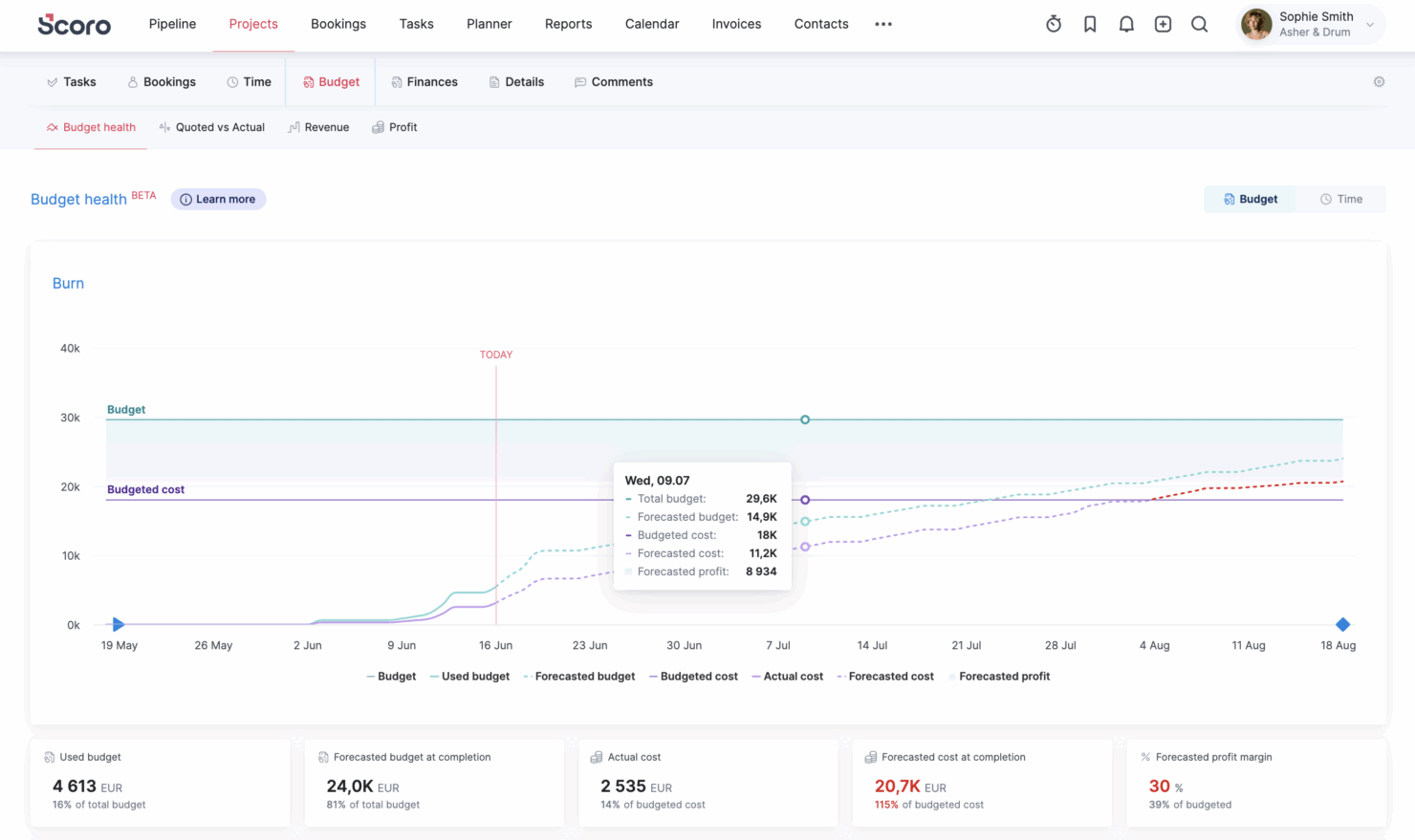
- Consultancies Scoro's quoting matrix breaks down deliverables by role, hours, and cost, giving consultancies real-time margin and utilization visibility across multi-entity, multi-currency operations.
- Architecture FIrms Scoro ties project phases, budgets, and time tracking together so architecture firms can monitor scope creep and protect fee-based project margins in real time.
- IT Services With Jira integration and effortless time logging from calendars or tasks, Scoro gives IT consultancies clear visibility into billable utilization, project profit, and progress as work gets delivered.
- Event Management Scoro handles multi-currency event quoting, purchase orders for vendors, and phase-based Gantt planning, so event agencies can track supplier costs and protect margins across simultaneous productions.
- Engineering FIrms Scoro unifies resourcing, cost tracking, and reporting across teams and offices, helping engineering firms forecast capacity and keep multi-phase projects profitable.
- Software Development Through native Jira sync, Scoro lets developers keep working in their existing tools while worklogs flow back automatically for accurate reporting, invoicing, and profitability tracking.
Who Should Use Jira, and Who Should Use Scoro?
If you’re running a professional services team that leans heavily on technical project management or product development workflows, I’d point you toward Jira. In my experience, Jira shines when your work revolves around tickets, backlogs, sprint planning, and highly customizable workflows.
If your team includes developers, IT specialists, or anyone already familiar with agile frameworks, you’ll likely appreciate how flexible and scalable it is. That said, you’ll need to be comfortable stitching together additional tools (or integrations) to handle things like budgeting, invoicing, or resource planning—it’s not built for that out of the box.
Scoro, on the other hand, is a much better fit if your professional services business needs end-to-end visibility across projects, finances, and resources in one place. I’d recommend it for agencies, consultancies, or service-based teams that care as much about profitability and utilization as they do about task management.
You get built-in tools for quoting, time tracking, billing, and reporting, which means less reliance on external systems. If you want a single platform to run both your projects and your business operations—and you don’t want to piece together a stack—Scoro will feel far more cohesive.
Differences Between Jira and Scoro
| Jira | Scoro | |
|---|---|---|
| Business Management | Focuses on project and issue tracking; requires integrations or add-ons for quoting, billing, and CRM. | Built-in business management suite including quoting, invoicing, CRM, budgeting, and profitability tracking. |
| Core Use Case | Built primarily for software development, IT, and agile project management. | Designed for professional services businesses needing project + financial management. |
| Financial Tracking | Minimal native financial tools; relies on integrations for budgeting or revenue tracking. | Robust financial management including cost tracking, revenue forecasting, and profitability analysis. |
| Resource Management | Limited native resource planning; often requires add-ons or external tools. | Advanced built-in resource planning, capacity management, and utilization tracking. |
| Workflow Automation | Advanced automation with custom rules, triggers, and complex issue dependencies across projects. | Strong automation with triggers and actions, especially in higher tiers, but less flexible than Jira’s rule engine. |
| Read Jira ReviewOpens new window | Visit ScoroOpens new window |
Similarities Between Jira and Scoro
| Collaboration | Each includes built-in collaboration tools like comments, notifications, and shared project views to keep teams aligned. |
|---|---|
| Integration Options | Jira and Scoro support integration with popular third-party tools (like Slack, Google Drive, and Zapier) as well as offer an API for deeper connections. |
| Reporting & Dashboards | Both provide customizable dashboards and project reports, letting you visualize work progress, deadlines, or team workload with interactive widgets. |
| Task Management | Both offer robust tools for planning, tracking, and updating project tasks, supporting checklists, status changes, and team assignments. |
| Time Tracking | Each platform includes built-in time tracking so teams can log work and monitor billable hours. |
| Read Jira ReviewOpens new window Visit ScoroOpens new window | |