

Cloudinary Pricing Tiers & Costs (Updated for 2026)

Cloudinary is a digital asset management (DAM) software that helps you manage and optimize your media assets. It offers multiple pricing tiers and plans, allowing you to choose between different subscription-based options that fit your budget and needs.
Cloudinary provides tools for managing images, videos, and other media efficiently. It’s great for teams looking to streamline their media handling. Generally, DAM software pricing can vary widely, but Cloudinary fits into the typical SaaS subscription model, offering plans that cater to both small teams and larger organizations.
How Much Does Cloudinary Cost?
Cloudinary's lowest-cost planstarts at $99 per month. Pricing details are publicly available, making it easy for you to explore options that fit your needs.
Its subscription-based pricing model suits small to medium-sized teams, especially those in media-heavy industries using cloud storage and video management tools. Plans differ by features like storage and bandwidth limits, as well as access to image manipulations and overlays.
Cloudinary offers a free plan, letting you try oufeatures before committing. Positioned as a mid-range solution, it’s ideal for teams needing robust media management functionality without enterprise-level costs.
Cloudinary Plans & Pricing Tiers
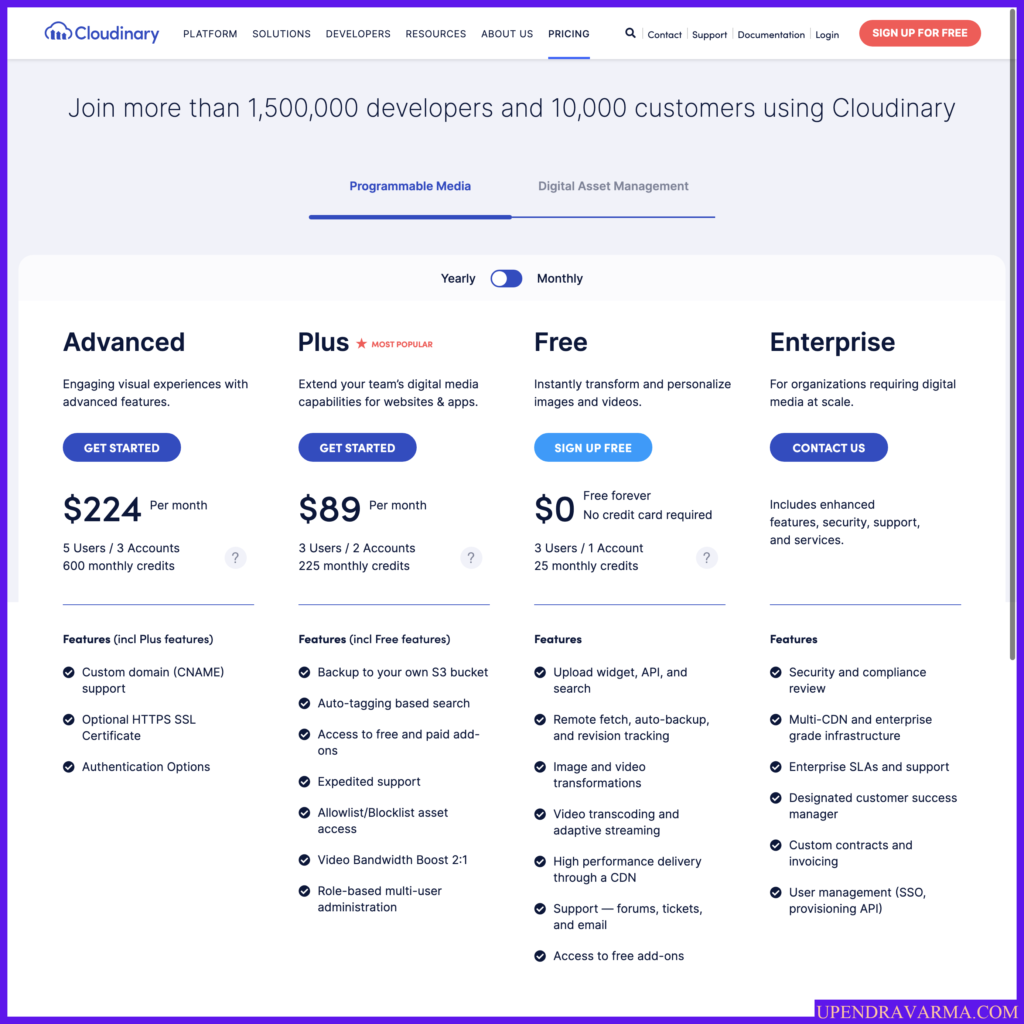
Cloudinary’s pricing tiers are structured to accommodate different levels of media management needs, from small teams to large enterprises. Each tier is defined by features like user access, managed storage capacity, and Cloudinary support options.
Pricing may vary based on usage, integrations, or onboarding requirements. Here’s a breakdown of the available plans:
| Plan Name | Pricing (Monthly/Annual) | Key Features Included | Best For |
|---|---|---|---|
| Free | No cost | 3 users, 1 account, 25 GB storage, auto-tagging, video support | Individuals, small teams |
| Plus | $99/month ($89/year) | 3 users, 2 accounts, 225 credits, backup to S3, expedited support | Small to midsize teams |
| Advanced | $249/month ($224/year) | 5 users, 3 accounts, 600 credits, custom domain, authentication | Growing businesses |
| Enterprise | Custom quote | Enhanced features, security, dedicated support | Large organizations |
How to Choose The Right Cloudinary Plan
Choosing the right Cloudinary plan means looking beyond the feature grid to see how it fits your real-world needs. When you're picking a DAM software, consider factors like integrations, compliance, and what your team truly requires.
Let’s dive deeper into these key considerations:

Evaluate Feature or Integration Requirements
- Does your team need specific integrations? Make sure Cloudinary works with your existing tools to avoid disruptions. Look for integrations with your CMS, project management, or analytics platforms—and familiarize yourself with Cloudinary’s SDKs.
- How important is storage capacity for your team? Determine if the plan’s managed storage meets your needs. Teams with large media libraries might need higher-tier plans for more space.
- Do you require advanced editing features? If your team needs robust tools like pixelate, resizing, or thumbnail manipulations, ensure the plan includes these. Lower-tier plans might lack advanced functionality.
- Does your team work with specific file types? Cloudinary supports common formats like JPG, GIF, WebP, MP4, and PDF—but it doesn’t support proprietary formats like PSD, AI, or RAW out of the box.
- What are your data transfer needs? Consider how much data you’ll move monthly. Plans vary in bandwidth allowances and net viewing bandwidth, which impacts costs.
- Do you need custom branding or domains? Some plans offer these options, which can be crucial for maintaining brand consistency, for example when embedding a widget on your homepage or public-facing site.
Evaluate Security, Compliance & Scalability
- Does your team handle sensitive data? Ensure Cloudinary’s security measures align with your data protection needs. Look for encryption and compliance certifications listed on cloudinary.com.
- Is regulatory compliance a factor for your industry? Verify if Cloudinary meets any industry-specific compliance requirements. This can impact your legal obligations and overall value for money.
- How scalable is the plan? Consider if the plan allows easy scaling as your team grows. Some plans might restrict growth or require costly upgrades.
- What’s the level of support access? Ensure you get the Cloudinary support level you need, especially if you’re in a fast-paced environment. Enterprise plans usually offer dedicated support and access to forums.
- Are there data residency requirements? Check if Cloudinary can host data in specific regions. This might be relevant if you’re storing data in an AWS region or similar cloud storage solution.
- Will future-proofing affect your choice? Think about the long-term. Choose a plan that can adapt to future needs, avoiding rework and migration costs. A flexible pricing model ideally improves your value for money over time.
Cloudinary Pricing Compared to Alternatives
Cloudinary is generally considered mid-range when it comes to DAM software pricing. It offers a balance of features and price, making it appealing to teams that need a strong content management and media optimization platform without a hefty cost.
The DAM system is feature-rich, but advanced capabilities and integrations often require higher-tier pricing plans.
Teams in media-heavy industries and medium-sized businesses typically get the most value for money from Cloudinary, especially those managing large file size assets or delivering content via a global CDN.
Comparison Chart: Cloudinary vs. Alternatives
Wondering how Cloudinary pricing compares to other digital asset management (DAM) software? Here’s a comparison chart that breaks down the costs of other digital asset management (DAM) software side-by-side:
Clicks on the links below may earn a commission, which supports our independent testing and review of software and services. Learn more about how we stay transparent.
| Tool | Best For | Trial Info | Price | ||
|---|---|---|---|---|---|
| 1 | Best for cross-team brand consistency | Free demo available | Pricing upon request | Website | |
| 2 | Best for mid-market and unlimited storage | Free demo available | Pricing upon request | Website | |
| 3 | Best for AI-driven asset organization | Free demo available | Pricing upon request | Website | |
| 4 | Best for AI-powered media search | Free plan available | From $10/month (billed annually) | Website | |
| 5 | Best for video-first businesses | 14-day free trial + free plan available | From $10/user/month (billed monthly) | Website | |
| 6 | Best for dynamic imaging and 360 spins | 30-day free trial | From $19/user/month | Website | |
| 7 | Best for integrated file handling | 14-day free trial + free plan available | From $79/user/month (billed annually) | Website | |
| 8 | Best for centralized digital asset management | Free demo available | Pricing upon request | Website | |
| 9 | Best for modern CDN services | 30-day free trial | Pricing upon request | Website | |
| 10 | Best for real-time image optimization | 30-day free trial + free plan available | From $19/user/month | Website |









What Affects Cloudinary Pricing?
Pricing for Cloudinary varies based on team size, usage, and specific needs, impacting your overall cost and plan selection:
- Number of users: More users typically mean higher costs, so choose a plan that matches your team size and the expected growth of your Cloudinary account.
- Feature tier: Advanced features are in higher-tier pricing plans, so decide which features your team truly needs.
- Usage volume: High cloud storage and bandwidth usage can increase costs, so estimate your needs accurately.
- Support requirements: Premium support options can add to the cost, so consider what level of support your team requires.
- Customizations: Tailored solutions often come with a custom quote, impacting your budget.
- Integration needs: Some integrations might require higher-tier plans, particularly if syncing media across social media platforms or using API-based image transformations.
Additional Costs to Watch Out For
Many DAM software vendors, including Cloudinary, don’t always disclose their full cost structure upfront. You might encounter surprise fees after signing, which can lead to unexpected budget overruns or restricted access. Consider writing a DAM software RFP to get a clear picture of all potential costs.
Knowing what might not be included in Cloudinary's base price will help your team plan better and avoid these pitfalls:
Setup Fees or Onboarding Costs
Setup fees or onboarding costs might apply when first implementing Cloudinary. These costs typically cover initial setup, training, and configuration to get your team up and running.
It’s wise to ask if these are included in your plan, reserved to higher-tier pricing, or if they’re billed separately. Understanding these costs upfront can help you avoid surprises and ensure your team gets the ease of use and support they need from the start.
Premium Support Tiers
Cloudinary offers different support tiers, and opting for premium support can add to your total cost. Premium support includes faster response times and dedicated assistance, which might be necessary for teams with complex needs.
Make sure you understand what support level is included in your plan and what might cost extra. Request a detailed breakdown of support options to see if the added expense is justified for your team.
Custom Integrations or API Usage
Custom integrations or extensive API usage can lead to additional fees with Cloudinary. If your team relies on syncing with s3 buckets, automating sd video delivery, or connecting across social media platforms, these costs could increase your overall spend. Determine if your plan covers these needs or if they’re considered add-ons.
Usage Overages
Exceeding your plan’s storage or bandwidth limits may result in overage charges. These fees can quickly add up if your team’s media usage grows unexpectedly.
It’s important to monitor your usage and understand the costs associated with going over your limits. Consider higher-tier plans if you anticipate consistent overages, as they might offer more favorable terms.
Regulatory or Compliance Costs
If your industry requires specific compliance measures, there could be additional costs. Cloudinary may offer compliance features as add-ons, which can affect your budget. Clarify if your plan includes necessary compliance features or if they’re available at an extra cost.
Is Cloudinary Worth the Cost?
In my opinion, Cloudinary offers solid value for teams managing large volumes of media assets. It's especially beneficial for creative teams in industries like media and e-commerce.
I think you'll appreciate its seamless integrations and transparent pricing, plus the available trials let you test it with ease. Sales reps usually provide tailored quotes that match your needs.
- Strong onboarding: Helps your team get started quickly.
- Excellent support: Ensures you won't face issues alone.
- Comprehensive integrations: Makes it easy to fit into your existing workflow.
Teams that need efficient media management and reliable support often find Cloudinary worth the investment.
Cloudinary Pricing FAQs
Here are answers to a few common questions about Cloudinary pricing:
Does Cloudinary offer a free trial or pilot?
Yes, Cloudinary offers a free trial for new users. This allows you to explore the platform’s features before committing to a paid plan. It’s a great way to see if Cloudinary meets your team’s needs without any initial cost.
Are discounts available for nonprofits or multi-year contracts?
Cloudinary offers discounts for multi-year contracts, which can be accessed by contacting their sales team. Nonprofits may also qualify for special pricing, so it’s worth reaching out to see what discounts your organization might be eligible for.
What's the average onboarding time?
Onboarding time can vary depending on the plan you choose. Generally, it’s a quick process, especially for smaller teams. However, larger organizations might require more time to integrate Cloudinary into their workflows.
Is the pricing likely to increase after the first year?
There is a possibility that pricing may increase after the first year. It’s important to discuss potential price changes with Cloudinary’s sales team during the purchasing process to avoid surprises later on.
How flexible is Cloudinary's pricing structure?
Cloudinary’s pricing is quite flexible, offering various plans tailored to different needs. You can choose a plan based on your team’s size, feature requirements, and budget, making it easier to find a suitable option.
Are there any hidden fees I should be aware of?
Cloudinary’s pricing is generally transparent, but it’s always smart to ask about any potential additional fees. Discuss with their sales team to get a full cost breakdown, ensuring there are no hidden surprises.
What's Next:
If you're in the process of researching digital asset management (DAM) software, connect with a SoftwareSelect advisor for free recommendations.
You fill out a form and have a quick chat where they get into the specifics of your needs. Then you'll get a shortlist of software to review. They'll even support you through the entire buying process, including price negotiations.



