

10 Zoho Assist Alternatives for Remote Support in 2026

10 Best Zoho Assist Alternatives Shortlist


Managing a project can be challenging, especially when your remote desktop tool doesn’t meet your team’s needs. You might find Zoho Assist lacking in certain areas, prompting a search for the best alternative for your business challenges.
In my experience, the right remote desktop software can significantly improve collaboration and productivity. You want tools that are reliable, easy-to-use, and tailored to your specific requirements.
In this article, I’ll share my top picks for Zoho Assist alternatives. I’ve tested and reviewed each option independently, providing you with unbiased insights to help you make an informed decision. Whether you’re looking for features, pricing, or user experience, I’ve got you covered.
What Is Zoho Assist?
Zoho Assist is a remote desktop software that helps you provide remote support sessions and access remote computers. IT professionals and support teams commonly use it to troubleshoot and manage systems efficiently. Features such as remote control, file transfer, and multi-platform support help with resolving issues quickly and maintaining productivity. Overall, Zoho Assist offers a practical option for remote support solutions.
Zoho Assist Alternatives Comparison Table
This comparison table summarizes pricing details for my top Zoho Assist alternative selections:
| Tool | Best For | Trial Info | Price | ||
|---|---|---|---|---|---|
| 1 | Best for free remote support | Free plan available | Pricing upon request | Website | |
| 2 | Best for instant remote support | 14-day free trial | From $30/user/month (billed annually) | Website | |
| 3 | Best for free remote access | 30-day free trial | From $24.9/month (billed annually) | Website | |
| 4 | Best for all-in-one remote support | 14-day free trial | From $30/user/month (billed annually) | Website | |
| 5 | Best for fast low-lag sessions | Free trial + free demo available | From $28.90/month (billed annually) | Website | |
| 6 | Best for easy remote access | Not available | Free to use | Website | |
| 7 | Best for strict security needs | Free trial + free demo available | Pricing upon request | Website | |
| 8 | Best for unlimited access | 15-day free trial | From $16.9/month (billed annually) | Website | |
| 9 | Best for unified management | Free trial + free demo available | Pricing upon request | Website | |
| 10 | Best for secure remote access | 7-day free trial | From $1.84/month (billed annually) | Website |
Why Trust Our Software Recommendations
Our team has been testing and reviewing software since 2012. As project managers ourselves, we know how difficult—and important—it is to choose the right software.
For this guide, we evaluated tools using hands-on testing and independent research, scoring tools using our selection criteria. We also draw on insights from industry thought leaders and practicing project management experts.
Our reviews reflect our human editorial judgment, not a sales pitch.
Expert reviewers:
Best Zoho Assist Alternatives Reviews
Below are my detailed summaries of the best Zoho Assist alternatives that made it onto my shortlist. My reviews offer a detailed look at the key features, pros and cons, integrations, and ideal use cases of each tool to help you find the best one for you.

HelpWire
Best for free remote support

HelpWire is a remote support software that enables you to connect with and assist clients remotely. Customer support teams and IT professionals use it to troubleshoot and resolve technical issues.
Why it's a good Zoho Assist alternative: HelpWire offers free remote support, making it an affordable choice for businesses on a budget. Its features include secure remote access, cross-platform compatibility, and real-time diagnostics. These capabilities ensure your team can quickly address client issues. The software's straightforward setup and user-friendly interface enhance its appeal for support operations.
Standout features and integrations:
Features include real-time diagnostics, secure file sharing, and cross-platform support. These features enable your team to provide efficient support without compromising security. HelpWire's intuitive interface also makes it easy to navigate, reducing the learning curve for new users.
Integrations are not publicly listed.
Pros and Cons
Pros:
- Real-time diagnostics
- Secure remote access
- Free support option available
Cons:
- Basic customization options
- Limited advanced features

Best for instant remote support

ConnectWise ScreenConnect is a remote desktop software designed to offer fast and secure remote support for IT professionals across various industries, including education, finance, and health care. It offers key functions, such as 24/7 remote access, privileged access management, and support for unattended access and mobile devices.
Why it's a good Zoho Assist alternative: ConnectWise ScreenConnect provides instant remote support, making it ideal for teams that need quick access to devices. Its features, such as secure remote connections, privileged access management, and mobile device support, support your team's ability to manage IT operations efficiently. The software's focus on minimizing downtime ensures your team's productivity is maintained. Additionally, its full security measures, such as AES encryption and multifactor authentication, provide peace of mind.
Standout features and integrations:
Features include 24/7 remote access, unattended access support, and mobile device compatibility. These features allow your team to connect to devices easily and manage IT operations smoothly. In my experience, the software's advanced security measures are a significant advantage in protecting sensitive data.
Integrations include ConnectWise Help Desk Services, ConnectWise Automate, Microsoft Intune, and more.
Pros and Cons
Pros:
- Mobile device support
- Secure remote connections
- Instant remote support capabilities
Cons:
- Requires proper management for security
- Potential video and audio quality issues

Best for free remote access

TeamViewer is a remote desktop software that enables you to connect to and manage devices remotely. IT support teams and businesses use it to facilitate remote troubleshooting and management.
Why it's a good Zoho Assist alternative: TeamViewer is a free remote access solution that is ideal if you need budget-friendly solutions. Its features, such as easy file transfer, multi-platform compatibility, and remote printing, enhance your support capabilities. You can quickly connect to any device without hassle. These elements make it a viable contender when considering alternatives to Zoho Assist.
Standout features and integrations:
Features include remote control and printing, as well as unattended remote access. These features allow you to manage devices easily and ensure your team can provide support without being physically present. Additionally, TeamViewer's cross-platform access supports various operating systems, which is essential in diverse IT environments.
Integrations include Microsoft Teams, ServiceNow, Salesforce, Jira, Zendesk, Freshworks, Microsoft Intune, Zoho, Microsoft Entra ID, and more.
Pros and Cons
Pros:
- Easy file transfer
- Multi-platform support
- Affordable price
Cons:
- Occasional lag in connections
- Connection issues reported

LogMeIn
Best for all-in-one remote support

LogMeIn is a remote access and support solution designed for IT professionals and Managed Service Providers (MSPs) to streamline IT management. It performs key functions, such as remote support, endpoint management, and secure file access.
Why it's a good Zoho Assist alternative: LogMeIn offers complete remote support through features such as AI-driven management, automated device handling, and advanced security measures. Its user-friendly interface and smooth remote monitoring make it ideal for IT teams. Enhanced productivity and simplified IT management are at the core of LogMeIn's offerings, appealing to organizations looking for a complete support solution.
Standout features and integrations:
Features include AI-driven tools for efficiency, automated device management, and advanced security measures. These features simplify complex IT tasks to enhance your team's productivity. LogMeIn's mobile device management ensures you can manage devices on-the-go without hassle.
Integrations include ServiceNow, Salesforce, Jira Service Desk, and more.
Pros and Cons
Pros:
- Advanced security measures
- Automated device handling
- AI-driven management tools
Cons:
- Steep learning curve
- Resource-intensive on devices


AnyDesk is a remote desktop and support tool that lets you access and control computers or devices from anywhere. It’s used by freelancers, small teams, IT staff, and others needing remote access and support.
Why AnyDesk is a good Zoho Assist alternative: AnyDesk gives you latency-free desktop sharing and stable remote control, so you and your team can work on remote devices as if you were right there. It lets you control the keyboard and mouse while allowing others to interact with your screen, plus share files and data quickly. Because of its low-lag remote sessions and fast data transmission with Advanced Encryption Standard (AES) encryption, it's especially useful if you frequently need quick remote access or support.
Standout features and integrations:
Features include remote control of desktops and servers, screen sharing from any device (PC, mobile, or tablet), and file transfer between devices during sessions. It also supports interactive access, so you can both view and control remote screens.
Integrations include support for Windows, macOS, Linux, Android, iOS, and more.
Pros and Cons
Pros:
- File transfer and remote control is supported
- Many platforms supported
- Low-latency remote access
Cons:
- Lacks advanced team management tools
- Free version is limited for business use


Chrome Remote Desktop is a remote access tool that allows users to securely connect to other computers through the Chrome browser or a Chromebook. Individuals and small businesses choose it for personal use and basic IT support.
Why it's a good Zoho Assist alternative: Chrome Remote Desktop offers easy remote access with minimal setup, making it accessible for users who need quick connections. Its integration with the Chrome browser eliminates the need for additional software installation. You can access your devices from anywhere, enhancing flexibility. The tool's straightforward interface is user-friendly, reducing the learning curve for new users.
Standout features and integrations:
Features include remote access through the Chrome browser, support for multiple operating systems, and the ability to share your screen with others. These features enable you to connect to your devices effortlessly. In my experience, the tool's simplicity is a significant advantage for users needing straightforward remote access.
Integrations are not publicly listed.
Pros and Cons
Pros:
- Access from anywhere
- No additional software needed
- Easy to set up
Cons:
- No remote printing
- No file transfer available


BeyondTrust Remote Support is a cloud-based remote access and support tool that IT teams use to troubleshoot devices securely. It helps your team support users manage remote systems and handle support tasks from anywhere.
Why BeyondTrust Remote Support is a good Zoho Assist alternative: It provides inclusive controls that help you meet strict security needs. You can set tight access rules so your team only reaches the systems they’re authorized to work on. Session monitoring and detailed audit trails give you clear records of what happens during support work. These controls help you keep sensitive environments safer during remote access.
Standout features and integrations:
Features include session recordings that help you review support work, remote camera sharing so users can show you what they see, and chat tools that enable you to support clients. These features make it easier for your team to solve issues even when systems aren’t easily reachable. You can also use screen sharing to guide users through fixes without confusion.
Integrations include ServiceNow, BMC, Salesforce, Okta, and more.
Pros and Cons
Pros:
- On-demand screen sharing
- Extensive access control options
- Extensive access control options
Cons:
- Cumbersome for small teams
- Many settings to manage


ISL Online is a remote access and support tool that enables your team to connect to Windows, Mac, Linux, and mobile devices from anywhere. IT teams, help-desk staff, and support providers use it for remote support and unattended access.
Why ISL Online is a good Zoho Assist alternative: ISL Online gives you a license that enables you to support unlimited users and devices — ideal if your team deals with many endpoints. You can access remote machines without per-device limits and set up unattended access so your team can remotely assist when needed. The tool offers advanced security with AES-256 encryption, two-factor authentication, and role-based permissions so you maintain control of several devices. You get full access and remote support features without constantly worrying about license limits.
Standout features and integrations:
Features include file transfer between local and remote machines, session recording for audit and review, and support for remote access, including on mobile devices. It also enables you to connect via Remote Desktop Protocol/Secure Shell (RDP/SSH) if needed and manage user permissions centrally. The system supports multiple monitors and remote reboot or restart with reconnect.
Integrations include ServiceNow, Freshworks, HaloITSM, and more.
Pros and Cons
Pros:
- Works across Windows, Mac, Linux, and mobile devices
- AES encryption and access controls
- Unlimited devices under one license
Cons:
- Interface less modern than some tools
- Concurrent-user license may limit teams

NinjaOne
Best for unified management
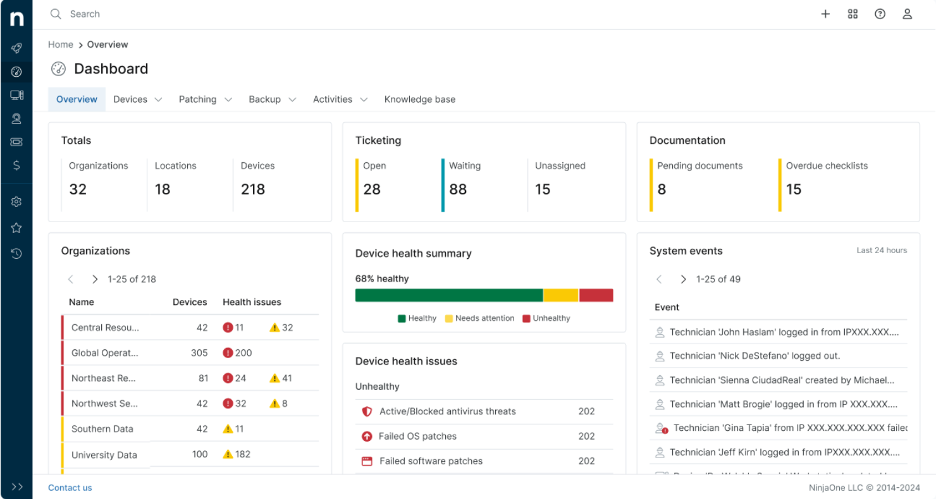
NinjaOne is an endpoint management software designed for IT professionals and MSPs to efficiently manage and monitor devices. It performs key functions such as remote monitoring, patch management, and IT asset management.
Why it's a good Zoho Assist alternative: NinjaOne offers unified management, making it ideal for teams needing complete oversight of their IT environments. Features such as automated patching, real-time monitoring, and detailed reporting help your team maintain security and performance. Its intuitive dashboard provides a centralized view of all devices, facilitating quick decision-making. The software's scalability supports growing IT infrastructures.
Standout features and integrations:
Features include automated patch management, real-time alerts, and thorough reporting. These features ensure your team can proactively manage IT issues without manual intervention. NinjaOne's centralized dashboard helps you keep track of all your devices in one place, enhancing efficiency.
Integrations include ConnectWise Screen Connect, Autotask, Zendesk, ServiceNow, Microsoft Entra, and more.
Pros and Cons
Pros:
- Centralized device management
- Real-time monitoring
- Automated patch management
Cons:
- Complex for non-technical users
- Pricing details are not transparent


RemotePC is a secure remote access software designed for a diverse range of users, including individuals, small offices, teams, and enterprises. It performs key functions, including remote access to multiple computers, file transfers, and remote printing.
Why it's a good Zoho Assist alternative: RemotePC offers unlimited access for users, which is great if your team needs extensive remote capabilities. Its features include secure file transfers, collaboration tools, and attended access for customer support. The software's scalability and ease of use make it a practical choice for both personal and business applications. Security measures, such as TLS v 1.2 with AES-256 encryption, add to its appeal for IT support needs.
Standout features and integrations:
Features include remote printing, a whiteboard for collaboration, and mobile access. These features support your team's ability to work efficiently from anywhere. RemotePC'suser management and monitoring tools are also helpful for businesses requiring oversight.
Integrations include Zendesk, Freshdesk, Jira, Okta, G Suite, OneLogin, and more.
Pros and Cons
Pros:
- Mobile access available
- Secure file transfers
- Unlimited user licenses
Cons:
- No free plan available
- No demo available
Other Zoho Assist Alternatives
Here are some additional Zoho Assist alternatives that didn’t make it onto my shortlist, but are still worth checking out:
- Parallels Access
For Windows on Mac Integration
- TSplus Remote Support
For tailored industry solutions
- Remote Utilities
For self-hosted solutions
- Splashtop
For educational settings
- AeroAdmin
For quick setup
- GoTo Resolve
For IT management
- UltraVNC
For open-source enthusiasts
- Microsoft Quick Assist
For Windows users
- RemotePC HelpDesk
For customer support teams
- Dameware Remote Support
For on-premises support


How I Evaluate Zoho Assist Alternatives
I evaluate in two layers: baseline must-haves like unattended access and cross-platform control, then differentiators like PM integrations and audit logging that separate the best tools from the rest.
Core Functionality (Table Stakes For This List)
When I'm selecting tools for my list, I rank each one on a scale from 0 (does not offer the functionality) to 5 (excels in this area) for each core functionality listed below. Then, I calculate the tool's total score into a percentage. Each tool needs to achieve a minimum total score of 65% to be considered for inclusion.
- Remote Screen Control: I evaluate how responsive the real-time control experience is, especially when a technician needs to restart services, edit configs, or walk a stakeholder through a deliverable mid-call.
- Unattended Access: I look for reliable always-on connections to headless machines, including device grouping and bulk deployment options that make managing dozens of project servers practical.
- Cross-Platform Compatibility: Project teams run mixed environments, so I check whether each tool supports Windows, macOS, Linux, iOS, and Android—including mobile-to-desktop connections for on-the-go troubleshooting.
- In-Session File Transfer: Moving project files during a live session matters, so I evaluate whether the tool supports drag-and-drop transfers in both directions without restrictive file size caps.
- Multi-Session & Multi-Monitor Support: I look at whether technicians can run parallel sessions and toggle between monitors, which comes up constantly when supporting multi-screen dev or design setups.
- Session Security & Encryption: End-to-end encryption, MFA, and session audit logs are what I check for here, particularly for teams handling sensitive client data or working under compliance requirements like SOC 2 or GDPR.
Once I have a list of tools that meet this criteria, I consider what sets each platform apart.
Differentiating Factors (What Sets Vendors Apart)
Here's how I compare and contrast different vendors:
Standout Features
I look for native integrations with PM and ticketing tools like Jira, ServiceNow, or Slack, since triggering a remote session straight from a ticket saves real time during incident response. Session recording is another differentiator I evaluate—it's useful for post-mortems, client audits, and onboarding documentation. Built-in collaboration features like chat, VoIP, and screen annotation also matter when you're walking a stakeholder through a live demo rather than just fixing a machine.
Beyond Features
Pricing structure matters a lot here. I check whether a vendor charges per technician or per device, since that distinction can drastically shift costs depending on your team size and endpoint count. Compliance is another factor I evaluate closely—teams supporting clients in regulated industries need SOC 2, GDPR, or HIPAA coverage, and not every tool offers it. I also consider deployment ease, especially whether a tool supports silent installs or MDM-based rollouts for distributed teams managing hundreds of endpoints.
Why Look For a Zoho Assist Alternative?
While Zoho Assist is a good choice of remote desktop software, there are a number of reasons some users seek out alternative solutions. You might be looking for a Zoho Assist alternative because:
- You need more advanced security features
- Your team requires better mobile access
- You're looking for more customization options
- You need a solution with better scalability
- Your team operates outside Zoho Assist's geographic availability
If any of these sound like you, you’ve come to the right place. My list contains several remote desktop software options that are better suited for teams facing these challenges with Zoho Assist and looking for alternative solutions.
Zoho Assist Key Features
Here are some of the key features of Zoho Assist, to help you contrast and compare what alternative solutions offer:
- Remote Support: Instant assistance for users, allowing you to troubleshoot issues quickly.
- Unattended Access: Manage devices without user presence, giving your team flexibility.
- File Transfer: Easy file sharing between devices to facilitate collaboration.
- Session Recording: Record sessions for future reference and training purposes.
- Annotation Tools: Highlight and mark during sessions to enhance communication.
- Advanced Reporting: Generate detailed usage reports for better analysis and insights.
- Mobile Device Support: Access mobile devices remotely, ensuring support on-the-go.
- API/SDK Integration: Customize and integrate with other applications for tailored solutions.
- Service Queue Management: Organize and prioritize support requests efficiently.
- Customization: Options for interface and branding to align with your company's identity.