

10 Best Open Source Mind Mapping Software in 2026

Best Open Source Mind Mapping Software Shortlist


Open source mind mapping software gives you free, flexible tools for visually organizing ideas using editable, shareable diagrams. If you’re searching for ways to map out projects, brainstorm with your team, or keep information accessible across platforms, you want solutions that let you customize, collaborate, and stay in control. This guide lays out the best open source mind mapping software for 2026, focusing on features and use cases that actually help you manage complexity and communicate clearly, so you can pick the right tool for you.
Why Trust Our Software Recommendations
Our team has been testing and reviewing software since 2012. As project managers ourselves, we know how difficult—and important—it is to choose the right software.
For this guide, we evaluated tools using hands-on testing and independent research, scoring tools using our selection criteria. We also draw on insights from industry thought leaders and practicing project management experts.
Our reviews reflect our human editorial judgment, not a sales pitch.
Expert reviewers:
Open Source Mind Mapping Software Comparison Table
This comparison table summarizes pricing details for my top open source mind mapping software selections:
| Tool | Best For | Trial Info | Price | ||
|---|---|---|---|---|---|
| 1 | Best for exporting to multiple formats | Free forever | Free forever | Website | |
| 2 | Best for hand-drawn style diagrams | 14-day free trial + free plan available | From $6/user/month (billed annually) | Website | |
| 3 | Best for integration with popular apps | Free plan available | Free to use | Website | |
| 4 | Best for browser-based team collaboration | Free forever | Free forever | Website | |
| 5 | Best for complex information structuring | Free forever | Free forever | Website | |
| 6 | Best for academic research organization | Free forever | Free forever | Website | |
| 7 | Best for customizable visualizations | Free forever | Free forever | Website | |
| 8 | Best for linking notes dynamically | Free forever | Free forever | Website | |
| 9 | Best for offline desktop simplicity | Free forever | Free forever | Website | |
| 10 | Best for minimal interface enthusiasts | Free forever | Free forever | Website |
Best Open Source Mind Mapping Software Reviews
Below are my detailed summaries of the best open source mind mapping software which can serve as powerful alternatives to proprietary options like MindManager, that made it onto my shortlist. My reviews offer a detailed look at the features, best use cases, and capabilities of each tool to help you find the best one for you.


FreeMind is an open source mind mapping solution for creating structured diagrams, capturing ideas, and organizing information visually with flexible formatting, note-taking, and node management features.
Who Is FreeMind Best For?
Individual users or small teams who need a free desktop mind mapping tool for organizing information across different fields, docs, or projects.
Why I Picked FreeMind
I picked FreeMind as one of the best because it makes exporting maps to multiple formats easy. I can quickly generate mind maps, then export them as HTML, PDF, SVG, or even OpenOffice documents. This flexibility fits my workflow when sharing diagrams with stakeholders.
FreeMind Key Features
- Node folding: Collapse and expand topics to keep large maps or complex flowcharts manageable.
- Attribute management: Add custom properties and metadata to nodes for better organization.
- Scripting support: Use built-in scripting to automate and customize map actions.
- File export options: Convert mind maps into formats like HTML, PDF, SVG, or OpenOffice documents for easier sharing.
FreeMind Integrations
FreeMind does not offer integrations, but provides third-party plugins with Confluence, Clojure, LaTeXMath, WSL, and WikiWhirl. Custom plugins can be written.
Pros and Cons
Pros:
- Supports complex, deeply nested map structures
- Runs smoothly on low-spec computers
- Exports mind maps in many formats
Cons:
- No real-time collaboration features
- Dated user interface design

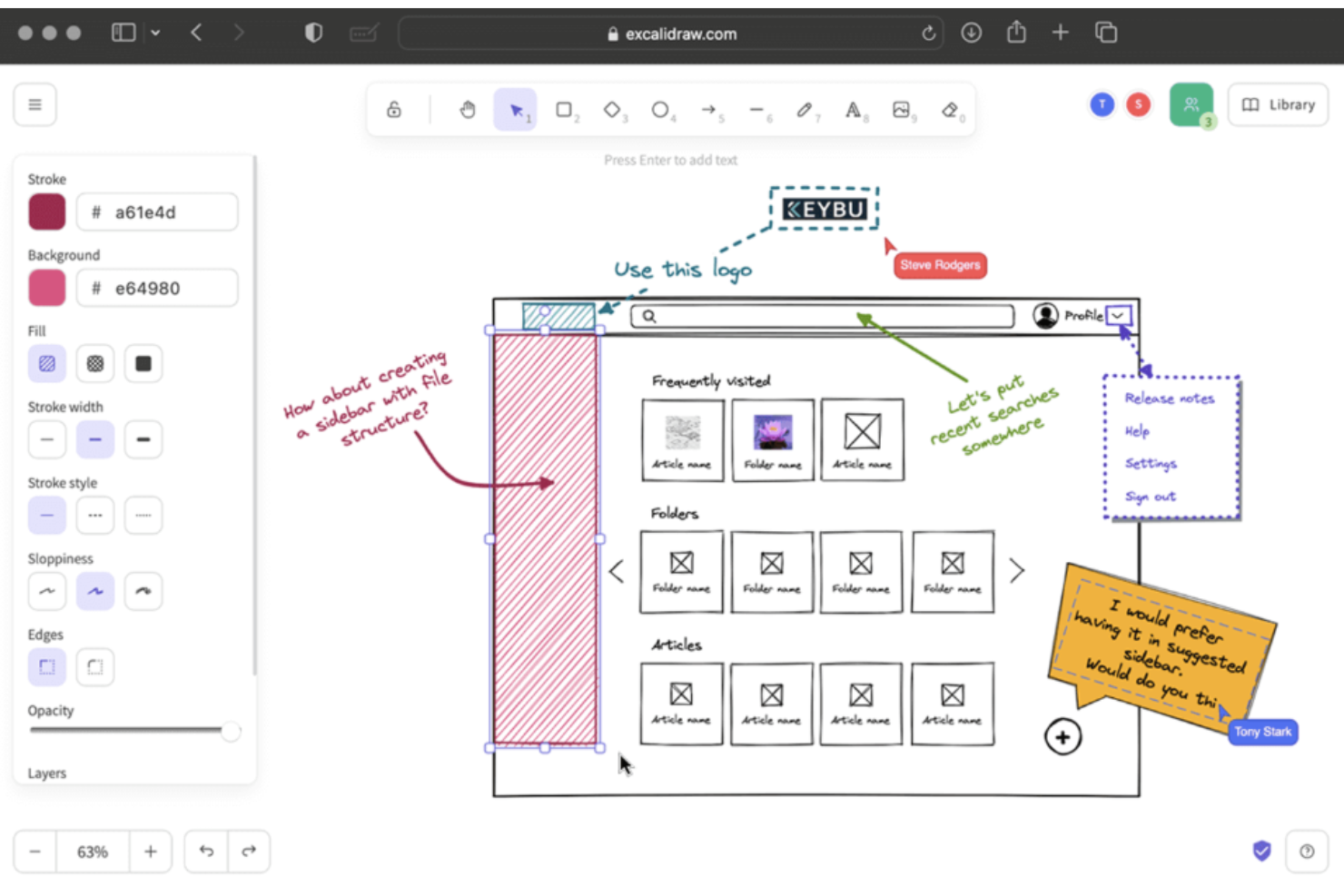
Excalidraw is an open source diagramming and visual collaboration platform known for its hand-drawn canvas, quick shape tools, and support for real-time co-editing of diagrams.
Who Is Excalidraw Best For?
Excalidraw is a great choice for design teams and educators who want to sketch ideas visually and collaborate in a flexible, hand-drawn digital workspace.
Why I Picked Excalidraw
I picked Excalidraw as one of the best because I use its hand-drawn style sketching to map ideas quickly, group concepts visually, and illustrate workflows. Its infinite canvas and real-time editing let my team brainstorm and organize thoughts with informal, expressive diagrams.
Excalidraw Key Features
- Export options: Save diagrams as PNG, SVG, or clipboard content.
- Layer management: Organize shapes and drawings on separate layers.
- Third-party libraries: Extend functionality with custom libraries and templates.
- Real-time collaboration: Work simultaneously with team members on the same canvas via shareable links.
Excalidraw Integrations
Excalidraw integrates with Confluence, Jira, Notion, and Slite. Excalidraw offers an API for custom integrations.
Pros and Cons
Pros:
- Collaborative editing for group brainstorming
- Infinite canvas supports large mind maps
- Sketches look hand-drawn for ideation
Cons:
- Lacks built-in file history features
- No built-in structure for node linking

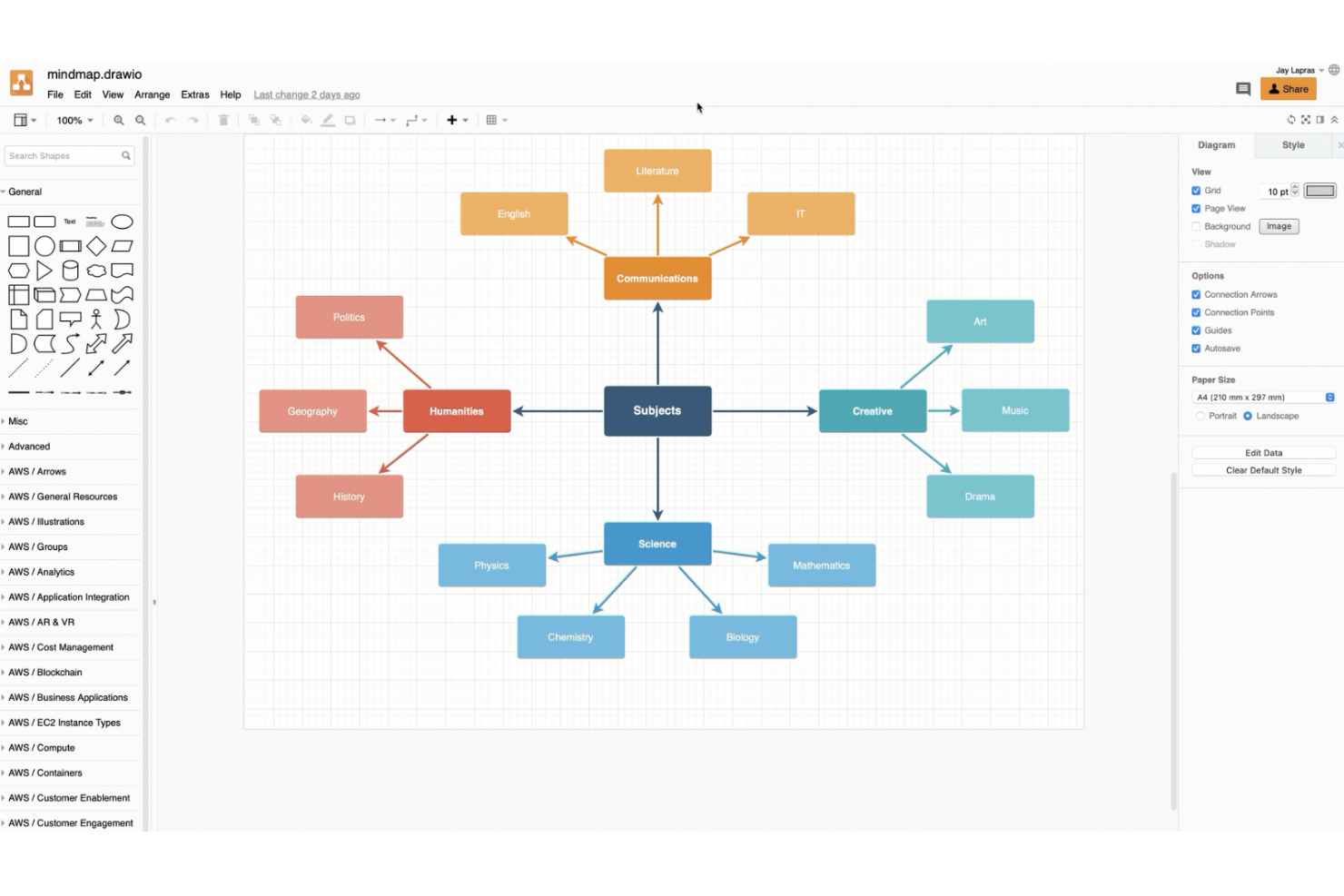
draw.io is a diagramming and mind mapping software that lets users create, edit, and organize mind maps with drag-and-drop tools, shape libraries, and real-time collaboration options.
Who Is draw.io Best For?
draw.io is a strong choice for product, engineering, and IT teams that need to create mind maps and diagrams inside tools like Confluence, Jira, or Google Workspace.
Why I Picked draw.io
I picked draw.io because I can launch it directly from tools like Confluence and Jira, then save, open, and update mind maps without leaving those apps. I like that teams can collaborate in real time and export diagrams to Google Drive or Microsoft OneDrive.
draw.io Key Features
- Shape libraries: Access a wide range of predefined shapes and icons for diagrams, useful for planning campaigns across social media.
- Version history: Review and restore earlier versions of your diagrams easily.
- Custom templates: Start new projects quickly using reusable diagram templates for web pages or applications.
- Offline mode: Create and edit diagrams locally in your browser or desktop app without requiring an internet connection.
draw.io Integrations
draw.io offers native integrations with Confluence, Jira, Google Workspace, Notion, Nextcloud, Microsoft OneDrive, Dropbox, and more. It provides an API for custom integrations.
Pros and Cons
Pros:
- Works offline without software installation
- Exports mind maps in many file formats
- Full-featured diagramming in the browser and desktop
Cons:
- No task management or workflow tools
- Lacks dedicated mind mapping shortcuts

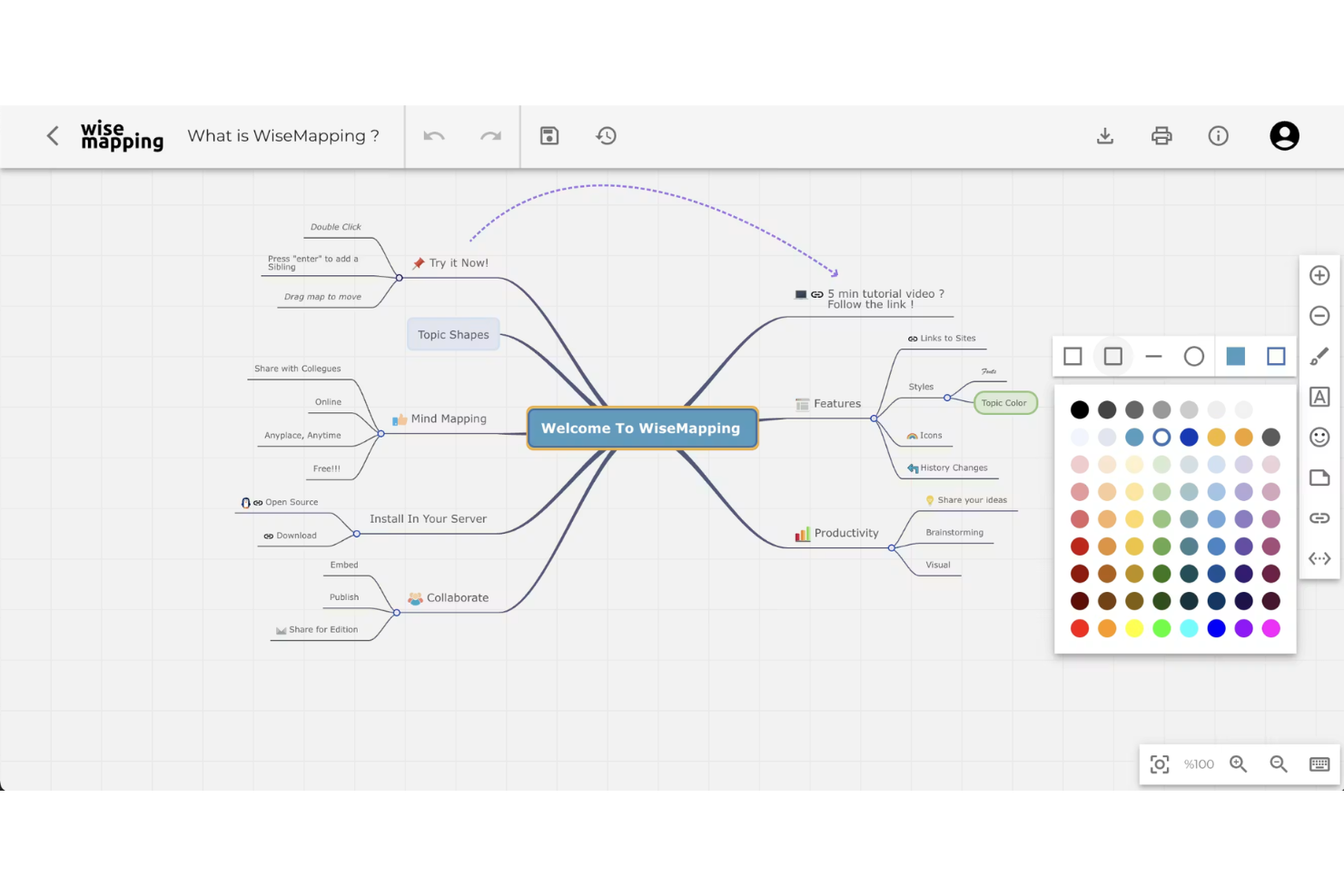
WiseMapping is a web-based, open source mind mapping tool where teams can create, edit, and organize visual mind maps collaboratively in real time.
Who Is WiseMapping Best For?
WiseMapping is a fit for distributed teams and educators who want a cloud-based platform to collaborate on mind maps using only a browser.
Why I Picked WiseMapping
I picked WiseMapping because I can invite colleagues to co-edit maps in a shared browser session, leave map-specific comments, and publish mind maps using a public link for quick feedback or knowledge sharing.
WiseMapping Key Features
- Open-source licensing: Download, host, and customize WiseMapping under its open source license, using mind map templates.
- Drag-and-drop map editing: Move nodes, branches, and topics around intuitively within the browser workspace designed for online mind mapping.
- Password-protected maps: Restrict map access to specific users using passwords before exporting to platforms like PowerPoint.
- Real-time map collaboration: Invite team members to co-edit mind maps simultaneously and share feedback directly in browser sessions.
WiseMapping Integrations
WiseMapping offers user authentication integrations and native embedding. A REST API is available for custom integrations.
Pros and Cons
Pros:
- Supports exporting maps in multiple formats
- Browser-based platform with real-time editing
- Freely downloadable for on-premise use
Cons:
- No built-in task or project management features
- Only basic customization for map themes

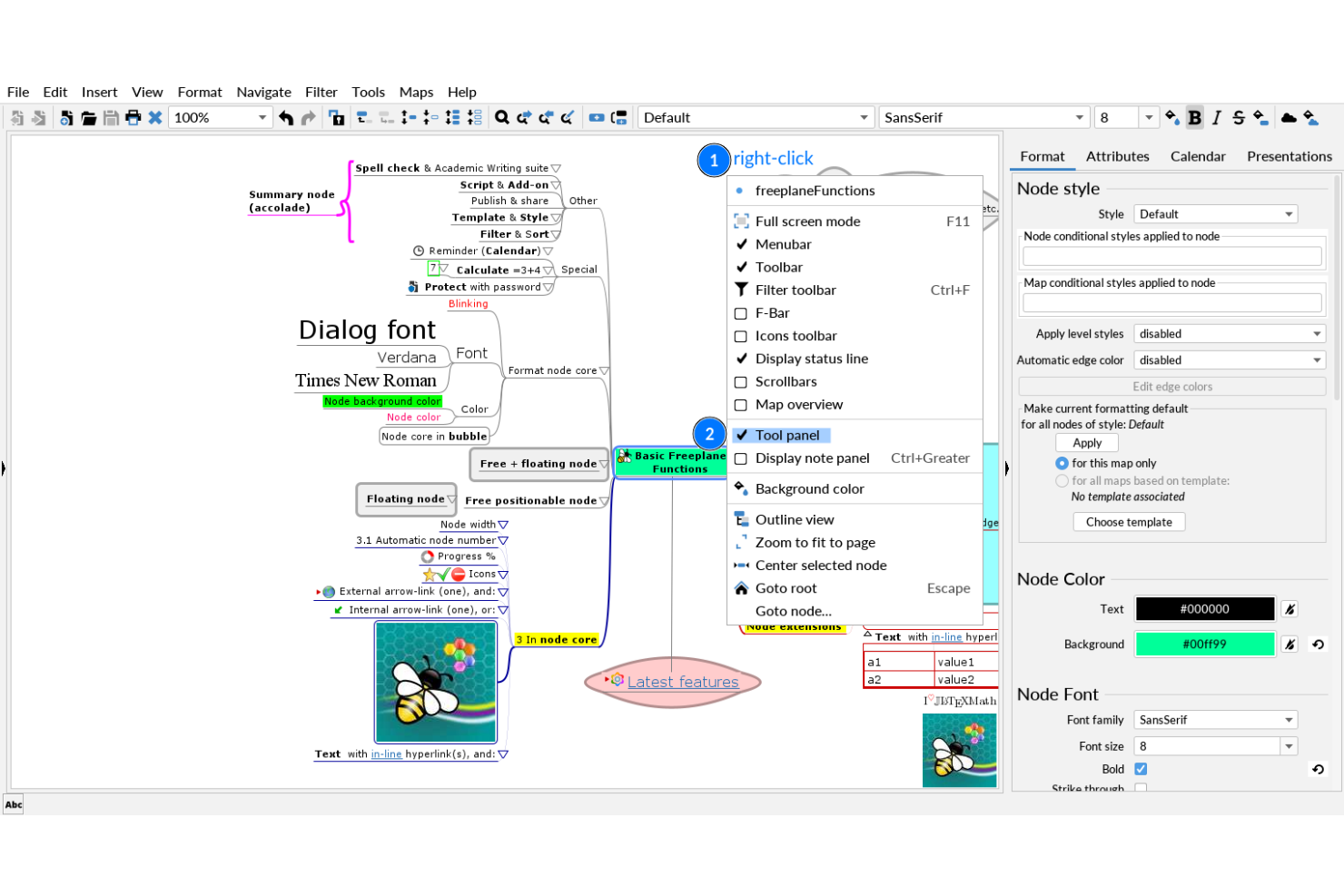
Freeplane is a free mind mapping and knowledge management software that lets you build complex maps, manage metadata, and customize structures for organizing advanced information workflows.
Who Is Freeplane Best For?
Freeplane suits researchers, academics, and information architects who need to build, analyze, or manage highly structured knowledge maps.
Why I Picked Freeplane
I picked Freeplane as one of my top choices because I can design large, deeply hierarchical mind maps and easily assign metadata or conditional styles to nodes. I like that I can create filtered views and automate relationships, which supports complex information structuring.
Freeplane Key Features
- Map encryption: Protect specific nodes or entire maps with password-based encryption, with source code often accessible on platforms like GitHub.
- Add-on support: Extend functionality with a range of downloadable plugins and scripts.
- Task management tools: Add reminders, priorities, and progress icons to nodes that are frequently built on Java.
- Conditional node styling: Automatically change node colors, borders, and fonts based on custom rules or hierarchical levels.
Freeplane Integrations
FreeMind does not offer integrations, but provides third-party plugins with MapInsight, Navigation, Jumper, Bookmarks, SmartLocker, and more. Custom plugins can be written.
Pros and Cons
Pros:
- Supports scripting and automation via add-ons
- Allows node-level encryption and password protection
- Handles massive and deeply nested mind maps
Cons:
- Dated interface compared to modern alternatives
- Lacks real-time web-based collaboration

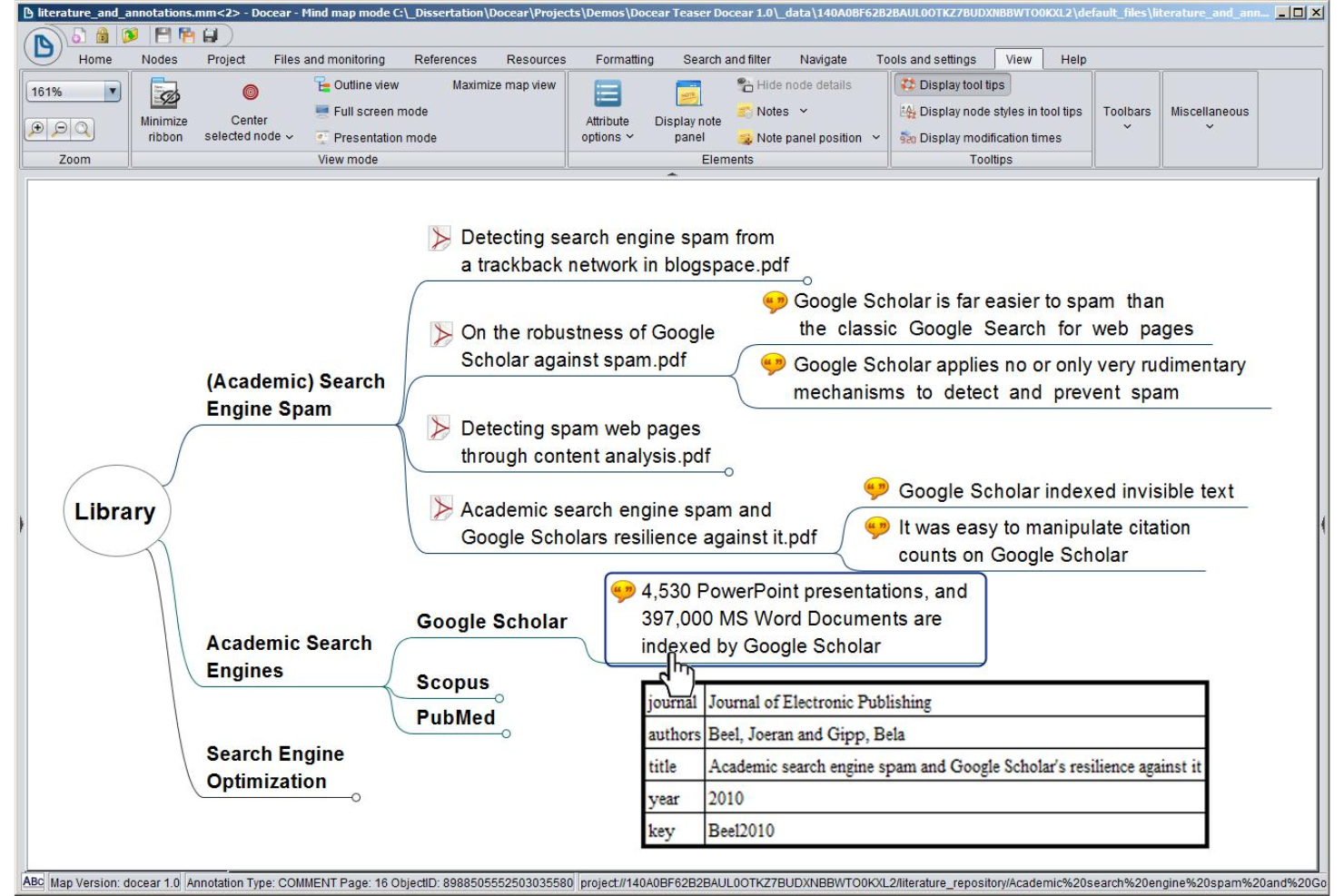
Docear is an open-source mind mapping tool designed for academic users, combining reference management, PDF annotation, and knowledge organization in a single workspace.
Who Is Docear Best For?
Academic researchers, students, and scholars organizing literature, annotations, and citations in a unified workspace.
Why I Picked Docear
I picked Docear as one of my top open-source picks because it combines mind mapping with reference and PDF management for academic writing. I use it to organize papers, annotate PDFs, and connect literature reviews directly to my research outlines.
Docear Key Features
- Hierarchical mind map editor: Create multi-level mind maps to visualize complex research topics on desktop or mac OS/Android.
- Workspace organization: Manage projects with folders for drafts, annotations, and mind maps centered around a core theme.
- BibTeX integration: Import and manage bibliographies for academic referencing.
- PDF annotation extraction: Automatically import highlighted text and comments from your PDF documents directly into your mind map nodes.
Docear Integrations
Docear offers built-in integrations with Notion and JabRef.
Pros and Cons
Pros:
- Advanced reference and citation management
- Direct PDF annotation and management features
- Academic-focused mind mapping tools and layout
Cons:
- No collaboration or cloud sync features
- Outdated user interface and documentation


VUE is an open-source mind mapping platform developed by Tufts University that lets you create, organize, and customize visual knowledge maps, manage multimedia resources, and structure data-rich presentations.
Who Is VUE Best For?
Educators, students, and researchers who need to create customized, interactive visualizations for presentations or academic projects.
Why I Picked VUE
I picked VUE as one of my top open-source mind mapping tools because I can fully customize node shapes, connections, and map layouts for complex visualizations. I use its metadata tagging and layered presentation mode to manage and present nuanced information.
VUE Key Features
- Resource linking: Attach documents, images, and URLs directly to your mind map nodes.
- Export options: Export maps to formats like PDF, SVG, and image files.
- Concept mapping: Build complex associations with labeled, directional connections.
- Presentation mode: Transition mind maps into interactive, pathway-driven slideshows to walk through complex visual structures.
VUE Integrations
Native integrations are not publicly listed.
Pros and Cons
Pros:
- Presentation mode for interactive knowledge maps
- Supports multimedia resource attachment to nodes
- Flexible node and edge visual customization
Cons:
- Lacks real-time collaboration features
- Legacy interface with limited updates

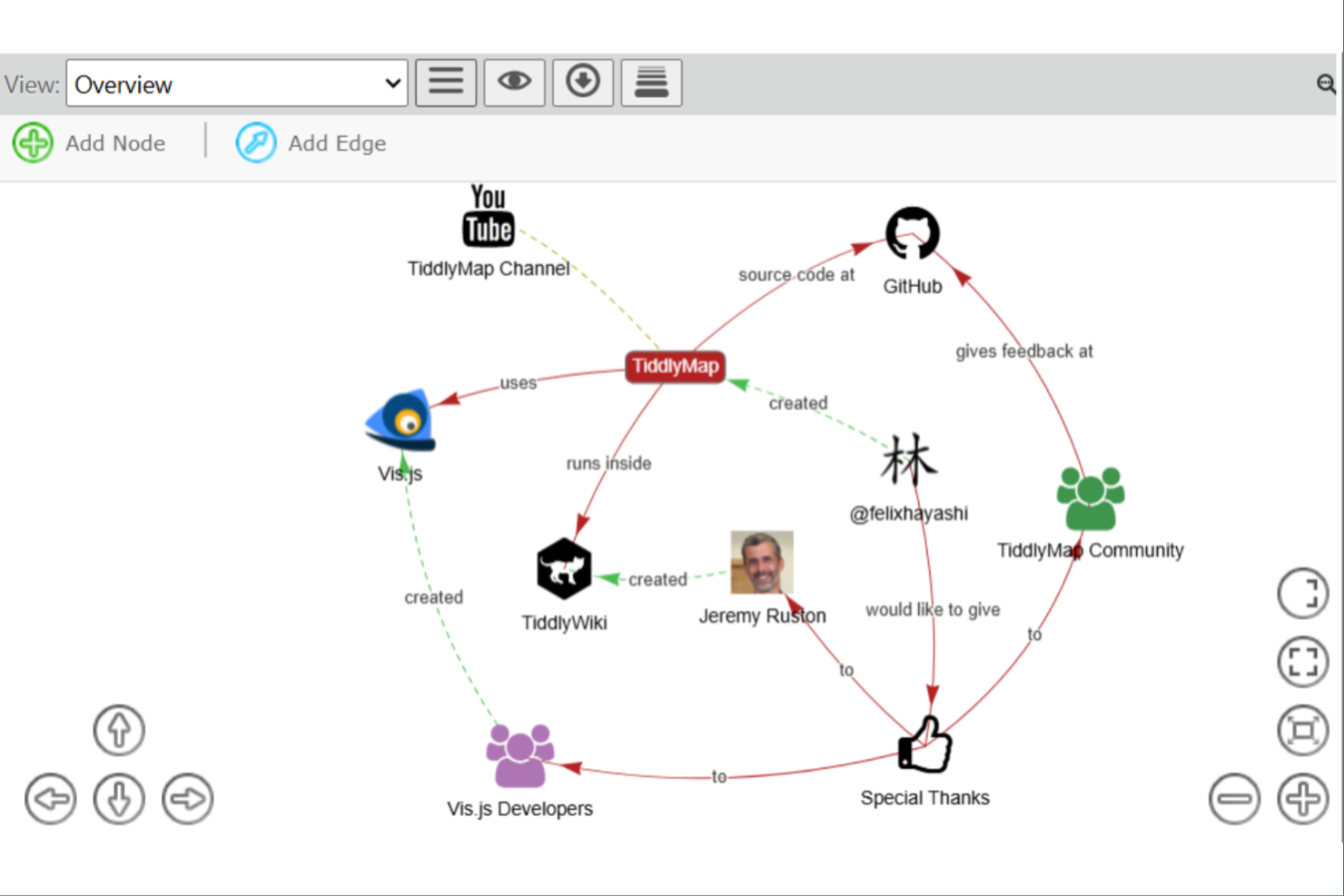
TiddlyMap is an open-source mind mapping and note-linking tool built on TiddlyWiki that lets you visualize relationships between your notes, create interactive maps, and manage ideas in a wiki-style environment.
Who Is TiddlyMap Best For?
TiddlyMap is a great fit for individual researchers, personal knowledge management enthusiasts, or educators looking to map notes and concepts dynamically.
Why I Picked TiddlyMap
I picked TiddlyMap as one of the best because I can map and link notes visually inside TiddlyWiki, updating connections instantly when content changes. I use its dynamic graph view to explore and edit relationships as my knowledge base grows and adapts.
TiddlyMap Key Features
- Custom node styling: Apply distinct colors and shapes to nodes for visual organization.
- Metadata tagging: Tag notes with metadata and format text with syntax like markdown for enhanced search and categorization.
- Multiple map layouts: Choose from force-directed, hierarchical, or custom layouts for maps.
- Interactive graph navigation: Click and drag nodes to reorganize structures dynamically and explore connections directly within your wiki.
TiddlyMap Integrations
TiddlyMap supports integrations via its plugin system and TiddlyWiki’s API for custom integrations.
Pros and Cons
Pros:
- Customizable appearance for nodes and edges
- Visual links embedded directly in TiddlyWiki
- Graph visualization updates with note changes
Cons:
- Steep learning curve for configuration
- No real-time collaboration features
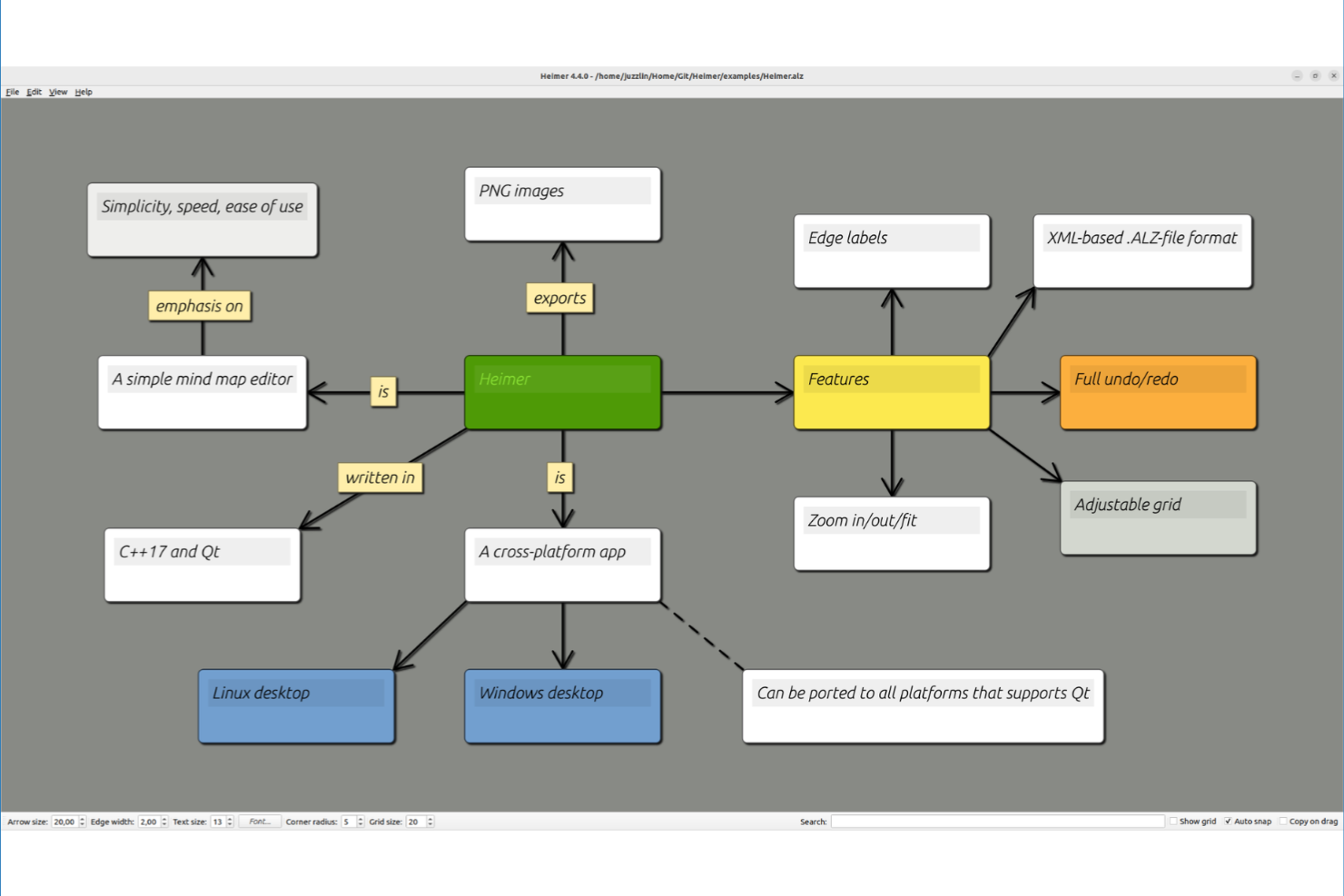
Heimer is an open-source mind mapping software for desktop users that lets you create, edit, and organize node-based diagrams entirely offline, with a minimal interface and straightforward layout tools.
Who Is Heimer Best For?
Heimer is ideal for individuals or small teams who need a straightforward, offline mind mapping tool for Linux or Windows desktops.
Why I Picked Heimer
I picked Heimer because I want a minimal, open-source mind mapping tool that runs fully offline on a desktop. I like that I can quickly add nodes, connect ideas without distractions, and save work in .hei or export as SVG for sharing or archiving.
Heimer Key Features
- Drag-and-drop editing: Rearrange nodes and connections on the canvas with simple mouse actions.
- Zoom and pan controls: Navigate large diagrams smoothly with built-in zoom and pan options.
- Export as PNG or PDF: Save your mind maps as image or document files for easy sharing or printing.
- Offline file support: Store and work on mind maps locally using native .hei or vector .svg file formats without needing an internet connection.
Heimer Integrations
Heimer doesn't have any native integrations.
Pros and Cons
Pros:
- Minimalist interface for distraction-free mapping
- Lightweight app with fast performance
- Fully offline, no internet required
Cons:
- Limited export formats beyond SVG and PNG
- No collaborative or real-time editing


My Mind is an open-source mind mapping tool that lets you build, edit, and save visual diagrams in your browser with a highly simplified interface and basic export options.
Who Is My Mind Best For?
My Mind suits individual users or small teams who want a distraction-free, browser-based mind mapping tool without complex features.
Why I Picked My Mind
I picked My Mind because I want a web-based mind mapping tool that gives me a clutter-free canvas and quick keyboard-centric editing. I like that I can run it locally or remotely from a browser, add nodes with single keystrokes, and export maps as PNG or JSON.
My Mind Key Features
- Color-coded branches: Set custom colors for each mind map branch for easy visual organization.
- Undo and redo controls: Instantly reverse or restore actions while editing maps.
- Resizable canvas: Adjust the canvas size to suit maps of varying complexity.
- Keyboard-centric shortcuts: Create, edit, and navigate map nodes rapidly using quick single-keystroke commands.
My Mind Integrations
My Mind doesn't have any native integrations.
Pros and Cons
Pros:
- Focused on fast keyboard commands
- Open source and self-hostable by design
- Completely runs in the browser or offline
Cons:
- Limited styling and formatting customization
- Lacks built-in cloud storage integration
Other Open Source Mind Mapping Software
Here are some additional open source mind mapping software options that didn’t make it onto my shortlist, but are still worth checking out:


How I Evaluate Open Source Mind Mapping Software
I split my evaluation into baseline requirements—like a true node-based canvas and OSI licensing—then differentiators that matter when teams need to self-host or map project scope together.
Core Functionality (Table Stakes For This List)
When I'm selecting tools for my list, I rank each one on a scale from 0 (does not offer the functionality) to 5 (excels in this area) for each core functionality listed below. Then, I calculate the tool's total score into a percentage. Each tool needs to achieve a minimum total score of 65% to be considered for inclusion.
- Open-Source Licensing: I check that each tool carries a recognized OSI-approved license like GPL, MIT, or Apache, with source code publicly accessible in a repository.
- Node-Based Mind Mapping: The core canvas needs to support hierarchical branching where you can add, edit, and rearrange parent-child nodes visually on a map.
- Self-Hosting or Local Install: I look for tools that run on your own infrastructure or desktop, so project data stays where your team controls it.
- Project-Relevant Node Data: Nodes should hold more than just text. I evaluate whether you can attach notes, links, or task-level metadata like due dates to branches.
- Import/Export Formats: Moving maps between tools matters. I check for support of common formats like FreeMind .mm, OPML, PNG, PDF, and Markdown.
- Collaboration or Sharing: Whether it's real-time co-editing on a self-hosted server or straightforward file sharing, teams need a way to work on the same map together.
Once I have a list of tools that meet the criteria, I consider what sets each platform apart.
Differentiating Factors (What Sets Vendors Apart)
Here's how I compare and contrast different vendors:
Standout Features
A plugin ecosystem is a big differentiator. Tools like Freeplane let you extend functionality through community scripts and add-ons, so you can tailor maps to match specific sprint or WBS workflows. I also evaluate whether a tool connects to platforms like Jira or Trello, so map branches can feed directly into your backlog. Task and Kanban views matter too—being able to switch a brainstormed scope map into an actionable board saves your team from duplicating work across tools.
Beyond Features
Community health is one of the first things I check. A project with regular commits and an active issue tracker—like Freeplane or Docear—signals that bugs get patched and the tool won't quietly go abandoned. Licensing also matters more than people expect. A GPL license has different implications for commercial use than MIT or Apache, so I evaluate which license fits your organization's policies. For teams handling sensitive project data, I look at whether self-hosted deployments support access controls and local-only storage.
How to Choose Open Source Mind Mapping Software
It’s easy to get bogged down in long feature lists and complex pricing structures. To help you stay focused as you work through your unique software selection process, here’s a checklist of factors to keep in mind:
| Factor | What to Consider |
|---|---|
| Scalability | Will the tool handle larger, more complex maps as your needs grow? Can multiple users or projects be supported? |
| Integrations | Does the tool connect with your preferred storage, documentation systems, or productivity apps? Are manual workarounds needed? |
| Customizability | Can you tailor map layouts, node structures, and visual themes to your team’s preferred style and process? |
| Ease of use | How intuitive is it for new users to create and navigate maps? Are non-technical team members able to use it confidently? |
| Implementation and onboarding | Are there clear guides, migration options, or templates to help your team get started quickly without extra handholding? |
| Cost | What are the real costs to host, maintain, or extend the tool long term? Are there premium add-ons or server requirements? |
| Security safeguards | Does the software allow you to keep mind maps private and secure, especially when self-hosted or run locally? |
| Support availability | Will you have access to an active user community, developer support, or documentation when you get stuck or need updates? |
What is Open Source Mind Mapping Software?
Open source mind mapping software are digital tools that let you visually organize information, ideas, or workflows using diagrams with nodes and connections, and whose source code is freely available for anyone to use, modify, and distribute. These tools support brainstorming, planning, and collaboration, and allow users to fully control their data, customize features, and host the software on their own systems if desired.
Features
When selecting open source mind mapping software, keep an eye out for the following key features:
- Node creation and editing: Easily add, delete, and rearrange nodes or branches so you can organize thoughts and ideas visually as they emerge.
- Export and import options: Support for exporting maps to formats like PDF, PNG, or XML, and importing existing data, enables easy sharing and archiving.
- Collaboration tools: Real-time or asynchronous sharing and collaboration features let multiple users contribute to a single mind map.
- Keyboard shortcuts: Access core functions and commands through keyboard-driven workflows, speeding up map creation and editing.
- Template library: Built-in map templates help jumpstart common projects, from meeting agendas to project planning or brainstorming.
- Customizable styling: Change colors, shapes, fonts, and layouts so you can tailor maps to different audiences or visual preferences.
- Search and filter: Built-in search and filtering let you quickly find specific nodes or topics within large, complex maps.
- Revision history: Track and revert changes with an audit trail or version history, providing peace of mind when collaborating or editing large maps.
- Offline access: The ability to run the software locally or offline ensures ongoing access without requiring an internet connection.
- Self-hosting capability: Freely host the tool on your own server for greater data control, performance, or security based on your organization’s needs.
Benefits
Implementing open source mind mapping software provides several benefits for your team and your business. Here are a few you can look forward to:
- Full data control: Host the software on your own servers or devices, ensuring privacy and security over all your mind maps.
- Flexible customization: Modify features, workflows, and appearance to fit your specific way of working or to match your brand’s visual identity.
- No vendor lock-in: Use and migrate your data freely without relying on proprietary file formats or restrictive licensing.
- Collaborative innovation: Work with contributors and developers globally to enhance features, fix bugs, or tailor the tool for new use cases.
- Cost savings: Avoid recurring licensing fees or restrictive premium tiers by using tools that are freely available for individuals and organizations.
- Broad interoperability: Export and import maps in common formats, connect with various tools, and integrate the software into your broader work ecosystem.
- Transparent development: Review, audit, and trust the source code, with the assurance that security updates and bug fixes can be peer-verified or implemented directly.
Costs and Pricing
Selecting open source mind mapping software requires an understanding of the various pricing models and plans available. Costs vary based on features, team size, add-ons, and more. The table below summarizes common plans, their average prices, and typical features included in open source mind mapping software solutions:
Plan Comparison Table for Open Source Mind Mapping Software
| Plan Type | Average Price | Common Features |
|---|---|---|
| Free Plan | $0 | Access to core mind mapping tools, basic export options, self-hosting ability, and community support. |
| Personal Plan | $5-$10/user/month | Additional customization, more export formats, offline access, and enhanced documentation or tutorials. |
| Business Plan | $10-$20/user/month | Collaboration tools, team management features, priority support, and secure data controls. |
| Enterprise Plan | $20-$40/user/month | Advanced security, integration options, dedicated hosting, audit logs, and onboarding or admin controls. |
Open Source Mind Mapping Software FAQs
Here are some answers to common questions about open source mind mapping software:
Can I integrate open source mind mapping software with other tools?
Yes, many open source mind mapping tools offer integration options through plugins, APIs, or standard export formats like XML or CSV. Check documentation for integration with platforms such as cloud storage, project management, or communication tools.
Do open source mind mapping tools work offline?
Yes, most open source mind mapping software can be installed and used offline, either as a desktop app or on a self-hosted server. This setup is helpful if your team needs access without relying on an internet connection.
What should I look for in open source mind mapping software for team use?
Look for collaboration features, user management, permission controls, and export options. Make sure the tool supports real-time editing if your team needs to work together live.
How difficult is it to migrate from a commercial mind mapping tool?
Migration depends on supported import formats. Many open source mind mapping tools accept popular formats or offer step-by-step guides to help you transfer your existing maps.
Is support available for open source mind mapping software?
Yes, support is usually available through community forums, documentation, and user guides. Some projects offer paid support or consulting if you need guaranteed response times or advanced troubleshooting.