

4 Best 3D Mind Mapping Software in 2026

Best 3D Mind Mapping Software Shortlist


3D mind mapping software lets you create, organize, and explore ideas in a fully interactive three-dimensional space. If you’re searching for the best 3D mind mapping tools to organize your docs and spreadsheets, you’re likely looking for new ways to visualize complex projects, connect remote teams, or elevate how you capture brainstorming sessions. With distributed work and evolving project demands, you need software that makes structure and big-picture thinking genuinely visual. This list gives you an inside look at the top 3D mind mapping platforms in 2026, so you can pick the one that fits how your team thinks, plans, and collaborates.
Why Trust Our Software Recommendations
Our team has been testing and reviewing software since 2012. As project managers ourselves, we know how difficult—and important—it is to choose the right software.
For this guide, we evaluated tools using hands-on testing and independent research, scoring tools using our selection criteria. We also draw on insights from industry thought leaders and practicing project management experts.
Our reviews reflect our human editorial judgment, not a sales pitch.
Expert reviewers:
3D Mind Mapping Software Comparison Table
This comparison table summarizes pricing details for my top 3D mind mapping software selections.
| Tool | Best For | Trial Info | Price | ||
|---|---|---|---|---|---|
| 1 | Best for turning text notes into 3D maps | Free trial available | From $49 (one-time purchase) | Website | |
| 2 | Best for mapping concepts on 3D spheres | 14-day free trial + free plan available | From $9.17/month (billed annually) | Website | |
| 3 | Best for immersive VR brainstorming | Free plan available | From $19.99 (one-time purchase) | Website | |
| 4 | Best for mapping cross-related node connections | Not available | Free forever plan | Website |
Best 3D Mind Mapping Software Reviews
Below are my detailed summaries of the best 3D mind mapping software that made it onto my shortlist. My reviews offer a detailed look at the features, capabilities, and best use cases of each platform to help you find the best one for you.

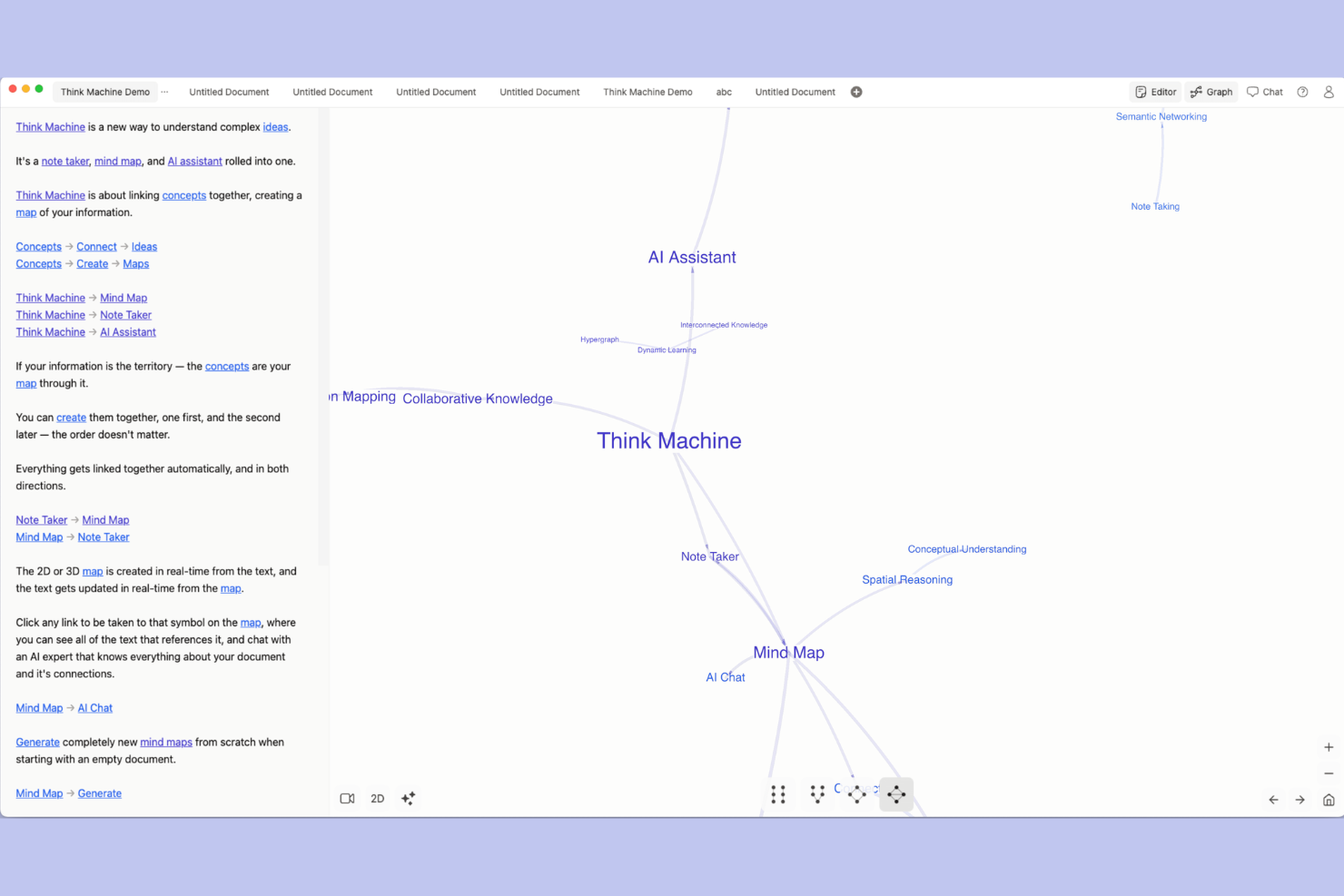
Think Machine is a 3D mind mapping software compatible with macOS and Windows that lets you import text notes, organize concepts, and build interactive maps using a three-dimensional interface.
Who Is Think Machine Best For?
Visual thinkers and project managers who need to map and connect written ideas in 3D environments.
Why I Picked Think Machine
I picked Think Machine as one of the best because I can import longform text notes and instantly convert them into interactive 3D visualizations. I rely on its mapping tools to connect, arrange, and cluster ideas directly from written content.
Think Machine Key Features
- 3D workspace navigation: Move through interconnected idea nodes in a fully three-dimensional environment.
- Node relationship editing: Create, break, and customize links between concepts visually.
- Map export options: Export 3D mind maps as graphics or other supported file types.
Think Machine Integrations
Native integrations include OpenAI, Anthropic, Google, Claude, and ChatGPT, and Microsoft services. An API is available for custom integrations.
Pros and Cons
Pros:
- Offers export of 3D visualizations
- Supports deep map navigation and zooming
- Converts plain text notes into 3D maps
Cons:
- Real-time multi-user editing is missing
- Only available as desktop or web app

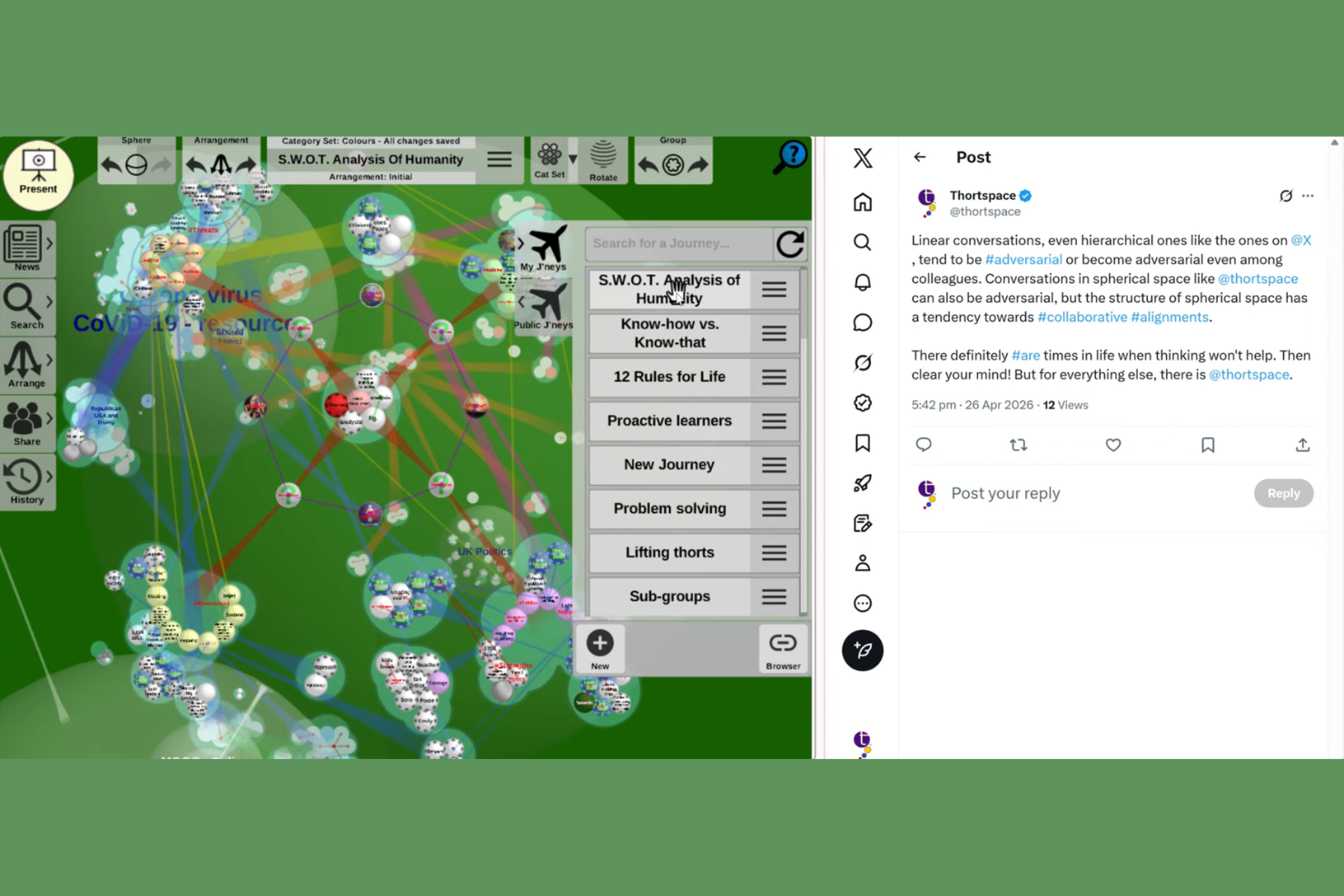
Thortspace is a 3D mind mapping software that lets you design, organize, and present concept maps on your desktop, iPhone or iPad using interactive spheres, supporting text, links, and visual arrangement of ideas across multiple devices.
Who Is Thortspace Best For?
Visual project planners, educators, and knowledge workers who want to map and present interconnected ideas in an interactive 3D space.
Why I Picked Thortspace
I picked Thortspace as one of the best because I can map and cluster concepts across interactive 3D spheres, arranging my ideas spatially. I like that I can group related thoughts, color-code themes, and create multiple spheres within the same workspace.
Thortspace Key Features
- Multi-device syncing: Access and update spheres across desktop, mobile, and tablet.
- Export options: Export maps as images or printable outlines.
- Real-time collaboration: Collaborate live with others in shared spheres.
Thortspace Integrations
Native integrations are not publicly listed.
Pros and Cons
Pros:
- Easily exports maps as images or outlines
- Supports dynamic 3D navigation and visualization
- Spheres enable multi-dimensional concept organization
Cons:
- Steep learning curve for beginners
- Paywall restricts private team sharing

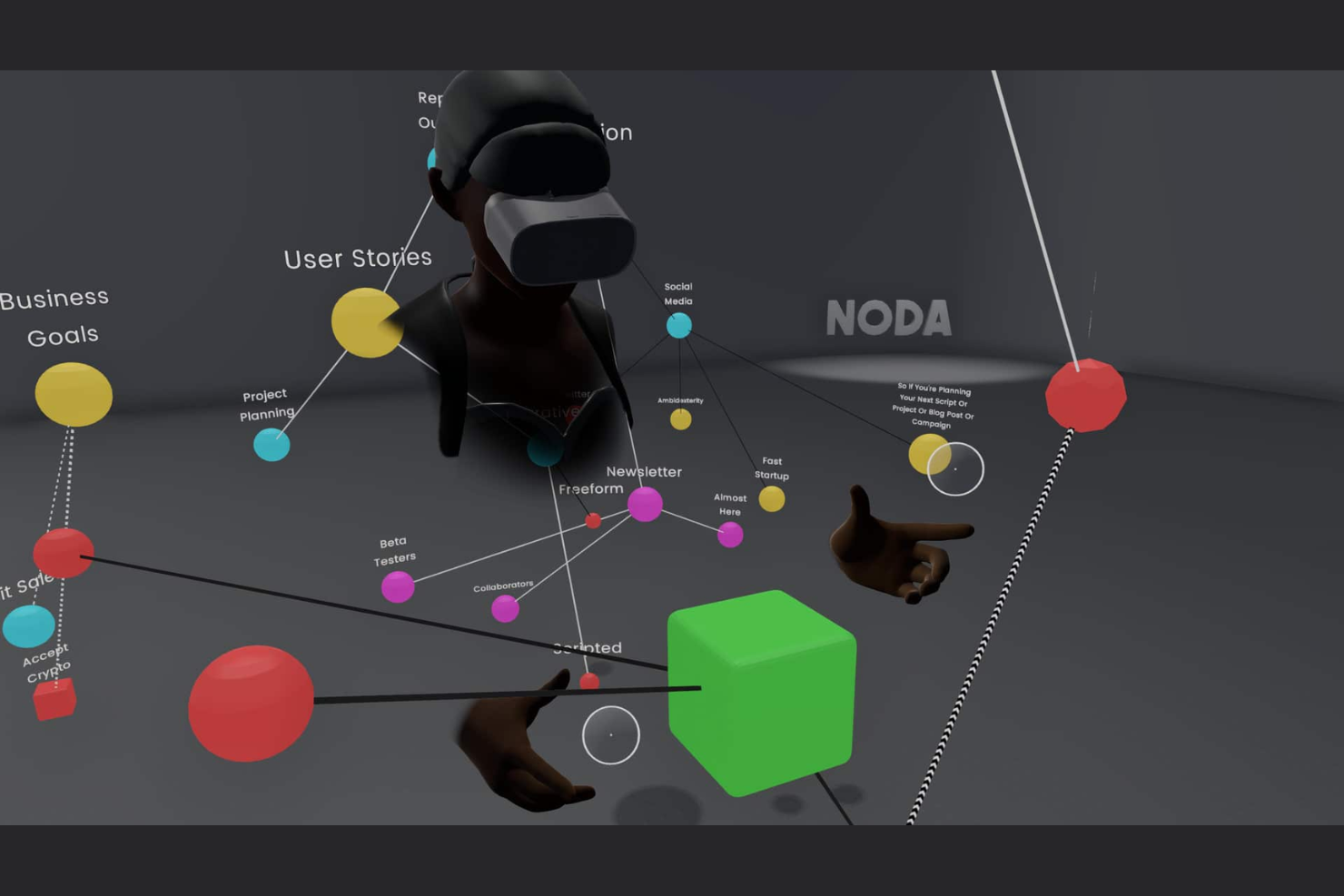
Noda is a VR mind mapping software for teams and individuals who want to brainstorm ideas, create, modify, and visually organize ideas in 3D environments using virtual reality headsets and controllers.
Who Is Noda Best For?
Teams and facilitators in creative industries who want to brainstorm and map ideas collaboratively in immersive virtual reality settings.
Why I Picked Noda
I picked Noda as one of the best because I can map and connect nodes in an immersive 3D virtual reality environment. I like that I can use VR controllers to spatially arrange my thoughts and host collaborative brainstorming sessions inside the same workspace.
Noda Key Features
- Voice dictation: Capture ideas and create nodes using speech-to-text instead of keyboard shortcuts.
- Export options: Save mind maps as images or text outlines.
- Multi-user avatars: Collaborators appear as customizable avatars during sessions.
Noda Integrations
Native integrations are not publicly listed. An API is available for custom integrations.
Pros and Cons
Pros:
- Supports collaborative sessions with multiple users
- Visualize and connect concepts in 3D space
- True VR environment for immersive mind mapping
Cons:
- Typing on virtual keyboards is clunky
- Requires VR headset and compatible hardware

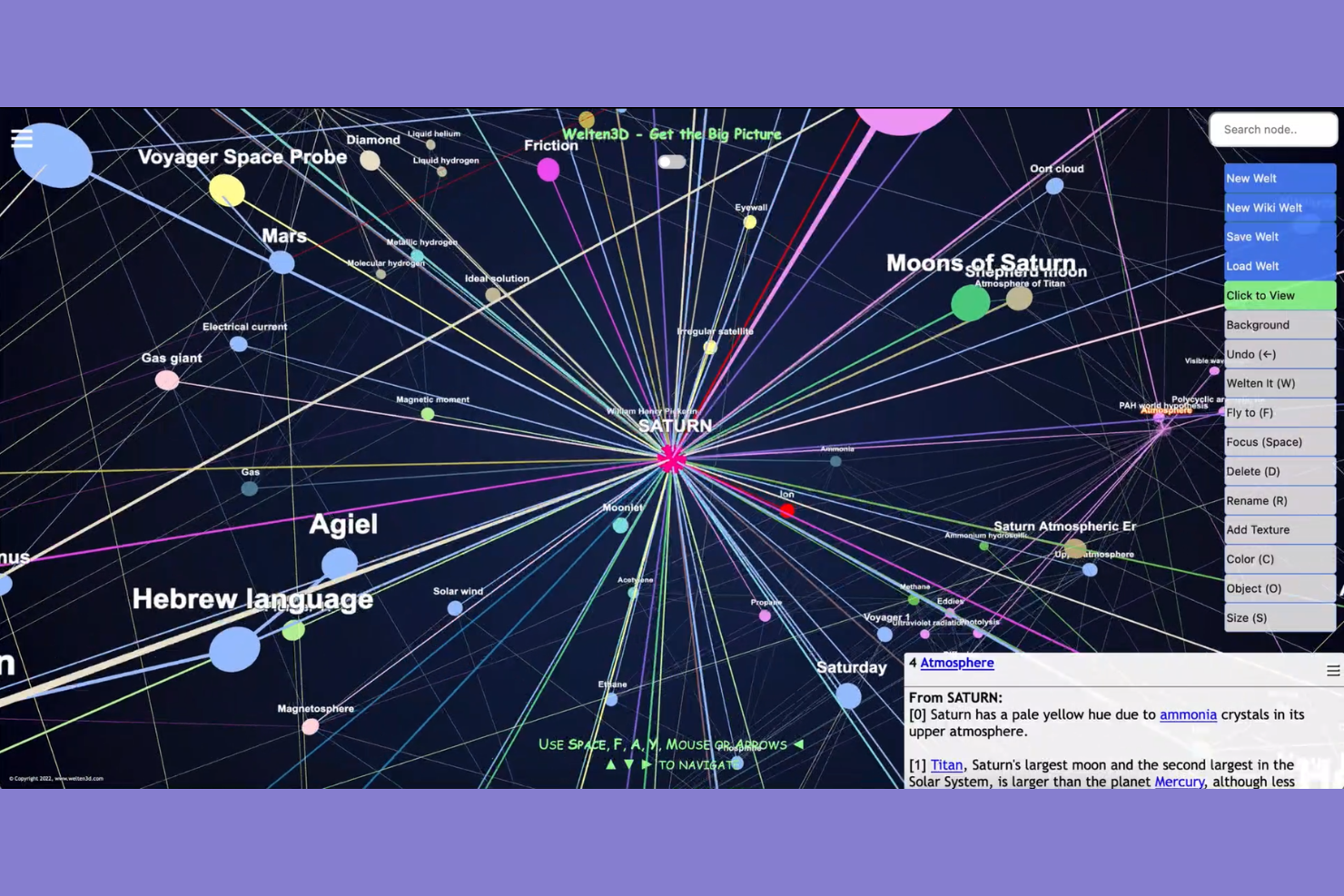
Welten3D is a free mind mapping platform that lets you create, organize, and visualize interconnected ideas and concepts directly in your browser.
Who Is Welten3D Best For?
Educators, students, and small teams who want a free, browser-based platform for collaborative 3D mind mapping and visual idea organization.
Why I Picked Welten3D
I picked Welten3D as one of the best because I can launch 3D mind mapping projects straight from my browser without downloads or installations. I like that I get multiuser editing, map sharing via URL, and real-time visualization at no cost.
Welten3D Key Features
- Node hierarchy navigation: Move through parent and child nodes easily within a 3D space.
- Customizable node appearance: Adjust colors and shapes for different topics and idea types.
- 3D spatial arrangement: Place and organize ideas in three dimensions for better structure.
Welten3D Integrations
Welten3D does not offer native integrations with external web pages or CRM platforms. However, it support an internal Wiki connection.
Pros and Cons
Pros:
- Includes 3D map visualization and navigation
- Generates instant Wikipedia 3D maps
- Runs entirely in your browser
Cons:
- Limited export options for mind maps
- No iOS or Android app available
Other 3D Mind Mapping Software
Here are some additional 3D mind mapping software options that didn’t make it onto my shortlist, but are still worth checking out:
- 3D Topicscape Pro
For organizing computer files visually


How I Evaluate 3D Mind Mapping Software
When evaluating tools that can map a 50-node work breakdown structure in three dimensions, I split it into two layers: baseline 3D functionality and the differentiators that set them apart.
Core Functionality (Table Stakes For This List)
When I'm selecting tools for my list, I rank each one on a scale from 0 (does not offer the functionality) to 5 (excels in this area) for each core functionality listed below. Then, I calculate the tool's total score into a percentage. Each tool needs to achieve a minimum total score of 55% to be considered for inclusion.
- 3D Visualization Engine: I check whether the tool renders maps in true 3D space with depth and axis placement, not just a flat canvas with cosmetic shadow effects.
- Hierarchical Node Mapping: Mapping a multi-level WBS means I look for unlimited parent-child branching, cross-links between nodes, and the ability to restructure on the fly.
- Interactive Navigation Controls: Zoom, pan, and multi-axis rotation should feel fluid when exploring a 50+ node project map from different angles and camera positions.
- PM Tool Integration: I evaluate whether nodes sync with platforms like Jira, Asana, or Monday so task data flows between the mind map and your existing delivery workflows.
- Real-Time Collaboration: Distributed teams need live co-editing with visible cursors, inline comments, and version history to run remote planning sessions on shared maps.
- Export & Presentation Modes: I look for output flexibility—PDF, PNG, PPTX, or a built-in presentation mode—so you can walk stakeholders through a 3D roadmap without requiring them to log in.
Once I have a list of tools that meet the criteria, I consider what sets each platform apart.
Differentiating Factors (What Sets Vendors Apart)
Here's how I compare and contrast different vendors:
Standout Features
AI-assisted mapping saves serious time when you're converting a project brief into a structured 3D map—I look for tools that auto-generate branches from pasted text or documents. A Gantt or timeline overlay is equally valuable because it lets you toggle between spatial brainstorming and schedule-based planning without duplicating data. I also evaluate whether a tool ships with PM-specific templates like WBS structures or risk maps, since starting from scratch on a 3D canvas adds friction most teams don't need.
Beyond Features
3D mind mapping tools have a steeper learning curve than flat alternatives, so I check for guided onboarding, in-app tutorials, and a solid knowledge base that gets new team members productive fast. Platform support matters too—distributed teams need web, desktop, and mobile access, plus offline mode for travel or unreliable connections. I also evaluate how well each tool fits into an existing PM stack, looking at native connectors to Slack, Teams, Google Workspace, and similar collaboration suites that project teams already rely on daily.
How to Choose 3D Mind Mapping Software
It’s easy to get bogged down in long feature lists and complex pricing structures. To help you stay focused as you work through your unique software selection process, here’s a checklist of factors to keep in mind:
| Factor | What to Consider |
|---|---|
| Scalability | Will the software support both individual maps and large, complex projects as your needs evolve? |
| Integrations | Does the platform connect natively with your existing tools, like project management or storage? |
| Customizability | Can you tweak visualization, node structure, and export formats to match your team’s workflows? |
| Ease of use | Is the interface intuitive for first-time users, or will your team face a steep learning curve? |
| Implementation and onboarding | How quickly can your team get started, and are onboarding resources like tutorials or templates provided? |
| Cost | Does pricing align with your team size and growth? Watch for usage limits or per-user fees. |
| Security safeguards | Is your data protected in transit and at rest? Are access controls suitable for sensitive projects? |
| Support availability | Does the vendor provide responsive support in your region and time zone, for urgent troubleshooting? |
What Is 3D Mind Mapping Software?
3D mind mapping software lets you create, organize, and visualize ideas or concepts in a three-dimensional space. Using a 3D mind map app gives you more spatial freedom than traditional mind mapping tools, helping you structure complex relationships, explore connections, and collaborate with others by arranging nodes and branches in multiple directions within a virtual canvas.
Features of 3D Mind Mapping Software
When selecting 3D mind mapping software, keep an eye out for the following key features:
- 3D canvas: Visualize nodes and connections in a three-dimensional workspace, allowing you to map complex ideas spatially.
- Node linking: Connect and organize topics, subtopics, or ideas into comprehensive flowcharts using lines, branches, or arrows to show hierarchical and associative relationships.
- Drag-and-drop editing: Move nodes, branches, and clusters freely throughout the 3D whiteboard environment for fast organization and restructuring.
- Collaboration tools: Invite others to edit or comment on maps in real time, making brainstorming sessions and teamwork more dynamic and interactive.
- Customizable appearance: Adjust node colors, shapes, sizes, and labels to visually group ideas or highlight priorities in your maps.
- File and media attachments: Embed documents, images, or links directly onto nodes to centralize all related resources in one place.
- Export options: Save your 3D mind maps in formats like PDF, image, or interactive files to share or present outside the software or display using presentation mode.
- Zoom and navigation controls: Easily pan, tilt, rotate, and zoom through the 3D space for a clearer view of complex map structures.
- Search and filter: Find specific nodes or ideas quickly by searching keywords or applying filters based on attributes or connections.
- Template library: Access ready-made templates to jumpstart new mind maps for common scenarios like project planning or process mapping.
Benefits of 3D Mind Mapping Software
Implementing 3D mind mapping software provides several benefits for your team and your business. Here are a few you can look forward to:
- Enhanced idea organization: Visualizing concepts for note taking in a 3D space helps you structure complex relationships that can get lost in standard 2D maps.
- Improved collaboration: Real-time editing and sharing features let multiple team members contribute and brainstorm together from anywhere.
- Centralized project documentation: File and media attachment features keep resources, notes, and discussion points in one easily accessible place.
- Greater clarity for presentations: Intuitive navigation and export options help you compile your notes into PowerPoint presentations to communicate multifaceted ideas to stakeholders more persuasively.
- Flexible workflows: Customizable nodes, templates, and layouts adapt to a wide range of task management, planning, and creative scenarios.
- Faster information retrieval: Search and filter tools make it simple to locate specific ideas or map sections as your project grows.
- Support for large-scale planning: Scalability features ensure your maps remain manageable and navigable, even as projects expand in scope.
Costs and Pricing of 3D Mind Mapping Software
Selecting 3D mind mapping software requires an understanding of the various pricing models and plans available. Costs vary based on features, team size, add-ons, and more. The table below summarizes common plans, their average prices, and typical features included in 3D mind mapping software solutions:
Plan Comparison Table for 3D Mind Mapping Software
| Plan Type | Average Price | Common Features |
|---|---|---|
| Free Plan | $0 | Basic 3D mapping tools, limited map storage, simple export options, and single-user support. |
| Personal Plan | $5-$15/user/month | Unlimited personal maps, custom node settings, file attachments, basic sharing, and core template access. |
| Business Plan | $15-$30/user/month | Team collaboration, advanced export formats, AI-powered real-time editing, integrations, priority support, and analytics. |
| Enterprise Plan | $30-$60/user/month | Advanced security controls, dedicated onboarding, custom integrations, admin controls, and premium support. |
3D Mind Mapping Software FAQs
Here are some answers to common questions about 3D mind mapping software:
Can 3D mind mapping software handle large, complex projects?
Yes, most 3D mind mapping software is designed to visualize and manage extensive maps with hundreds or even thousands of nodes. Look for platforms offering advanced navigation controls, search, and clustering to help you stay organized as your maps scale.
Do I need a powerful computer or graphics card to use 3D mind mapping software?
No, many 3D mind mapping tools run efficiently on typical modern laptops or desktops in Windows or Mac. However, handling very large maps or using VR features may require more processing power or a dedicated graphics card for smooth performance.
Is there a learning curve with 3D mind mapping tools compared to 2D options?
Yes, working in a 3D environment can take some getting used to, especially for users familiar with 2D layouts. Most platforms offer tutorials, tours, or templates to speed up onboarding and help you master navigation and editing.
Can I collaborate with others in real time on 3D mind maps?
Yes, many cross-platform 3D mind mapping solutions offer real-time collaboration features. Multiple users can edit, comment, and brainstorm together, making remote teamwork more engaging and productive.
Are there accessibility features in 3D mind mapping software?
Some 3D mind mapping tools provide accessibility options, such as keyboard shortcuts, color contrast settings, or screen reader compatibility. It’s a good idea to check vendor documentation to confirm if specific needs are supported.