


AgencyDesk vs. Asana: Comparison and Expert Reviews 2026



Keeping agency work on track gets harder when deadlines move, scope creeps, and the numbers behind each client sit in a different system from the work itself. The better fit depends on whether you want software built around agency operations or a more adaptable platform for managing projects and collaboration.
Agencydesk and Asana take two different approaches to an agency management system: one treats every job as a costed quote that carries through to the invoice, while the other is a flexible project platform for coordinating any kind of team. When client deadlines shift and budgets start to slip, the right fit can protect both delivery and margin without adding unnecessary process. I’ll walk through cost, core features, integrations, security, ease of use, and the teams each one suits.
AgencyDesk vs. Asana: An Overview
AgencyDesk
Asana

Why Trust Our Software Recommendations
Our team has been testing and reviewing software since 2012. As project managers ourselves, we know how difficult—and important—it is to choose the right software.
For this guide, we evaluated tools using hands-on testing and independent research, scoring tools using our selection criteria. We also draw on insights from industry thought leaders and practicing project management experts.
Our reviews reflect our human editorial judgment, not a sales pitch.
Expert reviewers:
AgencyDesk vs. Asana Pricing Comparison
| AgencyDesk | Asana | |
|---|---|---|
| Free Trial | Free Trial is Available | Free plan + free demo available |
| Pricing | From $20/month | From $10.99/user/month |
AgencyDesk vs. Asana Pricing & Hidden Costs
Agencydesk charges per user across three tiers, with seat minimums that rise by plan and a free trial, plus a free first month for agencies that book a discovery call. Its listed account storage is limited, so confirm your files will fit. Asana offers a free plan capped at two users, paid per-user plans, and custom-priced enterprise plans. Extra costs can include AI requests beyond your monthly credit allotment and add-ons for timesheets and budgets, permissions, or compliance.
To compare, map your likely seat count over the next year against each plan’s minimums, then check what the entry tier actually covers. Asana’s native time tracking, goals, portfolios, and workload view sit on its Advanced plan, and budgets need the timesheets add-on. Agencydesk treats costing, purchasing, and invoicing as core features, and guided onboarding includes training. Choose based on the total cost of your actual workflow, not the entry tier alone.
AgencyDesk vs. Asana Feature Comparison
| AgencyDesk | Asana | |
|---|---|---|
| API | ||
| Batch Permissions & Access | ||
| Budgeting | ||
| Calendar Management | ||
| Collaboration Support | ||
| Contact Management | ||
| Contact Sharing | ||
| Customer Management | ||
| Dashboard | ||
| Data Export | ||
| Data Import | ||
| Data Visualization | ||
| Expense Tracking | ||
| External Integrations | ||
| Gantt Charts | ||
| Multi-User | ||
| Notifications | ||
| Project Management | ||
| Resource Management | ||
| Scheduling | ||
| Task Scheduling/Tracking | ||
| Third-Party Plugins/Add-Ons | ||
| Travel Management | ||
| Workflow Management |
AgencyDesk vs. Asana Integrations
| Integration | AgencyDesk | Asana |
|---|---|---|
| Google Calendar | ✅ | ✅ |
| Microsoft Outlook | ✅ | ✅ |
| Xero | ✅ | ✅ |
| Slack | ❌ | ✅ |
| Google Drive | ❌ | ✅ |
| Everhour | ❌ | ✅ |
| Microsoft Teams | ❌ | ✅ |
| Jira | ❌ | ✅ |
| API | ❌ | ✅ |
| Zapier | ❌ | ✅ |
Agencydesk keeps to a short list: calendar sync feeds meetings into the Resource Planner, MCP links connect AI assistants, and a two-way Xero sync posts invoices and purchase orders with mapped account codes. Asana’s directory is much broader, spanning Slack, Google Drive, Everhour, Microsoft Teams, Jira, Zapier, and a public API. Its Xero app turns bills and invoices into Asana tasks rather than running job billing through the platform, so teams that live in many third-party apps will likely prefer Asana, while finance-heavy agencies may not.
AgencyDesk vs. Asana Security, Compliance & Reliability
| Factor | AgencyDesk | Asana |
|---|---|---|
| Data Privacy | Agencydesk hosts data on AWS infrastructure in Ireland and states compliance with South Africa’s POPIA. | Asana aligns its privacy program with GDPR, CCPA, and other US state privacy laws, and offers data residency in Europe, Australia, and Japan. |
| Encryption | Data moving between users and the platform is protected by TLS, while at-rest encryption is slated for early 2027 alongside a change of hosting provider. | Asana encrypts data in transit, at rest, and during processing, and Enterprise Key Management lets eligible customers hold their own keys. |
| Access Controls | Authenticated logins, role-based permission levels for users, managers, finance staff, admins, and owners, and OAuth for integrations. | Two-factor authentication is mandatory, with user- and object-level permissions, admin app controls, and SSO with SAML for enterprise admins. |
| Compliance | Agencydesk meets South Africa’s POPIA requirements, with SOC 2 and ISO 27001 certification not yet in place. | Asana lists SOC 2 Type 2, SOC 3, several ISO certifications, GDPR, CCPA, and HIPAA among its attestations and frameworks. |
| Reliability | Agencydesk describes AWS redundancy, active monitoring, and daily backups, plus SLA-backed support, but doesn’t publish a written uptime commitment. | Enterprise customers get an uptime commitment and round-the-clock priority support, backed by daily and regional backups and a public status page. |
Asana is the safer pick when a client’s procurement team wants audited certifications, data residency choices, and an uptime commitment in writing. Agencydesk covers the practical basics with EU hosting, role-based access, and daily backups, but it hasn’t pursued formal certifications and is still adding encryption at rest. That’s enough for most agency work, in my view, though not for clients in heavily regulated industries.
AgencyDesk vs. Asana Ease of Use
| Factor | AgencyDesk | Asana |
|---|---|---|
| Setup | A setup wizard or the onboarding team configures departments, rate cards, billing tiers, and templates, with live jobs moving across over a few weeks. | Basic task and project setup is straightforward, but configuring advanced workflows, reporting, and capacity settings takes more time. |
| Workflow Fit | Quotes, scheduling, time tracking, purchasing, and invoicing share one job record, so delivery and profitability stay linked. | Asana organizes tasks and projects with flexible views, which suit varied team workflows but require configuration for agency operations. |
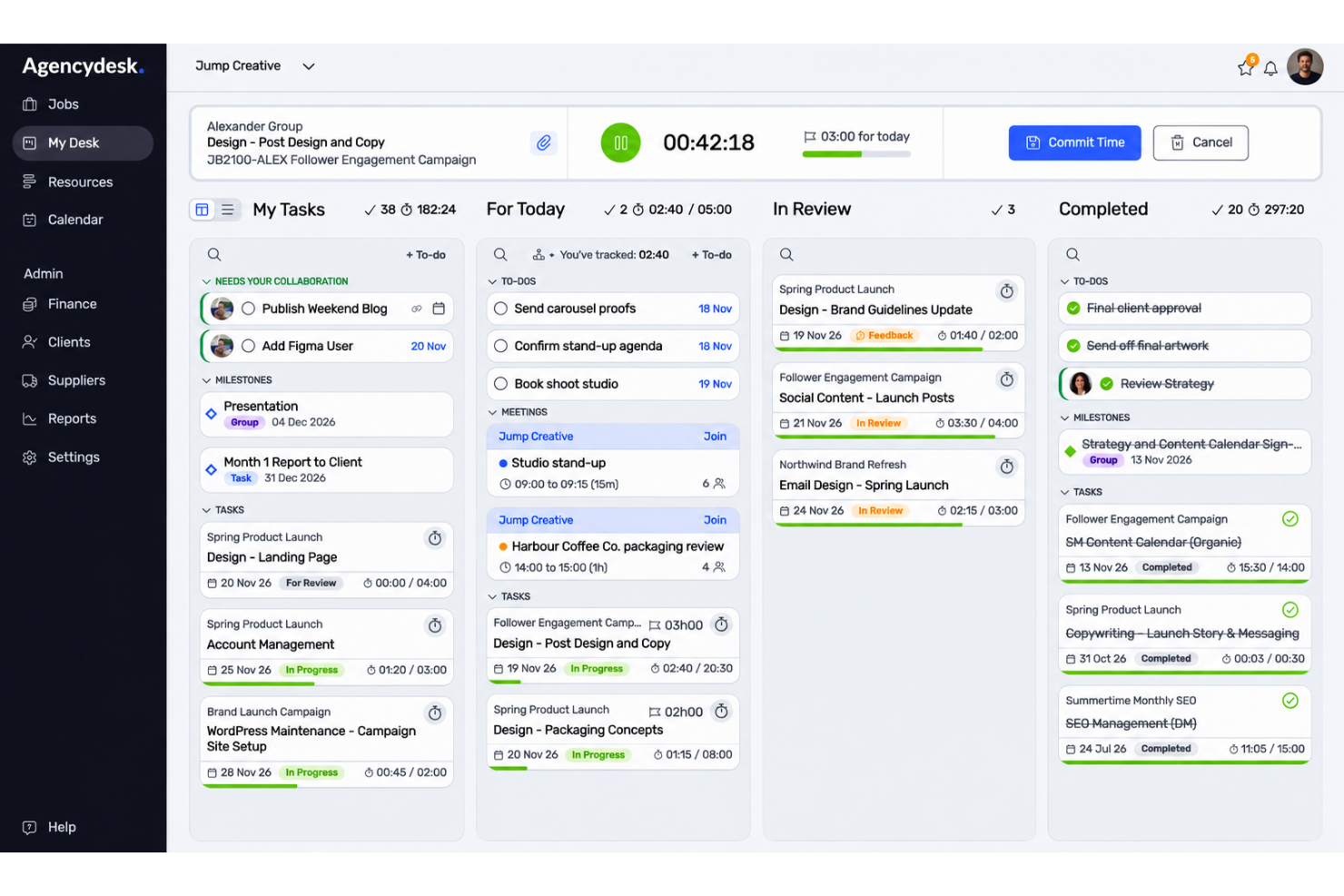
| Daily Use | My Desk lists each person’s tasks and bookings for the day, Job Central holds notes and files, and the Resource Planner shows capacity. | Its clean interface and customizable boards make assigning tasks, tracking deadlines, and checking progress easy to follow. |
| Learning Curve | The built-in agency structure cuts down on setup decisions, though teams used to blank-canvas tools may need time to adjust. | Everyday task management feels approachable, while advanced options can feel more involved as teams add workflows and features. |
Asana is the easier entry point for general project coordination, while Agencydesk asks for more upfront setup but pays it back once quoting, scheduling, and billing run through one workflow. I’d lean toward Agencydesk for teams that want delivery and financial details side by side, and toward Asana for teams that prize a clean interface and flexible boards.
AgencyDesk vs Asana: Pros & Cons
AgencyDesk
- Job costing drives scheduling, time, purchasing, and invoicing from one record.
- Scope changes become quoted, billable amendments on the same job.
- Resource Planner overlays meetings and leave, and exposes capacity by department.
- Tasks lack subtasks and automatic dependency scheduling.
- Clients cannot log in to review jobs or files.
- Five-user minimum and Xero-only accounting sync narrow the fit.
Asana
- You can easily track tasks and deadlines using Asana's intuitive interface.
- Asana's collaboration tools help your team communicate effectively in real-time.
- There are extensive customization options so you can tailor workflows and views to your specific needs.
- The reporting capabilities are somewhat basic, which may not satisfy teams needing detailed analytics.
- It can feel overwhelming if your team is small or your projects are simple.
- You might find the notification system a bit excessive or distracting.
Best Use Cases for AgencyDesk and Asana
AgencyDesk
- Creative Agencies Job costings flow into scheduled tasks, tracked time, reconciliation, and invoices, giving creative and design studios one record for each client project, from first quote to final bill.
- Marketing Agencies Digital marketing, SEO, social, and paid media teams running retainers alongside one-off projects can split work into separate estimates and track billable time against each.
- Small Agencies The Startup plan supports agencies with five or more users, and its sweet spot is small agencies rather than large enterprises.
- Growing Agencies Agencies with at least 15 users can consider the Growth plan, which adds deeper integration and dedicated support alongside Agencydesk’s planning and billing workflows.
- International Agencies Agencies billing clients abroad can set billing tiers in other currencies and pay suppliers in theirs within one job, with reports rolling up in the home currency.
- Agency Finance Teams Finance staff get invoices, purchase orders, and clients posted to Xero under the correct account codes, plus payment status flowing back, which cuts down on rekeying and corrections.
Asana
- Creative agencies You can manage creative workflows and client projects with Asana’s visual boards and timeline features.
- Tech startups You can coordinate product development and team tasks using Asana’s real-time updates and goal-setting tools.
- Marketing teams You can plan campaigns and track progress with Asana’s clear timelines and task comments.
- Nonprofits Asana lets you manage volunteer tasks, events, and fundraising efforts with clear task assignments and timelines.
- Remote teams You can collaborate effectively with Asana’s real-time updates and communication features.
- Event planners You can organize events easily with Asana’s task management and timeline visualization features.
Who Should Use AgencyDesk, and Who Should Use Asana?
Choose Agencydesk if your agency needs quoting, resource planning, time tracking, purchasing, and invoicing connected, with margins visible before a job wraps up, especially when retainers, suppliers, and multiple currencies are involved. Choose Asana if your team needs flexible coordination across functions, with goals, portfolios, AI Teammates, and a wider range of integrations. Its free plan for up to two users also gives very small teams a starting point that Agencydesk’s five-user minimum doesn’t.
Differences Between AgencyDesk and Asana
| AgencyDesk | Asana | |
|---|---|---|
| Agency finances | Prices work from a rate card with client billing tiers, then tracks costs, purchase orders, and invoices against live job margins. | Separates billable hours and compares time against budgets through a paid add-on, but invoicing happens elsewhere. |
| Integrations | Syncs with Xero, both major calendar suites, and AI assistants via MCP. | Offers calendar and Xero apps plus Slack, Google Drive, Microsoft Teams, Jira, Zapier, and a public API. |
| Pricing model | Per-user plans start at five seats, with a free trial instead of a free-forever tier. | Offers a free plan for up to two users, paid per-user plans, custom enterprise pricing, and paid AI usage beyond included credits. |
| Project planning | Schedules people against the hours estimated on each costed task, alongside job timelines and milestones. | Uses flexible projects, goals, and portfolios to connect work with broader objectives. |
| User interface | Centers daily work on My Desk, with Job Central and the Resource Planner for job details and capacity. | Offers a clean interface with customizable boards for task and deadline tracking. |
| Read AgencyDesk ReviewOpens new window | Read Asana ReviewOpens new window |
Similarities Between AgencyDesk and Asana
| Data Protection | Both encrypt data in transit and control access by role. Agencydesk assigns permission levels by job function, while Asana adds object-level permissions, mandatory two-factor authentication, and enterprise SSO. |
|---|---|
| Deadline Tracking | Both help teams keep due dates visible as work changes. Agencydesk ties dates to job timelines and milestones, while Asana’s Timeline view shows how dependent work shifts with each change. |
| Progress Reporting | Both provide reports to help teams monitor work. Agencydesk focuses its reports on job margins, utilization, and billing, while Asana’s dashboards and portfolios show progress and allocation across projects. |
| Task Assignment | Both let teams assign work and set deadlines. Agencydesk attaches assignments to costed job tasks and splits estimated hours across assignees, while Asana tracks them within projects. |
| Time Tracking | Both log time against project work. Agencydesk links each logged hour to a costed task so margins update in real time, while Asana includes native tracking on its Advanced plan, with budgets through an add-on. |
| Read AgencyDesk ReviewOpens new window Read Asana ReviewOpens new window | |