

Recension av Taskades AI-programvara för projektledning 2026



Taskade is a project management software that combines task management, docs, mind maps, and real-time collaboration in a single AI-native workspace. I'd consider it if your team needs a flexible, all-in-one tool without the configuration overhead of something like ClickUp, particularly if you want AI woven into how you plan and organize work from the start, rather than added on top of an existing workflow.
Taskade Evaluation Summary
- From $20/month
- Free plan available
Varför du kan lita på våra programvarurekommendationer
Vårt team har testat och recenserat programvara sedan 2012. Som projektledare själva vet vi hur
svårt — och viktigt — det är att välja rätt programvara.
För den här guiden utvärderade vi verktyg genom praktisk testning och oberoende research, och betygsatte verktygen enligt våra urvalskriterier. Vi drar även nytta av insikter från branschens tankeledare och praktiserande projektledningsexperter.
Våra recensioner speglar vårt mänskliga redaktionella omdöme, inte ett säljbudskap.
Expertgranskare:
Taskade Overview
In my opinion, Taskade is a solid pick if you want a lightweight, AI-based project management platform that combines task tracking, real-time collaboration, and AI assistance in one place. It’s quicker to get into than heavier tools like ClickUp or Asana, especially if your projects lean more creative or loosely structured. The AI features—like smart task generation and writing help—add a useful layer, but they’re not essential for everyone and still feel a bit early-stage compared to more focused AI tools.
Compared to the competition, Taskade stands out with its speed and simplicity but falls short in reporting, permissions control, and deep project customization. I’d recommend it for small to mid-sized teams who value flexibility and fast collaboration over traditional Gantt charts or complex workflows.
pros
-
Real-time collaboration keeps your team in sync effortlessly
-
Intuitive design makes task organization straightforward for everyone
-
Flexible project views adapt to your team's workflow needs
cons
-
Some users find the customization options limited for complex projects
-
The learning curve for mastering all features can be steep for new users
-
Occasional technical glitches might disrupt your team's workflow
-

Smartsheet
Visit WebsiteThis rating combines scores from multiple user review sites to reflect overall customer sentiment about the product.4.4 -
Celoxis
Visit WebsiteThis rating combines scores from multiple user review sites to reflect overall customer sentiment about the product.4.5 -
Accelo
Visit WebsiteThis rating combines scores from multiple user review sites to reflect overall customer sentiment about the product.4.4





Our Review Methodology
How We Test & Score Tools
We’ve spent years building, refining, and improving our software testing and scoring system. The rubric is designed to capture the nuances of software selection and what makes a tool effective, focusing on critical aspects of the decision-making process.
Below, you can see exactly how our testing and scoring works across seven criteria. It allows us to provide an unbiased evaluation of the software based on core functionality, standout features, ease of use, onboarding, customer support, integrations, customer reviews, and value for money.
Core Functionality (25% of final scoring)
The starting point of our evaluation is always the core functionality of the tool. Does it have the basic features and functions that a user would expect to see? Are any of those core features locked to higher-tiered pricing plans? At its core, we expect a tool to stand up against the baseline capabilities of its competitors.
Standout Features (25% of final scoring)
Next, we evaluate uncommon standout features that go above and beyond the core functionality typically found in tools of its kind. A high score reflects specialized or unique features that make the product faster, more efficient, or offer additional value to the user.
We also evaluate how easy it is to integrate with other tools typically found in the tech stack to expand the functionality and utility of the software. Tools offering plentiful native integrations, 3rd party connections, and API access to build custom integrations score best.
Ease of Use (10% of final scoring)
We consider how quick and easy it is to execute the tasks defined in the core functionality using the tool. High scoring software is well designed, intuitive to use, offers mobile apps, provides templates, and makes relatively complex tasks seem simple.
Onboarding (10% of final scoring)
We know how important rapid team adoption is for a new platform, so we evaluate how easy it is to learn and use a tool with minimal training. We evaluate how quickly a team member can get set up and start using the tool with no experience. High scoring solutions indicate little or no support is required.
Customer Support (10% of final scoring)
We review how quick and easy it is to get unstuck and find help by phone, live chat, or knowledge base. Tools and companies that provide real-time support score best, while chatbots score worst.
Customer Reviews (10% of final scoring)
Beyond our own testing and evaluation, we consider the net promoter score from current and past customers. We review their likelihood, given the option, to choose the tool again for the core functionality. A high scoring software reflects a high net promoter score from current or past customers.
Value for Money (10% of final scoring)
Lastly, in consideration of all the other criteria, we review the average price of entry level plans against the core features and consider the value of the other evaluation criteria. Software that delivers more, for less, will score higher.
Core Features
Task management: Taskade provides a platform to create, assign, and monitor tasks and subtasks efficiently. Its intuitive interface allows users to prioritize and categorize tasks into task lists, making it easy to keep track of project progress.
Collaboration tools: Taskade excels in facilitating real-time communication and collaboration among team members. The platform supports video calls, chat, real-time notifications, and document sharing to ensure efficient teamwork.
Automation: Taskade leverages AI automation for repetitive tasks, freeing up time for more strategic planning. This feature allows teams to set up automated workflows that trigger based on specific conditions.
Project tracking: Taskade offers strong project-tracking tools that help monitor timelines and deliverables. Users can visualize project progress through Gantt charts and Kanban boards that make it easier to manage deadlines.
Resource management: Taskade provides AI agents to help you allocate and manage resources across various projects. This functionality helps ensure that team members are optimally utilized and project needs are met efficiently.
Sync with Google Calendar: Taskade integrates with Google Calendar to automatically sync project due dates and task schedules. Users can easily view and manage their project timelines alongside personal or team calendars to ensure alignment and reduce scheduling conflicts.
Ease of Use
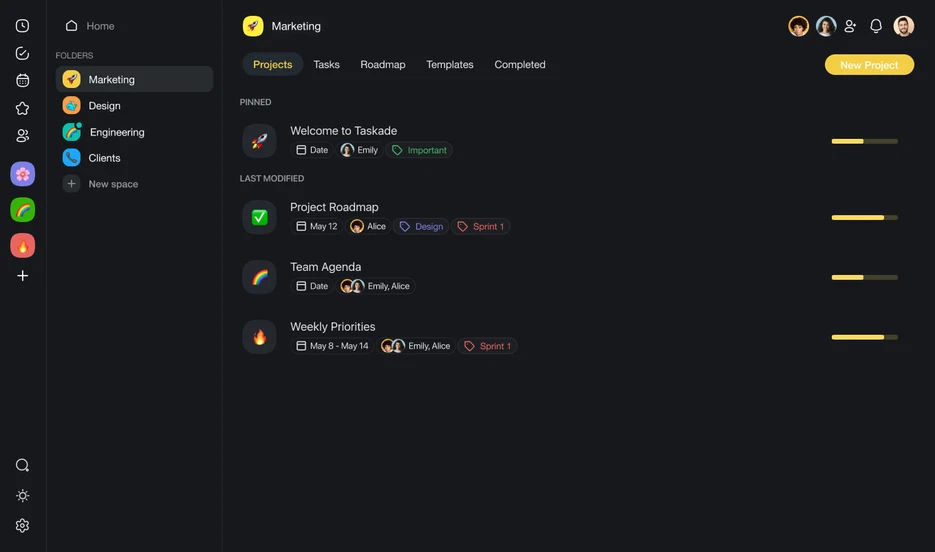
Taskade is generally easy to use compared to other project management software with artificial intelligence. Its intuitive design and user-friendly interface make navigation straightforward, allowing teams to quickly adapt and begin managing projects. Users also praise Taskade's clean and uncluttered layout, which simplifies task creation and organization.
Taskade’s mobile app and available templates further enhance its accessibility, making it a suitable choice for teams seeking a simple yet effective tool.

Taskade Specs
- API
- Calendar Management
- Collaboration Support
- Dashboards
- Data Export
- Data Import
- External Integrations
- File Sharing
- Gantt Charts
- Kanban Boards
- Mobile App
- Multi-User
- Notifications
- Prioritization
- Project Management
- Status Notifications
- Task Scheduling/Tracking
- Time Management

Vanliga frågor om Taskade
Hur hanterar Taskade datasäkerhet?
Taskade tar datasäkerhet på stort allvar och följer branschstandardiserade säkerhetsrutiner för att skydda ditt teams information. Taskade erbjuder även efterlevnad av dataskyddsbestämmelser för att säkerställa att dina data hanteras varsamt. Plattformen använder dessutom kryptering både under överföring och vid lagring. Regelbundna säkerhetsgranskningar och uppdateringar bidrar till att upprätthålla en säker miljö för dina projekt.
Kan Taskade stödja samarbete i distansteam?
Ja, Taskade är utformat för att underlätta samarbete för distansteam. Realtidsfunktionerna gör att du och ditt team kan arbeta tillsammans samtidigt, oavsett var ni befinner er. Ni kan chatta, dela filer och hantera uppgifter på en och samma plattform för att hålla alla samordnade och produktiva. Taskades lättillgänglighet på olika enheter säkerställer också att ditt team kan hålla kontakten, även när ni inte är på kontoret.
Vilka branscher har störst nytta av att använda Taskade?
Kreativa byråer, nystartade företag och distansteam har särskilt stor nytta av Taskade tack vare plattformens flexibilitet och funktioner för samarbete i realtid. Plattformens visuella gränssnitt är idealiskt för team som behöver brainstorma och organisera idéer effektivt, exempelvis vid innehållsskapande. Branscher som är beroende av kommunikation och snabb uppgiftshantering uppskattar också Taskades strömlinjeformade arbetsflöden.
Hur anpassningsbara är arbetsflödena i Taskade?
Taskade erbjuder flera anpassningsalternativ för att skräddarsy arbetsflöden efter ditt teams behov. Du kan skapa anpassade mallar och justera projektvyer så att de passar din föredragna arbetsstil. Taskades flexibilitet kanske dock inte omfattar de mycket komplexa anpassningar som vissa branscher kräver. För de flesta team räcker Taskades alternativ för att skapa effektiva arbetsflöden.
Finns det stöd för mobila enheter?
Ja, Taskade erbjuder mobilappar för både iOS- och Android-enheter. Det gör att du kan hantera uppgifter och samarbeta med ditt team när du är på språng. Dessa mobilappar tillhandahåller viktiga funktioner som gör att du kan fortsätta vara produktiv även när du är borta från datorn. Taskades mobila gränssnitt är användarvänligt och enkelt att navigera i.
Har Taskade stöd för arbete offline?
Taskade fungerar främst online och kräver en internetanslutning för åtkomst till funktioner för samarbete i realtid. Du kan dock visa tidigare inlästa uppgifter och projekt offline. Ändringar som görs offline synkroniseras när du är online igen. Även om Taskade inte har fullständigt stöd för offlinearbete säkerställer plattformen att du fortfarande kan komma åt viktig information när det behövs.
Hur underlättar Taskade teamkommunikation?
Taskade har inbyggd chatt och kommentarsfunktioner för att hålla kommunikationen relevant och fokuserad på uppgifterna. Du kan diskutera specifika uppgifter direkt på plattformen, vilket minskar behovet av externa kommunikationsverktyg. På så sätt samlas alla projektrelaterade samtal på ett ställe, så att alla hålls informerade och samordnade kring projektmålen.
Taskade företagsöversikt & historik
Taskade, Inc. är ett privat programvaruföretag som grundades 2017 av John Xie, Dionis Liore och Stan Chang. Taskade har sitt huvudkontor i San Francisco och fokuserar på AI-driven uppgifts- och projekthantering genom att erbjuda användare en plattform för att samarbeta, organisera och effektivisera arbetsflöden. Taskade är känt för sitt enkla och intuitiva gränssnitt som integrerar uppgiftshantering, tankekartor och verktyg för samarbete i realtid i en enhetlig lösning.
Företaget bedriver verksamhet globalt med ett distribuerat team och betjänar individer, team och organisationer inom ett brett spektrum av branscher. Taskade erbjuder skräddarsydda verktyg för AI-baserad uppgiftshantering samt projekthantering på företagsnivå.
Taskades viktigaste milstolpar
- 2017: Grundades av John Xie (vd), Dionis Loire (produktchef) och Stan Chang (teknikchef) i San Francisco, Kalifornien.
- 2021: Introducerade en omdesignad Taskade V4 och lanserade tvåvägssynkronisering med Google Kalender.
- 2022: Lanserade en Zapier-integrering och introducerade nya projektvyer, inklusive en omdesignad åtgärdsvy och ett helt nytt kalenderarbetsflöde.
- 2023: Lanserade Taskade AI för mobila enheter och gav iOS- och Android-enheter produktivitetsfunktioner med ChatGPT.
- 2024: Uppnådde betydande milstolpar, däribland skapandet av 500 000 AI-agenter, 1,5 miljoner automatiseringskörningar, bearbetning av 112 miljarder AI-token och slutförandet av 17 miljoner uppgifter.
Vad händer härnäst?
Vill du komma i kontakt med andra digitala projektledare för att dela resurser och bästa praxis? Gå med i vår medlemsgrupp och få tillgång till över 100 mallar, prover och exempel samt möjlighet att komma i kontakt med hundratals andra digitala projektledare i Slack.