


Meisterplan-recension: Fördelar, nackdelar, funktioner & priser



Meisterplan is a PPM tool built for portfolio-level resource planning and scenario modeling. I'd mainly reach for it when your team needs to visualize capacity across multiple projects and make faster trade-off decisions as priorities shift. If you've evaluated Planview but found it too complex for your team's size, Meisterplan gives you the portfolio visibility and what-if planning you need without the heavy implementation lift.
Meisterplan Evaluation Summary

- Pricing upon request
- 30-day free trial
Varför du kan lita på våra programvarurekommendationer
Vårt team har testat och recenserat programvara sedan 2012. Som projektledare själva vet vi hur
svårt — och viktigt — det är att välja rätt programvara.
För den här guiden utvärderade vi verktyg genom praktisk testning och oberoende research, och betygsatte verktygen enligt våra urvalskriterier. Vi drar även nytta av insikter från branschens tankeledare och praktiserande projektledningsexperter.
Våra recensioner speglar vårt mänskliga redaktionella omdöme, inte ett säljbudskap.
Expertgranskare:
Meisterplan Overview
pros
-
Meisterplan offers a drag-and-drop interface that makes planning and adjustments easy for your team.
-
Its visual roadmaps translate complex strategies into clear graphics, aiding in effective communication.
-
The tool's flexibility allows you to create unlimited roadmaps, scaling with your organization's needs.
cons
-
Some users might find its onboarding process lacking in guidance and tutorials.
-
Limited integrations can complicate workflows if your team relies on multiple tools.
-
The absence of a backlog management feature means you'll need additional tools for backlog tasks.
-

Celoxis
Visit WebsiteThis rating combines scores from multiple user review sites to reflect overall customer sentiment about the product.4.5 -
Smartsheet
Visit WebsiteThis rating combines scores from multiple user review sites to reflect overall customer sentiment about the product.4.5 -
Accelo
Visit WebsiteThis rating combines scores from multiple user review sites to reflect overall customer sentiment about the product.4.4





Core Features
Drag-and-Drop Interface: Easily adjust your project plans with a simple drag-and-drop function, making updates quick and intuitive for your team. This feature helps you manage changes without hassle.
Visual Roadmaps: Translate complex project strategies into clear, visual roadmaps that everyone can understand. It aids in aligning your team with business goals effectively.
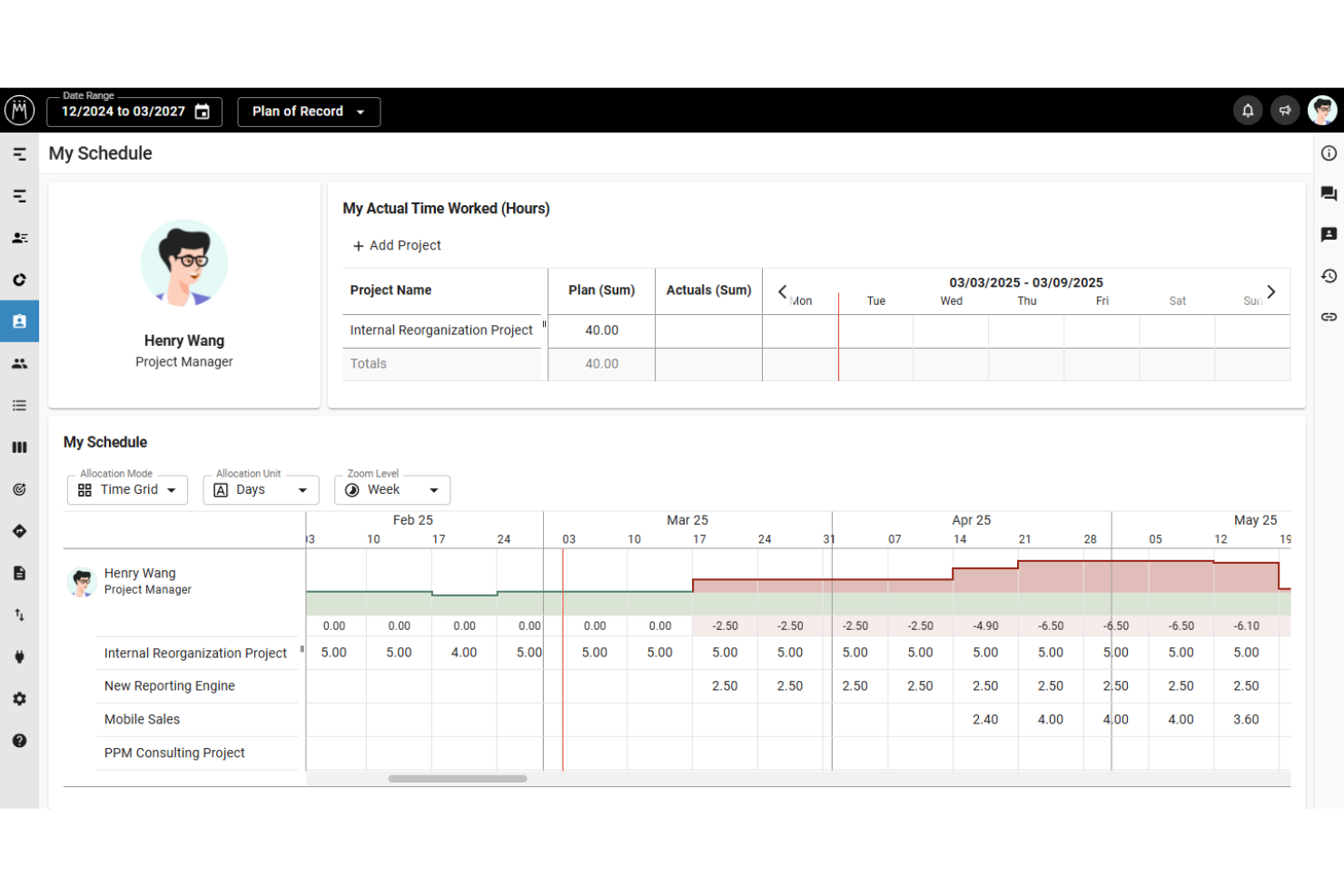
Resource Allocation: Allocate resources wisely across projects to prevent overbooking and ensure optimal productivity. This keeps your team focused and balanced.
Scenario Planning: Test different project scenarios to see potential outcomes and make informed decisions. This feature empowers you to anticipate challenges and plan accordingly.
Portfolio Management: Manage multiple projects in one view, helping you prioritize and align them with your strategic goals. This offers a comprehensive look at your project landscape.
Capacity Management: Monitor resource capacity to ensure your team isn’t overloaded, enabling better workload distribution. It ensures your resources are used efficiently.

Ease of Use
Meisterplan shines in user-friendliness with its intuitive drag-and-drop interface, making project adjustments simple for your team. Users appreciate the clear visual roadmaps that break down complex strategies into understandable graphics. Scenario planning lets you test different outcomes easily, adding to its usability. Compared to other tools, Meisterplan offers a straightforward experience that doesn’t overwhelm, helping your team focus on what matters.
Meisterplan Specs
- API
- Approval Workflows
- Audit Trail
- Budgeting
- Calendar Management
- Compliance Tracking
- Custom Reports
- Customer Management
- Dashboard
- Data Export
- Data Import
- Data Visualization
- Document Management
- Expense Tracking
- External Integrations
- Forecasting
- Inventory Tracking
- Multi-Currency
- Multi-User
- Notifications
- Prioritization
- Process Reporting
- Project Management
- Resource Management
- Risk Assessment
- Roadmapping
- Scheduling
- Supplier Management
- Third-Party Plugins/Add-Ons
- Workflow Management
Alternatives to Meisterplan




Meisterplan FAQs
How does Meisterplan handle data security and compliance?
Can Meisterplan support remote teams?
What kind of customer support can I expect with Meisterplan?
Is there a learning curve for new users?
Can I customize Meisterplan to fit my team's needs?
How does Meisterplan handle project updates and changes?
What resources are available for training and onboarding?
How can Meisterplan help with strategic alignment?
Vad händer härnäst?
Vill du komma i kontakt med andra digitala projektledare för att dela resurser och bästa praxis? Gå med i vår medlemsgrupp och få tillgång till över 100 mallar, prover och exempel, och kom i kontakt med hundratals andra digitala projektledare på Slack.