

Os 10 melhores softwares de gestão de recursos para pequenas empresas

Melhor software de gestão de recursos para pequenas empresas


Com tantas opções de software de gestão de recursos disponíveis no mercado, escolher a solução certa para a sua pequena empresa pode ser uma tarefa difícil. Procura simplificar a alocação de recursos e melhorar a entrega de projetos, mas o desafio está em encontrar a ferramenta que se adapta às suas necessidades específicas.
Compreendo esta dificuldade e estou aqui para o ajudar! Com base na minha vasta experiência com diversas ferramentas digitais de gestão de projetos, vou simplificar o seu processo de decisão.
Eis as minhas escolhas para o melhor software de gestão de recursos para pequenas empresas.
Why Trust Our Software Recommendations
Our team has been testing and reviewing software since 2012. As project managers ourselves, we know how difficult—and important—it is to choose the right software.
For this guide, we evaluated tools using hands-on testing and independent research, scoring tools using our selection criteria. We also draw on insights from industry thought leaders and practicing project management experts.
Our reviews reflect our human editorial judgment, not a sales pitch.
Expert reviewers:
Tabela comparativa: software de gestão de recursos para pequenas empresas
Esta tabela comparativa resume os detalhes de preços das minhas principais escolhas de software de gestão de recursos para pequenas empresas:
| Tool | Best For | Trial Info | Price | ||
|---|---|---|---|---|---|
| 1 | Best for staffing against project budgets | 14-day free trial + 30-day money back guarantee | From $8.50/user/month (billed annually) | Website | |
| 2 | Best for linking staffing to project margins | 30-day free trial + demo available | From $7/user/month | Website | |
| 3 | Best for tying team hours to project profit | Free plan + 14-day free trial + free demo available | From $2/user/month | Website | |
| 4 | Best for staffing plans tied to project margins | Free demo available | Pricing upon request | Website | |
| 5 | Best for sales-pipeline staffing forecasts | Free plan + free trial + free demo available | From $39/user/month | Website | |
| 6 | Best for sales pipeline capacity planning | 30-day free trial | From $9.50/user/month (billed annually) | Website | |
| 7 | Best for planning staff, rooms and equipment | Free 14-day trial | From $5/user/month (billed annually) | Website | |
| 8 | Best for staffing around project margins | 14-day free trial + demo available | Pricing upon request | Website | |
| 9 | Best for coordinating crews and shared assets | 30-day free trial | From $4.16/user/month (billed annually) | Website | |
| 10 | Best for labor-cost-based capacity planning | Free demo available | From $12/user/month (billed annually) | Website |
Avaliações do melhor software de gestão de recursos para pequenas empresas
Descubra resumos esclarecedores dos principais softwares de gestão de recursos concebidos para pequenas empresas. Cada avaliação detalha as vantagens, desvantagens, funcionalidades e casos de utilização.

awork
Best for staffing against project budgets

awork is a project and resource management platform built for agencies and small teams, combining workload visualization, capacity bookings, time tracking, and budget reporting across multiple projects.
Who Is awork Best For?
awork is a strong fit for agency teams and small creative operations that need to staff projects against budgets without juggling multiple tools.
Why I Picked awork
I picked awork as one of the best because it's purpose-built for agencies that need to staff projects against real budgets, not just assign tasks. I love how the capacity bookings feature lets you reserve a team member for a project phase, then the plan-vs-actual view immediately shows how tracked hours are stacking up against the budget. The workload bar in the User View flags overbooking across concurrent projects, so you can rebalance before a deadline slips.
awork Key Features
- Skill-based staffing filters: Filter team members by skill, role, or seniority to find the right person for an upcoming project phase.
- Smart alerts: Set up automated email notifications for project conditions like overdue tasks, budget thresholds, or inactivity periods.
- Retainer budget tracking: Monitor recurring monthly budgets alongside tracked hours, including future months' currently set budget.
- awork Connect: Share selected projects with clients or freelancers and assign project-specific roles to control their access.
awork Integrations
awork offers integrations with Google Calendar, Microsoft calendar, iCloud calendar, Personio, MOCO, and OS/. It also provides a REST API and connects with 500+ apps through n8n.
Pros and Cons
Pros:
- Skill-based staffing and adjustable team bookings
- Tracked hours connect directly to project budgets
- Cross-project workload and capacity visibility
Cons:
- Calendar items can still burden absent days
- Planner timelines can feel cluttered

Float
Best for linking staffing to project margins
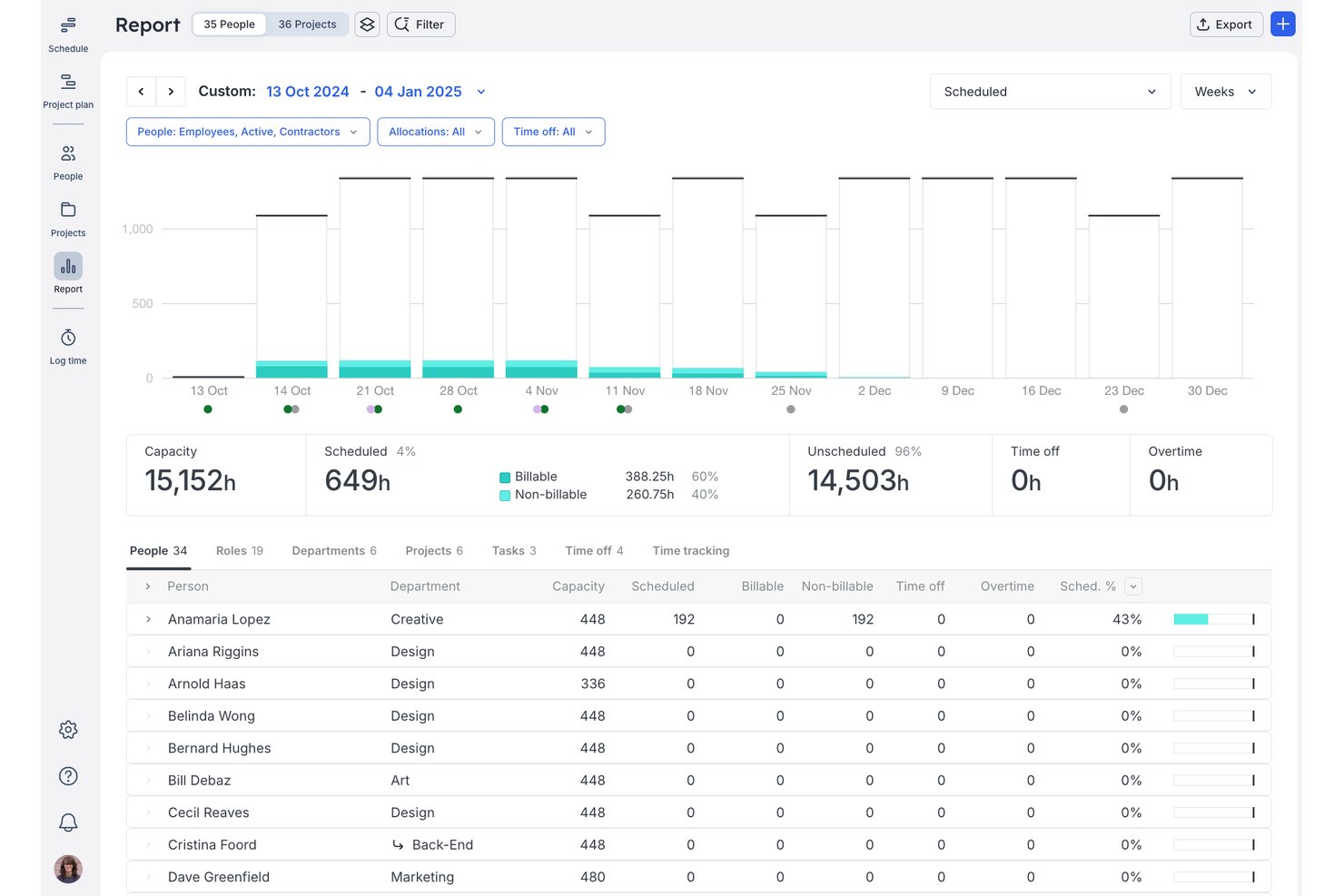
Float is a resource management platform that covers team scheduling, capacity planning, time tracking, and project financial reporting in a single visual workspace.
Who Is Float Best For?
Float is a strong fit for operations managers and resource leads at small-to-mid-sized teams who need to balance staffing across multiple projects while keeping a close eye on budgets and margins.
Why I Picked Float
Float earns its spot on my shortlist because of how tightly it connects staffing decisions to project margins. I love that the project finance dashboard lets me see revenue, costs, and delivery-cost trends alongside scheduled allocations, so I can catch margin risk before it becomes a real problem. Pair that with client rate cards and budget-versus-actuals tracking, and I can see exactly where billable time is slipping on any given project.
Float Key Features
- Drag-and-drop scheduling: Adjust team assignments directly on the visual schedule by dragging allocations to new dates, hours, or team members.
- Time-off and holiday management: Book leave, run approval workflows, and automatically block public holidays by country and region to keep capacity accurate.
- Prefilled timesheets: Populate team timesheets from scheduled work so members can confirm or adjust rather than log time from scratch.
- AI-assisted staffing: Get best-fit staffing suggestions for unassigned project roles based on each person's role fit and current availability.
Float Integrations
Float offers a native Google Calendar integration, plus integrations with Aprimo Productivity Management and Karbon. It supports marketplace integrations via Zapier for Asana, Basecamp, ClickUp, HubSpot, Jira, and Salesforce, along with a REST API supporting JSON and XML.
Pros and Cons
Pros:
- Margin views connect staffing decisions to budgets
- Drag-and-drop rebalancing keeps shifting allocations visible
- Visual schedule exposes cross-project workload imbalances
Cons:
- Historical reporting can require extra steps and exports
- Mobile time entry takes too many steps

Teamdeck
Best for tying team hours to project profit
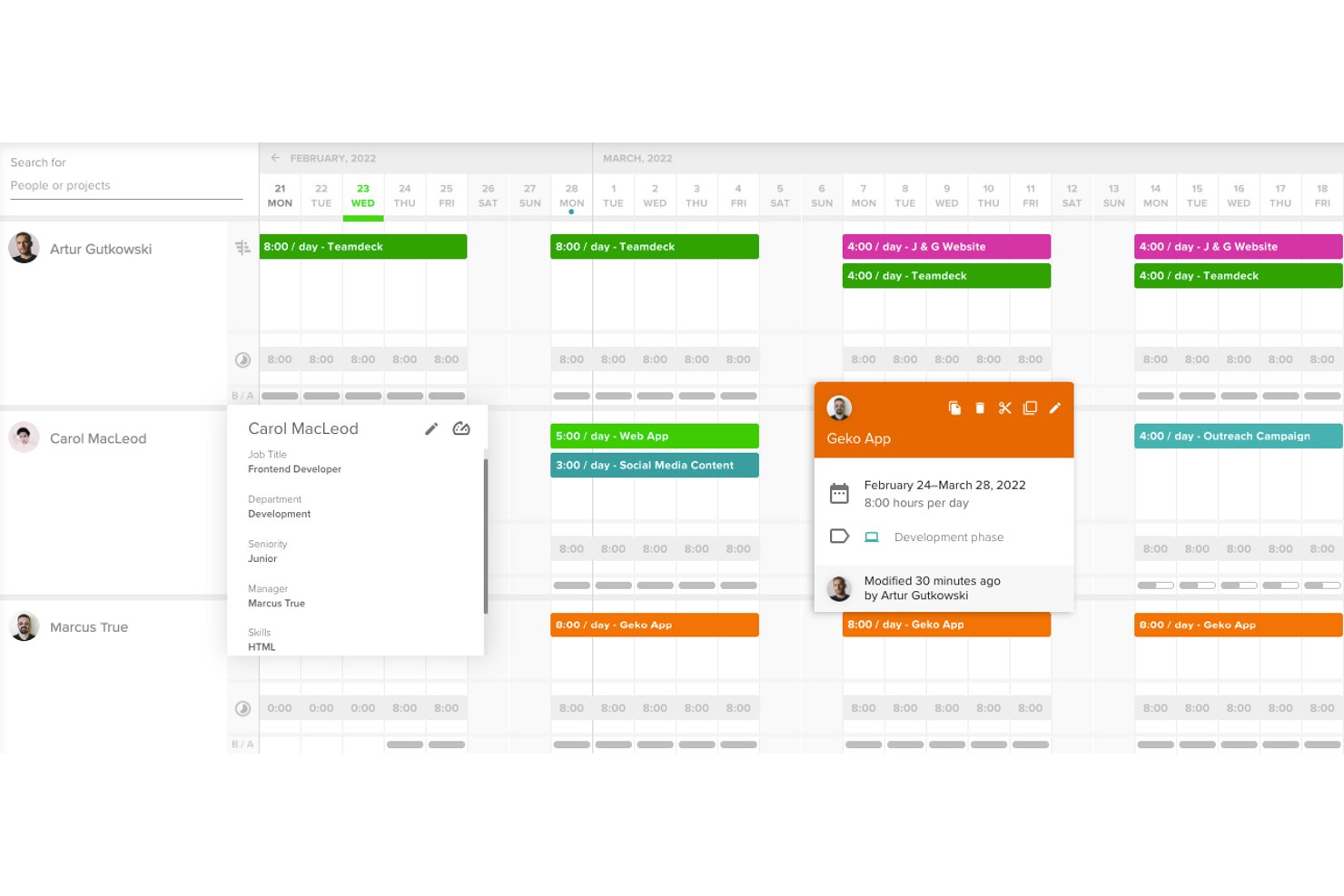
Teamdeck is a resource management platform that combines scheduling, time tracking, leave management, and custom reporting to give teams visibility into how hours are allocated across projects.
Who Is Teamdeck Best For?
Teamdeck is a strong fit for resource and project leads at small agencies or software teams who need to connect tracked hours directly to project profitability.
Why I Picked Teamdeck
I picked Teamdeck as one of the best because it's the only tool on my list that lets you build a custom report calculating project profit directly from tracked hours and hourly rates. You can set up a formula using timesheet data and a custom rate value, then watch billable-hour trends on a line chart to catch projects creeping toward budget overrun. The calendar's color-coded availability bars give you an instant read on who's overbooked before it becomes a problem.
Teamdeck Key Features
- Color-coded availability bars: The calendar displays red, grey, and white bars to show overbooking, full allocation, or open availability at a glance.
- Leave request and approval workflow: Team members submit time-off requests directly in the app, and managers approve or reject them with the confirmed days reflected in the schedule.
- Custom report builder: Build reports from scratch using charts, tables, custom values, and more than 30 formula functions to analyze team and project data.
- Booking tags: Assign up to five tags to any booking to categorize assignments by client, project type, or other dimensions for filtering in the calendar and reports.
Teamdeck Integrations
Teamdeck offers four native integrations: Podio, Sage HR, Slack, and Google Calendar. It also provides REST API access and webhooks for custom integrations, plus Zapier availability by invitation.
Pros and Cons
Pros:
- Leave requests appear alongside assignments
- Availability bars flag overbooking at a glance
- Custom profit reports connect hours and rates
Cons:
- Report setup can feel cumbersome
- Capacity forecasts require manual workarounds

Parallax
Best for staffing plans tied to project margins

Parallax is a resource planning and forecasting platform for professional services firms that combines CRM pipeline data, time tracking, and project financials to manage capacity, utilization, and staffing.
Who Is Parallax Best For?
Parallax fits agencies and professional services teams whose delivery leaders need staffing decisions connected directly to project margins and pipeline forecasts.
Why I Picked Parallax
I've included Parallax in my top picks because it's the only tool I've seen that directly connects staffing decisions to project margins, not just headcount or hours. Its Hiring Forecast pulls in open CRM pipeline alongside active project plans to show upcoming capacity gaps before they become missed deadlines or margin losses. Project Shaper then lets delivery leads model out those staffing decisions against real financial figures, so a resourcing call is also a profitability call.
Parallax Key Features
- Assignments View: A timeline-based view that organizes team allocations by person or project, with color-coded cell shading to flag capacity overages.
- Utilization Overview report: Tracks planned vs. actual utilization by department, role, or person across weekly, monthly, quarterly, and yearly periods.
- Project and people tagging: Lets you apply tags to people, projects, and roles to filter views and match team members to open roles by skills, tools, or experience.
- Active Projects alerts: Flags unallocated time, unassigned roles, and projects forecast to exceed budget by 20% or more from a single listing view.
Parallax Integrations
Parallax offers native integrations with HubSpot, Pipedrive, Salesforce, Copper, Harvest, Clockify, Toggl, Asana, and Jira. It also provides public and private APIs, a read-only reporting API, and webhooks for custom integrations.
Pros and Cons
Pros:
- Connects utilization forecasts with project financials
- Makes cross-project team allocations easier to assess
- Forecasts pipeline demand alongside active project capacity
Cons:
- Substantial setup can delay trusted staffing data
- No equipment scheduling for non-person resources

Ravetree
Best for sales-pipeline staffing forecasts

Ravetree is a work management platform that brings together project scheduling, resource planning, utilization tracking, time logging, and billing in one place.
Who Is Ravetree Best For?
Ravetree suits small agencies and client-service teams that need to connect sales pipeline visibility, resource scheduling, and billing in a single platform.
Why I Picked Ravetree
I've included Ravetree in my top picks because it's one of the few work management platforms that connects your CRM pipeline directly to resource scheduling. When a deal moves forward in Ravetree, you can use soft bookings on that pipeline project to forecast staffing needs before the contract is signed. I also like how the Schedule page shows utilization heat maps by team, role, or department, so you can see exactly where capacity exists before committing a new client to a timeline.
Ravetree Key Features
- Billable utilization targets: Set a billable-utilization target for each employee and run reports to track performance against those goals.
- Drag-and-drop scheduling: Assign unscheduled work items to a specific person and day directly from the Schedule page's unscheduled list.
- CRM deal-to-project conversion: Winning a deal in the built-in CRM can automatically create a project from a linked template.
- Custom time and expense reports: Build, save, and export reports that combine time logs and expenses across projects and clients.
Ravetree Integrations
Ravetree offers native integrations with Google Calendar, Outlook Calendar, QuickBooks, Stripe, HubSpot, Google Drive, Dropbox, OneDrive, and Box. Its Open API supports custom integrations with work items, users, skills, time-off plans, and time logs.
Pros and Cons
Pros:
- Reviewers value project-linked billable time reports
- Heat maps expose capacity across teams
- Pipeline soft bookings forecast staffing before contracts
Cons:
- Dense schedules can overwhelm larger teams
- No equipment scheduling for mixed resources

Best for sales pipeline capacity planning

EG Silverbucket is a project resource planning tool that combines workload visualization, capacity forecasting, scenario planning, and utilization reporting across teams and portfolios.
Who Is EG Silverbucket Best For?
EG Silverbucket is a strong fit for resource managers and project leads at professional services firms who need to plan capacity across a live sales pipeline and active project portfolio.
Why I Picked EG Silverbucket
I picked EG Silverbucket as one of the best because of how well it handles capacity planning across a live sales pipeline. I love that you can model unconfirmed pipeline deals alongside your confirmed project work in scenario planning, surfacing over- or under-capacity months in advance before you've committed a single resource. The workload overview then lets me drill from company-wide capacity down to an individual, with color-coded conflict indicators that distinguish pipeline demand from billable work and internal tasks.
EG Silverbucket Key Features
- Color-coded workload overview: Drill down from company-wide capacity to individual allocations using visual conflict and over-allocation indicators.
- Holiday and absence management: Record time off directly in the tool so availability is automatically factored into allocation decisions.
- Planned-versus-actual reporting: Compare logged hours against planned allocations to track budget variances across projects and teams.
- Role placeholder conversion: Create unassigned role placeholders that can be matched to candidates by availability and competency, then confirmed with one click.
EG Silverbucket Integrations
EG Silverbucket connects with Power BI for live dashboards and Excel for scheduled exports. Its REST API supports custom data exchange, while CSV and XLSX imports support bulk data transfers.
Pros and Cons
Pros:
- Forecasts help plan hiring and project starts
- Reviewers find allocation changes easy
- Color-coded views separate pipeline demand
Cons:
- Part-time hours complicate availability planning
- Reports offer limited management-level summaries

Best for planning staff, rooms and equipment

eResource Scheduler is a resource scheduling and management tool that lets teams plan, allocate, and track people, equipment, and rooms across projects using drag-and-drop scheduling, workload heatmaps, and capacity forecasting.
Who Is eResource Scheduler Best For?
eResource Scheduler is a strong fit for operations managers and team leads at small to mid-sized organizations that need to schedule people, rooms, and equipment across multiple projects from one place.
Why I Picked eResource Scheduler
I picked eResource Scheduler as one of the best because it's one of the few tools that lets you schedule people, rooms, and equipment from a single scheduling chart, which matters when your team juggles multiple project types at once. I especially like the drag-and-drop booking interface: you can split, extend, or move assignments across resources on the fly, and color-coded heatmaps show overloads the moment a booking pushes someone past their threshold. The capacity heatmaps and multi-project views make it easy to spot staffing gaps before they become real problems.
eResource Scheduler Key Features
- Skills-based resource matching: Filter resources by skills, roles, and availability, and receive system-suggested matches with ranked match scores for open requests.
- Timesheet approvals: Configure manual or automatic timesheet approval workflows with resource- and project-level approval rules and color-coded status indicators.
- Configurable overload thresholds: Set individual utilization thresholds per resource so the scheduling chart flags overloads the moment a booking exceeds that limit.
- Multi-time-zone scheduling: Assign resource- and booking-level time zones with automatic conversions to support teams working across different regions.
eResource Scheduler Integrations
Documented integrations include Jira, Outlook, Slack, Apple Calendar, and Google Calendar, though Google Calendar two-way sync is marked “Coming Soon.” eResource Scheduler also offers a REST API and webhooks for custom integrations.
Pros and Cons
Pros:
- Forecast reports help spot capacity shortages
- Drag-and-drop booking changes support quick rebalancing
- Visual workload views reveal resource gaps
Cons:
- Some routine tasks require too many clicks
- Report customization may limit detailed analysis


Scoro is a professional services automation platform that brings together resource planning, project delivery, time tracking, utilization reporting, and client billing in one system.
Who Is Scoro Best For?
Scoro fits growing professional services firms—agencies, consultancies, and similar teams—that need to staff projects with margin in mind from the first booking.
Why I Picked Scoro
I picked Scoro as one of the best because it's the only tool on this list that ties resource booking directly to project margins. Before you confirm a booking, you can see labor costs by role and track how time logged against a project moves the margin needle in real time. The Watchdog feature alerts you when forecasted budget burn crosses a threshold, so you catch overservicing before it quietly erodes profit on a fixed-fee engagement.
Scoro Key Features
- Utilization report: Compare each team member's capacity against booked, planned, and logged time, with filters for billable vs. total hours.
- Tentative bookings: Reserve a team member's time provisionally to test staffing scenarios before committing to a final schedule.
- Planner: Drag unscheduled tasks directly into individual team schedules, with overtime indicators and options to distribute work without exceeding capacity.
- BambooHR leave sync: Pull approved time-off requests from BambooHR into Scoro so leave automatically reduces available capacity in resource views.
Scoro Integrations
Scoro lists 40+ integrations, including native Google Calendar, BambooHR, Jira, QuickBooks, Slack, and HubSpot connections. It also provides a REST/HTTP JSON API with webhooks and supports Zapier.
Pros and Cons
Pros:
- Utilization reports separate billable hours
- Heatmaps flag overloaded or unavailable staff
- Project bookings connect staffing to margins
Cons:
- Broad workflows can overwhelm lean teams
- Schedule changes can take extra steps

Best for coordinating crews and shared assets
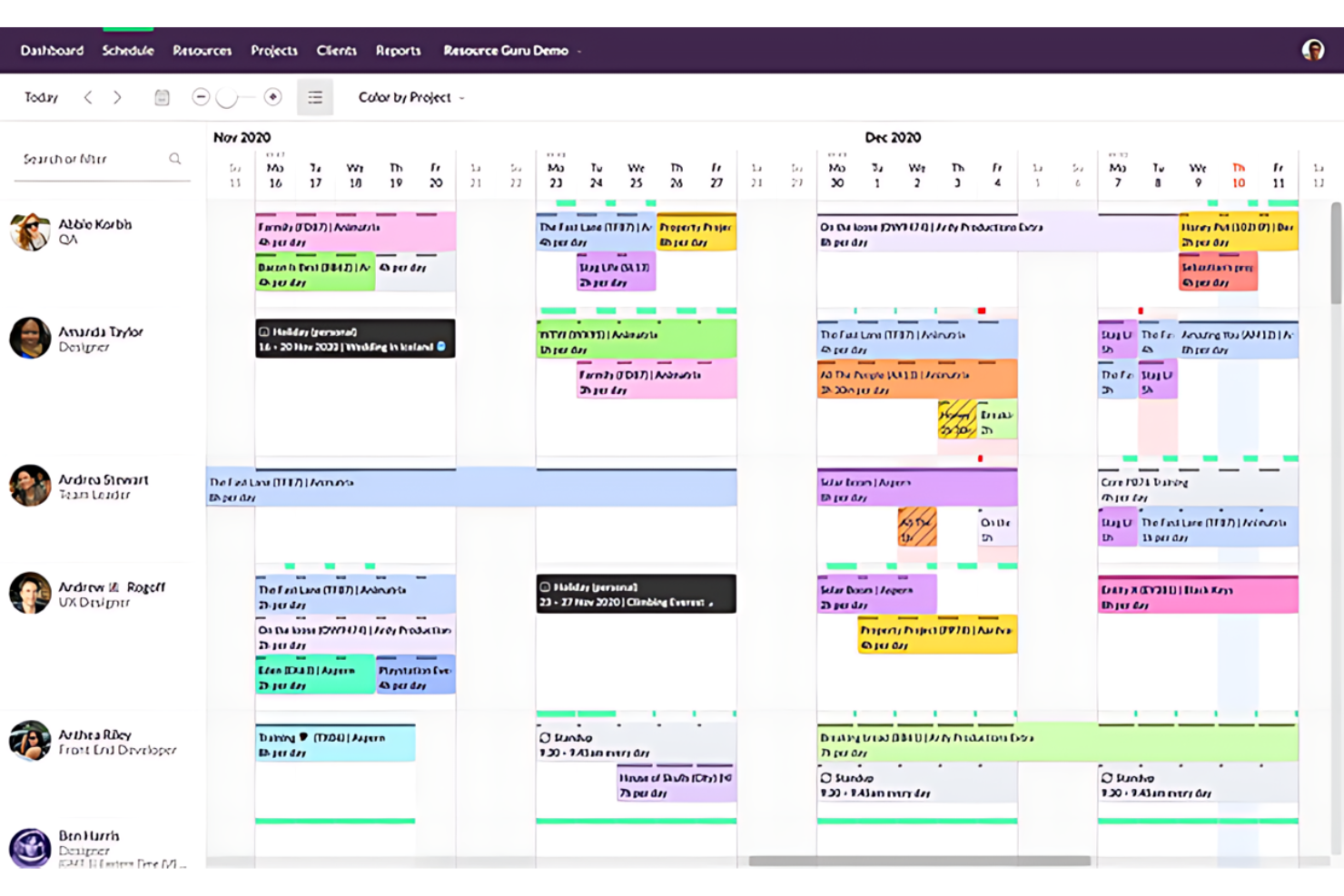
Resource Guru is a resource management and scheduling platform that lets you book people, equipment, and rooms across projects, track capacity and utilization, and manage team availability and time off in a shared schedule.
Who Is Resource Guru Best For?
Resource Guru is a strong fit for teams that schedule a mix of people, equipment, and rooms across multiple projects simultaneously.
Why I Picked Resource Guru
Resource Guru earns its spot on my shortlist because of how naturally it handles scheduling across people, equipment, and rooms in a single shared calendar. When you're coordinating field crews with shared gear, the clash detection and waiting list mean no two bookings silently compete for the same van or A/V kit. I also like that drag-and-drop lets you reassign a booking the moment a crew member calls in sick, updating the whole team's view instantly.
Resource Guru Key Features
- Leave management: Record vacations, sick days, and other absences directly in the shared schedule so they're visible alongside project bookings.
- Timesheet tracking: Log actual hours worked against projects and tasks, with entries pre-populated from scheduled bookings to reduce manual entry.
- Approval workflow: Assign booking approvers for in-demand people or resources so every request is reviewed before it's confirmed.
- Project budget tracking: Set budgets by fee or hours and see a live budget projection in the schedule that turns red when spending exceeds the limit.
Resource Guru Integrations
Resource Guru offers native integrations with Google Calendar, Outlook Calendar, Jira, Asana, monday.com, ClickUp, Trello, Slack, Microsoft Teams, and Google Sheets. It also supports REST-style API access, webhooks, and Zapier.
Pros and Cons
Pros:
- Quick setup without outside support
- Leave visible beside crew availability
- Clear calendar for people and equipment
Cons:
- Detailed utilization reporting sits behind higher tiers
- Per-resource billing penalizes variable contractor rosters
New Product Updates from Resource Guru

Resource Guru Adds More Control Over Calendar Sync
Resource Guru adds more control over Google and Outlook Calendar sync, including source calendar selection and destination calendar options. These updates help users manage external events and Resource Guru bookings with less clutter. For more information, visit Resource Guru’s official site.
 .

ClickTime
Best for labor-cost-based capacity planning
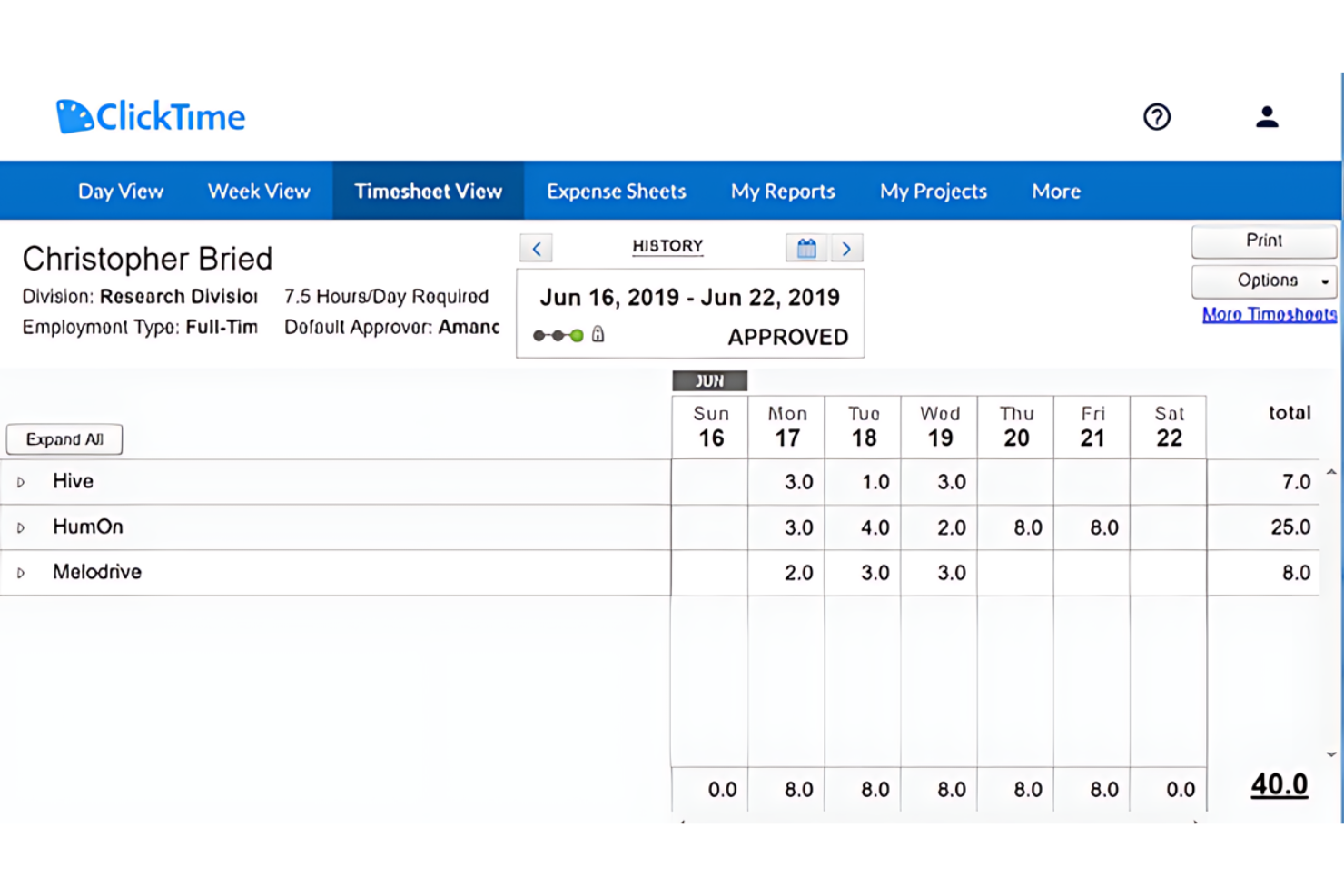
ClickTime is a time tracking and resource management platform that connects labor-cost budgeting, staff allocation, capacity planning, and utilization reporting across projects and teams.
Who Is ClickTime Best For?
ClickTime suits operations managers and project leads who need to connect staff allocations directly to labor-cost budgets and track actual spend against plan.
Why I Picked ClickTime
I picked ClickTime as one of the best because it's the only tool on my list that ties staff allocations directly to labor-cost budgets in real time. When I enter an allocation in the resource grid, it immediately updates both the project's remaining budget and that person's available hours. The Capacity View heat map then shows me three to six months of allocation trends, color-coded by utilization percentage, so I can spot who's overcommitted before it becomes a problem.
ClickTime Key Features
- Utilization reporting: The dashboard tracks billable versus non-billable hours and compares planned against actual utilization across your team.
- Time-off management: Staff can submit leave requests for manager approval, with accruals, company holidays, and calendar feeds built in.
- Role-based permissions: Managers can be granted view-only or edit access to allocations without exposing salary or billing rate data.
- Project budget tracking: Labor-cost budgets are set at the project level, with burn rate, actuals versus estimates, and over-budget alerts available.
ClickTime Integrations
ClickTime lists 50+ integrations, including native connections with Jira, Asana, Google Calendar, Slack, Salesforce, QuickBooks, Sage Intacct, NetSuite, Bamboo HR, and Rippling. It also offers a REST API, custom integrations, and Zapier.
Pros and Cons
Pros:
- Reviewers value project and billing reports
- Multi-month heat maps reveal capacity gaps early
- Connects staff allocations directly to labor budgets
Cons:
- No equipment scheduling or drag-and-drop rebalancing
- Resource planning requires higher-tier access
Outros softwares de gestão de recursos para pequenas empresas a considerar
Segue-se uma lista de outros softwares de gestão de recursos para pequenas empresas que selecionámos, mas que não chegaram à lista principal. Vale a pena conhecê-los!
- Saviom
For coordinating staff and equipment
- Hub Planner by Milient
For linking capacity to project margins
- Smartsheet
For resource planning alongside operations
- Paymo
For factoring leave into team plans
- Wrike
For planning people and shared assets
- Kantata
For staffing holds versus task schedules
- Celoxis
For profit-aware resource planning
- Teamwork.com
For planning capacity around margins
- Runn
For margin-aware project staffing
- ClickUp
For team capacity and inventory tracking


How I Evaluate Resource Management Software for Small Businesses
I split my evaluation into three parts, with core functionality carrying the most weight: assigning people to projects and showing team availability and workload. Next, I consider differentiators such as drag-and-drop rebalancing when priorities shift. Finally, I weigh onboarding, support, and pricing suited to small teams.
Core Functionality (Table Stakes For This List)
When I'm selecting tools for my list, I score each one on a scale from 0 (does not offer the functionality) to 5 (excels in this area) for each core functionality listed below. I then convert the total into a percentage to help assess each tool's overall fit, with extra weight on any functionalities I’ve deemed essential.
- Resource Scheduling (Essential): I look for timeline-based assignments for people or equipment, with conflicts visible when a team member is booked across overlapping projects.
- Workload Visibility (Essential): I check whether a calendar, timeline, or heatmap shows capacity across projects, making it easy to spot who’s overloaded before assigning more work.
- Capacity Planning: I assess how well the tool helps forecast team availability against upcoming project demand, such as when several new client projects may start together.
- Utilization Tracking: I look for reports that compare planned or logged time with availability, and distinguish billable from non-billable work where relevant.
- Availability Management: I check whether time off, holidays, and different work schedules factor into capacity so assignments reflect who’s actually available.
- Small-Team Fit: I consider whether setup, pricing, and user limits suit a small business without requiring an enterprise rollout.
Once I have a list of tools that meet the criteria, I consider what sets each platform apart.
Differentiating Factors (What Sets Vendors Apart)
Here's how I compare and contrast different vendors:
Standout Features
I look for drag-and-drop rebalancing that lets you move assignments between people without rebuilding a schedule. When a client escalates a deadline, shifting work should take seconds. PTO and leave sync matters just as much—if holidays aren't reflected automatically, your capacity numbers lie. I also evaluate multi-project dashboards, checking whether one view shows resourcing across every active client so you can catch conflicts before they become problems.
Beyond Features
I check whether a tool offers month-to-month, per-user pricing and a free trial so you can validate fit before committing budget. Integration depth matters just as much—I look for native connections to Google Calendar, Slack, or QuickBooks that keep resourcing data linked to the tools your team already uses daily. I also evaluate how well a platform scales from five users to fifty without forcing a migration or burying useful reports behind enterprise-tier paywalls.
Como escolher um software de gestão de recursos para pequenas empresas
É fácil perder-se em listas extensas de funcionalidades e estruturas de preços complexas. Para o ajudar a manter-se concentrado enquanto analisa o seu processo específico de seleção de software, eis uma lista de fatores a ter em conta:
| Fator | O que considerar |
| Escalabilidade | Certifique-se de que o software consegue acompanhar o crescimento da sua empresa. Procure planos flexíveis que permitam adicionar projetos, membros da equipa ou recursos conforme necessário. |
| Integrações | Verifique se o software se integra com as suas ferramentas existentes, como plataformas de contabilidade, CRM ou gestão de projetos. |
| Personalização | A sua equipa pode ter fluxos de trabalho específicos. Escolha um software que permita personalizar vistas, campos ou painéis de controlo para responder às suas necessidades concretas. |
| Facilidade de utilização | A interface deve ser intuitiva e exigir formação mínima. Procure funcionalidades de arrastar e largar e uma navegação simplificada para que a sua equipa possa começar rapidamente. |
| Orçamento | Compare os planos de preços com o seu orçamento. Tenha em conta custos como subscrições, taxas de configuração e complementos. Opte por um software que ofereça um período experimental gratuito para o testar antes de se comprometer. |
| Medidas de segurança | Os seus dados de recursos têm de estar protegidos. Procure funcionalidades como encriptação, autenticação multifator e controlo de acesso baseado em funções para proteger informações sensíveis. |
| Ferramentas de relatórios | Certifique-se de que o software fornece relatórios detalhados para monitorizar a alocação e utilização de recursos, bem como o progresso dos projetos, ajudando-o a tomar decisões baseadas em dados. |
| Suporte e formação | Escolha um software com suporte rápido, tutoriais e documentação para ajudar a sua equipa a resolver problemas e a tirar o máximo partido da utilização. |
Tendências no software de gestão de recursos para pequenas empresas
O software de gestão de recursos está em constante mudança. As pequenas empresas podem esperar vários novos desenvolvimentos, incluindo os seguintes.
- Integração com plataformas de trabalho remoto: Esta integração permite acompanhar em tempo real a alocação de recursos das equipas remotas, o que é importante, uma vez que apoia o crescimento da força de trabalho remota.
- Previsões baseadas em IA: A inteligência artificial analisa dados anteriores para prever os requisitos futuros dos projetos. Esta tendência na gestão de recursos com IA é interessante porque pode potencialmente reduzir o desperdício e aumentar a eficiência.
- Acesso móvel intuitivo: As interfaces móveis simplificadas permitem que as pequenas empresas gerem os recursos em qualquer lugar, o que é importante para a tomada de decisões em tempo real.
- Funcionalidades de colaboração em tempo real: As equipas podem atualizar e gerir recursos em simultâneo, o que é crucial para manter o ritmo dos projetos.
- Painéis de relatórios personalizáveis: Estes tipos de painéis permitem que as empresas vejam os dados mais importantes. Isto é importante para uma tomada de decisões informada.
Estas tendências influenciam a forma como as pequenas empresas gerem os seus recursos, tanto no presente como no futuro.
O que é o software de gestão de recursos para pequenas empresas?
O software de gestão de recursos para pequenas empresas é uma ferramenta digital concebida para as ajudar a gerir e alocar os seus recursos de forma eficaz. É utilizado por proprietários de empresas, gestores de projetos e líderes de equipas para garantir que recursos como pessoal, equipamento e materiais estão disponíveis quando necessários para satisfazer as exigências e os prazos dos projetos.
O software inclui normalmente funcionalidades de calendarização, acompanhamento e elaboração de relatórios sobre a utilização dos recursos. Permite aos utilizadores ver a disponibilidade e as limitações dos recursos, tomar decisões informadas e ajustar as alocações para manter os prazos e os orçamentos dos projetos.
Funcionalidades do software de gestão de recursos para pequenas empresas
Escolher o software de gestão de recursos adequado é importante para as pequenas empresas que procuram alocar os seus recursos limitados. Eis algumas das funcionalidades mais importantes a considerar.
- Interface intuitiva: Uma interface simples poupa tempo e reduz a curva de aprendizagem, permitindo que os membros da equipa se concentrem nas suas tarefas em vez de aprenderem a utilizar a ferramenta.
- Calendarização de recursos: As ferramentas de calendarização de recursos garantem que os recursos certos trabalham nas tarefas certas, evitando a sobrealocação e o esgotamento.
- Acompanhamento do tempo: Um acompanhamento preciso é essencial para a faturação e a análise da produtividade, uma vez que ajuda a compreender quanto tempo é dedicado a tarefas e projetos específicos.
- Previsão de projetos: As empresas podem planear prevendo os requisitos futuros dos projetos e evitar correrias de última hora para obter recursos.
- Relatórios em tempo real: Os relatórios em tempo real fornecem informações atualizadas, permitindo ajustes rápidos à alocação de recursos.
- Gestão do orçamento: Esta funcionalidade ajuda a garantir que os projetos se mantêm dentro do orçamento, o que é particularmente importante para pequenas empresas com restrições financeiras mais apertadas.
- Ferramentas de colaboração: Ao permitir que os membros da equipa colaborem sem problemas, as ferramentas de colaboração ajudam a manter a coesão e o ritmo dos projetos.
- Capacidades de integração: A integração com sistemas e software existentes reduz a necessidade de introduzir dados duplicados e mantém a consistência entre plataformas.
- Opções de personalização: A personalização permite que a ferramenta se adapte aos processos e requisitos únicos da empresa.
- Acessibilidade móvel: A acessibilidade móvel garante que os membros da equipa podem atualizar e consultar os recursos a qualquer hora e em qualquer lugar, mantendo todos sincronizados.
Benefícios do software de gestão de recursos para pequenas empresas
O software de gestão de recursos pode transformar a forma como as pequenas empresas melhoram a eficiência e a produtividade. Eis cinco benefícios principais que o software de gestão de recursos pode proporcionar aos utilizadores e às organizações.
- Maior visibilidade dos projetos: O software de gestão de recursos proporciona às empresas uma visão clara dos seus projetos, permitindo-lhes acompanhar o progresso e a atribuição de recursos em tempo real.
- Melhor colaboração entre equipas: À semelhança do software de gestão de tarefas para pequenas empresas, o software centraliza a comunicação e os detalhes dos projetos, promovendo um melhor trabalho em equipa e ajudando a evitar mal-entendidos e atrasos.
- Afetação eficiente de recursos: O software distribui eficazmente as tarefas e os recursos, garantindo que nenhum membro da equipa fica sobrecarregado enquanto outros são subutilizados.
- Poupança de custos: Com uma melhor gestão de recursos, as empresas podem reduzir o desperdício e garantir que cada dólar é gasto onde é mais necessário, conduzindo a potenciais reduções de custos.
- Tomada de decisões baseada em dados: O software fornece informações valiosas e análises de dados, permitindo às empresas tomar decisões fundamentadas sobre os projetos e a distribuição de recursos.
Leia mais: Pretende gerir os seus recursos de inventário? Consulte a nossa lista de ferramentas de gestão de recursos de inventário.
Custos e preços do software de gestão de recursos para pequenas empresas
Segue-se uma tabela que resume os preços das opções de planos de software de gestão de recursos concebido para pequenas empresas, juntamente com as funcionalidades habitualmente incluídas em cada plano.
Tabela de comparação de planos de software de gestão de recursos para pequenas empresas
| Tipo de plano | Preço médio | Funcionalidades comuns |
| Gratuito | $0 | Agendamento básico de recursos, Projetos limitados, Relatórios básicos |
| Básico | $10 - $20/utilizador/mês | Agendamento melhorado, Registo de tempo, Análises básicas |
| Profissional | $20 - $40/utilizador/mês | Planeamento avançado de recursos, Colaboração em tempo real, Conjunto completo de ferramentas de gestão de projetos |
| Empresarial | Preços personalizados | Integrações personalizadas, Funcionalidades de segurança avançadas, Integração e suporte personalizados |
Ao considerar um plano de software de gestão de recursos, os compradores de software para pequenas empresas devem avaliar as funcionalidades tendo em conta as necessidades da sua empresa. É também aconselhável procurar opções que ofereçam um período experimental gratuito para testar o software antes de o comprar.
Perguntas frequentes sobre software de gestão de recursos para pequenas empresas
Eis algumas perguntas frequentes sobre software de gestão de recursos para pequenas empresas.
Existem ferramentas de gestão de recursos económicas adequadas para pequenas empresas?
Sim, existem ferramentas de gestão de recursos económicas concebidas para pequenas empresas. Muitas oferecem modelos de preços escaláveis com base no número de utilizadores ou recursos, permitindo às empresas pagar apenas pelo que necessitam. Algumas disponibilizam até versões gratuitas com funcionalidades básicas.
É possível integrar o software de gestão de recursos com outros sistemas empresariais?
Muitas soluções de software de gestão de recursos oferecem capacidades de integração com outros sistemas empresariais, como software de contabilidade, sistemas de gestão de relações com clientes (CRM) ou software de bases de dados de clientes e ferramentas de gestão de projetos. Isto permite uma abordagem mais coesa à gestão das operações empresariais.
É difícil implementar software de gestão de recursos numa pequena empresa?
A dificuldade de implementar software de gestão de recursos pode variar, mas muitos fornecedores procuram tornar o processo tão simples quanto possível. Para facilitar a transição, procure software com interfaces intuitivas, bom apoio ao cliente e recursos como tutoriais e formação
De que forma o software de gestão de recursos melhora a entrega de projetos?
O software de gestão de recursos melhora a entrega de projetos ao proporcionar uma visão clara da alocação de recursos, identificar potenciais estrangulamentos e permitir a realização proativa de ajustes. Isto conduz a melhores prazos de projeto, uma melhor gestão do orçamento e um maior sucesso global do projeto
Que tipo de apoio posso esperar dos fornecedores de software de gestão de recursos?
As opções de apoio podem variar consoante o fornecedor, mas normalmente pode esperar uma variedade de opções, incluindo documentação online, apoio por e-mail, chat em direto e apoio telefónico. Alguns fornecedores podem também disponibilizar gestores de conta dedicados ou sessões de formação personalizadas.