Project Brief: What It Is and How to Write One


A project brief is a short, foundational document that aligns your team around what a project is, why it exists, and how you'll deliver it before you get started on the work. In my experience, skipping it is one of the fastest ways a project fails: scope creeps, stakeholders pull in different directions, and no one can agree on what "done" looks like.
This guide covers everything from what to include and who writes it to common mistakes and when to update it. I'll also touch on how project management software can make creating and sharing briefs much easier for distributed teams.
What Is a Project Brief?
A project brief is a short document that defines what a project is, why it's happening, and how you plan to deliver it. It captures the essentials: goals, scope, timeline, stakeholders, and budget, all in one place before any work begins.

It's the single source of truth your team references when they need a reminder of what the project is actually for.
Why a Project Brief Matters
Here's what a good project brief does for your team:
- Aligns Stakeholders Early: Everyone agrees on what success looks like before work starts, not after.
- Controls Scope: A written, approved scope gives you something concrete to reference when requests start expanding.
- Speeds Up Onboarding: New team members get context fast without a 30-minute call.
- Reduces Decision Fatigue: When trade-offs come up mid-project, the brief gives teams a framework for making calls.
- Creates Accountability: Named owners and defined outcomes mean there's less room for ambiguity about who's responsible for what.
A project brief prevents the two most common reasons projects go sideways: misaligned expectations and expanding scope. PMI's research found that 52% of projects experience scope creep or uncontrolled changes. In my experience, projects that skipped a brief are the ones most likely to end up in that statistic.
Project Brief Template
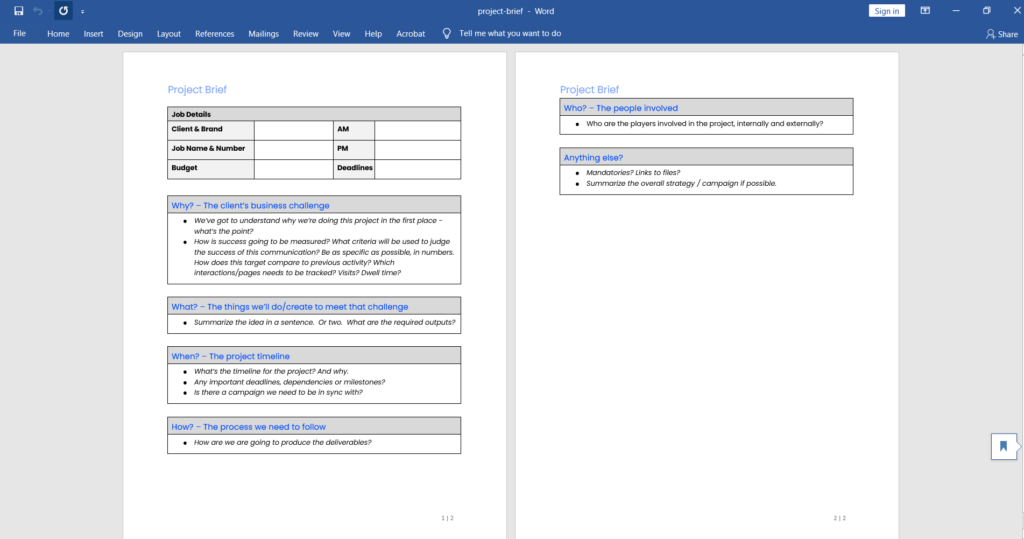
Download my project brief template and sample project brief here. You can customize it to fit your own project briefs (and add your organization's logo and branding), and the sample shows you exactly what should go in each section.
Project Brief Example
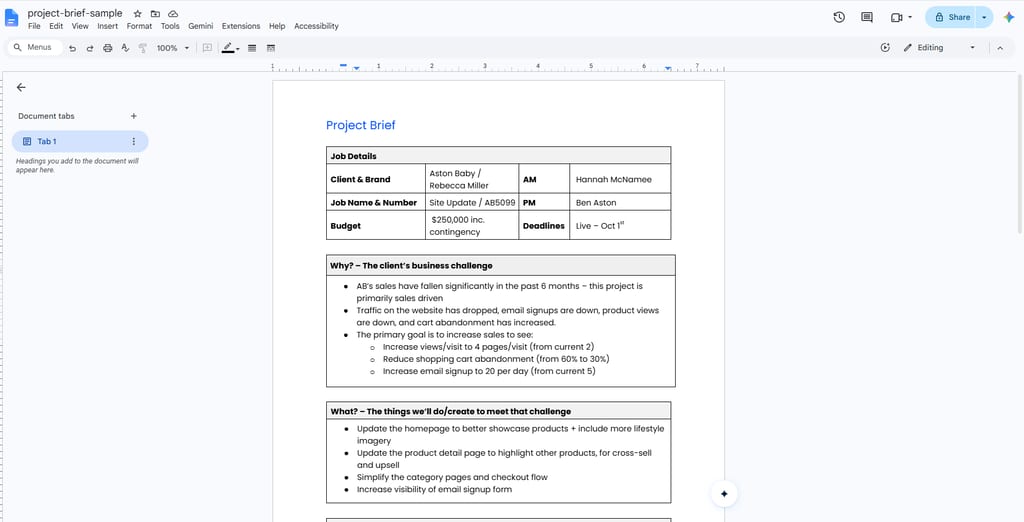
Here's what your project brief might look like when completed:
| Job Details | |||
|---|---|---|---|
| Client & Brand | Aston Baby / Rebecca Miller | AM | Hannah McNamee |
| Job Name & Number | Site Update / AB5099 | PM | Ben Aston |
| Budget | $250,000 inc. contingency | Deadlines | Live – Oct 1st |
| Why? – The client’s business challenge |
|---|
| AB’s sales have fallen significantly in the past 6 months; this project is primarily sales driven Traffic on the website has dropped, email signups are down, product views are down, and cart abandonment has increased. The primary goal is to increase sales via: increasing views/visit to 4 pages/visit (from current 2), reducing shopping cart abandonment (from 60% to 30%), and increasing email signup to 20 per day (from current 5) |
| What? – The things we’ll do/create to meet that challenge |
|---|
| Update the homepage to better showcase products + include more lifestyle imagery Update the product detail page to highlight other products, for cross-sell and upsell Simplify the category pages and checkout flow Increase visibility of email signup form |
| When? – The project timeline |
|---|
| Client kickoff 20th September Live – Nov 1st (deadline driven by the pre-booked paid media holiday campaign.) |
| How? – The process we need to follow |
|---|
| AB’s preference is to start with a discovery phase and create a backlog of prioritized improvements Project will then run in iterative UX/Design + Dev sprints Priority is to address bottom of funnel conversion quick wins ASAP then address the larger site issues as budget / timeline allows. |
| Who? – The people involved |
|---|
| Client: Rebecca Miller (primary stakeholder) DPM Project team: Simon (CD), Suze (Copy), Dave (Strategy) Warren (UX), Rory (Tech), Ben (AM) |
| Anything else? |
|---|
| The client wants to keep the site on Woocommerce and WordPress Previous strategy work on growth of astonbaby.com should be reviewed and referenced throughout this project |

Project Brief vs Other Project Documents
A project brief is often confused with documents that serve different purposes. Use this table to understand where a project brief fits relative to other common project documents:
| Document | Purpose | Typical Length | When It's Created |
|---|---|---|---|
| Project brief | Align team on goals, scope, and approach | 1–2 pages | Project initiation |
| Project charter | Formally authorize the project; define sponsor authority | 2–5 pages | Pre-initiation or initiation |
| Project plan | Detailed task breakdown, schedule, and resource plan | 5–20+ pages | Planning phase |
| Creative brief | Guide creative output (design, copy, campaigns) | 1 page | Before creative work begins |
| Project proposal | Make a case for funding or approval | Varies | Before the project is approved |
| Executive summary | Summarize outcomes for leadership | 1 page | End of project or reporting |
The brief is more detailed than a project charter but far less granular than a full project plan. If someone on your team hands you a 15-page document and calls it a brief, that's a plan.
Who Writes a Project Brief and When
The project manager typically owns the brief, but writing it is a collaborative process. You'll pull input from stakeholders, subject matter experts, and whoever is sponsoring the project. The brief reflects their input, even if you're the one drafting it.
Write the brief during initiation, before any planning or resourcing happens. If you're finalizing timelines or assigning tasks before the brief is approved, you're working in the wrong order.
Here's who typically contributes to each section:
- Project Manager: Drafts the document, facilitates sign-off, and maintains it throughout the project.
- Project Sponsor: Confirms the business rationale and signs off on scope and budget.
- Key Stakeholders: Validate goals, surface constraints, and confirm their roles.
- Subject Matter Experts: Inform technical scope, feasibility, and resource requirements.
I'd suggest running a short kickoff session with contributors before drafting. It takes less time than correcting a brief that doesn't reflect what the project goals are.
Key Elements to Include in a Project Brief
Every brief looks slightly different depending on the project, but these elements are generally always included.
Background and Context
Explain why this project exists. What's the business problem, opportunity, or trigger? This section gives latecomers and new stakeholders the "before" picture. Keep it to two or three sentences.
Objectives and Success Metrics
State what you're trying to achieve and how you'll know you've achieved it. Write objectives using the SMART framework (specific, measurable, achievable, relevant, time-bound). Vague objectives like "improve user experience" need a measurable outcome attached, like "reduce onboarding drop-off rate by 20% by Q2."
Scope
Define what's in and what's out. In-scope items are deliverables and work the team owns. Out-of-scope items are explicit exclusions that might otherwise be assumed. Being specific prevents stakeholders from adding "just one more thing" six weeks in.
Timeline and Milestones
List the key dates: project start, major milestones, and the target completion date. You don't need a full Gantt chart, but a handful of anchor dates gives everyone a shared sense of pace and urgency.
Target Audience
Describe who the project's output is for. For a product feature, that's the end user. For an internal initiative, it might be a specific department. This keeps decisions grounded in who actually benefits from the work.
Stakeholders and Roles
Name the people involved and clarify what each person is responsible for. Use a RACI matrix or a simple list for smaller projects if a full matrix feels like overkill. What matters is that no one is guessing whether a decision is theirs to make.
Budget and Resources
State the approved budget and any major resource commitments (e.g. headcount, tools, vendors, infrastructure). You don't need a line-item breakdown in the brief. A ceiling figure and key resource constraints are enough at this stage.
Communication Plan
Outline how the team will stay aligned. Include meeting cadence, status reporting format, and who gets what updates. This doesn't need to be elaborate. Even a single sentence like "weekly status email to sponsors every Friday" is more useful than nothing.
How to Write a Project Brief: Step-by-Step
Follow these steps to build a brief that's useful from day one:
- Gather Context Before You Write: Talk to the project sponsor and key stakeholders. Understand the business driver, any known constraints, and what a successful outcome looks like to the people who matter most.
- Draft the Background and Objectives First: Start with "why" before "what." Once the purpose is clear, the rest of the brief is easier to write consistently.
- Define Scope Explicitly: List what's included and what's not. Involve stakeholders in this step. Scope disputes are much easier to resolve in a draft than mid-delivery.
- Add Timeline Anchors and Owner Names: Even rough milestone dates and named roles are better than placeholders. Specificity creates accountability.
- Fill in Budget and Resources: Get a confirmed budget range from the sponsor before finalizing. Estimates without approval create problems later.
- Write the Communication Plan: Agree on update frequency and format with your sponsor. This part takes five minutes but saves hours of ad hoc messaging.
- Circulate for Review and Get Sign-off: Send the draft to all key stakeholders. Incorporate feedback, then get written approval.
- Share it With the Full Team: Post it somewhere everyone can find it, like your project management tool, a shared drive, or your team's documentation platform.
Common Project Brief Mistakes to Avoid
Most project brief problems aren't about what's in the document; they're about how it was built or used. Watch out for these:
- Writing it in Isolation: A brief drafted without stakeholder input will need to be revised, often more than once. Involve the right people early.
- Being Vague About Scope: "Improve the dashboard" is not a scope statement. Ambiguity invites assumptions, and assumptions invite scope creep.
- Skipping the Out-of-Scope List: If you only define what's included, stakeholders will fill in the gaps themselves (usually in their favor).
- Setting Objectives Without Metrics: Goals without measurable outcomes can't be evaluated. If you can't measure it, you can't confirm it's done.
- Filing it Away After Kickoff: The brief should be a living reference, not a one-time artifact. If it's not easy to find, it won't get used.
Tools to Streamline Your Project Brief
Here are some tools that make the process faster and the output more useful:
Clicks on the links below may earn a commission, which supports our independent testing and review of software and services. Learn more about how we stay transparent.


When to Update or Revise Your Project Brief
A project brief should stay accurate for the life of the project, and that means revisiting it when things change.
Update your brief when any of the following happens:
- Scope Changes: Any formally approved addition or removal of deliverables should be reflected in the brief.
- Timeline Shifts: If key milestones move, update the brief so it doesn't contradict your current plan.
- Stakeholder or Ownership Changes: New decision-makers need to be named; departed ones need to be replaced.
- Budget Revisions: Approved budget changes should be documented in the brief, not just in a spreadsheet.
- Objectives Evolve: If the business goal shifts mid-project, the brief should reflect the new target.
When you update the brief, note the version and what changed. This keeps the change history visible and gives stakeholders a clear record of why the project evolved. I treat version notes as a lightweight change log. It takes two minutes and saves a lot of "wait, I thought we agreed to…" conversations.
Start Your Next Project on the Right Foot
A solid project brief is one of the clearest ways to show up as a prepared, aligned project leader. If you want more tools like this to sharpen your delivery practice, sign up for our free newsletter and membership to get access to templates, playbooks, and peer insights built for project managers working in the age of AI.