
How to Use Wrike for Marketing Campaign Management



A campaign request comes in. A few tasks get created. Someone shares a brief in chat, another person uploads assets in a different thread, and details get lost while deadlines start shifting as more people get involved.
At some point, the campaign is running, but keeping track of what is approved, what is still in production, and who owns the next step becomes harder than expected.
That is where a structured system makes the difference.
Wrike helps marketing teams turn campaign requests into organized projects, making it easier to manage a high volume of campaigns across multiple teams, time zones, and regions.
With ready-to-use templates and workflows, teams can get started without building everything from scratch.
In this guide, I’ll break down how to use Wrike for marketing campaign management so your campaigns can move from request to launch through a process that is easier to manage and track.
Is Wrike Good for Marketing Campaign Management?
Yes. Wrike can be a strong platform for managing marketing campaigns, especially when teams need a centralized place to organize requests, coordinate timelines, manage approvals, and track progress.
But the real question is why it works well for campaign management and how teams actually use it to keep campaigns organized from request to launch.
I’ll break this down in the next section.
How Wrike Supports Marketing Campaign Workflows
Wrike helps marketing teams keep campaigns organized by bringing request intake, execution, collaboration, and reporting into one system. Here are ways it supports campaign workflows.
Streamline Campaign Requests and Task Intake
Wrike allows teams to create custom request forms that capture campaign details before work begins.
These forms turn requests into structured tasks that can be automatically assigned to the right team members.
Automation rules and AI-powered support can also help teams sort requests, reduce manual admin work, and keep intake moving as campaign volume grows.
Centralize Collaboration, Reviews, and Approvals
Wrike keeps campaign collaboration in one place, from planning to execution.
Teams can use tools like Whiteboards to brainstorm and align on campaign ideas before work begins, then move into production with built-in proofing and approvals.
This helps teams keep feedback, decisions, and final assets organized without relying on scattered tools.
Track Campaign Performance and Results
Wrike helps teams monitor campaign performance through dashboards and reports by bringing together campaign data and progress in one place.
Teams can connect data from other marketing tools or manually update key metrics within Wrike, allowing them to track progress, analyze results, and view performance alongside campaign tasks and timelines.
Together, these capabilities help teams keep campaigns organized and make more informed decisions as work scales across teams and regions.
Next, we’ll look at how to actually run campaigns inside Wrike.
How to Perform Marketing Campaign Management in Wrike
Wrike helps marketing teams run campaigns through a structured workflow that connects request intake, planning, execution, approvals, and reporting.
By setting up templates, workflows, and reporting tools correctly, teams can turn campaign requests into organized workstreams that are easier to track, manage, and improve over time.
Step 1: Start from a Template or Blueprint to Standardize Structure
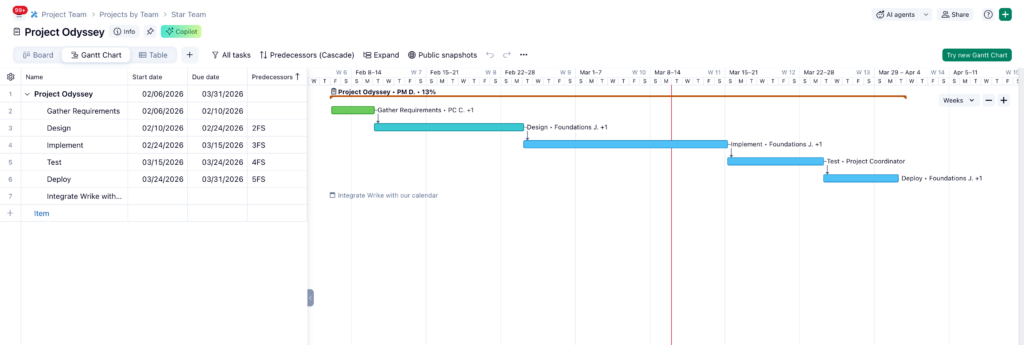
Begin by creating a campaign template or blueprint that defines how campaigns should be structured. This typically includes campaign phases, task groups, dashboards, and calendars so every campaign starts with the same operational framework.
Standardizing campaign structure makes it easier to launch campaigns quickly and maintain consistency across teams. Instead of rebuilding tasks and milestones each time, teams can reuse a proven structure that reflects how their campaigns actually run.
Step 2: Build a Campaign Intake Request Form (Internal and/or External)
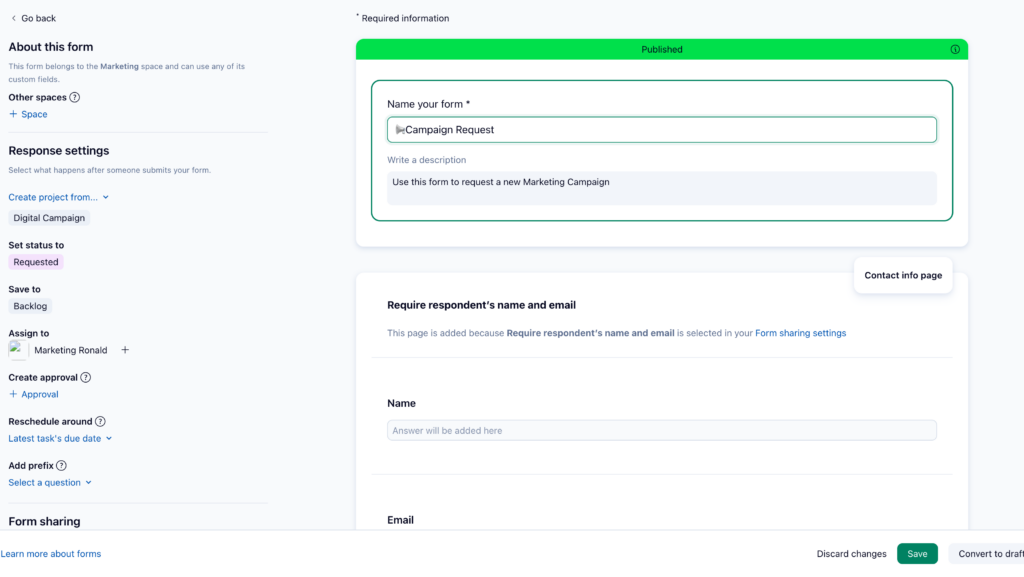
Next, create a request form that serves as the primary entry point for campaign work.
This form should collect key campaign details such as campaign name, goals, timeline, channel, and required assets.
Request forms can be configured to automatically create tasks or projects and route them to the correct workspace or team. They can also be shared externally so stakeholders or clients can submit campaign requests through a simple link.
Step 3: Map Intake Answers Into Fields That Power Execution
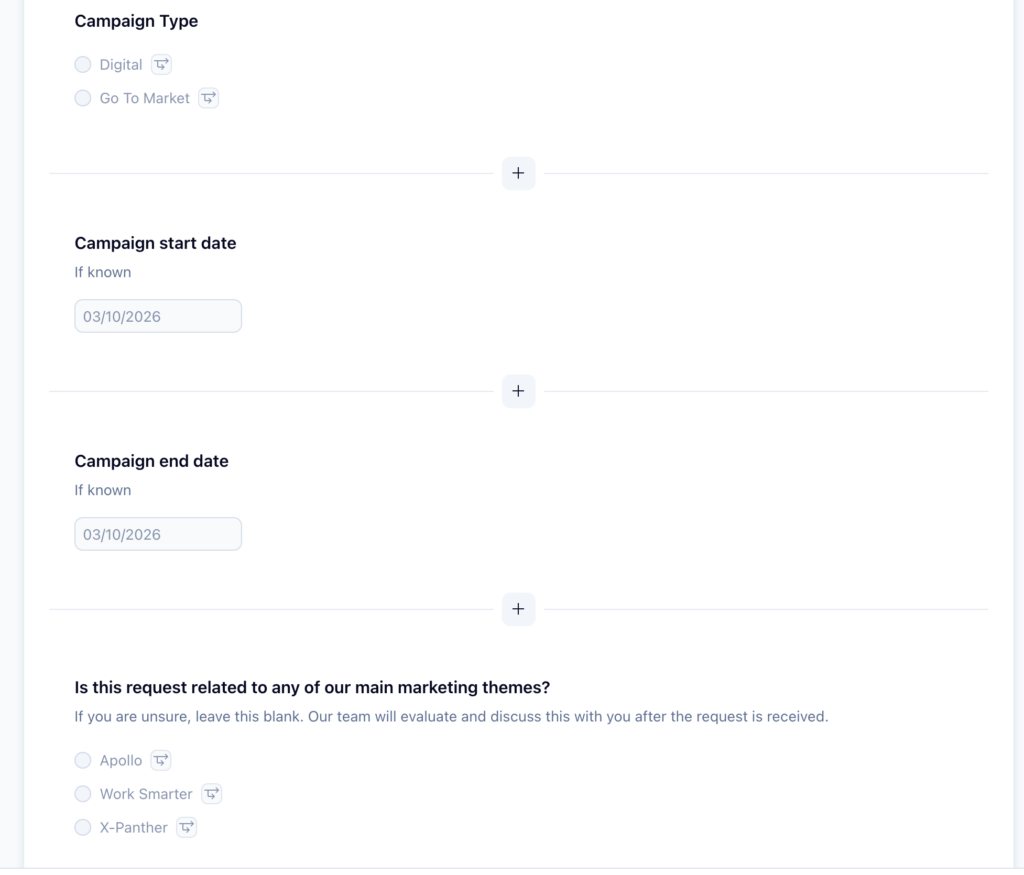
To keep campaign data organized, map request form responses into structured fields.
For example, responses can populate titles, descriptions, dates, attachments, priority levels, and custom fields such as campaign channel, region, owner, or due date.
Using structured fields ensures campaign information is usable for planning, filtering, and reporting instead of being buried inside long task descriptions.
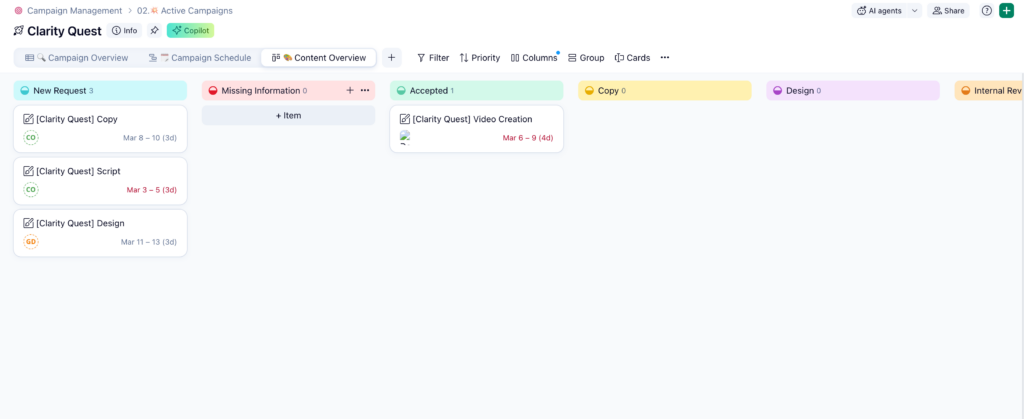
Step 4: Define Campaign Statuses with a Workflow That Reflects Reality
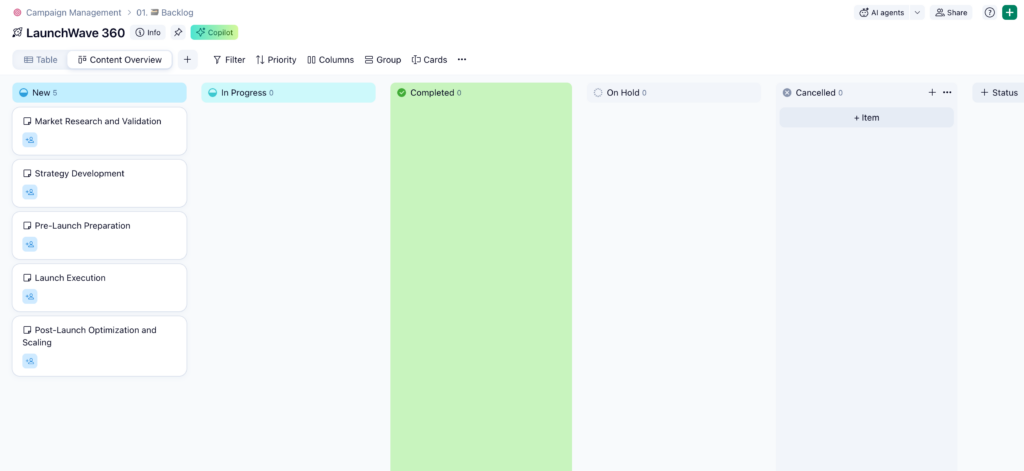
Once campaigns enter the system, tasks should move through a defined workflow that mirrors how work actually progresses. Marketing teams often use stages such as Intake, In Production, In Review, Approved, Scheduled, Live, and Complete.
A consistent workflow helps teams understand campaign progress at a glance and ensures that everyone interprets statuses the same way across campaigns.
Step 5: Launch Approvals at the Right Gate (Not in Someone’s Inbox Roulette)
Approvals should be embedded directly into the campaign workflow so reviews happen at the correct stage. For example, approvals can be triggered when creative assets are ready for review or when a campaign is about to launch.
By assigning approvers and due dates inside Wrike, teams can track decisions clearly and avoid scattered feedback across email or messaging tools.
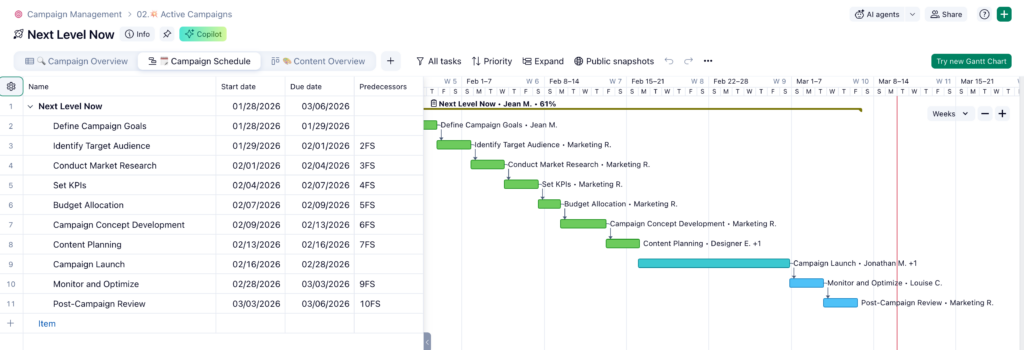
Step 6: Plan the Timeline with Dependencies in Gantt
Campaign timelines can be managed using the Gantt chart, where teams assign owners, deadlines, and task dependencies. Dependencies help model real sequencing, such as requiring landing page approval before launching paid campaigns.
When upstream tasks move, Wrike can automatically adjust dependent tasks, helping teams maintain accurate campaign timelines.
Step 7: Operationalize Visibility with Calendars, Dashboards, and Reports
Finally, use Wrike’s visibility tools to monitor campaign progress.
Calendar views help teams track scheduled campaign activities, dashboards provide quick status updates, and reports allow managers to review campaign progress by owner, status, or deadline.
These tools help teams track campaign performance in real time and reduce the need for manual status reporting.

Things to Keep in Mind When Running Marketing Campaigns in Wrike
Before scaling your campaign workflows, it helps to understand a few practical considerations that can keep your Wrike setup organized, predictable, and easier for teams to follow.
What Success Looks Like
When a campaign is set up properly in Wrike, the workflow should feel organized and easy to follow.
Requests enter through forms, campaigns follow a consistent project structure, and tasks move through clear stages from production to approval and launch.
Teams can check dashboards or reports to see progress without needing manual status updates.What Success Looks Like
Prerequisites and Setup Requirements
Before managing campaigns in Wrike, teams should have a few basics in place.
This includes clear roles for who manages the workspace, a standardized campaign structure using projects or templates, and a defined workflow that reflects how campaigns move from planning to completion.
Common Mistakes and Pro Tips
Many campaign issues come from treating requests as unstructured notes or creating workflows that are too complex to follow.
Keep intake structured with request forms, use simple workflow stages that match real handoffs, and manage reviews and approvals inside Wrike.
These practices help keep campaigns easier to track as projects scale.
Conclusion
As campaigns grow more complex, Wrike becomes even more valuable. It helps teams manage multiple campaigns across teams, channels, and regions while keeping work aligned and easy to track.
To go beyond a single campaign, explore Wrike’s marketing resources and templates. These help standardize intake, create reusable workflows, and improve visibility across campaigns.
A good starting point is the marketing campaign management template. From there, you can adapt workflows, dashboards, calendars, and campaign structures to fit how your team operates. Check out their full marketing product feature and get started managing your campaigns today.
 . From there, you can adapt workflows, dashboards, calendars, and campaign structures to fit how your team operates.
FAQs
How do I set up a single “front door” for campaign requests across teams or clients?
Use Wrike request forms as the standard intake channel so all campaign requests are submitted in one place. Forms can automatically create tasks or projects and can also be shared with external users via a link.
Should campaigns be projects, folders, or custom item types?
Most teams manage campaigns as projects because they support ownership, timelines, and subtasks. Custom item types can represent campaign-specific objects like briefs while still behaving like tasks or projects.
How do I stop launch-date changes from breaking everything?
Use task dependencies in the Gantt chart so when a task moves, dependent tasks automatically adjust. This keeps campaign timelines aligned.
What’s the best way to run creative review and approval inside Wrike?
Use proofing for file comments and approvals for formal sign-offs. This keeps feedback and decisions organized inside the task.
How do I create executive-ready status visibility without manual reporting?
Use dashboards and reports to track campaign progress in real time. When workflows and fields are structured properly, updates happen automatically.