

The Hidden Cost of Tool Sprawl in Service Delivery Teams (And How To Fix It)


Professional services teams rarely wake up one day and decide, “Let’s use seven different tools to run our business.”
Tool sprawl happens slowly: a time-tracking app here, a client communication tool there, a spreadsheet for budgets, a separate invoicing system, a project management tool for tasks, another for resourcing… and suddenly half your job as a PM becomes navigating tools rather than leading delivery.
Most teams don’t realize how expensive tool sprawl is, not just in subscription costs, but in lost hours, siloed data, and unnecessary stress.
We used to have separate tools for project management, time tracking, and scheduling in spreadsheets, and it was just a mess once we started growing.
This article will explore the true cost and early warning signs of tool sprawl, and provide strategies to consolidate your tech stack without disrupting existing workflows.
The Real Cost of Tool Sprawl (It’s Higher Than You Think)
While many teams can list their tools, few can actually measure the additional work each of these tools creates. Having too many tools often seems harmless, but the real costs—conflicting data, duplicate work, and missing information—are usually hidden. They include:
1. The “tool-switching tax” costs hours each week
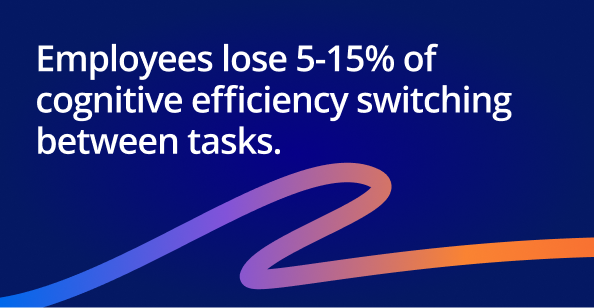
Every time you switch tools, you break your focus. In fact, statistics show that humans lose 5-15% of cognitive efficiency while switching between tasks. Multiply that by:
- Daily status checks
- Time entry
- Budget updates
- Client communication
- Financial reconciliation
…and the hours add up fast. Case in point: a study by Harvard Business Review found that employees spend 4 hours per week reorienting themselves after toggling apps. This constant tool switching isn't just frustrating; it represents lost productivity and, for many professional services businesses, lost billable hours.
2. Data gaps multiply as tools multiply
No matter how hard you try, separate systems rarely stay in sync. You end up with:
- Mismatched budgets and expenses
- Missing time entries
- Inconsistent project status
- Outdated resource plans
PMs end up becoming the glue between systems, spending time manually reconciling data that should connect automatically. It’s no wonder PM stress and burnout rates are high.
3. Multiple tools create multiple sources of truth
Ever tried to answer, “What’s the latest status?” and had to check:
- Your project management tool
- Someone’s spreadsheet
- Your developer’s calendar
- Slack
- A whiteboard with a hand-drawn timeline and Gantt chart
- Your email inbox
Tool sprawl turns information retrieval into detective work.
4. Tool-chain complexity increases onboarding friction
Congratulations! You’ve brought on new staff, but guess what? New hires need training in every tool, plus all the unspoken rules about “where the real truth lives.” That slows onboarding, time to employee productivity, and creates avoidable risk from new hires accidentally using outdated information.
5. Tool sprawl leads to revenue leak
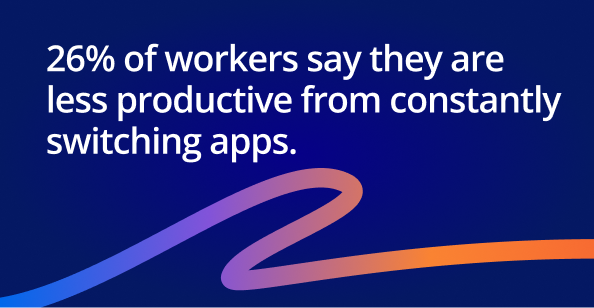
26% of workers report they are less productive as a result of constantly switching apps. Furthermore, this constant context-switching leads to employees missing 8-15% of communication and required actions. The financial consequences may include:
- Unlogged billable hours
- Late invoices
- Incomplete expense capture
- Underreported scope changes
The bottom line is that when delivery and financials are separated, profit erodes.
We used to juggle separate tools for projects, timesheets, and invoicing, and it always led to duplicate work or things slipping through.
What Are the Early Warning Signs You Have a Tool Sprawl Problem?
Tool sprawl has predictable early warning signs; here are the symptoms project managers typically notice first.
- The same information is being tracked in more than one system
- PMs spend too much time “recreating reports” manually
- Teams argue about which tool is accurate
- You’ve built spreadsheets to “patch” gaps between platforms
- You rely on people, not systems, to maintain alignment
If these feel familiar, you’re operating on a fragile ecosystem.
Context switching is exactly what we are struggling with right now.
How to Reduce Tool Sprawl Without Disrupting Your Team
Reducing tool sprawl starts with understanding where the friction lives and taking steps that strengthen delivery rather than disrupt it. These are the most effective ways to begin consolidating.
1. Start with a workflow audit
Map how work actually moves through your organization and note which tools support each step, including:
- Your core workflows: project intake to resource planning to delivery to billing
- The tools currently supporting each step
- The duplication, gaps, or dependencies between tools
You’ll quickly see where sprawl has crept in, and many teams discover they’re using multiple apps to manage the same workflow.
2. Define your “single source of truth” for each workflow
Every workflow needs a clear home for its data. A centralized platform, whether that’s PSA software like Accelo, Kantata, Forecast PSA, or another end-to-end system, reduces confusion and helps teams make decisions based on reliable, real-time information.
 , Kantata, Forecast PSA, or another end-to-end system, reduces confusion and helps teams make decisions based on reliable, real-time information.
3. Identify tools that should integrate (but don’t)
If key systems can’t share data consistently, project managers often end up stitching together spreadsheets to fill the gaps. The bottom line: if a tool can’t exchange data reliably with others, it’s a candidate for replacement.
4. Consolidate where alignment matters most
Focus on the workflows where fragmentation creates the biggest risk:
- Project delivery
- Time tracking
- Resource planning
- Billing and revenue
- Client communication
These workflows break easily without context and connection, jeopardizing delivery outcomes and your profitability.
5. Focus on reducing manual updates
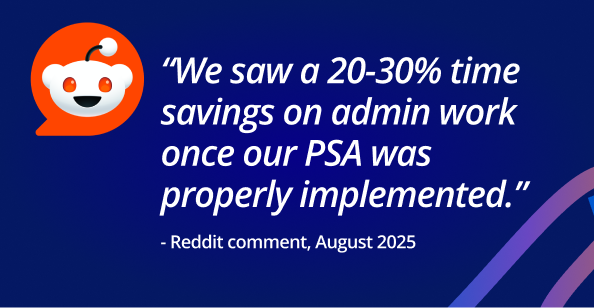
If information requires manual copying, exporting, or re-entry, it’s a sign the system isn’t working for you. Tools built to automate data flows, such as PSA platforms, help PMs spend less time reconciling and more time leading delivery.
Conclusion
Tool sprawl isn’t a sign of poor process — it’s a sign of growth.
However, as your team matures, it’s time to unify its operations so that project managers can focus on outcomes, rather than maintaining systems. Consolidation doesn’t just reduce software costs; it gives you cleaner data, smoother communication, and more reliable financial performance.
Next Steps
If the challenges in this article sound familiar, the next step is understanding what a more connected workflow would look like for your organization. Actions to take:
- See The Digital Project Manager’s review of Accelo
DPM’s in-depth review breaks down how Accelo’s PSA platform brings client management, project management, resource planning, time tracking, and billing into a single system, along with the types of organizations that benefit the most from Accelo. - Book a personalized demo with Accelo
If you’re exploring ways to reduce tool sprawl and improve visibility across delivery and financials, a guided demo can help you see how a unified PSA platform would work for your specific workflows, projects, and team structure. Book time with the Accelo team.

