

De 10 enkleste programvarene for prosjektstyring med KI – vurdert i 2026

Den beste og enkleste AI-programvaren for prosjektstyring


Den enkleste AI-programvaren for prosjektstyring hjelper team med å håndtere oppgaver, tidslinjer og prioriteringer mer effektivt ved å automatisere rutinearbeid. Hvis du føler deg overveldet av regneark, e-poster og stadig skiftende tidsfrister, kan AI-drevne verktøy skape struktur i kaoset – slik at du kan fokusere på å levere resultater.
Jeg har uavhengig testet og vurdert plattformene som regnes som de enkleste AI-verktøyene for prosjektstyring, for å finne dem som faktisk øker teamets produktivitet uten en bratt læringskurve. Fra automatisert planlegging av oppgaver til intelligente innsikter og smarte varsler har hvert verktøy i denne veiledningen unike funksjoner som er utviklet for å forenkle den daglige arbeidsflyten.
Why Trust Our Software Recommendations
Our team has been testing and reviewing software since 2012. As project managers ourselves, we know how difficult—and important—it is to choose the right software.
For this guide, we evaluated tools using hands-on testing and independent research, scoring tools using our selection criteria. We also draw on insights from industry thought leaders and practicing project management experts.
Our reviews reflect our human editorial judgment, not a sales pitch.
Expert reviewers:
Sammenligningstabell for AI-programvare til prosjektstyring
Denne sammenligningstabellen oppsummerer prisdetaljene for mine beste utvalgte AI-programmer for prosjektstyring:
| Tool | Best For | Trial Info | Price | ||
|---|---|---|---|---|---|
| 1 | Best for intuitive task automations | Free plan available | From $9/user/month (billed annually) | Website | |
| 2 | Best for scalable project structures | 14-day free trial | Pricing upon request | Website | |
| 3 | Best for GitHub project management | Free plan + 14-day free trial + free demo available | From $4.99/user/month (billed annually) | Website | |
| 4 | Best for AI-driven task scheduling | Free trial available | From $19/seat/month (billed annually) | Website | |
| 5 | Best for customizable task views | Free plan available | From $7/user/month (billed annually) | Website | |
| 6 | Best for AI chatbot task management | Free plan + free demo available | From $3/user/month (billed annually) | Website | |
| 7 | Best for flexible team collaboration | Free plan + free demo available | From $10/user/month (billed annually) | Website | |
| 8 | Best for project tracking suggestions | Free plan + free demo available | From $10.99/user/month (billed annually) | Website | |
| 9 | Best for AI-powered project insights | Free plan and 30-day free trial available | From $10/user/month | Website | |
| 10 | Best for expansive brainstorming canvas | Free plan + 14-day free trial available | From $8/user/month (billed annually) | Website |


Vurdering av den enkleste AI-programvaren for prosjektstyring
Nedenfor finner du mine detaljerte sammendrag av den enkleste AI-programvaren for prosjektstyring som kom med på kortlisten. Vurderingene mine gir en detaljert gjennomgang av de viktigste funksjonene, fordelene og ulempene, integrasjonene og ideelle bruksområdene for hvert verktøy, slik at du kan finne det som passer best for deg.

Best for intuitive task automations
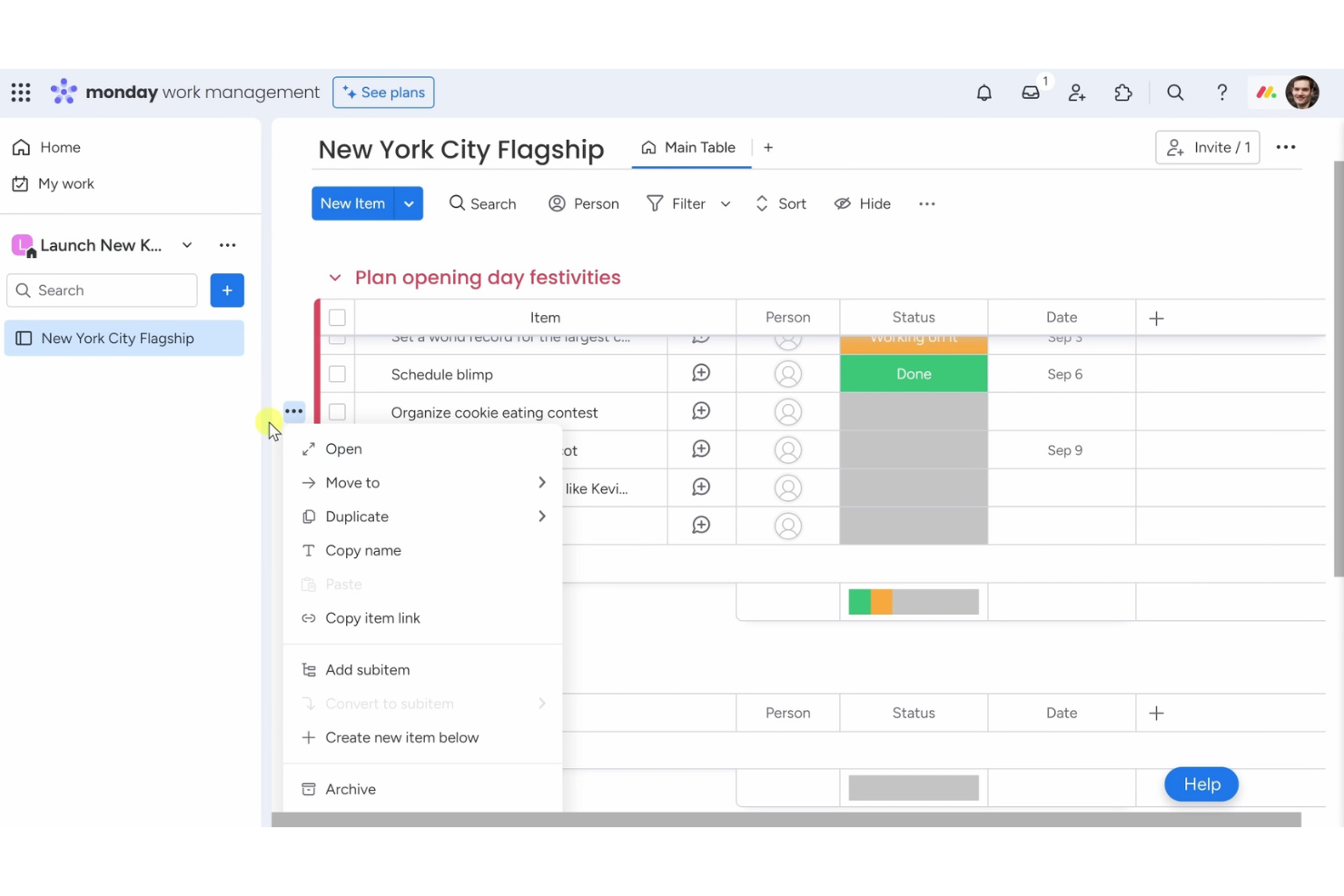
Monday AI Workspace is one of the easiest AI project management software tools for teams that want a simple way to organize tasks and workflows. It’s built for businesses that value ease of use while still benefiting from smart automation and AI assistance.
Why I picked Monday AI Workspace: Its no-code automation recipes let you cut out repetitive work with just a few clicks, so your team can focus on higher-priority tasks. AI features assist with task updates, summaries, and workflow adjustments, making project management less manual. The visual dashboard keeps everything clear at a glance, and customizable boards let you tailor processes to fit your team without complexity.
Standout features & integrations:
Features include a visual dashboard that lets you track project progress at a glance. You can create custom workflows to fit your team's processes, and automation recipes allow you to set up task triggers easily. The platform also offers a variety of templates to help you get started quickly.
Integrations include Slack, Google Drive, Zoom, Microsoft Teams, Dropbox, Trello, Zapier, Jira, Salesforce, and Shopify.
Pros and Cons
Pros:
- No coding required for automations
- Variety of templates available
- Flexible workflow creation
- Visual project dashboards
- Customizable automation recipes
Cons:
- Requires internet for full functionality
- Occasional slow loading times
- Complexity in advanced features
- Limited offline functionality
- Can be overwhelming for new users
New Product Updates from monday AI Workspace
monday AI Workspace Adds Human Approval Routing
monday AI Workspace adds a human-in-the-loop approval block to AI Workflows, sending approval requests and routing workflow paths based on responses. For more information, visit monday AI Workspace's official site.

Wrike
Best for scalable project structures

Wrike is one of the easiest AI project management software tools for teams that want a simple way to manage complex projects at scale. It’s designed to keep collaboration smooth and project visibility clear, even across large teams.
Why I picked Wrike: Its AI features help predict risks, suggest task priorities, and automate updates, so managing big projects feels less overwhelming. You can create custom workflows that fit your processes and set up automations to cut down on repetitive work. Real-time reporting keeps everyone aligned with accurate insights into progress and performance. Wrike’s mix of AI support and scalability makes it an easy choice for teams that need both simplicity and growth potential.
Standout features & integrations:
Features include custom workflows that let you tailor processes to fit your team's needs. You can automate recurring tasks to increase efficiency and reduce manual effort. The platform also offers real-time collaboration features, allowing team members to work together seamlessly.
Integrations include Slack, Microsoft Teams, Google Drive, Dropbox, Salesforce, Jira, Trello, Evernote, Box, and Adobe Creative Cloud.
Pros and Cons
Pros:
- Detailed reporting features
- Real-time collaboration capabilities
- Custom workflow options
- Flexible project structures
Cons:
- Initial setup can be time-consuming
- Limited offline functionality
- Learning curve for advanced features
- Requires time to fully customize
- Can be complex for new users
- Automates repetitive tasks
New Product Updates from Wrike
Wrike Adds Klaxoon MCP Integration
Wrike’s Klaxoon MCP integration is now generally available, enabling AI agents to navigate between Wrike tasks and attached whiteboards, read task context, and manage whiteboard attachments via API. For more information, visit Wrike's official site.

Zenhub
Best for GitHub project management

Zenhub is one of the easiest AI project management software tools for development teams working in GitHub. It’s designed to bring project planning and task tracking directly into the coding environment, reducing the need to switch between tools.
Why I picked Zenhub: Its AI features assist with task updates, prioritization, and sprint planning, helping your team stay focused on delivery. Boards make it simple to visualize progress, while burndown charts provide quick insights into timelines. By combining GitHub integration with AI-powered project support, Zenhub makes managing development projects easier and more efficient.
Standout features & integrations:
Features include burndown charts that help you track project progress and predict completion dates. You can create boards to organize tasks and visualize workflows easily. Zenhub also offers sprint planning tools that let your team focus on delivering work in manageable increments.
Integrations include GitHub, Slack, Microsoft Teams, Google Workspace, Jira, Trello, Asana, Bitbucket, GitLab, and Toggl.
Pros and Cons
Pros:
- Visual task boards
- Sprint planning capabilities
- Detailed burndown charts
- Supports agile workflows
- Direct integration with GitHub
Cons:
- Initial setup can be time-consuming
- Not ideal for non-developer teams
- Requires some technical knowledge
- Can be complex for beginners
- Limited to GitHub users

Motion
Best for AI-driven task scheduling

Motion is one of the easiest AI project management software tools for individuals and teams who want their schedules managed automatically. It focuses on using AI to handle time-blocking, task prioritization, and daily planning without extra effort.
Why I picked Motion: Its AI-driven scheduling automatically reorganizes tasks around deadlines, meetings, and changing priorities, so you don’t have to. You can set preferences for your workday, and Motion adapts in real time as new tasks arrive. This makes it especially useful if you want a project management tool that removes the stress of planning while keeping productivity high.
Standout features & integrations:
Features include a smart calendar that adjusts to changes in your schedule, task prioritization to focus on urgent work, and time blocking to allocate hours effectively. You can customize notifications to keep your team informed without overwhelming them, and the interface is designed to be intuitive, reducing the learning curve.
Integrations include Google Calendar, Outlook, Slack, Zoom, Microsoft Teams, Trello, Asana, Basecamp, Todoist, and Evernote.
Pros and Cons
Pros:
- Effective time blocking
- Intuitive user interface
- Customizable notifications
- Dynamic schedule adjustments
- AI-driven task organization
Cons:
- May lack advanced features
- Not ideal for complex projects
- Requires internet connection
- Can be overwhelming initially
- Limited customization options


ClickUp is one of the easiest AI project management software tools for teams that want flexibility without complexity. It’s built to adapt to different workflows while keeping task and project management simple to set up and use.
Why I picked ClickUp: Its AI features help with writing, summarizing, and generating task updates, making project management faster and less manual. Customizable views let your team switch between lists, boards, or timelines depending on preference. You can also create custom statuses and templates to save time on repetitive processes. With its adaptable hierarchy, ClickUp keeps projects organized while staying easy to navigate.
Standout features & integrations:
Features include a unique hierarchy structure that organizes tasks into spaces, folders, and lists. You can use custom fields to add specific data points to tasks, enhancing tracking and reporting. The platform also offers time tracking to help your team stay on top of deadlines.
Integrations include Slack, Google Drive, Dropbox, Zoom, Microsoft Teams, Trello, Todoist, Evernote, Zapier, and GitHub.
Pros and Cons
Pros:
- Detailed task templates
- Custom status creation
- Supports multiple project views
- Flexible workspace configuration
- Highly customizable task views
Cons:
- Complexity in managing large projects
- Limited offline functionality
- Requires time to fully customize
- Can be overwhelming for new users
- Steeper learning curve


Zoho is one of the easiest AI project management software tools for teams that want an all-in-one platform to handle tasks and collaboration. It’s designed to simplify work by combining automation, communication, and project tracking in one place.
Why I picked Zoho: Its AI assistant makes managing projects feel effortless, from assigning tasks to sending deadline reminders. You can automate routine processes and customize dashboards to match your team’s workflow. With its AI-driven interactions, Zoho helps reduce manual effort while keeping projects organized and productivity high.
Standout features & integrations:
Features include customizable dashboards that let you visualize your projects in a way that suits your team. You can automate recurring tasks to save time and reduce manual effort. The reporting tools provide insights into your team's performance, helping you make informed decisions.
Integrations include Slack, Google Workspace, Microsoft Office 365, Dropbox, Zapier, Trello, Zendesk, Evernote, QuickBooks, and Salesforce.
Pros and Cons
Pros:
- Integrates with multiple services
- Extensive reporting tools
- Automates recurring tasks
- Customizable dashboards available
- AI chatbot for task management
Cons:
- Can be overwhelming for small teams
- Limited offline capabilities
- May require technical knowledge
- Learning curve for new users
- Complexity in initial setup

Notion is one of the easiest AI project management software options for teams that want a simple yet flexible way to stay organized. It combines project tracking, task management, and documentation in a single workspace without overwhelming you with complexity.
Why I picked Notion: Its drag-and-drop interface makes it simple to set up workflows in minutes. AI support helps with organizing and refining content, keeping projects easy to manage. This combination of ease and adaptability makes Notion a strong choice for teams that want project management software that’s both simple and flexible.
Standout features & integrations:
Features include a drag-and-drop interface that lets you easily organize your projects, customizable templates to suit your team's specific needs, and a powerful search function to quickly find what you're looking for. You can create interconnected pages to build a knowledge base for your team, and the ability to embed various content types enhances collaboration.
Integrations include Slack, Google Drive, Trello, GitHub, Asana, Figma, Zapier, Typeform, Calendly, and Jira.
Pros and Cons
Pros:
- Flexible workspace design
- Embeddable content types
- Drag-and-drop organization
- Interconnected page linking
- Customizable page templates
Cons:
- Requires internet connection
- Complex setup for beginners
- No task dependencies
- Limited offline access
- Steep learning curve

Asana is one of the easiest AI project management software tools for teams that want to keep work organized without complexity. It’s designed to improve visibility across projects while supporting collaboration and accountability.
Why I picked Asana: Its AI-powered suggestions help you track tasks, deadlines, and priorities more efficiently. The timeline view makes it simple to map out project plans, while dependencies ensure tasks flow in the right order. With customizable fields and adaptable workflows, Asana gives you structure without being rigid, making it an easy choice for teams that need clarity and flexibility.
Standout features & integrations:
Features include a timeline view that helps you map out project plans visually. You can use task dependencies to ensure everything happens in the correct order. The custom fields feature allows you to add specific data points to your projects, enhancing tracking and reporting.
Integrations include Slack, Microsoft Teams, Google Drive, Dropbox, Zoom, Salesforce, Jira, Trello, Evernote, and Zapier.
Pros and Cons
Pros:
- Enhances project visibility
- Adaptable to different workflows
- Customizable project fields
- Task dependencies management
- Intuitive timeline feature
Cons:
- Complexity in advanced features
- Requires internet for full functionality
- Limited offline capabilities
- Overwhelming for small teams
- Learning curve for new users


Dart is one of the easiest AI project management software tools for teams that want smart task management without complexity. It’s built to support businesses in sales, IT, marketing, and startups by using AI to simplify organization and boost productivity.
Why I picked Dart: Its AI-powered insights help your team prioritize tasks and stay focused on what matters. Features like automatic property filling and subtask creation reduce manual work, while flexible views such as lists and boards make projects easy to visualize. With AI-generated reports and intelligent task management, Dart helps teams cut administrative overhead and manage projects more efficiently.
Standout features & integrations:
Features include intelligent task management that automates property filling and subtask generation. You can create and manage sprints with ease, and the document editor allows for detailed notes and AI-generated reports. Dart's various layout options, such as board and calendar views, help your team stay organized and meet deadlines.
Integrations include ChatGPT, Slack, Microsoft Teams, Google Calendar, GitHub, Jira, Trello, Asana, Dropbox, and Zoom.
Pros and Cons
Pros:
- Customizable workspaces
- AI-generated reports
- Various project views
- Automatic property filling
- AI-powered task insights
Cons:
- May require technical knowledge
- Limited offline capabilities
- Learning curve for new users
- Requires internet for full functionality
- Initial setup may be complex

Miro
Best for expansive brainstorming canvas

Miro is one of the easiest AI project management software tools for teams that prefer a visual, collaborative approach to planning and organizing work. It gives you a flexible space to brainstorm, map ideas, and align projects without adding complexity.
Why I picked Miro: Its AI tools help generate mind maps, summarize content, and organize workflows quickly, so your team can focus on ideas instead of setup. The infinite canvas supports real-time collaboration, letting teammates contribute from anywhere. By combining creativity with AI assistance, Miro makes project planning both simple and engaging.
Standout features & integrations:
Features include an infinite canvas that lets you map out projects and ideas without running out of space. You can use pre-built templates to get started quickly and customize them to fit your needs. Miro also offers sticky notes and drawing tools for flexible brainstorming sessions.
Integrations include Slack, Microsoft Teams, Google Drive, Dropbox, Zoom, Jira, Trello, Asana, Microsoft OneDrive, and Evernote.
Pros and Cons
Pros:
- Visualizes complex ideas easily
- Customizable for different needs
- Pre-built templates available
- Supports real-time collaboration
- Infinite canvas for brainstorming
Cons:
- Limited offline capabilities
- Interface may feel cluttered
- Can be overwhelming for new users
- Requires internet for collaboration
- Initial setup can be complex
New Product Updates from Miro
Miro Adds Japan Data Residency for Enterprise Customers
Miro has introduced Japan data residency for enterprise customers, offering in-region storage for production data, backups, and metadata, plus in-region compute infrastructure. For more information, visit Miro's official site.
Andre enkle AI-programmer for prosjektstyring
Her er noen flere enkle AI-programmer for prosjektstyring som ikke kom med på kortlisten, men som likevel er verdt å se nærmere på:
- Hive
For converting messages to tasks
- Productive
For agency profitability tracking
- CAFLOU
For small business cash flow management


How I Evaluate the Easiest AI Project Management Software
Every tool on this list needs to do more than slap an AI label on basic automations—I look for platforms where AI saves you real time, like generating a project plan from a one-line brief or surfacing risks before standup. I split my evaluation into core functionality a tool must have and differentiating factors that separate one option from another.
Core Functionality (Table Stakes For This List)
When I'm selecting tools for my list, I rank each one on a scale from 0 (does not offer the functionality) to 5 (excels in this area) for each core functionality listed below. Then, I calculate the tool's total score into a percentage. Each tool needs to achieve a minimum total score of 65% to be considered for inclusion.
- AI Task Automation: I check whether the AI can generate, assign, and reprioritize tasks from project context—like auto-creating subtasks when a sprint scope changes.
- Natural Language Interface: A good test is typing something like "show me all overdue tasks for the website redesign" and getting accurate, actionable results back.
- AI Project Planning: I evaluate whether the tool can turn a short brief into a structured plan with milestones and timelines, not just a blank template.
- AI Summaries & Insights: I look for tools that auto-generate status updates or flag at-risk workstreams so you're not manually pulling reports before every standup.
- Core PM Functionality: The foundation matters—multiple views (board, list, timeline), task dependencies, due dates, and collaboration features all need to be solid.
- Smart Notifications & Suggestions: Proactive AI nudges set tools apart, like suggesting you reassign a task when someone's workload spikes or reminding you of a missed dependency.
Once I have a list of tools that meet this criteria, I consider what sets each platform apart.
Differentiating Factors (What Sets Vendors Apart)
Here's how I compare and contrast different vendors:
Standout Features
Predictive risk detection is a big differentiator—I look for tools that flag potential delays based on historical patterns, like warning you a design review is likely to slip before it actually does. Cross-tool AI sync matters just as much, especially for small teams juggling Slack, Google Docs, and a CRM. Tools that pull context from connected apps and auto-update task status save hours of manual data entry. I also evaluate whether a platform lets you build custom AI agents to automate team-specific workflows, like auto-triaging incoming client requests at an agency.
Beyond Features
Time-to-value matters a lot when ease is the whole point. I evaluate how quickly a solo PM or small team can go from signup to running a real project—ideally within a single session, with AI-guided setup doing the heavy lifting. Pricing transparency is another factor I weigh, particularly whether AI features are included in affordable tiers or locked behind enterprise plans. I also check each vendor's data privacy posture, including whether they're clear about how project data is handled by their AI models and whether users can opt out of model training.
Slik velger du den enkleste AI-programvaren for prosjektstyring
Det er vanskelig å unngå å gå seg vill i lange funksjonslister og komplekse prismodeller. For å hjelpe deg med å holde fokus mens du går gjennom den unike prosessen med å velge programvare, får du her en sjekkliste over faktorer du bør ha i bakhodet:
| Faktor | Hva du bør vurdere |
|---|---|
| Skalerbarhet | Vil programvaren vokse sammen med teamet ditt? Vurder om den kan håndtere flere brukere og prosjekter etter hvert som virksomheten utvides. Se etter verktøy som tilbyr fleksible prisnivåer. |
| Integrasjoner | Kan den kobles til verktøyene du allerede bruker? Kontroller om programvaren integreres sømløst med de nåværende systemene dine, for eksempel Slack, Google Workspace eller Microsoft Teams. |
| Tilpasningsmuligheter | Kan du tilpasse den til prosessene dine? Sørg for at programvaren lar deg tilpasse arbeidsflyter og kontrollpaneler slik at de passer teamets unike behov. |
| Brukervennlighet | Er grensesnittet intuitivt? Vurder om teamet ditt enkelt kan navigere i programvaren uten omfattende opplæring. Se etter brukervennlig design. |
| Implementering og introduksjon | Hvor lang tid tar det å komme i gang? Vurder tiden og ressursene som kreves for å implementere løsningen og lære opp teamet ditt. Se etter verktøy med veiledede introduksjonsprosesser. |
| Kostnad | Er den innenfor budsjettet ditt? Sammenlign prisplanene og finn ut om kostnaden samsvarer med budsjettet ditt. Vær oppmerksom på skjulte gebyrer eller kostnader. |
| Sikkerhetstiltak | Beskytter den dataene dine? Kontroller at programvaren overholder sikkerhetsstandarder og tilbyr funksjoner som datakryptering og tilgangskontroller for brukere. |
Hva er den enkleste AI-programvaren for prosjektstyring?
Den enkleste AI-programvaren for prosjektstyring bruker kunstig intelligens til å forenkle oppgavehåndtering og øke produktiviteten – uten at brukerne må bruke timevis på å lære kompliserte funksjoner. Disse verktøyene er utviklet med tanke på enkelhet og kombinerer intuitiv UX/UI-design med smart, AI-drevet automatisering som hjelper team med å holde seg organiserte og effektive.
Den enkleste AI-programvaren for prosjektstyring inneholder vanligvis funksjoner som automatisk planlegging, prioritering av oppgaver og sanntidsanalyse for å redusere manuelt arbeid og holde prosjekter på rett spor. Resultatet er en raskere, smartere og mer uanstrengt måte å håndtere prosjekter på fra start til slutt.
Funksjoner i den enkleste AI-programvaren for prosjektstyring
Når du velger den enkleste AI-programvaren for prosjektstyring, bør du se etter følgende viktige funksjoner:
- Automatisk planlegging: Organiserer automatisk oppgaver basert på prioritet og tidsfrister, noe som sparer tid og reduserer behovet for manuell planlegging.
- Prioritering av oppgaver: Hjelper med å identifisere og fokusere på de viktigste oppgavene, slik at kritisk arbeid blir gjort først.
- Sanntidsanalyse: Gir innsikt i prosjektfremdrift og teamets ytelse, slik at du raskt kan ta velinformerte beslutninger.
- Tilpassbare arbeidsflyter: Gjør det mulig å tilpasse prosesser etter teamets spesifikke behov, noe som gir større fleksibilitet og effektivitet.
- Integrasjonsmuligheter: Kobles sømløst sammen med eksisterende verktøy som Slack og Google Workspace for å effektivisere arbeidsflyter.
- AI-drevet innsikt: Tilbyr intelligente anbefalinger og prognoser for å optimalisere oppgavehåndtering og ressursfordeling.
- Brukervennlig grensesnitt: Sikrer enkel bruk, slik at teammedlemmer kan navigere i programvaren uten omfattende opplæring.
- Sikkerhetstiltak: Beskytter data med kryptering og tilgangskontroller for brukere, slik at informasjonen din forblir sikker.
- Samarbeidsverktøy: Legger til rette for kommunikasjon og samarbeid mellom teammedlemmer, noe som forbedrer lagarbeid og produktivitet.
Fordeler med den enkleste AI-programvaren for prosjektstyring
Implementering av den enkleste AI-programvaren for prosjektstyring gir flere fordeler for teamet og virksomheten din. Her er noen av fordelene du kan se frem til:
- Økt effektivitet: Automatisk planlegging og prioritering av oppgaver reduserer manuelt arbeid, slik at teamet ditt kan fokusere på viktige oppgaver.
- Bedre samarbeid: Integrasjonsmuligheter og samarbeidsverktøy forbedrer kommunikasjonen og gjør det enklere for teammedlemmer å jobbe sammen.
- Bedre beslutningstaking: Sanntidsanalyse gir innsikt i prosjektfremdriften, slik at du raskt kan ta velinformerte beslutninger.
- Større fleksibilitet: Tilpassbare arbeidsflyter gjør det mulig å tilpasse prosesser etter teamets behov og håndtere ulike prosjektkrav.
- Tidsbesparelser: AI-drevet innsikt og automatiseringsfunksjoner bidrar til å effektivisere prosjektstyringen, slik at du får mer tid til andre prioriteringer.
- Datasikkerhet: Sikkerhetstiltak beskytter informasjonen din og gir deg trygghet for at dataene dine er sikre.
- Brukertilfredshet: Et brukervennlig grensesnitt sikrer at teammedlemmer enkelt kan navigere i programvaren, noe som reduserer læringskurven.
Kostnader og priser for den enkleste AI-programvaren for prosjektstyring
Valg av den enkleste AI-programvaren for prosjektstyring krever en forståelse av de ulike prismodellene og abonnementene som er tilgjengelige. Kostnadene varierer basert på funksjoner, teamstørrelse, tillegg og mer. Tabellen nedenfor oppsummerer vanlige abonnementer, gjennomsnittsprisene deres og typiske funksjoner som er inkludert i løsninger for AI-prosjektstyring:
Sammenligningstabell for abonnementer for den enkleste AI-programvaren for prosjektstyring
| Abonnementstype | Gjennomsnittspris | Vanlige funksjoner |
|---|---|---|
| Gratisabonnement | $0 | Grunnleggende oppgavehåndtering, begrensede integrasjoner og brukerstøtte fra fellesskapet. |
| Personlig abonnement | $5-$15/bruker/måned | Prioritering av oppgaver, tilpassbare arbeidsflyter og grunnleggende analyse. |
| Bedriftsabonnement | $20-$40/bruker/måned | Avansert rapportering, utvidede integrasjoner og samarbeidsverktøy. |
| Virksomhetsabonnement | $50+/bruker/måned | Tilpassede sikkerhetsfunksjoner, dedikert brukerstøtte og ubegrensede tilpasningsmuligheter. |
Vanlige spørsmål om programvare for AI-prosjektstyring
Her er noen svar på vanlige spørsmål om den enkleste programvaren for AI-prosjektstyring:
Hvordan håndterer verktøy for AI-prosjektstyring datasikkerhet?
Verktøy for AI-prosjektstyring prioriterer datasikkerhet ved å implementere funksjoner som kryptering, brukertilgangskontroller og samsvar med bransjestandarder. Det er viktig å vurdere programvarens sikkerhetstiltak for å sikre at teamets data forblir beskyttet. Se alltid etter sertifiseringer som ISO eller samsvar med GDPR hvis det er relevant for behovene dine.
Kan programvare for AI-prosjektstyring integreres med eksisterende systemer?
Ja, det meste av programvaren for AI-prosjektstyring tilbyr integrasjonsmuligheter med populære verktøy som Slack, Google Workspace og Microsoft Teams. Før du velger en løsning, må du sørge for at den kan kobles sømløst til de nåværende systemene dine for å opprettholde en effektiv arbeidsflyt. Sjekk programvarens integrasjonsbibliotek for støttede applikasjoner.
Hvordan forbedrer AI-funksjoner prosjektstyringen?
AI-funksjoner i programvare for prosjektstyring bidrar ved å automatisere rutineoppgaver, gi datadrevet innsikt og forbedre beslutningstakingen. De kan optimalisere planleggingen, forutsi prosjektrisiko og anbefale ressursfordeling. Dette gjør at teamet ditt kan fokusere på strategiske oppgaver og reduserer manuelt arbeid, noe som forbedrer den samlede produktiviteten.
Hva bør jeg vurdere når jeg evaluerer kostnadene ved programvare for AI-prosjektstyring?
Når du vurderer kostnader, bør du ta hensyn til prismodellen, inkluderte funksjoner og eventuelle tillegg. Sammenlign verdien programvaren gir, med prisen, og se etter eventuelle skjulte gebyrer. Det er viktig å sikre at programvaren passer innenfor budsjettet samtidig som den dekker teamets behov, så se etter fleksible prisplaner.
Hvordan kan verktøy for AI-prosjektstyring forbedre teamsamarbeidet?
Verktøy for AI-prosjektstyring forbedrer samarbeidet ved å integrere kommunikasjonsfunksjoner, tilby oppdateringer i sanntid og gi tilgang til delte arbeidsområder. Disse verktøyene bidrar til å holde teammedlemmene samkjørte og informerte, noe som reduserer misforståelser og forbedrer prosjektresultatene. Vurder samarbeidsfunksjonene for å sikre at de samsvarer med teamets arbeidsflyt.
Finnes det bransjer som har større nytte av programvare for AI-prosjektstyring?
Selv om programvare for AI-prosjektstyring kan være nyttig i ulike bransjer, er den spesielt nyttig for sektorer som krever kompleks prosjektkoordinering, for eksempel IT, markedsføring og bygg og anlegg. Disse verktøyene bidrar til å håndtere innviklede arbeidsflyter, automatisere repetitive oppgaver og gi innsikt som er avgjørende for at prosjekter i disse områdene skal lykkes.