

De 10 beste gratis programvarene for kundeinnføring i 2026

Gratis programvare for kundeonboarding – kortliste


Gratis programvare for kundeonboarding gir teamet ditt verktøy for å ønske nye kunder velkommen, organisere dem og administrere dem uten kostnader på forhånd – enten gjennom et gratis abonnement eller en gratis prøveperiode. Hvis du ser etter måter å automatisere onboarding på, holde alle oppdatert og levere en smidig kundeopplevelse uten å sprenge budsjettet, har du kommet til rett sted. Denne veiledningen fremhever de beste gratisalternativene, slik at du kan sammenligne funksjoner, se hva som passer arbeidsflyten din, og ta et trygt valg for virksomheten din i 2026.
Hvorfor du kan stole på våre programvareanbefalinger
Teamet vårt har testet og anmeldt programvare siden 2012. Vi er selv prosjektledere, så vi vet hvor vanskelig og hvor viktig det er å velge riktig programvare.
I denne guiden har vi vurdert verktøyene gjennom praktisk testing og uavhengig research og gitt dem poeng ut fra våre utvelgelseskriterier. Vi bygger også på innsikt fra ledende eksperter i bransjen og erfarne prosjektledere.
Anmeldelsene våre bygger på vår egen redaksjonelle vurdering. De er ikke et salgsargument.
Ekspertanmeldere:
Sammenligningstabell for gratis programvare for kundeonboarding
Denne sammenligningstabellen oppsummerer prisdetaljene for mine beste utvalgte gratisprogrammer for kundeonboarding.
| Tool | Best For | Trial Info | Price | ||
|---|---|---|---|---|---|
| 1 | Best for secure client portals with workflow automation | Free trial available | From $5,000/year (billed annually) | Website | |
| 2 | Best for a flexible workspace for building onboarding checklists and guides | Free plan + Free trial available | From $10/user/month | Website | |
| 3 | Best for no-code client portals for onboarding and resource sharing | Free plan + free demo available | From $19/month (billed annually) | Website | |
| 4 | Best for a spreadsheet-database hybrid for tracking onboarding progress | Free plan available; 14-day free trial | From $20/user/month (billed annually) | Website | |
| 5 | Best for client onboarding workspaces with templates and automation | Free plan + free demo available | From $350/month | Website | |
| 6 | Best for SOP templates for structured client onboarding | Free plan available | From $7/user/month (billed annually) | Website | |
| 7 | Best for onboarding and client portals for small teams | 7-day free trial + free plan available | From $20/month | Website | |
| 8 | Best for CRM with built-in onboarding pipeline tools | 28-day free trial + free plan available | From $20/seat/month | Website | |
| 9 | Best for interactive forms for client intake and onboarding surveys | Free plan available | From $28/month (billed annually) | Website | |
| 10 | Best for client portals with task management and file sharing | Free trial + free plan available | From $6.50/month (billed annually) | Website |

Anmeldelser av gratis programvare for kundeonboarding
Nedenfor finner du mine detaljerte sammendrag av den beste gratis programvaren for kundeonboarding som kom med på kortlisten min. Anmeldelsene mine gir en detaljert gjennomgang av funksjonene, de beste bruksområdene og prisene for hver plattform, slik at du kan finne den som passer best for deg.

Moxo
Best for secure client portals with workflow automation
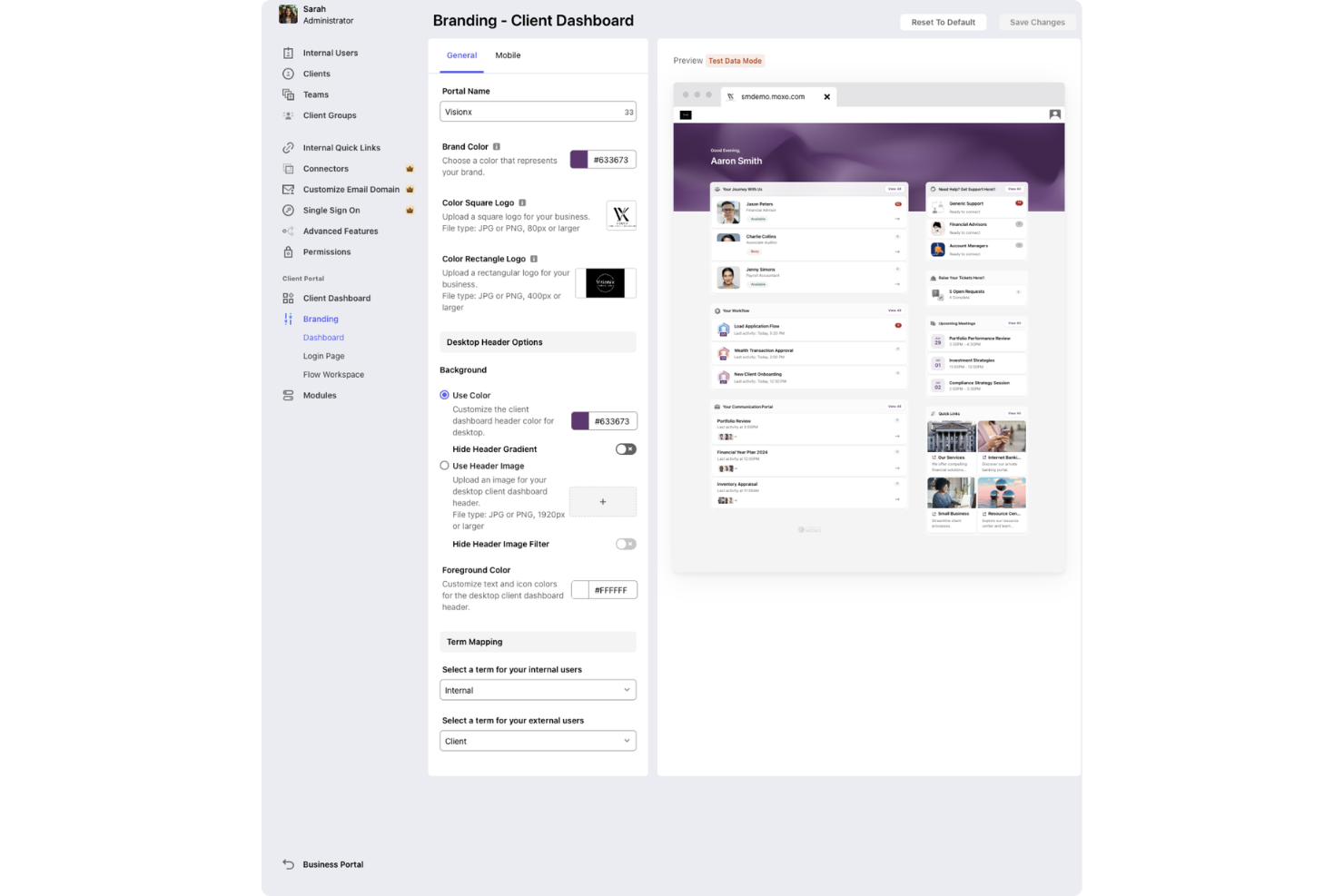
Moxo is a client onboarding and workflow management platform that provides secure client portals, digital forms, e-signatures, and real-time collaboration tools for managing onboarding processes.
Who Is Moxo Best For?
Moxo suits client-facing teams at financial services firms, consultancies, and professional services companies that need secure, branded onboarding portals.
Why I Picked Moxo
I picked Moxo as one of the best because I can set up secure, branded onboarding portals for clients and manage all onboarding steps in one place. I like that Moxo supports digital forms and e-signatures, which lets my team collect documents and approvals without switching tools. The free trial lets me test these features with real clients before committing.
Moxo Key Features
- In-app chat: Communicate with clients directly within the onboarding portal.
- Task tracking: Assign and monitor onboarding tasks for each client.
- Document sharing: Upload and organize files for client access and review.
- Audit trails: Track all client interactions and activity for compliance.
Moxo Integrations
Moxo offers native integrations with DocuSign, Salesforce, HubSpot, Outlook, and Google for meeting scheduling and data sync. An API is available for custom integrations.
What's Free?
Moxo offers a free plan with limited “flows” and AI credits. The plan provides access to core onboarding features, and users can perform up to two flows and have access to 500 AI credits per month.
Pros and Cons
Pros:
- Branded experience with customizable client workspaces
- Automated task assignment and progress tracking
- Real-time chat and messaging with clients
Cons:
- Mobile app notifications can be inconsistent
- No free plan, only a free trial
Notion
Best for a flexible workspace for building onboarding checklists and guides
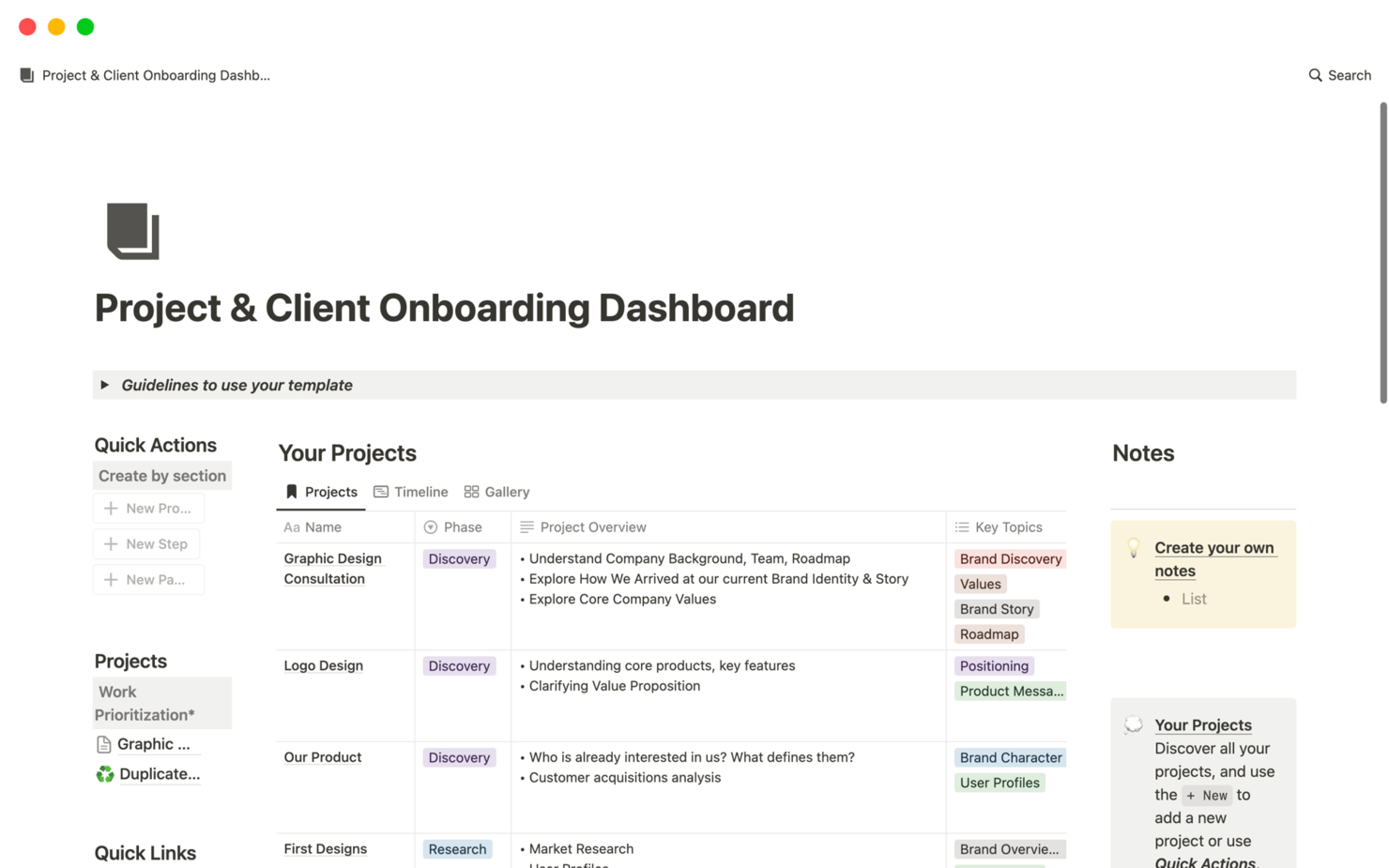
Notion is a collaborative workspace platform that combines document creation, wikis, databases, and project management tools for organizing and managing client onboarding workflows.
Who Is Notion Best For?
Notion suits small to midsize teams who want a flexible, all-in-one workspace for managing client onboarding and internal documentation.
Why I Picked Notion
I picked Notion as one of the best because I can combine docs, wikis, and project management in a single workspace—my team builds onboarding templates, tracks client progress in databases, and centralizes all onboarding resources in one place. I like that we can link onboarding checklists directly to client records and update everything in real time. The flexibility to create custom onboarding dashboards and knowledge bases makes it easy to adapt our process as client needs change.
Notion Key Features
- Guest access: Invite clients to view or edit specific onboarding pages.
- Task assignment: Assign onboarding tasks to team members or clients.
- Commenting and mentions: Collaborate on onboarding steps with in-line comments and @mentions.
- Version history: Track changes to onboarding documents and restore previous versions.
Notion Integrations
Notion offers native integrations with Slack, GitHub, GitLab, Jira, Asana, Google Drive, Figma, Zoom, and Typeform. It connects with Zapier and provides an API for custom integrations.
What's Free?
Notion offers a free-forever plan for individuals and small teams with unlimited pages and blocks. The free plan limits file uploads to 5MB per file and restricts some advanced permissions and admin controls.
Pros and Cons
Pros:
- Real-time collaboration with comments and mentions
- Custom templates support tailored onboarding workflows
- Flexible workspace combines documentation and task tracking
Cons:
- No dedicated client portal functionality
- Limited native automation for onboarding processes

Softr
Best for no-code client portals for onboarding and resource sharing

Softr is a no-code client portal builder that lets you create secure onboarding portals using data from Airtable or Google Sheets, with features for user authentication, permissions, and customizable layouts.
Who Is Softr Best For?
Softr is a good fit for small businesses and consultancies that want to build secure, no-code client onboarding portals using Airtable or Google Sheets.
Why I Picked Softr
I picked Softr as one of the best because I can build secure client portals directly from Airtable or Google Sheets without writing code. My team is able to set up granular user permissions and authentication for each client. I like that we can customize layouts and add document upload blocks to match our onboarding process.
Softr Key Features
- Drag-and-drop page builder: Arrange onboarding pages and sections visually with no coding required.
- Pre-built onboarding templates: Start quickly with templates designed for client portals and onboarding flows.
- Custom domain support: Use your own branded domain for client-facing portals.
- Email notifications: Automatically send onboarding updates and alerts to clients and team members.
Softr Integrations
Softr offers native integrations with Airtable, Google Sheets, Stripe, HubSpot, Mailchimp, Google Analytics, Intercom, Hotjar, and Google Tag Manager. It connects with Zapier and provides an API for custom integrations.
What's Free?
Softr offers a free-forever plan that includes unlimited applications and up to 5 internal users. The free plan displays Softr branding and has limited integration and customization options.
Pros and Cons
Pros:
- User authentication controls support secure access
- Pre-built templates accelerate setup time
- No-code builder simplifies creation of client onboarding portals
Cons:
- Reporting features are relatively basic
- Limited workflow automation capabilities
Airtable
Best for a spreadsheet-database hybrid for tracking onboarding progress
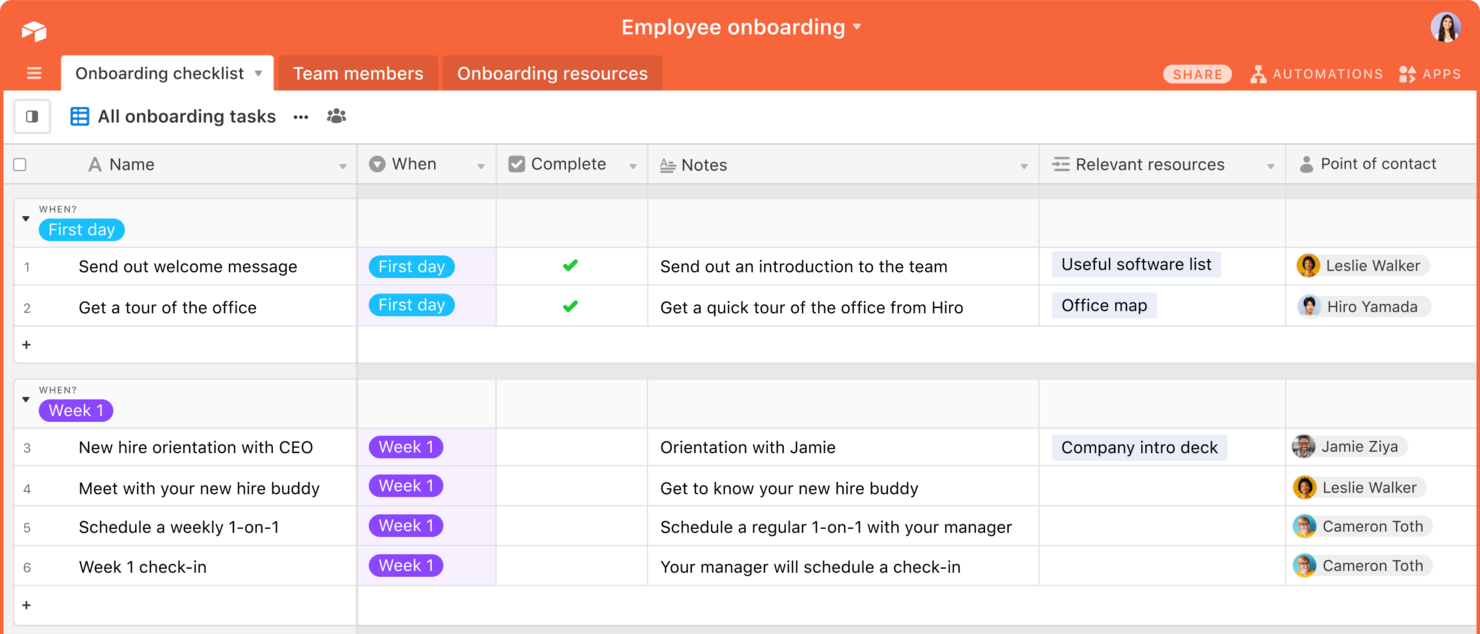
Airtable is a flexible database and workflow platform that lets you build custom client onboarding pipelines, automate processes, and organize client data using spreadsheets, forms, and visual dashboards.
Who Is Airtable Best For?
Airtable is a good fit for teams that need to design custom onboarding workflows and manage client data in a highly visual, flexible environment.
Why I Picked Airtable
I picked Airtable as one of the best because I can build custom onboarding pipelines using its visual database and automation tools. My team uses the free plan to create onboarding forms, track client progress, and collaborate in real time. I like that I can design unique onboarding templates and dashboards without code, which fits a range of client needs.
Airtable Key Features
- Views gallery: Choose from grid, calendar, kanban, and gallery views for onboarding data.
- Role-based permissions: Set granular access levels for collaborators and clients.
- Automations library: Trigger actions like notifications or record updates based on onboarding milestones.
- Attachment fields: Upload and organize client documents directly within onboarding records.
Airtable Integrations
Airtable offers native integrations with Google Drive, Slack, Jira, Salesforce, Box, and Dropbox, and connects with Zapier. An API is available for custom integrations.
What's Free?
Airtable offers a free-forever plan with unlimited bases, up to five creators or editors per workspace, and limited automation and integration options. Storage and record limits apply on the free plan.
Pros and Cons
Pros:
- Custom forms support structured client data collection
- Multiple views improve visibility into onboarding progress
- Flexible database structure adapts to custom onboarding workflows
Cons:
- Lacks built-in client communication tools
- Advanced automation features restricted on free plan

Dock
Best for client onboarding workspaces with templates and automation
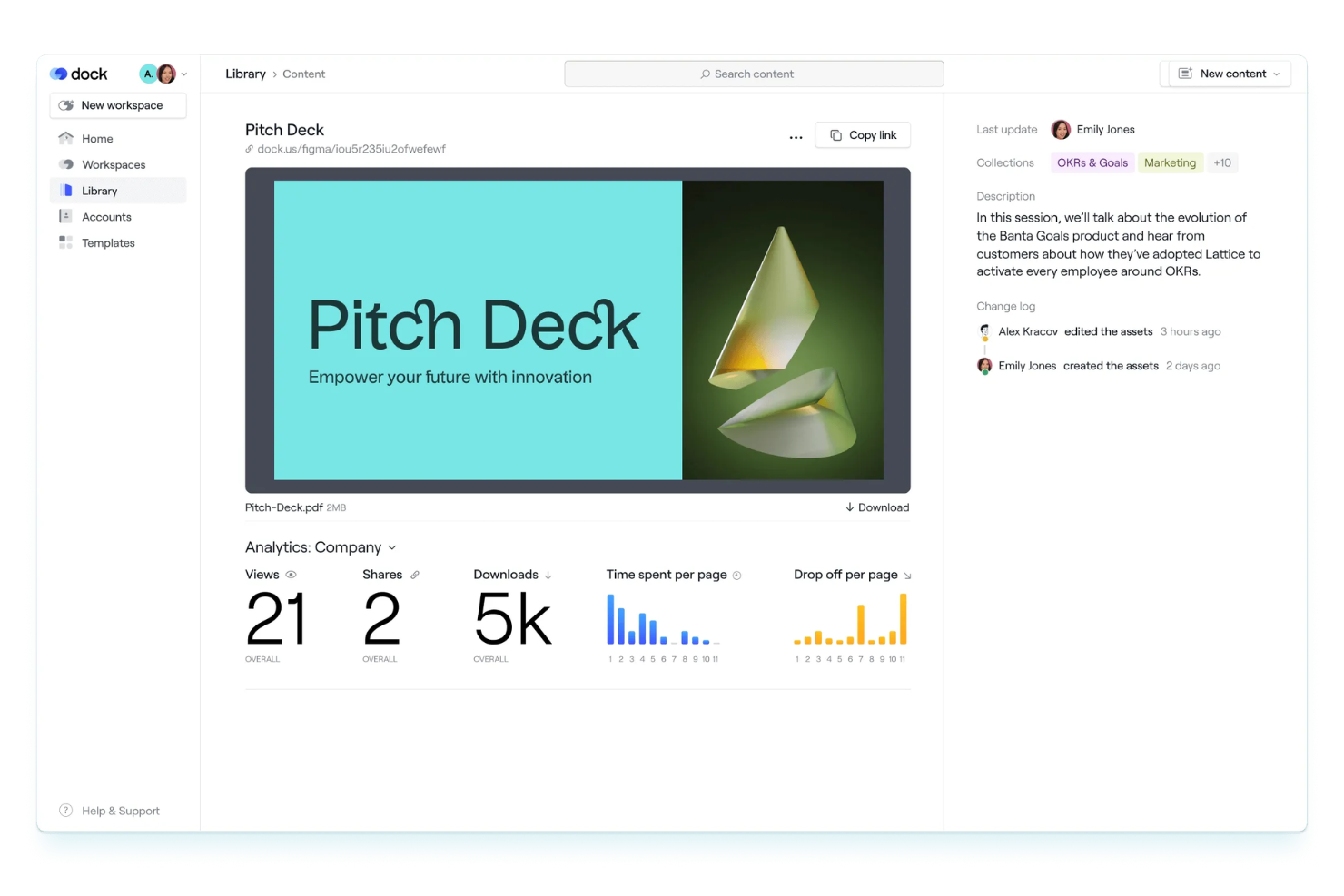
Dock is a client onboarding workspace platform that lets teams create interactive onboarding portals, automate onboarding tasks, and use customizable templates to manage client journeys.
Who Is Dock Best For?
Dock is a good fit for customer success and onboarding teams at B2B SaaS companies managing multiple client projects.
Why I Picked Dock
I picked Dock as one of the best because its onboarding workspaces let my team build repeatable client journeys with templates and automation. I like that I can assign tasks, share documents, and track progress in a single portal. The workspace templates make it easy to standardize onboarding across different client types.
Dock Key Features
- Client portal customization: Personalize each client’s onboarding portal with branding and tailored content.
- Embedded video walkthroughs: Add video guides directly into onboarding workspaces for step-by-step instructions.
- File request and upload: Request and collect documents securely from clients within the portal.
- Approval workflows: Set up approval steps for client deliverables and onboarding milestones.
Dock Integrations
Integrations include Slack, Salesforce, Gong, Zoom, Microsoft Teams, Zoom, Avoma, and Loom.
What's Free?
Dock offers a free-forever plan with limited features. The free plan restricts you to one active client workspace and does not include advanced automation or integrations.
Pros and Cons
Pros:
- Embedded video walkthroughs enhance onboarding guidance
- Customizable client portals with tailored content and branding
- Workspace templates standardize repeatable onboarding processes
Cons:
- Mobile experience less optimized than desktop
- Limited analytics for tracking onboarding performance

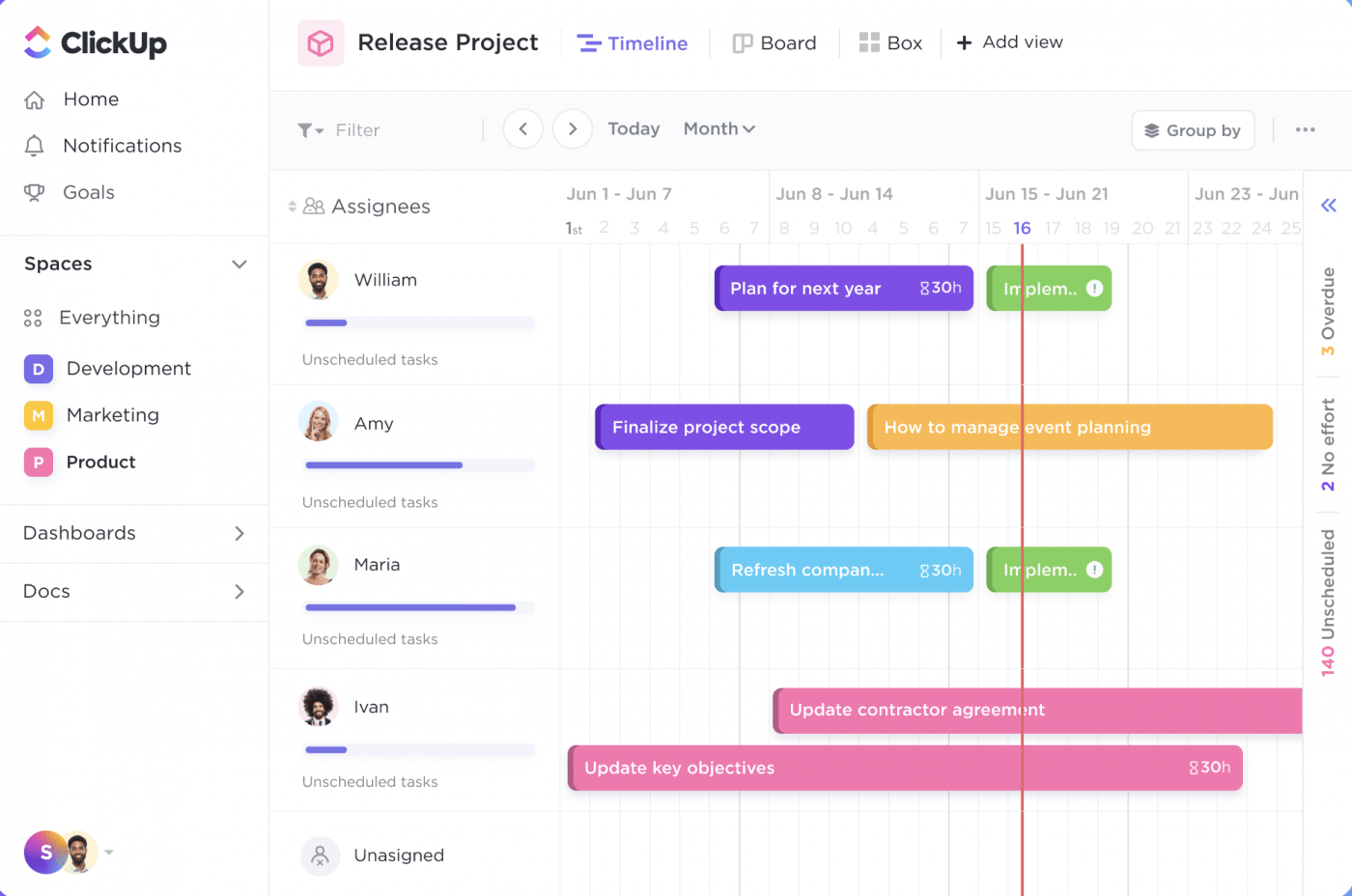
ClickUp is a work management platform that lets teams organize client onboarding with customizable SOP templates, task lists, document sharing, and workflow automation.
Who Is ClickUp Best For?
ClickUp is a good fit for small to midsize teams in digital agencies or consulting firms that need customizable onboarding workflows.
Why I Picked ClickUp
I picked ClickUp as one of the best because I can grab ready-made SOP templates for client onboarding and customize them for my workflow. I like that I can assign onboarding tasks, set dependencies, and track progress in real time. My team uses ClickUp’s document sharing to keep all onboarding materials in one place.
ClickUp Key Features
- Form view: Collect onboarding information from clients using customizable forms.
- Automations: Set up triggers and actions to automate repetitive onboarding steps.
- Custom fields: Track client-specific onboarding data with tailored field types.
- Time tracking: Monitor time spent on each onboarding task directly within the platform.
ClickUp Integrations
ClickUp offers native integrations with Google Drive, Slack, GitHub, Zoom, Microsoft Teams, Dropbox, OneDrive, Outlook, and Calendly. It also connects with Zapier and provides an API for custom integrations.
What's Free?
ClickUp offers a free-forever plan with unlimited users and tasks. The free plan limits automations, advanced reporting, and some integrations, and restricts guest access and storage.
Pros and Cons
Pros:
- Real-time collaboration improves team coordination
- Custom fields allow detailed client data tracking
- Pre-built SOP templates support structured onboarding processes
Cons:
- Mobile performance can lag on complex projects
- Automation capabilities limited on free plan

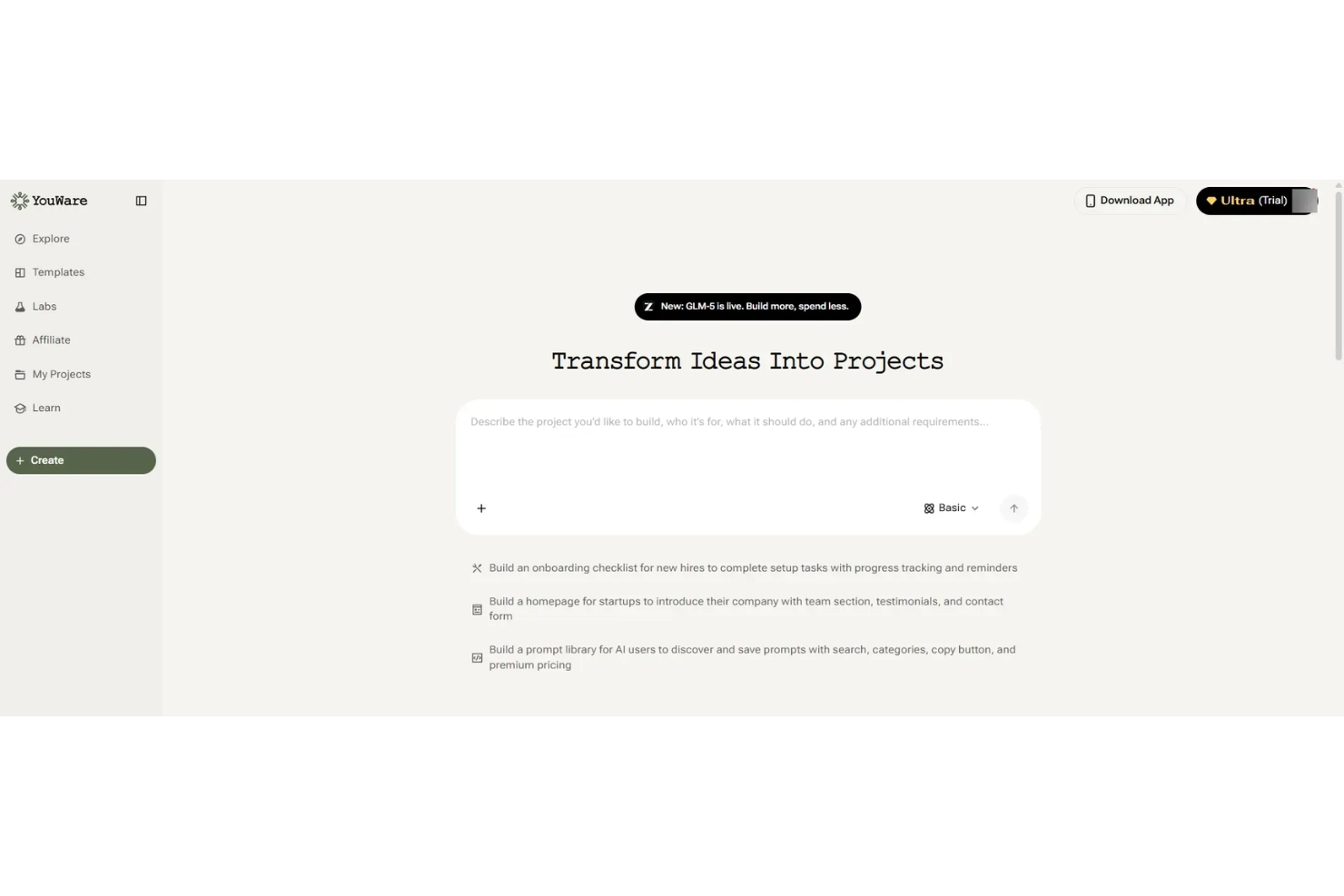
Youware is a client onboarding and portal platform designed for small teams, offering tools for client intake, document sharing, task assignment, and progress tracking.
Who Is Youware Best For?
Youware is a good fit for small teams or solo professionals who need a simple client onboarding and portal solution.
Why I Picked Youware
I picked Youware as one of the best because its free onboarding and client portal features are purpose-built for small teams. I like that I can set up client intake forms, assign onboarding tasks, and share documents in a single workspace. My team is able to track client progress and manage communication without needing to upgrade or add extra tools.
Youware Key Features
- Client portal customization: Personalize the look and feel of each client’s portal.
- Automated reminders: Send scheduled notifications to clients for outstanding tasks.
- Role-based access control: Set permissions for team members and clients.
- Activity timeline: View a chronological log of all client interactions and updates.
Youware Integrations
Integrations include Azure, Stripe, Google Cloud, Cloudflare, Supabase, Figma, AWS, Anthropic, OpenAI, and more.
What's Free?
Youware offers a free-forever plan for small teams. The free plan includes unlimited clients and core onboarding features, but advanced integrations and some customization options may be limited.
Pros and Cons
Pros:
- Built-in task tracking and automated reminders improve follow-ups
- Simple interface suited for small teams and solo users
- Free plan supports unlimited client onboarding projects
Cons:
- Basic role-based permissions lack depth
- Limited workflow automation compared to advanced tools

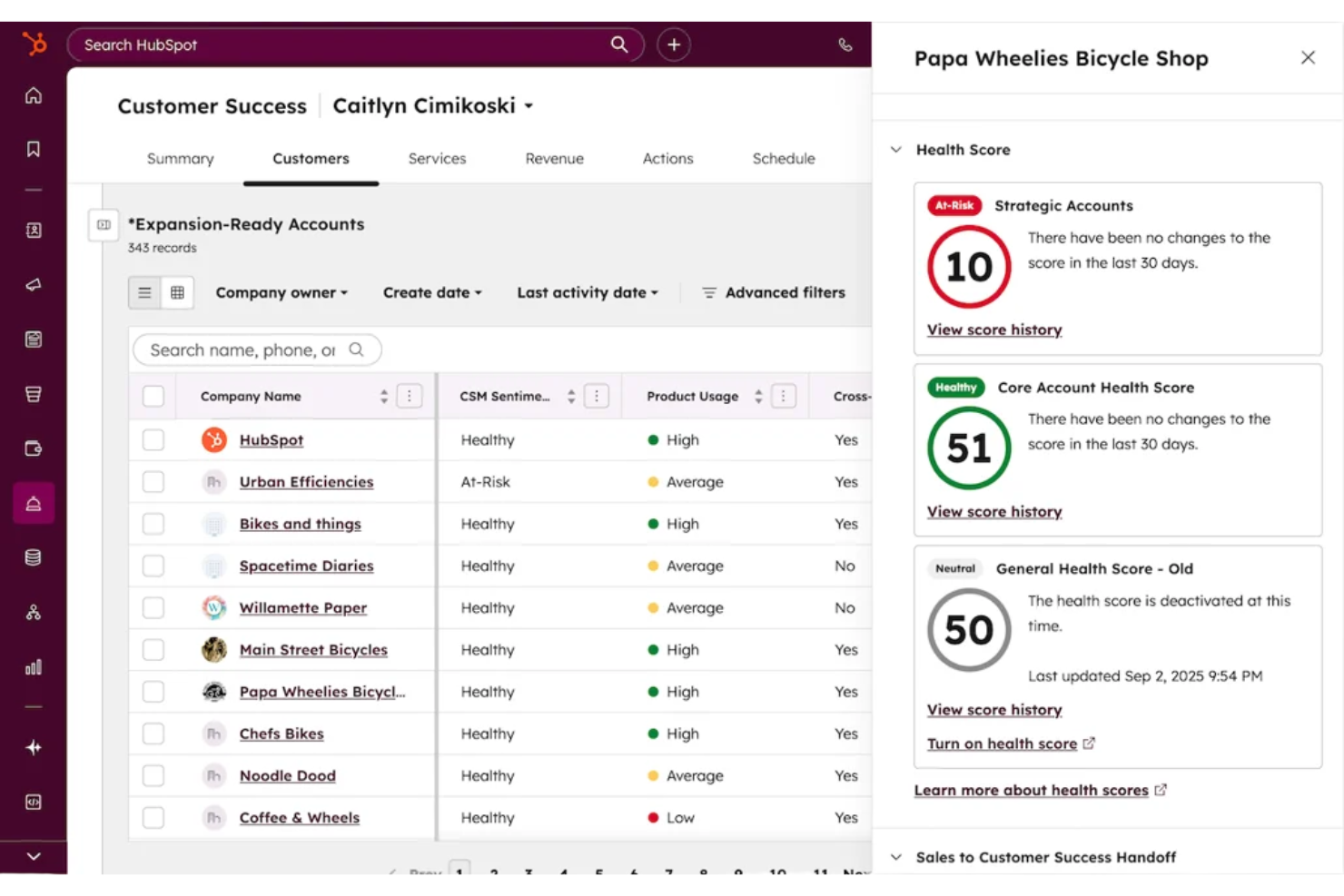
HubSpot CRM is a client onboarding and relationship management platform that combines contact management, pipeline tracking, email integration, and workflow automation for teams handling new client onboarding.
Who Is HubSpot CRM Best For?
Small to midsize businesses that need a unified platform for managing client onboarding and ongoing customer relationships.
Why I Picked HubSpot CRM
I picked HubSpot CRM as one of the best because it gives my team unlimited users and contacts on the free plan, which is rare for onboarding tools. I use its customizable pipelines to track every stage of client onboarding, and the built-in email tracking helps us keep communication organized. The contact timeline lets me see all client interactions in one place, so nothing falls through the cracks.
HubSpot CRM Key Features
- Meeting scheduling links: Let clients book onboarding calls directly from your calendar.
- Document management: Store and share onboarding documents within each client record.
- Task automation: Automatically assign onboarding tasks to team members based on triggers.
- Live chat widget: Add real-time chat to your website for instant client support during onboarding.
HubSpot CRM Integrations
HubSpot CRM offers native integrations with Gmail, Outlook, Google Calendar, Slack, Zoom, Mailchimp, Shopify, Stripe, Facebook Ads, and LinkedIn Ads. An API is available for custom integrations.
What's Free?
HubSpot CRM offers a free-forever plan with unlimited users and contacts. Some advanced features, automation, and reporting tools are restricted to paid plans.
Pros and Cons
Pros:
- Customizable pipelines for onboarding workflows
- Email tracking and logging for client communication
- Built-in meeting scheduler for onboarding calls
Cons:
- No built-in e-signature for onboarding documents
- Workflow automation is limited on free plan


Typeform is an online form builder that lets you create interactive forms, surveys, and quizzes with conversational logic for collecting client information and onboarding details.
Who Is Typeform Best For?
Typeform suits marketing teams and small businesses that want to create engaging, interactive onboarding forms for clients.
Why I Picked Typeform
I picked Typeform as one of the best because its conversational forms make client onboarding feel personal and interactive. I like that I can use conditional logic to tailor questions based on client responses. My team is able to embed forms directly on our website and collect onboarding details in a way that feels more like a conversation than a survey.
Typeform Key Features
- File upload field: Clients can securely upload documents or images during onboarding.
- Custom branding: Add your logo, colors, and fonts to match your brand identity.
- Response notifications: Get instant email alerts when a client submits a form.
- Integration with CRM tools: Connect responses directly to platforms like HubSpot or Salesforce.
Typeform Integrations
Typeform offers native integrations with HubSpot, Slack, Google Sheets, Salesforce, Mailchimp, Airtable, Trello, Asana, Microsoft Teams, and Zapier. An API is available for custom integrations.
What's Free?
Typeform offers a free-forever plan that allows one user to create unlimited forms with up to 10 questions per form and 10 responses per month. Some integrations and advanced features are only available on paid plans.
Pros and Cons
Pros:
- Custom branding enhances client-facing forms
- Conditional logic personalizes onboarding experiences
- Interactive forms improve client engagement during intake
Cons:
- Not suited for full end-to-end onboarding workflows
- Response limits restrict scalability on free plan

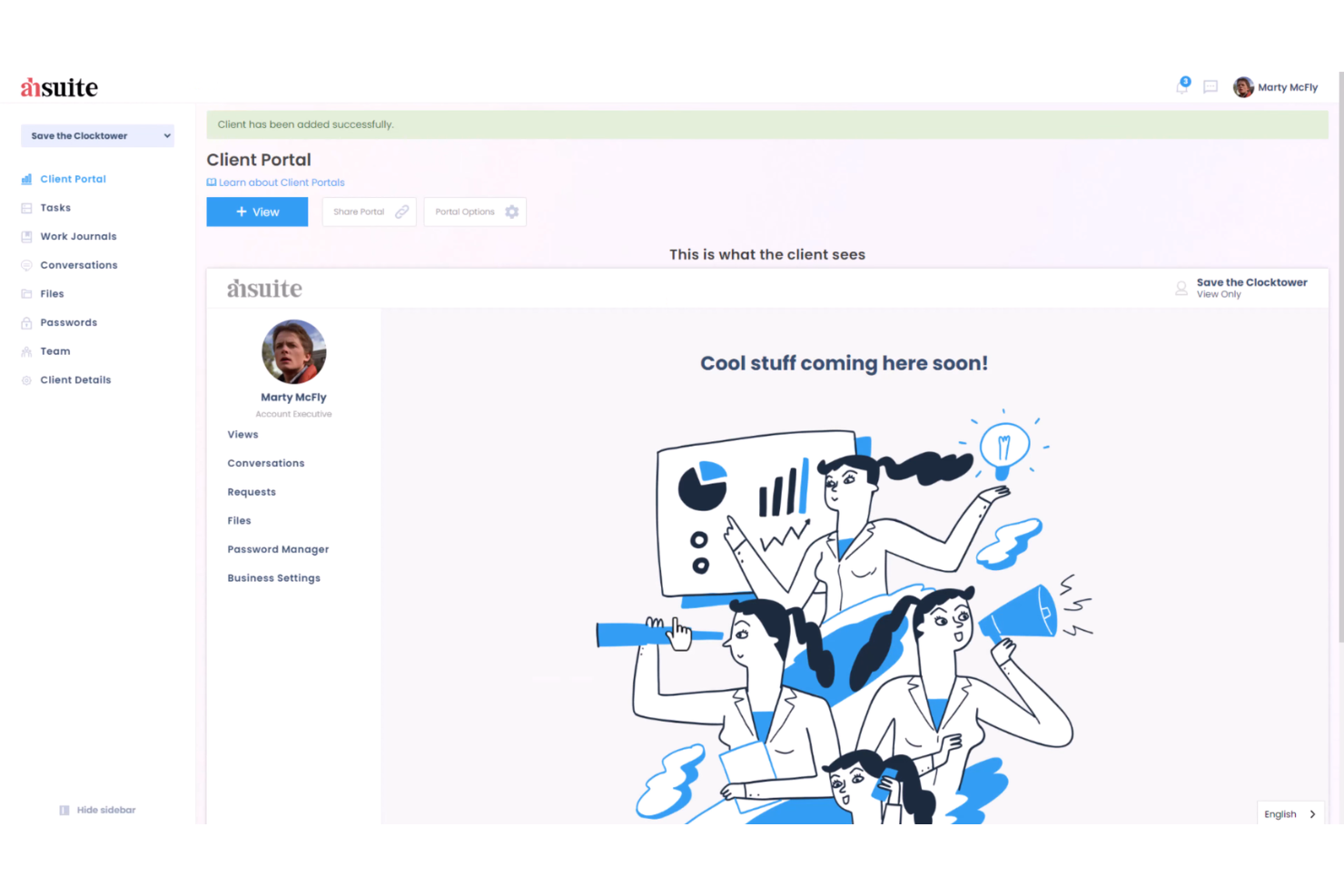
Ahsuite is a client portal platform for onboarding that lets you organize client dashboards, share files, manage tasks, and embed custom tools in a secure, branded environment.
Who Is Ahsuite Best For?
Ahsuite is a good fit for small agencies and consultants who need to onboard and manage multiple clients in one place.
Why I Picked Ahsuite
I picked Ahsuite as one of the best because it lets me onboard unlimited clients for free and organize each client’s dashboard with custom tabs, file sharing, and embedded tools. I like that I can create secure, branded portals for every client without worrying about user limits. My team is able to manage client communications, tasks, and shared resources all in one place, which is rare for a free plan.
Ahsuite Key Features
- White label customization: Add your own branding, logo, and colors to each client portal.
- Password manager: Store and share passwords securely with clients and team members.
- Client messaging: Send and receive direct messages within the portal.
- Task management: Assign, track, and organize tasks for each client workspace.
Ahsuite Integrations
Native integrations are not clearly documented
What's Free?
Ahsuite offers a free-forever plan with unlimited client portals and users. The free plan includes core features but displays Ahsuite branding and does not support white-label customization or advanced automation.
Pros and Cons
Pros:
- Custom dashboard tabs support flexible onboarding layouts
- Built-in messaging centralizes client communication
- Unlimited client portals available on free plan
Cons:
- No dedicated mobile application
- Limited automation for onboarding workflows
Annen gratis programvare for kundeonboarding
Her er noen flere gratisalternativer for kundeonboarding som ikke kom med på kortlisten min, men som likevel er verdt å sjekke ut:
- Zoho CRM
For CRM with onboarding workflow automation
- Trupeer
For AI-driven onboarding automation
- Rocketlane
For purpose-built onboarding platform with project templates
- Clustdoc
For client portal for document collection and onboarding workflows
- Appcues
For no-code onboarding flows and in-app guidance


How I Evaluate Free Client Onboarding Software
First, I define what counts as free. For client onboarding software, where you're repeating intake forms, kickoff checklists, and client portals for every engagement, a free-forever plan is required. From there, I evaluate on two layers: the core functionality a tool must have to make the list, and the differentiators that set vendors apart.
Core Functionality (Table Stakes For This List)
In addition to my free offer requirements, I also use a scoring system to select tools for my list. Here's how it works:
I rank each one on a scale from 0 (does not offer the functionality) to 5 (excels in this area) for each core functionality listed below. Then, I calculate the tool's total score into a percentage. Each tool needs to achieve a minimum total score of 65% to be considered for inclusion.
- Client Intake Forms: I check whether the free plan includes customizable forms for collecting project briefs, brand assets, login credentials, or scoping details from new clients.
- Onboarding Workflow Automation: Repeatable onboarding matters here. I look for templates or task sequences that can be cloned each time a new client signs on, rather than rebuilding from scratch.
- Client Portal or Shared Workspace: I evaluate whether clients get a dedicated space to view progress, access shared files, and interact with your team without needing a paid seat.
- Task & Milestone Tracking: Each tool should let you assign onboarding tasks, set due dates, and track milestones so nothing falls through the cracks during a client's first few weeks.
- Document Sharing & E-Signatures: I look at how the free plan handles contracts, SOWs, and onboarding packets—specifically whether clients can review, approve, or sign documents in the platform.
- Communication & Notifications: I evaluate whether the tool keeps clients and internal team members aligned through comments, @mentions, or automated email alerts tied to onboarding steps.
Once I have a list of tools that meet the criteria, I consider what sets each platform apart.
Differentiating Factors (What Sets Vendors Apart)
Here's how I compare and contrast different vendors:
Standout Features
Reusable onboarding templates save real time when you're bringing on multiple clients with similar service packages. I look for tools that let you clone a full onboarding sequence—tasks, forms, documents—and deploy it in a few clicks. A built-in contract or proposal builder also adds value by keeping the entire handoff in one place instead of bouncing between separate signing tools. I also consider whether clients can complete intake steps from their phone, since delays often happen when someone needs a desktop to respond.
Beyond Features
Free plan limits matter a lot here. I check how many active clients, team seats, and storage a tool allows before you hit a paywall—because onboarding even five clients a month can push you past tight caps. Integration support is another big factor. If the tool connects natively to your project management stack (Asana, Trello, ClickUp) or offers Zapier access on its free tier, you can hand off onboarded clients into active projects without manual re-entry. I also evaluate data security, since you're handling contracts, credentials, and sensitive client information from day one.
Slik velger du gratis programvare for kundeonboarding
Det er lett å gå seg vill i lange funksjonslister og kompliserte prismodeller. For å hjelpe deg med å holde fokus mens du går gjennom den unike prosessen din for valg av programvare, får du her en sjekkliste over faktorer du bør ha i tankene:
| Faktor | Hva du bør vurdere |
|---|---|
| Skalerbarhet | Vil programvaren håndtere flere kunder eller brukere etter hvert som virksomheten vokser, eller vil du raskt vokse ut av gratisabonnementet? |
| Integrasjoner | Kobler den seg direkte til de eksisterende verktøyene dine (for eksempel CRM, e-post eller fillagring), eller trenger du omveier? |
| Tilpasningsmuligheter | Kan du tilpasse arbeidsflyter, felt og maler slik at de samsvarer med onboardingprosessen din, eller er du bundet til standardinnstillingene? |
| Brukervennlighet | Vil teamet og kundene dine kunne navigere i systemet uten omfattende opplæring eller brukerstøtte? |
| Implementering og onboarding | Hvor lang tid vil det ta å komme i gang, og hvilke ressurser eller hvilken støtte er tilgjengelig for å hjelpe deg med migreringen? |
| Kostnad | Finnes det skjulte kostnader, utløsere for oppgradering eller bruksgrenser som kan tvinge deg til å betale tidligere enn forventet? |
| Sikkerhetstiltak | Tilbyr plattformen kryptering, tilgangskontroller og samsvar med relevante standarder for personvern og datasikkerhet? |
| Tilgjengelig brukerstøtte | Hvilke brukerstøttekanaler er tilgjengelige i gratisabonnementet, og er svartidene akseptable for behovene dine? |
Hva er gratis programvare for kundeonboarding?
Gratis programvare for kundeonboarding er en onboardingløsning som hjelper virksomheter med å administrere kundeonboardingprosessen fra oppstart til fullføring uten kostnader på forhånd. Disse verktøyene hjelper team med å organisere interessenter, redusere repetitive oppgaver og forbedre tiden til verdi gjennom strukturerte arbeidsflyter, selvbetjeningsressurser og brukervennlige grensesnitt. De brukes ofte til å optimalisere kundebevaring og redusere frafall under brukeronboarding ved å skape en konsekvent og veiledet onboardingopplevelse.
Funksjoner i gratis programvare for kundeonboarding
La oss gå gjennom funksjonene som vanligvis finnes i programvare for kundeonboarding, og hvilke som vanligvis er inkludert i gratis- kontra betalingsabonnementer.
Funksjoner som vanligvis er gratis i programvare for kundeonboarding
- Oppgavebehandling: Tildel, følg opp og organiser onboardingoppgaver for teammedlemmer og kunder for å sikre at ingenting blir glemt.
- Sjekklistemaler: Bruk eller tilpass ferdige onboarding-sjekklister for å standardisere prosessen og spare tid på oppsett.
- Dokumentdeling: Last opp og del filer eller skjemaer med kunder direkte på plattformen for enkel tilgang og samarbeid.
- Grunnleggende automatisering: Konfigurer enkle utløsere, for eksempel automatisk tildeling av oppgaver eller utsending av påminnelser, for å redusere manuelt arbeid.
- Kommentarer og omtaler: Kommuniser med teammedlemmer eller kunder ved hjelp av kommentarer i appen og @omtaler for å holde diskusjonene organiserte.
- Fremdriftssporing: Følg med på statusen for onboardingtrinnene og visualiser fullføringsgraden for å holde oversikt over kundereisene.
- Brukeradministrasjon: Legg til flere brukere eller teammedlemmer for å samarbeide om onboardingprosjekter i samme arbeidsområde.
- Kalenderintegrasjon: Synkroniser onboardingoppgaver og tidsfrister med kalenderen for å holde timeplanene samkjørte.
- Aktivitetslogger: Se en historikk over handlinger som er utført i onboardingprosjekter, for å sikre ansvarlighet og åpenhet.
Funksjoner som vanligvis krever betaling i programvare for kundeonboarding
- Avansert automatisering: Bygg arbeidsflyter i flere trinn som automatiserer komplekse onboardingsekvenser, godkjenninger eller varsler på tvers av team.
- Tilpasset merkevarebygging: Legg til bedriftens logo, farger og domene for å skape en merkevaretilpasset onboardingopplevelse for kundene.
- Innsamling av elektroniske signaturer: Samle inn juridisk bindende elektroniske signaturer på kontrakter eller skjemaer direkte på plattformen.
- Kundeportaler: Gi kundene sikre, personlige oversikter der de kan følge onboardingfremdriften og få tilgang til ressurser.
- Rapportering og analyse: Generer detaljerte rapporter om onboardingresultater, flaskehalser og måltall for kundetilfredshet.
- Rollebaserte tillatelser: Kontroller tilgangen til sensitiv informasjon ved å tildele detaljerte tillatelser til brukere og kunder.
- Integrasjon med premiumverktøy: Koble til avanserte CRM-, regnskaps- eller prosjektstyringssystemer som ikke er tilgjengelige i gratisabonnementer.
- Prioritert brukerstøtte: Få raskere svartider og tilgang til dedikerte supportkanaler for feilsøking og onboardinghjelp.
- Ubegrenset lagring: Fjern begrensninger for filopplasting og lagring for å håndtere store mengder onboardingdokumenter og medier.
- API-tilgang: Bruk plattformens API til å bygge tilpassede integrasjoner eller automatisere dataflyter med andre forretningssystemer.
Fordeler med gratis programvare for kundeonboarding
Implementering av gratis programvare for kundeonboarding gir flere fordeler for teamet og virksomheten din. Her er noen av fordelene du kan se frem til:
- Standardiserte prosesser: Bruk maler og sjekklister for å sikre at alle kunder får en konsekvent onboardingopplevelse.
- Bedre samarbeid: Tildel oppgaver, del dokumenter og kommuniser på ett sted for å holde teamet og kundene samkjørte.
- Kostnadsbesparelser: Få tilgang til viktige onboardingfunksjoner uten å betale for et abonnement, noe som gjør det enklere å holde oversikt over budsjettet.
- Raskere onboarding: Automatiser gjentakende trinn og følg fremdriften for å få kundene raskere gjennom onboardingprosessen.
- Bedre oversikt: Følg med på onboardingstatus og tidsfrister slik at ingenting blir oversett og alle holdes ansvarlige.
- Enkel skalering: Legg til flere brukere eller kunder etter hvert som virksomheten vokser, uten å bekymre deg for umiddelbare kostnader ved oppgradering.
- Sentralisert dokumentasjon: Lagre alt onboardingmateriale og alle kundefiler på ett tilgjengelig sted for teamet.
Kostnader og priser for programvare for kundeonboarding
Jeg forstår at du kom til denne artikkelen på jakt etter de beste alternativene for programvare for kundeonboarding som er tilgjengelige gratis. Ettersom gratisabonnementer bare tilbyr begrensede funksjoner, er det imidlertid stor sannsynlighet for at du må oppgradere abonnementet ditt i fremtiden.
Tabellen nedenfor oppsummerer vanlige abonnementer, gjennomsnittsprisene deres og typiske funksjoner som er inkludert i programvare for kundeonboarding:
Sammenligningstabell for programvare for kundeonboarding
| Plantype | Gjennomsnittspris | Vanlige funksjoner |
|---|---|---|
| Gratisplan | $0 | Grunnleggende oppgavebehandling, sjekklister og maler, begrenset dokumentdeling, grunnleggende automatisering og standard kundestøtte. |
| Personlig plan | $5–$15/bruker/måned | Ubegrenset antall oppgaver, mer lagringsplass, kalendersynkronisering, enkle integrasjoner og begrenset rapportering. |
| Bedriftsplan | $15–$30/bruker/måned | Avansert automatisering, tilpasset merkevarebygging, kundeportaler, innsamling av elektroniske signaturer og forbedret analyse. |
| Plan for større virksomheter | $30–$60/bruker/måned | Rollebaserte tillatelser, API-tilgang, ubegrenset lagringsplass, avanserte integrasjoner og prioritert kundestøtte. |
Vanlige spørsmål om gratis programvare for kundeonboarding
Her er noen svar på vanlige spørsmål om gratis programvare for kundeonboarding:
Hva er de viktigste begrensningene ved gratis programvare for kundeonboarding?
Gratis programvare for kundeonboarding begrenser vanligvis antallet brukere, lagringsplassen, automatiseringsreglene og integrasjonene. Du kan også finne begrensninger på avanserte funksjoner som rapportering, tilpasset merkevarebygging og kundeportaler.
Kan jeg migrere dataene mine hvis jeg oppgraderer fra en gratisplan til en betalingsplan?
Ja, de fleste plattformer lar deg migrere dataene dine sømløst når du oppgraderer. Oppgavene, dokumentene og kunderegistreringene dine forblir vanligvis intakte, men det er lurt å bekrefte detaljene rundt migreringen med leverandøren før du bytter.
Er gratis programvare for kundeonboarding sikker nok for sensitive kundedata?
Ja, de fleste anerkjente løsninger for gratis kundeonboarding bruker kryptering og tilgangskontroller. Gratisplaner inkluderer imidlertid kanskje ikke avanserte sikkerhetsfunksjoner eller samsvarssertifiseringer, så se gjennom leverandørens sikkerhetsdokumentasjon hvis du håndterer sensitiv informasjon.
Kan jeg bruke gratis programvare for kundeonboarding til flere prosjekter eller kunder samtidig?
Ja, de fleste gratisplaner lar deg administrere flere prosjekter eller kunder, men du kan møte begrensninger på antallet aktive prosjekter, brukere eller lagringsplass. Sjekk planens begrensninger for å sikre at den passer til arbeidsflyten din.
Hva skjer hvis jeg vokser ut av begrensningene i gratisplanen?
Hvis du vokser ut av gratisplanen, må du oppgradere til en betalingsplan for å få tilgang til flere brukere, mer lagringsplass eller avanserte funksjoner. De fleste leverandører gjør det enkelt å oppgradere uten å miste eksisterende data eller arbeidsflyter. Etter hvert som behovene dine for kundeonboarding blir mer komplekse, kan det også være lurt å utforske AI-programvare for kundeonboarding for ytterligere automatisering og støtte.