

De 10 beste gratis AI-programvarene for oppgavestyring, vurdert i 2026

Beste gratis AI-programvare for oppgavehåndtering


Den beste gratis AI-programvaren for oppgavehåndtering hjelper organisasjoner med begrenset budsjett med å prioritere, tildele oppgaver og opprettholde oversikten over prosjekter. Når tidsfrister overlapper, kommunikasjon går tapt i e-posttråder eller oppgaver mangler en ansvarlig, stopper prosjektene opp og viktig arbeid blir ikke gjort. Den riktige plattformen samler oppfølging av oppgaver, planlegging og statusoppdateringer på ett sted, slik at teamene vet nøyaktig hva som skjer videre.
Jeg har testet dusinvis av verktøy basert på min erfaring med å lede prosjekter med team på 5–20 personer for å finne de mest effektive. Finn det riktige verktøyet for å redusere kompleksiteten, styrke ansvarligheten og holde prosjektene i gang med minst mulig friksjon.
Hvorfor du kan stole på våre programvareanbefalinger
Teamet vårt har testet og anmeldt programvare siden 2012. Vi er selv prosjektledere, så vi vet hvor vanskelig og hvor viktig det er å velge riktig programvare.
I denne guiden har vi vurdert verktøyene gjennom praktisk testing og uavhengig research og gitt dem poeng ut fra våre utvelgelseskriterier. Vi bygger også på innsikt fra ledende eksperter i bransjen og erfarne prosjektledere.
Anmeldelsene våre bygger på vår egen redaksjonelle vurdering. De er ikke et salgsargument.
Ekspertanmeldere:
Sammenligningstabell over gratis AI-programvare for oppgavehåndtering
Denne sammenligningstabellen oppsummerer prisinformasjonen for mine beste utvalgte gratis AI-programmer for oppgavehåndtering:
| Tool | Best For | Trial Info | Price | ||
|---|---|---|---|---|---|
| 1 | Best for tracking time against AI-made tasks | Free plan available; 30-day free trial; Free demo available | From $9/user/month | Website | |
| 2 | Best with AI-powered risk identification | Free plan + 14-day trial available | From $9/user/month (billed annually) | Website | |
| 3 | Best for intuitive interface | Free plan + 14-day free trial available | From €17.50/user/month | Website | |
| 4 | Best for team collaboration | Free plan available | From $20/month | Website | |
| 5 | Best for simple task lists | Free plan + free trial available | From $5/user/month (billed annually) | Website | |
| 6 | Best for bug tracking | 30-day free trial and free plan available | From $35/month | Website | |
| 7 | Best for project milestones | Free-forever plan available | From $39/month (billed annually) | Website | |
| 8 | Best for project templates | Free plan + 14-day free trial + free demo available | From $9.99/user/month (billed annually) | Website | |
| 9 | Best for calendar syncing | Free plan available | From $10/seat/month | Website | |
| 10 | Best for chat integration | Free plan available | From $0.80/user/month (billed annually) | Website |


Anmeldelser av den beste gratis AI-programvaren for oppgavehåndtering
Les mine detaljerte sammendrag av hvert av de beste gratis AI-programmene for oppgavehåndtering. Jeg gjennomgår viktige funksjoner, fordeler & ulemper, integrasjoner og hva som er gratis for hver av de beste AI-verktøyene for oppgavehåndtering.
Toggl
Best for tracking time against AI-made tasks
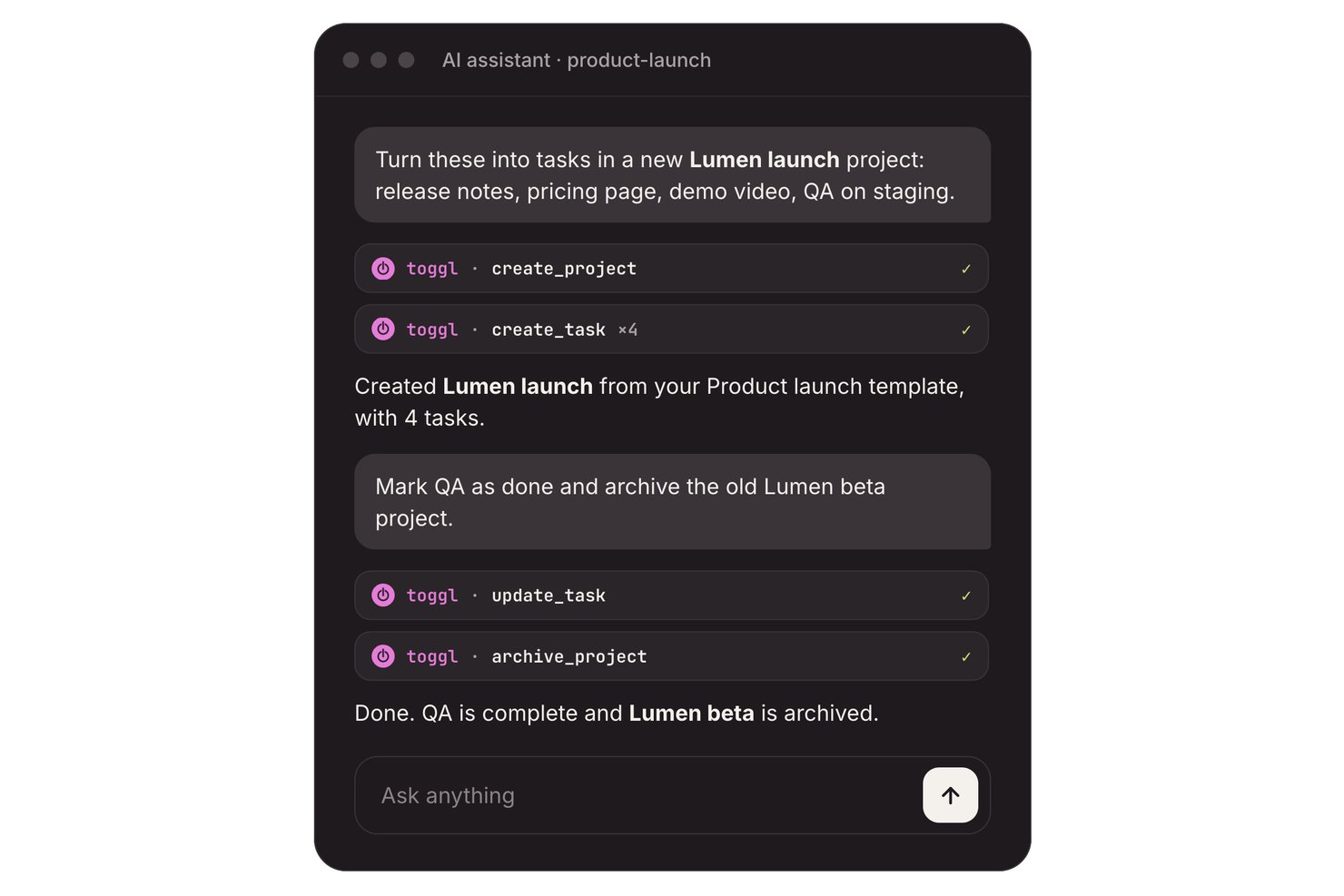
Toggl is an AI task management platform with task boards, estimates, and time tracking, plus an AI Task Creator that turns prompts, notes, and to-do-list photos into editable tasks.
Who Is Toggl Best For?
Freelancers and teams of up to three can turn notes into tasks and compare planned work with tracked time.
Why I Picked Toggl
I picked Toggl as “Best for tracking time against AI-made tasks” because it connects generated work to actual effort. Its free AI Task Creator turns prompts, meeting notes, or to-do-list photos into editable tasks; I can add estimates, then track time against each task. The free plan supports up to three users.
Toggl Key Features
- Recurring tasks: Set tasks to repeat on a schedule.
- Subtasks and comments: Add subtasks and comments to task records.
- Calendar integrations: Turn calendar events into tasks or time entries.
- Focus mode: Use focused work sessions with short breaks.
Toggl Integrations
Toggl connects with Google Calendar and Outlook calendars, and offers Jira and Asana integrations on Premium. A REST API and webhooks support custom integrations.
What's Free?
Toggl has a free plan for up to three users, including its AI Task Creator. Jira and Asana integrations require the Premium plan.
Pros and Cons
Pros:
- Reviewers praise quick, lightweight time tracking
- Task timers compare estimates with actuals
- AI turns notes into editable tasks
Cons:
- AI doesn’t proactively schedule or prioritize tasks
- Free collaboration stops at three users

Best with AI-powered risk identification
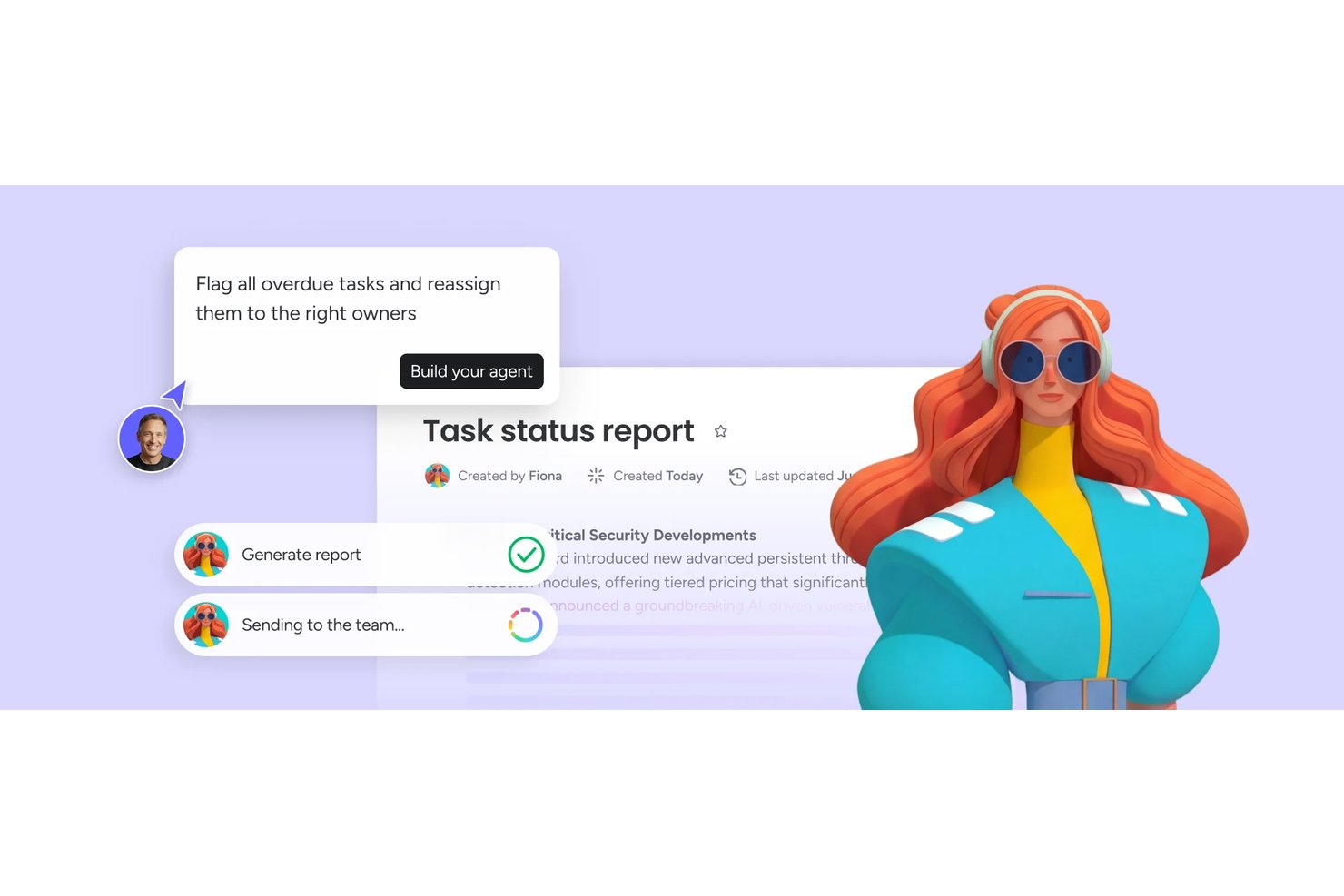
monday AI Workspace is an AI-powered work management platform that combines task automation, smart project planning, AI agents, and real-time risk identification across boards, timelines, and dashboards.
Who Is monday AI Workspace Best For?
It's a strong fit for project managers and cross-functional teams at mid-size to enterprise companies managing multiple complex workstreams simultaneously.
Why I Picked monday AI Workspace
monday AI Workspace earns its spot on my shortlist because of how its AI handles risk before it becomes a real problem. I like that it actively tracks dependencies across boards and flags conflicts, like resource over-allocation or delayed milestones, without me having to dig for them. The AI Meeting Notetaker also feeds directly into project context, so action items and risks surface automatically from standups.
monday AI Workspace Key Features
- AI workflow builder: Orchestrates multi-step workflows by connecting agents and automation rules directly within boards.
- Vibe app builder: Lets you turn process needs or requests into custom apps using simple descriptions or prompts.
- Sidekick AI assistant: Offers chat-based guidance to query project data, suggest actions, or draft updates in context.
- Multi-view project boards: Supports Kanban, Gantt, calendar, and timeline views for tracking progress across projects.
monday AI Workspace Integrations
monday AI Workspace offers hundreds of native integrations and marketplace apps, including Slack, Salesforce, HubSpot, Google Workspace, Microsoft Teams, GitHub, Zoom, Asana, Trello, and Dropbox. It supports Zapier and provides an API for custom integrations.
What's Free?
monday AI Workspace offers a 14-day free trial that gives you access to paid plan features, including AI tools, with no credit card required. After the trial ends, you'd need to upgrade to a paid plan to keep using AI features, as the free-forever plan (limited to 2 seats and 3 boards) doesn't include AI functionality.
Pros and Cons
Pros:
- Converts meeting notes into assigned tasks
- Risk alerts surface before deadlines slip
- AI agents handle end-to-end task lifecycle
Cons:
- Free plan limited to two seats
- AI features locked behind paid plans
New Product Updates from monday AI Workspace
monday AI Workspace Adds Human Approval Routing
monday AI Workspace adds a human-in-the-loop approval block to AI Workflows, sending approval requests and routing workflow paths based on responses. For more information, visit monday AI Workspace's official site.
Best for intuitive interface

MeisterTask is a task and project management tool for teams and individuals that want a visually appealing and easy-to-use platform. It's primarily used by creative professionals and teams in need of straightforward task organization and collaboration.
Why I picked MeisterTask: MeisterTask's free plan includes features like task timelines, customizable project boards, and task automation. It offers an intuitive interface that makes it easy for your team to adopt and use without a steep learning curve. MeisterAI can generate content, find information in your notes, and help with everyday writing. The free version also provides unlimited tasks and projects, which is great for teams that need flexibility.
Standout Features & Integrations:
Features include a home screen that pulls together upcoming tasks and notifications, reports that show your team’s progress, and the ability to turn emails or meeting notes into tasks.
Integrations include Slack, Microsoft Teams, Outlook, and Gmail.
What's free? MeisterTask offers a free plan with unlimited tasks and up to 3 projects.
Pros and Cons
Pros:
- Customizable project boards
- Suitable for creative teams
- Intuitive and easy-to-use interface
Cons:
- No offline access
- Basic reporting capabilities

Taskade
Best for team collaboration

Taskade is a collaborative task management tool for teams that want to boost productivity and communication. It’s great for remote teams and orgs that prioritize collaboration on tasks.
Why I picked Taskade: Taskade’s free offering includes features like to do lists, collaborative notes, and video chat. It's perfect for team collaboration and lets the team work together in real-time. AI features let you generate tasks and write content, and they also support brainstorming so your team can move faster. The free version lets you create unlimited tasks and projects.
Standout Features & Integrations:
Features include a built-in video chat feature that lets you communicate without switching apps, mind maps to visualize your projects, and task templates to help you get started quickly.
Integrations include Slack, Google Drive, Zapier, GitHub, and Microsoft Teams.
What's free? Taskade offers a free-forever plan with 3 AI apps and 1 workspace.
Pros and Cons
Pros:
- Suitable for remote teams
- Built-in video chat
- Real-time collaboration tools
Cons:
- Basic customization options
- Can be overwhelming for new users
Trello
Best for simple task lists
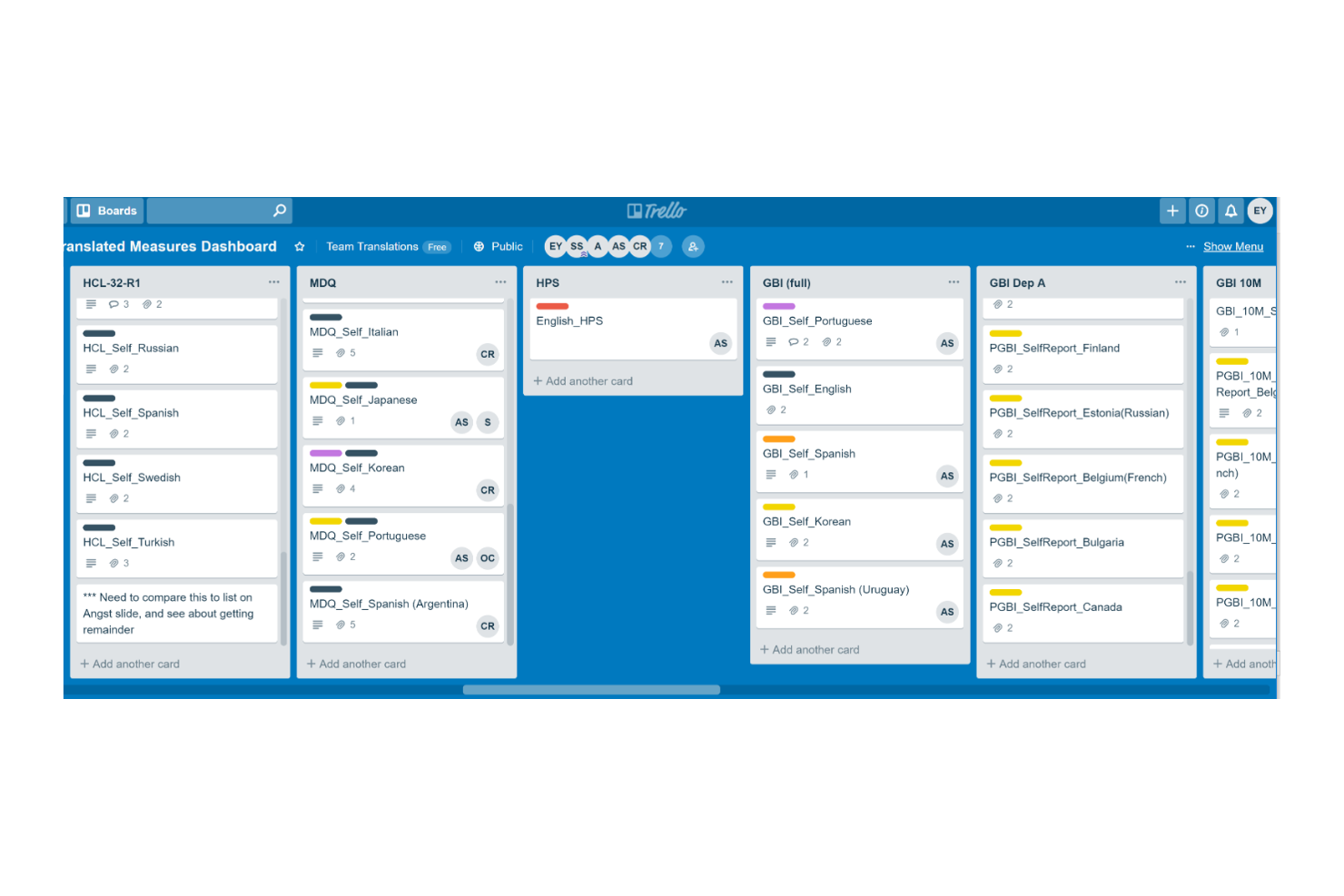
Trello is a project management tool for teams that want to organize and manage tasks efficiently. It's widely used by individuals and small teams for task tracking and collaboration.
Why I picked Trello: Trello's free offering includes features like task boards, card-based task management, and basic automation. It's ideal for creating simple task lists and lets you capture and organize tasks visually. Built-in AI features can suggest task organization, generate summaries, and help automate repetitive steps (via Butler).
Standout Features & Integrations:
Features include the ability to create tasks, assign them to the team, and set deadlines. Trello also allows you to add attachments and comments to tasks and keep information in one place.
Integrations include Slack, Microsoft Teams, Google Drive, Dropbox, Evernote, Salesforce, Jira, GitHub, and Confluence.
What's free? Trello offers a free plan with unlimited cards and 10 boards per workspace.
Pros and Cons
Pros:
- Visual task management
- Flexible task organization
- Easy to use for beginners
Cons:
- Limited customization options
- Limited features in free plan
Backlog
Best for bug tracking

Backlog is a project management and collaboration tool for developers and teams focused on software development and bug tracking. It's used by software teams to manage tasks, track bugs, and collaborate on code.
Why I picked Backlog: Backlog offers a free plan that includes features like task management, bug tracking, and version control. You can easily report and manage bugs, and the free version also supports project wikis and file sharing, which are essential for software development teams. AI-powered issue summaries also make it easier to spot and resolve bugs.
Standout Features & Integrations:
Features include built-in Gantt charts that help visualize project timelines and dependencies and subtasking capabilities that let you break down larger tasks into smaller pieces.
Integrations include Slack, Redmine, Jira, Cacoo, Jenkins, Dropbox, and Google Drive.
What's free? Backlog offers a free-forever plan with 1 project, 100MB of storage, and 10 users.
Pros and Cons
Pros:
- Supports subtasks
- Suitable for development teams
- Effective bug tracking tools
Cons:
- Basic customization options
- Learning curve for new users

Nifty
Best for project milestones

Nifty is a project management tool for teams that need to manage tasks, timelines, and communication in one place. It's best if your focus is project milestones and goal tracking.
Why I picked Nifty: Nifty’s free offering includes features like task management, milestone tracking, and team chat. It helps you set and track project milestones with ease. The free version supports unlimited team members and tasks, which is great for growing teams. AI features in Orbit AI support planning, prioritization, and execution and reduce manual effort.
Standout Features & Integrations:
Features include time tracking so you can monitor how much time your team spends on tasks and automated progress reports to keep stakeholders informed.
Integrations include Slack, Google Drive, Zoom, GitHub, Miro, and Typeform.
What's free? Nifty offers a free-forever plan with 100MB of storage and up to 2 active projects.
Pros and Cons
Pros:
- Supports document management
- Automated progress reports
- Effective milestone tracking
Cons:
- Some learning curve for new users
- Requires internet connection

Best for project templates

Teamwork.com is a project and resource management tool that helps streamline client projects and profitability. It's particularly useful for agencies, IT services, and consulting firms that require efficient project workflows and resource planning.
Why I picked Teamwork.com: Teamwork.com’s free plan offers features like project management, resource planning, and client management. You can create project templates to manage repetitive tasks. You also get access to AI tools like project wizards and smart assignments.
Standout Features & Integrations:
Features include customizable reports that help you track billable utilization and resource management. You can manage billable time and client communications effectively.
Integrations include Slack, Google Drive, Dropbox, QuickBooks, HubSpot, Salesforce, Zapier, Xero, and Harvest.
What's free? Teamwork.com’s free plan includes access to AI features and up to 5 projects.
Pros and Cons
Pros:
- Customizable reporting features
- AI-powered project wizards
- Comprehensive project templates
Cons:
- Complexity for new users
- Requires setup for optimal use

Reclaim
Best for calendar syncing
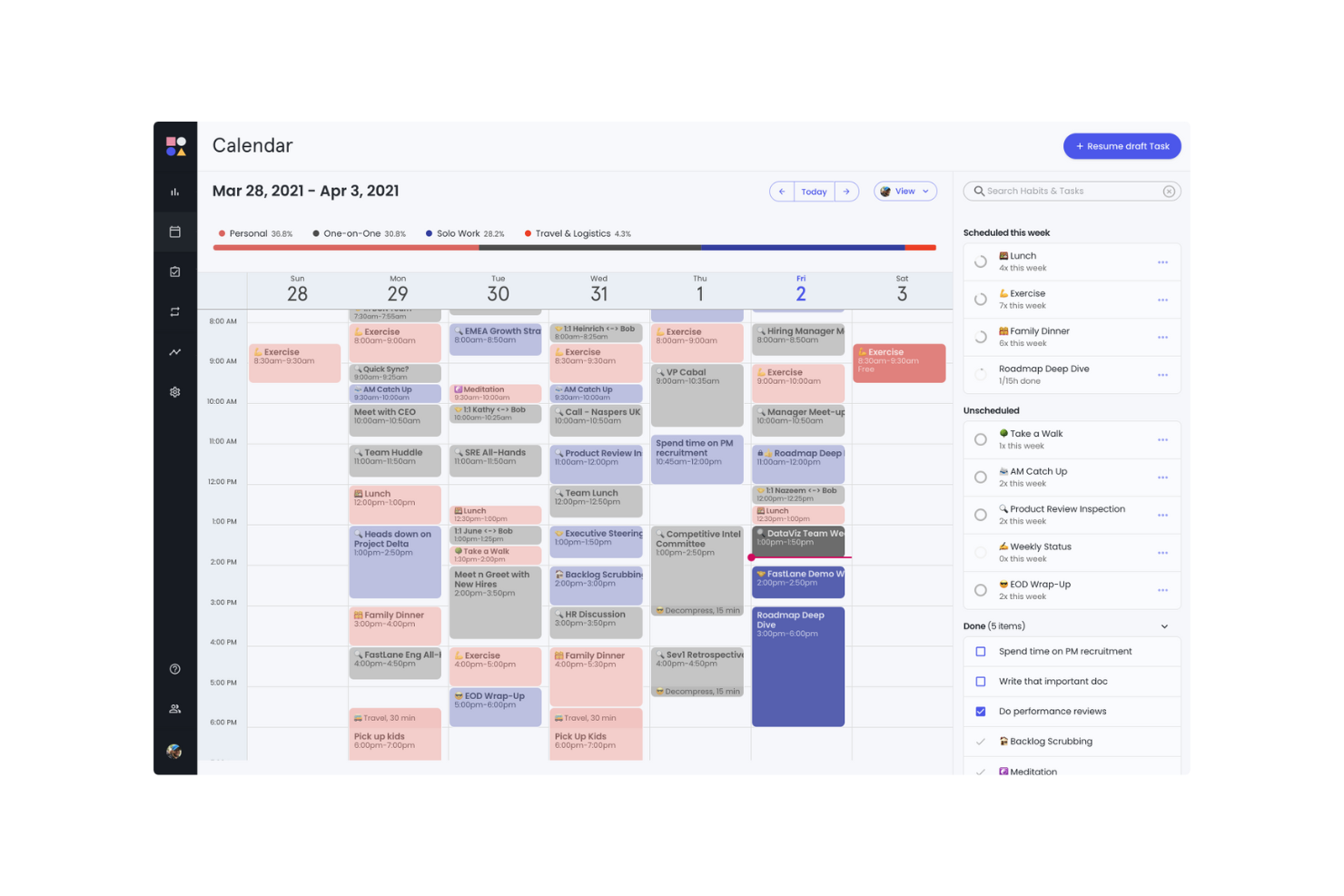
Reclaim is an AI-powered calendar app for individuals, teams, and orgs. It helps users who rely on calendar management to optimize their schedules, productivity and work-life balance.
Why I picked Reclaim: Reclaim's free offering includes features like focus time, smart meetings, and a calendar sync with Google Calendar. It's especially beneficial for syncing your calendar across different platforms. The free version lets you manage work and personal tasks effectively with features like buffer time and time tracking.
Standout Features & Integrations:
Features include AI scheduling and rescheduling for events, focus time, habits, and tasks. The planner can also build a daily schedule around your goals.
Integrations include Slack, Asana, ClickUp, Todoist, Jira, Linear, Google Tasks, and Zoom.
What's free? Reclaim offers a free version with 1 user team and a 1-week scheduling range.
Pros and Cons
Pros:
- Suitable for individual use
- Useful for managing focus time
- Effective calendar syncing
Cons:
- Not ideal for complex project management
- Learning curve for new users
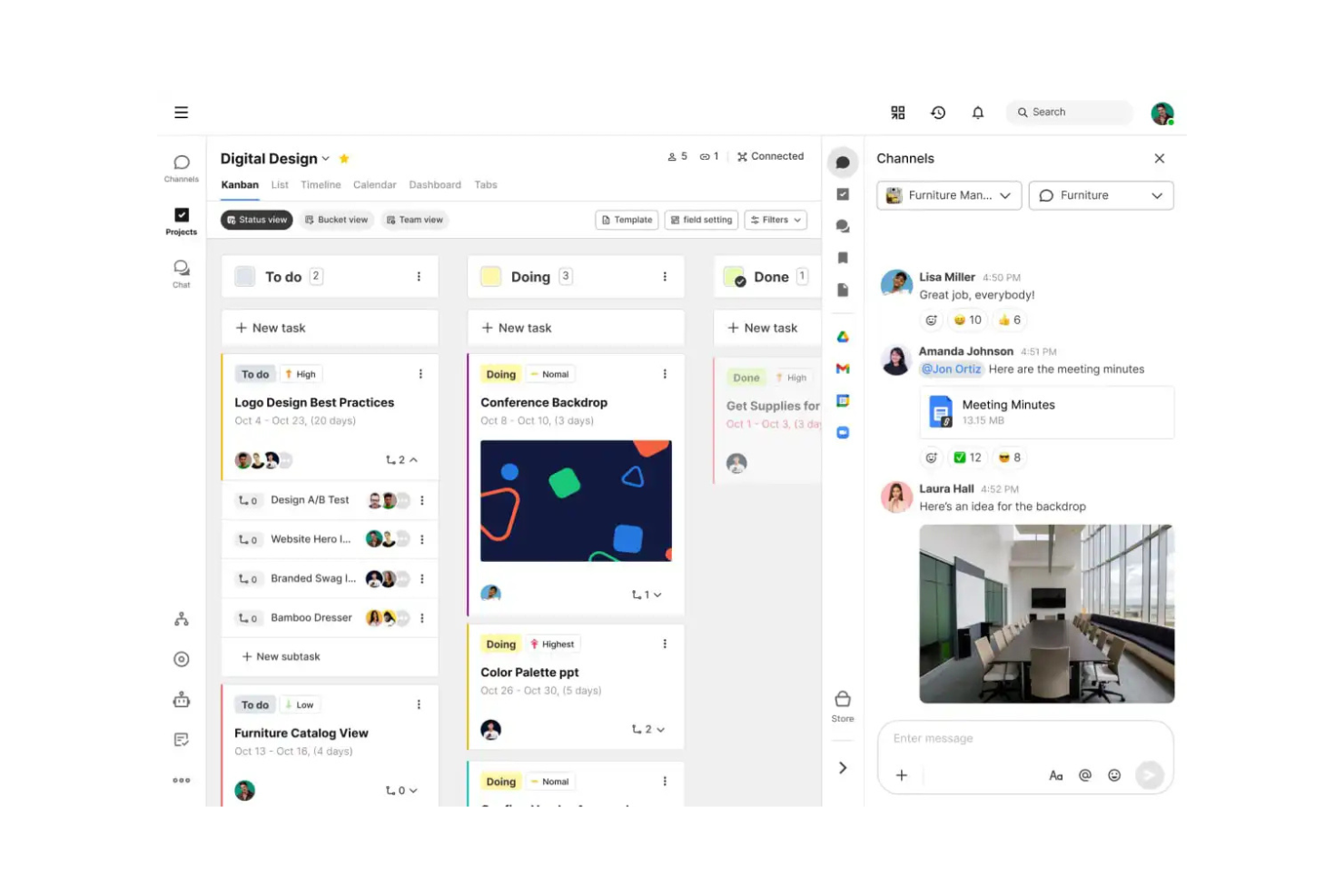
Swit is a collaborative work management tool for teams that want to combine task management with communication. It offers an integrated chat and task system to help improve teamwork and productivity.
Why I picked Swit: Swit’s free offering includes features like task boards, chat channels, and file sharing. It lets your team communicate and manage tasks in one place. The free version supports unlimited tasks and chat channels, which provides flexibility. AI features in Swit Snap support writing, summarizing, and automating routine steps.
Standout Features & Integrations:
Features include dashboards that track progress and workloads and plug-ins for setting goals and approvals. You can also manage guest permissions to bring in outside collaborators safely.
Integrations include Google Drive, Microsoft Teams, and Jira.
What's free? Swit offers a free-forever plan with unlimited users and 2 workspaces.
Pros and Cons
Pros:
- Supports remote collaboration
- Easy file sharing
- Suitable for cross-functional teams
Cons:
- Limited customization options
- Basic reporting tools
Annen gratis AI-programvare for oppgavehåndtering
Her er noen flere alternativer for AI-programvare for oppgavehåndtering som også tilbyr gratis abonnementer eller prøveperioder. Selv om disse verktøyene ikke kom med på listen min, er de likevel verdt å undersøke:
- Miro
For visual collaboration
- Connecteam
For mobile workforce
- GoodDay
For time-tracking without manual logs
- Asana
For task dependencies
- Wrike
For real-time activity streams
- Zoho Projects
For project time tracking
- ClickUp
For unlimited tasks and members


How I Evaluate Free AI Task Management Software
When a PM needs to turn a Slack thread into a sprint backlog for free, I split my evaluation into two layers: baseline AI task features and the differentiators that set one tool apart.
Core Functionality (Table Stakes For This List)
When I'm selecting tools for my list, I rank each one on a scale from 0 (does not offer the functionality) to 5 (excels in this area) for each core functionality listed below. Then, I calculate the tool's total score into a percentage. Each tool needs to achieve a minimum total score of 65% to be considered for inclusion.
- AI-Driven Task Automation: I look at whether the tool can auto-create, assign, or update tasks from triggers and inputs—like generating follow-up tasks after a status change.
- Usable Free Plan: The free tier needs to include actual AI features, not just basic PM. I check for meaningful AI usage limits and enough seats for a small team.
- Smart Prioritization & Scheduling: I evaluate how the AI ranks and sequences work. The best tools factor in deadlines, dependencies, and team capacity—not just due dates.
- Natural Language Task Input: Can you type "launch campaign with five subtasks by Friday" and get a structured output? I look for real NLP parsing, not simple keyword detection.
- Project Management Foundations: Every tool still needs solid PM basics. I check for task lists, board and timeline views, assignees, due dates, and progress tracking.
- Team Collaboration & Assignment: I evaluate shared workspaces, task comments, mentions, and notifications—features that keep distributed teams aligned on who owns what.
Once I have a list of tools that meet this criteria, I consider what sets each platform apart.
Differentiating Factors (What Sets Vendors Apart)
Here's how I compare and contrast different vendors:
Standout Features
Meeting-to-task AI is a major differentiator. I look for tools that pull action items from a call recap or Slack thread and convert them into assigned, due-dated tasks. Predictive risk insights also carry weight—the best tools flag timeline slippage or resource conflicts before your next standup. A conversational AI assistant rounds things out, letting PMs query sprint status or reassign work through a chat prompt instead of navigating dashboards.
Beyond Features
Free plan generosity matters a lot here. I check how many AI prompts, automations, and users a tool allows before it starts gating features behind a paywall. Data security and AI privacy also weigh heavily—I look at whether vendors clearly disclose if project data trains their AI models, since PMs often work with sensitive roadmaps. Integration depth rounds out my evaluation. A free AI task tool that connects to Slack, GitHub, or Google Calendar fits naturally into existing workflows, while one that sits in isolation creates more overhead than it saves.
Slik velger du gratis AI-programvare for oppgavehåndtering
Komplekse funksjonslister og prisstrukturer kan gjøre det vanskelig å finne ut hva du faktisk får med et gratis AI-verktøy for oppgavehåndtering. For å hjelpe deg med å holde fokus mens du går gjennom prosessen med å velge programvare, er dette noen faktorer du bør ha i tankene:
| Faktor | Hva du bør vurdere |
|---|---|
| Omfanget av gratistilbudet | Se hvilke funksjoner som er inkludert i gratisabonnementet. Dekker det de grunnleggende behovene dine uten skjulte kostnader? |
| Skalerbarhet | Vurder om programvaren kan vokse sammen med teamet ditt. Kan den håndtere et økende antall oppgaver og brukere etter hvert som dere utvider? |
| Integrasjoner | Se etter kompatibilitet med verktøy teamet ditt allerede bruker, for eksempel kalendere, kommunikasjonsapper eller løsninger for fillagring. |
| Brukervennlighet | Vurder hvor lang tid det tar å lære løsningen. Kan teamet raskt tilpasse seg grensesnittet uten omfattende opplæring? |
| Tilpasning | Finn ut om programvaren lar deg tilpasse arbeidsflyter og oversikter slik at de passer til teamets spesifikke prosesser og preferanser. |
| Mobiltilgang | Kontroller at programvaren har en mobilapp eller et responsivt design, slik at du kan håndtere oppgaver på farten. |
| Brukerstøtte | Vurder nivået på kundestøtten som er tilgjengelig. Finnes det direktechat, e-post- eller telefonstøtte som kan hjelpe deg når du støter på problemer? |
| Sikkerhet | Undersøk programvarens sikkerhetstiltak for data. Følger den bransjestandarder for å beskytte teamets informasjon? |
Hva er gratis AI-programvare for oppgavehåndtering?
Gratis AI-programvare for oppgavehåndtering er utviklet for å hjelpe team og enkeltpersoner med begrenset budsjett med å organisere, følge opp og håndtere oppgaver. Verktøy som tilbyr gratisabonnementer eller prøveperioder, lar brukerne få tilgang til grunnleggende funksjoner uten økonomisk forpliktelse.
Apper for oppgavehåndtering følger opp og organiserer oppgaver og lar deg visualisere hva som må gjøres og innen når. De gir data om fremdrift og fullføring, slik at det blir enklere å håndtere teamets arbeidsmengde og forbedre effektiviteten. Disse appene inkluderer ofte funksjoner som prioritering av oppgaver og integrasjoner som hjelper deg med å håndtere arbeidsflyter, forbedre koordineringen og opprettholde oversikten over oppgavene.
Funksjoner i gratis AI-programvare for oppgavehåndtering
La oss gå gjennom funksjonene som vanligvis finnes i AI-programvare for oppgavehåndtering, og hvilke som vanligvis er inkludert i gratis- og betalingsabonnementer.
Funksjoner som vanligvis finnes i gratis AI-programvare for oppgavehåndtering
- Oppretting og tildeling av oppgaver: Lar deg opprette oppgaver og tildele dem til teammedlemmer, slik at alle vet hva de har ansvar for.
- Grunnleggende samarbeidsverktøy: Gjør det mulig for teamet å kommunisere gjennom kommentarer og notater på oppgaver, noe som legger til rette for tilbakemeldinger og diskusjon.
- Oppfølging av forfallsdatoer og frister: Hjelper deg med å følge opp tidslinjer og frister for oppgaver, slik at prosjekter blir fullført i tide.
- Integrasjon med kalendere: Synkroniserer oppgaver med kalenderapper for å gi en tydelig oversikt over kommende frister og tidsplaner.
- Tilgang via mobilapp: Gir deg mulighet til å håndtere oppgaver på farten gjennom mobilapper, slik at teamet kan oppdatere oppgaver hvor som helst.
Funksjoner som vanligvis finnes i betalt AI-programvare for oppgavehåndtering
- Avansert rapportering og analyse: Gir innsikt i teamets prestasjoner og prosjektets fremdrift gjennom detaljerte rapporter og analyser.
- Tilpassbare arbeidsflyter: Lar deg tilpasse arbeidsflyter for oppgaver til bestemte prosesser og forbedre effektiviteten og organiseringen.
- Automatisering av gjentakende oppgaver: Sparer tid ved å automatisere rutineoppgaver og redusere manuelt arbeid for å øke produktiviteten.
- Prioritert brukerstøtte: Få raskere svartider og dedikert brukerstøtte for å løse problemer.
- Tidsregistrering og fakturering: Registrerer tiden som brukes på oppgaver og prosjekter, noe som er nyttig for fakturering av kunder og effektiv ressursstyring.
Fordeler med gratis AI-programvare for oppgavehåndtering
Implementering av gratis AI-programvare for oppgavehåndtering gir flere fordeler for teamet og virksomheten din. Her er noen av fordelene du kan se frem til:
- Kostnadsbesparelser: Få tilgang til viktige funksjoner for oppgavehåndtering uten å bruke penger, slik at du kan bruke økonomiske ressurser på andre områder i virksomheten.
- Bedre organisering: Hold oppgaver, frister og prioriteringer organisert på ett sted, slik at teamet kan holde fokus og arbeide effektivt.
- Forbedret samarbeid: Legg til rette for kommunikasjon og samarbeid mellom teammedlemmer med grunnleggende funksjoner for chat og kommentarer.
- Økt tilgjengelighet: Håndter oppgaver på farten med tilgang via mobilapp, slik at teamet kan arbeide hvor som helst.
- Bedre tidsstyring: Bruk kalenderintegrasjoner og oppfølging av frister for å sikre at oppgaver og prosjekter fullføres i tide.
- Skalerbarhet: Start med et gratisabonnement og oppgrader etter hvert som teamet vokser, slik at du får fleksibilitet uten en umiddelbar økonomisk forpliktelse.
Kostnader og priser for gratis AI-programvare for oppgavehåndtering
Du ser kanskje etter de beste alternativene for AI-programvare for oppgavehåndtering som er tilgjengelige gratis, men siden gratisabonnementer bare tilbyr begrensede funksjoner, er det stor sannsynlighet for at du må oppgradere abonnementet senere for å få flere avanserte funksjoner.
Tabellen nedenfor oppsummerer vanlige abonnementer, gjennomsnittspriser og typiske funksjoner som er inkludert i løsninger for AI-programvare for oppgavehåndtering:
Sammenligningstabell for abonnementer for AI-programvare for oppgavehåndtering
| Plantype | Gjennomsnittspris | Vanlige funksjoner |
|---|---|---|
| Gratisplan | $0 | Grunnleggende oppgavehåndtering, begrenset antall brukere og grunnleggende integrasjoner. |
| Personlig plan | $5-$15/user/month | Prioritering av oppgaver, kalendersynkronisering og tilgang til mobilapp. |
| Bedriftsplan | $15-$25/user/month | Avansert rapportering, verktøy for teamsamarbeid og automatiseringsfunksjoner. |
| Foretaksplan | $25-$50/user/month | Tilpassede arbeidsflyter, dedikert brukerstøtte og bedre sikkerhetsfunksjoner. |
Vanlige spørsmål om gratis AI-programvare for oppgavehåndtering
Her er noen svar på vanlige spørsmål om gratis AI-programvare for oppgavehåndtering:
Kan programvare for AI-oppgavehåndtering erstatte kalenderen eller planleggeren min?
Verktøy for AI-oppgavehåndtering kan foreslå hvor og når oppgaver skal planlegges basert på tidsfrister og tilgjengelighet, men de erstatter vanligvis ikke en kalender for møter, reiser eller personlige forpliktelser. Du vil fortsatt ha behov for et eget kalenderverktøy, men AI-verktøy kan hjelpe deg med å legge inn arbeid rundt den eksisterende timeplanen din.
Hvor godt håndterer gratis AI-verktøy teamsamarbeid?
Mange gratis AI-verktøy for oppgavehåndtering tillater grunnleggende samarbeid (delte oppgaver, kommentarer og lister), men avanserte funksjoner for koordinering – som sporing av avhengigheter, tillatelser, balansering av arbeidsmengde eller AI-innsikt på tvers av prosjekter – er ofte begrenset til betalte abonnementer. Sørg for å sjekke spesifikasjonene for de bestemte verktøyene du er interessert i, slik at du ser hva som tilbys.
Kan jeg oppgradere fra gratis til betalt uten å miste dataene eller oppsettet mitt?
Ja, de fleste leverandører sørger for at oppgavene, innstillingene og historikken din blir overført; du får bare tilgang til flere funksjoner og større kapasitet. Ta alltid sikkerhetskopi av dataene dine før du oppgraderer, for sikkerhets skyld.
Kan gratis programvare for AI-oppgavehåndtering integreres med andre verktøy?
Ja, mange gratis verktøy for AI-oppgavehåndtering tilbyr integrasjoner med populære apper som Slack, Google Kalender og Dropbox. Dette lar deg synkronisere oppgaver og samarbeide med de eksisterende verktøyene dine, og forbedrer produktiviteten til teamet ditt uten ekstra kostnader.