

10 beste verktøy for smidig prosjektstyring med KI – vurdert i 2026

Kortliste over de beste AI-verktøyene for smidig prosjektledelse


Det er ikke alltid enkelt å administrere prosjekter. Stramme tidsfrister, begrensede ressurser og endeløs koordinering kan raskt forvandle organiserte planer til kaos. Det er her AI-drevne verktøy for smidig prosjektledelse kommer inn – de hjelper med å oppdage risikoer før de ødelegger planene dine, ta smartere beslutninger om hvor teamets tid og innsats bør brukes, og håndtere repetitive oppgaver automatisk.
Jeg har personlig testet en rekke av disse verktøyene for å se hvordan AI-funksjonene deres fungerer i virkelige situasjoner. Noen gjør faktisk arbeidsbelastningen mindre og hjelper team med å jobbe smartere, ikke hardere.
I denne artikkelen går jeg gjennom mine beste valg og fremhever hvordan AI-funksjonene i hvert verktøy kan løse vanlige prosjektutfordringer og hjelpe teamet ditt med å holde seg produktivt og fokusert.
Hvorfor du kan stole på våre programvareanbefalinger
Teamet vårt har testet og anmeldt programvare siden 2012. Vi er selv prosjektledere, så vi vet hvor vanskelig og hvor viktig det er å velge riktig programvare.
I denne guiden har vi vurdert verktøyene gjennom praktisk testing og uavhengig research og gitt dem poeng ut fra våre utvelgelseskriterier. Vi bygger også på innsikt fra ledende eksperter i bransjen og erfarne prosjektledere.
Anmeldelsene våre bygger på vår egen redaksjonelle vurdering. De er ikke et salgsargument.
Ekspertanmeldere:
Sammenligningstabell for AI-verktøy for smidig prosjektledelse
Denne sammenligningstabellen oppsummerer prisdetaljene for mine beste valg blant AI-verktøy for smidig prosjektledelse.
| Tool | Best For | Trial Info | Price | ||
|---|---|---|---|---|---|
| 1 | Best for project tracking | 14-day free trial | From $10/user/month (billed annually) | Website | |
| 2 | Best for managing project portfolios | Free plan available | From $9/user/month (billed annually) | Website | |
| 3 | Best for real-time dashboards | 14-day free trial | From $10/user/month (billed annually) | Website | |
| 4 | Best for Microsoft integration | 30-day free trial | From $10/user/month (billed annually) | Website | |
| 5 | Best for budget-friendly teams | Free plan available | From $1.49/user/month (billed annually) | Website | |
| 6 | Best for version control | 30-day free trial and free plan available | From $35/month | Website | |
| 7 | Best for business process mapping | Free demo + 14-day free trial available | From $8/user/month (billed annually) | Website | |
| 8 | Best for versatile AI task management | Free plan available | From $7/user/month (billed annually) | Website | |
| 9 | Best for team collaboration | Free plan + free demo available | From $10.99/user/month (billed annually) | Website | |
| 10 | Best for roadmap visualization | Free demo available | From $9/user/month | Website |


Anmeldelser av de beste AI-verktøyene for smidig prosjektledelse
Nedenfor finner du mine detaljerte oppsummeringer av de beste AI-verktøyene for smidig prosjektledelse som kom med på kortlisten. Anmeldelsene mine gir et detaljert innblikk i de viktigste funksjonene, fordelene og ulempene, integrasjonene og de ideelle bruksområdene for hvert verktøy, slik at du kan finne det beste alternativet for deg.

Celoxis
Best for project tracking

Celoxis is an all-in-one project management tool designed for businesses that require detailed project tracking and resource management. It's popular among mid-sized to large organizations for its AI-driven analytics and reporting features that improve project oversight.
Why I picked Celoxis: It has an excellent focus on project tracking supported by AI-powered predictive analytics and an AI assistant for querying project data. The platform includes real-time dashboards, portfolio and workload insights, resource and capacity planning, and risk and financial controls that help organizations manage complex projects. These capabilities allow teams to anticipate delays, analyze project health, and make informed decisions across multiple active initiatives.
Standout Features & Integrations:
Features include AI-powered predictive analytics, Lex (AI assistant) for querying project information, real-time dashboards, project and portfolio tracking, resource planning, timesheets, budget and cost controls, and risk management.
Integrations include Microsoft Project, QuickBooks, Salesforce, Slack, Google Drive, Excel, and Outlook.
Pros and Cons
Pros:
- Supports resource and budget management
- Customizable reporting features
- Excellent project tracking capabilities
Cons:
- Complexity can overwhelm small teams
- Unintuitive and inefficient interface

Best for managing project portfolios
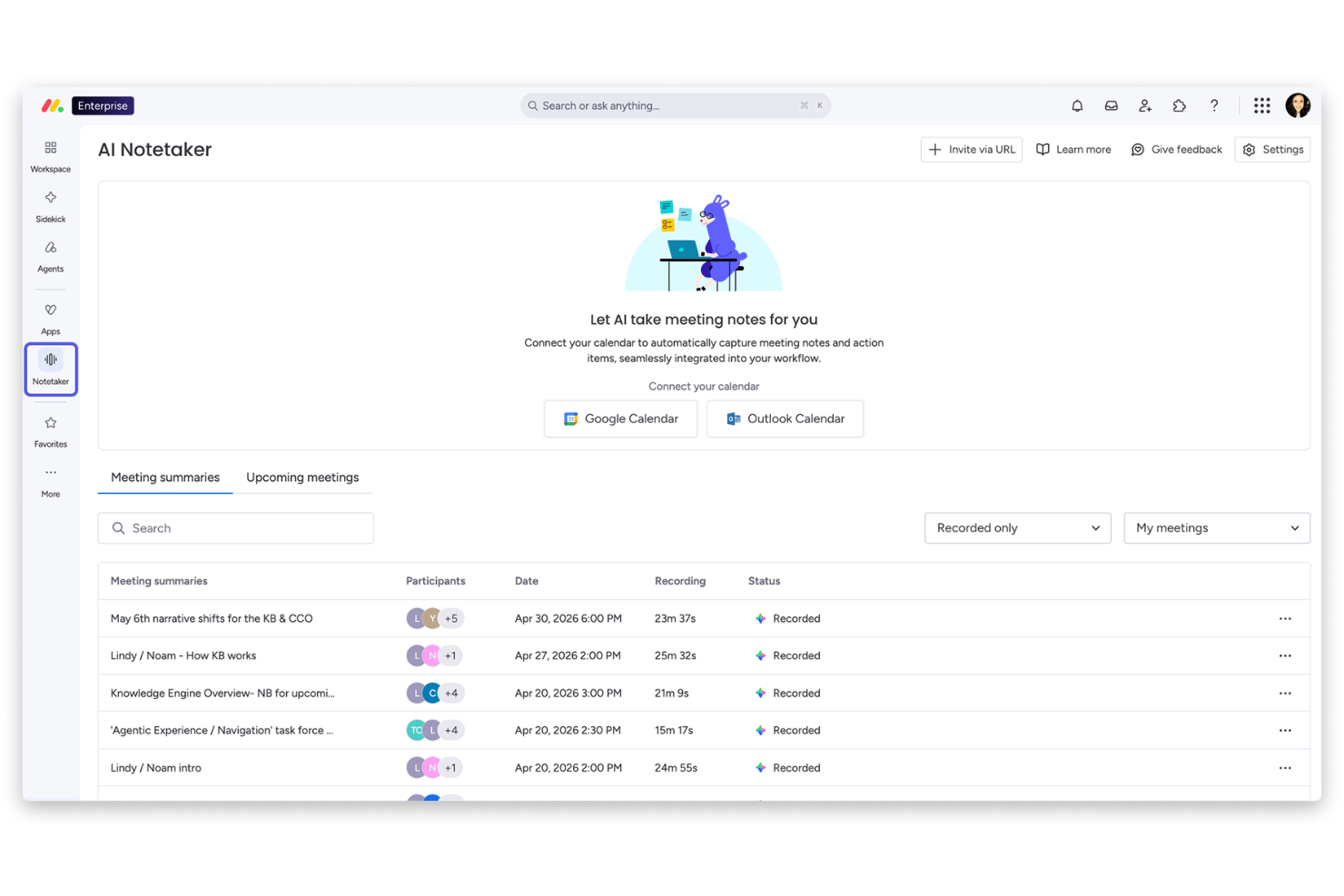
monday AI Workspace is an AI-powered work management platform that combines agile sprint planning, portfolio oversight, workflow automation, and predictive analytics across a unified board-based interface.
Who Is monday AI Workspace Best For?
It's a strong fit for mid-to-large engineering and product teams running multiple agile projects simultaneously who need portfolio-level visibility.
Why I Picked monday AI Workspace
monday AI Workspace earns its spot on my shortlist because it's one of the few agile tools that gives you genuine portfolio-level control, not just project-by-project tracking. I particularly like how the portfolio dashboards aggregate sprint progress, risks, and capacity across hundreds of projects in real time. The AI-powered risk detection flags dependency issues before they cascade across workstreams, which is where most portfolio tools fall short.
monday AI Workspace Key Features
- Sidekick AI assistant: Instantly generates task descriptions, user stories, and board content from natural language prompts.
- Sprint management boards: Offers out-of-the-box boards for managing sprints, story points, and backlog refinement.
- Engineering performance dashboards: Tracks team velocity, cycle times, and bottlenecks with customizable, real-time agile analytics.
- AI-powered daily standup: Summarizes team updates and next actions, auto-generating a daily standup report from board activity and conversations.
monday AI Workspace Integrations
monday AI Workspace offers over 200 native integrations, including GitHub, GitLab, BitBucket, Jira, Slack, Microsoft Teams, Zendesk, Salesforce, Google Workspace, and Zapier. An API is available for custom integrations.
Pros and Cons
Pros:
- Real-time risk and bottleneck detection
- AI assistant generates agile artifacts on demand
- Portfolio dashboards cover multiple agile teams
Cons:
- Scaled agile frameworks support is limited
- AI story point estimation not fully native
New Product Updates from monday AI Workspace
monday AI Workspace Adds Human Approval Routing
monday AI Workspace adds a human-in-the-loop approval block to AI Workflows, sending approval requests and routing workflow paths based on responses. For more information, visit monday AI Workspace's official site.

Wrike
Best for real-time dashboards
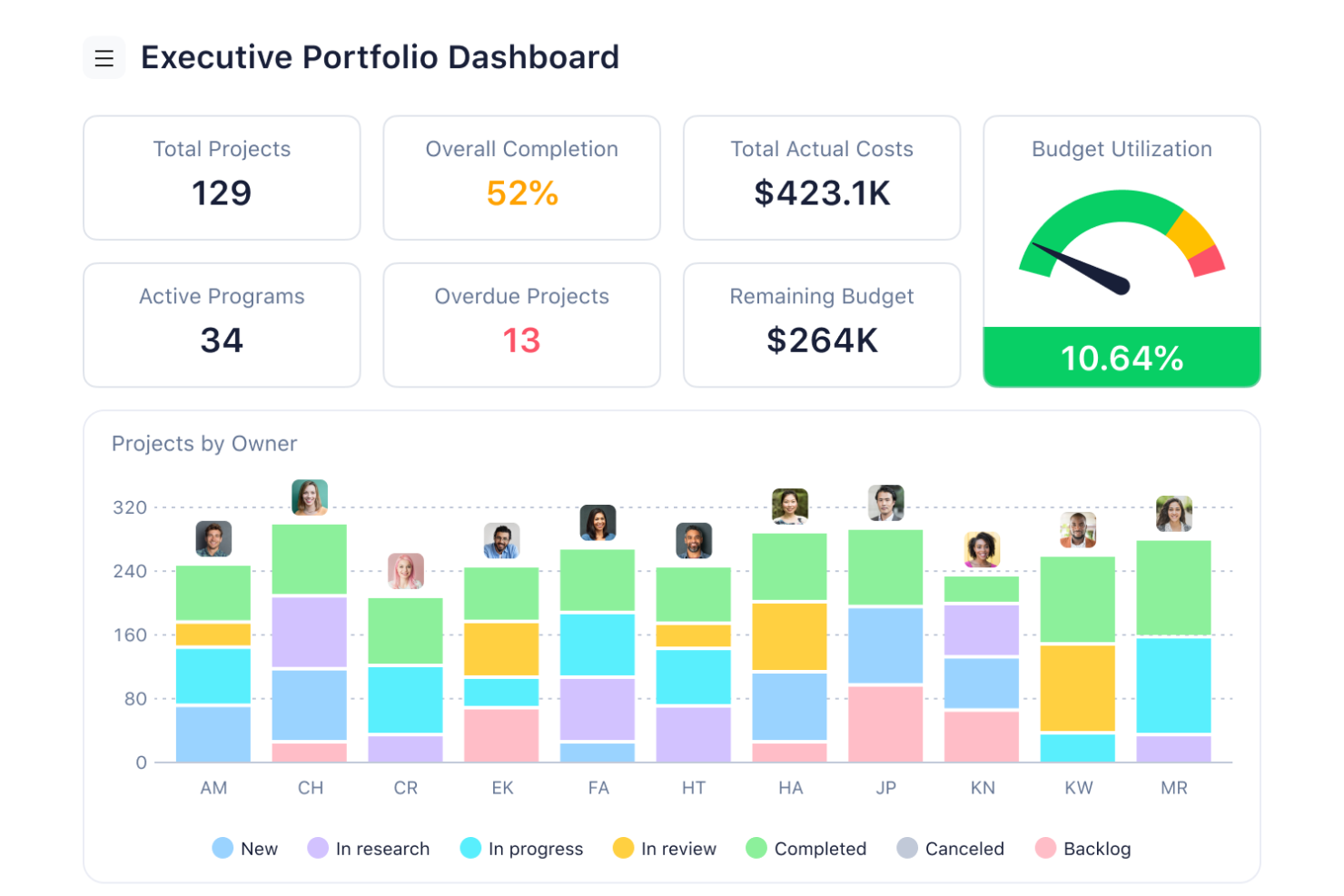
Wrike stands out as a dynamic project management tool designed to meet the needs of teams looking to enhance productivity and streamline workflows. It is particularly appealing to businesses in the technology and creative sectors, where managing complex projects and diverse teams is essential. By integrating advanced AI capabilities, Wrike helps mitigate the challenges of task management and project planning, offering solutions that reduce manual work and improve collaboration.
Why I Picked Wrike
I picked Wrike for its unique ability to leverage AI in project management, specifically through its generative AI features. These features allow your team to generate detailed project plans and identify errors, which are crucial for maintaining project integrity and timelines. Additionally, Wrike's task automation capabilities minimize repetitive tasks, freeing up your team to focus on strategic work. The tool's real-time dashboards provide actionable insights, helping you make informed decisions quickly.
Wrike Key Features
In addition to its AI capabilities, Wrike offers several other features that enhance its utility for project management:
- Mind Mapping: Visualize project ideas and plans to ensure alignment and clarity across your team.
- Customizable Request Forms: Streamline the intake process by tailoring forms to capture exactly what your project needs.
- Real-Time Dashboards: Gain insights into project progress and team performance with up-to-date analytics.
- In-Platform Email Communication: Keep all project-related communication centralized and accessible within Wrike.
Wrike Integrations
Integrations include Salesforce, Google Workspace, Microsoft Teams, HubSpot, NetSuite, QuickBooks, Adobe Creative Cloud, JIRA, Box, and Dropbox. Wrike also offers an API for custom integrations.
Pros and Cons
Pros:
- Broad integrations across enterprise tools
- Strong automation for complex workflows
- AI supports data driven planning
Cons:
- Advanced AI features cost more
- Interface learning curve for teams
New Product Updates from Wrike
Wrike Adds Klaxoon MCP Integration
Wrike’s Klaxoon MCP integration is now generally available, enabling AI agents to navigate between Wrike tasks and attached whiteboards, read task context, and manage whiteboard attachments via API. For more information, visit Wrike's official site.
Best for Microsoft integration

Microsoft Planner is a task management tool designed for teams within the Microsoft ecosystem, offering visual task organization and collaboration. It's popular among businesses that need to manage projects efficiently using Microsoft's suite of tools, with AI features enhancing task prioritization and workflow automation.
Why I picked Microsoft Planner: It integrates with Microsoft 365 Copilot, making it an ideal all-in-one platform for teams already using Microsoft's suite. AI-assisted capabilities like task suggestions and automated reminders help your team stay organized. The tool's integration with Microsoft Teams improves communication, while its familiar interface ensures a smooth transition. These features make it the best choice for those seeking a solution within the Microsoft ecosystem.
Standout Features & Integrations:
Features include a visual task board that helps organize tasks and projects, due date notifications to keep your team on track, and progress tracking to monitor task completion. These features improve your team's ability to manage projects effectively.
Integrations include Microsoft Teams, Outlook, SharePoint, OneDrive, Excel, Power BI, Microsoft To Do, LinkedIn, Power Automate, and Office 365.
Pros and Cons
Pros:
- Supports team collaboration
- Simple task board layout
- Useful progress tracking views
Cons:
- Requires a Microsoft 365 subscription
- Limited customization options

Best for budget-friendly teams

Freedcamp is a project management tool designed for teams seeking cost-effective solutions for task management and collaboration. It's particularly useful for startups and small businesses looking to manage projects with AI features that assist in task prioritization and deadline tracking.
Why I picked Freedcamp: It offers budget-friendly project management with AI-driven task prioritization and deadline reminders. These features help your team stay on top of tasks without breaking the bank. Freedcamp's intuitive interface makes it easy for teams to adopt and use effectively. It's an ideal choice for smaller teams that need efficient project management without high costs.
Standout Features & Integrations:
Features include a task board for visual project management, time tracking to monitor productivity, and a calendar view to organize deadlines. These tools help your team manage projects efficiently and meet deadlines.
Integrations include Google Drive, Dropbox, Zapier, Google Calendar, Slack, Box, OneDrive, Trello, GitHub, and Evernote.
Pros and Cons
Pros:
- All-in-one task management tools
- User-friendly interface
- Affordable pricing for small teams
Cons:
- May not scale well for large enterprises
- Limited advanced features
Backlog
Best for version control

Backlog is a project management and collaboration tool designed for development teams, offering features for task tracking, issue management, and version control. It's ideal for developers who need to manage code, track bugs, and collaborate efficiently, with AI features improving task prioritization and workflow automation.
Why I picked Backlog: It has strong version control capabilities combined with Agile project tracking in one platform. The platform also offers an AI-powered Issue Summaries feature, which uses OpenAI (ChatGPT) technology to condense long issues and comment threads into short, useful explanations—helping teams understand work faster and reduce miscommunication.
Standout Features & Integrations:
Features include built-in Git and SVN repositories, Kanban boards, Gantt charts, burndown charts, issue tracking, file sharing, project wikis, and an AI-driven Issue Summaries feature that provides quick summaries of long issues.
Integrations include GitHub, Jenkins, Redmine, Typetalk, Slack, Microsoft Teams, Google Drive, Dropbox, Zapier, and Cacoo.
Pros and Cons
Pros:
- Supports development team collaboration
- Detailed task tracking features
- Strong version control capabilities
Cons:
- Mobile app lacks functionality
- Limited customization for larger projects

Best for business process mapping

Businessmap is a business execution software designed for organizations aiming to improve operational efficiency and strategic alignment. It caters to businesses seeking to improve project management, AI-driven planning, and workflow tracking.
Why I picked Businessmap: Its ability to connect operational processes with strategy through portfolio-level planning, workflow visualization, and AI-supported analysis. The platform includes smart canvases, Kanban boards, OKRs and KPIs, and performance dashboards that help teams map processes and track outcomes. Businessmap also offers AI-supported planning and process analysis, which helps teams identify risks, forecast outcomes, and optimize workflows across departments.
Standout Features & Integrations:
Features include smart canvases for strategic planning, Kanban boards, portfolio and project alignment, OKR and KPI tracking, performance dashboards, and AI-supported process analysis.
Integrations include Salesforce, Microsoft Azure, Slack, Google Workspace, Trello, Jira, Asana, monday.com, Dropbox, and Microsoft Teams.
Pros and Cons
Pros:
- Supports process visualization
- AI-driven planning tools
- Excellent for strategic alignment
Cons:
- Limited customization for advanced users
- Limited integration capabilities


ClickUp is a versatile project management tool designed for teams of all sizes, offering features for task management, time tracking, and collaboration. It caters to businesses looking to enhance productivity with AI-powered functionalities, including a 24/7 intelligent assistant and AI-integrated task management.
Why I picked ClickUp: ClickUp offers a unique AI-driven approach to task management, making it ideal for teams seeking versatile solutions. The AI features include ClickUp Brain, which assists with tasks like updating and creating events. AI Talk to Text helps you type faster, saving time on daily tasks. These features align with its versatility, allowing your team to work efficiently across various projects.
Standout Features & Integrations:
Features include task management, time tracking, and dashboards. You can customize your workspace with over 100 features that help manage workflows. Automation tools are also available to reduce manual tasks and increase efficiency.
Integrations include Slack, Google Drive, Dropbox, GitHub, Zoom, Microsoft Teams, Outlook, Asana, Trello, and Salesforce.
Pros and Cons
Pros:
- Supports a wide range of integrations
- AI tools for efficient task management
- Customizable workspace with many features
Cons:
- Requires time to learn all features
- Can be overwhelming for new users

Asana is a work management tool that helps teams organize tasks and manage projects. It supports Agile workflows through flexible views and shared visibility.
Why I picked Asana: Asana's clear focus on collaborative task coordination aligns well with Agile team needs. Its multiple project views, such as list, board (Kanban), calendar, timeline, and Gantt charts, give teams flexibility in how they plan and track sprints. Features like AI-generated task suggestions, workload insights, and custom fields help team members maintain clarity and stay aligned during iterative development. Asana also includes status updates, inbox notifications, and time tracking, which support continuous communication and adaptive planning throughout a project cycle.
Standout Features & Integrations:
Features include project views (list, board, calendar, timeline, and Gantt), custom fields for structured task details, workload management to balance assignments, status update tools for quick reporting, inbox notifications, and AI-supported workflow automation.
Integrations include Slack, Microsoft Teams, Google Drive, Dropbox, Zoom, Salesforce, Tableau, Adobe Creative Cloud, GitHub, Gmail, Outlook, Vimeo, and Workplace.
Pros and Cons
Pros:
- Customizable workflows
- Multiple project view options
- User-friendly interface
Cons:
- Advanced features are limited to higher-tier plans
- Complexity may increase for larger teams


Aha! Develop is an Agile development tool for teams that need structured planning and visibility into delivery work. It supports multiple Agile methods and connects engineering tasks to product strategy.
Why I picked Aha! Develop: It excels with a strong connection between roadmap strategy and engineering execution. The platform supports Scrum, Kanban, and SAFe®, with tools for sprint planning, backlog prioritization, PI coordination, and Agile reporting. It also includes an assistant powered by generative AI that can create user stories and help estimate work, making it easier for teams to plan capacity and refine work items. Teams gain additional value from features like capacity planning, risk tracking, and unified backlogs that align engineering priorities with product goals.
Standout Features & Integrations:
Features include customizable roadmaps, unified backlogs, AI-generated user stories, work estimation tools, sprint and PI planning, capacity planning, interactive workflow boards, Agile reports (velocity, burndown, cycle time), and whiteboards for collaborative planning.
Integrations include Jira, Azure DevOps, GitHub, GitLab, Slack, Zendesk, Trello, and Confluence.
Pros and Cons
Pros:
- Supports Scrum, Kanban, and SAFe®
- Useful AI support for story creation
- Strong roadmap and strategy alignment
Cons:
- Complex and cluttered interface
- Limited customization for advanced users
Andre AI-verktøy for smidig prosjektledelse
Her er noen flere alternativer for AI-verktøy for smidig prosjektledelse som ikke kom med på kortlisten min, men som likevel er verdt å undersøke:
- Jira
For Agile development
- Digital.ai
For enterprise Agility
- Zoho Sprints
For sprint planning
- Taiga
For Agile software development


How I Evaluate AI Agile Project Management Tools
I only include tools where the AI goes beyond a chatbot bolted onto a task board—it needs to save real time in how teams plan, run, and improve their sprints. I split my evaluation into core functionality every tool must offer to make the list and differentiating factors that set one vendor apart from another.
Core Functionality (Table Stakes For This List)
When I'm selecting tools for my list, I rank each one on a scale from 0 (does not offer the functionality) to 5 (excels in this area) for each core functionality listed below. Then, I calculate the tool's total score into a percentage. Each tool needs to achieve a minimum total score of 65% to be considered for inclusion.
- AI-Powered Backlog Management: I look for tools that use AI to generate, prioritize, and refine user stories and epics from plain-language inputs rather than forcing manual entry.
- Agile Framework Support: The tool should natively support Scrum and Kanban at minimum, with sprint boards, backlogs, burndown charts, and velocity tracking built in.
- AI Sprint Planning & Estimation: I evaluate how well the AI recommends sprint scope and estimates story points based on team capacity and past velocity data.
- Predictive Analytics & Forecasting: I check whether the tool surfaces AI-driven delivery forecasts, risk flags, and bottleneck alerts across sprints and releases.
- AI Workflow Automation: Routine agile tasks like status updates, standup summaries, and task routing should be automated by AI rather than relying on manual rules.
- Integrations & Collaboration: Tools need to connect with the dev stack teams already use—GitHub, Slack, Jira, CI/CD pipelines—and support real-time collaboration.
Once I have a list of tools that meet this criteria, I consider what sets each platform apart.
Differentiating Factors (What Sets Vendors Apart)
Here's how I compare and contrast different vendors:
Standout Features
Dependency intelligence is a big differentiator—I look for tools that use AI to map cross-team dependencies and flag risks before they derail a sprint. Natural language querying also stands out. Being able to ask "what's blocking the checkout feature?" and get a real answer saves time over digging through boards manually. I also evaluate whether a tool can join standups or planning calls, extract action items, and push updates directly to the backlog.
Beyond Features
AI model transparency matters—I check whether a vendor explains how its AI generates recommendations and whether teams can opt out of model training on their data. Scalability is another key factor, especially for orgs running SAFe or LeSS across multiple squads. I look for portfolio-level roll-ups and cross-team reporting that hold up at scale. Time-to-value also counts: migration tools and prebuilt agile templates help teams moving off legacy platforms get productive fast without a lengthy onboarding cycle.
Slik velger du AI-verktøy for smidig prosjektledelse
Det er lett å gå seg vill i lange funksjonslister og kompliserte prisstrukturer. For å hjelpe deg med å holde fokus mens du går gjennom den unike prosessen din for valg av programvare, har jeg laget en sjekkliste over faktorer du bør ha i bakhodet:
| Faktor | Hva du bør vurdere |
|---|---|
| Skalerbarhet | Kan verktøyet vokse med teamet ditt? Vurder brukerbegrensninger og trinnvis prising for å sikre at det kan håndtere økt etterspørsel uten en betydelig kostnadsøkning. |
| Integrasjoner | Fungerer det med de eksisterende verktøyene dine? Kontroller kompatibilitet med programvaren du bruker i dag, og se etter omfattende API-muligheter for tilpassede løsninger. |
| Tilpasningsmuligheter | Kan du tilpasse det til arbeidsflyten din? Vurder hvor mye tilpasning som er tilgjengelig for dashbord, rapporter og oppgavefelt, slik at det passer dine spesifikke behov. |
| Brukervennlighet | Er grensesnittet intuitivt for teamet ditt? Se etter et ryddig oppsett og enkel navigering for å minimere opplæringsbehovet. |
| Implementering og introduksjon | Hvor raskt kan teamet ditt begynne å bruke det? Vurder ressursene og tiden som kreves for oppsett, inkludert opplæringsmateriell og tilgjengelig kundestøtte. |
| Kostnad | Passer det budsjettet ditt? Analyser prisstrukturen, inkludert skjulte gebyrer eller tilleggskostnader for enkelte funksjoner, for å unngå uventede utgifter. |
| Sikkerhetstiltak | Er dataene dine beskyttet? Sørg for at verktøyet følger bransjens sikkerhetsstandarder og tilbyr funksjoner som kryptering og tilgangskontroller for brukere. |
| Tilgjengelig kundestøtte | Kan du få hjelp når du trenger det? Se etter kundestøtte døgnet rundt, responstider og kvaliteten på hjelpedokumentasjonen for å sikre at du får hjelp når du trenger det. |
Hva er AI-verktøy for smidig prosjektstyring?
AI-verktøy for smidig prosjektstyring er programvareløsninger som bruker kunstig intelligens til å forbedre styringen av smidige prosjekter. Disse verktøyene brukes vanligvis av prosjektledere, teamledere og utviklere for å forbedre samarbeid og effektivitet.
Automatisering, prediktiv analyse og intelligent oppgaveprioritering bidrar til å håndtere arbeidsmengder, beregne prosjekttidslinjer og optimalisere ressursallokeringen. Alt i alt gir disse verktøyene brukerne smartere måter å planlegge, gjennomføre og overvåke prosjekter på, noe som gjør de smidige prosessene mer effektive og virkningsfulle.
Funksjoner
Når du velger AI-verktøy for smidig prosjektstyring, bør du se etter følgende viktige funksjoner:
- Prediktiv analyse: Gir innsikt i prosjekttidslinjer og potensielle risikoer, slik at teamene kan ta informerte beslutninger.
- Automatisert oppgaveprioritering: Rangerer automatisk oppgaver basert på hvor presserende og viktige de er, noe som muliggjør effektiv arbeidsflytstyring.
- Optimalisering av ressursallokering: Bruker AI til å fordele ressurser effektivt, slik at teamets prestasjoner og prosjektresultater blir best mulig.
- Intelligent rapportering: Tilbyr datadrevne rapporter som fremhever nøkkeltall og prosjektets status, og bidrar til strategisk planlegging.
- Samarbeid i sanntid: Tilrettelegger for smidig kommunikasjon og prosjektoppdateringer på tvers av team, noe som styrker samarbeid og produktivitet.
- Tilpassbare instrumentpaneler: Lar brukerne tilpasse grensesnittet slik at den mest relevante informasjonen vises, noe som forbedrer fokus og effektivitet.
- Integrasjon for tidsregistrering: Overvåker tiden som brukes på oppgaver, slik at teamene kan holde tidsplanen og håndtere arbeidsmengden effektivt.
- Verktøy for risikostyring: Identifiserer og reduserer potensielle prosjektrisikoer ved hjelp av AI-innsikt, slik at prosjektgjennomføringen blir smidigere.
Fordeler
Implementering av AI-verktøy for smidig prosjektstyring gir flere fordeler for teamet og virksomheten din. Her er noen av fordelene du kan se frem til:
- Økt effektivitet: Automatisering og oppgaveprioritering reduserer manuelt arbeid, slik at teamet kan fokusere på arbeid med stor effekt.
- Bedre beslutningstaking: Prediktiv analyse og intelligent rapportering gir innsikt som hjelper teamet med å ta informerte valg.
- Forbedret ressursstyring: AI-drevet ressursallokering sørger for at teamet er optimalt bemannet og at prosjektene holder seg på rett spor.
- Bedre samarbeid: Oppdateringer og kommunikasjonsverktøy i sanntid holder teamet tilkoblet og samkjørt med prosjektmålene.
- Redusert risiko: AI-baserte verktøy for risikostyring bidrar til å identifisere potensielle problemer tidlig, slik at forstyrrelser i prosjektene minimeres.
- Tidsbesparelser: Automatisert tidsregistrering og planlegging hjelper teamet med å håndtere arbeidsmengder mer effektivt, slik at tid frigjøres til andre oppgaver.
- Tilpasset innsikt: Tilpassede instrumentpaneler gir relevant informasjon ved et øyekast, slik at teamet kan holde fokus og være informert.
Kostnader og priser
Valg av AI-verktøy for smidig prosjektstyring krever en forståelse av de ulike prismodellene og abonnementene som er tilgjengelige. Kostnadene varierer basert på funksjoner, teamstørrelse, tillegg og mer. Tabellen nedenfor oppsummerer vanlige abonnementer, gjennomsnittsprisene deres og typiske funksjoner som er inkludert i løsninger for AI-verktøy for smidig prosjektstyring:
Sammenligningstabell for AI-verktøy for smidig prosjektstyring
| Abonnementstype | Gjennomsnittspris | Vanlige funksjoner |
|---|---|---|
| Gratisabonnement | $0 | Grunnleggende oppgavestyring, begrenset antall brukere og brukerstøtte fra fellesskapet. |
| Personlig abonnement | $1-$25/user/month | Oppgavestyring, grunnleggende integrasjoner og begrensede rapporteringsfunksjoner. |
| Bedriftsabonnement | $5-$175/user/month | Avansert rapportering, ressursstyring og forbedrede integrasjoner |
| Virksomhetsabonnement | $50-$1600+/user/month | Tilpassbare instrumentpaneler, AI-drevet analyse, dedikert brukerstøtte og sikkerhet. |
Vanlige spørsmål om AI-smidig prosjektledelse
Her er noen svar på vanlige spørsmål om verktøy for AI-smidig prosjektledelse:
Hvordan hjelper AI-programvaren med risikovurdering og risikohåndtering under smidige prosjekter?
AI gjennomgår kontinuerlig prosjektvariabler for å identifisere potensielle risikoer og anbefale løsninger. Dette kan omfatte justering av tidsplaner, omfordeling av arbeidsmengder eller omfordeling av oppgaver for å unngå fremtidige forsinkelser eller feil.
Er AI-verktøy egnet for små team?
Ja, AI-verktøy kan være nyttige for små team ved å automatisere repetitive oppgaver og gi innsikt som ellers kan bli oversett. Selv med færre ressurser kan små team bruke AI til å håndtere oppgaver effektivt, prioritere arbeidet og forbedre samarbeidet. AI-drevne verktøy kan hjelpe små team med å utrette mer enn ressursene skulle tilsi ved å optimalisere ressursfordelingen og forbedre kommunikasjonen.
Hvordan forbedrer AI prioriteringen av oppgaver i smidige arbeidsflyter?
AI analyserer avhengigheter mellom oppgaver, teamets prestasjoner og historiske prosjektdata for å rangere oppgaver basert på hvor presserende og betydningsfulle de er. Dette sikrer at oppgaver med høy verdi håndteres først, slik at teamet holder seg på linje med prosjektmålene og tidsfristene.