

De 10 beste programvarene for smidig styring vurdert i 2026

Beste programvare for agil styring – kortliste


Å navigere i kompleksiteten ved agil prosjektstyring kan være like utfordrende som å velge de riktige verktøyene for å forbedre arbeidsflyten. Mange organisasjoner mangler faktisk ofte ressursene som trengs for å hjelpe team med å tilpasse seg og samarbeide, noe som fører til høyere stressnivå og lavere produktivitet.
Som prosjektleder har jeg observert en økende etterspørsel etter løsninger som håndterer disse utfordringene direkte. Med utgangspunkt i mange års erfaring har jeg testet og vurdert flere av de beste prosjektstyringsverktøyene for å hjelpe team med å finne det som passer best.
Enten du ønsker å innføre et nytt system eller forbedre de nåværende prosessene dine, vil veiledningen min hjelpe deg med å ta informerte beslutninger som styrker teamets prestasjoner og prosjektresultater.
Why Trust Our Software Recommendations
Our team has been testing and reviewing software since 2012. As project managers ourselves, we know how difficult—and important—it is to choose the right software.
For this guide, we evaluated tools using hands-on testing and independent research, scoring tools using our selection criteria. We also draw on insights from industry thought leaders and practicing project management experts.
Our reviews reflect our human editorial judgment, not a sales pitch.
Expert reviewers:
Sammenligningstabell for agil styringsprogramvare
Tabellen nedenfor sammenligner priser, tilgjengelighet av gratis prøveperioder og demomuligheter for mine beste utvalgte programmer for agil styring.
| Tool | Best For | Trial Info | Price | ||
|---|---|---|---|---|---|
| 1 | Best for lightweight agile on a free plan | Free plan + 30-day free trial available | From $7.65/user/month (billed annually) | Website | |
| 2 | Best for backlog management | 15-day free trial | From $1/user/month (12 user minimum) | Website | |
| 3 | Best for secure task management | Free trial + free plan + free demo available | From $13/user/month (billed annually) | Website | |
| 4 | Best for unifying project management tools | Free plan + 14-day free trial + free demo available | From $79/user/month (billed annually) | Website | |
| 5 | Best for visual task management | 14-day free trial | From $5/user/month (billed annually) | Website | |
| 6 | Best for connecting strategy to execution | Free trial available | Pricing upon request | Website | |
| 7 | Best for AI-powered project management | Free plan + 14-day free trial + free demo available | From $4.99/user/month (billed annually) | Website | |
| 8 | Best for all-in-one agile management | 7-day free trial | From $96 (one time fee for 10 users) | Website | |
| 9 | Best for open-source agile project management | Free plan available | From €5/month | Website | |
| 10 | Best for customizable workspaces | Free plan available | From $4/user/month (billed annually) | Website |
Anmeldelser av den beste programvaren for agil styring
Denne delen gir en grundig analyse og oversikt over hver programvare for agil styring. Vi går gjennom fordeler og ulemper, viktige funksjoner og de beste bruksområdene.

Quire
Best for lightweight agile on a free plan
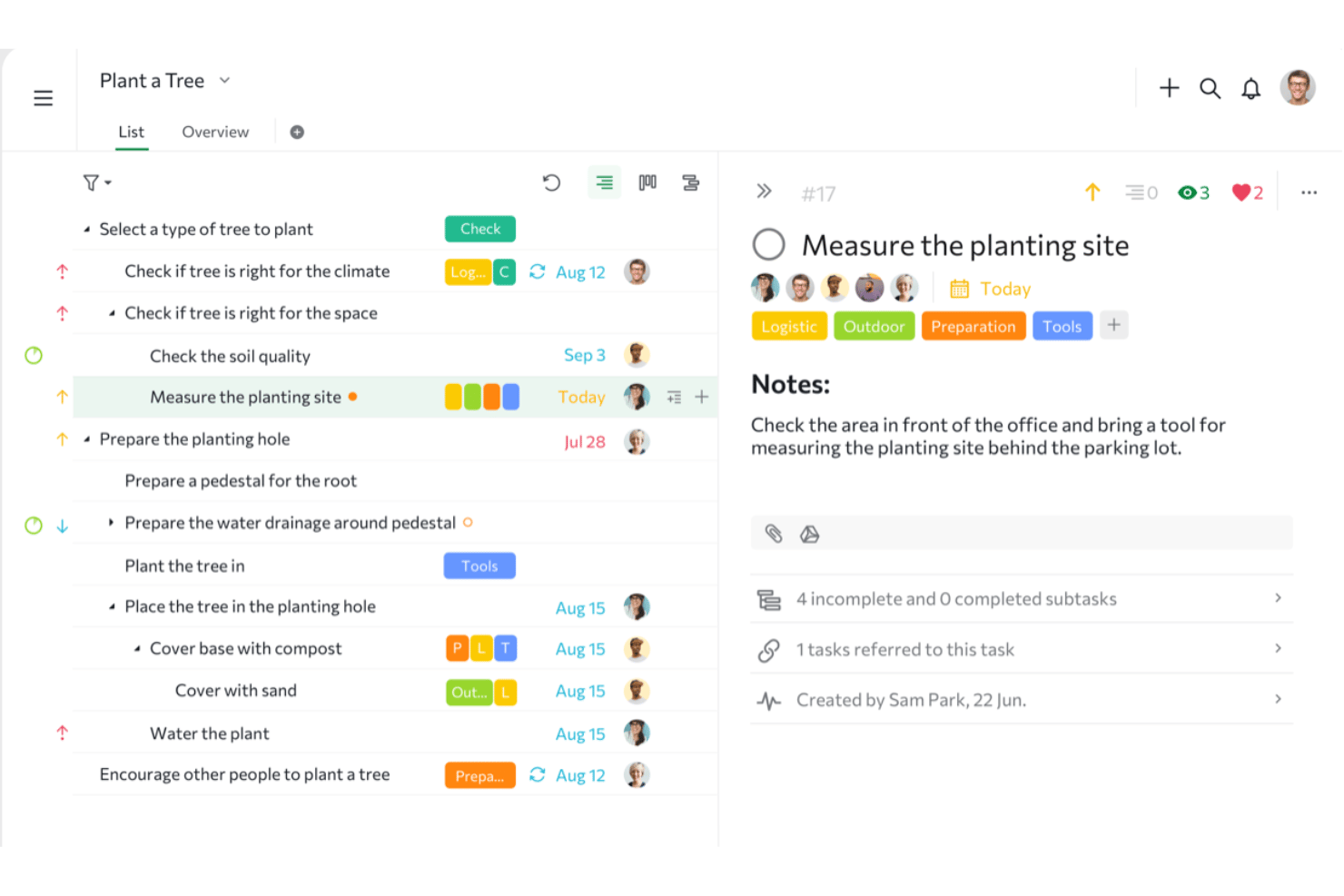
Quire is a project and task management tool built around a nested list hierarchy that doubles as a lightweight agile workspace, supporting Kanban boards, sprint-style sublists, timeline planning, and multi-view project tracking.
Who Is Quire Best For?
Quire is a good fit for small teams and early-stage startups that want a free, flexible workspace for managing tasks and lightweight sprints without the complexity of a dedicated agile platform.
Why I Picked Quire
I've included Quire in my top picks because it's one of the few tools that makes lightweight agile genuinely accessible on a free plan, without stripping out the features that make it work. Its nested list structure lets teams build a real backlog with parent-child task hierarchies, and the Sublist feature turns that backlog into functional sprints with their own Kanban board view. I also like that the free tier includes GitHub integration, so dev-adjacent teams can link tasks to issues and commits from day one.
Quire Key Features
- Multi-view project tracking: Switch between List, Kanban, Timeline, Table, Calendar, and Dashboard views within the same project without leaving the tool.
- Sublist-based sprint management: Pull tasks from your backlog into dedicated sublists that function as sprint containers with their own board view and date ranges.
- Task dependencies: Link tasks so that blocked work is clearly visible and sequencing is enforced across your project plan.
- Custom fields: Add project-specific fields like priority, story points, or issue type to tailor task tracking to your team's workflow.
Quire Integrations
Quire offers native integrations with GitHub, Slack, Microsoft Teams, Google Workspace, Google Drive, Dropbox, Box, and Microsoft OneDrive. It also provides a REST API and supports Zapier.
Pros and Cons
Pros:
- Sublist feature enables lightweight sprint management
- Switch between list, kanban, timeline, dashboard views
- Infinite nested task hierarchy for backlog organization
Cons:
- Sprints are not dedicated first-class objects
- No native burndown or velocity reports
New Product Updates from Quire
Quire Adds Custom Field Locking and Comment Reaction API Support
Quire adds custom field locking and API support for reading and setting emoji reactions on comments. These updates give teams more control over field data and expand comment interaction options for developers. For more information, visit Quire’s official site.
 .
.
Best for backlog management

Zoho Sprints is an agile project management software designed to help teams plan, track, and deliver projects efficiently.
Why I Picked Zoho Sprints: I really like its comprehensive backlog management system. You can collect all your project ideas in one place, brainstorm with your team, and refine work items that are sprint-ready. Additionally, its scrum board lets you visualize your workflow. You can track the progress of all work items in an ongoing sprint, moving tasks from "To-do" to "Done" as your team makes progress. This visual representation helps everyone stay on the same page and quickly identify any bottlenecks.
Standout features & integrations:
Features include release management, a timesheet module, a meetings module, customizable workflows, swimlanes, sprint activity tracking, velocity charts, burndown and burnup charts, cumulative flow diagrams, and mobile app access.
Integrations include Zendesk, GitHub, GitLab, Jenkins, Microsoft Teams, Google Drive, Zoho Projects, Zoho Desk, Zoho Analytics, Zapier, SalesIQ, and WorkDrive.
Pros and Cons
Pros:
- Comprehensive feature set for agile project management
- Integrates well with other tools
- Good reporting tools
Cons:
- Not ideal for non-agile teams
- Release management limited to highest tier
New Product Updates from Zoho Sprints
Zoho Sprints Adds Dashboard View for Custom Modules
Zoho Sprints adds a Dashboard view for custom modules with charts and tables for visualizing module records. This gives teams a clearer way to review custom data. For more information, visit Zoho Sprints’ official site.
 .
.
Best for secure task management

MeisterTask is designed to improve productivity and collaboration among teams following agile methodologies. It enhances task management by allowing users to create, assign, and track tasks through various stages of completion.
Why I Picked MeisterTask: MeisterTask focuses on security by employing data protection protocols, including SSL encryption for data in transit and AES encryption for data at rest. This ensures that all project data remains secure against unauthorized access. Its interface consists of a customizable Kanban-style board, allowing users to visualize workflows and add details like checklists, deadlines, and custom fields to each task.
Standout features & integrations:
Features include Kanban-style project boards for visualizing workflows, built-in time tracking, and automation of recurring tasks. The software also offers a personal board called Agenda for individual task management and reporting tools for productivity insights.
Integrations include Slack, Microsoft Teams, Google Drive, Dropbox, GitHub, Zendesk, Bitbucket, Box, Confluence, and Evernote.
Pros and Cons
Pros:
- Bulk section actions
- Multiple checklists per task
- Advanced search and filtering capabilities
Cons:
- May require additional setup for complex workflows
- Limited reporting features and task dependencies
Nifty
Best for unifying project management tools

Nifty integrates communication, task assignments, and progress tracking into a single platform. It is designed to simplify project workflows and team collaboration.
Why I Picked Nifty: Nifty’s standout feature is its milestone-based project roadmaps, which automatically adjust timelines based on task completion. This feature allows teams to visualize progress in real time and provides a clear understanding of project timelines. It also integrates with reporting tools for insights into project health, team productivity, and budget management.
Standout features & integrations:
Features include roadmaps for visual timeline setting, task management with various views (Kanban, List, Timeline, Calendar, Swimlane), real-time collaboration through chat and video calls, and automated reporting for operational clarity.
Integrations include Asana, Basecamp, ClickUp, Jira, Trello, Wrike, Slack, Dropbox, G Suite, and Jira.
Pros and Cons
Pros:
- Public roadmaps
- Cross-functional project portfolios
- Automated progress reporting
Cons:
- Limited sub-tasks functionality
- Limited ticket tagging capabilities
Trello
Best for visual task management

Trello is a simple, card-based Kanban-style organization software that enables teams across various industries to visualize project workflows, assign tasks, and track progress.
Why I Picked Trello: Trello stands out because of its simplicity and visual approach to task management. Its user-friendly interface is based on the Kanban board concept, allowing teams to create cards for tasks that can be moved across customizable lists. Additionally, it has a fully functional mobile app and is customizable through Trello’s integrations and add-ons called “Power-Ups.”
Standout features & integrations:
Features include boards, lists, and cards that keep tasks organized. The Butler automation feature allows users to automate tasks and workflows, while Power-Ups enable integration with other tools. Trello also offers customizable templates to help teams get started quickly.
Integrations include Slack, Google Drive, Jira, GitHub, Dropbox, Evernote, Salesforce, Microsoft Teams, Confluence, and Zapier.
Pros and Cons
Pros:
- Solid customization capabilities
- Advanced search and filters
- Card aging features
Cons:
- Reliant on third-party apps for advanced features
- Limited reporting tools and bulk actions
Best for connecting strategy to execution

Targetprocess is designed to support organizations scale agile practices across projects, allowing teams to manage workflows and align tasks with business objectives.
Why I Picked Targetprocess: Targetprocess provides a holistic view of work at both the strategic and operational levels. The software’s flexible visualization tools allow organizations to create custom views for tasks, projects, and portfolios. It also manages cross-team dependencies to avoid bottlenecks.
Standout features & integrations:
Features include end-to-end visibility into work, resource assignments, and budgets, as well as a single source of truth that aligns with strategic objectives. This ensures that all teams are on the same page and can adapt quickly to changes.
Integrations include Apache Ant, Maven, Bamboo, Bitbucket, Jira Service Manager, Zephyr, Rally Software, AppDynamics, Digital.ai, and GitHub.
Pros and Cons
Pros:
- Complete portfolio management
- Tailored reporting for multiple stakeholders
- Custom hierarchical structures
Cons:
- Limited out-of-the-box templates
- Limited analytics customization

Zenhub
Best for AI-powered project management

Zenhub is designed for software teams to simplify the software development process by automatically updating project data and providing real-time progress updates.
Why I Picked Zenhub: Zenhub’s integration with GitHub allows teams to track issues, create and manage tasks, and automate workflows without leaving the development environment. This helps reduce context-switching, ensuring developers stay focused on their code while adhering to agile practices. The software also has AI-powered features that provide predictive insight into project timelines, identify potential bottlenecks, and suggest improvements based on historical data.
Standout features & integrations:
Features include AI-powered issue creation, automated sprint planning, and real-time product roadmaps. These features help reduce manual work and ensure accurate project data, making it easier for teams to manage their workflows.
Integrations include GitHub, Slack, Miro, and Figma.
Pros and Cons
Pros:
- Cross-repository boards
- Direct GitHub integration and issue sync
- AI-powered predictive insights
Cons:
- Limited customization options
- Limited non-developer usability
Best for all-in-one agile management

VivifyScrum is a web-based project management software designed for agile project work for both small teams and larger organizations.
Why I Picked VivifyScrum: VivifyScrum offers tools within a single platform, making it efficient for teams to manage everything from sprint planning to time tracking to invoicing without needing multiple systems. The software blends agile project management with essential business functions, allowing businesses to plan and execute their projects.
Standout features & integrations:
Features include board configuration, reporting, and invoicing capabilities. Users can create Scrum or Kanban boards, tailor workflows, and utilize built-in reporting tools to visualize project health. The invoicing feature also allows teams to create and manage invoices directly within the platform.
Integrations include Bitbucket, GitLab, Slack, GitHub, Trello, Zapier, Google Drive, Jenkins, Semaphore, Travis CI, and Dropbox Paper.
Pros and Cons
Pros:
- Built-in invoice and billing
- Scalable different team sizes
- Integrated client management feature
Cons:
- Limited template library
- Lacks non-board views and advanced reporting

Taiga
Best for open-source agile project management

Taiga is an open-source agile management software for developers, project managers, and designers. It supports agile practices with tools for planning, prioritizing, and tracking work progress.
Why I Picked Taiga: Taiga’s open-source platform allows developers and project managers to customize the tool to fit specific project needs. It supports Scrum and Kanban methodologies, including epics, user stories, and sprints, and consists of solid visualization tools, like customizable Kanban boards.
Standout features & integrations:
Features include a feature-complete Kanban board, Scrum support, and integrated issue tracking. Taiga also offers dashboards and reporting tools, customization options, and the ability to self-host for greater control and security.
Integrations include GitHub, GitLab, Slack, G Suite, Trello, Jira, Asana, Bitbucket, HipChat, and Zendesk.
Pros and Cons
Pros:
- Public and private project options
- Built-in support for Scrum and Kanban
- Open-source flexibility
Cons:
- Limited documentation options
- Dependent on the community for updates

GoodDay
Best for customizable workspaces

GoodDay offers tools that enhance project planning, tracking, and collaboration. It focuses on productivity, and efficiency, and simplifies agile processes.
Why I Picked GoodDay: GoodDay allows users to create highly customizable workspaces adapting to various workflows, project types, and team structures, ensuring teams are not forced into a one-size-fits-all approach and instead, design their environment to match their specific processes. GoodDay provides an overview of project health and team performance through its reporting and analytics tools.
Standout features & integrations:
Features include over twenty views for workspace visualization, customization options, and a productivity suite that includes meetings, files, reminders, and chats. GoodDay also supports various project management methodologies such as Scrum, Kanban, and Lean, making it versatile for different team needs.
Integrations include Google Drive, Google Calendar, Gmail, Slack, GitHub, Gitlab, Excel, Jira, and Trello.
Pros and Cons
Pros:
- Task dependencies visualization
- Unified work environment
- Flexible workspace customization
Cons:
- Performance lag on larger projects
- Complex task management process
Annen programvare for agil styring
Nedenfor finner du en liste over annen programvare for agil styring som vi tok med på kortlisten, men som ikke kom med på topplisten. Det er likevel verdt å ta en titt på dem!
- Businessmap
For outcome-driven enterprise agility
- Axosoft
For Scrum and bug tracking
- Yodiz
For simplified planning and tracking
- Planview AgilePlace
For enterprise-level agile planning
- Smartsheet
For spreadsheet-based project tracking
- Wrike
For real-time collaboration
- Jira
For software development teams
- ClickUp
For customizable workflows
- Teamwork
For managing client projects
- Jira Align
For enterprise-level scaling
- Asana
For task management


Relaterte anmeldelser av prosjektstyringsprogramvare
Hvis du fortsatt ikke har funnet det du leter etter, kan du se nærmere på disse relaterte prosjektstyringsverktøyene som vi har testet og vurdert.
- Prosjektstyringsprogramvare
- Ressursstyringsprogramvare
- Programvare for automatisering av arbeidsflyt
- Oppgavestyringsprogramvare
- Samarbeidsverktøy
- Gantt-diagramverktøy
How I Evaluate Agile Management Software
I evaluate every tool against two layers: the table-stakes capabilities a Scrum team or product owner needs just to get started, and the differentiators that make one tool the right fit over another.
Core Functionality (Table Stakes For This List)
When I'm selecting tools for my list, I rank each one on a scale from 0 (does not offer the functionality) to 5 (excels in this area) for each core functionality listed below. Then, I calculate the tool's total score into a percentage. Each tool needs to achieve a minimum total score of 75% to be considered for inclusion.
- Backlog Management: I check whether you can create epics, stories, and subtasks in a clear hierarchy and reprioritize them with drag-and-drop during grooming sessions.
- Sprint Planning & Execution: Each tool should let you scope a sprint with story points or time estimates, assign capacity, and track progress through the full iteration lifecycle.
- Agile Boards (Scrum/Kanban): I look for visual boards with customizable columns, swimlanes, and WIP limits so teams can run Scrum sprints, Kanban flows, or hybrid setups from one view.
- Agile Reporting & Metrics: Burndown charts, velocity trends, and cumulative flow diagrams are the reports I evaluate to see how well a tool surfaces delivery health at a glance.
- Story & Issue Tracking: Teams need to log bugs mid-sprint, link blockers to parent stories, and map dependencies across squads, so I look at how each tool handles these workflows.
- Workflow Customization: I evaluate whether you can tailor statuses, transitions, and issue types per project, since a mobile team's workflow rarely mirrors an infrastructure team's.
Once I have a list of tools that meet this criteria, I consider what sets each platform apart.
Differentiating Factors (What Sets Vendors Apart)
Here's how I compare and contrast different vendors:
Standout Features
Scaled agile support matters when you're coordinating multiple squads around a shared program increment. I look for tools that handle ARTs, PI planning, and cross-team dependency boards natively. Automation rules are another separator—like auto-moving unfinished stories into the next sprint or triggering Slack alerts when a blocker is flagged. I also evaluate how deeply a tool connects to dev workflows through Git, CI/CD, and PR linking, since that visibility closes the gap between code activity and sprint progress.
Beyond Features
Integration ecosystem is one of the first things I evaluate. A tool that connects natively to Slack, Figma, Confluence, and your CI/CD pipeline keeps context in one place instead of scattered across tabs. I also consider how well a platform scales—whether it handles a five-person squad today and a 200-person organization next year without performance issues. Total cost of ownership rounds out my evaluation, including how pricing tiers gate key features like advanced reporting or SSO that growing teams will inevitably need.
Slik velger du programvare for agil styring
Mens du arbeider deg gjennom den unike prosessen med å velge programvare, bør du ha følgende punkter i mente.
- Teamstørrelse og kompleksitet: Ulike verktøy for smidig styring er tilpasset team av forskjellig størrelse og prosjekter med ulik kompleksitet. Små oppstartsbedrifter passer godt med lette verktøy som tilbyr enkel oppgavesporing, mens store virksomheter med flere avdelinger kan ha behov for en mer effektiv løsning som støtter komplekse arbeidsflyter.
- Integrasjonsmuligheter: Vurder hvor godt programvaren integreres med andre verktøy teamet bruker. Programvare for smidig styring bør kobles sømløst til kommunikasjonsplattformer, utviklingsverktøy og andre systemer for prosjektstyring for å unngå datasiloer.
- Tilpasning og fleksibilitet: Team med unike prosesser trenger mulighet til å tilpasse arbeidsflyter, instrumentpaneler og rapporter. Et verktøy som tilbyr svært tilpasningsbare arbeidsflyter, er uvurderlig for team som trenger å tilpasse programvaren til sine spesifikke metoder.
- Brukeropplevelse og innføring: Hvor enkelt programvaren er å bruke, påvirker direkte hvor raskt teamet kan ta den i bruk. Et verktøy med et intuitivt grensesnitt kan legge til rette for rask opplæring og økt brukerengasjement, særlig for team som er nye innen smidige arbeidsmetoder. Et mer komplekst verktøy kan derimot passe bedre for team med omfattende erfaring innen smidige metoder.
- Skalerbarhet og fremtidssikring: Etter hvert som organisasjonen vokser, bør programvaren for smidig styring vokse sammen med den. Løsninger som er utviklet for å støtte skalerbare smidige rammeverk, egner seg godt for selskaper som forventer rask vekst eller trenger å håndtere store og komplekse prosjekter på tvers av flere team. Ved å velge et skalerbart verktøy sikrer du at du ikke vokser fra programvaren etter hvert som behovene dine utvikler seg.
Trender innen programvare for smidig styring
Programvare for smidig styring er i rask endring og forvandler måten virksomheter håndterer prosjektene sine på. Etter hvert som teknologien utvikler seg, er det viktig å holde seg oppdatert på den nyeste utviklingen. Her er noen viktige trender du bør følge nøye med på, og som kan påvirke organisasjonen din
- KI-drevet prosjektstyring: KI integreres for å forutsi prosjektresultater og optimalisere arbeidsflyter. Denne trenden er viktig fordi den reduserer menneskelige feil, øker effektiviteten og muliggjør mer nøyaktige prognoser.
- Verktøy for samarbeid på avstand: Med fremveksten av fjernarbeid inkluderer smidig programvare nå avanserte samarbeidsfunksjoner. Disse verktøyene er avgjørende for å opprettholde samhold og produktivitet i teamet, samt støtte asynkron kommunikasjon.
- Tilpasningsbare arbeidsflyter: Smidige verktøy tilbyr flere muligheter for tilpasning av arbeidsflyter. Denne trenden er viktig fordi den gjør det mulig for team å tilpasse prosessene til sine behov og øker fleksibiliteten og tilpasningsevnen.
- Sanntidsanalyse: Sanntidsanalyse er i ferd med å bli en standardfunksjon i smidig programvare. Dette er viktig for å kunne ta datadrevne beslutninger raskt, og hjelper team med å holde kursen og overholde frister.
- Integrasjon med andre verktøy: Programvare for smidig styring integreres i stadig større grad med andre produktivitetsverktøy. Denne trenden er interessant fordi den skaper et mer enhetlig arbeidsmiljø og reduserer behovet for å bytte mellom ulike applikasjoner.
Etter hvert som teknologien utvikler seg, fortsetter programvare for smidig styring å tilpasse seg behovene til moderne team. Selskaper som utnytter disse trendene i endring, vil sannsynligvis oppnå et konkurransefortrinn.
Hva er programvare for smidig styring?
Programvare for smidig styring støtter iterative og inkrementelle metoder for smidig prosjektstyring. Den brukes hovedsakelig av programvareutviklingsteam, prosjektledere og tverrfunksjonelle team for å styrke samarbeidet, øke utviklingshastigheten og reagere bedre på markedstrender. Brukerne trenger denne programvaren for å håndtere oppgaver, følge fremdriften og innarbeide kontinuerlige tilbakemeldinger.
Programvare for smidig styring inkluderer vanligvis brukerhistorier, sprinter, oppgavekøer og tavler, for eksempel Scrum- og Kanban-tavler. Brukerhistorier beskriver kravene fra sluttbrukerens perspektiv, mens sprinter er tidsavgrensede perioder for å fullføre oppgaver. Oppgavekøer prioriterer oppgaver, og tavler visualiserer arbeidsflyten. Dette hjelper team med å håndtere pågående arbeid og sikre kontinuerlig levering.
Funksjoner i programvare for smidig styring
Når du velger programvare for smidig styring, er det viktig å kjenne til de viktigste funksjonene som hjelper teamet med å arbeide mer effektivt. Her er de mest sentrale funksjonene du bør se etter.
- Brukerhistorier: Dette gjør det mulig for team å dele opp arbeidet i håndterbare deler, slik at alle forstår oppgavene.
- Sprintplanlegging: Denne funksjonen hjelper team med å planlegge arbeidet i korte, iterative sykluser, noe som forbedrer fokus og produktivitet.
- Oppgavetavler: Dette visualiserer fremdriften for oppgavene, slik at det blir enklere å følge opp og håndtere arbeidet.
- Håndtering av oppgaveliste: Dette organiserer og prioriterer oppgaver, slik at det viktigste arbeidet blir gjort først.
- Nedbrenningsdiagrammer: Programvaren bør følge fremdriften over tid, slik at team kan holde tidsplanen og identifisere mulige hindringer.
- Samarbeidsverktøy: Dette legger til rette for kommunikasjon og samarbeid, slik at alle holder seg oppdatert.
- Tidsregistrering: Ved å følge med på hvor mye tid som brukes på oppgaver, kan teamet håndtere arbeidsbelastningen mer effektivt.
- Rapportering og analyse: Dette gir innsikt i teamets prestasjoner og bidrar til å identifisere områder som kan forbedres.
- Integrasjon med andre verktøy: Kobler seg til teamets programvare og effektiviserer arbeidsflytene.
- Tilpassbare arbeidsflyter: Tilpasses teamets spesifikke prosesser gjennom prosjektets livssyklus, slik at løsningen passer måten dere arbeider på.
Ved å velge smidig programvare med disse funksjonene kan teamet holde seg organisert, fokusert og produktivt.
Fordeler med smidig styringsprogramvare
Ved å ta i bruk smidige metoder kan virksomheter forbedre effektivitet, samarbeid og tilpasningsevne, noe som fører til bedre prosjektresultater og økt kundetilfredshet. Her er noen av fordelene ved å bruke smidig styringsprogramvare.
- Bedre samarbeid: Verktøy for smidig prosjektstyring legger til rette for bedre kommunikasjon og samarbeid ved å tilby en sentralisert plattform der teammedlemmer kan dele oppdateringer, tilbakemeldinger og fremdrift i sanntid.
- Økt fleksibilitet: Programvaren gjør det mulig for team å tilpasse seg endringer og nye krav, slik at prosjektene fortsatt er i tråd med virksomhetens mål og kundenes behov.
- Forbedret åpenhet: Med programvare for smidig prosjektstyring har alle interessenter innsyn i prosjektets fremdrift, tidslinjer og mulige hindringer. Dette hjelper dem med å ta informerte beslutninger og opprettholde ansvarlighet.
- Raskere levering: Smidig styringsprogramvare hjelper team med å levere produkter av høy kvalitet mer effektivt ved å dele opp prosjekter i mindre, håndterbare oppgaver og bruke iterative sykluser.
- Bedre risikostyring: Programvaren muliggjør kontinuerlig overvåking og vurdering av prosjektrisikoer, slik at team kan identifisere og håndtere problemer tidlig og redusere sannsynligheten for prosjektfeil.
Smidig styringsprogramvare kan i betydelig grad endre hvordan organisasjoner håndterer prosjektene sine, noe som fører til bedre resultater og høyere kundetilfredshet. Ved å utnytte disse fordelene kan virksomheter forbli konkurransedyktige og tilpasningsdyktige i et marked i rask endring.
Kostnader og priser for smidig styringsprogramvare
Denne delen gir et detaljert estimat over gjennomsnittlige abonnementer for smidig styringsprogramvare og tilhørende kostnader. Dataene er hentet fra en analyse av standard prisnivåer og funksjonene de tilbyr. Ved å forstå disse prisstrukturene kan brukere bedre vurdere behovene og budsjettet sitt når de velger smidig styringsprogramvare.
Sammenligningstabell for abonnementer for smidig styringsprogramvare
| Abonnementstype | Gjennomsnittspris | Vanlige funksjoner |
| Gratisabonnement | $0 | Grunnleggende prosjektstyring, begrenset antall brukere, viktige samarbeidsverktøy |
| Personlig abonnement | $3.66 - $5 per bruker/måned | Utvidet prosjektoppfølging, flere brukere, grunnleggende integrasjoner |
| Bedriftsabonnement | $10 - $20 per bruker/måned | Avansert rapportering, ubegrenset antall prosjekter, prioritert brukerstøtte, flere integrasjoner |
| Virksomhetsabonnement | Tilpasset pris | Funksjonssett, dedikert brukerstøtte, introduksjon og opplæring, sikkerhet på virksomhetsnivå |