

10 beste tidsregistreringsprogrammer for utviklere gjennomgått i 2026

Kortliste over den beste programvaren for tidsregistrering for utviklere


Det å lede et team med utviklere innebærer sine egne utfordringer. Det kan være krevende å balansere produktivitet og samtidig sikre nøyaktig fakturering og prosjektsporing. Det er her programvare for tidsregistrering kan hjelpe, slik at du kan følge med på hvor mye tid du bruker på koding.
Etter min erfaring styrker disse verktøyene ansvarligheten, samtidig som de gir innsikt i arbeidsflyten til teamet ditt. De hjelper deg med å identifisere begrensninger og fordele ressurser mer effektivt.
Jeg har testet og gjennomgått ulike alternativer uavhengig for å gi deg en objektiv vurdering av den beste programvaren for tidsregistrering for utviklere. Du får et tydelig inntrykk av styrkene og svakhetene ved hvert verktøy, slik at du kan ta det beste valget for teamet ditt.
Why Trust Our Software Recommendations
Our team has been testing and reviewing software since 2012. As project managers ourselves, we know how difficult—and important—it is to choose the right software.
For this guide, we evaluated tools using hands-on testing and independent research, scoring tools using our selection criteria. We also draw on insights from industry thought leaders and practicing project management experts.
Our reviews reflect our human editorial judgment, not a sales pitch.
Expert reviewers:
Sammenligningstabell for programvare for tidsregistrering for utviklere
Denne sammenligningstabellen oppsummerer prisopplysningene for mine utvalgte toppalternativer innen programvare for tidsregistrering for utviklere:
| Tool | Best For | Trial Info | Price | ||
|---|---|---|---|---|---|
| 1 | Best with anti-surveillance time tracking | Free plan + 30-day free trial + free demo available | From $9/user/month (billed annually) | Website | |
| 2 | Best with detailed reporting tools | Free plan + 30-day free trial + free demo available | From $6/user/month (billed annually) | Website | |
| 3 | Best for developer Git commits tracking | Free plan + 7-day free trial available | From $4.99/user/month | Website | |
| 4 | Best for payroll integration | 30-day free trial | From $20/month + $10/user/month | Website | |
| 5 | Best for AI-driven tracking | Free 14-day trial + free demo available | From $9/user/month (billed annually) | Website | |
| 6 | Best for project billing | Free plan + 14-day free trial + free demo available | From $4/user/month (billed annually) | Website | |
| 7 | Best for automatic time tracking | 14-day free trial + free plan + free demo available | From $3.99/user/month (billed annually) | Website | |
| 8 | Best for small teams | Free plan available + 14-day free trial | From $5.83/user/month (billed annually) | Website | |
| 9 | Best for distraction management | 14-day free trial available | From $7/month (billed annually) | Website | |
| 10 | Best for task management | Free plan + free demo + 14-day free trial available | From $3.75/user/month (billed annually) | Website |


Anmeldelser av den beste programvaren for tidsregistrering for utviklere
Nedenfor finner du mine detaljerte sammendrag av den beste programvaren for tidsregistrering for utviklere som kom med på kortlisten min. Anmeldelsene mine gir en detaljert gjennomgang av de viktigste funksjonene, fordelene og ulempene, integrasjonene og ideelle bruksområdene for hvert verktøy, slik at du kan finne det beste alternativet for deg.
Toggl
Best with anti-surveillance time tracking
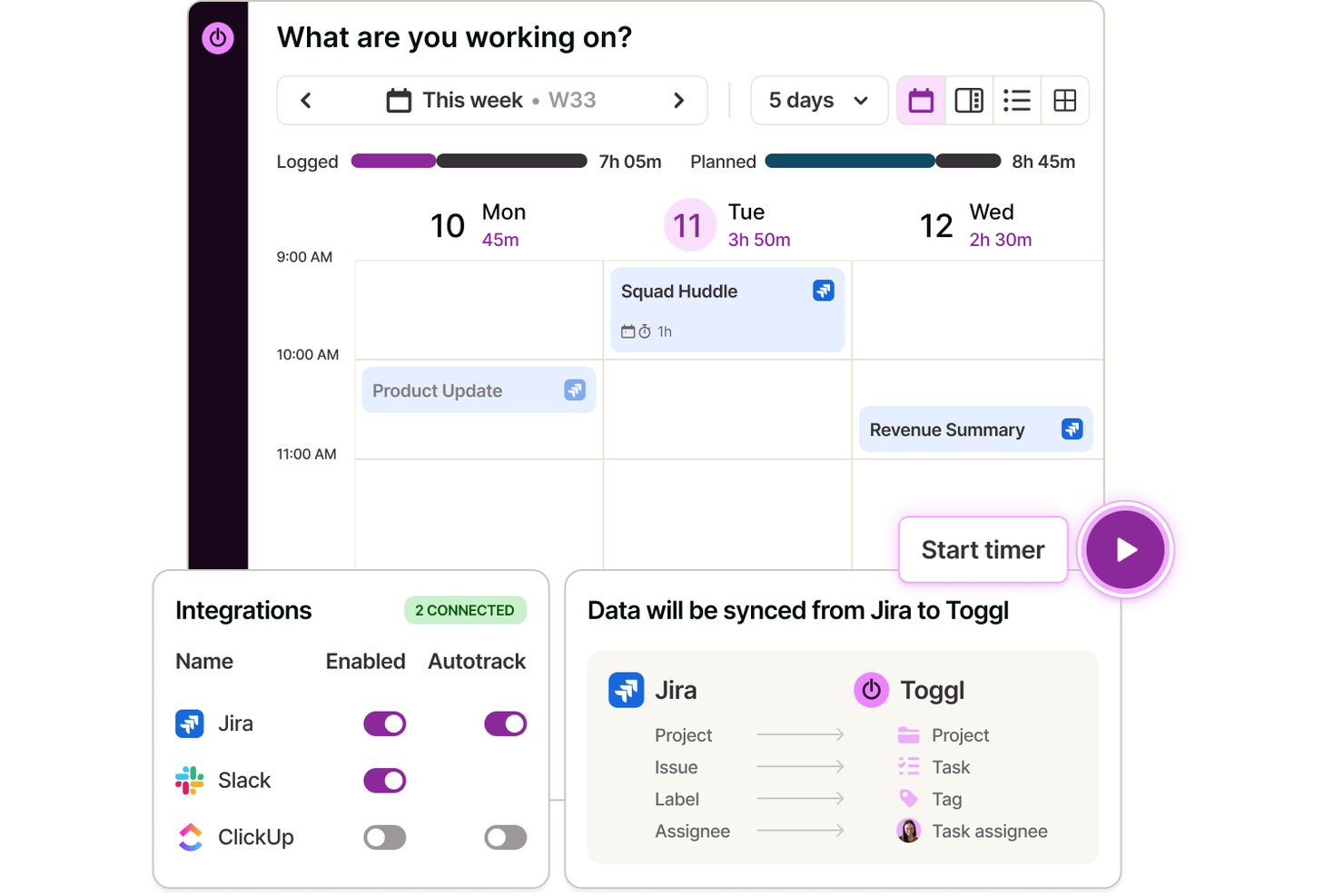
Toggl is a time tracking software and capacity planning tool designed for developers, providing features like private automated time capture, project-based tracking, integrations with dev tools, and detailed reporting.
Who Is Toggl Best For?
Engineering managers and software development teams seeking privacy-first time tracking across client projects and internal tasks.
Why I Picked Toggl
I picked Toggl as one of the best because I value its anti-surveillance time tracking, which means my team can log hours without invasive screenshots or keystroke tracking. We get automated time capture and privacy by default.
Toggl Key Features
- Integrations: Track time directly from Jira, GitHub, Asana, and more using native integrations and browser plugins.
- Customizable project structure: Organize projects, clients, and tasks with color coding and tags.
- Detailed reporting dashboards: Generate visual reports on time allocation by project, user, or client, plus team workloads, capacity, and profitability reports.
- Team timesheet approvals: Enable managers to review and approve team-submitted timesheets before client invoicing.
Toggl Integrations
Toggl offers native integrations with Jira, Asana, GitHub, Google Calendar, Outlook, Slack, and more. It connects with Zapier, provides an API for custom integrations, and has an MCP for connecting to Claude, Cursor, and Codex.
Pros and Cons
Pros:
- Supports team-based timesheet approvals
- No screenshots or keystroke monitoring
- Customizable reporting dashboards for projects
Cons:
- Limited sprint and epic tracking
- No native IDE integrations

actiTIME
Best with detailed reporting tools
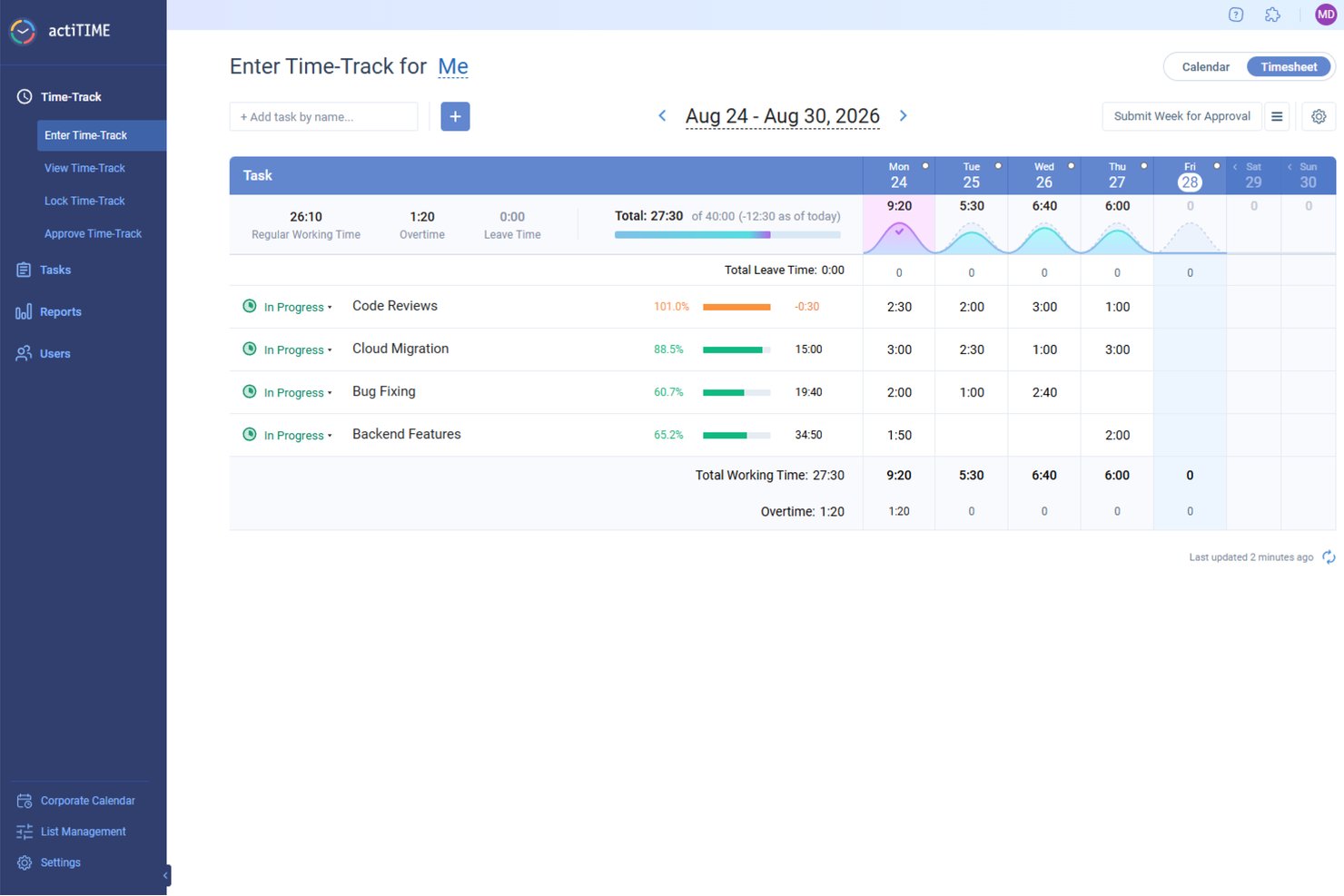
ActiTIME is designed to help teams track time, manage project costs, and monitor task progress, making it useful for development teams that need visibility into how work hours are spent. Its time-tracking system allows team members to log hours manually or with a timer and categorize them by project and task, giving managers a clear picture of how development time is distributed.
Why I Picked actiTIME
I chose actiTIME for its time tracking combined with project and task management features, which enable teams to assign work, set deadlines, and track progress against estimates. By comparing planned time or budgets with actual hours spent, teams can identify overruns early and adjust resources accordingly.
Additionally, actiTIME offers reporting and analytics tools that display project performance, team productivity, and project profitability. These insights can help development managers make better decisions about workload distribution, sprint capacity, and project budgeting, making actiTIME a valuable tool for development teams.
actiTIME Key Features
In addition to its project and budget tracking, actiTIME offers several other features that enhance its utility for developers:
- Billing & Invoicing: Set billing rates and generate on-brand PDF invoices based on recorded time.
- Work Schedules: Allows you to create company-wide work schedules, which can be overridden on an individual basis.
- Custom Workflows: Tailor task management processes to fit your team's specific needs and workflows.
- Leave Management: Manage team availability by tracking leaves and absences, ensuring smooth project execution.
actiTIME Integrations
Integrations include actiPLANS, QuickBooks, and Zapier.
Pros and Cons
Pros:
- Affordable solution for small businesses and teams
- Supports mobile apps for tracking on-the-go
- Simplifies reporting with quick and easy report generation
Cons:
- Not a full-featured issue tracking or backlog management tool
- Limited integrations compared to some other software options
New Product Updates from actiTIME

actiTIME Visual Hour Indicator and Time-Track Report Redesign
actiTIME adds a wave-style hour indicator to the Timesheet and Calendar views and refreshes the Time-Track report for smoother navigation and clearer visuals. For more information, visit actiTIME's official site.

Clockify
Best for developer Git commits tracking
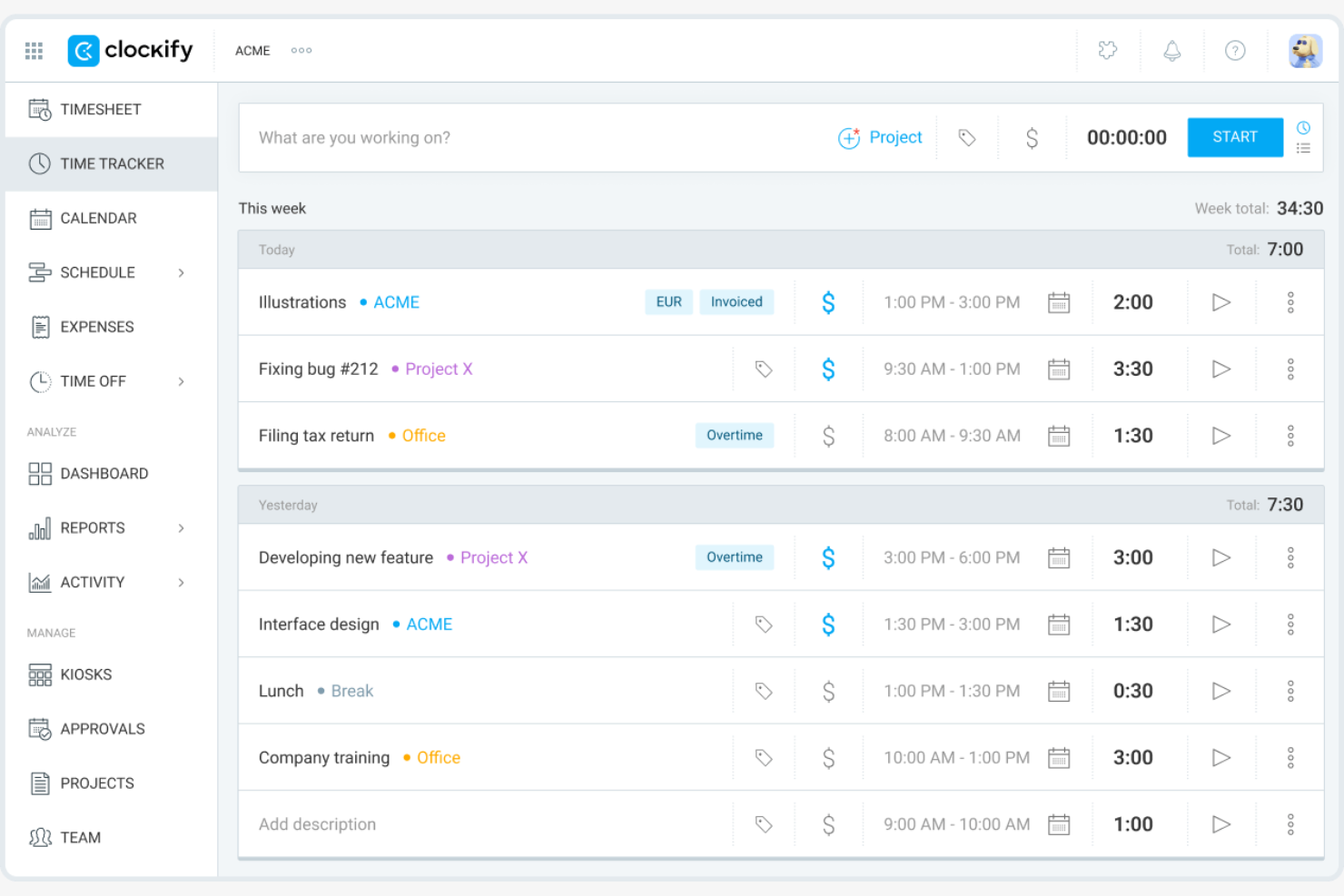
Clockify is a time tracking software designed for teams and individuals across various industries. It helps track work hours, manage projects, and monitor productivity efficiently.
Why I picked Clockify: I selected Clockify because it links daily developer activity directly with codebase updates, making it easy to track how engineering hours map to active code repositories. You can log time against specific GitHub, GitLab, and Bitbucket issues without forcing developers to leave their primary development environments. This alignment provides engineering leads with transparent visibility into sprint velocity, feature development overhead, and accurate R&D allocation without imposing extra administrative friction on the team.
Standout Features and Integrations:
Features include auto tracking, which records time spent on different tasks automatically. Budgeting tools allow you to set financial goals and track expenses. The calendar management feature helps you visualize and plan your team's schedule.
Integrations include Trello, Asana, Atlassian Jira, monday.com, QuickBooks, and more.
Pros and Cons
Pros:
- Supports five free users
- Extensive API and integrations
- Self-hosted on-premises solution
Cons:
- No built-in invoicing
- Limited automatic time tracking and productivity insights

Best for payroll integration

QuickBooks Time is a time tracking software that provides accurate time logging and payroll management for businesses of all sizes. It helps teams track employee hours, manage schedules, and simplify payroll processes.
Why I picked QuickBooks Time: QuickBooks Time excels in payroll integration, making it ideal for businesses needing efficient payroll management. It offers features such as real-time tracking and scheduling, which ensure accurate time logs for payroll processing. In my experience, its API integration with payroll systems simplifies the payroll process significantly.
Standout Features and Integrations:
Features include GPS tracking, which verifies employee locations during work hours. The scheduling feature helps you manage shifts and ensure coverage. You can also generate detailed reports to gain insights into labor costs and efficiency.
Integrations include QuickBooks Online, Xero, ADP, Gusto, Square, Expensify, and more.
Pros and Cons
Pros:
- Provides detailed labor reports
- Offers GPS tracking
- Strong payroll integration
Cons:
- GPS may be slow on mobile app
- Complex and overwhelming interface

Timely
Best for AI-driven tracking

Timely is a time tracking software that caters to professionals looking to automate their time management and improve productivity. It uses AI to automatically track work activities, providing insights into how time is spent across tasks and projects.
Why I picked Timely: Timely's AI-driven tracking automatically captures your work activities, reducing the need for manual input. This feature is particularly useful for those who want to focus on their tasks without constantly logging time. In my experience, its automation capabilities make it a standout choice for busy professionals.
Standout Features and Integrations:
Features include a visual timeline that helps you see your workday at a glance. The reporting feature offers insights into productivity patterns and efficiency. You can also set project budgets to keep track of time and costs effectively.
Integrations include Asana, Trello, Slack, QuickBooks, Zapier, and more.
Pros and Cons
Pros:
- Strong automation features
- Native integration with Google Calendar
- Drag-and-drop editing for automatically logged time
Cons:
- Mobile app lacks core AI tracking and timeline features
- Continuous background monitoring raises privacy concerns

My Hours
Best for project billing
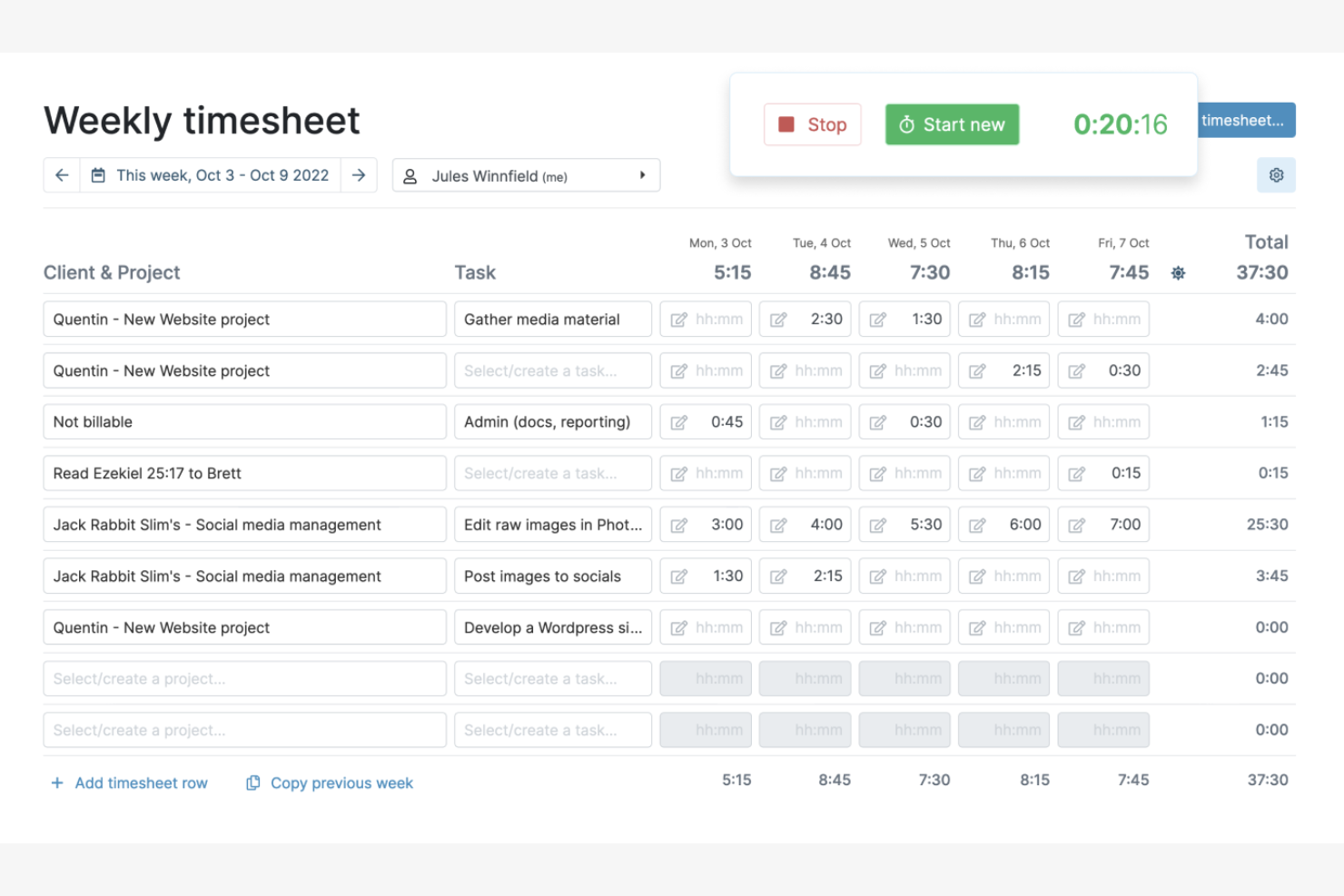
My Hours is a time tracking software designed for freelancers and small businesses to manage project hours and billing. It helps users track time, manage projects, and generate invoices efficiently.
Why I picked My Hours: My Hours is perfect for project billing, allowing you to track billable hours with ease. In my experience, its features make it a valuable tool for freelancers and small teams.
Standout Features and Integrations:
Features include customizable billing rates, which let you set different rates for projects and tasks. The reporting feature gives insights into project costs and profitability. You can also track time manually or with timers to ensure accurate logging.
Integrations include QuickBooks Online, Asana, Zapier, Microsoft Teams, and more.
Pros and Cons
Pros:
- Improves project billing accuracy
- Offers detailed cost reports
- Supports customizable billing rates
Cons:
- Occasional syncing delays between devices
- No automatic or background time tracking

TimeCamp
Best for automatic time tracking
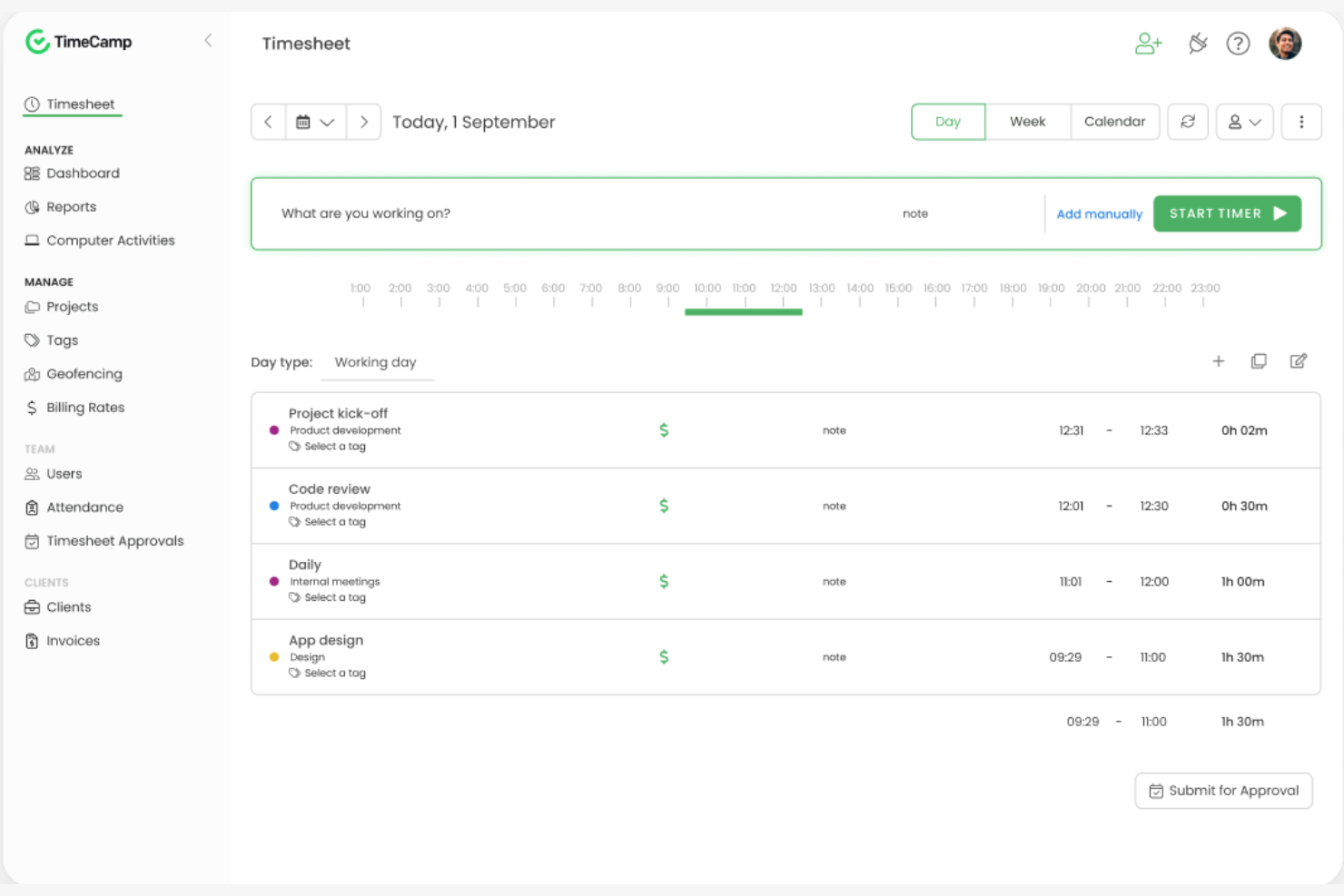
TimeCamp is a time tracking software tailored for businesses seeking to improve productivity and manage time effectively. It helps teams track hours, analyze productivity, and refine billing processes.
Why I picked TimeCamp: TimeCamp's automatic time tracking is perfect for teams that want to reduce manual input. It tracks your activities in the background, ensuring accurate time logs without disrupting your workflow. The tool also provides insightful reports to help you understand productivity patterns. In my experience, its easy setup and user-friendly interface make it a go-to option for many businesses.
Standout Features and Integrations:
Features include detailed reporting of time tracking data that helps you examine time spent on tasks and projects. The invoicing feature lets you bill clients directly from the platform. The project management tools allow you to assign tasks and track progress efficiently.
Integrations include Trello, Asana, Slack, Jira, QuickBooks, and more.
Pros and Cons
Pros:
- Easy to set up
- Exports to Google Spreadsheets to download as Excel, PDF, or CSV files
- Adds timer button to tools via browser plugins
Cons:
- Basic mobile app features
- Occasional tracking inaccuracies
TMetric
Best for small teams
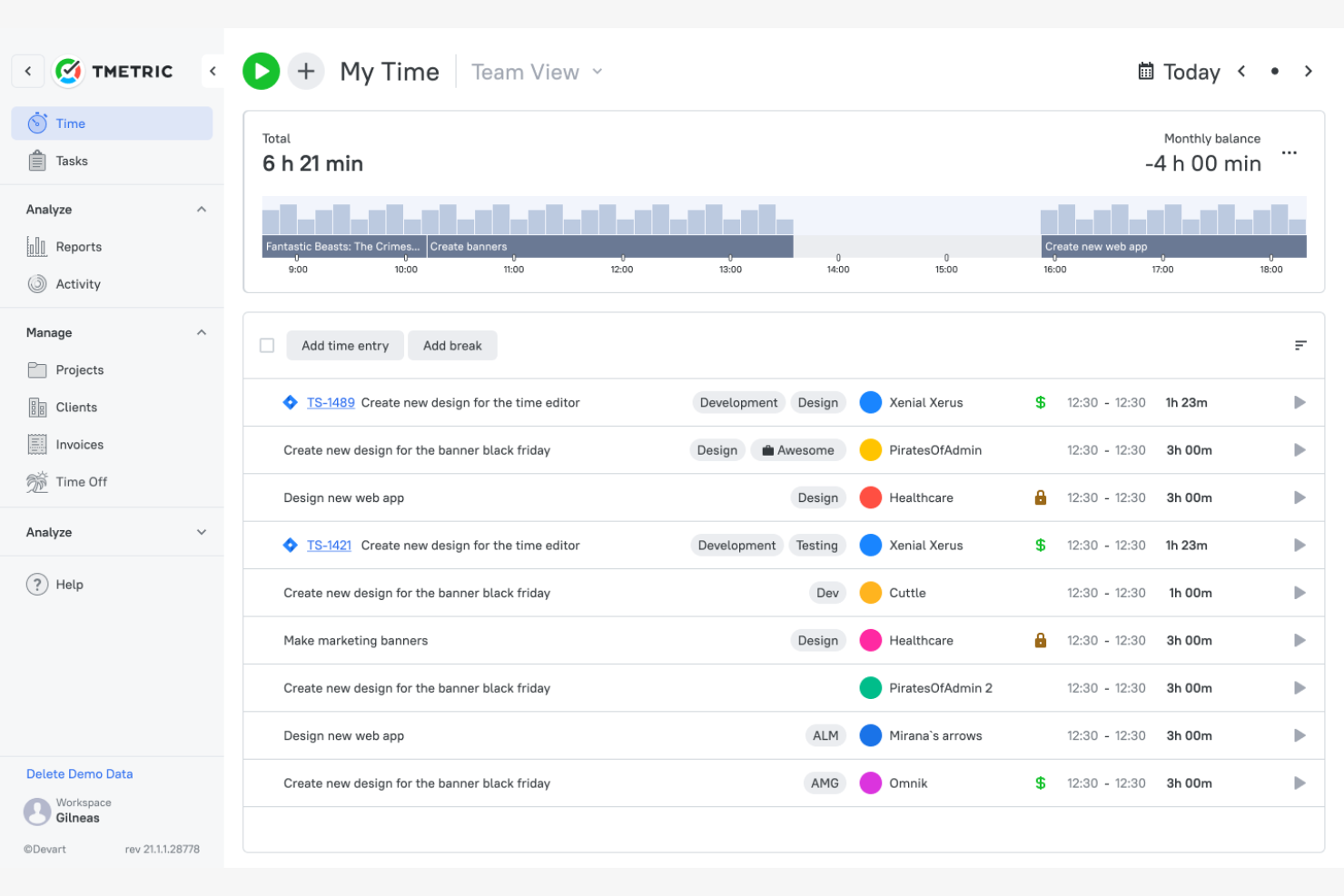
TMetric is a time tracking software that helps developers and small teams manage time, projects, and client billing. It offers features that boost productivity and provide detailed reporting for better project management.
Why I picked TMetric: TMetric is ideal for small teams due to its straightforward time tracking and budget management features. It allows your team to track employee time spent on tasks and projects accurately. The tool offers productivity analytics, giving insights into work patterns and efficiency. In my experience, its integration with popular development tools makes it a valuable asset for small teams.
Standout Features and Integrations:
Features include detailed reporting that helps you analyze time usage across projects. The invoicing feature lets you bill clients directly from the platform. Task management is also efficient, allowing you to assign and track tasks smoothly.
Integrations include Atlassian, Atlassian Jira, GitHub, Asana, Trello, Slack, and more.
Pros and Cons
Pros:
- Flexible billing modes
- Detailed productivity analytics
- Direct integrations with many developer ecosystems
Cons:
- Delayed customer support response
- Cluttered and less intuitive interface

Best for distraction management
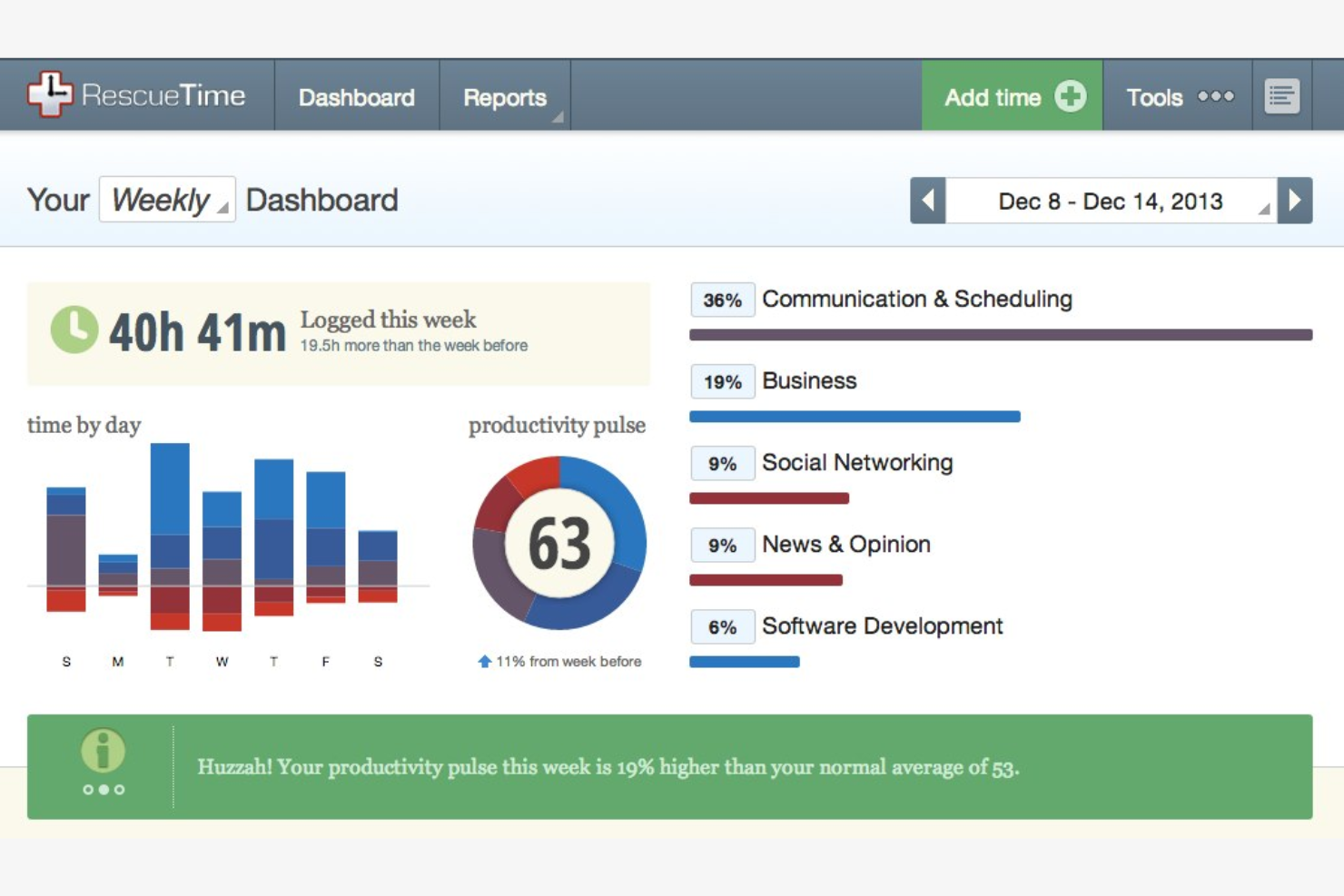
RescueTime is a time management software aimed at individuals and professionals who want to boost productivity by understanding their daily habits. It tracks time spent on applications and websites, helping users identify and eliminate distractions.
Why I picked RescueTime: RescueTime excels at distraction management, which is essential for maintaining focus in a busy work environment. In my experience, its focus on minimizing distractions makes it valuable for anyone looking to improve productivity.
Standout Features and Integrations:
Features include detailed activity reports that show where your time goes each day. The goal-setting feature sets limits on activities to help you maintain focus. You can also receive notifications when you spend too much time on distracting websites or apps.
Integrations include Slack, Trello, Asana, Beeminder, Exist, Google Calendar, and more.
Pros and Cons
Pros:
- Useful goal-setting features
- Customizable alerts for focus
- Effective distraction management
Cons:
- No manual timer or time entry functionality
- Limited offline tracking

TrackingTime
Best for task management

TrackingTime is a time tracking software that caters to teams and freelancers looking to efficiently manage tasks and projects. It provides tools to track time spent on tasks, manage team workloads, and generate accurate reports.
Why I picked TrackingTime: TrackingTime excels in task management, making it a great choice for teams needing to organize workloads. It allows you to create tasks, set deadlines, and assign them to team members. The platform offers real-time tracking, ensuring you know how time is spent on each task. In my experience, its task management capabilities help teams stay organized and meet deadlines.
Standout Features and Integrations:
Features include a built-in calendar that helps you visualize your team's schedule. The reporting feature provides insights into team productivity and time allocation. You can also set project budgets to manage resources effectively.
Integrations include Asana, Trello, Slack, Google Calendar, Outlook, and more.
Pros and Cons
Pros:
- Cross-platform desktop applications for Windows, Mac, and Linux
- Built-in calendar for scheduling
- Effective task management
Cons:
- Weak privacy controls and data encryption
- Inflexible and complex reporting
Annen programvare for tidsregistrering for utviklere
Her er noen flere alternativer innen programvare for tidsregistrering for utviklere som ikke kom med på kortlisten min, men som likevel er verdt å sjekke ut:
- Memtime
For offline tracking
- Harvest
For invoicing integration
- Timing
For macOS users
- WakaTime
For coding activity insights
- ClickTime
For project budgeting
- Paymo
For project management integration
- Zoho Projects
For task tracking
- Jibble
For attendance tracking
- Hubstaff
For remote team management
- ClockShark
For construction crews
- Lucen
For timeline visuals
- Productive
For agency workflows
- Apploye
For employee monitoring
- ATracker
For customizable dashboards
- Chrono Platform
For time analytics


How I Evaluate Time Tracking Software for Developers
I split evaluation into two layers: core functionality a tool must have to serve a dev team, and the differentiators—like Git logging or sprint analytics—that set the best options apart.
Core Functionality (Table Stakes For This List)
When I'm selecting tools for my list, I rank each one on a scale from 0 (does not offer the functionality) to 5 (excels in this area) for each core functionality listed below. Then, I calculate the tool's total score into a percentage. Each tool needs to achieve a minimum total score of 65% to be considered for inclusion.
- Automated Time Capture: I check whether a tool offers timers, idle detection, and background tracking so developers can log hours without breaking out of a coding session to fill in a manual form.
- Dev Tool Integrations: Tools like Jira, GitHub, GitLab, and Asana are staples in most dev stacks, so I evaluate how many of these a tracker connects with and whether it syncs tickets natively.
- Project & Task Organization: I look for the ability to map time against hierarchical structures like epics, sprints, and individual tickets rather than just flat project lists.
- Billable Hours & Rate Management: Agency owners and freelance developers need to split billable from non-billable time, so I evaluate whether per-project and per-user rates are supported.
- Timesheets & Reporting: Good reports turn raw time data into something useful. I look at whether a tool offers filterable dashboards, exportable timesheets, and breakdowns by developer, project, or client.
- Team Time Management: For engineering managers overseeing multiple developers, I evaluate role-based permissions, timesheet approval workflows, and aggregated team-level views.
Once I have a list of tools that meet this criteria, I consider what sets each platform apart.
Differentiating Factors (What Sets Vendors Apart)
Here's how I compare and contrast different vendors:
Standout Features
Git commit tracking is a big differentiator. Tools that link time entries to branches and pull requests give engineering managers a clear picture of where effort goes across a codebase. I also evaluate native IDE plugins for editors like VS Code or JetBrains, since developers who can start timers without switching windows are far more likely to log time consistently. Sprint and velocity analytics matter for agile teams that want to compare estimated vs. actual hours during retrospectives and refine future capacity planning.
Beyond Features
Developer workflow fit is something I weigh heavily. A tool with API access, CLI support, and webhooks lets teams automate time logging into their existing CI/CD pipelines instead of relying on manual input. Privacy controls also matter, especially configurable screenshot and activity monitoring settings, since many developers push back on surveillance-style tracking. For agencies and consultants, I look at whether a tool connects to accounting platforms like QuickBooks or Xero so teams can invoice directly from tracked billable hours.
Slik velger du programvare for tidsregistrering for utviklere
Det er lett å gå seg vill i lange funksjonslister og komplekse prismodeller. For å hjelpe deg med å holde fokus mens du arbeider deg gjennom den unike prosessen med å velge programvare, får du her en sjekkliste over faktorer du bør ha i tankene:
| Faktor | Hva du bør vurdere |
|---|---|
| Skalerbarhet | Vil programvaren vokse med teamet ditt? Kontroller om den kan håndtere flere brukere og prosjekter uten problemer. |
| Integrasjoner | Kan den kobles til de nåværende verktøyene dine? Sørg for at den fungerer med den eksisterende programvaren for prosjektstyring og regnskap, inkludert Windows, macOS og Android. |
| Tilpasningsmuligheter | Kan du tilpasse den til arbeidsflyten din? Se etter alternativer for å tilpasse dashbord, rapporter og brukerinnstillinger. |
| Brukervennlighet | Er den enkel for alle å bruke? Et brukervennlig grensesnitt kan spare tid og redusere behovet for opplæring. |
| Implementering og innføring | Hvor raskt kan du komme i gang? Vurder tilgjengeligheten av veiledninger, brukerstøtte og ressurser for en smidig overgang. |
| Kostnad | Er prisene i tråd med budsjettet ditt? Ta hensyn til alle kostnader, inkludert skjulte gebyrer og langsiktige bindinger. |
| Sikkerhetstiltak | Er dataene og personvernet ditt beskyttet? Se etter kryptering, brukertillatelser og samsvar med personvernregler. |
| Tilgjengelig brukerstøtte | Får du hjelp når du trenger det? Kontroller om det finnes brukerstøtte døgnet rundt, flere kontaktalternativer og god kundeservice. |
Hva er tidsregistreringsprogramvare for utviklere?
Tidsregistreringsprogramvare for utviklere er et verktøy som hjelper med å registrere tiden som brukes på ulike kodeoppgaver og prosjekter. Programvareutviklere, prosjektledere og team bruker det ofte til å overvåke produktiviteten og fordele ressurser effektivt. Funksjoner for automatisk tidsregistrering, integrasjon med prosjektstyring og detaljert rapportering gjør det enklere å håndtere arbeidsmengder og fakturere nøyaktig. Samlet sett øker disse verktøyene produktiviteten og gir verdifull innsikt i hvordan tiden brukes.
Funksjoner
Når du velger tidsregistreringsapper for utviklere, bør du se etter følgende viktige funksjoner:
- Automatisk tidsregistrering: Registrerer tiden som brukes på oppgaver uten manuell inntasting, noe som sparer tid og sikrer nøyaktighet.
- Integrasjon med prosjektstyring: Kobles til verktøy som Trello og Asana for å forbedre prosjektarbeidsflyten.
- Detaljert rapportering: Gir innsikt i produktivitetsmønstre og prosjektkostnader, slik at du kan ta informerte beslutninger.
- Tilpassbare dashbord: Lar deg tilpasse visningene slik at du kan fokusere på viktige måleverdier som er relevante for arbeidet ditt.
- Faktureringsfunksjoner: Genererer fakturaer direkte fra registrert tid og forenkler faktureringsprosessene.
- GPS-sporing: Bekrefter de ansattes plassering i arbeidstiden, noe som er nyttig for team som arbeider eksternt eller ute i felt.
- Oppgavekategorisering: Hjelper med å organisere oppgaver og prosjekter for bedre arbeidsflytstyring.
- Budsjettovervåking: Holder oversikt over prosjektbudsjetter for å forhindre overforbruk og sikre økonomisk kontroll.
Fordeler
Implementering av tidsregistreringsprogramvare for utviklere gir flere fordeler for teamet og virksomheten din. Her er noen av fordelene du kan se frem til:
- Økt produktivitet: Funksjoner for automatisk tidsregistrering gjør det enklere å se hvordan tiden brukes, slik at team kan optimalisere arbeidsflyter og fokusere på prioriteringer.
- Nøyaktig fakturering: Faktureringsfunksjoner sørger for at alle fakturerbare timer registreres og omgjøres til nøyaktige kundefakturaer.
- Bedre prosjektstyring: Integrasjon med prosjektstyringsverktøy bidrar til å forenkle oppgaver og overvåke prosjektfremdriften.
- Bedre ressursfordeling: Detaljert rapportering gir innsikt i fordelingen av arbeidsmengden, noe som muliggjør bedre beslutninger om ressursstyring.
- Økonomisk kontroll: Funksjoner for budsjettovervåking holder prosjektene innenfor de økonomiske rammene, mens funksjoner for utgiftssporing bidrar til å unngå overforbruk.
- Effektiv styring av fjernarbeid: GPS-sporing bekrefter de ansattes plassering og sikrer ansvarlighet for team som arbeider eksternt eller ute i felt.
Kostnader og priser
Valg av tidsregistreringsprogramvare for utviklere krever en forståelse av de ulike prismodellene og abonnementene som er tilgjengelige. Kostnadene varierer basert på funksjoner, teamstørrelse, tillegg og mer. Tabellen nedenfor oppsummerer vanlige abonnementer, gjennomsnittsprisene deres og typiske funksjoner som er inkludert i tidsregistreringsprogramvare for utviklere:
Sammenligningstabell for abonnementer for tidsregistreringsprogramvare for utviklere
| Plantype | Gjennomsnittspris | Vanlige funksjoner |
|---|---|---|
| Gratisabonnement | $0 | Grunnleggende tidsregistrering, begrenset rapportering og manuelle registreringer. |
| Personlig abonnement | $3.99-$20/bruker/måned | Automatisk tidsregistrering, prosjektkategorisering og grunnleggende fakturering. |
| Bedriftsabonnement | $15-$30/bruker/måned | Avansert rapportering, integrasjoner med prosjektstyringsverktøy og budsjettsporing. |
| Storbedriftsabonnement | $30-$50/bruker/måned | Tilpassbare dashbord, dedikert brukerstøtte og omfattende sikkerhetsfunksjoner. |
Vanlige spørsmål om tidsregistreringsprogramvare for utviklere
Her er noen svar på vanlige spørsmål om tidsregistreringsprogramvare for utviklere:
Hvordan kan jeg sikre personvernet med tidsregistreringsprogramvare?
De fleste tidsregistreringsprogrammer tilbyr funksjoner for personvern. Se etter verktøy som tilbyr kryptering, brukertillatelser og samsvar med personvernforordninger, for eksempel personvernforordningen. Du kan også undersøke om programvaren lar deg angi tilgangsnivåer for brukere, slik at du kan kontrollere hvem som ser hvilke data. Ved å lese personvernerklæringen til programvaren kan du få innsikt i hvordan dataene dine behandles. Sørg alltid for at programvareleverandøren har en tydelig forpliktelse til å beskytte brukerinformasjon.
Hvordan kan jeg få utviklingsteamet mitt til å bruke et tidsregistreringsverktøy konsekvent?
Du kan involvere utviklerne i valget av verktøy og sørge for at det passer med de eksisterende arbeidsflytene deres, for eksempel Git eller Atlassian Jira. Gi tydelig opplæring og forklar hvordan tidsregistrering er nyttig for teamet, ikke bare for ledelsen. Automatiser påminnelser og fremhev hvordan dataene bidrar til å håndtere arbeidsmengden og unngå utbrenthet.
Kan tidsregistreringsprogramvare integreres med verktøyene jeg bruker nå?
Ja. De fleste tidsregistreringsprogrammer kan integreres med et bredt utvalg av verktøy. Sjekk om programvaren støtter integrasjoner med prosjektstyrings-, regnskaps- og kommunikasjonsverktøyene du allerede bruker, for eksempel Trello, QuickBooks og Slack. Integrasjoner gjør at data kan flyte fritt mellom systemene, noe som forenkler arbeidsflytene. Før du kjøper, bør du kontrollere hvilke integrasjoner som er tilgjengelige, og vurdere å bruke prøveversjoner for å teste dem med det nåværende oppsettet ditt.
Er det vanskelig å gå over til en ny tidsregistreringsprogramvare?
Nei. Hvis overgangen planlegges godt, kan det være enkelt å gå over til en ny tidsregistreringsprogramvare. Velg et verktøy som tilbyr omfattende ressurser for innføring, for eksempel opplæringsvideoer, veiledninger og kundestøtte. La et lite team ta programvaren i bruk først, slik at du kan teste brukeropplevelsen før full utrulling. Sørg for at teamet er opplært og trygg på å bruke det nye systemet. En effektiv innføring kan minimere forstyrrelser og hjelpe teamet med å tilpasse seg raskt.
Hva er den beste måten å registrere tid på for både soloutviklere og team?
Den beste måten er å bruke et verktøy som støtter både automatisk og manuell registrering, mobil- og skrivebordsapper, prosjektbaserte tidslogger og individuell rapportering. Se etter programvare som lar deg bytte mellom registreringsmoduser, slik at utviklere kan registrere timer mens de arbeider eller legge dem til etter at oppgavene er fullført. Denne fleksibiliteten er avgjørende for team med ulike arbeidsmåter.
Hvilke brukerstøttealternativer er tilgjengelige hvis jeg får problemer?
De fleste leverandører av tidsregistreringsprogramvare tilbyr ulike brukerstøttealternativer. Se etter verktøy som tilbyr brukerstøtte døgnet rundt via chat, e-post eller telefon. Mange tilbyr også hjelpesentre med artikler og vanlige spørsmål som kan hjelpe deg med å løse vanlige problemer. Noen leverandører har dedikerte kundeansvarlige for personlig oppfølging. Før du bestemmer deg, bør du teste hvor raskt brukerstøtteteamet svarer, ved å sende inn prøvehenvendelser for å sikre at de innfrir forventningene dine.