

10 beste programvareverktøy for Scrum og Scrum-tavler for 2026

10 Liste over beste Scrum-programvare


Scrum-programvare hjelper team med å planlegge sprinter, administrere oppgaver og holde seg samkjørte gjennom raske, iterative utviklingssykluser. Enten du følger med på hastighet, legger til rette for daglige standup-møter eller organiserer sprintgjennomganger, kan riktig verktøy strukturere smidige arbeidsflyter og hjelpe teamet ditt med å levere bedre og raskere.
Jeg har testet og vurdert ledende Scrum-plattformer på tvers av dusinvis av prosjekter for å fremheve dem som faktisk støtter smidige team. Fra sprintplanlegging og oppgavetavler til burndown-diagrammer og samarbeidsfunksjoner tilbyr hvert verktøy i denne veiledningen funksjonalitet som er utviklet for å holde teamet ditt i bevegelse med tydelighet og hurtighet.
Why Trust Our Software Recommendations
Our team has been testing and reviewing software since 2012. As project managers ourselves, we know how difficult—and important—it is to choose the right software.
For this guide, we evaluated tools using hands-on testing and independent research, scoring tools using our selection criteria. We also draw on insights from industry thought leaders and practicing project management experts.
Our reviews reflect our human editorial judgment, not a sales pitch.
Expert reviewers:
Sammenligningstabell over den beste Scrum-programvaren
| Tool | Best For | Trial Info | Price | ||
|---|---|---|---|---|---|
| 1 | Best for Scrum and agile templates | 14-day free trial | Pricing upon request | Website | |
| 2 | Best for custom workflow automation | 30-day free trial | From $35/user/month (billed annually) | Website | |
| 3 | Best Scrum board for real-time collaboration | 15-day free trial | From $1/user/month (12 user minimum) | Website | |
| 4 | Best scrum tool with built-in video conferencing | Free plan + 14-day free trial available | From $8/user/month (billed annually) | Website | |
| 5 | Best for freelancers & | Free plan available | From $9/user/month (billed annually) | Website | |
| 6 | Best for API documentation | Free plan + 14-day free trial available | From $9.99/user/month (billed annually) | Website | |
| 7 | Best scrum software for enterprises | Free plan available | From $8.48/user/month | Website | |
| 8 | Best scrum software for sprint retrospectives | Free trial available | Pricing upon request | Website | |
| 9 | Best for agencies and consultancies | Free 7-day trial available | From $9/user/month (billed annually) | Website | |
| 10 | Best Scrum software for app integrations | Free plan available (request via email) | From $12.49 project-planning/user/month (billed annually) | Website |


Anmeldelser av den beste Scrum-programvaren
Her er en kort beskrivelse av hvert av Scrum-verktøyene på listen min, som viser hva det gjør best, samt skjermbilder som fremhever noen av funksjonene.

Wrike
Best for Scrum and agile templates

Wrike is a project management software suitable for teams of five or more. It includes Scrum tools and features, and is highly configurable, allowing users to customize workflows, dashboards, reports, and request forms.
Wrike enables users to switch between Agile Kanban boards, one-click Gantt charts, and traditional workload views. The tool also comes with a number of pre-built Agile templates, and features task lists, subtasks, schedules, shared workflows, file sharing, and real-time collaboration. Automatically prioritize your backlog, plan sprints with Gantt charts and Kanban boards, and track your sprint success with reports.
Wrike has an easy-to-use, intuitive interface and navigation with distinct spaces, folders, and tasks. Users can toggle between the home screen and timesheets, dashboards, calendars, reports, and an activity stream. Wrike has a dedicated help center with interactive training, videos, a ‘Getting Started’ guide, and a thriving community.
Wrike offers 400+ pre-built native integrations, including integrations with the most popular file management software from Microsoft, Google, and Dropbox, along with sales and marketing software from Salesforce and Marketo.
Pros and Cons
Pros:
- Excellent email integration
- View projects and tasks in different views (list, table, Kanban, Gantt)
- User-friendly and intuitive for all skill levels
- Users have access to a variety of fully customizable dashboards
Cons:
- No alerts to warn against unassigned/untagged tasks
- No task prioritization levels, high priority flags only
- Time tracking is included in Business/Enterprise plans only
New Product Updates from Wrike
Wrike Adds Klaxoon MCP Integration
Wrike’s Klaxoon MCP integration is now generally available, enabling AI agents to navigate between Wrike tasks and attached whiteboards, read task context, and manage whiteboard attachments via API. For more information, visit Wrike's official site.

Best for custom workflow automation

QuickBase is a cloud-based application development platform that enables users to create custom business applications without the need for coding expertise. Its platform can also be adapted for use as scrum software, supporting agile project management methodologies. This allows teams to manage sprints, backlogs, and user stories within a customizable framework.
QuickBase's flexibility in application design and data management additionally allows scrum teams to configure the system to their specific workflow requirements, facilitating the iterative development and continuous improvement central to scrum practices.
QuickBase integrates with Microsoft Teams, Tableau, Slack, Salesforce, NetSuite, QuickBooks, Dropbox, Google Drive, Marketo, and Zendesk.
QuickBase costs from $35/user/month (billed annually) and comes with a 30-day free trial.
Pros and Cons
Pros:
- Can scale with growing businesses
- Provides excellent customer support for users
- Intuitive interface
Cons:
- Some issues with slow loading times
- Lacks easily formattable reports

Best Scrum board for real-time collaboration
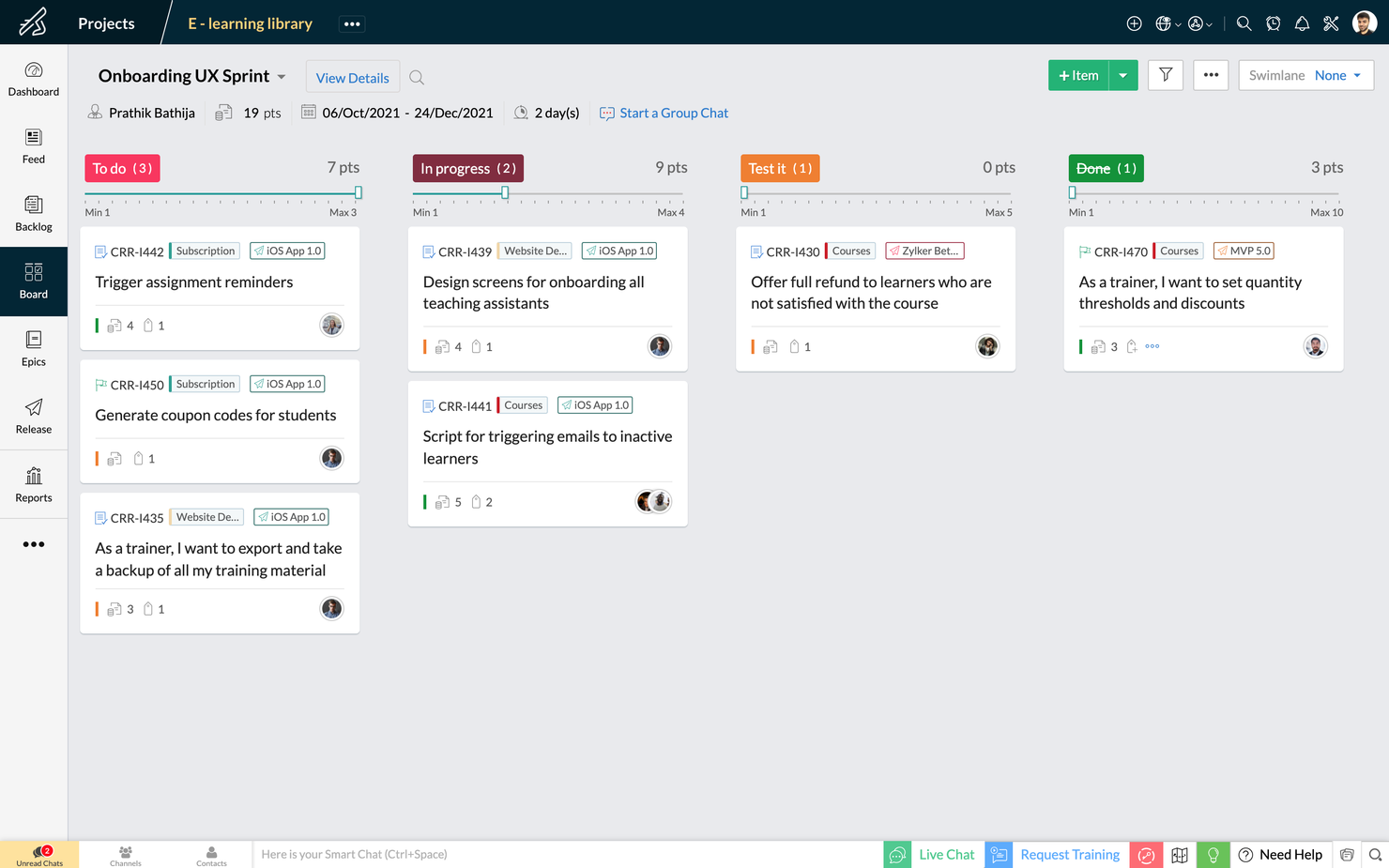
Zoho Sprints is an agile project management tool that helps Scrum teams organize user stories, manage backlogs, and track progress on Scrum Boards. It’s a simple and clutter-free Scrum software that helps teams to focus on shipping great quality work.
The drag and drop planning builder helps teams plan their upcoming sprints by moving items from their project backlog to their sprint backlog. The project backlog serves as the repository of all user stories, tasks, and bugs. The dedicated planning center equips teams to refine their project backlog with options to filter, sort and search items across default and custom parameters.
The Scrum Board in Zoho Sprints is highly customizable and provides visibility and transparency of everyone’s progress. It is effortless to drag-and-drop stories into completion, create custom statuses and set WIP limits. Teams can sort work items into swimlanes based on priority, story, or estimation points, and track the progress of sprints in an exclusive sprint dashboard.
Zoho Sprints provides real-time reports and insights into the overall progress. The Velocity Chart calculates the amount of work delivered in each sprint and helps teams to plan and estimate future sprints. Meanwhile, Burndown and Burnup charts help teams to track the pace at which they are burning estimation points by comparing the current and ideal progress line.
Communication and collaboration are crucial in every aspect of life, and
they're especially critical when you're working with cross-functional teams. With Zoho Sprints, product teams can collaborate within the context of their work through features like built-in chat, virtual meetings, and an interactive project feed.
Zoho Sprints integrates well with popular code repository management tools like GitHub, GitLab, Bitbucket. DevOps teams can also automate their CI/CD pipelines by integrating with developer tools like Jenkins and Azure DevOps. Teams can leverage webhooks and APIs to build their integrations or browse through a growing library of apps listed on Zoho's marketplace.
Zoho Sprints starts at $6/user/month (billed annually). They offer a freemium version for up to 3 users for 3 projects. Zoho Sprints offers a free trial for 15 days (no credit card required).
New Product Updates from Zoho Sprints
Zoho Sprints Adds Dashboard View for Custom Modules
Zoho Sprints adds a Dashboard view for custom modules with charts and tables for visualizing module records. This gives teams a clearer way to review custom data. For more information, visit Zoho Sprints’ official site.
 .
.
Miro
Best scrum tool with built-in video conferencing

Miro is a collaborative online whiteboard with built-in video conferencing widely used across various industries, including major Fortune 100 companies. It offers an extensive array of templates and formats, from Kanban boards to flowcharts.
As a scrum software tool, Miro includes interactive collaboration features like stickies and comments, enabling dynamic discussions during scrum sessions. Its integration with project management tools like Jira and Asana centralizes task tracking within the scrum framework. Additionally, Miro's planner tool assists in visualizing and organizing tasks, aiding teams in maintaining a clear overview of their projects and sprints.
Miro has integrations with a whole suite of tools, including Zoom, Figma, Confluence, Asana, monday.com, Microsoft Teams, Jira, Slack, Google Drive, Box, Airtable, Notion, Azure, and Webex. Some integrations are limited to paid plans only.
Pros and Cons
Pros:
- Built-in communication features for streamlined collaboration
- Intuitive and easy setup
- Free forever plan available
Cons:
- Free version does not allow high-quality export to pdf
- Zooming can be jumpy on larger projects
- Visitor/guest accounts locked to paid plans only
New Product Updates from Miro
Miro Adds Japan Data Residency for Enterprise Customers
Miro has introduced Japan data residency for enterprise customers, offering in-region storage for production data, backups, and metadata, plus in-region compute infrastructure. For more information, visit Miro's official site.

ClickUp
Best for freelancers &

ClickUp bills itself as "one app to replace them all" and I tend to agree. It's a good jack-of-all-trades option that handles basic tasks, docs, team chat, and goals within a sleek, welcoming interface. Remote scrum teams will love the easy screenshots and recording features for long-distance stand-up meetings. On top of everything, their free plan is quite generous, with unlimited tasks and unlimited members plus 100MB of storage space.
ClickUp costs $5/user/month. They also have a free version with unlimited tasks and unlimited members.
Pros and Cons
Pros:
- Can email (set-up) a task directly from Outlook
- Unlimited file storage on all paid account tiers
- Free forever plan allows unlimited members
Cons:
- Granular customization options mean a time-consuming setup
- Reporting suite is limited to paid plans only
- Read-only guest permissions are limited to paid account
New Product Updates from ClickUp
ClickUp Adds Meetings Hub, Super Agent Templates, and ZoomInfo Integration
ClickUp adds a searchable Meetings Hub, new ways to clone and template Super Agents, and a ZoomInfo integration through the App Center. These updates improve meeting retrieval, agent reuse, and access to sales intelligence. For more information, visit ClickUp’s official site.

Best for API documentation

Used by over 20K companies, Teamwork is a project management tool that highlights accountability and collaboration with time tracking, workload management, and templates and automation. Teamwork's API is flexible and accessible with different self-help modules for manipulating data, building integrations, customizing product development workflows, and visualizing your content. Scrum-oriented cross-functional teams will love this adaptability.
Teamwork costs from $10/user/month and they also offer a freemium version of the tool for up to 5 users. They also offer a 30-day free trial for all paid plans.
Pros and Cons
Pros:
- Easy to communicate task status with clients or team
- Easy zoom in/zoom out on project plans
- Features can be turned on/off (tasks, messages, time, risks, billing)
Cons:
- No easy way to measure your team’s capacity
- No industry-specialized project templates or formats
- No CSS template option for advanced customization
Jira
Best scrum software for enterprises
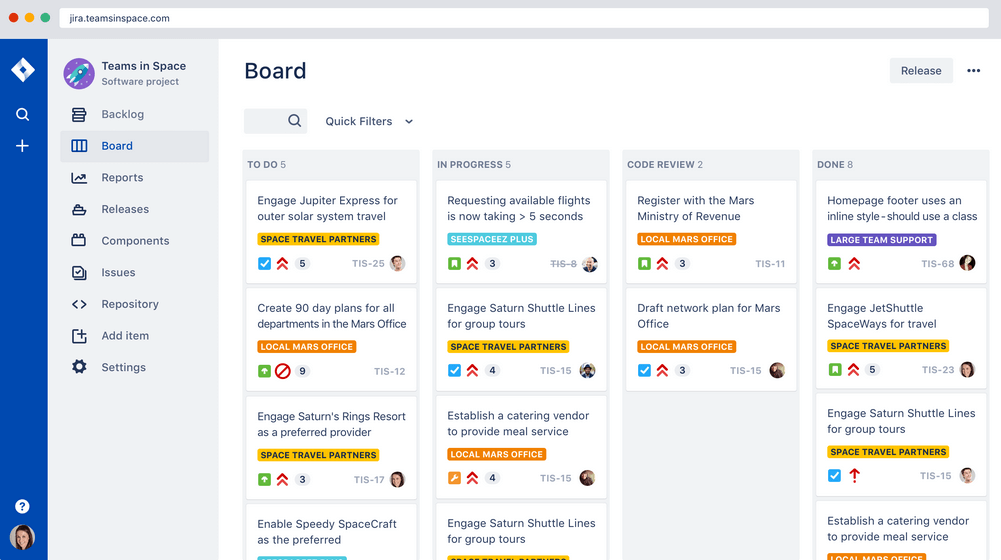
Jira Scrum board takes this workflow software powerhouse and hones it around team collaboration and incremental delivery starts. A few features scrum masters will find handy are their printable agile user story cards, 25+ agile extensions and filters, and a robust project template manager. Atlassian owns Jira, Confluence, Trello, BitBucket, SourceTree, Bamboo—making it great for enterprises who want everything in a single ecosystem.
Jira costs from $7/month for up to 10 users. They also offer free licensing for groups of 10 users or less.
Pros and Cons
Pros:
- Centralized administration across all Atlassian Cloud products
- Houses all historical works for future reference
- Can create tasks, sub-tasks, spikes, and epics
- Single view for all user stories
Cons:
- No mass-editing and scripting (rename a whole set of labels, etc.)
- Needs better linking within stories and tasks
- Limited collaboration features
Best scrum software for sprint retrospectives

Targetprocess is a Scrum team management app with tailored solutions for product owners, release train engineers, portfolio managers, and agile coaches. They make sprint retrospectives simple with built-in tools to check team happiness, organize feedback, or just record a high-level summary of a project. Targetprocess has board tags for "worked well," "didn't work well," and "improvement ideas", making collaborative retrospectives even easier.
Targetprocess offers customized pricing upon request.
Pros and Cons
Pros:
- Robust graphical and custom reports to pinpoint trends
- Responsive customer support team
- Can choose between unique or standard views per user
Cons:
- Can be tricky to move entities into different levels of the hierarchy
- Does not include iteration tracking
- No means to reuse steps
Best for agencies and consultancies

Bonsai is a versatile business management platform tailored for agencies, consultancies, and professional services. It combines tools for client and project management with financial tracking, offering an all-in-one solution for business operations. With features like CRM, proposal and contract management, scheduling, and expense tracking, Bonsai helps teams organize workflows, manage sprints, and complete projects.
Bonsai's robust task management system makes it a valuable tool for Scrum teams. It includes task assignments, prioritization, deadlines, and Kanban views for progress tracking, essential for managing Scrum sprints. The integrated timers and collaboration tools ensure that teams can maintain clear communication and stay on schedule throughout their projects.
Furthermore, Bonsai offers features like customizable templates, automated invoicing, project timelines, client portals, and comprehensive reporting and analytics. Bonsai also integrates with popular tools such as Google Calendar, Calendly, QuickBooks Online, ClickUp, Google Drive, Google Sheets, Zapier, Slack, HubSpot, Gmail, Xero, and more.
Pros and Cons
Pros:
- Client portal for direct communication
- Flexible task management with Kanban views
- Automation for repetitive tasks
Cons:
- Lacks more advanced scrum features like backlog management
- May not be the best for larger businesses
Nutcache
Best Scrum software for app integrations

Nutcache is a Scrum project management tool with the ability to measure task progress, set a business value to cards (ROI), assign complexity points to cards, display real-time sprint statistics, and use acceptance tests to set cards as completed. Nutcache has a healthy list of third-party integration options and also works with a paid Zapier plan to unlock thousands more. They also offer a flexible API to connect Nutcache to your existing tools and workflow.
Nutcache costs from $6/user/month with a “Pro” plan that requires 5 users.
Pros and Cons
Pros:
- Easy to integrate new employees (scalable)
- Great time and expense tracking
- Intuitive to learn and use
- Robust project dashboards
Cons:
- Need more third party integrations
- Complicated security levels for employees
Annen Scrum-programvare
Her er noen flere som ikke kom med på topplisten.
- VivifyScrum
For small teams and startups
- SwiftKanban
Scrum tool for engineering
- Height
Efficient Agile development made simple.
- Axosoft
Sprint dashboard
- Orangescrum
Scrum software with resource management
- monday AI Workspace
With AI-driven risk detection and reporting
- Celoxis
For resource management
- Hubstaff
Free scrum software
- Lucidspark
Scrum board for integrations and collaboration
- GoodDay
For backlog prioritization
- Asana
Free Scrum software
- Basecamp
Scrum tool for non-software projects
- Scoro
Agile Scrum software
- Trello
Widely-used Scrum board software
- SprintGround
For web developers
- Zoho Sprints
Scrum software within a connected suite of other business tools
- Scrumdesk
Objectives and key results (OKR) planning


How I Evaluate Scrum Software
I split my evaluation into two layers—whether a tool covers the sprint planning, backlog grooming, and burndown reporting fundamentals, then what sets it apart for teams scaling across multiple squads.
Core Functionality (Table Stakes For This List)
When I'm selecting tools for my list, I rank each one on a scale from 0 (does not offer the functionality) to 5 (excels in this area) for each core functionality listed below. Then, I calculate the tool's total score into a percentage. Each tool needs to achieve a minimum total score of 65% to be considered for inclusion.
- Product Backlog Management: I evaluate how each tool handles creating, ranking, and grooming user stories and epics—like dragging items to reprioritize after a stakeholder review.
- Sprint Planning & Execution: Each tool should let you define sprints with goals, pull items from the backlog, and track capacity so your team commits to realistic workloads.
- Scrum Board Visualization: I look for drag-and-drop boards with customizable columns and swimlanes that reflect how your team actually moves work from "To Do" through "Done."
- Agile Reporting & Metrics: Burndown charts, velocity tracking, and cumulative flow diagrams matter here—I check whether reports update in real time as the sprint progresses.
- Story Point Estimation: Tools should support story points at the item level and roll them up across sprints, similar to how Jira and Azure DevOps surface velocity history.
- Team Collaboration on Work Items: I look at whether team members can comment, @mention, attach files, and receive notifications directly on stories and tasks within a sprint.
Once I have a list of tools that meet this criteria, I consider what sets each platform apart.
Differentiating Factors (What Sets Vendors Apart)
Here's how I compare and contrast different vendors:
Standout Features
Built-in retrospective tools are a big differentiator—I look for templates like Start/Stop/Continue with voting and action items that carry into the next sprint. Developer integrations also matter: linking GitHub or GitLab commits directly to user stories gives the whole team visibility into what's shipped. I also check for no-code automation rules that handle recurring tasks like rolling unfinished items into the next sprint or notifying the Scrum Master when a story is blocked.
Beyond Features
Ecosystem fit is one of the first things I evaluate—whether a tool connects with your existing Slack, Confluence, or Figma setup shapes daily workflows more than most features do. I also consider how well a platform scales; a tool that works for one Scrum team can fall apart when you're coordinating ten squads across a portfolio. Onboarding matters, too. Pre-built Scrum templates and migration support from tools like spreadsheets or legacy PM platforms can cut weeks off your team's ramp-up time.
Slik velger du Scrum-programvare
Det er lett å gå seg vill i lange funksjonslister og komplekse prisstrukturer. For å hjelpe deg med å holde fokus mens du går gjennom den unike prosessen med å velge programvare, får du her en sjekkliste over faktorer du bør ha i bakhodet:
| Faktor | Hva du bør vurdere |
| Skalerbarhet | Vil dette verktøyet vokse sammen med teamet ditt etter hvert som behovene dine utvides? Du må se på prisplaner og funksjoner for å finne ut om verktøyet kan vokse med deg. |
| Integrasjoner | Integreres programvaren med teamets eksisterende verktøy? Noen selskaper ser for eksempel spesifikt etter prosjektstyringsprogramvare som integreres med Jira. |
| Tilpasningsmuligheter | Kan du tilpasse programvaren slik at den passer arbeidsflytene dine? |
| Brukervennlighet | Er verktøyets grensesnitt intuitivt nok til at teamet ditt lærer det raskt? |
| Budsjett | Passer prisen innenfor teamets økonomiske rammer? |
| Sikkerhetstiltak | Tilbyr programvaren robuste sikkerhetsfunksjoner som beskytter dataene dine? |
| Samarbeid | Vil programvaren forbedre måten teamet ditt samarbeider om prosjekter på? |
| Rapporteringsverktøy | Tilbyr programvaren rapporter som dekker teamets behov? Dette overses ofte, og mange verktøy har ikke gode rapporteringsmoduler. |
Trender innen Scrum-programvare i 2025
I researcharbeidet mitt har jeg hentet inn utallige produktoppdateringer, pressemeldinger og lanseringslogger fra ulike leverandører av Scrum-programvare. Her er noen av trendene som er i ferd med å vokse frem, og som jeg følger med på:
- KI-drevet sprintplanlegging: Leverandører begynner å integrere KI i programvare for sprintplanlegging for å forutsi oppgavevarighet og automatisk tildele teammedlemmer basert på tidligere resultatdata. Dette gjør planleggingen mer effektiv og reduserer menneskelige feil, slik at teamene samlet sett kan arbeide raskere.
- Spillifisering for engasjement: Verktøy for Scrum-mastere tar i bruk spillifisering for å holde teammedlemmene motiverte. Ved å belønne fremgang med merker eller poeng gjør disse funksjonene bruken av Scrum-oppgavetavler mer engasjerende og bidrar til å øke produktiviteten under sprinter.
- Fokus på samarbeid på avstand: Nettbaserte plattformer for Scrum-tavler forbedrer funksjonene for virtuelt samarbeid ved å tilby oppdateringer i sanntid og innebygde kommunikasjonsverktøy som knytter eksterne team bedre sammen. Noen Scrum-apper inkluderer nå innebygd videokonferanse eller chat, noe som gjør samarbeid på avstand enklere.
- Avansert rapportering og analyse: Flere verktøy for Scrum-administrasjon gir detaljert innsikt i sprintfremdrift, fullføringsgrad for oppgaver og flaskehalser. Team som bruker disse smidige tavlene, kan nå ta mer datadrevne beslutninger og følge utviklingen i resultatene over tid med større presisjon.
- Visuell sprintoppfølging: Scrum-tavler og Scrum-utforming utvikler seg til mer visuelle og interaktive plattformer. Leverandører integrerer dra-og-slipp-grensesnitt, fargekodet prioritering av oppgaver og dynamiske diagrammer i Scrum-systemene sine, slik at det blir enklere å følge sprintfremdriften med et blikk.
Hva er Scrum-programvare?
Scrum-programvare er et prosjektstyringsverktøy som hjelper team med å implementere Scrum-rammeverket ved å organisere arbeidet i korte, iterative sprinter.
Den brukes ofte i smidig programvareutvikling og inneholder funksjoner for sprintplanlegging, håndtering av produktkøen, oppgavesporing og daglige statusmøter. Scrum-verktøy forbedrer teamsamarbeidet, øker åpenheten og støtter kontinuerlig levering ved å hjelpe team med å reagere raskt på endringer.
Funksjoner i Scrum-programvare
Når du velger Scrum-programvare, bør du se etter følgende viktige funksjoner:
- Sprintplanlegging: Hjelper team med å planlegge og dele opp arbeidet i håndterbare sprinter ved hjelp av et sprintplanleggingsverktøy, slik at leveringen skjer i tide.
- Håndtering av produktkø: Gjør det enkelt å prioritere og organisere oppgaver i produktkøen, noe som er avgjørende for smidig Scrum-styring.
- Burndown-diagrammer: Gir en visuell fremstilling av arbeidsfremdriften på en smidig Scrum-tavle, slik at team kan følge hastigheten sin og forutsi når arbeidet blir ferdig.
- Kartlegging av brukerhistorier: Gjør det mulig for team å strukturere brukerhistorier effektivt innen smidig Scrum-programvareutvikling og samordne arbeidet med kundenes behov.
- Tilpassbare arbeidsflyter: Tilpasser seg bestemte teamprosesser i systemer for smidige Scrum-verktøy, slik at det blir fleksibelt hvordan arbeidet spores og fullføres, noe som er ideelt for Scrum-arbeidsflyter.
- Samarbeidsverktøy: Tilrettelegger for kommunikasjon i teamet med funksjoner som chat, kommentarer og fildeling.
- Verktøy for retrospektiver: Oppmuntrer til kontinuerlig forbedring ved å tilby strukturerte måter å gjennomgå og diskutere fullførte sprinter på.
- Rapportering og analyse: Gir innsikt i teamets resultater og bidrar til prosessoptimalisering for Scrum-prosjekter.
- Rollebaserte tillatelser: Sørger for at teammedlemmer får tilgang til de riktige verktøyene og opplysningene, og beskytter sensitive data, noe som er avgjørende for håndtering av Scrum-team og arbeidsflyter.
- Integrasjonsmuligheter: Kobler seg til andre verktøy i prosjektstyringsøkosystemet og effektiviserer arbeidsflyter på tvers av plattformer.
Fordeler med Scrum-programvare
Implementering av Scrum-programvare gir flere fordeler for teamet og virksomheten din. Her er noen av fordelene du kan se frem til:
- Bedre samarbeid: Scrum-verktøy gjør det enkelt for team å kommunisere og arbeide sammen gjennom delte tavler og oppgavelister.
- Raskere levering: Team kan levere prosjekter raskere ved å bruke apper for sprintplanlegging til å dele store oppgaver opp i mindre, håndterbare sprinter.
- Større åpenhet: Programvare for Scrum-tavler lar alle se fremdriften for oppgavene i sanntid, slik at det ikke oppstår forvirring om hvem som gjør hva.
- Bedre fleksibilitet: Smidige programvareverktøy lar team tilpasse seg endringer raskt uten å miste prosjektmålene av syne.
- Enklere prioritering: Verktøy for Scrum-mastere, for eksempel sprintprogramvare, hjelper team med å omorganisere oppgaver etter viktighet, slik at fokuset ligger på det som må gjøres først.
- Større ansvarlighet: Scrum-master-programvare gir tydelige tildelinger og frister, noe som gjør det enklere å følge med på hvem som har ansvaret for hver oppgave.
- Færre flaskehalser: Ved å bruke verktøy som en smidig sprinttavle til å visualisere arbeidsflyten kan team oppdage og løse problemer som bremser fremdriften.
Kostnader og priser for Scrum-programvare
Valg av Scrum-programvare krever en forståelse av de ulike prismodellene og planene som er tilgjengelige. Kostnadene varierer basert på funksjoner, teamstørrelse, tillegg og mer. Tabellen nedenfor oppsummerer vanlige planer, gjennomsnittsprisene deres og typiske funksjoner som er inkludert i Scrum-programvareløsninger:
Sammenligningstabell for planer for Scrum-programvare
| Plantype | Gjennomsnittspris | Vanlige funksjoner |
| Gratisplan | $0-$10/bruker/måned | Grunnleggende oppgavehåndtering, begrenset antall prosjekter, grunnleggende rapportering og begrensede integrasjoner. |
| Personlig plan | $0-$10/bruker/måned | Avansert oppgavesporing, tilpassede arbeidsflyter, rapporteringsverktøy og tilgang til standardintegrasjoner. |
| Forretningsplan | $15-$50/bruker/måned | Prosjektmaler, detaljert rapportering, tilpassede oversikter og funksjoner for teamsamarbeid. |
| Virksomhetsplan | $30-$100/bruker/måned | Ubegrenset antall prosjekter, prioritert brukerstøtte, avanserte sikkerhetsfunksjoner og integrasjoner på bedriftsnivå. |
Vanlige spørsmål
Hva er Scrum-metodikk?
Hvilke verdier er knyttet til Scrum?
Hva består Scrum-rammeverket av?
Hva er forskjellen mellom Scrum og Kanban?
Hva er en sprintgjennomgang i Scrum?
Hva er Scrum of Scrums-teknikken?
Hvilke utfordringer er knyttet til Scrum-metodikken?
Anmeldelser av lignende verktøy
Jeg har også skrevet om lignende verktøy, for eksempel alternativer som ligner på Trello og smidige prosjektstyringsverktøy i en mer generell forstand.