

10 beste programvarer for AI-drevet virksomhetsressursplanlegging, vurdert i 2026

Beste programvare for AI-baserte ERP-systemer


AI-basert programvare for ressursplanlegging i virksomheter (ERP) tar alt det et tradisjonelt ERP-system gjør – sporer ressurser, administrerer arbeidsflyter og lagrer forretningsdata – og gjør det raskere, mer tilpasningsdyktig og innsiktsdrevet. I motsetning til eldre systemer som er avhengige av manuell registrering og statiske regler, lærer AI-aktiverte ERP-systemer av dataene dine, oppdager avvik og anbefaler automatisk neste steg.
For driftsledere og prosjektledere betyr det bedre oversikt over hva som fungerer, hva som er i faresonen, og hvor du bør rette oppmerksomheten. AI-baserte ERP-verktøy kan forutsi etterspørsel, avdekke ineffektivitet og automatisere repetitive oppgaver, slik at teamene kan være proaktive i stedet for reaktive.
Jeg har selvstendig testet og vurdert ledende AI-baserte ERP-løsninger for å gi deg et objektivt innblikk i hva de tilbyr. I denne artikkelen deler jeg mine beste anbefalinger – med vekt på hva som gjør hver løsning unik, og hvordan de kan støtte både virksomheter i vekst og store selskaper.
Hvorfor du kan stole på våre programvareanbefalinger
Teamet vårt har testet og anmeldt programvare siden 2012. Vi er selv prosjektledere, så vi vet hvor vanskelig og hvor viktig det er å velge riktig programvare.
I denne guiden har vi vurdert verktøyene gjennom praktisk testing og uavhengig research og gitt dem poeng ut fra våre utvelgelseskriterier. Vi bygger også på innsikt fra ledende eksperter i bransjen og erfarne prosjektledere.
Anmeldelsene våre bygger på vår egen redaksjonelle vurdering. De er ikke et salgsargument.
Ekspertanmeldere:
Sammenligningstabell for AI-basert programvare for ressursplanlegging i virksomheter
Denne sammenligningstabellen oppsummerer prisdetaljene for mine beste utvalgte løsninger for AI-basert programvare for ressursplanlegging i virksomheter:
| Tool | Best For | Trial Info | Price | ||
|---|---|---|---|---|---|
| 1 | Best with AI-powered scenario planning | Free plan available | From $9/user/month (billed annually) | Website | |
| 2 | Best for AI-driven task automation | 14-day free trial | Pricing upon request | Website | |
| 3 | Best for real-time project tracking | 14-day free trial | From $10/user/month (billed annually) | Website | |
| 4 | Best for advanced financial task automation | Free demo available | Pricing upon request | Website | |
| 5 | Best for service firms tracking project profitability | 14-day free trial + free demo available | From $17/user/month | Website | |
| 6 | Best for integration with Microsoft tools | Free trial available | From $65/user/month (billed annually) | Website | |
| 7 | Best for fast-growing businesses | Free demo available | Pricing upon request | Website | |
| 8 | Best for mid-sized businesses | Free demo available | Pricing upon request | Website | |
| 9 | Best for customizability | Free plan available | From $8.95/user/month (billed annually) | Website | |
| 10 | Best for financial management | Free demo available | Pricing upon request | Website |


Anmeldelser av den beste AI-baserte programvaren for ressursplanlegging i virksomheter
Nedenfor finner du mine detaljerte sammendrag av den beste AI-baserte programvaren for ressursplanlegging i virksomheter som kom med på listen min. Anmeldelsene mine gir en detaljert gjennomgang av de viktigste funksjonene, fordelene og ulempene, integrasjonene og de ideelle bruksområdene for hvert verktøy, slik at du kan finne det som passer best for deg.

Best with AI-powered scenario planning
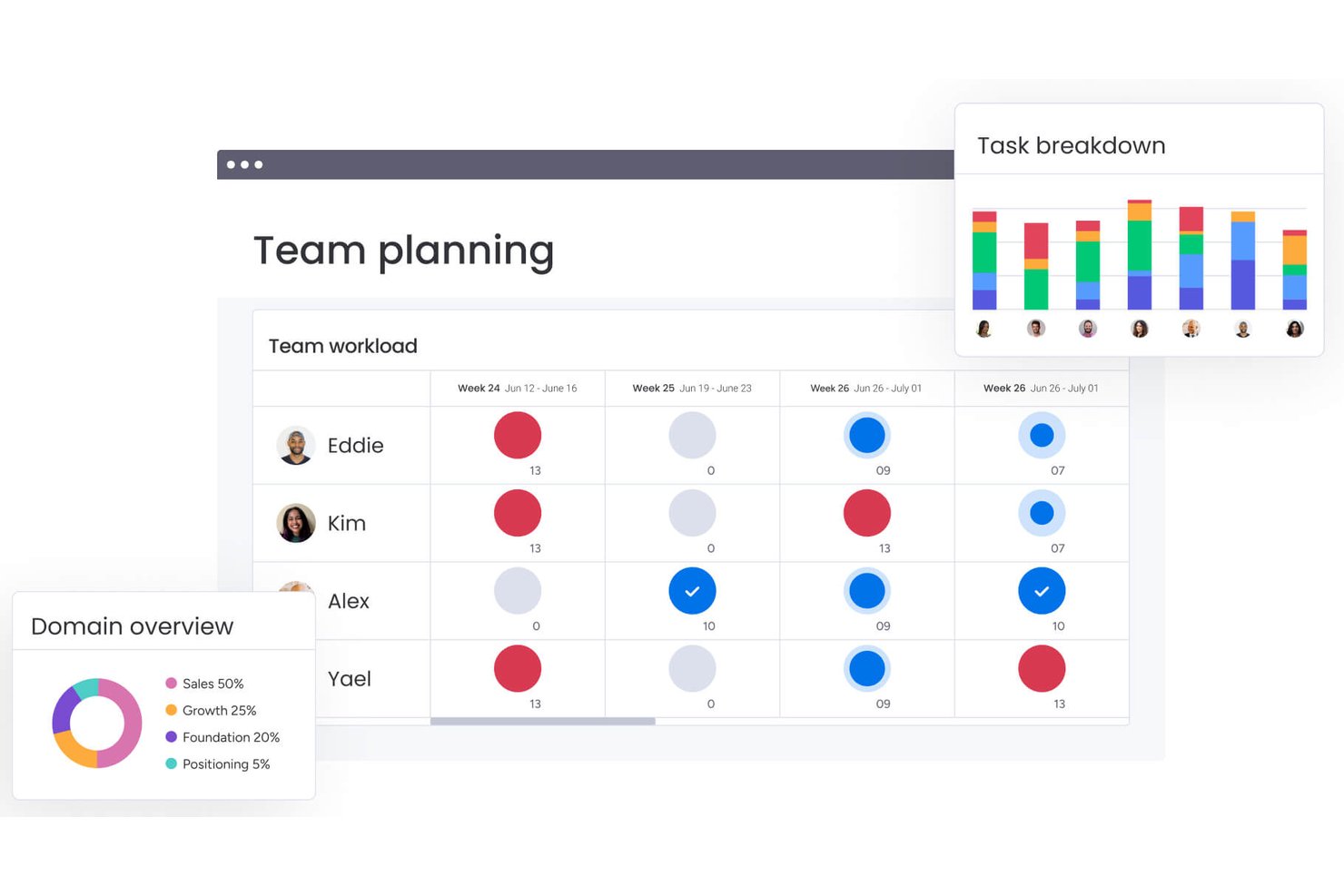
monday AI Workspace is an AI-powered work management platform that connects project planning, resource allocation, cross-departmental workflow automation, and real-time portfolio reporting through a suite of native AI agents and tools.
Who Is monday AI Workspace Best For?
It's a strong fit for PMO directors and portfolio managers at mid-to-large enterprises running cross-functional projects across multiple teams and departments.
Why I Picked monday AI Workspace
monday AI Workspace earns its spot on my shortlist because of how it handles scenario planning at the portfolio level. I use the AI agent builder to model competing resource allocation scenarios across active projects, and Sidekick surfaces dependency conflicts before they become timeline risks. What I find genuinely useful is that this happens in the same workspace where my team tracks execution, so scenario outputs feed directly into live dashboards.
monday AI Workspace Key Features
- AI-powered workflow automation: Create automated project workflows using AI agents to handle routing, approvals, and status updates.
- Native portfolio dashboards: Visualize project data in live dashboards with customizable, filterable widgets across multiple boards.
- Resource utilization tracking: Monitor team workload and allocations by project, skill, and availability from a unified view.
- Enterprise-grade security compliance: Supports GDPR and data residency requirements, plus role-based access controls for sensitive project data.
monday AI Workspace Integrations
monday AI Workspace offers hundreds of native integrations and marketplace apps, including Slack, Salesforce, HubSpot, Google Workspace, Microsoft 365, Jira, GitHub, Dropbox, Zoom, and Asana. It also supports Zapier and provides an API for custom integrations.
Pros and Cons
Pros:
- Real-time dashboards span multiple project boards simultaneously
- Native AI agents automate complex approval workflows
- AI scenario planning across entire project portfolios
Cons:
- AI features restricted to higher-tier plans
- Limited native ERP financial and procurement modules
New Product Updates from monday AI Workspace
monday AI Workspace Adds Human Approval Routing
monday AI Workspace adds a human-in-the-loop approval block to AI Workflows, sending approval requests and routing workflow paths based on responses. For more information, visit monday AI Workspace's official site.

Wrike
Best for AI-driven task automation
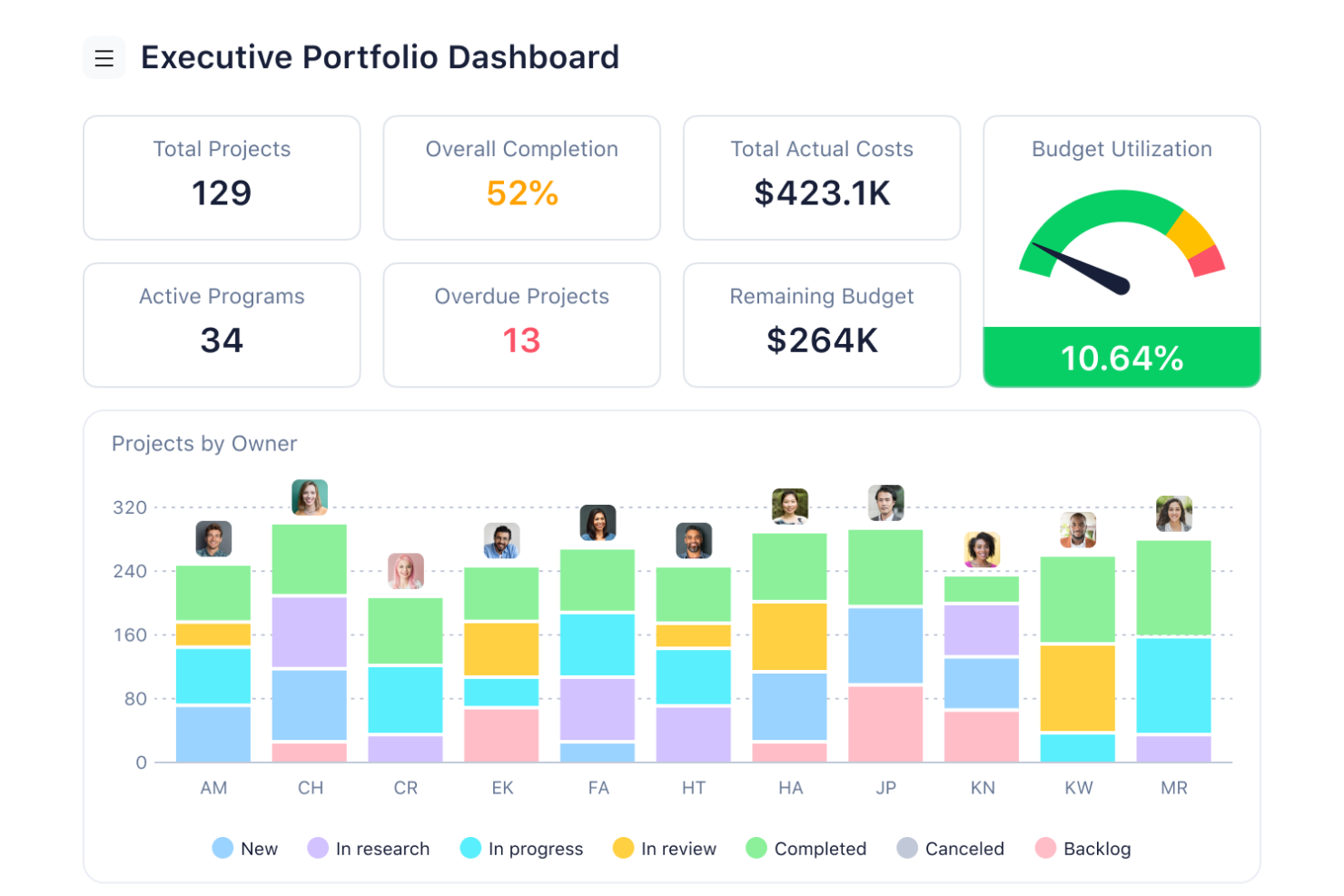
For businesses seeking an AI enterprise resource planning solution, Wrike emerges as a compelling choice. It caters to diverse industries, including marketing, creative, and project management sectors, by enhancing workflow efficiency and collaboration. Wrike automates mundane tasks, allowing your team to focus on strategic initiatives and drive impactful results. Its AI-powered capabilities and seamless integration with over 400 applications make Wrike an ideal partner for organizations looking to streamline processes and foster growth.
Why I Picked Wrike
I picked Wrike because its AI-driven features significantly enhance enterprise resource planning capabilities. Wrike's Work Intelligence automates repetitive tasks and provides data-driven insights, allowing your team to focus on high-value work. The customizable AI agents streamline workflows by predicting outcomes and minimizing manual interventions. Additionally, Wrike's seamless integration with AI assistants like Microsoft Copilot facilitates collaboration and project prioritization, making it an invaluable tool for businesses.
Wrike Key Features
In addition to its AI-driven capabilities, Wrike offers several other features that enhance its utility as an AI enterprise resource planning tool.
- Workflow Automation: Automates recurring tasks and integrates with over 400 applications, enhancing productivity.
- Resource and Capacity Planning: Offers tools for effective resource management.
- Work Management Tools: Includes Gantt charts, real-time reporting, and project portfolio management for comprehensive visibility.
- Collaboration Tools: Facilitates teamwork and communication with shareable dashboards and enhanced project tracking.
Wrike Integrations
Integrations include Microsoft Teams, Google Drive, Dropbox, Salesforce, Slack, Box, OneDrive, Adobe Creative Cloud, GitHub, and Jira.
Pros and Cons
Pros:
- Extensive integrations across business tools
- Strong resource and capacity planning
- AI automates enterprise workflows
Cons:
- Interface complexity for new users
- Advanced AI features cost more
New Product Updates from Wrike

Wrike Redesigns AI Agent Builder
Wrike redesigns its AI Agent Builder with a side-by-side setup, Scopes, sentence-style triggers and actions, and clearer filters. These changes make it easier to configure, test, and manage agent behavior. For more information, visit Wrike’s official site.

Celoxis
Best for real-time project tracking
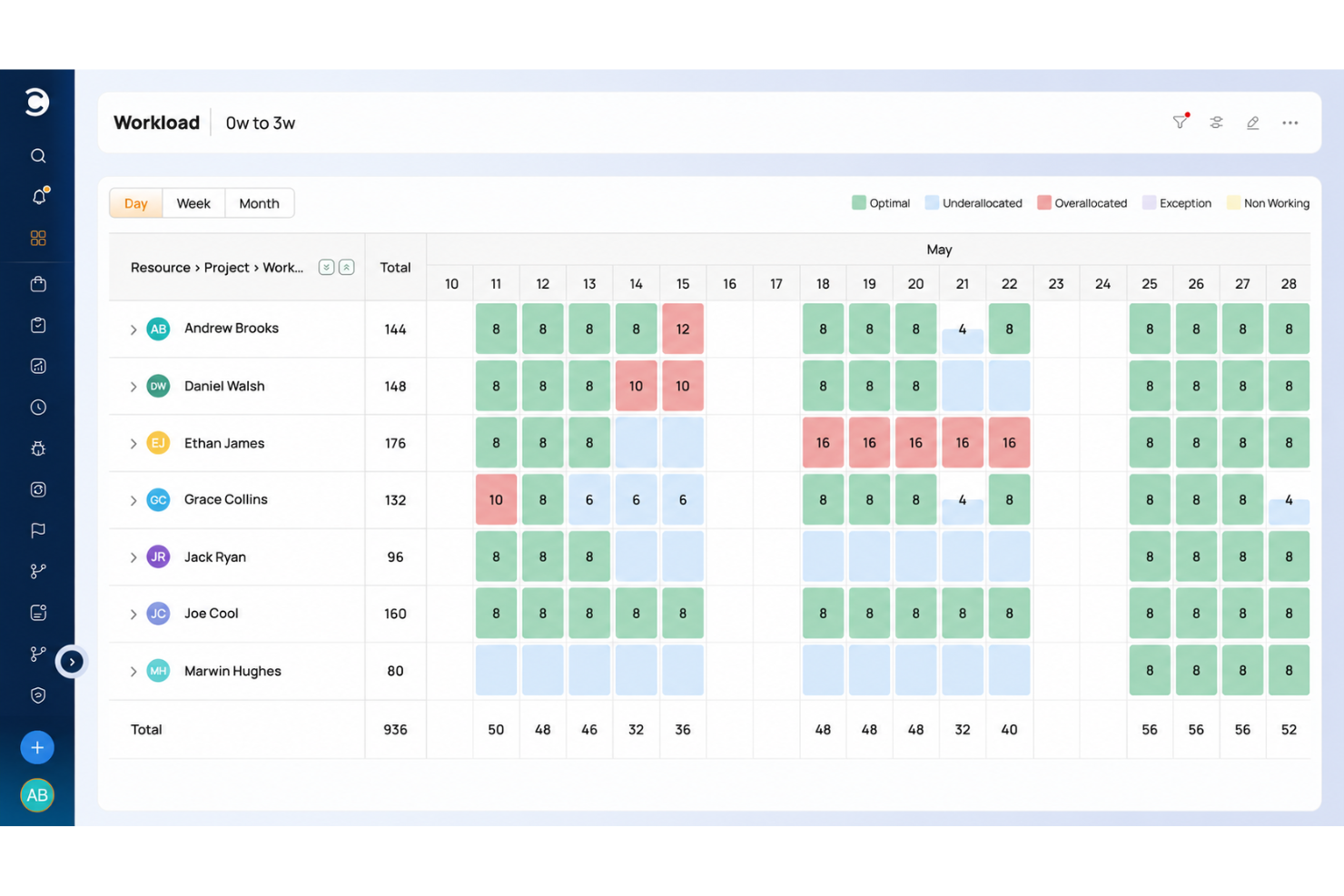
Celoxis is a project portfolio management platform with Gantt charts, resource planning, time tracking, project accounting, and real-time dashboards.
Who Is Celoxis Best For?
Celoxis is a good fit for mid-size to large organizations that manage multiple concurrent projects across cross-functional teams and need visibility into schedules, resources, and project finances in one platform.
Why I Picked Celoxis
Celoxis is one of my top picks because I love how its real-time project tracking actually eliminates the need for manual status updates. The platform rolls up task-level progress automatically, so when a team member updates their work, I can see the impact on the overall project health immediately, without chasing anyone down. I also use the baseline comparison feature to track planned vs. actual progress side by side, which makes it easy to flag slippage early and have an informed conversation with stakeholders.
Celoxis Key Features
- Resource workload management: View team capacity across projects and reassign tasks directly from the workload chart to avoid over-allocation.
- Project budget tracking: Set budgets at the project or task level and monitor actual spend against forecasts in real time.
- Custom dashboards: Build role-specific dashboards with widgets that surface the metrics most relevant to your team or stakeholders.
- Workflow automation: Create custom workflow apps with conditional logic to automate approvals, status changes, and task assignments.
Celoxis Integrations
Celoxis offers native integrations with Google Drive, Microsoft Excel, Microsoft Project, Salesforce, Jira, Zendesk, Slack, QuickBooks Online, and more. It also connects with Zapier, and an API is available for custom integrations.
Pros and Cons
Pros:
- Skill-based resource allocation built in
- On-premise deployment option available
- Detailed portfolio dashboards replace BI tools
Cons:
- Complex template setup slows onboarding
- Mobile app lacks full desktop functionality

Best for advanced financial task automation
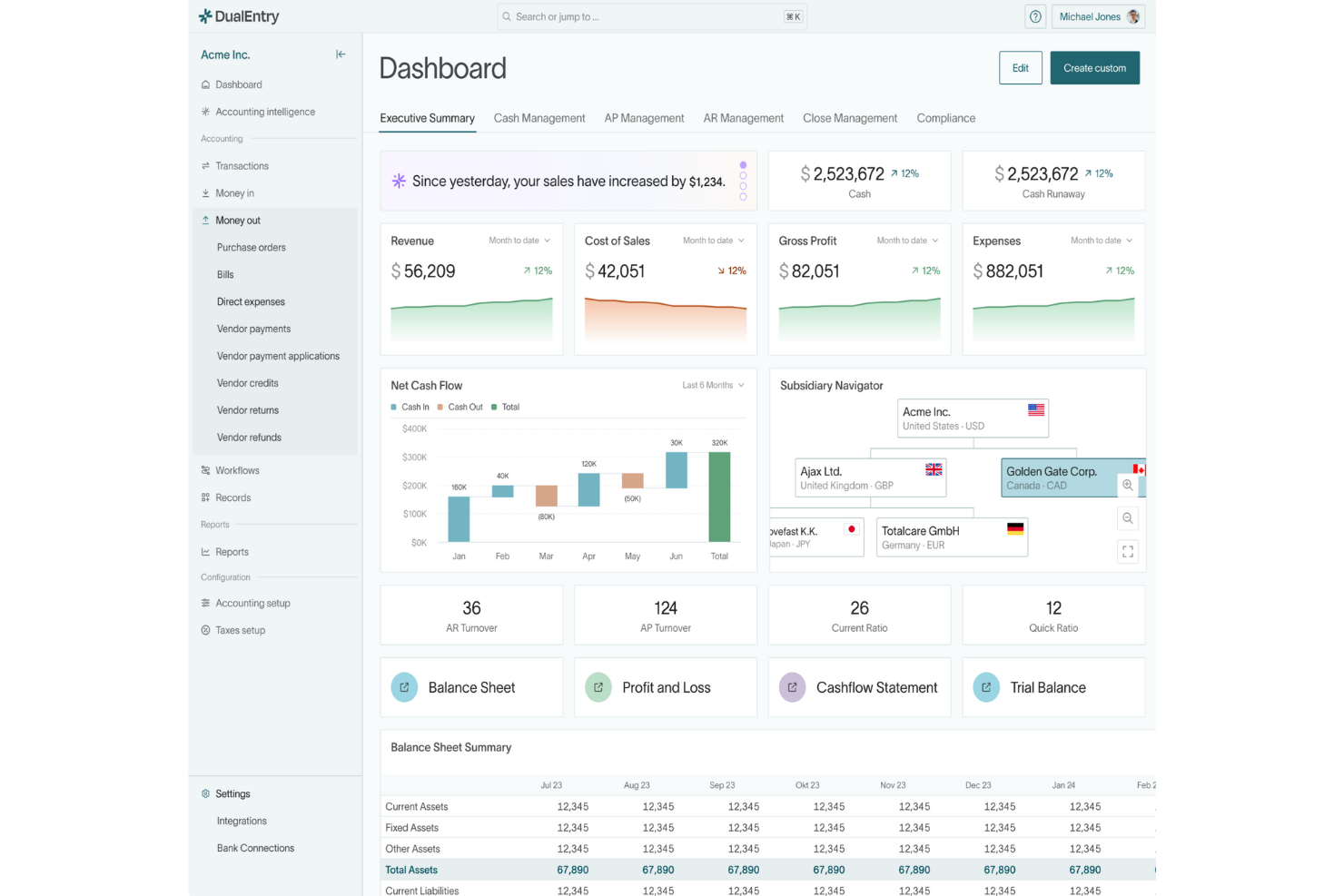
DualEntry is an AI-driven enterprise resource planning software designed to transform how finance teams manage their operations. Catering to businesses with complex financial needs, such as those experiencing rapid growth or dealing with multi-entity and multi-currency transactions, DualEntry offers an array of features that enhance financial management. It promises to address the challenges of financial accuracy and efficiency by automating routine tasks and providing real-time insights, making it an ideal solution for modern finance teams looking to streamline their processes.
Why I Picked DualEntry
I picked DualEntry for its standout ability to automate complex financial tasks, a crucial feature for any AI ERP software. Its AI-driven revenue recognition and flux analysis are particularly valuable, providing real-time insights that can significantly enhance decision-making. The platform's ability to handle multi-entity and multi-currency accounting without compromising on accuracy is another reason why it's a strong contender. These features, combined with its focus on automation, make DualEntry a compelling choice for businesses seeking to optimize their financial operations.
DualEntry Key Features
In addition to advanced financial task automation, DualEntry offers:
- OCR Technology: This feature enables automated document processing, reducing manual entry errors and speeding up data input.
- Transaction Categorization: AI-driven categorization helps in organizing transactions efficiently, ensuring smooth financial reporting.
- Automated Intercompany Transactions: Simplifies the management of transactions between subsidiaries, improving financial consolidation.
- Real-Time Risk Assessment: Provides continuous monitoring and assessment of financial risks, allowing for proactive management.
DualEntry Integrations
Integrations include live connections with over 13,000 banks and an open API for custom integrations.
Pros and Cons
Pros:
- Quick setup and migration process, minimizing downtime
- Ensures data security with compliance to industry standards
- Supports multi-entity and multi-currency accounting effectively
Cons:
- Integration with some third-party apps might be cumbersome
- Limited customization options for specific business needs

Scoro
Best for service firms tracking project profitability
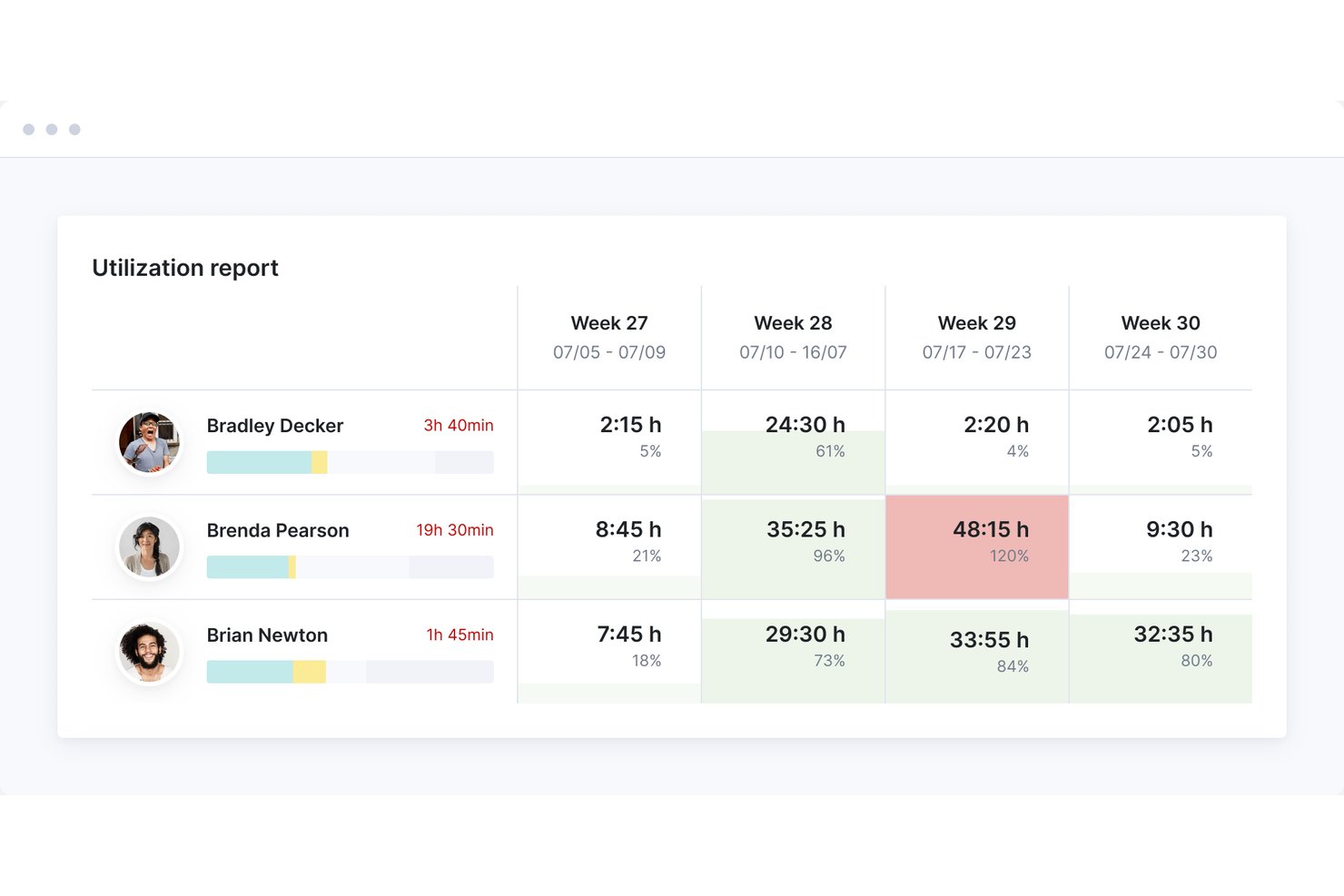
Scoro is an AI-powered professional services automation (PSA) platform that combines project management, resource planning, financial tracking, billing, CRM, and reporting in a single system.
Who Is Scoro Best For?
Scoro is a strong fit for consultancies, agencies, and IT services firms that need to connect project delivery directly to financial outcomes.
Why I Picked Scoro
I picked Scoro as one of the best because it connects project delivery directly to financial outcomes in a way most PSA tools simply don't. Its Budget Health tab gives you real-time burn tracking at the role, service, and project level, so you can see exactly where margin is eroding before it's too late. I also love the Quote Estimation Matrix, which breaks deliverables down by role and effort with full cost and margin visibility, then flows that data directly into project tasks and resource bookings.
Scoro Key Features
- ELI conversational AI assistant: Ask natural language questions against your live project and financial data to pull instant reports without leaving your workflow.
- Triggers & Actions automation engine: Set rules-based automations to handle recurring tasks, approval flows, and timesheet reminders across your team.
- MCP server integration: Connect Scoro to external AI tools like Claude, ChatGPT, and Copilot Studio to run multi-tool workflows from a single prompt.
- Capacity forecasting: Project future resource availability by tying team capacity directly to revenue projections, helping you plan hiring or outsourcing decisions ahead of time.
Scoro Integrations
Scoro offers 45+ integrations, including QuickBooks, Xero, Sage Intacct, Salesforce, HubSpot, BambooHR, Google Workspace, Microsoft, Stripe, and Expensify. It provides a REST API for custom integrations and supports Zapier.
Pros and Cons
Pros:
- Strong capacity forecasting links to revenue
- Conversational AI answers live project questions
- Real-time margin and budget health tracking
Cons:
- Advanced AI workflows still early access
- No inventory or manufacturing functionality
New Product Updates from Scoro

Scoro Adds Time Mobile App and ELI Improvements
Scoro adds the Scoro Time mobile app for iOS/Android to track time anywhere and expands ELI with attachments, smarter filtering, and trigger-based actions. For more information, visit Scoro's official site.

Best for integration with Microsoft tools

Microsoft Dynamics 365 combines ERP and CRM capabilities in a unified, AI-powered platform designed to help businesses connect data, automate processes, and improve decision-making. It’s built for organizations of all sizes, supporting finance, sales, operations, and customer engagement within a single, intelligent ecosystem.
Why I picked Microsoft Dynamics 365: Dynamics 365 stands out for its seamless integration of Microsoft Copilot, which brings generative AI into everyday workflows. Users can analyze data, generate reports, and receive predictive recommendations without leaving the app. This makes it an ideal choice for teams that rely on Microsoft tools and want deeper automation and intelligence across their operations. With its modular structure, businesses can scale Dynamics 365 to match their needs, whether they’re focusing on finance, supply chain, or customer experience.
Standout features & integrations:
Features include AI-powered forecasting and financial analytics that help teams predict trends and optimize budgets. Embedded Copilot tools assist with data analysis, report writing, and workflow automation. The supply chain module uses real-time data and predictive insights to enhance inventory control and demand planning. Dynamics 365 integrates natively with Microsoft 365, Power BI, and Azure AI services, creating a connected environment that improves collaboration and efficiency across departments.
Integrations include Microsoft Office 365, Microsoft Power BI, Microsoft Azure, LinkedIn, Outlook, SharePoint, Teams, OneDrive, Yammer, and Skype for Business.
Pros and Cons
Pros:
- Flexible deployment options
- AI-driven customer engagement
- Scalable modular design
Cons:
- Can be resource-intensive
- Frequent updates needed

NetSuite
Best for fast-growing businesses

NetSuite is a cloud-based ERP solution that leverages AI and automation to help fast-growing businesses operate more efficiently. It supports financial management, CRM, and e-commerce with intelligent insights that support informed decision-making and accelerate growth.
Why I picked NetSuite: NetSuite is built for businesses experiencing rapid expansion and needing flexible, scalable tools to adapt in real time. Its AI-powered analytics and automated workflows simplify financial management, while predictive insights help teams plan and respond faster to market changes.
With built-in CRM and e-commerce integrations, it provides a unified platform to manage customers, operations, and financials all in one place. The intuitive interface and customizable dashboards deliver relevant insights when you need them without digging through complex reports.
Standout features & integrations:
Features include AI-driven forecasting and real-time financial reporting. Intelligent automation offloads repetitive accounting and operational tasks, while predictive inventory management ensures optimal stock levels.
Integrations include Salesforce, Shopify, Adobe Commerce, WooCommerce, Zendesk, QuickBooks, HubSpot, Expensify, Box, and Slack.
Pros and Cons
Pros:
- Real-time financial tracking
- Customizable user interface
- Scales with business growth
Cons:
- Requires technical expertise
- Initial setup complexity

Best for mid-sized businesses

Acumatica is a cloud-based ERP solution that leverages AI and automation to give mid-sized businesses real-time visibility and control across finance, projects, and operations. It’s designed for organizations that need flexibility, scalability, and data-driven insights to support ongoing growth.
Why I picked Acumatica: Acumatica stands out for its adaptability and intelligent automation features that simplify complex financial and operational processes. Its AI-powered tools enable faster reporting, anomaly detection, and forecasting assistance. The project accounting module provides deep visibility into costs and resource allocation, while cloud-based access ensures smooth collaboration from anywhere. For mid-sized businesses looking for enterprise-grade capabilities without heavy infrastructure, Acumatica delivers an Agile, modern ERP experience.
Standout features & integrations:
Features include AI-enhanced financial management that automates reconciliation and compliance, real-time analytics for performance tracking, and predictive inventory management that optimizes supply chain operations. The customer management module helps you maintain strong client relationships, while its real-time analytics feature provides insights into business performance, aiding strategic decision-making. The inventory management system supports efficient stock control and logistics.
Integrations include Salesforce, Microsoft Office 365, Adobe Sign, Avalara, HubSpot, Shopify, Adobe Commerce, BigCommerce, Docusign, and PayPal.
Pros and Cons
Pros:
- Flexible cloud-based access
- Strong project accounting tools
- Scalable for growing businesses
Cons:
- Occasional learning curve for automation setup
- Predictive insights can vary in accuracy with limited data

Odoo
Best for customizability

Odoo is an open-source ERP platform that combines flexibility with emerging AI capabilities to help businesses manage sales, inventory, finance, and projects from a single, customizable system. Its modular design allows teams to build the exact ERP solution they need — without unnecessary complexity.
Why I picked Odoo: Odoo stands out for its adaptability and growing use of AI to enhance everyday business operations. Its modular structure lets organizations choose from hundreds of applications, from CRM and accounting to manufacturing and HR, and tailor them to specific workflows. With AI-driven automations, smart document handling, and predictive analytics, Odoo brings intelligence to its open-source foundation. The platform’s large developer community and extensive documentation make it a versatile choice for teams that want control, scalability, and innovation.
Standout features & integrations:
Features include AI-assisted document processing that automates data entry and reconciliation, predictive analytics for sales and inventory planning, and customizable dashboards that track real-time performance across departments.
Integrations include Google Calendar, QuickBooks, PayPal, eBay, Amazon, WooCommerce, Adobe Commerce, Shopify, Stripe, and Slack.
Pros and Cons
Pros:
- Modular application structure
- Extensive community support
- Highly customizable
Cons:
- Limited offline functionality
- Requires technical expertise

Xledger
Best for financial management

Xledger is a cloud-based ERP solution that leverages AI and automation to simplify financial management across industries. It provides advanced tools for accounting, project management, and reporting, giving businesses real-time visibility into their financial performance.
Why I picked Xledger: Xledger stands out for its intelligent automation and focus on financial control. Its AI-driven analytics enhance forecasting and reporting accuracy, while automated accounting processes reduce manual effort and minimize errors. Project and expense management tools help teams monitor budgets, resources, and approvals efficiently, making it ideal for organizations that value real-time insight and streamlined financial workflows.
Standout features & integrations:
Features include AI-powered invoicing and expense management that automate billing and approvals, predictive budgeting tools for more accurate financial planning, and real-time dashboards that visualize key performance indicators.
Integrations include Microsoft Office 365, Salesforce, HubSpot, QuickBooks, SAP, Oracle, Sage, Xero, PayPal, and Stripe.
Pros and Cons
Pros:
- Automated invoicing system
- Real-time reporting capabilities
- Strong financial management tools
Cons:
- Requires ongoing maintenance
- Requires financial expertise
Annen AI-basert programvare for ressursplanlegging i virksomheter
Her er noen flere alternativer for AI-basert programvare for ressursplanlegging i virksomheter som ikke kom med på listen min, men som likevel er verdt å se nærmere på:
- Epicor
For manufacturing businesses
- SAP S/4HANA
For large enterprises
- Oracle Fusion Cloud
For scalability
- Infor CloudSuite
For industry-specific needs
- Rillet
For small teams
- Workday
For human resources management
- Sage X3
For compliance-heavy manufacturing


How I Evaluate AI Enterprise Resource Planning Software
To make this list, a tool’s AI must support enterprise planning, like forecasting inventory and flagging financial anomalies. From there, I evaluate three things. Core functionality carries the most weight, like integrating finance and operations data and managing workflows. Then I look at standout features, like scenario modeling, and factors beyond features, like how long implementation takes.
Core Functionality (Table Stakes For This List)
When I'm selecting tools for my list, I score each one on a scale from 0 (does not offer the functionality) to 5 (excels in this area) for each core functionality listed below. I then convert the total into a percentage to help assess each tool's overall fit, with extra weight on any functionalities I’ve deemed essential.
- AI-Driven Forecasting (Essential): I look for machine-learning forecasts based on historical and current data across finance and inventory, with scenarios for shifts in demand.
- Unified Data Integration (Essential): I assess whether finance, supply chain, HR, and sales share current records, so project or order changes don’t require duplicate updates.
- Intelligent Automation: I check for AI-assisted invoice matching, reconciliation, and order processing, including how the platform routes exceptions.
- Anomaly Detection: I look for contextual AI flags across financial and operational records, such as unusual spending or inventory movements, beyond threshold alerts.
- Natural Language Reporting: I consider whether teams can ask plain-language questions and generate useful cross-functional reports without building each query.
- Adaptive Recommendations: I evaluate whether recommendations adjust to changing conditions, such as revised reorder points or budget allocations, and show supporting data.
Once I have a list of tools that meet the criteria, I consider what sets each platform apart.
Differentiating Factors (What Sets Vendors Apart)
Here's how I compare and contrast different vendors:
Standout Features
I look for scenario and what-if modeling that lets PMOs simulate budget cuts or resource shifts and see projected impacts across active projects before committing to a change. Embedded project financials matter just as much—I check whether project accounting ties directly to the general ledger so you get real-time profitability per client without reconciling spreadsheets. I also evaluate how each platform handles change management tracking, since automatic flags for scope or budget deviations, routed through configurable approvals, save PMs from chasing updates manually.
Beyond Features
I check how each platform integrates with existing PM tools like Jira or Asana—native connectors sync resource and capacity data faster than middleware workarounds. Implementation complexity matters too: a phased rollout with pre-built templates can cut months off deployment compared to a full big-bang migration. I also evaluate whether AI model decisions are explainable, since finance teams need audit-ready reasoning behind forecast-driven budget calls, not just a number.
Slik velger du AI-basert programvare for ressursplanlegging i virksomheter
Det er lett å gå seg vill i lange funksjonslister og kompliserte prismodeller. For å holde fokus mens du går gjennom den unike prosessen din for valg av programvare, får du her en sjekkliste over faktorer du bør ha i tankene:
| Faktor | Hva du bør vurdere |
|---|---|
| Skalerbarhet | Kan programvaren vokse med virksomheten din? Se etter skalerbare løsninger som kan håndtere flere brukere, mer data og flere transaksjoner etter hvert som selskapet utvides. |
| Integrasjoner | Kan den kobles til de eksisterende verktøyene dine? Sørg for kompatibilitet med dagens systemer, som CRM-, HR- og økonomiprogramvare, for å unngå datasiloer og ineffektive prosesser. |
| Tilpasningsmuligheter | Kan du tilpasse den til arbeidsflytene dine? Vurder om verktøyet tilbyr tilpasningsalternativer for dashbord, rapporter og prosesser, slik at de samsvarer med teamets spesifikke behov. |
| Brukervennlighet | Er grensesnittet intuitivt? Vurder læringskurven og om teamet enkelt kan ta i bruk og bruke programvaren uten omfattende opplæring. |
| Implementering og innføring | Hvor lang tid vil oppsettet ta? Spør om gjennomsnittlig tid for innføring og tilgjengelige ressurser som opplæring og brukerstøtte, slik at overgangen blir smidig. |
| Kostnad | Finnes det skjulte gebyrer? Se lenger enn den opprinnelige prislappen for å forstå de totale eierkostnadene, inkludert oppsettsgebyrer, vedlikehold og eventuelle kostnader for oppgraderinger. |
| Sikkerhetstiltak | Hvordan beskyttes dataene dine? Kontroller at løsningen overholder bransjestandarder, og spør om datakryptering, sikkerhetskopieringsrutiner og tilgangskontroller for brukere. |
| Tilgjengelig brukerstøtte | Når kan du få hjelp? Kontroller tilgjengeligheten av kundestøtte, inkludert åpningstider og kanaler som telefon, chat eller e-post, slik at du kan få hjelp når du trenger det. |
Hva er programvare for AI-basert virksomhetsressursplanlegging?
Programvare for AI-basert virksomhetsressursplanlegging (ERP) er et system som integrerer og automatiserer sentrale forretningsfunksjoner som økonomi, HR, forsyningskjede og drift. Den brukes av ledere som prosjektledere, økonomidirektører og driftsteam for å sentralisere data og effektivisere beslutningstaking på tvers av avdelinger.
Mens tradisjonelle ERP-systemer fokuserer på datainnsamling og prosessstyring, tilfører AI-ERP-programvare intelligens til ligningen. Den bruker maskinlæring og prediktiv analyse til å identifisere mønstre, forutsi resultater og anbefale tiltak automatisk. I stedet for bare å vise deg hva som skjer, kan AI-verktøy fortelle deg hvorfor det skjer – og hva du bør gjøre videre.
AI-drevne funksjoner som sanntidsanalyse, avviksdeteksjon, prosessautomatisering og rapportering på naturlig språk hjelper virksomheter med å gå fra reaktiv styring til proaktiv optimalisering. Resultatet er en smartere, raskere og mer tilpasningsdyktig ERP-opplevelse som øker produktiviteten, reduserer manuelt arbeid og støtter strategisk vekst.
Funksjoner
Når du velger programvare for AI-basert virksomhetsressursplanlegging, bør du se etter følgende nøkkelfunksjoner:
- Økonomistyring: Automatiserer regnskapsoppgaver som fakturering og rapportering for å forbedre nøyaktigheten og spare tid.
- Lagerstyring: Håndterer lagernivåer og logistikk for å forhindre varemangel og redusere svinn.
- Sanntidsanalyse: Gir oppdatert innsikt i virksomhetens resultater for å støtte strategiske beslutninger.
- Tilpassbare dashbord: Gjør det mulig for brukerne å tilpasse datavisningene slik at de fokuserer på det som er mest relevant for rollene deres.
- Forsyningskjedestyring: Optimaliserer flyten av varer og materialer for å opprettholde effektiv drift.
- Personaladministrasjon: Støtter HR-prosesser som lønnsutbetaling og administrasjon av medarbeideropplysninger.
- Automatisert rapportering: Genererer rapporter automatisk for å sikre rettidig og nøyaktig distribusjon av data.
- Prosjektstyring: Bidrar til å planlegge, gjennomføre og overvåke oppgaver for å holde prosjekter på rett spor og innenfor budsjettet.
- Styring av kunderelasjoner: Forbedrer håndteringen av kundeinteraksjoner og tjenesteleveransen.
- Sikkerhetstiltak: Beskytter sensitive data gjennom kryptering og tilgangskontroller for å opprettholde samsvar og tillit.
Fordeler
Implementering av programvare for AI-basert virksomhetsressursplanlegging gir flere fordeler for teamet og virksomheten din. Her er noen av fordelene du kan se frem til:
- Forbedret effektivitet: Automatiserer rutineoppgaver som fakturering og rapportering, slik at teamet ditt kan fokusere på mer strategiske aktiviteter.
- Bedre beslutningstaking: Tilbyr sanntidsanalyse som gir innsikt i virksomhetens resultater, slik at du kan ta velinformerte beslutninger.
- Forbedret samarbeid: Støtter kommunikasjon på tvers av avdelinger gjennom integrerte data og tilpassbare instrumentbord.
- Kostnadsbesparelser: Reduserer svinn og optimaliserer ressursbruken gjennom funksjoner som lagerstyring og styring av forsyningskjeden.
- Skalerbarhet: Vokser med virksomheten din og håndterer flere brukere og større datamengder etter hvert som behovene dine utvikler seg.
- Datasikkerhet: Beskytter sensitiv informasjon med kryptering og tilgangskontroller, noe som sikrer samsvar og trygghet.
- Kundetilfredshet: Forbedrer kundeinteraksjoner og tjenesteleveranser gjennom effektiv styring av kunderelasjoner.
Kostnader og priser
Valg av programvare for AI-basert virksomhetsressursplanlegging krever en forståelse av de ulike prismodellene og abonnementene som er tilgjengelige. Kostnadene varierer basert på funksjoner, teamstørrelse, tillegg og mer.
Tabellen nedenfor oppsummerer vanlige abonnementer, gjennomsnittsprisene deres og typiske funksjoner som er inkludert i programvareløsninger for AI-basert virksomhetsressursplanlegging:
Sammenligningstabell for programvare for AI-basert virksomhetsressursplanlegging
| Abonnementstype | Gjennomsnittspris | Vanlige funksjoner |
|---|---|---|
| Gratisabonnement | $0 | Grunnleggende økonomistyring, begrenset rapportering og grunnleggende kundestyring. |
| Personlig abonnement | $10-$30/bruker/måned | Avansert økonomistyring, forbedret rapportering, grunnleggende lagerstyring og e-poststøtte. |
| Forretningsabonnement | $25-$210/bruker/måned | Omfattende rapportering, styring av forsyningskjeden, prosjektstyring og kundestøtte. |
| Virksomhetsabonnement | $200+/bruker/måned | Komplett funksjonspakke, avansert analyse, tilpassede integrasjoner, dedikert kundestøtte og opplæring. |
Vanlige spørsmål om AI-programvare for virksomhetsstyring (ERP)
Her er noen svar på vanlige spørsmål om AI-programvare for virksomhetsstyring:
Hva er de 5 største utfordringene ved implementering av ERP?
Vanlige utfordringer omfatter høye kostnader, kompleks datamigrering, motstand mot endring, begrenset opplæring og integrasjonsproblemer. Med AI-ERP kan du møte ytterligere utfordringer, som å sikre data av høy kvalitet for maskinlæring og tilpasse arbeidsflyter slik at de inkluderer automatisering. Grundig planlegging og tidlig involvering av teamet kan gjøre disse hindringene enklere å håndtere og bidra til at implementeringen går problemfritt.
Hvordan forbedrer AI styringen av forsyningskjeden i ERP?
ERP AI-løsninger kan forbedre styringen av forsyningskjeden gjennom etterspørselsprognoser, optimalisering av lagernivåer og bedre samarbeid med leverandører. Disse funksjonene fører til reduserte kostnader, bedre kontantstrøm og effektiv ressursallokering. Teamet ditt vil dra nytte av mer nøyaktige prognoser og effektive logistikkoperasjoner.
Kan AI-ERP-systemer tilpasses spesifikke forretningsbehov?
Ja, AI-ERP-systemer er utviklet for tilpasning. Du kan justere moduler, algoritmer, arbeidsflyter, dashbord og rapporter slik at de samsvarer med organisasjonens unike forretningsprosesser. Denne fleksibiliteten gjør programvaren mer verdifull for teamet ditt og hjelper deg med å nå prosjektmålene dine.
Hvilke sikkerhetshensyn gjelder for AI-ERP-systemer?
AI-drevne ERP-systemer trenger sterk sikkerhet, for eksempel datakryptering, strenge tilgangskontroller og regelmessige sårbarhetskontroller. Vær oppmerksom på at AI-funksjoner kan bruke flere datatyper, noe som øker behovet for personvern. Samarbeid med leverandøren din om å etablere sikkerhetsrevisjoner og sikre at du følger alle krav til samsvar.
Hvordan kan jeg måle avkastningen på investeringen etter implementering av et AI-ERP-system?
Mål avkastningen på investeringen ved å følge med på leveringstider for prosjekter, reduksjon av feil, ressursutnyttelse og kostnadsbesparelser etter lanseringen. Bruk den innebygde analysen i ERP-plattformen til å sammenligne disse målene med resultatene før implementeringen. Se etter økt produktivitet i teamet og færre prosjektforsinkelser.
Hvilket løpende vedlikehold krever AI-ERP-programvare?
Både tradisjonelle ERP-systemer og systemer som er forbedret med funksjoner for kunstig intelligens, krever regelmessig vedlikehold for å forbli effektive. Dette omfatter rutinemessige oppdateringer, sikkerhetsoppdateringer og kontroller av systemets tilstand. For AI-drevne plattformer er det også viktig å planlegge regelmessig omskolering av AI-modeller for å håndtere faktorer som nøyaktighet i naturlig språkbehandling, menneskelige feil og potensiell skjevhet i historiske data.
I tillegg bør du planlegge løpende programvareoptimaliseringer for å sikre ytelse og pålitelighet. Samarbeid tett med ERP-leverandøren din for kontinuerlig støtte, og sett av tid til at teamet ditt kan gjennomgå nye funksjoner, forbedringer og systemoppdateringer etter hvert som de lanseres.