

10 beste programvareløsninger for intelligent prosessautomatisering for 2026

Kortliste over den beste programvaren for intelligent prosessautomatisering


Den beste programvaren for intelligent prosessautomatisering (IPA) hjelper virksomheter med å effektivisere driften ved å automatisere repetitive oppgaver, redusere manuelle feil og forbedre prosesseffektiviteten på tvers av team. Disse verktøyene kombinerer robotisert prosessautomatisering (RPA), maskinlæring og kunstig intelligens for å håndtere regelbaserte arbeidsflyter og tilpasse seg endrede forretningsbehov – slik at det frigjøres tid til mer strategisk arbeid.
Jeg har testet og vurdert de beste løsningene for intelligent prosessautomatisering for å finne verktøyene som faktisk leverer når det gjelder hastighet, skalerbarhet og enkel integrasjon. Enten du automatiserer godkjenninger, dokumentbehandling eller arbeidsflyter for kundeservice, hjelper denne veiledningen deg med å finne riktig IPA-programvare for virksomheten din.
Why Trust Our Software Recommendations
Our team has been testing and reviewing software since 2012. As project managers ourselves, we know how difficult—and important—it is to choose the right software.
For this guide, we evaluated tools using hands-on testing and independent research, scoring tools using our selection criteria. We also draw on insights from industry thought leaders and practicing project management experts.
Our reviews reflect our human editorial judgment, not a sales pitch.
Expert reviewers:
Sammenligningstabell for programvare for intelligent prosessautomatisering
\u003cp data-start=\u0022168\u0022 data-end=\u0022552\u0022\u003eBruk denne sammenligningstabellen til å se mine beste utvalgte programmer for intelligent prosessautomatisering side ved side.\u003c/p\u003e
| Tool | Best For | Trial Info | Price | ||
|---|---|---|---|---|---|
| 1 | Best for intelligent document processing | Free demo available | Pricing upon request | Website | |
| 2 | Best for predictive analytics & modular workflows | Free demo available | Pricing upon request | Website | |
| 3 | Best for low-code/no-code workflow design | Free trial available | From $10,000 (one-time license) | Website | |
| 4 | Best with 1,000+ prebuilt app connectors | 30-day free trial | Pricing upon request | Website | |
| 5 | Best for AI-powered business automation | Free plan available | From $25/month | Website | |
| 6 | Best for enterprise iPaaS and app integrations | Free plan available | From $100/month | Website | |
| 7 | Best for AI-powered cloud services | Free demo available | Pricing upon request | Website | |
| 8 | Best for all-in-one digital modernization | Free demo available | Pricing upon request | Website | |
| 9 | Best for scalable intelligent automation | 30-day free trial | Pricing upon request | Website | |
| 10 | Best for low-code process automation and mining | Free plan available | Pricing upon request | Website |
Anmeldelser av den beste programvaren for intelligent prosessautomatisering
Her er en grundig analyse av mine beste valg innen programvare for intelligent prosessautomatisering, med fordeler og ulemper, viktige funksjoner og de beste bruksområdene for hver løsning.\r\n
Best for intelligent document processing

Klippa DocHorizon is an AI-powered platform designed to automate document processing tasks. It helps you extract, classify, convert, and verify data from various documents using technologies like OCR and machine learning.
Why I picked Klippa DocHorizon: One of the standout features of Klippa DocHorizon is its ability to handle over 50 types of documents, including invoices, receipts, ID cards, and passports. This versatility allows your team to automate the processing of diverse documents, reducing the need for manual intervention. Additionally, the platform offers customizable workflows, enabling you to define specific data fields for extraction and set up approval processes tailored to your business needs.
Standout features & integrations:
Features include advanced fraud detection, which automatically identifies altered or fraudulent documents. Additionally, Klippa DocHorizon has automated document classification, which uses machine learning algorithms to categorize documents based on their content, improving organization and retrieval. The platform also offers data anonymization tools, allowing you to mask sensitive information to comply with privacy regulations.
Integrations include Google Workspace, Dropbox, Zoho, Xero, Odoo, Microsoft Teams, Slack, Discord, OpenAI, Jira, monday.com, and Stripe.
Pros and Cons
Pros:
- Supports processing of over 50 document types, including custom docs
- Combines AI with human-in-the-loop automation for better data accuracy
- Masks sensitive information to comply with GDPR and other privacy regulations
Cons:
- Setting up custom workflows might be complex for non-technical users
- No option to try the software before buying
New Product Updates from Doxis AI.dp.
Doxis AI.dp Improves Dataset Validation and API Controls
Doxis AI.dp improves dataset editing with real-time type validation, better field controls, and save prevention on invalid values, plus new API capabilities. These updates help teams maintain cleaner dataset values and manage rows more reliably. For more information, visit Doxis AI.dp’s official site.
 .
.
Best for predictive analytics & modular workflows

RunMyJobs by Redwood is designed for enterprises seeking to automate complex workflows across hybrid and multi-cloud environments. It appeals to IT professionals and business leaders in industries like finance, retail, and manufacturing, who need to enhance operational efficiency and real-time decision-making. By integrating seamlessly with existing systems, it addresses the challenge of managing diverse applications and data, providing a unified platform for intelligent automation.
Why I Picked RunMyJobs by Redwood
I picked RunMyJobs by Redwood for its ability to automate intricate workflows with predictive analytics and modular workflows that cater to both IT and business users. The platform's capability to support hybrid architectures and full stack connectivity makes it an ideal choice for organizations transitioning to more efficient processes. Its self-service automation empowers end-users with comprehensive visibility into business operations, directly addressing the need for streamlined and transparent processes.
RunMyJobs by Redwood Key Features
Some other features that stand out include:
- Event-Driven Orchestration: Enables automation of tasks based on specific events, allowing for responsive and dynamic workflows.
- Real-Time Monitoring: Provides continuous oversight of processes and performance, ensuring timely interventions when necessary.
- Predictive SLA Notifications: Alerts users of potential service level agreement breaches, enabling proactive management.
- No-Code Integration: Allows seamless connectivity with various enterprise applications without requiring coding expertise.
RunMyJobs by Redwood Integrations
Integrations include SAP ERP S/4HANA, ServiceNow, Databricks, Amazon EC2, Azure Automation, IBM AIX and AS/400, AWS DataSync, Apache Groovy, HP-UX, and Informatica Cloud.
Pros and Cons
Pros:
- Predictive SLA monitoring improves uptime
- Handles complex hybrid workflows reliably
- Strong SAP and ERP integration
Cons:
- Steep learning curve initially
- Pricing not publicly available

Best for low-code/no-code workflow design

In a world where efficiency is key, ActiveBatch stands out as a tool designed to automate and orchestrate complex IT and business processes. Ideal for IT departments and businesses across various industries, this platform can alleviate the cumbersome task of manual scheduling and process management. By integrating seamlessly with existing technology stacks, ActiveBatch empowers your team to focus on strategic initiatives rather than routine tasks.
Why I Picked ActiveBatch
I picked ActiveBatch for its ability to facilitate intelligent process automation through its low-code/no-code functionality, which allows teams to design workflows without extensive coding knowledge. This feature is complemented by its event-driven job scheduling, enabling tasks to be executed based on specific triggers, which is crucial for timely and efficient process management. Additionally, ActiveBatch's customizable reporting offers visibility into automated processes, allowing you to make informed decisions and optimize workflows.
ActiveBatch Key Features
In addition to its standout features, I also found several other capabilities that make ActiveBatch an ideal choice for intelligent process automation:
- Job Steps Library: Provides a comprehensive set of pre-built actions that users can drag and drop into workflows, reducing the time spent on manual coding.
- SLA Management: Ensures that all processes meet the required service level agreements by providing real-time monitoring and alerts.
- Dynamic Failover: Automatically reroutes workflows to backup systems in case of failure, ensuring uninterrupted operations.
- Change Management: Offers tools for synchronizing objects and configurations across different environments, simplifying updates and modifications.
ActiveBatch Integrations
Integrations include Microsoft SQL Server, ServiceNow, SharePoint, Oracle EBS, VMware, Microsoft Azure, and various ERP/business systems. An API is also available for custom integrations.
Pros and Cons
Pros:
- Broad enterprise system integrations
- Event-driven scheduling flexibility
- Low-code workflow automation design
Cons:
- Complex setup for small teams
- Steep learning curve initially

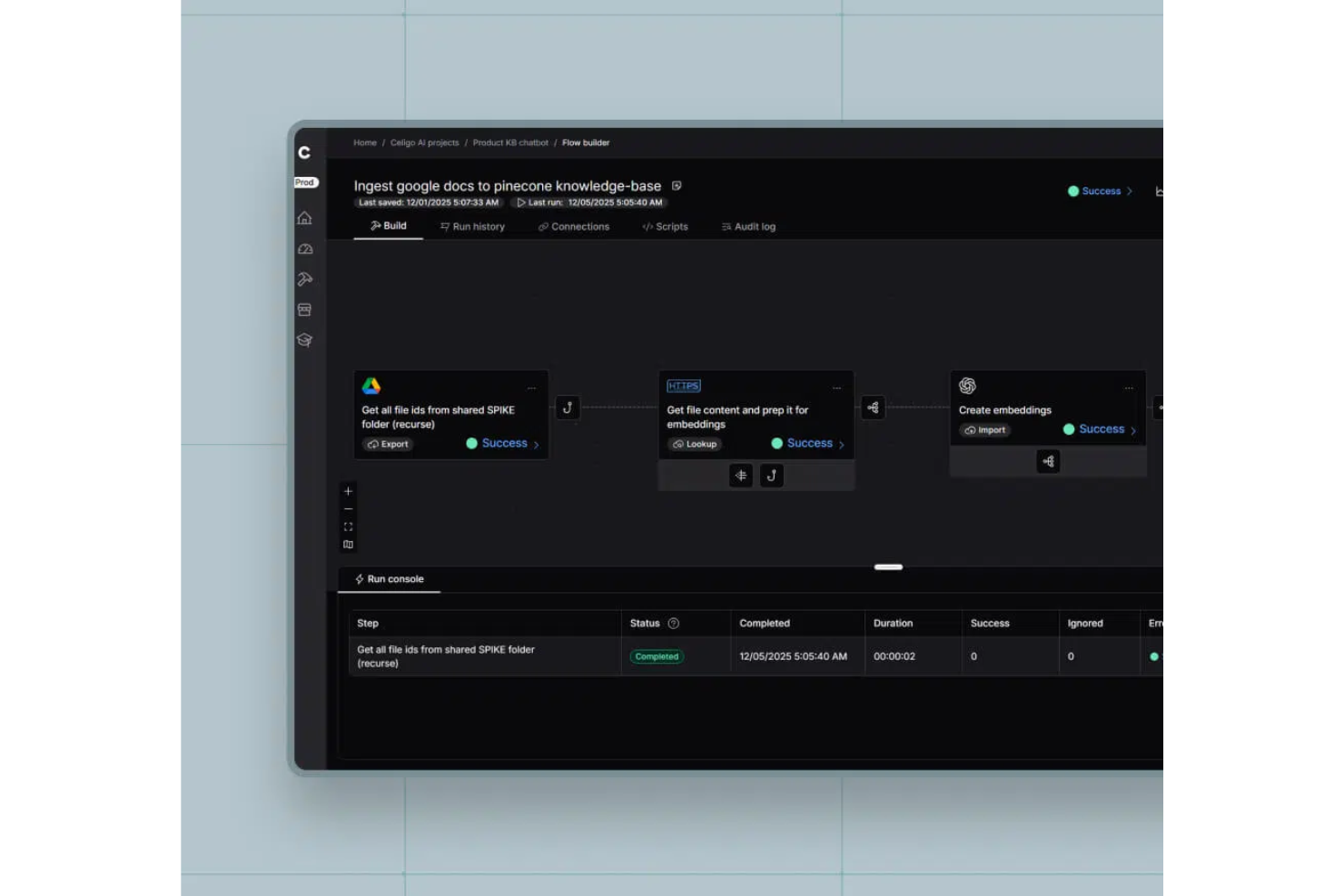
Celigo is an intelligent process automation platform that connects cloud applications, automates workflows, manages APIs, and handles data integration across business systems.
Who Is Celigo Best For?
Celigo suits IT teams and operations leaders at mid-sized to large businesses that need to automate and connect multiple cloud applications.
Why I Picked Celigo
I picked Celigo as one of the best because I can automate complex workflows across dozens of cloud apps without building custom integrations from scratch. My team uses the library of 1,000+ prebuilt connectors to quickly link systems like Salesforce, NetSuite, and Shopify. In practice, that means we can launch new automations in days instead of weeks.
Celigo Key Features
- Visual flow builder: Design and manage automation workflows using a drag-and-drop interface.
- Advanced data mapping: Transform and map data fields between different applications with built-in tools.
- Error management dashboard: Monitor, troubleshoot, and resolve integration errors from a centralized dashboard.
- Role-based access controls: Set permissions and manage user access for different automation projects.
Celigo Integrations
Celigo offers 1,000+ native integrations, including Shopify, NetSuite, Salesforce, Microsoft Dynamics 365, SAP, QuickBooks, HubSpot, Jira, Slack, Google Sheets, and Snowflake. An API is available for custom integrations.
Pros and Cons
Pros:
- Features robust error handling and monitoring tools
- Supports complex, multi-step automation workflows
- Includes dedicated training and certification programs
Cons:
- Limited offline or on-premises deployment options
- Some connectors require additional configuration
New Product Updates from Celigo
Celigo Adds SuiteTax and Variant Publishing for Shopify–NetSuite
Celigo adds NetSuite SuiteTax support and variant-level sales channel publishing to its Shopify–NetSuite integration. These updates improve tax handling and give merchants more control over how product variants are published. For more information, visit Celigo’s official site.
 .
.
UiPath
Best for AI-powered business automation

UiPath is a business automation platform with significant artificial intelligence (AI) capabilities that help organizations automate and optimize their processes. It’s designed to streamline operations, improve efficiency, and transform work through advanced automation tools.
Why I picked UiPath: This software stands out for how it leverages AI in its process mining, task mining, and intelligent document processing features to enhance automation capabilities. Users can build complex automations quickly with its low-code development environment, which is ideal for companies that want to implement sophisticated automation solutions but lack extensive programming skills.
Standout features & integrations:
Features include tools for process mining, task mining, and communications mining, which help users identify and optimize processes for better performance. UiPath's low-code development environment allows users to create custom automations easily, even for complex scenarios. Additionally, its intelligent document processing uses specialized AI to handle document-intensive tasks efficiently.
Integrations include SAP, Microsoft Azure, Google Workspace, Salesforce, ServiceNow, Amazon Web Services, Oracle, IBM, Slack, and Workday.
Pros and Cons
Pros:
- Extensive process mining capabilities
- Low-code development environment
- Scalable AI-powered automation
Cons:
- Requires dedicated support for initial setup
- Potentially overwhelming feature set

Workato
Best for enterprise iPaaS and app integrations

Workato is an enterprise integration platform as a service (iPaaS) that enables businesses to automate workflows and integrate applications across their organization. It’s designed for enterprises looking to connect various apps and automate complex processes to improve operational efficiency.
Why I picked Workato: This platform’s pre-built connectors and customizable automation recipes make it ideal for enterprises that need advanced iPaaS and app integrations. The software enables teams to automate data flows between multiple applications without requiring extensive coding knowledge, making it accessible for different user groups. Its ability to handle real-time data synchronization ensures seamless operations across platforms.
Standout features & integrations:
Features include customizable automation recipes that allow users to easily build workflows tailored to their needs. Workato also offers real-time data synchronization, ensuring that information is always up-to-date across integrated systems. The platform’s intuitive interface allows for easy management and monitoring of all automated processes.
Integrations are not listed publicly by the provider.
Pros and Cons
Pros:
- Real-time data integration
- Good logging functionality for troubleshooting
- Easy onboarding and setup
Cons:
- Requires understanding of API and data management techniques
- Limited customization options

Oracle
Best for AI-powered cloud services

Oracle provides a suite of software and services designed for businesses looking to leverage AI-powered cloud solutions. Its services help businesses migrate, build, and run IT environments, whether for existing workloads or new cloud-native applications.
Why I picked Oracle: This software’s infrastructure integrates generative AI capabilities across various business processes. Oracle provides tools for building and deploying AI models, helping businesses enhance their decision-making and automate workflows. The cloud services are designed to be highly secure and compliant, which is essential for enterprise businesses in regulated industries.
Standout features & integrations:
Features include AI-powered analytics for enhanced data insights, a secure and compliant cloud infrastructure for regulated industries, and tools for building and deploying AI models seamlessly. Oracle's cloud platform also supports high-performance computing and scalable storage options.
Integrations include Microsoft Azure, Google Cloud, SAP, Salesforce, and VMware, providing a wide range of connectivity options for businesses using Oracle's cloud services.
Pros and Cons
Pros:
- Scalable cloud infrastructure
- Wide range of AI tools
- Strong compliance for regulated industries
Cons:
- Resource-intensive for larger deployments
- Requires specific technical knowledge

Comidor
Best for all-in-one digital modernization
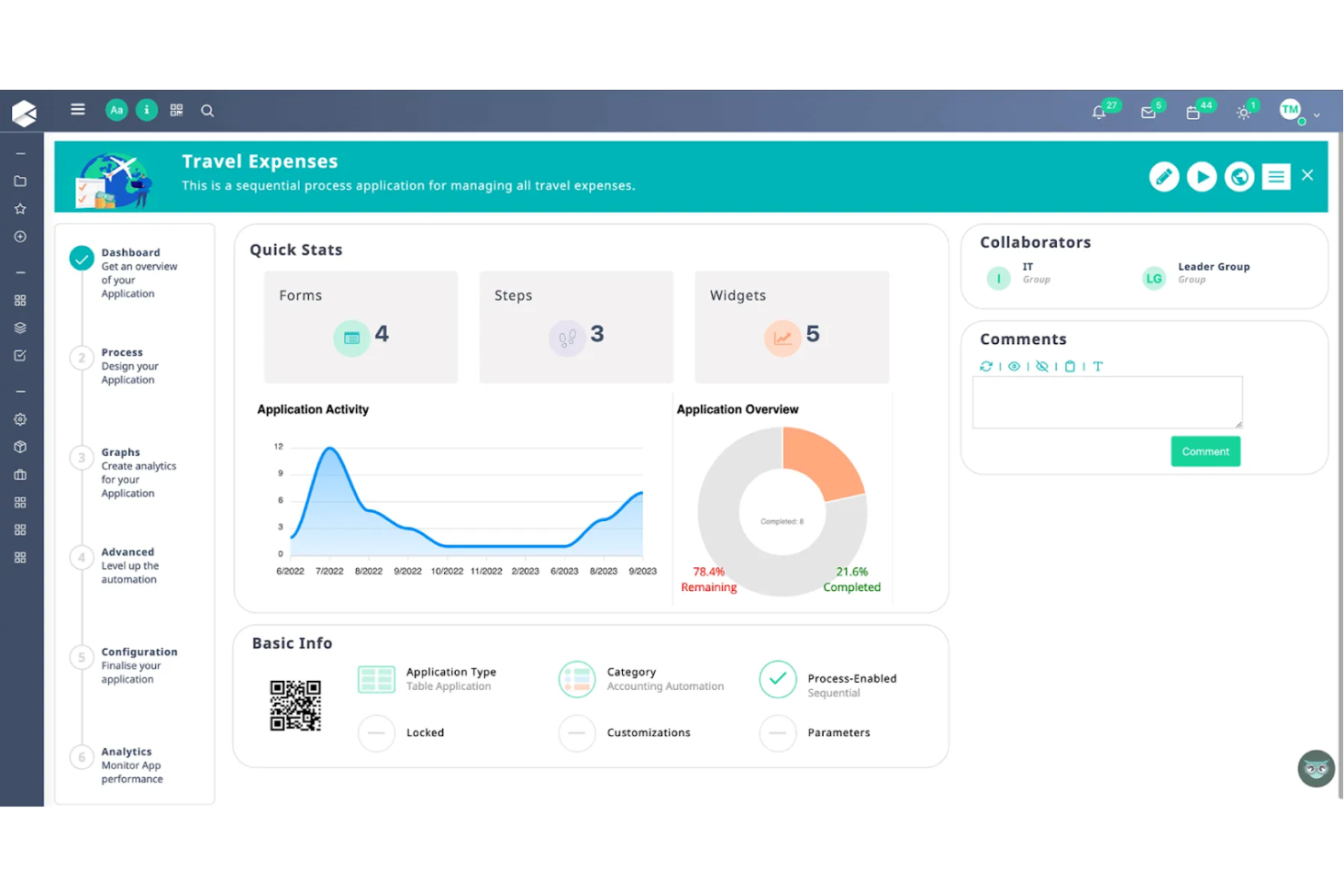
Comidor is a digital transformation platform designed for organizations that want to modernize and automate their business processes. It caters primarily to enterprises that need a comprehensive solution for managing workflows, projects, and collaboration in one unified platform.
Why I picked Comidor: I included this software because it offers a range of features for project management, business process automation, and workflow management all in one platform. This all-in-one approach makes it easier for teams to collaborate and automate repetitive tasks. Comidor's flexibility allows users to customize their workflows to meet specific business needs, enhancing efficiency and productivity. Meanwhile, its built-in analytics help organizations monitor performance and optimize their processes continuously.
Standout features & integrations:
Features include the ability to automate and manage complex workflows with drag-and-drop functionality using the BPMN 2.0 Comidor Workflow Designer. Users can also create custom forms and fields, which makes it easy to tailor workflows to specific business needs. Comidor also provides a range of RPA and AI components, including sentiment analysis and text classification, to enhance automation capabilities.
Integrations include RESTful Web Service, Message Queue, Teams Integration, Google Integration, Zoho Projects API, Zoho CRM, Freshdesk API, and Salesforce API.
Pros and Cons
Pros:
- Real-time analytics and reporting
- Strong customization capabilities
- Efficient low-code development
Cons:
- Challenging to configure some integrations
- Steep learning curve initially
Best for scalable intelligent automation

Blue Prism is an enterprise automation platform designed to provide organizations with a scalable digital workforce. It focuses on helping businesses automate repetitive manual tasks and manage workflows efficiently, freeing up human workers to focus on higher-value tasks.
Why I picked Blue Prism: I chose this platform for its focus on scalable intelligent automation. It supports enterprise businesses along their large-scale automation journey with a centralized control room that allows users to manage and monitor digital workers, ensuring consistent performance and reliability. The platform's security and compliance features ensure that all automated processes are governed and auditable, providing peace of mind for organizations in highly regulated industries.
Standout features & integrations:
Features include a no-code drag-and-drop design studio for creating automation workflows and advanced security features that provide governance and compliance for automated processes. Blue Prism also offers tools for business process management and orchestration, helping companies automate complex workflows across different departments.
Integrations include Microsoft, AWS, ABBYY, EY, and Deloitte.
Pros and Cons
Pros:
- No-code design studio simplifies automation
- Centralized control for digital workers
- Highly scalable for large organizations
Cons:
- May need specialized support for setup and deployment
- Requires ongoing management and monitoring

Appian
Best for low-code process automation and mining

Appian is a platform that automates business processes through a combination of low-code development and process mining capabilities. It helps businesses unify their data and improve operations, leading to better growth and enhanced customer experiences.
Why I picked Appian: This software enables users to build applications quickly without extensive coding. Its process mining tools offer insights into business processes, helping organizations identify bottlenecks and improve efficiency. The software also supports end-to-end automation, allowing businesses to automate repetitive tasks and focus on higher-value work. Its ability to unify data across different systems makes it easier to create comprehensive and effective business applications.
Standout features & integrations:
Features include low-code development for rapid application building, process mining capabilities, and end-to-end process automation that helps streamline operations. Appian also offers data unification across systems, which enhances the power and reach of applications built on its platform.
Integrations include Salesforce, SAP, Microsoft Azure, Amazon Web Services, Google Cloud, and Oracle.
Pros and Cons
Pros:
- Scalable for large enterprises
- Unified data across systems
- Supports end-to-end automation
Cons:
- Customization can be limited
- Requires technical expertise for advanced features
Annen programvare for intelligent prosessautomatisering
Nedenfor finner du en liste over annen programvare for intelligent prosessautomatisering som jeg har valgt ut. Selv om de ikke kom med blant de 10 beste, er de fortsatt verdifulle og verdt å undersøke nærmere.
- IBM
For hybrid cloud and AI integration
- Fortra
For cybersecurity-focused automation
- Pega
For AI decisioning automation
- Automation Anywhere
For versatility and flexibility
- Tungsten Automation
For AI-powered workflow automation
- Bizagi
For low-code process automation
- DocuPipe
For custom document field extraction
- Nintex
For document and process management
- Tonkean
For human-in-the-loop automation
- JIFFY.ai
For automating complex workflows
- Ushur
For automating customer communications


Relaterte programvareanmeldelser
Hvis du fortsatt ikke har funnet det du leter etter her, kan du se nærmere på disse andre verktøyene som vi har testet og evaluert:
- Prosjektstyringsprogramvare
- Ressursstyringsprogramvare
- Programvare for arbeidsflytautomatisering
- Programvare for tidsregistrering
- Programvare for oppgavehåndtering
- Samarbeidsverktøy
- Gantt-diagramverktøy
- Produktivitetsverktøy
- Programvare for intelligent dokumentbehandling
How I Evaluate Intelligent Process Automation Software
I split my evaluation into two layers: core capabilities a tool must have to qualify—like workflow orchestration and AI decisioning—and the differentiators that separate the top choices.
Core Functionality (Table Stakes For This List)
When I'm selecting tools for my list, I rank each one on a scale from 0 (does not offer the functionality) to 5 (excels in this area) for each core functionality listed below. Then, I calculate the tool's total score into a percentage. Each tool needs to achieve a minimum total score of 65% to be considered for inclusion.
- Workflow Automation Engine: I evaluate whether the platform offers a visual builder for designing multi-step flows—like routing a project intake request through approval, resourcing, and kickoff automatically.
- AI/ML Decisioning: Tools that embed machine learning for things like auto-classifying incoming tickets by priority or predicting project timeline slippage stand out from those offering static rules alone.
- System Integrations: I check for prebuilt connectors to common PM and collaboration tools like Jira, Asana, Slack, and major ERP platforms, plus a well-documented API for custom connections.
- Robotic Process Automation (RPA) & Task Bots: Whether a platform supports attended and unattended bots matters—especially for repetitive tasks like syncing timesheets across systems or pulling data from legacy tools.
- Process Mining & Discovery: I look for the ability to analyze workflow logs and surface bottlenecks, such as identifying where approval cycles consistently stall across a project portfolio.
- Document & Data Intelligence: Platforms should handle unstructured data extraction—like pulling key dates and deliverables from contracts or SOWs using OCR, NLP, or intelligent document processing.
Once I have a list of tools that meet the criteria, I consider what sets each platform apart.
Differentiating Factors (What Sets Vendors Apart)
Here's how I compare and contrast different vendors:
Standout Features
A generative AI copilot can save hours—I look for platforms where you describe a workflow in plain language and the system drafts it for you. Predictive project analytics matter too, especially dashboards that flag budget overruns or resource conflicts before they derail a sprint. I also evaluate whether a platform ships with reusable automation templates for common PM scenarios like project intake or change requests, since these cut setup time dramatically.
Beyond Features
Governance matters a lot here. I evaluate whether a platform offers a centralized control tower for monitoring live bots and workflows, plus audit trails and role-based access—especially for PMOs managing regulated project portfolios. Implementation speed is another factor I weigh; sandbox environments and guided onboarding can mean the difference between a weeks-long pilot and a months-long rollout. I also check pricing transparency, since per-bot versus per-user licensing can dramatically shift total cost as your automation scales across teams.
Slik velger du programvare for intelligent prosessautomatisering
Det er lett å gå seg vill i lange funksjonslister og komplekse prismodeller. For å hjelpe deg med å holde fokus når du går gjennom den unike prosessen din for valg av programvare, får du her en sjekkliste over faktorer du bør ha i tankene:
| Faktor | Hva du bør vurdere |
|---|---|
| Skalerbarhet | Kan programvaren vokse i takt med virksomhetens behov? |
| Integrasjoner | Kan den integreres med de eksisterende verktøyene dine? |
| Tilpasningsmuligheter | Kan du tilpasse programvaren til prosessene dine? |
| Brukervennlighet | Er programvaren intuitiv for teamet ditt å bruke? |
| Budsjett | Holder den seg innenfor de økonomiske rammene dine? |
| Sikkerhetstiltak | Tilbyr programvaren robust databeskyttelse? |
| Brukerstøtte | Finnes det pålitelig kundestøtte? |
| Rapportering | Tilbyr den detaljerte analyser og rapporter? |
Trender innen programvare for intelligent prosessautomatisering
Her er noen trender jeg har lagt merke til innen teknologi for programvare for intelligent prosessautomatisering, samt hva de kan bety for fremtiden. Jeg har gått gjennom utallige produktoppdateringer, pressemeldinger og utgivelseslogger for å trekke frem de viktigste innsiktene.
- AI-forbedret beslutningstaking: Flere plattformer integrerer AI for å hjelpe virksomheter med å ta bedre beslutninger basert på datadrevet innsikt. Denne trenden er nyttig for selskaper som ønsker å redusere manuell beslutningstaking og bruke AI til å forutsi resultater og optimalisere prosesser. Andre verktøy, som programvare for AI-oppgavebehandling, tilbyr også denne funksjonen.
- Prosessutvinningsfunksjoner: Det er økende fokus på verktøy som kan analysere eksisterende arbeidsflyter for å oppdage og identifisere ineffektivitet og foreslå forbedringer. Denne funksjonen blir stadig viktigere etter hvert som virksomheter ønsker å optimalisere prosessene og redusere kostnader uten å måtte gjette seg frem.
- Hyperautomatisering: Dette konseptet kombinerer flere automatiseringsverktøy og -teknologier for å automatisere så mange forretningsprosesser som mulig. Det er særlig attraktivt for selskaper som ønsker å digitalisere driften fullstendig og redusere avhengigheten av menneskelig inngripen i rutineoppgaver. For eksempel samler Workato integrasjon og automatisering i én plattform, slik at virksomheter kan bygge komplekse arbeidsflyter fra ende til ende uten å skrive kode.
- Utvikling med lite kode/uten kode: Flere leverandører tilbyr plattformer med lite eller ingen kode for å gjøre automatisering tilgjengelig for personer som ikke er utviklere. Denne trenden er spesielt relevant for små og mellomstore virksomheter som trenger å automatisere prosesser raskt uten å ansette egne utviklere.
- Fokus på brukeropplevelse: Det skjer en tydelig dreining mot å gjøre automatiseringsprogramvare mer intuitiv og brukervennlig. Leverandørene prioriterer ryddige grensesnitt som er enkle å navigere i, for å sikre at teamene kan ta i bruk programvaren med minimal opplæring.
Hva er programvare for intelligent prosessautomatisering?
Programvare for intelligent prosessautomatisering (IPA) er et verktøy som bruker AI, maskinlæring og automatisering til å effektivisere forretningsprosesser og redusere manuelt arbeid.
Disse verktøyene brukes ofte innen drift, økonomi, HR, forsyningskjede og IT, og kombinerer robotic process automation (RPA) med AI-drevet beslutningstaking for å forbedre nøyaktigheten, øke effektiviteten og avdekke forbedringer i prosessene. Funksjoner som prosessutvinning, arbeidsflyter med lite kode og smarte boter hjelper team med å spare tid og fokusere på strategiske oppgaver.
Funksjoner i programvare for intelligent prosessautomatisering
Når du velger programvare for intelligent prosessautomatisering, bør du se etter følgende viktige funksjoner:
- AI-forbedret beslutningstaking: Bruker AI til å analysere data og komme med anbefalinger, slik at virksomheter raskt kan ta velinformerte beslutninger.
- Prosessanalyse: Analyserer eksisterende arbeidsflyter for å identifisere ineffektivitet og foreslår forbedringer som optimaliserer den samlede driften.
- Lavkodeutvikling: Gjør det mulig for brukere å opprette automatiserte arbeidsflyter med minimalt behov for koding, noe som gjør det tilgjengelig for ikke-utviklere.
- Maskinlæringfunksjoner: Lærer av datamønstre for å forbedre automatiseringsprosessene over tid og øke effektiviteten og nøyaktigheten.
- Sanntidsanalyse: Gir umiddelbar innsikt i prosessytelsen, slik at virksomheter kan gjøre datadrevne justeringer.
- Robuste sikkerhetstiltak: Sørger for at alle automatiserte prosesser og all datahåndtering overholder sikkerhetsstandarder og beskytter sensitiv informasjon.
- Skalerbarhet: Støtter virksomhetens økende behov ved enkelt å håndtere større datamengder og mer komplekse arbeidsflyter, og tilbyr prediktiv analyse for å støtte vekst.
- Tilpassbare arbeidsflyter: Gjør det mulig for brukere å tilpasse automatiseringsprosessene til spesifikke virksomhetskrav, slik at de passer godt til ulike driftsprosesser.
- Integrasjon med eksisterende systemer: Kobler seg sømløst til andre programvareverktøy og forbedrer kontinuiteten i arbeidsflyten og datadeling.
- Brukervennlig grensesnitt: Har et intuitivt design som er enkelt å navigere i, og reduserer læringskurven for nye brukere.
- Modellering av forretningsprosesser: Gjør det mulig for team å utforme, kartlegge og optimalisere forretningsprosesser visuelt før automatisering.
Fordeler med programvare for intelligent prosessautomatisering
Implementering av programvare for intelligent prosessautomatisering gir flere fordeler for teamet og virksomheten din. Her er noen av fordelene du kan se frem til:
- Automatisering av tidkrevende oppgaver: Ansatte kan fokusere på strategisk arbeid ved å automatisere repetitive oppgaver.
- Reduksjon av feil og uoverensstemmelser: Standardisering av prosesser med automatiseringsverktøy minimerer menneskelige feil.
- Forbedret beslutningstaking: Sanntidsanalyse og AI-drevet innsikt bidrar til bedre og raskere beslutninger.
- Forbedret driftseffektivitet: Optimaliserte arbeidsflyter og identifisering av flaskehalser gir en jevnere drift.
- Økt produktivitet blant ansatte: Automatisering og strømlinjeformede prosesser hjelper ansatte med å bli mer produktive.
- Sikkerhet og samsvar: Robuste funksjoner for databeskyttelse og automatiserte revisjonsspor sørger for sikkerhet og samsvar.
- Forbedret kundetilfredshet: Raskere responstider og nøyaktig håndtering av informasjon gir bedre kundeopplevelser.
Kostnader og priser for programvare for intelligent prosessautomatisering
Valg av programvare for intelligent prosessautomatisering krever en forståelse av de ulike prismodellene og abonnementene som er tilgjengelige. Kostnadene varierer basert på funksjoner, teamstørrelse, tillegg og mer. Tabellen nedenfor oppsummerer vanlige abonnementer, gjennomsnittsprisene deres og typiske funksjoner som er inkludert i løsninger for intelligent prosessautomatisering:
Sammenligningstabell for abonnementer på programvare for intelligent prosessautomatisering
| Plantype | Gjennomsnittspris | Vanlige funksjoner |
| Gratisabonnement | $0 | Grunnleggende automatiseringsverktøy, begrensede integrasjoner, brukerstøtte fra fellesskapet |
| Personlig abonnement | $5-$25/bruker/måned | Tilgang for én bruker, grunnleggende prosessautomatisering, begrenset analyse |
| Bedriftsabonnement | $30-$75/bruker/måned | Tilgang for flere brukere, avansert arbeidsflytautomatisering, analyse og rapportering, prioritert brukerstøtte |
| Abonnement for store virksomheter | $100+/bruker/måned | Ubegrenset antall brukere, fullstendige AI-funksjoner, tilpassede integrasjoner, dedikert brukerstøtte, funksjoner for sikkerhet og samsvar |
Vanlige spørsmål om programvare for intelligent prosessautomatisering
Her er noen svar på vanlige spørsmål om programvare for intelligent prosessautomatisering:
Hvordan integreres verktøy for intelligent prosessautomatisering med eksisterende systemer?
Verktøy for intelligent prosessautomatisering (IPA) er utviklet for sømløs integrasjon med et bredt spekter av eksisterende systemer. Det betyr at de kan kobles til ulike programvareplattformer, for eksempel CRM, ERP og andre forretningsapplikasjoner, slik at data flyter jevnt mellom dem. Denne integrasjonen bidrar til å opprettholde konsistens og redusere behovet for manuell dataregistrering, noe som forbedrer effektiviteten i arbeidsflyten totalt sett.
Kan programvare for intelligent prosessautomatisering håndtere ustrukturerte data?
Ja, mange IPA-verktøy kan håndtere ustrukturerte data takket være avanserte funksjoner som naturlig språkbehandling (NLP) og maskinlæring. Disse funksjonene gjør det mulig for programvaren å tolke og behandle data fra ulike kilder, for eksempel e-poster, dokumenter og andre ustrukturerte inndata, noe som gjør den nyttig for komplekse dataanalyse- og beslutningsoppgaver.
Hvilke typer virksomheter har størst nytte av intelligent prosessautomatisering?
Virksomheter i alle størrelser og bransjer kan ha nytte av IPA, men teknologien er særlig verdifull for virksomheter med store mengder repetitive oppgaver og datadrevne prosesser. Bransjer som finans, helsevesen, detaljhandel og produksjon oppnår ofte de største gevinstene fordi de håndterer store datamengder og krever presise og effektive arbeidsflyter.
Hvordan støtter intelligent prosessautomatisering samsvar og sikkerhet?
IPA-programvare kan forbedre samsvar og sikkerhet betydelig ved å sørge for at alle prosesser er dokumenterte og sporbare. Den automatiserer datahåndtering i henhold til forhåndsdefinerte regler og standarder, noe som bidrar til å minimere menneskelige feil og opprettholde samsvar med regelverket. IPA-verktøy omfatter ofte også sikkerhetsfunksjoner som kryptering og tilgangskontroller for å beskytte sensitiv informasjon.
Hva er forskjellen mellom intelligent prosessautomatisering og robotisert prosessautomatisering?
Selv om både IPA og robotisert prosessautomatisering (RPA) har som mål å automatisere oppgaver, går IPA lenger enn enkel oppgaveautomatisering ved å inkludere kognitive funksjoner. IPA bruker AI-teknologier som maskinlæring og NLP til å forstå, tolke og ta beslutninger basert på ustrukturerte data. Dette gjør teknologien mer allsidig og tilpasningsdyktig enn tradisjonell RPA, som hovedsakelig er regelbasert og fokuserer på å automatisere repetitive oppgaver.
Den beste programvaren for intelligent prosessautomatisering (IPA) hjelper virksomheter med å effektivisere driften ved å automatisere repetitive oppgaver, redusere manuelle feil og forbedre prosesseffektiviteten på tvers av team. Disse verktøyene kombinerer robotisert prosessautomatisering (RPA), maskinlæring og AI for å håndtere regelbaserte arbeidsflyter og tilpasse seg endrede forretningsbehov – slik at det frigjøres tid til mer strategisk arbeid.
Jeg har testet og vurdert ledende løsninger for intelligent prosessautomatisering for å identifisere verktøyene som faktisk leverer når det gjelder hastighet, skalerbarhet og enkel integrasjon. Enten du automatiserer godkjenninger, dokumentbehandling eller arbeidsflyter for kundeservice, hjelper denne veiledningen deg med å finne riktig IPA-programvare for virksomheten din.