

10 beste Kintone-alternativer for prosjektteam i 2026

Beste alternativer til Kintone – kortliste


Kintone er et verdifullt verktøy for team som ønsker tilpassbare løsninger for å administrere arbeidsflyter, data og samarbeid på én integrert plattform. Det er imidlertid ikke nødvendigvis den beste løsningen for alle virksomheter.
Når du skal finne et alternativ til Kintone, er det flere faktorer du bør vurdere, blant annet kostnad, funksjoner, integrasjoner og mer. Men når det finnes så mange løsninger, hvordan kan du vite hvilken som passer for deg?
Med min omfattende erfaring innen prosjektledelse og digital programvare har jeg funnet og vurdert en rekke alternativer til Kintone for å hjelpe team med å finne de beste løsningene. Med min veiledning er jeg sikker på at du vil være godt rustet til å velge et prosjektstyringsverktøy som ikke bare oppfyller virksomhetens unike behov, men som også forbedrer teamets effektivitet og samarbeid.
Hva er Kintone?
Kintone er en skybasert plattform som gjør det mulig for team og organisasjoner å opprette, tilpasse og distribuere forretningsapplikasjoner. Den tilbyr verktøy for databaseadministrasjon, automatisering av arbeidsflyter og samarbeidende prosjektstyring, slik at brukerne kan effektivisere driften og administrere data på en effektiv måte.
Hvorfor du kan stole på våre programvareanbefalinger
Teamet vårt har testet og anmeldt programvare siden 2012. Vi er selv prosjektledere, så vi vet hvor vanskelig og hvor viktig det er å velge riktig programvare.
I denne guiden har vi vurdert verktøyene gjennom praktisk testing og uavhengig research og gitt dem poeng ut fra våre utvelgelseskriterier. Vi bygger også på innsikt fra ledende eksperter i bransjen og erfarne prosjektledere.
Anmeldelsene våre bygger på vår egen redaksjonelle vurdering. De er ikke et salgsargument.
Ekspertanmeldere:
Sammenligningstabell for alternativer til Kintone
| Tool | Best For | Trial Info | Price | ||
|---|---|---|---|---|---|
| 1 | Best for flexible low-code business process automation | Free plan available | Pricing upon request | Website | |
| 2 | Best for unlimited user access in low-code apps | 14-day free trial | From $392/month | Website | |
| 3 | Best for comprehensive low-code app development | Free plan available; 15-day free trial | Pricing upon request | Website | |
| 4 | Best for field apps linked to legacy databases | 45-day free trial | From $22/user/month (billed annually) | Website | |
| 5 | Best for client-facing operations workspaces | Free plan + 30-day free trial + free demo available | From $14/user/month | Website | |
| 6 | Best for no-code application development | Free trial available | From $49/month (billed annually) | Website | |
| 7 | Best for secure and strategic form building | 14-day free trial | From $83/month (billed annually) | Website | |
| 8 | Best for AI-powered app development | Free plan available | From $20/user/month (billed annually) | Website | |
| 9 | Best for simple online surveys and data collection | Free plan available | From $8.40/user/month | Website | |
| 10 | Best for versatile online form building | Free plan available | Pricing upon request | Website |
Vurderinger av de beste alternativene til Kintone
I denne delen gir jeg en grundig analyse og oversikt over hvert alternativ til Kintone. Jeg går gjennom fordeler og ulemper ved hvert verktøy, funksjonene deres og hvilke bruksområder de egner seg best for.

Ninox
Best for flexible low-code business process automation
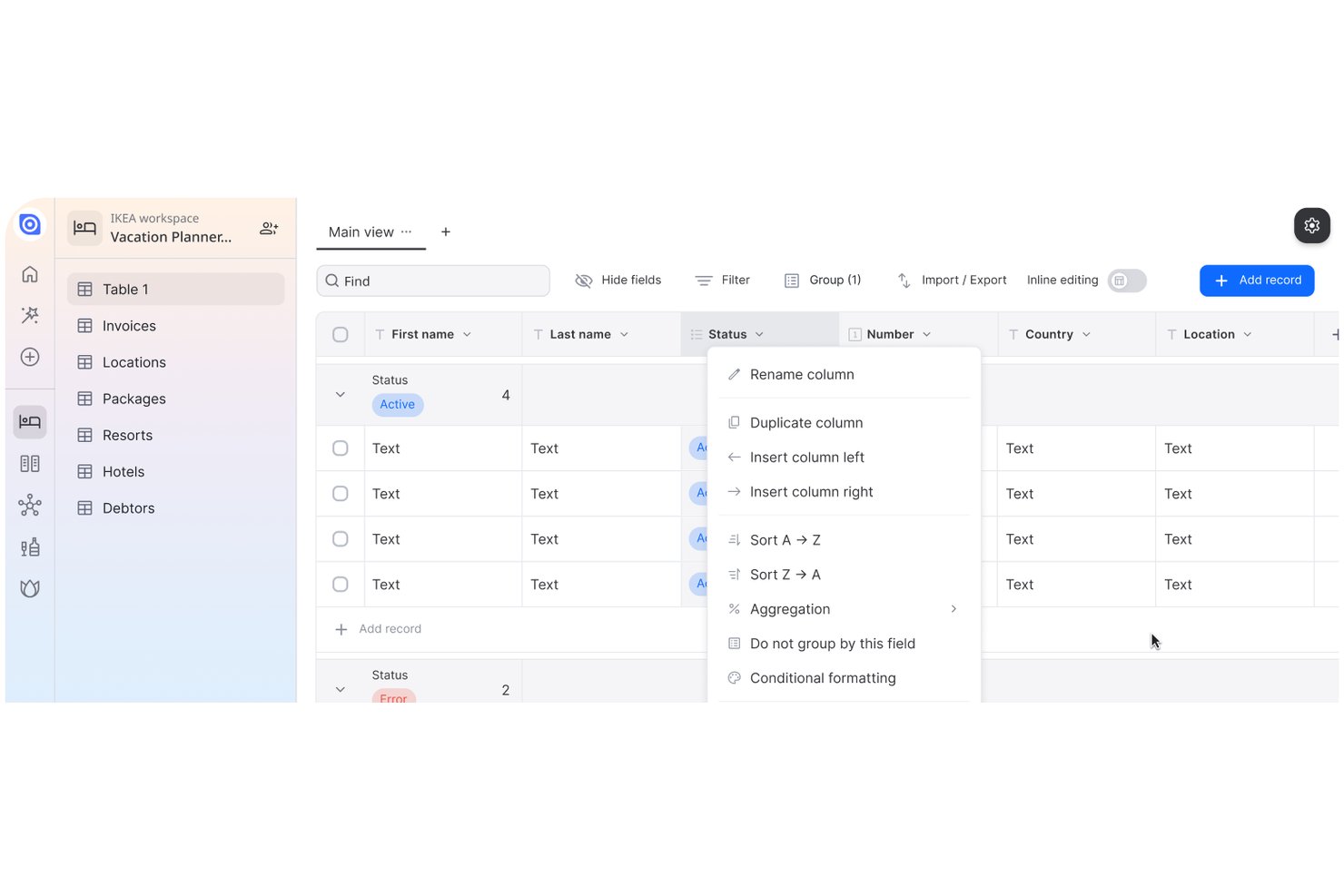
Ninox is a low-code app and database platform for teams replacing spreadsheets and disconnected tools with tailored workflows for project tracking, approvals, and operational data, making it an option for businesses considering kintone alternatives.
Who Is Ninox Best For?
Ninox suits operations teams that need to build adaptable internal apps for specialized workflows that standard project management tools don’t cover.
Why I Picked Ninox
I picked Ninox because it lets me shape a low-code app around a business process instead of forcing the process into a fixed template. I like how linked database tables can connect project records, approvals, and operational data, while custom forms and scripts support steps such as routing a request after a status change. That makes it a practical kintone alternative for workflows that need tailored data structures and automation.
Ninox Key Features
- Kanban and calendar views: Display records as boards or scheduled items.
- Role-based access controls: Set permissions at organization, workspace, and user levels.
- Spreadsheet import and export: Map fields when importing Excel or CSV files, then export records.
- Dashboard widgets: Add charts and KPI summaries to pages.
Ninox Integrations
Ninox lists seven direct integrations: Lexware Office, sevdesk, weclapp, Xentral, Sage Accounting, Google Sheets, and Excel. It also connects with Zapier and provides a REST API for custom integrations.
Pros and Cons
Pros:
- Mobile apps keep records accessible across devices
- Custom forms and scripts model tailored workflows
- Relational tables connect project and operational records
Cons:
- Scripting and documentation take extra effort
- Report layouts offer limited formatting control

Caspio
Best for unlimited user access in low-code apps
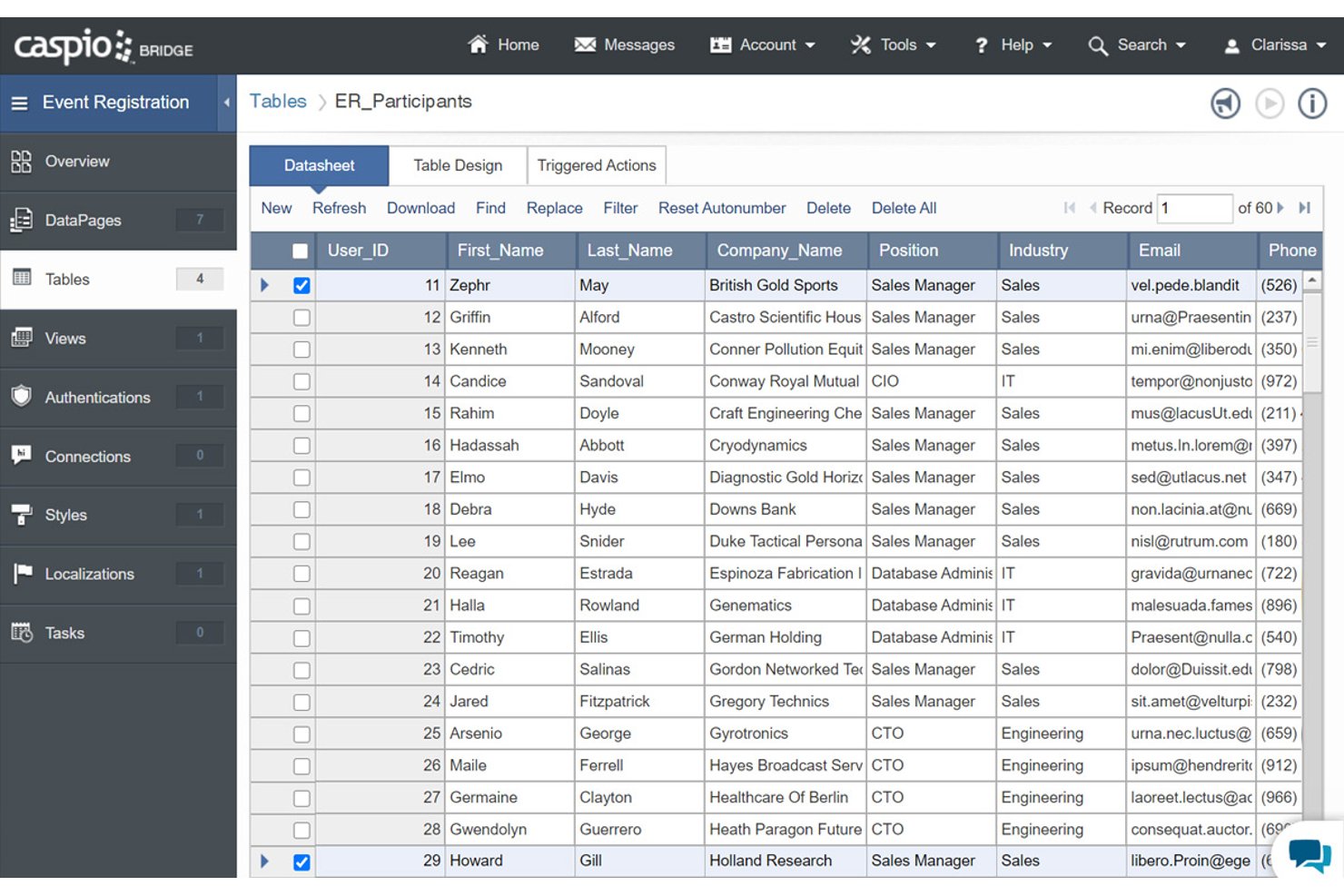
Caspio gives operations and project teams a low-code way to build database-backed web apps and automate workflows, replacing scattered spreadsheets and manual handoffs without custom software development.
Who Is Caspio Best For?
Caspio suits operations and IT teams building low-code apps for broad employee, partner, or customer access without per-user limits.
Why I Picked Caspio
I picked Caspio as a kintone alternative because it’s best for unlimited user access in low-code apps. I like that I can build database-backed web apps and automate workflows, so project teams can replace spreadsheet-based request tracking with an app employees, partners, and customers can access.
Caspio Key Features
- Interactive reports and dashboards: Create charts, pivot tables, and dashboards from application data.
- REST API and webhooks: Connect Caspio apps with external services through APIs and event-based integrations.
- App embedding: Host apps on Caspio or embed them in websites, intranets, and customer portals.
- Audit trails: Use built-in audit trails alongside role- and record-level security.
Caspio Integrations
Caspio connects with Make, n8n, and Keragon, and supports Zapier. It also offers a REST API and webhooks for custom integrations.
Pros and Cons
Pros:
- Scheduled tasks automate repeatable workflows
- Relational database links operational records
- Unlimited users remove per-seat access barriers
Cons:
- Complex applications can require custom coding
- Dashboard customization trails dedicated analytics tools

Best for comprehensive low-code app development
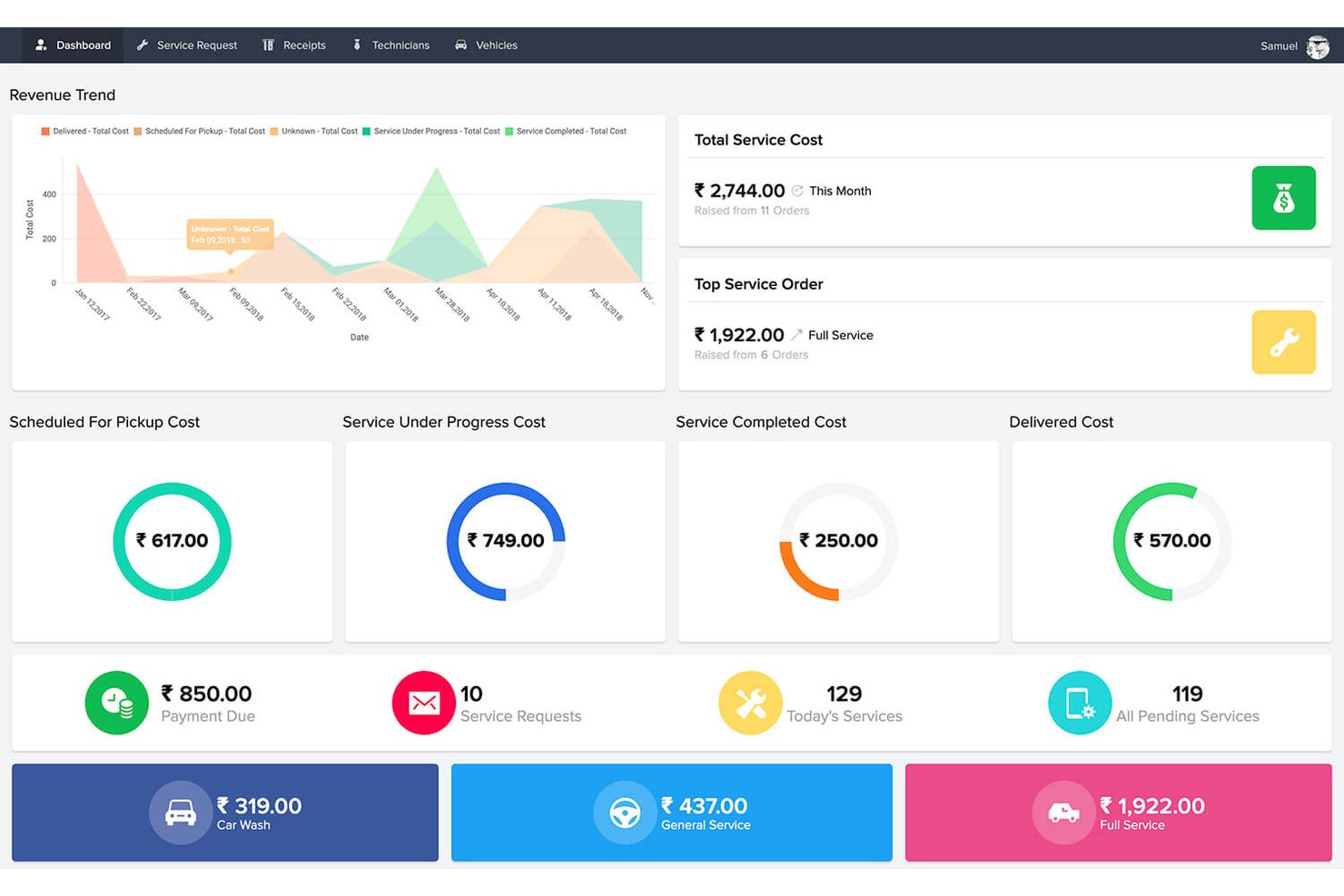
Zoho Creator gives operations and project teams a low-code way to build custom business apps and automate cross-team workflows when spreadsheets or fixed tools can't match changing processes.
Who Is Zoho Creator Best For?
Zoho Creator suits operations and IT teams in growing businesses that need tailored business apps without relying on full custom development.
Why I Picked Zoho Creator
I picked Zoho Creator, best for comprehensive low-code app development, as a kintone alternative because its app builder pairs custom forms with Blueprints that define approval stages and actions. I like that Deluge lets me add routing rules, such as sending higher-value purchase requests to finance for review.
Zoho Creator Key Features
- Reports and dashboards: Build reports and dashboards to view app data and track metrics.
- Prebuilt integrations: Connect apps with more than 1,000 prebuilt integrations.
- Customer portals: Give customers, vendors, and partners access to shared information.
- Mobile apps: Use native iOS and Android apps, with offline access to forms and reports.
Zoho Creator Integrations
Zoho Creator supports integrations with Salesforce, Stripe, QuickBooks, and Slack, and connects with Zapier and Workato. It also provides REST APIs for custom integrations.
Pros and Cons
Pros:
- Portals extend tailored apps to external partners
- One build creates native mobile apps
- Custom forms and Deluge automate approval routes
Cons:
- Formula bugs can disrupt app calculations
- Pixel-level interface customization remains restrictive

Best for field apps linked to legacy databases
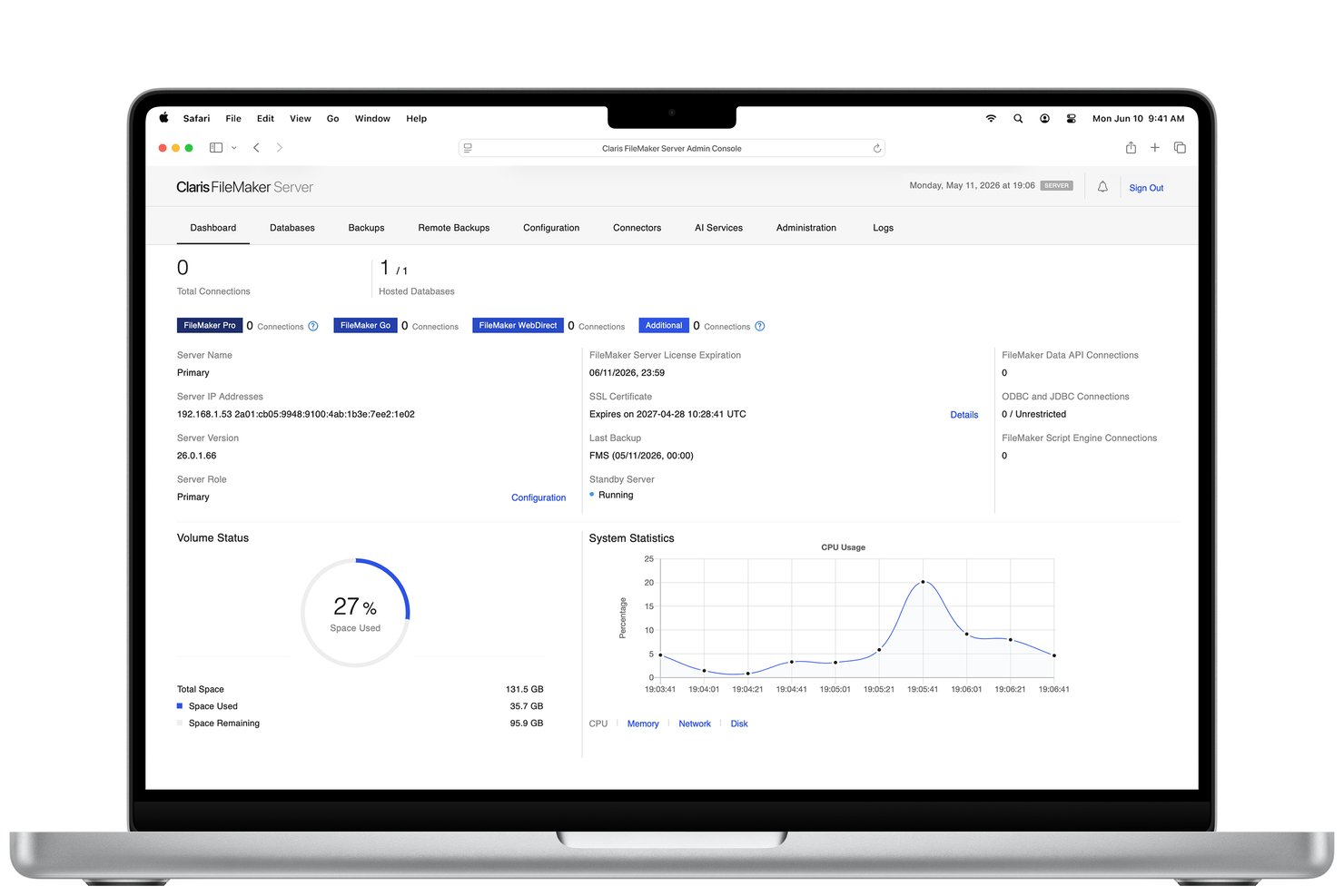
Claris FileMaker is a low-code app platform for teams that need tailored workflow apps to manage project data, approvals, and processes across connected systems.
Who Is Claris FileMaker Best For?
Claris FileMaker suits operations and IT teams that need custom business apps connected to existing databases and services.
Why I Picked Claris FileMaker
I picked Claris FileMaker for custom app development with extensive integration, especially when kintone’s app structure doesn’t fit a project workflow. Its Script Engine automates app behavior, while Claris Connect supports custom REST API connectors and conditional flows. I’d use them to turn project intake into tailored FileMaker records and send updates to a team’s proprietary planning system.
Claris FileMaker Key Features
- Cross-platform apps: Build and run apps on macOS, Windows, iPhone, and iPad.
- FileMaker WebDirect: Open FileMaker apps in a web browser.
- Access controls: Set authentication, role-based permissions, and record-level security.
- Data access: Export data as CSV or XML, or connect through Data APIs and xDBC.
Claris FileMaker Integrations
Claris Connect includes connectors for Asana, Jira, Slack, Trello, Smartsheet, Google Sheets, Microsoft Teams, and QuickBooks, and connects directly with Claris FileMaker and Claris Studio. You can build custom connectors for apps with a REST API.
Pros and Cons
Pros:
- Native desktop, mobile, and browser access
- Teams can revise live databases
- Tailored relational apps for unusual workflows
Cons:
- Web layouts can feel dated
- Complex scripts demand developer expertise
Podio
Best for client-facing operations workspaces
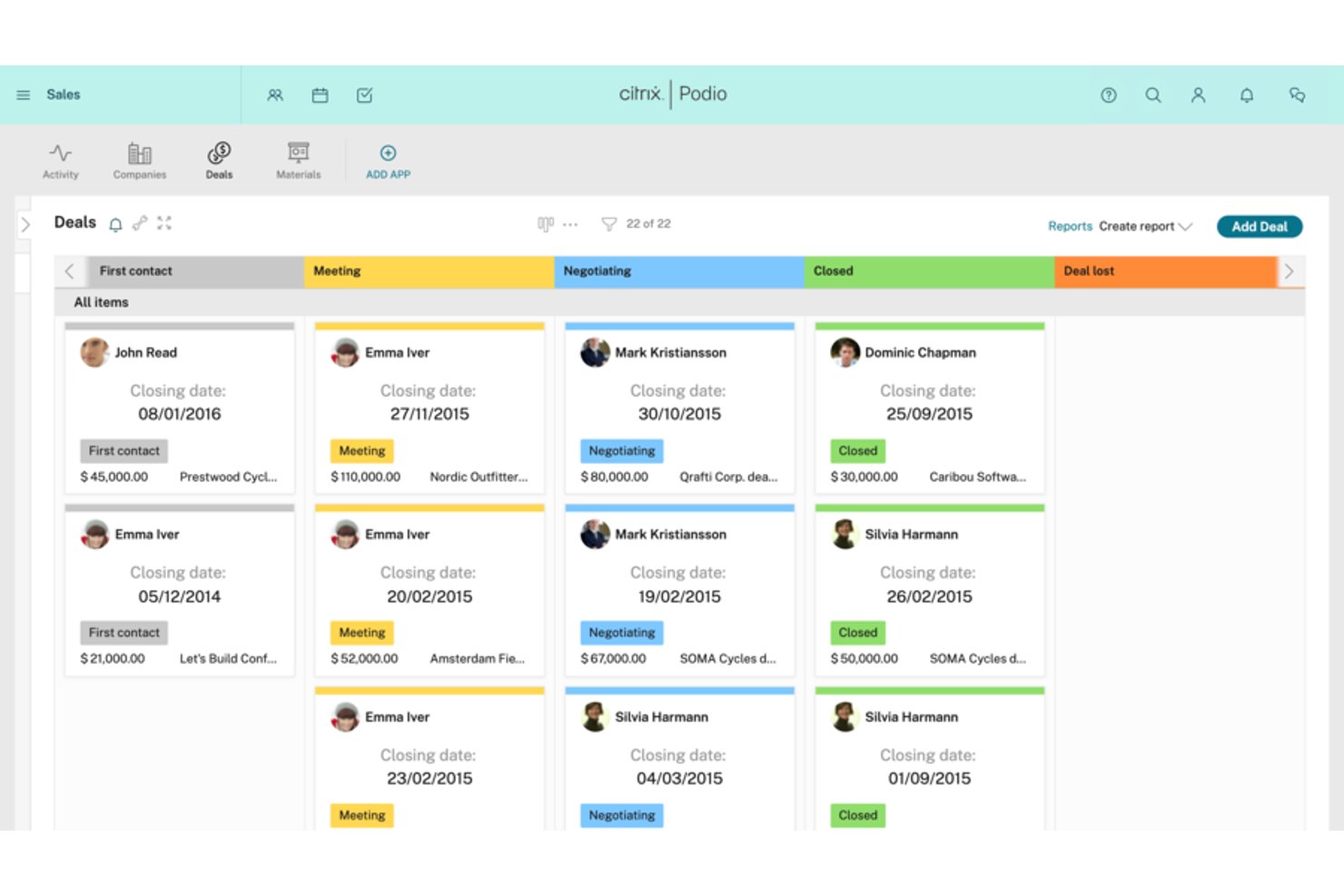
Podio is a work management platform for project and operations teams that want to build custom apps for tracking requests, coordinating work, and keeping project information in one shared workspace.
Who Is Podio Best For?
Podio suits operations teams that need to tailor workflows to their processes and coordinate work across departments.
Why I Picked Podio
I picked Podio as a kintone alternative because it pairs customizable business solutions with team collaboration. I use its custom apps to structure request intake and approval workflows around fields and status changes that match the process. Shared workspaces keep each request’s records, tasks, and team discussions together.
Podio Key Features
- Webforms: Collect external submissions directly into Podio.
- Relational fields: Link related records across apps.
- Shared calendar: View scheduled work in one calendar.
- Access controls: Set permissions for users and external collaborators.
Podio Integrations
Podio’s Extensions directory lists third-party add-ons such as teamdeck, Timely, and Gravity Forms + Podio; it also connects with Slack, Gmail, and Google Sheets through Zapier. Podio provides an API for custom integrations.
Pros and Cons
Pros:
- Free guest access supports external collaborators
- Linked records connect related business data
- Custom apps match department-specific workflows
Cons:
- Complex workflows take time to configure
- Reporting and dashboards offer limited depth

Knack
Best for no-code application development
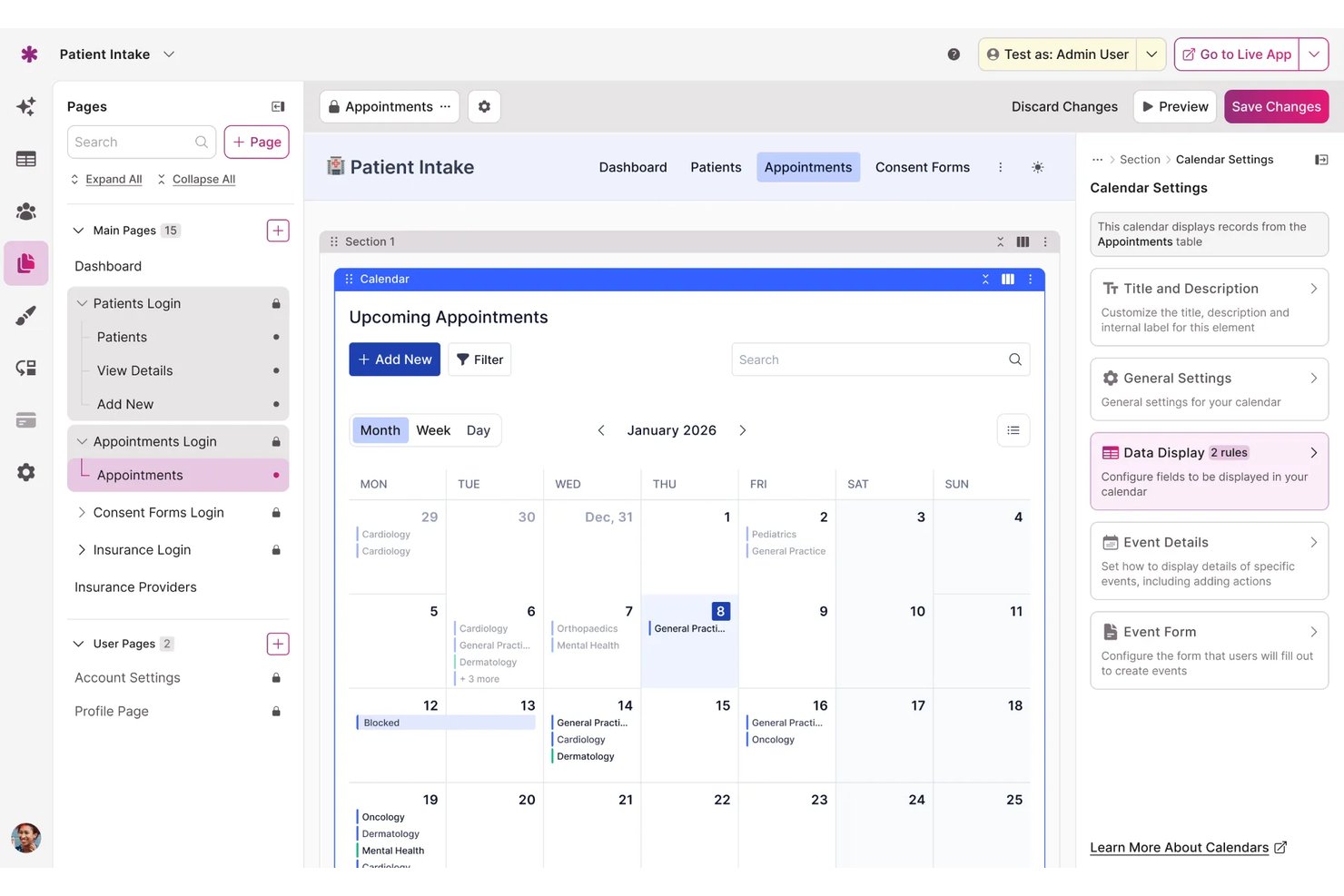
Knack is a cloud-based database and business app platform for operations and project teams that need to organize shared data, replace spreadsheet-based tracking, and connect day-to-day workflows without custom software.
Who Is Knack Best For?
Knack suits operations and project teams that need to build custom internal apps without relying on developers.
Why I Picked Knack
I picked Knack as a kintone alternative because it’s best for no-code application development. I like how its database, forms, and role-based access let me build a project intake app where teams submit requests, track linked records, and see only the information relevant to their role.
Knack Key Features
- Visual workflow builder: Create automated processes with drag-and-drop steps and actions.
- Knack Flows integrations: Connect Knack to third-party apps, including Slack, Google Drive, and QuickBooks.
- Reports and dashboards: Present data with pivot tables, charts, and customizable filters.
- App templates: Start with prebuilt options for project management, scheduling, and reporting.
Knack Integrations
Knack Flows offers 400+ native integrations, including Slack, Google Drive, QuickBooks, HubSpot, and Salesforce; Knack also connects with Zapier and provides an API for custom integrations.
Pros and Cons
Pros:
- Role-based views separate staff and client access
- Flows automate approvals across business workflows
- Relational databases support custom operational apps
Cons:
- No offline mode for field teams
- Complex actions across tables take extra setup

Best for secure and strategic form building
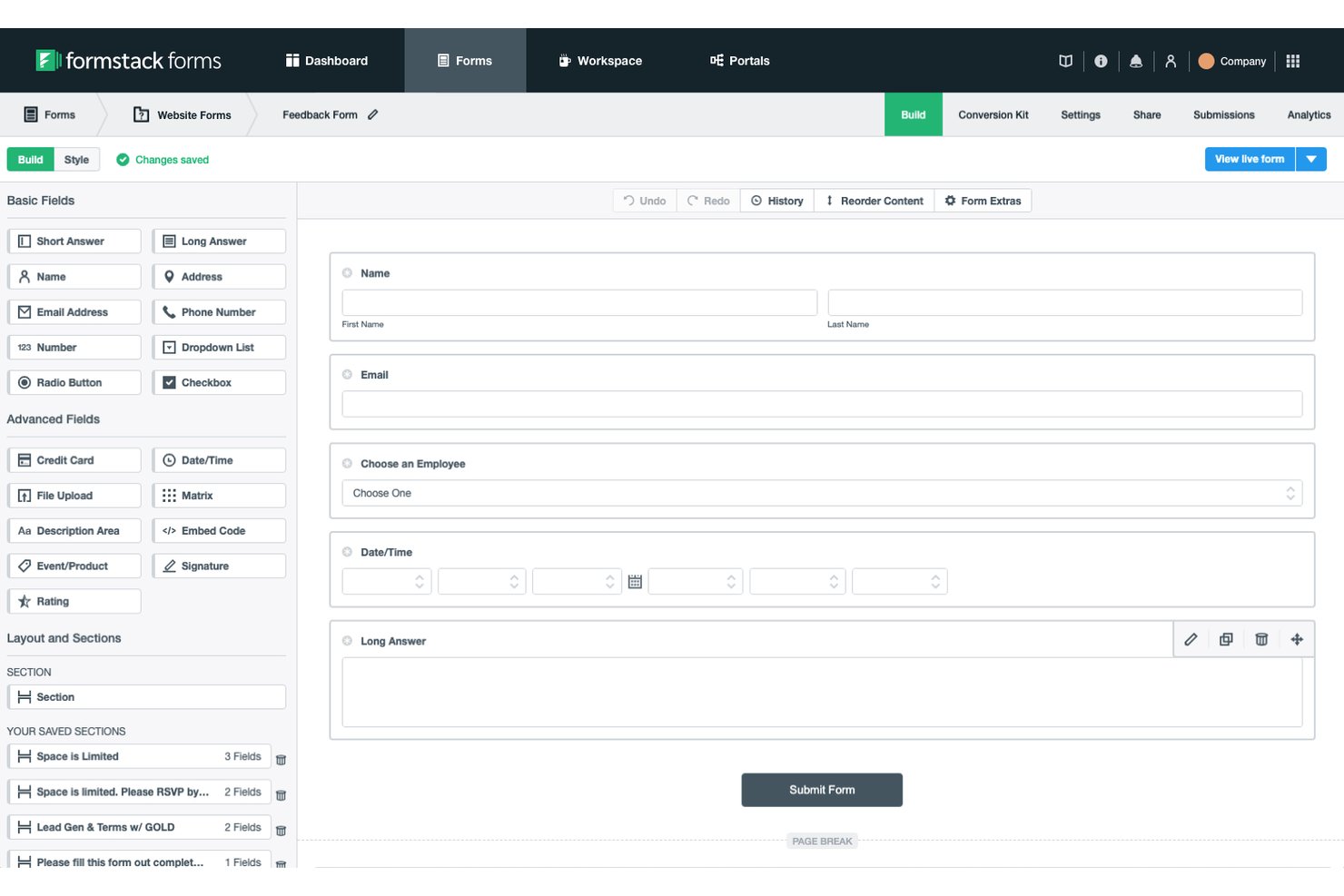
Formstack is a no-code form and workflow platform for teams that need to replace email-based intake with structured submissions, routed approvals, and connected processes without building a custom app.
Who Is Formstack Best For?
Formstack suits operations and project teams that need secure forms to collect information and route approvals across business workflows.
Why I Picked Formstack
I picked Formstack as a kintone alternative for its “Best for secure and strategic form building” focus. Encrypted form data and user-level permissions help protect sensitive intake, while conditional logic and approval workflows route requests to the right reviewer.
Formstack Key Features
- Save and resume: Let respondents pause a form and continue later.
- Data integrations: Sync form submissions with CRMs and other connected systems.
- Payment collection: Add payment fields and connect a payment processor.
- Form analytics: Track form activity and identify where respondents abandon forms.
Formstack Integrations
Formstack lists 250+ integrations, including native Salesforce and integrations with Google Sheets, HubSpot, Airtable, Microsoft Power Automate, and Zapier. It also provides an API for custom integrations.
Pros and Cons
Pros:
- Respondents can save and resume submissions
- Conditional branching routes requests to reviewers
- Encrypted intake with granular form permissions
Cons:
- Limited control over form appearance
- Doesn't replace kintone's record-centric custom apps
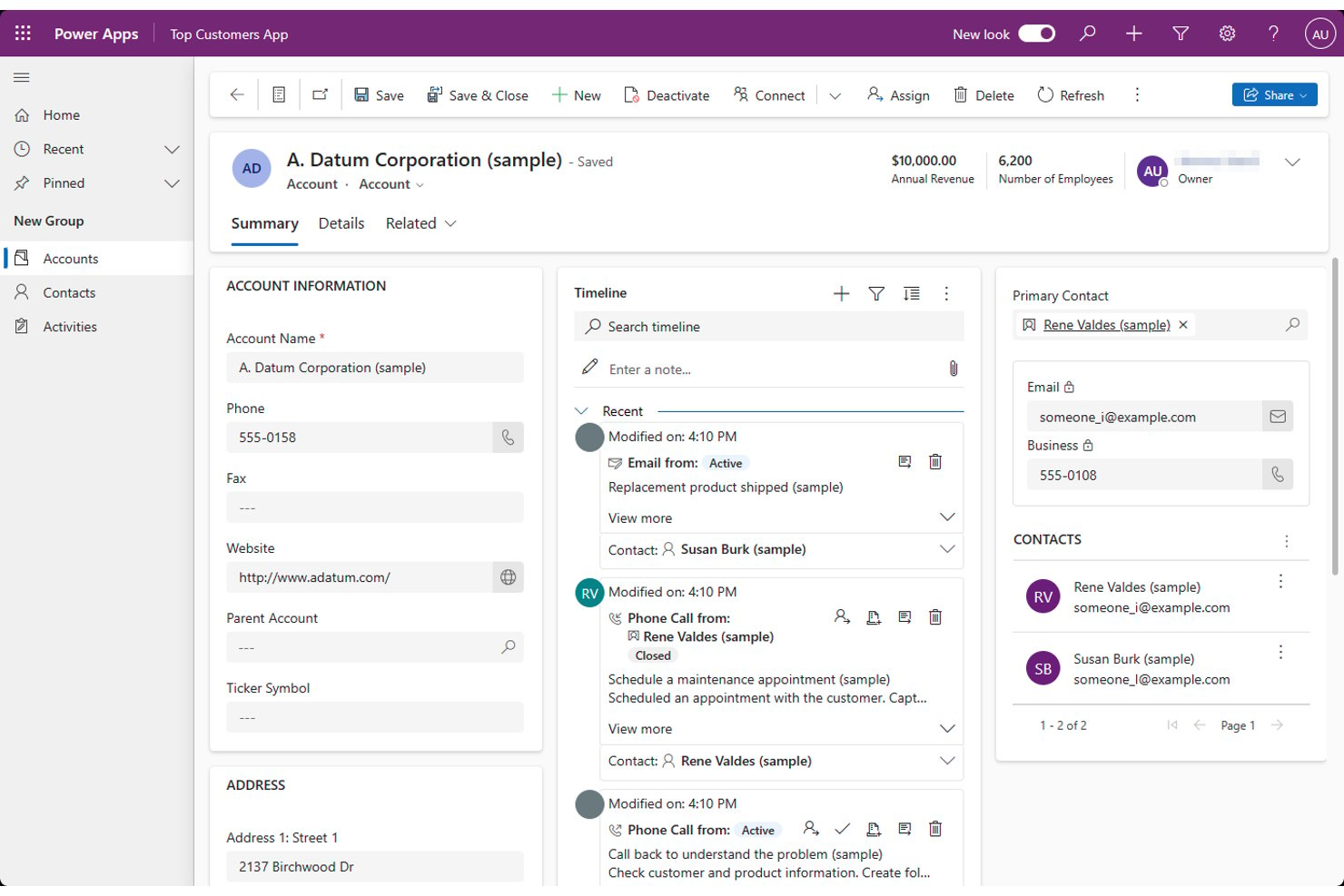
Microsoft Power Apps gives project and operations teams a low-code way to build custom business apps that replace manual data collection and connect work across Microsoft tools and other systems.
Who Is Microsoft Power Apps Best For?
Microsoft Power Apps suits IT teams and business analysts who want to build AI-powered business apps with low-code tools.
Why I Picked Microsoft Power Apps
I picked Microsoft Power Apps, my choice for “Best for AI-powered app development,” as a kintone alternative. Copilot can turn a plain-language process description into app screens and tables, while AI Builder can extract fields from submitted documents. I’d use both to create an intake app that routes requests and captures invoice details.
Microsoft PowerApps Key Features
- Canvas apps: Arrange controls on flexible screens to create custom forms and workflows.
- Model-driven apps: Build data-focused apps from Dataverse tables, forms, and views.
- Data connectors: Connect apps to Microsoft 365 and third-party services.
- Power Automate flows: Trigger actions such as notifications or approvals from app events.
Microsoft PowerApps Integrations
Microsoft Power Apps has built-in connectors across the Microsoft ecosystem, including Microsoft 365 and SharePoint, as well as connectors for Salesforce and SQL Server. You can also create custom connectors for REST APIs.
Pros and Cons
Pros:
- Dataverse supports structured business app data
- Rapidly digitizes approval and intake workflows
- Copilot drafts apps from plain-language requirements
Cons:
- Polished interfaces often require design workarounds
- Large datasets can slow app performance

Google Forms gives project teams a lightweight way to collect requests, feedback, and project details, helping them organize incoming information without adopting a full workflow automation platform.
Who Is Google Forms Best For?
Google Forms suits project managers and operations teams that need quick surveys to gather stakeholder input or project data.
Why I Picked Google Forms
I picked Google Forms as a kintone alternative for its stated strength: “Best for simple online surveys and data collection.” I use answer-based section branching and response validation to tailor project intake questions and reduce incomplete submissions. Response summaries and Google Sheets exports help me review stakeholder feedback and organize requests before assigning work elsewhere.
Google Forms Key Features
- Question types: Add multiple-choice, short-answer, date, and other question formats.
- File uploads: Let respondents attach files to their submissions.
- Quiz mode: Assign points, set answer keys, and provide feedback on answers.
- Collaborator access: Invite others to edit a form with you.
Google Forms Integrations
Google Forms has a built-in option to send responses to Google Sheets. It connects with Zapier and provides an API for custom integrations.
Pros and Cons
Pros:
- Validation reduces incomplete submissions
- Branching tailors questions to respondent answers
- Fast setup for project intake surveys
Cons:
- Limited form styling and branching depth
- No task ownership or workflow tracking
Jotform
Best for versatile online form building
Jotform is a no-code forms and workflow platform that helps project and operations teams collect requests, route approvals, and reduce manual follow-up without building a custom app.
Who Is Jotform Best For?
Jotform suits operations, HR, and marketing teams that need to create varied online forms without custom development.
Why I Picked Jotform
I picked Jotform as a kintone alternative for teams that build different request workflows. Its USP is “Best for versatile online form building.” I like how conditional fields can tailor an intake form to each request type, while approval workflows route submissions to the right reviewer. A product change request can collect relevant details and move directly into sign-off.
Jotform Key Features
- App integrations: Connect submissions to tools such as Slack, Google Drive, and Salesforce.
- Jotform Tables: View, organize, and update submission data in a spreadsheet-style workspace.
- PDF editor: Turn submitted data into custom PDFs, such as project briefs or service agreements.
- Payment collection: Accept payments through forms using supported payment integrations.
Jotform Integrations
Jotform lists 200+ integrations, including Slack, Google Drive, Salesforce, Google Sheets, Trello, Asana, and Zapier. It also provides an API for custom integrations.
Pros and Cons
Pros:
- Submissions convert into signable PDFs
- Approval flows route submissions for sign-off
- Conditional fields tailor request-specific intake
Cons:
- Complex forms can lag during editing
- Tables offer less depth for relational apps
Andre alternativer til Kintone
Nedenfor finner du en liste over flere alternativer til Kintone som jeg har valgt ut. Selv om de ikke kom med blant de ti beste, er de fortsatt verdifulle og verdt å undersøke nærmere.
- Quickbase
For dynamic work and project management
- Smartsheet
For project management and collaboration
- Wrike
For real-time project visibility and tracking
- Airtable
For scalable data and development
- TeamDesk
For creating custom databases without coding
- AppSheet
For building custom mobile apps
- Insightly
For CRM with project management features
- ClickUp
For customizable workflows and task management
- monday.com
For team collaboration and project tracking


Relaterte vurderinger av prosjektstyringsprogramvare
Hvis du fortsatt ikke har funnet det du leter etter her, kan du se nærmere på disse andre relaterte verktøyene som vi har testet og vurdert:
- Prosjektstyringsprogramvare
- Programvare for ressursstyring
- Programvare for automatisering av arbeidsflyter
- Programvare for tidsregistrering
- Programvare for oppgavehåndtering
- Samarbeidsverktøy
- Gantt-diagramverktøy
- Produktivitetsverktøy
- Programvare for prosjektsporing
- Programvare for prosjektplanlegging
How I Evaluate Kintone Alternatives
I split my evaluation into two layers: the baseline a tool must clear—no-code app building, workflow automation, custom databases—and the differentiators that matter for project teams.
Core Functionality (Table Stakes For This List)
When I'm selecting tools for my list, I rank each one on a scale from 0 (does not offer the functionality) to 5 (excels in this area) for each core functionality listed below. Then, I calculate the tool's total score into a percentage. Each tool needs to achieve a minimum total score of 65% to be considered for inclusion.
- No-Code App Building: I check whether teams can build custom apps—like a project intake form or a client request tracker—through visual tools rather than code.
- Task & Project Tracking: Each tool should let you assign tasks, set deadlines, and track progress across views like Kanban boards, Gantt charts, or timelines.
- Workflow Automation: I look for rule-based triggers and actions, such as automatically reassigning a task when a status changes or routing an approval to a team lead.
- Custom Databases & Fields: Teams need to structure project data their own way, so I evaluate how each tool handles custom fields, linked records, and relational data.
- In-Context Team Collaboration: Comments, @mentions, and activity feeds tied directly to tasks or records matter more here than a standalone chat feature.
- Integrations & API Access: I evaluate native connections to tools like Slack, Google Workspace, and Jira, plus whether a REST API and webhook support are available.
Once I have a list of tools that meet this criteria, I consider what sets each platform apart.
Differentiating Factors (What Sets Vendors Apart)
Here's how I compare and contrast different vendors:
Standout Features
Custom dashboards matter because PMO leads need to roll up project health across teams without exporting data to a spreadsheet. I also look at portfolio and resource management features—seeing workload across projects helps operations managers spot overallocation before it causes delays. Guest access is another factor I weigh, since cross-functional teams often collaborate with contractors or clients who shouldn't need a full license.
Beyond Features
Pricing transparency matters when you're scaling from a small team to a department-wide rollout—I check whether per-user costs stay predictable as headcount grows. Onboarding support is another factor I evaluate, since deploying a no-code platform across multiple departments often requires guided setup, templates, or access to certified consultants. I also consider team size and industry fit, because a tool built for enterprise IT teams may overwhelm a 10-person marketing group.
Hvorfor se etter et alternativ til Kintone?
Selv om Kintone er en verdsatt programvare, dekker den kanskje ikke alle behovene du har for at den skal være den beste løsningen for deg. Derfor er dette noen vanlige grunner til at du kanskje ser etter et alternativ til Kintone:
- Kostnad: Kintones prisstruktur passer kanskje ikke for alle virksomheter, spesielt de med begrensede budsjetter. Hvis du synes kostnaden er for høy, kan det hende du må se etter rimeligere alternativer som tilbyr lignende funksjonalitet.
- Tilpasning: Selv om Kintone tilbyr enkelte tilpasningsmuligheter, er de kanskje ikke egnet for selskaper som trenger mer omfattende tilpasningsalternativer. Prøv derfor å se etter et alternativ som gir større fleksibilitet og kontroll over utformingen og funksjonaliteten til applikasjonene.
- Brukergrensesnitt: Hvis Kintones brukergrensesnitt føles utdatert eller tungvint, kan brukerne ønske seg en plattform med et mer intuitivt og moderne design. Et elegant og brukervennlig grensesnitt kan forbedre produktiviteten og brukeradopsjonen betydelig, noe som kan føre til et bytte.
- Integrasjon: Kintone integreres kanskje ikke sømløst med annen viktig programvare og andre verktøy som brukes i organisasjonen din, og det er helt greit. Virksomheter som trenger mer avanserte integrasjonsmuligheter for å effektivisere prosessene sine, kan utforske andre plattformer som tilbyr bedre tilkobling til den eksisterende teknologiske infrastrukturen.
- Skalerbarhet: Etter hvert som en virksomhet vokser, kan behovene overstige kapasiteten til de eksisterende systemene. Hvis Kintone ikke skalerer effektivt for å møte økte krav eller større kompleksitet, kan et alternativ være et bedre valg.
Det er viktig å velge riktig verktøy for prosjektstyring og samarbeid for å maksimere produktiviteten og sikre smidig drift i teamet. Med et Kintone-alternativ kan du finne de spesifikke funksjonene og den fleksibiliteten organisasjonen din trenger for å lykkes i et stadig skiftende forretningslandskap.
Viktige funksjoner du bør se etter i Kintone-alternativer
Her er noen viktige funksjoner i Kintone som den alternative programvaren bør kunne gjenskape eller forbedre for å være et godt valg:
- Tilpassbare databaser: Tilpassbare databaser gjør det mulig for virksomheter å skreddersy systemer for datahåndtering etter egne behov, slik at all relevant informasjon er organisert og tilgjengelig uten å være avhengig av flere separate programvareløsninger. Denne funksjonen er viktig for effektiv datasporing på tvers av ulike avdelinger og prosjekter, og gir bedre oversikt over driften som helhet.
- Applikasjonsbygging uten kode: Muligheten til å bygge og tilpasse applikasjoner ved hjelp av et dra-og-slipp-grensesnitt uten behov for programmeringskunnskaper gjør det mulig for teammedlemmer uten teknisk bakgrunn å bidra til utviklingen av verktøy. Dette bidrar til raskere implementering av forretningsløsninger og fremmer innovasjon i teamene.
- Arbeidsflytstyring: Å organisere komplekse prosesser i automatiserte arbeidsflyter som enkelt kan spores fra start til slutt, bidrar til å effektivisere driften og redusere risikoen for feil. Denne funksjonen sørger for at prosjektene utvikler seg smidig, og gjør det mulig for ledere å følge opp oppgaver effektivt, noe som forbedrer produktiviteten og ansvarsforholdene.
- Samarbeidsverktøy: Innebygde samarbeidsverktøy forbedrer kommunikasjonen mellom teammedlemmer ved å la dem dele data, merke kolleger og ha viktige samtaler i forbindelse med arbeidet. Disse verktøyene legger til rette for et mer integrert og responsivt arbeidsmiljø, noe som er avgjørende i et hektisk forretningsmiljø.
- Automatiserte varsler: Automatiserte varsler er avgjørende for å holde teammedlemmer informert om kommende frister og oppgavetildelinger uten manuell oppfølging. Denne funksjonen bidrar til å sikre at ingenting blir oversett, opprettholder fremdriften i prosjektene og forbedrer tidsstyringen på tvers av teamene.
- Gjesteområder: Muligheten til å opprette gjesteområder for samarbeid med eksterne personer som ikke er faste brukere av plattformen, er viktig for prosjekter som involverer kontraktører, kunder eller partnere. Denne fleksibiliteten forbedrer det eksterne samarbeidet, samtidig som man beholder kontrollen over data og prosjektstyring i kjerneteamet.
- Datavisualisering: Verktøy for datavisualisering, som grafer og diagrammer, gir umiddelbar innsikt i virksomhetens resultater og gjør det enklere å følge fremdriften mot målene. Denne funksjonen er avgjørende for å kunne ta informerte beslutninger raskt, slik at teamene proaktivt kan justere strategiene basert på sanntidsanalyse av data.
- Tilgangskontroller: Det er nødvendig å innføre detaljerte tillatelseskontroller for å styre hvem som kan få tilgang til og endre data, slik at dataintegritet og sikkerhet opprettholdes. Denne funksjonen sørger for at sensitiv informasjon beskyttes, og at kravene i regelverket overholdes.
- Mobil tilgang: Mobil tilgang gjør det mulig for teammedlemmer å bruke databaser, applikasjoner og arbeidsflyter fra hvor som helst, slik at de kan være produktive selv når de ikke sitter ved skrivebordet. Denne fleksibiliteten er avgjørende for moderne virksomheter med mobile eller fjernarbeidende medarbeidere.
- Integrasjonsmuligheter: Muligheten til å integrere med andre verktøy og tjenester gjennom API-er utvider funksjonaliteten til en plattform og gjør den til en mer strategisk løsning. Denne samhandlingen er avgjørende for å optimalisere arbeidsflyter og forbedre produktiviteten totalt sett.
Når du vurderer alternativer til Kintone, er det viktig å ta hensyn til en plattform som ikke bare oppfyller, men potensielt også overgår funksjonene Kintone tilbyr. Ved å velge en plattform som utmerker seg på disse områdene, får teamet ditt verktøyene som trengs for å lykkes i et konkurransepreget forretningslandskap.