

10 beste alternative verktøy til ClickTime for tidsregistrering i 2026

Kortliste over de beste alternativene til ClickTime


Hvis du opplever at ClickTime ikke er det riktige verktøyet for prosjektstyring og tidsregistrering for teamet ditt, finnes det mange alternativer til ClickTime som kan hjelpe deg med timelister, prosjektbudsjettering og prosjektrapportering.
ClickTime mangler kanskje avansert analyse eller bestemte integrasjoner som du trenger for å dekke bruksområdet ditt, så jeg har testet og vurdert dusinvis av alternativer til ClickTime for å hjelpe deg med å finne en erstatning. Her er mine anbefalinger til de beste alternativene til ClickTime.
Hva er ClickTime?
ClickTime er programvare for tidsregistrering og arbeidsstyring som virksomheter og organisasjoner kan bruke til å følge med på de ansattes arbeidstimer, administrere prosjektkostnader og forbedre produktiviteten i arbeidsstyrken.
Vanlige brukere omfatter prosjektledere, HR-medarbeidere og økonomiteam som trenger å registrere tid til fakturering, lønn og prosjektstyring. Programvaren gir innsikt i de ansattes arbeidsvaner og prosjektfremdrift, slik at du kan ta informerte beslutninger og fordele ressurser effektivt.
Why Trust Our Software Recommendations
Our team has been testing and reviewing software since 2012. As project managers ourselves, we know how difficult—and important—it is to choose the right software.
For this guide, we evaluated tools using hands-on testing and independent research, scoring tools using our selection criteria. We also draw on insights from industry thought leaders and practicing project management experts.
Our reviews reflect our human editorial judgment, not a sales pitch.
Expert reviewers:
Sammenligningstabell for alternativer til ClickTime
Denne sammenligningstabellen oppsummerer prisopplysningene for mine beste utvalgte alternativer til ClickTime:
| Tool | Best For | Trial Info | Price | ||
|---|---|---|---|---|---|
| 1 | Best for flexible time tracking | Free plan + 30-day free trial + free demo available | From $6/user/month (billed annually) | Website | |
| 2 | Best for profitability tracking across client projects | 30-day free trial + free plan available | From $9/user/month (billed annually) | Website | |
| 3 | Best for cross-platform time tracking | Free plan + 7-day free trial available | From $4.99/user/month | Website | |
| 4 | Best for team time tracking | Free plan + 14-day free trial + free demo available | From $4/user/month (billed annually) | Website | |
| 5 | Best for automatic time tracking | 14-day free trial + free plan + free demo available | From $3.99/user/month (billed annually) | Website | |
| 6 | Best for project cost accounting | Free demo available | From $13/user/month | Website | |
| 7 | Best for GovCon compliance and project billing | Not available | Pricing upon request | Website | |
| 8 | Best for professional services billing and utilization | 14-day free trial | From $10/user/month (billed annually) | Website | |
| 9 | Best for GPS and remote workforce tracking | 14-day free trial | From $10/user/month (billed annually) | Website | |
| 10 | Best for budget management | Free demo available | From $20/user/month | Website |


Vurderinger av de beste alternativene til ClickTime
Her er min detaljerte analyse av hvert av de beste alternativene til ClickTime. Hver oversikt dekker styrker og svakheter, viktige funksjoner og ideelle situasjoner for bruk av disse verktøyene.

actiTIME
Best for flexible time tracking
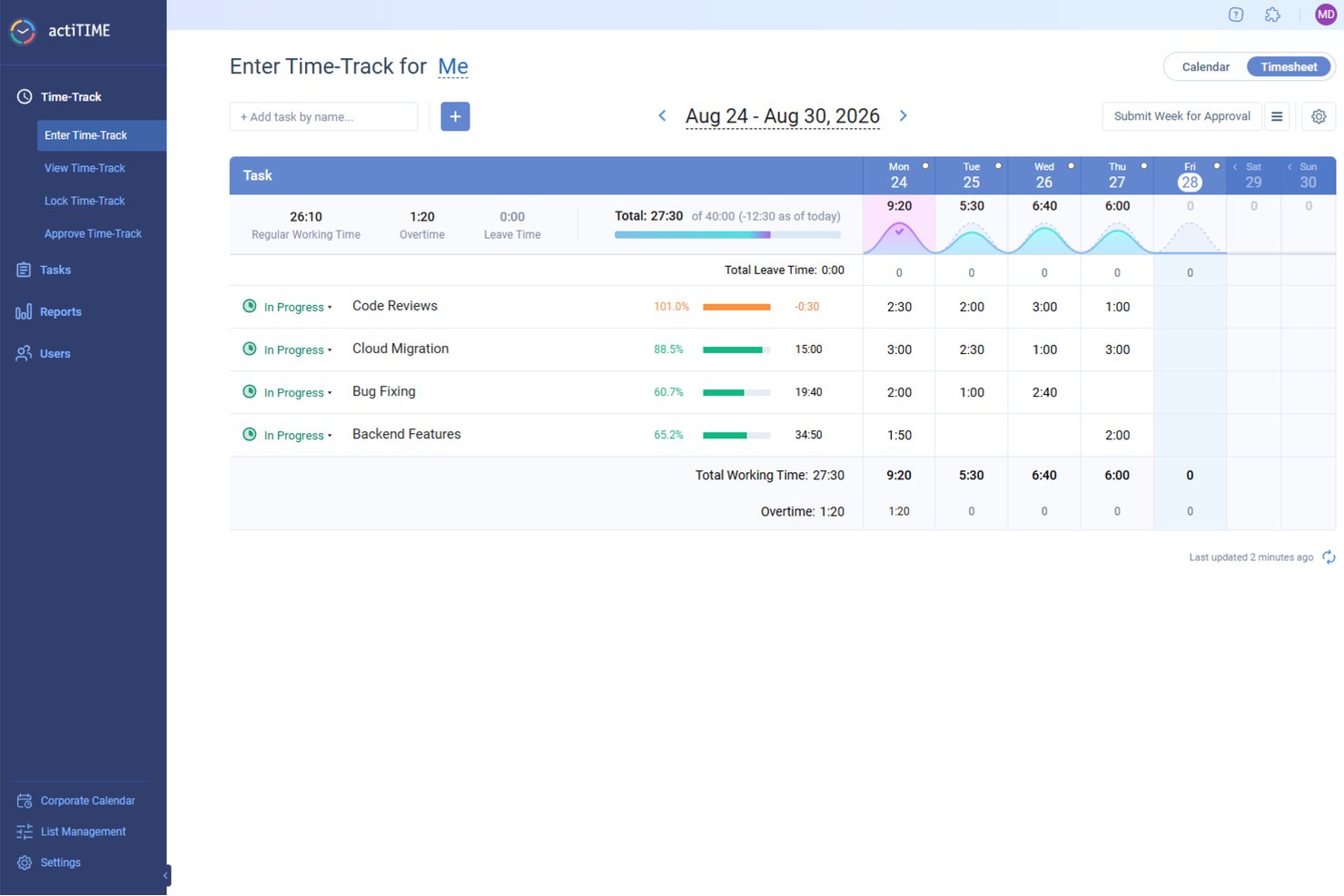
actiTIME is a time-tracking software designed to aid project management and financial oversight across various industries.
Why it's a good ClickTime alternative:
actiTIME is a practical alternative to ClickTime because it offers features that cater to diverse time tracking and project management needs. You can access flexible time tracking methods, including web timesheets, calendar views, and mobile apps, which support accurate payroll processing and billing. The tool's reporting capabilities also provide templates for performance analysis, overtime monitoring, and project profitability assessment, aiding in better resource allocation and budgeting.
Standout features and integrations:
Features include overtime calculation, which helps ensure fair compensation for remote employees working extra hours. Timesheet locking prevents employees from modifying past time entries once a deadline has passed, keeping time records accurate and reliable. Additionally, leave tracking allows remote workers to request time off directly in the system.
Integrations include QuickBooks, Zapier, actiPLANS, GitHub, Salesforce, Jira, Trello, Outlook, Evernote, Todoist, and Bamboo HR.
Pros and Cons
Pros:
- Status updates help managers monitor remote teams
- Multiple ways to track time
- Provides detailed reporting tools
Cons:
- No built-in payroll feature
- No GPS tracking for more detailed monitoring
New Product Updates from actiTIME

actiTIME Visual Hour Indicator and Time-Track Report Redesign
actiTIME adds a wave-style hour indicator to the Timesheet and Calendar views and refreshes the Time-Track report for smoother navigation and clearer visuals. For more information, visit actiTIME's official site.
Beebole
Best for profitability tracking across client projects
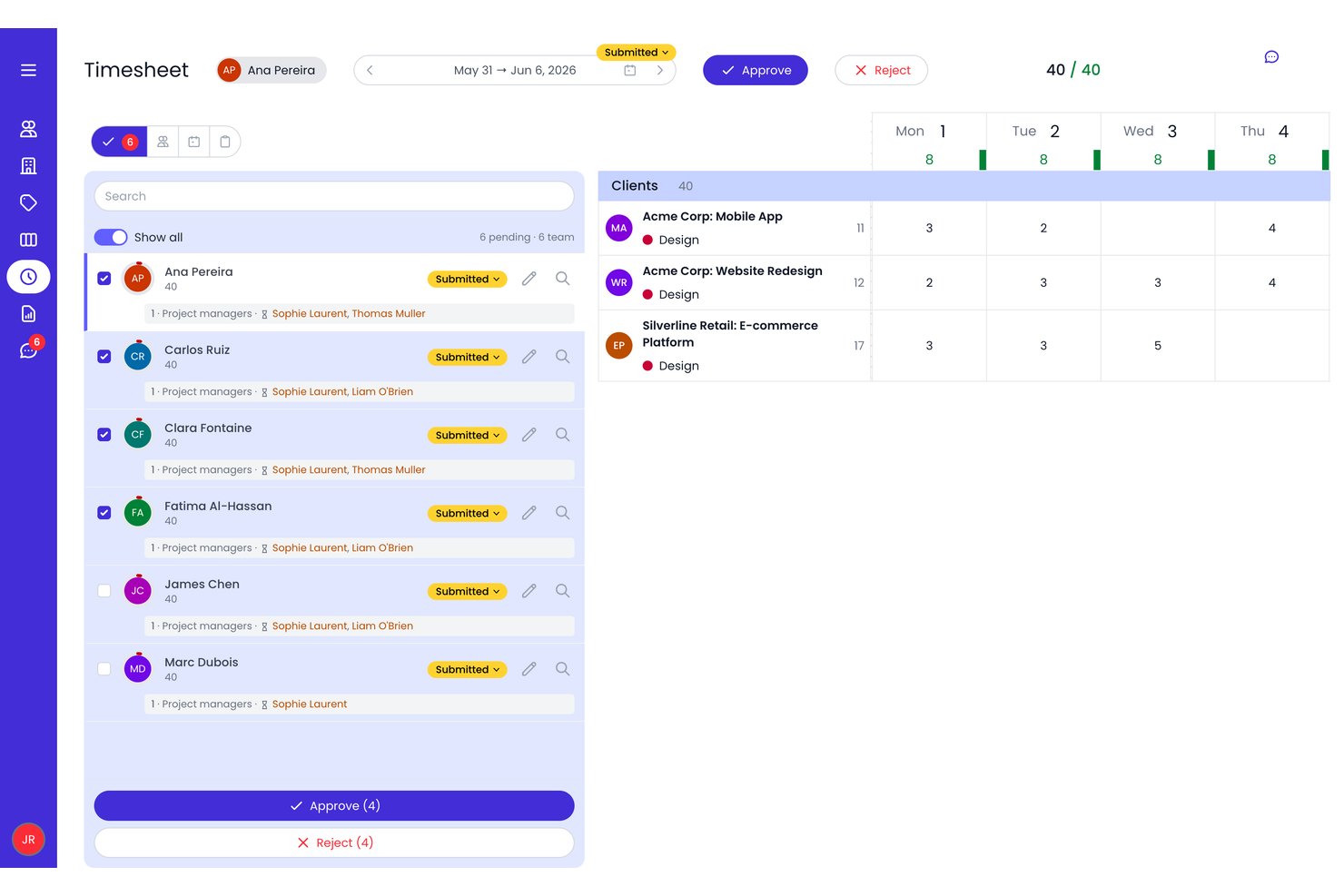
Beebole is a time tracking and project financials platform that combines billable and non-billable hour logging, multi-level budget management, resource capacity planning, and customizable profitability reporting across client projects.
Who Is Beebole Best For?
Beebole is a strong fit for agencies and consulting firms that need to track billable hours, manage multi-level project budgets, and monitor profitability across a client portfolio.
Why I Picked Beebole
Beebole earns its spot on my shortlist because of how precisely it layers billing and cost rates across every level of a client project. I like that you can set separate bill rates and cost rates at the person, task, or subproject level, which means margin reporting reflects reality rather than averages. Real-time budget vs. actual tracking with overrun alerts makes it easy to catch a project trending over before it eats into profit.
Beebole Key Features
- AI-suggested time entries: Beebole uses past logging patterns and activity data to suggest time entries, while calendar events can be imported separately to help populate timesheets.
- Skill-tagged resource planning: Assign and filter bookings by skill tags across Gantt, Staffing, and Kanban views, with availability calculated against real PTO and work schedules.
- Multi-level timesheet approvals: Configure approval workflows across multiple management levels, with automated reminders, period locking, and a full audit trail of every change.
- Google Sheets and Excel live data push: Link a spreadsheet to a saved Beebole report using the Google Sheets add-on or Excel add-in, then refresh the report data from within the spreadsheet.
Beebole Integrations
Beebole offers native integrations with Google Calendar, Outlook Calendar, Google Sheets, Excel, Asana, Linear, monday.com, QuickBooks Online, Xero, and BambooHR. Its open API and webhooks support custom connections; Jira is listed as coming soon.
Pros and Cons
Pros:
- Skill-tagged resource planning with live availability
- Real-time budget vs. actuals with alerts
- Tracks profitability at every project level
Cons:
- Advanced budgeting requires top tier plan
- No native client invoicing capabilities

Clockify
Best for cross-platform time tracking

Clockify is a time-tracking and project-management tool. It stands out as the best option for unlimited users and projects, offering scalability without additional costs.
Why it's a good ClickTime alternative:
I selected Clockify because it gives digital project managers continuous visibility into team bandwidth and logged hours across every major operating system. With dedicated apps for web, desktop, and mobile, your distributed project team can maintain accurate timesheets whether they work in an office or on the go. Its real-time activity dashboards, offline tracking support, and flexible rate settings make it easy to align daily tasks directly with client deliverables and project estimates.
Standout features and integrations:
Features include a timer, timesheet, kiosk, calendar, and auto tracker. The tool also provides detailed reporting tools, project management capabilities, and team management features. It caters to various industries and use cases, making it versatile for different business needs.
Integrations include Asana, Trello, Notion, QuickBooks, Google Calendar, Outlook, Slack, GitHub, GitLab, Basecamp, ClickUp, and Zendesk.
Pros and Cons
Pros:
- Flexible billing options with annual and monthly plans
- Free plan available with essential features
- Native apps for mobile and desktop
Cons:
- No offline mode for the web version
- Limited customization options for reports on the free plan

My Hours
Best for team time tracking

My Hours is cloud-based time-tracking software designed for team collaboration. It's best for team time tracking because it offers a suite of features for efficiently managing multiple users and projects.
Why it's a good ClickTime alternative:
I chose My Hours for the list because it provides tools for teams to track time, manage tasks, and monitor budgets. Its focus on team functionality makes it a good alternative to ClickTime, especially for those who require collaborative time-tracking capabilities.
Standout features and integrations:
Features include budget alerts, task budgets, and the ability to assign tasks to team members, which are essential for managing team projects and ensuring profitability. The tool also supports billable rate settings per project or team member, simplifying the billing process.
Integrations include QuickBooks, Zapier, Trello, Asana, Slack, Jira, GitHub, Basecamp, Todoist, and Google Calendar.
Pros and Cons
Pros:
- Priority support for Pro users
- Budget tracking and alerts
- Comprehensive team management features
Cons:
- Some users report occasional software glitches
- Limited to 5 users on the free plan

TimeCamp
Best for automatic time tracking

TimeCamp is a versatile time-tracking tool that simplifies recording work hours. It is best for automatic time tracking because it captures time spent on tasks without manual input.
Why it's a good ClickTime alternative:
I chose TimeCamp for the list because of its automatic time-tracking capabilities, which make it a strong alternative to ClickTime. Its ability to run quietly in the background, capturing every minute spent on tasks, allows users to focus on their work without the distraction of manual time entries.
Standout features and integrations:
Features include its time-tracking functionality, which is noteworthy as it enables users to track time without manual intervention. The tool also provides detailed reports essential for analyzing productivity and managing project budgets effectively.
Integrations include Trello, Asana, Jira, QuickBooks, Google Calendar, Slack, Xero, Microsoft Teams, Todoist, and Salesforce.
Pros and Cons
Pros:
- Integrates with a wide range of popular tools
- Detailed reporting for productivity analysis
- Automatic time tracking reduces manual effort
Cons:
- Some users may find the interface less intuitive than competitors
- Limited customization options for reports

Journyx
Best for project cost accounting
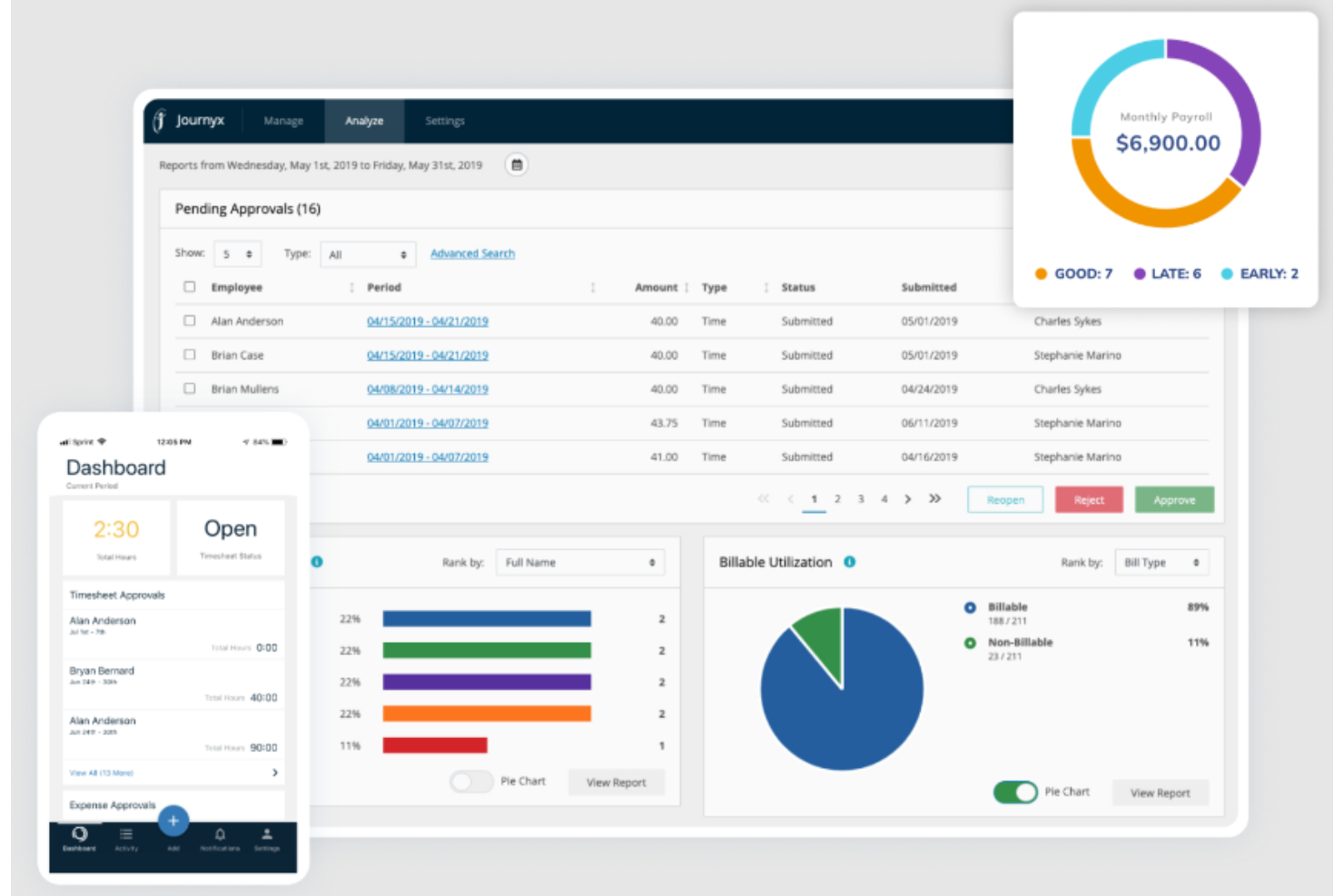
Journyx is a project time tracking solution that combines timesheet management, multi-level approval workflows, resource capacity planning, and rate-based billing and payroll reporting.
Who Is Journyx Best For?
Journyx fits teams that need to tie billable hours directly to project costs, making it a strong choice for project-driven organizations managing rate-based billing and payroll reporting.
Why I Picked Journyx
I picked Journyx as one of the best because it handles project cost accounting in a way most time tracking tools simply don't. I particularly like how rate policies can be set at the user, project, or project-activity level, so bill rates and pay rates calculate automatically against logged hours. The Scheduled Project Status Reports then show cost-to-date alongside actual versus scheduled hours, giving you a real-time read on where a project stands financially before invoices go out.
Journyx Key Features
- Multi-level approval workflows: Configurable approval chains pull department and function data from ERP, HR, or payroll systems to route timesheets automatically.
- DCAA-compliant timekeeping tools: Daily email reminders, an audit log viewer, configurable printable timesheet reports, and data validation support government contract timekeeping requirements.
- Mobile time and expense entry: Employees can log time, record reimbursable expenses, and submit for approval directly from iOS or Android devices.
- Scheduled Project Status Reports: Reports display actual versus scheduled hours alongside cost-to-date, giving you a financial and timeline snapshot across active projects.
Journyx Integrations
Journyx offers native integrations with ADP, Paychex, Microsoft Project, Microsoft Dynamics 365 Business Central, and Microsoft Dynamics 365 Finance & Operations. It also supports REST, SOAP, and Reportlink APIs for custom connections, plus Zapier.
Pros and Cons
Pros:
- DCAA audit tools support contract timekeeping
- Resource views help managers plan workload
- Project reports clarify costs and billing
Cons:
- Reporting experiences vary across users
- Timesheet corrections can require manager rejection

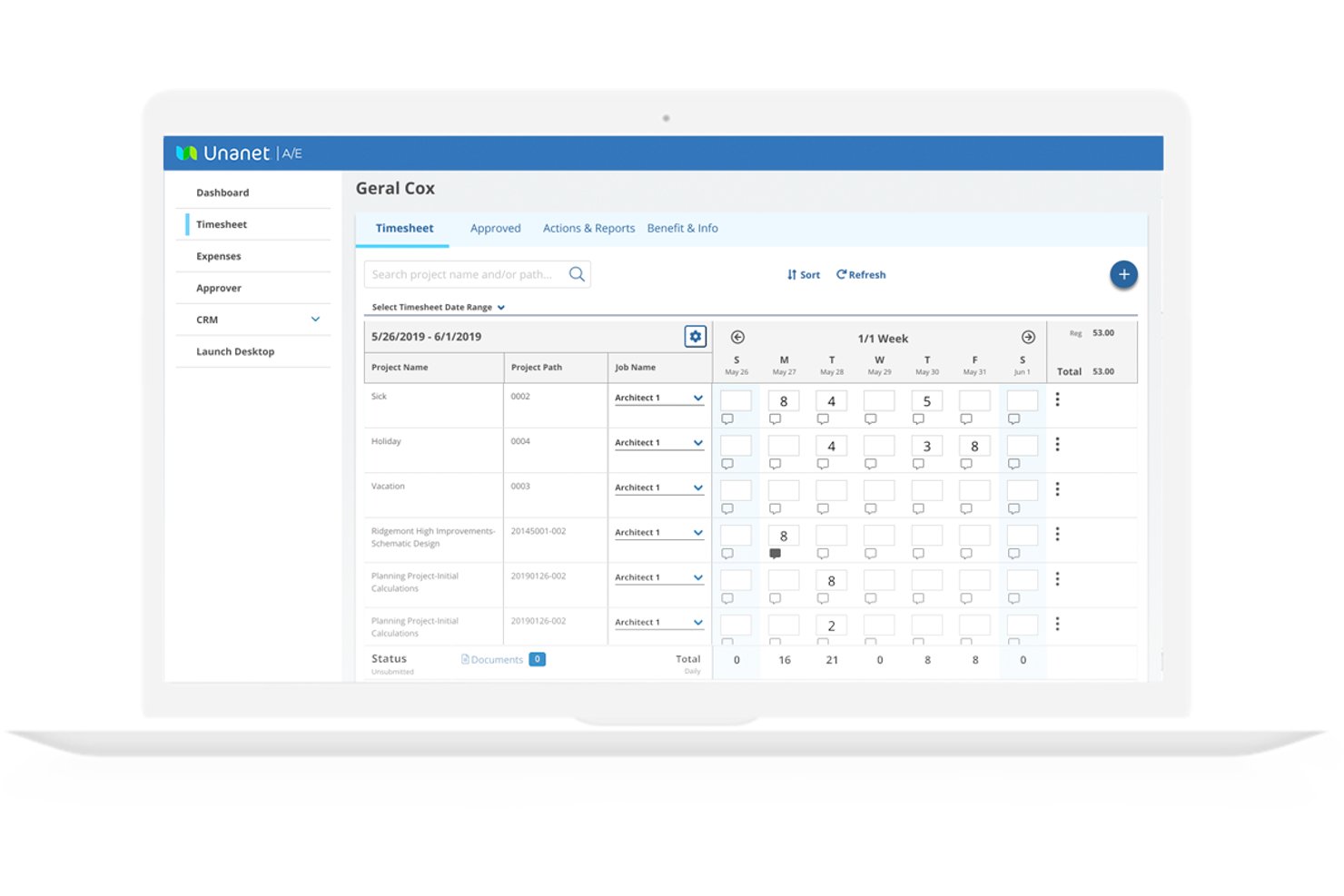
Unanet ERP GovCon is a project-based ERP platform built for government contractors that connects time and expense tracking, project accounting, contract management, resource planning, and compliance reporting in one system.
Who Is Unanet Best For?
Unanet ERP GovCon is a strong fit for government contractors who need time tracking, project billing, and DCAA compliance managed in one system.
Why I Picked Unanet
I picked Unanet as one of the best because it's purpose-built for government contractors who need DCAA-compliant timekeeping and project billing in one place. I love that it blocks advance time entry on government projects, maintains a full change history, and generates floor-check reports automatically. Contract funding alerts notify your team when burn hits a set threshold, like 75% of funded value, so you're never caught off guard mid-performance period.
Unanet Key Features
- Mobile time and expense capture: Employees can log time and submit expenses with receipt photos from iOS or Android, including offline with automatic upload on reconnect.
- Scenario-based resource planning: Teams can build multiple resource plan sets, lock a baseline, and compare alternative staffing scenarios before a contract award.
- Multi-contract-type billing: The system handles time-and-materials, firm-fixed-price, cost-plus, and hybrid contracts with billing and revenue recognition built in.
- 100+ pre-built integrations: Unanet Connect links to payroll systems like ADP, Paychex, and Workday, plus accounting tools like QuickBooks, with bi-directional data sync.
Unanet Integrations
Unanet Connect offers 100+ pre-built integrations, including ADP, Paychex, Workday, UKG, Salesforce, and HubSpot, with bi-directional employee-information sync for payroll providers. Enterprise-grade APIs support custom connectivity.
Pros and Cons
Pros:
- Dashboards show project costs and profitability
- DCAA controls support compliant timekeeping
- Project-linked time helps reduce spreadsheet errors
Cons:
- Setup can require administrator or support help
- Reports can be difficult to tailor

Best for professional services billing and utilization
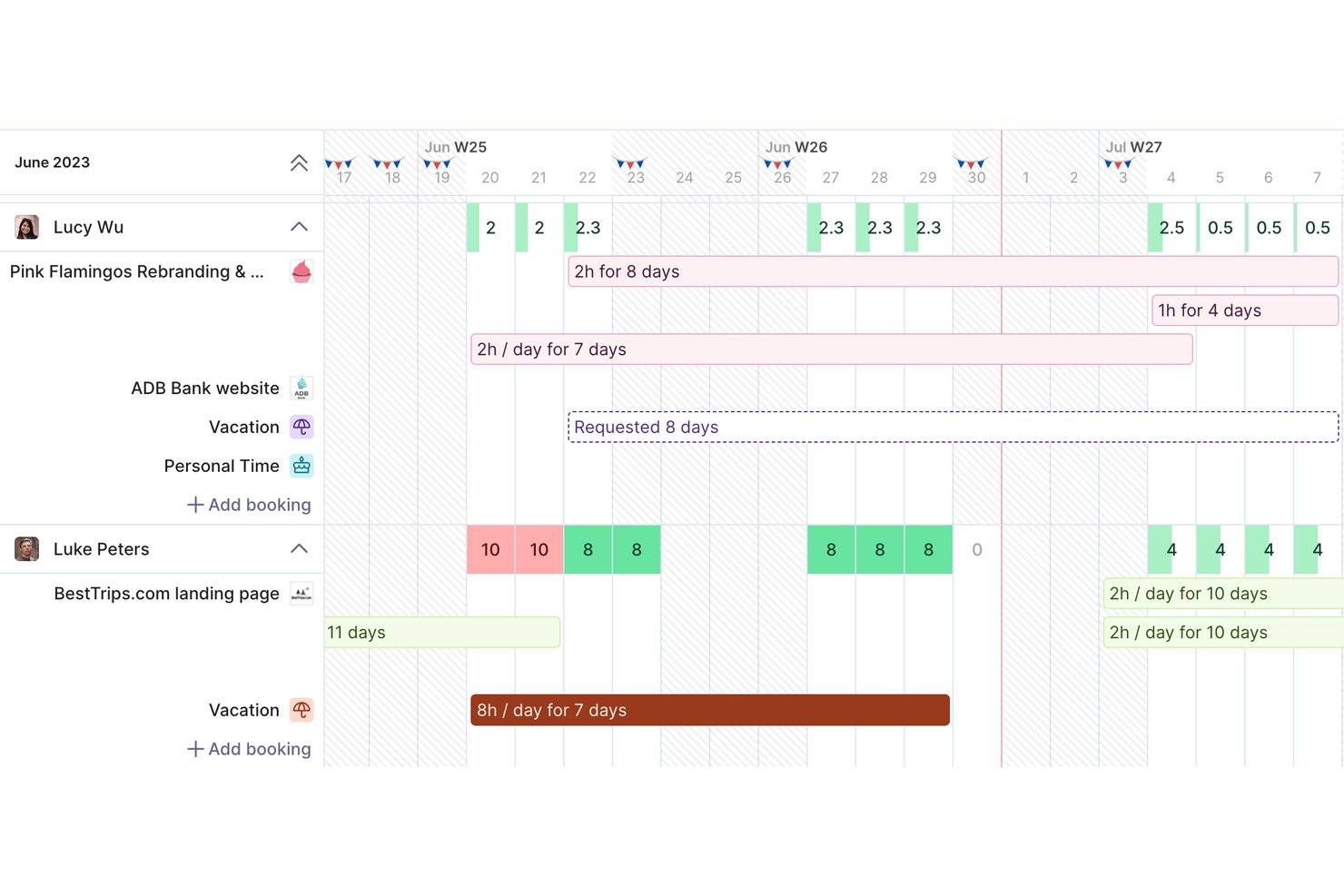
Productive is a professional services automation platform that combines time tracking, resource planning, project budgeting, invoicing, and financial reporting in one place.
Who Is Productive Best For?
Productive is a strong fit for agencies and consulting firms that need to connect resource planning, project delivery, and client billing in a single platform.
Why I Picked Productive
I picked Productive as one of the best because it's the only tool on this list that ties time entries directly to project budgets, profitability, and invoicing in a single workflow. When a team member logs hours against a budget, those hours immediately update cost tracking and budget alerts, so I can see at a glance whether a retainer or fixed-price engagement is on track. I especially like the Scenario Builder, which lets me model resource and budget scenarios before committing to a deal.
Productive Key Features
- Multi-approver timesheet workflows: Assign multiple approvers to time entries, choosing between requiring all approvers or just one to finalize approval.
- AI-assisted time entry: Use AI to match calendar events to projects and services, helping team members fill timesheets faster.
- Expense and purchase order management: Record and categorize expenses, track approval and payment status, and link purchase orders directly to project budgets.
- 50+ agency report templates: Access a library of pre-built report templates covering utilization, profitability, and project financials.
Productive Integrations
Productive offers native integrations with QuickBooks, Xero, NetSuite, Sage, Jira, Google Calendar, Slack, Personio, and BambooHR. It provides a JSON:API, webhooks, and connections to over 1,000 apps through Zapier.
Pros and Cons
Pros:
- Agency reports clarify utilization and margins
- Makes team capacity visible across projects
- Connects tracked hours to project profitability
Cons:
- Workload view misses uneven daily allocations
- Past-date timer entries require manual logging
New Product Updates from Productive
Productive Adds Voice Dictation, Slack Connector, Proposals, and Overtime
Productive adds voice dictation, a Slack Connector, proposal controls, and overtime tracking. These updates support faster AI interactions, client proposals, and time management. For more information, visit Productive’s official site.

Hubstaff
Best for GPS and remote workforce tracking

Hubstaff is a time-tracking and workforce management tool. It's best for GPS and remote workforce tracking due to its location-based services and tools for managing distributed teams.
Why it's a good ClickTime alternative:
I chose Hubstaff for the list because of its remote team features, including GPS tracking, which is essential for businesses with a mobile workforce. Its ability to provide detailed insights into team productivity makes it a standout ClickTime alternative.
Standout features and integrations:
Features include tracking, project cost management, workforce optimization, and employee scheduling. It also provides solutions for work order management, online invoicing, and payroll tracking, which are important for efficient business operations.
Integrations include Active Collab, Asana, Breeze, ClickUp, GitHub, GitLab, Insightly, LiquidPlanner, Mavenlink, Paymo, PivotalTracker, Podio, Redbooth, Redmine, Teamwork Projects, Trello, Unfuddle, Wrike, Zoho Projects, Slack, Zendesk, Salesforce, and QuickBooks.
Pros and Cons
Pros:
- Free 14-day trial available
- Over 30 integrations with other software
- Comprehensive-time tracking and project management features
Cons:
- GPS tracking may not be necessary for all businesses
- Limited offline features

BigTime
Best for budget management
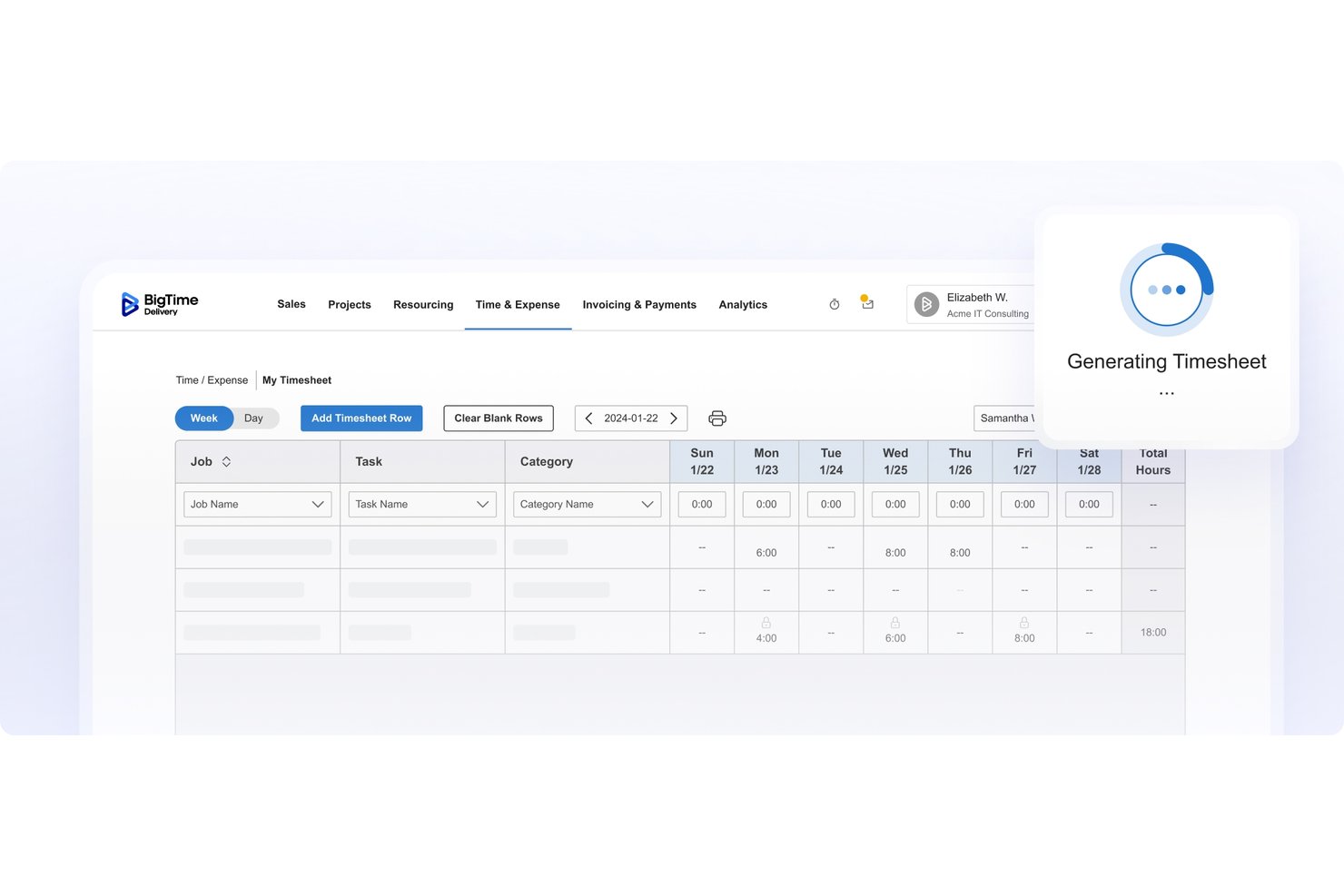
BigTime is a professional services automation (PSA) platform that covers time tracking, resource management, project budgeting, and billing and invoicing in a single system.
Who Is BigTime Best For?
BigTime is a strong fit for professional services firms—consultancies, agencies, and similar businesses—that need to track billable hours and manage project budgets in one place.
Why I Picked BigTime
I picked BigTime as one of the best because it connects project budgeting directly to how your team tracks time and bills clients. I love that you can set financial alerts that fire when burn rate, unbilled hours, or margin cross a threshold you define, so budget issues surface before they become problems. Scenario-based resource planning also lets you model allocations and project profitability before committing anyone to a project.
BigTime Key Features
- Role-based rate cards: Apply different billing rates by staffer, project role, or labor code, and reuse rate cards across multiple projects.
- Timesheet approval routing: Configure approval workflows by project team, manager, department, or team role, with bulk approve/reject actions available.
- Multi-currency invoicing: Invoice clients in multiple currencies, available on the Premier plan for firms working across international markets.
- Native accounting integrations: Connect directly with QuickBooks, Sage Intacct, and Lacerte to sync time, expenses, invoices, and client data.
BigTime Integrations
BigTime offers native integrations with QuickBooks Online and Desktop, Sage Intacct, Lacerte, Salesforce, HubSpot, Jira, and Google Calendar. Its REST-based API supports custom integrations with read/write access using XML or JSON.
Pros and Cons
Pros:
- Project time entries feed client billing
- Scenario planning forecasts staffing profitability
- Budget-to-actual project visibility
Cons:
- Invoice calculations sometimes need checking
- Custom reports can take effort to configure
Andre alternativer til ClickTime
Nedenfor finner du en liste over flere alternativer til ClickTime som jeg satte på kortlisten, men som ikke kom med på topplisten. Det kan være verdt å ta en titt på dem hvis du ikke fant det du lette etter ovenfor.
- Accelo
For end-to-end consulting engagement ops
- Kantata
For resource planning in services firms
- Toggl
For ease of use and flexibility
- Paymo
For small team workflows
- Avaza
For project collaboration
- Insightful
For productivity insights
- Monitask
With integrated productivity monitoring
- Deltek Replicon Time
For AI-powered time tracking
- Harvest
For integrated invoicing and time tracking
- TimeSolv
For legal professionals


Relatert programvare for prosjektstyring
Hvis du fortsatt ikke har funnet det du leter etter, kan du se nærmere på disse relaterte verktøyene for prosjektstyring som vi har testet og vurdert.
- Programvare for prosjektstyring
- Programvare for ressursstyring
- Programvare for arbeidsflytautomatisering
- Programvare for oppgavehåndtering
- Samarbeidsverktøy
- Gantt-diagramverktøy
How I Evaluate ClickTime Alternatives
I look at ClickTime alternatives in two layers: the baseline—like project time tracking, budget monitoring, and timesheet approvals—and the differentiators that separate great fits from average ones.
Core Functionality (Table Stakes For This List)
When I'm selecting tools for my list, I rank each one on a scale from 0 (does not offer the functionality) to 5 (excels in this area) for each core functionality listed below. Then, I calculate the tool's total score into a percentage. Each tool needs to achieve a minimum total score of 65% to be considered for inclusion.
- Project Time Tracking: I check whether hours can be logged against specific clients, projects, and tasks via both timers and manual timesheets, including on mobile.
- Budget & Cost Management: Each tool should let you set project budgets, assign bill and cost rates by role, and track actuals against estimates in real time.
- Resource & Capacity Planning: I evaluate how well a platform surfaces team availability, utilization rates, and workload distribution across active engagements.
- Timesheet Approval Workflows: Approval routing matters—I look for configurable chains where managers can review, reject, and lock timesheets on a set cadence.
- Expense Tracking: The tool should support categorized expense entries tied to projects, with receipt uploads and submission flows alongside time entries.
- Billing & Reporting: I look at whether tracked time and expenses flow into invoices and reports you can customize and share with clients or leadership.
Once I have a list of tools that meet this criteria, I consider what sets each platform apart.
Differentiating Factors (What Sets Vendors Apart)
Here's how I compare and contrast different vendors:
Standout Features
Automated time capture is a big differentiator. Tools that passively log hours from calendars and apps save consultants from reconstructing their week every Friday. I also evaluate project profitability analytics, where the strongest platforms surface real-time margins per engagement so you can course-correct before a project bleeds money. Scenario-based forecasting rounds things out, letting ops leaders model what happens to utilization if a new deal closes or a team member goes on leave.
Beyond Features
Integrations matter a lot here. I check whether time data flows into your accounting platform and PM tools without manual exports, since a disconnect between your timesheet tool and QuickBooks or Jira creates double-entry headaches. DCAA and SOC 2 compliance is another factor I weigh, especially for firms on government contracts where audit-ready timekeeping is a requirement. I also consider team size fit, because a solo consultant's needs look very different from an enterprise PMO managing hundreds of billable resources across offices.
Hvorfor se etter et alternativ til ClickTime?
Det kan være lurt å se etter et alternativ til ClickTime hvis du opplever noe av følgende.
- Kostnadshensyn: Du synes ClickTimes prismodell er for dyr for budsjettet ditt.
- Funksjonssett: Funksjonene ClickTime tilbyr, dekker ikke prosjektstyringsbehovene dine fullt ut.
- Brukeropplevelse: Du eller teamet ditt synes ClickTimes grensesnitt er lite intuitivt eller vanskelig å navigere i.
- Integrasjonsmuligheter: Du trenger et verktøy som integreres mer effektivt med annen programvare du bruker.
- Kundestøtte: Du er ikke fornøyd med nivået på kundestøtten ClickTime tilbyr.
Viktige funksjoner i ClickTime
Her er noen av de viktigste funksjonene i ClickTime, slik at du kan sammenligne hva alternative løsninger tilbyr:
- Nettbaserte timelister: Samler inn viktige data og legger til rette for nøyaktig rapportering
- Rask tidsregistrering: Lar teammedlemmer registrere timer enkelt og raskt, med funksjoner for å kopiere tidligere registreringer
- Tilpasning: Tilbyr tilpassbare timelister med ulike detaljnivåer og egendefinerte registreringsperioder
- Registrering av fakturerbare og ikke-fakturerbare timer: Lar deg merke arbeid som fakturerbart eller ikke-fakturerbart
- Stoppeklokke: Tilbyr et presist tidsregistreringsverktøy med automatisk registrering og påminnelser for brukerne
- Registrering av overtid: Registrerer automatisk overtid, hvem som jobbet ekstra, og de tilknyttede kostnadene
- Registrering av ansattes utgifter: Forenkler prosessen med å registrere og refundere ansattes utgifter
- Håndtering av fravær: Hjelper med å administrere fravær ved hjelp av tilpassede permisjonstyper og godkjenningsprosesser
- Ressursplanlegging: Hjelper med å tildele prosjekttimer og administrere ansattes tilgjengelighet
- Estimering av prosjektkostnader: Tilbyr funksjoner for å forutsi prosjektkostnader ved hjelp av ansattes satser og historiske data
- Jira-kompatibilitet: Du kan ha behov for et prosjektstyringsverktøy som er kompatibelt med Jira for bedre oppfølging av problemer og oppgaver