

10 beste alternative verktøy til Camunda for automatisering i 2026

Kortliste over de beste Camunda-alternativene


Camunda er et kraftig verktøy for styring av forretningsprosesser (BPM) som hjelper organisasjoner med å automatisere og optimalisere arbeidsflytene sine, og dermed øke effektiviteten og produktiviteten. Til tross for Camundas styrker og popularitet er det imidlertid ikke sikkert at verktøyet passer best for alle virksomhetstyper og behov. Derfor kan det hende du trenger et alternativ. Med så mange tilgjengelige alternativer kan det likevel være vanskelig å vite hvor du skal begynne.
For å hjelpe deg med å komme i gang med søket brukte jeg kunnskapen og erfaringen min innen prosjektstyringsprogramvare og menneskelige ressurser til å teste og sammenligne flere av de beste Camunda-alternativene. Mine grundige gjennomganger beskriver fordeler og ulemper, funksjoner og integrasjoner for hvert verktøy som er utviklet for å gjenskape Camundas funksjonalitet.
Enten du trenger å effektivisere driften eller administrere arbeidsflyter mer effektivt, er jeg sikker på at du finner ditt neste Camunda-alternativ i listen nedenfor.
Hva er Camunda?
Camunda er en åpen kildekode-basert BPM-programvareplattform som spesialiserer seg på arbeidsflyt- og prosessautomatisering. Den tilbyr verktøy for modellering, utføring og optimalisering av forretningsprosesser, slik at organisasjoner kan effektivisere komplekse arbeidsflyter og integrere ulike systemer og tjenester.
Programvaren brukes ofte til å automatisere forretningsprosesser, legge til rette for bedre beslutningsstyring og forbedre den generelle driftseffektiviteten.
Why Trust Our Software Recommendations
Our team has been testing and reviewing software since 2012. As project managers ourselves, we know how difficult—and important—it is to choose the right software.
For this guide, we evaluated tools using hands-on testing and independent research, scoring tools using our selection criteria. We also draw on insights from industry thought leaders and practicing project management experts.
Our reviews reflect our human editorial judgment, not a sales pitch.
Expert reviewers:
Sammenligningstabell over Camunda-alternativer
Denne sammenligningstabellen oppsummerer prisopplysningene for mine beste utvalgte Camunda-alternativer:
| Tool | Best For | Trial Info | Price | ||
|---|---|---|---|---|---|
| 1 | Best with prebuilt connectors for apps | 30-day free trial | Pricing upon request | Website | |
| 2 | Best for embedded iPaaS and app integrations | Free plan available | From $100/month | Website | |
| 3 | Best for AI-powered process automation | Free plan available | Pricing upon request | Website | |
| 4 | Best for decision-making and workflow processing | Free trial + free demo available | From $0.45/case | Website | |
| 5 | Best for intelligent document processing | Free demo available | Pricing upon request | Website | |
| 6 | Best for no-code workplace automation | Free plan + 7-day free trial + free demo available | From $22/user/month (billed annually) | Website | |
| 7 | Best for scalable workflow orchestration | Free plan available | Pricing upon request | Website | |
| 8 | Best for integrated BPM and case management | 30-day free trial | Pricing upon request | Website | |
| 9 | Best for enterprise workload assistance | Free trial available | From $2,400/month (billed annually) | Website | |
| 10 | Best for open-source process generaton | Free trial available | Pricing upon request | Website |
Anmeldelser av de beste Camunda-alternativene

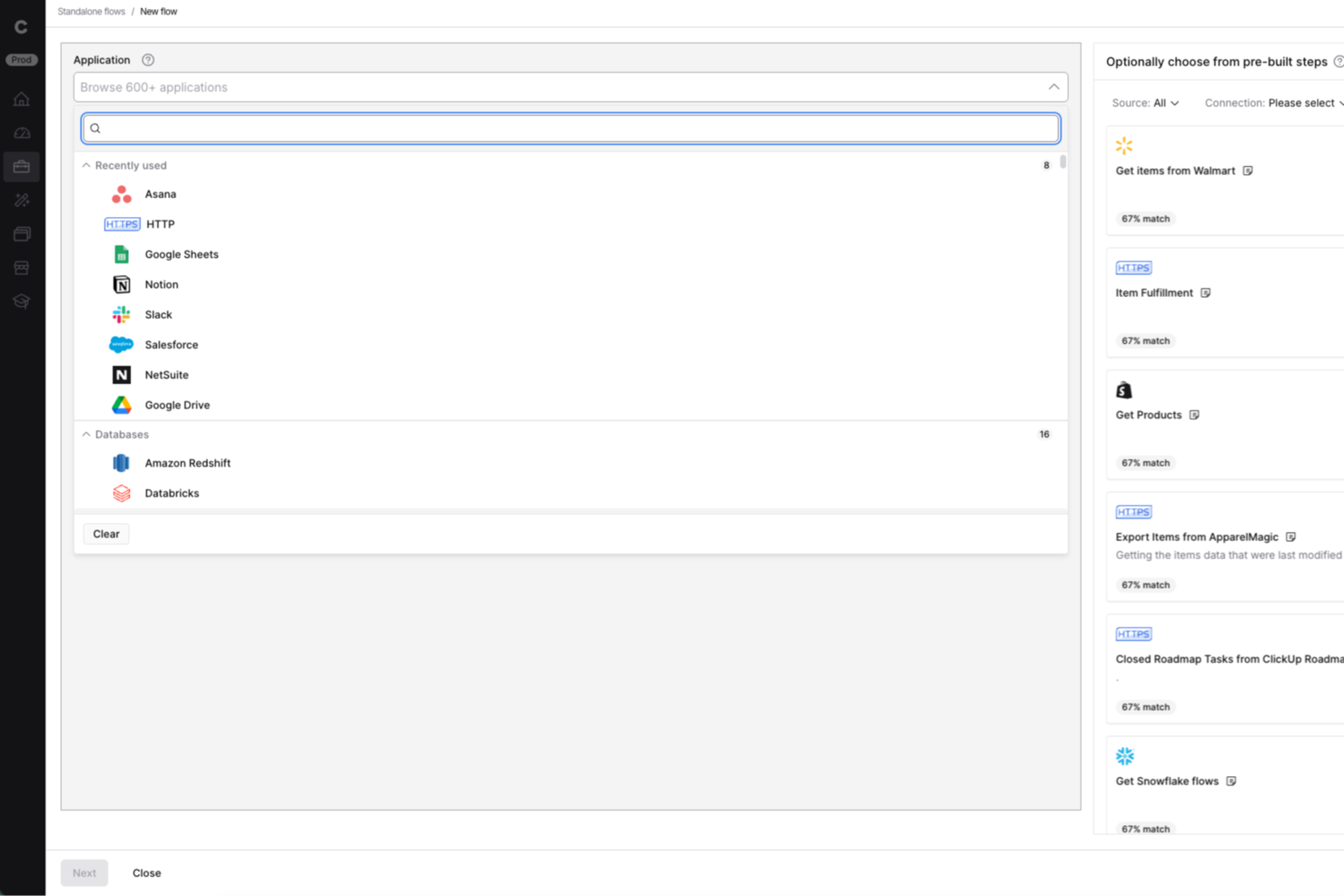
Celigo is an integration and automation platform for IT teams and operations leaders who need to connect business apps, automate workflows, and manage complex processes without heavy custom development.
Who Is Celigo Best For?
Mid-sized and enterprise IT teams who need to automate and integrate business processes across multiple cloud and on-premises applications.
Why I Picked Celigo
I picked Celigo as one of the best because I rely on its extensive library of prebuilt connectors for apps like Salesforce, NetSuite, and Shopify. My team is able to quickly automate cross-platform workflows without building custom integrations from scratch. In practice, that means we can connect core business systems and orchestrate processes across our tech stack with minimal setup.
Celigo Key Features
- Visual flow builder: Design and manage automation workflows using a drag-and-drop interface.
- Error management dashboard: Monitor, troubleshoot, and resolve integration errors in real time.
- Role-based access controls: Set granular permissions for users and teams across integrations.
- API management tools: Create, publish, and manage APIs to connect custom and legacy systems.
Celigo Integrations
Integrations include Salesforce, Microsoft Dynamics 365 Business Central, Oracle NetSuite, Walmart, SAP, Snowflake, Acumatica, ADP, Adobe, and 3PL Central.
Pros and Cons
Pros:
- Centralized error management dashboard
- Visual flow builder for process automation
- Advanced security and compliance certifications
Cons:
- Workflow versioning features are less granular
- Complex integrations may need developer support
New Product Updates from Celigo
Celigo Adds SuiteTax and Variant Publishing for Shopify–NetSuite
Celigo adds NetSuite SuiteTax support and variant-level sales channel publishing to its Shopify–NetSuite integration. These updates improve tax handling and give merchants more control over how product variants are published. For more information, visit Celigo’s official site.
 .
.
Workato
Best for embedded iPaaS and app integrations

Workato is a platform that offers embedded iPaaS for integrations with various apps. Its ability to connect products to over 1000 apps make it a versatile tool for businesses needing extensive integration capabilities.
Why it's a good Camunda alternative: Workato stands out with its advanced integration capabilities and low-code/no-code approach, which makes it accessible for both technical and non-technical users. Its ability to connect with a wide range of applications and its focus on embedded integrations make it a solid alternative to Camunda.
Standout features & integrations:
Features include enterprise iPaaS, workflow apps, data orchestration, Workbots, API management, and B2B/EDI orchestration.
Integrations include Salesforce, Slack, Marketo, NetSuite, ServiceNow, Workday, SAP, Microsoft Teams, Google Sheets, and HubSpot.
Pros and Cons
Pros:
- Strong focus on embedded integrations
- Low-code/no-code platform
- Extensive integration capabilities
Cons:
- Limited customization options for advanced users
- The learning curve for complex integrations

Appian
Best for AI-powered process automation

Appian is an advanced low-code platform designed to streamline business processes through AI-powered automation. It integrates AI to enhance process automation, making it ideal for organizations leveraging AI for operational efficiency.
Why it's a good Camunda alternative: Appian hosts advanced AI capabilities, which significantly enhance process automation. The software stands out due to its ability to integrate AI seamlessly into business processes, offering a more intelligent and efficient workflow engine automation solution than Camunda.
Standout features & integrations:
Features include robotic process automation, intelligent document processing, API integrations, and unified data fabric.
Integrations include Salesforce, Microsoft Dynamics, Oracle, SAP, Google Cloud, AWS, IBM, ServiceNow, Box, and Docusign.
Pros and Cons
Pros:
- Advanced data management capabilities
- Comprehensive low-code development
- Strong AI integration
Cons:
- Limited customization in some areas
- Steeper learning curve

Pega
Best for decision-making and workflow processing

Pega is an advanced tool for AI-driven decisioning and workflow automation. It excels in automating complex business processes and making real-time decisions using AI.
Why it's a good Camunda alternative: Pega offers a highly customizable and user-friendly interface, making it easier to design and manage complex business processes without extensive technical expertise. Additionally, the software excels in integration capabilities, seamlessly connecting with various existing systems, and provides robust customer support, ensuring a smoother experience from implementation to ongoing maintenance.
Standout features & integrations:
Features include AI-powered decisioning, workflow automation, low-code development, and enterprise-grade capabilities.
Integrations include Salesforce, SAP, Oracle, Microsoft Dynamics, AWS, Google Cloud, IBM Cloud, MuleSoft, ServiceNow, and Twilio.
Pros and Cons
Pros:
- Enterprise-grade security and scalability
- Extensive workflow automation
- Strong AI capabilities
Cons:
- Limited customization
- Complex setup for beginners

Best for intelligent document processing

ProcessMaker is a business process automation platform that offers solutions for various industries and departments. It’s designed to automate repetitive tasks and mission-critical workflows, leveraging advanced OCR capabilities to turn unstructured data into actionable insights.
Why it's a good Camunda alternative: ProcessMaker stands out due to its advanced OCR and AI-driven data extraction, significantly reducing manual data entry errors and ensuring data integrity. The software also provides strong customization options and seamless integration capabilities, allowing businesses to tailor the platform to their specific needs while ensuring compatibility with their existing systems. Lastly, ProcessMaker’s competitive pricing and responsive customer support further enhance its appeal as a versatile and accessible workflow automation solution.
Standout features & integrations:
Features include process automation, intelligent document processing, and process intelligence.
Integrations include Salesforce, Microsoft Dynamics, SAP, Oracle, Google Workspace, Dropbox, Slack, Jira, Zendesk, and QuickBooks.
Pros and Cons
Pros:
- Strong integration capabilities
- Comprehensive process automation features
- Advanced OCR and AI capabilities
Cons:
- Limited advanced analytics
- Occasional performance issues with larger workflows

Yoroflow
Best for no-code workplace automation

Yoroflow is a digital workplace platform that automates business processes with no-code tools. Its intuitive drag-and-drop interface and extensive integration capabilities help it stand out as a top Camunda alternative.
Why it's a good Camunda alternative: Yoroflow offers a strong no-code platform that simplifies workflow automation, making it accessible to users without technical skills. It offers intuitive drag-and-drop tools, extensive customization options, and seamless integration capabilities, making it ideal for businesses that need to automate processes without the complexity or high costs associated with Camunda.
Standout features & integrations:
Features include workflow design, automated routing, RESTful APIs, reporting insights, alerts, access controls, and security.
Integrations include Microsoft Teams, Microsoft 365, Slack, Stripe, Google Drive, Gmail, Dropbox Business, Mailchimp, Microsoft SharePoint, and Twilio.
Pros and Cons
Pros:
- Comprehensive security features
- Extensive integration options
- Intuitive no-code interface
Cons:
- Requires initial setup support
- Limited advanced customization


Apache Airflow is a platform for authoring, scheduling, and monitoring workflows. Its modular architecture and message queue system help teams handle an arbitrary number of workers.
Why it's a good Camunda alternative: Apache Airflow is a strong alternative to Camunda for organizations that prioritize flexibility and scalability in managing complex workflows. It excels in orchestrating and scheduling tasks across various environments, making it ideal for data engineering and other technical processes that require extensive customization and coding capabilities. Additionally, being open-source, Airflow offers cost advantages and a vibrant community for support and collaboration.
Standout features & integrations:
Features include dynamic pipeline generation, custom operators, and a pure Python interface for workflow creation.
Integrations include Google Cloud Platform, Amazon Web Services, Microsoft Azure, Alibaba Cloud OSS, Datadog, OpenFaaS, Amazon DynamoDB, AWS Glue, Amazon RDS, and Google Cloud Spanner.
Pros and Cons
Pros:
- Strong integrations
- Dynamic pipeline generation
- Scalable and flexible
Cons:
- Requires Python knowledge
- Complex setup


IBM Business Automation Workflow is an advanced tool designed to automate digital workflows, enhancing productivity and efficiency. It integrates BPM and case management to streamline business processes and improve collaboration.
Why it's a good Camunda alternative: IBM Business Automation Workflow allows users to leverage its advanced integration of BPM and case management, which makes it a solid alternative for Camunda. Its ability to consolidate and standardize task work, combined with powerful analytics and AI capabilities, sets it apart in managing complex workflows.
Standout features & integrations:
Features include dynamic content-centric applications, built-in monitoring and analytics, and seamless integration.
Integrations include IBM Watsonx Orchestrate, IBM Cloud Pak for Business Automation, IBM Process Mining, IBM Decisions, IBM Content Services, IBM FileNet, IBM Case Manager, IBM Operational Decision Manager, IBM Blueworks Live, and IBM Robotic Process Automation.
Pros and Cons
Pros:
- High availability and disaster recovery options
- Powerful analytics and AI capabilities
- Advanced BPM and case management integration
Cons:
- Requires significant training for full utilization
- Complexity in the initial setup


Control-M is an enterprise workload automation tool that simplifies and automates complex IT processes. Its strong capabilities in leading and scheduling large-scale help companies seamlessly manage complex workflows across various platforms and applications.
Why it's a good Camunda alternative: Control-M excels in handling enterprise-level workload automation, which is vital for organizations with extensive IT operations. Its ability to integrate with various platforms and applications makes it a strong contender as a Camunda alternative, especially for enterprises needing a more advanced workload management process.
Standout features & integrations:
Features include job scheduling, workflow automation, and real-time monitoring features.
Integrations include AWS, Azure, Google Cloud Platform, SAP, Oracle, IBM, Microsoft SQL Server, Hadoop, Informatica, and ServiceNow.
Pros and Cons
Pros:
- Real-time monitoring and reporting
- Supports a wide range of platforms and applications
- Comprehensive workload automation capabilities
Cons:
- Requires training for optimal use
- Can be complex to set up and configure


Bonitasoft is an open-source business process management software that offers solutions for end-to-end process orchestration, IT modernization, and delivery of complex applications. It empowers professional developers, DevOps teams, technology executives, and business executives.
Why it's a good Camunda alternative: Bonitasoft’s ability to integrate with existing solutions and provide deep visibility into processes makes it a strong contender as a Camunda alternative. Additionally, the platform's focus on empowering development teams and supporting complex use cases sets it apart from other tools. Bonitasoft also provides process insights, process automation, and related technologies such as RPA, process mining, and adaptive case management.
Standout features & integrations:
Features include its low-code capabilities for developers, continuous integration and continuous delivery (CI/CD) support, and the ability to deploy on both cloud and on-premise environments.
Integrations include Salesforce, SAP, Microsoft Dynamics, Google Drive, Dropbox, Slack, Jira, GitHub, Jenkins, and AWS.
Pros and Cons
Pros:
- Extensive partner network and community support
- Strong support for complex use cases
- Open-source and highly extensible
Cons:
- Limited out-of-the-box templates
- Requires technical expertise for customization
Andre Camunda-alternativer
Nedenfor finner du en liste over flere Camunda-alternativer som jeg valgte ut. Selv om de ikke kom med blant de 10 beste, er de fortsatt verdifulle og verdt å undersøke nærmere.
- Flowable
For low-code business management
- CANEA ONE
For comprehensive quality management systems
- Kissflow
For low-code and no-code app development
- ClickUp
For project management and task tracking
- Tallyfy
For process documentation and automation
- Decisions
For complex workflow automation
- Prismatic
For embedded integrations in SaaS
- Orkes
For cloud-native workflow orchestration


Relaterte anmeldelser av prosjektstyringsprogramvare
Hvis du fortsatt ikke har funnet det du leter etter her, kan du se nærmere på disse andre relaterte verktøyene som vi har testet og evaluert:
- Prosjektstyringsprogramvare
- Programvare for ressursstyring
- Programvare for arbeidsflytautomatisering
- Programvare for tidsregistrering
- Programvare for oppgavestyring
- Samarbeidsverktøy
- Verktøy for oppretting av Gantt-diagrammer
- Produktivitetsverktøy
- Programvare for prosjektsporing
- Programvare for prosjektplanlegging
How I Evaluate Camunda Alternatives
I evaluate in two layers: the baseline every process orchestration tool must hit and the differentiators that distinguish a microservices-native engine from a no-code BPM platform.
Core Functionality (Table Stakes For This List)
When I'm selecting tools for my list, I rank each one on a scale from 0 (does not offer the functionality) to 5 (excels in this area) for each core functionality listed below. Then, I calculate the tool's total score into a percentage. Each tool needs to achieve a minimum total score of 65% to be considered for inclusion.
- BPMN Workflow Modeling: I check whether the tool offers a visual BPMN 2.0 designer with versioning, so teams can model processes like order fulfillment or employee onboarding.
- Process Orchestration Engine: The engine needs to handle long-running, stateful workflows with retries and timers, like orchestrating multi-step payment processing across services.
- Decision Automation Support: I look for DMN decision tables or a built-in rules engine that lets you define routing logic, such as approval thresholds or claims adjudication rules.
- API & System Integrations: Each tool should offer REST APIs and connectors for linking into existing systems like ERPs, CRMs, and messaging platforms your services rely on.
- Human Task Management: I evaluate how the tool handles user tasks, including task inboxes, form builders, and assignment routing for steps that need manual review or approval.
- Process Monitoring & Analytics: Dashboards and audit logs matter here. I look for real-time visibility into active instances, SLA tracking, and bottleneck detection across running workflows.
Once I have a list of tools that meet this criteria, I consider what sets each platform apart.
Differentiating Factors (What Sets Vendors Apart)
Here's how I compare and contrast different vendors:
Standout Features
Process mining is a major differentiator. Tools that analyze event logs from your existing systems and surface optimization opportunities save weeks of manual process discovery. I also look for low-code process builders that let business analysts design and iterate on workflows without waiting on engineering. For teams running DevOps pipelines, Git-based versioning and CI/CD integration make it possible to promote process definitions across environments the same way you'd deploy application code.
Beyond Features
Deployment flexibility matters a lot here. Some teams need a fully managed SaaS option, while others in regulated industries require on-premise or hybrid setups with strict data residency controls. I also evaluate the licensing model closely, especially whether there's an open-source core or community edition your team can use to prototype before committing. Developer ecosystem rounds out my evaluation. Strong documentation, active community forums, and a healthy connector marketplace tell me a platform has staying power and won't leave your engineering team solving problems alone.
Hvorfor se etter et Camunda-alternativ?
Selv om Camunda er en robust programvare, finnes det flere grunner til at du kan ha behov for en annen løsning. Det kan hende du ser etter et alternativ til Camunda hvis du er bekymret for:
- Kostnad: Selv om Camunda tilbyr et omfattende funksjonssett, kan prisen være uoverkommelig for organisasjoner med begrensede budsjetter. Hvis kostnad er en viktig bekymring, kan det hende du må undersøke rimeligere alternativer som fortsatt dekker behovene dine for arbeidsflytautomatisering.
- Kompleksitet: Camunda er utviklet for å håndtere komplekse forretningsprosesser, noe som kan være unødvendig omfattende for enklere arbeidsflyter. Hvis organisasjonens behov er mer grunnleggende, kan du oppleve at Camundas omfattende funksjoner og bratte læringskurve er unødvendige.
- Tilpasning: Selv om Camunda tilbyr et solid rammeverk for prosessautomatisering, kan det hende du trenger mer omfattende tilpasningsmuligheter for å skreddersy programvaren nøyaktig til forretningsprosessene dine. Hvis du opplever at Camundas tilpasningsmuligheter er begrensede, kan et mer fleksibelt alternativ være nødvendig for å dekke de unike behovene dine.
- Integrasjon: Effektiv integrasjon med eksisterende systemer er viktig for sømløs arbeidsflytautomatisering. Hvis Camunda har problemer med å integreres med den nåværende programvarestakken din eller krever omfattende konfigurering, kan dette forstyrre driften din. Da kan et alternativ med bedre integrasjonsmuligheter være et mer passende valg.
- Kundestøtte: Pålitelig kundestøtte er avgjørende, særlig når du arbeider med kompleks prosessautomatisering. Hvis du opplever at Camundas kundestøttetjenester mangler når det gjelder responstid eller kompetanse, kan det hende du bør vurdere et alternativ som tilbyr mer tilgjengelig støtte.
Alternativer til Camunda tilbyr funksjoner og fordeler som Camunda kanskje mangler, for eksempel rimeligere priser, enklere grensesnitt, større tilpasningsmuligheter, bedre integrasjonsfunksjoner og bedre kundestøtte. Derfor kan disse alternativene i større grad samsvare med dine spesifikke behov og begrensninger.
Viktige funksjoner i alternativer til Camunda
Her er noen viktige funksjoner i alternativer til Camunda som den alternative programvaren bør kunne gjenskape eller forbedre for å passe godt.
- Optimalisering og styring av arbeidsflyter: Effektiv effektivisering og styring av arbeidsflyter er viktig for å opprettholde produktiviteten og minimere flaskehalser. Et alternativ til Camunda bør tilby robuste verktøy for å optimalisere arbeidsflytprosesser, slik at oppgaver fullføres effektivt og uten unødvendige forsinkelser.
- Automatisering av forretningsprosesser (BPMN): Automatisering av forretningsprosesser ved hjelp av BPMN-standarder legger til rette for konsekvent prosessgjennomføring i tråd med bransjestandarder. Et alternativ til Camunda bør støtte BPMN, slik at virksomheter kan automatisere komplekse arbeidsflyter samtidig som de følger anerkjente standarder for prosessmodellering.
- Prosessmodellering og -utforming: Muligheten til å opprette og utforme forretningsprosesser visuelt hjelper brukerne med å forstå og forbedre arbeidsflyter. Et alternativ til Camunda bør tilby intuitive verktøy for prosessmodellering, slik at team lettere kan kartlegge og forbedre driften.
- KI-verktøy for automatisering: Bruk av KI til å automatisere repetitive oppgaver kan øke effektiviteten betydelig og redusere manuelt arbeid. Et godt alternativ til Camunda bør inkludere KI-drevet automatisering for å effektivisere prosesser og gjøre det mulig for team å fokusere på mer strategiske aktiviteter.
- Prosjektstyringsverktøy: Funksjoner for oppgavestyring, oppgavetildeling, overvåking og analyse er avgjørende for å holde prosjekter på rett spor. Et alternativ til Camunda bør integrere omfattende prosjektstyringsfunksjoner for å sikre at alle deler av et prosjekt håndteres effektivt fra start til slutt.
- Integrasjon med andre plattformer: Sømløs integrasjon med populære plattformer og verktøy er avgjørende for å skape et enhetlig arbeidsflytmiljø. Et egnet alternativ til Camunda bør støtte integrasjoner med eksisterende programvare, slik at dataflyt og samarbeid på tvers av ulike systemer fungerer problemfritt.
- Forretningsregler og beslutningstaking: Definering og styring av komplekse forretningsregler gir presis kontroll over automatiserte prosesser. Et alternativ til Camunda bør tilby robuste verktøy for styring av forretningsregler, slik at organisasjoner kan ta velinformerte og konsekvente beslutninger i arbeidsflytene sine.
- Brukervennlig grensesnitt: Et tilpassbart og intuitivt brukergrensesnitt er viktig for brukeraksept og brukervennlighet. Et alternativ til Camunda bør tilby et brukervennlig grensesnitt som kan tilpasses behovene til ulike brukere, slik at plattformen er tilgjengelig for alle teammedlemmer.
- Samarbeidsverktøy: Tilrettelegging for teamsamarbeid med funksjoner for kommunikasjon og deling er avgjørende for effektivt samarbeid. Et alternativ til Camunda bør inkludere samarbeidsverktøy som lar teammedlemmer kommunisere, dele dokumenter og samarbeide sømløst om prosjekter.
- Funksjoner for kundekommunikasjon: Bedre kundeinteraksjon og kommunikasjon bidrar til å bygge sterke relasjoner og forbedre tjenesteleveransen. Et godt alternativ til Camunda bør tilby funksjoner som støtter effektiv kundekommunikasjon, for eksempel automatiske oppdateringer, tilbakemeldingssløyfer og personlig tilpassede meldinger.
Et godt alternativ bør ikke bare matche Camundas styrker, men også tilby økt fleksibilitet, brukervennlighet og forbedrede samarbeidsverktøy. Ved å fokusere på disse viktige funksjonene kan du velge en løsning som effektivt støtter organisasjonens mål for prosessstyring, samtidig som den sikrer brukervennlighet og skalerbarhet.