

10 beste AI-verktøy for produktivitet gjennomgått i 2026

Kortliste over de beste AI-verktøyene for produktivitet


AI-verktøy for produktivitet hjelper team med å effektivisere arbeidsflyter, automatisere repetitive oppgaver og fokusere på arbeid med stor effekt. Når tidsfristene er korte og prioriteringene stadig endres, kan disse verktøyene avlaste ved å organisere prosjekter, oppsummere oppdateringer og gjøre den daglige oppgavehåndteringen mer effektiv.
Jeg har testet og vurdert dusinvis av AI-drevne plattformer for å finne verktøyene som virkelig forbedrer produktiviteten. Fra smart planlegging og oppgaveautomatisering til innsikt i sanntid og AI-skriveassistenter er hvert verktøy på denne listen utviklet for å støtte moderne team under press.
Hvorfor du kan stole på våre programvareanbefalinger
Teamet vårt har testet og anmeldt programvare siden 2012. Vi er selv prosjektledere, så vi vet hvor vanskelig og hvor viktig det er å velge riktig programvare.
I denne guiden har vi vurdert verktøyene gjennom praktisk testing og uavhengig research og gitt dem poeng ut fra våre utvelgelseskriterier. Vi bygger også på innsikt fra ledende eksperter i bransjen og erfarne prosjektledere.
Anmeldelsene våre bygger på vår egen redaksjonelle vurdering. De er ikke et salgsargument.
Ekspertanmeldere:
Sammenligningstabell for AI-verktøy for produktivitet
Denne sammenligningstabellen oppsummerer prisopplysningene for mine utvalgte AI-verktøy for produktivitet:
| Tool | Best For | Trial Info | Price | ||
|---|---|---|---|---|---|
| 1 | Best for catching up on team decisions | Free plan available | From $7.25/user/month (billed annually) | Website | |
| 2 | Best for querying time data in plain language | Free plan available; 30-day free trial; Free demo available | From $9/user/month | Website | |
| 3 | Best for automating routine team tasks | Free plan + 14-day trial available | From $9/user/month (billed annually) | Website | |
| 4 | Best for AI workflows across projects and email | Free plan + 14-day trial + demo available | From $5/user/month (billed annually) | Website | |
| 5 | Best for small business pipeline customization | Free plan available | From $7/user/month (billed annually) | Website | |
| 6 | Best for office integration | Free plan available | From $21/user/month (billed annually) | Website | |
| 7 | Best for meeting transcription | Free plan + free demo available | From $10/user/month (billed annually) | Website | |
| 8 | Best for research organization | Free demo available | Pricing upon request | Website | |
| 9 | Best for quick answers | Free demo available | From $20/month | Website | |
| 10 | Best for task automation | Free plan available | From $29/user/month (billed annually) | Website |


Anmeldelser av de beste AI-verktøyene for produktivitet
Nedenfor finner du mine detaljerte sammendrag av de beste AI-verktøyene for produktivitet som kom med på kortlisten. Anmeldelsene mine gir en detaljert gjennomgang av de viktigste funksjonene, fordeler \u0026 ulemper, integrasjoner og ideelle bruksområder for hvert verktøy, slik at du kan finne det som passer best for deg.

Slack
Best for catching up on team decisions
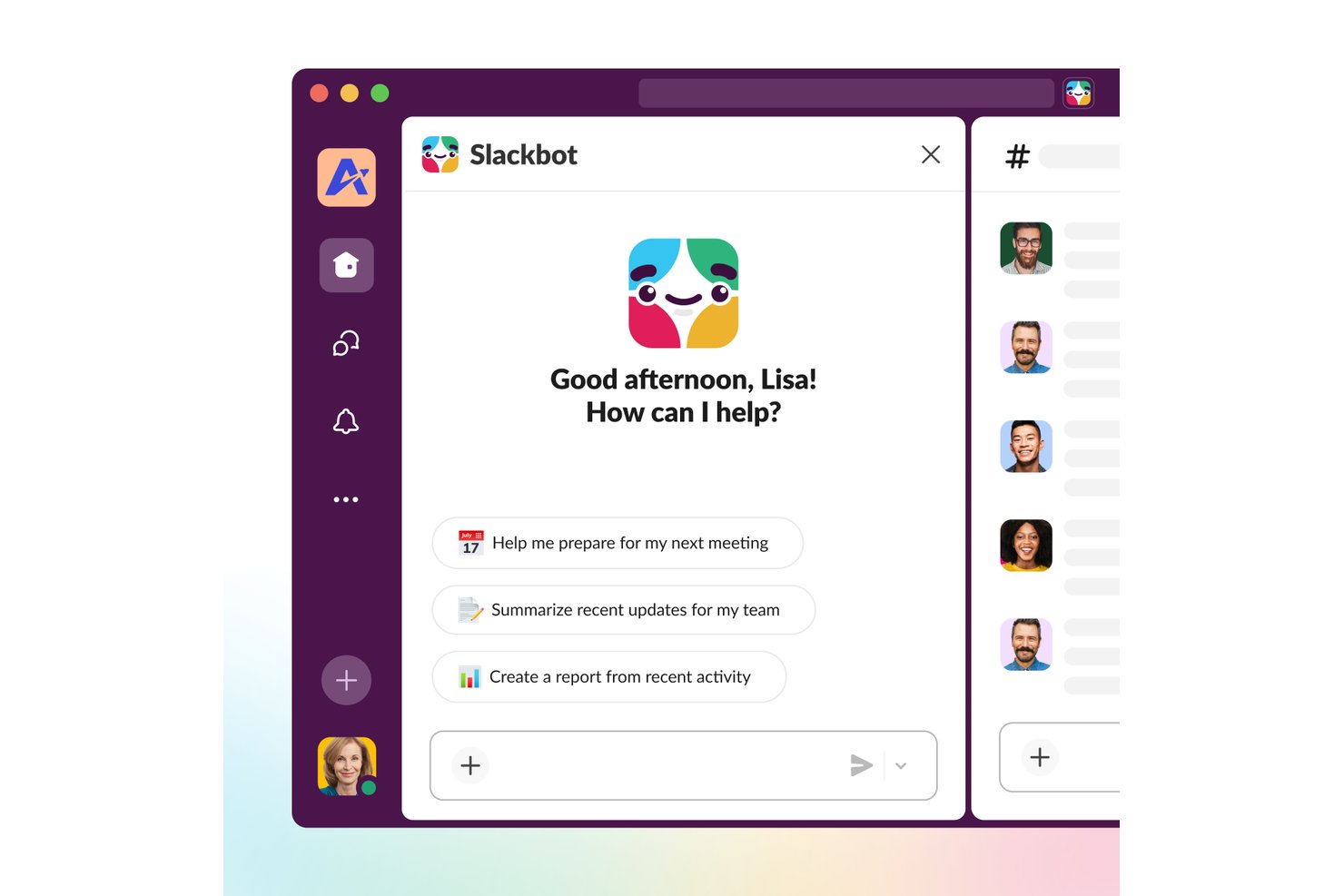
Slack is a team communication platform that layers AI across channels, threads, and huddles to deliver conversation summaries, natural-language search, automated workflows, and cross-app information retrieval.
Who Is Slack Best For?
Slack is a strong fit for distributed tech teams that need a central place to track conversations, decisions, and project updates across multiple channels and tools.
Why I Picked Slack
Slack earns its spot on my shortlist because AI-powered channel and thread summaries make catching up on team decisions genuinely fast, even after days away from a busy project channel. I find the Recap feature especially useful: each morning it surfaces a digest of exactly what I missed, so I can walk into a standup already knowing what was decided overnight. Slackbot takes it further by letting me ask plain-language questions across Slack history and connected tools to pull up the context behind any call.
Slack Key Features
- AI workflow builder: Generate a workflow from a plain-language prompt, then customize and publish it directly in Slack.
- Slackbot app actions: Ask Slackbot to search, create, or update records across connected apps using natural-language requests.
- AI file summaries: Generate instant summaries of shared PDF, DOCX, PPTX, and XLSX files without leaving Slack.
- Enterprise search: Search across connected tools—including Google Drive, Jira Cloud, Salesforce, and more—from a single search experience.
Slack Integrations
Slack offers 2,600+ marketplace integrations, including Jira, Google Drive, GitHub, Asana, Salesforce, Figma, and Zoom. Slack APIs and SDKs support custom apps and agents, while enterprise search connects sources such as Microsoft Outlook, OneDrive, and SharePoint.
Pros and Cons
Pros:
- Workflow automations handle repeatable team requests
- Cited search retrieves prior project decisions
- AI summaries speed catch-up on busy threads
Cons:
- Summaries can flatten complex discussion context
- Busy channels can bury important updates
Toggl
Best for querying time data in plain language
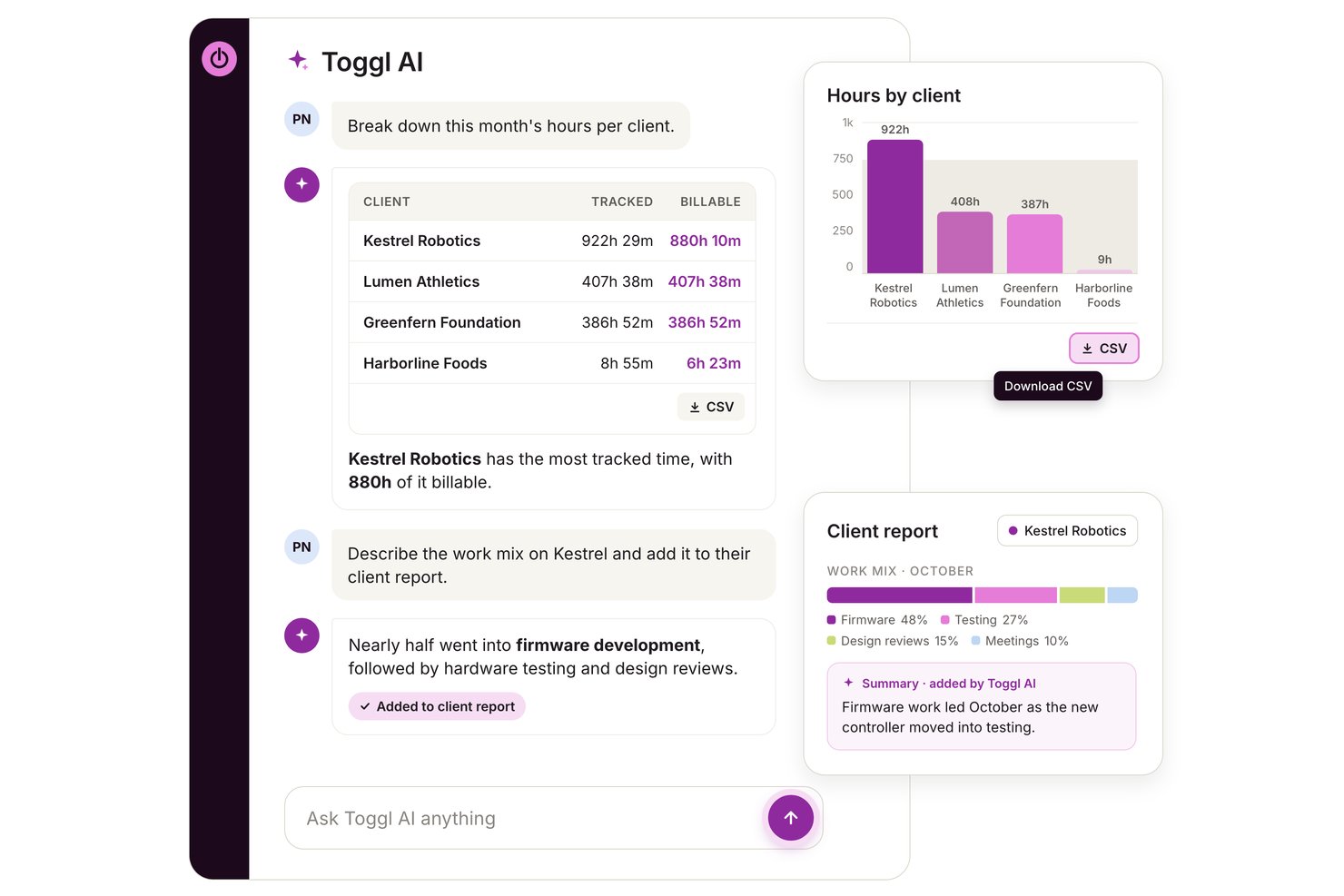
Toggl is a time tracking and capacity planning platform with an AI assistant that lets you query workspace time data in plain language, create tasks from notes or briefs, and manage projects, budgets, and team workload.
Who Is Toggl Best For?
Toggl works well for project managers and team leads who need to answer questions about where time is actually going—across projects, clients, and team members—without digging through reports manually.
Why I Picked Toggl
I picked Toggl as one of the best because its AI assistant lets you ask plain-language questions directly against your workspace data—so instead of manually pulling reports, you can ask things like "which projects ran over estimate this month?" and get an answer with the actual numbers behind it. I also like that the AI Task Creator turns rough meeting notes or a photo of a handwritten to-do list into a structured task list you can review and edit before committing.
Toggl Key Features
- MCP server integration: Connect Toggl to compatible AI assistants like Claude and Cursor to query and update workspace data using natural language.
- Capacity forecasting: Project future workload, utilization, and profitability from scheduled or tentative work using the Capacity Management add-on.
- Timesheet approvals: Let team members submit timesheets for admin review, approval, or change requests on Premium plans.
- Permission-aware AI controls: Organization admins can disable AI features for the entire workspace, with the setting enforced server-side.
Toggl Integrations
Toggl offers native integrations with Google Calendar, Outlook Email & Calendar, Asana, and Jira, plus an API, webhooks, and an MCP server and CLI for custom AI-assisted workflows.
Pros and Cons
Pros:
- Reviewers value project-level time breakdowns
- Turns notes and photos into editable tasks
- Answers workspace questions with supporting figures
Cons:
- No general-purpose drafting or summaries
- AI remains beta and can be wrong

Best for automating routine team tasks
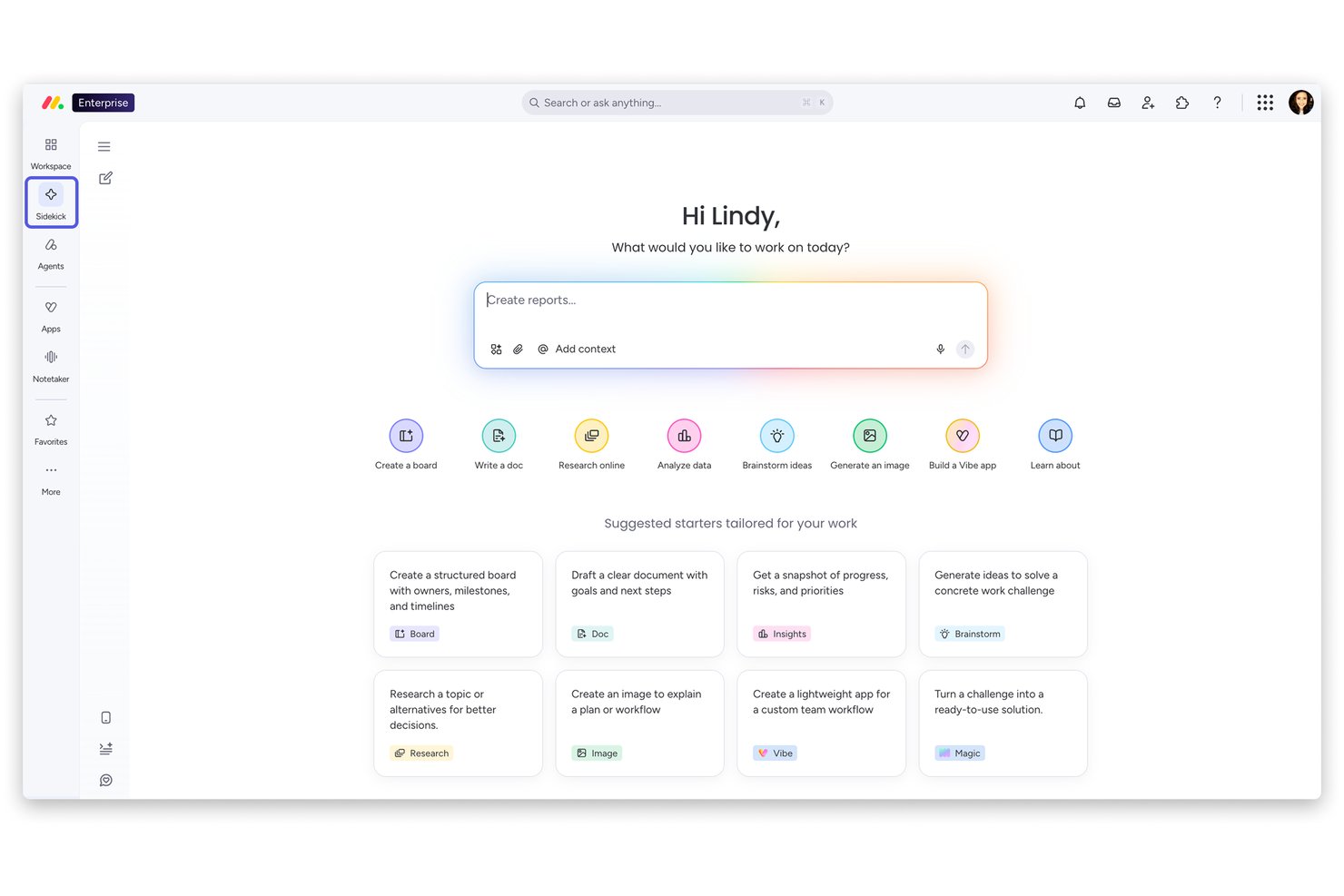
monday AI Workspace is an AI work platform that combines project planning, task automation, workflow orchestration, and cross-functional collaboration across work management, CRM, service, and dev products on a single connected platform.
Who Is monday AI Workspace Best For?
monday AI Workspace is a strong fit for mid-market and enterprise teams coordinating work across multiple departments on a single platform.
Why I Picked monday AI Workspace
I picked monday AI Workspace as one of the best because its automation capabilities go well beyond simple rule-based triggers. The monday agents layer evaluates context and chooses actions dynamically, so repetitive workflows like SLA escalations, supplier research, and bug triage run without manual intervention. My team also uses monday magic to generate full workflows from a single natural language prompt, which cuts the manual setup that usually slows adoption on new projects.
monday AI Workspace Key Features
- No-code workflow builder: Create and customize project workflows visually without writing code.
- Portfolio-level dashboards: Aggregate analytics, health metrics, and dependencies across multiple projects in one view.
- Methodology flexibility: Switch between Agile, Kanban, Waterfall, and hybrid project structures based on team needs.
- Role-based permissions: Set granular access controls for boards, dashboards, and data based on user roles.
monday AI Workspace Integrations
monday AI Workspace offers hundreds of native integrations and marketplace apps, including Slack, Gmail, Outlook, Zoom, GitHub, Microsoft Teams, Salesforce, HubSpot, Google Workspace, and Zapier, with an API available for custom integrations.
Pros and Cons
Pros:
- Custom AI agents for team-specific workflows
- Portfolio dashboards roll up cross-project AI insights
- Automation agents handle complex multi-step workflows
Cons:
- Resource optimization features lag leading competitors
- AI meeting notetaker is still maturing
New Product Updates from monday AI Workspace
monday AI Workspace Adds Human Approval Routing
monday AI Workspace adds a human-in-the-loop approval block to AI Workflows, sending approval requests and routing workflow paths based on responses. For more information, visit monday AI Workspace's official site.
Hive
Best for AI workflows across projects and email
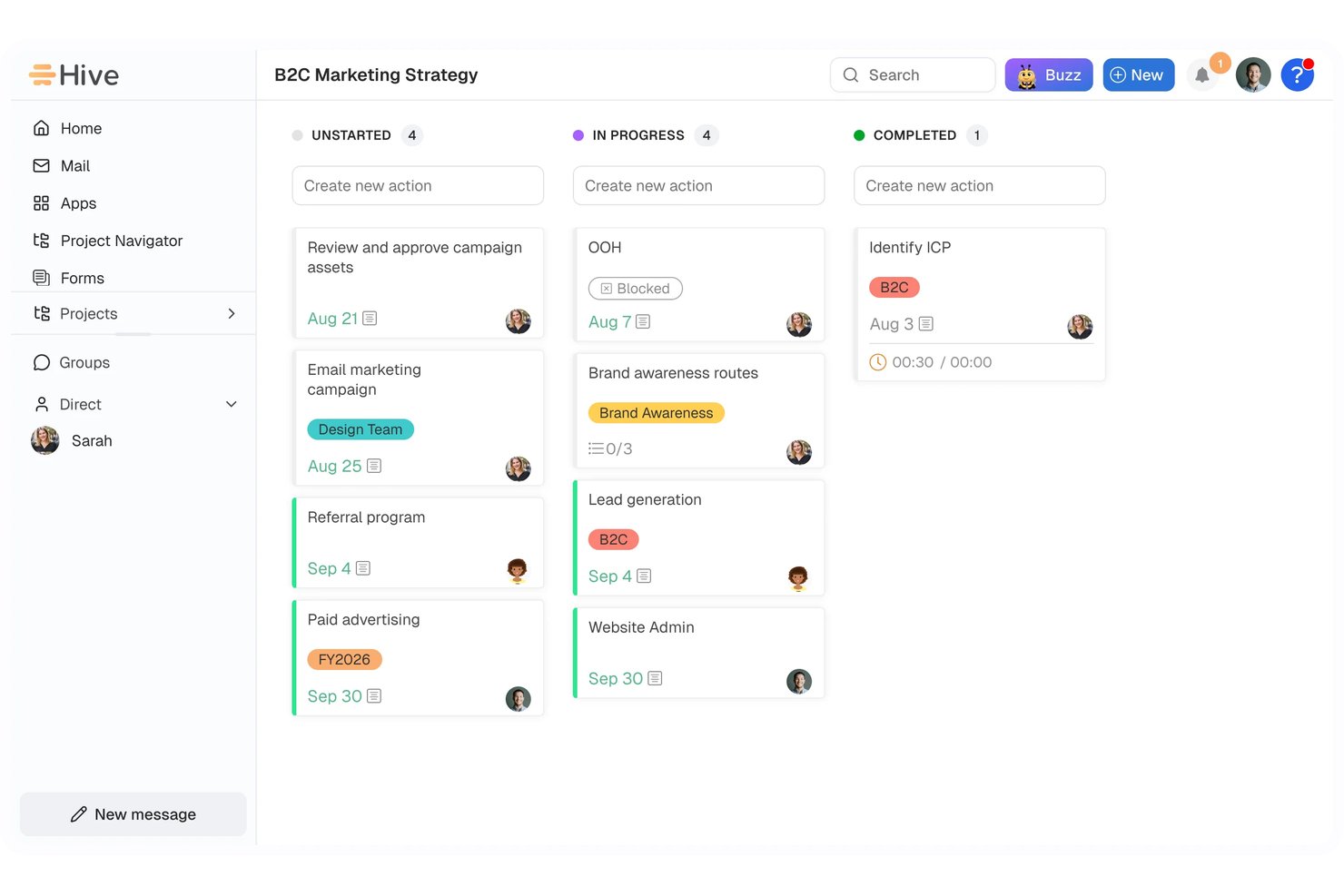
Hive is an AI-enabled project management platform that combines task tracking, workflow automation, meeting intelligence, and email management through its Buzz AI assistant.
Who Is Hive Best For?
Hive is a strong fit for team managers and leads who need to run projects, automate workflows, and manage email in one connected workspace.
Why I Picked Hive
I picked Hive as one of the best because it genuinely connects AI across both project workflows and email in a single workspace, which is rare. Its Buzz AI assistant can draft a status report, convert an email thread into an action card, and build a multi-step automation from a plain-English description, all without leaving the app. I also love that Sidekick preps meeting briefings before calls and pulls out committed action items after, so nothing slips through the cracks between conversations and project tasks.
Hive Key Features
- Buzz Chat: Ask Buzz questions in plain English to get project status updates, surface blockers, or pull workspace stats across active work.
- AI Dashboards: Build and refine charts and reports using workspace activity data to track goals and flag project blockers.
- Proofing and approvals: Mark up documents, videos, and live pages with feedback, then manage the full review and approval cycle inside Hive.
- Resourcing view: Assign teammates to projects and visualize team availability across a project's full lifecycle to manage capacity.
Hive Integrations
Hive claims over 1,000 integrations and documents native connections with Jira, GitHub, Slack, Google Calendar, Outlook Calendar, Google Drive, Zoom, and Microsoft Teams. It also offers a REST API, custom HTTP and MCP connections, plus Zapier integrations.
Pros and Cons
Pros:
- AI turns meetings and email into actions
- Flexible views clarify deadlines and progress
- Forms and triggers route incoming work
Cons:
- Large projects can feel slow
- Workflow setup can demand upfront configuration
Best for small business pipeline customization
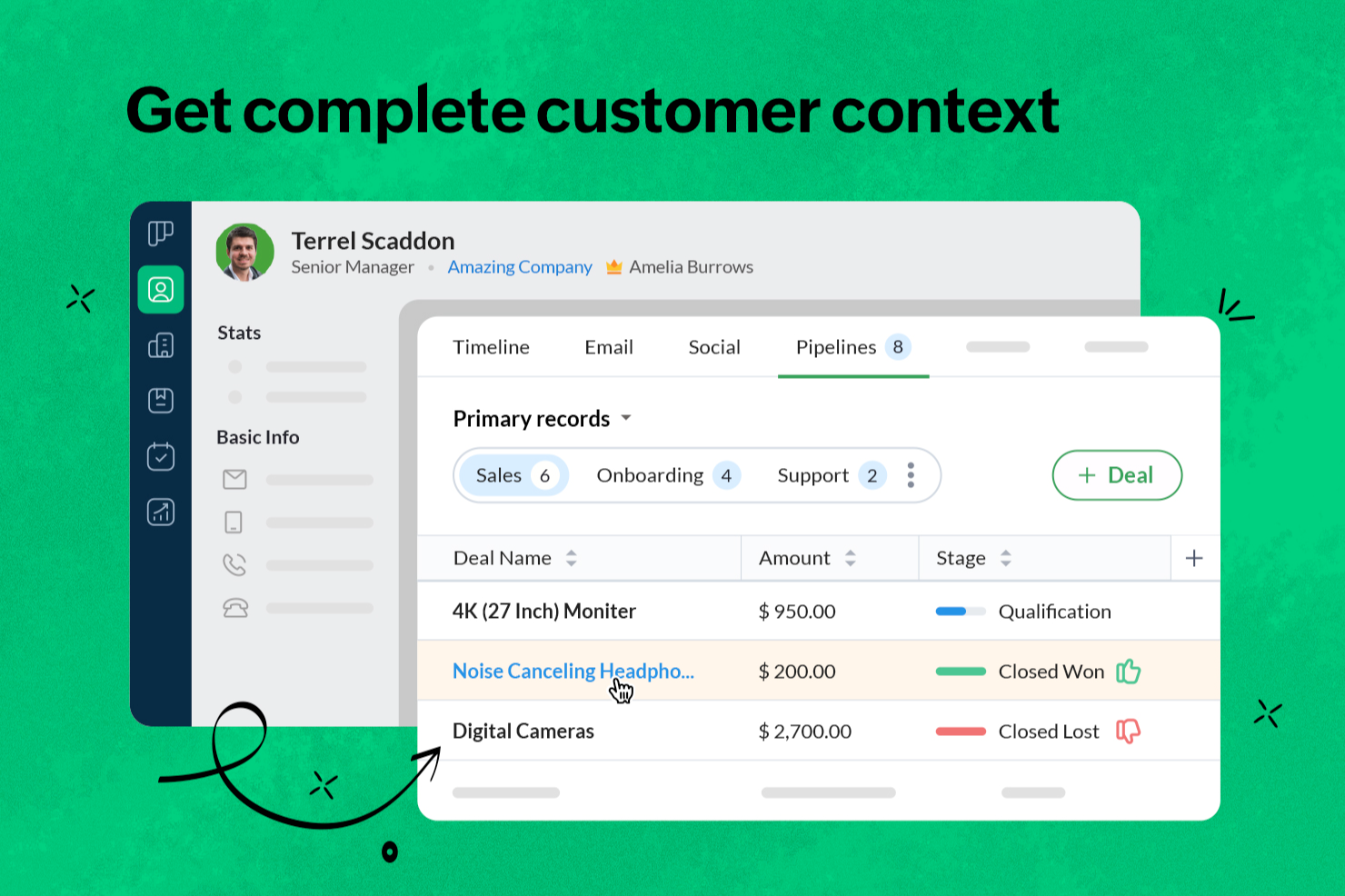
Bigin by Zoho CRM is a pipeline-focused CRM designed for small businesses that need to manage contacts, track deals, and automate sales workflows. It helps you organize customer relationships in customizable pipelines while keeping communication and activity tracking in one place.
Who Is Bigin by Zoho CRM Best For?
Small business owners and teams who need a simple, pipeline-focused CRM to manage customer relationships and sales activities.
Why I Picked Bigin by Zoho CRM
I picked Bigin by Zoho CRM because it allows my team to customize sales pipelines for different business processes instead of relying on a single generic structure. We can create multiple pipelines with unique stages, fields, and workflows, which makes it easier to track deals by product line or service type. The drag-and-drop builder also lets my team adjust processes quickly as priorities shift.
Bigin by Zoho CRM Key Features
- Workflow automation: Set up automated actions for repetitive tasks like follow-ups and status updates.
- Email integration: Connect your email accounts to send, receive, and track messages directly from Bigin.
- Mobile app: Access pipelines, contacts, and activities on iOS and Android devices.
- Telephony integration: Make and log calls from within the CRM using built-in phone system integrations.
Bigin by Zoho CRM Integrations
Bigin by Zoho CRM offers native integrations with Microsoft Outlook, Microsoft Teams, Google Workspace, Mailchimp, Shopify, and Zapier. An API is available for custom integrations.
Pros and Cons
Pros:
- Customizable pipelines for different sales processes
- Mobile app supports pipeline updates on the go
- Built-in telephony and unified communication tracking
Cons:
- Limited third-party integrations compared to competitors
- Fewer advanced reporting features than larger CRMs
New Product Updates from Bigin by Zoho CRM

Bigin iOS Adds Interactive WhatsApp Templates and Quick Replies
Bigin’s iOS app now supports interactive WhatsApp templates and Quick Replies, making it easier to preview and send instant messages to customers. For more information, visit Bigin by Zoho CRM's official site.
 .

Best for office integration

Microsoft CoPilot is an AI productivity tool that integrates seamlessly into the Microsoft ecosystem. It helps professionals save time by automating tasks and enhancing workflows across familiar applications.
Why I picked Microsoft CoPilot: Its AI support makes everyday work faster and smarter. You can rely on automation to draft content, analyze information, and simplify complex tasks. The tool adapts to different use cases, from data-heavy projects to polished communications. This makes it a powerful choice for teams aiming to maximize productivity within Microsoft Office.
Standout features & integrations:
Features include natural language processing for document creation, automated data insights, and task automation. These features help you manage large datasets and improve document accuracy. You can also receive intelligent suggestions to optimize your workflow.
Integrations include Microsoft Word, Excel, Outlook, PowerPoint, OneNote, Teams, SharePoint, Dynamics 365, Azure, and OneDrive.
Pros and Cons
Pros:
- Provides intelligent suggestions
- Enhances document accuracy
- Automates repetitive tasks
- AI-driven content generation
- Excellent office integration
Cons:
- Subscription for full features
- Relies on internet connection
- May have a learning curve
- Limited to Microsoft ecosystem
- Requires Microsoft 365 subscription

Best for meeting transcription

Fireflies.ai is an AI productivity tool that streamlines meeting documentation through automated transcription. It helps teams save time by capturing conversations and turning them into actionable insights.
Why I picked Fireflies.ai: Its AI support makes meetings more productive and less manual. You can automatically generate transcripts, highlight important details, and extract action items. The platform ensures information is easy to access and share across your team. This makes Fireflies.ai an ideal choice for organizations that want to improve efficiency in meeting management.
Standout features & integrations:
Features include keyword detection, sentiment analysis, and speaker identification. You can organize your meeting notes by tagging specific topics. The platform also allows you to set reminders for follow-up actions.
Integrations include Zoom, Microsoft Teams, Google Meet, Slack, Salesforce, HubSpot, Zapier, Dropbox, Evernote, and Trello.
Pros and Cons
Pros:
- Creates action items
- Highlights key points
- Automatic recording
- Searchable transcripts
- Accurate meeting transcriptions
Cons:
- Limited offline access
- Subscription for full features
- May need manual corrections
- Requires internet connection
- Occasional transcription errors

Best for research organization

NotebookLM is an AI productivity tool that simplifies research and writing by turning complex information into clear insights. It helps professionals, students, and teams save time while organizing and presenting knowledge effectively.
Why I picked NotebookLM: Its AI-driven support makes handling large volumes of information more efficient. You can automate the process of extracting key points and structuring your work. The platform adapts to different workflows, whether for research, learning, or professional projects. This makes it an excellent choice for anyone looking to boost productivity in knowledge-intensive tasks.
Standout features & integrations:
Features include audio overviews, personalized AI insights, and presentation outlines. You can listen to your sources with engaging audio discussions. The tool also helps you create structured outlines for presentations.
Integrations include Google Docs, Google Slides, YouTube, Gmail, Slack, Microsoft Teams, Dropbox, Evernote, Asana, and Trello.
Pros and Cons
Pros:
- Audio overview feature
- Supports multiple document types
- Clear citation tracking
- Instant insights from sources
- Effective research organization
Cons:
- Relies on internet connection
- Subscription required for full features
- May not suit all research needs
- Requires learning curve
- Limited offline access


Perplexity is an AI productivity tool that delivers fast, reliable answers to complex questions. It helps users save time by turning detailed queries into clear, actionable insights.
Why I picked Perplexity: Its AI-powered approach makes information retrieval efficient and accurate. You can quickly process complex inputs and get concise results tailored to your needs. The tool adapts to a wide range of professional and research workflows. This makes Perplexity an excellent choice for anyone looking to boost productivity through smarter access to knowledge.
Standout features & integrations:
Features include natural language processing, customizable query settings, and real-time feedback. These features help you refine your search criteria and get the most relevant results. The tool also offers a user-friendly interface for easy navigation.
Integrations include Google Sheets, Microsoft Excel, Slack, Trello, Asana, Zapier, Notion, Airtable, Jira, and Monday.com.
Pros and Cons
Pros:
- User-friendly interface
- Intuitive search capabilities
- Offers real-time feedback
- Handles large datasets efficiently
- Fast response to queries
Cons:
- Initial setup may be time-consuming
- Subscription needed for full features
- May have a learning curve
- Requires internet connection
- Limited offline functionality


Motion AI is an AI productivity tool built to automate work and streamline daily operations. It helps teams manage projects and schedules more efficiently by using intelligent automation.
Why I picked Motion AI: Its AI-first approach reduces the need for manual planning. You can rely on automation to handle repetitive tasks, while the system adapts to your team’s priorities. The clean interface makes it easy to adopt AI-driven workflows. This makes Motion AI an excellent choice for teams aiming to maximize efficiency and focus on high-value work.
Standout features & integrations:
Features include AI-driven scheduling, task management, and project planning. These features help you organize your workload effectively. With automated notifications, your team stays informed and on track.
Integrations include Zapier, Zoom, Google Meet, Gmail, Outlook, HubSpot, Salesforce, and Slack.
Pros and Cons
Pros:
- Supports remote work
- Enhances team collaboration
- Automates repetitive tasks
- Intuitive user interface
- AI-driven task scheduling
Cons:
- Subscription cost may be high
- Occasional glitches reported
- Requires learning curve
- Limited customization options
- Can be complex for new users
Andre AI-verktøy for produktivitet
Her er noen flere alternativer for AI-verktøy for produktivitet som ikke kom med på kortlisten min, men som likevel er verdt å sjekke ut:
- Synthesia
For video creation
- Elicit
For research insights
- Insightful
For transforming workforce data into insights
- Grammarly
For writing assistance
- Smartsheet
For flexible project tracking views
- Zoho Projects
For budget tracking
- Any.do
For to-do lists
- Reclaim
For smart calendar scheduling


How I Evaluate AI Productivity Tools
Every tool on this list has to do more than slap an AI label on basic automations—I look for platforms that actually save PMs time on planning, risk detection, and status reporting. I split my evaluation into two layers: the core AI functionality a tool needs to qualify and the differentiating factors that separate good options from great ones.
Core Functionality (Table Stakes For This List)
When I'm selecting tools for my list, I rank each one on a scale from 0 (does not offer the functionality) to 5 (excels in this area) for each core functionality listed below. Then, I calculate the tool's total score into a percentage. Each tool needs to achieve a minimum total score of 65% to be considered for inclusion.
- AI-Driven Task Automation: I check whether the tool can auto-create, assign, and reprioritize tasks from inputs like emails, briefs, or sprint signals rather than just running static rules.
- Generative Planning Assistance: I look for AI that turns a plain-language brief into a structured plan with milestones, dependencies, and owners—not just a task list.
- Predictive Risk & Delay Detection: Each tool should surface at-risk work before it's overdue, flagging bottlenecks or slipping timelines based on real project data patterns.
- AI Content & Meeting Summarization: I evaluate whether summaries produce linked action items, not just transcripts—turning a 30-minute standup into assigned next steps.
- Natural Language Interaction: The AI should let PMs ask questions like "which tasks are blocked this sprint?" and get accurate, contextual answers or trigger actions directly.
- Intelligent Resource Optimization: I look for workload balancing that goes beyond utilization charts—recommending reassignments based on availability, skills, and capacity forecasts.
Once I have a list of tools that meet this criteria, I consider what sets each platform apart.
Differentiating Factors (What Sets Vendors Apart)
Here's how I compare and contrast different vendors:
Standout Features
Cross-tool AI orchestration is a big differentiator—I look for tools that pull context from Slack threads, GitHub commits, and shared docs to inform project decisions rather than operating in a silo. Portfolio-level intelligence matters when you're a program manager tracking health across dozens of projects at once. I also evaluate how transparent a tool's AI outputs are. When the AI flags a delivery risk, you should see the data driving that score, not just a red icon.
Beyond Features
Data security and AI governance deserve close attention—I check whether vendors clearly disclose how project data is handled and whether it trains their models. Integration depth also matters a lot. A tool that syncs bi-directionally with Jira, Confluence, and Slack fits into an existing PM stack without forcing a rip-and-replace. I also evaluate scalability, since a tool that works for a 10-person squad may struggle once you're running a portfolio across multiple business units with years of historical data.
Slik velger du AI-verktøy for produktivitet
Det er lett å gå seg vill i lange funksjonslister og komplekse prismodeller. For å hjelpe deg med å holde fokus mens du går gjennom den unike prosessen din for valg av programvare, får du her en sjekkliste over faktorer du bør ha i tankene:
| Faktor | Hva bør du vurdere? |
|---|---|
| Skalerbarhet | Vil verktøyet vokse sammen med teamet ditt? Vurder om det kan håndtere flere brukere eller større datamengder uten ekstra kostnader. Se etter alternativer som støtter virksomhetens fremtidige vekst. |
| Integrasjoner | Kan det kobles til de eksisterende verktøyene dine? Sørg for at det fungerer problemfritt med annen programvare teamet ditt bruker, for eksempel CRM-, e-post- og kalenderapper. Unngå verktøy som isolerer data. |
| Tilpasningsmuligheter | Kan du tilpasse det til arbeidsprosessene dine? Sjekk om du kan justere arbeidsflyter, dashbord eller innstillinger slik at de passer teamets unike behov. |
| Brukervennlighet | Er verktøyet intuitivt? Et brukervennlig grensesnitt reduserer opplæringstiden og øker bruken. Test det med en gratis prøveperiode for å se hvor raskt teamet ditt kan tilpasse seg. |
| Implementering og innføring | Hvor enkelt er det å komme i gang? Vurder hvor mye tid og hvilke ressurser som kreves for oppsettet. Se etter verktøy med tydelige veiledninger og støtte som gjør overgangen enklere. |
| Kostnad | Passer det inn i budsjettet ditt? Sammenlign prisplaner og vurder de totale kostnadene, inkludert skjulte gebyrer eller tillegg. Se etter fleksible priser som samsvarer med budsjettet ditt. |
| Sikkerhetstiltak | Hvor sikre er dataene dine? Kontroller om verktøyet tilbyr kryptering, tilgangskontroller for brukere og samsvar med personvernregler for å beskytte sensitiv informasjon. |
Hva er AI-verktøy for produktivitet?
AI-verktøy for produktivitet er programvareapplikasjoner som bruker kunstig intelligens til å automatisere oppgaver, analysere data og forbedre effektiviteten. Fagpersoner som prosjektledere, markedsførere og analytikere bruker ofte disse verktøyene for å spare tid og forbedre arbeidsflyten. Funksjoner for oppgaveautomatisering, dataanalyse og integrasjon gjør det enklere å håndtere arbeidsmengder, forbedre samarbeidet og ta datadrevne beslutninger. Samlet sett øker disse verktøyene produktiviteten og gjør det mulig for brukerne å fokusere på oppgaver med høy verdi.
Funksjoner i AI-verktøy for produktivitet
Når du velger AI-verktøy for produktivitet, bør du se etter følgende viktige funksjoner:
- Automatisering av oppgaver: Automatiserer gjentakende oppgaver for å spare tid og redusere manuelt arbeid.
- Dataanalyse: Gir innsikt og avdekker trender i data for å støtte informerte beslutninger.
- Integrasjonsmuligheter: Kobler seg til eksisterende programvare for å sikre sømløs dataflyt og samarbeid.
- Tilpasningsmuligheter: Lar brukerne tilpasse arbeidsflyter og instrumentbord etter sine spesifikke behov.
- Samarbeid i sanntid: Gjør det mulig for team å arbeide sammen samtidig, noe som forbedrer kommunikasjonen og effektiviteten.
- Behandling av naturlig språk: Forstår og behandler menneskelig språk for å legge til rette for brukerinteraksjon.
- Sikkerhetstiltak: Beskytter sensitiv informasjon med kryptering og tilgangskontroller.
- Skalerbarhet: Tilpasser seg økende teamstørrelser og større datamengder uten ekstra kostnader.
- Brukervennlighet: Har et intuitivt grensesnitt som reduserer læringskurven og øker bruken.
- Rapportering og visualisering: Tilbyr verktøy for å lage visuelle rapporter og instrumentbord for bedre tolkning av data.
Fordeler med AI-produktivitetsverktøy
Implementering av AI-produktivitetsverktøy gir flere fordeler for teamet og virksomheten din. Her er noen av fordelene du kan se frem til:
- Tidsbesparelser: Automatiserer rutineoppgaver og frigjør tid til mer strategisk arbeid.
- Bedre beslutningstaking: Analyserer data for å gi innsikt og hjelpe deg med å ta informerte valg.
- Forbedret samarbeid: Sanntidsfunksjoner gjør det mulig for team å arbeide mer effektivt sammen.
- Økt fleksibilitet: Tilpasningsmuligheter lar deg tilpasse verktøyet til dine spesifikke prosesser.
- Bedre datahåndtering: Integrasjonsmuligheter sikrer sømløs dataflyt på tvers av ulike plattformer.
- Skalerbarhet: Vokser i takt med teamet og virksomhetens behov uten ekstra kostnader.
- Sikkerhet: Beskytter sensitive data med avanserte sikkerhetsfunksjoner.
Kostnader og priser for AI-produktivitetsverktøy
Når du velger AI-produktivitetsverktøy, må du forstå de ulike prismodellene og tilgjengelige abonnementene. Kostnadene varierer basert på funksjoner, teamstørrelse, tillegg og mer. Tabellen nedenfor oppsummerer vanlige abonnementer, gjennomsnittsprisene deres og typiske funksjoner som er inkludert i løsninger for AI-produktivitetsverktøy:
Sammenligningstabell for AI-produktivitetsverktøy
| Abonnementstype | Gjennomsnittspris | Vanlige funksjoner |
|---|---|---|
| Gratisabonnement | $0 | Grunnleggende oppgavehåndtering, begrensede integrasjoner og viktig brukerstøtte. |
| Personlig abonnement | $5-$25/user/month | Automatisering av oppgaver, dataanalyse og grunnleggende tilpasningsmuligheter. |
| Bedriftsabonnement | $30-$60/user/month | Avanserte integrasjoner, forbedrede samarbeidsverktøy og prioritert brukerstøtte. |
| Virksomhetsabonnement | $75-$150/user/month | Fullstendige tilpasningsmuligheter, egen kundeansvarlig og avanserte sikkerhetsfunksjoner. |
Vanlige spørsmål om AI-produktivitetsverktøy
Her er noen svar på vanlige spørsmål om AI-produktivitetsverktøy:
Hvordan kan AI-produktivitetsverktøy integreres med eksisterende systemer?
AI-produktivitetsverktøy tilbyr ofte integrasjonsmuligheter som gjør at de kan kobles sømløst til eksisterende programvare, for eksempel CRM-systemer, e-postplattformer og prosjektstyringsverktøy. Det er viktig å kontrollere om verktøyet støtter API-ene eller tredjepartskoblingene som kreves av de nåværende systemene dine. Dette sikrer en jevn dataflyt og forbedrer effektiviteten i arbeidsflyten.
Hva bør jeg ta hensyn til når det gjelder datasikkerhet med AI-verktøy?
Når du bruker AI-produktivitetsverktøy, er det avgjørende å vurdere datasikkerhetstiltakene deres. Se etter funksjoner som kryptering, tilgangskontroller for brukere og samsvar med personvernregler. Sørg for at verktøyet er i tråd med organisasjonens sikkerhetspolicyer for å beskytte sensitiv informasjon og opprettholde tillit.
Er AI-produktivitetsverktøy skalerbare?
Skalerbarhet er en viktig faktor når du velger AI-produktivitetsverktøy. Vurder om verktøyet kan håndtere økt datamengde eller flere brukere etter hvert som teamet ditt vokser. Skalerbare løsninger bør gjøre det mulig å legge til funksjoner eller kapasitet uten betydelige ekstra kostnader, slik at de forblir effektive etter hvert som virksomheten utvides.
Hvilke kostnader er knyttet til AI-produktivitetsverktøy?
AI-produktivitetsverktøy kan variere mye i pris, ofte basert på funksjoner, antall brukere og tilleggstjenester. Det er viktig å sammenligne prismodeller, for eksempel abonnement kontra engangsavgifter, og ta hensyn til eventuelle skjulte kostnader som oppsett eller opplæring. Se etter abonnementer som gir fleksibilitet og passer budsjettet ditt.
Hvordan støtter AI-produktivitetsverktøy samarbeid?
AI-produktivitetsverktøy støtter samarbeid ved å tilby funksjoner som redigering av dokumenter i sanntid, delte arbeidsområder og kommunikasjonskanaler. Disse funksjonene hjelper team med å arbeide effektivt sammen, uavhengig av hvor de befinner seg. Vurder verktøy som tilbyr sømløs integrasjon med kommunikasjonsplattformene teamet ditt foretrekker, for å styrke samarbeidet.
Hvilket nivå av kundestøtte tilbyr AI-produktivitetsverktøy?
Nivået på kundestøtten kan variere mellom ulike AI-produktivitetsverktøy. Vurder hvilke supportkanaler som er tilgjengelige, for eksempel chat i sanntid, e-post eller telefonstøtte. Ta hensyn til leverandørens responstid og kvaliteten på støtteressursene, som veiledninger eller vanlige spørsmål, slik at du raskt kan løse eventuelle problemer.