

10 beste apper for tidsregistrering i 2026: Anmeldt & sammenlignet

10 Liste over de beste tidsregistreringsappene


De beste appene for tidsregistrering hjelper deg med å forstå nøyaktig hvor tiden går på tvers av oppgaver, prosjekter og teammedlemmer, slik at du kan forbedre faktureringsnøyaktigheten, produktiviteten og planleggingen av arbeidsbelastningen. Disse verktøyene erstatter manuelle regneark med sanntidsinnsikt og tydelig ansvarlighet.
Gjennom karrieren min har jeg selv brukt tidsregistreringsverktøy i både ingeniør- og byråmiljøer, og jeg har sett hvordan dårlige tidsdata fører til faktureringsproblemer, ukontrollert utvidelse av prosjektomfanget og utbrenthet.
I denne veiledningen har jeg vurdert de beste appene for tidsregistrering basert på praktisk testing. Hver av dem har ulike styrker når det gjelder registrering av timer, analyse av tidsdata og hjelp til å holde teamene fokuserte, fakturere nøyaktig og planlegge smartere. Derfor finner du informasjon om hva som skiller dem ut, fordeler og ulemper samt andre detaljer som kan hjelpe deg med å ta en informert beslutning om ditt neste verktøy.
Why Trust Our Software Recommendations
Our team has been testing and reviewing software since 2012. As project managers ourselves, we know how difficult—and important—it is to choose the right software.
For this guide, we evaluated tools using hands-on testing and independent research, scoring tools using our selection criteria. We also draw on insights from industry thought leaders and practicing project management experts.
Our reviews reflect our human editorial judgment, not a sales pitch.
Expert reviewers:
Sammenligningstabell for tidsregistreringsapper
Denne sammenligningstabellen oppsummerer grunnleggende detaljer om hvert av mine beste utvalgte tidsregistreringsprogrammer:
| Tool | Best For | Trial Info | Price | ||
|---|---|---|---|---|---|
| 1 | Best as AI for business | Free demo available | From $8/user/month | Website | |
| 2 | Best for remote employee monitoring | 14-day free trial + free demo available | From $4.99/user/month + $19/month base fee (billed annually) | Website | |
| 3 | Best for customizability and flexibility | Free plan + 30-day free trial + free demo available | From $6/user/month (billed annually) | Website | |
| 4 | Best for user-friendly calendar integrations | Free plan + 30-day free trial + free demo available | From $9/user/month (billed annually) | Website | |
| 5 | Best for GPS-enabled field team tracking | 14-day free trial | From $29/month (billed annually) | Website | |
| 6 | Best for tracking project costs in real time | 14-day free trial + free demo available | From $6.42/user/month (billed annually) | Website | |
| 7 | Best for agencies managing budgets and time together | 14-day free trial | From $10/user/month (billed annually) | Website | |
| 8 | Best for manual and live timers | Free plan available | From $5/month | Website | |
| 9 | Best for automatic time tracking | 14-day free trial + free demo available | From $3.99/user/month (billed annually) | Website | |
| 10 | Best for payroll integration | Free 21-day trial + free demo available | From $2.93/user/month (billed annually) | Website |


Oversikt over de beste tidsregistreringsappene
Her er en kort beskrivelse av hver tidsregistreringsapp for å vise det beste bruksområdet og de mest bemerkelsesverdige funksjonene til hvert verktøy. Jeg har også inkludert skjermbilder for å gi deg et innblikk i brukergrensesnittet deres.

Best as AI for business
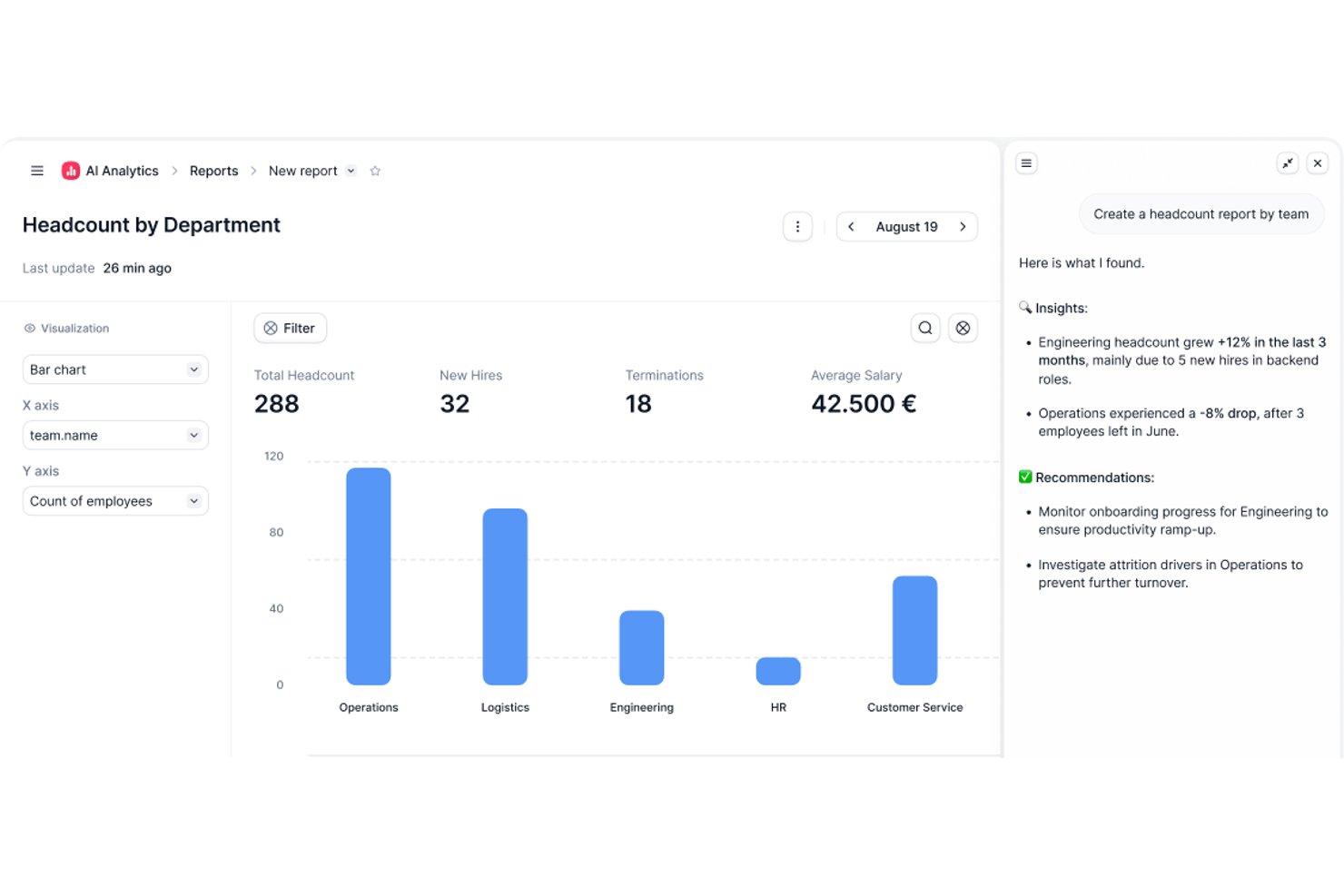
Factorial is an AI-powered HR and business operations platform that covers time tracking, shift scheduling, timesheet approval, project hour logging, and workforce reporting.
Who Is Factorial Best For?
Factorial is a strong fit for HR and operations teams that want time tracking, scheduling, and workforce reporting managed within a single AI-powered platform.
Why I Picked Factorial
I've included Factorial in my top picks because its AI-for-business positioning goes beyond basic time tracking: the built-in AI agent, One, can generate live reports from your actual workforce data, answer team questions about time-off policies, and automate expense processing without you touching a spreadsheet. I also like how project time tracking ties directly into Time and Materials billing, so tracked hours and rates roll up into billable amounts and profitability views in real time.
Factorial Key Features
- QR-code clock-in: Employees can clock in and out by scanning a QR code, including codes tied to specific work locations.
- Team Status widget: Gives managers a real-time view of which employees are clocked in, clocked out, or missing their scheduled start.
- Timesheet approval workflow: Managers can review timesheets by day, week, or month, filter by pending status, and approve or unapprove entries.
- Project budget tracking: Project phases display tracked hours versus estimated hours, used budget versus budget cap, and cost-to-date versus estimated cost.
Factorial Integrations
Marketplace integrations include Microsoft Power BI, Slack, Okta, Sage 200, DATEV LODAS, and Zapier. Factorial also offers a public REST API, webhooks, and sandboxes for custom integrations.
Pros and Cons
Pros:
- Attendance sits alongside leave and employee records
- Mobile clock-ins suit distributed, moving teams
- Quick timesheet submission for managers
Cons:
- Project invoicing caps may constrain client billing
- Custom time reports require manual workarounds

Best for remote employee monitoring

Buddy Punch is an employee time clock software designed to help you manage time tracking, scheduling, and payroll. It lets you monitor employee hours and handle payroll processes from anywhere.
Why I Picked Buddy Punch
I picked Buddy Punch for its robust time tracking and attendance features, which make it easy to monitor remote employee hours, overtime, and missed shifts for accurate payroll. It also automates PTO tracking for simpler time-off management. Additionally, Buddy Punch offers advanced tools like GPS tracking, geofencing, and facial recognition to manage remote teams effectively, ensure accountability, and prevent buddy punching.
Buddy Punch Key Features
In addition, Buddy Punch offers a variety of other features that can meet your scheduling and time tracking needs.
- Employee Scheduling: You can create and manage schedules using a user-friendly drag-and-drop interface, which makes it easy to organize shifts and accommodate changes.
- Payroll Management: This lets you integrate your time tracking data with payroll processing to maintain accurate and timely payments.
- Customizable Reporting: You can generate detailed reports tailored to your specific needs and get insights into employee hours, overtime, and more.
- Job Costing: This lets you track the time spent on specific projects or tasks to better understand labor costs and optimize resource allocation.
Buddy Punch Integrations
Integrations include QuickBooks, ADP Workforce Now, Gusto, Paychex, Paylocity, Paycor, iSolved, Justworks, SurePayroll, Rippling, Zapier, and TriNet Payroll.
Pros and Cons
Pros:
- Customizable reports
- GPS tracking
- Real-time monitoring
Cons:
- No offline mode
- Basic mobile app

actiTIME
Best for customizability and flexibility
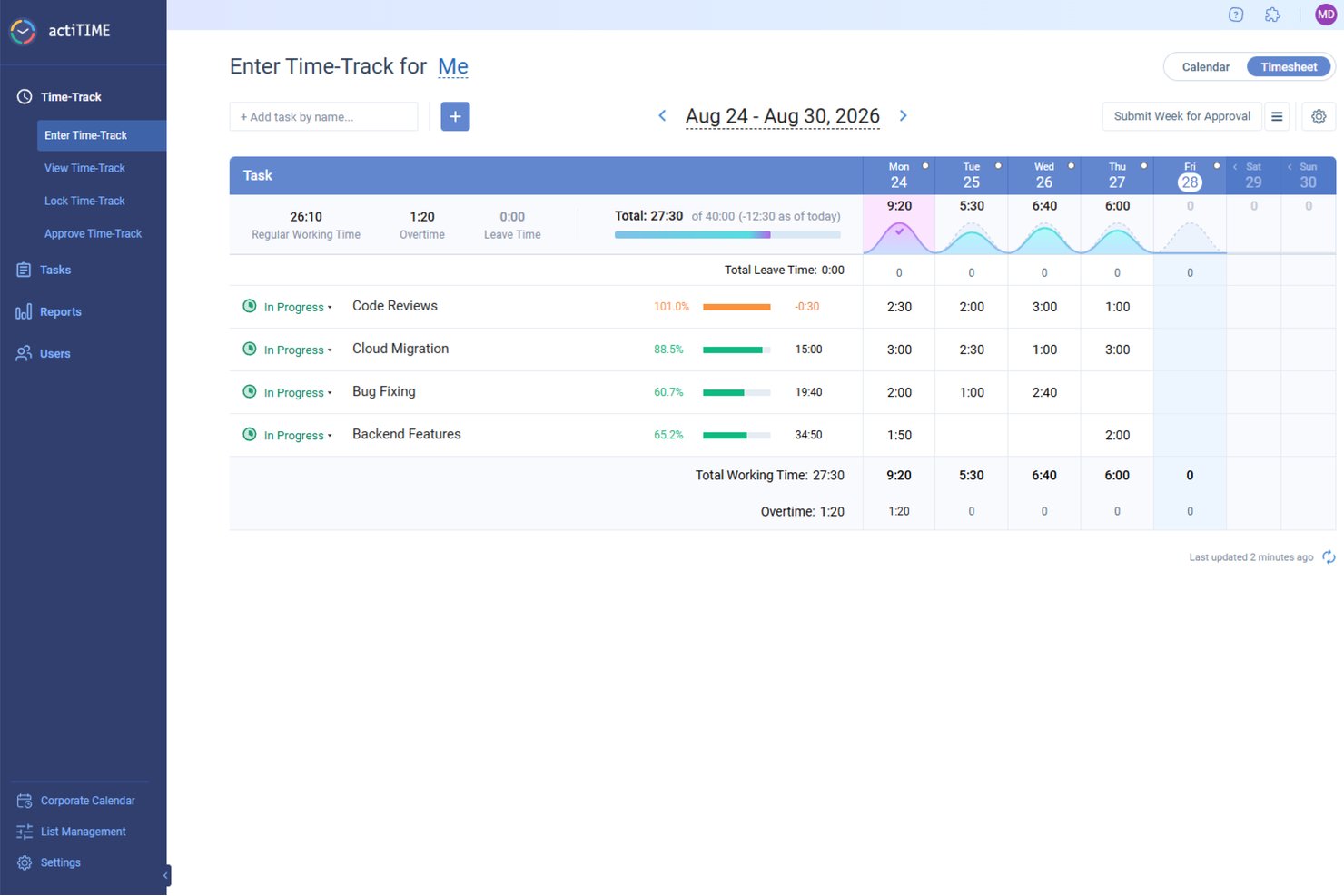
actiTIME is a digital project management tool that focuses on time tracking and work management for businesses of various sizes. Its user-friendly interface and comprehensive time management features position it as a top choice for intuitive time tracking management.
Why I Picked actiTIME
actiTIME allows users to tailor the software to their specific needs. This means that businesses can choose which features they want to use and turn off the rest, simplifying the user experience and ensuring that the software aligns perfectly with their workflow and requirements.
actiTIME provides various deployment options, including cloud, on-premise, and hybrid models. This flexibility ensures that businesses of all types and sizes can choose a deployment method that best fits their IT infrastructure and data management policies. Having these options in a largely "always online" world makes actiTIME stand out for customizability and flexibility.
actiTIME Key Features
actiTIME also offers a wide range of other features that cater to diverse business needs.
- Time Tracking: The weekly timesheets, calendar views, and mobile app let you track working hours and leave with precision.
- Task Management: You can use task estimates, deadlines, and Kanban views to efficiently manage your team's workload.
- Reports & Data Analysis: This lets you generate comprehensive performance reports and profit/loss analyses to gain insights into your business operations.
- Team Management: You can define user roles, set permissions, and manage work schedules to maintain a well-organized team environment.
actiTIME Integrations
Integrations include QuickBooks, Outlook, GitHub, Jira, and Trello.
Pros and Cons
Pros:
- Offline time tracking with sync-back
- Good manual timesheet locking and approval options
- Set hourly budgets and track cost by project
Cons:
- Setup and configuration of advanced workflows can be complex
- Reporting granularity and customization are limited
New Product Updates from actiTIME

actiTIME Visual Hour Indicator and Time-Track Report Redesign
actiTIME adds a wave-style hour indicator to the Timesheet and Calendar views and refreshes the Time-Track report for smoother navigation and clearer visuals. For more information, visit actiTIME's official site.
Toggl
Best for user-friendly calendar integrations
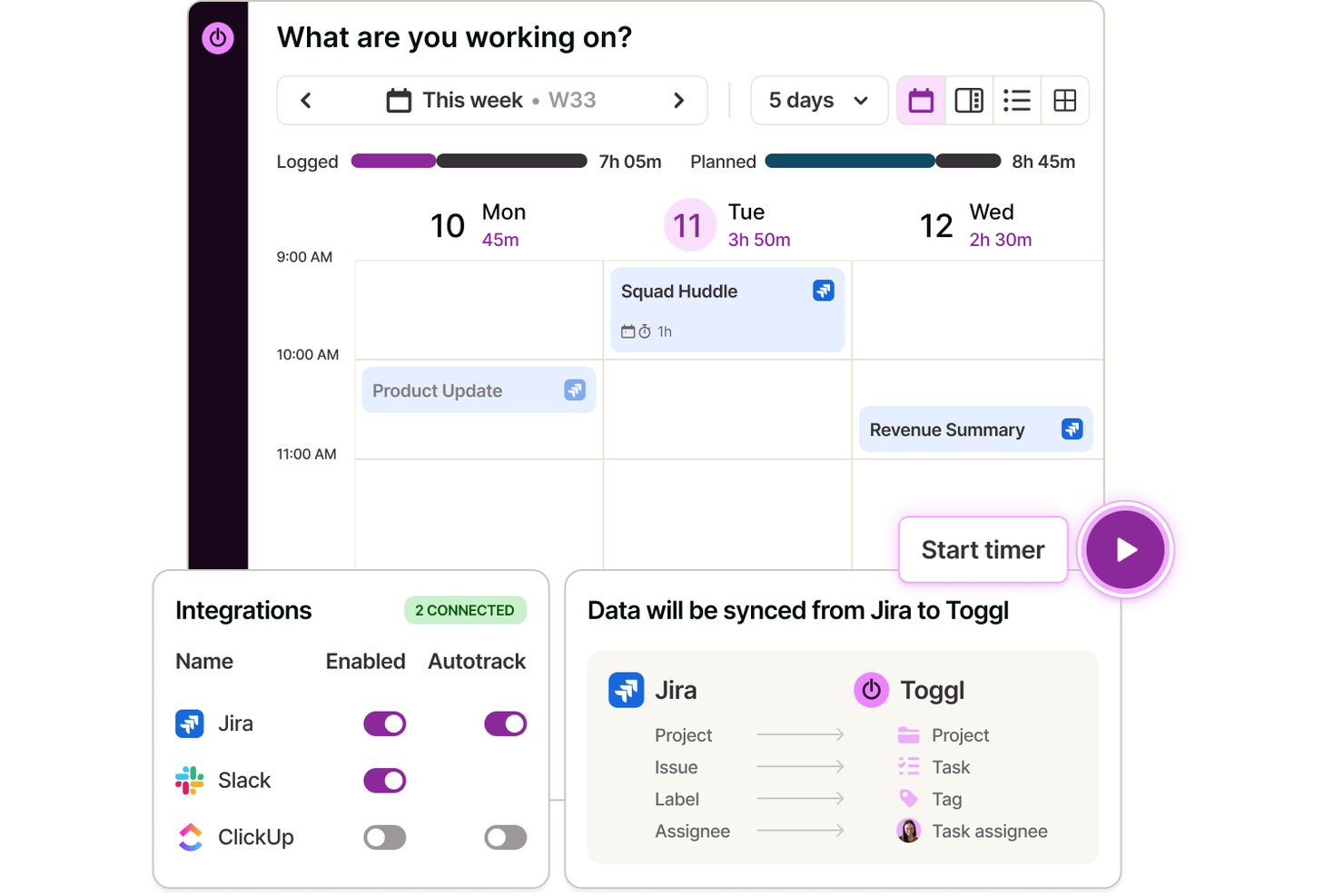
Toggl is a time-tracking app that lets you record hours, manage projects, organize client work, and connect seamlessly with popular calendar platforms through web, desktop, and mobile apps.
Who Is Toggl Best For?
Freelancers, agencies, and small to mid-sized teams looking for simple, calendar-friendly time tracking across multiple devices, capacity planning, and detailed reporting.
Why I Picked Toggl
I picked Toggl as one of the best because I can drag calendar events right into my timesheet, pull in Google or Outlook meeting data instantly, and see scheduled tasks alongside my tracked hours—all without leaving the platform. Toggl AI also allows me to start a timer, create tasks, and compile client reports, all using natural language.
Toggl Key Features
- Task management: Plan tasks on a board, schedule them against real capacity, and track how long they take with a timer.
- Capacity planning: Plan according to team availability and current workload, based on accurate time data.
- Multi-platform time entries: Track time on web, desktop, mobile, and browser extensions that sync across all devices.
- Billable rates: Assign custom hourly rates to projects, clients, or team members for accurate billing.
Toggl Integrations
Toggl offers native integrations with Google Calendar, Outlook Calendar, Asana, Jira, GitHub, Todoist, and more. It connects with Zapier, provides an API for custom integrations, and an MCP for connecting to Claude, Codex, and other AI assitants.
Pros and Cons
Pros:
- Customizable reporting dashboards for projects
- Transparent anti-surveillance approach
- Supports team-based timesheet approvals
Cons:
- No GPS location or screenshot tracking
- Bulk editing tools are limited

Best for GPS-enabled field team tracking

Connecteam is an employee management platform built for deskless and mobile teams. It combines time tracking, scheduling, task management, and communication tools in one place and makes it easier for businesses to manage field employees and stay connected.
Why I Picked Connecteam
I picked Connecteam because it offers one of the most reliable GPS-enabled time-tracking systems for mobile and field teams. Its built-in time clock lets employees clock in and out from anywhere, and location tracking helps maintain accurate records for payroll and accountability. I also like its scheduling tools, which make it simple to manage shifts, track availability, and reduce conflicts, especially for distributed or on-the-go workforces.
Connecteam Key Features
Connecteam offers several other features that make it a comprehensive time tracking solution for your business.
- Automated Time Logging: This lets you automatically record employee work hours to reduce manual entry errors and maintain accurate reporting.
- Geofencing: You can set up virtual boundaries to make sure employees clock in and out only when they are within designated work areas, which adds a layer of accountability.
- Timesheet Export: You can easily export digital timesheets to payroll software, which streamlines the payroll process and saves time on administrative tasks.
- Break and Overtime Management: The app tracks breaks and overtime hours in real-time to help you manage compliance and follow fair labor practices.
Connecteam Integrations
Integrations include Gusto, QuickBooks, Xero, Paychex, Zapier, NetSuite, Salesforce, HubSpot, Slack, Microsoft Teams, Google Calendar, and Microsoft Outlook.
Pros and Cons
Pros:
- Timesheet export ready for payroll
- View live job-site map routes for mobile staff
- Accurate geofence clock-in monitoring
Cons:
- Requires mobile devices for full benefit
- Complex workflows require setup and configuration effort
New Product Updates from Connecteam

Connecteam Expands Break and Timesheet Controls
Connecteam adds flexible break thresholds, personalized policies, auto-end options, a centralized exceptions report, and improved timesheet issue visibility to help teams manage breaks and timesheets more effectively. For more information, visit Connecteam’s official site.
 .
.
DeskTime
Best for tracking project costs in real time
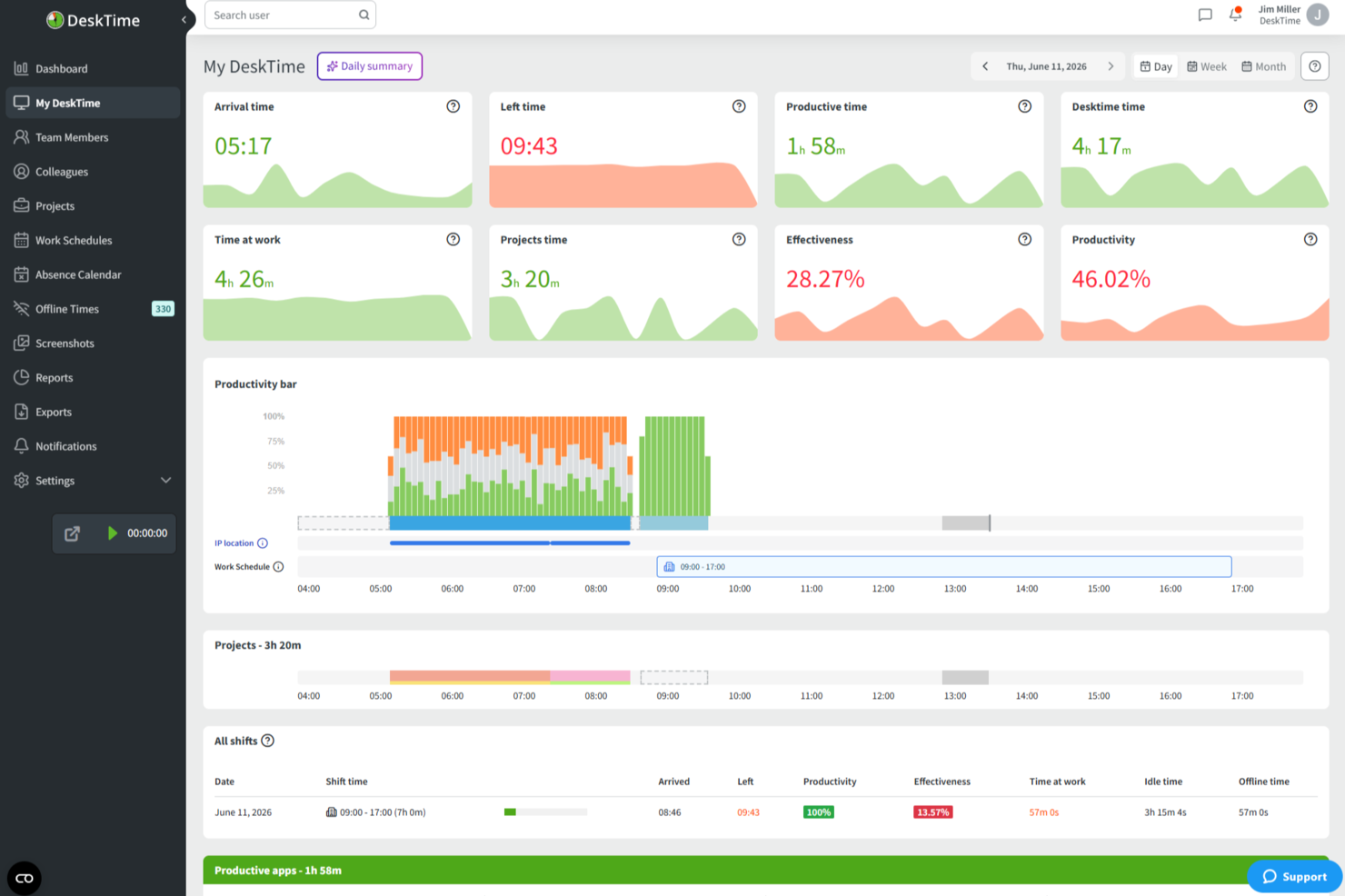
DeskTime is an automatic time tracking app that runs in the background to log app and URL usage, track hours across projects, calculate productivity scores, and manage employee schedules—all within a single platform.
Who Is DeskTime Best For?
DeskTime is a good fit for small to mid-sized teams that need automatic, always-on time tracking without relying on manual input from employees.
Why I Picked DeskTime
I've included DeskTime in my top picks because its project tracking lets you attach hourly rates directly to individual projects and tasks. That means as your team logs hours, DeskTime calculates labor costs in real time, so you're never guessing where your budget stands mid-project. I also like that multiple team members can log time against the same project simultaneously, giving you a live cost rollup across the entire team, not just individual contributors.
DeskTime Key Features
- Automatic time tracking: DeskTime runs in the background on your desktop and logs time automatically, without requiring manual start and stop inputs.
- App and URL categorization: Every app and website your team visits gets tagged as productive, unproductive, or neutral, giving you a breakdown of how work time is actually spent.
- Screenshot feature: DeskTime captures optional screenshots at set intervals, giving you visual confirmation of what was on screen during logged work hours.
- Absence calendar: Track team vacations, sick days, and time off directly within DeskTime alongside regular work schedules.
DeskTime Integrations
DeskTime offers a small set of native integrations, including Google Calendar, Outlook Calendar, Trello, GitLab, Asana, and Jira, and it connects with Zapier. An API is also available for custom integrations.
Pros and Cons
Pros:
- Built-in shift scheduling and absence management
- Categorizes apps as productive or unproductive
- Automatic tracking eliminates manual timer entry
Cons:
- Idle time detection can miscount work hours
- Mobile app lacks full desktop feature parity

Best for agencies managing budgets and time together

Productive is a complete work management system for agencies. It combines employee time tracking, project management, resource allocation, and budgeting under one roof.
Why I Picked Productive
This software is a good choice for teams that want an all-in-one solution for work management. Designed specifically with the needs of agencies in mind, your team members can track their billable and non-billable hours, and you can sync that up directly with invoicing and billing. You can also leverage your time tracking data for project planning, capacity planning, and resource allocation.
The platform is relatively flexible and customizable. Several views are available for project management, including Gantt charts, boards, timelines, calendars, and more. You can assign work and tasks based not just on employee capacities, but also skill sets. It's a comprehensive tool that covers nearly all aspects of your agency's work management operations.
Productive Key Features
Productive also offers several other features that cater to your agency's diverse needs.
- Invoicing: This feature lets you generate invoices directly from tracked time and project data to help you accurately bill your clients.
- Reporting: You can get insights into team performance, project progress, and financial metrics, all tailored to your specific needs.
- Resource Scheduling: This lets you easily allocate tasks and manage workloads across your team.
- Automations: You can automate routine tasks and processes to save time and reduce manual errors, which helps improve overall productivity.
Productive Integrations
Integrations include Dropbox, Exact, Google Calendar, HubSpot, Jira, Harvest Economic, Outlook, Microsoft Calendar, Slack, QuickBooks, and Xero.
Pros and Cons
Pros:
- Budget vs actuals visibility for each project
- Resource planning helps avoid over-booking your team
- Time entries linked directly to budgets and clients
Cons:
- Requires discipline from your team to track time accurately
- Customization options limited for complex setups
New Product Updates from Productive
Productive Adds Voice Dictation, Slack Connector, Proposals, and Overtime
Productive adds voice dictation, a Slack Connector, proposal controls, and overtime tracking. These updates support faster AI interactions, client proposals, and time management. For more information, visit Productive’s official site.

Best for manual and live timers

MinuteShark is designed specifically for freelancers, solo professionals, and consultants who need a straightforward time tracking solution without the complexity of traditional project management tools. It addresses the challenges of tracking time, managing projects, and invoicing with confidence, making it an ideal choice for those who juggle multiple clients and projects. By focusing on essential features—including its natural language AI Assistant—MinuteShark helps you organize your work and understand how your day is spent, ensuring you can make informed business decisions.
Why I Picked MinuteShark
I picked MinuteShark because it excels in providing a clutter-free environment tailored for consultants and freelancers. Its standout feature is the ability to track time accurately with a dashboard that offers a clear visual overview of daily progress, tasks, and an interactive AI Assistant that handles commands via plain English text or voice. I appreciate the seamless project management capabilities that allow you to structure work into projects, tasks, and subtasks, making it easy to keep detailed descriptions and prepare accurate invoices. This focus on simplicity and functionality makes MinuteShark a compelling choice for those needing efficient time management.
MinuteShark Key Features
In addition to its core functionalities, MinuteShark offers several other features that enhance its utility as a time tracking app.
- Daily Productivity Hub: Your dashboard provides a glance at daily progress and allows management of personal notes and to-do lists from one screen.
- Powerful Reports: The tool offers clear, easy-to-read reports that help you understand how time is spent across projects and teams.
- Live Syncing Across Devices: With cloud syncing, your workday follows you on both mobile and desktop, ensuring continuity.
- Custom Development: MinuteShark offers custom solutions to ensure the platform meets your unique business challenges, ideal for specialized needs.
MinuteShark Integrations
Native integrations are not currently listed by MinuteShark.
Pros and Cons
Pros:
- Strong reporting and exports
- Flexible time tracking options
- Clean, distraction free interface
Cons:
- No advanced invoicing features
- Limited native integrations

Best for automatic time tracking
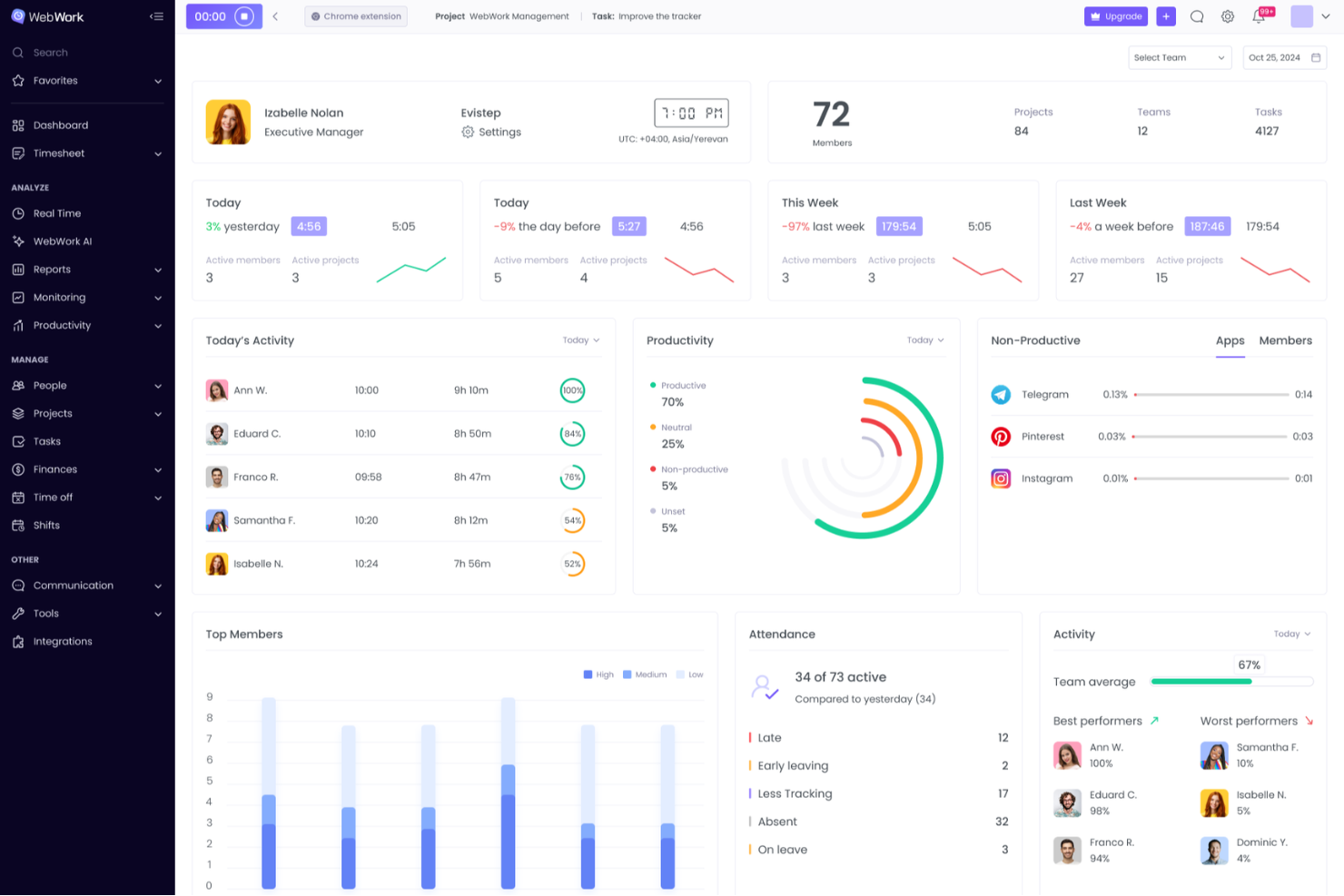
WebWork Time Tracker is a versatile tool designed to help you and your team monitor work hours and boost productivity. It offers automated time tracking and detailed activity monitoring and makes it easier to manage tasks and projects.
Why I Picked WebWork Time Tracker
I like that it offers time tracking with screenshots, which automatically records the hours your team works and captures periodic screenshots to verify their activity. This feature ensures you have a clear view of your team's productivity and helps maintain transparency. It's particularly beneficial when managing remote teams, as it provides an extra layer of accountability.
WebWork Time Tracker Key Features
WebWork Time Tracker also offers a range of other features that can help you improve productivity and accountability on your team.
- Task Management: You can organize and assign tasks directly within the app, which lets your team stay focused and on track with project goals.
- Billable Hours Tracking: You can easily distinguish between billable and non-billable hours, which helps maintain accurate invoicing and budgeting for your projects.
- Activity Levels: This lets you monitor keyboard and mouse activity levels to gain insights into your team’s engagement and productivity throughout the day.
- Invoice Generation: This lets you create and send professional invoices directly from the app, streamline your billing process, and improve cash flow management.
WebWork Time Tracker Integrations
Integrations include Asana, Slack, Deel, GitHub, ClickUp, Trello, Jira, Xero, Bitbucket, Zapier, Todoist, and Bitwage.
Pros and Cons
Pros:
- Manual time edits allow for missed clock-ins
- Idle-time detection flagging team time accuracy
- Segment tracked time by project and sub-task
Cons:
- Difficulty in deducting excess hours when tracker continues running
- Time-consuming setup and custom workflow configuration

Agendrix
Best for payroll integration

For teams seeking a reliable time-tracking app with payroll integration, Agendrix offers features tailored to small businesses and shift-based teams. Automated timesheets and multiple clock-in options help reduce manual time entry and scheduling issues. Agendrix also connects with popular payroll systems, making it easier to prepare payroll and manage employee hours accurately.
Why I Picked Agendrix
I picked Agendrix for its payroll integration, which makes it easier to transfer tracked hours directly into payroll systems. This helps reduce manual entry and payroll errors. It also includes automated timesheets and multiple clock-in options, such as biometric and location-based tracking, to support accurate time logging for both in-office and remote teams.
Agendrix Key Features
In addition to its standout payroll integration, Agendrix offers:
- Employee Scheduling: Create and share work schedules effortlessly with drag-and-drop tools.
- Mobile Access: Manage schedules and track time on-the-go with iOS and Android apps.
- Communication Tools: Engage with your team via professional messaging and a news feed.
- HR Management: Handle employee onboarding, records management, and time-off requests within the platform.
Agendrix Integrations
Integrations include Lightspeed, ADP Workforce Now, QuickBooks, Payworks, and more, ensuring your time-tracking and payroll processes are seamlessly connected.
Pros and Cons
Pros:
- Employee self-service features reduce manager workload and administrative tasks
- Shift scheduling tools help managers organize staff availability efficiently
- Payroll integration reduces manual data entry and payroll processing errors
Cons:
- Some payroll systems require manual syncing adjustments
- Reporting tools offer limited customization for deeper workforce analysis
Andre alternativer for tidsregistrering
Her er noen flere alternativer som ikke kom med på listen over de beste programmene for tidsregistrering, men som fortsatt er verdt å sjekke ut:
- Beebole
For charging billable hours
- TimeTrex
For biometric employee attendance
- Clockify
For real-time tracking
- Jibble
For small teams
- 7shifts
For restaurant time tracking
- Projectworks
For real-time tracking of billable hours
- Timesheets.com
For project-specific time tracking
- Deltek Replicon Time
For mobile time tracking
- Sage HR
For employee engagement features
- Deel HR
For global teams
- Insightful
With employee monitoring capabilities
- ClickTime
For structured, finance-ready data
- Hubstaff
For tracking across devices
- Homebase
For managing hourly workforces
- Hub Planner by Milient
For capacity-based time planning
- VOGSY
For service firms using Google Workspace
- Monitask
For tracking remote team productivity
- TimeJam
For motivating teams with daily time goals


How I Evaluate Time Tracking Apps
I split my evaluation into two layers: baseline criteria a tool must hit—like project-level billing rates and native PM integrations—and differentiators that set tools apart for multi-client PMs.
Core Functionality (Table Stakes For This List)
When I'm selecting tools for my list, I rank each one on a scale from 0 (does not offer the functionality) to 5 (excels in this area) for each core functionality listed below. Then, I calculate the tool's total score into a percentage. Each tool needs to achieve a minimum total score of 65% to be considered for inclusion.
- Time Entry Methods: I check whether a tool supports real-time timers, manual entry, and weekly timesheets—because teams that split time between meetings and deep work need flexible logging options.
- Project & Task Association: Every logged hour should map to a specific project, task, or client so PMs can trace where time actually goes across active engagements.
- Billable Hours Tracking: I look for the ability to flag billable vs. non-billable time and set rates at the user, project, or task level—especially important for agencies juggling multiple client contracts.
- Reporting & Analytics: Good reports break down time by person, project, and client with export options, so I evaluate how easily you can pull a weekly utilization snapshot or a project profitability summary.
- Team & Resource Management: I evaluate multi-user support, role-based permissions, and workload visibility—tools like Toggl Track and Harvest handle this differently, so I compare how each surfaces team utilization.
- PM Tool Integrations: Native connections with platforms like Jira, Asana, and Monday are key, so I check whether tasks sync bidirectionally or require manual mapping between systems.
Once I have a list of tools that meet the criteria, I consider what sets each platform apart.
Differentiating Factors (What Sets Vendors Apart)
Here's how I compare and contrast different vendors:
Standout Features
Budget and burn alerts make a real difference when you're running multiple projects—I look for tools that notify you before a project crosses its hour or cost threshold, not after. Timesheet approval workflows also matter for PMO leads who need to validate logged hours before they flow into invoicing or payroll. I evaluate resource forecasting views that compare planned hours against actuals too, which helps PMs make staffing decisions before a sprint starts rather than reacting to overallocation mid-cycle.
Beyond Features
Pricing model matters a lot here—I check whether per-user costs make sense at scale or if flat-rate plans better fit larger PMOs. Platform coverage is another factor I weigh, since distributed teams need mobile apps and browser extensions to log time wherever they work. I also evaluate how easily a tool rolls out to a full team, looking at SSO provisioning and onboarding resources that help drive adoption. Getting 50 people to actually track their hours consistently is a challenge on its own, and the right vendor makes that easier.
Slik velger du en app for tidsregistrering
Det er lett å gå seg vill i lange funksjonslister og kompliserte prismodeller. For å hjelpe deg med å holde fokus mens du går gjennom den unike prosessen din for valg av programvare, får du her en sjekkliste over faktorer du bør ha i bakhodet:
| Faktor | Hva du bør vurdere |
|---|---|
| Skalerbarhet | Kan verktøyet støtte teamet ditt etter hvert som det vokser? Se på brukerbegrensninger, prosjektgrenser og om prisnivåene gir mening når behovene dine øker. Unngå verktøy som blir for kostbare eller tungvinte i større skala. |
| Integrasjoner | Kan det kobles til prosjektstyringsverktøyene, faktureringssystemene eller lønnssystemet ditt? Sørg for at integrasjonene er direkte og godt dokumenterte – ikke klønete nødløsninger. Støtte for Zapier er nyttig, men er kanskje ikke tilstrekkelig. |
| Tilpasningsmuligheter | Kan du tilpasse innstillinger som felt for tidsregistrering, godkjenningsflyter eller prosjektetiketter? Tenk på hvor rigide arbeidsflytene dine er, og om appen kan tilpasses dem. |
| Brukervennlighet | Kommer teamet ditt faktisk til å bruke det? Se etter enkle tidtakere, mobiltilgang og minimalt oppsett. Hvis det oppleves som et ork, får du dårlige data eller ingen data i det hele tatt. |
| Implementering og innføring | Hvor lang tid vil oppsettet ta, og hvem må involveres? Vurder om du trenger hjelp fra en administrator, hvor lang tid det tar å importere prosjekter, og hva slags opplæring som tilbys. |
| Kostnad | Kan du forsvare prisen per bruker per måned? Vær oppmerksom på skjulte begrensninger, langsiktige kontrakter og obligatoriske tillegg. En gratis prøveperiode eller et freemium-nivå bidrar til å redusere risikoen. |
| Sikkerhetstiltak | Følger leverandøren beste praksis som SOC 2, SSO eller 2FA? Hvis du registrerer kundetimer eller lønnsdata, må du sørge for at de er tilstrekkelig beskyttet. |
| Tilgjengelig kundestøtte | Kan du få tak i noen når noe går galt? Sjekk om chat i sanntid, e-post eller telefonstøtte er inkludert – eller om det er begrenset til åpningstider eller dyrere prisnivåer. |
Hva er en app for tidsregistrering?
En app for tidsregistrering er et verktøy som er utviklet for å registrere og analysere hvor mye tid som brukes på oppgaver. Den hjelper enkeltpersoner og team med å loggføre timer, samtidig som prosjektledere får oversikt over kapasiteten. Den brukes av frilansere, byråer og prosjektbaserte team til å registrere fakturerbar tid, måle produktivitet og administrere arbeidsmengder.
Disse appene inneholder ofte tidtakere, manuell registrering, rapportering og integrasjoner med fakturerings- eller prosjektstyringsverktøy.
Funksjoner i apper for tidsregistrering
Når du velger en app for tidsregistrering, bør du se etter følgende viktige funksjoner:
- Brukervennlig grensesnitt: Appen bør være enkel å navigere i og la deg raskt starte og stoppe tidtakere eller registrere timer. Da kan du fokusere på arbeidet i stedet for verktøyet.
- Støtte for flere enheter: Se etter en app som fungerer sømløst på datamaskin, mobil og i nettleser. Dette er praktisk når du bytter mellom enheter.
- Organisering av prosjekter og oppgaver: Du kan organisere timer etter kunde, prosjekt eller oppgave. Dette gjør det enklere å se hvor tiden din går, og å fakturere kunder.
- Tilpassbare rapporter: Dette lar deg generere detaljerte rapporter basert på registrert tid, se trender, følge med på produktiviteten og enkelt dele timer med en leder eller kunde.
- Manuell tidsregistrering: Du bør kunne legge til eller redigere timer manuelt, slik at registreringene forblir korrekte selv om du glemmer å starte tidtakeren.
- Påminnelser og varsler: Dette gir deg påminnelser, for eksempel om å stemple inn eller ut, slik at registreringene holdes ryddige og du unngår mangler og glemte registreringer.
- Integrasjon med andre verktøy: Du bør kunne koble appen til prosjektstyringsverktøy eller kalendere for å spare tid og effektivisere arbeidsflytene dine.
- Frakoblet funksjonalitet: Dette lar deg registrere tid selv når du ikke har internettilgang. Arbeidstimene synkroniseres når du får tilgang til internett, slik at alt holdes oppdatert.
- Administrasjon av faktureringssatser: Dette lar deg enkelt angi og justere faktureringssatser, noe som er nyttig hvis du fakturerer kunder med ulike satser.
Vanlige KI-funksjoner i apper for tidsregistrering
I tillegg til standardfunksjonene i apper for tidsregistrering som er nevnt ovenfor, tilbyr mange løsninger KI-funksjoner som:
- Automatisk tidsregistrering: KI kan følge med på aktiviteten din og automatisk tilordne tid til riktige prosjekter eller oppgaver. Det sparer tid og hindrer manuelle feil.
- Smarte forslag: KI kan foreslå hvilken kunde eller oppgave du arbeider med, basert på aktiviteten din. Det gjør det enklere å holde orden når du skifter mellom oppgaver.
- Prediktiv analyse: KI kan analysere tidligere mønstre for å anslå når prosjekter blir ferdige, eller hjelpe deg med å planlegge arbeidsplanen mer effektivt.
- Avviksdeteksjon: KI kan markere uvanlige tidsregistreringer, for eksempel svært lange arbeidsøkter eller manglende registreringer, slik at du raskt kan rette feil og unngå forvirring senere.
- Produktivitetsinnsikt: KI kan gjennomgå arbeidsvanene dine, fremheve trender og gi konkrete råd, slik at du kan arbeide smartere – ikke hardere.
Fordeler med apper for tidsregistrering
Implementering av apper for tidsregistrering gir flere fordeler for teamet og virksomheten din. Her er noen av fordelene du kan se frem til:
- Bedre tidsbevissthet: Hjelper teammedlemmer med å se hvor timene deres går, slik at de kan jobbe mer effektivt.
- Enklere fakturering: Registrerer fakturerbare timer nøyaktig, slik at du kan fakturere kunder uten å måtte dobbeltsjekke.
- Tydeligere prosjektkostnader: Viser hvor mye tid hver oppgave eller hvert prosjekt tar, noe som hjelper deg med å holde deg innenfor budsjettet.
- Bedre ansvarlighet: Gjør det enklere å se hvem som jobber med hva og når, spesielt med eksterne team.
- Forenklet lønnsberegning: Registrerer arbeidstimer slik at du kan beregne lønn uten å måtte purre på timelister.
- Raskere rapportering: Gir deg rask tilgang til tidsdata uten at du trenger å lage manuelle regneark.
- Smidigere ressursplanlegging: Gjør det mulig å oppdage ubalanser i arbeidsmengden, slik at du kan fordele oppgaver jevnere.
Kostnader og priser for tidsregistreringsapper
Ved valg av tidsregistreringsapper er det nødvendig å forstå de ulike prismodellene og abonnementene som er tilgjengelige. Kostnadene varierer basert på funksjoner, teamstørrelse, tillegg og mer. Tabellen nedenfor oppsummerer vanlige abonnementer, gjennomsnittsprisene deres og typiske funksjoner som er inkludert i tidsregistreringsapper:
Sammenligningstabell for abonnementer for tidsregistreringsapper
| Abonnementstype | Gjennomsnittspris | Vanlige funksjoner |
|---|---|---|
| Gratisabonnement | $0 | Grunnleggende tidsregistrering, manuell registrering, begrenset antall prosjekter og grunnleggende rapportering |
| Personlig abonnement | $5–$10/bruker/måned | Tidsregistrering, mobiltilgang, enkle rapporter og begrenset antall integrasjoner |
| Forretningsabonnement | $10–$25/bruker/måned | Teamadministrasjon, prosjektsporing, fakturering, arbeidsflyter for godkjenning og avanserte rapporter |
| Enterprise-abonnement | $25–$50/bruker/måned | Egendefinerte roller, revisjonslogger, dedikert kundestøtte, SSO-alternativer og avansert sikkerhet |
Ofte stilte spørsmål om tidsregistreringsapper
Her er noen svar på vanlige spørsmål du kanskje har om tidsregistreringsapper og hvordan de kan tilføre verdi til prosessene dine:
Hvorfor bør jeg registrere arbeidstiden til teamet mitt?
Når du registrerer arbeidstiden til teamet ditt, får du oversikt over hvor arbeidstimene brukes, og du kan identifisere flaskehalser eller ineffektivitet. Disse dataene gjør det mulig å fordele ressurser bedre, styre budsjetter og holde prosjekter på rett spor. Som prosjektleder er dette spesielt nyttig for å utarbeide mer nøyaktige prognoser og rapportere til kunder.
Nøyaktig tidsregistrering gjør det også enklere å fakturere kunder og håndtere lønn uten gjetting. Alt i alt skaper det ansvarlighet og hjelper teamet ditt med å jobbe smartere.
Hvordan bidrar tidsregistreringsapper til produktivitet?
Tidsregistreringsapper bidrar til produktivitet ved å synliggjøre hvor tiden brukes hver dag. Du kan oppdage distraksjoner, styre arbeidsmengder og oppmuntre teamet ditt til å fokusere på oppgaver med høy prioritet. Mange apper tilbyr automatiske påminnelser og rapporter som hjelper alle med å ta ansvar og holde tidsplanen.
Det finnes mange artikler som fremhever hvor mye tid som brukes på uproduktive oppgaver, og de er ganske skremmende. Fra tid brukt på mobiltelefoner til sosiale aktiviteter kan dette sluke hundrevis av timer i året.
Ved å innføre tidsregistrering i hele arbeidsstyrken blir de ansatte langt mer bevisste på eventuelle uproduktive timer de samler opp, siden de ikke vil ha noen måte å loggføre disse timene i tidsregistreringsappen på. I stedet blir de mer ansvarlige og produktive ved å redusere eller eliminere tidssløsende aktiviteter i arbeidstiden.
Finnes det gratis tidsregistreringsapper?
Ja, flere tidsregistreringsapper tilbyr gratis abonnementer som er godt egnet for mindre team eller for å teste funksjoner. Verktøy som Toggl Track, Clockify og Harvest har gratisversjoner. Gratis-/premium-abonnementer er også et godt valg for små bedrifter som har grunnleggende behov for tidsregistrering. Vær imidlertid oppmerksom på at disse abonnementene ikke inkluderer alle funksjonene som finnes i de betalte abonnementene, og at kundestøtten ofte er begrenset.
Hvordan kan jeg bruke tidsregistreringsdata til å forbedre prosjektberegninger?
Du kan bruke reelle prosjektdata fra tidsregistreringsapper til å lage mer nøyaktige beregninger for fremtidig arbeid. Analyser hvor lang tid lignende oppgaver tok, hvor forsinkelser oppsto, og hvilke ressurser som var overbooket. Med historiske data kan de nye prosjektplanene og tilbudene dine gjenspeile teamets faktiske ytelse, slik at beregningene blir mer pålitelige.
Hvordan håndterer jeg godkjenning og korrigering av timelister i tidsregistreringsapper?
De fleste tidsregistreringsapper lar deg konfigurere arbeidsflyter for godkjenning, slik at ledere kan gjennomgå og godkjenne innsendte timelister før de ferdigstilles. Hvis det finnes feil eller manglende registreringer, kan du be om korrigeringer direkte gjennom appen. Se etter verktøy som varsler teammedlemmer automatisk og fører en endringslogg for revisjonsspor.