

10 beste AI-planleggingsassistenter vurdert i 2026

Utvalgte beste AI-planleggingsassistenter


De beste AI-planleggingsassistentene hjelper deg med å administrere kalenderen din ved hjelp av kunstig intelligens. De kan automatisk koordinere møter, finne ledige tidspunkter, endre avtaler og integreres med kalenderen din. Uten de riktige verktøyene vil du bruke tid på konflikter, problemer med tidssoner og lange e-posttråder, og oppleve dobbeltbookinger og flere manuelle administrative oppgaver.
Jeg har brukt erfaringen min innen prosjektledelse og over 3 års erfaring med programvaretesting til å vurdere dusinvis av verktøy og sette sammen listen min over den beste programvaren for AI-planleggingsassistenter. Alle anbefalingene mine hjelper deg med å administrere eksterne team og komplekse kalendere bedre, redusere friksjon og frigjøre tid til fokusert arbeid. Jeg deler mine beste anbefalinger av planleggingsassistenter, med en tydelig gjennomgang av hva som gjør hver av dem nyttige.
Why Trust Our Software Recommendations
Our team has been testing and reviewing software since 2012. As project managers ourselves, we know how difficult—and important—it is to choose the right software.
For this guide, we evaluated tools using hands-on testing and independent research, scoring tools using our selection criteria. We also draw on insights from industry thought leaders and practicing project management experts.
Our reviews reflect our human editorial judgment, not a sales pitch.
Expert reviewers:
Sammenligningstabell for AI-planleggingsassistenter
Denne sammenligningstabellen oppsummerer prisopplysningene for mine beste utvalgte AI-planleggingsassistenter:
| Tool | Best For | Trial Info | Price | ||
|---|---|---|---|---|---|
| 1 | Best for auto scheduling features | 14-day free trial | From $29/month (billed annually) | Website | |
| 2 | Best for AI-powered risk identification | Free plan available; 14-day free trial | From $9/user/month (billed annually) | Website | |
| 3 | Best for integration options | 7-day free trial | From $19/user/month | Website | |
| 4 | Best simple calendar tool | Free plan available | From $8.25/month (billed annually) | Website | |
| 5 | Best for task automation | 7-day free trial | From $4.60/user/month (billed annually) | Website | |
| 6 | Best for dynamic scheduling | Free trial available | From $19/seat/month (billed annually) | Website | |
| 7 | Best for team coordination | Free plan available | From $10/seat/month | Website | |
| 8 | Best for remote teams | Free trial available | Pricing upon request | Website | |
| 9 | Best task-focused scheduling | Free plan available and 7-day free trial | From $5/month (billed annually) | Website | |
| 10 | Best for personal productivity | 14-day free trial | From $9.95/month (billed annually) | Website |

Anmeldelser av de beste AI-planleggingsassistentene
Nedenfor finner du mine detaljerte oppsummeringer av de beste AI-planleggingsassistentene som kom med på listen min. Anmeldelsene mine gir en detaljert gjennomgang av de viktigste funksjonene, fordelene og ulempene, integrasjonene og ideelle bruksområdene for hvert verktøy, slik at du kan finne det beste alternativet for teamet ditt.

Best for auto scheduling features

Connecteam is a workforce management platform that offers AI-powered scheduling, shift planning, time tracking, and team communication tools for businesses managing hourly and shift-based teams.
Who Is Connecteam Best For?
Connecteam is a strong fit for operations managers and team leads in industries like retail, hospitality, and field services who need to schedule large groups of hourly or shift-based workers.
Why I Picked Connecteam
Connecteam earns its spot on my shortlist because of how well its auto scheduling feature handles the complexity of shift-based workforce management. The AI looks at employee availability, approved time-off requests, role qualifications, and shift coverage requirements all at once—then fills every open slot in seconds. I like that it also factors in fairness, distributing unpopular shifts evenly across the team rather than defaulting to the same people every time. On top of that, the built-in conflict detection flags overtime, rest period violations, and overlapping shifts before you publish, so you're not manually hunting for errors after the fact.
Connecteam Key Features
- Multi-location scheduling: Build and manage separate schedules for different locations and teams without additional fees, with cross-schedule conflict detection built in.
- Open shifts: Post unassigned shifts that employees can claim on a first-come, first-served basis, with optional manager approval before the shift is confirmed.
- Shift tasks and sub-tasks: Attach tasks directly to individual shifts, assign them to specific employees or entire teams, and track completion in real time.
- Planned vs. actual hours reporting: Export a comparison of scheduled hours against actual hours worked to support payroll accuracy and labor cost analysis.
Connecteam Integrations
Connecteam offers native integrations with QuickBooks, Gusto, Xero, ADP, Lightspeed POS, PrismHR, Square, BambooHR, Accu-Time Systems (Beta), Synel (Beta), Shopify, Clover, Wix, and connects with Zapier. An API is available for custom integrations.
Pros and Cons
Pros:
- Shift swaps update schedules automatically
- Real-time updates notify schedule changes
- Automated scheduling optimizes roles availability
Cons:
- Advanced reporting features may feel less robust
- Limited native integrations versus competitors
New Product Updates from Connecteam

Connecteam Expands Break and Timesheet Controls
Connecteam adds flexible break thresholds, personalized policies, auto-end options, a centralized exceptions report, and improved timesheet issue visibility to help teams manage breaks and timesheets more effectively. For more information, visit Connecteam’s official site.
 .
.
Best for AI-powered risk identification
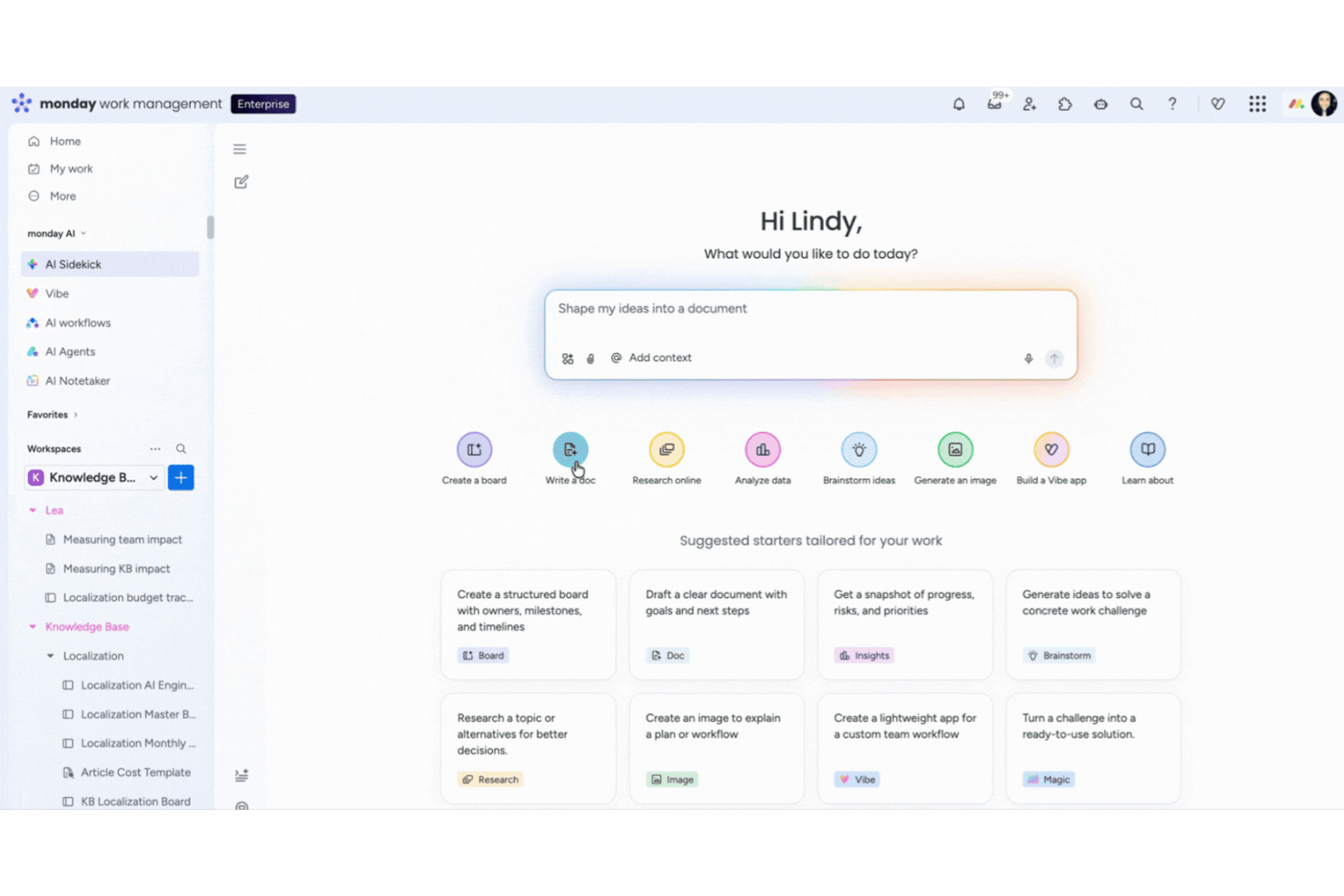
monday AI Workspace is an AI-powered work management platform that brings together autonomous task scheduling, real-time dependency tracking, risk identification, and calendar coordination in a single workspace.
Who Is monday AI Workspace Best For?
It's a strong fit for project managers and PMO teams in mid-size to enterprise tech organizations managing multiple concurrent projects with complex dependencies.
Why I Picked monday AI Workspace
I picked monday AI Workspace because it's one of the few platforms where AI actively monitors your project data rather than waiting for you to notice a problem. Its agents scan dependencies continuously and flag tasks that are behind schedule or stuck in approval queues in real time. I also rely on its anomaly detection layer, which catches unusual workload spikes before they cascade into missed milestones across the broader project timeline.
monday AI Workspace Key Features
- AI-powered meeting notetaker: Joins calls, transcribes conversations, summarizes discussions, and sends action items to boards automatically.
- No-code workflow automation builder: Lets teams build and trigger custom automated workflows across projects and teams without writing code.
- Conversational AI assistant (Sidekick): Accepts natural language commands to create, edit, or reschedule tasks and meetings from any device.
- Native two-way calendar sync: Keeps Google and Outlook calendars in sync with project boards and task timelines in real time.
monday AI Workspace Integrations
monday AI Workspace offers hundreds of native integrations, including Google Calendar, Outlook, Gmail, Zoom, Microsoft Teams, GitHub, and Slack. It provides an API for custom integrations and connects with Zapier.
Pros and Cons
Pros:
- Handles dependency-based rescheduling automatically
- Automates meeting scheduling across teams
- Flags at-risk tasks in real time
Cons:
- AI-generated updates may require manual review
- Advanced workload management sometimes lags
New Product Updates from monday AI Workspace
monday AI Workspace Adds Human Approval Routing
monday AI Workspace adds a human-in-the-loop approval block to AI Workflows, sending approval requests and routing workflow paths based on responses. For more information, visit monday AI Workspace's official site.

Akiflow
Best for integration options

Akiflow is an AI scheduling assistant that brings together calendar management, task consolidation, and integrations with popular productivity tools for centralized scheduling.
Who Is Akiflow Best For?
Akiflow is a good fit for individual professionals and project managers who work across multiple tools and need a single place to manage their schedule and tasks.
Why I Picked Akiflow
I picked Akiflow as one of the best because its integration depth is hard to replicate in a single scheduling tool. It connects with over 3,000 tools through its Universal Inbox, pulling tasks from Slack, Gmail, Jira, Asana, Linear, and more into one consolidated view. So when a Slack message or a Jira issue arrives, I can turn it into a scheduled task without leaving Akiflow. Two-way sync with Google Calendar and Outlook keeps my calendar accurate across the platforms my team uses.
Akiflow Key Features
- AI time blocking: Automatically schedule tasks into your calendar based on priority, deadlines, and available time slots.
- Command bar: A quick-access command interface lets you create, schedule, and reschedule tasks without switching between apps.
- Daily planner view: A focused daily agenda view surfaces your most important tasks and meetings in a single, prioritized layout.
- Recurring task scheduling: Set tasks to repeat on custom schedules so routine work gets automatically placed on your calendar.
Akiflow Integrations
Akiflow offers native integrations with Google Calendar, Outlook, Slack, Asana, Todoist, Trello, Gmail, and Linear, and connects with Zapier.
Pros and Cons
Pros:
- Efficient for managing multiple calendars
- Quick command for fast task entry
- Centralizes tasks from multiple tools
Cons:
- No team assignment or shared boards
- Doesn’t include native scheduling for external appointments

TidyCal
Best simple calendar tool

TidyCal is an AI-powered scheduling assistant that lets you automate meeting bookings, sync multiple calendars, and manage availability through a simple online interface.
Who Is TidyCal Best For?
TidyCal suits freelancers, solopreneurs, and small teams who need a no-fuss way to manage bookings without a steep learning curve.
Why I Picked TidyCal
TidyCal is on my shortlist because it reduces scheduling to what most people need. I love that you get a live booking page the moment you create an account—no configuration maze, no onboarding checklist to work through. The booking type setup is fast: I can define a meeting type, set my availability, and share a link in under five minutes. The AI features (available on paid plans) layer on smart scheduling without making the tool feel bloated or complicated.
TidyCal Key Features
- Automated reminders: Send automated email and SMS reminders to reduce no-shows before scheduled meetings.
- Session packages and bundles: Create pre-paid session packs (e.g., 5-packs or 10-packs) that clients purchase upfront before booking individual sessions.
- Recurring subscriptions: Set up subscription-based booking types so clients are charged automatically on a recurring schedule.
- Payment collection: Connect Stripe or PayPal to collect payment at the time of booking, before a session begins.
TidyCal Integrations
TidyCal offers native integrations with Google Calendar, Microsoft Outlook Calendar, and Apple Calendar, and connects with Zapier. An API supports custom integrations.
Pros and Cons
Pros:
- Simple user interface
- Allows for buffer times
- Automatic time zone detection
Cons:
- Lacks detailed analytics
- May not suit large teams

TimeHero
Best for task automation

TimeHero is an AI scheduling assistant that automates task planning, manages team calendars, and integrates with your existing workflow tools.
Who Is TimeHero Best For?
TimeHero is a good fit for small to mid-sized teams who need AI-driven task scheduling without manually managing every calendar block.
Why I Picked TimeHero
TimeHero earns its spot as one of the best on my shortlist because of how it handles task automation at a level most scheduling tools don't touch. What I find most useful is the autonomous recurring task feature—instead of just repeating a task on a fixed date, TimeHero finds the best available slot within a given timeframe and schedules it there automatically. I also like the automatic risk detection, which flags tasks that are drifting too close to their due date with little room left to reschedule. When a meeting gets added last minute, TimeHero doesn't wait for you to manually shuffle things around—it replans your day on its own.
TimeHero Key Features
- Workload and capacity tracking: View how your time and your team's time is allocated across past, present, and future planned work.
- Project workflow templates: Launch recurring project types using templates that auto-schedule tasks across the team based on start and due dates.
- Proactive time tracking: Start a timer directly from your task plan and log time against scheduled work, with timesheets comparing estimated vs. actual hours.
- Guest and reviewer accounts: Share filtered project views with external stakeholders, letting them see relevant tasks, due dates, and files without full account access.
TimeHero Integrations
TimeHero offers native integrations with Google Calendar, Microsoft Outlook, and Slack. It also connects with Zapier and provides an API for custom integrations.
Pros and Cons
Pros:
- Adapts to calendar changes
- Supports recurring tasks
- Predictive task management
Cons:
- Interface can feel cluttered
- Real-time updates aren’t always immediate

Motion
Best for dynamic scheduling

Motion is an AI scheduling assistant that combines automated calendar management, intelligent task prioritization, and meeting scheduling for individuals and teams.
Who Is Motion Best For?
Motion is a good fit for busy professionals and small teams who manage high task volumes and need their schedule automatically organized around shifting priorities.
Why I Picked Motion
Motion earns its spot on my shortlist because it handles dynamic scheduling—it doesn't just block time on your calendar, it continuously re-optimizes your entire day as things change. I really like the AI Calendar Assistant's ability to reprioritize and reschedule tasks automatically when a meeting runs long or a new urgent task lands. My team doesn't need to manually reshuffle the plan every time something shifts. The distinction between "do date" and "due date" is also genuinely useful—Motion flags at-risk tasks days in advance rather than surfacing the problem the morning something is due.
Motion Key Features
- AI Meeting Assistant: Set preferred meeting windows, daily meeting limits, and custom booking page availability to protect focus time.
- AI Workflows: Automate repeatable project sequences and SOPs so work passes between team members without manual handoffs.
- AI Meeting Notetaker: Automatically capture meeting notes and summaries so nothing discussed gets lost after a call.
- AI capacity planning: Balance team workload across projects by matching available time against active tasks and deadlines.
Motion Integrations
Motion offers native integrations with Google Calendar and Microsoft Outlook Calendar. An API is available for custom integrations.
Pros and Cons
Pros:
- Reduces manual calendar adjustments
- Offers detailed time analytics
- Adapts to last-minute changes
Cons:
- No offline mode
- Can feel rigid if you prefer manual control

Reclaim
Best for team coordination

Reclaim is an AI scheduling assistant that automates calendar management, prioritizes tasks, and coordinates meetings for individuals and teams.
Who Is Reclaim Best For?
Reclaim is a good fit for teams and knowledge workers who need to balance deep work, meetings, and collaborative scheduling across shared calendars.
Why I Picked Reclaim
Reclaim earns its spot as one of the best on my shortlist because of how well it handles team coordination through AI-driven scheduling. I particularly like the Team Scheduling Links feature, which lets my team share availability across multiple people at once—no back-and-forth needed to find a time that works. Reclaim also syncs tasks and habits directly into the calendar, so when a teammate books time with me, it's working around real commitments, not just blocked-off slots.
Reclaim Key Features
- AI task scheduling: Reclaim automatically blocks time on your calendar for tasks, splits large projects into work sessions, and reschedules them when meetings conflict.
- AI habits: Set recurring routines—like a daily standup prep or weekly review—and Reclaim finds and defends time for them automatically around your existing schedule.
- Smart buffer time: Reclaim auto-schedules decompression time and travel time before and after meetings, including automatic color-coding and Slack status updates.
- No-meeting days: Designate specific days as meeting-free, and Reclaim enforces that protection by automatically declining or rescheduling conflicting invites.
Reclaim Integrations
Reclaim offers native integrations with Google Calendar and Slack, and provides an API for custom integrations.
Pros and Cons
Pros:
- Enhances team collaboration
- Break management features
- Predictive calendar adjustments
Cons:
- Not suited to those who want manual control
- Setup may be time-consuming


Clara is an AI scheduling assistant that automates meeting coordination, calendar management, and rescheduling through email-based interactions for teams needing advanced scheduling support.
Who Is Clara Best For?
Clara suits remote teams that coordinate meetings across time zones and want to avoid manual back-and-forth.
Why I Picked Clara
I chose Clara because it fits naturally into how remote teams communicate. I love that it works entirely through email—you just cc Clara on a thread, and it reads the conversation, checks availability across all participants, proposes times, and sends the calendar invite. There's no scheduling link to share or new tool to onboard. For distributed teams coordinating across time zones, Clara also handles follow-ups automatically when someone doesn't respond, which I find genuinely useful when you're working asynchronously.
Clara Key Features
- Focus block protection: Clara respects designated focus blocks in your calendar and avoids scheduling meetings during those times.
- Buffer time rules: Set travel or transition buffers between meetings, and Clara automatically factors them into every scheduling decision.
- Meeting type customization: Define distinct meeting types with specific durations, locations, or conferencing links, and Clara applies the right settings each time.
- Escalation control: Clara only loops you in when a scheduling situation requires your input, handling everything else on its own.
Clara Integrations
Clara integrates natively with Google Calendar and Microsoft Outlook Calendar, and provides an API for custom integrations.
Pros and Cons
Pros:
- Provides executive assistant backup
- Minimizes email back-and-forth
- Operates 24/7 for global teams
Cons:
- Slight delays compared to fully automated tools
- Relies heavily on email-based workflows


Trevor AI is an AI scheduling assistant that lets you organize tasks, prioritize your to-do list, and time-block work directly onto your calendar.
Who Is Trevor AI Best For?
Trevor AI is a good fit for individual contributors and freelancers who need to manage a high volume of tasks alongside a busy calendar.
Why I Picked Trevor AI
Trevor AI earns its spot on my shortlist because of how directly it connects your task list to your calendar. What I find most useful is the Smart Scheduling Queue—you add tasks to a prioritized queue, and Trevor proactively suggests time blocks for them, even in bulk. The personal AI model is another feature I keep coming back to: it adapts to your scheduling patterns over time, so duration predictions and time-slot suggestions get sharper with each planning session. Focus Mode adds another layer by breaking a scheduled task into five steps and pairing it with a timer, so you're not just blocking time—you're actually working through it.
Trevor AI Key Features
- Drag-and-drop scheduling: Manually drag tasks from your to-do list directly onto your calendar to assign them a specific time slot.
- Multi-list task management: Organize tasks across multiple lists and view them all in a single unified sidebar alongside your calendar.
- Recurring tasks: Set tasks to repeat on a schedule so they automatically reappear in your task list without manual re-entry.
- Daily planner view: Review all scheduled tasks and calendar events together in a single day view to track what's planned.
Trevor AI Integrations
Trevor AI offers native integrations with Google Calendar, Outlook Calendar, and Apple Calendar.
Pros and Cons
Pros:
- Supports multiple calendar accounts
- Personalized AI scheduling model
- Effective time-blocking capabilities
Cons:
- Occasional syncing delays
- Limited customization options


SkedPal is an AI scheduling assistant that automatically organizes tasks, prioritizes to-dos, and syncs with your calendar to help you manage your daily workload.
Who Is SkedPal Best For?
SkedPal suits individual professionals and freelancers who need to manage personal task loads and keep their schedules organized.
Why I Picked SkedPal
SkedPal earns its spot on my shortlist because of how well it handles the gap between having a to-do list and actually getting things done. I love the natural-language scheduling approach—instead of manually dragging tasks onto a calendar, you tell SkedPal something like "find time for this project before May 10th" and it builds the time blocks for you. The Outline feature is also genuinely useful for capturing every open loop in your work and personal life in one place, which prevents anything from slipping through. When priorities shift mid-week, the auto-scheduler recalculates your entire plan with one click instead of making you rearrange everything by hand.
SkedPal Key Features
- Time maps: Define your preferred working hours for different types of tasks so SkedPal only schedules work during the times you've set aside for it.
- Prioritization board: Rank tasks by importance so the auto-scheduler knows which items to place first when building your daily plan.
- Routines and habits planning: Schedule recurring tasks and habits as part of your regular plan so they get time-blocked alongside one-off work.
- Status Tracker: Monitor your current activity in real time and watch your schedule adjust automatically as your day unfolds.
SkedPal Integrations
SkedPal offers native integrations with Google Calendar, Outlook Calendar, and Apple Calendar. An API is available for custom integrations.
Pros and Cons
Pros:
- Mobile app availability
- Supports routine goal setting
- Flexible time blocking
Cons:
- Can feel overengineered
- May require frequent adjustments
Andre AI-planleggingsassistenter
Her er noen flere alternativer for AI-planleggingsassistenter som ikke kom med på listen min, men som likevel er verdt å se nærmere på:
- Scheduler AI
For small businesses
- Sidekick AI
For email scheduling
- Katch AI
For meeting requests
- Carly AI
With multilingual scheduling support
- Acuity Scheduling
For appointment booking
- ClickUp
For task management
- Calendly
For simple meeting setup
- Google Calendar
For universal accessibility
- Lindy
For personalized scheduling
- Notion Calendar
For customizable planning
- Kronologic
For sales teams
- Kalendar AI
For lead generation


How I Evaluate AI Scheduling Assistants
Any tool can suggest a due date—I look for AI that reschedules dependencies when a deadline slips and rebalances workloads without manual effort. I split my evaluation into two layers: the core functionality a tool needs to qualify and the differentiating factors that set the best options apart.
Core Functionality (Table Stakes For This List)
When I'm selecting tools for my list, I rank each one on a scale from 0 (does not offer the functionality) to 5 (excels in this area) for each core functionality listed below. Then, I calculate the tool's total score into a percentage. Each tool needs to achieve a minimum total score of 65% to be considered for inclusion.
- AI-Driven Auto-Scheduling: I look for tools that place tasks and meetings on the calendar autonomously—factoring in priorities, deadlines, and dependencies rather than just suggesting a time slot.
- Dynamic Rescheduling: When a predecessor task slips, I check whether downstream work and meetings cascade automatically or whether a PM has to manually drag every item.
- Workload & Capacity Intelligence: I evaluate how well the tool detects overallocation—like flagging when a developer is booked at 140% before a sprint deadline—and whether it suggests reassignment.
- Calendar & PM Tool Integrations: Bidirectional sync with Google Calendar, Outlook, and platforms like Jira or Asana matters here. I look for real-time data flow, not overnight batch syncs.
- Predictive Deadline Forecasting: I check whether the AI projects realistic completion dates using velocity and historical patterns, and whether it surfaces at-risk milestones early enough to act.
- Natural Language Task Input: I evaluate whether you can type or speak something like "schedule a design review with the frontend team next Tuesday" and get a usable task with the right assignee and date.
Once I have a list of tools that meet the criteria, I consider what sets each platform apart.
Differentiating Factors (What Sets Vendors Apart)
Here's how I compare and contrast different vendors:
Standout Features
Scenario simulation is a major differentiator—I look for tools that let you model a delayed handoff or added scope and preview how the rest of the timeline shifts before committing. Cross-project prioritization also matters when PMs juggle multiple workstreams. The strongest tools surface what each person should tackle next across all active projects, not just one. Focus time protection rounds this out by letting the AI block deep-work windows around key deliverables and push back on meeting creep automatically.
Beyond Features
AI trust and explainability matters a lot here—I want to see why the tool rescheduled a task or reassigned work, not just that it did. Data privacy is equally important since these tools ingest calendar, task, and meeting data. I check whether vendors offer clear policies on model training opt-outs and data residency options. Time-to-value also shapes my evaluation. A tool that needs weeks of historical data before its AI delivers useful suggestions is a harder sell than one that starts adding value within days of connecting your project boards.
Slik velger du en AI-planleggingsassistent
Det er lett å gå seg vill i lange funksjonslister og komplekse prisstrukturer. For å hjelpe deg med å holde fokus mens du jobber deg gjennom din unike prosess for valg av programvare, finner du her en sjekkliste over faktorer du bør ha i bakhodet:
| Faktor | Hva du bør vurdere |
|---|---|
| Skalerbarhet | Kan verktøyet vokse med teamet ditt? Vurder om det kan håndtere flere brukere, møter og mer data etter hvert som organisasjonen utvides. Se etter alternativer som tilbyr fleksible abonnementer eller enkle oppgraderinger. |
| Integrasjoner | Kan det kobles til verktøyene du bruker i dag? Kontroller om det kan integreres med eksisterende kalendere, kommunikasjonsplattformer og prosjektstyrings- eller CRM-programvare for å sikre en smidig arbeidsflyt og unngå manuell dataregistrering. |
| Tilpasningsmuligheter | Kan du tilpasse det etter behovene dine? Vurder om verktøyet lar deg tilpasse planleggingsregler, varsler og brukerpreferanser. Denne fleksibiliteten kan bidra til å tilpasse verktøyet til teamets spesifikke arbeidsflyter. |
| Brukervennlighet | Er det brukervennlig? Sørg for at grensesnittet er intuitivt og enkelt å navigere i for alle teammedlemmer. Et komplisert verktøy kan føre til frustrasjon og lavere bruk. |
| Implementering og innføring | Hvor raskt kan du komme i gang? Vurder ressursene og tiden som kreves for oppsett og opplæring. Se etter leverandører som tilbyr omfattende støtte ved innføring, for eksempel veiledninger og kundesuksessteam, eller til og med AI-drevne funksjoner for personlig assistanse som kan legge til rette for en smidig overgang. |
| Kostnad | Er det innenfor budsjettet ditt? Sammenlign prisplanene og se hvilke funksjoner som er inkludert på hvert nivå. Vær oppmerksom på skjulte kostnader eller ekstra gebyrer for premiumfunksjoner som kanskje ikke passer budsjettet ditt. |
| Sikkerhetstiltak | Beskytter det dataene dine? Sørg for at verktøyet følger bransjestandarder for sikkerhet og tilbyr funksjoner som datakryptering og tilgangskontroller for brukere, slik at sensitiv informasjon beskyttes. |
| Tilgjengelig kundestøtte | Kan du få hjelp når du trenger det? Undersøk leverandørens alternativer for kundestøtte, for eksempel direktechat, telefonstøtte og responstider, for å sikre at du får tilgang til hjelp når du møter problemer eller har spørsmål. |
Hva er en AI-assistent for planlegging?
En AI-assistent for planlegging er programvare som bidrar til å automatisere prosessen med å sette opp møter og avtaler.
Disse verktøyene bidrar til økt produktivitet ved å ta seg av planleggingsprosessen, slik at du kan fokusere på viktigere oppgaver. De brukes ofte av ledere, toppledere og administrativt ansatte for å spare tid og unngå planleggingskonflikter. Funksjoner som automatisk bestilling, kalendersynkronisering og påminnelser gjør det enklere å holde seg til planen og unngå uteblitte møter.
Funksjoner i AI-assistenter for planlegging
Når du velger en AI-assistent for planlegging, bør du se etter følgende viktige funksjoner:
- Automatisk planlegging: Organiserer møter automatisk basert på deltakernes tilgjengelighet, slik at behovet for e-poster frem og tilbake reduseres.
- Kalendersynkronisering: Integreres med eksisterende kalenderapper for å sikre at timeplanene alltid er oppdaterte og at konflikter minimeres.
- Støtte for tidssoner: Justerer møtetidspunkter for deltakere i ulike tidssoner, noe som gjør det enklere å koordinere globale team.
- Prioritering av oppgaver: Hjelper brukerne med å fokusere på viktige oppgaver ved å planlegge dem automatisk på optimale tidspunkter.
- Tilpassbare bestillingssider: Lar brukerne opprette personlige planleggingslenker for enkel avtaleinnstilling.
- Møtepåminnelser: Sender automatiske varsler til deltakerne før møter for å redusere risikoen for uteblitte avtaler.
- Prediktiv planlegging: Justerer og flytter oppgaver basert på endrede prioriteringer og nye oppgaver ved hjelp av smarte algoritmer.
- Integrasjon med samarbeidsverktøy: Kobler seg til plattformer som Slack og Zoom for å effektivisere kommunikasjonen og oppsettet av AI-møter.
- Sikkerhetstiltak: Beskytter sensitiv informasjon med datakryptering og tilgangskontroller for brukere.
- Analyser og innsikt: Gir detaljerte rapporter om tidsbruk for å hjelpe brukerne med å optimalisere timeplanene og produktiviteten.
- AI-agenter og funksjoner for virtuell assistent: Tilbyr håndfri hjelp og forslag i sanntid for bedre beslutninger om planlegging.
Fordeler med AI-assistenter for planlegging
Implementering av en AI-assistent for planlegging kan gi flere fordeler for teamet og virksomheten din. Her er noen av fordelene du kan se frem til:
- Tidsbesparelser: Automatiserer planleggingsoppgaver, slik at teamet ditt kan fokusere på viktigere arbeid.
- Færre konflikter: Synkroniserer kalendere og administrerer tilgjengelighet for å minimere overlappende avtaler og tapte møter.
- Økt produktivitet: Prioriterer oppgaver og setter av tid til fokusert arbeid, noe som øker den generelle effektiviteten.
- Bedre koordinering: Støtter globale team ved å ta hensyn til tidssoner og integrere med samarbeidsverktøy.
- Økt fleksibilitet: Tilpasser seg endringer i siste liten og planlegger oppgaver på nytt for å holde teamet smidig.
- Datadrevet innsikt: Tilbyr analyser av tidsbruk for å hjelpe deg med å optimalisere tidsplaner og forbedre arbeidsflyten.
- Bedre kommunikasjon: Sender påminnelser og oppdateringer for å sikre at alle er informert og forberedt til møter.
- Funksjoner for personlig assistent: Gir brukerne intelligente anbefalinger som hjelper dem med å administrere både oppgaver på gjøremålslisten og møter.
Kostnader og priser for AI-planleggingsassistenter
Når du velger en AI-planleggingsassistent, må du forstå de ulike prismodellene og abonnementene som er tilgjengelige. Kostnadene varierer basert på funksjoner, teamstørrelse, tillegg og mer. Tabellen nedenfor oppsummerer vanlige abonnementer, gjennomsnittsprisene deres og typiske funksjoner som inngår i løsninger for AI-planleggingsassistenter:
Sammenligningstabell for abonnementer for AI-planleggingsassistenter
| Abonnementstype | Gjennomsnittspris | Vanlige funksjoner |
|---|---|---|
| Gratisabonnement | $0 | Grunnleggende planlegging, begrenset kalendersynkronisering og viktige påminnelser |
| Personlig abonnement | $5 - $25/bruker/måned | Avanserte planleggingsalternativer, full kalendersynkronisering, tilpassbare bestillingssider og oppgaveprioritering |
| Bedriftsabonnement | $25 - $50/bruker/måned | Verktøy for teamsamarbeid, integrasjon med tredjepartsapper, detaljerte analyser og forbedrede sikkerhetsfunksjoner |
| Abonnement for større virksomheter | $50+/bruker/måned | Tilpassbare løsninger, dedikert kundestøtte, avansert sikkerhet, beskyttelsestiltak og integrasjonsmuligheter i stor skala |
Vanlige spørsmål om AI-planleggingsassistenter
Her er noen svar på vanlige spørsmål om AI-planleggingsassistenter:
Hvordan kan AI brukes til planlegging?
AI kan hjelpe med planlegging ved å legge til oppgaver i kalenderen, løse konflikter og gruppere lignende oppgaver i tidsblokker. Den kan til og med analysere gjøremålslisten din og anbefale de beste tidspunktene for å fullføre hver oppgave. Dette reduserer kontekstbytte og gjør det enklere å holde fokus. Før du bytter, bør du undersøke om verktøyet fungerer sammen med det du allerede bruker.
Hva er den beste AI-løsningen for planlegging?
Det beste AI-planleggingsverktøyet avhenger av hva du trenger. Noen er gode til å lage dagsplaner, mens andre fokuserer på å sette opp møter. Se etter funksjoner som tidsblokkering, kalendersynkronisering, naturlig språkbehandling og hva andre brukere sier, for å finne den riktige løsningen for deg og teamet ditt.
Hva er formålet med en planleggingsassistent?
En planleggingsassistent hjelper deg med å administrere og organisere avtaler, møter og arrangementer. Den kobler seg til e-post- og kalenderappen din for å planlegge ting effektivt, og bruker AI-drevne forslag for å spare tid og redusere friksjon.
Har Microsoft en AI-planlegger?
Ja, Microsoft tilbyr en AI-planlegger kalt Scheduler som bruker naturlig språk til å sette opp møter. Den fungerer sammen med Outlook for å automatisere planleggingen og redusere behovet for manuell utveksling av meldinger.
Hvordan håndterer AI-planleggingsassistenter tidssoner?
AI-planleggingsassistenter justerer automatisk møtetidspunkter for personer i ulike tidssoner. Dette sikrer at alle får riktig møteinvitasjon og bidrar til å unngå konflikter, noe som gjør det enklere å koordinere globale team.
Kan AI-planleggingsassistenter integreres med samarbeidsverktøy?
Ja, mange AI-planleggingsassistenter fungerer sammen med verktøy som Slack, Zoom og Microsoft Teams. Andre går lenger ved å integreres med CRM-plattformer og bruke AI-agenter til å analysere teamdata for bedre planleggingsbeslutninger. Dette gjør det enkelt å sette opp møter og holde kommunikasjonen tydelig, slik at teamet kan holde kontakten og arbeide etter planen.