

10 beste AI-notatapper vurdert i 2026

10 Utvalg av de beste AI-appene for notater


Det kan raskt bli uoversiktlig å håndtere prosjekter når du følger opp oppgaver, møter og ideer samtidig. Det er her AI-apper for notater kommer inn; de håndterer det tidkrevende arbeidet, som å transkribere samtaler, sortere informasjon og fremheve det viktigste, slik at du slipper.
Jeg har brukt tid på å teste disse verktøyene selv, og noen gjør virkelig arbeidet enklere. Nedenfor finner du mine beste anbefalinger basert på faktisk bruk, inkludert hvilke som skiller seg ut med smarte funksjoner og arbeidsflyter som fungerer godt for team
Why Trust Our Software Recommendations
Our team has been testing and reviewing software since 2012. As project managers ourselves, we know how difficult—and important—it is to choose the right software.
For this guide, we evaluated tools using hands-on testing and independent research, scoring tools using our selection criteria. We also draw on insights from industry thought leaders and practicing project management experts.
Our reviews reflect our human editorial judgment, not a sales pitch.
Expert reviewers:
Sammenligningstabell for AI-apper for notater
Denne sammenligningstabellen oppsummerer prisdetaljene for mine beste utvalgte AI-apper for notater.
| Tool | Best For | Trial Info | Price | ||
|---|---|---|---|---|---|
| 1 | Best for AI-assisted organization | Free plan available | From $10/user/month (billed annually) | Website | |
| 2 | Best for turning meeting notes into tasks | Free plan available | From $9/user/month (billed annually) | Website | |
| 3 | Best for linking notes with AI | Free plan available | From $4/user/month (billed annually) | Website | |
| 4 | Best for collaboration with AI | 30-day free trial available | From $6/user/month (billed annually) | Website | |
| 5 | Best for eco-friendly AI note-taking | Free plan available | From $14/user/month | Website | |
| 6 | Best for AI-powered voice analysis | Free plan + free demo available | From $10/user/month (billed annually) | Website | |
| 7 | Best for transcribing meetings | Free plan available | From $8.33/user/month (billed annually) | Website | |
| 8 | Best for AI-driven memory recall | Free plan available | From $12/user/month | Website | |
| 9 | Best for automating meeting notes | Free plan + free demo available | From €39/user/month (billed annually) | Website | |
| 10 | Best for generating meeting summaries | Free plan available | From $10/user/month (billed annually) | Website |

Anmeldelser av de beste AI-appene for notater
Nedenfor finner du mine detaljerte sammendrag av de beste AI-appene for notater som kom med på utvalgslisten min. Anmeldelsene mine gir en detaljert gjennomgang av de viktigste funksjonene, fordeler & ulemper, integrasjoner og ideelle bruksområder for hvert verktøy, slik at du kan finne det som passer best for deg.
Notion
Best for AI-assisted organization

Notion is a workspace that combines note-taking, task management, and collaboration, catering to both individuals and teams. It offers AI-driven features that help users organize information and streamline workflows efficiently.
Why I picked Notion: Notion's AI capabilities assist in organizing information through smart suggestions and automated content categorization. Its flexibility allows you to create custom databases and templates tailored to your needs. The tool's ability to integrate tasks, notes, and projects in one place can increase productivity.
Standout Features & Integrations:
Features include the ability to create custom templates for different project types, which is designed to limit repetitive tasks. You can embed various types of media, from videos to code snippets, enriching your workspace. Notion's drag-and-drop interface makes it easy to rearrange content and adapt to changing project needs.
Integrations include Slack, Google Drive, Trello, Asana, Figma, GitHub, Typeform, Zapier, Jira, and Microsoft Teams.
Pros and Cons
Pros:
- Supports embedding various media types
- Drag-and-drop interface simplifies organization
- Customizable templates for diverse projects
Cons:
- Limited offline capabilities
- Free plan does not offer full scope of the tool

ClickUp
Best for turning meeting notes into tasks
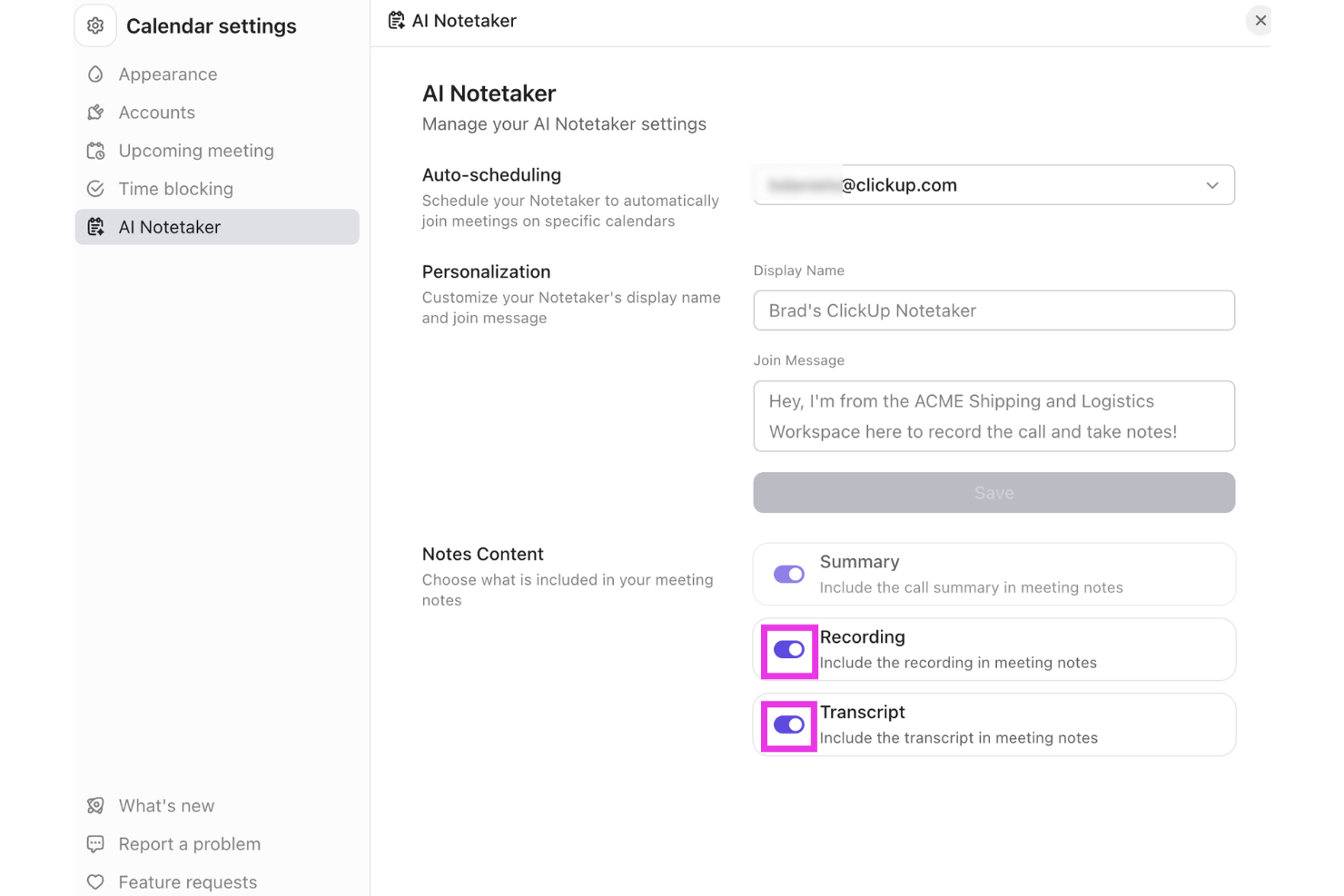
ClickUp offers a versatile platform that integrates AI capabilities to support note-taking and team collaboration. Professionals across project management, software development, and vendor management can use its tools to organize information and manage workflows in one place. With the AI Meeting Notetaker and support for turning meeting notes into tasks, ClickUp helps teams capture discussions and connect them directly to actionable work.
Why I Picked ClickUp
I picked ClickUp for turning meeting notes into tasks, using its AI Meeting Notetaker to capture conversations and organize key points from discussions. The tool records meetings, generates summaries, and converts action items into tasks that can be tracked within ClickUp. It also connects notes with projects, documents, and workflows, helping teams manage follow-ups without switching between multiple tools.
ClickUp Key Features
In addition to turning meeting notes into tasks, ClickUp offers:
- Project Tracking: Offers real-time visibility into project status, helping teams stay on top of their tasks and deadlines.
- Document Creation: Enables seamless document drafting and editing within the platform, ensuring all your notes are easily accessible.
- Time Management: Provides tools to track time spent on tasks, aiding in better resource allocation and productivity analysis.
- Integration Support: Connects with over 50 applications, allowing you to manage projects across different platforms without switching tools.
ClickUp Integrations
Integrations include Slack, Google Drive, Dropbox, Microsoft Teams, Zoom, GitHub, Jira, Salesforce, and other third-party tools.
Pros and Cons
Pros:
- All-in-one platform combining tasks, docs, goals, and collaboration tools
- Flexible customization for workflows, dashboards, and task organization
- Centralized workspace organizing tasks, projects, and clients in one platform
Cons:
- Interface complexity can overwhelm non-technical users or first-time users
- Mobile app and form features reported as limited by some users
New Product Updates from ClickUp
ClickUp Adds Meetings Hub, Super Agent Templates, and ZoomInfo Integration
ClickUp adds a searchable Meetings Hub, new ways to clone and template Super Agents, and a ZoomInfo integration through the App Center. These updates improve meeting retrieval, agent reuse, and access to sales intelligence. For more information, visit ClickUp’s official site.
Obsidian
Best for linking notes with AI

Obsidian is a note-taking app designed for users who need to organize complex information and connections between notes. It caters mainly to individuals and teams looking for a way to visualize their thoughts and ideas through interconnected notes and AI-assisted linking.
Why I picked Obsidian: The app's standout feature is its ability to link notes using AI, making it easier for you to create a web of related ideas. Obsidian uses AI to suggest connections between your notes, which can increase your ability to discover relationships. Its AI capabilities also help in categorizing and organizing your notes automatically.
Standout Features & Integrations:
Features include a graph view that visually represents the links between your notes, aiding in better comprehension. You can also customize your workspace with plugins to suit your needs. Additionally, Obsidian offers markdown support, which allows you to format notes with ease.
Integrations include Markdown, Git, Dropbox, Google Drive, Evernote, OneDrive, Todoist, Trello, and Notion.
Pros and Cons
Pros:
- Supports markdown for easy formatting
- Customizable with community plugins
- Visual graph view for note connections
Cons:
- Requires manual setup for full functionality
- Mobile app interface is less feature-rich than desktop version
Best for collaboration with AI

Microsoft OneNote is a digital note-taking app that caters to individuals and teams looking for a collaborative workspace. With AI-enhanced features, it helps users organize notes, share ideas, and collaborate efficiently across projects.
Why I picked Microsoft OneNote: The tool's AI capabilities make it ideal for collaboration by enabling real-time sharing and editing of notes. It integrates with other Microsoft products, which increases productivity for teams using the Microsoft ecosystem. AI-driven features like handwriting recognition and search make it easy to find and organize information.
Standout Features & Integrations:
Features include the ability to clip web content directly into your notes, making research more efficient. You can organize your notes with sections and pages, providing a structured approach to note-taking. Additionally, the drawing tools allow you to sketch ideas or annotate documents directly within OneNote.
Integrations include Microsoft Word, Microsoft Excel, Microsoft Outlook, Microsoft Teams, OneDrive, SharePoint, PowerPoint, Skype, Yammer, and Planner.
Pros and Cons
Pros:
- Integrates with Microsoft products
- Handwriting recognition for easy note search
- Real-time collaboration with team members
Cons:
- Requires a Microsoft account for full features
- Mobile versions offer fewer features than desktop versions

Granola
Best for eco-friendly AI note-taking

Granola is an AI-powered notepad aimed at professionals who frequently attend meetings and need efficient note-taking solutions. It focuses on transcribing audio directly from your device, eliminating the need for additional meeting bots and enhancing the note-taking experience with AI-driven features.
Why I picked Granola: Granola's eco-friendly approach is reflected in its ability to transcribe audio directly from your computer, reducing the reliance on external servers. Its AI capabilities assist in creating detailed meeting notes quickly, which is ideal for back-to-back meetings. Users can customize templates to fit various meeting types, ensuring that the tool adapts to specific needs.
Standout Features & Integrations:
Features include customizable templates that let you tailor notes to different meeting formats. The AI support for post-meeting tasks helps you manage follow-ups. Additionally, Granola enables easy sharing of notes across platforms, making collaboration straightforward.
Integrations include Zoom, Slack, Microsoft Teams, Google Meet, Skype, Webex, Asana, Trello, Notion, and Evernote.
Pros and Cons
Pros:
- AI support for managing post-meeting tasks
- Customizable templates for different meetings
- Direct transcription from your device
Cons:
- No audio or video playback available
- Limited to Mac and iPhone users

Best for AI-powered voice analysis

Fireflies is an AI-driven meeting assistant that transcribes and analyzes conversations for teams and professionals. It helps capture meeting notes and insights, leveraging AI to improve understanding and collaboration.
Why I picked Fireflies: Fireflies provides AI-powered voice analysis by transcribing meetings in real-time and highlighting key topics. Its AI capabilities allow you to search and review past conversations quickly, ensuring no detail is missed. The tool's ability to analyze sentiment and track speaker participation adds depth to its transcription functionality.
Standout Features & Integrations:
Features include the ability to create action items directly from meeting notes, which helps with follow-up tasks. You can also set up reminders for important deadlines based on meeting discussions. Fireflies offers a searchable archive of all your meetings, making it easy to revisit past conversations.
Integrations include Slack, Google Meet, Zoom, Microsoft Teams, Salesforce, Asana, Trello, Dropbox, Evernote, and Zapier.
Pros and Cons
Pros:
- Searchable archive of past meetings
- Sentiment analysis for conversation insights
- Real-time transcription of meetings
Cons:
- Action items can feel overly literal
- Some users need repeated “training” for voice accuracy


Otter is a transcription service tailored for professionals who need to capture meetings and conversations accurately. It offers AI-driven transcription capabilities, making it a popular choice among teams and individuals who rely on detailed meeting notes.
Why I picked Otter: Otter excels in transcribing meetings by using advanced AI algorithms to convert speech into text in real time. It can distinguish between different speakers and provides time-stamped notes, ensuring you capture every detail. Its voice recognition technology is considered quite accurate, which minimizes the need for manual edits.
Standout Features & Integrations:
Features include live transcription during meetings, which allows you to follow along in real time. You can also highlight important parts of the conversation for easy reference later. Additionally, Otter offers keyword searching to quickly locate specific information within your transcripts.
Integrations include Zoom, Microsoft Teams, Google Meet, Dropbox, Google Calendar, Microsoft Outlook, Google Drive, Slack, and Evernote.
Pros and Cons
Pros:
- Easy keyword searching in transcripts
- Real-time transcription capabilities
- Accurate speaker identification
Cons:
- Limited functionality in noisy environments
- Transcript can include errors, garbled output, and missed wording


Mem is an AI-powered note-taking application tailored for professionals and teams who need efficient information retrieval and organization. It uses AI to enhance memory recall, allowing users to access and manage their notes.
Why I picked Mem: Mem's AI-driven features focus on knowledge management and memory recall, helping you find notes quickly with contextual search capabilities. The tool learns from your usage patterns to suggest relevant content and connections. Its AI organizes notes automatically, reducing manual effort. This makes it ideal for those who need to recall information quickly and accurately without sorting through a pile of documents.
Standout Features & Integrations:
Features include a timeline view that organizes notes chronologically for easy access. You can also create tasks and reminders, ensuring you never miss important deadlines. Mem's tagging system helps categorize and retrieve notes efficiently, intuitively create a collection of notes through hashtags, or pull in links to previous mems by hitting “@” and searching for relevant notes. Instead of a hierarchical folder system, mem enables you to create a fluid map of relevant documentation, easily retrievable without leaving the note you are currently working on.
Integrations include Slack, Google Calendar, Notion, Zapier, Trello, Asana, Microsoft Teams, Google Drive, Dropbox, and Evernote.
Pros and Cons
Pros:
- Automatic note organization
- AI suggests relevant content and connections
- Contextual search for quick information retrieval
Cons:
- Note structure and features take some time to fully understand
- Free plan limits usage per month


Jamie is an AI note-taking tool designed for meeting productivity by automatically generating detailed notes, transcripts, and action items. It caters to professionals and teams who need to focus on discussions without the distraction of manual note-taking.
Why I picked Jamie: Jamie excels in automating meeting notes, allowing your team to capture essential details without interruption. Its AI capabilities include speaker recognition and support for several languages, ensuring accurate transcription. The tool's focus on privacy and security, with GDPR compliance and data encryption, adds value for enterprise users.
Standout Features & Integrations:
Features include speaker recognition, which helps distinguish between different participants for clarity. Jamie supports over 99 languages, making it accessible for diverse teams. It also offers admin controls and single sign-on options for enterprise use.
Integrations include Notion, Google Docs, Microsoft Teams, Slack, Zoom, Google Meet, Salesforce, Asana, Trello, and monday.com.
Pros and Cons
Pros:
- Automates action items from meetings
- Integrated AI assistant for follow-ups
- Works online and in-person meetings
Cons:
- No live transcription during meetings
- Desktop-only app, no full mobile support


Supernormal is an AI-powered tool designed for professionals who need to enhance meeting productivity. It automates note-taking and task management, allowing users to focus on discussions while the AI handles documentation and summarization.
Why I picked Supernormal: Supernormal's standout feature is its ability to generate meeting summaries using its AI assistant, Norma. This assistant joins meetings and produces concise summaries, helping your team keep track of key points and actionable steps. The platform supports multiple languages and offers customizable display names for a personalized experience.
Standout Features & Integrations:
Features include customizable display names, which help personalize your meeting experience. The platform supports over 60 languages, ensuring accessibility for diverse teams. Additionally, users can easily share meeting notes and track tasks through its intuitive interface.
Integrations include Salesforce, Slack, HubSpot, Asana, Zoom, Microsoft Teams, Google Meet, Notion, and the Radiant app for M1 Macs.
Pros and Cons
Pros:
- Strong integrations with productivity workflows & CRM
- Supports over 60 languages
- AI assistant joins and summarizes meetings
Cons:
- May require setup for optimal use
- Free plan lacks key advanced features
Andre AI-apper for notater
Her er noen flere AI-apper for notater som ikke kom med på utvalgslisten min, men som likevel er verdt å sjekke ut:
- Wave.co
For AI-enhanced audio notes
- Fellow
For team feedback and notes
- Avoma
For collaborative meeting insights
- Krisp
For noise cancellation in calls
- Equal Time
For meeting time management


How I Evaluate AI Note Taking Apps
Any tool on this list needs to do more than just record and transcribe—it has to use AI to turn messy project conversations into usable outputs like action items, owner assignments, and decision logs that actually flow into your PM workflow. I split my evaluation into two layers: the core functionality a tool must have to qualify, and the differentiating factors that separate a good option from the right one for your team.
Core Functionality (Table Stakes For This List)
When I'm selecting tools for my list, I rank each one on a scale from 0 (does not offer the functionality) to 5 (excels in this area) for each core functionality listed below. Then, I calculate the tool's total score into a percentage. Each tool needs to achieve a minimum total score of 65% to be considered for inclusion.
- AI-Powered Transcription: I evaluate how well each tool converts spoken dialogue into accurate, speaker-labeled text—especially during fast-paced standups or multi-speaker sprint reviews.
- AI Meeting Summarization: Each tool needs to generate structured recaps that capture key points, not just condense text. I look for summaries I could share directly with stakeholders.
- Action Item Extraction: I check whether the AI reliably pulls tasks, owners, and deadlines from conversations—like catching "Sarah will update the risk register by Friday."
- Meeting Platform Integration: The tool should connect natively with Zoom, Microsoft Teams, and Google Meet so it joins calls automatically without manual recording or uploads.
- Project Tool Integrations: I look at how well notes and tasks flow into tools like Jira, Asana, ClickUp, or Monday so extracted action items don't sit in a silo.
- AI Search & Query: Teams build up months of meeting history. I evaluate whether the AI lets you ask questions across past transcripts to find a specific decision or commitment.
Once I have a list of tools that meet this criteria, I consider what sets each platform apart.
Differentiating Factors (What Sets Vendors Apart)
Here's how I compare and contrast different vendors:
Standout Features
Multi-meeting intelligence is a big differentiator—I look for tools that can connect themes, blockers, and decisions across an entire sprint cycle rather than treating each call in isolation. Custom AI prompts also matter because PMs can build reusable templates that pull out risks or dependencies every time. I check whether a tool can auto-generate status reports from recent meetings, saving you from manually compiling weekly updates for leadership.
Beyond Features
Security and compliance weigh heavily in my evaluation because these tools record sensitive stakeholder and client conversations. I check for SOC 2 Type II certification, GDPR readiness, and clear data retention policies. Pricing structure also matters—I look at whether per-seat costs and recording minute caps scale reasonably for PMs who run five or more meetings a day. For distributed teams, transcription accuracy on technical PM vocabulary and multi-language support can make or break adoption across regions.
Slik velger du en AI-app for notater
Det er lett å gå seg vill i lange lister over funksjoner og kompliserte prisstrukturer. For å hjelpe deg med å holde fokus mens du går gjennom den unike prosessen med å velge programvare, får du her en sjekkliste over faktorer du bør ha i bakhodet:
| Faktor | Hva du bør vurdere |
| Skalerbarhet | Hvor godt kan appen vokse med teamet ditt? Vurder om den støtter å legge til brukere eller utvide funksjonene uten betydelige kostnadsøkninger. |
| Integrasjoner | Kan appen kobles til verktøyene du allerede bruker? Se etter kompatibilitet med plattformer som Slack, Google Workspace eller Microsoft Office. |
| Tilpasningsmuligheter | Kan du tilpasse appen til arbeidsflyten din? Se etter alternativer for å justere maler, oversikter eller organiseringen av notater slik at de passer behovene dine. |
| Brukervennlighet | Er appen intuitiv for alle på teamet? Vurder hvor lang tid det tar å lære den, og se om teammedlemmer uten teknisk bakgrunn kan bruke den uten frustrasjon. |
| Implementering og opplæring | Hvor raskt kan du begynne å bruke appen? Vurder tilgjengeligheten av oppsettveiledninger, opplæringsressurser og støtte under opplæringsfasen. |
| Kostnad | Passer appen inn i budsjettet ditt? Sammenlign prisplaner, og se etter skjulte gebyrer eller behov for ekstra kjøp for å få tilgang til full funksjonalitet. |
| Sikkerhetstiltak | Er notatene dine sikre? Sørg for at appen tilbyr kryptering, regelmessige oppdateringer og samsvar med standarder for databeskyttelse, som GDPR. |
Hva er AI-apper for notater?
AI-apper for notater er digitale verktøy som bruker kunstig intelligens til å forbedre innsamling og organisering av notater. Disse verktøyene brukes vanligvis av fagpersoner som prosjektledere, studenter og bedriftsledere som trenger effektiv og nøyaktig dokumentasjon.
Funksjoner som transkripsjon i sanntid, automatisk organisering og kontekstbasert søk bidrar til å øke produktiviteten og redusere manuelt arbeid. Alt i alt sparer disse verktøyene tid og forbedrer nøyaktigheten og tilgjengeligheten til informasjon.
Funksjoner
Når du velger AI-apper for notater, bør du se etter følgende viktige funksjoner:
- Sanntidstranskripsjon: Konverterer talte ord fra møter, telefonsamtaler eller lydfiler til tekst umiddelbart, slik at du kan holde fokus på samtalene i stedet for å skrive.
- Automatisk organisering: AI kategoriserer og sorterer notater på en intelligent måte, slik at du sparer tid på å administrere møtereferater eller idédugnader.
- Kontekstbasert søk: Lar deg bruke AI til å finne notater etter emne, nøkkelord eller kontekst. Ideelt for raskt å finne frem til detaljer fra tidligere møter.
- Taleridentifikasjon: Identifiserer og skiller tydelig mellom talere, noe som forbedrer transkripsjonsnøyaktigheten under gruppediskusjoner og kundesamtaler.
- Møtesammendrag: Oppretter AI-sammendrag av hver økt, slik at du kan gå gjennom hovedpunkter og oppgaver uten å spille av hele lydopptaket på nytt.
- Nøkkelordmerking: Fremhever kritiske begreper og beslutninger automatisk, slik at du raskere kan skanne og organisere innhold.
- Integrasjonsstøtte: Kobler til populære plattformer som Slack, Google Workspace og Microsoft Office, og støtter samarbeid både i gratisversjonen og i betalte abonnementer.
- Sentimentanalyse: Bruker AI til å oppdage tone og sentiment i diskusjoner, slik at du kan vurdere engasjement og enighet under møter.
- Tilpassbare maler: Tilbyr ferdiglagde maler for ulike møtetyper, enten det gjelder en rask innsjekk eller en detaljert prosjektgjennomgang.
- Konvertering fra tale til tekst: Konverterer talenotater eller lydopptak til nøyaktig skrevet tekst. Perfekt for alt-i-ett-apper for møtenotater på tvers av enheter.
Fordeler
Implementering av AI-apper for notatskriving gir flere fordeler for teamet og virksomheten din. Her er noen av fordelene du kan se frem til:
- Tidsbesparelser: Sanntidstranskripsjon og automatisk organisering reduserer tiden som brukes på manuell notatskriving og sortering.
- Forbedret nøyaktighet: AI-drevne funksjoner som taleridentifikasjon og kontekstbasert søk forbedrer nøyaktigheten i notatene dine og gjør det enklere å finne dem igjen.
- Forbedret samarbeid: Integrasjonsstøtte gjør det enkelt å dele og samarbeide med teammedlemmer på tvers av ulike plattformer.
- Dypere innsikt: Sentimentanalyse og møtesammendrag gir verdifull innsikt i samtaler, slik at du kan ta velinformerte beslutninger.
- Økt tilgjengelighet: Konvertering fra tale til tekst og nøkkelordmerking gjør notatene dine lett tilgjengelige og enkle å navigere i fra alle enheter.
- Tilpasningsmuligheter: Tilpassbare maler lar deg skreddersy notatskrivingen til ulike møtetyper og arbeidsflyter.
- Bedre organisering: AI-funksjoner kategoriserer og merker notater automatisk, slik at informasjonen holdes godt organisert og er enkel å finne.
Kostnader og priser
Valg av AI-apper for notatskriving krever en forståelse av de ulike prismodellene og abonnementene som er tilgjengelige. Kostnadene varierer basert på funksjoner, teamstørrelse, tillegg og mer. Tabellen nedenfor oppsummerer vanlige abonnementer, gjennomsnittsprisene deres og typiske funksjoner som er inkludert i løsninger for AI-notatskriving:
Sammenligningstabell for apper for AI-notatskriving
| Abonnementstype | Gjennomsnittspris | Vanlige funksjoner |
| Gratisabonnement | $0 | Grunnleggende notatskriving, begrenset lagringsplass og grunnleggende søkefunksjonalitet. |
| Personlig abonnement | $5-$15/bruker/måned | Avansert søk, tilpassbare maler og integrasjoner med populære apper. |
| Bedriftsabonnement | $20-$35/bruker/måned | Verktøy for teamsamarbeid, sanntidstranskripsjon og forbedrede sikkerhetsfunksjoner. |
| Enterprise-abonnement | $50-$75/bruker/måned | Tilpassede integrasjoner, dedikert brukerstøtte samt analyse og rapportering. |
Vanlige spørsmål om AI-apper for notatskriving
Her er noen svar på vanlige spørsmål om AI-apper for notatskriving:
Kan AI-apper for notatskriving integreres med verktøyene jeg allerede bruker?
De fleste AI-apper for notatskriving fungerer sømløst med verktøy som Google Workspace, Slack og Microsoft Office. Mange kobles også til populære apper for videokonferanser og produktivitet, slik at du kan dele AI-genererte møtenotater eller talenotater uten ekstra trinn. Hvis en direkte kobling ikke er tilgjengelig, kan plattformer som Zapier hjelpe deg med å koble sammen favorittverktøyene dine eller automatisere oppgaver på tvers av dem. Før du velger en app, bør du undersøke hvilke integrasjoner som støtter arbeidsflyten din.
Er AI-apper for notatskriving sikre for sensitiv informasjon?
Sikkerhet er en prioritet for de fleste AI-møteassistenter og produktivitetsapper. De bruker vanligvis kryptering, tofaktorautentisering og overholdelse av GDPR for å beskytte dataene dine. Hvis du håndterer konfidensielle møtetranskripsjoner eller lydopptak, bør du se etter verktøy som tilbyr tilgangskontroller og regelmessige sikkerhetsoppdateringer. Det er alltid lurt å gå gjennom personvernerklæringen til en app før du lagrer sensitiv informasjon.
Hvordan kan AI-apper for notatskriving forbedre teamsamarbeidet?
AI-apper for notatskriving hjelper team med å holde seg samkjørte ved å automatisk generere møtesammendrag, transkripsjoner og oppfølgingspunkter. Enten du bruker ChatGPT-drevne funksjoner, Fireflies.ai eller Otter.ai, gjør disse verktøyene det enkelt for alle å gå gjennom diskusjoner og neste steg. Noen støtter også AI-chat for rask idémyldring eller oppfølging etter møter. Velg en løsning som passer teamets foretrukne kommunikasjonskanaler og arbeidsflyt, slik at samarbeidet forblir produktivt og tydelig.