

10 migliori strumenti aziendali di gestione dei progetti con IA recensiti nel 2026

10 Elenco dei migliori strumenti aziendali di gestione dei progetti con IA


Gli strumenti aziendali di gestione dei progetti con IA utilizzano l'intelligenza artificiale per aiutare le grandi organizzazioni a pianificare, eseguire e ottimizzare progetti complessi. Affrontano la sfida di gestire enormi quantità di dati, team distribuiti e flussi di lavoro dinamici, migliorando il processo decisionale, la previsione dei rischi e la visibilità complessiva dei progetti.
In base alla mia esperienza nel testare e recensire software, ho riscontrato che questi strumenti possono alleviare significativamente i problemi più comuni della gestione dei progetti. Scoprirai come le funzionalità di IA possono migliorare la pianificazione e l'esecuzione dei tuoi progetti.
In questo articolo condividerò le mie migliori scelte tra gli strumenti aziendali di gestione dei progetti con IA, fornendoti le informazioni necessarie per prendere una decisione consapevole per il tuo team.
Perché fidarsi dei nostri consigli sui software
Il nostro team testa e recensisce software dal 2012. In quanto project manager noi stessi, sappiamo quanto sia difficile — e importante — scegliere il software giusto.
Per questa guida, abbiamo valutato gli strumenti attraverso test pratici e ricerche indipendenti, assegnando un punteggio agli strumenti in base ai nostri criteri di selezione. Ci basiamo inoltre sulle competenze di leader di pensiero del settore e di professionisti attivi nella gestione dei progetti.
Le nostre recensioni riflettono il nostro giudizio editoriale umano, non un discorso di vendita.
Revisori esperti:
Tabella comparativa degli strumenti aziendali di gestione dei progetti con IA
Questa tabella comparativa riassume i dettagli sui prezzi degli strumenti aziendali di gestione dei progetti con IA che ho selezionato.
| Tool | Best For | Trial Info | Price | ||
|---|---|---|---|---|---|
| 1 | Ideale per la gestione delle risorse | Prova gratuita + demo gratuita disponibili | Da $10/utente/mese (fatturazione annuale) | Website | |
| 2 | Ideale per la visibilità del portafoglio alimentata da intelligenza artificiale | Piano gratuito disponibile | A partire da $9/utente/mese (fatturato annualmente) | Website | |
| 3 | Ideale per l'automazione dei flussi di lavoro aziendali senza codice | Demo gratuita disponibile | Prezzi su richiesta | Website | |
| 4 | Ideale per funzionalità di intelligenza artificiale incluse in tutti i piani | Prova gratuita di 14 giorni + piano gratuito disponibile | Da $10/utente/mese (fatturato annualmente) | Website | |
| 5 | Ideale per la pianificazione dei progetti guidata dall’IA | Demo gratuita disponibile | Prezzi su richiesta | Website | |
| 6 | La migliore IA per i verbali delle riunioni | Piano gratuito + demo gratuita disponibile | Da $10.99/utente/mese (fatturazione annuale) | Website | |
| 7 | Ideale per l'integrazione con GitHub | Piano gratuito disponibile | Da $4.99/utente/mese (fatturato annualmente) | Website | |
| 8 | Le migliori viste attività personalizzabili | Piano gratuito + prova gratuita di 14 giorni + demo gratuita disponibile | Da $7/utente/mese (fatturato annualmente) | Website | |
| 9 | Ideale per la collaborazione sui documenti di team | Piano gratuito + demo gratuita disponibile | A partire da $10/membro/mese (fatturazione annuale) | Website | |
| 10 | Ideale per la gestione agile dei progetti | Piano gratuito + prova gratuita di 14 giorni disponibile | Da $7,91/utente/mese (fatturato annualmente) | Website |


Recensioni dei migliori strumenti aziendali di gestione dei progetti con IA
Di seguito trovi i miei riepiloghi dettagliati dei migliori strumenti aziendali di gestione dei progetti con IA inclusi nel mio elenco. Le mie recensioni offrono una panoramica dettagliata delle funzionalità principali, dei pro e dei contro, delle integrazioni e dei casi d’uso ideali di ciascuno strumento, per aiutarti a trovare quello più adatto a te.

Celoxis
Ideale per la gestione delle risorse
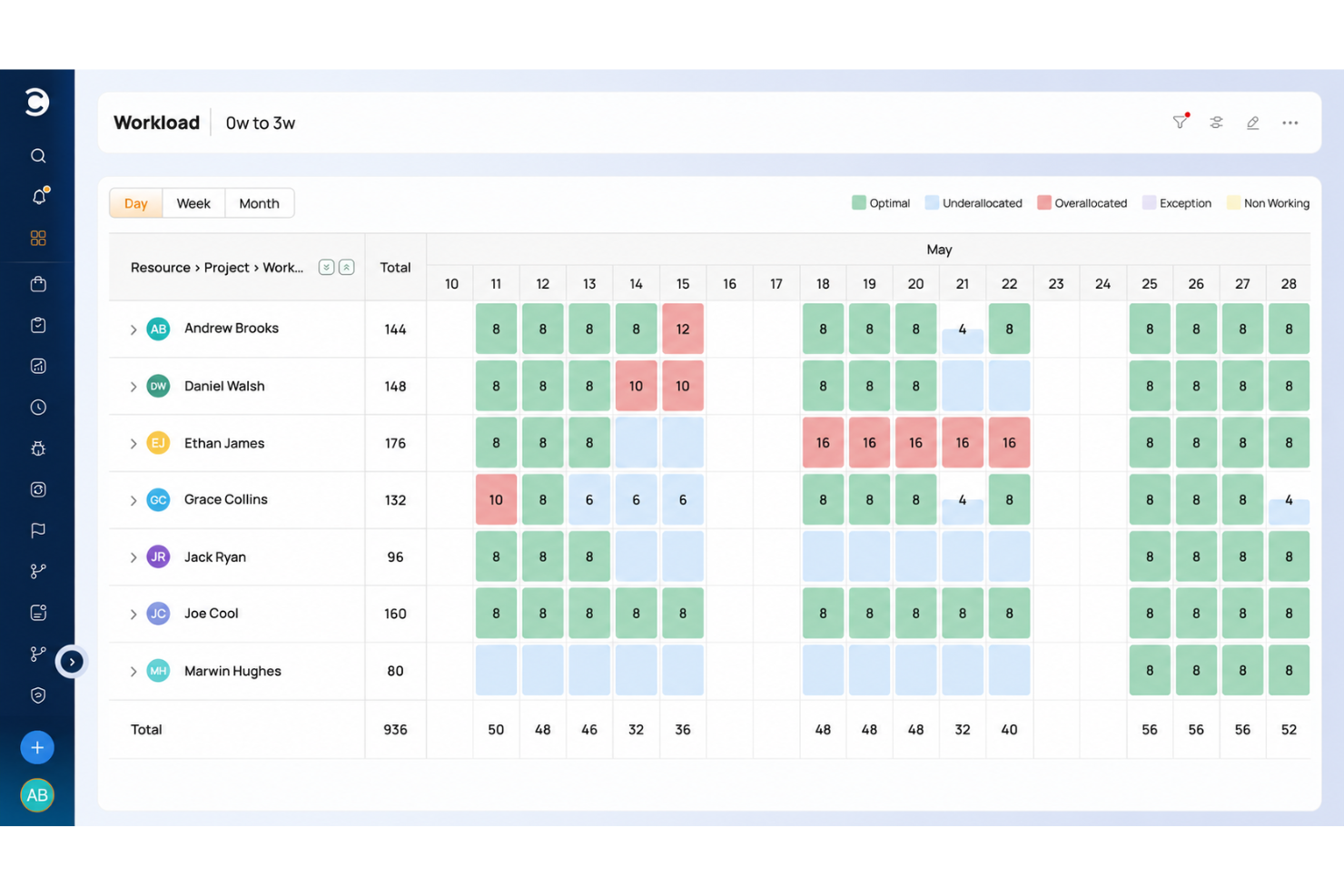
Celoxis è uno strumento completo di gestione dei progetti progettato per le aziende che necessitano di capacità dettagliate di gestione e pianificazione delle risorse. Si rivolge a medie e grandi imprese, offrendo strumenti per il monitoraggio dei progetti, l'assegnazione delle risorse e la gestione finanziaria. Le funzionalità di intelligenza artificiale di Celoxis migliorano il processo decisionale offrendo analisi predittive e pianificazione automatizzata.
Perché ho scelto Celoxis: Celoxis si distingue nella gestione delle risorse, consentendo al tuo team di allocare le risorse in modo efficiente tra i vari progetti. I suoi algoritmi basati su intelligenza artificiale prevedono le esigenze di risorse e ti aiutano a ottimizzare la distribuzione dei carichi di lavoro. Celoxis offre anche una pianificazione automatizzata, riducendo lo sforzo manuale e migliorando le tempistiche di progetto. Questo focus sulla gestione delle risorse lo rende ideale per aziende con esigenze complesse di allocazione delle risorse.
Funzionalità e integrazioni eccezionali
Funzionalità includono diagrammi di Gantt interattivi, dashboard personalizzabili e monitoraggio del tempo. Queste caratteristiche aiutano il tuo team a monitorare l'avanzamento del progetto e a gestire efficacemente le attività. Celoxis offre anche strumenti avanzati di reportistica per fornire approfondimenti sulle prestazioni dei progetti.
Integrazioni includono Salesforce, QuickBooks, Google Drive, Slack, Jira, Microsoft Project, Outlook, Excel, Zendesk e Trello.
Pros and Cons
Pros:
- Potenti capacità di gestione delle risorse
- Funzionalità di pianificazione automatizzata
- Strumenti avanzati di reportistica
Cons:
- Il layout dell'interfaccia datato può causare rallentamenti
- Il livello base manca di opzioni di personalizzazione

Ideale per la visibilità del portafoglio alimentata da intelligenza artificiale
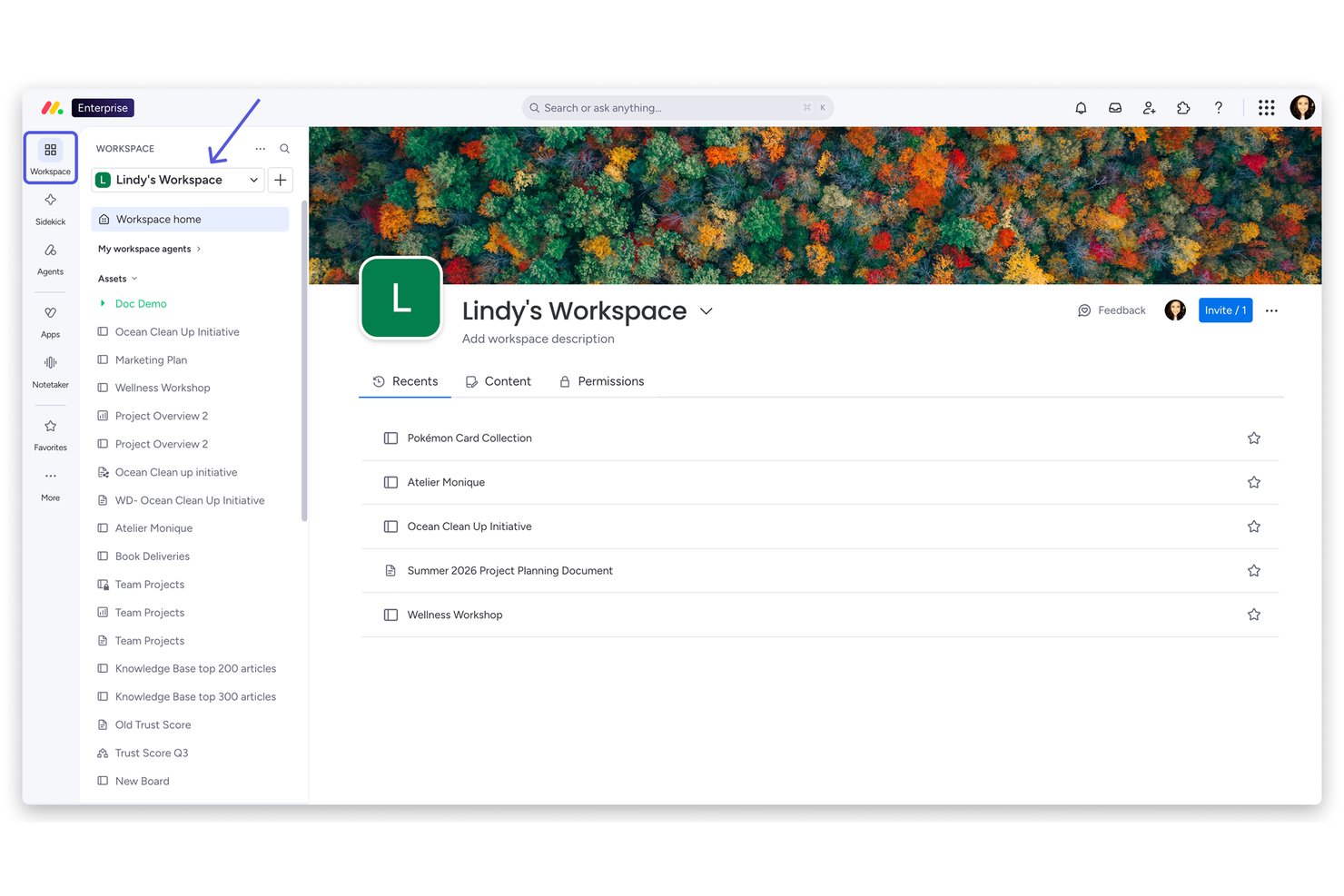
monday AI Workspace è una piattaforma di lavoro aziendale basata sull'AI che combina la gestione del portafoglio, l'automazione delle attività tramite intelligenza artificiale, la pianificazione delle risorse e l'orchestrazione dei flussi di lavoro interfunzionali tra team di progetto e di programma.
Per chi è ideale monday AI Workspace?
È particolarmente indicato per team PMO aziendali e responsabili di portafoglio di grandi organizzazioni che gestiscono più progetti interfunzionali simultaneamente.
Perché ho scelto monday AI Workspace
Ho inserito monday AI Workspace tra le mie scelte migliori per il modo in cui gestisce la visibilità sul portafoglio su larga scala. Adoro i Dashboard di Portafoglio, che mostrano in tempo reale lo stato di salute di ogni progetto attivo senza bisogno di inseguire manualmente gli aggiornamenti di stato. Inoltre, monday sidekick mi permette di interrogare i dati dei progetti in linguaggio naturale e ricevere sintesi immediate pronte per la dirigenza, riducendo notevolmente i tempi di preparazione dei report. La funzione di Assegnazione Intelligente AI nel Capacity Manager permette anche al mio team di assegnare le persone giuste al lavoro giusto su tutto il portafoglio, e non solo su singoli progetti.
Caratteristiche principali di monday AI Workspace
- Costruttore di workflow AI: Orquestra automazioni personalizzate su flussi di lavoro di progetto e portafoglio utilizzando logiche e trigger basati sull'intelligenza artificiale.
- Gestione avanzata delle risorse: Assegna e monitora le risorse in base a competenze, carico di lavoro e disponibilità su più progetti.
- Dashboard di portafoglio: Visualizza istantanee e riepiloghi dati in tempo reale da ogni progetto all'interno di tutto lo spazio di lavoro aziendale.
- Sincronizzazione bidirezionale con Jira e Salesforce: Mantiene dati di progetto e portafoglio sempre aggiornati sincronizzandoli in tempo reale con i principali sistemi aziendali.
Integrazioni di monday AI Workspace
monday AI Workspace offre centinaia di integrazioni native, tra cui Salesforce, Jira, HubSpot, Google Workspace, Slack, Microsoft Teams, GitHub, DocuSign, Stripe, Zoom e si collega con Zapier. È inoltre disponibile un'API per integrazioni personalizzate.
Pros and Cons
Pros:
- Dashboard AI di portafoglio mostrano la salute dei progetti in tempo reale
- Agenti autonomi gestiscono in modo indipendente attività progettuali multi-step
- Supporta metodologie Agile, Waterfall e ibride
Cons:
- Le funzionalità AI sono disponibili solo nei piani di fascia superiore
- Configurazioni aziendali complesse richiedono una significativa impostazione amministrativa
New Product Updates from monday AI Workspace
monday AI Workspace Adds Human Approval Routing
monday AI Workspace adds a human-in-the-loop approval block to AI Workflows, sending approval requests and routing workflow paths based on responses. For more information, visit monday AI Workspace's official site.

Ideale per l'automazione dei flussi di lavoro aziendali senza codice
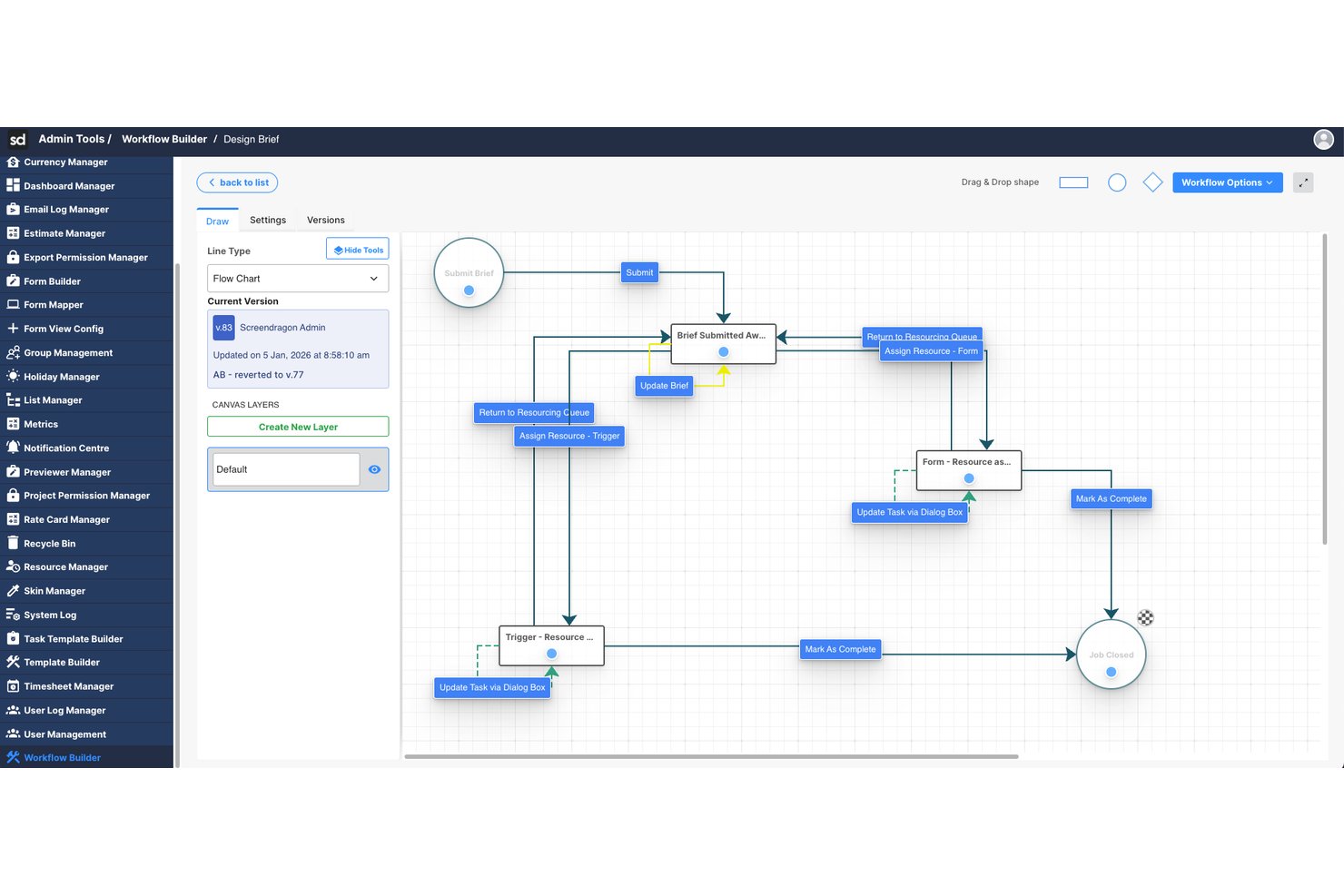
Screendragon è una piattaforma aziendale di gestione del lavoro che combina l'orchestrazione dei flussi di lavoro basata sull'IA, la pianificazione delle risorse e la gestione dei progetti con strumenti di automazione senza codice progettati per operazioni di marketing e creative su larga scala.
Per chi è più adatto Screendragon?
Screendragon è particolarmente adatto ai team di marketing aziendali, alle agenzie interne e ai gruppi che gestiscono le operazioni creative con elevati volumi di lavoro tra più parti interessate.
Perché ho scelto Screendragon
Screendragon è entrato nella mia lista ristretta grazie al suo motore di flussi di lavoro senza codice, che consente ai team aziendali di creare e automatizzare complesse catene di approvazione senza alcun coinvolgimento degli sviluppatori. Apprezzo anche il livello di orchestrazione degli agenti IA, che instrada il lavoro tra più modelli di IA in base alle esigenze di costo e prestazioni. La funzionalità di gestione intelligente delle risorse completa l'offerta assegnando automaticamente i membri del team in base alle competenze, non solo alla disponibilità.
Funzionalità principali di Screendragon
- Controlli di governance dell'IA: Offre supervisione e gestione dell'utilizzo dell'IA, dell'instradamento dei modelli e dell'esecuzione dei flussi di lavoro all'interno della piattaforma.
- Reportistica operativa avanzata: Fornisce dashboard e analisi in tempo reale su progetti, persone, budget e approvazioni.
- Integrazioni aziendali: Si connette in modo nativo a piattaforme come SAP, Salesforce, PeopleSoft, Jira e Microsoft 365.
- Controlli degli accessi basati sui ruoli: Supporta la sicurezza di livello aziendale con autorizzazioni per utenti, team e partner esterni.
Integrazioni di Screendragon
Screendragon offre integrazioni native con SAP, PeopleSoft, Salesforce, Microsoft 365, Google Drive, Adobe Creative Cloud, Jira, Trello, Box ed Egnyte e fornisce un'API per integrazioni personalizzate.
Pros and Cons
Pros:
- Automazione dei flussi di lavoro senza codice e senza supporto degli sviluppatori
- Gli agenti IA gestiscono autonomamente attività in più fasi
- Assegnazione delle risorse basata sulle competenze tramite IA
Cons:
- Orientato maggiormente al marketing che a un utilizzo più ampio nell'ufficio di gestione dei progetti
- Le funzionalità di previsione dei rischi basate sull'IA sono meno mature
New Product Updates from Screendragon
Screendragon Unveils New AI Hub
Screendragon introduced AI Hub, a new capability that lets teams build and manage AI agents directly within workflows. The update helps marketing teams automate tasks, maintain governance controls, and scale AI-driven operations more efficiently. For more information, visit Screendragon's official site.

Wrike
Ideale per funzionalità di intelligenza artificiale incluse in tutti i piani

Wrike è una piattaforma di gestione del lavoro progettata per i team che cercano di ottimizzare i flussi di lavoro dei progetti. Serve principalmente aziende e team che necessitano di funzionalità avanzate di automazione e gestione delle attività. Le capacità di intelligenza artificiale di Wrike, come Wrike Copilot, assistono nell’analisi dei dati in tempo reale e nell’automazione delle attività, offrendo un valore significativo agli utenti.
Perché ho scelto Wrike: Le funzionalità di intelligenza artificiale di Wrike sono incluse in tutti i piani, rendendo la piattaforma accessibile a team di varie dimensioni. Wrike Copilot offre approfondimenti guidati dall’IA per aiutarti a gestire i progetti in modo efficiente. Comprende funzionalità di analisi dei dati tramite IA, permettendo al tuo team di automatizzare le attività ripetitive. Questo rende Wrike una scelta versatile per migliorare la produttività in diversi settori.
Funzionalità principali e integrazioni
Funzionalità includono gestione delle attività, diagrammi di Gantt e una piattaforma di collaborazione visiva. La piattaforma offre modelli per la gestione Agile e di eventi, aiutando il tuo team a iniziare rapidamente. Wrike punta inoltre molto sull’educazione degli utenti attraverso corsi online e webinar.
Integrazioni includono Google, Microsoft, Adobe Creative Cloud, Box, GitHub, JIRA, Salesforce, Zoom, Tableau e MS Teams.
Pros and Cons
Pros:
- Funzionalità di IA in tutti i piani
- Modelli di progetto molto numerosi
- Ottime risorse di formazione per gli utenti
Cons:
- Struttura complessa basata su cartelle
- Le automazioni sono limitate a meno che non si effettui l’upgrade
New Product Updates from Wrike

Wrike Adds Quick Search to Table View
Wrike adds Quick Search to Table View with full-table search across titles, descriptions, and fields, plus highlighted matches. This helps users find tasks faster in large tables. For more information, visit Wrike’s official site.

Forecast
Ideale per la pianificazione dei progetti guidata dall’IA
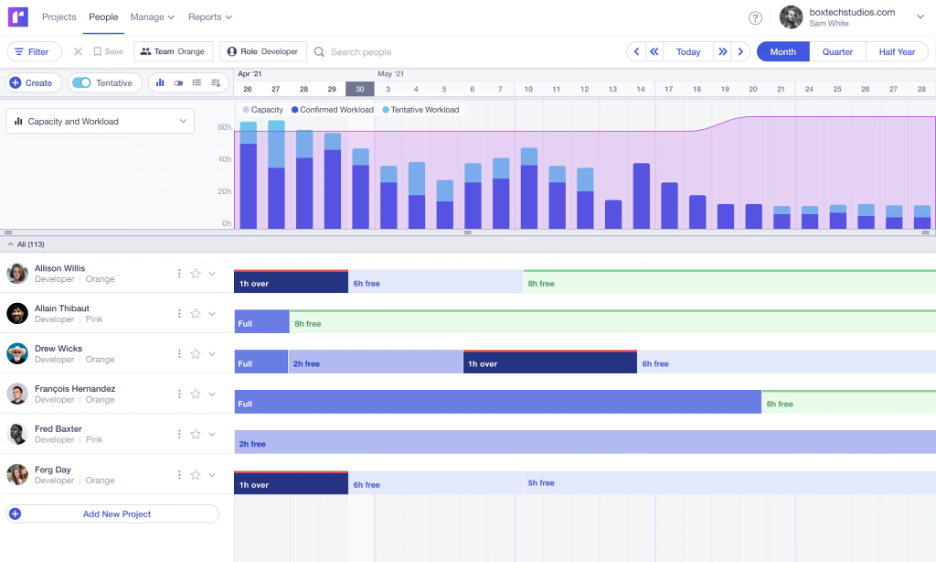
Forecast è uno strumento di gestione dei progetti e pianificazione delle risorse progettato per team che cercano approfondimenti guidati dall’IA per ottimizzare i propri flussi di lavoro. È pensato per le aziende che hanno bisogno di gestire in modo efficiente progetti, risorse e budget. Le capacità di IA di Forecast automatizzano la pianificazione dei progetti e forniscono analisi predittive per migliorare il processo decisionale e l’allocazione delle risorse.
Perché ho scelto Forecast: Forecast sfrutta l’intelligenza artificiale per guidare la pianificazione dei progetti e la gestione delle risorse, rendendolo una delle migliori scelte per i team che vogliono ottimizzare le operazioni. Le sue funzionalità di IA includono la pianificazione automatica delle attività e la previsione delle risorse, che ti aiutano a gestire i carichi di lavoro in modo efficace. Le analisi predittive di Forecast offrono informazioni sui tempi dei progetti e sui possibili rischi. Questo approccio alla pianificazione basata sull'IA garantisce che il tuo team possa adattarsi rapidamente ai cambiamenti e mantenere alta la produttività.
Funzionalità e integrazioni principali
Funzionalità includono il tracciamento del tempo, la gestione dei budget e dashboard personalizzabili. Queste funzionalità aiutano il tuo team a monitorare i progressi dei progetti e lo stato finanziario. Forecast offre anche una vista timeline per visualizzare le pianificazioni dei progetti e le dipendenze.
Integrazioni includono Slack, Google Calendar, Microsoft Teams, QuickBooks, Jira, Trello, Xero, Zapier, HubSpot e Salesforce.
Pros and Cons
Pros:
- Pianificazione dei progetti supportata dall’IA
- Gestione completa delle risorse
- Analisi predittive per la valutazione dei rischi
Cons:
- Costo elevato per team piccoli
- Richiede tempo per essere configurato completamente

Asana
La migliore IA per i verbali delle riunioni
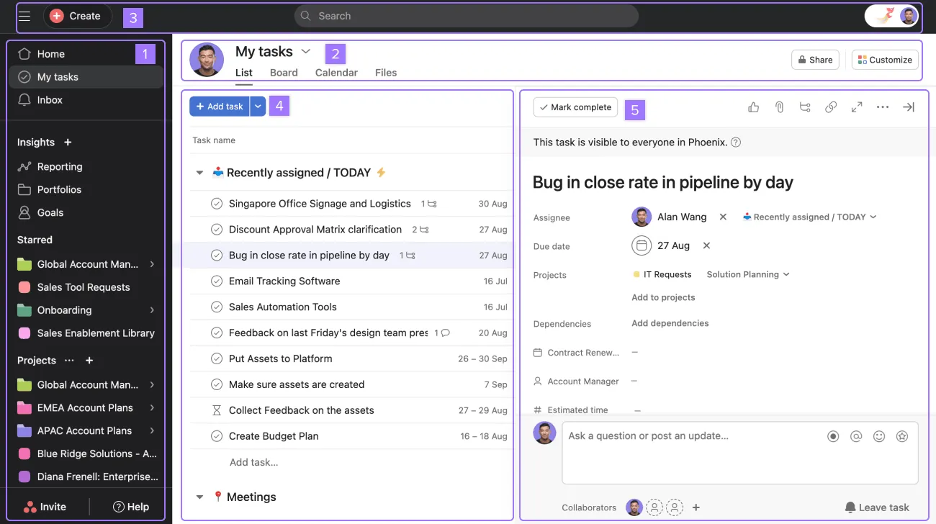
Asana è uno strumento di gestione dei progetti progettato per team che hanno bisogno di organizzare il lavoro e gestire le attività in modo efficiente. È popolare tra aziende di tutte le dimensioni, offrendo strumenti per il monitoraggio delle attività e la pianificazione dei progetti. Le capacità di intelligenza artificiale di Asana si concentrano sul migliorare la produttività automatizzando le attività di routine e fornendo approfondimenti dai dati dei progetti.
Perché ho scelto Asana: Asana eccelle nell’uso dell’IA per ottimizzare i verbali delle riunioni, aiutando il tuo team a catturare e organizzare le informazioni in modo efficace. Le sue funzionalità di IA includono suggerimenti automatici per le attività e previsioni delle tempistiche, che possono migliorare il flusso di lavoro del team. Asana utilizza anche l’IA per fornire approfondimenti sull’avanzamento del progetto e su eventuali ostacoli. Questa attenzione alla gestione delle riunioni tramite IA lo rende uno strumento prezioso per i team che desiderano migliorare la collaborazione.
Funzionalità principali & Integrazioni
Funzionalità includono dipendenze tra attività, una visualizzazione a timeline e traguardi di progetto. Queste funzionalità ti aiutano a gestire progetti complessi con molteplici elementi in movimento. Asana offre anche una funzione di gestione del carico di lavoro per bilanciare la capacità del team.
Integrazioni includono Slack, Microsoft Teams, Google Drive, Dropbox, Zoom, Salesforce, Jira, Trello, Zapier e Adobe Creative Cloud.
Pros and Cons
Pros:
- IA efficace per i verbali delle riunioni
- Dipendenze tra attività intuitive
- Timeline visiva e gestione del carico di lavoro
Cons:
- Personalizzazione avanzata dei campi limitata
- Sovraccarico di notifiche senza adeguata configurazione

Zenhub
Ideale per l'integrazione con GitHub
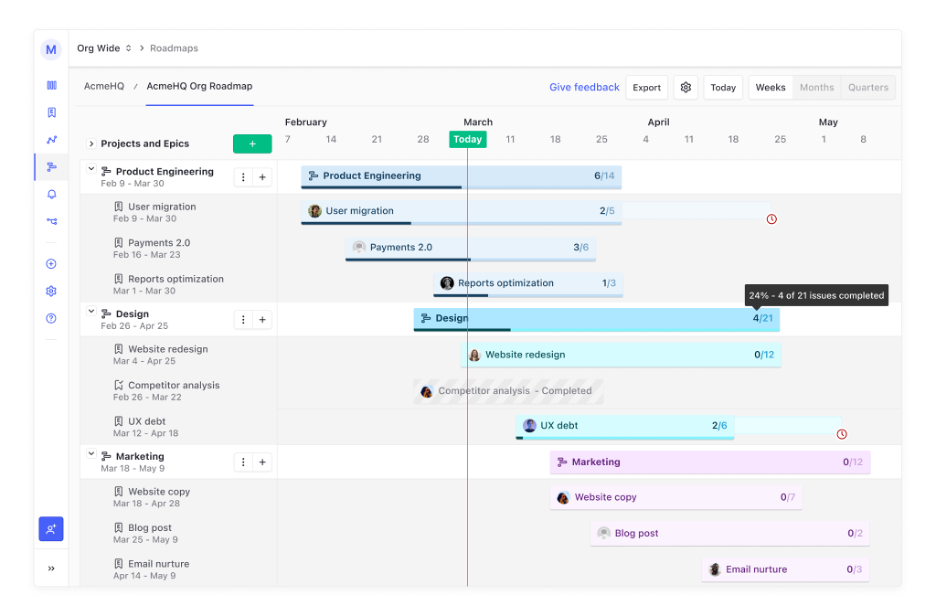
Zenhub è una piattaforma di gestione dei progetti progettata specificamente per i team di sviluppo che utilizzano GitHub, aiutandoli a migliorare la produttività e la collaborazione. Si integra direttamente con GitHub, offrendo strumenti per la gestione dei ticket, la pianificazione degli sprint e la gestione dei rilasci all'interno dell'interfaccia di GitHub. Le capacità di intelligenza artificiale di Zenhub includono l'automazione dei workflow e l'analisi predittiva per ottimizzare le tempistiche dei progetti e l'allocazione delle risorse.
Perché ho scelto Zenhub: Zenhub si distingue per la sua rapida integrazione con GitHub, rendendolo uno strumento essenziale per i team di sviluppo. Le sue funzionalità di intelligenza artificiale semplificano la gestione dei workflow automatizzando le attività di routine e offrendo approfondimenti sullo stato dei progetti. Le analisi predittive di Zenhub aiutano il tuo team a individuare potenziali colli di bottiglia e ad adattare i piani di conseguenza. Questa profonda integrazione con GitHub e gli approfondimenti guidati dall’intelligenza artificiale lo rendono una risorsa preziosa per i progetti di sviluppo software.
Funzionalità e integrazioni principali
Funzionalità includono bacheche kanban, grafici burndown e tracciamento delle milestone. Questi strumenti forniscono al tuo team capacità di gestione visiva dei progetti all’interno di GitHub. Zenhub offre anche una suite di reportistica per analizzare le prestazioni dei progetti e la produttività del team.
Integrazioni includono GitHub, Slack, Microsoft Teams, Google Workspace, Jira, Trello, Asana, Zoom, Dropbox e Salesforce.
Pros and Cons
Pros:
- Integrazione senza soluzione di continuità con GitHub
- Automazione dei workflow efficace
- Suite di reportistica completa
Cons:
- Funzionalità limitate al di fuori di GitHub
- Utilizzo limitato per i non sviluppatori


ClickUp è uno strumento versatile di gestione dei progetti progettato per i team che cercano flessibilità nella gestione di attività e progetti. Serve a una base di utenti diversificata, dalle piccole squadre alle grandi aziende, offrendo strumenti per la gestione delle attività, la definizione degli obiettivi e l'automazione dei flussi di lavoro. Le capacità di intelligenza artificiale di ClickUp migliorano la produttività automatizzando l'assegnazione dei compiti e fornendo approfondimenti sulle prestazioni dei progetti.
Perché ho scelto ClickUp: ClickUp offre viste delle attività altamente personalizzabili, permettendo al tuo team di adattare lo spazio di lavoro alle esigenze specifiche. Le sue funzionalità di intelligenza artificiale includono l'automazione delle attività ripetitive e suggerimenti intelligenti per la priorità delle attività. Gli strumenti guidati dall'IA di ClickUp aiutano a ottimizzare la produttività del team analizzando il carico di lavoro e l'efficienza. Questa flessibilità nella personalizzazione lo distingue, rendendolo adatto a diversi settori e tipologie di progetto.
Funzionalità e integrazioni distintive
Funzionalità includono monitoraggio del tempo, definizione degli obiettivi e un editor di documenti integrato. Queste caratteristiche permettono al tuo team di gestire i progetti in modo completo all'interno di un'unica piattaforma. ClickUp offre anche una funzionalità di whiteboard per la collaborazione visiva e il brainstorming.
Integrazioni includono Slack, Google Drive, Microsoft Teams, Zoom, Dropbox, Trello, HubSpot, Salesforce, GitHub e Outlook.
Pros and Cons
Pros:
- Viste delle attività altamente personalizzabili
- Funzionalità complete per la gestione dei progetti
- Editor di documenti integrato
Cons:
- Rallentamenti delle prestazioni in spazi di grandi dimensioni
- La moltitudine di funzionalità può risultare opprimente

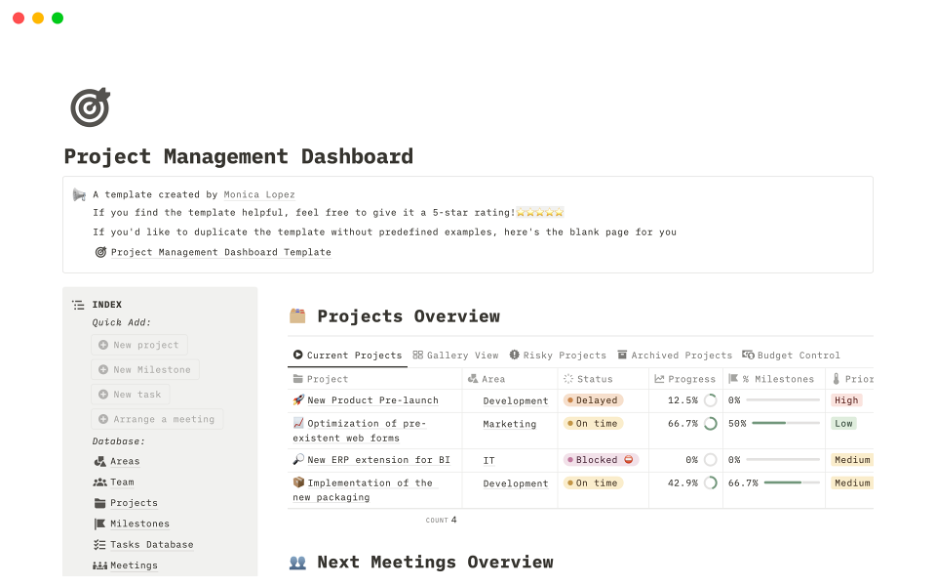
Notion è uno strumento di lavoro versatile progettato per i team che desiderano collaborare e organizzare il proprio lavoro in un unico luogo. Si rivolge a una vasta gamma di utenti, dalle startup alle grandi aziende, offrendo strumenti per la creazione di note, la gestione dei progetti e la collaborazione sui documenti. Le funzionalità di intelligenza artificiale di Notion aumentano la produttività automatizzando i flussi di lavoro e fornendo ricerche e organizzazioni intelligenti.
Perché ho scelto Notion: Notion si distingue nella collaborazione sui documenti di gruppo grazie alla sua combinazione unica di funzionalità per prendere appunti e gestire progetti. I suoi strumenti di intelligenza artificiale aiutano a organizzare le informazioni in modo efficiente, rendendo semplice trovare e gestire i contenuti. I template e i database di Notion consentono di personalizzare lo spazio di lavoro in base alle esigenze del team. Questo lo rende una scelta ideale per i team focalizzati su una collaborazione e gestione efficace dei documenti.
Funzionalità e integrazioni principali
Funzionalità includono layout flessibile delle pagine, template personalizzabili e un potente sistema di database. Queste funzionalità aiutano a creare uno spazio di lavoro su misura per il flusso di lavoro del team. Notion offre anche uno strumento per ritagliare contenuti dal web e organizzarli direttamente nello spazio di lavoro.
Integrazioni includono Slack, Google Drive, Figma, Microsoft Teams, GitHub, Trello, Asana, Zapier, Typeform e Jira.
Pros and Cons
Pros:
- Eccellente per la collaborazione sui documenti
- Spazio di lavoro altamente personalizzabile
- Funzionalità di database intuitive
Cons:
- Permessi estesi rallentano gruppi numerosi
- Funzionalità offline limitate

Jira
Ideale per la gestione agile dei progetti
Jira è uno strumento di gestione dei progetti progettato per team di sviluppo software che adottano metodologie agili come Scrum e Kanban. È ampiamente utilizzato dai team tecnici per pianificare, monitorare e rilasciare progetti software. Le funzionalità di intelligenza artificiale di Jira aiutano i team ad automatizzare i flussi di lavoro e a prevedere le tempistiche dei progetti, migliorando efficienza e collaborazione.
Perché ho scelto Jira: Jira è pensato per la gestione agile dei progetti, risultando una delle scelte migliori per i team di sviluppo software. Le sue funzionalità AI includono regole di automazione intelligenti che fanno risparmiare tempo automatizzando attività ripetitive. Le analisi predittive di Jira offrono approfondimenti sull'andamento del progetto, aiutando il team ad anticipare possibili ritardi. Queste capacità guidate dall'intelligenza artificiale rendono Jira una soluzione eccellente per la gestione di progetti software complessi.
Caratteristiche principali & Integrazioni
Funzionalità includono flussi di lavoro personalizzabili, reportistica dettagliata e prioritizzazione del backlog. Questi strumenti aiutano il tuo team a gestire le attività in modo efficiente e a rimanere concentrato sugli obiettivi del progetto. Jira offre anche un'app mobile, che ti consente di monitorare i progetti ovunque ti trovi.
Integrazioni includono Slack, GitHub, Bitbucket, Confluence, Microsoft Teams, Google Drive, Zoom, Trello, Salesforce e Zendesk.
Pros and Cons
Pros:
- Eccellente per metodologie agili
- Capacità di automazione avanzate
- Reportistica e analisi dettagliate
Cons:
- Configurazione complessa
- Curva di apprendimento ripida per i team non tecnici
Altri strumenti aziendali di gestione dei progetti con IA
Ecco alcune altre opzioni di strumenti aziendali di gestione dei progetti con IA che non sono entrate nel mio elenco, ma che vale comunque la pena prendere in considerazione:
- Smartsheet
Ideale per interfaccia simile a un foglio di calcolo
- TaskRay
Il migliore con integrazione nativa Salesforce
- Microsoft Planner
Ideale per gli utenti dell'ecosistema Microsoft
- Productive.io
Ideale per la gestione dei progetti in agenzia


Come valuto gli strumenti di Project Management AI per le aziende
Ogni strumento in questa lista deve andare oltre il semplice marchio dell'AI — cerco piattaforme in cui l'intelligenza artificiale riduca realmente il lavoro manuale nella gestione dei progetti su larga scala, come l'automazione dei report di stato o la segnalazione preventiva delle consegne a rischio. Suddivido la mia valutazione in funzionalità fondamentali che ogni strumento deve possedere per qualificarsi e fattori di differenziazione che distinguono un fornitore dall'altro.
Funzionalità Core (Requisiti minimi per questa lista)
Quando seleziono gli strumenti per la mia lista, valuto ciascuno su una scala da 0 (non offre la funzionalità) a 5 (eccelle in quest'area) per ogni funzionalità principale elencata di seguito. Successivamente, calcolo il punteggio totale dello strumento in una percentuale. Ogni strumento deve raggiungere un punteggio totale minimo del 65% per essere incluso.
- Automazione delle Attività potenziata dall'AI: Verifico se uno strumento può generare automaticamente attività, assegnare responsabili e modificare priorità in base al contesto di progetto, invece di limitarsi a regole statiche if-then.
- Gestione predittiva dei rischi e previsioni: Cerco segnali basati su ML che segnalino anticipatamente slittamenti di programma o sforamenti di budget, come un avviso che notifica il project manager settimane prima che una milestone rischi di non essere rispettata.
- Gestione intelligente delle risorse: La piattaforma dovrebbe raccomandare decisioni di assegnazione del personale basate su competenze e capacità, non solo mostrare un diagramma di utilizzo che i project manager devono comunque interpretare manualmente.
- Reporting generativo AI: Valuto se lo strumento produce riepiloghi di progetto in linguaggio naturale e risponde a domande ad hoc, come "quali stream di lavoro sono in ritardo in questo sprint?"
- Sicurezza e scalabilità enterprise: SSO/SAML, permessi basati sui ruoli, audit logging e certificazioni di conformità come SOC 2 o ISO 27001 contribuiscono tutte al mio punteggio in questa area.
- Integrazioni a livello di portfolio: Valuto i connettori nativi verso i principali sistemi enterprise come Jira, Salesforce, SAP e Workday per confermare che i dati fluiscano ordinatamente nei modelli AI.
Dopo aver individuato gli strumenti che soddisfano tali criteri, considero cosa distingue ciascuna piattaforma.
Fattori di differenziazione (Cosa distingue i fornitori)
Ecco come metto a confronto i diversi fornitori:
Funzionalità distintive
La simulazione di scenari è un importante fattore di differenziazione: cerco strumenti che permettano a un direttore PMO di modellare cosa succede alle tempistiche e ai budget se una squadra chiave viene riassegnata prima che la decisione venga presa. La mappatura delle dipendenze tra i progetti è altrettanto importante, soprattutto quando un ritardo in un lancio di prodotto ostacola silenziosamente altri tre flussi di lavoro. Valuto inoltre se una piattaforma offre agenti autonomi che gestiscono attività ricorrenti come sollecitare aggiornamenti di stato o riassumere daily standup senza che nessuno li solleciti.
Oltre le funzionalità
La governance dell'AI è un aspetto fondamentale: valuto se un fornitore comunica in modo trasparente come i dati di progetto vengono utilizzati per addestrare i propri modelli e se le organizzazioni possono scegliere di non partecipare o di utilizzare l'AI internamente. Presto molta attenzione anche al costo totale di proprietà, dato che alcune piattaforme riservano le funzionalità AI migliori ai livelli premium o fanno pagare crediti a consumo che possono crescere sensibilmente in ambito enterprise. Verifico infine la flessibilità metodologica, dato che un PMO che utilizza SAFe per l'ingegneria e Waterfall per la compliance ha bisogno di uno strumento che gestisca entrambe le modalità sotto un unico livello di reporting.
Come scegliere uno strumento aziendale di gestione dei progetti con IA
È facile perdersi in lunghi elenchi di funzionalità e strutture tariffarie complesse. Per aiutarti a rimanere concentrato mentre affronti il tuo processo specifico di selezione del software, ecco un elenco dei fattori da tenere a mente:
| Fattore | Cosa considerare |
| Scalabilità | Lo strumento crescerà insieme al tuo team? Considera i limiti relativi agli utenti e se lo strumento è in grado di gestire una maggiore quantità di dati e complessità man mano che i tuoi progetti crescono. |
| Integrazioni | Si collega agli strumenti che già utilizzi? Verifica la compatibilità con i software che usi già per garantire un flusso di dati senza problemi e la continuità dei flussi di lavoro. |
| Personalizzazione | Puoi adattarlo al tuo flusso di lavoro? Cerca opzioni per personalizzare dashboard, report e flussi di lavoro in base ai processi e alle preferenze del tuo team. |
| Facilità d'uso | È intuitivo? Valuta la curva di apprendimento e se i membri del team possono adottarlo rapidamente senza una formazione approfondita. |
| Implementazione e avviamento | Quanto tempo occorrerà per iniziare? Considera il tempo e le risorse necessari per la configurazione, la migrazione dei dati e la formazione iniziale del tuo team. |
| Costo | Qual è il costo totale? Confronta i costi degli abbonamenti, le spese nascoste e il valore offerto dai diversi livelli tariffari per adattarti al tuo budget. |
| Misure di sicurezza | I tuoi dati sono protetti? Verifica la presenza di crittografia, controlli di accesso degli utenti e conformità alle normative pertinenti sulla protezione dei dati per garantire la sicurezza delle tue informazioni. |
| Disponibilità dell'assistenza | Quali opzioni di assistenza sono disponibili? Verifica se puoi ricevere aiuto tempestivo tramite chat, telefono o e-mail e se sono disponibili risorse di autoassistenza come domande frequenti o forum. |
Cosa sono gli strumenti aziendali di gestione dei progetti con IA?
Gli strumenti aziendali di gestione dei progetti con IA sono soluzioni software progettate per migliorare la pianificazione e l'esecuzione dei progetti sfruttando l'intelligenza artificiale. Questi strumenti sono comunemente utilizzati da project manager, responsabili dei team e professionisti IT per migliorare l'efficienza e il processo decisionale. Le funzionalità di automazione, analisi predittiva e ottimizzazione delle risorse aiutano a gestire le attività, prevedere le difficoltà dei progetti e allocare le risorse in modo efficace. Nel complesso, questi strumenti offrono un valore significativo migliorando la produttività e consentendo di prendere decisioni basate sui dati.
Funzionalità degli strumenti aziendali di gestione dei progetti con IA
Quando scegli gli strumenti aziendali di gestione dei progetti con IA, presta attenzione alle seguenti funzionalità chiave:
- Automazione: automatizza le attività ripetitive per risparmiare tempo e ridurre gli errori, consentendo al tuo team di concentrarsi su attività più strategiche.
- Analisi predittiva: fornisce informazioni sulle tempistiche dei progetti e sui potenziali rischi, aiutandoti a prendere decisioni informate e ad anticipare le difficoltà.
- Ottimizzazione delle risorse: analizza l'allocazione delle risorse per garantire l'utilizzo ottimale dei membri del team e delle risorse aziendali, migliorando l'efficienza dei progetti.
- Dashboard personalizzabili: consentono di adattare visualizzazioni e report alle esigenze specifiche del team, migliorando visibilità e controllo.
- Analisi basate sull'IA: offrono raccomandazioni basate sui dati per la gestione dei progetti, migliorando il processo decisionale e la pianificazione strategica.
- Automazione dei flussi di lavoro: consolida i processi automatizzando i flussi di lavoro ordinari, aumentando produttività e coerenza.
- Funzionalità di integrazione: si connette agli strumenti e alle piattaforme esistenti per garantire un rapido flusso di dati e la collaborazione tra i sistemi.
- Monitoraggio del tempo: monitora il tempo dedicato alle attività e ai progetti, fornendo informazioni sulla produttività e sull'allocazione delle risorse.
- Gestione del budget: monitora i budget e le spese dei progetti, aiutandoti a rispettare i vincoli finanziari e a prendere decisioni economicamente vantaggiose.
- Misure di sicurezza: garantiscono la protezione dei dati tramite crittografia e controlli degli accessi degli utenti, preservando la riservatezza e l'integrità delle informazioni.
Vantaggi degli strumenti aziendali di gestione dei progetti con IA
L'implementazione di strumenti aziendali di gestione dei progetti con IA offre numerosi vantaggi al tuo team e alla tua azienda. Ecco alcuni dei vantaggi che puoi aspettarti:
- Maggiore efficienza: automatizza le attività ordinarie, liberando tempo per consentire al tuo team di concentrarsi sulle attività ad alta priorità.
- Miglioramento del processo decisionale: fornisce analisi predittive e informazioni basate sull'IA, aiutandoti a prendere rapidamente decisioni informate.
- Migliore allocazione delle risorse: ottimizza l'utilizzo delle risorse analizzando la capacità del team e le esigenze del progetto, garantendo una distribuzione efficiente del carico di lavoro.
- Migliore gestione dei rischi: identifica tempestivamente i potenziali rischi dei progetti grazie alle funzionalità di IA, consentendo strategie di mitigazione proattive.
- Risparmio sui costi: monitora con precisione budget e spese, aiutandoti a individuare opportunità di risparmio e a rispettare i limiti finanziari.
- Maggiore collaborazione: si integra con gli strumenti esistenti, facilitando la condivisione dei dati e la comunicazione all'interno del team.
- Scalabilità: si adatta alle esigenze della tua azienda in crescita, offrendo la flessibilità necessaria per gestire nel tempo progetti più grandi o complessi.
Costi e prezzi degli strumenti aziendali di gestione dei progetti con IA
La scelta di strumenti aziendali di gestione dei progetti con IA richiede la comprensione dei diversi modelli e piani tariffari disponibili. I costi variano in base alle funzionalità, alle dimensioni del team, ai componenti aggiuntivi e ad altri fattori. La tabella seguente riassume i piani più comuni, i relativi prezzi medi e le funzionalità tipicamente incluse nelle soluzioni di strumenti aziendali di gestione dei progetti con IA:
Tabella comparativa dei piani per gli strumenti aziendali di gestione dei progetti con IA
| Tipo di piano | Prezzo medio | Funzionalità comuni |
| Piano gratuito | $0 | Gestione di base delle attività, integrazioni limitate e supporto della comunità. |
| Piano personale | $5-$15/utente/mese | Gestione delle attività, automazione di base, funzionalità di reportistica e supporto limitato. |
| Piano aziendale | $20-$40/utente/ mese | Automazione avanzata, modelli di progetto, monitoraggio del tempo e supporto prioritario. |
| Piano per grandi aziende | $50-$100/utente/ mese | Integrazioni personalizzate, analisi avanzate, responsabile dedicato e sicurezza potenziata. |
Domande frequenti sugli strumenti di gestione dei progetti con IA per aziende
Ecco alcune risposte alle domande comuni sugli strumenti di gestione dei progetti con IA per aziende:
In che modo le funzionalità di IA influiscono sulle tempistiche dei progetti?
Le funzionalità di IA possono migliorare significativamente le tempistiche dei progetti automatizzando la pianificazione e prevedendo potenziali ritardi. Con l’IA, il tuo team può analizzare i dati storici per prevedere con maggiore precisione la durata dei progetti. Questo aiuta ad allocare le risorse in modo efficiente e a identificare i potenziali colli di bottiglia prima che si verifichino.
Ad esempio, gli strumenti di pianificazione basati sull’IA possono modificare automaticamente le tempistiche in base agli aggiornamenti sui progressi in tempo reale, assicurando che il tuo team rimanga in linea con i piani. Riducendo gli interventi manuali, le funzionalità di IA consentono inoltre ai responsabili di progetto di concentrarsi sulla pianificazione strategica anziché sulla pianificazione quotidiana.
Gli strumenti di IA possono integrarsi con i flussi di lavoro esistenti?
Sì, gli strumenti di IA possono integrarsi con i flussi di lavoro esistenti tramite API e connettori integrati. Quando scegli uno strumento di gestione dei progetti con IA, verifica la compatibilità con il tuo attuale insieme di software, come i sistemi CRM o ERP. L’integrazione assicura che i dati fluiscano senza problemi tra le piattaforme, riducendo l’inserimento manuale dei dati e gli errori.
Ad esempio, l’integrazione di uno strumento di IA con il tuo CRM può automatizzare la comunicazione con i clienti e gli aggiornamenti. La maggior parte degli strumenti di IA offre opzioni di integrazione personalizzabili, rendendo più semplice per il tuo team mantenere i flussi di lavoro esistenti beneficiando al contempo dei miglioramenti offerti dall’IA.
La sicurezza dei dati è un problema con gli strumenti di gestione dei progetti con IA?
Sì, la sicurezza dei dati è un aspetto essenziale da considerare quando si utilizzano strumenti di gestione dei progetti con IA. Questi strumenti gestiscono spesso dati sensibili sui progetti e richiedono solide misure di sicurezza, come la crittografia e i controlli degli accessi. Assicurati che lo strumento sia conforme agli standard di settore come il GDPR o l’HIPAA, se applicabili.
Cerca funzionalità come l’autenticazione a più fattori e audit di sicurezza regolari. È inoltre consigliabile esaminare le politiche di conservazione dei dati del fornitore per capire come vengono archiviati e protetti i tuoi dati. Dando priorità alla sicurezza, puoi salvaguardare le informazioni del tuo team sfruttando al contempo le funzionalità dell’IA.
E ora:
Se stai cercando strumenti di gestione dei progetti con IA per aziende, contatta gratuitamente un consulente SoftwareSelect per ricevere consigli personalizzati.
Compili un modulo e fai una breve conversazione durante la quale verranno analizzate nel dettaglio le tue esigenze. In seguito riceverai una selezione ristretta di software da esaminare. Ti supporteranno persino durante l'intero processo di acquisto, comprese le trattative sul prezzo.