

I 10 migliori strumenti di collaborazione con l’IA recensiti nel 2026

10 Selezione dei migliori strumenti di collaborazione basati sull'IA


I migliori strumenti di collaborazione basati sull'IA migliorano la gestione dei progetti e consentono di centralizzare la comunicazione, automatizzare il coordinamento delle attività e rispettare le scadenze senza infiniti aggiornamenti sullo stato di avanzamento o informazioni sparse. Quando i file sono distribuiti su diverse piattaforme, gli aggiornamenti finiscono sepolti nei thread delle chat o non è chiaro chi sia responsabile delle attività, i progetti si bloccano e i tuoi team perdono la concentrazione.
La piattaforma giusta può aiutarti a semplificare i flussi di lavoro, ridurre gli sforzi duplicati e mantenere visibili le priorità in tempo reale. Ho testato e recensito oltre 20 strumenti di collaborazione basati sull'IA e selezionato le opzioni migliori. Trova quella più adatta per mantenere il tuo team organizzato, ridurre gli ostacoli e portare a termine i progetti.
Perché fidarsi dei nostri consigli sui software
Il nostro team testa e recensisce software dal 2012. In quanto project manager noi stessi, sappiamo quanto sia difficile — e importante — scegliere il software giusto.
Per questa guida, abbiamo valutato gli strumenti attraverso test pratici e ricerche indipendenti, assegnando un punteggio agli strumenti in base ai nostri criteri di selezione. Ci basiamo inoltre sulle competenze di leader di pensiero del settore e di professionisti attivi nella gestione dei progetti.
Le nostre recensioni riflettono il nostro giudizio editoriale umano, non un discorso di vendita.
Revisori esperti:
Tabella comparativa degli strumenti di collaborazione basati sull'IA
Questa tabella comparativa riassume i dettagli sui prezzi delle mie migliori selezioni di strumenti di collaborazione basati sull’IA:
| Tool | Best For | Trial Info | Price | ||
|---|---|---|---|---|---|
| 1 | Ideale per la collaborazione tra dipartimenti | Prova gratuita di 14 giorni | Da $9/utente/mese (fatturazione annuale) | Website | |
| 2 | Ideale per l'integrazione della messaggistica multicanale | Prova gratuita di 30 giorni disponibile | Da $14/user/month (fatturato annualmente) | Website | |
| 3 | Ideale per progetti complessi | Prova gratuita di 14 giorni + piano gratuito disponibile | Da $10/utente/mese (fatturato annualmente) | Website | |
| 4 | Ideale per i team di design | Piano gratuito disponibile | Da $3/utente/mese | Website | |
| 5 | Ideale per progetti su database | Piano gratuito disponibile | Da $20/utente/mese (fatturazione annuale) | Website | |
| 6 | Ideale per la gestione delle tempistiche di progetto | Piano gratuito disponibile | Da $39/mese (fatturazione annuale) | Website | |
| 7 | Ideale per la messaggistica video | Demo gratuita disponibile | $18/mese | Website | |
| 8 | Ideale per caselle di posta di team | Prova gratuita di 14 giorni + demo gratuita disponibile | Da $25/postazione/mese (fatturazione annuale) | Website | |
| 9 | Ideale per i liberi professionisti | Prova gratuita di 7 giorni disponibile | Da $9/utente/mese (fatturato annualmente) | Website | |
| 10 | Ideale per la gestione della conoscenza | Prova gratuita + piano gratuito disponibile | A partire da $5.42/utente/mese | Website |


Recensioni dei migliori strumenti di collaborazione basati sull'IA
Leggi il mio riepilogo dettagliato di ciascuna delle mie scelte tra i migliori strumenti di collaborazione basati sull’IA. Tratto le funzionalità principali, i pro e i contro, le integrazioni e i casi d’uso ideali, così potrai trovare quello più adatto a te.

Ideale per la collaborazione tra dipartimenti
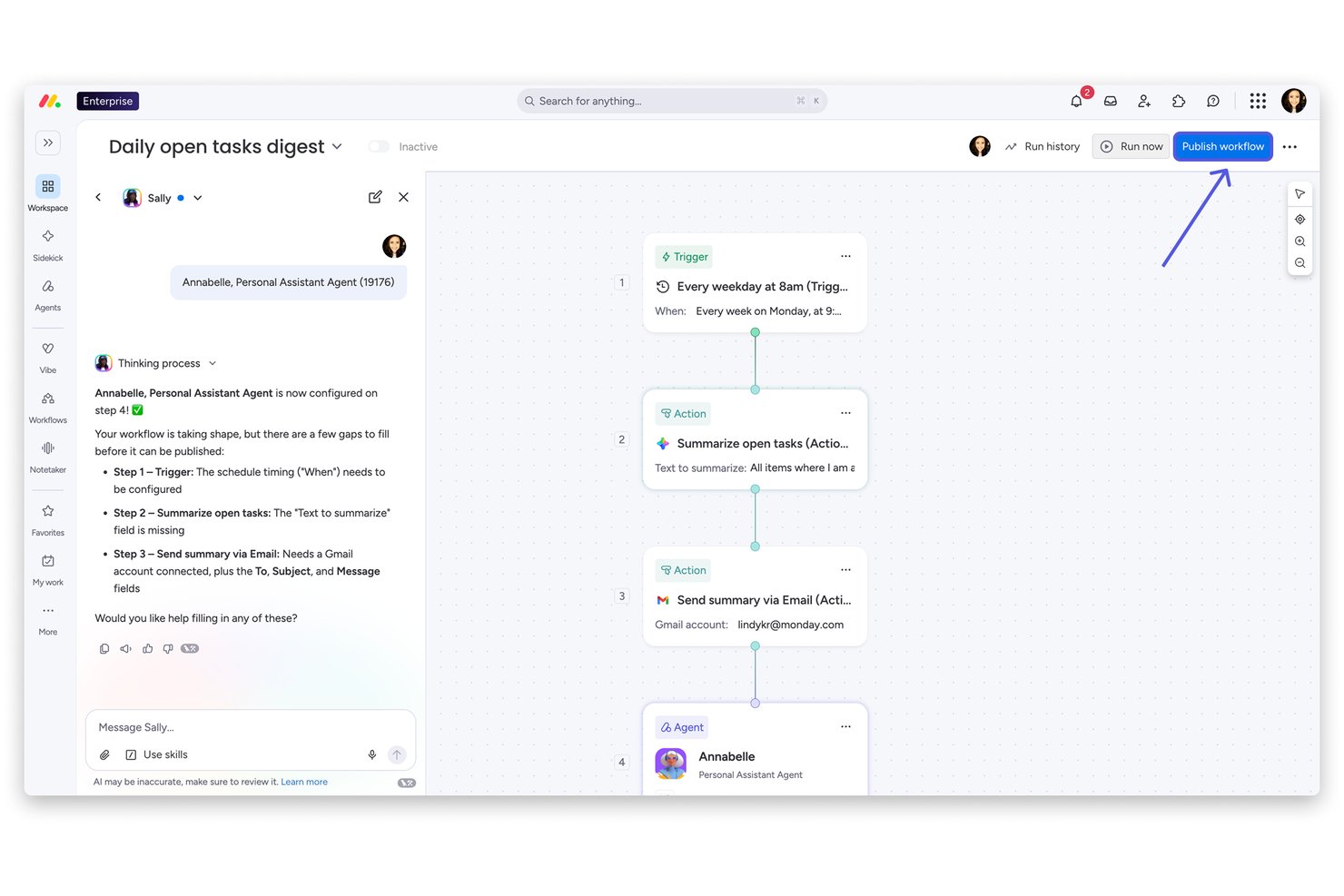
monday AI Workspace è una piattaforma di lavoro potenziata dall’IA che unisce gestione di progetti, collaborazione sui documenti, automazione dei flussi di lavoro e un workforce di agenti IA, permettendo di connettere i team di diversi dipartimenti in uno spazio di lavoro condiviso.
Per chi è ideale monday AI Workspace?
È particolarmente indicata per organizzazioni di medie e grandi dimensioni che gestiscono attività su più dipartimenti e necessitano di un’unica piattaforma per allineare i team senza passare continuamente da uno strumento all’altro.
Perché ho scelto monday AI Workspace
Ho inserito monday AI Workspace nella mia lista perché gestisce in modo efficace la collaborazione tra dipartimenti che spesso utilizzano strumenti o flussi di lavoro diversi. Mi piace il fatto che gli agenti IA permettano a marketing, ingegneria e operation di distribuire agenti specializzati che confluiscono comunque in una board condivisa, evitando che le decisioni vadano perse nei passaggi di mano. Il Notetaker delle riunioni AI è una delle mie funzioni preferite perché estrae le azioni da svolgere direttamente dalle chiamate e le inoltra automaticamente alla bacheca corretta, senza richiedere pulizia manuale dopo la riunione.
Funzionalità principali di monday AI Workspace
- Assistente AI Sidekick: Genera descrizioni delle attività, riassunti e briefing di progetto direttamente nelle tue board e documenti.
- Colonne AI: Automatizza l’inserimento ripetitivo dei dati generando valori e aggiornamenti dei campi in base al contesto del workspace.
- Gestione del portafoglio e delle risorse: Consente di gestire più progetti, allocare risorse e monitorare i progressi a livello organizzativo.
- Integrazioni MCP (Model Context Protocol): Collega strumenti di IA esterni come Claude, Copilot o ChatGPT per una sincronizzazione diretta di dati e flussi di lavoro.
Integrazioni di monday AI Workspace
monday AI Workspace offre centinaia di integrazioni native tramite le funzionalità integrate e il marketplace, tra cui Slack, Jira, Salesforce, HubSpot, GitHub, Microsoft Teams e Google Workspace. Supporta anche Zapier e offre un’API per integrazioni personalizzate.
Pros and Cons
Pros:
- Gli agenti AI automatizzano l’assegnazione di attività tra dipartimenti
- Note delle riunioni AI sincronizzate direttamente nelle bacheche di progetto
- Un unico spazio di lavoro integra progetti, documenti e dashboard
Cons:
- Le funzionalità IA sono disponibili solo nei piani di livello superiore
- La complessità dell’impostazione delle bacheche cresce con la dimensione del team
New Product Updates from monday AI Workspace
monday AI Workspace Adds Human Approval Routing
monday AI Workspace adds a human-in-the-loop approval block to AI Workflows, sending approval requests and routing workflow paths based on responses. For more information, visit monday AI Workspace's official site.
Missive
Ideale per l'integrazione della messaggistica multicanale
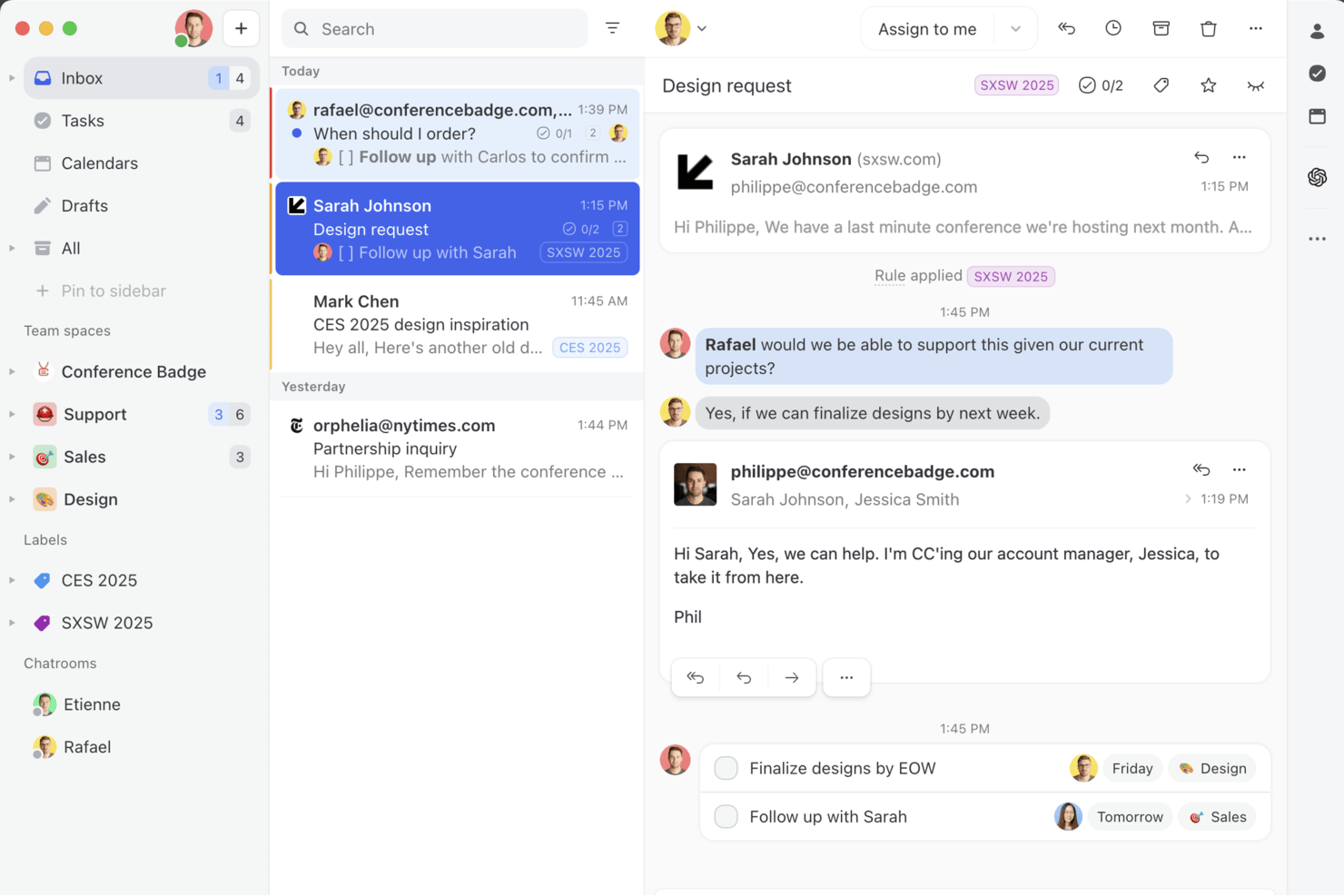
Missive è una piattaforma collaborativa di posta in arrivo condivisa che unifica email, SMS, WhatsApp e canali di messaggistica social con stesura assistita dall'IA, riepilogo delle conversazioni, estrazione automatica delle attività e strumenti per i flussi di lavoro del team in un unico spazio di lavoro.
Per chi è più adatto Missive?
Missive è particolarmente adatto ai responsabili di team interfunzionali e ai team che gestiscono molte comunicazioni e coordinano il lavoro tramite email, SMS, WhatsApp e canali social in un unico spazio di lavoro condiviso.
Perché ho scelto Missive
Missive si è guadagnato un posto nella mia rosa ristretta perché nessun altro strumento che ho testato riunisce email, SMS, WhatsApp, Facebook Messenger e Instagram in un unico spazio di lavoro condiviso dove tutto il team può creare bozze, assegnare e riepilogare le conversazioni insieme. Sono particolarmente colpito dal modo in cui il riepilogo tramite IA pubblica i riepiloghi condivisi delle conversazioni come note visibili al team: così, quando una conversazione viene riassegnata durante il thread, la persona successiva ne comprende immediatamente tutto il contesto. Le Regole IA fanno un ulteriore passo avanti estraendo automaticamente le attività da svolgere direttamente dalle email in arrivo e indirizzandole verso strumenti come Asana o ClickUp senza doverle classificare manualmente.
Funzionalità principali di Missive
- Motore di Regole IA: analizza automaticamente le email in arrivo utilizzando istruzioni in linguaggio naturale per attivare l'instradamento, le assegnazioni o le escalation senza classificazione manuale.
- Stesura collaborativa: più membri del team possono collaborare alla stesura di una risposta in tempo reale all'interno di una conversazione condivisa prima dell'invio.
- Supporto ai fornitori IA con la propria chiave: collega la tua chiave API di OpenAI, Anthropic o Google Gemini per alimentare le funzionalità IA, mantenendo il controllo sui costi e sulla scelta del modello.
- Bilanciamento del carico di lavoro: distribuisce le conversazioni in arrivo tra i membri del team utilizzando i metodi di assegnazione A rotazione, Meno occupato, Tutti insieme o Casuale.
- Server MissiveMCP: collega strumenti IA esterni, come Claude o ChatGPT, per consultare le conversazioni collaborative, controllare i calendari e preparare risposte, mantenendo obbligatoria la revisione del team prima dell'invio.
Integrazioni di Missive
Missive offre integrazioni native con Asana, ClickUp, Trello e Todoist, oltre a connessioni MCP con Linear e Notion. Supporta OpenAI, Anthropic e Google Gemini, dispone di un'API per integrazioni personalizzate ed è disponibile su Zapier.
Pros and Cons
Pros:
- Unifica email, SMS e messaggistica social
- L'IA riepiloga le conversazioni come note condivise del team
- Automatizza l'estrazione delle attività dai messaggi
Cons:
- Nessuna nota riunione tramite IA né supporto vocale
- Manca il rilevamento predittivo dei rischi di progetto
New Product Updates from Missive
Missive Adds Conversation Pins
Missive now lets you pin key links, decisions, and notes inside a conversation, keeping them accessible in a dedicated Pins section in the Details sidebar. For more information, visit Missive's official site.
 .
.
Wrike
Ideale per progetti complessi

Wrike è un software di gestione progetti progettato per aiutare il tuo team a gestire i progetti grazie alle sue funzionalità di automazione e intelligenza artificiale. È pensato per aziende e professionisti che necessitano di soluzioni efficienti per i flussi di lavoro, offrendo funzionalità per la produzione creativa, i flussi di lavoro di marketing e la pianificazione agile.
Perché ho scelto Wrike
Ho scelto Wrike per le sue funzionalità basate sull'intelligenza artificiale che migliorano la collaborazione in progetti complessi. Le capacità di intelligenza artificiale generativa di Wrike aiutano il tuo team a redigere piani di progetto e a riassumere le note delle riunioni, risparmiando tempo e riducendo il lavoro manuale. La piattaforma offre anche dashboard in tempo reale che forniscono analisi per prendere decisioni informate, essenziali per i team che devono rimanere agili e reattivi. Queste caratteristiche rendono Wrike una scelta ideale per le aziende che cercano uno strumento che faciliti la collaborazione e fornisca al team approfondimenti potenziati dall’AI.
Funzionalità principali di Wrike
Oltre alle capacità basate sull'intelligenza artificiale, ho trovato anche altre funzionalità che rendono Wrike un solido strumento di collaborazione:
- Moduli di richiesta personalizzati: Semplifica il processo di raccolta delle richieste consentendo ai team di creare moduli su misura per esigenze di progetto specifiche.
- Revisione online: Migliora la collaborazione offrendo un luogo dove i team possono revisionare e approvare i lavori creativi direttamente all’interno della piattaforma.
- Comunicazione email integrata: Centralizza tutte le comunicazioni relative ai progetti integrando la funzionalità email all’interno di Wrike.
- Flussi di lavoro illimitati: Adattati alle diverse esigenze di progetto creando tutti i flussi di lavoro necessari per il tuo team.
Integrazioni di Wrike
Le integrazioni includono Microsoft Teams, Google Workspace, Slack, Salesforce, Adobe Creative Cloud, NetSuite, QuickBooks, Jira, GitHub e Box.
Pros and Cons
Pros:
- Il confronto dinamico delle versioni dei file velocizza i processi di revisione.
- Dashboard e flussi di lavoro personalizzabili si adattano a diverse esigenze.
- Le funzionalità complete di gestione delle attività migliorano il coordinamento del team.
Cons:
- L’app mobile non offre tutte le funzionalità disponibili nella versione desktop.
- I flussi di lavoro complessi possono richiedere tempo per essere impostati.
New Product Updates from Wrike

Wrike Adds Quick Search to Table View
Wrike adds Quick Search to Table View with full-table search across titles, descriptions, and fields, plus highlighted matches. This helps users find tasks faster in large tables. For more information, visit Wrike’s official site.

FigJam
Ideale per i team di design
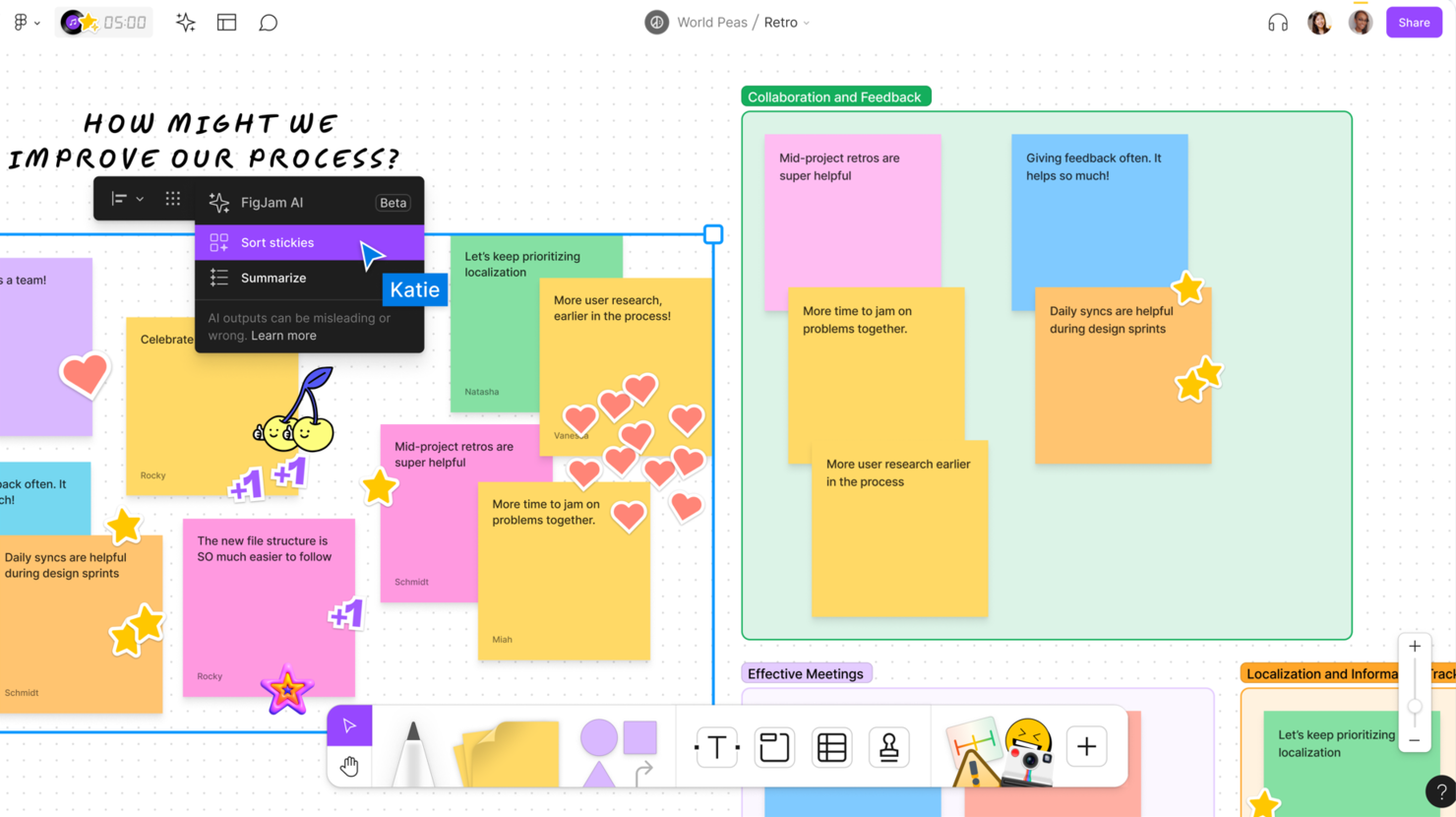
FigJam è uno strumento di lavagna collaborativa che permette ai team di design e ai creativi di fare brainstorming, pianificare e lavorare insieme in modo visivo. Designer e team lo utilizzano per abbozzare idee, mappare progetti e collaborare.
Perché ho scelto FigJam: L’interfaccia intuitiva di FigJam supporta sessioni di brainstorming e disegno. Puoi usare l’IA di FigJam per generare idee, creare diagrammi e riassumere i contenuti sulla lavagna. Il tuo team può combinare post-it, forme e disegni con input generati dall’IA per rendere i workshop più rapidi. La capacità dello strumento di facilitare la collaborazione in tempo reale permette al team di lavorare insieme senza intoppi.
Funzionalità e integrazioni principali:
Funzionalità includono modelli per iniziare rapidamente, una funzione di votazione per prendere decisioni in modo collaborativo e un timer integrato per restare nei tempi durante le riunioni e le sessioni.
Integrazioni includono Figma, Slack, Microsoft Teams, Zoom, Dropbox, Google Drive, Asana, Trello, Notion e Jira.
Pros and Cons
Pros:
- Facile per abbozzare idee
- Funzione di votazione integrata
- Timer per la gestione delle riunioni
Cons:
- Richiede una connessione a internet stabile
- Complesso per chi non è designer

Airtable
Ideale per progetti su database
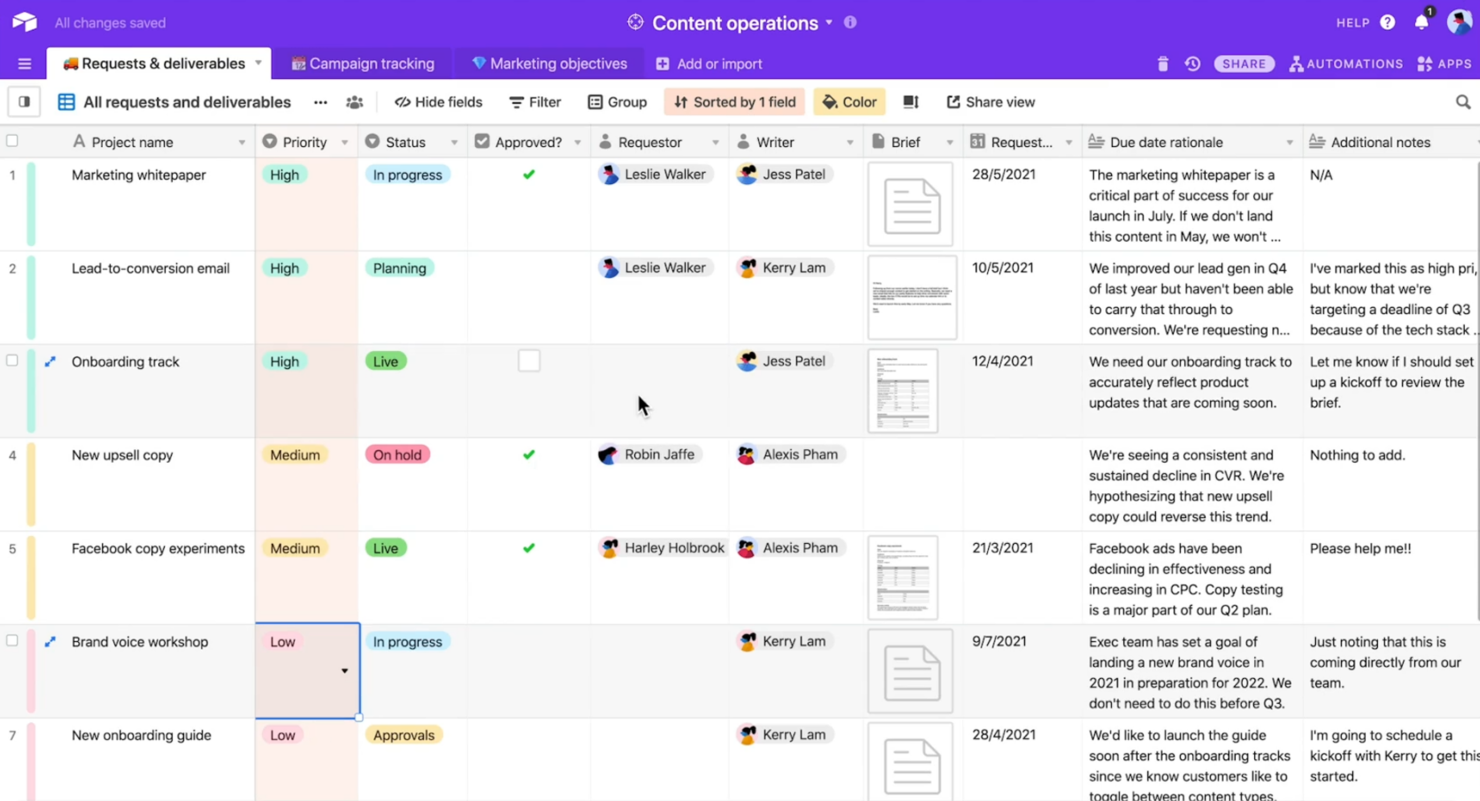
Airtable è uno strumento di gestione di database flessibile che consente ai team di organizzare e collaborare sui progetti. Viene utilizzato da marketer, project manager e creativi che necessitano di una soluzione personalizzabile per monitorare e gestire i dati.
Perché ho scelto Airtable: Airtable gestisce facilmente progetti e database. Offre un'interfaccia intuitiva che permette di creare tabelle e viste personalizzate. Puoi utilizzare le funzionalità di intelligenza artificiale di Airtable per generare contenuti e suggerire automazioni. La funzionalità drag-and-drop rende semplice l'organizzazione dei dati. Secondo la mia esperienza, la capacità di Airtable di collegare i record e automatizzare i flussi di lavoro lo rende utile per progetti complessi.
Funzionalità e integrazioni principali:
Funzionalità includono record codificati per colore che facilitano la categorizzazione e l'identificazione rapida delle informazioni. È anche possibile progettare interfacce personalizzate per rendere i dati complessi utilizzabili e accessibili.
Integrazioni includono Slack, Google Drive, Dropbox, Salesforce e Zendesk.
Pros and Cons
Pros:
- Campi altamente personalizzabili
- Monitoraggio visivo dei progetti
- Supporta relazioni dati complesse
Cons:
- Funzionalità offline limitate
- Le funzionalità avanzate richiedono piani a pagamento

Nifty
Ideale per la gestione delle tempistiche di progetto
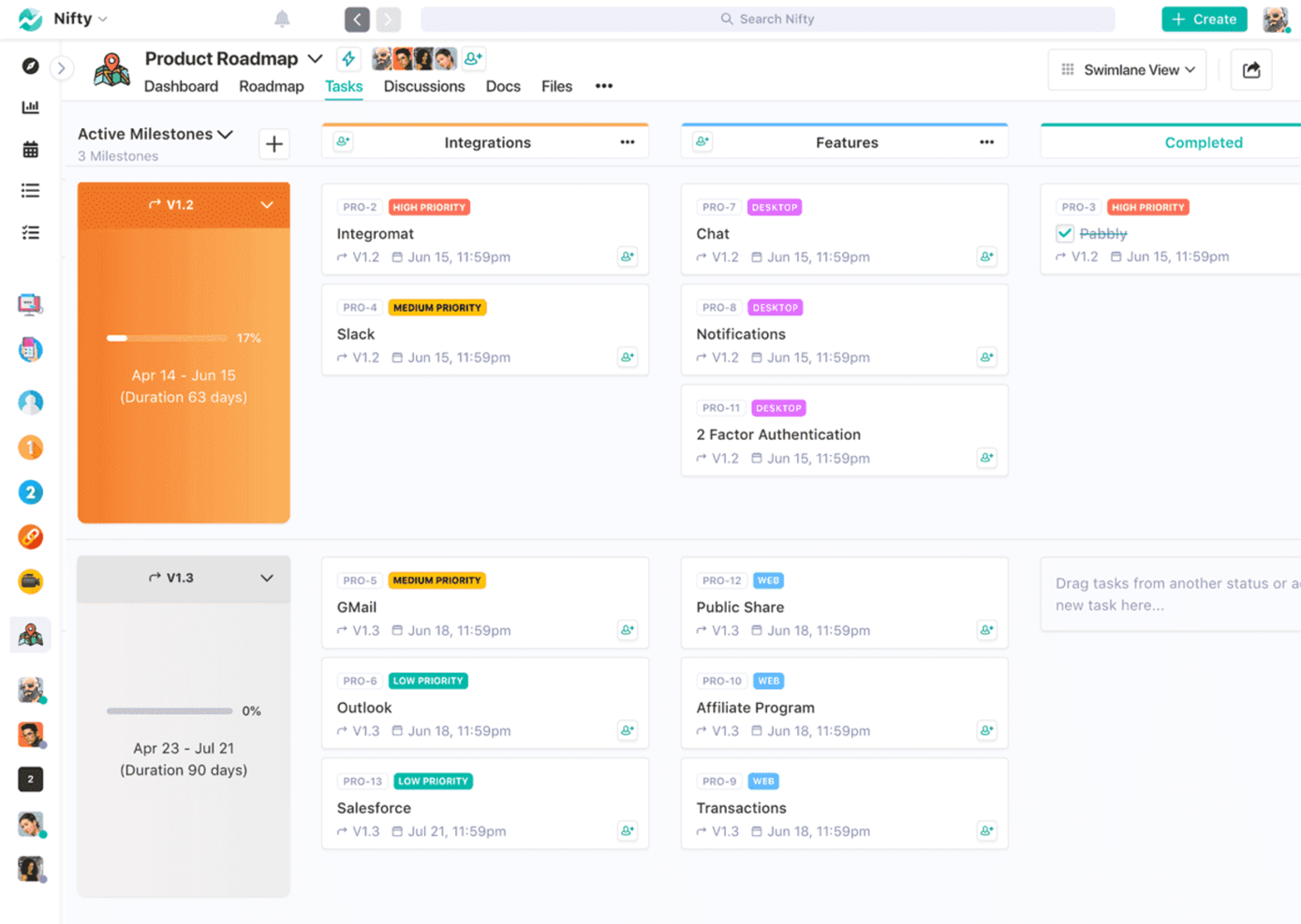
Nifty è uno strumento di gestione dei progetti che aiuta i team a gestire le tempistiche e le attività. I project manager e i gruppi di lavoro lo utilizzano per tenere traccia delle tappe fondamentali e collaborare in modo efficiente.
Perché ho scelto Nifty: L'interfaccia intuitiva di Nifty aiuta a gestire le tempistiche dei progetti e a visualizzare l'avanzamento dei lavori. Lo strumento offre anche il monitoraggio delle tappe fondamentali per mantenere il team allineato sulle scadenze. Le funzionalità AI di Nifty aiutano a pianificare, prioritizzare ed eseguire i compiti in modo più efficace. Le funzionalità collaborative come le discussioni sulle attività e la condivisione dei file migliorano la comunicazione e il lavoro di squadra.
Caratteristiche principali & integrazioni:
Funzionalità includono il monitoraggio del tempo per controllare le ore dedicate alle attività, aiutando così a gestire meglio le risorse, e le dipendenze tra compiti che permettono di organizzare e stabilire le priorità in modo efficace.
Integrazioni includono Slack, Google Drive, Zoom, GitHub, Asana, Trello e Notion.
Pros and Cons
Pros:
- Visualizzazione intuitiva della timeline
- Monitoraggio efficace delle tappe fondamentali
- Funzione di sincronizzazione del calendario
Cons:
- Reportistica avanzata limitata
- Ritardi occasionali nella sincronizzazione

Loom
Ideale per la messaggistica video
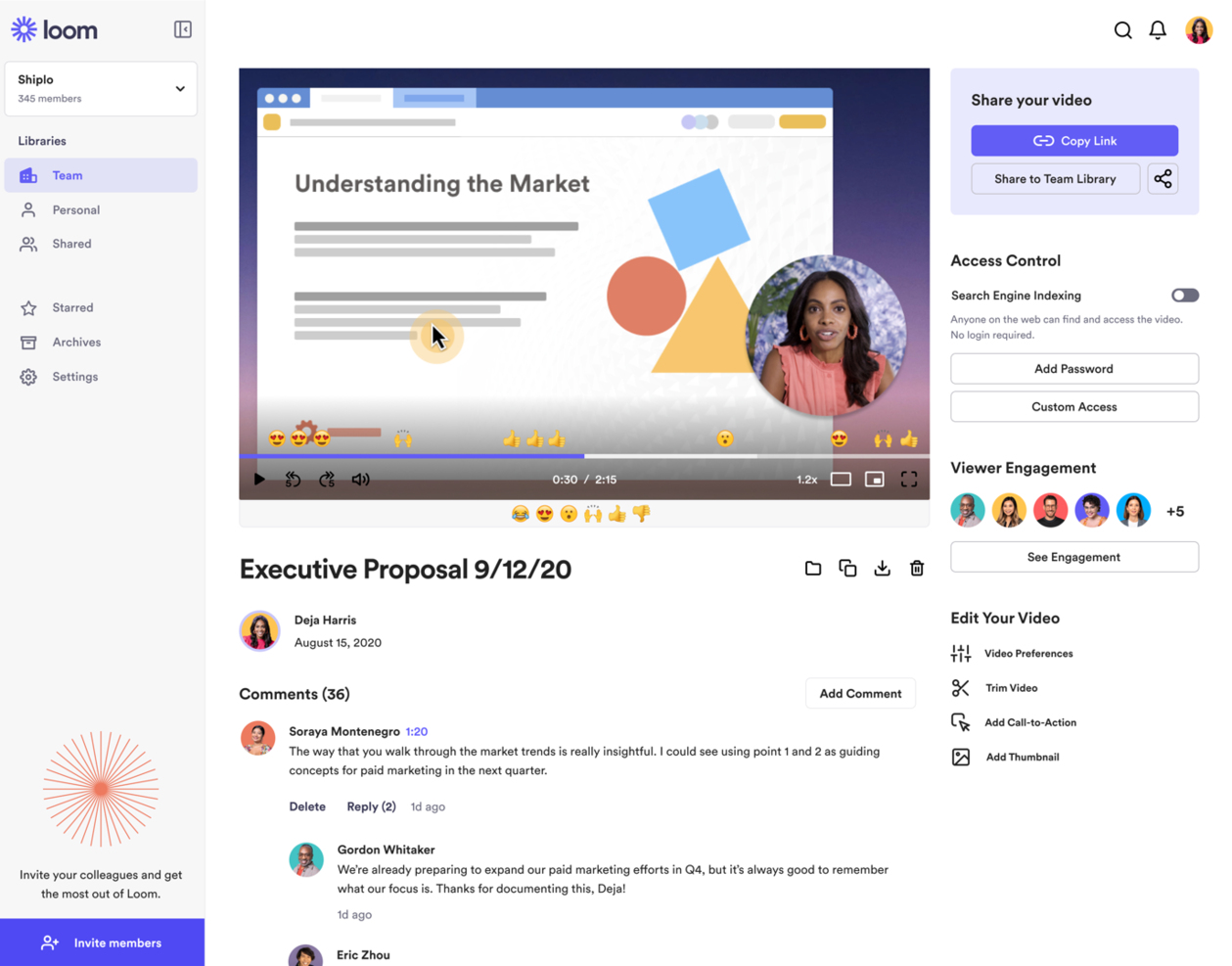
Loom è uno strumento di comunicazione video che permette al tuo team di creare messaggi video. È molto apprezzato tra i team da remoto, gli educatori e l'assistenza clienti per la sua capacità di trasmettere informazioni complesse in modo visivo.
Perché ho scelto Loom: Loom eccelle nei messaggi video e ti consente di registrare contemporaneamente schermo, voce e volto. Puoi utilizzare l'intelligenza artificiale per migliorare istantaneamente i video, generare trascrizioni e trasformare le registrazioni in formati di testo come messaggi o report. Lo strumento ti consente di condividere i video con un semplice link e ricevere feedback immediato tramite commenti. Velocità e semplicità fanno di Loom il preferito dai team che desiderano velocizzare la comunicazione e ridurre le email troppo lunghe.
Funzionalità distintive e integrazioni:
Funzionalità includono il taglio del video per eliminare parti non necessarie, strumenti di disegno per evidenziare informazioni chiave e un pulsante call-to-action per indirizzare gli spettatori a una pagina web specifica.
Integrazioni includono Slack, Gmail, Jira, Zoom, Notion e Confluence.
Pros and Cons
Pros:
- Elaborazione video rapida
- Opzioni di condivisione semplici
- Registrazione video di alta qualità
Cons:
- Personalizzazione video limitata
- Funzioni di analisi basilari

Front
Ideale per caselle di posta di team
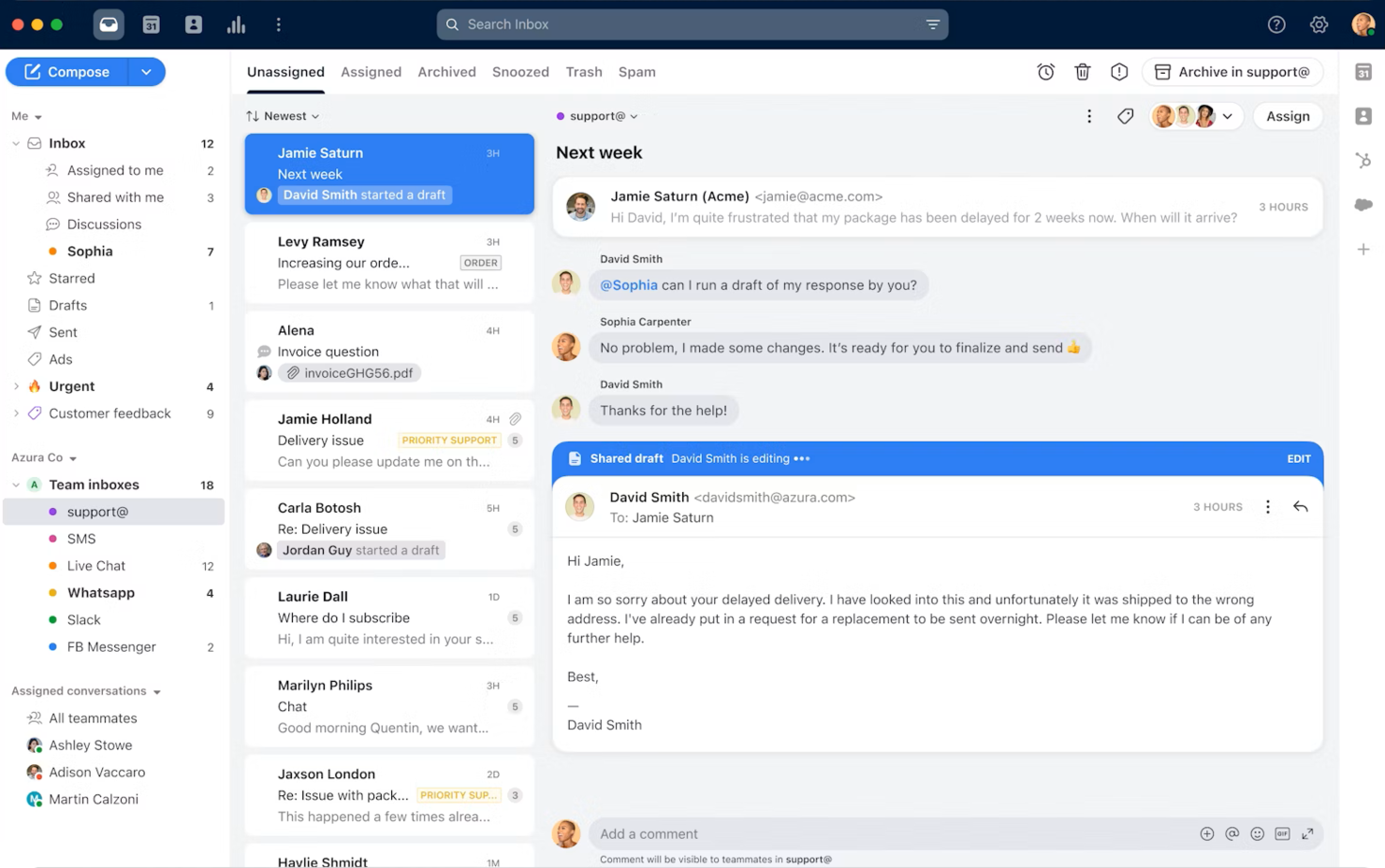
Front è una piattaforma di casella di posta condivisa che aiuta i team a gestire le comunicazioni. Si rivolge a team di assistenza clienti, vendite e operazioni che hanno bisogno di collaborare sulle risposte alle email e gestire le caselle di posta del team.
Perché ho scelto Front: Front ti permette di gestire le caselle di posta dei team e centralizzare le comunicazioni in un unico luogo. Le funzionalità di intelligenza artificiale possono aiutarti a redigere risposte, automatizzare l'instradamento e misurare la soddisfazione dei clienti senza lavoro manuale aggiuntivo. Puoi assegnare le email a specifici membri del team, così da mantenere responsabilità e chiarezza nei compiti. La funzione di commenti interni della piattaforma consente al tuo team di discutere le email direttamente dalla casella di posta. Nella mia esperienza, i flussi di lavoro automatizzati di Front aiutano a ridurre le attività ripetitive e migliorare la produttività.
Funzionalità e integrazioni principali:
Funzionalità includono modelli di email che fanno risparmiare tempo, analisi delle prestazioni e dei tempi di risposta alle email, e rilevamento delle collisioni, che impedisce a più persone di rispondere alla stessa email.
Integrazioni includono Salesforce, Slack, Asana, Trello, Zapier, HubSpot, Intercom, Aircall e Dropbox.
Pros and Cons
Pros:
- Hub di comunicazione centralizzato
- Assegna le email ai membri del team
- Previene risposte duplicate alle email
Cons:
- Personalizzazione dei modelli limitata
- Richiede una connessione internet stabile

Ideale per i liberi professionisti
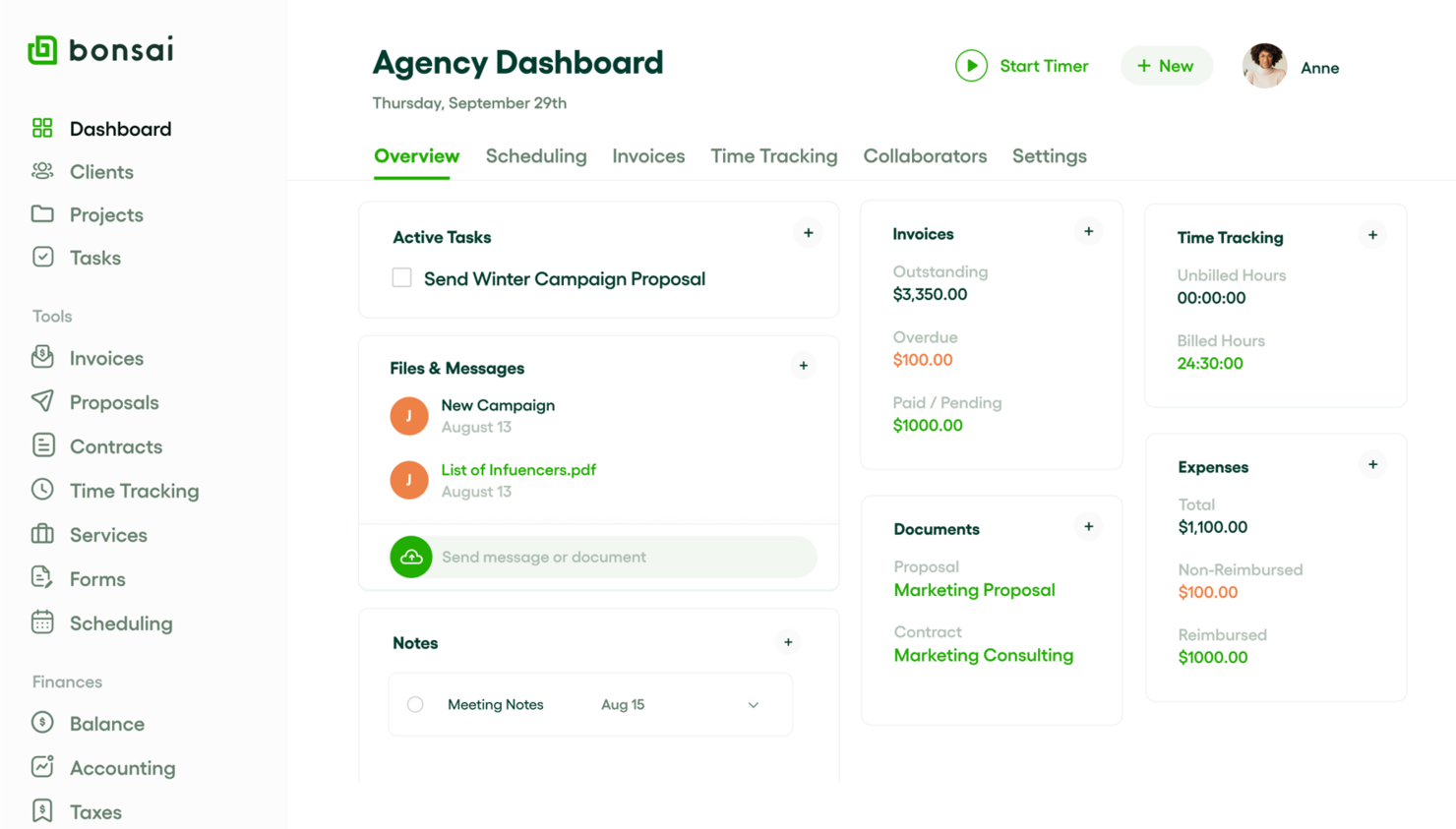
Bonsai Agency Software è una piattaforma completa che permette ai liberi professionisti di gestire contratti, fatture e progetti. I professionisti indipendenti possono utilizzarla per gestire le proprie operazioni aziendali.
Perché ho scelto Bonsai Agency Software: Le funzionalità AI di Bonsai permettono di creare proposte, contratti e fatture più velocemente grazie a modelli e automazione, e puoi personalizzare i modelli in base alle tue esigenze specifiche. La funzione di fatturazione migliora la gestione delle fatture e consente di creare e inviare fatture professionali. Il monitoraggio dei progetti di Bonsai ti aiuta a rispettare le scadenze, gestire il carico di lavoro e collaborare con i clienti.
Funzionalità principali & integrazioni:
Funzionalità includono la gestione e la priorità dei compiti, il monitoraggio del tempo per verificare le ore dedicate ai progetti e un portale clienti dove i clienti possono approvare contratti e fatture.
Le integrazioni includono QuickBooks, Zapier, Xero e Calendly.
Pros and Cons
Pros:
- Modelli di contratto personalizzabili
- Processo di fatturazione efficiente
- Portale clienti per approvazioni
Cons:
- Personalizzazione limitata dei report
- Può risultare complesso per i nuovi utenti

Confluence
Ideale per la gestione della conoscenza

Confluence è uno strumento di collaborazione che aiuta le squadre a creare, condividere e gestire contenuti. È utilizzato da responsabili di progetto, sviluppatori e squadre IT per la condivisione delle conoscenze e la documentazione.
Perché ho scelto Confluence: Confluence offre uno spazio centralizzato per la documentazione e la collaborazione della squadra. Puoi utilizzare le funzionalità di IA di Confluence per generare contenuti, riassumere pagine e automatizzare le attività di scrittura ripetitive. La funzionalità di versionamento delle pagine consente di tenere traccia delle modifiche e ripristinare le versioni precedenti. I modelli ti aiutano a configurare pagine per casi d'uso come note delle riunioni e piani di progetto.
Funzionalità e integrazioni principali:
Le funzionalità includono uno strumento avanzato per la modifica del testo, che consente di formattare facilmente i contenuti, una potente funzione di ricerca per trovare rapidamente le informazioni e impostazioni delle autorizzazioni per controllare chi può visualizzare o modificare i contenuti.
Le integrazioni includono Jira, Trello, Slack, Google Drive e Microsoft Teams.
Pros and Cons
Pros:
- Ampia raccolta di modelli
- Autorizzazioni personalizzabili
- Funzionalità di versionamento delle pagine
Cons:
- Può essere lento con grandi quantità di dati
- Complessità nella configurazione delle autorizzazioni
Altri strumenti di collaborazione basati sull'IA
Ecco alcune opzioni aggiuntive di strumenti di collaborazione basati sull’IA che non sono entrate nella mia selezione, ma che vale comunque la pena considerare:
- Bit.ai
Ideale per la collaborazione sui documenti
- Roam
Ideale per la condivisione collaborativa delle idee
- Zoho Projects
Ideale per il monitoraggio delle attività
- Quickbase
Ideale per la creazione di app
- TaskRay
Ideale per la collaborazione potenziata da IA su Salesforce


Come Valuto gli Strumenti di Collaborazione AI
Ogni strumento qui deve offrire più di un semplice componente aggiuntivo chatbot—cerco AI che faccia davvero risparmiare tempo, come l’estrazione automatica degli elementi d’azione o l’individuazione dei blocchi. Suddivido la mia valutazione in funzionalità di base che uno strumento deve avere per qualificarsi e fattori differenzianti che separano le opzioni buone da quelle eccellenti.
Funzionalità di Base (Requisiti Minimi per Questa Lista)
Quando seleziono gli strumenti per la mia lista, valuto ciascuno su una scala da 0 (non offre la funzionalità) a 5 (eccelle in quest’area) per ogni funzionalità base elencata di seguito. Successivamente, calcolo il punteggio totale dello strumento in percentuale. Ogni strumento deve raggiungere un punteggio minimo totale del 65% per essere preso in considerazione per l’inclusione.
- Generazione di Contenuti Alimentata dall’AI: Cerco strumenti che utilizzino l’intelligenza artificiale generativa per aiutare i team a redigere l’ordine del giorno delle riunioni, i brief di progetto o le descrizioni dei compiti direttamente all’interno dello spazio di lavoro.
- Capacità di Sintesi AI: Lunghi thread su Slack e riunioni di un’ora fanno perdere tempo, quindi valuto quanto bene ogni strumento condensa conversazioni e documenti in punti chiave chiari.
- Funzionalità di Collaborazione in Tempo Reale: I team hanno bisogno di superfici condivise per lavorare insieme, quindi verifico la presenza di co-editing, commenti e collaborazione asincrona su documenti, attività o lavagne condivise.
- Estrazione AI di Attività e Azioni: Valuto se lo strumento è in grado di individuare elementi d’azione, assegnatari e scadenze dalle riunioni o dai thread di chat senza che qualcuno li annoti manualmente.
- Integrazioni con Tool di Gestione Progetti: Strumenti come Jira, Asana e Monday sono il cuore del lavoro di progetto, quindi verifico sempre una solida sincronizzazione bidirezionale con queste piattaforme.
- Insight e Ricerca Guidati dall’AI: Oltre alla semplice ricerca per parole chiave, cerco recupero semantico e insight evidenziati—come la segnalazione di attività obsolete o blocchi non risolti all’interno di uno spazio di lavoro.
Una volta che ho una lista di strumenti che soddisfano i criteri, considero cosa distingue ciascuna piattaforma dalle altre.
Fattori Differenzianti (Cosa Distingue i Fornitori)
Ecco come confronto i diversi fornitori:
Funzionalità Distintive
Un copilota AI per riunioni che si unisce alle chiamate e genera automaticamente i follow-up è un enorme risparmio di tempo per i PM che gestiscono meeting consecutivi su diversi filoni di lavoro. Valuto anche la consapevolezza del contesto trasversale tra strumenti, dove l’AI attinge informazioni rilevanti da app connesse come Slack o Jira senza input manuale. Sono interessanti anche gli agenti AI personalizzabili—i team possono configurarli per gestire attività ricorrenti come promemoria sprint o report settimanali personalizzati per i flussi di lavoro progetto-specifici.
Oltre le Funzionalità
La governance dell’AI è fondamentale qui—verifico se i fornitori sono trasparenti su come trattano i dati di progetto e se i contenuti dei clienti addestrano i loro modelli. La scalabilità è un altro fattore importante, soprattutto per i direttori PMO che gestiscono più portafogli con decine di collaboratori esterni. Valuto anche il supporto all’implementazione, poiché introdurre uno strumento AI in team distribuiti richiede solide risorse di onboarding e una guida al change management per ottenere una reale adozione oltre il gruppo pilota.
Come scegliere gli strumenti di collaborazione basati sull'IA
È facile perdersi in lunghi elenchi di funzionalità e strutture tariffarie complesse. Per aiutarti a rimanere concentrato mentre scegli lo strumento giusto, ecco un elenco di fattori da tenere presenti:
| Fattore | Cosa considerare |
|---|---|
| Scalabilità | Lo strumento crescerà insieme al tuo team? Considera le esigenze future e se lo strumento è in grado di gestire un numero maggiore di utenti e dati senza problemi di prestazioni. |
| Integrazioni | Funziona con gli strumenti che già utilizzi? Verifica la compatibilità con i software che il tuo team usa già, come CRM o sistemi di archiviazione dei file. |
| Personalizzazione | Puoi adattarlo ai tuoi flussi di lavoro? Cerca opzioni per modificare dashboard, report e impostazioni degli utenti in base ai processi del tuo team. |
| Facilità d'uso | È intuitivo per tutti? Valuta la curva di apprendimento e l'interfaccia utente. Uno strumento difficile da utilizzare può rallentare il tuo team. |
| Implementazione e avvio | Con quale rapidità il tuo team può iniziare? Valuta le risorse disponibili, come tutorial e assistenza, per garantire una transizione agevole. |
| Costo | Rientra nel tuo budget? Confronta i piani tariffari e considera i costi a lungo termine, comprese eventuali tariffe nascoste o spese aggiuntive per le funzionalità premium. |
| Misure di sicurezza | Quanto sono sicuri i tuoi dati? Verifica le misure di protezione dei dati dello strumento, gli standard di crittografia e la conformità alle normative di settore come il GDPR. |
| Disponibilità dell'assistenza | Quali opzioni di assistenza sono disponibili? Verifica la disponibilità di un'assistenza 24 ore su 24, 7 giorni su 7, i tempi di risposta e l'accesso a un account manager dedicato, se necessario. |
Cosa sono gli strumenti di collaborazione basati sull'IA?
Gli strumenti di collaborazione basati sull'IA sono piattaforme digitali che potenziano il lavoro di squadra e la comunicazione tramite funzionalità di intelligenza artificiale. Questi strumenti sono generalmente utilizzati da project manager, responsabili dei team e lavoratori da remoto per migliorare la produttività e il coordinamento.
Funzionalità come la chat in tempo reale, il monitoraggio dei progetti e la condivisione dei documenti ti aiutano a organizzare le attività, gestire le scadenze e favorire una comunicazione efficace. Questo semplifica la collaborazione e contribuisce a rendere il team più efficiente.
Funzionalità degli strumenti di collaborazione basati sull'IA
Quando selezioni strumenti di collaborazione basati sull'IA, presta attenzione alle seguenti funzionalità chiave:
- Comunicazione in tempo reale: offre messaggistica istantanea e videochiamate per mantenere i membri del team connessi e coinvolti.
- Gestione delle attività: consente di assegnare, monitorare e stabilire le priorità delle attività per mantenere i progetti nei tempi previsti.
- Condivisione dei documenti: facilita l'accesso ai file e la collaborazione su di essi, riducendo la necessità di scambiarsi numerose e-mail.
- Funzionalità di integrazione: si collega agli strumenti e ai software esistenti per creare un flusso di lavoro coerente tra le piattaforme.
- Dashboard personalizzabili: consentono di personalizzare visualizzazioni e report in base alle esigenze e alle preferenze specifiche del team.
- Flussi di lavoro automatizzati: semplificano le attività ripetitive e liberano tempo da dedicare al lavoro strategico.
- Misure di sicurezza: proteggono i dati sensibili con la crittografia e garantiscono la conformità alle normative di settore.
- Analisi e report: forniscono informazioni sulle prestazioni del team e sull'avanzamento dei progetti per supportare il processo decisionale.
- Accesso da dispositivi mobili: consente ai membri del team di collaborare e accedere alle informazioni da qualsiasi luogo e in qualsiasi momento.
- Interfaccia intuitiva: offre un design intuitivo che riduce al minimo la curva di apprendimento e aumenta il tasso di adozione.
Vantaggi degli strumenti di collaborazione basati sull'IA
L'implementazione di strumenti di collaborazione basati sull'IA offre diversi vantaggi al tuo team e alla tua azienda. Eccone alcuni:
- Comunicazione migliore: la messaggistica in tempo reale e le videochiamate mantengono il team connesso e riducono le incomprensioni.
- Organizzazione migliorata: le funzionalità di gestione delle attività aiutano a tenere traccia degli incarichi e delle scadenze, così nulla viene trascurato.
- Maggiore produttività: i flussi di lavoro automatizzati gestiscono le attività ripetitive, permettendo al team di concentrarsi su attività di maggior valore.
- Processo decisionale migliore: le analisi e i report forniscono informazioni sull'avanzamento dei progetti e sulle prestazioni del team, consentendo di prendere decisioni consapevoli.
- Maggiore flessibilità: l'accesso da dispositivi mobili consente al team di collaborare da qualsiasi luogo, e può supportare il lavoro da remoto e gli spostamenti.
- Maggiore sicurezza dei dati: le misure di sicurezza proteggono le informazioni sensibili, offrendo tranquillità per quanto riguarda la sicurezza dei dati.
- Esperienza personalizzabile: le dashboard personalizzabili consentono di adattare lo strumento ai flussi di lavoro e alle preferenze specifiche del team.
Costi e prezzi degli strumenti di collaborazione basati sull'IA
I costi degli strumenti di collaborazione basati sull'IA variano in base alle funzionalità, alle dimensioni del team, ai componenti aggiuntivi e ad altri fattori. La tabella seguente riepiloga i piani più comuni, i relativi prezzi medi e le funzionalità tipicamente incluse nelle soluzioni di collaborazione basate sull'IA:
Tabella di confronto dei piani per gli strumenti di collaborazione con IA
| Tipo di piano | Prezzo medio | Funzionalità comuni |
|---|---|---|
| Piano gratuito | $0/utente/mese | Gestione di base delle attività, spazio di archiviazione limitato e strumenti essenziali per la comunicazione. |
| Piano personale | $5-$15/utente/mese | Gestione delle attività, condivisione dei documenti e integrazioni di base. |
| Piano aziendale | $15-$30/utente/mese | Integrazioni avanzate, analisi e reportistica e funzionalità di sicurezza più efficaci. |
| Piano per grandi imprese | $30-$50/utente/mese | Flussi di lavoro personalizzabili, assistenza prioritaria e misure di sicurezza avanzate. |
Domande frequenti sugli strumenti di collaborazione con IA
Ecco alcune risposte alle domande più comuni sugli strumenti di collaborazione con IA:
In che modo gli strumenti di IA influiscono sull'efficacia della comunicazione del team?
Gli strumenti di collaborazione con IA possono analizzare i tuoi messaggi, evidenziare le discussioni importanti e suggerire riepiloghi o passaggi successivi. Aiutano il tuo team a evitare conversazioni duplicate e cambi di contesto. Puoi utilizzarli per mettere in evidenza le informazioni chiave e poi rispondere più rapidamente e in modo più chiaro.
Gli strumenti di collaborazione con IA supportano la conformità e la privacy dei dati?
Gli strumenti di collaborazione con IA tutelano la privacy mediante accessi basati sui ruoli, registri di controllo e crittografia per proteggere i dati sensibili. Verifica che uno strumento sia conforme alle normative della tua regione, come il GDPR o il SOC-2. Dovresti inoltre stabilire regole chiare su come le funzionalità di IA possono utilizzare i contenuti riservati.
Quanto sono scalabili gli strumenti di collaborazione con IA per i team in crescita?
Gli strumenti di collaborazione con IA spesso si adattano alla crescita consentendoti di modificare i piani o i livelli di prestazioni (ad es. per un numero maggiore di utenti o una maggiore capacità di archiviazione). L’architettura dovrebbe consentirti di aggiungere utenti e funzionalità senza dover riprogettare tutto. Tuttavia, dovrai testare le prestazioni man mano che il team cresce.
Quali sono le insidie più comuni nell'implementazione dell'IA negli strumenti di collaborazione?
Tra le insidie più comuni degli strumenti di collaborazione con IA vi è l’eccessiva dipendenza dall’IA, che può ridurre la capacità di giudizio del team; inoltre, l’IA può interpretare erroneamente gli input vaghi. La complessità dell’integrazione con la tua infrastruttura esistente (ad es. i sistemi legacy) può rallentare l’adozione e la formazione richiede tempo, quindi prevedi un periodo di adattamento.
Come valuto il ROI degli strumenti di collaborazione con IA?
Per valutare il ROI degli strumenti di collaborazione con IA, puoi monitorare il tempo risparmiato sugli aggiornamenti dello stato, la riduzione del volume delle e-mail, la maggiore rapidità dei cicli decisionali e il minor numero di scadenze non rispettate. Confronta le metriche prima e dopo per progetti simili. Chiedi al tuo team se, dopo l’adozione, percepisce meno difficoltà nel coordinamento.