

10 migliori software Kanban per ridurre i tempi di consegna nel 2026

10 Elenco dei migliori software Kanban


Gestire il lavoro in modo efficiente può sembrare un esercizio di equilibrismo, soprattutto quando bisogna coordinare più attività, team e scadenze. È qui che entra in gioco il software Kanban: un approccio visivo alla gestione delle attività e dei flussi di lavoro che mantiene i progetti sulla buona strada e il team allineato. Tuttavia, con le innumerevoli soluzioni Kanban presenti sul mercato, scegliere quella giusta può essere complicato.
Grazie alla mia esperienza nella gestione dei progetti e dopo aver testato strumenti per anni, ho raccolto le migliori opzioni disponibili. Che tu gestisca un team o lavori in autonomia, in questo elenco selezionato troverai sicuramente una soluzione adatta alle tue esigenze.
Perché fidarsi dei nostri consigli sui software
Il nostro team testa e recensisce software dal 2012. In quanto project manager noi stessi, sappiamo quanto sia difficile — e importante — scegliere il software giusto.
Per questa guida, abbiamo valutato gli strumenti attraverso test pratici e ricerche indipendenti, assegnando un punteggio agli strumenti in base ai nostri criteri di selezione. Ci basiamo inoltre sulle competenze di leader di pensiero del settore e di professionisti attivi nella gestione dei progetti.
Le nostre recensioni riflettono il nostro giudizio editoriale umano, non un discorso di vendita.
Revisori esperti:
Tabella di confronto dei software Kanban
Ecco una tabella in cui puoi confrontare rapidamente gli strumenti appena descritti nelle panoramiche.
| Tool | Best For | Trial Info | Price | ||
|---|---|---|---|---|---|
| 1 | Ideale per il rilevamento dei rischi nelle bacheche Kanban | 14 giorni di prova gratuita | Da $6/utente/mese | Website | |
| 2 | Migliore selezione di modelli di progetto | Prova gratuita di 14 giorni | Da $9,80/utente/mese | Website | |
| 3 | Ideale per l'integrazione con Google Workspace | Prova gratuita di 14 giorni | A partire da $3/utente/mese (con fatturazione annuale) | Website | |
| 4 | Ideale per creare app e flussi di lavoro personalizzati senza codice | Prova gratuita di 30 giorni | Da $35/utente/mese (fatturato annualmente) | Website | |
| 5 | Ideale per la collaborazione in tempo reale | Prova gratuita di 15 giorni | Da $1/utente/mese (minimo 12 utenti) | Website | |
| 6 | Migliore software Kanban per visualizzare le fasi del progetto | Prova gratuita di 15 giorni + piano gratuito + demo gratuita disponibile | A partire da $4/utente/mese (fatturazione annuale) | Website | |
| 7 | Il miglior software Kanban per la comunicazione del team | Piano gratuito disponibile | Da $8/utente/mese | Website | |
| 8 | Ideale per brainstorming, ideazione e gestione attività in un'unica soluzione | Prova gratuita + piano gratuito + demo gratuita disponibili | A partire da $13/utente/mese (fatturato annualmente) | Website | |
| 9 | Ideale per personalizzare il proprio set di funzionalità | Gratuito per utenti illimitati con un massimo di 100MB di archiviazione e offre una prova gratuita | A partire da $5/utente/mese | Website | |
| 10 | Miglior Kanban cross-portfolio | 30 giorni di prova gratuita | A partire da $5/licenza/mese e $0 per visualizzatori/iscritti | Website |


Panoramica dei 10 migliori software Kanban
Ecco una breve descrizione di ciascun software Kanban per la gestione dei progetti presente nel mio elenco, con una spiegazione di ciò che sa fare meglio e schermate che mostrano alcune delle sue funzionalità.

Ideale per il rilevamento dei rischi nelle bacheche Kanban
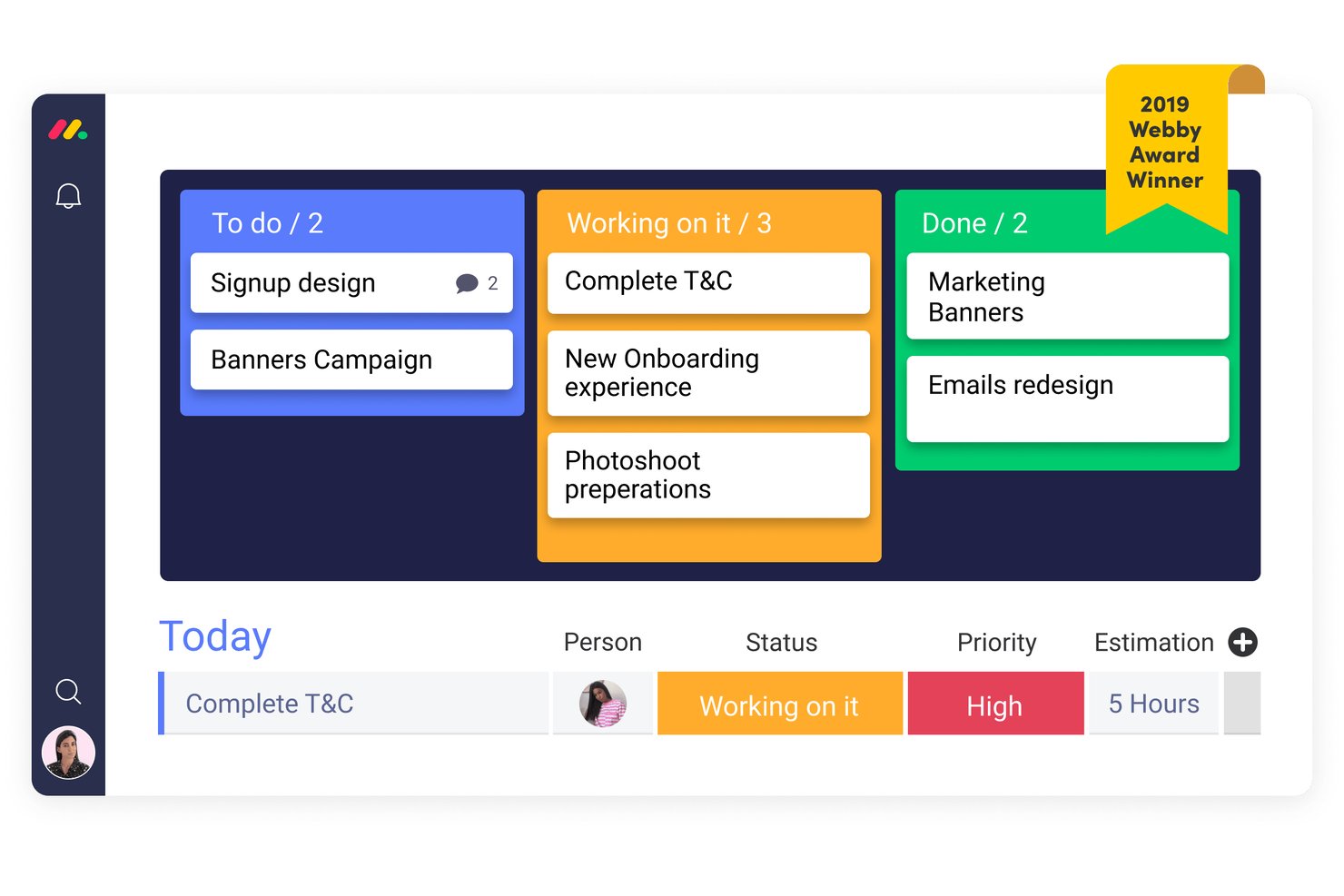
monday AI Workspace è una piattaforma di gestione del lavoro potenziata dall'IA che combina bacheche Kanban, pianificazione degli sprint, automazione dei flussi di lavoro e strumenti di collaborazione tra team per i casi d'uso di progetto, sviluppo, CRM e servizi.
Per Chi è Ideale monday AI Workspace?
È particolarmente adatta a team agili e a team operativi cross-funzionali che necessitano di bacheche Kanban insieme a pianificazione degli sprint, automazione e monitoraggio dei rischi assistito dall'IA in un'unica piattaforma.
Perché Ho Scelto monday AI Workspace
monday AI Workspace si guadagna un posto tra i migliori della mia selezione grazie al modo in cui il rilevamento dei rischi tramite IA funziona direttamente all'interno della bacheca Kanban. L'assistente IA Sidekick segnala problemi di dipendenza e scadenze a rischio prima che emergano in una riunione di stato. Apprezzo anche il riepilogo sprint fornito dall'IA, che individua automaticamente i blocchi sulle bacheche attive affinché il mio team possa agire prima che le attività vadano fuori rotta.
Funzionalità Principali di monday AI Workspace
- Visualizzazione multipla delle bacheche: Passa tra le visualizzazioni Kanban, Gantt, timeline, calendario e grafico per un monitoraggio flessibile dei progressi.
- Regole di automazione dei flussi di lavoro: Imposta trigger e azioni per spostare le card, assegnare responsabili o notificare i membri del team senza aggiornamenti manuali.
- Gestione delle dipendenze: Collega le card correlate e visualizza le dipendenze tra attività per prevenire blocchi e interruzioni del flusso di lavoro.
- Modelli di card personalizzati: Crea template riutilizzabili con campi precompilati e checklist per le tipologie di lavoro ricorrenti.
Integrazioni di monday AI Workspace
monday AI Workspace offre centinaia di integrazioni native, tra cui Slack, Google Workspace, Microsoft 365, Salesforce, Jira, GitHub, Zoom, Dropbox, HubSpot e Zendesk. Supporta anche Zapier e fornisce un'API per integrazioni personalizzate.
Pros and Cons
Pros:
- L'IA rileva elementi a rischio nelle bacheche Kanban
- Supporta automazioni avanzate sulle azioni della bacheca
- Offre visualizzazioni multi-bacheca a livello di portfolio
Cons:
- L'app mobile a volte è lenta con bacheche di grandi dimensioni
- Supporto limitato per la modifica offline delle bacheche
New Product Updates from monday AI Workspace
monday AI Workspace Adds Human Approval Routing
monday AI Workspace adds a human-in-the-loop approval block to AI Workflows, sending approval requests and routing workflow paths based on responses. For more information, visit monday AI Workspace's official site.

Wrike
Migliore selezione di modelli di progetto
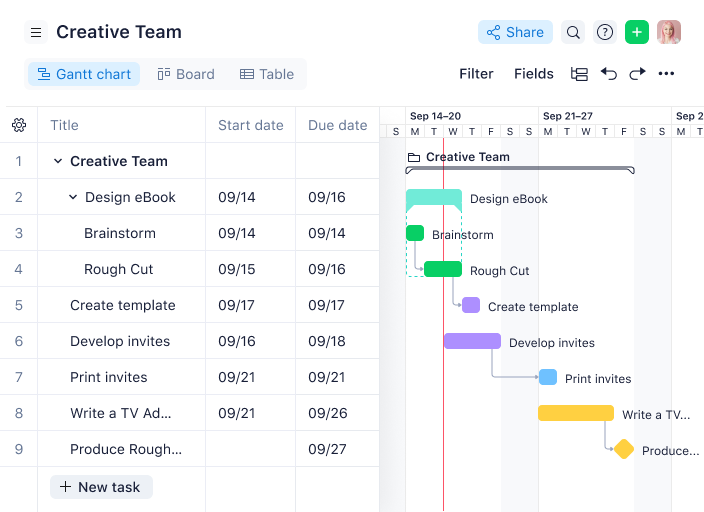
La versatile e facile da usare piattaforma web di Wrike si adatta a come il tuo team organizza il lavoro: non offre solo funzionalità Kanban, ma troverai anche le classiche bacheche Kanban insieme ad altre funzioni di gestione dei progetti. Il sistema integrato di revisione e approvazione accelera il flusso di lavoro e le molteplici visualizzazioni dei report ti tengono aggiornato sugli sviluppi in tempo reale. Wrike offre numerosi tipi di modelli di progetto, inclusi modelli Kanban per iniziare rapidamente.
Nei piani di livello superiore, puoi utilizzare Wrike per creare tag di programmazione per lavoratori a tempo pieno, part-time, a contratto e/o per il fine settimana. Successivamente, puoi assegnare un programma a ciascun membro del team e Wrike considererà la loro disponibilità individuale al momento di pianificare le tempistiche dei progetti Kanban.
Wrike offre oltre 400 integrazioni native predefinite, inclusi collegamenti con i più popolari software di gestione file di Microsoft, Google e Dropbox, oltre a software di vendita e marketing come Salesforce e Marketo.
New Product Updates from Wrike

Wrike Redesigns AI Agent Builder
Wrike redesigns its AI Agent Builder with a side-by-side setup, Scopes, sentence-style triggers and actions, and clearer filters. These changes make it easier to configure, test, and manage agent behavior. For more information, visit Wrike’s official site.

GQueues
Ideale per l'integrazione con Google Workspace
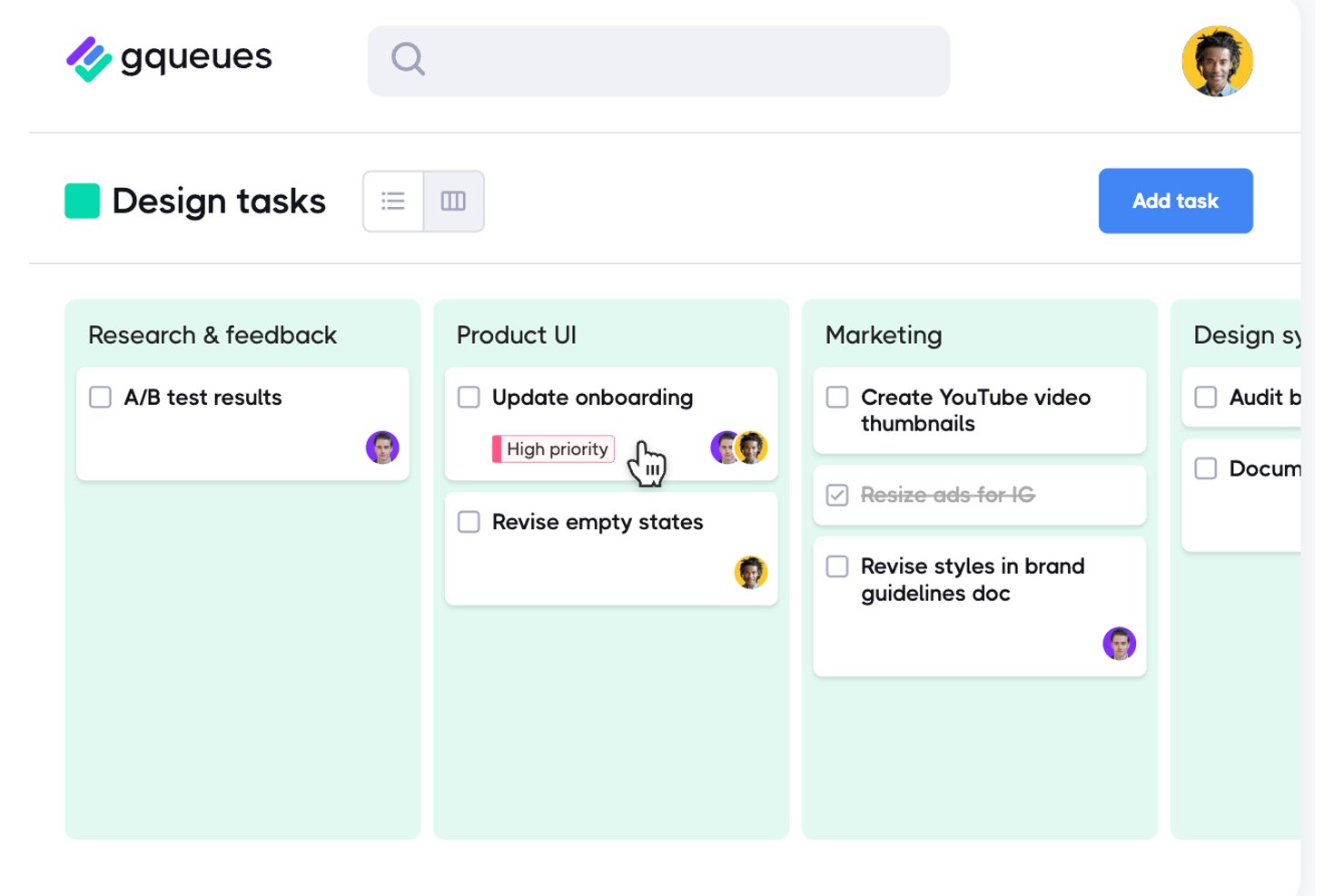
GQueues è un gestore di attività creato per i team di Google Workspace, che integra viste delle bacheche kanban, gestione degli elenchi e sincronizzazione con Google Calendar in un unico strumento di flusso di lavoro nativo di Google.
Per chi è più indicato GQueues?
GQueues è una scelta naturale per i team di piccole e medie dimensioni che operano interamente su Google Workspace e hanno bisogno di una gestione strutturata delle attività senza adottare una piattaforma separata.
Perché ho scelto GQueues
Ho scelto GQueues come uno dei migliori strumenti perché è l'unico strumento kanban che abbia visto costruito interamente attorno a Google Workspace, anziché semplicemente integrato in esso. La sua vista Bacheca consente al mio team di organizzare le attività per assegnatario, priorità o stato utilizzando colonne con trascinamento, mentre la sincronizzazione bidirezionale con Google Calendar fa sì che le scadenze delle schede vengano effettivamente visualizzate nel luogo in cui pianifichiamo già il nostro lavoro. Le Code intelligenti mi consentono di salvare viste filtrate tra più progetti, così non devo mai cercare ciò che è bloccato.
Funzionalità principali di GQueues
- Code intelligenti: salva filtri personalizzati come Code intelligenti per accedere rapidamente alle attività prioritarie di più progetti.
- Componente aggiuntivo Gmail: trasforma le email in attività operative direttamente dalla posta in arrivo con il componente aggiuntivo nativo di Gmail.
- Sincronizzazione bidirezionale con Google Calendar: aggiorna automaticamente le scadenze delle attività e lo stato di completamento nel tuo Google Calendar collegato.
- Sottoattività nidificate illimitate: suddividi il lavoro in tutti i livelli secondari necessari al tuo team per un monitoraggio dettagliato.
Integrazioni di GQueues
GQueues offre un'integrazione nativa con Google Workspace, inclusi Google Calendar, Gmail, Google Drive e Google Contacts. È possibile utilizzare Zapier con la sua funzionalità di conversione delle email in attività per connettere altre app.
Pros and Cons
Pros:
- Le colonne della bacheca organizzano le attività per assegnatario, stato o priorità
- Passaggio istantaneo dalla vista elenco alla vista bacheca
- Livelli gerarchici illimitati di nidificazione delle sottoattività
Cons:
- Nessun limite WIP per controllare la capacità delle colonne
- Nessun report di analisi dei tempi di ciclo o del flusso

Ideale per creare app e flussi di lavoro personalizzati senza codice
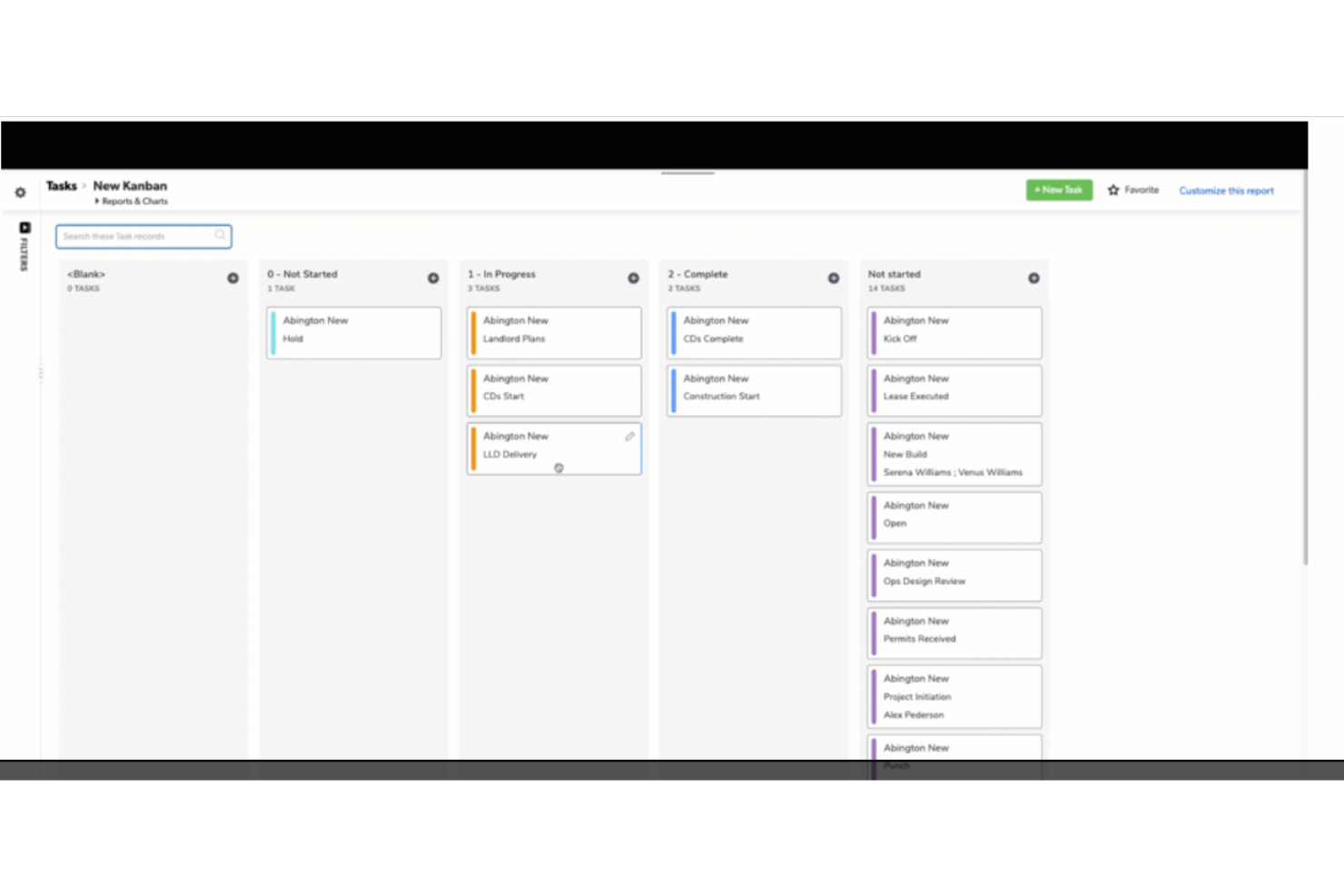
QuickBase è una piattaforma di sviluppo applicativo basata su cloud che consente alle aziende di creare soluzioni personalizzate per le proprie sfide operative uniche. Nota per la sua versatilità e facilità d'uso, QuickBase permette agli utenti con poca o nessuna esperienza di programmazione di sviluppare applicazioni personalizzate che ottimizzano i processi, gestiscono i dati e migliorano la collaborazione.
In qualità di software Kanban, QuickBase eccelle nell'offrire una piattaforma altamente personalizzabile e flessibile per la gestione di flussi di lavoro e progetti. Il suo punto di forza risiede nella possibilità di creare board Kanban su misura che si adattano perfettamente alle esigenze e ai processi specifici di ciascun progetto. QuickBase consente una facile visualizzazione delle attività e dei flussi di lavoro, facilitando il monitoraggio efficiente dei progressi e dei punti critici in tempo reale. La piattaforma supporta un approccio dinamico alla gestione dei progetti, dove le attività possono essere rapidamente e intuitivamente spostate tra diverse fasi del flusso di lavoro, promuovendo agilità e reattività.
Le integrazioni includono Salesforce, Microsoft Teams, Google Calendar, Tableau, QuickBase Pipelines, Slack e Zapier.
I prezzi per QuickBase partono da $35/utente/mese (fatturato annualmente). È disponibile anche una prova gratuita di 30 giorni.

Ideale per la collaborazione in tempo reale
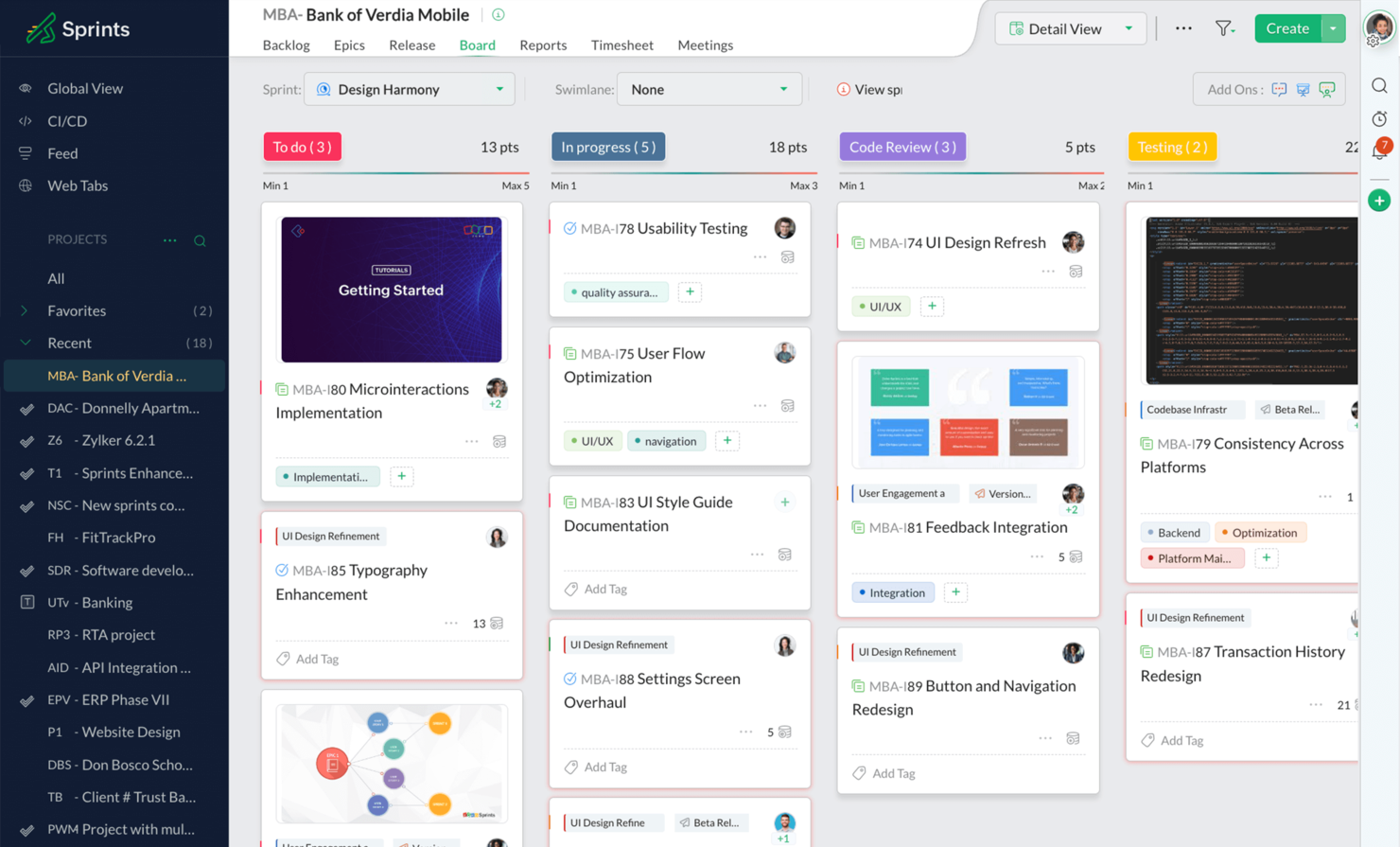
Zoho Sprints è un software di gestione agile dei progetti progettato per supportare team dinamici nella pianificazione, nel monitoraggio e nella collaborazione sui progetti. Si distingue per la sua suite completa di funzionalità pensate per le metodologie agili, in particolare per framework come Scrum e Kanban.
I team possono gestire i loro sprint, condurre riunioni giornaliere stand-up, impostare obiettivi per gli sprint e partecipare a riunioni di retrospettiva utilizzando la piattaforma. Il software supporta inoltre la collaborazione tramite funzionalità come feed, commenti e notifiche, consentendo ai membri del team di rimanere aggiornati e comunicare in modo efficace.
Come software Kanban, Zoho Sprints offre bacheche Kanban visuali intuitive, supporto per funzionalità fondamentali come i limiti di lavoro in corso (WIP) e flussi di lavoro personalizzabili che si adattano ai processi specifici del team. Le sue funzionalità di collaborazione in tempo reale e le analisi approfondite aumentano la produttività e le capacità decisionali del team, mentre le capacità di integrazione assicurano un funzionamento senza interruzioni all'interno di ecosistemi tecnologici diversificati.
Zoho Sprints si integra con Microsoft Teams, Google Workspace, Zendesk, Jenkins, GitHub, BitBucket, AWS Code Commit, Zapier e altri. Inoltre si integra con molte app di Zoho.
New Product Updates from Zoho Sprints
Zoho Sprints Adds Dashboard View for Custom Modules
Zoho Sprints adds a Dashboard view for custom modules with charts and tables for visualizing module records. This gives teams a clearer way to review custom data. For more information, visit Zoho Sprints’ official site.
 .
.
Migliore software Kanban per visualizzare le fasi del progetto
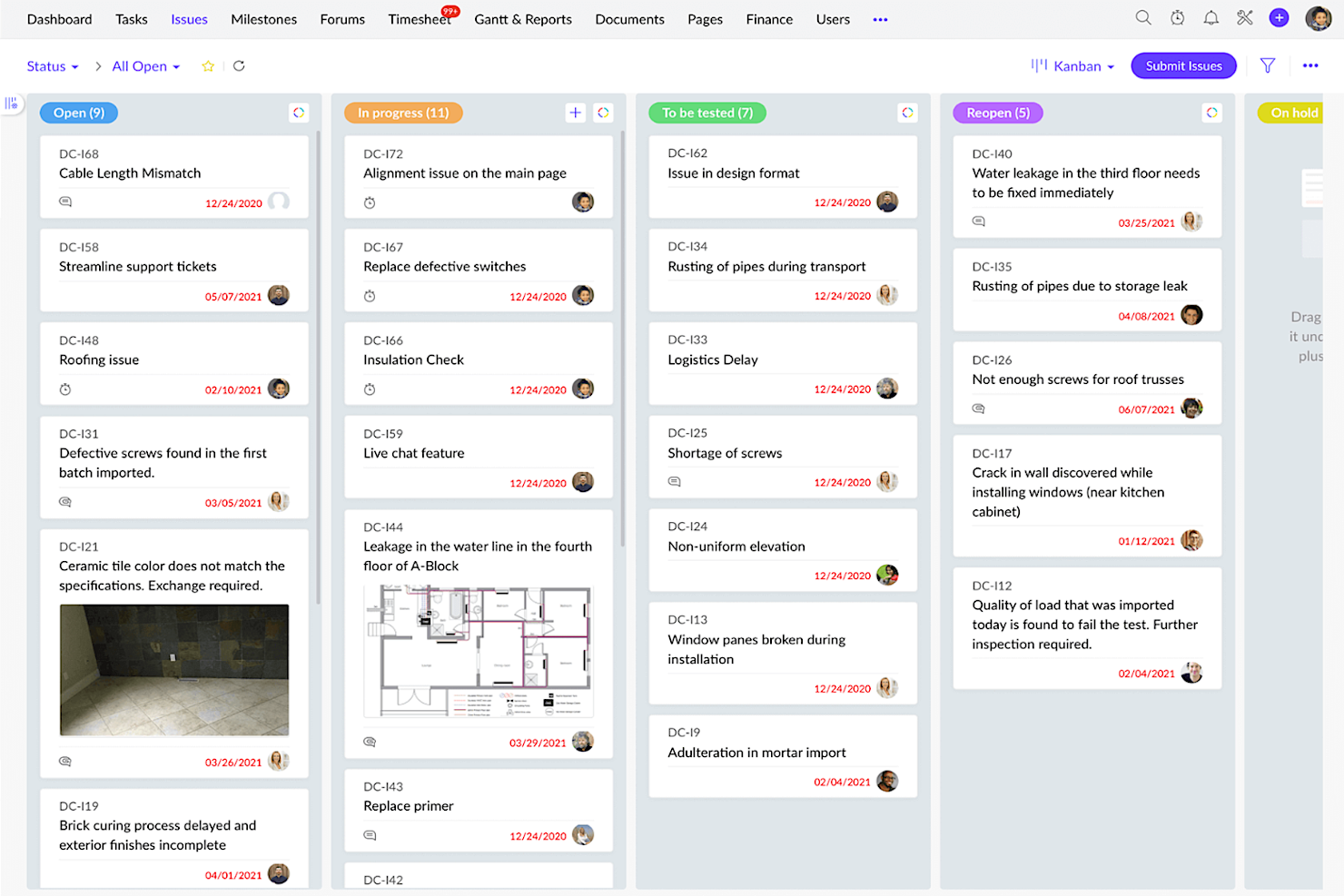
Zoho Projects è un software di gestione progetti basato sul web che offre diverse funzionalità per la pianificazione, l'esecuzione, il monitoraggio e la collaborazione nei progetti, rendendolo uno strumento completo per gestire i progetti in modo efficace. Il Kanban è una metodologia di gestione progetti che enfatizza la visualizzazione del lavoro, la limitazione delle attività in corso e l'ottimizzazione del flusso di lavoro. Zoho Projects consente ai team di monitorare visivamente il proprio lavoro, fornendo una panoramica chiara dello stato di ogni attività e dell'avanzamento complessivo del progetto.
Le bacheche Kanban di Zoho Projects sono completamente personalizzabili, permettendo ai team di crearle in base al loro flusso di lavoro e alle proprie preferenze. I team possono creare più bacheche per diversi progetti o per fasi diverse dello stesso progetto. Ogni pannello è composto da colonne che rappresentano le varie fasi del flusso di lavoro, come 'Da fare', 'In corso' e 'Fatto'. I team possono anche creare colonne personalizzate per rappresentare fasi specifiche del loro processo di lavoro.
Utilizzando Zoho Projects è possibile aggiungere attività, assegnarle ai membri del team, impostare date di scadenza, inserire descrizioni e allegati. Ogni attività sulla bacheca è rappresentata da una scheda che contiene tutte le informazioni rilevanti sul lavoro. I team possono anche aggiungere etichette alle attività per classificarle in base alla priorità, allo stato o a qualsiasi altra categoria pertinente al flusso di lavoro.
È possibile spostare le attività tra le colonne semplicemente trascinandole. Questa funzione consente agli utenti di aggiornare rapidamente lo stato dei compiti e seguirne l'avanzamento. Si può usare la funzione di filtro e ricerca per trovare attività specifiche, rendendo semplice concentrarsi su ciò che è più importante.
Zoho Projects offre diversi strumenti per aiutare i team a collaborare in modo efficace. I team possono aggiungere commenti alle attività, menzionare altri membri del team e discutere task specifici. Possono anche utilizzare la funzione @menzione per taggare i membri e informarli su aggiornamenti o cambiamenti relativi all'attività.
Zoho Projects si integra con altre app Zoho, con app di uso comune di Google (Google Calendar, Drive, Fogli, ecc.) e Microsoft (Calendar, Excel, Office 365, OneDrive, Teams e SharePoint), oltre che con altre app di terze parti come Basecamp, Jira, Slack, Zendesk e Zapier.
Zoho Projects ha un costo a partire da $5/utente/mese per il monitoraggio di progetti illimitati. È disponibile anche un piano freemium con funzionalità limitate, nonché una prova gratuita di 10 giorni.
New Product Updates from Zoho Projects
Zoho Projects Adds CodeX Scripts for Custom Modules
Zoho Projects now supports CodeX Scripts for custom modules, enabling conditional logic and rules for creating, updating, and deleting records. For more information, visit Zoho Projects' official site.
 .
.
Miro
Il miglior software Kanban per la comunicazione del team

Miro è una lavagna online collaborativa con oltre 1.000 modelli, tra cui mappe mentali, bacheche Kanban, diagrammi di Gantt, wireframe di prodotto, bacheche di ricerca e diagrammi di flusso. Miro è ampiamente adottata dalle principali aziende ed è riconosciuta per favorire la comunicazione del team e supportare efficacemente ambienti di lavoro ibridi.
La piattaforma supporta una vasta gamma di attività creative e organizzative con funzionalità come un modello Kanban intuitivo, modifica in tempo reale e videochiamata. Miro consente inoltre diverse modalità di espressione delle idee, incluse immagini e video, e mette a disposizione strumenti per la creazione rapida di diagrammi e una tela infinita per soddisfare le ampie esigenze della gestione dei progetti.
Miro include anche strumenti di collaborazione come votazioni e post-it digitali, consentendo ai team di integrare il feedback in modo efficiente. Inoltre, Miro offre integrazioni immediate con strumenti essenziali per la documentazione dei progetti come Notion e Asana, facilitando flussi di lavoro più semplici.
Miro dispone di integrazioni con un'intera suite di strumenti, tra cui Zoom, Figma, Asana, Microsoft Teams, Jira, Slack, Google Drive, Box, Confluence, Monday.com, Airtable, Notion, Azure e Webex. Alcune integrazioni sono riservate esclusivamente ai piani a pagamento.
Miro è gratuito per un numero illimitato di membri con un massimo di 3 bacheche modificabili. I piani a pagamento partono da $8/utente/mese (fatturazione annuale).
Pros and Cons
Pros:
- Funzionalità di comunicazione integrate per una collaborazione fluida
- Configurazione intuitiva e semplice
- Piano gratuito disponibile per sempre
Cons:
- La versione gratuita non consente l'export in pdf ad alta qualità
- Lo zoom può risultare poco fluido su progetti di grandi dimensioni
- Account visitatore/ospite disponibili solo nei piani a pagamento
New Product Updates from Miro
Miro Adds Japan Data Residency for Enterprise Customers
Miro has introduced Japan data residency for enterprise customers, offering in-region storage for production data, backups, and metadata, plus in-region compute infrastructure. For more information, visit Miro's official site.

Ideale per brainstorming, ideazione e gestione attività in un'unica soluzione

MeisterTask si distingue nel panorama dei software Kanban offrendo una piattaforma altamente visiva e intuitiva per gestire attività e flussi di lavoro utilizzando la metodologia Kanban. Consente agli utenti di creare bacheche Kanban personalizzabili, dove le attività sono rappresentate come schede che possono essere spostate attraverso diverse colonne o fasi, riflettendo il loro stato attuale nel flusso di lavoro. Questo approccio visivo non solo facilita la comprensione istantanea dei progressi delle singole attività e dei progetti, ma favorisce anche transizioni più fluide tra le diverse fasi del lavoro.
Oltre alla sua funzionalità Kanban principale, MeisterTask arricchisce l'esperienza di gestione dei progetti con una gamma di funzionalità pensate per aumentare la produttività e la collaborazione. Si integra perfettamente con MindMeister, uno strumento online di mappe mentali, permettendo un flusso unico ed efficiente dalla fase di brainstorming e idee direttamente alle attività operative. Questa integrazione colma il divario tra la pianificazione iniziale e l'esecuzione dei compiti, una caratteristica particolarmente interessante per i team che valorizzano creatività e innovazione nei propri flussi di lavoro. Inoltre, MeisterTask supporta l'automazione delle attività, i promemoria delle scadenze, il monitoraggio del tempo e strumenti collaborativi completi, inclusi allegati di file e commenti.
Le integrazioni includono Slack, Dropbox, Github, Google Drive, Microsoft Teams, Outlook, Trello, Asana, MindMeister e centinaia di altre tramite un piano a pagamento con Zapier.
MeisterTask ha un costo a partire da $14.50/mese (fatturato annualmente) e offre una prova gratuita.

ClickUp
Ideale per personalizzare il proprio set di funzionalità
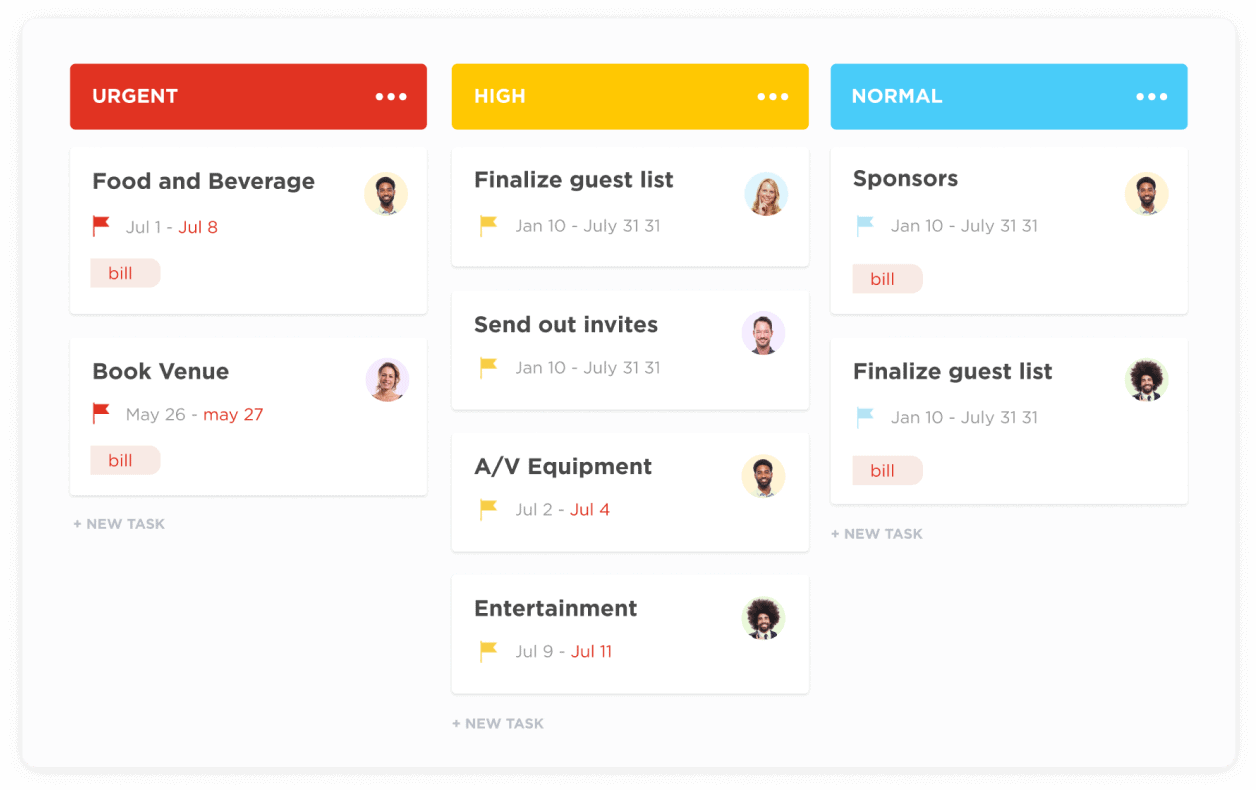
L'app di gestione progetti flessibile di ClickUp offre oltre 100 funzionalità proprietarie tra cui scegliere, consentendo agli utenti più esperti di mettere in evidenza ciò che desiderano e nascondere ciò che non usano. Scegli tra semplici elenchi di attività o flussi di lavoro più avanzati (chiamati 'Stati') per monitorare gli aggiornamenti e i progressi a distanza. I loro Kanban board traggono vantaggio da questa vasta gamma di funzionalità, permettendo agli utenti di personalizzare le proprie bacheche e flussi di lavoro in base alle esigenze uniche di ogni progetto, attività e sotto-attività.
ClickUp adotta un approccio unico al 'piano gratuito', che permette utenti e attività illimitati. La limitazione, tuttavia, risiede nell'avere solo 100 utilizzi di determinate funzionalità come campi personalizzati e mappe mentali. Questo potrebbe comunque essere l'ideale per team numerosi alla ricerca di una soluzione Kanban gratuita senza intenzione di rimanere sulla piattaforma in modo permanente.
ClickUp offre integrazioni native con Slack, G Suite, Dropbox e molti altri strumenti, oltre a più di 1.000 integrazioni tramite Zapier.
ClickUp è gratuito per utenti illimitati con un massimo di 100 MB di archiviazione. Il piano a pagamento parte da $5/utente/mese e offre una prova gratuita.
New Product Updates from ClickUp
ClickUp Adds Meetings Hub, Super Agent Templates, and ZoomInfo Integration
ClickUp adds a searchable Meetings Hub, new ways to clone and template Super Agents, and a ZoomInfo integration through the App Center. These updates improve meeting retrieval, agent reuse, and access to sales intelligence. For more information, visit ClickUp’s official site.

Kanban Zone
Miglior Kanban cross-portfolio
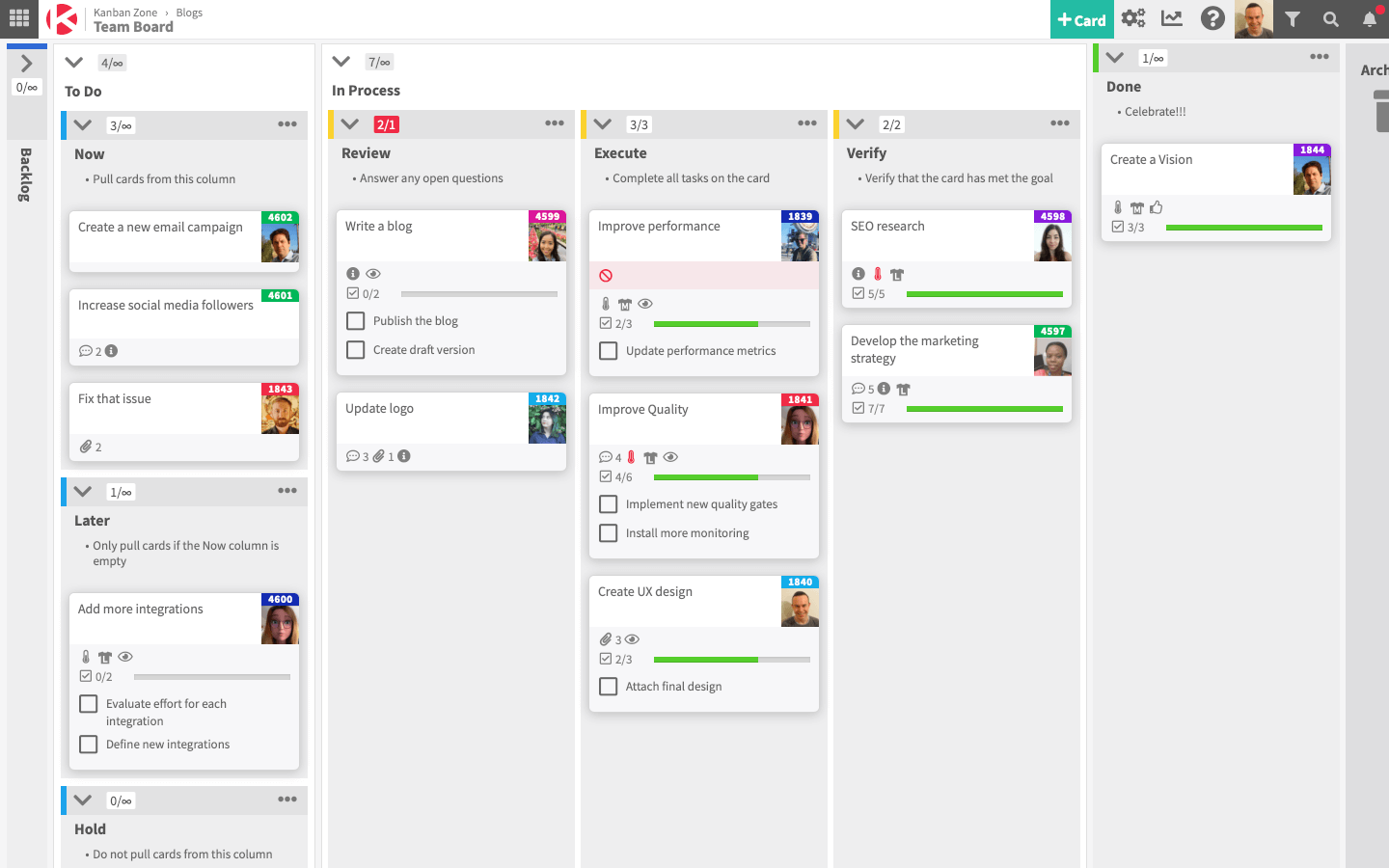
Kanban Zone è progettato per consentire ai team di visualizzare l'intera agenzia e l'organizzazione collegando team e processi. Lo strumento offre un editor di bacheche Kanban altamente flessibile che non limita gli utenti a griglie perfette e permette invece di mappare realmente il proprio flusso di lavoro ideale.
Lo strumento include anche una visualizzazione della timeline per una maggiore capacità di pianificazione, oltre a modelli e una Portfolio Kanban per la tracciabilità tra i progetti. Sono inoltre disponibili metriche di progetto e Kanban, funzionalità di collaborazione come commenti e notifiche, e capacità di gestione del flusso di lavoro.
Kanban Zone ha un'interfaccia semplice che aiuta i team a concentrarsi sul lavoro da svolgere, e un team di esperti del supporto per aiutare con l'onboarding e le domande continuative. Sul loro sito sono disponibili numerose risorse formative per chi vuole approfondire la metodologia kanban.
Kanban Zone può integrarsi con altri strumenti di gestione progetti utilizzando un piano (a pagamento) tramite Zapier.
I prezzi di Kanban Zone partono da $5 al mese per un piano personale e da $8 al mese per i piani professionali. È inoltre disponibile una prova gratuita di 30 giorni.
Altre opzioni Kanban
Ecco alcuni altri strumenti che non ho incluso nell’elenco principale, ma che vale comunque la pena provare:
- Shortcut
Ideale per automatizzare i flussi di lavoro tramite trigger
- Teamwork.com
I migliori controlli di accesso per stakeholder/clienti
- Bonsai Agency Software
Ideale per agenzie
- ProjectManager
Ideale per la gestione del portafoglio progetti (PPM)
- Businessmap
Il miglior software Kanban per team di sviluppo software
- Stackfield
Ideale per bacheche crittografate ospitate in Germania
- SwiftKanban
Il miglior software kanban per aziende
- Height
Miglior Kanban per l'allocazione delle risorse interfunzionali
- Quire
Ideale per la funzionalità drag-and-drop
- Teamhood
Il miglior software Kanban con metriche di flusso


Come Valuto il Software Kanban
Divido ogni valutazione in due livelli: la funzionalità Kanban di base che uno strumento deve avere—board reali, limiti WIP, metriche di flusso—e i fattori differenzianti che distinguono una soluzione adatta da una eccezionale.
Funzionalità di Base (Requisiti Fondamentali per Questa Lista)
Quando seleziono gli strumenti per la mia lista, valuto ognuno di essi su una scala da 0 (non offre la funzionalità) a 5 (eccelle in quest'area) per ciascuna delle funzionalità di base elencate di seguito. Poi calcolo il punteggio totale dello strumento trasformandolo in percentuale. Ogni strumento deve raggiungere un punteggio totale minimo del 75% per essere preso in considerazione.
- Board Kanban Personalizzabili: Verifico se è possibile configurare le colonne per adattarle a un vero flusso di lavoro—ad esempio separando "code review" da "QA" invece di essere bloccati con le fasi generiche "da fare" e "fatto".
- Gestione delle Schede con Drag-and-Drop: Spostare le schede tra le colonne dovrebbe aggiornare lo stato in tempo reale, e cerco il supporto per lo spostamento in blocco quando è necessario riprioritizzare tutte le attività di uno sprint.
- Limiti del Lavoro in Corso: I team che adottano la consegna basata sul flusso necessitano di limiti WIP a livello di colonna. Valuto se i limiti attivano avvisi visivi o bloccano effettivamente l'inserimento di nuove schede in una colonna piena.
- Swimlane e Categorizzazione delle Schede: Cerco swimlane orizzontali, etichette e campi personalizzati che permettano di segmentare una board per team, priorità o classe di servizio—utile quando una board serve sia per risoluzione di bug sia per sviluppo di nuove funzionalità.
- Analisi del Flusso e Reportistica: Diagrammi di flusso cumulativo, grafici dei tempi di ciclo e trend di throughput distinguono uno strumento kanban da una semplice board delle attività. Valuto profondità e chiarezza di queste metriche.
- Collaborazione sulle Schede: Ogni scheda dovrebbe supportare assegnatari, scadenze, checklist, commenti e allegati in modo che la board diventi la fonte di verità unica—non solo uno strato visivo sopra un altro strumento.
Una volta che ho una lista di strumenti che soddisfano i criteri, considero ciò che distingue ciascuna piattaforma.
Fattori Differenzianti (Cosa Distingue i Fornitori)
Ecco come confronto i diversi fornitori:
Funzionalità Distintive
L'automazione dei flussi di lavoro è un grande fattore distintivo. Cerco strumenti che assegnano automaticamente le schede, inviano notifiche o spostano le attività tra le colonne in base a regole—risparmiando tempo su passaggi ripetitivi come il passaggio da "design" a "dev". La gestione delle dipendenze conta tanto quando più team condividono una board. La possibilità di collegare e bloccare schede evita sorprese a valle durante sprint trasversali tra più team. Per una visione a livello di programma, valuto se uno strumento offre aggregazioni di portafoglio che raccolgono dati da più board di team in una vista unica.
Oltre le Funzionalità
La profondità delle integrazioni è una delle prime cose che verifico. Un kanban board che si connette nativamente a GitHub, Slack e alla pipeline CI/CD diventa il centro operativo del team invece che l'ennesima scheda da gestire. Anche la struttura dei prezzi influisce su chi utilizzerà realmente lo strumento—valuto se i piani gratuiti limitano funzionalità chiave come WIP o analisi ai soli piani a pagamento, poiché questo incide direttamente sull'adozione da parte dei piccoli team. Per le aziende, verifico SSO, accessi basati sui ruoli e certificazioni di conformità come SOC 2 per assicurarmi che lo strumento si adatti ai requisiti di sicurezza esistenti.
Come scegliere il software Kanban
È facile perdersi in lunghi elenchi di funzionalità e strutture tariffarie complesse. Per aiutarti a rimanere concentrato mentre affronti il tuo processo di selezione del software, ecco un elenco di fattori da tenere a mente:
| Fattore | Cosa considerare |
|---|---|
| Scalabilità | Valuta se il software può crescere insieme al tuo team. Cerca soluzioni in grado di gestire un aumento delle attività e degli utenti senza sacrificare prestazioni o usabilità. |
| Integrazioni | Assicurati che si colleghi agli strumenti che già utilizzi, come Slack o Google Workspace, per semplificare i flussi di lavoro e mantenere la produttività. |
| Personalizzazione | Verifica se puoi adattare le bacheche e i flussi di lavoro ai processi specifici del tuo team, un aspetto essenziale per l'efficienza e la soddisfazione. |
| Facilità d'uso | Scegli un'interfaccia intuitiva che riduca al minimo il tempo di formazione e aiuti il team a iniziare rapidamente a gestire le attività. |
| Budget | Valuta il costo rispetto al tuo budget. Cerca prezzi trasparenti, bacheche Kanban gratuite e periodi di prova gratuiti per valutare il rapporto qualità-prezzo senza impegno. |
| Misure di sicurezza | Dai la priorità ai software con solide funzionalità di sicurezza, come la crittografia e le autorizzazioni basate sui ruoli, per proteggere i dati sensibili dei tuoi progetti. |
| Accesso da dispositivi mobili | Se il tuo team è spesso in movimento, assicurati che il software offra un'app mobile affidabile per gestire le attività ovunque. |
| Assistenza | Scegli un fornitore che offra un'assistenza clienti efficace, incluse esercitazioni e supporto in tempo reale, per risolvere rapidamente i problemi. |
Onestamente, c'è molto da assimilare e molta pressione per fare la scelta giusta, quindi ti suggerirei di utilizzare il nostro servizio di consulenza sui software di gestione dei progetti per aiutarti a creare un elenco ristretto di strumenti per la gestione dei progetti adatti alle esigenze specifiche tue e della tua organizzazione.
Che cos'è il software Kanban?
Il software Kanban è uno strumento di gestione dei progetti basato sulla metodologia Kanban, in cui gli utenti possono spostare le schede su una bacheca per indicare l'avanzamento e visualizzare il flusso di lavoro. Il software Kanban include spesso funzionalità come l'assegnazione delle attività, l'impostazione delle priorità, la collaborazione in tempo reale, i commenti nelle schede e l'analisi dei dati, per migliorare la visibilità e il controllo sull'avanzamento del progetto.
Questa rappresentazione visiva favorisce la trasparenza, semplificando l'identificazione dei colli di bottiglia, il monitoraggio dei progressi e l'ottimizzazione dell'efficienza del flusso di lavoro.
Funzionalità del software Kanban
Quando scegli un software Kanban, presta attenzione alle seguenti funzionalità chiave:
- Collaborazione: favorisce il lavoro di squadra consentendo agli utenti di condividere le attività, comunicare tramite commenti e integrarsi con strumenti come Slack o la posta elettronica.
- Gestione delle attività: consente agli utenti di creare, assegnare e monitorare le attività, assicurando che tutti i membri del team siano consapevoli delle proprie responsabilità.
- Pianificazione del percorso di sviluppo: aiuta a pianificare i rilasci dei prodotti e a gestire gli arretrati, aiutando i team a stabilire in modo efficace la priorità di attività e funzionalità.
- Mappatura delle idee: supporta la strutturazione delle idee in attività, storie ed epiche, aspetto che può essere fondamentale per lo sviluppo dei prodotti e la gestione dei progetti.
- Monitoraggio del tempo: sebbene non sia sempre integrato, alcuni strumenti Kanban possono integrarsi con estensioni per monitorare il tempo dedicato alle attività, facilitando l'analisi della produttività.
- Flussi di lavoro personalizzabili: consente ai team di adattare i processi alle proprie esigenze specifiche, ad esempio mediante corsie, filtri e annidamento degli elementi per una visualizzazione migliore.
- Funzionalità di integrazione: offre un'integrazione fluida con altri strumenti software, migliorando la funzionalità complessiva e la connettività del flusso di lavoro.
- Gestione dei commenti degli utenti: raccoglie e assegna la priorità ai commenti degli utenti per garantire che lo sviluppo del prodotto sia in linea con le esigenze e le aspettative dei clienti.
Buone pratiche per l'utilizzo del software Kanban
Utilizzare il software Kanban è facile. Tuttavia, usarlo correttamente è ciò che distingue un buon responsabile di progetto da uno eccellente! Ecco 5 modi per utilizzare correttamente le bacheche Kanban:
1. Definisci e limita il lavoro in corso (WIP)
Imposta limiti WIP per ogni colonna, per assicurarti che il team si concentri sul completamento delle attività prima di iniziarne di nuove. Ad esempio, se la colonna "In corso" ha un limite WIP pari a 3, è possibile lavorare contemporaneamente solo su 3 attività.
2. Utilizza etichette chiare e coerenti
Utilizza codici colore, tag o categorie per identificare le priorità, i tipi di attività o gli assegnatari. Ad esempio, usa il rosso per le attività ad alta priorità o il verde per quelle a bassa priorità.
3. Esamina e aggiorna regolarmente la bacheca
Organizza revisioni giornaliere o settimanali per assicurarti che le attività siano aggiornate, che quelle completate vengano archiviate e che gli ostacoli vengano affrontati. Questo può rientrare in una riunione giornaliera o in una retrospettiva.
4. Suddividi le attività in parti gestibili
Dividi le attività più grandi in sottoattività più piccole e operative, che possano avanzare più rapidamente sulla bacheca. Ad esempio, una fase del progetto può includere sottoattività come "Ricerca", "Stesura" e "Revisione".
5. Ottimizza continuamente il flusso di lavoro
Utilizza metriche come il tempo di consegna (il tempo dalla creazione al completamento dell'attività) e il tempo di ciclo (il tempo dall'inizio alla fine) per identificare le inefficienze. Modifica i limiti WIP, rialloca le risorse o perfeziona i flussi di lavoro secondo necessità.
Software Kanban - Domande frequenti
Non conosci la metodologia Kanban? Hai semplicemente bisogno di saperne di più sui tuoi nuovi strumenti? Qualunque sia la tua esigenza, ecco alcune risposte alle domande frequenti (FAQ) sul software Kanban.