

I 10 migliori software per la gestione delle risorse nei servizi professionali recensiti nel 2026

Selezione dei migliori software di gestione delle risorse per i servizi professionali


Con la vasta gamma di software di gestione delle risorse presenti sul mercato, scegliere quello perfetto per i propri servizi professionali può essere un compito impegnativo. Desideri allocare e utilizzare le tue risorse con maggiore precisione, ma stai facendo fatica a trovare lo strumento più adatto. Non preoccuparti: sono qui per semplificare questa decisione. Basandomi sulla mia vasta esperienza nella gestione di progetti digitali e sull'utilizzo diretto di numerose piattaforme di gestione delle risorse, ti guiderò verso la scelta giusta. Ecco le mie scelte per i migliori software di gestione delle risorse per i servizi professionali.
Perché fidarsi dei nostri consigli sui software
Il nostro team testa e recensisce software dal 2012. In quanto project manager noi stessi, sappiamo quanto sia difficile — e importante — scegliere il software giusto.
Per questa guida, abbiamo valutato gli strumenti attraverso test pratici e ricerche indipendenti, assegnando un punteggio agli strumenti in base ai nostri criteri di selezione. Ci basiamo inoltre sulle competenze di leader di pensiero del settore e di professionisti attivi nella gestione dei progetti.
Le nostre recensioni riflettono il nostro giudizio editoriale umano, non un discorso di vendita.
Revisori esperti:
Tabella comparativa dei software di gestione delle risorse per i servizi professionali
La tabella seguente confronta i dettagli dei prezzi delle mie migliori selezioni di software di gestione delle risorse per i servizi professionali.
| Tool | Best For | Trial Info | Price | ||
|---|---|---|---|---|---|
| 1 | Ideale per l'automazione dei servizi professionali tutto-in-uno | Prova gratuita di 14 giorni + demo gratuita disponibile | Da $19.90/utente/mese (fatturazione annuale) | Website | |
| 2 | Ideale per agenzie | Prova gratuita di 14 giorni + demo gratuita disponibile | Da $10/mese (fatturazione annuale) | Website | |
| 3 | Ideale per la gestione configurabile dei permessi | Demo gratuita disponibile | Prezzo su richiesta | Website | |
| 4 | Ideale per la visualizzazione del carico di lavoro | Prova gratuita di 14 giorni + piano gratuito disponibile | A partire da $10/utente/mese (fatturato annualmente) | Website | |
| 5 | Ideale per la gestione delle risorse orientata alle persone | Non disponibile | Prezzo su richiesta | Website | |
| 6 | Ideale per la fatturazione automatizzata | Prova gratuita di 21 giorni + demo gratuita disponibile | Da $17.10/utente/mese (fatturazione annuale) | Website | |
| 7 | Ideale per l'integrazione della gestione del lavoro | Demo gratuita disponibile | Prezzo su richiesta | Website | |
| 8 | Miglior gestione integrata di tempo e risorse | Prova gratuita di 7 giorni disponibile | Da $9/utente/mese (fatturazione annuale) | Website | |
| 9 | Ideale per la rilevazione dei tempi alimentata dall'IA | Prova gratuita + demo disponibile | Da $6/utente/mese | Website | |
| 10 | Ideale per approfondimenti in tempo reale sui progetti | Prova gratuita di 30 giorni + demo gratuita disponibile | A partire da $15/utente/mese (fatturazione annuale) | Website |


Recensioni dei migliori software di gestione delle risorse per i servizi professionali
Ecco le mie valutazioni dettagliate su ogni software presente in questo elenco, comprese le funzionalità che svolgono meglio e i casi d’uso più adatti per ciascuno.

Scoro
Ideale per l'automazione dei servizi professionali tutto-in-uno

Scoro è una soluzione completa per la gestione del lavoro progettata per portare struttura nella tua attività, offrendo una suite di funzionalità che spaziano dalla gestione dei progetti, CRM, fatturazione e reportistica.
Perché ho scelto Scoro:
Ho scelto Scoro per la sua solida piattaforma tutto-in-uno che integra vari aspetti dell'automazione dei servizi professionali in un unico sistema. Il suo ampio set di funzionalità la distingue da altri strumenti di gestione delle risorse, offrendo una soluzione unificata per project management, CRM e gestione finanziaria. Ritengo che Scoro sia la migliore per l'automazione dei servizi professionali perché offre una piattaforma centralizzata che semplifica la gestione dell’intero ciclo di vita del progetto, dalla preventivazione alla fatturazione, assicurando che tutti i processi siano connessi senza soluzione di continuità.
Funzionalità e integrazioni principali:
Le funzioni principali di Scoro includono diagrammi di Gantt aggiornati in tempo reale, un planner con funzionalità drag-and-drop, e report dettagliati che forniscono indicazioni sui progressi di progetto e sulle performance finanziarie. Il software offre anche un tracker del tempo, gestione della pipeline di vendita e fatturazione automatica, elementi essenziali per ottimizzare l’uso delle risorse e migliorare la redditività.
Scoro si integra nativamente con una varietà di strumenti, tra cui Google Calendar, Microsoft Exchange, Xero, QuickBooks, Sage Intacct, Exact Online, Expensify, Stripe, Jira e altri ancora.
Pros and Cons
Pros:
- Piattaforma tutto-in-uno per diversi processi aziendali
- Dati e report in tempo reale per decisioni consapevoli
- Personalizzabile per soddisfare specifiche esigenze aziendali
Cons:
- È richiesto un minimo di 5 utenti per tutti i pacchetti
- Può essere necessario tempo per l’onboarding e l’adozione completa del sistema
- Il prezzo può essere più alto rispetto ad alcuni altri strumenti, soprattutto per team di piccole dimensioni
New Product Updates from Scoro

Scoro Adds Time Mobile App and ELI Improvements
Scoro adds the Scoro Time mobile app for iOS/Android to track time anywhere and expands ELI with attachments, smarter filtering, and trigger-based actions. For more information, visit Scoro's official site.

Ideale per agenzie

Productive è un software di gestione per agenzie tutto-in-uno progettato per una vasta gamma di aziende, comprese agenzie di marketing e design e società di consulenza.
Perché ho scelto Productive:
Apprezzo il fatto che la sua funzione di pianificazione delle risorse consenta al tuo team di allocare efficacemente le risorse tra diversi progetti, garantendo che i carichi di lavoro siano bilanciati e le scadenze rispettate. Grazie alla pianificazione delle risorse, puoi vedere chi sta lavorando a cosa e quando, aiutando così a individuare potenziali colli di bottiglia o periodi di sotto-utilizzo.
Funzionalità e integrazioni principali:
Le funzionalità includono gestione dei progetti, previsione dei ricavi, collaborazione con i clienti, supporto all’onboarding, reportistica personalizzata, modelli di progetto, fatturazione flessibile e metriche di crescita.
Le integrazioni includono Jira, HubSpot, Xero, Google Calendar, Sage, Zapier, Outlook/Microsoft Calendar, Slack, BugHerd, QuickBooks, Fortnox e Personio.
Pros and Cons
Pros:
- Funzione Sales CRM per il monitoraggio delle opportunità
- Funzionalità complete per la gestione finanziaria e la reportistica
- Solide capacità di pianificazione e monitoraggio delle risorse
Cons:
- Potrebbe offrire più integrazioni
- Potrebbe non essere ideale per le aziende che desiderano solo una funzione di gestione risorse
New Product Updates from Productive
Productive Adds Voice Dictation, Slack Connector, Proposals, and Overtime
Productive adds voice dictation, a Slack Connector, proposal controls, and overtime tracking. These updates support faster AI interactions, client proposals, and time management. For more information, visit Productive’s official site.
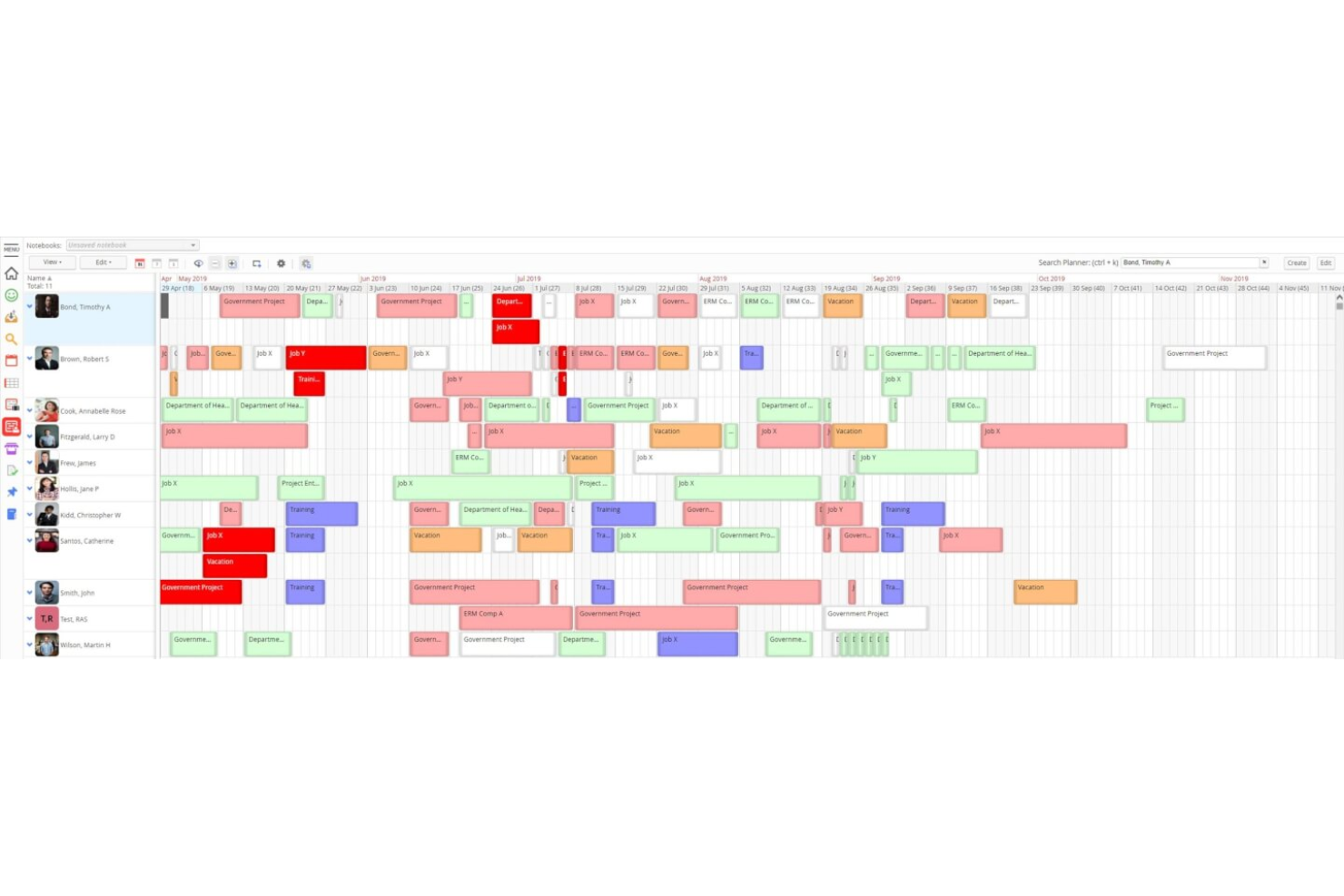
Retain è una piattaforma di pianificazione e programmazione delle risorse pensata per le aziende di servizi professionali, che combina l'allocazione delle risorse basata sulle competenze, la pianificazione della capacità, il monitoraggio dell'utilizzo e i timesheet integrati in un unico sistema.
Per chi è ideale Retain?
Retain è particolarmente adatto a studi di consulenza, contabilità e ingegneria di medie e grandi dimensioni che necessitano di una pianificazione avanzata delle risorse su strutture complesse e multi-ufficio.
Perché ho scelto Retain
Ho scelto Retain come uno dei migliori perché il suo modello di autorizzazioni è davvero progettato per la complessità organizzativa che si trova nelle grandi aziende di servizi professionali. Gli amministratori possono definire l'accesso basato sui ruoli a un livello molto dettagliato, in modo che un responsabile di reparto possa vedere la capacità del proprio team, mentre un coordinatore junior ha diritti di prenotazione solo nell'ambito delle sue competenze. Apprezzo inoltre la possibilità di configurare i flussi di lavoro e le notifiche di sistema per ogni ruolo, consentendo che le catene di approvazione per l'aggiornamento delle competenze o le modifiche alle prenotazioni rispecchino il reale funzionamento dell'azienda.
Funzionalità principali di Retain
- Allocazione delle risorse basata sulle competenze: Abbina le persone ai progetti utilizzando una tassonomia strutturata fino a 30.000 competenze, alimentata da Lightcast.
- Matching di idoneità tramite AI: Propone automaticamente le risorse più adatte per un ruolo in base a competenze, disponibilità ed esperienza.
- Timesheet integrati: Compila automaticamente i timesheet dalle prenotazioni esistenti e confronta le ore programmate con quelle effettive.
- Dashboard di utilizzo: Monitora l'utilizzo fatturabile e non fatturabile tra team, dipartimenti e periodi di tempo.
Integrazioni di Retain
Retain offre integrazioni che collegano i dati di pianificazione delle risorse tra sistemi HR, CRM e finanziari, con sincronizzazione nativa con Microsoft 365 e supporto per piattaforme di integrazione come MuleSoft e Azure Logic Apps. Le integrazioni includono Salesforce, Microsoft Dynamics 365, Workday, SAP, Oracle, Oracle NetSuite OpenAir, BambooHR, SugarCRM, Employment Hero e Thomson Reuters GoFileRoom. È disponibile un'API per integrazioni personalizzate.
Pros and Cons
Pros:
- Opzioni di implementazione on-premises e cloud
- Profili di permessi dettagliati basati sui ruoli
- Matching di idoneità tramite AI per le richieste di personale
Cons:
- I report integrati richiedono soluzioni manuali
- Le scadenze delle sessioni interrompono i flussi di lavoro di pianificazione

Wrike
Ideale per la visualizzazione del carico di lavoro
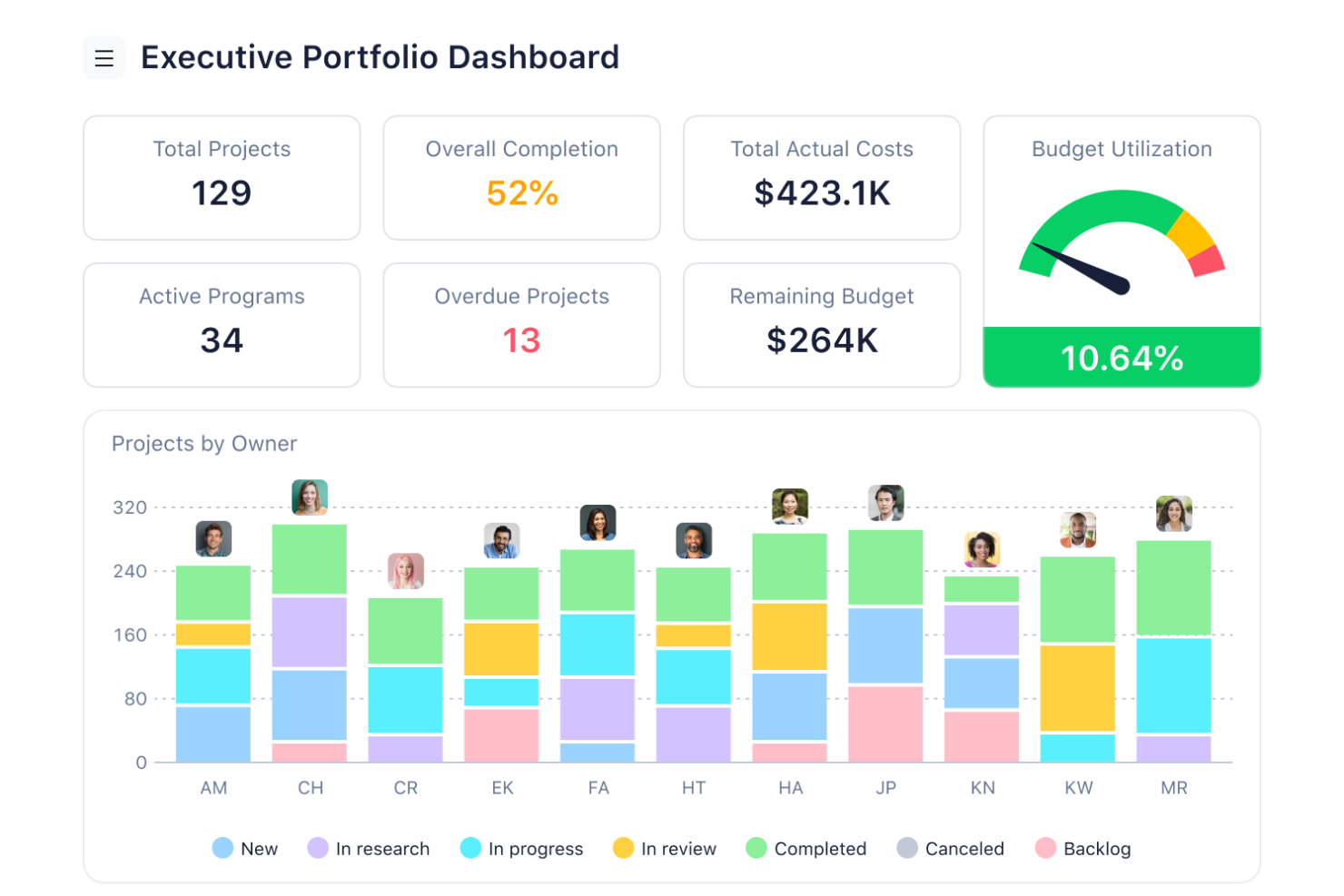
Wrike è uno strumento di gestione progetti basato su cloud che aiuta i team a organizzare le attività, gestire le risorse e collaborare in modo efficace.
Perché ho scelto Wrike:
Le capacità di gestione delle risorse di Wrike sono particolarmente vantaggiose per i team di servizi professionali. La piattaforma offre grafici di carico di lavoro che consentono di visualizzare gli incarichi di ogni membro del team, facilitando l'equilibrio dei compiti e prevenendo il burnout. Questa funzionalità garantisce una distribuzione uniforme del lavoro, permettendo al team di operare in modo efficiente e rispettare le scadenze dei progetti. Inoltre, Wrike mette a disposizione strumenti di allocazione delle risorse che aiutano ad assegnare le persone giuste ai compiti giusti in base alla loro disponibilità e competenze.
Funzionalità principali & integrazioni:
Funzionalità includono monitoraggio del tempo, flussi di lavoro personalizzabili, collaborazione in tempo reale, condivisione di documenti, dipendenze tra attività, diagrammi di Gantt, gestione del carico di lavoro, moduli di richiesta, dashboard, strumenti di reportistica, revisione dei file e processi di approvazione.
Integrazioni includono QuickBooks, Skyvia, Power BI, Google Sheets, Miro, Salesforce, Tableau, Microsoft Teams, MediaValet, Zoom, Adobe Creative Cloud e Google Drive.
Pros and Cons
Pros:
- Offre diversi strumenti per la gestione dei progetti
- Workflow, dashboard e report personalizzati
- Scalabile per team in crescita
Cons:
- Curva di apprendimento dovuta all’ampia gamma di funzionalità
- Nessuna funzione di chat integrata
New Product Updates from Wrike
Wrike Adds Klaxoon MCP Integration
Wrike’s Klaxoon MCP integration is now generally available, enabling AI agents to navigate between Wrike tasks and attached whiteboards, read task context, and manage whiteboard attachments via API. For more information, visit Wrike's official site.

Kantata
Ideale per la gestione delle risorse orientata alle persone
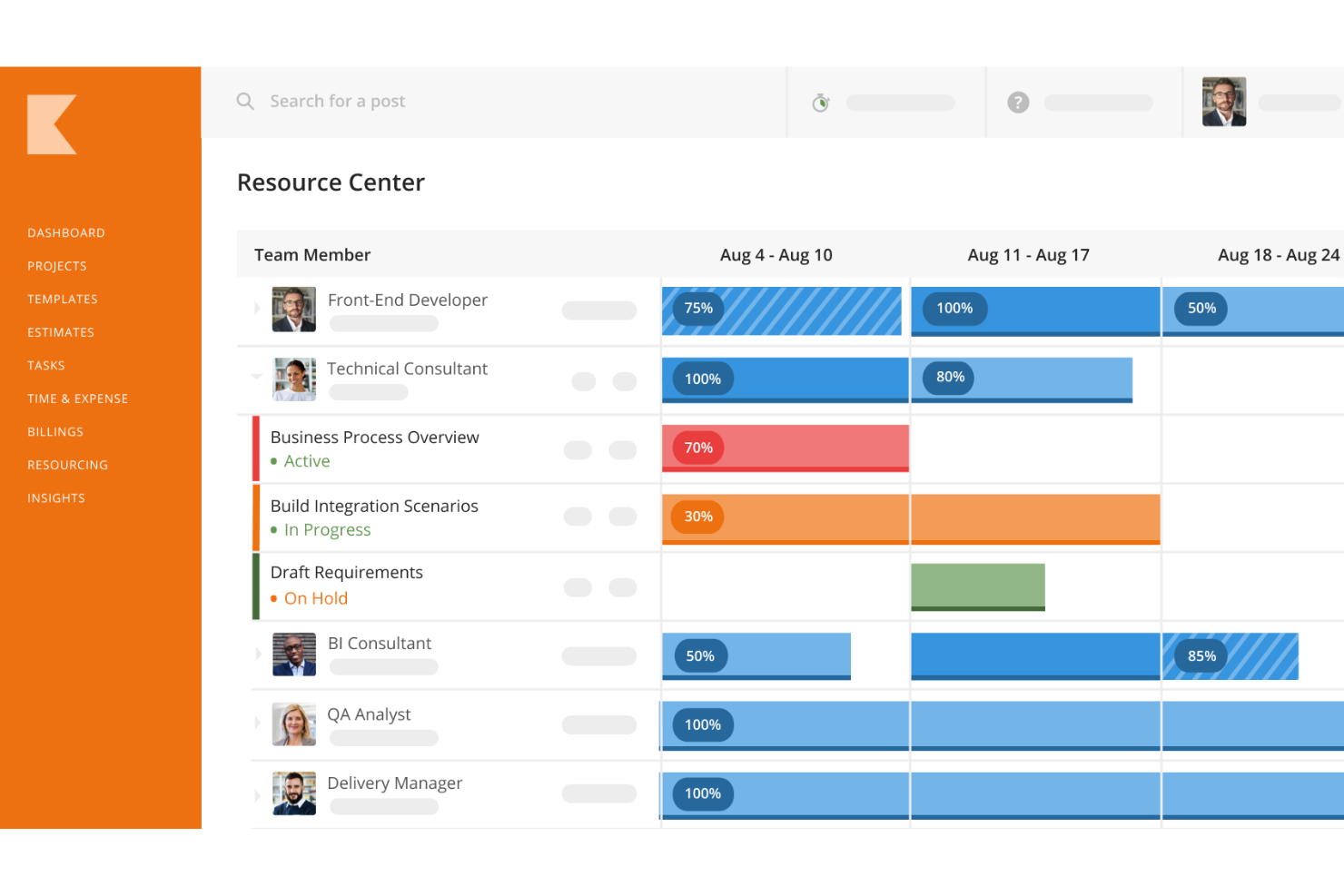
Kantata è una piattaforma completa per la gestione delle risorse e dei progetti, sviluppata per consulenti, agenzie e team di servizi professionali. Centralizza la gestione della consegna dei progetti, dei dati finanziari, della collaborazione tra team e della reportistica.
Perché ho scelto Kantata:
Mi piace che Kantata adotti un approccio incentrato sulle persone nella pianificazione delle risorse, aiutando le aziende a bilanciare i carichi di lavoro e abbinare le competenze giuste ai giusti progetti. I suoi strumenti di previsione e pianificazione della capacità offrono una visibilità in tempo reale sulle esigenze di personale, così da poter effettuare aggiustamenti rapidi ed evitare il sovraccarico o la sottoutilizzazione. Questo assicura che i team rimangano produttivi e coinvolti, mentre i progetti restano redditizi e nei tempi previsti.
Funzionalità e integrazioni principali:
Kantata offre molte altre funzionalità, come raccomandazioni automatizzate per l’assegnazione delle risorse basate su disponibilità e competenze, pianificazione di scenari per testare varie opzioni prima di prendere decisioni, e un inventario dettagliato delle competenze per individuare eventuali lacune o opportunità di sviluppo. Dispone anche di strumenti per tracciare tempi e spese, oltre a strumenti collaborativi come board delle attività e calendari condivisi, per mantenere il lavoro connesso tra i team.
Le integrazioni includono Microsoft Teams, Asana, Trello, Zapier, Google Workspace, Salesforce, Slack, QuickBooks, Jira, HubSpot, Xero, NetSuite, Harvest, FreshBooks, Toggl e Dropbox.
Pros and Cons
Pros:
- Diagrammi di Gantt per pianificazione progetti e allocazione risorse
- Funzionalità di analisi e reportistica
- Funzionalità di previsione per finanziari e capacità
Cons:
- I report personalizzati possono essere difficili da creare
- Il processo di installazione può essere complicato
New Product Updates from Kantata

Kantata Adds Access Group Change History
Kantata adds Access Groups History, letting account administrators track changes to group details, membership, and permissions in Recent History. The update also makes these events available through the Subscribed Events API for broader monitoring. For more information, visit Kantata’s official site.
 .
.
Ideale per la fatturazione automatizzata
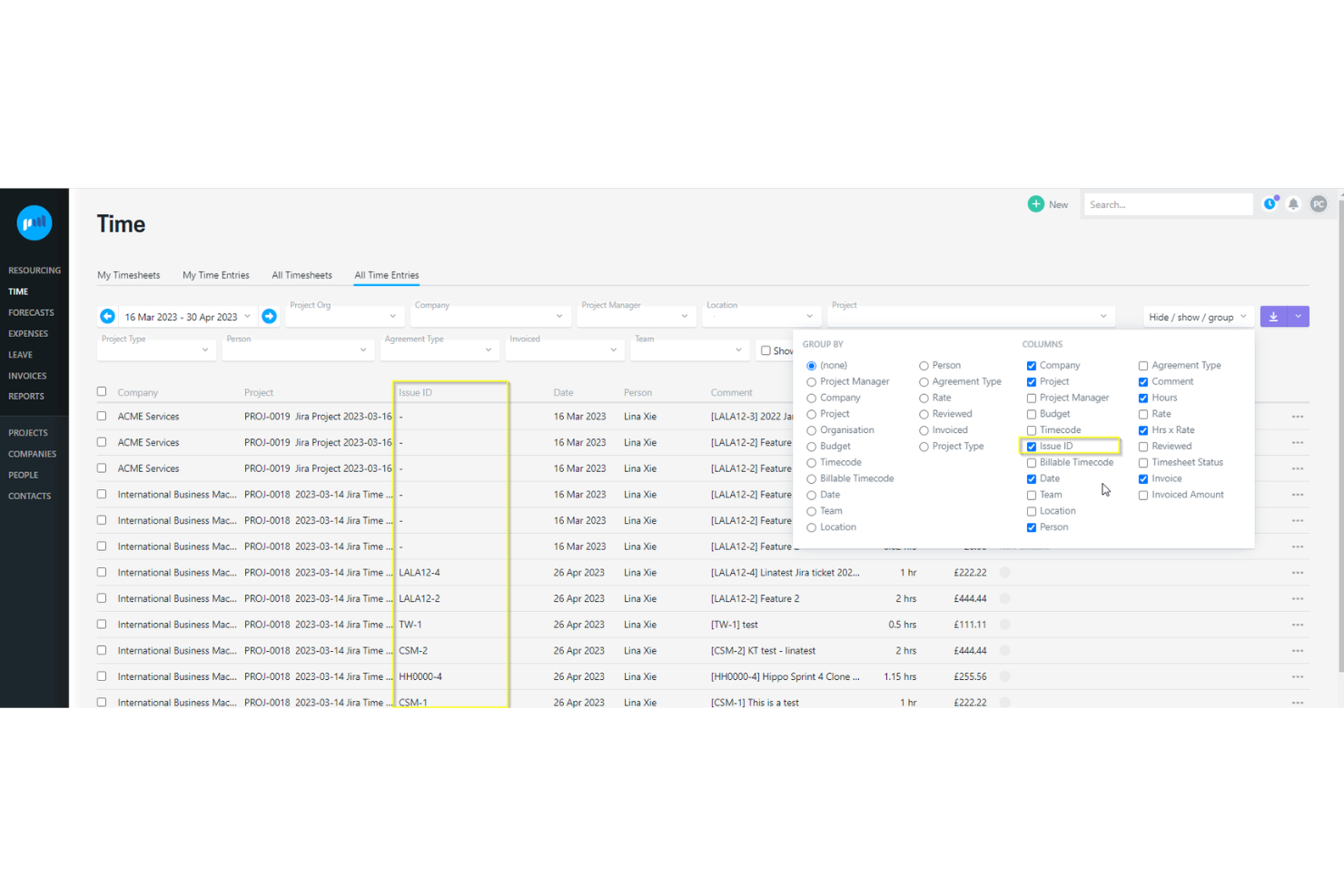
Projectworks è una piattaforma cloud di automazione dei servizi professionali (PSA) pensata per aziende di consulenza, architettura, ingegneria e simili. Riunisce visibilità sui progetti, controllo finanziario e pianificazione delle risorse per aiutare i team a ottimizzare l'utilizzo e la redditività.
Perché ho scelto Projectworks:
Ho scelto Projectworks perché la fatturazione automatizzata elimina gran parte del lavoro amministrativo legato alla fatturazione, garantendo che le fatture siano precise ed emesse puntualmente. Mi piace anche che si colleghi direttamente con piattaforme contabili come Xero e QuickBooks, mantenendo i dati finanziari coerenti tra i vari sistemi. Inoltre, i report di progetto in tempo reale ti permettono di monitorare da vicino budget, redditività e utilizzo delle risorse, aspetti fondamentali per le aziende di servizi professionali.
Funzionalità e integrazioni principali:
Projectworks offre funzionalità come il monitoraggio di tempo e spese, l'allocazione delle risorse tra progetti e dashboard in tempo reale che sostituiscono i fogli di calcolo soggetti a errori. Il suo sistema di fatturazione automatizzato permette che le ore fatturabili e i costi di progetto confluiscano direttamente in fatture precise, risparmiando tempo e riducendo gli errori.
Le integrazioni includono Xero, QuickBooks, HubSpot, Salesforce, 12d Synergy, MYOB, Jira, Azure DevOps, Employment Hero, Zapier, Direct Data Connection e API Connection.
Pros and Cons
Pros:
- Automatizza la fatturazione con sincronizzazione contabile
- Monitoraggio preciso di tempo e spese
- Dashboard in tempo reale per il controllo dei progetti
Cons:
- Richiede un piano minimo di 10 utenti
- Curva di apprendimento per i nuovi utenti

Ideale per l'integrazione della gestione del lavoro

Workfront è esperto nel facilitare la collaborazione tra i team e il completamento dei progetti. Si distingue per la sua capacità di integrare la gestione del lavoro tra varie funzioni aziendali.
Perché ho scelto Workfront:
Ho scelto Workfront perché eccelle nell'unificare le attività e i processi di gestione del lavoro, aspetto fondamentale per mantenere coerenza ed efficienza tra i reparti. Le sue capacità di integrazione sono particolarmente impressionanti, distinguendolo da altri strumenti di gestione progetti.
Ritengo Workfront il migliore per l'integrazione della gestione del lavoro grazie al suo sistema completo che si allinea agli obiettivi strategici, ottimizza la collaborazione e aumenta la produttività grazie alla possibilità di connettersi alle applicazioni chiave.
Funzionalità e integrazioni principali:
Le caratteristiche chiave di Workfront includono strumenti di pianificazione strategica, prioritizzazione delle attività e automazione dei processi di lavoro. Supporta diverse metodologie di lavoro, come Agile e Scrum, e si integra nativamente con una serie di applicazioni, tra cui Adobe Creative Cloud, Marketo Engage e altro ancora, per facilitare flussi di lavoro efficienti.
Pros and Cons
Pros:
- Gestione centralizzata del lavoro tra diverse funzioni
- Si integra con Adobe Creative Cloud e altre applicazioni aziendali
- Supporta varie metodologie di lavoro come Agile e Scrum
Cons:
- Il prezzo non è trasparente sul sito web
- Può essere necessario un colloquio con le vendite per capire tutte le funzionalità
- L'implementazione potrebbe essere complessa per i team più piccoli

Miglior gestione integrata di tempo e risorse

Bonsai Agency Software è una piattaforma tutto-in-uno progettata per aiutare le agenzie a gestire in modo efficiente risorse, progetti e finanze. Offre strumenti per la pianificazione dei progetti, la registrazione del tempo e la gestione del budget, permettendo al tuo team di consegnare i progetti nei tempi previsti e rispettando il budget.
Perché ho scelto Bonsai Agency Software:
Mi piace il fatto che Bonsai offra pianificazione e previsione delle risorse. Puoi assegnare il lavoro in base alla capacità del tuo team, monitorare i carichi di lavoro in tempo reale e prevedere eventuali carenze di personale prima che inizino nuovi progetti. Inoltre, gli strumenti di tracciamento del tempo e dei timesheet di Bonsai consentono al tuo team di registrare le ore lavorate, offrendoti una visione chiara dell'avanzamento del progetto, della capacità e dei budget in ogni momento. Con la possibilità di impostare tariffe personalizzate fatturabili e di costo per membri del team, attività e progetti, puoi mantenere una contabilità precisa e prendere decisioni informate sull'allocazione delle risorse.
Funzionalità e integrazioni principali:
Funzionalità includono gestione clienti, generazione di preventivi, gestione dei contratti, pianificazione, moduli e questionari, gestione delle attività, monitoraggio delle spese, fatturazione, pagamenti, report e analisi, strumenti di collaborazione per il team e un portale clienti.
Integrazioni includono Gmail, Google Calendar, Zapier, Slack, QuickBooks Online, Calendly, ClickUp, Trello, Google Drive, Google Sheets, Xero e HubSpot.
Pros and Cons
Pros:
- Portale clienti dall'aspetto professionale
- Buone capacità di previsione delle risorse
- Integra tracciamento di tempo e budget per valutare la redditività
Cons:
- Alcune funzionalità potrebbero non essere adatte ad aziende con elevati volumi operativi
- L'app mobile potrebbe essere migliorata con funzionalità aggiuntive

Ideale per la rilevazione dei tempi alimentata dall'IA

Replicon è specializzato in soluzioni per la rilevazione dei tempi e la gestione dei progetti. Si distingue per il suo sistema di rilevazione delle ore alimentato dall'IA.
Perché ho scelto Replicon:
Ho selezionato Replicon perché impiega l'intelligenza artificiale per migliorare il processo di rilevazione dei tempi. La sua funzione alimentata dall'IA, ZeroTime™, la differenzia dagli altri software di gestione delle risorse grazie alla rilevazione automatica delle ore lavorate, motivo per cui la ritengo la scelta migliore per la rilevazione dei tempi tramite IA. Questa funzionalità libera i dipendenti dall'inserimento manuale delle ore, migliorando la produttività e garantendo la fatturazione precisa dei progetti e la conformità normativa.
Funzionalità principali e integrazioni:
Le funzionalità chiave di Replicon includono ZeroTime™ per la rilevazione automatica delle ore, opzioni di timesheet personalizzabili per diverse attività e ruoli, e servizi completi per la conformità a buste paga e normative. Si integra con diverse app di lavoro come Slack, Jira, Asana e Zoom, facilitando timesheet precompilati e il controllo dei dati.
Pros and Cons
Pros:
- Rilevazione automatica delle ore alimentata da IA con ZeroTime
- Opzioni di timesheet configurabili per diversi scenari lavorativi
- Servizi completi di conformità a buste paga e normative
Cons:
- Mancanza di informazioni trasparenti sui prezzi sul sito web
- Necessità di contattare il reparto vendite per avere prezzi e pacchetti completi
- Le funzionalità estese possono richiedere un periodo di apprendimento per i nuovi utenti

Ideale per approfondimenti in tempo reale sui progetti

ProjectManager è uno strumento completo progettato per la gestione di progetti e del lavoro. È ideale per fornire approfondimenti in tempo reale sui progetti, consentendo ai team di pianificare, monitorare e collaborare in modo efficace.
Perché ho scelto ProjectManager:
Ho scelto ProjectManager per la sua solida gamma di funzionalità che si adattano a una varietà di settori e casi d’uso, dalla produzione all’IT ai servizi professionali. La sua versatilità e la capacità di fornire dati in tempo reale sull’avanzamento del lavoro lo rendono una scelta eccellente per ottenere approfondimenti sui progetti. Ritengo che ProjectManager sia il migliore per ottenere informazioni in tempo reale sui progetti perché offre dashboard live, report dettagliati e una gestione avanzata delle risorse, elementi essenziali per prendere decisioni informate rapidamente.
Funzionalità principali & integrazioni:
ProjectManager offre una suite di funzionalità che migliorano la visibilità e il controllo sui progetti. Diagrammi di Gantt, bacheche Kanban, liste di attività e automazione dei flussi di lavoro sono tra i suoi strumenti più importanti. Queste caratteristiche facilitano la pianificazione, la programmazione e l’esecuzione dei progetti, promuovendo la trasparenza e la collaborazione tra i membri del team.
ProjectManager si integra nativamente con oltre 1.000 app per il business e la gestione di progetti, tra cui Google (per la gestione delle attività in Gmail, sincronizzazione con Google Drive e Google Calendar), Microsoft (per importare e sincronizzare piani di Microsoft Project, file Excel e file CSV), Zapier (per collegarsi con Salesforce), Slack (per condividere le conversazioni di progetto), Jira (per aggiornamenti sulle attività), e offre una API personalizzata per integrazioni più avanzate.
Pros and Cons
Pros:
- Dashboard e report in tempo reale per approfondimenti immediati
- Funzionalità versatili adatte a vari settori e tipologie di progetto
- Ampia integrazione con app per una maggiore produttività
Cons:
- Costo superiore rispetto ai software di gestione progetti di base
- È necessario il pagamento annuale per ottenere il prezzo migliore
- I prezzi per le aziende non sono trasparenti e richiedono contatto diretto
Altri software di gestione delle risorse per i servizi professionali da prendere in considerazione
Di seguito trovi un elenco di altri software di gestione delle risorse per i servizi professionali che ho selezionato, ma che non sono rientrati nell’elenco principale. Vale sicuramente la pena esaminarli.
- Parallax
Ideale per la gestione delle risorse focalizzata sui margini
- eResource Scheduler
Ideale per il monitoraggio dell'utilizzo
- Clarizen
Ideale per la gestione di progetti scalabili
- BigTime
Ideale per la produttività e la redditività degli studi professionali
- Accelo
Ideale per l'automazione delle operazioni di servizio
- Screendragon
La migliore pianificazione e previsione delle risorse con IA per PSA
- Float.com
Ideale per le funzionalità di pianificazione della capacità
- GoodDay
Ideale per integrare la pianificazione delle risorse
- Saviom
Ideale per l'ottimizzazione delle risorse aziendali
- Hub Planner by Milient
Ideale per la gestione delle risorse
- Dayshape
Ideale per la gestione delle risorse guidata dall'IA


Come valuto i software di gestione delle risorse per i servizi professionali
Suddivido la mia valutazione in due livelli: le funzionalità di base che uno strumento deve avere per gestire il personale e monitorare l'utilizzo, e i fattori che distinguono le buone piattaforme da quelle eccellenti.
Funzionalità principali (Requisiti fondamentali per questa lista)
Quando seleziono gli strumenti per la mia lista, valuto ciascuno su una scala da 0 (non offre la funzionalità) a 5 (eccelle in quest'area) per ogni funzionalità principale elencata di seguito. Successivamente, calcolo il punteggio totale dello strumento trasformandolo in percentuale. Ogni strumento deve raggiungere un punteggio totale minimo del 65% per essere considerato nell'elenco.
- Pianificazione e allocazione delle risorse: Cerco strumenti di pianificazione visiva che permettano di trascinare e rilasciare i consulenti sugli incarichi dei clienti per settimana o mese, non solo di assegnare attività in un backlog.
- Monitoraggio capacità e utilizzo: Dashboard in tempo reale che suddividono le ore fatturabili e non fatturabili per persona sono fondamentali, soprattutto per individuare i rischi di inattività prima che incidano sui margini.
- Gestione competenze e disponibilità: Verifico che sia possibile cercare nel pool di risorse tramite etichette di competenze, certificazioni o anzianità per abbinare rapidamente il consulente giusto all'incarico del cliente.
- Previsione della domanda e pianificazione pipeline: Lo strumento dovrebbe permettere di prevedere le esigenze di personale sia per progetti confermati che per quelli preventivi, così da pianificare in anticipo nuove assunzioni o subappalti.
- Monitoraggio del tempo e ore fatturabili: I timesheet devono essere collegati direttamente a progetti e attività con workflow di approvazione, offrendo una visione chiara delle ore pianificate rispetto a quelle effettive su ogni incarico.
- Gestione finanziaria dei progetti e redditività: Valuto se la piattaforma collega tariffe di costo e tariffe di fatturazione ad ogni allocazione, così da monitorare i margini di progetto e le previsioni di ricavi in tempo reale.
Una volta ottenuto un elenco di strumenti che soddisfano questi criteri, valuto cosa distingue ciascuna piattaforma.
Fattori differenzianti (Cosa distingue i fornitori)
Ecco come confronto e valuto i diversi fornitori:
Caratteristiche distintive
La pianificazione per scenari è tra le mie priorità: voglio simulare cosa succede se una trattativa si conclude in anticipo o se un consulente chiave lascia un progetto prima di prendere decisioni reali sul personale. L’integrazione CRM aggiunge un altro livello, importando le opportunità ponderate nella previsione della domanda così che i responsabili non vengano colti di sorpresa da improvvisi aumenti di lavoro. Cerco anche suggerimenti di assegnazione delle risorse basati sull’intelligenza artificiale, che consiglino consulenti in base a competenze, lavori precedenti e disponibilità invece di fare affidamento solo sulla memoria del manager.
Oltre le funzionalità
Le integrazioni con l’ecosistema PSA sono essenziali. Uno strumento che non si sincronizza con ERP o sistema contabile obbliga qualcuno a riconciliare manualmente le ore con le fatture ogni ciclo di fatturazione. Valuto anche quanto una piattaforma si adatta a studi di dimensioni diverse: un’agenzia di 30 persone ha esigenze molto diverse rispetto a una società con 500 consulenti su più regioni e valute. Il reporting completa la mia valutazione: cerco KPI predefiniti per i servizi professionali come utilizzo, realizzazione e margine di progetto, più connettori con strumenti come Power BI o Tableau.
Come scegliere un software di gestione delle risorse per i servizi professionali
È facile perdersi in lunghi elenchi di funzionalità e strutture tariffarie complesse. Per aiutarti a rimanere concentrato mentre affronti il tuo processo specifico di selezione del software, ecco una lista di fattori da tenere a mente:
| Fattore | Cosa considerare |
|---|---|
| Scalabilità | Il software crescerà insieme alla tua azienda? Valuta se è in grado di gestire un numero crescente di utenti o progetti senza problemi di prestazioni. Cerca soluzioni che supportino la tua crescita futura. |
| Integrazioni | Si integra con gli strumenti che utilizzi attualmente? Verifica se si collega facilmente al tuo CRM, al software di contabilità e agli altri sistemi essenziali per evitare interruzioni del flusso di lavoro. |
| Personalizzazione | Puoi adattarlo ai tuoi processi? Assicurati che il software consenta modifiche per allinearsi ai tuoi flussi di lavoro specifici e alle esigenze aziendali. |
| Facilità d'uso | L'interfaccia è intuitiva? Valuta la rapidità con cui il tuo team può acquisire dimestichezza. Un design intuitivo riduce i tempi di formazione e aumenta la produttività. |
| Implementazione e configurazione iniziale | Quanto è fluida la transizione? Cerca risorse chiare per la configurazione iniziale, come tutorial e assistenza clienti, per facilitare il passaggio e ridurre al minimo i tempi di inattività. |
| Costo | Il prezzo rientra nel tuo budget? Confronta i livelli tariffari e i costi nascosti. Assicurati che il costo sia in linea con il valore e le funzionalità offerte. |
| Misure di sicurezza | Quanto sono sicuri i tuoi dati? Verifica che il software soddisfi gli standard di settore per la protezione dei dati, inclusi la crittografia e i controlli di sicurezza periodici. |
| Disponibilità dell'assistenza | Quando puoi ricevere aiuto? Verifica se l'assistenza è disponibile durante il tuo orario di lavoro e attraverso i canali che preferisci, come telefono, e-mail o chat. |
Tendenze nel software di gestione delle risorse per i servizi professionali
Ecco alcune tendenze attuali e interessanti che sto osservando nel software di gestione delle risorse per la tecnologia dei servizi professionali.
- Integrazione con l'intelligenza artificiale e l'apprendimento automatico: L'intelligenza artificiale e l'apprendimento automatico vengono integrati sempre più nel software di gestione delle risorse. Questa tendenza consente di effettuare analisi predittive e di assegnare le risorse in modo più intelligente, migliorando significativamente l'efficienza e i risultati dei progetti.
- Enfasi sui dati in tempo reale: I dati in tempo reale stanno diventando una funzionalità standard negli strumenti di gestione delle risorse. Ciò consente ai responsabili di prendere rapidamente decisioni informate, mantenendo i progetti agili e reattivi ai cambiamenti.
- Esperienza utente migliorata grazie alla personalizzazione: Le opzioni di personalizzazione si stanno ampliando nelle piattaforme di gestione delle risorse, consentendo agli utenti di adattare interfacce e flussi di lavoro alle proprie esigenze specifiche. Questa tendenza è interessante perché risponde alle esigenze delle diverse realtà dei servizi professionali, migliorando il coinvolgimento degli utenti.
- Accessibilità da dispositivi mobili: L'accessibilità da dispositivi mobili è in aumento nel software di gestione delle risorse, a supporto di una forza lavoro sempre più remota e in movimento. Ciò consente ai membri del team di aggiornare e consultare le informazioni ovunque si trovino.
- Focus sugli strumenti di collaborazione: Gli strumenti di collaborazione vengono integrati più profondamente nel software di gestione delle risorse. Questi strumenti possono favorire una migliore comunicazione e collaborazione e contribuire a superare i silos all'interno delle organizzazioni.
Queste tendenze stanno preparando il terreno per una gestione delle risorse più dinamica e reattiva nei servizi professionali.
Che cos'è il software di gestione delle risorse per i servizi professionali?
Il software di gestione delle risorse per i servizi professionali è uno strumento che aiuta le aziende ad assegnare e gestire efficacemente risorse come tempo, persone e budget. Professionisti come project manager e responsabili di team utilizzano questi strumenti per aumentare la produttività e garantire il regolare svolgimento dei progetti. Le funzionalità di pianificazione, monitoraggio del tempo e reporting aiutano a ottimizzare le risorse, rispettare le tempistiche e prendere decisioni informate. Nel complesso, questi strumenti offrono un valore significativo migliorando l'efficienza e i risultati dei progetti.
Funzionalità
Quando scegli il software di gestione delle risorse per i servizi professionali, presta attenzione alle seguenti funzionalità principali:
- Assegnazione delle risorse: Una funzionalità presente anche nei più ampi software di gestione dei progetti, assegna in modo efficiente le risorse ai progetti, garantendo un utilizzo ottimale dei membri del team e degli asset.
- Pianificazione dei progetti: Aiuta a pianificare le tempistiche e le attività dei progetti, mantenendo tutto nei tempi previsti e organizzato.
- Monitoraggio del tempo: Monitora il tempo dedicato alle attività e ai progetti, fornendo informazioni sulla produttività e aiutando a gestire le scadenze.
- Report e analisi: Offre informazioni sulle prestazioni dei progetti e sull'utilizzo delle risorse, favorendo decisioni basate sui dati.
- Gestione del budget: Monitora le spese e i budget dei progetti, contribuendo a evitare spese eccessive e garantendo il controllo finanziario.
- Dashboard personalizzabili: Consente di personalizzare le visualizzazioni per concentrarsi sui dati e sulle metriche più rilevanti per il team.
- Gestione delle attività: Organizza attività e priorità, assicurando che tutti i membri del team conoscano le proprie responsabilità.
- Accesso da dispositivi mobili: Offre la possibilità di gestire risorse e progetti ovunque ci si trovi, supportando il lavoro da remoto e la flessibilità.
- Gestione della conformità: Garantisce che tutti i progetti rispettino le normative e gli standard del settore, riducendo i rischi.
- Strumenti di collaborazione: Facilitano la comunicazione e il lavoro di squadra, rendendo più semplice per i team collaborare efficacemente.
Vantaggi
L'implementazione del software di gestione delle risorse per i servizi professionali offre diversi vantaggi al team e all'azienda. Ecco alcuni dei vantaggi che puoi aspettarti:
- Maggiore efficienza: ottimizza l'allocazione delle risorse e la gestione delle attività, aiutando il tuo team a lavorare in modo più intelligente e veloce.
- Collaborazione potenziata: fornisce strumenti che facilitano la comunicazione e il lavoro di squadra, garantendo che tutti rimangano connessi e informati.
- Migliore processo decisionale: offre informazioni dettagliate tramite report e analisi, consentendo strategie e adeguamenti basati sui dati.
- Controllo dei costi: monitora budget e spese, aiutando a prevenire spese eccessive e garantendo la sostenibilità finanziaria dei progetti.
- Maggiore flessibilità: offre l'accesso da dispositivi mobili, consentendo al tuo team di gestire i progetti da qualsiasi luogo e supportando il lavoro da remoto.
- Conformità normativa: aiuta a rispettare gli standard e le normative del settore, riducendo i rischi di non conformità.
- Risparmio di tempo: semplifica processi come la pianificazione e il monitoraggio del tempo, liberando tempo per attività più strategiche.
Costi e prezzi
La scelta di un software per la gestione delle risorse destinato ai servizi professionali richiede la comprensione dei diversi modelli e piani tariffari disponibili. I costi variano in base alle funzionalità, alle dimensioni del team, ai componenti aggiuntivi e ad altri fattori. La tabella seguente riassume i piani più comuni, i relativi prezzi medi e le funzionalità tipicamente incluse nelle soluzioni software per la gestione delle risorse destinate ai servizi professionali:
Tabella comparativa dei piani per il software di gestione delle risorse destinato ai servizi professionali
| Tipo di piano | Prezzo medio | Funzionalità comuni |
|---|---|---|
| Piano gratuito | $0 | Gestione di base delle attività, accesso limitato per gli utenti e spazio di archiviazione minimo. |
| Piano personale | $5-$25/user/month | Gestione delle attività, monitoraggio del tempo e funzionalità di base per la reportistica. |
| Piano aziendale | $30-$60/user/month | Report avanzati, pianificazione dei progetti, allocazione delle risorse e integrazioni. |
| Piano per grandi imprese | $70-$120/user/month | Pannelli di controllo personalizzabili, analisi complete, funzionalità di sicurezza avanzate e assistenza dedicata. |
Domande frequenti sul software di gestione delle risorse destinato ai servizi professionali
Ecco alcune risposte alle domande comuni sul software di gestione delle risorse destinato ai servizi professionali:
In che modo il software di gestione delle risorse supporta il processo decisionale?
Il software di gestione delle risorse aiuta a prendere decisioni informate fornendo dati e analisi in tempo reale. Evidenzia le aree di miglioramento e consente di allocare le risorse in modo più efficace. Con queste informazioni, è possibile adeguare le strategie e ottimizzare i risultati dei progetti.
Quali fattori influenzano il costo del software di gestione delle risorse?
Il costo è influenzato dalle funzionalità, dall’ambito e dalle caratteristiche del software. È importante verificare se la formazione e l’assistenza sono incluse nel prezzo. Funzionalità come le analisi avanzate o le capacità di integrazione possono aumentare il costo; valuta quindi ciò di cui il tuo team ha realmente bisogno.
Con quale facilità il software di gestione delle risorse si integra con gli strumenti esistenti?
La facilità di integrazione varia a seconda del software, ma è fondamentale per mantenere l’efficienza del flusso di lavoro. Verifica se il software supporta gli strumenti esistenti, come i sistemi CRM o di contabilità. Un’integrazione fluida garantisce l’accessibilità dei dati e riduce l’inserimento manuale delle informazioni.
Il software di gestione delle risorse dispone di funzionalità integrate per il monitoraggio del tempo?
Sì, la maggior parte dei software di gestione delle risorse include il monitoraggio del tempo per controllare l’utilizzo delle risorse. Questa funzionalità aiuta a gestire efficacemente i carichi di lavoro e le scadenze, garantendo che il team rimanga produttivo e che i progetti rispettino i tempi previsti.
Quale assistenza post-implementazione è disponibile per il software di gestione delle risorse?
L’assistenza post-implementazione può includere formazione, tutorial e servizio clienti. Verifica se l’assistenza è disponibile nel tuo fuso orario e attraverso i tuoi canali preferiti. Il supporto continuo garantisce che il tuo team possa sfruttare appieno le funzionalità del software.