

I 10 migliori strumenti di gestione dei progetti con portali per i clienti per il 2026

10 Selezione dei migliori software di gestione dei progetti con portale clienti


Le continue richieste di aggiornamento, gli allegati persi e la condivisione accidentale di informazioni eccessive compromettono i rapporti con i clienti e assorbono la capacità operativa dei responsabili di progetto. Un software dedicato alla gestione dei progetti con portale clienti risolve il problema creando un centro sicuro e autonomo per approvazioni, materiali da consegnare e tempistiche.
Basandomi su oltre 20 anni di esperienza nella gestione di progetti digitali, ho analizzato i principali strumenti di gestione dei progetti di quest'anno con portali clienti da una prospettiva operativa, per offrirti piattaforme che proteggono davvero la capacità operativa dei responsabili di progetto senza creare attriti per i portatori di interesse.
Perché fidarsi dei nostri consigli sui software
Il nostro team testa e recensisce software dal 2012. In quanto project manager noi stessi, sappiamo quanto sia difficile — e importante — scegliere il software giusto.
Per questa guida, abbiamo valutato gli strumenti attraverso test pratici e ricerche indipendenti, assegnando un punteggio agli strumenti in base ai nostri criteri di selezione. Ci basiamo inoltre sulle competenze di leader di pensiero del settore e di professionisti attivi nella gestione dei progetti.
Le nostre recensioni riflettono il nostro giudizio editoriale umano, non un discorso di vendita.
Tabella comparativa dei migliori software di gestione dei progetti con portale clienti
Questa tabella comparativa riassume prezzi, dettagli delle prove gratuite e delle demo delle mie migliori selezioni di software di gestione dei progetti con portale clienti, per aiutarti a trovare l’opzione migliore per il tuo budget e le tue esigenze aziendali.
| Tool | Best For | Trial Info | Price | ||
|---|---|---|---|---|---|
| 1 | Ideale per approfondimenti di progetto in tempo reale | Prova gratuita di 14 giorni + demo gratuita disponibile | Da $19,90/utente/mese (fatturato annualmente) | Website | |
| 2 | Ideale per flussi di lavoro di approvazione dei clienti basati sulle pietre miliari | Prova gratuita di 14 giorni | A partire da $3.90/progetto attivo/mese | Website | |
| 3 | Ideale per il monitoraggio della redditività delle agenzie | Prova gratuita di 14 giorni + demo gratuita disponibile | A partire da $10/mese (fatturazione annuale) | Website | |
| 4 | Ideale per la collaborazione tra team di qualsiasi dimensione | Prova gratuita di 14 giorni | A partire da $9.80/utente/mese | Website | |
| 5 | Ideale per i flussi di lavoro delle grandi agenzie | Demo gratuita disponibile | Prezzo su richiesta | Website | |
| 6 | Ideale per il controllo della visibilità per i clienti | Prova gratuita di 30 giorni + demo gratuita disponibile | A partire da $15/utente/mese | Website | |
| 7 | Ideale per taggare i clienti e ottenere facilmente feedback | Prova gratuita di 14 giorni | A partire da $6/utente/mese | Website | |
| 8 | Ideale per creare portali clienti personalizzati con il proprio marchio | Prova gratuita di 15 giorni + piano gratuito + demo gratuita disponibile | Da $4/utente/mese (fatturazione annuale) | Website | |
| 9 | Ideale per caricamento diretto di file da parte dei clienti | Prova gratuita di 14 giorni | Da $19/mese | Website | |
| 10 | Ideale per l'automazione potenziata dall'AI | Prova gratuita + demo gratuita disponibili | A partire da $19/utente/mese (fatturazione annuale) | Website |


Recensioni dei migliori software di gestione dei progetti con portale clienti
Ecco una breve descrizione di ciascun software con portale clienti presente nella mia lista, con indicazione dei suoi punti di forza e schermate che mostrano alcune delle funzionalità.

Scoro
Ideale per approfondimenti di progetto in tempo reale

Scoro è una piattaforma di gestione progetti che riunisce portali clienti, monitoraggio delle attività, gestione del tempo, fatturazione e reportistica in tempo reale in un unico spazio di lavoro.
Per Chi è Ideale Scoro?
Scoro è particolarmente adatto per aziende di servizi professionali—come agenzie, società di consulenza e fornitori di servizi IT—che gestiscono più progetti cliente contemporaneamente.
Perché Ho Scelto Scoro
Scoro si guadagna il suo posto nella mia shortlist grazie alla reportistica in tempo reale profondamente integrata in ogni fase del ciclo di vita del progetto. Adoro che la tabella 'Preventivo vs Effettivo' si aggiorni dal vivo durante l’avanzamento dei progetti—così, se un incarico inizia a sforare il budget, lo vedo immediatamente a livello di ruolo, servizio e progetto, non a posteriori. I dashboard personalizzabili consentono al mio team di raggruppare KPI da vendite, delivery e finance in un’unica panoramica, evitando di dover assemblare dati da tre strumenti diversi prima di un meeting con il cliente. Scoro offre inoltre 47 modelli di report preimpostati, così la generazione di un’analisi della redditività per progetto richiede minuti, non ore.
Funzionalità Principali di Scoro
- Portale clienti: Condividi preventivi, aggiornamenti di progetto e file con i clienti tramite un portale dedicato dove possono approvare preventivi e comunicare con il tuo team in tempo reale.
- Diagrammi di Gantt: Visualizza le tempistiche dei progetti e le dipendenze delle attività con una vista Gantt drag-and-drop che si aggiorna man mano che il lavoro avanza.
- Prenotazione delle risorse: Prenota provvisoriamente il tempo dei membri del team prima dell’avvio di un progetto, con Scoro che genera automaticamente le prenotazioni in base alle ore preventivate.
- Fatturazione: Genera automaticamente le fatture direttamente dai preventivi approvati e consenti ai clienti di pagare in pochi clic tramite l’integrazione incorporata per i pagamenti.
Integrazioni di Scoro
Scoro offre integrazioni native con Xero, QuickBooks, Zapier, Google Calendar, Outlook, Slack e Mailchimp. È disponibile un’API per integrazioni personalizzate.
Pros and Cons
Pros:
- Link ai preventivi interattivi con chat di feedback diretta
- Monitoraggio in tempo reale del budget per account esterni
- Conversione automatica da preventivo a fattura
Cons:
- Nessuno strumento nativo per il controllo degli asset
- Nessuna opzione di chat interna per il team
New Product Updates from Scoro

Scoro Adds Quote Timelines, ELI Automation, and Partial Invoicing
Scoro now supports quote line start/end dates to build project timelines that carry into tasks and PDFs, expands ELI automation and conversation navigation, and adds partial invoicing by amount plus new accounting and HR integrations. For more information, visit Scoro's official site.

Ziggu
Ideale per flussi di lavoro di approvazione dei clienti basati sulle pietre miliari
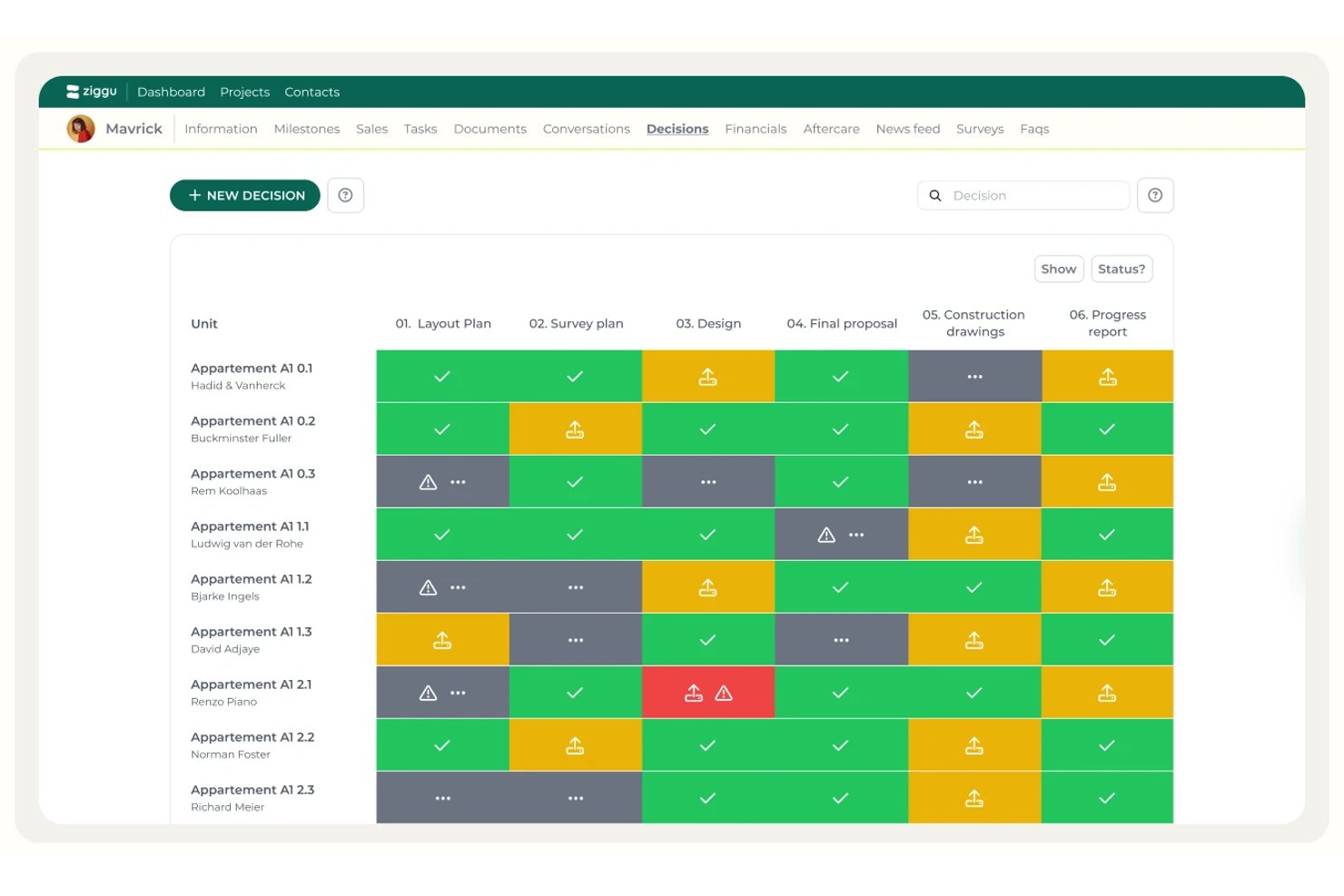
Ziggu è una piattaforma di portale clienti basata sulla gestione dei progetti per pietre miliari, che offre spazi di lavoro per i clienti personalizzati con il marchio, flussi di lavoro strutturati per le approvazioni, gestione dei documenti e comunicazioni automatizzate con le parti interessate.
Per chi è più adatto Ziggu?
Ziggu è particolarmente adatto ad agenzie e aziende che lavorano su progetti nei settori dell'architettura, dell'interior design o dello sviluppo immobiliare e che necessitano di flussi di lavoro strutturati per l'approvazione da parte dei clienti in ogni fase del progetto.
Perché ho scelto Ziggu
Ziggu si è guadagnato un posto nella mia lista ristretta perché il portale clienti non è una semplice funzionalità, ma l'intero prodotto. Mi colpisce il modo in cui i flussi di lavoro per l'approvazione basati sulle pietre miliari sono integrati nel nucleo della piattaforma: quando si attiva una pietra miliare, decisioni, moduli e promemoria vengono inviati automaticamente alle persone giuste. La funzione Decisioni registra ogni approvazione del cliente con relativa marca temporale e supporta la firma dei PDF, creando così una chiara traccia di controllo nel caso in cui sorgano contestazioni in seguito.
Funzionalità principali di Ziggu
- Posta in arrivo unificata per le conversazioni: Una posta in arrivo centralizzata che raccoglie tutte le comunicazioni con i clienti tra i vari progetti, con note interne del team invisibili ai clienti.
- Automazione attivata dalle pietre miliari: Attività, messaggi, moduli e decisioni si attivano automaticamente quando viene attivata una pietra miliare, mantenendo ogni parte interessata nei tempi previsti.
- Monitoraggio dei problemi dopo la consegna: I clienti registrano direttamente nel portale i problemi relativi alla garanzia o alla lista delle imperfezioni, allegando foto, mentre scadenze e approvazioni vengono monitorate all'interno di Ziggu.
- Visibilità del budget in tempo reale: I clienti possono visualizzare la ripartizione aggiornata del budget, i costi degli aggiornamenti e le offerte in sospeso sincronizzate con il software di fatturazione (piano Plus).
Integrazioni di Ziggu
Ziggu offre integrazioni native con Exact Online, Salesforce, Teamleader, Google Drive, Dropbox, Microsoft SharePoint, Power BI e Archisnapper. La sua API REST supporta integrazioni personalizzate.
Pros and Cons
Pros:
- Approvazioni dei clienti attivate dalle pietre miliari con una traccia di controllo completa
- Accesso illimitato al portale clienti personalizzato con il marchio per i clienti
- Monitoraggio automatizzato dei problemi per i clienti dopo la consegna
Cons:
- Nessuna vista Gantt o Kanban integrata
- Manca una funzione nativa di revisione visiva e annotazione

Ideale per il monitoraggio della redditività delle agenzie
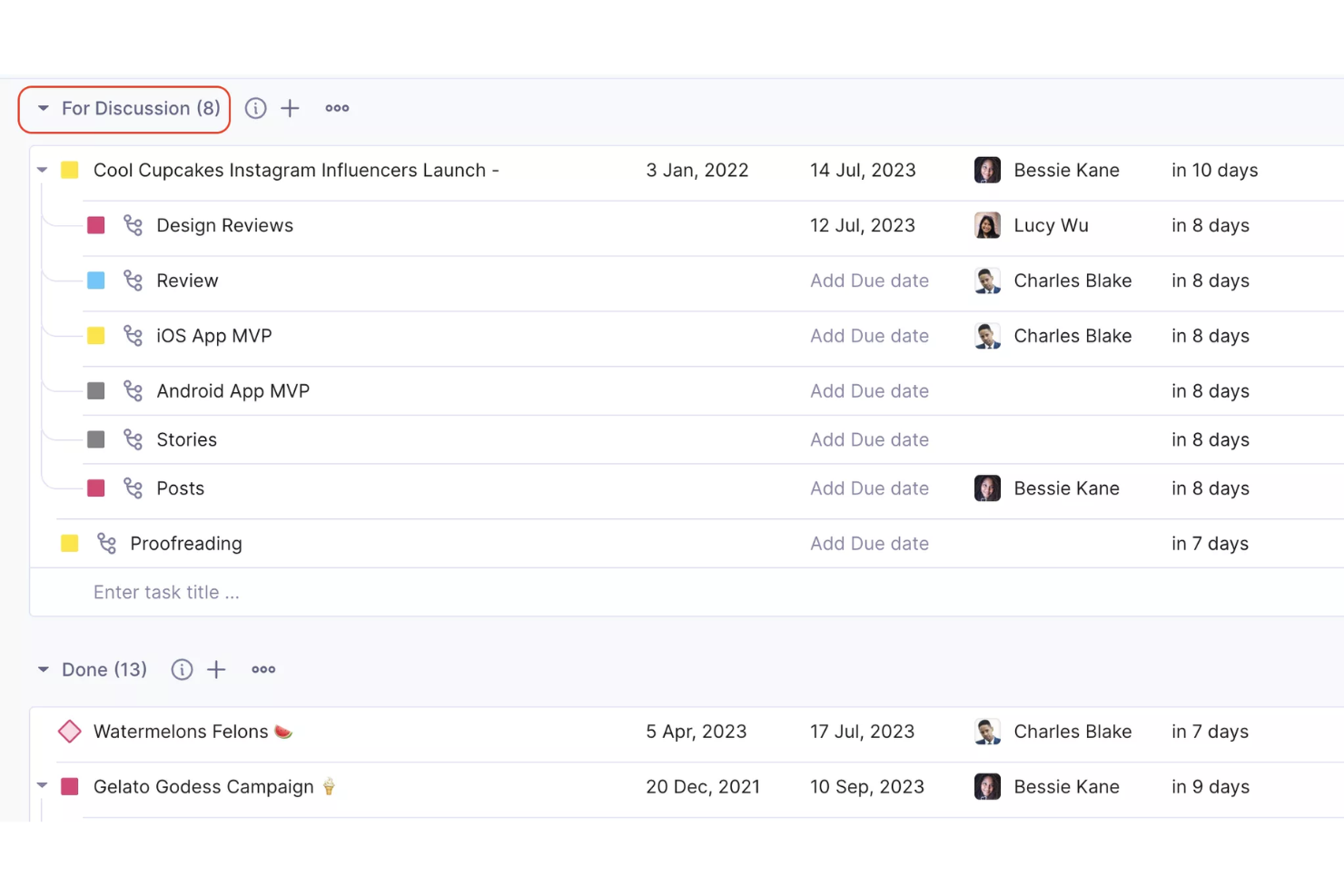
Productive è una piattaforma di gestione progetti per agenzie che riunisce portali clienti, monitoraggio dei progetti, gestione dei budget, rilevazione delle ore lavorate e fatturazione in un unico spazio di lavoro.
Per chi è ideale Productive?
Productive è particolarmente indicato per agenzie digitali e società di servizi professionali che hanno bisogno di gestire progetti per clienti, tracciare il tempo fatturabile e monitorare la redditività dei progetti in un'unica soluzione.
Perché ho scelto Productive
Productive merita un posto nella mia lista perché è uno dei pochi strumenti di gestione progetti che collega direttamente il lavoro rivolto al cliente alle performance finanziarie. Mi piace il fatto che il monitoraggio del budget e della redditività non sia un semplice report separato da estrarre al termine del progetto, ma si aggiorni in tempo reale man mano che il team registra le ore lavorate. Quindi, se un progetto sta consumando il budget più velocemente del previsto, posso accorgermene subito e intervenire prima che diventi un problema. Il portale clienti mi permette inoltre di dare ai clienti accesso diretto ai budget dei loro progetti e a dashboard personalizzate, così non devono scrivermi per chiedere aggiornamenti: possono semplicemente accedere e vedere esattamente qual è la situazione.
Funzionalità principali di Productive
- Visualizzazioni multiple dei progetti: Passa tra Gantt, Kanban, calendario, sequenza temporale e panoramica dei carichi di lavoro per gestire le attività in base al tipo di progetto.
- Pianificazione delle risorse: Consulta capacità del team, ore fatturabili e disponibilità in una sola schermata e utilizza prenotazioni provvisorie per pianificare progetti incerti o non ancora confermati.
- Flussi di lavoro automatizzati per i progetti: Configura automazioni per attivare azioni come la creazione di fatture o l'invio di messaggi Slack quando si verificano determinate condizioni di progetto.
- Moduli di feedback per i clienti: Crea moduli per raccogliere i feedback dei clienti e convertire automaticamente le risposte in attività.
Integrazioni Productive
Productive offre integrazioni native con Slack, Google Calendar, Xero, QuickBooks, HubSpot e Jira. Si collega anche con Zapier e dispone di un'API per integrazioni personalizzate.
Pros and Cons
Pros:
- Accesso gratuito e illimitato per gli utenti del portale clienti
- Controlli granulari della privacy dei commenti per i clienti
- Dashboard finanziari dei progetti condivisi in tempo reale
Cons:
- Campi avanzati disponibili solo nei piani superiori
- Nessuna integrazione nativa con gateway di pagamento per i clienti
New Product Updates from Productive

Productive Adds Agent Triggers, Teams Integration, and Time Controls
Productive adds automated agent triggers, broader AI file support, Microsoft Teams integration, Resource Planner improvements, and new time entry controls. These updates expand automation while improving scheduling, collaboration, and time tracking. For more information, visit Productive’s official site.

Wrike
Ideale per la collaborazione tra team di qualsiasi dimensione
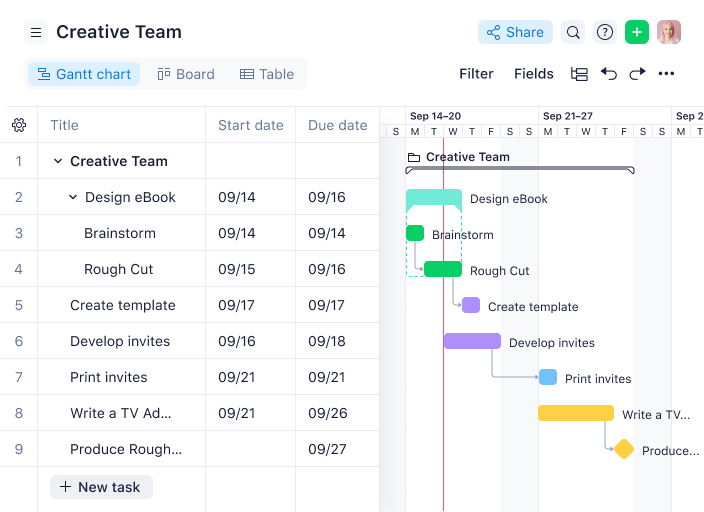
Wrike è una piattaforma di gestione dei progetti che consente ai team di organizzare i progetti, gestire le attività e collaborare con i clienti tramite portali cliente personalizzabili e la condivisione sicura dei documenti.
Per chi è più adatto Wrike?
Wrike è una buona soluzione per i team di medie e grandi dimensioni nei settori del marketing, dei servizi professionali e della tecnologia che necessitano di una gestione strutturata dei progetti con collaborazione integrata con i clienti esterni.
Perché ho scelto Wrike
Wrike si distingue come una delle migliori opzioni della mia selezione perché gestisce la collaborazione tra team interni e clienti esterni senza richiedere ai clienti un posto a pagamento. Apprezzo il fatto che i richiedenti esterni possano inviare richieste di lavoro tramite moduli di richiesta personalizzati e lasciare commenti direttamente nelle attività, mantenendo tutte le comunicazioni in un unico luogo invece di disperderle tra diverse conversazioni e-mail. La funzione di approvazione integrata consente ai clienti di esaminare e approvare i materiali finali direttamente dalla piattaforma, e permette di monitorare esattamente lo stato di ogni approvazione. Questa combinazione di moduli di richiesta esterni, commenti nelle attività e monitoraggio delle approvazioni rende Wrike una delle opzioni più complete per i team che gestiscono progetti rivolti ai clienti su larga scala.
Funzionalità principali di Wrike
- Vista con diagramma di Gantt: Visualizza le tempistiche del progetto, le dipendenze e i traguardi tra le attività utilizzando un diagramma di Gantt interattivo che si aggiorna in tempo reale.
- Pannelli di controllo personalizzati: Crea pannelli di controllo che mostrano lo stato delle attività, il carico di lavoro e l'avanzamento dei progetti di più team o flussi di lavoro in un'unica vista.
- Prenotazione delle risorse: Riserva tempo a membri specifici del team o a determinati ruoli professionali e verifica la disponibilità prima di assegnare il lavoro a un progetto.
- Report sull'attività degli utenti: Genera rapporti di controllo che registrano ogni azione eseguita da ciascun utente nel tuo account, incluse modifiche, commenti e variazioni di stato.
Integrazioni di Wrike
Wrike si integra con oltre 400 applicazioni, comprese le applicazioni più popolari di Microsoft, Slack, Google e Dropbox, oltre a software per le vendite e il marketing come Salesforce e Marketo. Consulta la directory delle applicazioni per vedere tutte le applicazioni compatibili con Wrike.
Pros and Cons
Pros:
- Controlli granulari delle autorizzazioni per le viste dei clienti
- Verifica nativa dei materiali per il feedback dei clienti
- Moduli di richiesta dinamici per l'acquisizione delle richieste dei clienti
Cons:
- Identità del marchio personalizzata disponibile solo con il piano Enterprise
- Limiti per gli utenti ospiti nei piani inferiori
New Product Updates from Wrike

Wrike Activity Reports Add Actor Type Details
Wrike’s Activity Report now displays actor type details, helping admins identify whether changes came from the UI, Automation, Wrike Agents, API, or AI via MCP. For more information, visit Wrike's official site.

Ideale per i flussi di lavoro delle grandi agenzie
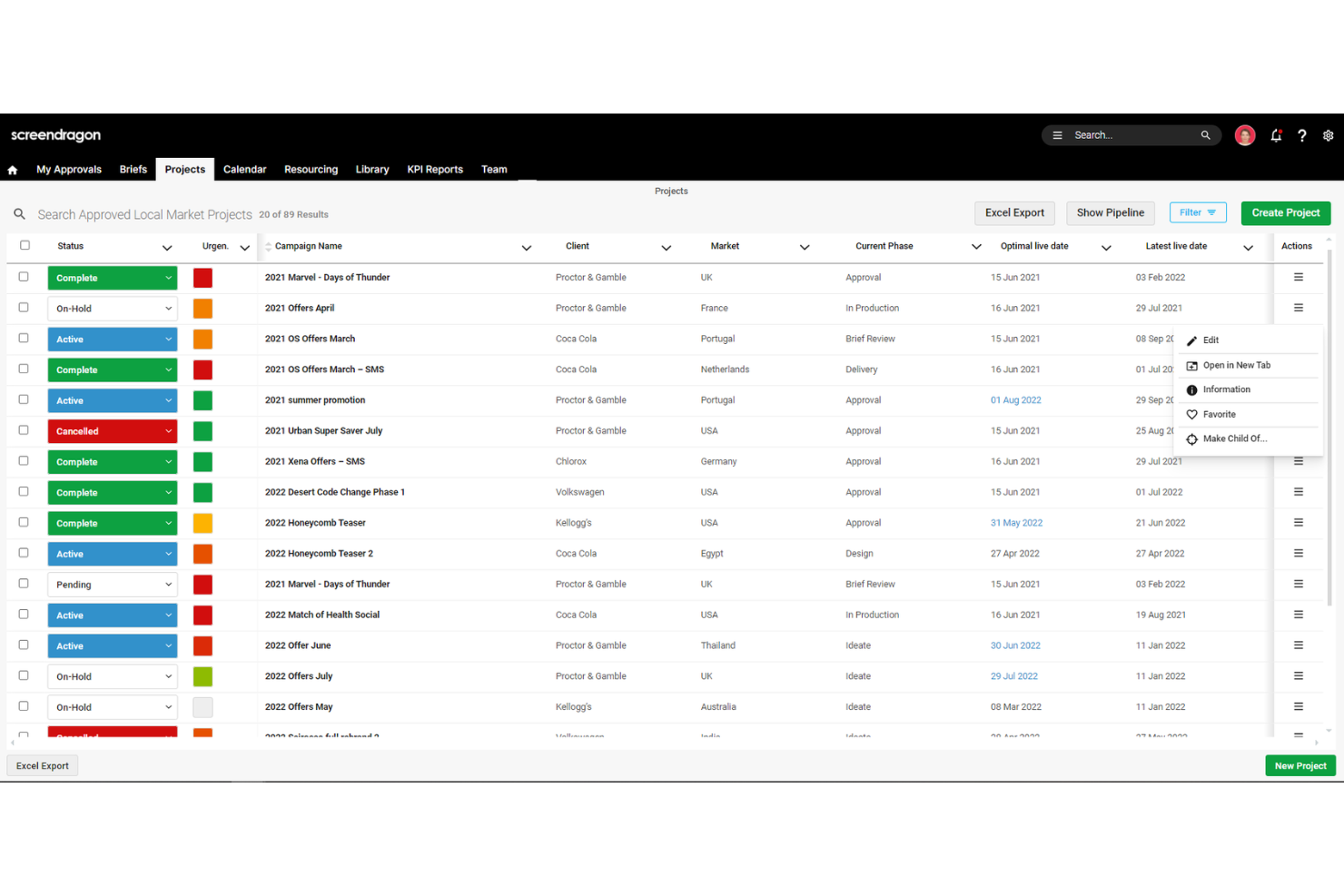
Screendragon è una soluzione di gestione progetti pensata per team di marketing, agenzie e servizi professionali. Centralizza le operazioni, inclusi progetti, risorse, processi e budget, in un unico hub.
Le funzionalità di project management di Screendragon sono progettate per gestire tutte le operazioni in un solo luogo, compresi progetti, risorse, processi e budget. Questa centralizzazione significa che non perderai tempo a passare tra moduli o strumenti scollegati.
Inoltre, Screendragon offre una gestione delle attività flessibile e visiva. Puoi utilizzare diagrammi di Gantt, bacheche Kanban, elenchi e altro ancora per gestire le attività come preferisci. Assegna compiti, modifica le tempistiche e dai priorità a ciò che conta per il tuo team—tutto da una sola schermata. Il portale clienti è progettato per migliorare la collaborazione permettendoti di condividere dettagli specifici dei progetti, aggiornamenti e file con i tuoi clienti in un ambiente sicuro. Questo garantisce ai clienti una visibilità in tempo reale sui progetti senza compromettere informazioni sensibili.
Le integrazioni includono MS Power BI, Slack, MS Teams, Zapier, Google Drive, Trello, Microsoft 365, Box, Jira, Microsoft OneDrive e PeopleSoft.
New Product Updates from Screendragon
Screendragon Unveils New AI Hub
Screendragon introduced AI Hub, a new capability that lets teams build and manage AI agents directly within workflows. The update helps marketing teams automate tasks, maintain governance controls, and scale AI-driven operations more efficiently. For more information, visit Screendragon's official site.

Basecamp
Ideale per il controllo della visibilità per i clienti
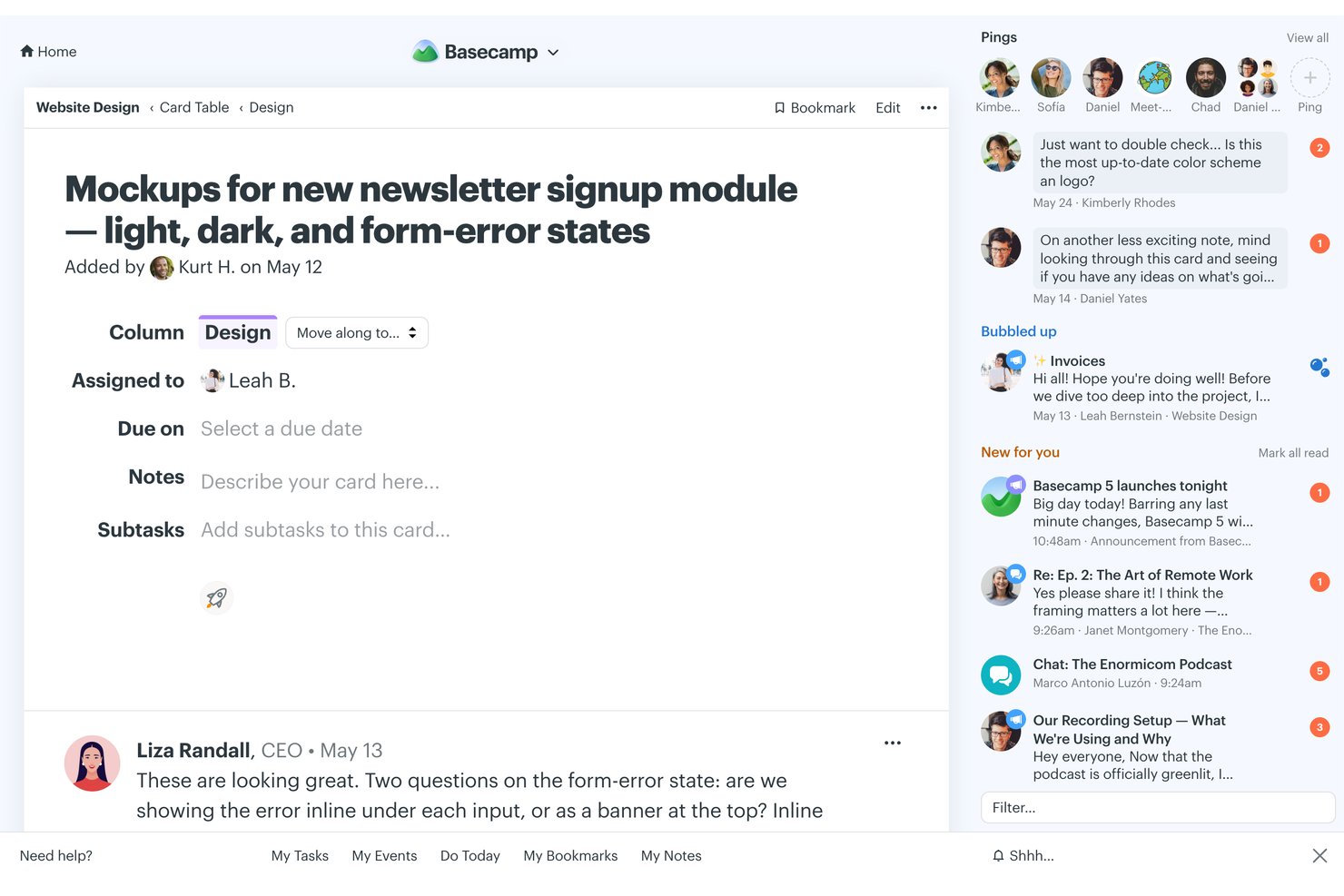
Basecamp è uno strumento di gestione progetti e collaborazione di squadra progettato sulle strutture di progetto rivolte ai clienti, che offre bacheche per messaggi, elenchi di attività, condivisione di file, calendari e controlli di accesso ai clienti per singolo progetto.
Per chi è più adatto Basecamp?
Basecamp è particolarmente indicato per agenzie di piccole e medie dimensioni e team di freelance che gestiscono più progetti clienti contemporaneamente e hanno bisogno di un modo leggero e strutturato per tenere aggiornati i clienti.
Perché ho scelto Basecamp
Basecamp si è guadagnato un posto nella mia lista perché gestisce in modo preciso il confine tra ciò che vedono i clienti e ciò che rimane interno. Mi piace che ogni progetto abbia un interruttore che controlla la visibilità per il cliente a livello di singolo elemento, così posso mantenere una lista di cose da fare in lavorazione nascosta mostrando solo le consegne approvate e i calendari definitivi. I clienti ottengono una vista dedicata di bacheche e file senza mai imbattersi nelle conversazioni interne del team.
Funzionalità chiave di Basecamp
- Tabelle a schede: Visualizza le fasi del progetto e gli incarichi utilizzando semplici bacheche in stile Kanban per tracciare l'avanzamento del lavoro.
- Grafici a collina: Mostra il progresso del progetto nel tempo con una visualizzazione dello stato unica che aiuta a identificare ciò che procede e ciò che è bloccato.
- Check-in automatici: Programma promemoria ricorrenti per raccogliere aggiornamenti dal team o dai clienti senza bisogno di riunioni.
- Documenti e file: Organizza, condividi e collabora su file, immagini e documenti direttamente all'interno di ogni progetto.
Integrazioni Basecamp
Basecamp offre integrazioni native con Google Drive, Dropbox, OneDrive e Zapier. È disponibile un'API per integrazioni personalizzate.
Pros and Cons
Pros:
- La visibilità per progetti cliente è regolabile in modo dettagliato
- Il prezzo fisso copre un numero illimitato di utenti clienti
- Le bacheche dei messaggi mantengono organizzata la comunicazione con i clienti
Cons:
- Nessun diagramma di Gantt o vista cronologica
- Il portale clienti non consente la personalizzazione del marchio

Ideale per taggare i clienti e ottenere facilmente feedback
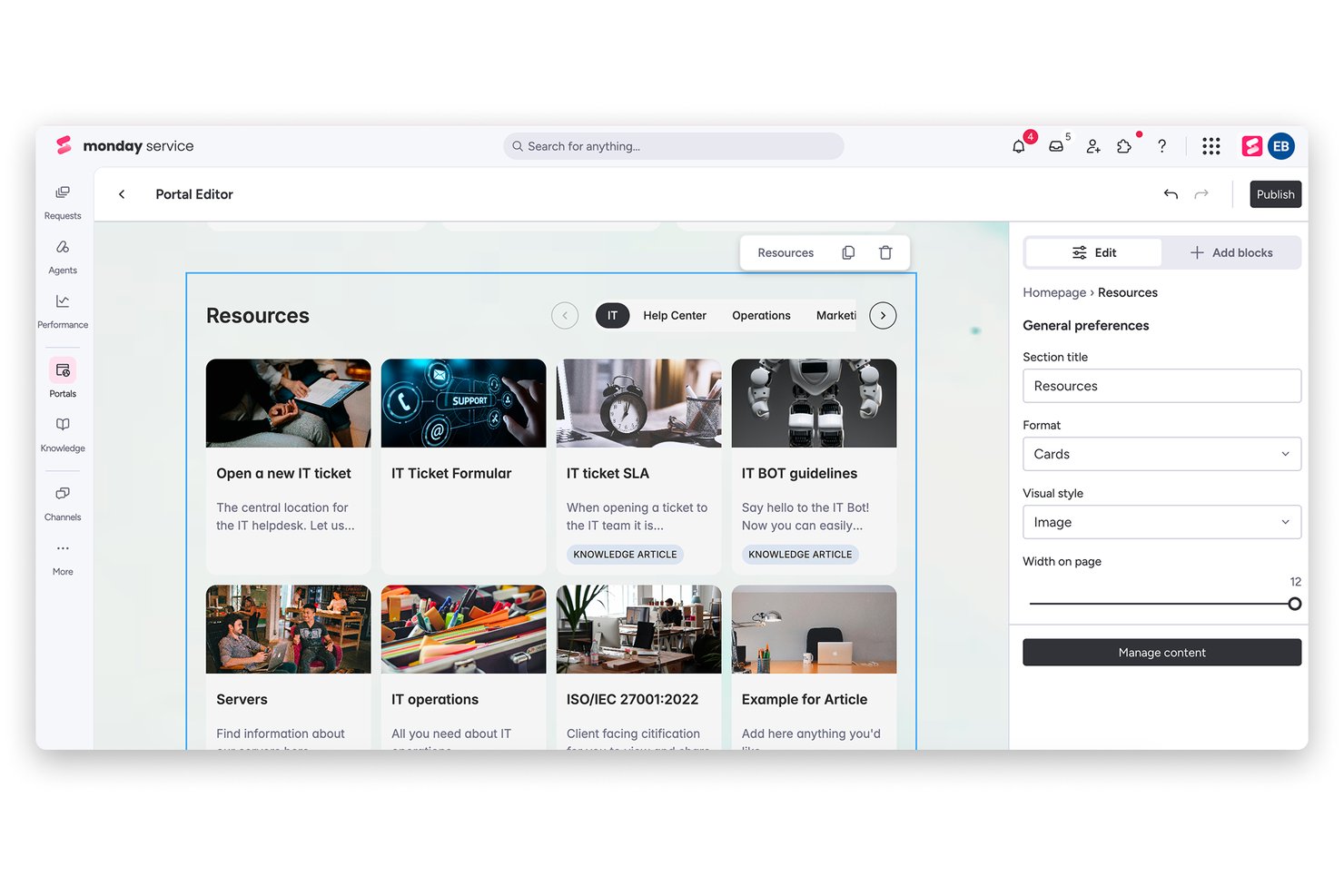
monday AI Workspace è una piattaforma di gestione del lavoro configurabile che combina pianificazione dei progetti, monitoraggio delle attività, automazioni potenziate dall'AI e accesso esterno per gli ospiti al fine di supportare la consegna dei progetti ai clienti.
Per chi è più adatto monday AI Workspace?
monday AI Workspace è particolarmente indicato per team di servizi ai clienti e agenzie che gestiscono più progetti simultanei, coinvolgendo un mix di collaboratori interni e stakeholder esterni.
Perché ho scelto monday AI Workspace
monday AI Workspace merita un posto nella mia lista grazie alla naturalezza con cui gestisce i cicli di feedback dei clienti. Mi piace il fatto che sia possibile aggiungere utenti ospiti direttamente nei thread degli aggiornamenti degli elementi, coinvolgendo i clienti esattamente nella conversazione in cui serve il loro contributo. In pratica, il mio team utilizza questa funzione per segnalare deliverable da revisionare, taggando un contatto cliente su un'attività specifica, e loro rispondono direttamente nel thread senza necessità di una licenza a pagamento.
Funzionalità chiave di monday AI Workspace
- Dashboard personalizzabili: Crea dashboard che visualizzano lo stato dei progetti, le tappe principali e le scadenze, sia per i team interni sia per i clienti.
- Controlli d'accesso basati sui ruoli: Imposta livelli di accesso dettagliati per distinguere ciò che visualizzano clienti e utenti interni sulle board condivise.
- Builder di workflow automatizzati: Automatizza processi ripetitivi, promemoria e passaggi di consegne tra progetti utilizzando le ricette di automazione integrate.
- Condivisione e approvazione file integrate: Allega, condividi e gestisci file di progetto all'interno delle board, inclusa la tracciabilità delle fasi di approvazione o validazione da parte dei clienti.
Integrazioni di monday AI Workspace
monday AI Workspace offre centinaia di integrazioni native tramite le integrazioni integrate e il marketplace, tra cui Slack, Salesforce, Google Workspace, Microsoft 365, HubSpot, Zoom, Dropbox, Jira, Trello e GitHub. Supporta anche Zapier e mette a disposizione un'API per integrazioni personalizzate.
Pros and Cons
Pros:
- Accesso ospite disponibile anche nei piani di livello inferiore
- Dashboard altamente configurabili per viste rivolte al cliente
- Le automazioni AI riducono il lavoro manuale di aggiornamento sui progetti
Cons:
- Nessun portale clienti white label dedicato
- La complessità delle board può confondere gli utenti clienti esterni
New Product Updates from monday AI Workspace
monday AI Workspace Adds Human Approval Routing
monday AI Workspace adds a human-in-the-loop approval block to AI Workflows, sending approval requests and routing workflow paths based on responses. For more information, visit monday AI Workspace's official site.

Ideale per creare portali clienti personalizzati con il proprio marchio

Zoho Projects è una piattaforma di gestione progetti pensata per i team che necessitano di spazi di lavoro orientati al cliente, offrendo strumenti per il monitoraggio delle attività, la condivisione di documenti, la registrazione del tempo e un accesso personalizzabile per i clienti.
Per chi è ideale Zoho Projects?
Zoho Projects è particolarmente adatto ad agenzie e team di servizi che devono fornire ai clienti un accesso diretto e con marchio personalizzato all'avanzamento dei progetti e alle consegne.
La pagina dei prezzi conferma la presenza delle seguenti funzionalità: dominio personalizzato (disponibile nel piano Enterprise), gestione degli utenti clienti, profili e ruoli personalizzati e controlli di accesso basati sui ruoli.
Perché ho scelto Zoho Projects
Ho scelto Zoho Projects tra i migliori per la cura dei dettagli nel branding del portale. La maggior parte degli strumenti di project management permette di aggiungere i clienti come utenti—Zoho Projects ti consente di associare il dominio della tua azienda al portale, così i clienti accedono all’area progetti tramite il tuo URL, non tramite un indirizzo zoho.com. È una differenza significativa se vuoi offrire un’esperienza curata e brandizzata per l’agenzia. Inoltre, apprezzo il fatto che l’accesso dei clienti sia rigidamente controllato tramite profili e ruoli personalizzati: puoi definire con precisione cosa ogni utente cliente può vedere e fare all’interno di un progetto. Unite alle notifiche automatiche che informano i clienti su cambi di stato di attività e problemi, il portale diventa un vero spazio di lavoro rivolto ai clienti e non solo una semplice lista di attività condivisa.
Funzionalità principali di Zoho Projects
- Diagramma di Gantt: Visualizza le tempistiche delle attività, imposta le dipendenze e ripianifica direttamente dal diagramma.
- Automazione dei flussi di lavoro Blueprint: Progetta flussi di lavoro per le attività, passo dopo passo, assegnando le persone giuste e attivando aggiornamenti nei campi in base al cambiamento degli stati.
- Timesheet e fatturazione: Registra il tempo dedicato alle singole attività e trasforma i report di tempo in fatture tramite integrazione con Zoho Books o Zoho Invoice.
- Dashboard di portafoglio: Visualizza lo stato delle attività, la salute del budget e l’avanzamento dei progetti da una dashboard unica per tutti i progetti attivi.
Integrazioni di Zoho Projects
Zoho Projects offre integrazioni native con Zoho CRM, Zoho Books, Zoho Invoice, Google Drive, Microsoft 365, Slack, GitHub, Bitbucket, Dropbox e Zapier. È disponibile anche un’API per integrazioni personalizzate.
Pros and Cons
Pros:
- Integrazione nativa con l’ecosistema Zoho CRM
- Prezzi accessibili per piccoli team
- Chat di squadra interattiva integrata
Cons:
- Richiede componenti aggiuntivi a pagamento per l’accesso clienti ospiti
- Cap sui limiti di storage degli account nei vari piani
New Product Updates from Zoho Projects
Zoho Projects Adds CodeX Scripts for Custom Modules
Zoho Projects now supports CodeX Scripts for custom modules, enabling conditional logic and rules for creating, updating, and deleting records. For more information, visit Zoho Projects' official site.
 .
.
Ideale per caricamento diretto di file da parte dei clienti
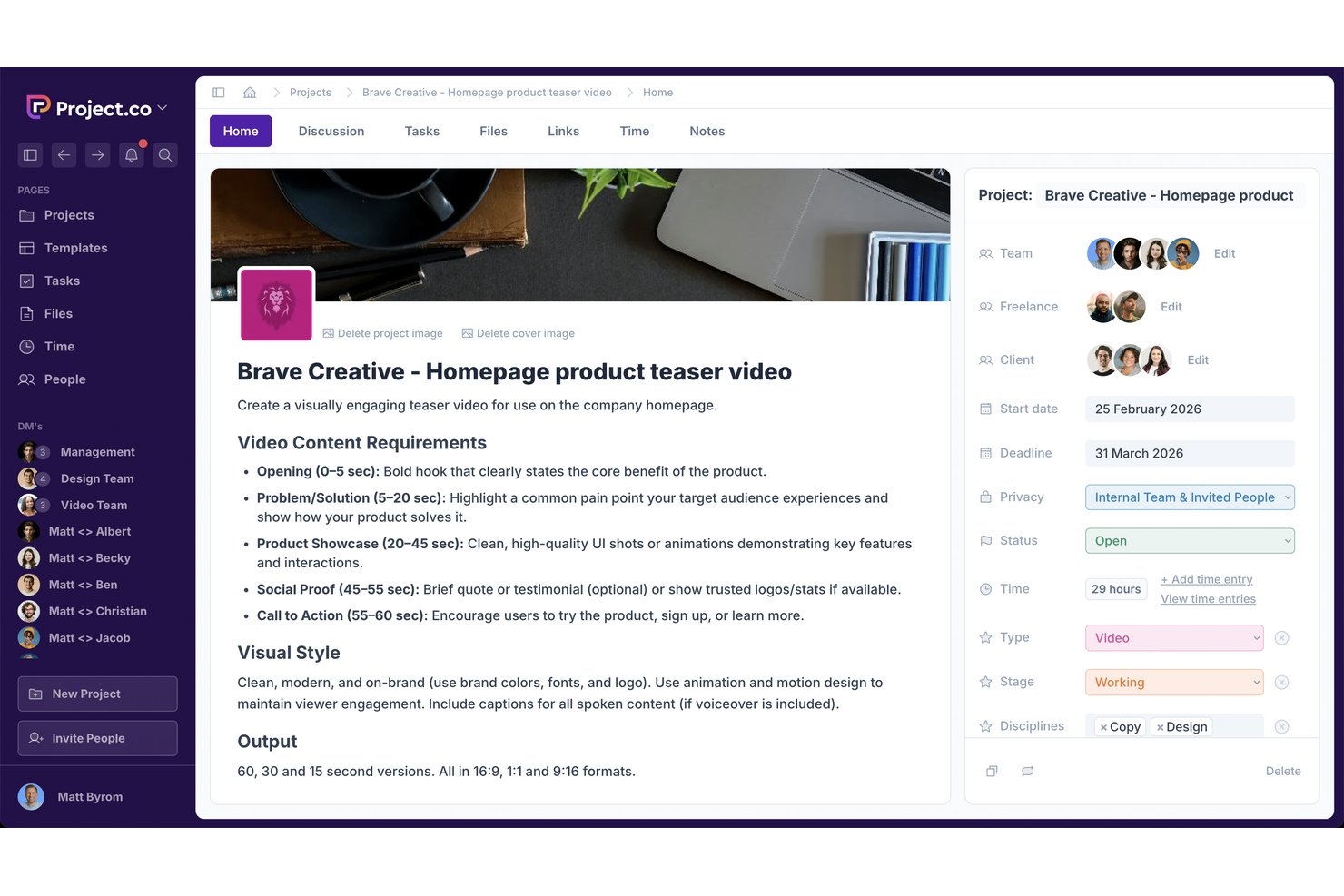
Project.co è una piattaforma di project management orientata ai clienti che unisce gestione delle attività, condivisione di file, collaborazione tra team e clienti, monitoraggio del tempo e portali clienti personalizzati in un unico spazio di lavoro.
Per Chi è Ideale Project.co?
Project.co è una soluzione perfetta per piccole agenzie e consulenti freelance che gestiscono simultaneamente più account clienti attivi.
Perché Ho Scelto Project.co
Ho scelto Project.co come uno dei migliori per la modalità specifica con cui gestisce i caricamenti di file da parte dei clienti. Ogni file caricato in un progetto riceve un proprio thread di discussione, così quando un cliente inserisce una consegna, il mio team può fornire feedback direttamente su quel file senza dover cercare in altri canali di messaggistica. Unito ai controlli di privacy specifici per progetto e attività, i file interni rimangono nascosti ai clienti a meno che non decida esplicitamente di condividerli.
Funzionalità Principali di Project.co
- Monitoraggio del tempo: Tieni traccia delle ore dedicate a ogni progetto e attività con strumenti di monitoraggio integrati.
- Branding personalizzato: Applica il logo della tua agenzia, i colori e perfino un dominio personalizzato ai portali clienti.
- Controllo granulare dei permessi: Imposta diritti di accesso dettagliati per membri del team, clienti e collaboratori a livello di progetto e di attività.
- Attività ricorrenti: Pianifica attività che si ripetono automaticamente a intervalli stabiliti per supportare il lavoro continuativo per i clienti.
Integrazioni di Project.co
Le integrazioni native non sono chiaramente documentate.
Pros and Cons
Pros:
- I clienti possono caricare file direttamente nei progetti
- Portale white-label incluso in tutti i piani
- Thread di discussione per ogni file per mantenere il feedback organizzato
Cons:
- Report limitati per aggiornamenti dei progetti rivolti ai clienti
- Nessuna visualizzazione Gantt per la pianificazione delle tempistiche

Rocketlane
Ideale per l'automazione potenziata dall'AI
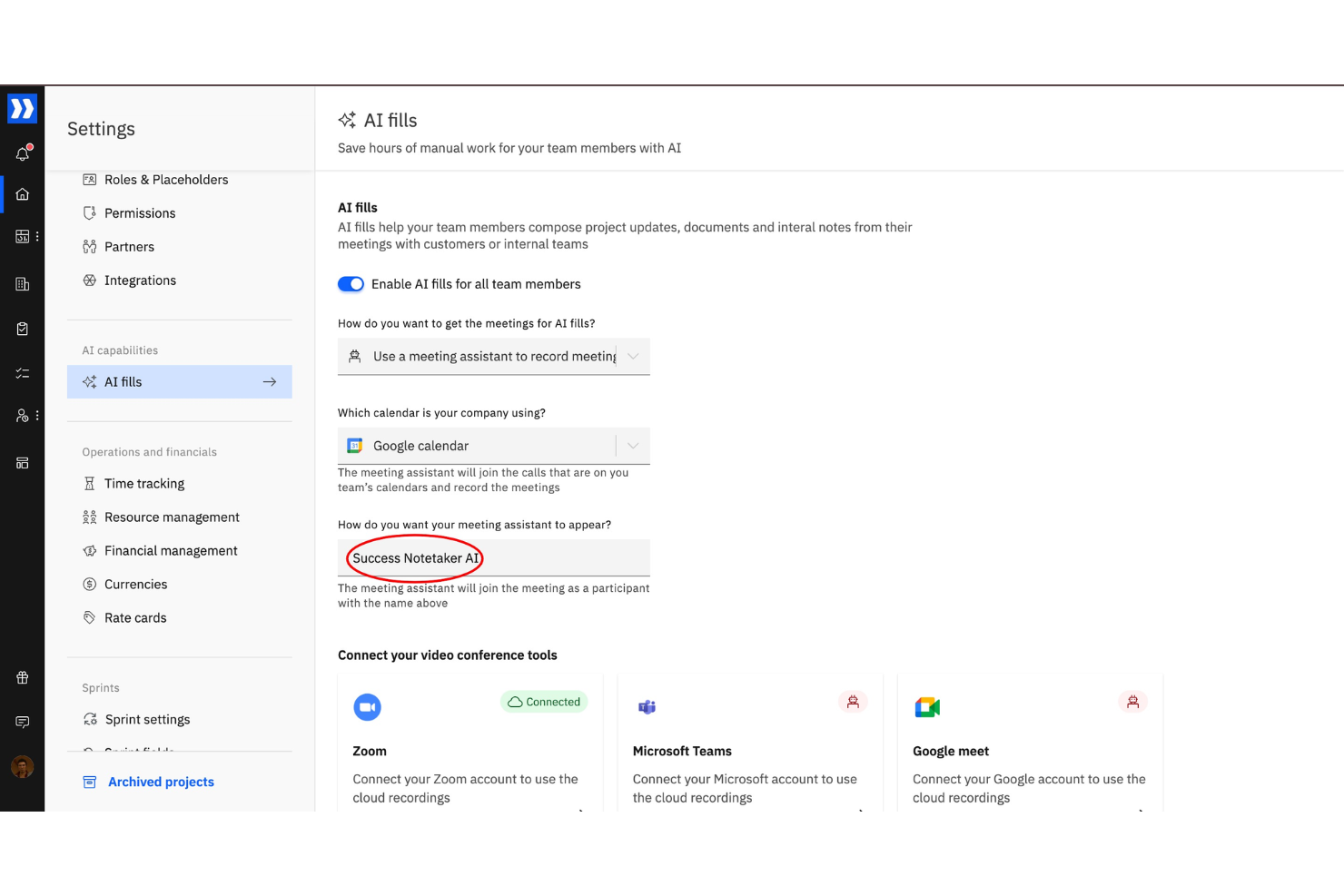
Rocketlane è una piattaforma di project management pensata per i team a diretto contatto con i clienti, che offre pianificazione dei progetti, portali clienti personalizzati, condivisione di documenti e strumenti di collaborazione in tempo reale.
Per chi è ideale Rocketlane?
Rocketlane è una scelta adatta per i team di onboarding clienti e servizi professionali che necessitano di un'esperienza strutturata e orientata al cliente durante l'erogazione dei servizi.
Perché ho scelto Rocketlane
Rocketlane si è guadagnato un posto nella mia shortlist grazie a Nitro, il suo layer AI che svolge attività di delivery invece di limitarsi a suggerire azioni. Sono particolarmente colpito da come Nitro generi automaticamente piani di progetto partendo da SOW, email e call di discovery; così, quando un nuovo cliente firma, il mio team non parte da zero. Mi affido molto anche all'agente per la documentazione: estrae decisioni da chiamate e PDF per creare e aggiornare automaticamente SOW, note di passaggio di consegne e documentazione d'implementazione in tempo reale. Inoltre, l'automazione della governance di Nitro gestisce in background approvazioni, solleciti per escalation e aggiornamenti ai piani di progetto, consentendo così al mio team di dedicare meno tempo agli aspetti amministrativi e più ai clienti.
Funzionalità principali di Rocketlane
- Portale clienti personalizzato: Offri ai clienti un portale dedicato, completamente personalizzabile (con colori, logo e font del tuo brand), dove possono visualizzare i piani di progetto, cronologie, attività e file in un unico luogo.
- Aggiornamenti di stato automatizzati: Crea template per aggiornamenti di progetto e pianificali per l'invio periodico, mantenendo aggiornati i clienti senza sforzo manuale.
- Viste Gantt, Kanban e a bacheca: Passa da layout Waterfall, Agile, Gantt, Kanban o a bacheca a seconda delle preferenze del tuo team nella gestione e visualizzazione delle attività di progetto.
- Partner Central: Coinvolgi partner esterni nella delivery dei progetti con collaborazione interaziendale, informazioni condivise e reportistica sulle performance in un unico spazio.
Integrazioni di Rocketlane
Rocketlane offre integrazioni native con Slack, Salesforce, Jira, HubSpot, Google Calendar e Outlook Calendar. Si collega anche con Zapier e Workato per automazione dei flussi di lavoro più ampia.
Pros and Cons
Pros:
- I template velocizzano l'onboarding e i flussi di lavoro ripetibili
- Il monitoraggio finanziario integrato aiuta a controllare budget e marginalità
- Le timeline di progetto in tempo reale migliorano la visibilità per team e clienti
Cons:
- La profondità dei report può essere limitata per esigenze analitiche complesse
- Migliore per progetti orientati al cliente, meno indicato per lavori solo interni
New Product Updates from Rocketlane

Rocketlane Introduces Governance and Workforce Agents
Rocketlane introduces Governance Agents and Workforce Agents to automate delivery processes and recurring tasks. These updates help teams enforce rules and streamline project execution. For more information, visit Rocketlane’s official site.
 .
.Altre opzioni di software di gestione dei progetti con portale clienti
Ecco alcuni altri strumenti di gestione dei progetti con portali clienti che non sono entrati nella lista, ma che meritano comunque di essere presi in considerazione:
- Dock
Ideale per la pianificazione collaborativa dei progetti
- ClickUp
Ideale per la condivisione flessibile dei dashboard
- Teamwork.com
Ideale per combinare chat del team e flussi di lavoro di progetto
- Bonsai Agency Software
Ideale per progetti di agenzia e collaborazione con i clienti
- Ravetree
Ideale per unire gestione clienti e risorse
- Plutio
Ideale per uno spazio di lavoro clienti unificato
- Taskip
Il migliore con preventivi e fatturazione integrati
- Celoxis
Ideale per un'interfaccia pratica e ottimizzata per dispositivi mobili
- Accelo
Ideale per automazione del processo dalla preventivazione al pagamento
- ProWorkflow
Ideale per la gestione delle spese di progetto
- GoodDay
Ideale per spazi di lavoro personalizzabili
- OneDesk
Ideale per l'integrazione con help desk
- TaskRay
Ideale per i team che utilizzano Salesforce
- ProProfs Project
Ideale per agenzie creative e IT
- Lark
Ideale per flussi di lavoro da chat a task
- Moxo
Ideale per i follow-up automatici ai clienti
- SuiteDash
Ideale per portali white-label
- Assembly
Ideale per la protezione dei dati dei clienti con focus sulla conformità
- Birdview PSA
Ideale per strumenti avanzati di gestione delle risorse
- Agiled
Ideale per i team agili


Come valuto i software di gestione progetti con portale clienti
Divido la mia valutazione in due livelli: requisiti fondamentali come un portale clienti dedicato e viste delle attività, e fattori distintivi come strumenti di revisione o integrazioni di fatturazione.
Funzionalità di base (Requisiti essenziali per questa lista)
Quando seleziono gli strumenti per la mia lista, valuto ciascuno su una scala da 0 (funzionalità assente) a 5 (eccelle in questa area) per ognuna delle funzionalità di base elencate sotto. Quindi calcolo il punteggio totale dello strumento in percentuale. Ogni strumento deve raggiungere un punteggio totale minimo del 65% per essere preso in considerazione.
- Accesso al portale clienti: Controllo se i clienti ottengono un portale dedicato con accesso tramite login, piuttosto che solo un link condiviso o un invito generico come ospite agli spazi di lavoro interni.
- Gestione progetti di base: Gestione attività, cronologie, dipendenze e traguardi sono tutti elementi importanti qui: valuto se la base di gestione progetti è abbastanza solida da gestire veri progetti.
- Visibilità lato cliente: Cerco dashboard o viste che rendano visibile lo stato del progetto e i traguardi ai clienti, come un tracker di avanzamento che un cliente con contratto può consultare autonomamente.
- Condivisione file e approvazioni: Caricare file è indispensabile; valuto se lo strumento supporta flussi strutturati di approvazione in cui i clienti possano approvare direttamente le consegne.
- Strumenti per collaborazione esterna: Cerco commenti, thread di feedback o canali di messaggistica specifici per il cliente—non semplici chat di team interne adattate per uso esterno.
- Permessi dettagliati e personalizzazione brand: Valuto se è possibile separare ciò che i clienti vedono dalle note interne e se il portale supporta la brandizzazione personalizzata come loghi o palette di colori.
Dopo aver individuato gli strumenti che rispondono a questi criteri, considero ciò che distingue davvero ogni piattaforma.
Fattori distintivi (Cosa differenzia i fornitori)
Ecco come confronto e metto in risalto i diversi fornitori:
Funzionalità che spiccano
Il monitoraggio del tempo integrato collegato ai progetti clienti è un importante elemento distintivo, soprattutto per le agenzie che gestiscono contratti a forfait dove i clienti vogliono vedere le ore fatturabili. Cerco anche strumenti di revisione visiva che permettano ai clienti di annotare un mock-up di design o un documento direttamente dal portale anziché inviare feedback via email. Completano il quadro i report rivolti ai clienti: riepiloghi di stato auto-generati da condividere periodicamente per risparmiare ore di email di aggiornamento ogni settimana.
Oltre le funzionalità
Il modello di prezzo è molto importante in questo contesto. Alcuni strumenti fanno pagare per ogni utente esterno, il che può diventare costoso se si stanno integrando decine di clienti. Valuto se i posti per ospiti o clienti sono inclusi o fatturati a parte. La sicurezza è un altro fattore chiave: i clienti condividono materiali sensibili, quindi verifico la conformità SOC 2, SSO e i log di audit sulle attività nel portale. Infine, verifico quanto bene ogni strumento si integra con piattaforme CRM e di fatturazione come HubSpot o QuickBooks, dato che la maggior parte dei team a contatto con la clientela necessita che i dati di progetto fluiscano nel proprio stack operativo più ampio.
Come scegliere un software di gestione dei progetti con portale clienti
Per scegliere il software di gestione dei progetti con portale clienti più adatto, concentrati su controlli granulari delle autorizzazioni, un inserimento dei clienti senza complicazioni e modelli di prezzo trasparenti. Lo strumento ideale offre ai portatori di interesse una visibilità di alto livello sullo stato dei progetti e approvazioni autonome, mantenendo completamente privati le bozze interne, i commenti e i budget del tuo team. Ecco una lista di fattori da tenere presenti:
| Fattore | Cosa considerare |
|---|---|
| Autorizzazioni granulari | Lo strumento offre interruttori con un clic per distinguere tra "Solo interno" e "Visibile al cliente"? Devi poter nascondere il lavoro grezzo e i commenti interni senza duplicare le attività. |
| Complessità dell'inserimento dei clienti | I clienti possono accedere tramite link magici o visualizzazioni semplificate per gli ospiti? Se l'accesso richiede una configurazione di 30 minuti, i portatori di interesse torneranno a usare l'email. |
| Prezzo degli account ospite | Gli account dei clienti sono illimitati e gratuiti? Assicurati che l'accesso degli ospiti non sia riservato ai piani aziendali o addebitato alle tariffe complete degli utenti. |
| Rimozione del marchio e personalizzazione | Puoi usare domini personalizzati, loghi personalizzati ed email di notifica con il tuo marchio per mantenere un'immagine professionale dell'agenzia? |
| Revisione e approvazioni | Il portale supporta annotazioni puntuali nell'app, commenti video con indicazione temporale ed etichette di stato chiare (ad es. Approvato, Modifiche richieste)? |
| Pannelli di controllo autonomi | Le tempistiche delle tappe fondamentali e i grafici di avanzamento di alto livello sono automatizzati, così che i dirigenti impegnati possano verificare lo stato del progetto in 10 secondi senza inviarti un'email? |
Consiglio dell'esperto: Prima dell'acquisto, esegui una prova di 60 secondi con qualcuno al di fuori del tuo team. Se non riesce a trovare lo stato di una tappa fondamentale o a caricare un documento senza il tuo aiuto, nemmeno i tuoi clienti ci riusciranno.
Che cos'è un software di gestione dei progetti con portale clienti?
Un software di gestione dei progetti con portali clienti è uno strumento che combina funzionalità interne di monitoraggio dei progetti con uno spazio sicuro in cui i clienti possono visualizzare gli aggiornamenti, condividere file e collaborare.
Questi strumenti aiutano agenzie, liberi professionisti e team di servizi a semplificare la comunicazione, offrendo ai clienti visibilità sull'avanzamento, sui materiali da consegnare e sui feedback, il tutto senza interminabili catene di e-mail o riunioni di aggiornamento. Spesso combinano strumenti di gestione dei progetti, come la gestione delle attività e la condivisione dei documenti, con messaggistica e autorizzazioni personalizzate per l'accesso dei clienti.
Caratteristiche principali
Le funzionalità principali dei software di gestione dei progetti con portale clienti offrono agli stakeholder una finestra interattiva sull'avanzamento dei progetti, sui materiali da consegnare e sulle approvazioni, mantenendo al contempo rigorosamente separati i flussi di lavoro interni del team, le bozze grezze e le discussioni interne. Ecco le sette funzionalità da ricercare:
- Visibilità del progetto per i clienti: una dashboard chiara in cui i clienti possono fornire approvazioni e feedback sulle attività o sui file senza visualizzare i flussi di lavoro interni.
- Esperienza cliente personalizzabile: la possibilità di personalizzare il portale clienti con elementi del marchio (loghi, colori, dominio, ecc.) per offrire un'esperienza professionale ai clienti.
- Messaggistica e collaborazione sicure: messaggistica integrata o discussioni nei commenti per semplificare la comunicazione senza dipendere da strumenti esterni. Questo spazio centralizzato può aiutare a condividere in modo sicuro documenti di progetto, contratti e materiali.
- Accesso e autorizzazioni basati sui ruoli: la possibilità di impostare diversi livelli di autorizzazione garantisce che le discussioni interne del team, i dati finanziari e le informazioni riservate rimangano privati.
- Strumenti interattivi di revisione e annotazione: motori nativi per il feedback visivo che consentono ai clienti di aggiungere indicatori sui file immagine, evidenziare bozze di testo o lasciare commenti con indicazione temporale sui file video direttamente nel browser.
- Archivi centralizzati dei materiali: hub di file con controllo delle versioni che organizzano tutti i materiali destinati ai clienti per cartella o attività, eliminando gli allegati sepolti nelle e-mail e la confusione dovuta ai file duplicati.
- Moduli dinamici per le richieste dei clienti: strumenti integrati per la creazione di moduli che consentono ai clienti di inviare nuove richieste, richieste di modifica o segnalazioni di bug, generando automaticamente attività interne per il team.
Vantaggi
L'utilizzo di un software di gestione dei progetti con portale clienti crea un hub centralizzato che riduce gli ostacoli nella comunicazione con i clienti, protegge la disponibilità del team e accelera le approvazioni dei progetti. Ecco i cinque vantaggi principali:
- Meno e-mail di aggiornamento: elimina il flusso costante di messaggi del tipo "Un rapido aggiornamento?", offrendo agli stakeholder accesso autonomo all'avanzamento del progetto in tempo reale.
- Revisioni e approvazioni più rapide: accelera i cicli di revisione offrendo ai clienti un portale diretto e semplice per lasciare feedback e approvare i materiali da consegnare.
- Confini interni più sicuri: mantiene l'attenzione dei clienti sulle tappe finali, proteggendo al contempo le bozze grezze, le chat private e le note interne del team.
- Tracce di controllo più chiare: centralizza in un unico luogo ogni approvazione, versione dei file e richiesta di modifica, eliminando le controversie sull'ambito del progetto del tipo "Non ho mai approvato questa cosa".
- Percezione del marchio più curata: offre un'esperienza moderna e professionale da agenzia attraverso il branding personalizzato e visualizzazioni del cliente con marchio personalizzato.
Analisi dei costi e dei prezzi
I software di gestione dei progetti con portali clienti costano generalmente tra $10 e $45 per utente al mese, ma la spesa totale per il software dipenderà in larga misura dal modo in cui ciascuna piattaforma addebita i costi per gli account degli ospiti esterni rispetto ai membri interni del team.
- Modelli con account ospite o cliente gratuiti: le configurazioni più adatte alle agenzie consentono a un numero illimitato di clienti di visualizzare, commentare e approvare il lavoro gratuitamente, addebitando i costi solo per i membri interni principali del team.
- Modelli con account ospite a pagamento: alcuni strumenti considerano i clienti esterni utenti a prezzo pieno o richiedono "Pass ospite" a pagamento una volta superato un rapporto prestabilito (ad esempio, 5 ospiti gratuiti per ogni utente a pagamento), facendo rapidamente aumentare i costi con la crescita del numero di clienti.
- Modelli con funzionalità vincolate al piano: le funzionalità avanzate del portale, come il collegamento a un dominio personalizzato (
projects.youragency.com), la personalizzazione con marchio proprio e i controlli dettagliati della privacy, sono spesso disponibili solo nei piani Business o Enterprise di livello superiore ($20–$40+/utente/mese). - Prezzi fissi illimitati: alcune piattaforme applicano un costo mensile o annuale fisso per un numero illimitato di utenti interni e ospiti clienti, rendendo prevedibile il budget indipendentemente dalle dimensioni dell'agenzia.
Tabella di confronto dei piani per il software di gestione dei progetti con portale clienti
| Modello di tariffazione | Fascia di costo media | Ideale per | A cosa fare attenzione |
| Ospiti gratuiti illimitati | $10–$25 /utente/mese | Agenzie e studi in crescita | Funzionalità come i domini personalizzati potrebbero essere bloccate nei piani superiori. |
| Pass per ospiti soggetti al piano | $15–$35 /utente/mese | Team di gestione dei progetti di medie dimensioni | I costi per eccedenza aumentano rapidamente una volta superato il limite del rapporto tra ospiti e utenti. |
| Tariffa fissa illimitata | $15–$300/quota mensile fissa | Team ad alto volume e in espansione | Controlli delle autorizzazioni meno granulari rispetto alle piattaforme con tariffazione per utente. |
Strumenti gratuiti di gestione dei progetti con accesso al portale clienti
Sebbene i portali dedicati con marchio personalizzato richiedano generalmente piani a pagamento, diverse piattaforme offrono piani gratuiti permanenti validi con funzionalità di condivisione con i clienti. Tuttavia, queste opzioni gratuite presentano rigidi limiti operativi, come spazi di archiviazione ridotti, limiti sul numero di progetti o viste amministrative limitate, che ti costringono a organizzare il lavoro tenendone conto. Tra le opzioni figurano:
- ClickUp: consente di invitare ospiti esterni a visualizzare cruscotti personalizzati e bacheche delle attività, ma limita lo spazio di archiviazione dell'intero spazio di lavoro a 60 MB e blocca la personalizzazione del marchio dietro piani a pagamento.
- Agiled: offre un piano gratuito permanente con un portale clienti personalizzato con il proprio marchio e account cliente illimitati, ma limita lo spazio di archiviazione e blocca la configurazione del dominio personalizzato (
projects.youragency.com) nei piani a pagamento. - Project.co: supporta utenti cliente illimitati negli hub di progetto condivisi, ma limita a 10 i progetti attivi e lo spazio di archiviazione totale a 1 GB.
- GoodDay: include l'accesso gratuito per ospiti/clienti (fino a 15 membri del team interno), consentendo ai clienti di visualizzare i cruscotti di avanzamento senza consumare postazioni utente, ma limita i controlli amministrativi avanzati e la personalizzazione del marchio.
- Kitchen.co: offre feedback visivi e bacheche delle attività per i clienti illimitati, ma limita a 2 gli utenti interni, lo spazio di archiviazione totale a 2 GB (500 MB per file) e non offre la configurazione di un dominio personalizzato nel piano gratuito.
- Zoho Projects: include l'accesso nativo per gli utenti cliente alla visualizzazione dei traguardi, ma limita rigorosamente il piano gratuito a 2 progetti attivi, 3 membri del team e uno spazio di archiviazione minimo di 10 MB.
Quando i portali clienti gratuiti non sono più sufficienti
Gli strumenti gratuiti funzionano bene per freelance e piccoli progetti pilota, ma quando la tua agenzia o il tuo portafoglio clienti crescono, i piani gratuiti raggiungono rapidamente limiti operativi che danneggiano la produttività e l'esperienza dei clienti. Devi passare a uno strumento di portale clienti dedicato e a pagamento quando:
- Hai bisogno di approvazioni e revisioni direttamente nell'app: ti servono strumenti interattivi per il feedback, come l'inserimento di indicatori visivi o di marcatori temporali nei video, e pulsanti di stato formali Approvato o Modifiche richieste per eliminare lo slittamento dell'ambito del progetto.
- Hai bisogno di distribuire risorse in grandi volumi: raggiungi i limiti di dimensione dei file per i file di progettazione ad alta risoluzione, le bozze video o le indicazioni multimediali di grandi dimensioni, finendo per ricorrere nuovamente ai link di trasferimento file di terze parti.
- Hai bisogno di un controllo professionale sul marchio: desideri l'hosting su un dominio personalizzato (
projects.youragency.com), uno stile del marchio personalizzato e notifiche email essenziali che rafforzino l'autorevolezza del marchio della tua agenzia. - Hai bisogno di veri controlli sulla privacy interna: ti servono opzioni esplicite "Solo interno" per le attività in bozza, le note private e le discussioni del team interno, così da poter lavorare dietro le quinte senza interferenze da parte dei clienti.
- Hai bisogno di un inserimento dei clienti scalabile: superi i rigidi limiti relativi ai progetti attivi o agli ospiti e hai bisogno di account cliente illimitati che non facciano aumentare in modo sproporzionato i costi mensili del software.
Buone pratiche per l'implementazione
Il successo dell'implementazione di un portale clienti dipende dal favorire l'adozione da parte dei clienti, dallo stabilire fin dal primo giorno confini chiari per la comunicazione e dal mantenere aggiornata la piattaforma, affinché gli interlocutori si fidino davvero di essa come unica fonte di verità. Ecco come implementare il portale clienti:
- Condurre l'avvio del portale clienti in diretta: Accompagna gli stakeholder attraverso l'interfaccia del portale durante la riunione di avvio per dimostrare come monitorare le tappe fondamentali, visualizzare i materiali da consegnare e inviare le approvazioni.
- Imporre una regola di comunicazione basata innanzitutto sul portale: Reindirizza tutte le email dei clienti sullo stato di avanzamento al portale rispondendo con collegamenti diretti al portale e insegna agli stakeholder che le richieste inviate tramite il portale vengono gestite più rapidamente.
- Mantenere aggiornamenti quotidiani sullo stato delle attività: Richiedi ai project manager di effettuare controlli quotidiani sui pannelli di controllo visibili ai clienti per garantire che l'avanzamento delle tappe fondamentali, gli stati delle attività e le tempistiche riflettano i progressi in tempo reale.
- Configurare autorizzazioni di accesso dei clienti basate sui ruoli: Imposta autorizzazioni utente esplicite in base al livello gerarchico degli stakeholder, fornendo pannelli di controllo sullo stato di alto livello agli sponsor dirigenziali e accesso a livello di attività ai contatti dei clienti operativi quotidiani.
- Standardizzare le convenzioni per la denominazione dei file negli spazi di lavoro: Implementa gerarchie di cartelle coerenti e strutture di denominazione dei file con controllo delle versioni in tutti i progetti, affinché i clienti possano individuare i materiali approvati senza l'assistenza del project manager.
- Testare i portali con clienti beta selezionati: Testa innanzitutto i flussi di lavoro dei portali rivolti ai clienti su 2–3 account di clienti fidati per individuare i punti di attrito dell'esperienza utente prima del lancio sull'intero portafoglio clienti.
Domande frequenti
Ecco alcune risposte alle domande comuni sul software di gestione dei progetti con portale clienti:
Che cos'è un portale clienti nella gestione dei progetti?
Un portale clienti è uno spazio di lavoro sicuro e basato sul Web che offre agli stakeholder esterni accesso diretto agli aggiornamenti del progetto in tempo reale, ai materiali da consegnare, agli allegati e ai flussi di lavoro per le approvazioni. Funge da hub dedicato in cui i clienti possono monitorare i progressi del progetto, lasciare feedback e approvare il lavoro senza dover accedere al tuo spazio di lavoro interno o alle discussioni private del team.
Qual è la differenza tra un portale clienti e un link di accesso ospite?
Un portale clienti offre ai clienti un accesso dedicato e un pannello di controllo con accesso ai progetti e ai documenti specifici per loro, mentre un link di accesso ospite spesso fornisce un accesso più limitato e una tantum a singoli file o pagine.
I miei clienti utilizzeranno davvero un portale clienti?
I clienti adotteranno un portale se l’accesso è semplice e senza ostacoli. I portali che si basano su link magici senza password o sull’accesso singolo (SSO) registrano un’elevata utilizzazione da parte dei clienti. Se un portale richiede configurazioni complesse dell’account in più passaggi, i clienti torneranno a utilizzare l’email. Formare le parti interessate durante la riunione di avvio del progetto e applicare una regola di comunicazione «prima il portale» garantisce un’adozione a lungo termine.
Posso personalizzare il portale clienti per clienti diversi?
Sì, la maggior parte dei software di gestione dei progetti di fascia alta consente di personalizzare i portali per ogni cliente, dalle autorizzazioni di base all’identità visiva completamente personalizzata. Puoi configurare pannelli di controllo unici che mostrino solo i traguardi, le attività e i file pertinenti a quello specifico cliente. Le piattaforme avanzate consentono inoltre di personalizzare l’identità visiva (loghi, colori del marchio) e di impostare URL dedicati per ogni account o spazio di lavoro.
Queste piattaforme sono facili da usare per i clienti non tecnici?
Sì, la maggior parte delle opzioni principali è progettata per offrire una navigazione intuitiva e interfacce semplici, così anche i clienti con competenze tecniche minime possono visualizzare i progetti, approvare i materiali da consegnare e comunicare facilmente.
Posso creare gratuitamente un portale clienti personale?
Sì, puoi creare un portale clienti personalizzato a costo zero utilizzando strumenti senza codice e software esistenti:
-
Notion o Coda: Crea una pagina dello spazio di lavoro condivisa con schede delle attività incorporate, link ai file e moduli incorporati, quindi condividila con autorizzazioni specifiche per il cliente.
-
Google Workspace / Looker Studio: Crea una cartella Google Drive condivisa per i materiali, abbinata a un pannello di controllo Looker Studio aggiornato in tempo reale che utilizzi Google Sheets per monitorare lo stato.
-
WordPress + plugin gratuiti: Se gestisci un sito web, i plugin gratuiti per portali clienti ti consentono di creare aree clienti protette da password per condividere file e aggiornamenti.