

I 10 migliori software CRM per i servizi professionali nel 2026

Il miglior software CRM per i servizi professionali: selezione


Il moderno software di gestione delle relazioni con i clienti per i servizi professionali aiuta il tuo team a gestire in un unico luogo le relazioni con i clienti, i progetti e le comunicazioni, offrendoti piena visibilità e controllo su ogni incarico. Se stai cercando il miglior software CRM per i servizi professionali, probabilmente ti trovi a gestire progetti complessi, esigenze dei clienti in continua evoluzione e difficoltà nella collaborazione tra team diversi. Il CRM giusto riunirà i dati dei clienti, i dettagli dei progetti e le pipeline di vendita, così nulla passerà inosservato.
In questa guida ti presenterò le principali piattaforme che, a mio avviso, sono state progettate appositamente per il tuo settore e ti mostrerò cosa rende ciascuna opzione particolarmente adatta ai team di servizi professionali nel 2026.
Perché fidarsi dei nostri consigli sui software
Il nostro team testa e recensisce software dal 2012. In quanto project manager noi stessi, sappiamo quanto sia difficile — e importante — scegliere il software giusto.
Per questa guida, abbiamo valutato gli strumenti attraverso test pratici e ricerche indipendenti, assegnando un punteggio agli strumenti in base ai nostri criteri di selezione. Ci basiamo inoltre sulle competenze di leader di pensiero del settore e di professionisti attivi nella gestione dei progetti.
Le nostre recensioni riflettono il nostro giudizio editoriale umano, non un discorso di vendita.
Revisori esperti:
Riepilogo del miglior software CRM per i servizi professionali
Questa tabella comparativa riassume i dettagli dei prezzi delle mie principali selezioni di software CRM per i servizi professionali, per aiutarti a trovare quello più adatto al tuo budget e alle esigenze della tua azienda.
| Tool | Best For | Trial Info | Price | ||
|---|---|---|---|---|---|
| 1 | Ideale per la collaborazione tra i team di marketing e vendite | Demo gratuita disponibile | Da $45/postazione/mese (fatturato annualmente) | Website | |
| 2 | Ideale per la consegna dei progetti collegata alle vendite | Prova gratuita di 14 giorni disponibile | Da $29/utente/mese (fatturazione annuale) | Website | |
| 3 | Ideale per gestire le operazioni di un'agenzia a 360 gradi | Prova gratuita di 14 giorni + demo gratuita disponibile | Da $10/mese (fatturazione annuale) | Website | |
| 4 | Ideale per monitorare tempi e spese di progetto | Demo gratuita disponibile | Da $20/utente/mese | Website | |
| 5 | Ideale per l'automazione dei flussi di lavoro nelle attività per i clienti | Demo gratuita disponibile | Prezzo su richiesta | Website | |
| 6 | Ideale per comunicazioni multicanale con i clienti | Prova gratuita di 15 giorni + piano gratuito disponibile | Da $14/utente/mese (fatturato annualmente) | Website | |
| 7 | Ideale per la pianificazione di risorse e capacità | Non disponibile | Prezzo su richiesta | Website | |
| 8 | La migliore integrazione con Google Workspace | Prova gratuita di 14 giorni disponibile | Da $29/utente/mese | Website | |
| 9 | Ideale per la conversione da preventivo a progetto con fatturazione | Prova gratuita di 14 giorni | A partire da $17/utente/mese | Website | |
| 10 | Ideale per ottenere informazioni sulla redditività dei progetti | Demo disponibile | Prezzi su richiesta | Website |


Recensioni del miglior software CRM per i servizi professionali
Di seguito trovi i miei riepiloghi dettagliati del miglior software CRM per i servizi professionali incluso nella mia selezione. Le mie recensioni offrono una panoramica approfondita delle funzionalità, dei casi d’uso ideali e delle integrazioni di ciascuna piattaforma, per aiutarti a trovare quella più adatta alle tue esigenze.
Ideale per la collaborazione tra i team di marketing e vendite
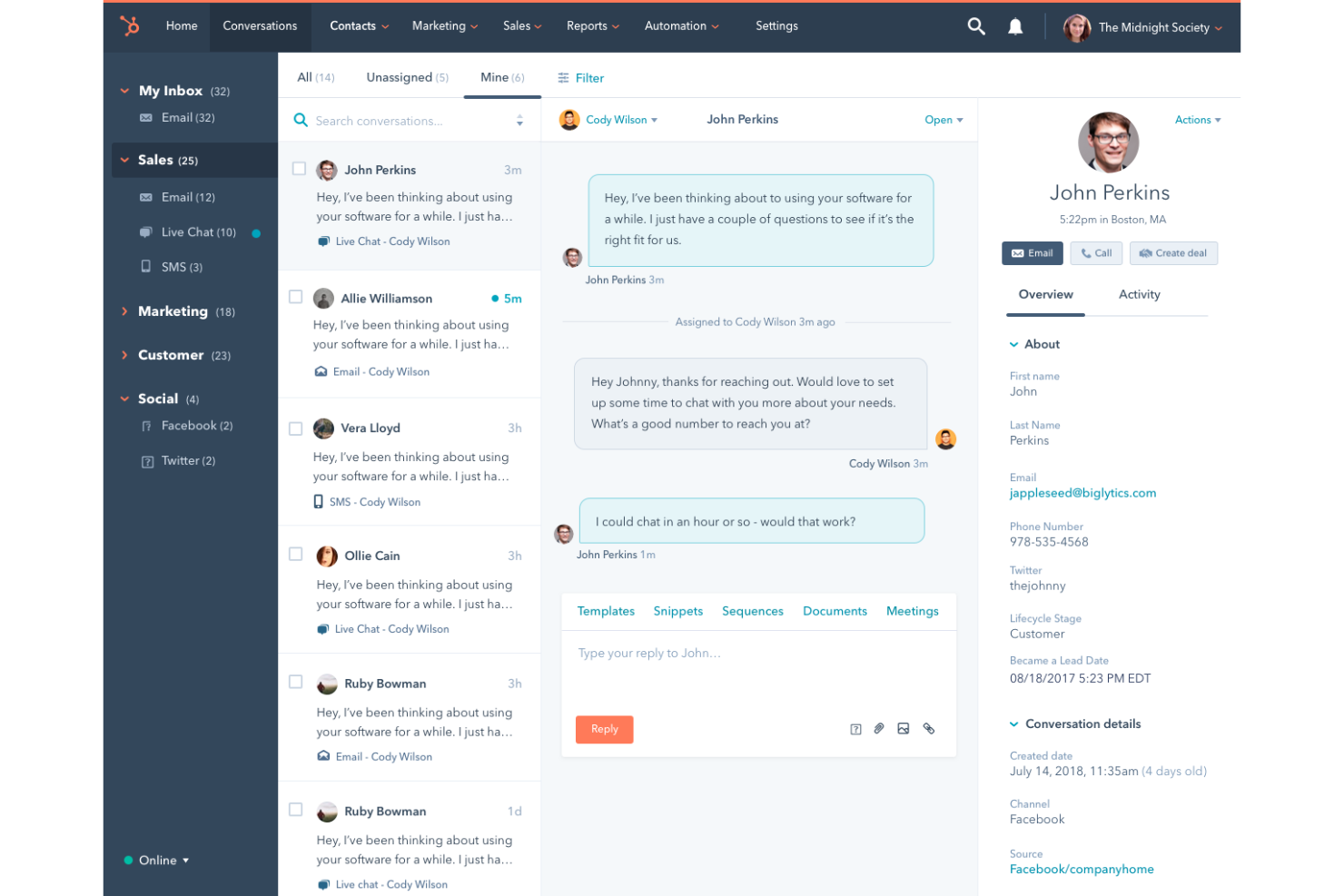
HubSpot CRM è una piattaforma CRM basata sul cloud che include la gestione dei contatti, il monitoraggio delle trattative, l'invio di email, la programmazione delle riunioni e la gestione della pipeline di vendita attraverso hub di marketing, vendite e assistenza connessi.
A chi è più adatto HubSpot CRM?
HubSpot CRM è particolarmente adatto alle aziende di servizi professionali in crescita, dove i team di marketing e vendite devono lavorare con dati condivisi relativi ai contatti e alla pipeline.
Perché ho scelto HubSpot CRM
HubSpot CRM si è guadagnato un posto nella mia selezione perché la cronologia condivisa dei contatti offre ai team di marketing e vendite una visione unica di ogni punto di contatto, dal clic iniziale sulla campagna di generazione dei lead fino alla chiusura della trattativa. Apprezzo in particolare il modo in cui il punteggio dei lead consente al marketing di definire criteri di qualificazione che il team vendite può consultare prima di effettuare una chiamata. Il programmatore di riunioni integrato e le sequenze email permettono a entrambi i team di utilizzare lo stesso strumento senza duplicare il lavoro.
Funzionalità principali di HubSpot CRM
- Gestione della pipeline delle trattative: Crea e personalizza le pipeline di vendita con fasi delle trattative gestibili tramite trascinamento, che riflettono l'effettivo processo di vendita della tua azienda.
- Previsioni di vendita: Proietta i ricavi in base alla fase della pipeline, all'importo della trattativa e alla data di chiusura da un'apposita dashboard per le previsioni.
- Dashboard di report personalizzate: Crea report su contatti, trattative e attività utilizzando un generatore di report con funzionalità di trascinamento.
- Generazione di preventivi: Crea e invia preventivi personalizzati direttamente dalla scheda di una trattativa senza uscire dal CRM.
Integrazioni di HubSpot CRM
Il Marketplace delle app di HubSpot ospita oltre 1.000 integrazioni, inclusi strumenti come Salesforce, Slack, Gmail, Google Calendar, Jira, Mailchimp, Calendly, Zendesk, WordPress e QuickBooks. È disponibile anche Zapier per collegare HubSpot ad app aggiuntive, mentre per le integrazioni personalizzate viene offerta un'API.
Pros and Cons
Pros:
- Dati condivisi tra marketing, vendite e assistenza
- Automazione del marketing integrata insieme agli strumenti di vendita
- Il monitoraggio dei visitatori del sito web identifica i potenziali clienti anonimi
Cons:
- L'automazione dei flussi di lavoro limita i processi complessi in più fasi
- Le funzionalità principali sono disponibili solo nei piani con prezzo più elevato

Ideale per la consegna dei progetti collegata alle vendite

Insightly è una piattaforma CRM che combina la gestione delle pipeline, il monitoraggio dei contatti e strumenti integrati di consegna dei progetti, consentendo ai team di trasformare le trattative concluse in progetti monitorati senza lasciare la piattaforma.
Per chi è meglio Insightly?
Insightly è ideale per studi di consulenza e agenzie dove gli account manager si occupano sia della chiusura delle trattative sia della consegna al cliente nello stesso sistema.
Perché ho scelto Insightly
Ho scelto Insightly tra i migliori perché è l’unico CRM che ho utilizzato in cui un’opportunità vinta si trasforma in un progetto attivo con un solo clic. Il progetto eredita i contatti originali, le note e i dati dei campi personalizzati raccolti durante il ciclo di vendita. Apprezzo anche che le pipeline di progetto utilizzino la stessa struttura a fasi delle pipeline di vendita, così i team di delivery lavorano in un ambiente familiare senza bisogno di altri strumenti o processi di passaggio.
Funzionalità principali di Insightly
- Set di attività: Attiva sequenze predefinite di compiti ed eventi quando una trattativa o un progetto passa a una nuova fase.
- Collegamento delle relazioni: Mappa le connessioni tra contatti, organizzazioni e opportunità per mostrare come sono collegati i clienti.
- Instradamento lead: Assegna automaticamente i lead in entrata a un membro specifico del team in base a regole definite.
- Reportistica integrata: Genera dashboard su pipeline di vendita, stato dei progetti e attività del team in un’unica visualizzazione.
Integrazioni Insightly
Insightly offre decine di integrazioni native, tra cui DocuSign, QuickBooks, PandaDoc, Xero, MailChimp, Slack, Zoom, Evernote e Unbounce, oltre a integrazioni con Google e Microsoft. Sono disponibili oltre 1.000 integrazioni aggiuntive tramite il componente aggiuntivo AppConnect di Insightly. Insightly fornisce anche un'API per integrazioni personalizzate e si collega con Zapier.
Pros and Cons
Pros:
- Trasforma immediatamente le trattative vinte in progetti monitorati
- Il collegamento delle relazioni mappa i contatti tra organizzazioni
- Pipeline personalizzabili sia per vendite che delivery
Cons:
- Reportistica e automazione disponibili solo nelle versioni superiori
- Rallentamenti quando si gestiscono set di dati di grandi dimensioni

Ideale per gestire le operazioni di un'agenzia a 360 gradi
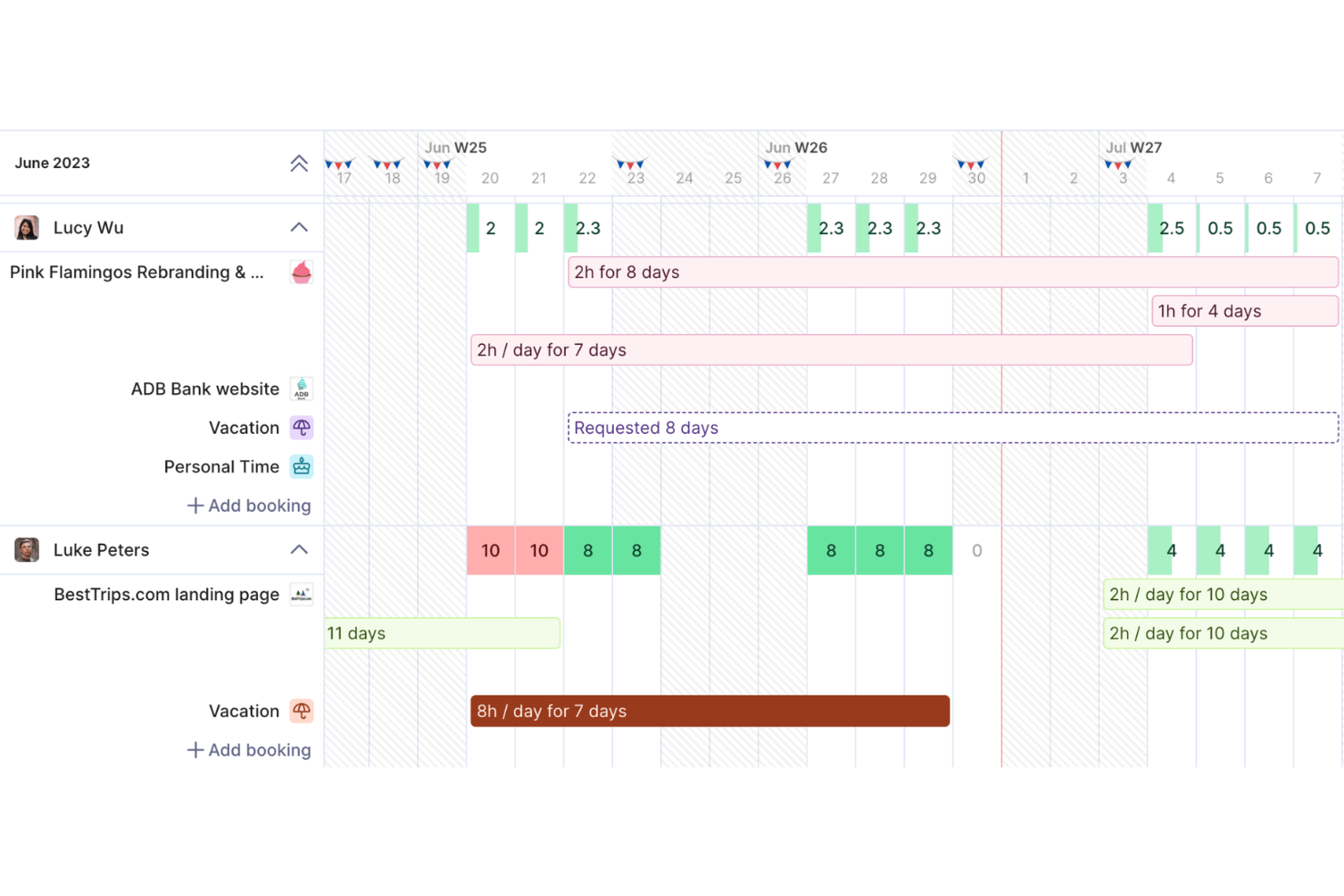
Productive è una piattaforma di gestione per agenzie che copre gestione progetti, pianificazione delle risorse, CRM di vendita, rilevazione delle ore lavorate, budgeting, fatturazione e previsioni finanziarie in uno spazio di lavoro collegato unico.
Per chi è ideale Productive?
Productive è particolarmente adatto per agenzie digitali, creative e di marketing che devono gestire il lavoro per i clienti, le ore fatturabili e la redditività da un'unica piattaforma.
Perché ho scelto Productive
Ho scelto Productive tra i migliori perché è uno dei pochi strumenti in cui una trattativa vinta si trasforma direttamente in un progetto attivo, con budget, contatti e contesto del cliente già pronti. Mi piace che il monitoraggio della redditività in tempo reale sia il fulcro di tutto: mentre il mio team registra tempi, costi e dati sui margini, questi si aggiornano istantaneamente, così non devo attendere i report mensili. Il generatore di scenari mi permette anche di confrontare modelli di prezzo e pianificazione delle risorse prima di fare una proposta, cosa che trovo particolarmente utile per proteggere i margini nei lavori a tariffa fissa.
Funzionalità principali di Productive
- Pianificazione delle risorse: Pianifica i membri del team in base alla disponibilità, alle competenze e all'anzianità su progetti attuali e futuri con una panoramica visiva della capacità.
- Vista diagramma di Gantt: Mappa le tempistiche dei progetti, le dipendenze dei compiti e le milestone in una interfaccia Gantt drag-and-drop che si aggiorna con l'avanzamento del lavoro.
- Bozza di fatture automatizzata: Genera bozze di fattura direttamente dal tempo registrato e dai budget approvati senza inserimento manuale dei dati.
- Rilevazione dei ricavi: Monitora i ricavi riconosciuti rispetto a quelli differiti su progetti attivi e contratti clienti dalla stessa piattaforma.
Integrazioni di Productive
Productive offre integrazioni native con Jira, HubSpot, Xero, QuickBooks, Sage, Google Calendar, Gmail, Microsoft Outlook, Slack e BambooHR, oltre a diversi altri connettori di contabilità e HR. Si collega anche con Zapier e fornisce un'API aperta con supporto per webhook per integrazioni personalizzate.
Pros and Cons
Pros:
- Le trattative si trasformano direttamente in progetti attivi
- Monitoraggio della redditività in tempo reale per progetto
- Unifica CRM, rilevazione delle ore lavorate e fatturazione
Cons:
- Le formule nei report non offrono una flessibilità avanzata
- L'interfaccia può risultare a volte lenta
New Product Updates from Productive
Productive Adds Voice Dictation, Slack Connector, Proposals, and Overtime
Productive adds voice dictation, a Slack Connector, proposal controls, and overtime tracking. These updates support faster AI interactions, client proposals, and time management. For more information, visit Productive’s official site.

BigTime
Ideale per monitorare tempi e spese di progetto

BigTime è una piattaforma di automazione per i servizi professionali (PSA) che copre monitoraggio di tempi e spese, gestione di progetti e portfolio, pianificazione delle risorse, definizione dell’ambito e preventivazione, fatturazione e reportistica assistita da IA per aziende di consulenza.
Per chi è ideale BigTime?
BigTime è particolarmente adatto a società di servizi professionali di medie dimensioni nei settori della consulenza, contabilità, ingegneria e servizi IT che fatturano i clienti a ore.
Perché ho scelto BigTime
BigTime merita il suo posto nella mia lista grazie a quanto integra strettamente la tracciatura del tempo e delle spese con la fatturazione e i dati finanziari dei progetti. L’ho scelto perché la vista 'budget vs. consuntivo' si aggiorna in tempo reale, così posso rilevare se un progetto sta sforando il budget prima che venga inviata la fattura, non dopo. Mi piace anche l’Expense Agent, che acquisisce, categorizza e indirizza le ricevute per l’approvazione senza inserimento manuale. Questo tipo di dettaglio è fondamentale quando si fattura ai clienti e occorre contabilizzare con precisione ogni spesa.
Funzionalità principali di BigTime
- Pianificazione delle risorse: Assegna il personale ai progetti per ruolo o dipartimento, con rilevamento dei conflitti e monitoraggio dell’utilizzo in tutto il team.
- Definizione dell’ambito e preventivazione: Crea preventivi di progetto basandoti su costi e margini reali, con controlli su prezzi, sconti e ambito di lavoro.
- Workflow di fatturazione: Personalizza le fatture per singolo cliente, sincronizza con QuickBooks o Sage Intacct e automatizza la fatturazione per ridurre gli errori.
- Assistente IA: Interroga in tempo reale i margini di progetto, la capacità produttiva e i colli di bottiglia grazie allo strumento integrato di reportistica IA di BigTime.
Integrazioni con BigTime
BigTime offre integrazioni native con QuickBooks, Sage Intacct, Xero, NetSuite, Salesforce, HubSpot, Microsoft Dynamics CRM, Jira, BambooHR e Zendesk. Si collega inoltre a provider di identità come Okta e Microsoft Entra ID, e include una REST API e BigTime DataHub per integrazioni personalizzate e reportistica avanzata tramite strumenti come Power BI e Tableau.
Pros and Cons
Pros:
- Monitoraggio in tempo reale del budget vs. consuntivo
- Collega le registrazioni del tempo direttamente alle fatture
- Cattura integrata delle spese fornitore per progetto
Cons:
- Supporta solo due livelli di profondità delle attività
- L’app mobile può risultare macchinosa su Android

Accelo
Ideale per l'automazione dei flussi di lavoro nelle attività per i clienti

Accelo è una piattaforma di automazione per servizi professionali (PSA) potenziata dall'IA che connette la gestione delle opportunità, l'erogazione dei progetti, la pianificazione delle risorse e il monitoraggio finanziario in un sistema unico.
Per chi è ideale Accelo?
Accelo è particolarmente adatto a piccole e medie imprese di servizi professionali nei settori della consulenza, dei servizi IT e delle agenzie di marketing che gestiscono lavori ricorrenti per i clienti.
Perché ho scelto Accelo
Ho inserito Accelo tra le mie migliori scelte per il modo in cui gestisce il passaggio tra vendita e consegna. Quando un affare viene chiuso nel CRM, Accelo genera automaticamente un progetto da quell'opportunità, popolando attività, tempistiche e budget da un modello. Apprezzo anche la sua automazione dei flussi di lavoro basata su trigger, che fa avanzare il lavoro attraverso le varie fasi, invia aggiornamenti ai clienti e riassegna le attività senza intervento manuale. In questo modo, le attività ricorrenti per i clienti procedono senza che nessuno debba rincorrerle.
Funzionalità principali di Accelo
- Gestione dei contratti ricorrenti: Monitora i budget dei contratti a tempo, le ore e i cicli di rinnovo rispetto ai contratti clienti attivi.
- Pianificazione delle risorse assistita dall'IA: Abbina il personale ai progetti in base a competenze, disponibilità e carico di lavoro utilizzando i suggerimenti dell'IA.
- Gestione delle variazioni di ambito: Segnala e gestisce il lavoro extra per proteggere i budget e i margini dei progetti.
- Dashboard di report personalizzati: Crea report su utilizzo, redditività e performance finanziaria dell'intero portfolio progetti.
Integrazioni Accelo
Accelo offre oltre 30 integrazioni native, tra cui Salesforce, HubSpot, QuickBooks, Xero, Sage Intacct, Jira, Google Workspace, Microsoft 365, Slack ed Expensify. Si collega inoltre a Zapier e mette a disposizione una REST API per integrazioni personalizzate.
Pros and Cons
Pros:
- Cattura automatica delle email per ogni scheda cliente
- Monitoraggio dei contratti a tempo con rinnovi integrati
- Budget in tempo reale rispetto ai consuntivi per ogni progetto
Cons:
- Personalizzare in profondità i report è complicato
- L'app mobile non ha tutte le funzionalità della versione desktop
New Product Updates from Accelo
Accelo Adds Quote Designer and Pipeline Management
Accelo adds Quote Designer, enhanced pipeline views, and quote tracking with version history. This helps teams create proposals and manage opportunities from scoped work. For more information, visit Accelo’s official site.
Zoho CRM
Ideale per comunicazioni multicanale con i clienti

Progettato per la gestione delle vendite e dei clienti, Zoho CRM riunisce il monitoraggio della pipeline, la gestione dei contatti, l'automazione dei flussi di lavoro e gli strumenti di comunicazione multicanale in un'unica piattaforma.
A chi è rivolto Zoho CRM?
Zoho CRM è ideale per team di servizi professionali focalizzati sulle vendite che necessitano di un sistema centralizzato per gestire un alto volume di interazioni con i clienti su diversi canali.
Perché ho scelto Zoho CRM
Ho inserito Zoho CRM nella mia lista dei preferiti per la sua capacità di collegare efficacemente la cronologia delle comunicazioni con i clienti su ogni canale in un'unica vista. Mi piace SalesSignals, che invia notifiche in tempo reale quando un cliente apre una email, risponde sui social media o invia un modulo, così il mio team può seguire il cliente nel momento più opportuno. CommandCenter permette anche di mappare e automatizzare l'intero percorso del cliente su questi canali senza cambiare strumento.
Funzionalità principali di Zoho CRM
- Assistente Zia AI: Valuta i lead, segnala anomalie di vendita e suggerisce la prossima azione migliore in base all'attività nel CRM.
- Gestione dei territori: Assegna account e trattative ai membri del team secondo regole geografiche o per segmento.
- Moduli personalizzati: Ti consente di creare nuovi tipi di record oltre ai contatti e alle trattative standard per adattare la struttura dati della tua azienda.
- Monitoraggio delle fasi della pipeline: Visualizza le trattative aperte per fase, valore e data di chiusura in una bacheca kanban drag-and-drop.
Integrazioni di Zoho CRM
Zoho CRM offre oltre 1.100 integrazioni disponibili nel marketplace, tra cui Google Workspace, Microsoft 365, Slack, PandaDoc, RingCentral, DocuSign, Zoom, QuickBooks e Mailchimp. Si integra anche con Zapier e dispone di un'API per integrazioni personalizzate.
Pros and Cons
Pros:
- Canali email, telefono, chat e social integrati
- Canvas consente di ridisegnare visivamente i layout del CRM Zia
- L'IA valuta i lead e prevede gli esiti delle trattative
Cons:
- La app mobile ha funzionalità limitate e alcuni bug
- I tempi di risposta del supporto variano per i piani non premium
New Product Updates from Zoho CRM

Zoho CRM Adds Workflow Automation for Subform Actions
Zoho CRM now lets you automate subform events with workflow rules, triggering actions when rows are added, edited, or deleted based on conditions. For more information, visit Zoho CRM's official site.
 .
.
Kantata
Ideale per la pianificazione di risorse e capacità

Kantata è una piattaforma di automazione dei servizi professionali (PSA) guidata dall'intelligenza artificiale che unifica la gestione delle risorse, la consegna dei progetti, il monitoraggio finanziario e la previsione della capacità in un unico sistema progettato per le aziende di servizi.
A chi è più adatta Kantata?
Kantata è particolarmente adatta ad aziende di servizi professionali di medie e grandi dimensioni nei settori della consulenza, IT e marketing che devono gestire una complessa allocazione delle risorse su più progetti simultanei.
Perché ho scelto Kantata
Kantata si guadagna un posto tra i migliori nella mia shortlist per il modo in cui gestisce la pianificazione delle risorse e della capacità su larga scala. Apprezzo la sua previsione guidata dall'IA, che abbina il personale disponibile alla domanda prevista dei progetti prima che si crei un problema. In pratica, significa che il mio team può visualizzare tassi di utilizzo, disponibilità di competenze e vincoli di capacità sull'intero portafoglio in un'unica schermata. Il livello Agentic Business Intelligence mette inoltre in evidenza informazioni predittive senza bisogno di uno strumento BI separato, un aspetto fondamentale quando si gestiscono incarichi complessi e simultanei.
Funzionalità principali di Kantata
- Monitoraggio di tempo e spese: Registra ore fatturabili e non fatturabili direttamente sui progetti, con flussi di approvazione incorporati per fogli ore e spese.
- Gestione finanziaria dei progetti: Monitora budget, margini e riconoscimento dei ricavi in tempo reale, con fatturazione collegata direttamente alle milestone di progetto o al tempo registrato.
- Rilevamento dello scope creep: Identifica rischi di consegna e attività fuori dallo scope prima che abbiano impatto sugli esiti per il cliente o sui margini del progetto.
- Expertise Agent: Descrivi ciò di cui hai bisogno in linguaggio naturale e il sistema AI di Kantata reperisce contesto in tutta la tua organizzazione per agire in autonomia.
Integrazioni di Kantata
Kantata offre integrazioni native con Salesforce, QuickBooks e Google Workspace, oltre che con NetSuite e Sage Intacct. Le integrazioni aggiuntive includono HubSpot, Slack, Jira e Zoom. Kantata supporta anche strumenti middleware come MuleSoft e Workato, fornisce oltre 1.200 connettori preconfigurati tramite la piattaforma Kantata Connect e offre un'API per integrazioni personalizzate.
Pros and Cons
Pros:
- Assegnazione risorse per competenze tra i progetti
- Monitoraggio in tempo reale dei margini per ogni collaborazione
- Opzioni sia native Salesforce che open infrastructure
Cons:
- La configurazione dei progetti richiede molti passaggi
- Campi personalizzati limitati nei modelli di attività
New Product Updates from Kantata

Kantata Adds Access Group Change History
Kantata adds Access Groups History, letting account administrators track changes to group details, membership, and permissions in Recent History. The update also makes these events available through the Subscribed Events API for broader monitoring. For more information, visit Kantata’s official site.
 .
.
Copper
La migliore integrazione con Google Workspace


Scoro
Ideale per la conversione da preventivo a progetto con fatturazione

Scoro è una piattaforma PSA e CRM progettata appositamente per le aziende di servizi professionali, che combina la gestione dei contatti e della pipeline, la gestione dei progetti, il monitoraggio del tempo, la creazione di preventivi, la fatturazione e la reportistica finanziaria in un unico sistema integrato.
Per chi è più adatto Scoro?
Scoro è particolarmente adatto alle aziende di servizi professionali—società di consulenza, agenzie e fornitori di servizi IT—che hanno bisogno di collegare la pipeline delle vendite, la gestione dei progetti e la fatturazione in un unico sistema.
Perché ho scelto Scoro
Ho scelto Scoro come una delle migliori soluzioni perché la conversione da preventivo a progetto è la più completa che abbia visto in questa categoria. Quando un'opportunità viene vinta, i servizi preventivati, i ruoli e le stime dell'impegno vengono trasferiti direttamente in un progetto attivo, quindi nulla deve essere reinserito o va perso nel passaggio. La matrice di stima dei preventivi consente di suddividere i risultati da consegnare per ruolo e impegno, con visibilità sui margini prima ancora dell'inizio del lavoro: è esattamente il modo per evitare di accettare ambiti di progetto non redditizi.
Funzionalità principali di Scoro
- Pianificatore visivo delle risorse: Una vista per bilanciare il carico di lavoro che mostra in tempo reale la capacità del team nei progetti attivi e futuri.
- Gestione dei contratti continuativi: Supporto integrato per i cicli di fatturazione ricorrenti, così puoi gestire i clienti con contratti continuativi senza configurare manualmente le fatture per ogni periodo.
- Sincronizzazione contabile bidirezionale: L'integrazione bidirezionale nativa con Xero, QuickBooks, Sage Intacct ed Exact Online mantiene i dati finanziari accurati tra i sistemi.
- Assistente IA ELI: Uno strumento di IA integrato che risponde a domande in linguaggio naturale sui dati aziendali e genera report su richiesta.
Integrazioni di Scoro
Scoro offre integrazioni native con Xero, QuickBooks, Sage Intacct, Exact Online, HubSpot, Salesforce, Slack, Google Workspace, Jira e Microsoft 365. Offre inoltre un'API REST aperta e integrazioni con Zapier.
Pros and Cons
Pros:
- La conversione da preventivo a progetto mantiene coerenti i dettagli
- Monitoraggio in tempo reale dei progetti e della redditività
- Pianificatore avanzato delle risorse per la previsione della capacità
Cons:
- Portale clienti disponibile solo nel piano Enterprise
- Nessuna chat nativa o messaggistica in tempo reale
New Product Updates from Scoro

Scoro Adds Time Mobile App and ELI Improvements
Scoro adds the Scoro Time mobile app for iOS/Android to track time anywhere and expands ELI with attachments, smarter filtering, and trigger-based actions. For more information, visit Scoro's official site.

Ideale per ottenere informazioni sulla redditività dei progetti
Altri software CRM per i servizi professionali
Ecco alcune ulteriori opzioni di software CRM per i servizi professionali che non sono entrate nella mia selezione, ma che vale comunque la pena prendere in considerazione:
- Bitrix24
Ideale per la comunicazione e la collaborazione interne
- Flowlu
Ideale per la gestione integrata della base di conoscenza
- Workamajig
Ideale per la pianificazione delle risorse nelle agenzie creative
- Microsoft Dynamics 365 Sales
Ideale per strumenti avanzati di previsione delle vendite


How I Evaluate CRM Software for Professional Services
I look at these platforms across two layers: the baseline capabilities a tool must have—like converting won deals into projects without re-entry—and the differentiators that set top picks apart.
Core Functionality (Table Stakes For This List)
When I'm selecting tools for my list, I rank each one on a scale from 0 (does not offer the functionality) to 5 (excels in this area) for each core functionality listed below. Then, I calculate the tool's total score into a percentage. Each tool needs to achieve a minimum total score of 65% to be considered for inclusion.
- Client Lifecycle Management: I check whether a platform tracks accounts from first inquiry through repeat engagements, including custom lifecycle stages and engagement history per client.
- Pipeline & Deal Tracking: Services deals aren't one-size-fits-all, so I look for customizable pipelines with weighted probabilities and fields that reflect T&M, retainer, or fixed-fee models.
- Project Conversion: A won deal should flow into a project without anyone re-entering scope, timelines, or budgets—I evaluate how cleanly that handoff happens inside the tool.
- Resource & Engagement Visibility: I look at whether you can see who's assigned where, what capacity looks like across your team, and how that ties back to specific client accounts or deals.
- Time & Billing Integration: Whether native or through a tight connector, I evaluate how the tool links tracked hours and expenses to client records for invoicing and profitability tracking.
- Services Revenue Forecasting: I look for forecasting that goes beyond raw pipeline totals to factor in active project stages, committed retainers, and backlog alongside weighted opportunities.
Once I have a list of tools that meet this criteria, I consider what sets each platform apart.
Differentiating Factors (What Sets Vendors Apart)
Here's how I compare and contrast different vendors:
Standout Features
Resource and capacity forecasting is a big differentiator. I look for tools that use weighted pipeline data to project staffing needs and utilization gaps before deals close. Engagement and proposal management matters just as much, especially when a platform lets you generate SOWs with built-in pricing models like T&M or retainer and push them for e-signature without leaving the CRM. I also evaluate revenue and billing intelligence, checking whether the tool tracks realization rates and lifetime client value across mixed billing arrangements.
Beyond Features
Industry and vertical fit is the first thing I consider. A CRM built for IT consulting firms handles engagements differently than one designed for architecture or accounting practices, and pre-built data models save weeks of configuration. Integration depth matters just as much—I check whether a platform syncs with accounting tools like QuickBooks or Xero and PSA systems so billable hours actually flow into invoicing. I also evaluate total cost of ownership, looking at whether core services features require premium-tier upgrades or expensive add-ons to unlock.
Come scegliere un software CRM per i servizi professionali
È facile perdersi in lunghi elenchi di funzionalità e strutture tariffarie complesse. Per aiutarti a rimanere concentrato mentre affronti il tuo particolare processo di selezione del software, ecco una lista di fattori da tenere presenti:
| Fattore | Considerazioni |
|---|---|
| Scalabilità | La piattaforma supporterà la tua azienda quando acquisirai nuovi clienti, ti espanderai in nuove regioni o aprirai nuovi uffici? |
| Integrazioni | Il software offre connessioni integrate ai tuoi principali strumenti di contabilità, PSA e monitoraggio del tempo? |
| Personalizzazione | Puoi configurare fasi, campi e flussi di lavoro in base alle modalità con cui i tuoi team forniscono i servizi ai clienti? |
| Facilità d'uso | I responsabili di progetto, i consulenti e i partner utilizzeranno effettivamente il sistema ogni giorno oppure creerà ostacoli? |
| Implementazione e inserimento iniziale | Quali risorse sono necessarie per iniziare a lavorare? L'inserimento iniziale guidato dal fornitore è incluso oppure hai bisogno di assistenza esterna? |
| Costo | Il prezzo è chiaro quando aggiungi utenti, moduli o integrazioni? Fai attenzione ai costi nascosti man mano che la tua azienda cresce. |
| Misure di sicurezza | La piattaforma offre autorizzazioni granulari, una crittografia efficace e registri per la verifica dei dati dei clienti e dei progetti? |
| Requisiti di conformità | La soluzione supporta il GDPR, il SOC 2 o altri standard richiesti per la gestione di dati sensibili relativi ai servizi professionali? |
Che cos'è un software CRM per i servizi professionali?
Il software CRM per i servizi professionali è una piattaforma progettata per gestire le relazioni con i clienti, le pipeline di vendita, la realizzazione dei progetti e i processi di fatturazione, adattata alle aziende che offrono servizi basati su progetti o servizi di consulenza. Queste soluzioni centralizzano i dati dei clienti, monitorano le trattative e gli incarichi e collegano l'erogazione operativa ai flussi di lavoro finanziari, semplificando la gestione dell'intero ciclo di vita del cliente e migliorando la collaborazione tra i team.
Caratteristiche dei software CRM per i servizi professionali
Quando selezioni un software CRM per i servizi professionali, presta attenzione alle seguenti caratteristiche chiave:
- Gestione dei contatti e degli account: Archivia, organizza e aggiorna i dati completi dei clienti, tenendo traccia in un unico luogo di ogni interazione, coinvolgimento e cronologia delle relazioni.
- Pipeline di vendita personalizzabili: Configura le fasi delle trattative e le ponderazioni delle probabilità in base al tuo processo di vendita, così da poter monitorare le opportunità di progetto e prevedere accuratamente i ricavi.
- Conversione da trattativa a progetto: Trasforma istantaneamente le trattative concluse in progetti o incarichi, mantenendo tutti i dati pertinenti del cliente, dell'ambito e dell'assegnazione senza reinserimento manuale.
- Pianificazione delle risorse e della capacità: Assegna i membri del team al lavoro per i clienti in base alle competenze e alla disponibilità, garantendo carichi di lavoro equilibrati e un'efficace realizzazione dei progetti.
- Monitoraggio del tempo e delle spese: Registra le ore fatturabili e le relative spese direttamente nel CRM, collegandole ai progetti dei clienti per una fatturazione e un'analisi della redditività accurate.
- Integrazione della fatturazione e delle fatture: Genera fatture, gestisci i compensi ricorrenti e monitora i pagamenti direttamente dalla piattaforma o sincronizzandola con i sistemi contabili esistenti.
- Gestione dei documenti: Archivia, condividi e collabora in modo sicuro su contratti, proposte e dichiarazioni di lavoro all'interno del CRM, con registri di audit per la conformità.
- Autorizzazioni basate sui ruoli: Controlla l'accesso ai dati sensibili in base al ruolo dell'utente o del team, tutelando la riservatezza dei clienti e supportando le esigenze di conformità del settore.
- Monitoraggio delle comunicazioni con i clienti: Registra email, chiamate e riunioni con funzioni di sincronizzazione automatica, così che l'intero team abbia visibilità sulle conversazioni con i clienti in ogni fase.
- Dashboard di reportistica e analisi: Visualizza lo stato della pipeline, le tendenze dei ricavi, l'utilizzo delle risorse e il coinvolgimento dei clienti, aiutando i responsabili a prendere decisioni aziendali informate.
Vantaggi dei software CRM per i servizi professionali
L'implementazione di un software CRM per i servizi professionali offre diversi vantaggi al tuo team e alla tua azienda. Ecco alcuni dei benefici che puoi aspettarti:
- Visibilità completa sul cliente: Ottieni una visione completa di ogni relazione con il cliente collegando informazioni di contatto, proposte, progetti e lavori precedenti in un unico sistema.
- Flusso di lavoro più rapido dalla trattativa al progetto: Converti istantaneamente le trattative concluse in progetti attivi, eliminando l'inserimento manuale dei dati e riducendo i ritardi nell'avvio dei progetti.
- Previsioni delle risorse e dei ricavi: Utilizza i dati in tempo reale sulla pipeline e sulla capacità per prevedere le esigenze di personale, gestire i carichi di lavoro e stimare i ricavi dell'azienda con maggiore precisione.
- Maggiore accuratezza nella fatturazione: Monitora le ore fatturabili, le spese e i compensi ricorrenti direttamente rispetto al lavoro svolto per i clienti, ottenendo una fatturazione precisa e puntuale.
- Cronologia centralizzata delle comunicazioni: Mantieni tutti aggiornati registrando email, chiamate, documenti e riunioni con i clienti, per una migliore collaborazione e continuità.
- Maggiore sicurezza dei dati: Proteggi le informazioni sensibili sui clienti e sui progetti con accessi basati sui ruoli e registri di audit che supportano la conformità nei settori regolamentati.
- Migliore processo decisionale: Sfrutta le funzioni integrate di analisi e reportistica per individuare le tendenze, misurare la redditività dei progetti e orientare la strategia commerciale e operativa.
Costi e prezzi dei software CRM per i servizi professionali
La selezione di un software CRM per i servizi professionali richiede la comprensione dei diversi modelli e piani tariffari disponibili. I costi variano in base alle funzionalità, alle dimensioni del team, ai componenti aggiuntivi e ad altri fattori. La tabella seguente riassume i piani più comuni, i relativi prezzi medi e le funzionalità tipicamente incluse nelle soluzioni software CRM per i servizi professionali:
Tabella comparativa dei piani dei software CRM per i servizi professionali
| Tipo di piano | Prezzo medio | Funzionalità comuni |
|---|---|---|
| Piano gratuito | $0 | Gestione di base dei contatti, pipeline limitate e reportistica semplice. |
| Piano personale | $10-$25/utente/mese | Gestione dei contatti, pipeline personalizzabili, conversione di base dei progetti e supporto per un singolo utente. |
| Piano aziendale | $30-$55/utente/mese | Supporto multiutente, gestione dei progetti e delle risorse, monitoraggio del tempo, integrazione della fatturazione e reportistica avanzata. |
| Piano per grandi aziende | $60-$120/utente/mese | Autorizzazioni avanzate, supporto per più entità, strumenti di conformità, accesso API, integrazioni premium e assistenza all'avvio. |
Domande frequenti sul software CRM per i servizi professionali
Ecco alcune risposte alle domande più comuni sul software CRM per i servizi professionali:
Cosa distingue il software CRM per i servizi professionali dagli strumenti CRM generici?
Il software CRM per i servizi professionali collega vendite, gestione dei progetti e fatturazione in un unico sistema, offrendo ai team una visione del ciclo di vita del cliente e supportando flussi di lavoro specializzati come proposte, conversione dei progetti e pianificazione delle risorse.
Il software CRM per i servizi professionali può integrarsi con strumenti contabili o PSA?
Sì, la maggior parte delle piattaforme offre integrazioni native o certificate con strumenti di contabilità, monitoraggio del tempo e automazione dei servizi professionali, consentendo di sincronizzare i dati finanziari, monitorare le ore fatturabili e semplificare la fatturazione.
Quanto è semplice implementare un software CRM per i servizi professionali?
Il tempo di implementazione dipende dai sistemi attuali e dalla complessità dei processi. Le piattaforme con configurazioni di settore preimpostate e opzioni di onboarding specifiche per i servizi generalmente riducono i tempi di configurazione e rendono più agevole il lancio per i team non tecnici.
In che modo il software CRM aiuta nella pianificazione dei progetti e delle risorse?
Il software CRM trasferisce i dati relativi alle opportunità e ai progetti nei moduli di pianificazione delle risorse, aiutandoti a prevedere i carichi di lavoro del team, associare le competenze ai progetti in arrivo e individuare potenziali sovraccarichi o carenze di capacità prima che influiscano sulla fornitura del servizio.
È possibile personalizzare i flussi di lavoro e i campi dati per la mia specifica offerta di servizi?
Sì, le principali piattaforme consentono di adattare le fasi delle trattative, i tipi di progetto e i campi dati al modello di erogazione della tua azienda, sia che tu operi con fatturazione oraria, contratti a canone, progetti a prezzo fisso o una combinazione di tipologie di incarico.
Quali tipi di aziende traggono maggiori vantaggi dal software CRM per i servizi professionali?
Società di consulenza, agenzie creative, fornitori di servizi IT, studi legali e altre aziende basate su progetti ottengono il maggior valore, soprattutto quelle che devono collegare acquisizione dei clienti, fornitura dei servizi e fatturazione in un’unica soluzione.