

I 10 migliori software di gestione dell’ufficio progetti basati sull’IA nel 2026

Software per l'ufficio di gestione dei progetti basato sull'IA: selezione


I software per ufficio di gestione dei progetti basati sull'IA utilizzano l'intelligenza artificiale per automatizzare la pianificazione, l'allocazione delle risorse, la reportistica e il processo decisionale per i PMO. Questi strumenti di gestione dei progetti basati sull'IA offrono funzionalità avanzate di intelligenza artificiale che aiutano i team a gestire la complessità, ridurre il lavoro manuale e ottenere risultati migliori. Supportano attività come il brainstorming, l'identificazione dei potenziali rischi e decisioni più consapevoli grazie a informazioni dettagliate in tempo reale. Molte piattaforme includono anche funzionalità avanzate progettate per gestire portafogli di grandi dimensioni, mantenendo al contempo una curva di apprendimento relativamente gestibile. In questa guida troverai le principali piattaforme PMO basate sull'IA, ciò che rende unica ciascuna di esse e come possono aiutarti a portare a termine i progetti con maggiore sicurezza nel 2026.
Perché fidarsi dei nostri consigli sui software
Il nostro team testa e recensisce software dal 2012. In quanto project manager noi stessi, sappiamo quanto sia difficile — e importante — scegliere il software giusto.
Per questa guida, abbiamo valutato gli strumenti attraverso test pratici e ricerche indipendenti, assegnando un punteggio agli strumenti in base ai nostri criteri di selezione. Ci basiamo inoltre sulle competenze di leader di pensiero del settore e di professionisti attivi nella gestione dei progetti.
Le nostre recensioni riflettono il nostro giudizio editoriale umano, non un discorso di vendita.
Revisori esperti:
Tabella comparativa dei software per ufficio di gestione dei progetti basati sull'IA
Questa tabella comparativa riassume i dettagli sui prezzi delle mie migliori selezioni di software per ufficio di gestione dei progetti basati sull’IA:
| Tool | Best For | Trial Info | Price | ||
|---|---|---|---|---|---|
| 1 | Ideale per favorire l'adozione intuitiva dell'AI da parte delle squadre | Prova gratuita di 14 giorni | A partire da $9/utente/mese (con fatturazione annuale) | Website | |
| 2 | Ideale per insight su progetti e portafogli | Prova gratuita + demo gratuita disponibile | Da $10/utente/mese (fatturato annualmente) | Website | |
| 3 | Ideale per la pianificazione delle risorse con IA | Demo gratuita disponibile | Prezzo su richiesta | Website | |
| 4 | Ideale per la gestione di attività tutto-in-uno | Piano gratuito disponibile | Da $7/utente/mese (fatturazione annuale) | Website | |
| 5 | Ideale per l’intelligenza di progetto nei servizi | Demo gratuita disponibile | Prezzo su richiesta | Website | |
| 6 | Ideale per il monitoraggio di progetti in stile foglio di calcolo | Prova gratuita + demo gratuita disponibile | Da $9/membro/mese (fatturato annualmente) | Website | |
| 7 | Ideale per l'automazione collaborativa dei progetti | Prova gratuita di 14 giorni + piano gratuito + demo gratuita disponibili | Da $5/utente/mese (fatturato annualmente) | Website | |
| 8 | Ideale per flussi di lavoro PMO personalizzabili | Prova gratuita di 14 giorni + piano gratuito disponibile | Da $10/utente/mese (fatturato annualmente) | Website | |
| 9 | Ideale per la gestione completa dei progetti | Prova gratuita di 15 giorni + piano gratuito + demo gratuita disponibile | Da $4/utente/mese (fatturazione annuale) | Website | |
| 10 | Ideale per l'ottimizzazione delle risorse in ambienti multi-progetto | Prova gratuita di 30 giorni + demo gratuita disponibile | Da €22,5/mese (fatturazione annuale) | Website |


Recensioni dei software per ufficio di gestione dei progetti basati sull'IA
Di seguito sono riportati i miei riepiloghi dettagliati dei software per ufficio di gestione dei progetti basati sull’IA inclusi nella mia selezione. Le mie recensioni offrono una panoramica dettagliata delle funzionalità, dei casi d’uso migliori e delle integrazioni di ciascuna piattaforma, per aiutarti a trovare quella più adatta alle tue esigenze.

Ideale per favorire l'adozione intuitiva dell'AI da parte delle squadre
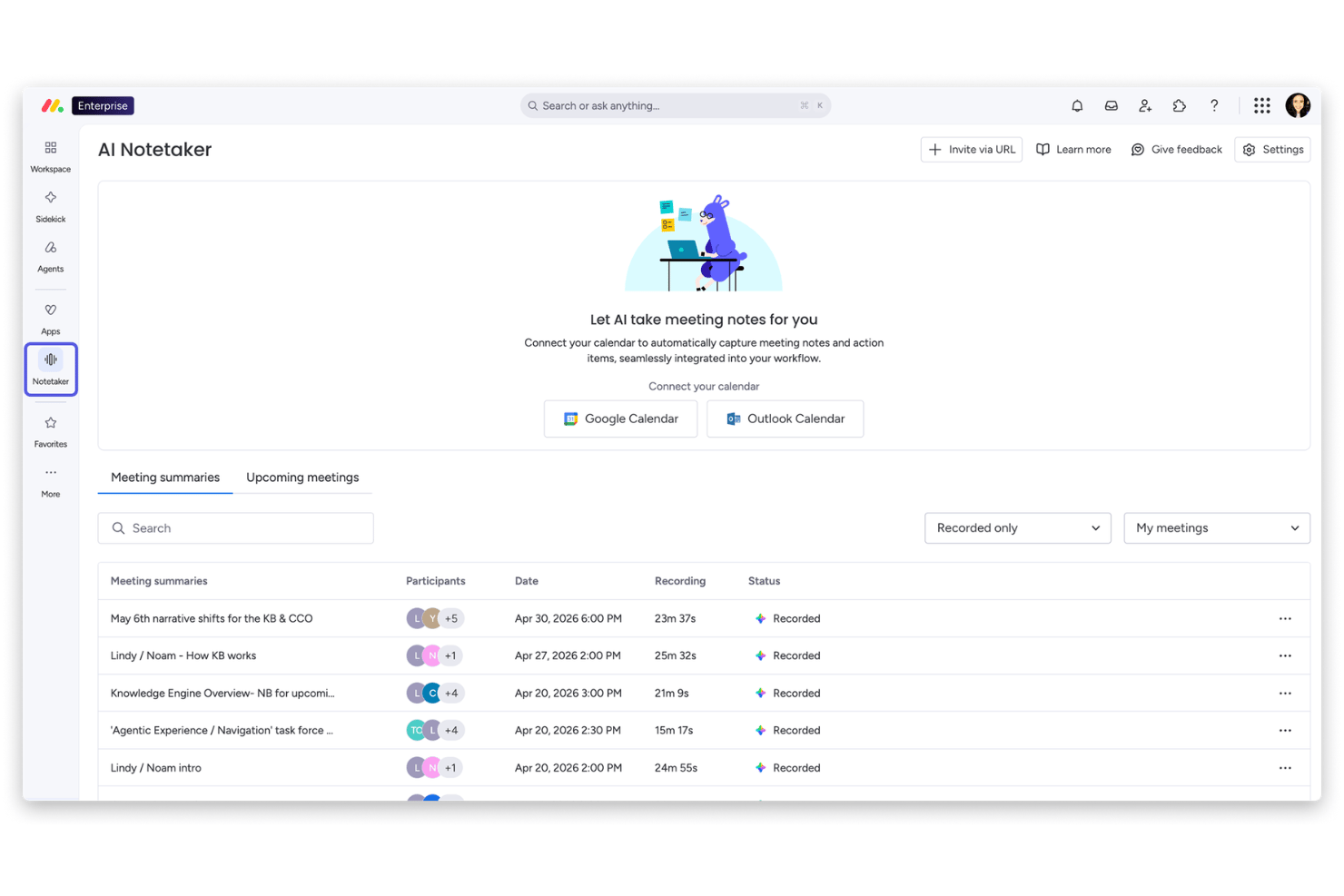
monday AI Workspace è una piattaforma per la gestione del lavoro che combina pianificazione dei progetti assistita dall'AI, pannelli di controllo del portafoglio, automazione dei flussi di lavoro e strumenti di collaborazione tra squadre in un unico spazio di lavoro altamente configurabile.
Per chi è più adatto monday AI Workspace?
È particolarmente adatto alle squadre di medie e grandi imprese che gestiscono più progetti contemporaneamente nelle aree di prodotto, ingegneria e funzioni aziendali.
Perché ho scelto monday AI Workspace
monday AI Workspace si è guadagnato un posto nella mia lista ristretta grazie alla naturalezza con cui le sue funzionalità di AI si integrano nel modo in cui le squadre lavorano già. Apprezzo in particolare l'assistente Sidekick AI, che mette in evidenza il contesto e suggerisce automazioni basate sui modelli di utilizzo effettivi, invece di richiedere una configurazione manuale. Le colonne AI e Agent Workforce consentono alla mia squadra di automatizzare gli aggiornamenti ripetitivi dello stato e i passaggi di consegne senza dover scrivere una singola regola da zero.
Funzionalità principali di monday AI Workspace
- Assistente AI per gli appunti delle riunioni: Trascrive e riassume automaticamente le riunioni, estraendo le principali attività da svolgere e le decisioni e inserendole nelle schede dei progetti.
- Pannello di controllo del portafoglio: Aggrega dati in tempo reale provenienti da più progetti, offrendo una visibilità chiara sullo stato e sulle tendenze del portafoglio.
- Creazione di flussi di lavoro personalizzati: Consente di progettare e automatizzare flussi di lavoro dei progetti composti da più passaggi utilizzando un'interfaccia visiva senza codice.
- Algoritmi di rilevamento dei rischi: Evidenzia potenziali rischi e ostacoli dei progetti utilizzando l'AI, che analizza l'attività e gli aggiornamenti di stato dell'intero portafoglio.
Integrazioni di monday AI Workspace
monday.com offre centinaia di integrazioni native tramite i connettori integrati e il mercato, tra cui Slack, Gmail, Outlook, Google Workspace, Salesforce, Jira, GitHub, Microsoft Teams, Dropbox e Zoom. Supporta inoltre Zapier e mette a disposizione un'API per integrazioni personalizzate.
Pros and Cons
Pros:
- Sidekick AI suggerisce automazioni basate sui modelli della squadra
- L'assistente per gli appunti delle riunioni sincronizza le attività nelle schede dei progetti
- I pannelli di controllo del portafoglio si aggiornano con dati in tempo reale
Cons:
- Funzionalità limitate per l'ottimizzazione delle risorse a livello di portafoglio
- Nessun sistema di assegnazione di punteggi per la definizione delle priorità dei progetti basato sull'AI
New Product Updates from monday AI Workspace
monday AI Workspace Adds Human Approval Routing
monday AI Workspace adds a human-in-the-loop approval block to AI Workflows, sending approval requests and routing workflow paths based on responses. For more information, visit monday AI Workspace's official site.

Celoxis
Ideale per insight su progetti e portafogli

Celoxis è una piattaforma di gestione dei portafogli di progetto per PMO e team aziendali che combina il monitoraggio dei progetti potenziato dall'IA, analisi avanzate, gestione delle risorse e automazione dei flussi di lavoro.
Per chi è ideale Celoxis?
PMO e project manager aziendali che necessitano di una gestione dei portafogli supportata dall'IA e di analisi avanzate per ambienti complessi e multi-progetto.
Perché ho scelto Celoxis
Ho scelto Celoxis come una delle migliori soluzioni perché la sua gestione dei portafogli di progetto basata su IA mi aiuta a dare priorità e a bilanciare le risorse tra più progetti. Utilizzo le sue analisi avanzate per generare report in tempo reale sullo stato del portafoglio e individuare tempestivamente i rischi di progetto. Il mio team si affida a dashboard personalizzabili per monitorare i KPI e visualizzare le dipendenze su vasta scala.
Funzionalità principali di Celoxis
- Gantt interattivi: Pianifica, programma e aggiorna le tempistiche dei progetti con controlli drag-and-drop.
- Gestione dei timesheet: Registra le ore fatturabili e non fatturabili direttamente all'interno della piattaforma.
- Automazione dei flussi di lavoro personalizzati: Crea e automatizza processi di approvazione e flussi di attività.
- Portale clienti: Fornisci agli stakeholder esterni l'accesso agli aggiornamenti di progetto e ai deliverable.
Integrazioni Celoxis
Celoxis offre integrazioni native con Jira, Salesforce, Microsoft Project, Google Drive, Excel, Outlook, Slack, QuickBooks e Trello. È disponibile un'API per integrazioni personalizzate.
Pros and Cons
Pros:
- Pianificazione di risorse e capacità a livello di portafoglio
- Portale clienti integrato per la collaborazione esterna
- Reportistica avanzata con dashboard in tempo reale
Cons:
- Nessuna chat AI o assistente integrato
- Funzionalità Agile board e sprint limitate

Forecast
Ideale per la pianificazione delle risorse con IA
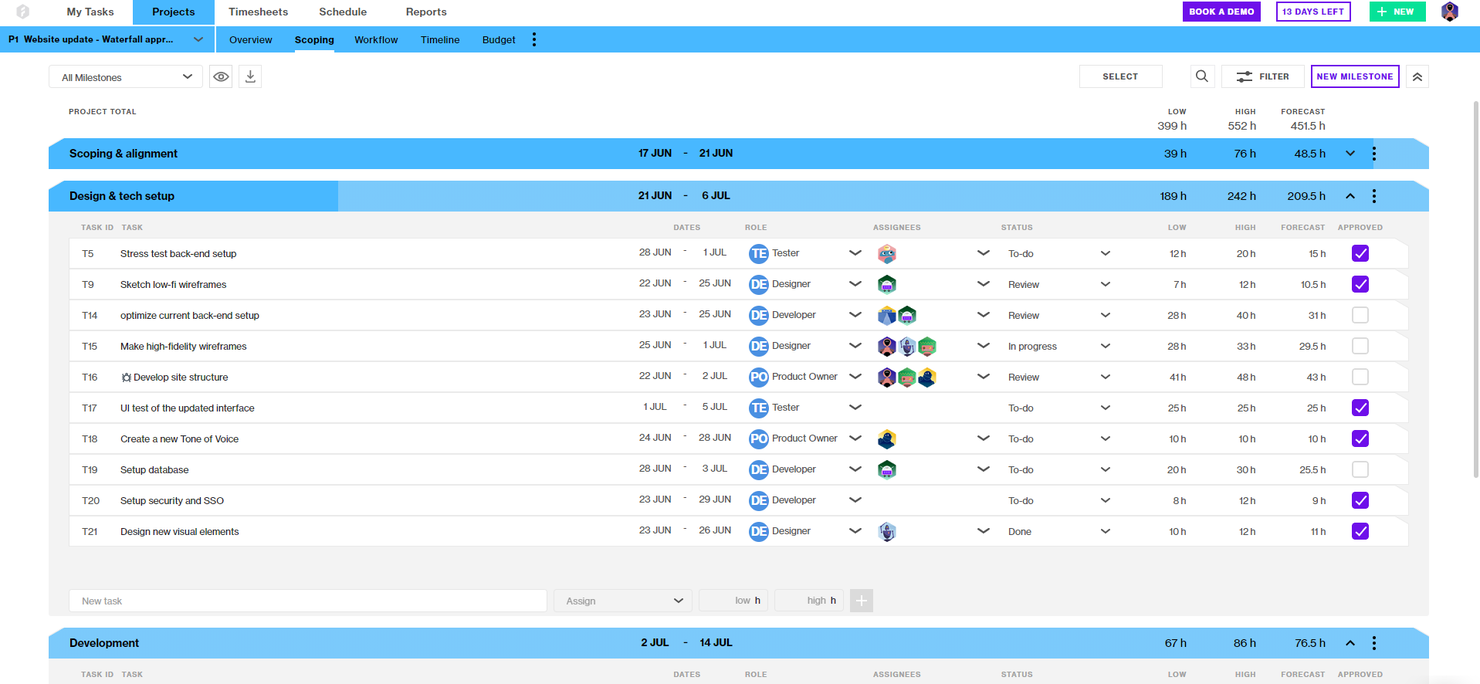
Forecast è una piattaforma di gestione progetti e risorse alimentata dall'IA che unisce pianificazione dei progetti, allocazione delle risorse, rilevazione dei tempi e gestione finanziaria per team che gestiscono portafogli di progetti complessi.
Per chi è più adatto Forecast?
Project manager e responsabili operativi in aziende di servizi professionali di medie e grandi dimensioni che necessitano di una gestione unificata di progetti, risorse e finanze.
Perché ho scelto Forecast
Ho scelto Forecast tra i migliori perché mi affido alla sua gestione AI di risorse, progetti e finanze per mantenere efficiente il mio project office. Utilizzo la pianificazione automatica di Forecast e il bilanciamento del carico di lavoro per ottimizzare le assegnazioni del team su più progetti. Il monitoraggio finanziario integrato mi consente di tenere sotto controllo i budget e i margini in tempo reale senza dover cambiare strumenti.
Caratteristiche principali di Forecast
- Bacheche Kanban: Visualizza e gestisci le attività del progetto con flussi di lavoro Kanban personalizzabili.
- Gestione dei retainer: Tieni traccia e gestisci i retainer ricorrenti dei clienti all'interno dei portafogli di progetti.
- Vista timeline del progetto: Visualizza fasi di progetto, milestone e dipendenze in una singola timeline.
- Impostazioni di autorizzazione personalizzate: Controlla l'accesso e la visibilità degli utenti ai dati sensibili del progetto.
Integrazioni di Forecast
Forecast offre integrazioni native con Jira Cloud, Trello, Azure DevOps, GitHub, GitLab, Salesforce, HubSpot, Slack, QuickBooks e Xero. Si collega inoltre a Zapier e fornisce un'API per integrazioni personalizzate.
Pros and Cons
Pros:
- La pianificazione automatica tramite IA prevede le tempistiche progettuali
- I dati finanziari integrati collegano budget e progetti
- Le heatmap delle risorse mostrano visivamente il carico di lavoro del team
Cons:
- Nessun sistema di gestione documentale integrato
- Nessuna funzione nativa di rilevazione tempi per i singoli task


ClickUp è una piattaforma di gestione progetti basata sull'intelligenza artificiale per team e PMO che combina gestione delle attività, automazione dei flussi di lavoro, collaborazione sui documenti e dashboard personalizzabili.
Per chi è ideale ClickUp?
Team interfunzionali e PMO di aziende tecnologiche di medie e grandi dimensioni che necessitano di gestione progetti e automazione dei flussi di lavoro guidate dall'AI.
Perché ho scelto ClickUp
Ho scelto ClickUp come uno dei migliori perché le sue funzionalità di gestione progetti basate sull'intelligenza artificiale mi permettono di automatizzare la creazione delle attività, riassumere aggiornamenti di progetto e generare azioni direttamente dalle note delle riunioni. Il mio team utilizza le dashboard personalizzabili di ClickUp per monitorare lo stato di salute dei progetti e le dipendenze tra i vari flussi di lavoro. Mi affido al suo assistente di scrittura AI per redigere velocemente documentazione di progetto e report di stato.
Funzionalità chiave di ClickUp
- Whiteboard: Collabora visivamente su piani di progetto e flussi di lavoro in tempo reale.
- Monitoraggio degli obiettivi: Definisci, monitora e aggiorna gli obiettivi di progetto direttamente nel tuo spazio di lavoro.
- Campi personalizzati: Aggiungi campi dati su misura ad attività, elenchi o progetti per un tracciamento avanzato.
- Vista carico di lavoro: Monitora la capacità del team e bilancia gli incarichi tra i vari progetti.
Integrazioni di ClickUp
ClickUp offre oltre 50 integrazioni native, tra cui Slack, GitHub, GitLab, Google Drive, Dropbox, Microsoft Teams, Zoom, Outlook, HubSpot e Zendesk. Si collega con Zapier e mette a disposizione una API per integrazioni personalizzate.
Pros and Cons
Pros:
- Whiteboard integrati per la collaborazione visiva
- Funzionalità avanzate di monitoraggio degli obiettivi e OKR
- Supporta regole di automazione dei flussi di lavoro complesse
Cons:
- Le funzionalità AI richiedono piani di livello superiore
- La reportistica portfolio è limitata per i grandi PMO

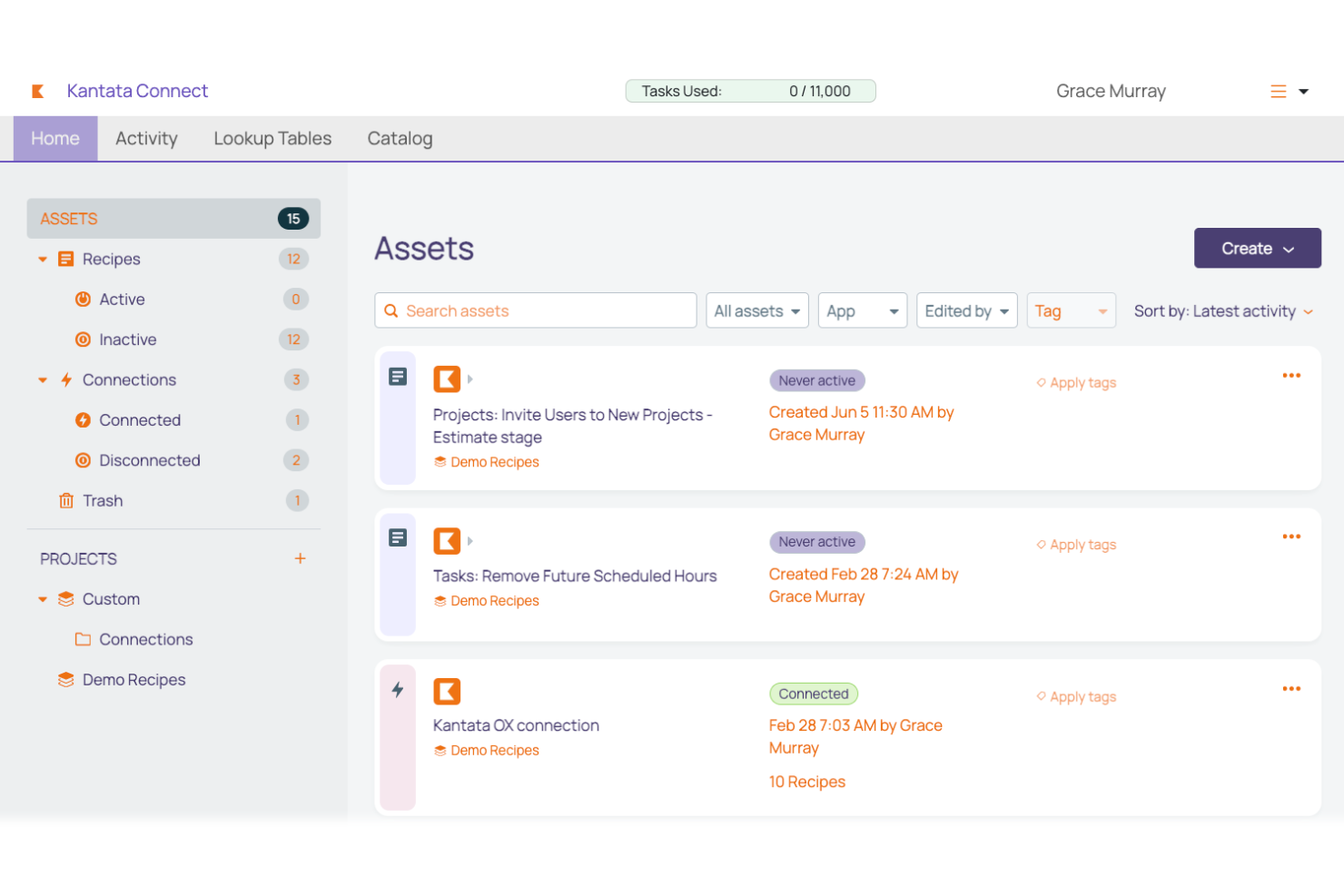
Kantata è una piattaforma di automazione per servizi professionali rivolta agli uffici di gestione progetti che combina gestione delle risorse, contabilità di progetto, monitoraggio del tempo e collaborazione sui progetti in un unico sistema.
Per chi è più indicato Kantata?
Responsabili di progetto e leader delle operazioni presso grandi aziende di servizi professionali che necessitano di avanzate funzionalità di consegna dei progetti e gestione delle risorse.
Perché ho scelto Kantata
Ho scelto Kantata perché avevo bisogno di una piattaforma progettata appositamente per la consegna di progetti di servizi professionali su larga scala. Utilizzo le sue funzionalità di previsione delle risorse e contabilità di progetto per gestire portafogli di clienti complessi. Il mio team si affida al monitoraggio avanzato dell'utilizzo e all'analisi dei margini per mantenere i progetti redditizi e nei tempi previsti.
Caratteristiche principali di Kantata
- Workspace di progetto: Centralizza file, discussioni e aggiornamenti del progetto in un unico posto.
- Permessi basati sul ruolo: Controlla l'accesso ai dati sensibili di progetto e finanziari.
- Monitoraggio di tempi e spese: Consente agli utenti di registrare ore fatturabili e spese direttamente sulla piattaforma.
- Dashboard personalizzate: Permette ai team di creare viste su misura per metriche di progetto e KPI.
Integrazioni di Kantata
Kantata offre integrazioni native con Salesforce, HubSpot, Expensify, Jira, BambooHR e Concur. È disponibile una API per integrazioni personalizzate e sono supportati oltre 1.200 connettori preconfigurati tramite middleware come MuleSoft e Workato.
Pros and Cons
Pros:
- Dashboard di portafoglio per una visibilità multiprogetto
- Gestione degli accordi di retainer per lavori ricorrenti con i clienti
- Le heatmap delle risorse visualizzano il carico di lavoro del team
Cons:
- Opzioni limitate per la personalizzazione dei template di progetto
- Le esportazioni dei report hanno restrizioni di formato

Ideale per il monitoraggio di progetti in stile foglio di calcolo
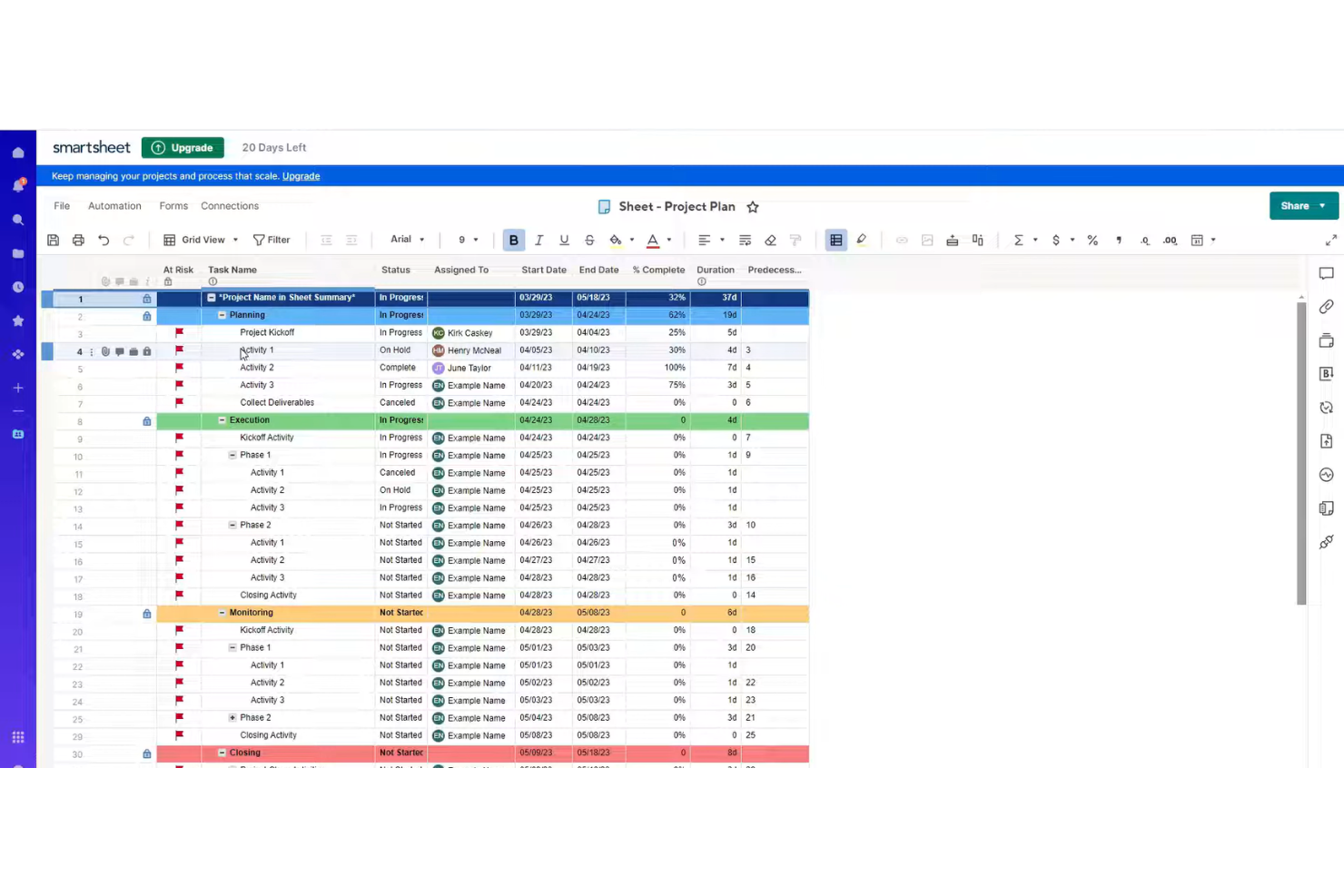
Smartsheet è una piattaforma di gestione progetti e del lavoro che combina il monitoraggio delle attività in stile foglio di calcolo, automazione dei flussi di lavoro, gestione delle risorse e reportistica per team che gestiscono portafogli di progetti complessi.
A chi è più adatto Smartsheet?
Responsabili di progetto e team in aziende di medie e grandi dimensioni che necessitano di una gestione progetti flessibile, ispirata ai fogli di calcolo, con automazione e integrazioni.
Perché ho scelto Smartsheet
Ho scelto Smartsheet come uno dei migliori perché mi affido alla sua interfaccia ispirata ai fogli di calcolo per creare rapidamente piani di progetto personalizzati e automatizzare i flussi di lavoro ripetitivi. Il mio team utilizza le regole di automazione integrate e la formattazione condizionale per gestire approvazioni e aggiornamenti di stato su progetti complessi. Mi piace anche il modo in cui le integrazioni di Smartsheet e i suoi modelli flessibili ci permettono di adattare lo spazio di lavoro man mano che le esigenze del progetto cambiano.
Funzionalità principali di Smartsheet
- Gestione delle risorse: Assegna, monitora e adatta i carichi di lavoro dei team in tempo reale.
- Vista diagramma di Gantt: Visualizza le tempistiche dei progetti e le dipendenze con diagrammi di Gantt interattivi.
- Commenti a livello di cella: Aggiungi contesto e discussione direttamente alle singole celle nei fogli di progetto.
- Promemoria automatici: Imposta promemoria basati su tempo o condizioni per attività e scadenze.
Integrazioni Smartsheet
Smartsheet offre integrazioni native con Google Workspace, Microsoft 365, Slack, Salesforce, Jira, DocuSign, Box, Dropbox, Tableau e Zapier. È disponibile un'API per integrazioni personalizzate.
Pros and Cons
Pros:
- Interfaccia in stile foglio di calcolo che consente una configurazione rapida dei progetti
- Automazione integrata per attività di progetto ripetitive
- Gestione delle risorse con visualizzazioni di assegnazione e carico di lavoro
Cons:
- Funzionalità limitate di previsione progetti basate su intelligenza artificiale
- I diagrammi di Gantt non dispongono di controlli avanzati sulle dipendenze
New Product Updates from Smartsheet

Smartsheet Adds Non-Plan User Management in Admin Center
Smartsheet adds a Non plan users tab to the Seat types and true-up page in Admin Center. This lets system admins review non-plan users and add them to the plan or remove them from the organization in one place. For more information, visit Smartsheet’s official site.
Hive
Ideale per l'automazione collaborativa dei progetti
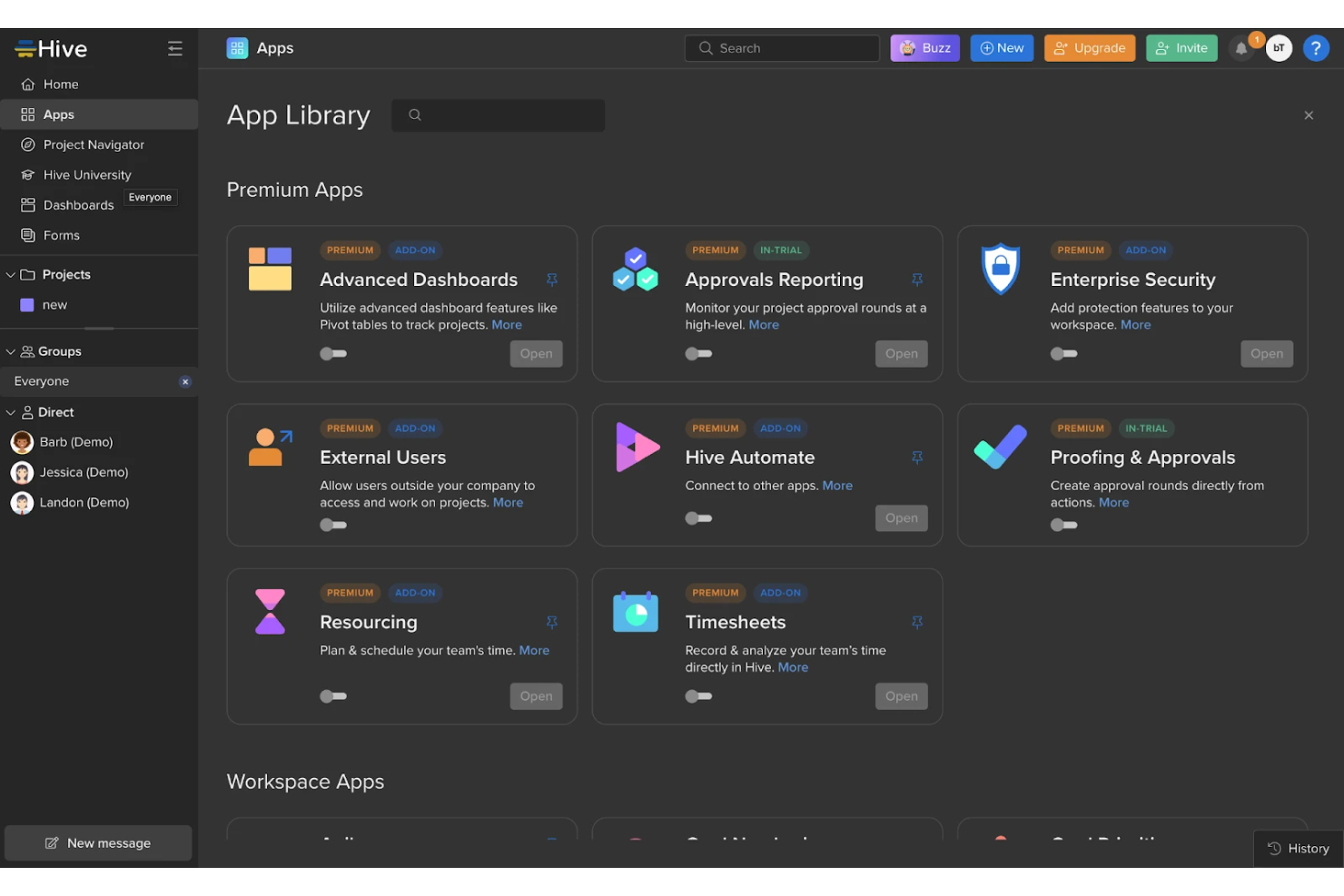
Hive è una piattaforma di gestione dei progetti e collaborazione di squadra che riunisce automazione di attività basata su AI, monitoraggio dei progetti, gestione del tempo e condivisione di documenti in un unico spazio di lavoro.
Per chi è ideale Hive?
Team dinamici in ambito marketing, operations o agenzie creative che necessitano di gestione progetti e collaborazione guidate dall'AI.
Perché ho scelto Hive
Ho scelto Hive tra i migliori perché utilizzo i suoi strumenti di gestione progetti basati su AI per automatizzare le attività ripetitive e generare riepiloghi dei progetti in tempo reale. Il mio team si affida all'assistente AI per scrivere email, creare schede operative e suggerire i prossimi passi direttamente nello spazio di lavoro. Mi piace anche la flessibilità delle viste di progetto di Hive, che ci permette di passare da Gantt a Kanban e al calendario senza perdere il contesto.
Funzionalità chiave di Hive
- Chat in-app: Messaggia direttamente i colleghi all'interno degli spazi di lavoro di progetto.
- Monitoraggio del tempo: Registra le ore e monitora il tempo impiegato nelle attività.
- Revisione e approvazioni: Revisiona e approva documenti, immagini e video in un unico posto.
- Moduli: Raccogli richieste di progetto e feedback tramite moduli personalizzabili.
Integrazioni di Hive
Hive offre integrazioni native con Google Drive, Google Calendar, Dropbox, QuickBooks, Zoom, Microsoft OneDrive e Microsoft Teams. Si connette anche con Zapier e fornisce una API per integrazioni personalizzate.
Pros and Cons
Pros:
- L'assistente AI genera schede operative e riepiloghi
- Revisione integrata per risorse creative
- Varie viste di progetto tra cui Gantt e Kanban
Cons:
- Le funzionalità AI sono limitate ad alcuni flussi di lavoro
- Il diagramma di Gantt può essere lento con progetti di grandi dimensioni

Wrike
Ideale per flussi di lavoro PMO personalizzabili
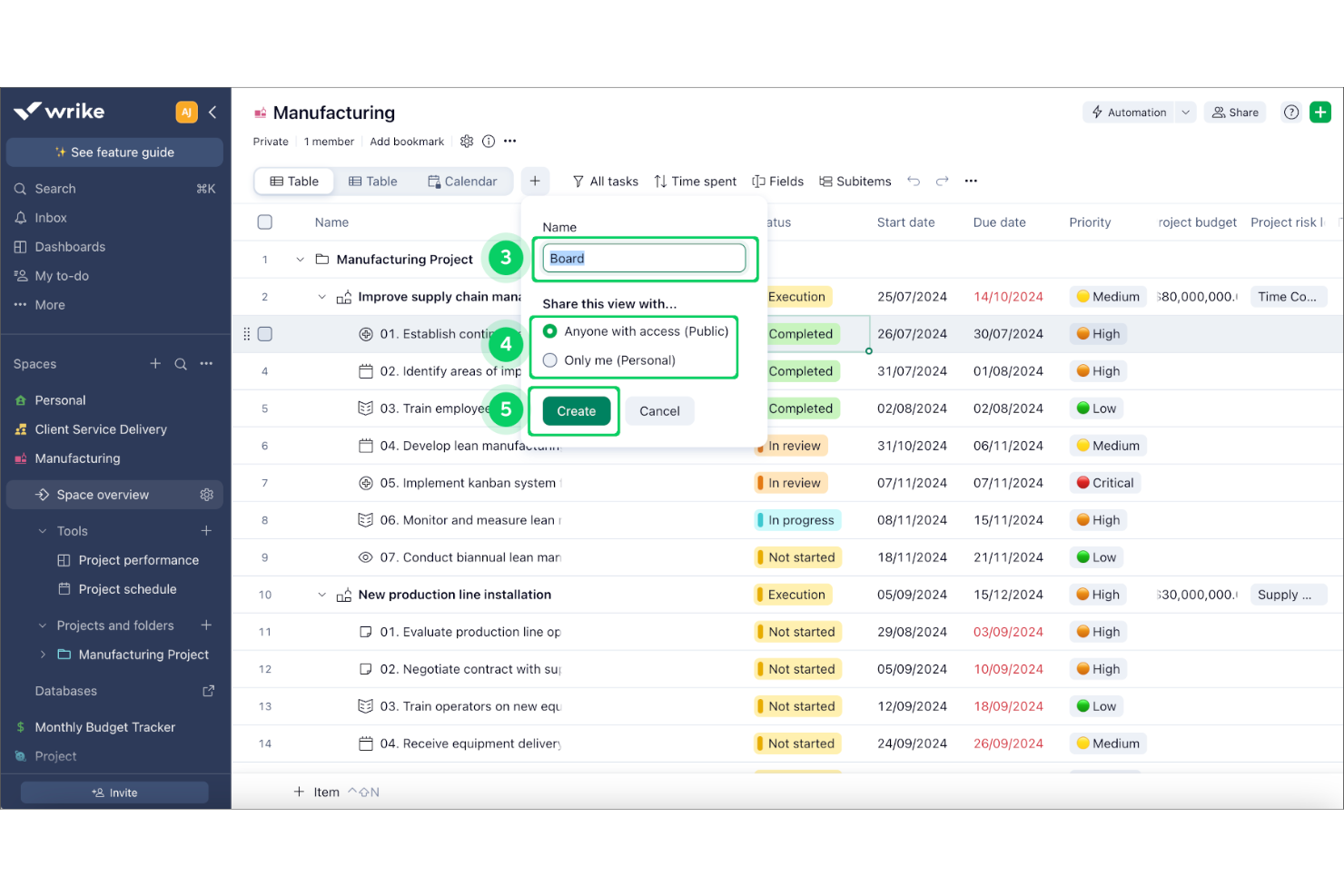
Wrike è una piattaforma software per l’ufficio di gestione progetti alimentata dall’intelligenza artificiale che combina pianificazione dei progetti, automazione dei flussi di lavoro, gestione delle risorse e analisi avanzata per team che gestiscono flussi di lavoro complessi.
Per chi è Wrike?
Uffici di gestione progetti di medie e grandi imprese che coordinano team interfunzionali e progetti complessi.
Perché ho scelto Wrike
Ho scelto Wrike tra i migliori perché la sua piattaforma di gestione del lavoro basata su AI offre previsione automatica del rischio e prioritizzazione intelligente delle attività per portafogli di progetti complessi. Utilizzo l’automazione dei flussi di lavoro per ridurre gli aggiornamenti manuali e mantenere fluido il lavoro tra team. Il mio team si affida alle analisi di Wrike per ottenere intuizioni sullo stato dei progetti e individuare i blocchi prima che diventino problematici.
Caratteristiche principali di Wrike
- Moduli di richiesta personalizzati: Raccogli l’avviamento dei progetti e automatizza la creazione delle attività con moduli configurabili.
- Blueprints: Standardizza progetti e processi ricorrenti utilizzando modelli riutilizzabili.
- Dashboard di gestione delle risorse: Visualizza i carichi di lavoro del team e assegna le risorse tra i progetti.
- Revisione dei documenti: Revisiona, commenta e approva file direttamente all’interno delle attività.
Integrazioni Wrike
Wrike offre centinaia di integrazioni native tramite le sue integrazioni integrate e il marketplace, inclusi Google Workspace, Dropbox, GitHub, Adobe Creative Cloud e Zoom. Supporta anche Zapier e mette a disposizione un’API per integrazioni personalizzate.
Pros and Cons
Pros:
- Previsione dei rischi di progetto e intuizioni guidate dall’AI
- Automazione dei flussi di lavoro e opzioni di assegnazione delle attività
- Moduli di richiesta personalizzati per la raccolta dei progetti
Cons:
- La configurazione dell’automazione può essere complessa per i PMO
- Il sistema di notifiche può sovraccaricare team numerosi
New Product Updates from Wrike
Wrike Adds Klaxoon MCP Integration
Wrike’s Klaxoon MCP integration is now generally available, enabling AI agents to navigate between Wrike tasks and attached whiteboards, read task context, and manage whiteboard attachments via API. For more information, visit Wrike's official site.

Ideale per la gestione completa dei progetti
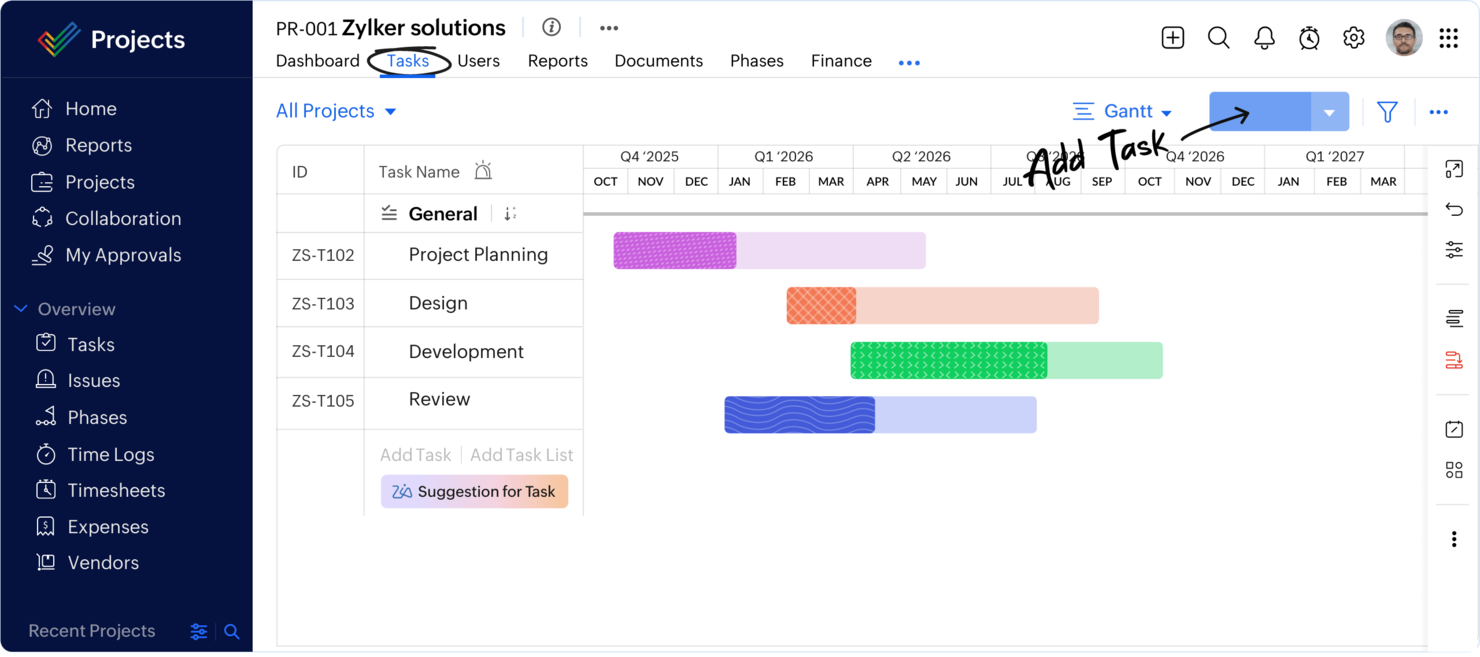
Zoho Projects è una piattaforma di project management basata su cloud per PMO e team che combina gestione delle attività, automazione dei flussi di lavoro, monitoraggio dei progetti potenziato dall'intelligenza artificiale e registrazione delle ore di lavoro integrata.
Per chi è più adatto Zoho Projects?
Project manager e PMO di piccole e medie imprese che necessitano di una gestione progetti guidata dall'intelligenza artificiale e dell'automazione dei flussi di lavoro.
Perché ho scelto Zoho Projects
Ho scelto Zoho Projects come uno dei migliori perché le sue funzionalità di project management potenziate dall'IA mi aiutano ad automatizzare aggiornamenti ricorrenti e prevedere ritardi nei progetti. Il mio team utilizza l'automazione dei flussi di lavoro per snellire approvazioni e attività ricorrenti. Mi affido inoltre alla registrazione delle ore integrata per monitorare il tempo dedicato ai progetti senza uscire dalla piattaforma.
Caratteristiche principali di Zoho Projects
- Costruttore di flussi di lavoro Blueprint: Progetta e automatizza visivamente flussi di lavoro personalizzati per i progetti.
- Diagrammi di Gantt: Pianifica, programma e monitora le tempistiche di progetto con regolazioni drag-and-drop.
- Gestione delle segnalazioni: Registra, assegna e risolvi le problematiche del progetto tramite moduli dedicati.
- Gestione documentale: Archivia, condividi e collabora sui file di progetto direttamente sulla piattaforma.
Integrazioni di Zoho Projects
Zoho Projects offre integrazioni native con Slack, Microsoft Teams, Google Drive, Dropbox, GitHub, Bitbucket, Zoho CRM, Zoho Desk e Zapier. È disponibile un'API per integrazioni personalizzate.
Pros and Cons
Pros:
- Assistente IA prevede ritardi e rischi di progetto
- Gestione integrata delle segnalazioni e del bug logging
- Diagrammi di Gantt con analisi del percorso critico
Cons:
- Nessun modulo integrato per la gestione del portafoglio progetti
- L'allocazione delle risorse non dispone di funzionalità avanzate di previsione
New Product Updates from Zoho Projects
Zoho Projects Adds CodeX Scripts for Custom Modules
Zoho Projects now supports CodeX Scripts for custom modules, enabling conditional logic and rules for creating, updating, and deleting records. For more information, visit Zoho Projects' official site.
 .
.
Epicflow
Ideale per l'ottimizzazione delle risorse in ambienti multi-progetto
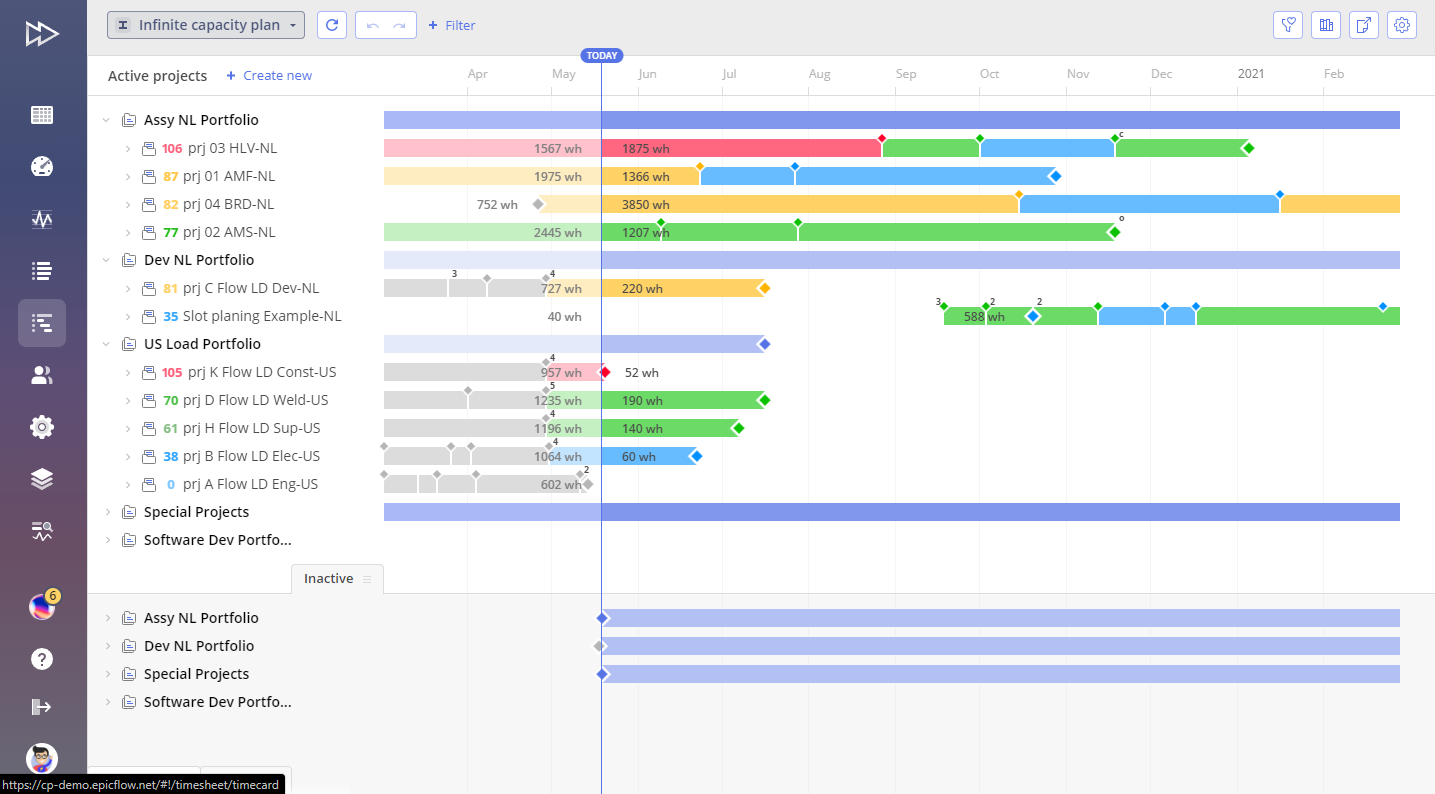
Epicflow è una piattaforma di gestione progetti e risorse basata sull’intelligenza artificiale, progettata per ambienti multi-progetto, che offre funzionalità di bilanciamento del carico di lavoro, simulazione di scenari e analisi avanzate.
Per chi è ideale Epicflow?
Project e resource manager di aziende di medie e grandi dimensioni che gestiscono più progetti simultanei su team complessi.
Perché ho scelto Epicflow
Ho scelto Epicflow perché ho bisogno di una gestione delle risorse guidata dall’AI che possa gestire decine di progetti sovrapposti senza doversi destreggiare manualmente. Uso la visualizzazione pipeline per controllare in tempo reale il flusso dei progetti e individuare i colli di bottiglia prima che si verifichino. Il mio team si affida alla simulazione di scenari per testare variazioni di allocazione delle risorse e prevedere i risultati dei progetti con precisione basata sui dati.
Funzionalità principali di Epicflow
- Motore di prioritizzazione delle attività: Classifica automaticamente le attività in base a vincoli e dipendenze di progetto.
- Integrazione con MS Project e Jira: Sincronizza dati dagli strumenti di project management esistenti per una supervisione unificata.
- Analisi dei dati storici: Analizza le prestazioni dei progetti passati per migliorare la pianificazione futura.
- Dashboard personalizzabili: Gli utenti possono personalizzare le visualizzazioni per carico di lavoro, avanzamento e allocazione delle risorse.
Integrazioni di Epicflow
Epicflow offre integrazioni native con Microsoft Project, Jira Software, Oracle Primavera e sistemi HRM. È disponibile un’API per integrazioni personalizzate con altri strumenti di gestione progetti o risorse.
Pros and Cons
Pros:
- Allocazione delle risorse guidata dall’AI tra più progetti
- Simulazione di scenari per la pianificazione dei progetti
- Visualizzazione in tempo reale del carico di lavoro e dei colli di bottiglia
Cons:
- Funzionalità AI limitate oltre la gestione delle risorse
- Le opzioni di personalizzazione dei report sono piuttosto limitate
Altri software per ufficio di gestione dei progetti basati sull'IA
Ecco alcune altre opzioni di software per ufficio di gestione dei progetti basati sull’IA che non sono state incluse nella mia selezione, ma che vale comunque la pena esaminare:
- Planview
Ideale per la pianificazione di portafoglio su larga scala
- Planisware
Ideale per la gestione di portafogli enterprise
- Prism PPM
Ideale per la gestione agile del portafoglio


Come valuto i software AI per Project Management Office
Ogni strumento in questo elenco deve offrire un'intelligenza artificiale che effettivamente faccia la differenza per i team PMO—mi riferisco a riepiloghi di portafoglio generati automaticamente o a previsioni di rischio che segnalano problemi prima ancora che il responsabile li individui. Suddivido la mia valutazione in funzionalità di base che ogni piattaforma PMO deve avere per qualificarsi e fattori differenzianti che separano le opzioni buone da quelle davvero adatte.
Funzionalità di base (requisiti indispensabili per questo elenco)
Quando seleziono gli strumenti, assegno a ciascuno un punteggio da 0 (non offre la funzionalità) a 5 (eccelle in quest'area) per ogni funzionalità di base elencata qui sotto. Poi calcolo il punteggio totale dello strumento e lo converto in percentuale. Ogni strumento deve raggiungere un punteggio totale minimo del 65% per poter essere incluso.
- Analisi di portafoglio guidata dall'AI: Cerco un'intelligenza artificiale che evidenzi insight sulla salute dell'intero portafoglio—come segnalare un insieme di progetti che tende ad andare oltre il budget—invece di offrire solo dashboard statiche.
- Previsione predittiva dei rischi: Lo strumento dovrebbe prevedere rischi come ritardi sulle tempistiche o strozzature nelle risorse in anticipo, non solo registrarli dopo che un PM li segnala in una riunione.
- Ottimizzazione intelligente delle risorse: Valuto se l'AI consiglia aggiustamenti del personale tra progetti in base a competenze, disponibilità e variazioni di priorità.
- Reportistica di stato automatizzata: Verifico se la piattaforma genera sintesi executive e riepiloghi scritti dall'AI invece di richiedere ai PM di compilare manualmente aggiornamenti settimanali.
- Governance e prioritizzazione AI: È importante la valutazione delle richieste di progetto—cerco un'AI che classifichi le richieste in arrivo in base agli obiettivi strategici, così il PMO può finanziare il lavoro giusto.
- Assistente conversazionale AI: Un valido copilota AI permette ai responsabili PMO di porre domande in linguaggio naturale come “quali programmi sono a rischio questo trimestre?” e avere una risposta operativa.
Una volta ottenuto l'elenco degli strumenti che soddisfano i criteri, considero cosa differenzia ciascuna piattaforma.
Fattori differenzianti (cosa distingue i fornitori)
Ecco come confronto e metto in contrasto i diversi fornitori:
Funzionalità esclusive
La pianificazione degli scenari è un grande elemento distintivo—cerco strumenti che permettano ai leader PMO di simulare cosa accade se un programma chiave subisce ritardi o se un budget viene tagliato a metà trimestre. Anche gli agenti AI personalizzati sono notevoli quando consentono ai team di automatizzare i riti di governance come le revisioni stage-gate senza bisogno di sviluppatori. Valuto inoltre se la piattaforma monitora la realizzazione dei benefici, collegando i progetti consegnati ai risultati di business promessi nei casi iniziali.
Oltre le funzionalità
La profondità dell'integrazione è cruciale. Una piattaforma PMO che non può estrarre dati live da Jira, Smartsheet o dal tuo ERP è solo un altro silo. Analizzo anche attentamente le politiche di gestione dei dati AI—se il fornitore addestra i modelli sui dati del tuo portafoglio, offre controlli sulla localizzazione dei dati e fornisce spiegazioni sulle raccomandazioni AI. Vale la pena verificare i tempi di implementazione, in particolare quanto tempo occorre prima che l'AI apprenda i modelli del tuo portafoglio e inizi a fornire previsioni utili anziché risultati generici.
Come scegliere un software per ufficio di gestione dei progetti basato sull'IA
È facile perdersi in lunghi elenchi di funzionalità e strutture tariffarie complesse. Per aiutarti a rimanere concentrato mentre affronti il tuo processo unico di selezione del software, ecco una checklist dei fattori da tenere a mente:
| Fattore | Cosa valutare |
|---|---|
| Scalabilità | Il software sarà in grado di gestire la crescita del tuo team, un numero maggiore di progetti o una quantità crescente di dati senza rallentamenti o costosi aggiornamenti? |
| Integrazioni | Si collega nativamente agli strumenti che già utilizzi, come Slack, Jira o Google Workspace, oppure saranno necessarie soluzioni alternative o sviluppi personalizzati? |
| Personalizzazione | Puoi adattare flussi di lavoro, campi e dashboard ai processi del tuo team oppure sei vincolato a modelli rigidi? |
| Facilità d'uso | Il tuo team lo adotterà rapidamente oppure l'interfaccia e la navigazione rallenteranno il lavoro quotidiano e richiederanno ulteriore formazione? |
| Implementazione e avvio | Quanto tempo sarà necessario per iniziare a utilizzare il software e quali risorse o supporto ti serviranno per la migrazione dei dati e la formazione degli utenti? |
| Costo | I livelli tariffari sono chiari e si adattano al tuo budget quando cambiano le tue esigenze? Fai attenzione ai costi nascosti o ai componenti aggiuntivi obbligatori. |
| Misure di sicurezza | La piattaforma offre crittografia, controlli degli accessi e conformità a standard come il GDPR o SOC 2 per proteggere i tuoi dati? |
| Disponibilità dell'assistenza | Puoi contattare l'assistenza quando ne hai bisogno e sono previsti SLA o referenti dedicati per i problemi urgenti o l'aiuto durante l'avvio? |
Che cos'è un software per ufficio di gestione dei progetti basato sull'IA?
Il software per uffici di gestione dei progetti basato sull'IA è una piattaforma software per la gestione dei progetti che utilizza l'intelligenza artificiale per aiutare i team a pianificare, monitorare e gestire i progetti in modo più efficiente. Questi strumenti spesso includono agenti di IA che automatizzano i flussi di lavoro, analizzano i dati e mettono in evidenza informazioni utili a supportare risultati migliori. Fungono da potenti strumenti di produttività, aiutando i team a utilizzare l'IA per ridurre il lavoro manuale, migliorare la collaborazione e adattarsi alle priorità che cambiano. In molti casi, queste piattaforme sono particolarmente utili per startup e team in crescita che necessitano di soluzioni di gestione dei progetti scalabili ed efficienti.
Funzionalità del software per uffici di gestione dei progetti basato sull'IA
Quando selezioni un software per uffici di gestione dei progetti basato sull'IA, presta attenzione alle seguenti funzionalità chiave:
- Automazione delle attività con l'IA: automatizza le attività di progetto ripetitive, come l'assegnazione del lavoro, l'invio di promemoria e l'aggiornamento degli stati in base alle regole o ai trigger del progetto.
- Analisi predittiva: utilizza dati storici e in tempo reale per prevedere i rischi del progetto, i colli di bottiglia delle risorse e le tempistiche di consegna, così puoi agire tempestivamente.
- Elaborazione del linguaggio naturale: consente di creare attività, aggiornare progetti o generare report utilizzando comandi in linguaggio naturale o interfacce di chat.
- Creazione automatica di report: genera riepiloghi dei progetti, cruscotti e aggiornamenti sull'avanzamento senza input manuali, risparmiando tempo e riducendo gli errori nei report.
- Gestione delle risorse: monitora la disponibilità del team, assegna le risorse e suggerisce le assegnazioni ottimali in base al carico di lavoro e alle esigenze del progetto.
- Strumenti di collaborazione: fornisce chat, commenti e condivisione di file integrati, così i team possono comunicare e lavorare insieme senza cambiare piattaforma.
- Funzionalità di integrazione: si collega ad altri strumenti aziendali, come calendari, archivi di documenti e app di comunicazione, per centralizzare le informazioni del progetto.
- Flussi di lavoro personalizzabili: consente di progettare e modificare le fasi del progetto, i processi di approvazione e le dipendenze tra attività per adattarli al modo di lavorare del team.
- Monitoraggio del tempo: monitora quanto tempo viene dedicato alle attività e ai progetti, aiutando nella fatturazione, nella pianificazione delle risorse e nell'analisi delle prestazioni.
- Approvazioni automatizzate: indirizza documenti, attività o richieste alle parti interessate appropriate per la revisione e l'approvazione, riducendo i ritardi e i solleciti manuali.
Vantaggi del software per uffici di gestione dei progetti basato sull'IA
L'implementazione di un software per uffici di gestione dei progetti basato sull'IA offre diversi vantaggi al tuo team e alla tua azienda. Ecco alcuni dei vantaggi che puoi aspettarti:
- Consegna più rapida dei progetti: l'assegnazione automatizzata delle attività e gli aggiornamenti dello stato aiutano a mantenere i progetti in linea e a ridurre i ritardi manuali.
- Migliore processo decisionale: l'analisi predittiva e i cruscotti in tempo reale forniscono informazioni utili per identificare i rischi e adeguare proattivamente i piani.
- Allocazione ottimizzata delle risorse: la gestione delle risorse basata sull'IA garantisce che le persone giuste vengano assegnate alle attività giuste in base alla disponibilità e al carico di lavoro.
- Collaborazione migliorata: chat, commenti e condivisione di file integrati mantengono tutti connessi e riducono la necessità di utilizzare strumenti di comunicazione frammentati.
- Riduzione del carico di lavoro amministrativo: la creazione automatica di report e le approvazioni automatizzate riducono al minimo il tempo dedicato alle attività ripetitive, lasciando al team più tempo per il lavoro a maggior valore aggiunto.
- Maggiore visibilità: i dati centralizzati dei progetti e i cruscotti personalizzabili semplificano il monitoraggio dell'avanzamento e la condivisione degli aggiornamenti con le parti interessate.
- Scalabilità per i team in crescita: i flussi di lavoro flessibili e le funzionalità di integrazione supportano il team con l'aumento del volume e della complessità dei progetti.
Costi e prezzi del software per uffici di gestione dei progetti basato sull'IA
La scelta di un software per uffici di gestione dei progetti basato sull'IA richiede la comprensione dei vari modelli e piani tariffari disponibili. I costi variano in base alle funzionalità, alle dimensioni del team, ai componenti aggiuntivi e ad altri fattori. La tabella seguente riassume i piani più comuni, i relativi prezzi medi e le funzionalità tipicamente incluse nelle soluzioni software per uffici di gestione dei progetti basate sull'IA:
Tabella di confronto dei piani per il software per uffici di gestione dei progetti basato sull'IA
| Tipo di piano | Prezzo medio | Funzionalità comuni |
|---|---|---|
| Piano gratuito | $0 | Gestione di base delle attività, funzionalità IA limitate, integrazioni di base e spazio di archiviazione limitato. |
| Piano personale | $5-$15/utente/mese | Automazione delle attività, sincronizzazione del calendario, reportistica di base e supporto via e-mail. |
| Piano aziendale | $15-$35/utente/mese | Strumenti IA avanzati, modelli di progetto, monitoraggio del tempo, gestione delle risorse e supporto prioritario. |
| Piano per grandi aziende | $35-$60/utente/mese | Flussi di lavoro personalizzati, sicurezza avanzata, accesso API, onboarding dedicato e funzionalità di conformità. |
Domande frequenti sul software IA per l'ufficio di gestione dei progetti
Ecco alcune risposte alle domande comuni sul software IA per l’ufficio di gestione dei progetti:
In che modo l'IA migliora il software per l'ufficio di gestione dei progetti?
L’IA migliora il software per l’ufficio di gestione dei progetti automatizzando le attività ripetitive, analizzando i dati dei progetti per individuare le tendenze e fornendo informazioni utili all’azione. Questo aiuta i team a risparmiare tempo, individuare tempestivamente i rischi e prendere decisioni migliori durante tutto il ciclo di vita del progetto.
Il software IA per l'ufficio di gestione dei progetti può integrarsi con gli strumenti che già utilizzo?
Sì, la maggior parte dei software IA per l’ufficio di gestione dei progetti può integrarsi con strumenti diffusi come Slack, Google Workspace e Jira. Verifica sempre le opzioni di integrazione per assicurarti che il software si adatti al tuo flusso di lavoro attuale senza richiedere ulteriore lavoro manuale.
Il software IA per l'ufficio di gestione dei progetti è adatto ai piccoli team?
Sì, molte soluzioni offrono piani flessibili e funzionalità adatte ai piccoli team. Cerca piattaforme con onboarding semplice, prezzi accessibili e funzionalità scalabili, così potrai crescere senza cambiare strumenti.
Quali funzionalità di sicurezza devo aspettarmi dal software IA per l'ufficio di gestione dei progetti?
Dovresti aspettarti funzionalità come la crittografia dei dati, i controlli di accesso degli utenti e la conformità a standard come GDPR o SOC 2. Queste misure di sicurezza aiutano a proteggere le informazioni sensibili sui progetti e garantiscono che la tua organizzazione soddisfi i requisiti normativi.
Quanto tempo occorre per implementare un software IA per l'ufficio di gestione dei progetti?
I tempi di implementazione variano, ma la maggior parte delle soluzioni basate sul cloud può essere configurata in pochi giorni o in un paio di settimane. Fattori come la migrazione dei dati, la formazione degli utenti e la personalizzazione dei flussi di lavoro possono influire sulle tempistiche, quindi pianifica di conseguenza.