Le 10 migliori alternative e concorrenti di Wrike: recensione del 2026

10 Selezione delle migliori alternative a Wrike


Le migliori alternative a Wrike offrono un onboarding più rapido, meno problemi di configurazione e una manutenzione ridotta, senza sacrificare le funzionalità che i team usano davvero. Sebbene Wrike eccella nella reportistica di livello aziendale e nella pianificazione dei carichi di lavoro, può risultare sovraccarico o eccessivamente complesso per i team che hanno semplicemente bisogno di avviare i progetti.
Per molti team, la difficoltà con Wrike non riguarda ciò che può fare, ma quello che serve per arrivarci. Dal processo di configurazione impegnativo alla rigida gerarchia basata sulle cartelle e al modello di prezzi con componenti aggiuntivi, Wrike spesso richiede il supporto di un amministratore solo per mantenere lo slancio. Se il tuo team dedica più tempo a personalizzare le viste e gestire le autorizzazioni che a portare a termine il lavoro, potrebbe essere arrivato il momento di cambiare.
Ho testato e recensito decine di strumenti per la gestione dei progetti e ho utilizzato Wrike con team grandi e piccoli. In questa guida analizzo le migliori alternative a Wrike disponibili oggi, evidenziando quali strumenti semplificano i flussi di lavoro, riducono il carico di configurazione e si adattano meglio al ritmo con cui lavorano i team moderni.
Perché fidarsi dei nostri consigli sui software
Il nostro team testa e recensisce software dal 2012. In quanto project manager noi stessi, sappiamo quanto sia difficile — e importante — scegliere il software giusto.
Per questa guida, abbiamo valutato gli strumenti attraverso test pratici e ricerche indipendenti, assegnando un punteggio agli strumenti in base ai nostri criteri di selezione. Ci basiamo inoltre sulle competenze di leader di pensiero del settore e di professionisti attivi nella gestione dei progetti.
Le nostre recensioni riflettono il nostro giudizio editoriale umano, non un discorso di vendita.
Revisori esperti:
Tabella comparativa delle alternative a Wrike
Questa tabella comparativa riassume i dettagli sui prezzi delle mie principali alternative a Wrike:
| Tool | Best For | Trial Info | Price | ||
|---|---|---|---|---|---|
| 1 | Migliore alternativa a Wrike per analisi avanzata dei costi e delle prestazioni di progetto | Prova gratuita + demo gratuita disponibili | Da $10/utente/mese (fatturazione annuale) | Website | |
| 2 | Ideale per facilità d'uso e curva di apprendimento breve | 14 giorni di prova gratuita | Da $6/utente/mese | Website | |
| 3 | La migliore alternativa a Wrike per team marketing e agenzie in crescita | Demo gratuita disponibile | Prezzo su richiesta | Website | |
| 4 | La migliore alternativa a Wrike per una pianificazione dettagliata del team | Prova gratuita di 14 giorni + demo gratuita disponibile | Da $10/mese (fatturazione annuale) | Website | |
| 5 | Ideale per automazione delle attività e personalizzazione | Prova gratuita di 15 giorni + piano gratuito + demo gratuita disponibile | Da $4/utente/mese (fatturato annualmente) | Website | |
| 6 | Ideale per suddividere progetti complessi | Prova gratuita di 30 giorni + piano gratuito disponibile | Da $7,65/membro/mese (fatturato annualmente) | Website | |
| 7 | Ideale per l'integrazione di ideazione e gestione delle attività | Prova gratuita + piano gratuito + demo gratuita disponibili | Da $13/utente/mese (fatturato annualmente) | Website | |
| 8 | La migliore alternativa a Wrike per tagliare i costi con funzionalità simili | Piano gratuito + demo gratuita disponibile | A partire da $5/utente/mese | Website | |
| 9 | Ideale per template specifici per settore | Prova gratuita di 14 giorni + demo gratuita disponibile | Da $8/utente/mese (fatturato annualmente) | Website | |
| 10 | Ideale per la fatturazione e l'emissione di fatture direttamente in piattaforma | Prova gratuita di 7 giorni disponibile | Da $9/utente/mese (fatturato annualmente) | Website |


Confronto tra le 10 migliori alternative a Wrike
Le migliori alternative a Wrike offrono interfacce utente più ordinate, una configurazione più semplice e spesso prezzi più flessibili, soprattutto per i team che non hanno bisogno di tutta la complessità di Wrike. Che tu stia cercando una collaborazione più semplice, un onboarding più rapido o strumenti più adatti ai flussi di lavoro agili, esistono piattaforme eccellenti in grado di offrire ciò che potrebbe mancare a Wrike.
Sebbene Wrike sia noto per le sue solide funzionalità, può risultare opprimente per i team che danno priorità alla facilità d’uso o che hanno bisogno di una maggiore personalizzazione senza aggiungere complessità. Se lo strumento attuale ti rallenta o ostacola la visibilità, potrebbe essere arrivato il momento di valutare un cambio.
Da anni testo e recensisco software per la gestione dei progetti, tra cui Wrike e decine di suoi concorrenti. In questa guida ti illustrerò le migliori alternative a Wrike disponibili oggi, fornendo informazioni chiare sulle prestazioni di ciascuna e sul tipo di team a cui è più adatta.
Nella prossima parte di questa recensione di Wrike, esamineremo i pro e i contro, le informazioni sulle prove gratuite, i prezzi e il parere degli esperti per ogni alternativa a Wrike. Abbiamo inoltre spiegato perché ogni scelta potrebbe essere più adatta al tuo team e ai requisiti del tuo progetto.

Celoxis
Migliore alternativa a Wrike per analisi avanzata dei costi e delle prestazioni di progetto
Perché Celoxis è un'ottima alternativa a Wrike
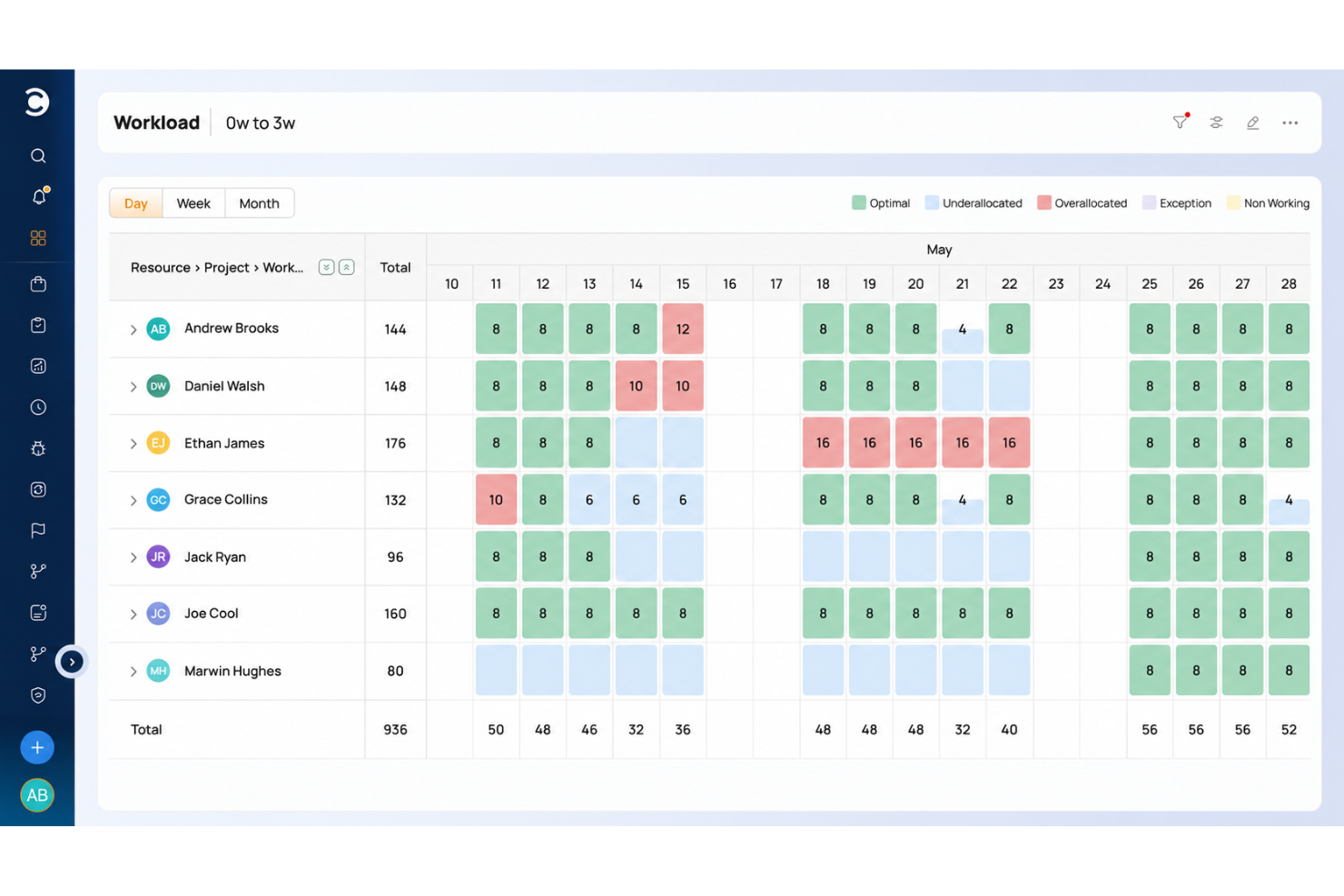
Celoxis è un'alternativa interessante a Wrike per le organizzazioni che cercano una soluzione solida di gestione dei progetti. Ciò che distingue Celoxis è l'enfasi sul controllo completo e sull'analisi dei progetti, offrendo funzionalità avanzate come flussi di lavoro automatizzati e la Gestione del Valore Acquisito. Queste capacità vanno oltre ciò che Wrike normalmente fornisce, consentendo una pianificazione e un monitoraggio del progetto più articolati. Celoxis offre inoltre opzioni di personalizzazione estese, rendendolo adattabile a diversi flussi di lavoro, una caratteristica particolarmente utile per i team che necessitano di soluzioni su misura. Con la sua interfaccia intuitiva e l'attenzione sia all'esecuzione dei progetti che all'analisi delle prestazioni, Celoxis si distingue come una scelta eccellente per chi cerca un'alternativa più versatile e potente a Wrike.

Ideale per facilità d'uso e curva di apprendimento breve
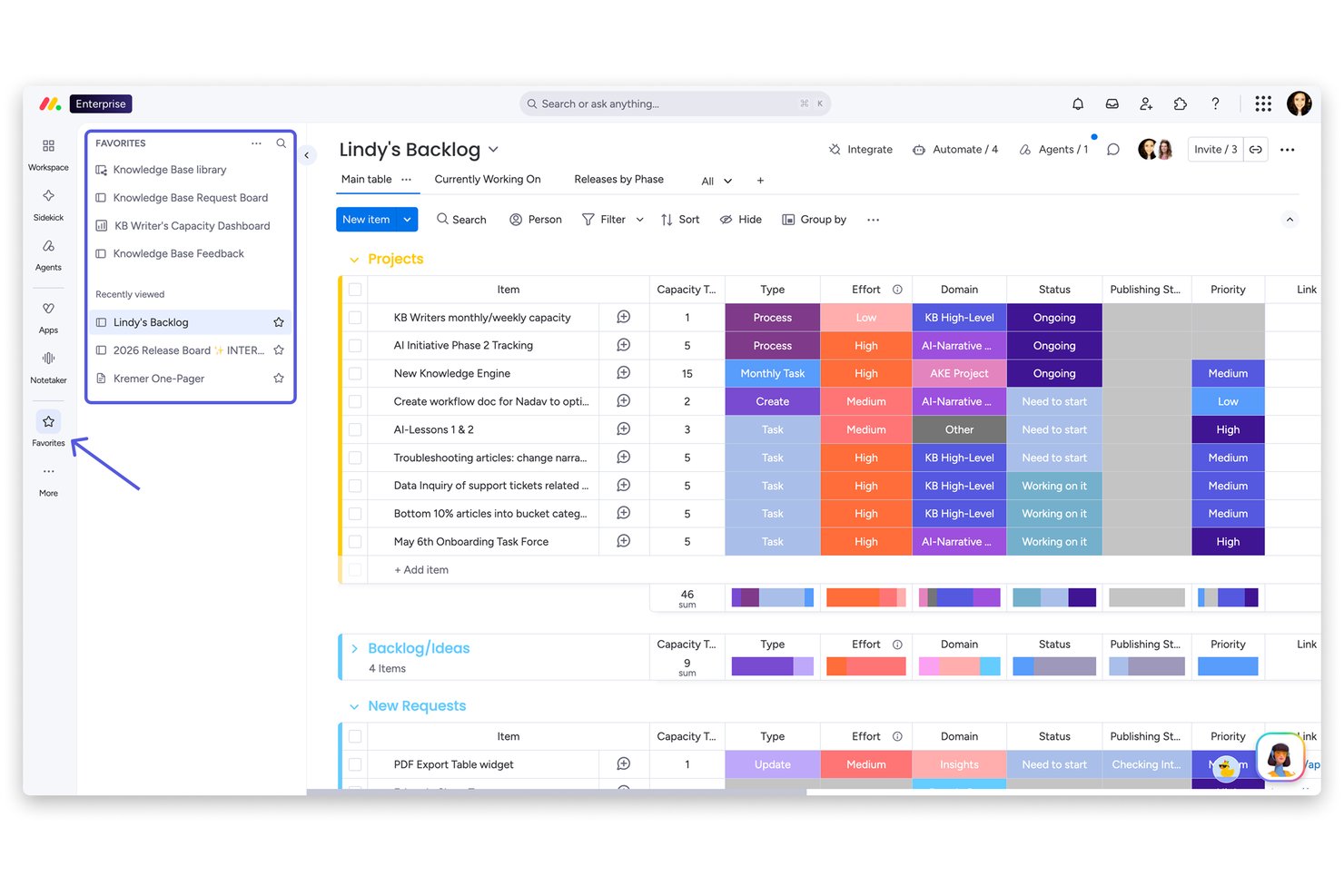
monday AI Workspace è una piattaforma di gestione del lavoro nativa dell'IA, creata per team interfunzionali che necessitano di pianificare, eseguire e monitorare progetti senza dover gestire molteplici strumenti scollegati.
Per chi è più adatto monday AI Workspace?
È particolarmente indicato per organizzazioni di medie dimensioni in cui team non tecnici devono gestire progetti complessi senza dipendere dall'IT o da una formazione specialistica.
Perché monday AI Workspace è una buona alternativa a Wrike
Ho incluso monday AI Workspace tra le mie migliori scelte perché la distanza tra l'inizio e lo svolgimento di attività reali è sorprendentemente breve. L'assistente AI Sidekick consente al mio team di creare board, configurare automazioni e collegare flussi di lavoro tramite una conversazione, senza dover cercare nelle impostazioni. In più, oltre 200 modelli predefiniti consentono di aggiungere una board per la pianificazione dello sprint o un tracker per campagne di marketing in pochi minuti.
Funzionalità principali di monday AI Workspace
- Permessi di accesso per ospiti: Invita clienti o collaboratori esterni a visualizzare le board e aggiungere commenti senza bisogno di una licenza completa a pagamento.
- Builder di flussi di lavoro potenziato dall'IA: Automatizza flussi di lavoro multi-step con strumenti IA nativi che collegano più board e attivano azioni.
- Dashboard per la gestione delle risorse: Visualizza la capacità, le allocazioni e i carichi di lavoro tra progetti per prevenire il burnout e bilanciare i team.
- Reportistica a livello di portfolio: Crea dashboard trasversali a vari progetti con widget per KPI, budget e lo stato di salute del portfolio in tempo reale.
Integrazioni monday AI Workspace
monday AI Workspace offre centinaia di integrazioni native grazie agli strumenti integrati e al marketplace, tra cui Slack, Salesforce, HubSpot, Google Workspace, Microsoft 365, Adobe Creative Cloud, Jira, GitHub, Trello e Zoom. Supporta Zapier e fornisce un'API per integrazioni personalizzate.
Pros and Cons
Pros:
- AI Sidekick crea board e automazioni in modo conversazionale
- Oltre 200 modelli accelerano immediatamente la configurazione dei progetti
- La vista dei carichi di lavoro bilancia la capacità del team tra i progetti
Cons:
- Reportistica avanzata disponibile solo su piani di livello superiore
- Limiti alle automazioni nei piani con prezzo inferiore
New Product Updates from monday AI Workspace
monday AI Workspace Adds Human Approval Routing
monday AI Workspace adds a human-in-the-loop approval block to AI Workflows, sending approval requests and routing workflow paths based on responses. For more information, visit monday AI Workspace's official site.

La migliore alternativa a Wrike per team marketing e agenzie in crescita
Perché Screendragon è una valida alternativa a Wrike
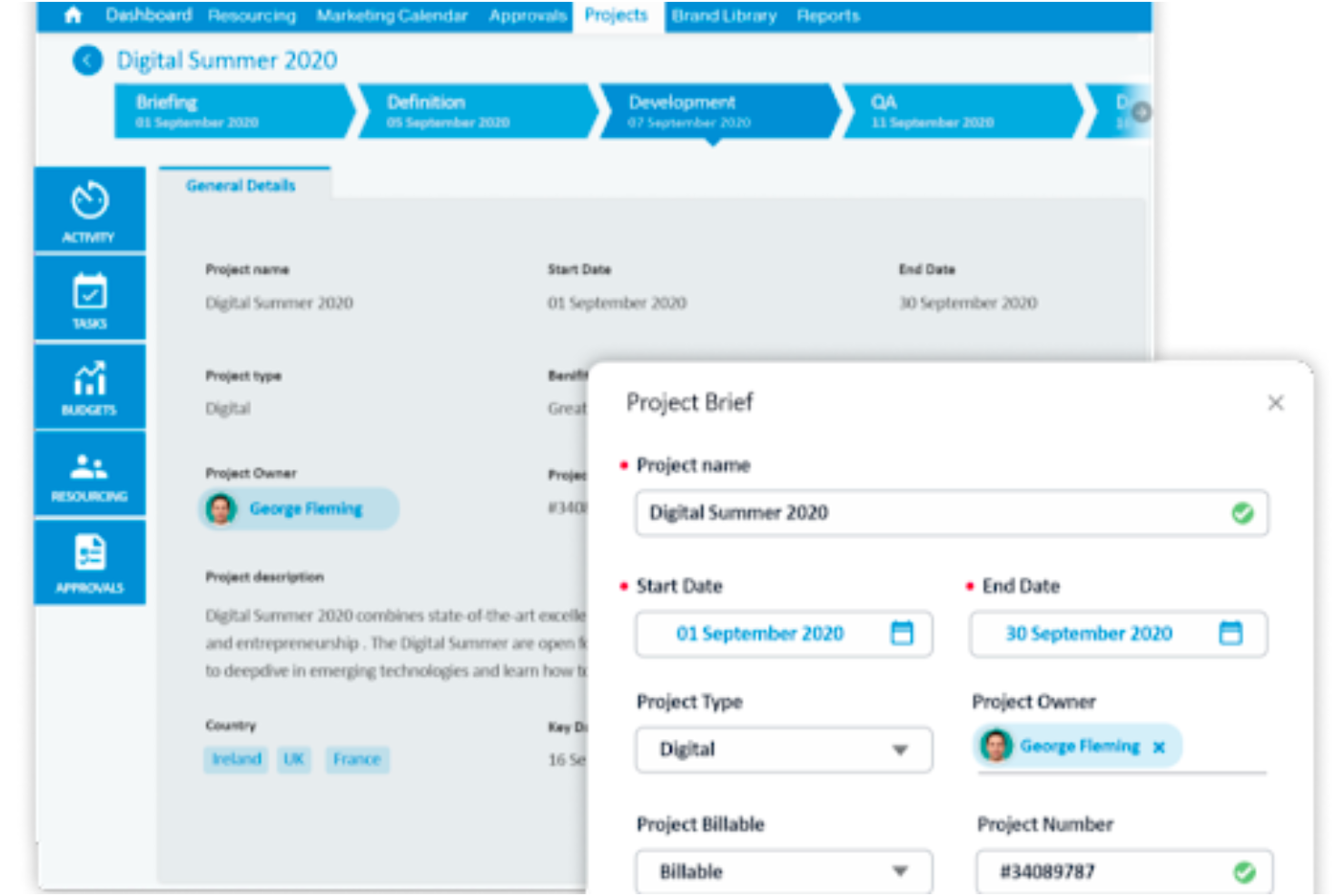
Screendragon e Wrike condividono alcune funzionalità relative alla gestione dei flussi di lavoro creativi. Tuttavia, Screendragon si distingue offrendo funzionalità più avanzate per la gestione di progetti, risorse e workflow. Screendragon è particolarmente indicato per agenzie in crescita e team marketing che necessitano di una maggiore flessibilità da parte di un software di project management. Offre una soluzione integrata che consente agli utenti di lavorare in modo fluido, senza dover passare da un modulo o da una visualizzazione all’altra per svolgere le attività—un punto debole comune di Hive. Anche l’esperienza utente di Screendragon è intuitiva, con possibilità di personalizzazione grazie a dashboard personalizzate, viste sullo stato dei progetti e livelli di autorizzazione, il tutto con una curva di apprendimento ridotta che sarà apprezzata dagli ex utenti Wrike.
New Product Updates from Screendragon
Screendragon Unveils New AI Hub
Screendragon introduced AI Hub, a new capability that lets teams build and manage AI agents directly within workflows. The update helps marketing teams automate tasks, maintain governance controls, and scale AI-driven operations more efficiently. For more information, visit Screendragon's official site.

La migliore alternativa a Wrike per una pianificazione dettagliata del team

Perché Productive è una valida alternativa a Wrike
Productive è uno strumento di gestione progetti e produttività che aiuta le aziende a gestire progetti, clienti e team. È pensato come una soluzione completa per la gestione dei progetti, il monitoraggio del tempo e la fatturazione, rendendolo un'opzione ideale per agenzie e fornitori di servizi professionali. Productive permette ai team di creare e gestire in modo efficiente i calendari, assegnando compiti e scadenze a singoli o gruppi. Le sue funzionalità avanzate di rilevamento del tempo consentono ai membri del team di monitorare la loro produttività, registrare le ore fatturabili e ottenere approfondimenti sull'allocazione delle risorse. Grazie all'attenzione sull'ottimizzazione dei calendari di squadra, sul monitoraggio preciso delle ore lavorate e sul tracciamento dettagliato delle attività, Productive consente alle organizzazioni di snellire i processi di gestione progetti, aumentare la produttività e raggiungere risultati di successo.
New Product Updates from Productive

Productive Adds Agent Triggers, Teams Integration, and Time Controls
Productive adds automated agent triggers, broader AI file support, Microsoft Teams integration, Resource Planner improvements, and new time entry controls. These updates expand automation while improving scheduling, collaboration, and time tracking. For more information, visit Productive’s official site.

Ideale per automazione delle attività e personalizzazione
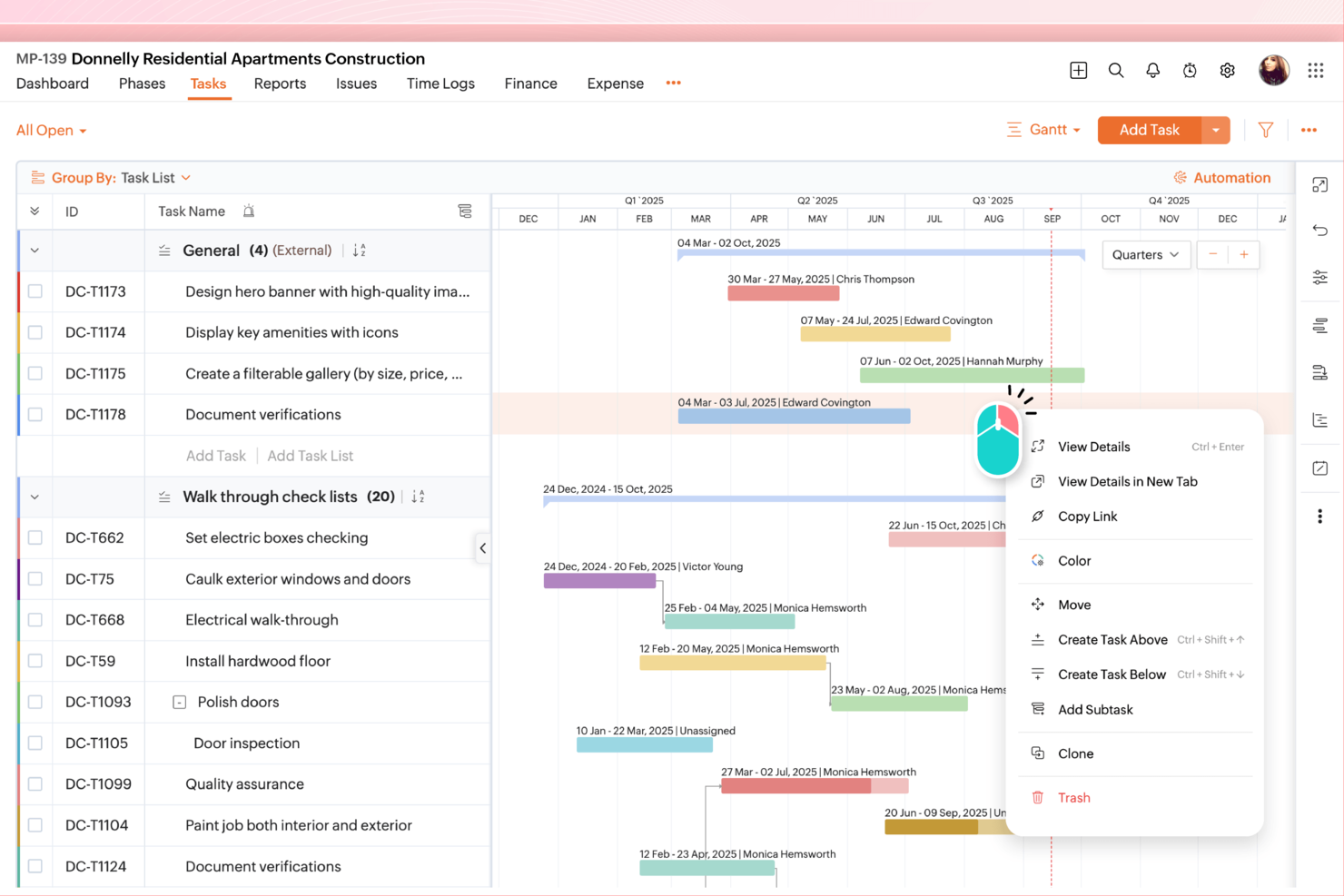
Per chi cerca un'alternativa a Wrike, Zoho Projects offre una soluzione di gestione dei progetti convincente, adatta a settori che vanno dall'edilizia allo sviluppo software. Il tuo team potrà beneficiare della sua interfaccia intuitiva e della suite completa di funzionalità pensate per migliorare la collaborazione, la gestione delle attività e garantire la privacy dei dati. Che tu voglia affrontare tempistiche di progetto complesse o favorire una migliore comunicazione nel tuo team, Zoho Projects risponde a queste sfide con le sue capacità versatili.
Perché ho scelto Zoho Projects
Ho scelto Zoho Projects come alternativa a Wrike per la forte attenzione alla privacy dell'utente e alle funzionalità di automazione delle attività. Con Zoho Projects, puoi automatizzare le attività di routine grazie a un'interfaccia drag-and-drop semplice, risparmiando tempo e permettendo al tuo team di concentrarsi su lavori più critici. Inoltre, la piattaforma offre solide opzioni di personalizzazione dei progetti, consentendo di adattare i workflow e i campi alle tue esigenze specifiche. Queste caratteristiche si allineano perfettamente alle necessità delle aziende che cercano una soluzione di gestione dei progetti flessibile e sicura.
Principali funzionalità di Zoho Projects
Oltre alle capacità di automazione e personalizzazione, Zoho Projects offre altre funzionalità che lo rendono una valida alternativa a Wrike.
- Gestione delle attività: Tu e il tuo team potete organizzare le attività con dipendenze e diagrammi di Gantt per visualizzare le tempistiche dei progetti.
- Monitoraggio del tempo: Tieni traccia delle ore dedicate alle varie attività per gestire i budget e aumentare l'efficienza.
- Monitoraggio dei problemi: Identifica e risolvi rapidamente le problematiche di progetto per mantenere il ritmo di lavoro.
- Collaborazione di squadra: Utilizza la chat integrata e la gestione documentale per migliorare la comunicazione e la condivisione dei documenti.
Integrazioni di Zoho Projects
Le integrazioni includono Zoho CRM, Slack, GitHub, Google Drive, Dropbox, Microsoft Teams, Zapier, Bitbucket, Box e Microsoft Office 365.
Pros and Cons
Pros:
- Potenti capacità di automazione delle attività
- Opzioni di personalizzazione dei progetti flessibili
- Strumenti di monitoraggio del tempo integrati
Cons:
- Curva di apprendimento dell'interfaccia per i principianti
- Meno funzionalità avanzate di collaborazione
New Product Updates from Zoho Projects
Zoho Projects Adds CodeX Scripts for Custom Modules
Zoho Projects now supports CodeX Scripts for custom modules, enabling conditional logic and rules for creating, updating, and deleting records. For more information, visit Zoho Projects' official site.
 .
.
Quire
Ideale per suddividere progetti complessi

Perché Quire è un'ottima alternativa a Wrike
La funzione di elenco di attività annidate di Quire consente di suddividere progetti complessi in sottoattività più piccole e gestibili, offrendo una gerarchia e una struttura chiare. Ciò è particolarmente utile per i team che hanno bisogno di monitorare flussi di lavoro dettagliati e dipendenze all'interno di un progetto. La possibilità di creare livelli illimitati di sottoattività garantisce inoltre che ogni aspetto di un progetto possa essere documentato e controllato.
New Product Updates from Quire

Quire Adds Task and Standalone Reminders
Quire adds task reminders and standalone reminders with shared notifications, recurring schedules, and automatic date tracking. These updates help teams stay ahead of deadlines and manage reminders that do not need a task. For more information, visit Quire’s official site.
 .
.
Ideale per l'integrazione di ideazione e gestione delle attività
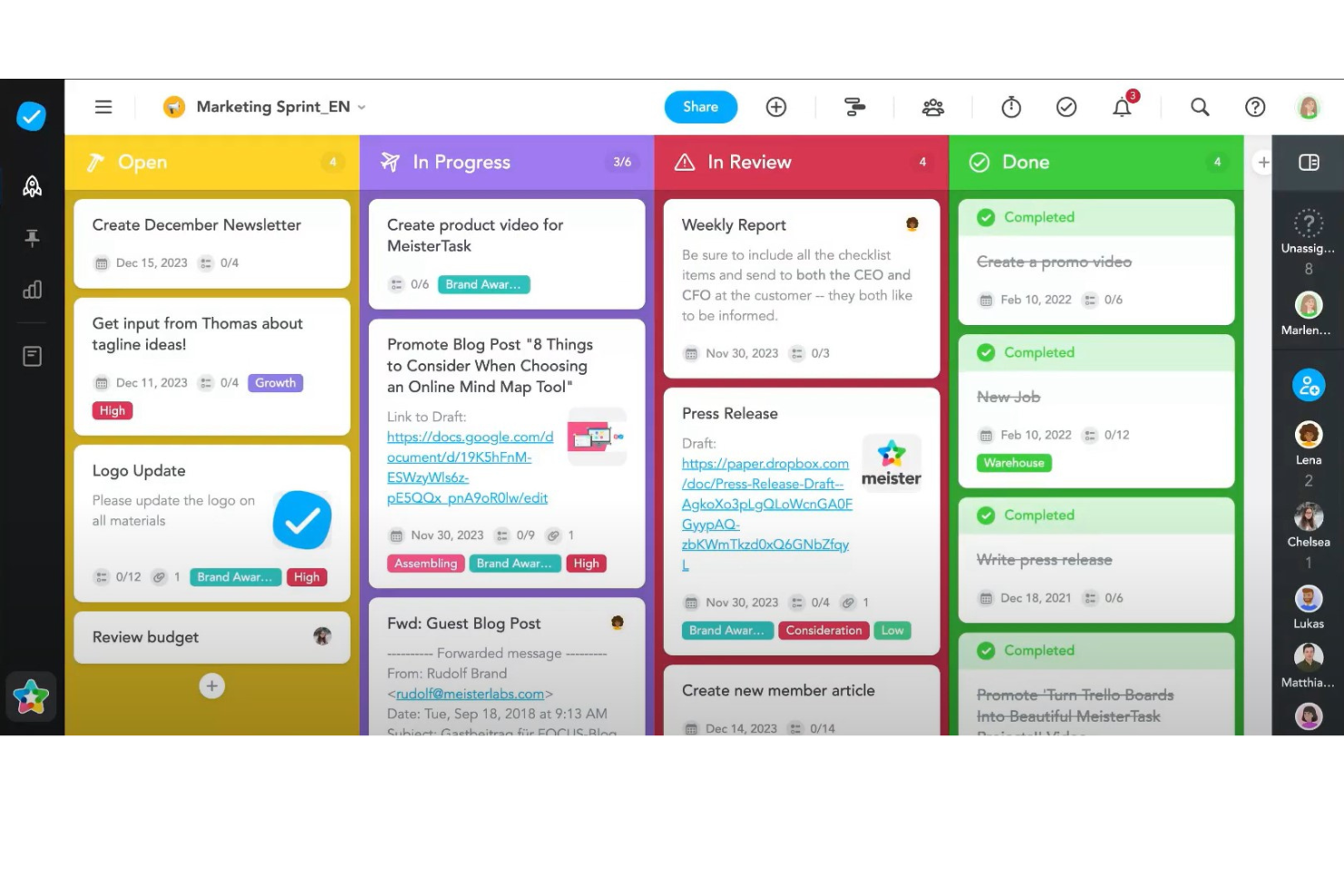
Perché MeisterTask è una valida alternativa a Wrike
MeisterTask si distingue come concorrente formidabile di Wrike nel mercato dei software di gestione dei progetti grazie alla sua interfaccia intuitiva e visivamente accattivante e a una particolare attenzione alla collaborazione e alla flessibilità. Ciò che differenzia MeisterTask sono le sue funzionalità di nicchia, come l'integrazione con Mind Map, che consente agli utenti di fare brainstorming, pianificare e poi trasformare direttamente le idee in attività concrete all'interno dello stesso ecosistema. Questa integrazione senza soluzione di continuità tra ideazione e gestione delle attività è particolarmente preziosa nei processi creativi e di pianificazione strategica, offrendo un vantaggio distintivo rispetto ai concorrenti.

ClickUp
La migliore alternativa a Wrike per tagliare i costi con funzionalità simili
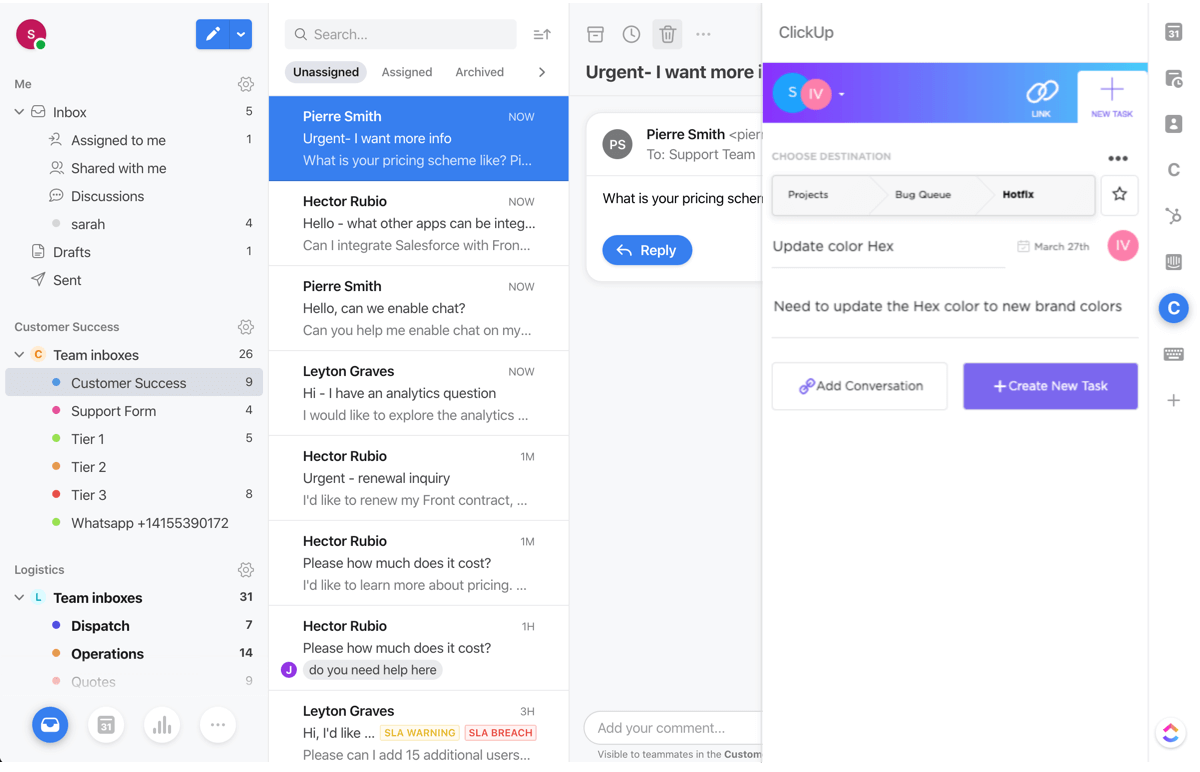
Perché ClickUp è una valida alternativa a Wrike
Pensa a ClickUp come a una copia di Wrike, ma a una frazione del prezzo e con robuste funzionalità di gestione dei progetti come gestione avanzata delle attività, monitoraggio del tempo e gestione delle risorse. Questo rende l'app più adatta a piccoli team, freelance e startup che non necessitano di reportistica avanzata o previsioni. ClickUp offre anche una versione gratuita del suo strumento più ampia.
New Product Updates from ClickUp
ClickUp Adds Meetings Hub, Super Agent Templates, and ZoomInfo Integration
ClickUp adds a searchable Meetings Hub, new ways to clone and template Super Agents, and a ZoomInfo integration through the App Center. These updates improve meeting retrieval, agent reuse, and access to sales intelligence. For more information, visit ClickUp’s official site.

Workzone
Ideale per template specifici per settore

Per i team che cercano un'alternativa a Wrike, Workzone offre una soluzione pragmatica concentrandosi sugli elementi essenziali della gestione dei progetti, rendendolo ideale per i team di marketing, operazioni e IT. Affronta le sfide legate alla gestione di progetti complessi offrendo chiarezza e organizzazione, aiutando i team a semplificare i flussi di lavoro senza inutili complicazioni. Grazie all'enfasi sulla visibilità in tempo reale e sulla collaborazione, Workzone garantisce che il tuo team rimanga sempre connesso e informato, rendendolo una scelta interessante per chi desidera migliorare le proprie capacità di project management.
Perché ho scelto Workzone
Ho scelto Workzone come alternativa a Wrike perché eccelle nel semplificare la gestione dei progetti attraverso funzionalità di gestione del ciclo di vita dei progetti e organizzazione delle richieste. I moduli per la richiesta di progetti e gli strumenti di revisione dei documenti sono particolarmente utili per i team che desiderano migliorare i processi di raccolta e approvazione delle richieste. Workzone si distingue inoltre per i suoi strumenti di collaborazione efficace, che consentono ai team di condividere facilmente lo stato dei progetti e i feedback. Queste funzioni risolvono il comune problema della gestione di numerosi progetti urgenti con più stakeholder, rendendo Workzone un'opzione affidabile per i team che cercano struttura ed efficienza.
Caratteristiche principali di Workzone
Oltre alla gestione del ciclo di vita dei progetti e agli strumenti di collaborazione, Workzone offre diverse altre funzionalità che lo rendono una valida alternativa a Wrike:
- Report predefiniti: Fornisce informazioni sulla gestione del carico di lavoro e del budget, aiutando il tuo team a tenere sotto controllo le metriche di progetto.
- Template specifici per settore: Offre oltre 1.000 modelli per facilitare avvii rapidi di progetti personalizzati sulle esigenze del tuo settore.
- Richieste centralizzate: Semplifica la gestione e l'approvazione delle richieste, assicurando che tutti gli input ai progetti siano organizzati e facilmente accessibili.
- Formazione e supporto illimitati: Garantisce al tuo team accesso rapido all'assistenza e alla formazione, migliorando l'esperienza d'uso e l'adozione della piattaforma.
Integrazioni Workzone
Le integrazioni includono Slack, Microsoft Teams, Google Drive, Salesforce, Dropbox, Box, OneDrive, QuickBooks, Outlook e Gmail.
Pros and Cons
Pros:
- Ottima visibilità e monitoraggio dei progetti
- Revisione e approvazione documenti integrate
- Gestione strutturata delle richieste e del carico di lavoro
Cons:
- Ecosistema di integrazioni più ridotto rispetto ai concorrenti
- Esperienza mobile meno performante rispetto a desktop
New Product Updates from Workzone

Workzone Enterprise Adds Multi-Stage Approval Workflows
Workzone Enterprise now includes Approval Workflows, enabling multi-stage document approvals to standardize complex processes and reduce manual effort. For more information, visit Workzone's official site.
 .
.
Ideale per la fatturazione e l'emissione di fatture direttamente in piattaforma
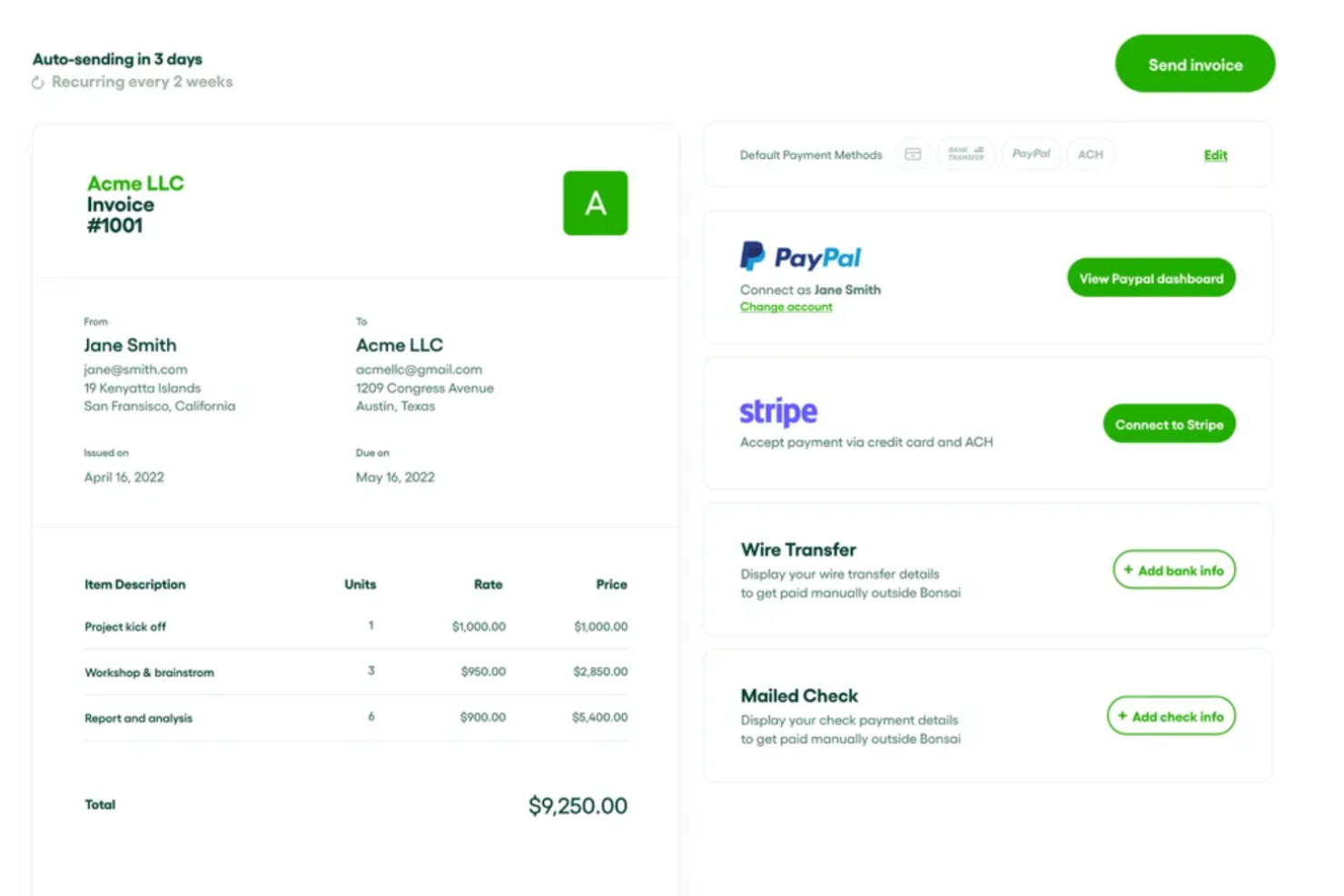
Perché Bonsai è una valida alternativa a Wrike
Bonsai offre funzionalità di gestione dei progetti simili a Wrike, come la gestione delle attività, la programmazione, le viste a bacheca Kanban, la condivisione di file e strumenti di collaborazione. Tuttavia, Bonsai si distingue ampliando le sue capacità oltre la gestione dei progetti, includendo anche la gestione dei clienti e delle finanze. Un elemento fondamentale che differenzia la piattaforma è la funzione di fatturazione integrata, che consente agli utenti di ricevere pagamenti dai clienti. Questa caratteristica permette la creazione automatica di fatture e promemoria, diversi metodi di pagamento e pagamenti ricorrenti per progetti continuativi. Inoltre, Bonsai offre modelli di contratto, strumenti per le proposte e funzionalità CRM per la gestione dei clienti.
Altre alternative a Wrike
Ecco alcune alternative aggiuntive a Wrike che non sono entrate nella mia selezione, ma che vale comunque la pena prendere in considerazione:
- Parallax
Ideale per una gestione completa dei progetti con un'interfaccia intuitiva e facile da usare
- Ravetree
Migliore alternativa a Wrike per agenzie e fornitori di servizi professionali
- nTask Manager
Ideale per i servizi di assistenza clienti
- Pneumatic Workflow
Ideale per snellire i progetti digitali
- Height
Ideale per fatturazione e pagamenti dei progetti direttamente in piattaforma
- Smartsheet
La migliore alternativa a Wrike per i team che desiderano un'interfaccia simile a un foglio di calcolo
- Scoro
Ideale per la gestione dei progetti con monitoraggio KPI integrato
- Hive
La migliore alternativa a Wrike per riunire tutta la tua comunicazione in un unico luogo
- Accelo
Migliore alternativa a Wrike con gestione clienti completa
- GoodDay
Ideale per la personalizzazione e i flussi di lavoro Agile


Cosa sono le alternative a Wrike?
Le alternative a Wrike sono strumenti per la gestione dei progetti che replicano molte delle funzionalità principali di Wrike, come il monitoraggio delle attività, la collaborazione e l'automazione dei flussi di lavoro, ma offrono interfacce, modelli di prezzo e specializzazioni differenti.
Le aziende si rivolgono a queste alternative quando cercano un design più intuitivo, integrazioni migliori, costi inferiori o una piattaforma più facile da scalare. Ideali per i team frustrati dalla complessità di Wrike o alla ricerca di un nuovo inizio, questi strumenti contribuiscono a migliorare l'efficienza e l'adattabilità nella gestione dei progetti.
Informazioni su Wrike
Wrike è una soluzione per la gestione dei progetti specializzata nelle comunicazioni tra reparti e nei documenti modello realizzati su misura, che possono essere utili a qualsiasi team creativo dai ritmi intensi. All'interno dell'app puoi creare e organizzare Spazi, Cartelle, Progetti, Attività e Sottoattività come preferisci.
Inoltre, gli utenti possono fare affidamento sui modelli predefiniti (sviluppati internamente) o sui modelli (sviluppati da Wrike) per velocizzare il processo di inserimento di nuovi elementi nel sistema del flusso di lavoro. Dispone inoltre di un intuitivo generatore personalizzato di moduli di richiesta che consente di creare moduli per le richieste di progetto. Grazie all'accesso tramite link condivisibile, anche i clienti esterni possono compilare i moduli. Wrike dispone di un'app mobile per lavorare ovunque e offre un'ampia compatibilità con le integrazioni. Si connette a oltre 150 app, tra cui Google Docs, i programmi Microsoft, i servizi Amazon e molte altre.
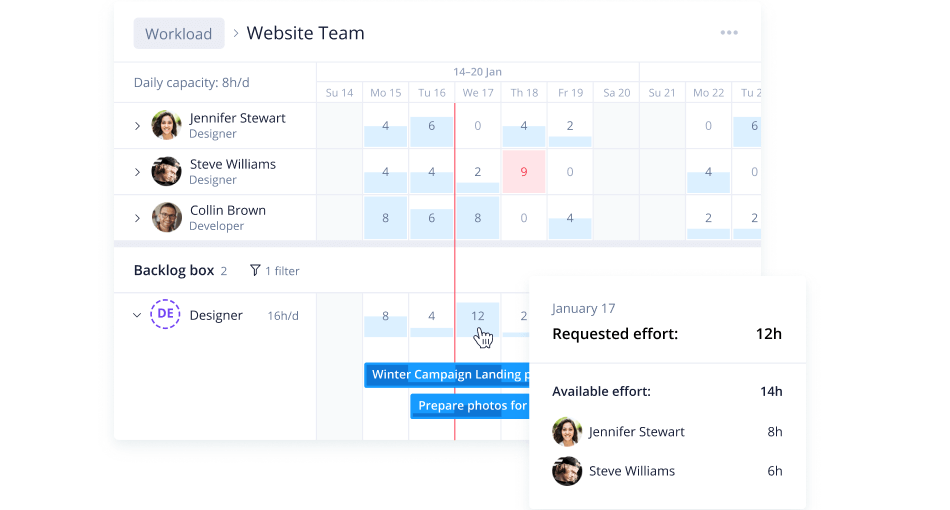
I report e le analisi personalizzati di Wrike consentono di prevedere facilmente i potenziali rischi, così il team può correggere la rotta e pianificare di conseguenza. I suoi cruscotti sono altamente visivi e offrono informazioni immediatamente comprensibili. Inoltre, le notifiche dettagliate possono aiutarti ad adeguare rapidamente il portafoglio e a ridurre al minimo la perdita di ricavi.
Grazie a un'interfaccia utente semplice, Wrike aiuta i manager a visualizzare i progetti imminenti, a individuare facilmente i rischi che richiedono interventi di mitigazione e a gestire le risorse per compensare eventuali carenze. Essendo il software di gestione dei rischi più personalizzabile e configurabile sul mercato, Wrike consente la collaborazione tra reparti in tempo reale, aiutando i team a comunicare i potenziali rischi e a lavorare insieme per risolverli. Sebbene Wrike sia molto intuitivo, puoi anche usufruire del centro assistenza dedicato, che offre formazione interattiva, video, una guida introduttiva e una comunità attiva.
Wrike ti consente di iniziare gratuitamente con una prova di 14 giorni delle funzionalità e delle opzioni di personalizzazione più avanzate di Wrike. I piani a pagamento partono da $9.80/utente/mese.
Come valuto le alternative a Wrike
Suddivido ogni strumento in due livelli: criteri di base—gerarchie delle attività, viste del carico di lavoro, regole di automazione—che ne determinano l'idoneità, e fattori distintivi che lo rendono adatto al vostro team.
Funzionalità fondamentali per questo elenco
Quando seleziono gli strumenti per il mio elenco, assegno a ciascuno un punteggio su una scala da 0 (non offre la funzionalità) a 5 (eccelle in quest'area) per ogni funzionalità fondamentale elencata di seguito. Poi converto il punteggio totale dello strumento in una percentuale. Ogni strumento deve raggiungere un punteggio totale minimo del 75% per essere preso in considerazione.
- Struttura delle attività e dei progetti: cerco gerarchie annidate, dipendenze e strutture multi-progetto che supportino flussi di lavoro reali, come la gestione del lancio di un prodotto con flussi di lavoro paralleli tra ingegneria, progettazione e marketing.
- Viste multiple dei progetti: i team lavorano in modi diversi, quindi verifico che lo strumento offra almeno viste Gantt, Kanban, calendario ed elenco, tra le quali gli utenti possano passare senza perdere il contesto.
- Strumenti di collaborazione del team: il lavoro interfunzionale si blocca rapidamente senza commenti organizzati per discussioni, @mentions e condivisione di file. Valuto quanto efficacemente i team possano comunicare direttamente nelle attività invece di passare alla posta elettronica o alla chat.
- Automazione dei flussi di lavoro e campi personalizzati: ogni team ha i propri processi. Esamino la flessibilità del generatore di automazioni: è possibile configurare regole come l'assegnazione automatica delle attività quando cambia uno stato o lo spostamento degli elementi tra le fasi di un progetto in base ai valori dei campi personalizzati?
- Gestione delle risorse e del carico di lavoro: la pianificazione della capacità è importante quando si assegnano persone a più progetti. Verifico la presenza di viste del carico di lavoro che mostrino chi ha troppi incarichi e consentano di ridistribuire le assegnazioni in tempo reale.
- Report e dashboard: i responsabili dei progetti e i dirigenti hanno bisogno di dati diversi. Valuto se le dashboard possano mostrare sia i progressi a livello di attività sia i KPI dell'intero portafoglio, come la velocità di consegna, il consumo del budget e i tassi di completamento dei traguardi.
Una volta ottenuto un elenco di strumenti che soddisfano questi criteri, considero ciò che distingue ogni piattaforma.
Fattori distintivi (ciò che distingue i fornitori)
Ecco come confronto e metto a confronto i diversi fornitori:
Funzionalità di spicco
L'accesso per clienti e ospiti è un importante fattore distintivo per i team che gestiscono parti interessate esterne: verifico se uno strumento consente di invitare i clienti a esaminare i progressi senza richiedere un'utenza a pagamento. Anche il monitoraggio nativo del tempo è importante per i team di servizi professionali che devono registrare le ore fatturabili su attività specifiche. Per le attività operative di marketing e creative, esamino i flussi di lavoro per la revisione con annotazioni e l'approvazione: gli strumenti che supportano annotazioni e riscontri con controllo delle versioni all'interno dell'app evitano ai team di gestire cicli di revisione distribuiti tra posta elettronica e chat.
Oltre le funzionalità
La struttura dei prezzi è un motivo comune per cui i team abbandonano Wrike, quindi valuto se ogni strumento offra licenze flessibili: la combinazione di tipi di utenza per utenti completi, visualizzatori e ospiti fa davvero la differenza per i team interfunzionali. Anche la profondità delle integrazioni è importante. Verifico la presenza di connessioni native a strumenti come Slack, Jira e Google Drive, oltre all'accesso API per flussi di dati personalizzati. Considero anche la scalabilità: valuto se una piattaforma sia adatta oggi a un team di 10 persone, ma possa supportare in futuro un'implementazione a livello di più reparti.
Come scegliere un'alternativa a Wrike
È facile perdersi in lunghi elenchi di funzionalità e strutture tariffarie complesse. Per aiutarti a rimanere concentrato mentre affronti il tuo specifico processo di selezione del software, ecco una lista di fattori da tenere a mente:
| Fattore | Cosa considerare |
|---|---|
| Scalabilità | Assicurati che lo strumento possa crescere insieme al tuo team. Cerca soluzioni che supportino un numero crescente di progetti e utenti. |
| Integrazioni | Verifica se il software si connette agli strumenti che già utilizzi, come Slack, Google Workspace o Salesforce. |
| Personalizzazione | Devi poter adattare i flussi di lavoro e i cruscotti. Scegli uno strumento che ti consenta di modificare le funzionalità in base alle tue esigenze. |
| Semplicità d'uso | Il tuo team dovrebbe essere in grado di comprendere e utilizzare rapidamente lo strumento senza una formazione approfondita. |
| Budget | Considera non solo il costo iniziale, ma anche le spese future. Cerca prezzi flessibili che rientrino nel tuo budget. |
| Misure di sicurezza | Assicurati che la soluzione offra solide funzionalità di protezione dei dati, come la crittografia e la conformità alle normative. |
| Assistenza clienti | Un'assistenza affidabile è fondamentale. Scegli un servizio disponibile 24 ore su 24, 7 giorni su 7 e con diverse modalità di contatto. |
| Prestazioni | Valuta come lo strumento gestisce le attività. Dovrebbe funzionare senza problemi e senza rallentamenti durante i carichi di lavoro elevati. |
Onestamente, c'è molto da assimilare e molta pressione per fare la scelta giusta, quindi ti suggerirei di utilizzare il nostro servizio di consulenza sui software di gestione dei progetti per aiutarti a selezionare una rosa di strumenti per responsabili di progetto adatti alle esigenze specifiche tue e della tua organizzazione.
Caratteristiche principali di un'alternativa valida a Wrike
Ecco alcune delle caratteristiche principali di un'alternativa a Wrike, per aiutarti a confrontare le funzionalità offerte dalle soluzioni alternative:
- Cruscotti personalizzabili: Puoi adattare il tuo spazio di lavoro alle esigenze del tuo team e migliorare la trasparenza dei progetti. Cerca un'alternativa che consenta di personalizzare i cruscotti con il sistema trascina e rilascia, offrendo la visualizzazione dei dati in tempo reale e una facile condivisione per mantenere allineate le parti interessate.
- Modalità di revisione e confronto: Questa funzione consente di esaminare e confrontare diverse versioni dei file affiancate, aiutandoti a individuare facilmente le modifiche. Assicurati che l'alternativa includa strumenti avanzati di revisione con funzionalità di annotazione, monitoraggio delle versioni e integrazioni con software di progettazione per una collaborazione fluida.
- Gestione delle attività: Crea attività e sottoattività senza difficoltà, consentendo un flusso di lavoro più organizzato. Una buona alternativa dovrebbe offrire una creazione intuitiva delle attività, supporto per le dipendenze e opzioni di definizione delle priorità per gestire efficacemente flussi di lavoro semplici e complessi.
- Monitoraggio del tempo: Monitora il tempo dedicato alle attività per gestire meglio risorse e scadenze. Scegli un'alternativa che integri il monitoraggio del tempo con la fatturazione e la reportistica, fornendo informazioni dettagliate sulla distribuzione del tempo senza bisogno di uno strumento separato.
- Gestione del carico di lavoro: Ti aiuta ad assegnare le attività in modo efficiente in base alla disponibilità e al carico di lavoro dei membri del team. Cerca funzionalità dinamiche di gestione del carico di lavoro che forniscano aggiornamenti in tempo reale e consentano di riassegnare facilmente le attività per prevenire i colli di bottiglia.
- Supporto per le integrazioni: Collegati a diverse applicazioni di terze parti per semplificare i tuoi processi. Assicurati che l'alternativa supporti le integrazioni principali con il tuo attuale ecosistema tecnologico o fornisca un'API aperta per connessioni personalizzate, così da mantenere flussi di lavoro fluidi.
- Rapporti dettagliati: Genera rapporti che offrano informazioni approfondite sui tuoi progetti, aiutandoti a prendere decisioni consapevoli. Un'alternativa dovrebbe fornire opzioni di reportistica altamente personalizzabili con elementi visivi come grafici e diagrammi, consentendoti di adattare le informazioni a pubblici diversi.
- Strutture di progetto scalabili: Modifica le dimensioni e le strutture dei progetti in base alle esigenze del tuo team man mano che evolvono. Cerca uno strumento che supporti la scalabilità senza complicazioni, offrendo strutture gerarchiche, sottoprogetti e collegamenti tra progetti per garantire flessibilità con la crescita delle tue esigenze.
Quando esplori le alternative a Wrike, concentrati sugli strumenti che offrono flessibilità, funzionalità avanzate di collaborazione e scalabilità per supportare le esigenze in evoluzione del tuo team. Dai priorità alle soluzioni con interfacce intuitive, integrazioni fluide e funzionalità innovative che migliorano la produttività e semplificano i flussi di lavoro.