



Microsoft Planner vs. Jira: Confronto Esperto per il 2026



Microsoft Planner offre un approccio semplice alla gestione delle attività e dei progetti del tuo team. Jira, invece, è uno strumento agile per il monitoraggio e la gestione di progetti complessi. Mentre Microsoft Planner è facile da usare e si integra facilmente con altri prodotti Microsoft, Jira è noto per la potente personalizzazione e la scalabilità.
Ho testato e recensito ogni software di project management per confrontare le loro funzionalità, vantaggi e svantaggi, prezzi e altro ancora. Scopri qual è lo strumento più adatto alle esigenze del tuo team nel mio confronto esperto.
Microsoft Planner vs. Jira: An Overview
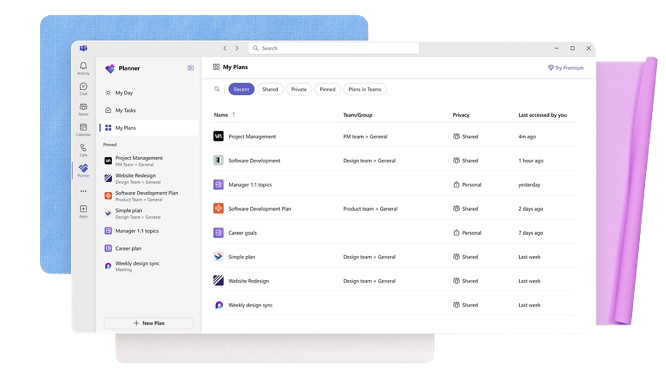
Microsoft Planner


Jira

Perché fidarsi dei nostri consigli sui software
Il nostro team testa e recensisce software dal 2012. In quanto project manager noi stessi, sappiamo quanto sia difficile — e importante — scegliere il software giusto.
Per questa guida, abbiamo valutato gli strumenti attraverso test pratici e ricerche indipendenti, assegnando un punteggio agli strumenti in base ai nostri criteri di selezione. Ci basiamo inoltre sulle competenze di leader di pensiero del settore e di professionisti attivi nella gestione dei progetti.
Le nostre recensioni riflettono il nostro giudizio editoriale umano, non un discorso di vendita.
Revisori esperti:
Microsoft Planner vs. Jira Pricing Comparison
| Microsoft Planner | Jira | |
|---|---|---|
| Free Trial | Free trial available | Free plan + 14-day free trial available |
| Pricing | From $10/user/month (billed annually) | From $8.48/user/month |
Prezzi e Costi Nascosti di Microsoft Planner vs. Jira
Il costo di Microsoft Planner è generalmente incluso negli abbonamenti Microsoft 365, ma potrebbero sorgere costi aggiuntivi se hai bisogno di funzionalità avanzate o piani di livello superiore. Il prezzo di Jira si basa su un modello di abbonamento a livelli, e i costi aumentano se aggiungi più utenti e funzionalità premium.
Per scegliere lo strumento di project management più adatto al tuo budget, valuta le esigenze specifiche del tuo team e le modalità di utilizzo; quindi, calcola il costo totale di proprietà, tenendo conto di eventuali spese nascoste, per assicurarti che rientri nel tuo budget.
Microsoft Planner vs. Jira Feature Comparison
Le bacheche intuitive di Microsoft Planner sono perfette per flussi di lavoro progettuali semplici, e puoi facilmente gestire e monitorare le attività quotidiane del tuo team. Le funzionalità di reportistica di Jira sono ideali per progetti che richiedono un’analisi e un monitoraggio dettagliati, soprattutto in contesti agili.
| Microsoft Planner | Jira | |
|---|---|---|
| API | ||
| Collaboration Support | ||
| Dashboards | ||
| Data Export | ||
| Data Import | ||
| External Integrations | ||
| Gantt Charts | ||
| Multi-User | ||
| Notifications | ||
| Prioritization | ||
| Task Scheduling/Tracking |
Microsoft Planner vs. Jira Integrazioni
| Integrazione | Microsoft Planner | Jira |
|---|---|---|
| Slack | ❌ | ✅ |
| Trello | ❌ | ✅ |
| Microsoft Teams | ✅ | ✅ |
| Confluence | ❌ | ✅ |
| GitHub | ❌ | ✅ |
| Figma | ❌ | ✅ |
| Miro | ❌ | ✅ |
| Google Calendar | ❌ | ✅ |
| API | ✅ | ✅ |
| Zapier | ❌ | ✅ |
L'integrazione di Microsoft Planner con Microsoft Teams ti aiuta a coordinare le attività e la comunicazione. È particolarmente preziosa se già utilizzi Microsoft 365. L'integrazione di Jira con Confluence è ottima per i team agili che hanno bisogno di documentare e condividere approfondimenti sui progetti.
Microsoft Planner vs. Jira Sicurezza, Conformità & Affidabilità
| Fattore | Microsoft Planner | Jira |
|---|---|---|
| Tutela dei dati | Microsoft Planner garantisce la tutela dei dati tramite la conformità al GDPR e ad altre normative. | Jira offre misure di tutela dei dati, incluse la conformità al GDPR e impostazioni di privacy personalizzabili. |
| Crittografia | Microsoft Planner utilizza la crittografia end-to-end per proteggere i dati sia in transito che a riposo. | Jira fornisce la crittografia per le trasmissioni e l’archiviazione dei dati per mantenere un accesso sicuro. |
| Affidabilità | Microsoft Planner si basa sui data center globali Microsoft per alta disponibilità e tempi di attività garantiti. | Jira offre un accordo sul livello di servizio per il 99,9% di uptime e sistemi ridondanti per prevenire interruzioni. |
Microsoft Planner e Jira offrono entrambi forti funzionalità di sicurezza e conformità, ma i loro approcci differiscono leggermente. Per valutare le loro funzioni di sicurezza e conformità, esamina le politiche di gestione dei dati, gli standard di crittografia e le certificazioni di conformità per capire quale si allinea meglio ai requisiti della tua organizzazione.
Microsoft Planner vs. Jira Facilità d'uso
| Fattore | Microsoft Planner | Jira |
|---|---|---|
| Interfaccia utente | Microsoft Planner offre un'interfaccia pulita e intuitiva con funzionalità di trascinamento. | Jira ha un'interfaccia ricca di funzionalità che può risultare complessa, ma è altamente personalizzabile per utenti esperti. |
| Esperienza di onboarding | Microsoft Planner fornisce un processo di onboarding semplice con guide integrate. | L'onboarding di Jira può essere complesso e richiede formazione prima di poter utilizzare appieno le sue funzionalità. |
| Configurazione | Microsoft Planner si integra perfettamente con Microsoft 365 per semplificare la configurazione. | La configurazione di Jira richiede impostazioni specifiche e può essere dispendiosa in termini di tempo per i nuovi utenti. |
L’interfaccia semplice di Microsoft Planner e l’integrazione con Microsoft 365 lo rendono più rapido da adottare per nuovi team. Jira, seppur potente, può risultare più impegnativo a causa della sua complessità e delle numerose funzionalità. Ha una curva di apprendimento ripida, ma offre una maggiore personalizzazione agli utenti esperti.
Microsoft Planner vs Jira: Pros & Cons
Microsoft Planner
- You can easily assign and track tasks within your team.
- Its integration with Microsoft 365 enhances team collaboration
- The simple, user-friendly interface makes task management straightforward.
- It lacks advanced customization options for complex projects.
- The reporting features are not as robust as some competitors.
- It may not accommodate larger teams needing detailed task dependencies.
Jira
- Agile workflow management supports Scrum and Kanban and can improve your teams' productivity.
- Automation rules are easy to set up, which helps your team speed up their work.
- Custom filters can be created and accessed quickly, which improves your team's efficiency.
- Field names can be confusing, which might slow down your team's workflow.
- The interface can be too crowded in Scrum projects, which can make it hard for your team to navigate.
- There's a lack of resource management capabilities, which could limit your team's planning.
Best Use Cases for Microsoft Planner and Jira
Microsoft Planner
- Small Businesses Microsoft Planner's straightforward interface is perfect for small businesses that need to manage tasks without complex features.
- Marketing Teams It helps marketing teams track campaigns and collaborate effectively with its task assignment and tracking capabilities.
- Educational Institutions Schools and universities can use it to organize academic projects and coordinate activities across departments.
- IT Departments IT teams can benefit from its integration with Microsoft 365, making it easy to manage tech projects and resources.
- Remote Teams For remote teams needing a simple way to track tasks and collaborate, Microsoft Planner provides the necessary tools.
- Nonprofits Nonprofits can use it to manage volunteer tasks and projects efficiently, leveraging its easy-to-use interface.
Jira
- Software development Jira’s agile tools like Scrum and Kanban boards make it perfect for managing software projects.
- IT departments Its issue tracking capabilities help your team efficiently handle technical support and bug fixes.
- Tech startups Jira offers customization capabilities that allow your team to scale and adapt as your projects grow.
- Agile teams Sprint planning and backlog management features keep your agile processes organized and effective.
- Large enterprises Jira’s automation rules can streamline your complex workflows and improve team productivity.
- Project managers Its reporting and analytics provide insights that help you make informed decisions quickly.
Chi dovrebbe usare Microsoft Planner e chi dovrebbe usare Jira?
Secondo me, Microsoft Planner è ideale per i team che già utilizzano Microsoft 365, soprattutto per chi cerca uno strumento semplice di gestione delle attività per organizzare compiti e progetti basilari. È perfetto per team di piccole o medie dimensioni che apprezzano la facilità d’uso e un’integrazione veloce con gli strumenti già in uso.
Credo che Jira sia la scelta migliore per organizzazioni di grandi dimensioni e per team di sviluppo software o tecnici che necessitano di un tracciamento avanzato dei progetti, personalizzazione e reportistica dettagliata, specialmente se adottano metodologie agili. Se i membri del team preferiscono lavorare con strumenti complessi e flussi di lavoro articolati, le numerose funzionalità di Jira potrebbero essere la soluzione ideale.
Differences Between Microsoft Planner and Jira
| Microsoft Planner | Jira | |
|---|---|---|
| Automation | Microsoft Planner offers basic automations within the Microsoft ecosystem. | Jira includes advanced automation features for complex workflows and agile project management. |
| Integrations | Microsoft Planner integrates seamlessly with Microsoft 365 apps. | Jira supports a wide range of third-party integrations, which is ideal for diverse tool ecosystems. |
| Onboarding | Microsoft Planner's onboarding is straightforward and includes integrated guides. | Jira's onboarding can be complex, and your team may require additional training. |
| User Interface | Microsoft Planner offers a simple, intuitive interface suited for basic task management. | Jira provides a complex interface with extensive customization options for detailed tracking. |
| Read Microsoft Planner ReviewOpens new window | Read Jira ReviewOpens new window |
Similarities Between Microsoft Planner and Jira
| Cloud-Based Access | Both are cloud-based, so your team can access and update projects from anywhere with internet access. |
|---|---|
| Collaboration | Both tools offer collaboration features; Planner integrates with Microsoft Teams, while Jira supports real-time updates and comments. |
| Reporting | Both offer reporting capabilities; Planner provides basic project progress charts, and Jira offers advanced reporting for detailed insights. |
| Security | Both provide robust security features. Microsoft Planner leverages Microsoft 365's security and Jira offers customizable security settings. |
| Task Management | Both Microsoft Planner and Jira allow you to create, assign, and track tasks, with MS Planner using boards and Jira using tickets. |
| Read Microsoft Planner ReviewOpens new window Read Jira ReviewOpens new window | |