



Microsoft Planner vs. Asana: Confronto Esperto per il 2026



Microsoft Planner offre una piattaforma semplificata per organizzare e monitorare facilmente le attività del tuo team. Asana propone un ambiente flessibile per gestire progetti e flussi di lavoro complessi. Sebbene entrambi gli strumenti mirino a migliorare la produttività, si differenziano nell'esperienza utente e nelle capacità di integrazione. In questo articolo confronteremo gli strumenti e le loro funzionalità, vantaggi e svantaggi, prezzi e altro ancora, per aiutarti a scegliere il miglior software per la gestione delle attività per le tue esigenze.
Microsoft Planner vs. Asana: An Overview
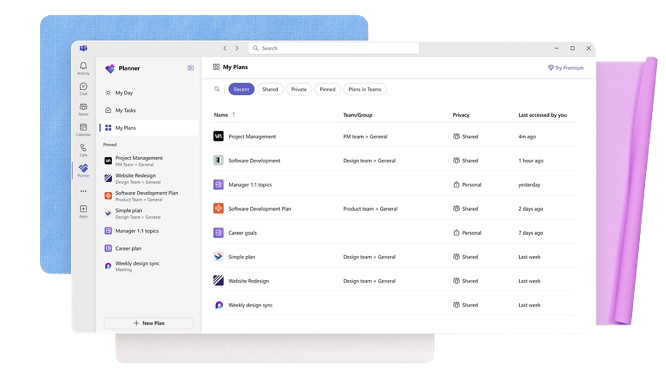
Microsoft Planner


Asana

Perché fidarsi dei nostri consigli sui software
Il nostro team testa e recensisce software dal 2012. In quanto project manager noi stessi, sappiamo quanto sia difficile — e importante — scegliere il software giusto.
Per questa guida, abbiamo valutato gli strumenti attraverso test pratici e ricerche indipendenti, assegnando un punteggio agli strumenti in base ai nostri criteri di selezione. Ci basiamo inoltre sulle competenze di leader di pensiero del settore e di professionisti attivi nella gestione dei progetti.
Le nostre recensioni riflettono il nostro giudizio editoriale umano, non un discorso di vendita.
Microsoft Planner vs. Asana Pricing Comparison
| Microsoft Planner | Asana | |
|---|---|---|
| Free Trial | Free trial available | Free plan available |
| Pricing | From $10/user/month (billed annually) | From $10.99/user/month (billed annually) |
Il prezzo di Microsoft Planner è solitamente incluso nei pacchetti Microsoft 365, il che potrebbe comportare costi aggiuntivi se è necessario aggiornare il piano per ottenere più funzionalità. Il prezzo di Asana offre un modello a livelli con una versione base gratuita, ma gli strumenti avanzati e le integrazioni sono disponibili nei piani di livello superiore, che possono comportare spese extra. Per scegliere la tariffa più adatta alle tue esigenze, valuta le funzionalità specifiche richieste dal tuo team e confrontale con quelle incluse in ciascun piano, assicurandoti di pagare solo per ciò che porterà reale beneficio ai tuoi progetti.
Microsoft Planner vs. Asana Feature Comparison
Grazie all’integrazione di Microsoft Planner con Microsoft 365, puoi gestire facilmente le attività e collaborare con il tuo team utilizzando strumenti familiari, ideale per le organizzazioni che già usano prodotti Microsoft. La gestione delle attività di Asana eccelle grazie alle timeline visive dei progetti e agli aggiornamenti in tempo reale, perfetta per i team dinamici che devono tenere traccia dei progressi e rispettare le scadenze in modo efficiente. Entrambi gli strumenti offrono vantaggi unici, sia che tu sia già inserito nell’ecosistema Microsoft sia che tu abbia bisogno di una forte visualizzazione dei progetti.
| Microsoft Planner | Asana | |
|---|---|---|
| API | ||
| Collaboration Support | ||
| Dashboard | ||
| Dashboards | ||
| Data Export | ||
| Data Import | ||
| External Integrations | ||
| Gantt Charts | ||
| Multi-User | ||
| Notifications | ||
| Resource Management | ||
| Scheduling | ||
| Task Scheduling/Tracking |
Integrazioni di Microsoft Planner vs. Asana
| Integrazione | Microsoft Planner | Asana |
| Microsoft Teams | ✅ | ❌ |
| Outlook | ✅ | ❌ |
| Slack | ❌ | ✅ |
| Trello | ❌ | ✅ |
| Google Drive | ❌ | ✅ |
| OneDrive | ✅ | ❌ |
| Salesforce | ❌ | ✅ |
| Dropbox | ❌ | ✅ |
| API | ✅ | ✅ |
| Zapier | ❌ | ✅ |
Grazie all'integrazione di Microsoft Planner con Microsoft Teams, puoi ottimizzare la comunicazione e la gestione delle attività all'interno di un'interfaccia familiare, ideale per i team che sfruttano appieno l'ecosistema Microsoft. L'integrazione di Asana con Slack è ottima per i team che lavorano con comunicazioni in tempo reale e hanno bisogno di aggiornare tutti i membri sui progressi dei progetti senza uscire dallo strumento di chat. Entrambe le integrazioni offrono vantaggi specifici a seconda che il tuo team dipenda maggiormente da Microsoft o da piattaforme di comunicazione flessibili.
Sicurezza, conformità e affidabilità di Microsoft Planner vs. Asana
| Fattore | Microsoft Planner | Asana |
| Privacy dei Dati | Microsoft Planner è conforme al GDPR e alla normativa HIPAA, garantendo la privacy dei dati degli utenti. | Asana offre la conformità al GDPR e segue rigorose politiche di privacy per proteggere i dati degli utenti. |
| Crittografia | Microsoft Planner utilizza crittografia AES-256 per proteggere i dati sia a riposo che in transito. | Asana implementa la crittografia TLS per i dati in transito e AES-256 per i dati a riposo. |
| Affidabilità | Microsoft Planner beneficia dell'infrastruttura solida di Microsoft, offrendo un uptime del 99,9%. | Asana garantisce un uptime del 99,9% grazie alla sua affidabile infrastruttura cloud. |
Microsoft Planner e Asana offrono entrambi solide caratteristiche di sicurezza e conformità, ma le loro modalità si distinguono leggermente per quanto riguarda la crittografia e le politiche sulla privacy. Per scegliere il fornitore giusto, valuta i requisiti normativi richiesti dal tuo settore e analizza le certificazioni di conformità e gli standard di crittografia di ciascun strumento.
Facilità d'uso di Microsoft Planner vs. Asana
| Fattore | Microsoft Planner | Asana |
| Interfaccia utente | Microsoft Planner offre un’interfaccia pulita basata su schede che si integra con le altre app Microsoft. | Asana propone un’interfaccia intuitiva visivamente, con viste e timeline personalizzabili. |
| Onboarding | Microsoft Planner fornisce un’esperienza di onboarding semplice se già utilizzi strumenti Microsoft. | Asana mette a disposizione guide interattive e tutorial per aiutarti a iniziare rapidamente. |
| Configurazione | Microsoft Planner è facile da configurare all’interno di Microsoft 365 e richiede una configurazione minima. | Asana offre un processo di configurazione semplice, con modelli per avviare subito i tuoi progetti. |
Microsoft Planner è facile da navigare se già utilizzi l’ecosistema Microsoft, ma può risultare limitato nella personalizzazione. Asana si distingue per l’interfaccia personalizzabile e le utili guide di onboarding, anche se può sembrare opprimente a chi non è abituato a tutte le sue funzionalità avanzate.
Microsoft Planner vs Asana: Pros & Cons
Microsoft Planner
- You can easily assign and track tasks within your team.
- Its integration with Microsoft 365 enhances team collaboration
- The simple, user-friendly interface makes task management straightforward.
- It lacks advanced customization options for complex projects.
- The reporting features are not as robust as some competitors.
- It may not accommodate larger teams needing detailed task dependencies.
Asana
- You can easily track tasks and deadlines using Asana's intuitive interface.
- Asana's collaboration tools help your team communicate effectively in real-time.
- There are extensive customization options so you can tailor workflows and views to your specific needs.
- The reporting capabilities are somewhat basic, which may not satisfy teams needing detailed analytics.
- It can feel overwhelming if your team is small or your projects are simple.
- You might find the notification system a bit excessive or distracting.
Best Use Cases for Microsoft Planner and Asana
Microsoft Planner
- Small Businesses Microsoft Planner's straightforward interface is perfect for small businesses that need to manage tasks without complex features.
- Marketing Teams It helps marketing teams track campaigns and collaborate effectively with its task assignment and tracking capabilities.
- Educational Institutions Schools and universities can use it to organize academic projects and coordinate activities across departments.
- IT Departments IT teams can benefit from its integration with Microsoft 365, making it easy to manage tech projects and resources.
- Remote Teams For remote teams needing a simple way to track tasks and collaborate, Microsoft Planner provides the necessary tools.
- Nonprofits Nonprofits can use it to manage volunteer tasks and projects efficiently, leveraging its easy-to-use interface.
Asana
- Creative agencies You can manage creative workflows and client projects with Asana’s visual boards and timeline features.
- Tech startups You can coordinate product development and team tasks using Asana’s real-time updates and goal-setting tools.
- Marketing teams You can plan campaigns and track progress with Asana’s clear timelines and task comments.
- Nonprofits Asana lets you manage volunteer tasks, events, and fundraising efforts with clear task assignments and timelines.
- Remote teams You can collaborate effectively with Asana’s real-time updates and communication features.
- Event planners You can organize events easily with Asana’s task management and timeline visualization features.
Chi dovrebbe usare Microsoft Planner e chi dovrebbe usare Asana?
Secondo la mia opinione, Microsoft Planner è ideale per i team già inseriti nell’ecosistema Microsoft, soprattutto per chi necessita di una gestione delle attività semplice senza dover abbandonare strumenti abituali. È perfetto per le organizzazioni con budget limitati che vogliono sfruttare l’investimento già fatto in Microsoft 365. D’altro canto, credo che Asana sia più adatto ai team che prosperano nella gestione visiva dei progetti e hanno bisogno di maggiore flessibilità e personalizzazione. È una scelta eccellente per le industrie creative e i team dinamici che richiedono funzioni avanzate di tracciamento dei progetti e collaborazione.
Differences Between Microsoft Planner and Asana
| Microsoft Planner | Asana | |
|---|---|---|
| Automation | Limited automation options focused on basic task management. | Includes advanced automation features like custom rules and triggers. |
| Integrations | Integrates seamlessly with Microsoft products like Teams and Outlook. | Offers broad integrations with tools like Slack, Google Drive, and Salesforce. |
| Pricing | Included with Microsoft 365 subscriptions, which may require upgrades for more features. | Offers a tiered pricing model with a free basic version and paid advanced plans. |
| Project Tracking | Basic task lists and boards for simple project views. | Offers detailed project timelines and dashboards for comprehensive tracking. |
| User Interface | Features a simple, card-based layout integrated with Microsoft apps. | Provides a visually rich, customizable interface with various views and timelines. |
| Read Microsoft Planner ReviewOpens new window | Read Asana ReviewOpens new window |
Similarities Between Microsoft Planner and Asana
| Collaboration | Both provide collaboration features, with Microsoft Planner integrated into Teams and Asana offering commenting and file attachments. |
|---|---|
| Mobile Usability | Both offer mobile apps, giving you the flexibility to manage tasks on the go, whether you're using Microsoft or Asana's app. |
| Reporting | Each provides basic reporting capabilities, with Microsoft Planner's charts and Asana's project dashboards helping track progress. |
| Task Management | Both tools allow you to create, assign, and track tasks, with Microsoft Planner using a card-based system and Asana offering task lists. |
| User Support | Both offer user support and resources, with Microsoft Planner leveraging Microsoft's support network and Asana providing guides and forums. |
| Read Microsoft Planner ReviewOpens new window Read Asana ReviewOpens new window | |