10 Best GRC Tools And Platforms Reviewed for 2026

10 Best GRC Tools Shortlist


GRC tools help organizations manage governance, risk, and compliance processes in a centralized platform. Additionally, these tools streamline policy management, risk assessment, and regulatory reporting, reducing the risk of non-compliance and audit failures.
Drawing from my experience with governance and organizational tools, I’ve tested several GRC platforms to see how well they support cross-functional teams, simplify documentation, and automate controls. I’ve compared tools for usability, integrations, and how well they align with real-world regulatory frameworks.
Below, you’ll find my top recommendations based on hands-on testing. Each GRC tool listed stands out for specific features or strengths, so you can identify the one best suited to your organization’s needs.
Why Trust Our Software Recommendations
Our team has been testing and reviewing software since 2012. As project managers ourselves, we know how difficult—and important—it is to choose the right software.
For this guide, we evaluated tools using hands-on testing and independent research, scoring tools using our selection criteria. We also draw on insights from industry thought leaders and practicing project management experts.
Our reviews reflect our human editorial judgment, not a sales pitch.
Expert reviewers:
GRC Tools Comparison Table
This comparison table summarizes pricing details for my top GRC tool selections:
| Tool | Best For | Trial Info | Price | ||
|---|---|---|---|---|---|
| 1 | Best for enterprise risk management | Free demo available | Pricing upon request | Website | |
| 2 | Best for third-party risk management | Free demo available | Pricing upon request | Website | |
| 3 | Best for global data privacy compliance | Free plan + free demo available | From $499/month | Website | |
| 4 | Best for integrated performance | Free demo available | Pricing upon request | Website | |
| 5 | Best for comprehensive compliance reporting | 30-day free trial | Pricing upon request | Website | |
| 6 | Best for team alignment | Free plan available | From $7/user/month (billed annually) | Website | |
| 7 | Best for mid-market and enterprise companies | Free demo available | Pricing upon request | Website | |
| 8 | Best GRC automation tool | Free demo available | Pricing upon request | Website | |
| 9 | Best for dependency visualization | Free demo available | Pricing upon request | Website | |
| 10 | Best GRC assessment tool | Free demo available | Pricing upon request | Website |

Best GRC Tools Reviews
In these brief descriptions, discover key features of the most popular compliance software along with pricing information and screenshots.
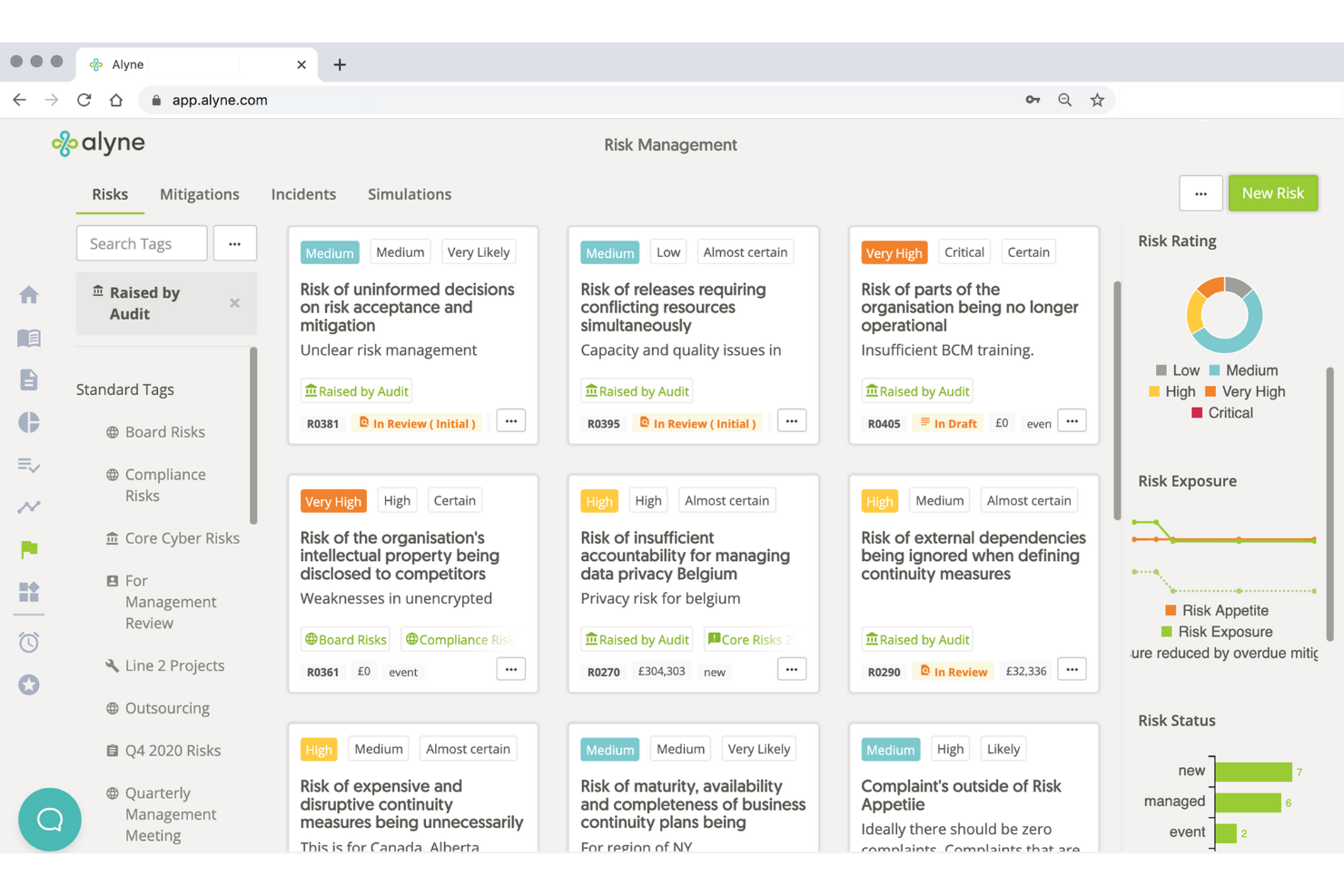
Best for enterprise risk management
Mitratech is a comprehensive GRC tool designed primarily for legal, risk, and HR professionals. It excels in automating workflows, managing compliance, and offering advanced analytics. Ankit Gupta, Senior Security Engineer, shared how the platform simplified operations for his team: “Mitratech helped us align policy management and regulatory tracking in one place, reducing the time we spent chasing updates.”
Why I picked Mitratech: Mitratech stands out for its focus on legal compliance, providing AI-driven tools like InvoiceIQ for invoice review. The platform integrates data insights and AI to enhance automation, efficiency, and visibility. It offers extensive features for legal spend management, vendor risk management, and compliance tracking. These capabilities make it a strong choice for organizations needing detailed compliance solutions.
Standout Features & Integrations
Standout features include workflow automation to streamline processes, document automation to manage files efficiently, and advanced analytics for insightful reporting. The platform's AI-driven tools enhance accuracy and reduce manual efforts. It also offers integrated risk management through the Mitratech Risk Platform.
Integrations include Microsoft Office, SAP, Oracle, Salesforce, Workday, DocuSign, Adobe Sign, SharePoint, NetSuite, and QuickBooks.

Best for third-party risk management

Prevalent offers a specialized approach to managing risks from third-party vendors, making it a fitting choice for organizations under regulatory pressure. With its AI-driven capabilities, it automates vendor onboarding, risk assessments, and continuous monitoring, which can help your team reduce administrative tasks and improve turnaround times. This tool is particularly valuable for industries with complex vendor relationships, providing real-time communication and standardized assessments to support your risk management efforts.
Why I Picked Prevalent
I picked Prevalent for its standout capabilities in third-party risk management, which is crucial for any organization dealing with numerous vendors. The AI-powered risk assessments and continuous monitoring features allow your team to identify and mitigate potential threats from third-party relationships. With automated workflows, you can manage the entire vendor lifecycle, from onboarding to offboarding, reducing manual tasks and enhancing your focus on strategic risk reduction. These features make Prevalent appealing to industries like finance and healthcare, where regulatory compliance and risk management are paramount.
Prevalent Key Features
In addition to its capabilities in third-party risk management, Prevalent offers several other features that make it a strong contender in the GRC tools space.
- Compliance Training: The platform includes tools for compliance training, ensuring that your team is up-to-date with the latest regulatory standards and practices.
- Policy Management: Prevalent provides robust policy management features, allowing your team to create, distribute, and manage policies across the organization efficiently.
- Incident Management: The tool includes incident management capabilities, helping your team to track, manage, and resolve incidents effectively to maintain compliance and reduce risks.
- Audit Management: Prevalent offers comprehensive audit management features, enabling your team to conduct audits, manage findings, and ensure compliance with regulatory requirements.
Prevalent Integrations
Native integrations are not currently listed by Prevalent.
Pros and Cons
Pros:
- Strong security measures protect sensitive data and maintain compliance.
- Comprehensive third-party risk management features support strategic risk mitigation.
- User-friendly interface simplifies navigation for compliance teams.
Cons:
- Occasional technical glitches and bugs disrupt workflow continuity.
- Higher cost compared to competitors may affect budget-conscious users.
Best for global data privacy compliance
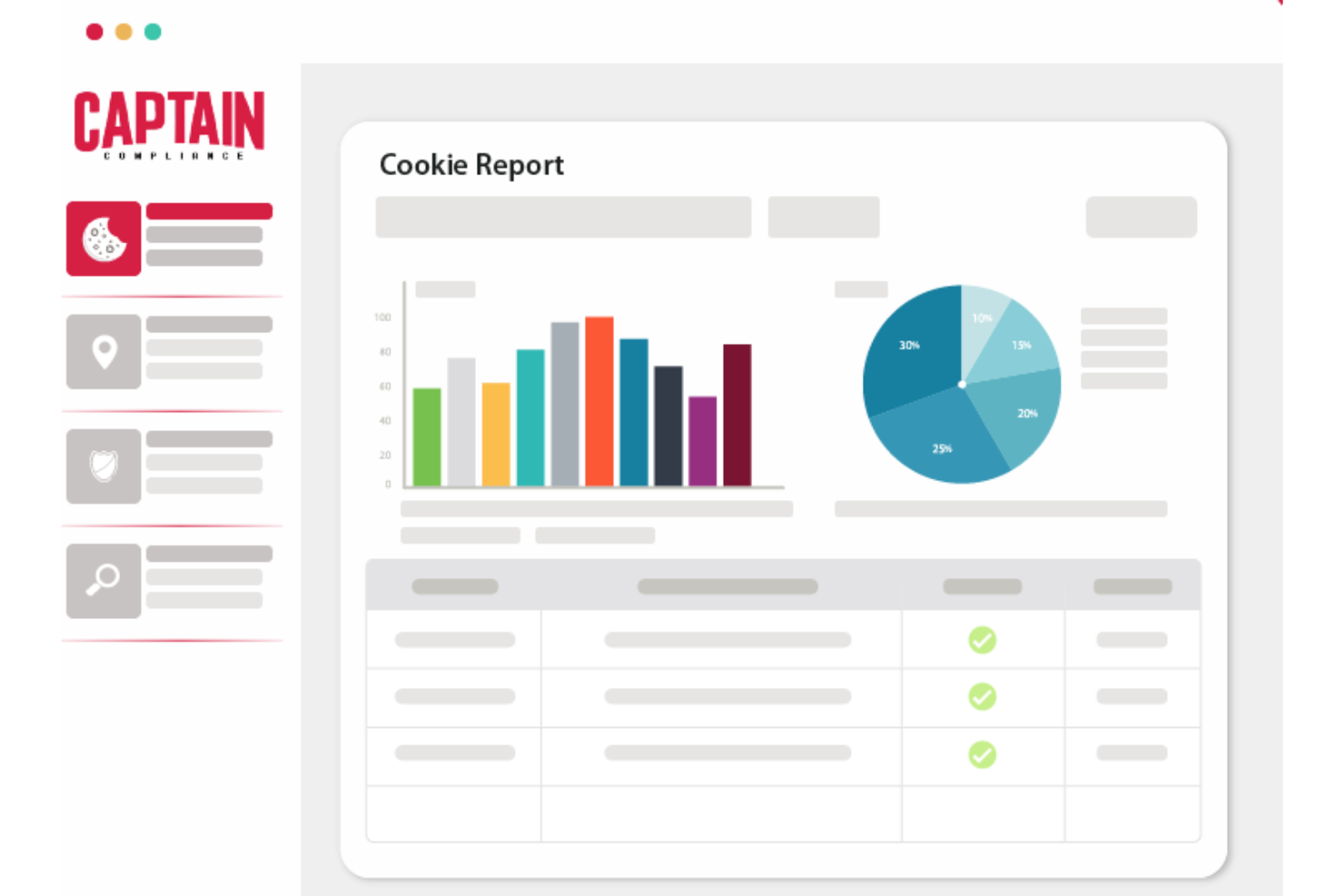
Captain Compliance is an all-in-one data privacy platform designed to simplify privacy compliance for organizations. It offers tools for managing cookie consent, privacy policies, and transparency pages, ensuring adherence to global data privacy laws like GDPR and CPRA.
Captain Compliance stands out with its comprehensive suite of features designed to enhance compliance management. One of the standout features is its cookie consent management system, which ensures that businesses comply with global data privacy laws. This feature is crucial for organizations operating in multiple jurisdictions, as it automates the process of obtaining and managing user consent for cookies.
Additionally, the privacy policy management feature centralizes all privacy policies, linking them directly to consent and cookie policies. It also has a cookie scanner which provides a real-time overview of cookies on any website. This tool is invaluable for organizations looking to maintain compliance with privacy regulations by continuously monitoring and updating their cookie policies based on the latest scan results.
The transparency page further enhances user trust by displaying current cookies on the site, ensuring that users are fully informed about the data being collected.

Best for integrated performance
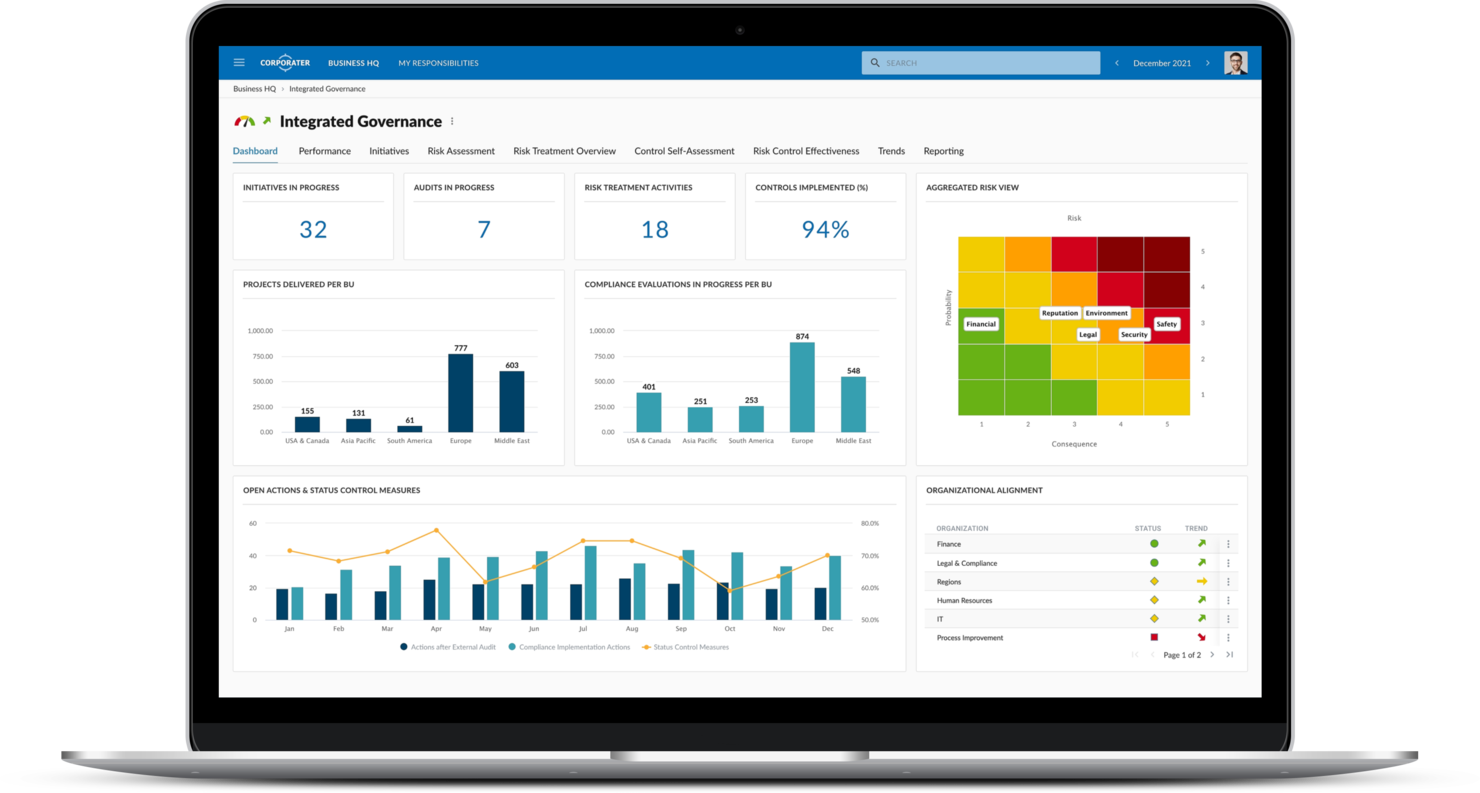
Corporater is a business management platform designed for executives, managers, and governance professionals. It supports strategic planning, performance management, and risk management functions.
Why I picked Corporater: Corporater is tailored for business governance with its strategic planning and performance management features. It offers a balanced scorecard approach, which helps align business activities with the organization's vision. The platform allows you to create custom dashboards for real-time insights. This makes it ideal for organizations focused on aligning strategy with execution.
Standout Features & Integrations
Standout features include customizable dashboards for tailored insights, a balanced scorecard for strategic alignment, and risk management tools to monitor and mitigate risks. The platform provides strategic planning capabilities to support long-term goals. It also offers performance management to track and improve business outcomes.
Integrations include Microsoft Power BI, SAP, Oracle, Salesforce, Tableau, SharePoint, Microsoft Dynamics, Google Analytics, Slack, and Jira.
Best for comprehensive compliance reporting

ADAudit Plus is an Active Directory auditing tool designed for IT administrators and security professionals. It provides detailed insights into user activities, login patterns, and changes within the network to help maintain security and compliance.
Why I picked ADAudit Plus: ADAudit Plus focuses on real-time auditing, offering instant alerts for suspicious activities. It provides detailed audit reports that help in tracking user behavior and changes across the network. The tool includes features like file integrity monitoring and privileged user auditing to enhance security. Its real-time capabilities make it essential for organizations needing immediate insights into their Active Directory environments.
Standout Features & Integrations
Standout features include file integrity monitoring to keep track of changes in sensitive files, privileged user auditing to monitor high-level access, and login activity tracking for comprehensive user insights. The tool offers compliance reporting to meet regulatory requirements. The tool also offers advanced user behavior analytics. This feature continuously monitors user activities and detects anomalies that could indicate potential security threats. Furthermore, it includes detailed file server auditing, which tracks access and modifications to files and folders, ensuring data integrity and security.
Integrations include Microsoft 365, Azure Active Directory, Windows Server, Exchange Server, SharePoint, VMware, Citrix, Google Workspace, AWS, and Office 365.

ClickUp
Best for team alignment
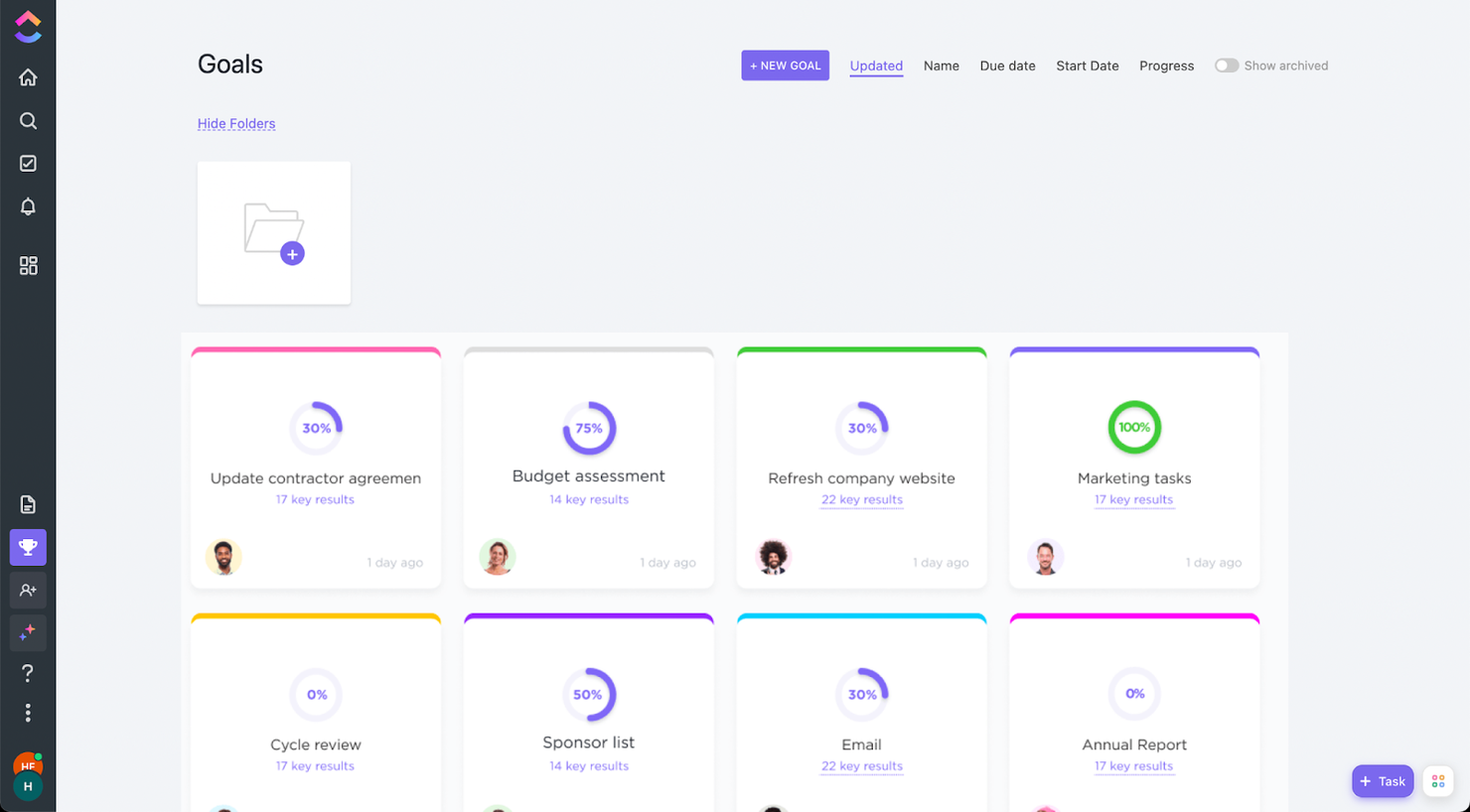
ClickUp is a project management software that has everything you need to complete your project. Additionally, features like goals and customized lists can help you address the business's governance, risk, and compliance.
Goals can be set by going to the left navigation menu and clicking on the trophy icon. To ensure alignment across departments, you can set access permissions and add only the people who need to see them. Compliance can be measured by setting tasks within those goals and monitoring progress.
ClickUp offers native integrations with Slack, G Suite, Dropbox, and many more tools, as well as over 1,000+ integrations through Zapier.
ClickUp is free with limited storage for an unlimited number of users. Paid plans start at $5/user/month and offer a free trial.
New Product Updates from ClickUp
ClickUp Adds Meetings Hub, Super Agent Templates, and ZoomInfo Integration
ClickUp adds a searchable Meetings Hub, new ways to clone and template Super Agents, and a ZoomInfo integration through the App Center. These updates improve meeting retrieval, agent reuse, and access to sales intelligence. For more information, visit ClickUp’s official site.

Best for mid-market and enterprise companies

Hyperproof is a compliance operations tool aimed at compliance managers and IT security teams. It helps organizations manage compliance tasks, assessments, and audits to ensure they meet regulatory requirements. Ankit Gupta, Senior Security Engineer, described the impact it’s had on his team: “Hyperproof streamlined how we collect and map compliance evidence, turning what used to be weeks of prep into a continuous workflow.”
Why I picked Hyperproof: I chose Hyperproof because of its user-friendly interface, flexible risk assessment framework, and advanced reporting capabilities. It allows you to automate risk management processes and easily track compliance with various regulations. Hyperproof includes over 110 compliance and risk management frameworks, ensuring that users can cover diverse regulatory requirements across industries. These include SOC 2, ISO 27001, NIST 800-53, NIST CSF, NIST Privacy, PCI, SOX, and others.
Hyperproof specializes in continuous compliance, offering tools that automate evidence collection and monitoring. It provides a centralized platform for managing multiple compliance frameworks simultaneously. The tool's features include automated reminders and task management to keep your team on track. Its focus on continuous compliance makes it suitable for organizations needing to maintain ongoing adherence to regulations.
Standout Features & Integrations
Standout features include automated evidence collection that reduces manual work, compliance framework mapping to manage various standards, and task management tools to streamline compliance activities. It also features scopes, which allow companies to split framework controls across product lines, geographies, and other organizational boundaries, tailoring compliance to specific business areas.
Integrations include Microsoft Teams, Slack, Jira, Confluence, Okta, Google Workspace, Azure Active Directory, AWS, OneTrust, and ServiceNow. In addition, its open API and software developer’s kit (SDK) enables companies to create their own integrations, offering flexibility beyond pre-built options.

Best GRC automation tool
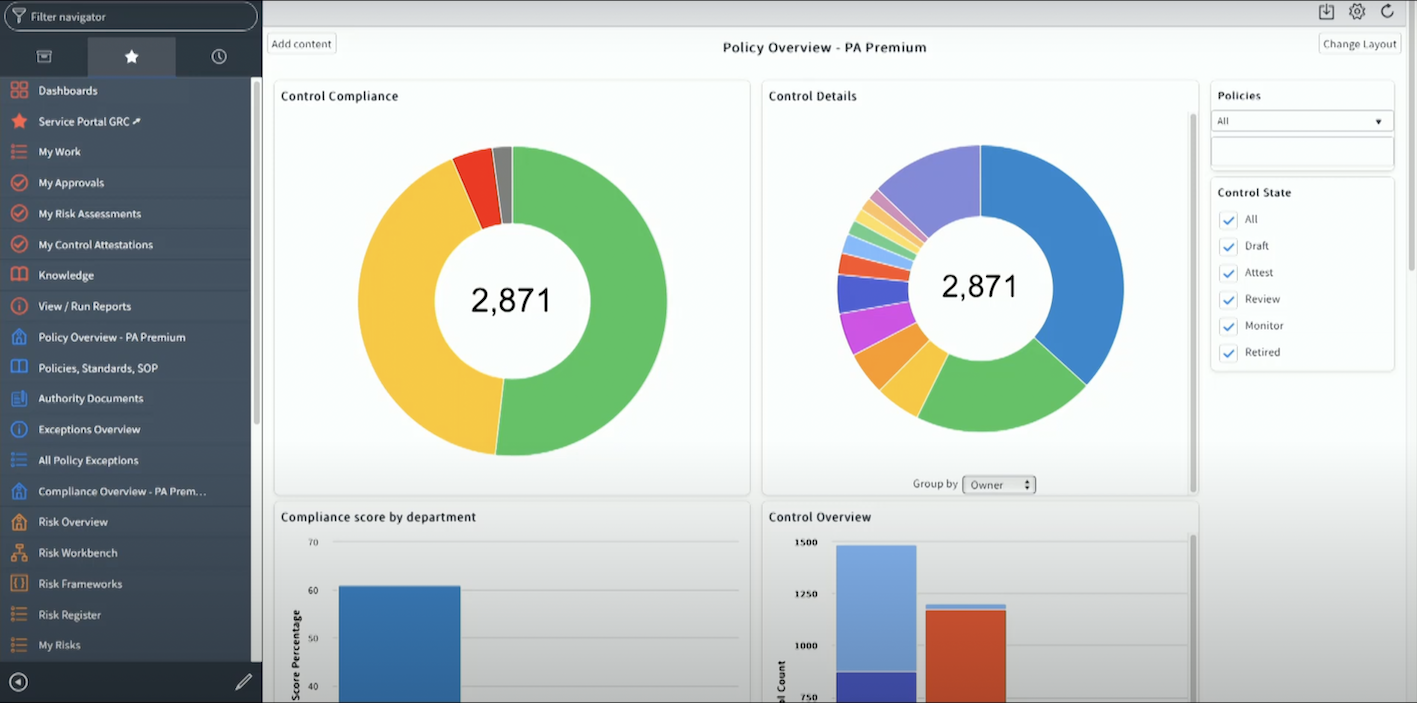
ServiceNow is a versatile platform catering to large enterprises, focusing on IT service management, operations, and business workflow automation. It helps organizations streamline processes, manage IT assets, and improve service delivery across departments. Beyond IT operations, many enterprises also use ServiceNow to strengthen compliance and risk management. Caleb Johnstone, SEO Director at Paperstack, shared: “ServiceNow have transformed our compliance procedures by automating risk assessments and providing us with real time information which makes our audits easy and predictable.”
Why I picked ServiceNow: ServiceNow is tailored for large enterprises with its extensive capabilities in IT service management and automation. It offers a unified platform where you can manage incidents, changes, and requests efficiently. The tool includes features like asset management and performance analytics to support large-scale operations. Its scalability and comprehensive suite of tools make it ideal for big organizations seeking to enhance operational efficiency.
Standout Features & Integrations
Standout features include performance analytics for tracking key metrics, asset management to oversee IT resources, and workflow automation to improve process efficiency. The platform offers incident management to handle service disruptions. It also includes change management to control modifications within the IT environment.
Integrations include Microsoft Azure, AWS, Google Cloud, Slack, Jira, SAP, Salesforce, Workday, Microsoft Teams, and Zoom.

Best for dependency visualization
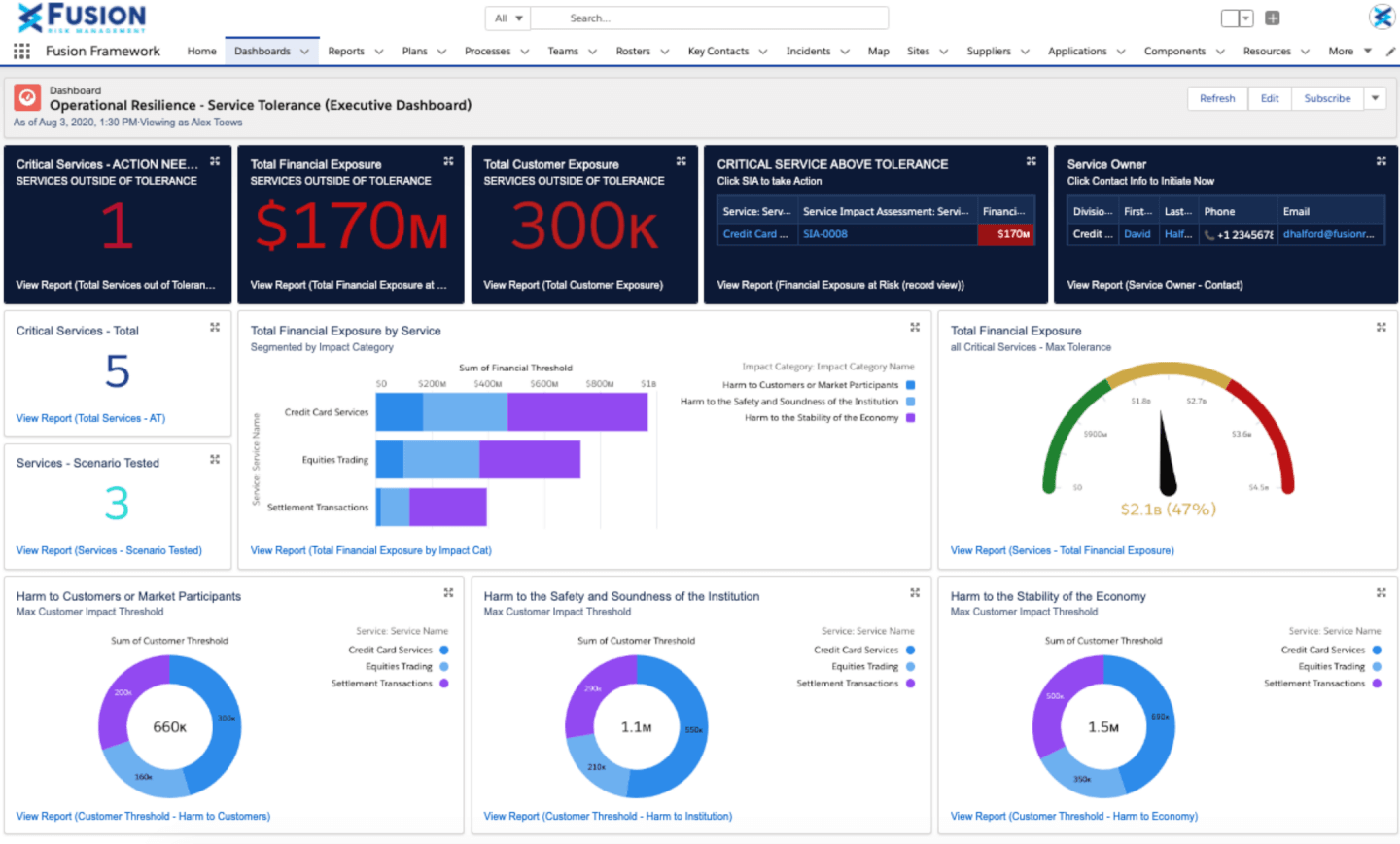
Fusion Framework System is a GRC tool designed for risk managers and business continuity professionals. It helps organizations enhance their operational resilience by managing risks, incidents, and business continuity plans.
Why I picked Fusion Framework System: The tool allows users to visualize their business, products, and services from a customer perspective, creating a map of day-to-day functions within your business. Through dependency visualization, organizations can recognize impacts and view relationships based on risks, processes, applications, and third parties.
Fusion Framework System excels in operational resilience, providing tools to manage risks and continuity plans effectively. It offers customizable dashboards that allow you to monitor incidents and track recovery efforts. The platform includes features for scenario planning and impact analysis to prepare for potential disruptions. Its focus on resilience makes it ideal for organizations needing to maintain business continuity in challenging environments.
Standout Features & Integrations
Standout features include scenario planning for proactive risk management, impact analysis to assess potential disruptions, and incident tracking for real-time response. The platform provides customizable dashboards for tailored monitoring. It also offers business continuity planning to ensure preparedness.
Integrations include Salesforce, Microsoft Teams, Tableau, ServiceNow, Slack, AWS, Google Workspace, Microsoft Azure, Jira, and Zoom.

MetricStream
Best GRC assessment tool
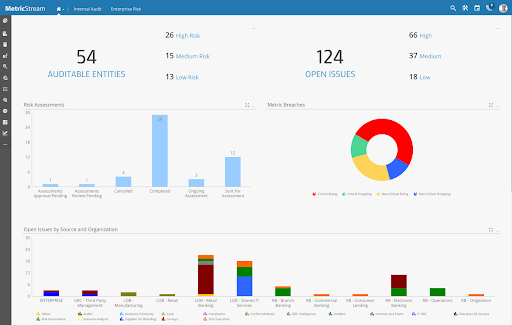
MetricStream is a governance, risk, and compliance platform tailored for risk managers and compliance officers. It helps organizations manage risk, compliance, and audit processes effectively across various departments. Its strength lies in supporting complex, multi-stakeholder initiatives. As the Founder & CEO of 4PMTI.com shared: “I have worked with MetricStream to help implement GRC integration as a part of a global program involving more than 300 stakeholders in a program spanning five departments. MetricStream helped us unify risk and compliance tracking across five departments, and its heat maps made executive reviews faster and far more informed.”
Why I picked Metricstream: It excels in integrated risk management, providing a unified platform to handle multiple risk types and compliance needs. It offers features like risk assessment and policy management that are crucial for maintaining organizational compliance. The platform's real-time risk monitoring helps keep your team informed about potential threats. Its ability to integrate various GRC functions into one platform makes it suitable for organizations looking to streamline their risk management processes.
Standout Features & Integrations
Standout features include policy management for maintaining compliance standards, risk assessment tools to evaluate potential risks, and audit management for thorough compliance checks. A highlight of this software is its internal audit management facilities, which allow users to easily and intuitively streamline and automate the internal audit lifecycle. The platform provides real-time risk monitoring to keep your team informed. It also offers compliance reporting to meet regulatory requirements.
Integrations include SAP, Oracle, Salesforce, Microsoft Azure, Google Cloud, Workday, AWS, ServiceNow, Tableau, and Slack.
When to Use GRC Tools
GRC tools bring your governance, risk, and compliance work into one place, replacing the spreadsheets and siloed trackers that make it nearly impossible to see your full risk picture. If any of the scenarios below sound familiar, it's worth adding them to your stack:
- Your team is managing compliance across multiple frameworks: Say you're juggling SOC 2, ISO 27001, and GDPR at the same time. A GRC tool maps overlapping controls across frameworks so you're not duplicating work or missing gaps.
- You're heading into an audit with no clear paper trail: When evidence is scattered across email threads, shared drives, and sticky notes, pulling it together can take weeks. GRC tools centralize documentation and automate evidence collection, so you're audit-ready year-round.
- Risk reviews are happening once a year, if that: If your risk register lives in a spreadsheet that only gets opened before a board meeting, you're flying blind the rest of the year. GRC tools keep risk data current with automated monitoring and real-time alerts.
- It's taking too long to assign and track policy sign-offs: Chasing down 200 employees to confirm they've read the updated security policy is a time sink. Automated policy distribution and acknowledgment tracking puts that process on autopilot.
- You're growing fast and controls aren't keeping up: When headcount doubles or you move into a new market like the EU or APAC, your compliance surface expands overnight. A GRC tool scales with you, flagging new regulatory requirements before they become violations.
Other GRC Tools
Here are some of the tools that did not make it to the top 10 but are worth your consideration.
- IBM OpenPages
Enterprise GRC tool
- SAP GRC
For first-party integrations
- SAI Global Compliance 360
For flexibility and customization
- Riskonnect
For user experience
- Navex RiskRate
Risk intelligence database
- Enablon
GRC reporting tool
- 6clicks
AI-powered GRC software
- SoftComply Risk Manager Plus
For risk management in Jira
- Nasdaq BWise
For visibility and oversight
- Soterion
For SAP customers
- StandardFusion
For flexible compliance management
- SAI360
For industry-specific risk management tracking
- Jama Software
For live traceability and risk detection
- Resolver
GRC tool for information security
- LogicGate
GRC tool for cross-department collaboration
- Onspring
For managing vendor risk
- Procipient
GRC tool for audit scheduling and management


Related Project Management Reviews
- Project Management Software
- Resource Management Software
- Workflow Automation Software
- Collaboration Tools
How I Evaluate GRC Tools
I look at GRC tools in two layers: the baseline—risk registers, control mapping, audit trails—that earns a spot on the list, and the differentiators that set each platform apart.
Core Functionality (Table Stakes For This List)
When I'm selecting tools for my list, I rank each one on a scale from 0 (does not offer the functionality) to 5 (excels in this area) for each core functionality listed below. Then, I calculate the tool's total score into a percentage. Each tool needs to achieve a minimum total score of 65% to be considered for inclusion.
- Risk Management: I look for a full risk lifecycle—register, scoring, ownership, and mitigation tracking—so teams can tie specific risks to live projects rather than managing them in disconnected spreadsheets.
- Compliance Management: Each tool should map controls to recognized frameworks like ISO 27001, SOX, or GDPR, and I check whether it supports tracking compliance status across multiple regulations at once.
- Policy & Governance Controls: I evaluate whether the platform supports policy creation, version control, attestation workflows, and distribution—especially for teams enforcing approval gates across project milestones.
- Audit Trail & Documentation: A solid audit trail means every action, decision, and change is logged automatically. I look for evidence linking and searchable logs that hold up during internal or external audits.
- Controls Assessment & Testing: I check whether you can define internal controls, schedule assessments, and track remediation. Platforms like ServiceNow GRC and LogicGate both handle this differently, so depth matters here.
- GRC Reporting & Dashboards: Dashboards should give PMO directors and compliance officers role-specific views into risk posture, control health, and compliance gaps without requiring a separate BI tool.
Once I have a list of tools that meet the criteria, I consider what sets each platform apart.
Differentiating Factors (What Sets Vendors Apart)
Here's how I compare and contrast different vendors:
Standout Features
Third-party risk management matters when your projects depend on external vendors or contractors. I check whether the platform lets you assess and monitor supplier risk alongside internal controls. Regulatory change tracking is another differentiator—tools like Archer and MetricStream can flag new regulations and map their impact to existing controls automatically. I also look for AI-powered risk insights that surface patterns across project portfolios, helping risk managers prioritize before issues escalate.
Beyond Features
Integrations are a big deal here. I check whether the platform connects to tools like Jira, ServiceNow, or SAP, since GRC data that lives outside your project workflows tends to get ignored. Regulatory framework coverage also varies widely—some platforms ship with dozens of pre-built frameworks while others require you to build everything from scratch. For global teams, I evaluate deployment options and data residency controls, especially when projects span regions with different data sovereignty requirements.
How to Choose GRC Tools
As you work through your own unique software selection process, keep the following points in mind:
- Identify Your Compliance Needs: Begin by pinpointing the specific compliance requirements your organization must meet. Ensure the GRC tool can effectively address various regulatory demands for different industries, such as GDPR for data protection or HIPAA for healthcare.
- Assess Risk Management Capabilities: GRC tools should offer powerful features to identify, assess, and mitigate risks. This is especially critical for industries with high operational risks, like manufacturing or energy.
- Integration with Existing Systems: Evaluate how well the GRC tool integrates with your current tech stack. This is key for organizations using multiple governance, risk, and compliance systems, as well as CRM, ERP, or IT systems, as it can significantly streamline processes.
- Scalability and Flexibility: Your GRC needs will evolve, so choose a tool that can grow with your organization, especially if your business is fast-growing in a dynamic industry.
- User-Friendly Interface: The success of a GRC tool often hinges on ease of use, as complex tools can impede user adoption and lead to errors. It is important to choose a solution with an intuitive interface and strong support options.
Trends in GRC Tools
In my research, I sourced countless product updates, press releases, and release logs from different GRC software vendors. Here are some of the emerging trends I’m keeping an eye on:
- Integration with Other Business Systems: GRC tools are increasingly offering deeper integration capabilities with other business systems, such as ERP, CRM, and project management software. This trend is driven by the need for a unified view of risks and compliance across different business functions.
- AI-Driven Risk Assessment: More GRC tools are incorporating AI to predict and assess risks with greater accuracy. This helps companies identify potential threats faster, using data patterns that human analysis might miss. For example, some platforms now use machine learning to provide real-time risk scoring.
- Unified Control Frameworks: Vendors are starting to offer unified frameworks that allow organizations to map multiple compliance requirements under one structure. This reduces redundancy, making it easier to manage overlapping regulations from different regions or industries.
- Real-Time Monitoring for Compliance: A shift toward continuous compliance is becoming popular, with GRC tools offering real-time monitoring to detect policy violations as they happen. Companies benefit by implementing a compliance program, being proactive instead of reactive in their compliance efforts, catching issues early and ensuring business continuity.
- Embedded ESG Reporting: GRC tools are expanding to include Environmental, Social, and Governance (ESG) metrics. Many companies are now expected to meet ESG standards, and these tools help them track, manage, and report on sustainability goals alongside traditional compliance.
- User-Friendly Dashboards for Non-Experts: More vendors are designing GRC tools with simpler, more intuitive dashboards aimed at users who aren’t compliance experts. This makes the tools more accessible across different departments, helping non-specialists navigate compliance tasks without extensive training.
- Real-time Risk Monitoring: Enhanced capabilities for real-time monitoring of risks and identification leveraging new technologies, with alerts and notifications, enable risk GRCs to response more quickly to potential issues.
What are GRC Tools?
GRC tools are a category of software that helps businesses manage governance, risk, and compliance workflows in a single system. They integrate these three key areas to ensure that a company operates ethically, manages its risks effectively, and complies with all relevant laws and regulations.
These tools are commonly used by compliance teams, IT departments, and risk officers to track regulatory requirements, monitor internal risks, and enforce corporate policies. GRC platforms reduce manual effort, improve audit readiness, and ensure accountability across departments.
Why Use GRC Tools?
Organizations across various industries are increasingly turning to GRC compliance management solutions to help enhance operational resilience, and maintain stakeholder trust. Here are some key factors motivating organizations to adopt governance, risk, and compliance (GRC) software:
- Regulatory Requirements: Businesses must comply with a wide range of regulations, which can vary by industry and location. Compliance management tools can help organizations stay up-to-date with evolving legal standards, reducing the risk of non-compliance and associated penalties. Companies can also use a compliance platform to automate compliance processes, ensuring consistent adherence to required guidelines.
- Cyber Risks: The increasing frequency and sophistication of cyber threats pose significant risks to organizations. Security GRC tools can enable companies to identify vulnerabilities, implement security measures, and monitor ongoing risks.
- Data Privacy Needs: As data privacy regulations, such as GDPR and CCPA, tighten globally, businesses must ensure they handle personal data responsibly. Compliance tools can help organizations implement solid data protection measures to safeguard sensitive information and avoid costly breaches.
- Operational Efficiency: Adopting GRC processes can also help streamline governance, risk, and compliance activities, reducing redundancies and improving overall efficiency. Implementing GRC software allows organizations to centralize data and workflows, fostering better decision-making and enhancing the overall governance framework.
- Strategic Risk Management: A comprehensive governance, risk, and compliance framework can also help organizations anticipate and mitigate risks before they materialize. GRC ERM (Enterprise Risk Management) tools facilitate a proactive approach, allowing businesses to align risk management with their strategic goals. This enterprise GRC view enables users to prioritize risks and allocate resources effectively.
By leveraging GRC functions, companies can not only meet compliance mandates, but also build a strong foundation for managing risks and enhancing overall governance.
Features
When selecting GRC tools, keep an eye out for the following key features:
- Risk management: This feature helps you identify, assess, and monitor risks within your organization. By using structured workflows, it makes it easier to prioritize threats and develop mitigation strategies, saving you from those nasty surprises down the line.
- Compliance tracking: Stay on top of rapidly changing regulations with compliance tracking. It lets you map your processes to regulatory requirements, manage documentation, and create audit trails, so you don’t sweat those compliance deadlines.
- Policy management: Organize, update, and distribute policies from a central hub. Policy management simplifies tracking policy acceptance and version control, ensuring everyone always has the latest rulebook.
- Incident management: Log, track, and resolve incidents efficiently. This feature supports timely responses, root cause analysis, and documentation, proving handy whether you’re dealing with security slipups or process hiccups.
- Audit management: Streamline internal or external audits with planning tools, evidence collection, and reporting. Audit management turns what could be a paperwork nightmare into a clear, manageable workflow.
- Reporting and dashboards: Access real-time insights through customizable reports and dashboards. They help you spot trends, measure performance, and communicate key risk and compliance data to decision-makers in no time.
- Access control: Restrict who can view or edit sensitive data by setting user roles and permissions. Access control keeps confidential information safe and makes sure only the right people can make crucial changes.
- Document management: Store and organize important files with version tracking and encryption. Document management makes information easy to find and protects you from losing those mission-critical docs to the digital abyss.
- Workflow automation: Automate repetitive, rule-based tasks related to risk, compliance, or auditing. Workflow automation frees up your team’s time and reduces the chance of human error—letting everyone focus on higher-value work.
Common GRC Tools AI Features
Beyond the standard GRC tools features listed above, many of these solutions are incorporating AI with features like:
- Automated risk assessment: AI scans vast data sets to identify emerging risks by detecting patterns humans might miss. It helps you stay ahead of trouble before it becomes an issue.
- Predictive analytics: AI crunches data from across the organization to forecast trends, compliance issues, or security threats. That way, you’re not just reacting—you’re planning proactively.
- Natural language processing for compliance: AI reads and interprets regulation documents or company policies in plain language, flagging gaps and keeping you informed in real time.
- Anomaly detection: AI monitors user activity and transaction data to catch suspicious behavior automatically, making it easier to spot fraud or process violations as soon as they start.
- Automated policy recommendations: AI suggests policy updates or new controls by learning from historical incidents and regulatory changes, helping you stay compliant with less manual effort.
Benefits
Here are five key benefits of using GRC tools:
- Enhanced Decision-Making: GRC tools provide comprehensive data analytics and reporting features. This enables project managers to make informed decisions based on real-time data, improving project outcomes and strategic alignment.
- Improved Risk Management: By offering advanced risk assessment and monitoring capabilities, GRC tools allow users to identify, assess, and mitigate risks efficiently. This proactive approach reduces potential impacts on project timelines and budgets.
- Streamlined Compliance Processes: Automation of compliance tasks within GRC platforms significantly reduces manual effort and error. This ensures that projects adhere to legal, regulatory, and internal policy requirements more reliably, saving time and resources.
- Increased Operational Efficiency: Integrating GRC functions into a single platform eliminates silos and enhances collaboration among teams. This integration fosters efficiency, as information is easily accessible and processes are streamlined across projects.
- Stronger Governance and Strategic Alignment: GRC organization tools facilitate the alignment of project objectives with overall business strategies. They provide a framework for governance that ensures projects contribute positively to the organization's goals and performance.
For organizations and project managers, adopting GRC tools is a strategic move towards achieving operational excellence, managing risks effectively, and ensuring compliance with all relevant standards and regulations. These benefits not only safeguard the organization from potential pitfalls but also enhance its capability to deliver successful projects that align with its strategic vision.
Costs and Pricing
Pricing for governance, risk management, and compliance (GRC) tools varies widely. Unfortunately, most prices are not available on GRC websites; instead, companies typically require a demo or meeting with a sales rep before they'll disclose prices, due to the customization usually involved with this type of tool. Here is a general idea of what a GRC tool might cost your org.
Comparison Table For GRC Tools
| Plan Type | Average Price | Common Features Included | Best For |
|---|---|---|---|
| Free Option | $0 | Most tools don't offer this | n/a |
| Basic | $500 - $1,000/month | Risk assessment, compliance management, basic reporting and dashboards, document management | Small to medium businesses, or smaller teams within a larger company |
| Standard | $1,000 - $3,000/month | All of the above, plus policy management, incident management, advanced reporting, integration capabilities | Medium-sized businesses, or departments within larger enterprises |
| Premium | $3,000 - $7,000/month | All of the above, plus advanced risk management, predictive analytics, customizable dashboards, dedicated custom support | Large businesses and organizations with extensive risk and compliance needs |
| Enterprise | $7,000+/month | All of the above, plus customizations that are typically required for enterprise, unlimited users, onsite training, strategic advisory services to help you navigate compliance more effectively | Large enterprises that need additional customization not included with other plans |
This might seem steep, but non-compliance penalties are typically steeper.
FAQs
Find answers to common questions other people ask about this topic.
How can I assess my existing GRC procedures? How will I know if I need to get GRC software?
Start by mapping your current compliance workflows, identifying manual steps, and checking for missed deadlines or audits. If tracking risks, controls, and documentation across spreadsheets or emails is slow or inconsistent, it’s time to consider GRC software.
Tools centralize records, automate reminders, and create an audit trail, which saves you time and reduces errors. If regulatory requirements are increasing, a GRC tool is usually a worthwhile investment.
How do I choose the right GRC tool for my organization’s size and complexity?
Start by mapping your compliance requirements, industry regulations, and reporting needs. Then, evaluate which GRC solutions are geared for organizations like yours—some focus on SMBs while others handle complex enterprise operations. Look for features like customizable workflows, robust reporting, and scalability. Also, consider usability for your team and whether the platform can integrate with your current systems. Request product demos, pilot programs, or customer references to see the tool in action and ensure it aligns with your real-world processes before you commit to a contract.
What integrations should a modern GRC platform support?
Your GRC tool should connect with systems you already use, such as HR databases, document management, ERP, and communication tools. Integration with cloud storage, identity and access management, and security information systems is particularly valuable for automating evidence collection and risk tracking. For compliance teams, seamless integration with email, collaboration platforms, and regulatory feeds reduces effort and improves response speed. Always review a platform’s integration library and confirm it supports secure API connections so your data remains up to date and accessible.
Can GRC tools help automate compliance reporting and audits?
Yes, most GRC tools offer audit-ready report templates, automated evidence gathering, and real-time dashboards. These features help your compliance team compile checklists, submit documentation, and track audit progress with less manual work. Automated alerts remind you of compliance deadlines and flag missing documentation. During audits, you can easily pull historical records or generate on-demand reports for regulators. This reduces administrative overhead and increases the accuracy and consistency of your compliance processes.
What are some best practices for effectively implementing a GRC strategy?
To implement a GRC strategy successfully, involve all key stakeholders early and clarify your compliance goals. Use a GRC platform to centralize policies, risk registers, and incident tracking. Standardize processes using tool templates and automate repetitive compliance tasks where possible. Schedule regular reviews using the platform’s reporting features to monitor progress and gaps. Provide team training on both the tool and your workflows to maintain engagement and ensure adoption.
What are some challenges of implementing a GRC strategy?
Common challenges include resistance to change, data silos, and unclear ownership of compliance tasks. GRC software can help by standardizing workflows, alerting teams to overdue tasks, and automating evidence collection across departments. To address challenges, choose a tool that integrates well, offer training for all users, and assign clear responsibilities. Test the platform’s communication and collaboration features to break down silos and keep everyone accountable.
Are there any open source GRC tools? What are the benefits and drawbacks of using an open source GRC tool?
Yes, several open source GRC tools exist, like OpenGRC and Eramba. The main benefit is cost savings, plus the ability to customize features. However, open source tools may lack dedicated customer support, certified integrations, or regular security updates that commercial tools provide. If you have strong IT resources and need flexibility, open source can work. If ongoing support and fast updates matter more, consider proprietary GRC software.