
Reseña de Instagantt: Ventajas, Desventajas, Características y Guía de Precios



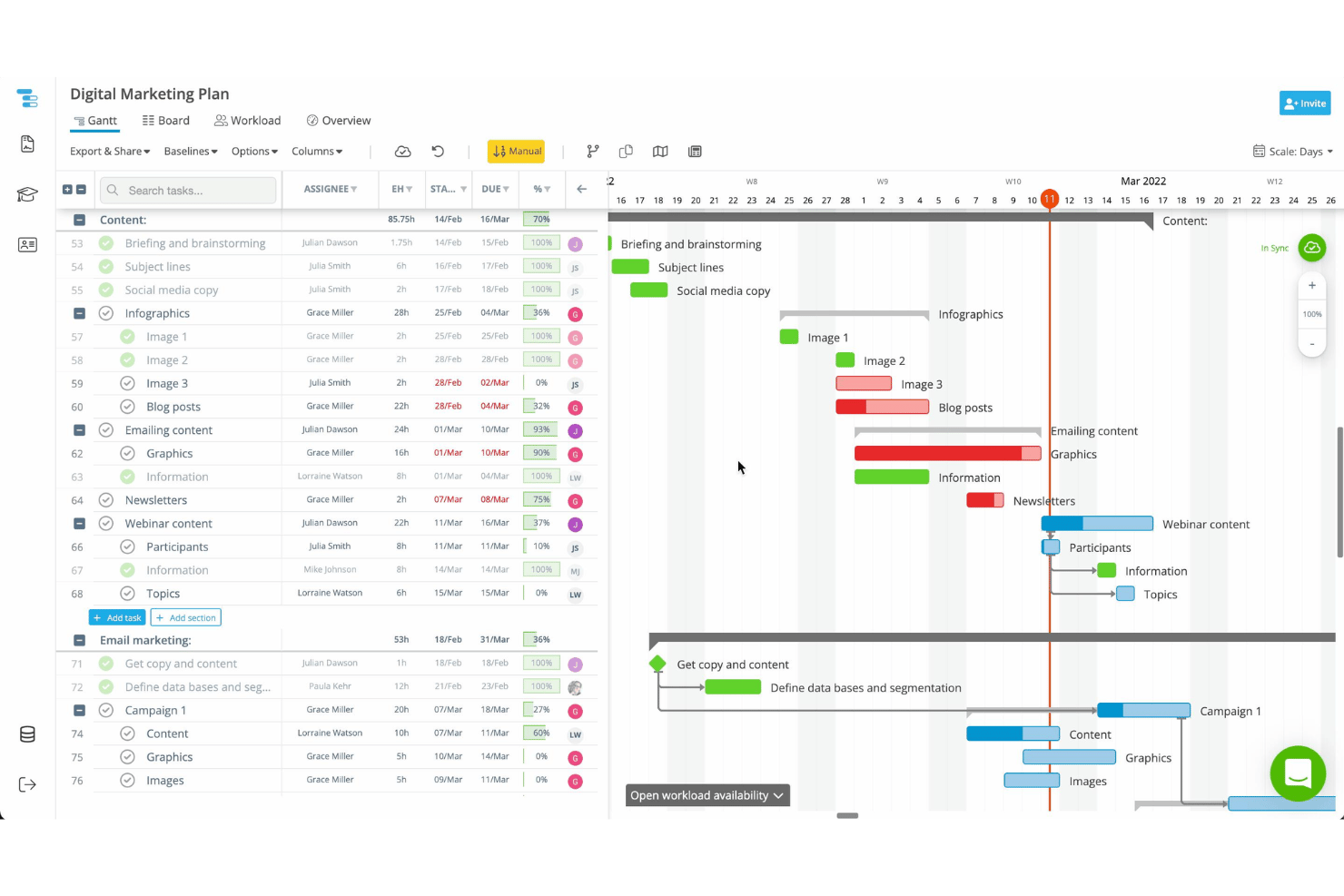
Instagantt is a gantt chart software built specifically for project managers who need a dedicated timeline view layered directly on top of their Asana workspace. If your team already runs in Asana, I'd pick Instagantt over a standalone tool like TeamGantt—it syncs natively with your Asana projects, so you get full Gantt functionality without managing a separate system or re-entering data. It's worth a close look if you want real timeline control without pulling your team out of their existing workflow.
Instagantt Evaluation Summary
- From $120/year
- 7-day free trial available
Por qué confiar en nuestras recomendaciones de software
Nuestro equipo lleva probando y evaluando software desde 2012. Como gestores de proyectos, sabemos lo difícil —y lo importante— que es elegir el software adecuado.
Para esta guía, evaluamos las herramientas mediante pruebas prácticas e investigación independiente, puntuando las herramientas según nuestros criterios de selección. También nos basamos en la experiencia de líderes de opinión del sector y de profesionales en activo de la gestión de proyectos.
Nuestras reseñas reflejan nuestro criterio editorial humano, no un discurso de ventas.
Revisores expertos:
Instagantt Overview
When judging Instagantt against other options, I think its clean interface and drag-and-drop scheduling make day-to-day planning, project scheduling, and task management a lot simpler. Pricing is fair for solo users and small teams, especially since the onboarding is quick and you get clear learning resources. While its integrations could be deeper and advanced dependencies can get clunky with very complex projects, I still find Instagantt ideal for teams focused on transparency, visuals, and fast adoption—especially in product, marketing, or small agency environments where project visibility matters most.
pros
-
Drag-and-drop scheduling simplifies shifting project tasks quickly
-
Visual progress tracking with custom color coding impresses stakeholders
-
Multiple baseline comparison helps spot timeline changes instantly
cons
-
Complex dependencies are harder to manage in larger projects
-
Exported PDF gantt charts can lose formatting detail
-
Mobile experience is limited compared to desktop version
-

Smartsheet
Visit WebsiteThis rating combines scores from multiple user review sites to reflect overall customer sentiment about the product.4.5 -
Celoxis
Visit WebsiteThis rating combines scores from multiple user review sites to reflect overall customer sentiment about the product.4.5 -
Accelo
Visit WebsiteThis rating combines scores from multiple user review sites to reflect overall customer sentiment about the product.4.4





Nuestra Metodología de Revisión
Cómo probamos y puntuamos las herramientas
Llevamos años construyendo, refinando y mejorando nuestro sistema de prueba y puntuación de software. La rúbrica está diseñada para capturar los matices de la selección de software y los factores que hacen efectivo a un sistema, centrándose en los aspectos críticos del proceso de toma de decisiones.
A continuación, puedes ver exactamente cómo funciona nuestro proceso de prueba y puntuación en base a siete criterios. Esto nos permite proporcionar una evaluación imparcial del software basada en la funcionalidad principal, características destacadas, facilidad de uso, incorporación, soporte al cliente, integraciones, opiniones de clientes y valor por el dinero.
Funcionalidad principal (25% de la puntuación final)
El punto de partida de nuestra evaluación es siempre la funcionalidad principal de la herramienta. ¿Cuenta con las funciones y características básicas que un usuario esperaría ver? ¿Alguna de estas funciones principales está limitada a planes de precios superiores? Esperamos que la herramienta se mantenga a la par de las capacidades básicas de sus competidores.
Características destacadas (25% de la puntuación final)
A continuación, evaluamos las características destacadas poco comunes que van más allá de la funcionalidad principal normalmente encontrada en este tipo de herramientas. Una puntuación alta refleja funciones únicas o especializadas que hacen que el producto sea más rápido, eficiente, o aporte valor extra al usuario.
También evaluamos la facilidad de integración con otras herramientas habitualmente presentes en el ecosistema tecnológico para ampliar la funcionalidad y utilidad del software. Las herramientas que ofrecen muchas integraciones nativas, conexiones de terceros y acceso por API para integrar soluciones personalizadas obtienen la mejor puntuación.
Facilidad de uso (10% de la puntuación final)
Consideramos cuán rápido y fácil es ejecutar las tareas fundamentales usando la herramienta. El software con alta puntuación está bien diseñado, es intuitivo, ofrece aplicaciones móviles, proporciona plantillas y hace que tareas relativamente complejas parezcan sencillas.
Incorporación (10% de la puntuación final)
Sabemos lo importante que es una adopción rápida para un nuevo sistema, así que evaluamos cuán sencillo es aprender a usar la herramienta con una capacitación mínima. Analizamos cuán rápido un miembro del equipo puede configurarse y comenzar a usar la herramienta sin experiencia previa. Las soluciones mejor puntuadas indican que se requiere poco o ningún soporte.
Soporte al cliente (10% de la puntuación final)
Revisamos la rapidez y facilidad para obtener ayuda por teléfono, chat en vivo o base de conocimientos. Las empresas que ofrecen soporte en tiempo real obtienen las mejores puntuaciones, mientras que los chatbots obtienen las peores.
Opiniones de clientes (10% de la puntuación final)
Además de nuestras propias pruebas y valoraciones, consideramos la puntuación neta del promotor de clientes actuales y anteriores. Revisamos la probabilidad de que, ante la opción, quisieran elegir la herramienta de nuevo por su funcionalidad central. Un software con una puntuación alta refleja una gran satisfacción de sus usuarios actuales o pasados.
Valor por el dinero (10% de la puntuación final)
Por último, tomando en cuenta todos los criterios mencionados, comparamos el precio promedio de los planes básicos respecto a las funciones principales y el valor aportado por los otros criterios. El software que entrega más por menos recibirá una puntuación superior.
Core Features
Task Dependencies
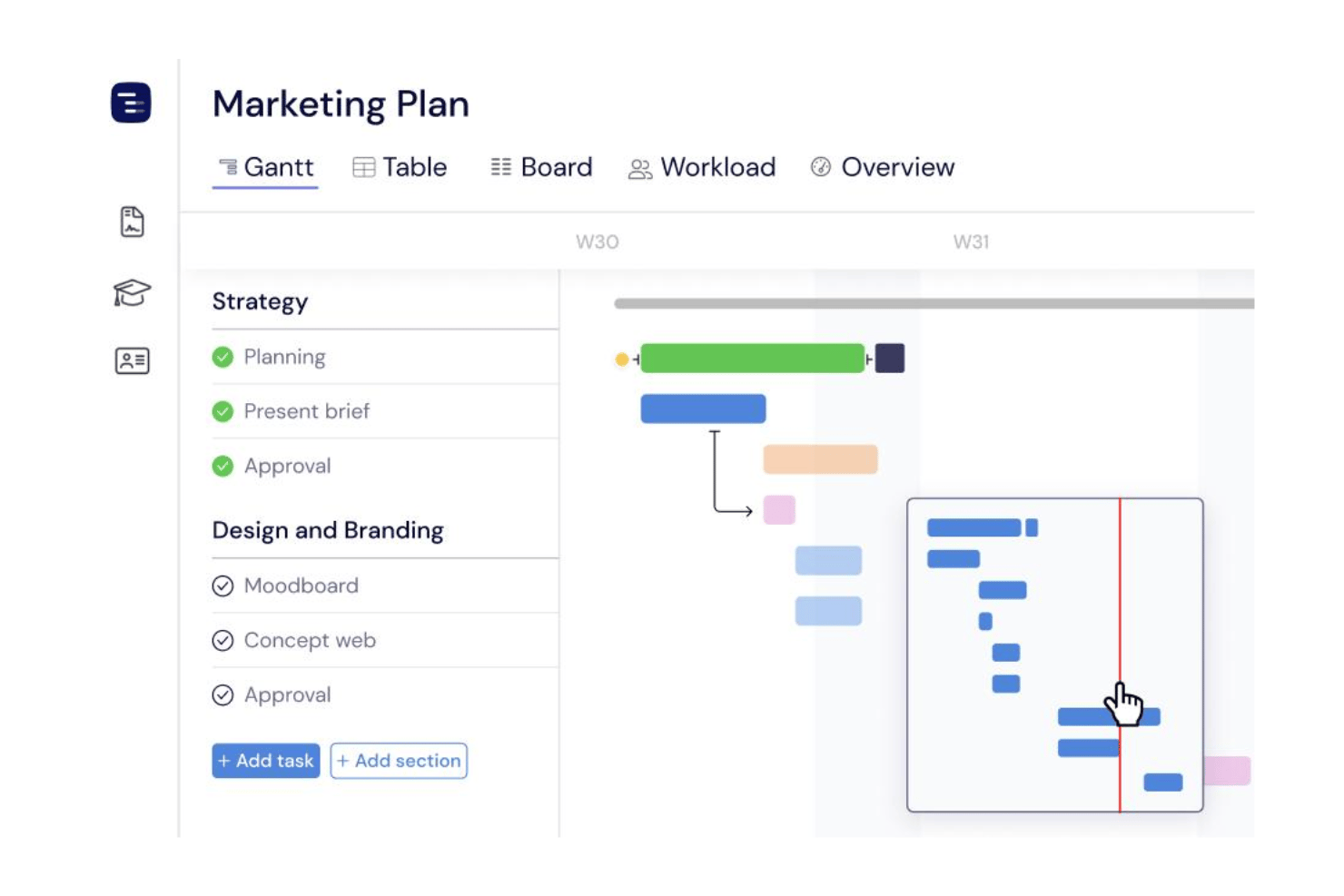
Link tasks to create clear sequences and visualize project flow. Instagantt lets you drag connectors between tasks, highlighting potential bottlenecks.
Multiple Project Workspaces
Manage several projects in separate, organized workspaces. This simplifies access and keeps projects and teams siloed when needed.
Baseline Tracking
Save and compare project baselines to spot timeline shifts. Instagantt clearly marks where your project has drifted from the original plan.
Custom Progress Tracking
Track project completion with simple percentage updates and color codes. You easily see what’s ahead, behind, or completed at a glance.
Manual and Auto Scheduling
Choose between moving tasks by hand or letting dependencies adjust them automatically. This brings flexibility whether you plan day-to-day or map out full quarters.
Timeline Export and Sharing
Export gantt charts to PDF, PNG, or share live project URLs. Both options support quick updates to clients or executives who want a snapshot of progress.

Ease of Use
Instagantt feels intuitive, with drag-and-drop timelines, keyboard shortcuts, and visual cues that keep project updates fast and painless. Task creation and reordering are simple, and user feedback often mentions how clear color coding and baseline comparisons speed up team check-ins. Even users new to Gantt charts say onboarding is quick because layouts are logical and user-friendly.
Integrations
Instagantt integrates primarily with Asana, with options to integrate with Jira and Slack.
Instagantt also offers an API for custom integrations and supports connecting with third-party integration tools like Zapier.

Instagantt Specs
- API
- Batch Permissions & Access
- Budgeting
- Calendar Management
- Collaboration Support
- Contact Management
- Contact Sharing
- Customer Management
- Dashboard
- Dashboards
- Data Export
- Data Import
- Data Visualization
- Dependency Tracking
- Document Sharing
- Expense Tracking
- External Integrations
- File Sharing
- Gantt Charts
- Kanban Boards
- Multi-User
- Notifications
- Project Management
- Resource Management
- Scheduling
- Task Scheduling/Tracking
- Third-Party Plugins/Add-Ons
- Time Management
- Travel Management
- Workflow Management