



Trello vs. Notion: Vergleich & Expertenbewertungen für 2026



Trello bietet eine intuitive Plattform zur einfachen Verwaltung von Aufgaben und Projekten. Notion stellt einen flexiblen Arbeitsbereich zum Organisieren von Informationen und zur Zusammenarbeit mit Ihrem Team bereit. Während Trello bei der unkomplizierten Aufgabenverwaltung punktet, bietet Notion ein breiteres Spektrum an Organisationsfunktionen.
In diesem Artikel finden Sie einen detaillierten Vergleich dieser Tools, inklusive ihrer Funktionen, Vor- und Nachteile sowie Preise. So können Sie die passende Projektmanagement-Software für Ihre Bedürfnisse auswählen.
Trello vs. Notion: An Overview
Trello




Notion



Warum Sie unseren Software-Empfehlungen vertrauen können
Unser Team testet und bewertet Software seit 2012. Als Projektmanager wissen wir selbst, wie schwierig – und wichtig – es ist, die richtige Software auszuwählen.
Für diesen Leitfaden haben wir Tools mithilfe von praktischen Tests und unabhängiger Recherche bewertet und dabei unsere Bewertungskriterien angewendet. Zudem greifen wir auf Erkenntnisse von Branchenvordenkern und praktizierenden Projektmanagement-Experten zurück.
Unsere Bewertungen spiegeln unser menschliches redaktionelles Urteilsvermögen wider, keine Verkaufsstrategie.
Expertenprüfer:
Trello vs. Notion Pricing Comparison
| Trello | Notion | |
|---|---|---|
| Free Trial | 14-day free trial | Free plan available |
| Pricing | From $5/user/month (billed annually) | From $10/user/month (billed annually) |
Trello Preismodell bietet ein Freemium-Modell mit optionalen kostenpflichtigen Stufen, die erweiterte Funktionen hinzufügen. Nutzer sollten jedoch die potenziellen Kosten für Integrationen beachten.
Notion Preismodell basiert ebenfalls auf einem Freemium-Ansatz, mit Premium-Tarifen für zusätzliche Arbeitsplätze und Kollaborationsfunktionen. Es können dabei Kosten für Team-Erweiterungen anfallen.
Um die passende Preisstruktur zu wählen, bewerten Sie die Größe Ihres Teams, die benötigten Funktionen und eventuelle Zusatzkosten, die mit Ihrem Teamwachstum entstehen könnten.
Trello vs. Notion Feature Comparison
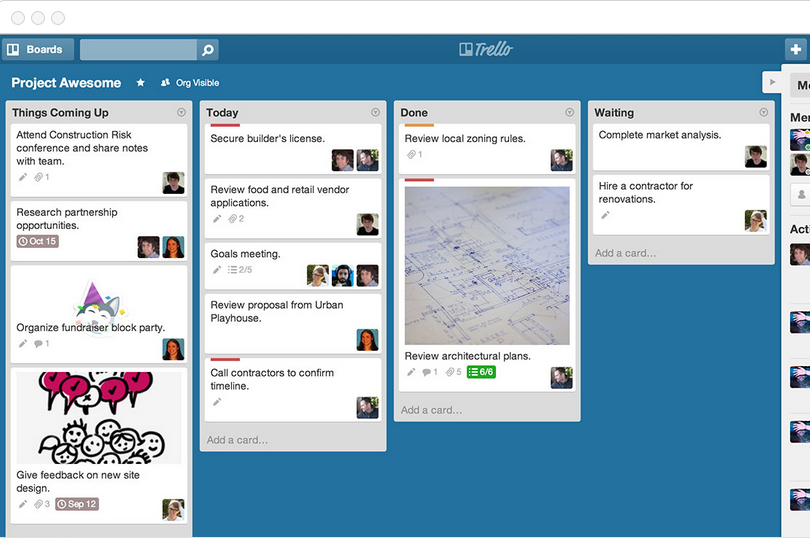
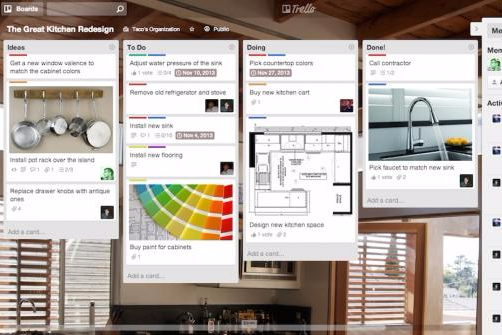
Trellos Kanban-Boards machen es einfach, den Workflow Ihres Teams zu visualisieren – ideal für die Verwaltung laufender Aufgaben in schnelllebigen Umgebungen.
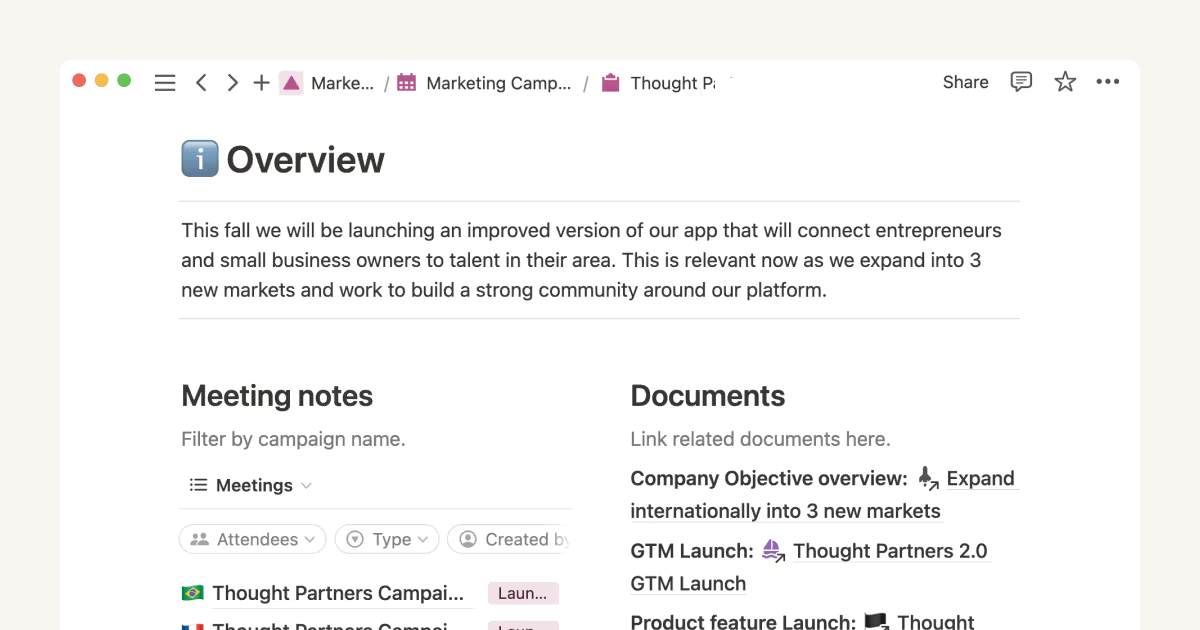
Notions flexible Datenbanken ermöglichen das Anpassen von Arbeitsbereichen für unterschiedliche Projektanforderungen und sind besonders geeignet für Teams, die detaillierte Dokumentation benötigen. Trello glänzt bei der visuellen Aufgabenverfolgung, während Notion besser für die Organisation komplexer Projektinformationen geeignet ist.
| Trello | Notion | |
|---|---|---|
| API | ||
| Calendar Management | ||
| Data Export | ||
| Data Import | ||
| External Integrations | ||
| Multi-User | ||
| Notifications | ||
| Project Management | ||
| Scheduling | ||
| Task Scheduling/Tracking |
Trello vs. Notion Integrationen
| Integration | Trello | Notion |
| Slack | ✅ | ✅ |
| Google Drive | ✅ | ✅ |
| Microsoft Teams | ✅ | ❌ |
| GitHub | ✅ | ❌ |
| Zapier | ✅ | ✅ |
| Asana | ❌ | ✅ |
| Jira | ✅ | ❌ |
| Figma | ❌ | ✅ |
| API | ✅ | ✅ |
Die Slack-Integration von Trello liefert sofortige Aufgaben-Updates und hält Teams so in Echtzeit auf dem Laufenden. Die Figma-Integration von Notion ermöglicht eine nahtlose Zusammenarbeit zwischen Design und Projektplanung. Während Trello auf Echtzeit-Kommunikation ausgerichtet ist, ist Notion stärker darin, Designarbeit mit Projektdokumentation zu verbinden.
Trello vs. Notion Sicherheit, Compliance & Zuverlässigkeit
| Faktor | Trello | Notion |
| Datenverschlüsselung | Notion bietet granulare Berechtigungseinstellungen zur Verwaltung des Zugriffs auf Arbeitsbereiche und Seiten. | Notion nutzt außerdem AES-256-Bit-Verschlüsselung für ruhende Daten und TLS für Datenübertragungen. |
| Regulatorische Compliance | Trello erfüllt die Anforderungen der DSGVO und CCPA und bietet Nutzern Datenschutz. | Notion hält die Standards von DSGVO und CCPA ein und gewährleistet Datenschutz sowie Datensicherheit. |
| Zugriffskontrolle | Trello bietet rollenbasierte Berechtigungen zur Steuerung des Zugriffs auf Boards und Daten. | Notion nutzt ebenfalls AES-256-Bit-Verschlüsselung für ruhende Daten und TLS für Datenübertragungen. |
| Backup & Wiederherstellung | Trello führt regelmäßige Datensicherungen durch und ermöglicht Wiederherstellungsoptionen bei Datenverlust. | Notion sorgt mit automatischen Backups und Wiederherstellungssystemen für Datenverfügbarkeit. |
Trello und Notion bieten beide starke Sicherheits- und Compliance-Features, jedoch könnten die umfassenden Zugriffskontrollen von Trello für Teams mit strengen Anforderungen an die Datenverwaltung besser geeignet sein.
Beachten Sie die spezifischen Sicherheitsanforderungen Ihres Teams, wie Verschlüsselungsstandards und regulatorische Pflichten, um das passende Tool für die Richtlinien Ihrer Organisation zu wählen.
Trello vs. Notion Benutzerfreundlichkeit
| Faktor | Trello | Notion |
| Benutzeroberfläche | Trello bietet eine übersichtliche Kanban-Oberfläche, die leicht zu bedienen ist. | Notion stellt einen anpassbaren Arbeitsbereich bereit, dessen Flexibilität anfangs jedoch überfordernd wirken kann. |
| Onboarding-Erfahrung | Schnellstart-Anleitungen und Vorlagen von Trello erleichtern neuen Nutzern die Einführung. | Das Onboarding bei Notion erfordert mehr Einarbeitung aufgrund des umfangreichen Funktionsumfangs. |
| Einrichtung | Trello erfordert nur wenig Einrichtung, sodass Teams schnell loslegen können. | Die Einrichtung bei Notion ist aufwendiger, da Arbeitsbereiche und Datenbanken konfiguriert werden müssen. |
| Support | Trello bietet ein umfassendes Hilfezentrum und Community-Support. | Notion stellt ausführliche Anleitungen sowie ein aktives Community-Forum zur Unterstützung bereit. |
Trello punktet durch seine Benutzerfreundlichkeit, eine intuitive Oberfläche und einen minimalen Einrichtungsaufwand – ideal für ein schnelles Aufgabenmanagement. Notion hat aufgrund seiner zahlreichen Anpassungsmöglichkeiten eine steilere Lernkurve, wird jedoch für Teams, die Zeit in die Einarbeitung investieren, zu einem leistungsstarken Werkzeug.
Trello vs Notion: Pros & Cons
Trello
- You can easily visualize your tasks with Trello's board and card layout.
- It's simple to use, making it accessible for team members of all skill levels.
- Trello adapts to your team's workflow, offering flexibility in task management.
- Trello lacks advanced reporting features you might find in more complex tools.
- You can't create intricate task dependencies, which may limit complex project planning.
- Trello's simplicity might not suit large teams with detailed project management needs.
Notion
- You can tailor your workspace to fit your needs with flexible layouts and templates.
- The intuitive design makes it easy for users to navigate and organize their projects.
- You can take notes, manage projects, and maintain your databases in one place.
- It can be challenging for new users to master without spending time on tutorials.
- You might experience slow performance if you have large databases or complex setups.
- The mobile app is less intuitive than the desktop version.
Best Use Cases for Trello and Notion
Trello
- Creative Agencies Trello's visual task management makes it easy for you to track projects, ideas, and client feedback.
- Startups The flexibility Trello offers helps your team adapt quickly as you grow and change.
- Marketing Teams You can easily plan campaigns and track progress with Trello's board system.
- Design Departments Trello's simple interface allows you to manage design projects and revisions efficiently.
- Freelancers You can organize your tasks and deadlines without getting overwhelmed by complex features
- Product Development Trello's adaptability helps your team streamline workflows and manage product roadmaps effectively.
Notion
- Creative Agencies You can use customizable templates within a flexible workspace to manage creative projects and collaborate with the team.
- Freelancers You can manage multiple projects and clients in a single, organized platform.
- Startups You can tailor your workspace to your needs in order to manage rapid growth and changing project requirements.
- Remote Teams Notion supports constant communication and project tracking across different locations.
- Education Departments You can use Notion's database capabilities to organize curricula, schedules, and educational materials.
- Content Writers You can use the note-taking and organization features to manage research, drafts, and editorial calendars efficiently.
Wer sollte Trello nutzen und wer sollte Notion nutzen?
Trello eignet sich am besten für Teams, die eine einfache, visuelle Lösung zum Aufgaben- und Projektmanagement benötigen – gerade in dynamischen Umgebungen wie Start-ups oder kleinen Teams. Notion ist besser für Nutzer, die ein umfassenderes Werkzeug für komplexe Dokumentationen und individuelle Anpassungen brauchen; ideal für kreative Teams oder Projekte mit vielfältigen Anforderungen.
Wenn Ihr Team Wert auf einfache Handhabung und eine schnelle Einrichtung legt, ist Trello eine sehr gute Wahl. Benötigen Sie hingegen mehr Flexibilität und Tiefe, passt Notion besser zu Ihren Anforderungen.
Differences Between Trello and Notion
| Trello | Notion | |
|---|---|---|
| Automation | Trello includes built-in automation with Butler for repetitive tasks. | Notion lacks native automation but can be extended through integrations |
| Customization | Trello’s customization is limited to board and card settings. | Notion allows extensive customization with databases and templates. |
| Documentation | Trello focuses on visual task tracking rather than documentation. | Notion excels in combining project management with detailed documentation |
| Pricing | Trello employs a freemium model, offering paid tiers for additional features. | Notion also uses a freemium model but charges for added workspaces and features |
| User Interface | Trello offers a simple Kanban board layout for task management. | Notion provides a customizable workspace with various layout options. |
| Read Trello ReviewOpens new window | Read Notion ReviewOpens new window |
Similarities Between Trello and Notion
| Cloud-Based Access | Trello and Notion are cloud-based, so you can access your projects from anywhere, whether you’re in the office or on the go. |
|---|---|
| Collaboration | Both Trello and Notion support team collaboration by allowing multiple users to edit and comment on projects in real time. |
| Freemium Model | Trello and Notion both have a freemium pricing model, letting you start with basic features and scale up as your needs grow. |
| Integrations | Both tools offer a range of integrations with popular apps like Slack and Google Drive, enhancing their functionality. |
| User Support | Each platform has an active user community and provides extensive online resources, helping you get the most out of their features. |
| Read Trello ReviewOpens new window Read Notion ReviewOpens new window | |