



Trello vs. Zoho Projects: Expertenvergleich & Bewertungen 2026



Trello bietet einen unkomplizierten Ansatz zur Organisation Ihrer Projekte mit intuitiven Boards und Karten, während Zoho Projects eine umfassende Suite zur Verwaltung komplexer Arbeitsabläufe bereitstellt. Trellos Einfachheit unterscheidet sich von den robusten Funktionen von Zoho Projects, sodass Ihre Wahl von den Anforderungen Ihres Teams abhängt.
In diesem Artikel finden Sie einen detaillierten Vergleich dieser Tools, einschließlich ihrer Funktionen, Vor- und Nachteile, Preisgestaltung und mehr, damit Sie entscheiden können, welche Projektmanagement-Software am besten zu Ihrer Arbeit passt.
Trello vs. Zoho Projects: An Overview
Trello

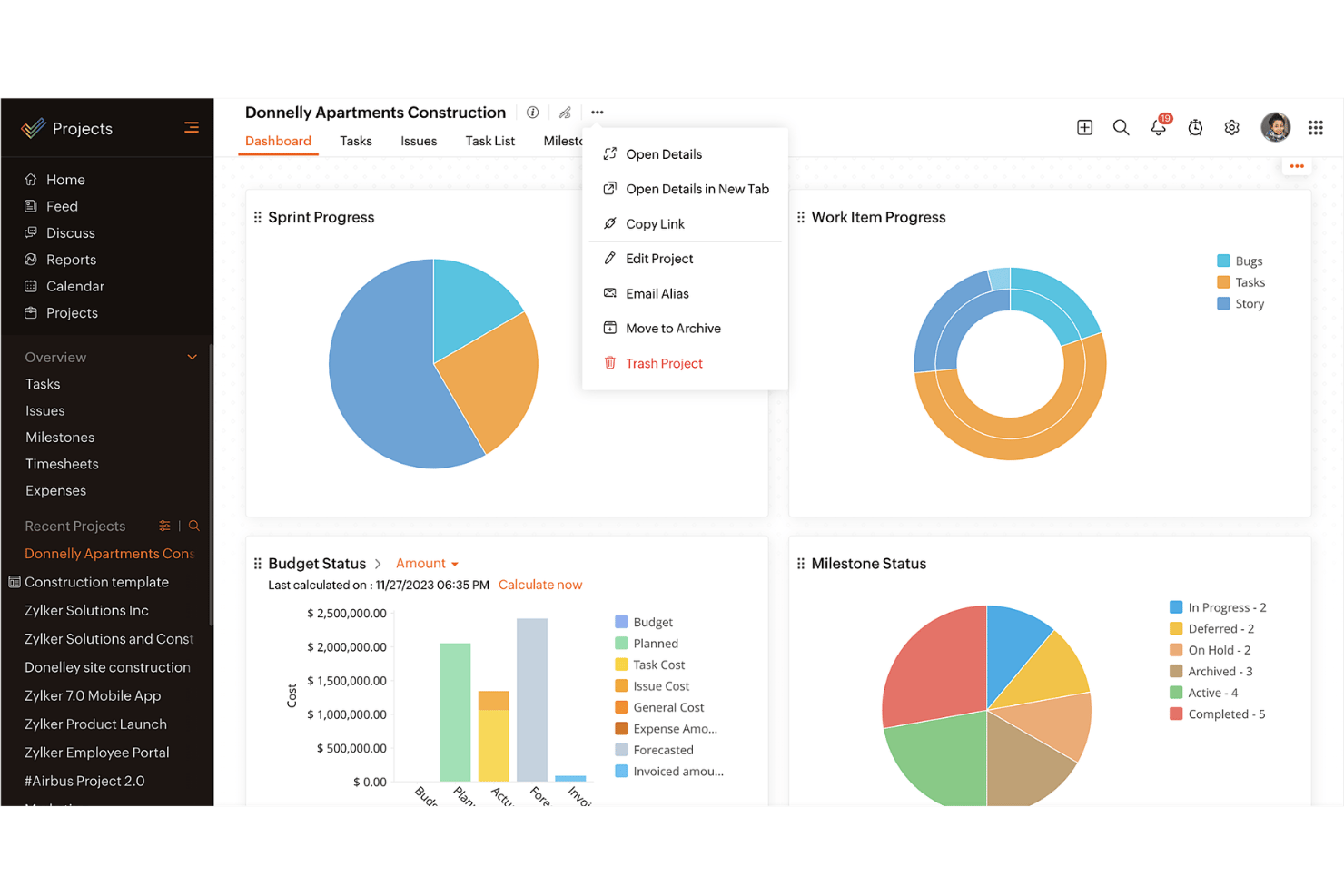
Zoho Projects


Warum Sie unseren Software-Empfehlungen vertrauen können
Unser Team testet und bewertet Software seit 2012. Als Projektmanager wissen wir selbst, wie schwierig – und wichtig – es ist, die richtige Software auszuwählen.
Für diesen Leitfaden haben wir Tools mithilfe von praktischen Tests und unabhängiger Recherche bewertet und dabei unsere Bewertungskriterien angewendet. Zudem greifen wir auf Erkenntnisse von Branchenvordenkern und praktizierenden Projektmanagement-Experten zurück.
Unsere Bewertungen spiegeln unser menschliches redaktionelles Urteilsvermögen wider, keine Verkaufsstrategie.
Expertenprüfer:
Trello vs. Zoho Projects Pricing Comparison
| Trello | Zoho Projects | |
|---|---|---|
| Free Trial | 14-day free trial | Free plan + 15-day free trial available |
| Pricing | From $5/user/month (billed annually) | Pricing upon request |
Trello-Preise basieren auf einem gestaffelten Modell mit kostenlosen und kostenpflichtigen Plänen, wobei zusätzliche Kosten für Power-Ups und Integrationen anfallen können. Zoho Projects-Preise folgen einem Abonnementmodell mit verschiedenen Stufen, wobei für erweiterte Funktionen oder mehr Speicherplatz zusätzliche Gebühren anfallen können.
Um das passende Preismodell zu wählen, sollten Sie die Anforderungen und die potenzielle Nutzung Ihres Teams bewerten und dabei sowohl den aktuellen als auch den zukünftigen Bedarf berücksichtigen, um zu prüfen, welcher Tarif am besten zu Ihrem geplanten Wachstum und Ihren Funktionswünschen passt.
Trello vs. Zoho Projects Feature Comparison
Trello verwendet Kanban-Boards, um Teams bei der Visualisierung und Verwaltung von Aufgaben zu unterstützen, was es ideal für die Verfolgung laufender Projekte und individueller Verantwortlichkeiten macht. Zoho Projects bietet Gantt-Diagramme zur Planung und Überwachung von Zeitplänen, die besonders hilfreich für komplexe Projekte mit detaillierten Zeitplänen und Meilensteinen sind.
Trello setzt auf Einfachheit, während Zoho Projects einen strukturierteren Ansatz für das Projektmanagement bietet.
| Trello | Zoho Projects | |
|---|---|---|
| API | ||
| Batch Permissions & Access | ||
| Budgeting | ||
| Calendar Management | ||
| Collaboration Support | ||
| Contact Management | ||
| Contact Sharing | ||
| Customer Management | ||
| Dashboard | ||
| Dashboards | ||
| Data Export | ||
| Data Import | ||
| Data Visualization | ||
| Dependency Tracking | ||
| Document Sharing | ||
| Expense Tracking | ||
| External Integrations | ||
| File Sharing | ||
| Gantt Charts | ||
| Kanban Boards | ||
| Multi-User | ||
| Notifications | ||
| Project Management | ||
| Resource Management | ||
| Scheduling | ||
| Task Scheduling/Tracking | ||
| Third-Party Plugins/Add-Ons | ||
| Time Management | ||
| Travel Management | ||
| Workflow Management |
Trello vs. Zoho Projects Integrationen
| Integration | Trello | Zoho Projects |
| Slack | ✅ | ❌ |
| Google Drive | ✅ | ✅ |
| Dropbox | ✅ | ✅ |
| Microsoft Teams | ✅ | ❌ |
| Outlook | ✅ | ❌ |
| Salesforce | ❌ | ✅ |
| QuickBooks | ❌ | ✅ |
| GitHub | ✅ | ❌ |
| API | ✅ | ✅ |
| Zapier | ✅ | ❌ |
Trello lässt sich mit Slack integrieren, um Aufgabenaktualisierungen direkt an Ihre Messaging-App zu senden – ideal für Teams, die auf schnelle Kommunikation angewiesen sind. Zoho Projects integriert sich mit Salesforce, sodass Vertriebsteams das Projektmanagement mit Kundendaten verknüpfen und einen reibungslosen Workflow zwischen den Abteilungen aufrechterhalten können.
Trello unterstützt eine auf Aufgaben fokussierte Zusammenarbeit, während Zoho Projects Projektthemen mit größeren Geschäftssystemen für stärker integrierte Prozesse verbindet.
Trello vs. Zoho Projects Sicherheit, Compliance & Zuverlässigkeit
| Faktor | Trello | Zoho Projects |
| Datenverschlüsselung | Trello verwendet TLS-Verschlüsselung, um Daten während der Übertragung und im Ruhezustand zu schützen. | Zoho Projects nutzt AES-256-Verschlüsselung zum Schutz der Daten. |
| Compliance | Trello erfüllt die Datenschutzvorgaben nach GDPR und CCPA. | Zoho Projects entspricht GDPR, CCPA und bietet eine ISO 27001 Zertifizierung. |
| Uptime-Garantie | Trello verspricht 99,9 % Betriebszeit mit kontinuierlicher Überwachung. | Zoho Projects bietet eine 99,9 %-SLA mit Systemstatus in Echtzeit. |
| Zugriffskontrolle | Trello ermöglicht anpassbare Berechtigungen und Zwei-Faktor-Authentifizierung. | Zoho Projects bietet rollenbasierte Zugriffe und Zwei-Faktor-Authentifizierung. |
Trello und Zoho Projects bieten beide solide Sicherheitsfunktionen, aber Zoho Projects umfasst eine größere Bandbreite an Compliance-Zertifizierungen. Bei der Bewertung von Sicherheit und Compliance sollten Sie Verschlüsselungsstandards, Zertifizierungsumfang und Verfügbarkeitsgarantien berücksichtigen, um sicherzustellen, dass Ihre Projektdaten sicher und jederzeit zugänglich bleiben.
Trello vs. Zoho Projects Benutzerfreundlichkeit
| Faktor | Trello | Zoho Projects |
| Benutzeroberfläche | Trellos Drag-and-Drop-Oberfläche ist intuitiv und macht die Aufgabenverwaltung einfach. | Zoho Projects bietet eine komplexere Oberfläche mit verschiedenen Ansichten und Funktionen. |
| Onboarding-Erlebnis | Trello ermöglicht ein unkompliziertes Onboarding mit minimalem Einrichtungsaufwand. | Zoho Projects stellt neue Nutzer mit ausführlichen Tutorials und Einrichtungsanleitungen unterstützt. |
| Einrichtung | Trello benötigt nur eine kurze Einrichtung, sodass Projekte sofort angelegt werden können. | Zoho Projects erfordert mehr Konfiguration, um die Software auf Ihre Bedürfnisse abzustimmen. |
| Unterstützung | Trello bietet Online-Support und ein umfassendes Hilfezentrum. | Zoho Projects stellt einen 24/7-Support sowie umfangreiche Dokumentation bereit. |
Trello ist aufgrund seiner einfachen Oberfläche besonders für die schnelle Aufgabenverwaltung geeignet, kann jedoch für komplexe Projektanforderungen zu eingeschränkt sein. Zoho Projects ist anfangs möglicherweise anspruchsvoller, überzeugt jedoch durch umfangreiche Funktionen und eine starke Unterstützung für umfassendes Projektmanagement.
Trello vs Zoho Projects: Pros & Cons
Trello
- You can easily visualize your tasks with Trello's board and card layout.
- It's simple to use, making it accessible for team members of all skill levels.
- Trello adapts to your team's workflow, offering flexibility in task management.
- Trello lacks advanced reporting features you might find in more complex tools.
- You can't create intricate task dependencies, which may limit complex project planning.
- Trello's simplicity might not suit large teams with detailed project management needs.
Zoho Projects
- Task dependencies are highly visual and easy to set up.
- Built-in time tracking integrates smoothly with billing features.
- Customizable project templates support repeatable workflows.
- Reporting customization can be limited for advanced needs.
- Mobile app notifications do not always sync in real time.
- Gantt chart drag-and-drop can feel sluggish with large projects.
Best Use Cases for Trello and Zoho Projects
Trello
- Creative Agencies Trello's visual task management makes it easy for you to track projects, ideas, and client feedback.
- Startups The flexibility Trello offers helps your team adapt quickly as you grow and change.
- Marketing Teams You can easily plan campaigns and track progress with Trello's board system.
- Design Departments Trello's simple interface allows you to manage design projects and revisions efficiently.
- Freelancers You can organize your tasks and deadlines without getting overwhelmed by complex features
- Product Development Trello's adaptability helps your team streamline workflows and manage product roadmaps effectively.
Zoho Projects
- Small Agencies Kanban boards, time tracking, and client billing streamline project delivery and reporting for agency teams.
- IT Departments Issue tracking, blueprint automations, and strong permission controls provide what IT teams need for complex internal projects.
- Consulting Firms Time sheets, detailed reports, and project-level billing help consultants keep track of client hours and invoicing.
- Remote Teams Robust collaboration tools, document sharing, and project forums help distributed users stay connected.
- Marketing Teams Reusable templates, task dependencies, and timeline tracking make repeated campaigns run smoothly and transparently.
- Construction Projects Gantt charts, milestones, and resource allocation features support the scheduling needs of construction and field project managers.
Wer sollte Trello verwenden und wer Zoho Projects?
Trello eignet sich ideal für kleine Teams oder Einzelpersonen, die ein einfaches, benutzerfreundliches Tool zur Aufgabenorganisation benötigen – insbesondere in kreativen Arbeitsbereichen oder Start-ups. Zoho Projects ist besser geeignet für größere Teams oder Organisationen, die komplexe Projekte mit detaillierter Nachverfolgung, Berichterstattung und Zusammenarbeit verwalten müssen.
Wenn Ihr Team Wert auf Schnelligkeit und Einfachheit legt, ist Trello eine sehr gute Wahl. Für Teams, die eine fortschrittlichere Projektmanagement-Lösung mit strukturierter Planung benötigen, ist Zoho Projects besser geeignet.
Differences Between Trello and Zoho Projects
| Trello | Zoho Projects | |
|---|---|---|
| Automation | Trello provides basic automation through its Butler feature. | Zoho Projects offers advanced automation tools for complex workflows. |
| Core Features | Trello focuses on task management with boards and cards | Zoho Projects includes comprehensive project management features like Gantt charts. |
| Integrations | Trello integrates well with communication tools like Slack and Teams. | Zoho Projects integrates with business tools like Salesforce and QuickBooks. |
| Pricing | Trello uses a tiered pricing model with free and paid plans. | Zoho Projects follows a subscription model with various tiers and add-ons |
| User Interface | Trello offers a simple, card-based Kanban board that's easy to navigate. | Zoho Projects has a more complex interface with multiple views and options. |
| Read Trello ReviewOpens new window | Read Zoho Projects ReviewOpens new window |
Similarities Between Trello and Zoho Projects
| Cloud-Based | Trello and Zoho Projects are cloud-based, allowing you to access your projects from anywhere with an internet connection. |
|---|---|
| Collaboration | Both tools support team collaboration, with Trello enabling comments on cards and Zoho Projects offering discussion forums. |
| Integrations | Both integrate with third-party apps to enhance functionality, with Trello focusing on tools like Slack and Zoho Projects on business software like QuickBooks. |
| Mobile Usability | Both provide mobile apps, letting you manage your projects and tasks on the go, where you’re using Trello’s app or Zoho Project’s app. |
| Task Management | Both Trello and Zoho Projects allow you to manage tasks efficiently, with Trello using boards and Zoho Projects offering task lists and milestones. |
| Read Trello ReviewOpens new window Read Zoho Projects ReviewOpens new window | |