



monday.com vs. Trello: Vergleich & Expertenbewertungen für 2026



monday.com bietet eine vielseitige Plattform, um die Aufgaben und die Zusammenarbeit Ihres Teams zu optimieren. Trello stellt eine einfache, kartenbasierte Oberfläche zur Verfügung, mit der Projekte visuell verwaltet werden können. Während beide Tools helfen, Ihre Arbeit zu organisieren, ist monday.com im Vergleich zur Einfachheit von Trello umfassender ausgestattet. In diesem Artikel vergleichen wir die Tools und ihre Funktionen, Vor- und Nachteile, Preise und mehr, um Ihnen die Auswahl der besten Projektmanagement-Software für Ihr Team zu erleichtern.
monday AI Workspace vs. Trello: An Overview
monday AI Workspace

Trello




Warum Sie unseren Software-Empfehlungen vertrauen können
Unser Team testet und bewertet Software seit 2012. Als Projektmanager wissen wir selbst, wie schwierig – und wichtig – es ist, die richtige Software auszuwählen.
Für diesen Leitfaden haben wir Tools mithilfe von praktischen Tests und unabhängiger Recherche bewertet und dabei unsere Bewertungskriterien angewendet. Zudem greifen wir auf Erkenntnisse von Branchenvordenkern und praktizierenden Projektmanagement-Experten zurück.
Unsere Bewertungen spiegeln unser menschliches redaktionelles Urteilsvermögen wider, keine Verkaufsstrategie.
Expertenprüfer:
monday AI Workspace vs. Trello Pricing Comparison
| monday AI Workspace | Trello | |
|---|---|---|
| Free Trial | Free plan available | 14-day free trial |
| Pricing | From $9/user/month (billed annually) | From $5/user/month (billed annually) |
monday.com vs. Trello Preisgestaltung & versteckte Kosten
Die Preisgestaltung von monday.com ist nach verschiedenen Paketen gestaltet, die sich an den Funktionen und der Nutzeranzahl orientieren. Dabei können zusätzliche Kosten für Premium-Integrationen und Automatisierungsgrenzen entstehen. Trello-Preise bieten ein Freemium-Modell mit kostenpflichtigen Plänen für erweiterte Funktionen. Zusätzliche Kosten können bei Power-Ups und größerem Speicherbedarf anfallen. Um die passende Preisstruktur für Ihr Team zu finden, bewerten Sie die konkret benötigten Funktionen, berücksichtigen Sie das mögliche Wachstum und kalkulieren Sie die Gesamtkosten über einen längeren Zeitraum, einschließlich etwaiger Add-ons oder zukünftiger Upgrades.
monday AI Workspace vs. Trello Feature Comparison
Mit den Automatisierungen von monday.com können Sie wiederkehrende Aufgaben wie das Aktualisieren der Stakeholder beim Erreichen eines Projektmeilensteins automatisieren. Das ist in schnelllebigen Umgebungen besonders wertvoll. Trellos kartenbasierte Benutzeroberfläche eignet sich hervorragend für Teams, die einen visuellen Ansatz zur Verfolgung des Projektfortschritts benötigen – insbesondere in kreativen Szenarien, in denen Zusammenarbeit im Mittelpunkt steht. Beide Tools bieten jeweils einzigartige Vorteile, wobei monday.com bei der Automatisierung punktet und Trello beim visuellen Aufgabenmanagement.
| monday AI Workspace | Trello | |
|---|---|---|
| API | ||
| Batch Permissions & Access | ||
| Budgeting | ||
| Calendar Management | ||
| Collaboration Support | ||
| Contact Management | ||
| Contact Sharing | ||
| Customer Management | ||
| Dashboard | ||
| Dashboards | ||
| Data Export | ||
| Data Import | ||
| Data Visualization | ||
| Dependency Tracking | ||
| Document Sharing | ||
| Expense Tracking | ||
| External Integrations | ||
| File Sharing | ||
| Gantt Charts | ||
| Kanban Boards | ||
| Multi-User | ||
| Notifications | ||
| Project Management | ||
| Resource Management | ||
| Scheduling | ||
| Task Scheduling/Tracking | ||
| Third-Party Plugins/Add-Ons | ||
| Time Management | ||
| Travel Management | ||
| Workflow Management |
monday.com vs. Trello Integrationen
| Integration | monday.com | Trello |
|---|---|---|
| Slack | ✅ | ✅ |
| Google Drive | ✅ | ✅ |
| Microsoft Teams | ✅ | ✅ |
| Dropbox | ✅ | ✅ |
| HubSpot | ✅ | ❌ |
| ✅ | ❌ | |
| Salesforce | ✅ | ✅ |
| Asana | ❌ | ✅ |
| API | ✅ | ✅ |
| Zapier | ✅ | ✅ |
Durch die Integration von monday.com mit HubSpot können Sie Ihre Vertriebs- und Projektmanagementprozesse nahtlos synchronisieren, was für Teams, die Marketing und Projektabläufe miteinander verbinden, entscheidend ist. Trellos Integration mit Asana eignet sich besonders für Teams, die Aufgabenmanagement mit umfassenderer Projektplanung verbinden möchten – insbesondere in dynamischen Projektumgebungen. Beide Tools bieten wertvolle Integrationen, wobei monday.com bei CRM-Anbindungen und Trello im Aufgabenmanagement glänzt.
monday.com vs. Trello Sicherheit, Compliance & Zuverlässigkeit
| Faktor | monday.com | Trello |
|---|---|---|
| Datenschutz | monday.com nutzt DSGVO-konforme Verfahren zur Datenverarbeitung, um Nutzerinformationen zu schützen. | Trello implementiert DSGVO-Richtlinien, um den Datenschutz der Nutzerdaten sicherzustellen. |
| Verschlüsselung | monday.com verwendet AES-256-Verschlüsselung für Daten im Ruhezustand und bei der Übertragung. | Trello sichert Daten mithilfe von TLS-Verschlüsselung während der Übertragung. |
| Regulatorische Compliance | monday.com erfüllt die Anforderungen nach ISO/IEC 27001 für Informationssicherheit. | Trello entspricht den SOC2 Type II-Standards für Sicherheits-Compliance. |
| Zuverlässigkeit | monday.com garantiert 99,9 % Verfügbarkeit durch eine robuste Infrastruktur. | Trello gewährleistet eine Verfügbarkeit von 99,99 % dank einer zuverlässigen Server-Architektur. |
monday.com und Trello bieten beide ein hohes Maß an Sicherheit und Compliance, allerdings stellt monday.com umfangreichere Features zur regulatorischen Einhaltung bereit. Um den passenden Anbieter zu wählen, sollten Sie die spezifischen Sicherheitsanforderungen Ihres Teams prüfen und die jeweiligen Compliance-Zertifikate sowie Verschlüsselungsprotokolle der Tools bewerten.
monday.com vs. Trello Benutzerfreundlichkeit
| Faktor | monday.com | Trello |
|---|---|---|
| Benutzeroberfläche | monday.com bietet ein anpassbares Dashboard mit Drag-and-Drop-Funktionalität. | Trello stellt eine einfache, kartenbasierte Oberfläche bereit, die intuitiv ist. |
| Onboarding-Erlebnis | monday.com beinhaltet interaktive Tutorials und Anleitungen für neue Nutzer. | Trello bietet eine einfache Einrichtung mit minimalem Onboarding. |
| Einrichtung | monday.com erfordert zunächst einige Anpassungen, um Workflows zu konfigurieren. | Trellos Einrichtung ist schnell und einfach – ideal für den sofortigen Start. |
| Support | monday.com bietet 24/7 Kundensupport sowie ein umfassendes Hilfezentrum. | Trello stellt ein Community-Forum und E-Mail-Support zur Verfügung. |
monday.com ermöglicht umfangreiche Anpassungen, kann in der Einrichtung aber etwas komplex sein, während Trello durch seine Einfachheit einen schnellen Start ermöglicht, aber weniger Flexibilität für detaillierte Anpassungen bietet. Der Support bei monday.com ist umfassend und hilft dabei, sich in komplexen Funktionen zu orientieren, während Trello durch seinen klaren, visuellen Ansatz besonders benutzerfreundlich ist.
monday AI Workspace vs Trello: Pros & Cons
monday AI Workspace
- The interface is easy to use, with simple drag and drop timeline and charting mechanics.
- You can create forms that live within your project as a view.
- There is a long list of supported integrations
- The Gantt view isn't useful for building a project.
- Recurring tasks are considered automations and limited to higher tier plans.
- There is a steep learning curve for beginners.
Trello
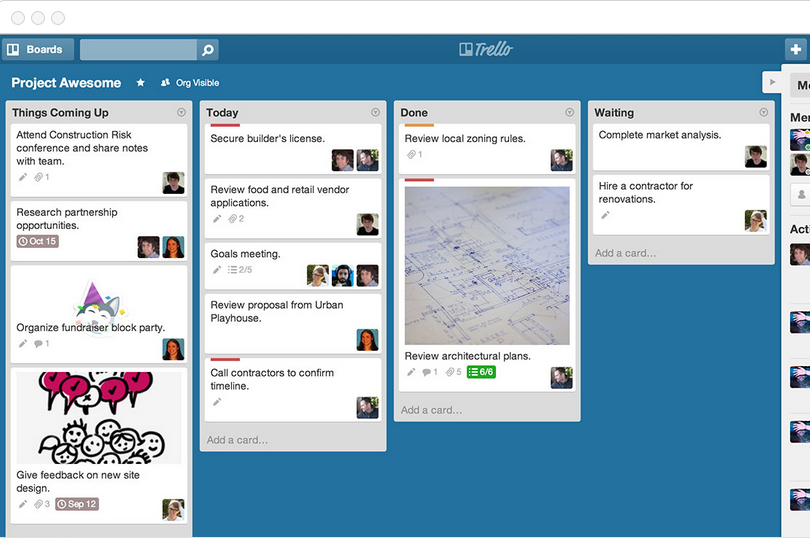
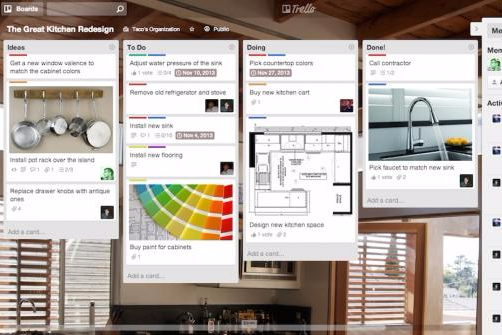
- You can easily visualize your tasks with Trello's board and card layout.
- It's simple to use, making it accessible for team members of all skill levels.
- Trello adapts to your team's workflow, offering flexibility in task management.
- Trello lacks advanced reporting features you might find in more complex tools.
- You can't create intricate task dependencies, which may limit complex project planning.
- Trello's simplicity might not suit large teams with detailed project management needs.
Best Use Cases for monday AI Workspace and Trello
monday AI Workspace
- Creative departments With features like collaborative docs and a proofing screen, creative teams can improve feedback loops and increase delivery speeds.
- Marketing teams Its customizable dashboards and automation features let you track campaigns and workflows efficiently.
- Content creation monday.com's file management and commenting capabilities let teams manage media files and improve collaboration.
- Event planners The platform’s timeline views and easy collaboration features make managing multiple events straightforward.
- Product development You can track progress and updates across teams to maintain alignment and meet deadlines.
- Remote teams With collaborative features and real-time updates, remote teams can maintain productivity and communication effortlessly.
Trello
- Creative Agencies Trello's visual task management makes it easy for you to track projects, ideas, and client feedback.
- Startups The flexibility Trello offers helps your team adapt quickly as you grow and change.
- Marketing Teams You can easily plan campaigns and track progress with Trello's board system.
- Design Departments Trello's simple interface allows you to manage design projects and revisions efficiently.
- Freelancers You can organize your tasks and deadlines without getting overwhelmed by complex features
- Product Development Trello's adaptability helps your team streamline workflows and manage product roadmaps effectively.
Wer sollte monday.com nutzen und wer Trello?
Meiner Meinung nach eignet sich monday.com am besten für Teams, die umfassende Projektmanagement-Funktionen und Anpassungsmöglichkeiten benötigen – insbesondere in größeren Organisationen oder in Branchen wie IT und Marketing. Ich finde, Trello passt besser zu kleineren Teams oder Einzelpersonen, die Wert auf Einfachheit und visuelles Aufgabenmanagement legen – perfekt für kreative Projekte oder Start-ups mit begrenztem Budget. Aus meiner Sicht ist monday.com ideal für Teams, die detaillierte Workflows und Integrationen benötigen, während Trello die beste Wahl ist, wenn Sie ein unkompliziertes, visuelles Tool wünschen.
Differences Between monday AI Workspace and Trello
| monday AI Workspace | Trello | |
|---|---|---|
| Automation | monday.com includes built-in automations for recurring tasks. | Trello supports automations through power-ups and integrations. |
| Customization | monday.com offers extensive customization options with templates and automations. | Trello provides limited customization with its card-based system. |
| Pricing | monday.com has tiered pricing based on features and user count. | Trello offers a freemium model with advanced features in paid plans. |
| Support | monday.com provides 24/7 customer support and a comprehensive help center. | Trello offers community forums and email support for user assistance. |
| User Interface | monday.com features a dynamic dashboard with drag-and-drop capabilities. | Trello uses a simple, visual card-based interface that's easy to navigate. |
| Visit monday AI WorkspaceOpens new window | Read Trello ReviewOpens new window |
Similarities Between monday AI Workspace and Trello
| Cloud-Based | Both tools are cloud-based, so you can access your projects anywhere. monday.com provides a robust web app, and Trello offers a simple, intuitive online platform. |
|---|---|
| Collaboration | Both monday.com and Trello offer real-time collaboration features, allowing your team to work together seamlessly. monday.com uses boards and updates, while Trello uses cards and comments to keep everyone in sync. |
| Integrations | monday.com and Trello both integrate with popular apps like Slack and Google Drive, making it easy to connect your existing tools. |
| Mobile Usability | Both platforms have mobile apps, allowing you to manage tasks on the go. monday.com's app is feature-rich, while Trello's app is user-friendly and straightforward. |
| Visual Management | Both tools use visual elements to manage tasks, with monday.com using boards and Trello using cards, helping your team stay organized at a glance. |
| Visit monday AI WorkspaceOpens new window Read Trello ReviewOpens new window | |