



monday dev vs. Smartsheet: Expertenvergleich für 2026



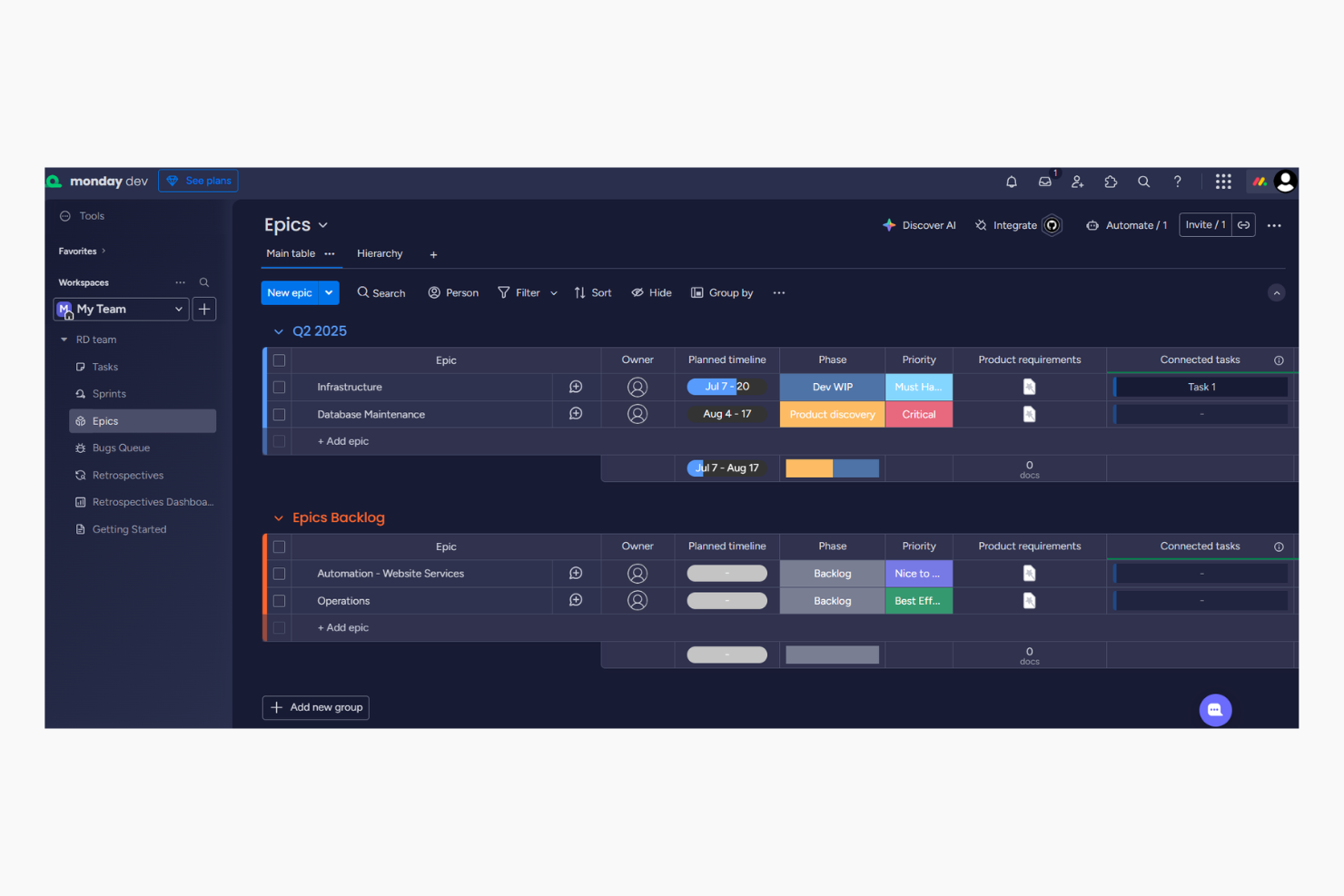
monday dev, ein Produkt von monday.com, bietet eine flexible agile Softwaremanagement-Plattform, auf der Sie Workflows zur Projektverwaltung ganz einfach automatisieren können. Smartsheet stellt eine leistungsstarke Lösung für die kollaborative Arbeitsorganisation bereit – mithilfe von Tabellen und Formeln, ähnlich wie in Google Sheets und Excel. Während beide Tools darauf abzielen, die Produktivität Ihres Teams zu steigern, unterscheidet sich monday dev durch seine intuitive Benutzeroberfläche mit farbenfrohen Gantt-Diagrammen und Kanban-Boards von Smartsheets tabellenartigem Ansatz.
In diesem Artikel vergleichen wir die Tools und deren Funktionen, Vor- und Nachteile, Preisgestaltung und mehr, um Ihnen bei der Auswahl der richtigen Projektmanagement-Software für Ihr Team zu helfen.
monday dev vs. Smartsheet: An Overview
monday dev

Smartsheet

Warum Sie unseren Software-Empfehlungen vertrauen können
Unser Team testet und bewertet Software seit 2012. Als Projektmanager wissen wir selbst, wie schwierig – und wichtig – es ist, die richtige Software auszuwählen.
Für diesen Leitfaden haben wir Tools mithilfe von praktischen Tests und unabhängiger Recherche bewertet und dabei unsere Bewertungskriterien angewendet. Zudem greifen wir auf Erkenntnisse von Branchenvordenkern und praktizierenden Projektmanagement-Experten zurück.
Unsere Bewertungen spiegeln unser menschliches redaktionelles Urteilsvermögen wider, keine Verkaufsstrategie.
Expertenprüfer:
monday dev vs. Smartsheet Pricing Comparison
| monday dev | Smartsheet | |
|---|---|---|
| Free Trial | Free trial available | 30-day free trial |
| Pricing | From $9/month (billed annually) | From $9/user/month (billed annually) |
monday dev vs. Smartsheet Preise & versteckte Kosten
Die Preisgestaltung von monday dev basiert auf einem gestaffelten Abonnementmodell, das aus einem Basic-, Standard- und Pro-Tarif mit unterschiedlichem Funktionsumfang sowie einer Enterprise-Stufe besteht. Es können zusätzliche Kosten für Premium-Funktionen oder Integrationen anfallen, da die Anzahl der Aktionen pro Tarif begrenzt ist. Auch die Smartsheet-Preise folgen einem gestaffelten Ansatz. Allerdings fallen hier Zusatzkosten an, wenn Sie bestimmte Add-ons nutzen oder andere Tools aus deren Ökosystem wählen, wie etwa Brandfolder oder Resource Management von Smartsheet.
Um das passende Tool für Ihr Team auszuwählen, prüfen Sie die Funktionen, die Sie wirklich benötigen, denken Sie an künftige Skalierung und berücksichtigen Sie alle Zusatzkosten, damit die Preisgestaltung zu den langfristigen Zielen Ihres Projekts passt. Mit den Automatisierungen von monday dev können Sie wiederkehrende Aufgaben leicht optimieren – ideal für das Management groß angelegter Marketingkampagnen, die ständige Aktualisierungen erfordern. Das Dokumentenmanagement von Smartsheet eignet sich hervorragend zum Organisieren und Nachverfolgen von Freigaben in komplexen Ingenieursprojekten, in denen eine detaillierte Dokumentation essenziell ist. Während monday dev besonders bei der Automatisierung von Workflows punktet, glänzt Smartsheet durch den Umgang mit umfangreicher Dokumentation.
monday dev vs. Smartsheet Feature Comparison
| monday dev | Smartsheet | |
|---|---|---|
| API | ||
| Collaboration Support | ||
| Data Export | ||
| Data Import | ||
| Data Visualization | ||
| External Integrations | ||
| Multi-User | ||
| Notifications | ||
| Third-Party Plugins/Add-Ons | ||
| Workflow Management |
monday dev vs. Smartsheet Integrationen
| Integration | monday dev | Smartsheet |
|---|---|---|
| ✅ | ❌ | |
| HubSpot | ✅ | ✅ |
| Miro | ✅ | ✅ |
| Google Workspace | ✅ | ✅ |
| Microsoft Office 365 | ✅ | ✅ |
| Slack | ✅ | ✅ |
| Salesforce | ✅ | ✅ |
| Zoom | ✅ | ✅ |
| API | ✅ | ✅ |
| Zapier | ✅ | ✅ |
| Jira | ✅ | ✅ |
| Trello | ✅ | ❌ |
Durch die Integration von monday dev mit LinkedIn können Sie soziale Medien Updates für Marketingkampagnen automatisieren, Zeit sparen und die Konsistenz wahren. Die Smartsheet-Integration mit Brandfolder eignet sich hervorragend für das Verwalten digitaler Assets in inhaltslastigen Umgebungen wie Medienunternehmen, da sie einen leichten Zugriff und eine effektive Organisation ermöglicht. Während monday dev Marketingaktivitäten effizienter macht, überzeugt Smartsheet durch die Verwaltung komplexer Inhalte.
monday dev vs. Smartsheet Sicherheit, Compliance & Zuverlässigkeit
| Faktor | monday dev | Smartsheet |
|---|---|---|
| Datenverschlüsselung | Verwendet AES-256-Verschlüsselung, um Daten während der Übertragung und im Ruhezustand zu schützen. | Setzt TLS-Verschlüsselung für den Datentransfer und AES-256 für die Datenspeicherung ein. |
| Regulatorische Konformität | Entspricht den Standards von DSGVO und ISO/IEC 27001 zum Schutz von Nutzerdaten. | Hält DSGVO, CCPA und ISO/IEC 27001 ein und sorgt damit für umfassenden Datenschutz. |
| Zuverlässigkeit der Verfügbarkeit | Bietet 99,9 % Uptime-SLA für kontinuierlichen Zugriff und Performance. | Stellt eine 99,9 % Uptime-SLA bereit, um zuverlässige Serviceverfügbarkeit zu gewährleisten. |
monday dev und Smartsheet bieten beide starke Sicherheitsmaßnahmen, doch Smartsheet punktet mit etwas breiterer regulatorischer Konformität. Um das passende Tool zu wählen, sollten Sie prüfen, welche Standards für Ihre Branche entscheidend sind, und die Konformitätsdokumentation jedes Tools überprüfen, um sicherzustellen, dass Ihre Anforderungen erfüllt werden.
monday dev vs. Smartsheet Benutzerfreundlichkeit
| Faktor | monday dev | Smartsheet |
|---|---|---|
| Benutzeroberfläche | Bietet eine visuell ansprechende und farbenfrohe Oberfläche, die das Aufgabenmanagement vereinfacht. | Stellt eine tabellenähnliche Oberfläche bereit, die Excel-Nutzern vertraut vorkommen dürfte. |
| Einstiegserlebnis | Enthält interaktive Tutorials und Vorlagen, damit neue Nutzer schnell loslegen können. | Umfasst eine umfassende Wissensdatenbank und Videoanleitungen für neue Nutzer. |
| Individualisierung | Ermöglicht Drag-and-drop-Anpassungen für Dashboards und Workflows. | Bietet anpassbare Vorlagen, erfordert jedoch mehr Schritte für die Personalisierung. |
monday dev ist dank seiner lebendigen Benutzeroberfläche und der einfachen Anpassung leichter zu bedienen und daher ideal für Teams, die neu bei Projektmanagement-Tools sind. Smartsheet kann für Nutzer, die nicht an Tabellenkalkulationen gewöhnt sind, herausfordernd sein, bietet aber umfangreiche Anleitungen für alle, die strukturierte Lernpfade bevorzugen.
monday dev vs Smartsheet: Pros & Cons
monday dev
- Easily customize workflows, including sprint planning and Kanban board configurations
- Visual project tracking keeps your team aligned and focused
- Automation features save time on repetitive tasks
- Gantt chart view is less intuitive than other tools
- Mobile app lacks full functionality for managing product roadmap tasks.
- Initial setup might be overwhelming for teams new to agile tools
Smartsheet
- Gives your team a lot of flexibility with how you set up sheets, dashboards, and workflows
- Proofing and approval tools can help you better collaborate with your team
- Handles complex projects and cross-team coordination better than most tools
- It takes time to set up and isn’t very intuitive for new users
- Interactive spreadsheets don’t automatically sync changes
- You can’t easily build simple task lists without doing extra setup
Best Use Cases for monday dev and Smartsheet
monday dev
- Tech startups Customizable workflows help your team adapt and grow rapidly in a dynamic environment, especially during fast-paced product development cycles.
- Software development Automation features and bug tracking streamline repetitive tasks, allowing your developers to focus on coding.
- Product management teams Roadmapping tools and backlog prioritization help your team align stakeholders and deliver product updates on schedule.
- IT departments Efficient task tracking and automation improve your team's response to issues and requests, especially when managing technical dependencies.
- Remote teams Collaboration tools keep your team members connected, no matter where they are working.
- Creative agencies Customizable dashboards provide your team with the flexibility needed for unique projects, backed by a centralized knowledge base and shared docs.
- Local nonprofits The setup complexity and feature set might be more than what your team requires.
Smartsheet
- Marketing Teams You can manage campaign timelines, creative approvals, and content calendars in one place using built-in forms, reminders, and dashboards.
- Construction Projects Smartsheet is great for tracking tasks, permits, and inspections across vendors and crews using Gantt charts and status columns.
- PMO Departments You get a clear portfolio view of all your projects, timelines, and risks with built-in reports and resource views.
- Healthcare Operations Smartsheet helps you track compliance tasks, training, and onboarding with audit-ready logs and approval workflows.
- IT Teams Smartsheet is useful for managing system rollouts, support requests, and change logs with forms, automations, and sheet linking.
- Mid-Sized & Enterprise-Level Companies You get enough structure to handle complex operations and scale without needing a full custom solution.
Wer sollte monday dev nutzen und wer Smartsheet?
Meiner Meinung nach ist monday dev hervorragend geeignet für kreative Teams und Start-ups, die Wert auf Flexibilität und eine ansprechende Optik legen. Es passt besonders zu Organisationen, die auf Zusammenarbeit setzen und ein Tool brauchen, das sich an unterschiedliche Arbeitsweisen anpasst. Smartsheet hingegen halte ich für ideal für Branchen, die auf detailliertes Datenmanagement angewiesen sind und eine strukturierte, tabellarische Oberfläche bevorzugen. Es empfiehlt sich vor allem für Teams, die bereits mit Excel vertraut sind und umfangreiche Möglichkeiten zur Projektverfolgung und Dokumentation benötigen.
Differences Between monday dev and Smartsheet
| monday dev | Smartsheet | |
|---|---|---|
| Automation | Provides easy-to-set-up workflow automations for repetitive tasks. | Requires more manual setup for automating processes. |
| Customization | Allows drag-and-drop customization and flexible dashboards. | Provides customizable templates but with more rigid structures. |
| Hidden Costs | Uses a tiered subscription model with extra costs for premium features. | |
| Integrations | Integrates with tools like LinkedIn and Miro for creative workflows. | Supports extensive integrations with tools like Brandfolder for asset management. |
| Read monday dev ReviewOpens new window | Visit SmartsheetOpens new window | |
| Pricing | Offers tiered pricing with potential extra costs for add-on modules. | |
| User Interface | Features a colorful, intuitive interface for easy navigation. | Offers a familiar spreadsheet-like interface for data-heavy tasks. |
| Read monday dev ReviewOpens new window | Visit SmartsheetOpens new window |
Similarities Between monday dev and Smartsheet
| Collaboration | Both offer robust collaboration features like real-time updates and team communication channels. monday dev provides visual boards for teamwork, while Smartsheet offers shared sheets for tracking progress. |
|---|---|
| Customizable Workflows | Both allow customization of workflows to suit different project needs. monday dev offers drag-and-drop flexibility, and Smartsheet provides structured templates you can modify. |
| Integrations | Both integrate with popular tools like Slack and Google Workspace, supporting seamless workflow connectivity. They each provide APIs for custom integrations tailored to your team's needs. |
| Pricing | Both use a tiered pricing model, allowing you to choose plans based on your team's size and feature needs. They provide scalable options as your project requirements grow. |
| Security | Both prioritize security with features like data encryption and compliance with standards like GDPR. They ensure your data is protected and accessible only to authorized users. |
| Read monday dev ReviewOpens new window Visit SmartsheetOpens new window | |