

10 beste Softwarelösungen zur Verwaltung von Büroflächen im Jahr 2026

Auswahl der besten Software zur Verwaltung von Büroflächen


Software zur Verwaltung von Büroflächen bietet Ihnen eine zentrale Anlaufstelle, um Schreibtische zuzuweisen, Umzüge zu planen und Ihre Arbeitsplatz- sowie Immobilienkosten zu überwachen. Wenn Sie wechselnde Teams, hybride Arbeitszeiten oder wachsende Immobilienportfolios verwalten, hilft Ihnen das richtige Tool, sich schnell anzupassen und die Einhaltung von Vorschriften im Blick zu behalten. Dieser Leitfaden stellt die beste Software zur Verwaltung von Büroflächen vor, damit Sie sehen können, welche Lösungen die Verwaltung von Grundrissen, die ESG-Berichterstattung und Analysen abdecken – und die passende Lösung für Ihre Anforderungen an Arbeitsbereiche, Compliance und Berichterstattung finden.
Warum Sie unseren Software-Empfehlungen vertrauen können
Unser Team testet und bewertet Software seit 2012. Als Projektmanager wissen wir selbst, wie schwierig – und wichtig – es ist, die richtige Software auszuwählen.
Für diesen Leitfaden haben wir Tools mithilfe von praktischen Tests und unabhängiger Recherche bewertet und dabei unsere Bewertungskriterien angewendet. Zudem greifen wir auf Erkenntnisse von Branchenvordenkern und praktizierenden Projektmanagement-Experten zurück.
Unsere Bewertungen spiegeln unser menschliches redaktionelles Urteilsvermögen wider, keine Verkaufsstrategie.
Expertenprüfer:
Vergleichstabelle für Software zur Verwaltung von Büroflächen
Diese Vergleichstabelle fasst die Preisdetails meiner Auswahl der besten Software zur Verwaltung von Büroflächen zusammen:
| Tool | Best For | Trial Info | Price | ||
|---|---|---|---|---|---|
| 1 | Am besten für ESG-Berichterstattung in Verbindung mit Immobilienausgaben | Kostenlose Demo verfügbar | Preis auf Anfrage | Website | |
| 2 | Am besten geeignet für die einheitliche Analyse von Flächen und IoT-Sensordaten | Kostenlose Demo verfügbar | Preise auf Anfrage | Website | |
| 3 | Am besten für die Kosten- und Leasingverfolgung von Immobilienportfolios geeignet | Kostenlose Demo verfügbar | Preis auf Anfrage | Website | |
| 4 | Am besten für Umzugsmanagement und anteilige Mietkostenberechnung geeignet | Kostenlose Demo verfügbar | Preise auf Anfrage | Website | |
| 5 | Am besten für Arbeitsplatzmanagement auf Grundlage von Grundrissen | Kostenlose Demo verfügbar | Preise auf Anfrage | Website | |
| 6 | Am besten für integriertes Besucher- und Liefermanagement | Kostenlose Demo verfügbar | Preise auf Anfrage | Website | |
| 7 | Am besten geeignet für FedRAMP-autorisiertes IWMS für Arbeitsplätze | Kostenlose Demo verfügbar | Preise auf Anfrage | Website | |
| 8 | Am besten für Immobilienportfoliomanagement auf IWMS-Niveau geeignet | Kostenlose Demo verfügbar | Preis auf Anfrage | Website | |
| 9 | Am besten für die Berichterstattung zu Flächenkosten und Kostenverrechnung geeignet | Kostenlose Demo verfügbar | Preis auf Anfrage | Website | |
| 10 | Am besten für Arbeitsplatzmanagement in regulierten Branchen geeignet | Kostenlose Demo verfügbar | Preis auf Anfrage | Website |
Bewertungen von Software zur Verwaltung von Büroflächen
Nachfolgend finden Sie meine ausführlichen Zusammenfassungen der besten Software zur Verwaltung von Büroflächen, die es in meine engere Auswahl geschafft hat. Meine Bewertungen bieten einen detaillierten Einblick in die Funktionen, die besten Einsatzmöglichkeiten und die Fähigkeiten jeder Plattform, damit Sie die beste Lösung für sich finden.

Am besten für ESG-Berichterstattung in Verbindung mit Immobilienausgaben
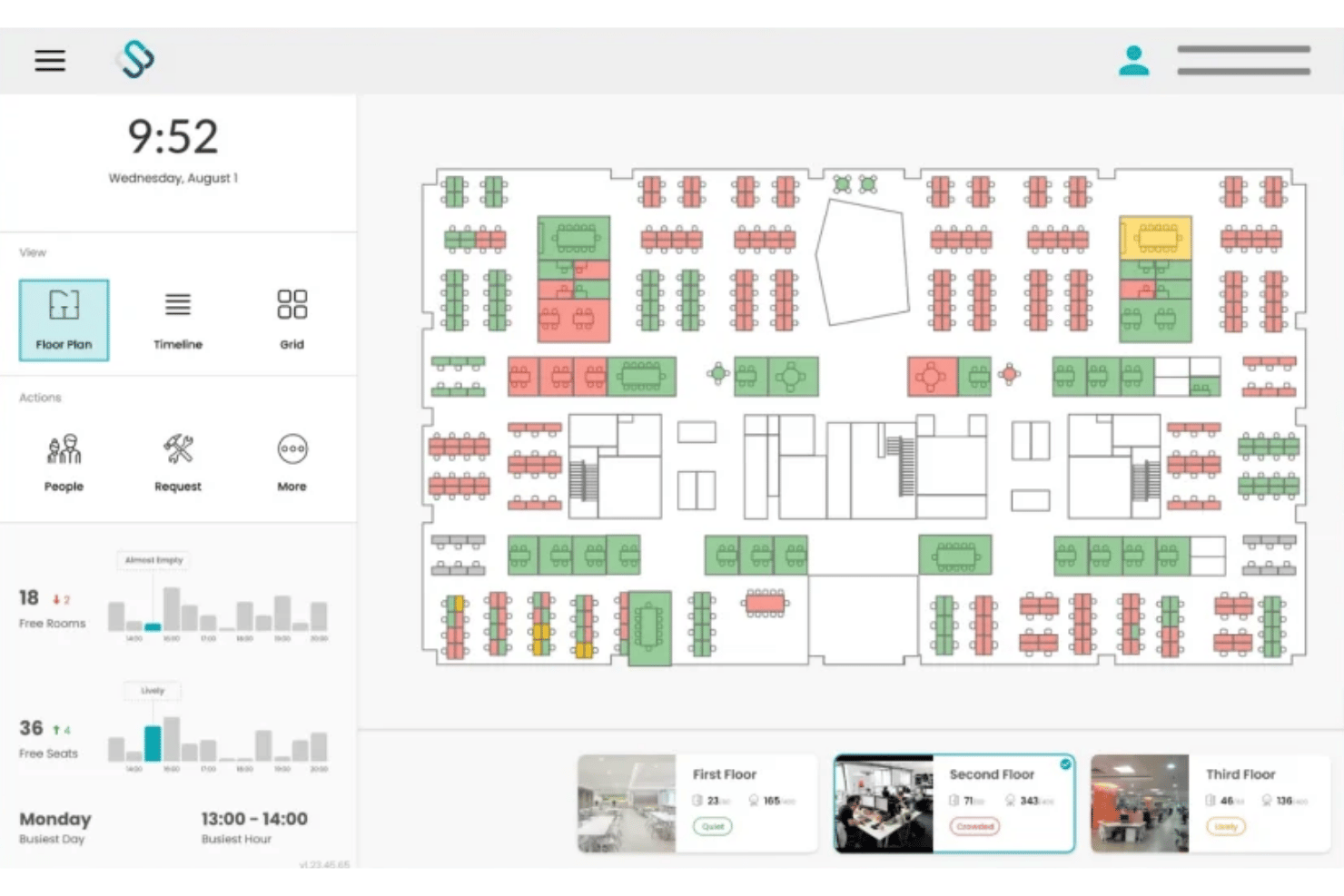
Spacewell ist eine Arbeitsplatzmanagement-Plattform, die Schreibtisch- und Raumbuchung, interaktive Visualisierung von Grundrissen, IoT-basierte Belegungsanalysen und ESG-Energieberichte für standortübergreifende Immobilienportfolios kombiniert.
Für wen ist Spacewell am besten geeignet?
Spacewell eignet sich besonders für Immobilien- und Facility-Management-Teams von Unternehmen, die standortübergreifende Portfolios verwalten und bei denen Raumkosten, Energieverbrauch und ESG-Berichterstattung in einem einzigen System zusammengeführt werden müssen.
Warum ich Spacewell ausgewählt habe
Spacewell hat sich einen Platz auf meiner Auswahlliste verdient, weil das Energiemodul CO2-Berichterstattung, PV-Analysen und ESG-Dashboards direkt mit Kostenstellendaten zu jeder Schreibtisch- und Raumbuchung verbindet. Besonders überzeugend ist, dass die Plattform, wenn ein Immobilienleiter die Zusammenlegung zweier Etagen begründen muss, sowohl die Energiekosten als auch die Kosten pro Sitzplatz in derselben Ansicht anzeigt. Mit Raumsimulationen lassen sich Szenarien zur Verdichtung oder Konsolidierung modellieren, bevor eine Entscheidung getroffen wird. Dadurch wird der ESG-Fall durch tatsächliche Auslastungszahlen gestützt.
Wichtige Funktionen von Spacewell
- Konversationelle Buchung mit KI: Ein integrierter KI-Assistent ermöglicht es Nutzern, Schreibtische oder Räume in natürlicher Sprache in mehr als 30 Sprachen zu buchen. Dabei lernt er aus dem bisherigen Buchungsverhalten und zeigt passende Vorschläge an.
- Überwachung der Raumluftqualität: Sensoren erfassen CO2- und VOC-Werte, Temperatur sowie Luftfeuchtigkeit in Echtzeit. Die Daten zur Raumluftqualität werden direkt auf interaktiven Grundrissen zusammen mit dem Belegungsstatus angezeigt.
- Kollegensuche: Ab dem Advanced-Tarif können Mitarbeitende nach Teammitgliedern suchen und deren aktuelle Sitzplatzzuweisungen auf einem Live-Grundriss einsehen, um Bürotage zu koordinieren.
- Integration von IoT-Sensoren: Spacewell lässt sich mit einem hardwareunabhängigen Sensornetzwerk verbinden, darunter VergeSense, XY Sense und Cisco Spaces, und führt Bewegungs-, Personenzähl- und Umgebungsdaten in einer zentralen Belegungsansicht zusammen.
Spacewell-Integrationen
Spacewell bietet native Integrationen mit Microsoft 365, Outlook, Teams, Google Workspace, Zoom, SAP, Oracle, ServiceNow, Workday, VergeSense, XY Sense und Cisco Spaces. Für individuelle Integrationen ist eine API verfügbar.
Pros and Cons
Pros:
- Verbindet ESG- und Raumkosten
- Hardwareunabhängige Plattform unterstützt große Portfolios
- Überwacht Kennzahlen zur Raumluftqualität
Cons:
- Bietet keine Erfassung von Außenparkplätzen
- Begrenzt den unabhängigen Zugriff über mobile Apps

HubStar
Am besten geeignet für die einheitliche Analyse von Flächen und IoT-Sensordaten
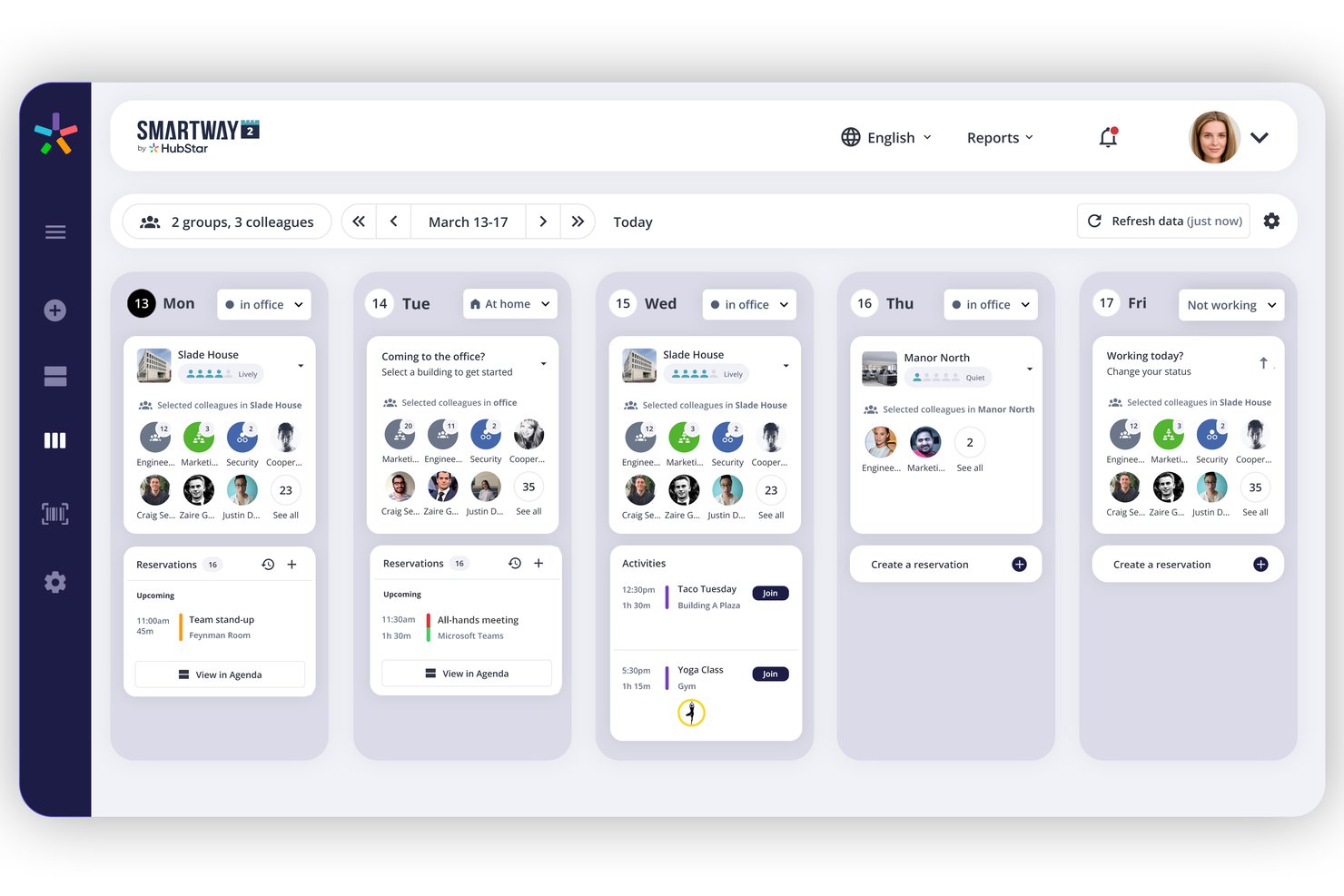
HubStar ist eine modulare Plattform zur Arbeitsplatzverwaltung, die die Buchung von Schreibtischen und Räumen, IoT-sensorgestützte Belegungsanalysen, die Verwaltung interaktiver Grundrisse und Besuchermanagement für Büroportfolios an mehreren Standorten kombiniert.
Für wen ist HubStar am besten geeignet?
HubStar eignet sich besonders für Teams aus dem Facility- und Arbeitsplatzmanagement in Unternehmen, die Portfolios an mehreren Standorten verwalten und Belegungsdaten von IoT-Sensoren, WLAN- und Zutrittskartensystemen auf einer Plattform zusammenführen müssen.
Warum ich mich für HubStar entschieden habe
HubStar steht auf meiner engeren Auswahlliste, weil keine andere von mir getestete Plattform Belegungsdaten aus so vielen Quellen in einer einzigen Analyseebene zusammenführt. PresenceIQ kombiniert Daten von WLAN-Zugangspunkten (Aruba, Cisco), Zutrittskartenscans, proprietären Sensoren und IoT-Geräten von Drittanbietern wie VergeSense und Butlr, um Ihnen ein wirklich vollständiges Bild davon zu geben, wie die Flächen genutzt werden. Außerdem gefällt mir, dass die Analysen nicht nur beschreibend sind: Die präskriptive Ebene liefert konkrete Empfehlungen zur bedarfsgerechten Anpassung von Arbeitsbereichsgrößen und zur Neugestaltung von Zonen auf Grundlage realer Anwesenheitsmuster.
Die wichtigsten Funktionen von HubStar
- Digitaler KI-Assistent: Empfiehlt auf Grundlage von Präferenzen und bisherigem Verhalten die optimalen Bürotage für jeden Mitarbeitenden und bucht anschließend automatisch den besten verfügbaren Schreibtisch oder Raum.
- Besuchermanagement: Unterstützt die Anmeldung am Selbstbedienungskiosk, die Fotoaufnahme, das Unterzeichnen von Geheimhaltungsvereinbarungen, den Druck von Besucherausweisen und die Echtzeitverfolgung von Besuchern innerhalb derselben Plattform.
- Verwaltung von Arbeitsbereichen und Zonen: Weist Teams bestimmten Zonen im Grundriss zu und ermöglicht konfigurierbare Buchungsrichtlinien, Sitzplatzquoten und Buchungsregeln bis hin zur Ebene einzelner Arbeitsplätze.
- Datenexport an BI-Plattformen: Überträgt Belegungs- und Nutzungsdaten direkt an Power BI, Tableau, Qlik und ThoughtSpot für externe Berichte und Analysen.
Integrationen von HubStar
HubStar bietet native Integrationen innerhalb des Microsoft-Ökosystems (Teams, Outlook, Exchange, Azure AD) sowie mit Zoom, Workday, PeopleSoft, Rippling, Okta, Ping Identity, VergeSense und WLAN-Anbietern wie Cisco und Aruba. Darüber hinaus sind BI-Exporte an Power BI, Tableau, Qlik und ThoughtSpot möglich. Für individuelle Integrationen steht eine offene API zur Verfügung.
Pros and Cons
Pros:
- Führt Belegungsdaten von Sensoren und WLAN zusammen
- Der KI-Assistent bucht automatisch optimale Schreibtische und Räume
- Maschinelles Lernen unterstützt die Bearbeitung von Grundrissen
Cons:
- Kein spezieller Workflow für Umzüge
- Begrenzt den unabhängigen Zugriff über mobile Apps

Planon
Am besten für die Kosten- und Leasingverfolgung von Immobilienportfolios geeignet
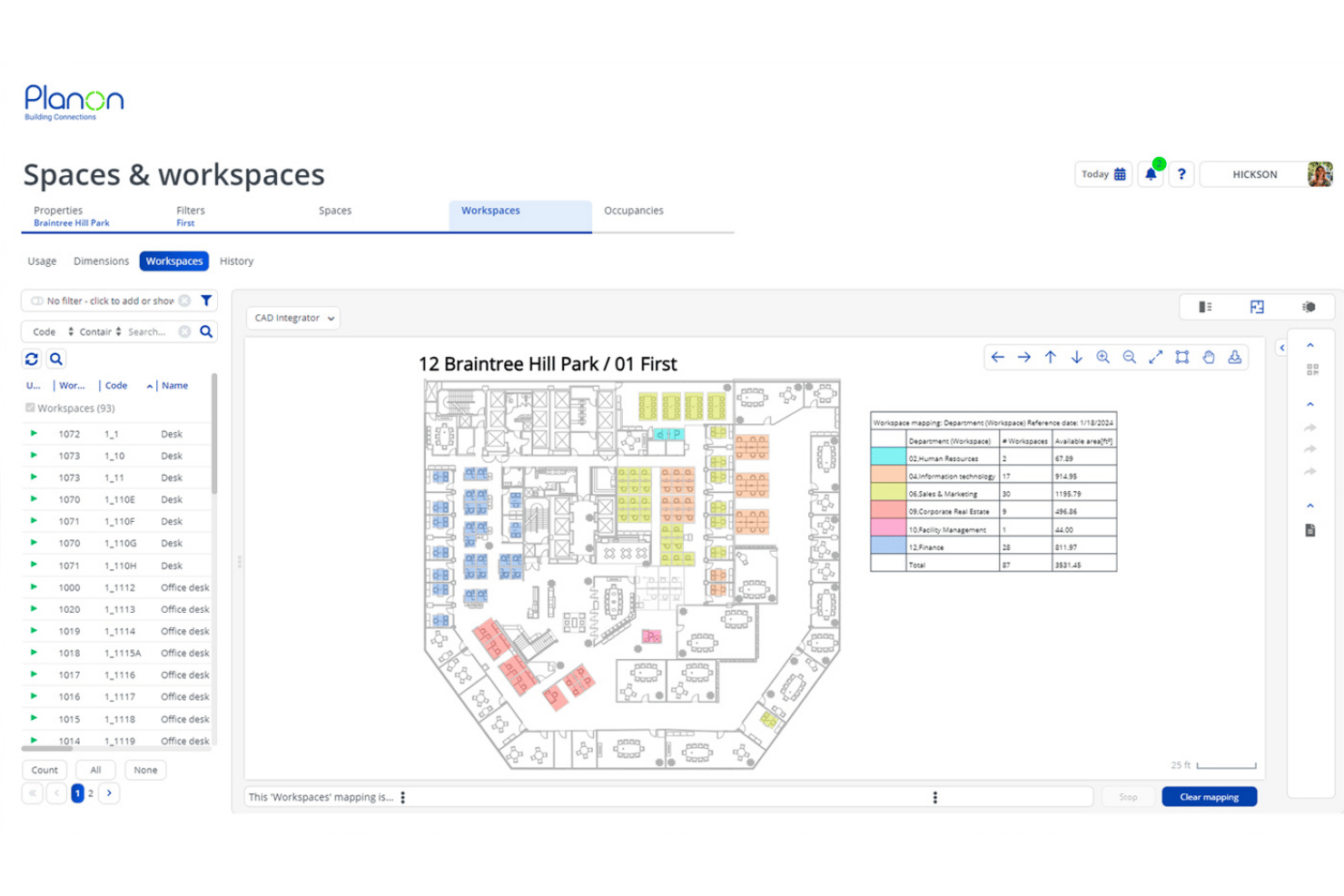
Planon ist eine unternehmensweite IWMS-Plattform, die die Buchung von Räumen und Schreibtischen, die in CAD/BIM integrierte Verwaltung von Grundrissen, IoT-gestützte Belegungsanalysen, die Leasingbilanzierung und die Verfolgung von Immobilienportfolios über globale Betriebsabläufe an mehreren Standorten hinweg kombiniert.
Für wen ist Planon am besten geeignet?
Planon wurde für Immobilien- und Facility-Management-Teams in Unternehmen entwickelt, die große Portfolios an mehreren Standorten verwalten und komplexe Anforderungen an Leasingbilanzierung und Kostenverfolgung haben.
Warum ich Planon ausgewählt habe
Planon verdient seinen Platz auf meiner Auswahlliste, weil keine andere von mir getestete Plattform an seine Detailtiefe bei der Kostentransparenz für Immobilienportfolios und der Leasingbilanzierung herankommt. Besonders gut gefällt mir, wie das System die IFRS-16-/ASC-842-konforme Leasingverfolgung mit Analysen zur Verrechnung von Kosten pro Sitzplatz kombiniert, sodass Finanz- und Facility-Management-Teams mit denselben Zahlen arbeiten. Durch die direkte Verknüpfung der Szenarioplanung mit CAD-Grundrissen können Sie die komplette Neustrukturierung einer Etage anhand aktueller Leasingkostendaten modellieren, bevor auch nur ein einziger Schreibtisch umgestellt wird.
Wichtige Funktionen von Planon
- Integration von IoT-Sensoren: Verbinden Sie Belegungssensoren, Luftqualitätsmonitore und Gebäudemanagementsysteme, um Echtzeitdaten in Nutzungs-Dashboards einzuspeisen.
- Bereichszonierung: Weisen Sie Teams festgelegten Bereichszonen auf Etagen zu, mit konfigurierbaren Buchungsrichtlinien und Kapazitätsobergrenzen für Abteilungen.
- Besuchermanagement: Die Plattform umfasst direkt integrierte Funktionen für die selbstständige Besucheranmeldung, Benachrichtigungen an Gastgeber und die sichere Nachverfolgung des Besucherstroms.
- Connect für Analysen: Exportieren Sie Arbeitsplatzdaten über eine API zur individuellen Berichterstellung in BI-Tools wie Power BI, Tableau oder Snowflake.
Integrationen von Planon
Planon bietet native Integrationen mit Microsoft Outlook, Microsoft Teams, Microsoft Places, Google Calendar, SAP, Oracle, AutoCAD und Autodesk Revit. Für individuelle Integrationen steht eine API zur Verfügung.
Pros and Cons
Pros:
- Echtzeit-Grundrisse mit CAD/BIM-Integration
- Erweiterte Belegungsanalysen mithilfe von IoT-Sensoren
- Integrierte Szenarioplanung für räumliche Umzüge
Cons:
- Keine individuell gebrandeten Besucherausweise
- Keine Nachverfolgung von Außenparkplätzen

Am besten für Umzugsmanagement und anteilige Mietkostenberechnung geeignet
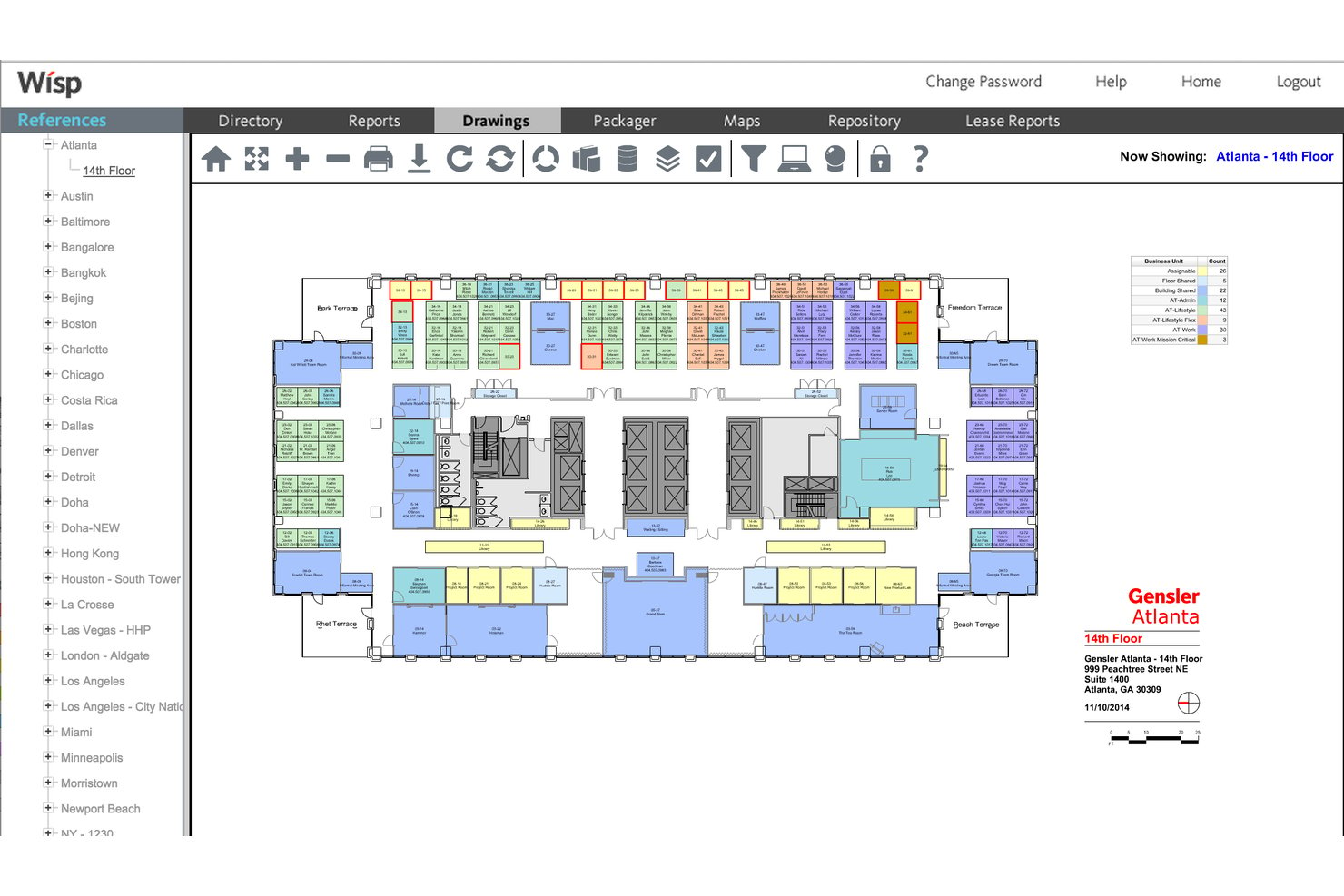
Wisp by Apex42 ist eine Plattform zur Verwaltung von Büroflächen, die auf interaktiven Grundrissen, Umzugsmanagement, Arbeitsplatzreservierungen, Auslastungsanalysen sowie der anteiligen Mietkostenberechnung und Umlageberichterstattung für mehrere Standorte basiert.
Für wen eignet sich Wisp by Apex42 am besten?
Wisp eignet sich besonders für Teams im Bereich Facility Management und Unternehmensimmobilien, die Portfolios mit mehreren Standorten, einer hohen Fluktuation bei den Arbeitsplätzen und komplexen Anforderungen an die interne Kostenverteilung verwalten.
Warum ich Wisp by Apex42 ausgewählt habe
Ich habe Wisp by Apex42 in meine Top-Auswahl aufgenommen, weil die Funktionen für Umzugsmanagement und anteilige Mietkostenberechnung zu den am weitesten entwickelten gehören, die ich in dieser Kategorie gesehen habe. Der konfigurierbare MAC-Workflow verarbeitet Umzugsanfragen und Genehmigungen und aktualisiert Grundrisse automatisiert durchgängig. Eine unbegrenzte szenariobasierte Flächenplanung ermöglicht es Teams, vollständige Neuaufteilungen zu modellieren, ohne Live-Daten zu verändern. Auf der Kostenseite ermöglicht die 27-stufige anteilige Mietkostenberechnung, einzelnen Abteilungen ihre exakte Fläche über ein Portfolio mit mehreren Standorten hinweg zu berechnen.
Wichtige Funktionen von Wisp by Apex42
- Interaktive Grundrisse: Mehrere Grundrisse auf Standortebene anzeigen und bearbeiten, die aus CAD-Zeichnungen erstellt wurden, mit Farbcodierung über Colorizers™, um Abteilungen, Leerstand und Belegung im gesamten Portfolio zu visualisieren.
- Berichte zur Flächenauslastung: Auf mehr als 50 vorgefertigte Berichte mit Echtzeit-Detailansicht von der Portfolioebene bis zum einzelnen Arbeitsplatz zugreifen, einschließlich sensorgestützter Wärmekarten, die direkt auf den Grundrissen angezeigt werden.
- Arbeitsplatzreservierungen: Arbeitsplätze über jedes Gerät buchen, mit Einchecken per QR-Code, automatischer Freigabe bei Nichterscheinen, Optionen für wiederkehrende Reservierungen und Einschränkungen auf Nachbarschaftsebene.
- Workflow für Serviceanfragen: Arbeitsaufträge für Einrichtungen einreichen und verwalten, die direkt mit bestimmten Bereichen auf den Grundrissen verknüpft sind, mit konfigurierbarer Weiterleitung an die zuständige Fachkraft für Gebäudetechnik.
Integrationen von Wisp by Apex42
Wisp bietet integrierte Verbindungen mit ADP Workforce Now, UKG, Microsoft Entra ID, Brivo, Google Calendar, Microsoft Outlook, Microsoft Teams und Slack. Für individuelle Integrationen ist eine API verfügbar.
Pros and Cons
Pros:
- Unbegrenzte CAD-Aktualisierungen durch das Anbieterteam
- Branchenführende Automatisierungstools für das Umzugsmanagement
- 27-stufige interne anteilige Mietkostenberechnung
Cons:
- Integrierte Raumbuchung ist weniger prominent als bei vergleichbaren Lösungen
- Begrenzte Tools zur Erstellung individueller Berichte

Am besten für Arbeitsplatzmanagement auf Grundlage von Grundrissen
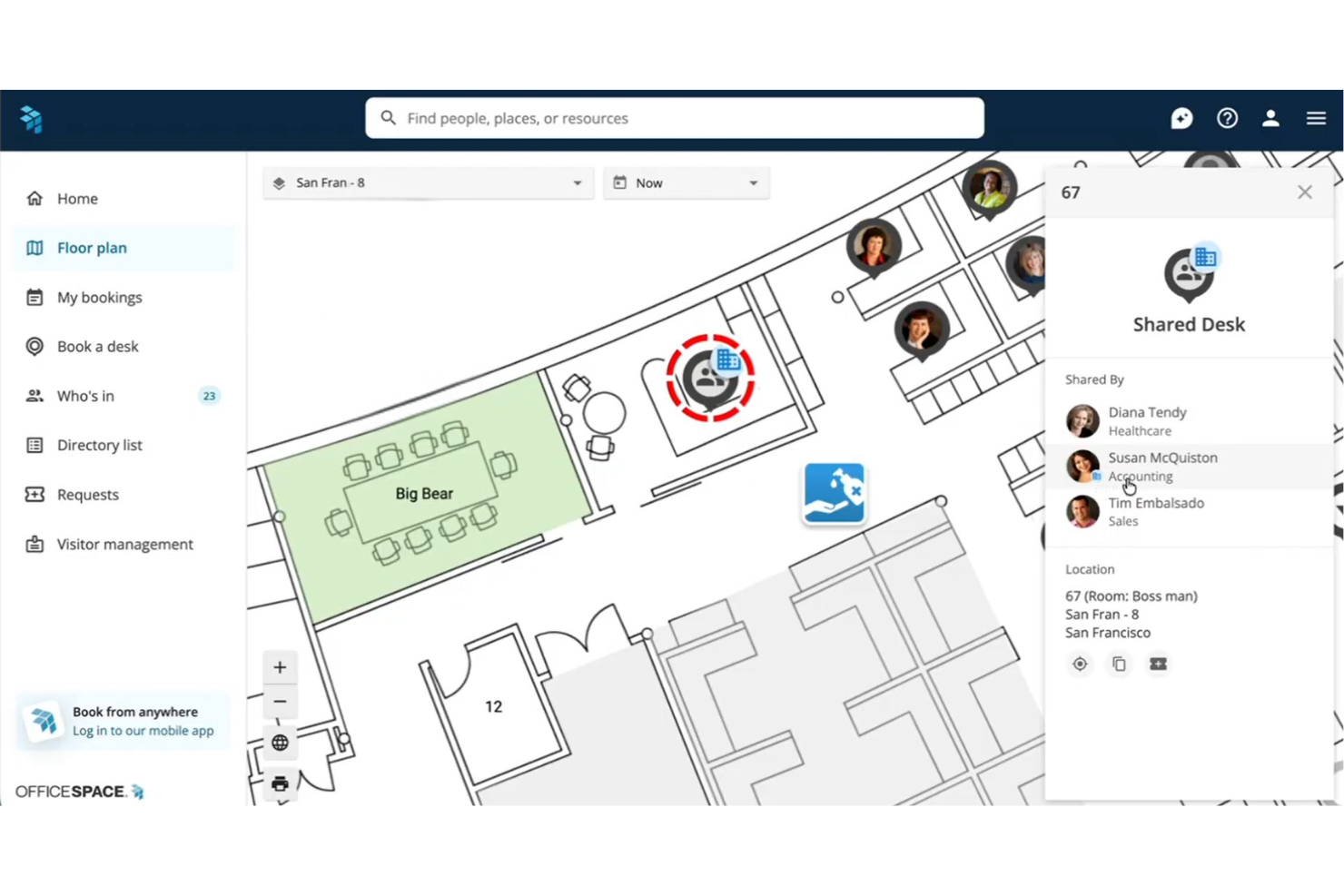
OfficeSpace ist eine Plattform für Arbeitsplatzmanagement, die auf interaktiven Grundrissen basiert und Schreibtisch- und Raumbuchung, Umzugsmanagement, Analysen zur Flächennutzung sowie KI-gestützte Szenarioplanung für Büroportfolios mit mehreren Standorten kombiniert.
Für wen ist OfficeSpace am besten geeignet?
OfficeSpace eignet sich besonders für Teams im Facility Management und Immobilienmanagement von Unternehmen, die komplexe Büroportfolios mit mehreren Standorten verwalten und eine auf Grundrissen basierende Flächenplanung als Kern ihres Arbeitsablaufs benötigen.
Warum ich OfficeSpace ausgewählt habe
OfficeSpace hat sich einen Platz auf meiner Auswahlliste verdient, weil der Grundriss im Mittelpunkt steht – nicht als visuelles Extra, sondern als eigentliche Oberfläche für die Buchung von Schreibtischen, die Planung von Umzügen und die Auswertung von Nutzungsdaten. Mir gefällt besonders, dass Facility-Management-Teams mit OfficeSpace Studio Sitzplatzzuweisungen, Nachbarschaftszonen und Raumaufteilungen direkt im Browser bearbeiten können, ohne ein Supportticket erstellen zu müssen. Besonders überzeugend ist die Szenarioplanung für Blöcke und Etagen: Sie können eine vollständige Neubelegung über mehrere Etagen modellieren, Versionen vergleichen und die besten Elemente zusammenführen, bevor Sie eine einzelne Änderung umsetzen.
Wichtige Funktionen von OfficeSpace
- Steuerung durch Nachbarschaftsverantwortliche: Weisen Sie Abteilungsleitern die Verwaltung von buchungsbezogenen Richtlinien, Kapazitätsgrenzen und Zugriffsberechtigungen für bestimmte Zonen in ihren zugewiesenen Bereichen zu.
- Besuchermanagement mit Greetly: Checken Sie Gäste über markenbezogene Tablet-Kioske ein – mit Selbstregistrierung per QR-Code, Erfassung von Geheimhaltungsvereinbarungen und Benachrichtigungen an Gastgeber über Slack, Teams oder E-Mail.
- KI-Arbeitsplatzagenten: Eine Reihe speziell entwickelter Agenten bearbeitet Facility-Anfragen und Empfehlungen für hybride Arbeitstage und ermöglicht über den Insights Agent Abfragen zur Flächennutzung in natürlicher Sprache.
- Integration von Sensor- und Ausweisdaten: Verbinden Sie IoT-Sensoren, WLAN-Präsenzdaten und Ausweissysteme von Anbietern wie VergeSense und Cisco Meraki, um die Echtzeitbelegung zusätzlich zu den Buchungsdaten zu erfassen.
Integrationen von OfficeSpace
OfficeSpace bietet native Integrationen mit Slack, Zoom, Google Meet, Workday, ADP, BambooHR, Okta, VergeSense, Cisco Meraki und Jira sowie native Integrationen innerhalb des Microsoft-Ökosystems, darunter Microsoft 365, Teams, Outlook und Azure AD. Für benutzerdefinierte Integrationen im Pro-Plus-Tarif stehen eine vollständige REST-API und erweiterte Webhooks zur Verfügung.
Pros and Cons
Pros:
- Interaktive Echtzeit-Grundrisse für alle Standorte
- Erweiterte KI-Agenten für die Flächenplanung
- Szenariomodellierung für Umzugsmanagementprojekte
Cons:
- Keine native Sendungsverfolgung für Pakete
- Von Rezensenten als komplex bezeichnete Administrationsoberfläche
New Product Updates from OfficeSpace

OfficeSpace Adds Work Order Status and Cost Reports
OfficeSpace adds Work Order Status and Work Order Cost reports for built-in maintenance reporting. These reports help facilities teams track work order activity and costs without relying on manual spreadsheets. For more information, visit OfficeSpace’s official site.
 .
.
Robin
Am besten für integriertes Besucher- und Liefermanagement
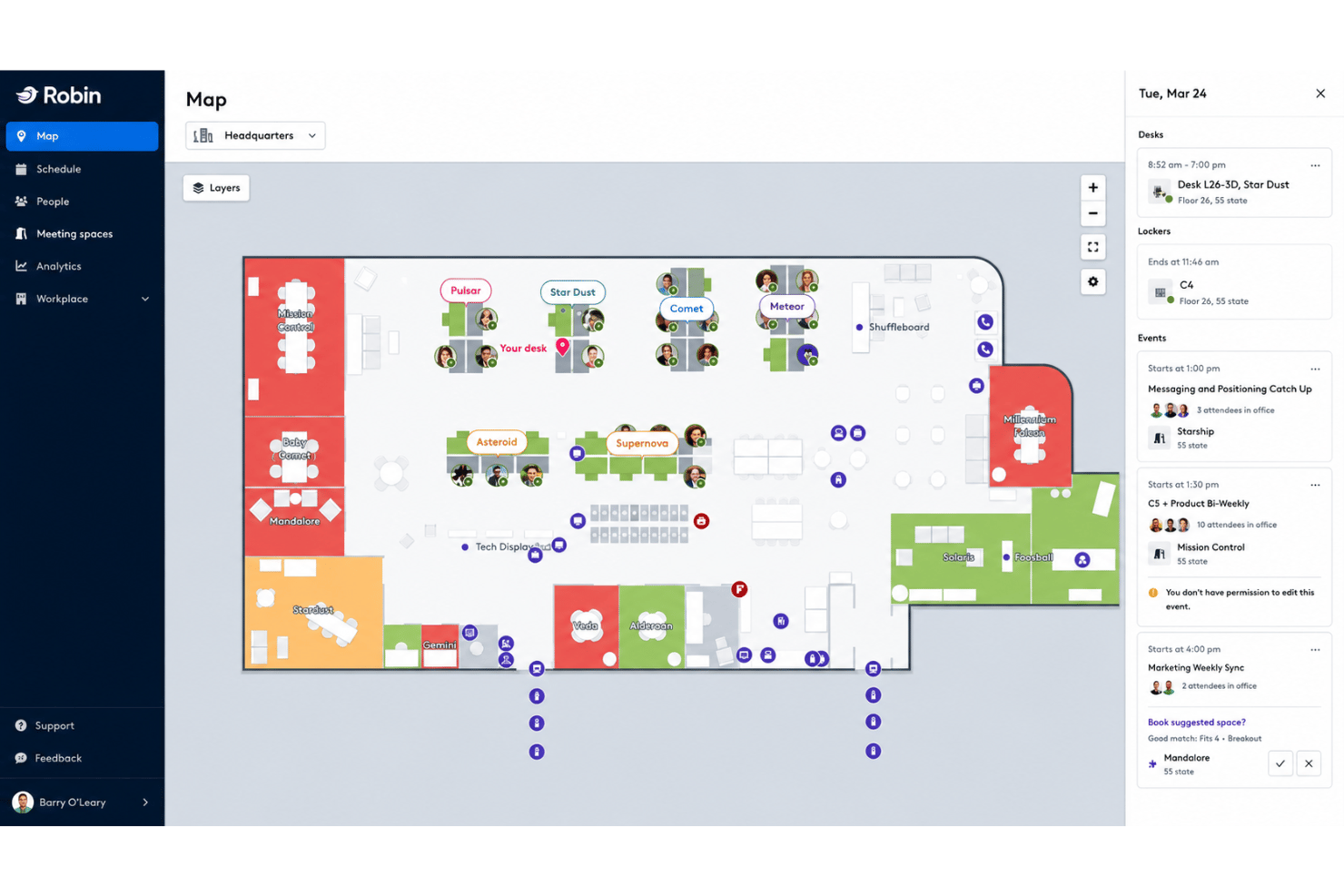
Robin ist eine Plattform für Arbeitsplatzmanagement, die die Buchung von Schreibtischen und Räumen, interaktive Grundrisse, Analysen zur Flächennutzung, Besucher- und Liefermanagement sowie Tools für die hybride Arbeitsplanung kombiniert.
Für wen eignet sich Robin am besten?
Robin eignet sich besonders für mittelgroße bis große Unternehmen mit hybriden Teams an mehreren Standorten, die Besucher- und Liefermanagement in derselben Plattform wie ihre Schreibtisch- und Raumbuchung benötigen.
Warum ich Robin ausgewählt habe
Robin hat sich einen Platz auf meiner Vorauswahlliste verdient, weil keine andere von mir getestete Plattform Besucher- und Liefermanagement so eng in denselben Arbeitsbereich integriert. Vorabregistrierung, selbstständige Anmeldung, Ausweisdruck und Gastgeber-Benachrichtigungen über Slack oder Teams sind integriert, und die Nachverfolgung eingehender Pakete befindet sich auf derselben Übersichtsseite wie Ihre Schreibtisch- und Raumbuchungen. Außerdem gefällt mir, dass Besucherprotokolle und Lieferaufzeichnungen zusammen mit Buchungsdaten durchsuchbar sind, sodass nichts in einem separaten Tool liegt.
Wichtige Funktionen von Robin
- KI-gestützte Schreibtisch- und Raumbuchung: Robin empfiehlt und reserviert automatisch Schreibtische und Räume auf Grundlage Ihrer bisherigen Buchungsmuster und der Nähe zu Ihrem Team.
- Bereichs- und Zonenkontrollen: Administratoren können Teams bestimmten Schreibtischzonen zuweisen und Buchungsberechtigungen sowie Kapazitätsregeln auf Abteilungsebene konfigurieren.
- Auslastungsanalysen aus mehreren Quellen: Robin führt Daten aus Badge-Scans, Belegungssensoren, WLAN-Anmeldungen und Kalenderbuchungen auf einer einzigen Übersichtsseite zur Flächennutzung zusammen.
- Koordination der Arbeitswoche: Eine Ansicht zur Teamplanung zeigt, wer an welchen Tagen der Woche im Büro arbeitet, synchronisiert mit dem Arbeitsort im Google Kalender.
Robin-Integrationen
Robin bietet direkte Integrationen mit Microsoft 365, Outlook, Teams, Google Kalender, Slack, Zoom, VergeSense, Avigilon, Brivo, Kisi, Okta, OneLogin und Rippling. Für benutzerdefinierte Integrationen ist eine API verfügbar.
Pros and Cons
Pros:
- Integrierte Übersichtsseite für Besucher- und Liefermanagement
- KI-gestützte Schreibtischbuchung und automatische Reservierungen
- Auslastungsanalysen aus mehreren Quellen und Szenarioplanung
Cons:
- Änderungen an Grundrissen können den Kundensupport von Robin erfordern
- Analyseerweiterungen erfordern einen separaten Kauf

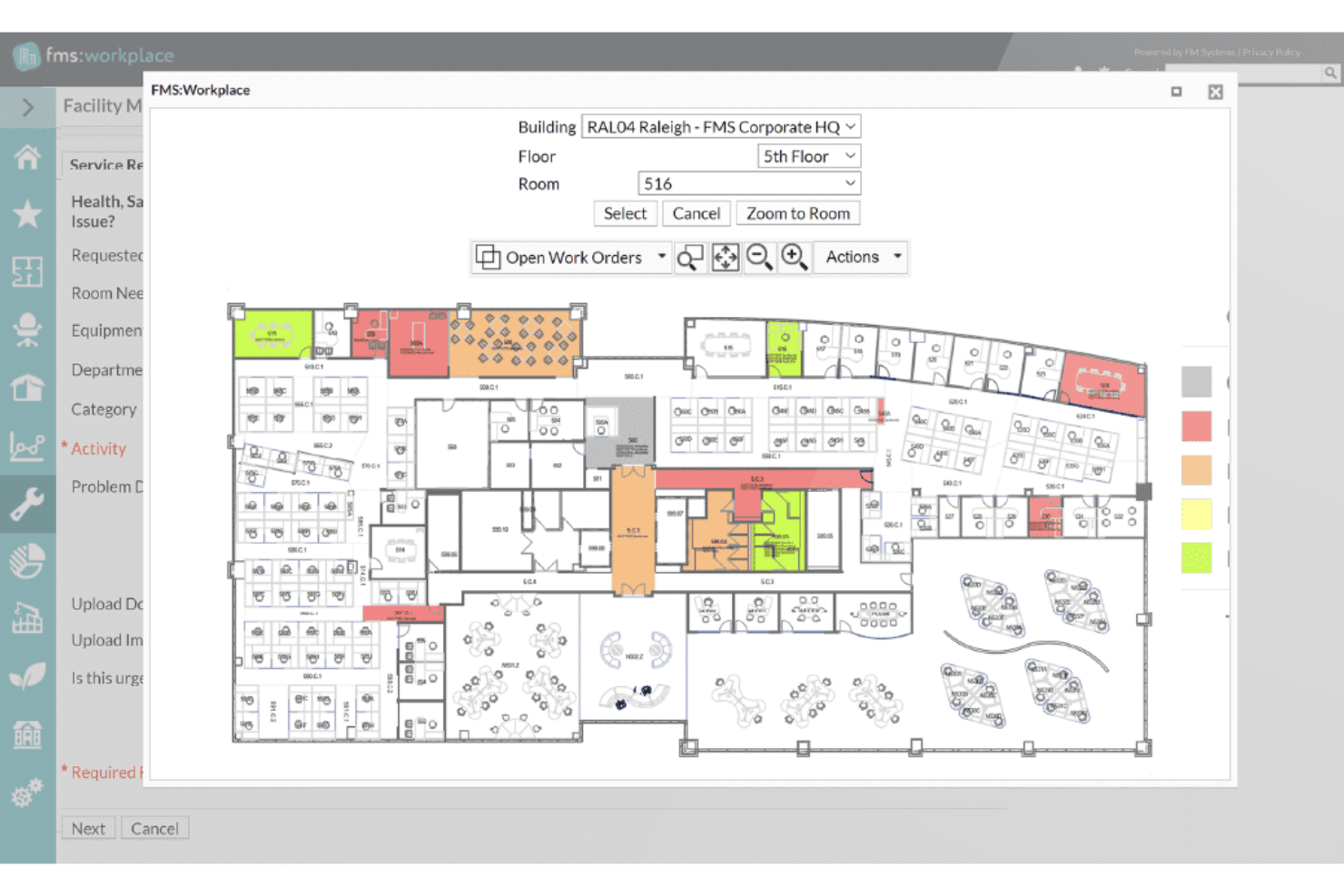
FM:Systems ist eine modulare IWMS-Plattform für die Buchung von Schreibtischen und Räumen, interaktive Grundrisse, Umzugsmanagement, Analysen zur Flächennutzung, Besuchermanagement und die Integration von IoT-Sensoren über Portfolios mit einem oder mehreren Standorten hinweg.
Für wen ist FM:Systems am besten geeignet?
FM:Systems eignet sich besonders gut für Teams im Facility- und Immobilienmanagement von Unternehmen – insbesondere in Behörden, im Gesundheitswesen und im Hochschulbereich –, die ein FedRAMP-autorisiertes IWMS mit integrierter Sensorintegration und Verwaltung von Portfolios mit mehreren Standorten benötigen.
Warum ich FM:Systems ausgewählt habe
FM:Systems hat sich einen Platz auf meiner Auswahlliste verdient, weil es eine der wenigen Plattformen zur Verwaltung von Büroflächen mit einer FedRAMP-Betriebsgenehmigung ist und damit eine realistische Option für Bundesbehörden und regulierte Umgebungen darstellt, in denen die meisten Tools die Anforderungen schlicht nicht erfüllen können. Besonders ansprechend finde ich das native IoT-Sensorökosystem, das Echtzeit-Belegungsdaten direkt in FMS:Insights überträgt, ohne dass eine Sensorplattform eines Drittanbieters erforderlich ist. Auch das Modul für strategische Szenarioplanung ist wirklich beeindruckend: Es ermöglicht Facility-Teams, per Drag-and-drop Stapelpläne mit Kostenanalysen zu erstellen, bevor sie sich für eine Neuaufteilung oder Konsolidierung entscheiden.
Die wichtigsten Funktionen von FM:Systems
- Buchung von Schreibtischen und Räumen: Buchen Sie Schreibtische, Räume und Services über das Web, die mobile App, Outlook oder physische Kioske – mit Check-in per QR-Code und sensorbasiertem Check-in sowie automatischer Freigabe bei Nichterscheinen.
- Besuchermanagement: Registrieren Sie Besucher vorab, ermöglichen Sie den Check-in über einen Selbstbedienungskiosk, lösen Sie bei der Ankunft Benachrichtigungen an Gastgeber aus und drucken Sie über das integrierte Besuchermodul automatisch Besucherausweise.
- Belegungsanalysen aus mehreren Quellen: FMS:Insights führt Daten aus Sensoren, Buchungen, Ausweislesern, Cisco Spaces Wi-Fi und Finanzsystemen in einem einzigen konfigurierbaren Dashboard mit gewichteter KPI-Bewertung zusammen.
- Integration mit AutoCAD und Revit: Synchronisieren Sie CAD-Zeichnungen und BIM-Modelle bidirektional, damit Grundrisse in der Flächenplanung, im Umzugsmanagement und bei der Nutzungsberichterstattung korrekt bleiben.
Integrationen von FM:Systems
FM:Systems bietet native Integrationen mit Microsoft 365, Outlook, Teams, AutoCAD, Autodesk Revit, Google Workspace, Slack, Cisco Spaces, Cisco WebEx und Crestron Fusion. Für individuelle Integrationen ist eine API verfügbar.
Pros and Cons
Pros:
- Native Sensoren für Echtzeitanalysen der Flächennutzung
- Strategische Szenarioplanung mit Kostenmodellierung
- FedRAMP-Autorisierung für regulierte Umgebungen
Cons:
- Keine integrierten physischen Sensoren enthalten
- Begrenzte Möglichkeiten zur Erstellung benutzerdefinierter Berichte

Am besten für Immobilienportfoliomanagement auf IWMS-Niveau geeignet
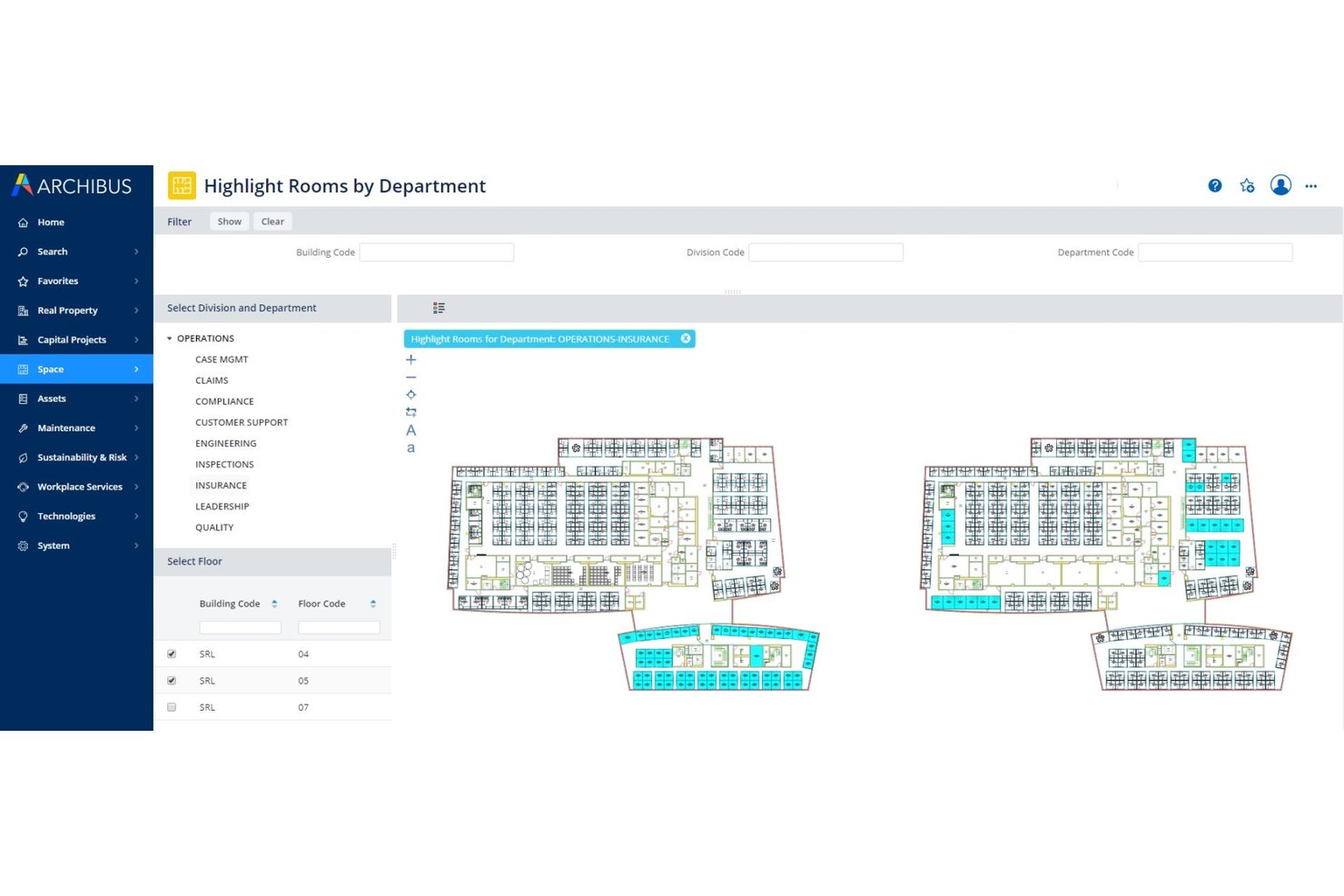
Archibus von Eptura ist eine umfassende IWMS-Plattform für die Raumplanung, das Umzugsmanagement, die Mietvertragsverwaltung, die Anlagenverfolgung und das Immobilienportfoliomanagement in standortübergreifenden Unternehmensumgebungen.
Für wen eignet sich Archibus von Eptura am besten?
Archibus wurde für Teams aus den Bereichen Unternehmensinfrastruktur und Immobilien entwickelt, die komplexe, standortübergreifende Portfolios verwalten und Mietvertragsverwaltung, Raumplanung sowie Umzugsmanagement in einem einzigen System bündeln müssen.
Warum ich Archibus von Eptura ausgewählt habe
Archibus von Eptura schafft es auf meine engere Auswahl, weil kein anderes Tool in dieser Kategorie eine vergleichbare Tiefe bei der durchgängigen Verwaltung eines großen Immobilienportfolios bietet. Besonders beeindruckt mich das Modul für die Mietvertragsverwaltung, das Vertragsdaten zentralisiert und mit automatisierten Benachrichtigungen sowie interaktiven Portfolio-Dashboards für globale, standortübergreifende Strukturen verbindet. Kombiniert man dies mit szenariobasierten Block- und Stapelplanungen, mit denen sich vollständige Neuaufteilungen modellieren und verschiedene Konfigurationen im Was-wäre-wenn-Vergleich prüfen lassen, bevor auch nur ein einziger Schreibtisch umgestellt wird, erhält man ein echtes IWMS für komplexe Anforderungen in großem Maßstab.
Die wichtigsten Funktionen von Archibus von Eptura
- BIM-Viewer: Autodesk-Revit- und BIM-360-Modelle direkt innerhalb der Plattform anzeigen und bearbeiten, ohne Revit-Kenntnisse zu benötigen.
- IoT-Auswertungen zur Nutzung: Ruft Echtzeitbelegungsdaten von VergeSense-Sensoren ab, um Wärmekarten und Berichte zur Spitzenauslastung nach Raum und Etage zu erstellen.
- Verfolgung von Investitionsprojekten: Überwacht Budgets, Zeitpläne und Meilensteine für Arbeitsplatzausbau- und Infrastrukturprojekte innerhalb derselben Plattform.
- Nachhaltigkeitsmodul: Verfolgt Energieverbrauch und Emissionen im gesamten Portfolio mit speziellen Berichtswerkzeugen, die mit Raum- und Anlagendaten verknüpft sind.
Integrationen von Archibus von Eptura
Archibus von Eptura bietet native Integrationen mit VergeSense, Autodesk Revit, Autodesk BIM 360, AutoCAD, Workday, Okta, ServiceNow, Snowflake und native Integrationen im gesamten Microsoft-Ökosystem, darunter Microsoft 365, Teams, Outlook, Copilot, Places, Power BI und Azure AD. Für individuelle Integrationen steht eine offene API zur Verfügung.
Pros and Cons
Pros:
- Überwacht die Zeitpläne für die Umsetzung von Investitionsprojekten
- Branchenführende Integration von BIM- und CAD-Plänen
- Echtzeit-Wärmekarten zur Belegung mit Sensoren
Cons:
- Ein Einkaufs- und Supportnetzwerk ausschließlich über Partner ist erforderlich
- Keine native Kartierung von Außenbereichen des Campus

Am besten für die Berichterstattung zu Flächenkosten und Kostenverrechnung geeignet
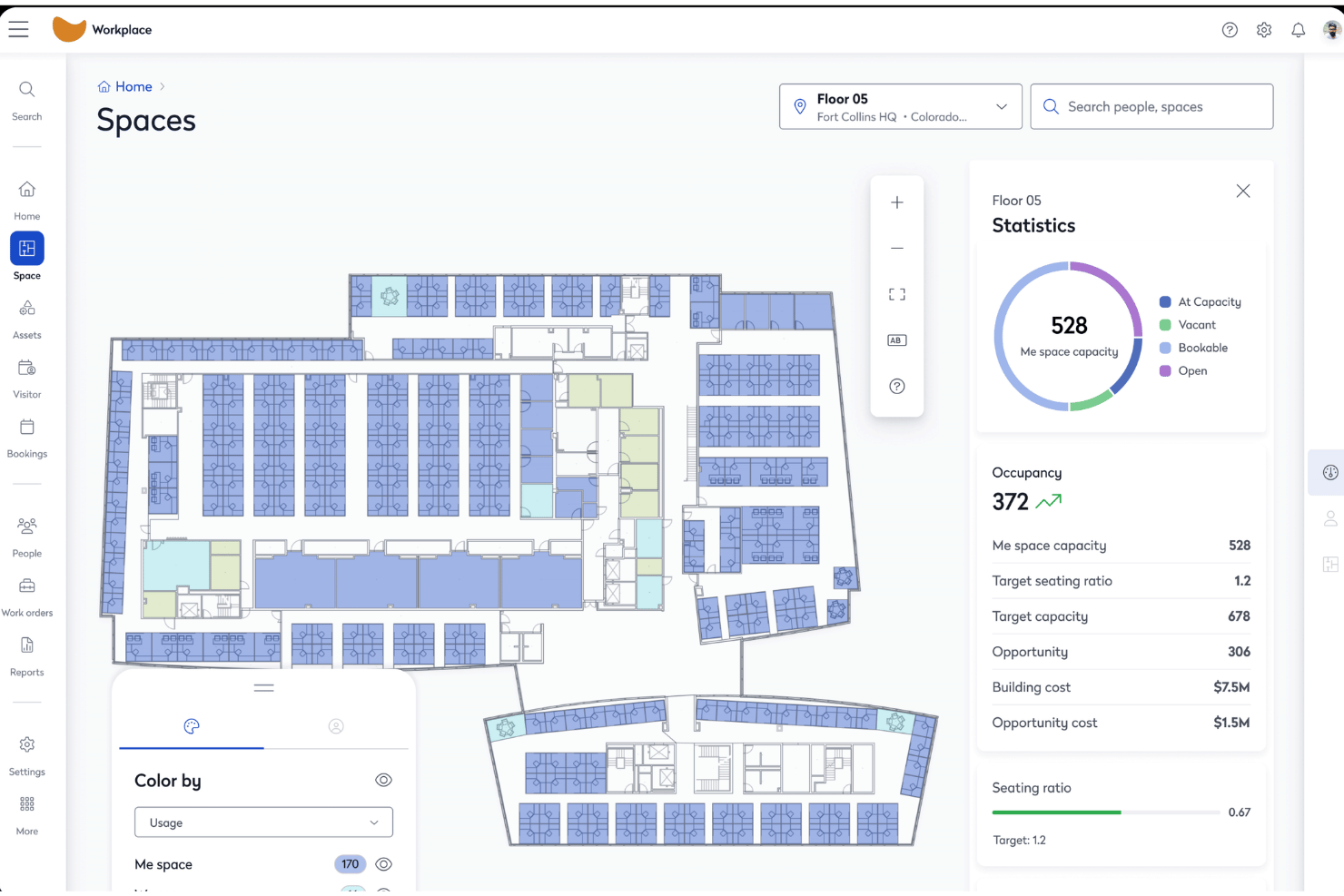
Eptura Workplace ist eine Plattform zur Verwaltung von Büroflächen für Unternehmen, die interaktive Grundrisse, die Buchung von Schreibtischen und Räumen, Umzugsmanagement, Analysen zur Flächennutzung und Besuchermanagement über Portfolios mit einem oder mehreren Standorten hinweg kombiniert.
Für wen ist Eptura Workplace am besten geeignet?
Eptura Workplace eignet sich besonders für Teams aus den Bereichen Unternehmensimmobilien und Gebäudemanagement, die große Portfolios mit mehreren Standorten verwalten und bei denen die Kostenverantwortung für Flächen sowie die Verrechnung nach Kostenstellen eine zentrale Rolle im Betrieb spielen.
Warum ich mich für Eptura Workplace entschieden habe
Eptura Workplace steht auf meiner Auswahlliste, weil die Lösung die Kostenverantwortung für Flächen auf Portfolioebene besonders gut verwaltet. Ich schätze, dass sie die Verwaltung von Mietvertragsdaten, die Verfolgung der Kosten pro Sitzplatz und die Berichterstattung zur Kostenverrechnung an einem Ort kombiniert, sodass Finanz- und Immobilienteams den Flächenverbrauch direkt den Geschäftsbereichen zuordnen können. Der Portfolio-Insights-Agent stellt diese Zahlen automatisch bereit, und Power-BI-Konnektoren ermöglichen es, sie ohne manuelle Datenabfragen in Dashboards für Führungskräfte zu übertragen.
Die wichtigsten Funktionen von Eptura Workplace
- Block- und Stapelplanung: Visuelle Drag-and-drop-Planungstools ermöglichen es, Teams Etagen und Zonen zuzuweisen, Szenarien für Umstrukturierungen zu modellieren und Layoutoptionen zu vergleichen, bevor Umzüge endgültig beschlossen werden.
- Belegungsverfolgung aus mehreren Quellen: Bezieht Belegungsdaten aus Badge-Lesegeräten, der Erkennung von WLAN-Präsenz und Sensorplattformen wie VergeSense und Relogix ein, um ein passives und genaues Bild davon zu vermitteln, wie die Flächen tatsächlich genutzt werden.
- Besuchermanagement: Vorabregistrierung, Check-in vor Ort, individueller Badge-Druck, Erfassung elektronischer Unterschriften, Beobachtungslisten und Notfall-Registrierungen werden vollständig über das integrierte Besuchermodul verwaltet.
- KI-Agent für die Flächenplanung: Erstellt automatisch Stapelpläne auf Grundlage tatsächlicher Belegungs- und Mitarbeiterzahldaten und stellt anschließend Szenariovergleiche bereit, damit Ihr Team auf Basis von Daten statt auf Grundlage von Vermutungen handeln kann.
Integrationen von Eptura Workplace
Eptura Workplace bietet native Integrationen mit Microsoft 365, Outlook, Teams, Google Calendar, Okta, AutoCAD, Autodesk Revit, VergeSense, Relogix, CoWorkr, ServiceNow, Tableau und Snowflake. Für individuelle Integrationen ist eine API verfügbar.
Pros and Cons
Pros:
- Die visuelle Block- und Stapelplanung ermöglicht Umstrukturierungen
- Kombiniert Belegungsdaten aus Sensoren, Badges und Buchungen
- Integrierte erweiterte Berichte zur Kostenverrechnung und zu Kosten
Cons:
- Die Navigation im Administrationsportal ist komplex
- Keine native Slack-Integration dokumentiert

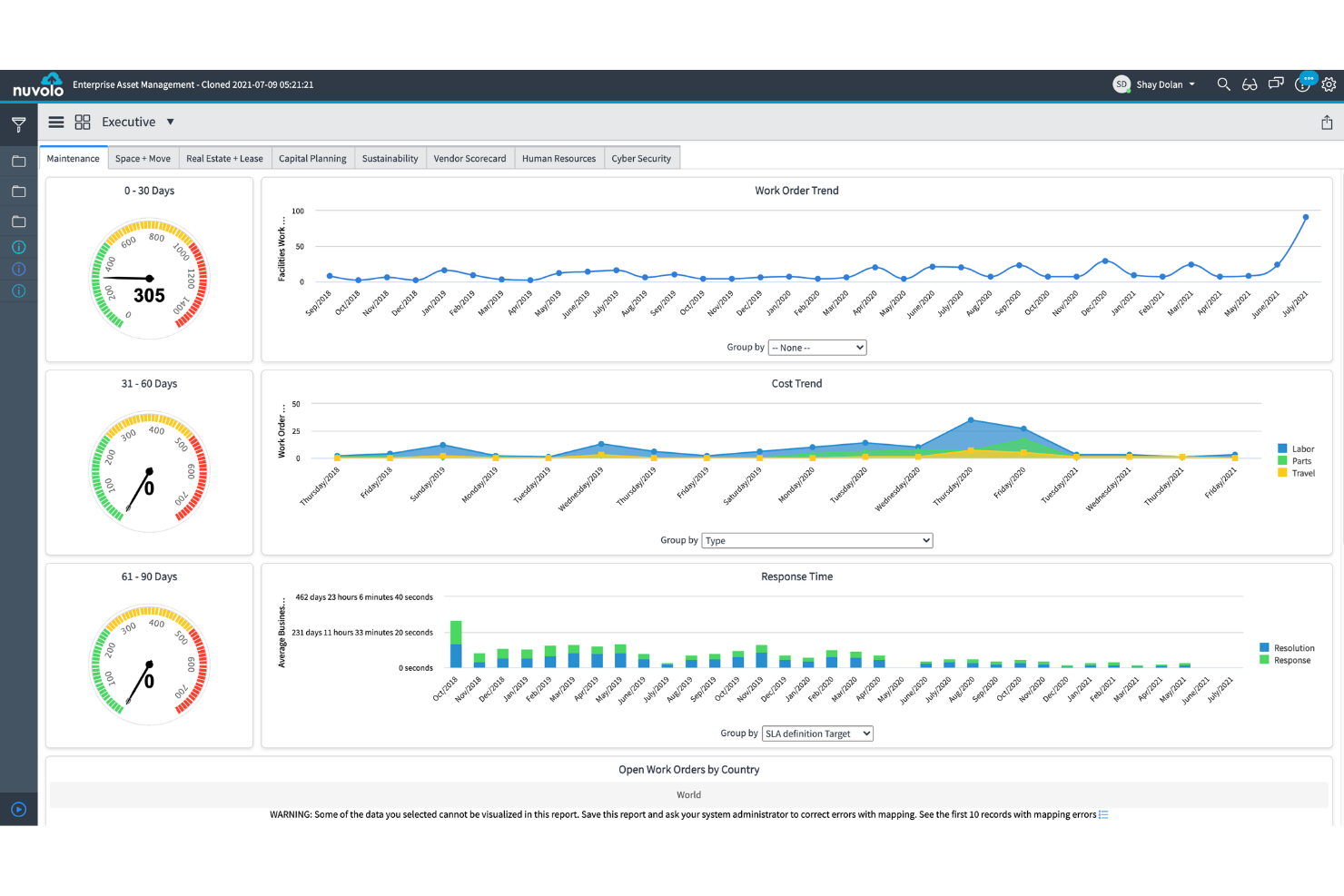
Nuvolo ist eine nativ auf ServiceNow entwickelte IWMS-Plattform, die Flächenmanagement, die Buchung von Schreibtischen und Räumen, Umzugsmanagement, die Nachverfolgung von Immobilienportfolios und Nachhaltigkeitsberichte in einer einzigen vernetzten Suite kombiniert.
Für wen ist Nuvolo am besten geeignet?
Nuvolo eignet sich besonders für große Unternehmen in regulierten Branchen – dem Gesundheitswesen, den Biowissenschaften und dem öffentlichen Sektor –, die bereits ServiceNow nutzen und ein vollständig integriertes IWMS mit Leasingbilanzierung, Umzugsmanagement und sicherheitskonformen Funktionen auf höchstem Compliance-Niveau in einer Plattform benötigen.
Warum ich Nuvolo ausgewählt habe
Ich habe Nuvolo in meine Top-Auswahl aufgenommen, weil die Plattform speziell für große Unternehmen in regulierten Branchen entwickelt wurde, die mehr als ein einfaches Buchungstool benötigen. Die patentierte CAD-Interpretations-Engine synchronisiert sich direkt mit AutoCAD und Revit. Dadurch ist die groß angelegte Erfassung von Grundrissen – etwa für mehr als 3.500 Standorte – ohne endlose manuelle Uploads möglich. Zusammen mit einem speziellen Umzugsmanagement-Modul, das die Planung von Campusverlagerungen in mehreren Szenarien und die automatisierte Zuweisung von Arbeitsaufträgen unterstützt, bietet die Plattform eine Lösung für Komplexitäten, die die meisten Arbeitsplatz-Tools einfach nicht bewältigen können.
Die wichtigsten Funktionen von Nuvolo
- Konforme Leasingbilanzierung: Verwaltet eigene und geleaste Immobilien mit integrierter Konformität gemäß ASC 842 und IFRS 16, einschließlich Benachrichtigungen zu wichtigen Terminen und automatisierten Hinweisen auf Verlängerungen.
- Prognose des Flächenbedarfs: Prognostiziert den künftigen Flächenbedarf mithilfe von Daten zum Personalwachstum und der Nachverfolgung von Teilungsverhältnissen, um Entscheidungen über Konsolidierungen oder Erweiterungen zu unterstützen.
- Integration von IoT- und Belegungssensoren: Verbindet sich mit Gebäudesensoren und IoT-Geräten, um Echtzeitdaten zur Belegung direkt in Auslastungs-Dashboards einzuspeisen.
- Besuchermanagement: Verwaltet Besucherprozesse vor Ort, die kioskbasierte Anmeldung und Benachrichtigungen an Gastgeber innerhalb derselben Oberfläche für das Reservierungsmanagement.
Nuvolo-Integrationen
Nuvolo bietet native Integrationen mit AutoCAD, Revit, Workday, Oracle PeopleSoft, Microsoft Teams, Slack, Microsoft 365 und Outlook. Für individuelle Integrationen steht eine API zur Verfügung.
Pros and Cons
Pros:
- Native CAD-Synchronisierung für automatisierte Grundrisse
- Umfassendes Umzugsmanagement für komplexe Verlagerungen
- Compliance-Module für Gesundheitswesen und öffentliche Verwaltung
Cons:
- Erfordert eine separate ServiceNow-Lizenz für die Nutzung
- Verfolgt Hardware-Assets nicht
Weitere Software zur Verwaltung von Büroflächen
Hier finden Sie einige zusätzliche Optionen für Software zur Verwaltung von Büroflächen, die es nicht in meine engere Auswahl geschafft haben, die sich aber dennoch zu prüfen lohnen:
- Kadence
Am besten für KI-gestützte Umzugsplanung und hybride Terminplanung
- Tactic
Am besten für Besucher- und Arbeitsplatzbuchungen an einem Ort geeignet
- Skedda
Am besten für Regeln zur Selbstbedienungsbuchung von Schreibtischen und Räumen
- deskbird
Am besten für die Buchung von Hybridbüros über Slack und Teams geeignet
- OfficeRnD Workplace
Am besten für die Planung und Buchung hybrider Teams
- Appspace
Am besten für die Wegweisung an Kiosken und in mobilen Büros
- Envoy Workplace
Ideal für Besucher- und Schreibtischbuchungen auf einer Plattform
- Gable
Ideal für gemeinschaftlich genutzte Arbeitsplätze und die Buchung von Büros nach Bedarf
- Yoffix
Am besten für die in Microsoft 365 integrierte Buchung von Schreibtischen und Räumen
- Mri Manhattan
Am besten geeignet für die Verwaltung von Immobilienportfolios von Unternehmen


Wie ich Software für die Verwaltung von Büroflächen bewerte
Meine Bewertung erfolgt in zwei Ebenen: die grundlegenden Funktionen, die ein Tool bieten muss – Grundrisse, Buchung und Auslastungsanalysen – sowie die Unterscheidungsmerkmale, die eine spezielle App zur Schreibtischbuchung von einer Plattform abheben, die das Umzugsmanagement und die Compliance für ganze Portfolios bewältigt.
Grundlegende Funktionen (Voraussetzungen für diese Liste)
Bei der Auswahl der Tools für meine Liste bewerte ich jedes einzelne Tool für jede der unten aufgeführten Kernfunktionen auf einer Skala von 0 (bietet die Funktion nicht) bis 5 (zeichnet sich in diesem Bereich aus). Anschließend berechne ich die Gesamtbewertung des Tools als Prozentsatz und verwende 65 % als Maßstab, um die allgemeine Eignung für die Liste zu beurteilen.
- Interaktive Grundrisse: Ich achte auf mehrstandortfähige, mehrschichtige Grundrisse mit Unterstützung für den Import von CAD- oder BIM-Dateien und einem Live-Status der Sitzplätze – nicht nur auf statische Bilder, die als PNGs hochgeladen wurden.
- Buchung von Schreibtischen und Räumen: Die Selbstbedienungsreservierung von Schreibtischen, Räumen und Extras wie Parkplätzen oder Schließfächern ist wichtig, ebenso wie der mobile Check-in und Richtliniensteuerungen für Nachbarschaften oder Zonen.
- Analysen zur Flächenauslastung: Ich bewerte, ob die Plattform Buchungsdaten mit Sensor-, Ausweis- oder WLAN-Signalen kombiniert, um tatsächliche Belegungstrends und nicht nur die Anzahl der Reservierungen anzuzeigen.
- Umzugsmanagement: Ich prüfe, ob eine per Drag-and-drop bedienbare Stapelplanung mit Szenarienvergleich vorhanden ist – insbesondere für Teams, die Neuordnungen oder Umzüge über mehrere Etagen innerhalb enger Zeitpläne durchführen.
- Mitarbeiterverzeichnis und Wegweiser: Das Verzeichnis sollte mit Ihrem HRIS synchronisiert werden und Personen auf der Karte mit ihren Sitzplatzzuweisungen verknüpfen, damit jeder einen Kollegen finden kann, ohne vorher eine Nachricht senden zu müssen.
- Integration der hybriden Arbeitsplanung: Die bidirektionale Synchronisierung mit Outlook, Google Kalender, Teams oder Slack ist die Grundlage. Zusätzlich achte ich jedoch auf Ansichten zur Koordination von Teamtagen und Unterstützung für SSO.
Sobald ich eine Liste von Tools habe, die die Kriterien erfüllen, prüfe ich, wodurch sich die einzelnen Plattformen voneinander abheben.
Unterscheidungsmerkmale (Was Anbieter voneinander abhebt)
So vergleiche ich verschiedene Anbieter miteinander:
Herausragende Funktionen
Szenarioplanungstools sind besonders wichtig, wenn eine Neuordnung oder Konsolidierung abgewogen wird. Ich achte auf Was-wäre-wenn-Modellierungen, mit denen sich Änderungen des Hybridverhältnisses anhand von Kosten- und Personaldaten testen lassen, bevor eine Entscheidung getroffen wird. Die Integration von Sensoren und IoT ist ebenso wichtig – ich bewerte, ob eine Plattform passive Belegungsdaten von Ausweisen oder WLAN-Signalen abruft und nicht nur die Anzahl der Reservierungen. Besucher- und Liefermanagement vervollständigen das Bild, indem eigenständige Lobby-Apps durch integrierten Check-in, Benachrichtigungen für Gastgeber und Paketverfolgung ersetzt werden.
Über die Funktionen hinaus
Ich bewerte, wie schnell ein Anbieter Ihre Grundrisse digitalisieren kann – einige bieten umfassende CAD-/BIM-Konvertierungsdienste an, während andere erwarten, dass Sie dies selbst erledigen, wodurch sich die Einführung um Wochen verzögern kann. Die Integrationstiefe ist ebenso wichtig: Ich prüfe die bidirektionale Synchronisierung mit Microsoft 365, Google Workspace und HRIS-Plattformen wie Workday, damit die Benutzerbereitstellung und Buchungen automatisch erfolgen. Die Sicherheitsausrichtung ist ein weiterer Filter, insbesondere die SOC-2-Type-II-Zertifizierung und Optionen für die Datenresidenz von Teams, die über mehrere Regionen hinweg arbeiten. Schließlich prüfe ich den Export von Analysedaten – ob Dashboards mit Power BI oder Tableau verbunden werden können, damit Auslastungsdaten ohne manuelle Exporte in eine umfassendere Portfolio-Berichterstattung einfließen.
So wählen Sie Software zur Verwaltung von Büroflächen aus
Die richtige Software zur Verwaltung von Büroflächen hängt davon ab, welche Probleme am Arbeitsplatz Sie zuerst lösen möchten:
| Wenn Ihre Priorität ... ist | Achten Sie auf ... |
|---|---|
| Hybride Arbeitszeiten und Buchungen zu verwalten | Kalendersynchronisierung und der Echtzeit-Status von Sitzplätzen auf der Karte |
| Immobilienausgaben und Kostenumlagen zu verfolgen | Integrierte Zuordnung von Flächenkosten und Belegungsberichte |
| Compliance oder regulierte Umgebungen zu verwalten | Unterstützung des Anbieters für FedRAMP, SOC 2 oder vergleichbare Dokumentation |
| Große Umzüge oder Neuanordnungen zu koordinieren | Werkzeuge zur Szenariomodellierung für die Planung über mehrere Etagen |
| Workflows für Besucher, Lieferungen und Buchungen zu vereinheitlichen | Integrierte Funktionen für Check-in und Gastgeberbenachrichtigungen |
So prüfen Sie Ihre engere Auswahl
- Testen Sie die Digitalisierung von Grundrissen: Laden Sie einen Beispielgrundriss hoch und messen Sie, wie schnell die Live-Bearbeitung erfolgt oder welche Unterstützung für CAD-/BIM-Dateien angeboten wird.
- Prüfen Sie die Analysetiefe: Führen Sie eine echte Belegungsanalyse anhand Ihrer Buchungsdaten sowie Ausweis- oder Sensordaten durch.
- Fordern Sie Compliance-Nachweise an: Bitten Sie schriftlich um das aktuellste SOC-2-Type-II-Audit oder den FedRAMP-Status.
- Testen Sie ein Umzugsszenario: Ordnen Sie mit der Plattform drei Teams in einer Testumgebung neu an und exportieren Sie Kostenprognosen für vorher und nachher.
- Wählen Sie Ihren Kompromiss: Entscheiden Sie zwischen einer schnellen Einführung (Self-Service-Tools) und einer großen Auswahl an Integrationen plus Compliance (Lösungen auf Unternehmensniveau).
Was ist Software zur Verwaltung von Büroflächen?
Software zur Verwaltung von Büroflächen ist eine digitale Plattform, die zentralisiert, wie Sie Schreibtische zuweisen, Grundrisse verwalten, die Nutzung von Arbeitsplätzen planen und Immobilienkosten überwachen. Sie unterstützt Teams bei der Koordination hybrider Arbeit, der Erfassung der Auslastung und der Sicherstellung der Compliance durch interaktive Karten, Buchungstools und Analysen. Diese Art von Software unterstützt Facility-, IT- und Projektmanager dabei, Ressourcen am Arbeitsplatz sichtbar und anpassbar zu halten, wenn sich die Anforderungen der Teams ändern.
Funktionen von Software zur Verwaltung von Büroflächen
Achten Sie bei der Auswahl einer Software zur Verwaltung von Büroflächen auf die folgenden wichtigen Funktionen:
- Interaktive Grundrisse: Digitale Grundrisskarten mit Sitzplatzzuweisungen, Ausstattungsmerkmalen und Aktualisierungen der Auslastung in Echtzeit anzeigen, bearbeiten und verwalten. Dies hilft Teams, Arbeitsplätze an mehreren Standorten zu visualisieren und zu planen.
- Schreibtisch- und Raumbuchung: Mitarbeitenden ermöglichen, Schreibtische, Besprechungsräume oder Kollaborationsbereiche über Self-Service-Tools zu reservieren, häufig einschließlich mobilem Check-in, Buchungsrichtlinien und Bereichssteuerungen.
- Analysen zur Flächennutzung: Die tatsächliche und reservierte Nutzung von Arbeitsplätzen überwachen, indem Reservierungsdaten, Sensoren, WLAN- oder Zugangskartendaten erfasst werden, um Entscheidungen über Flächenbedarf und Layouts zu unterstützen.
- Umzugsmanagement: Büro- und Umzugsplanungen mit Szenariomodellierung, Bearbeitung von Grundrissen per Drag-and-drop und Vorher-Nachher-Visualisierungen durchführen. Dadurch lässt sich die Arbeitsplatzzuweisung leichter anpassen, wenn sich Teams verändern.
- Mitarbeiterverzeichnis und Orientierung: Personen mit ihren Sitzplatzzuweisungen verknüpfen, Kontaktdaten anzeigen und interaktive Karten bereitstellen, über die Mitarbeitende Kollegen, Besprechungsräume oder Ausstattungsbereiche finden können.
- Planung hybrider Arbeit: Mit Kalenderplattformen integrieren und eine teambasierte Planung anbieten, die zeigt, wann einzelne Personen oder Gruppen vor Ort arbeiten möchten, um die Anwesenheit zu koordinieren und Konflikte zu reduzieren.
- Besuchermanagement: Gäste registrieren, digitale Besucherausweise ausstellen, Gastgeber benachrichtigen und Besucherprotokolle innerhalb derselben Plattform verfolgen, sodass eigenständige Empfangstools ersetzt werden.
- Integration mit HR- und IT-Systemen: Mitarbeiterdaten, Sitzplatzzuweisungen und Benutzerberechtigungen mit Tools wie Active Directory, Google Workspace oder Ihrem HRIS synchronisieren, damit die Informationen automatisch aktualisiert werden.
- Erfassung und Berichterstattung zu Flächenkosten: Belegungskosten den Kostenstellen oder Teams zuweisen, Nutzungsberichte erstellen und Daten für Finanz- und Facility-Verantwortliche exportieren.
- Sicherheits- und Compliance-Kontrollen: Sensible Daten durch SSO, rollenbasierte Berechtigungen, Prüfprotokolle und die Einhaltung von Sicherheitsstandards wie SOC 2 oder FedRAMP schützen und damit regulatorische Anforderungen sowie Datenschutzanforderungen unterstützen.
Gängige KI-Funktionen von Software zur Verwaltung von Büroflächen
Über die oben aufgeführten Standardfunktionen von Software zur Verwaltung von Büroflächen hinaus integrieren viele dieser Lösungen KI mit Funktionen wie:
- KI-gestützte Auslastungsprognosen: Historische Nutzungsdaten und Echtzeitdaten von Sensoren verwenden, um den zukünftigen Bedarf an Arbeitsplätzen vorherzusagen. So können Sie die Schreibtischzuweisung optimieren und ungenutzte Flächen reduzieren.
- KI-gestützte Empfehlungen zur Flächenoptimierung: Buchungsmuster, Teampläne und Bewegungsdaten analysieren, um Änderungen am Layout oder Neuzuweisungen von Sitzplätzen vorzuschlagen, die Zusammenarbeit und Flächeneffizienz verbessern.
- Automatisierte Anomalieerkennung: Auslastungs- und Buchungsdaten überwachen, um ungewöhnliche Muster zu kennzeichnen – etwa anhaltendes Nichterscheinen oder Überbelegung –, sodass Sie Probleme beheben können, bevor sie den Betrieb beeinträchtigen.
- Assistenten für Abfragen in natürlicher Sprache: Fragen zur Flächennutzung, Verfügbarkeit oder zu Buchungsrichtlinien in Alltagssprache stellen und mithilfe von KI sofort Antworten und Erkenntnisse aus Ihren Daten erhalten.
- Warnmeldungen zur vorausschauenden Wartung: Sensor- und Nutzungsdaten mithilfe von KI analysieren und erkennen, wann Besprechungsräume oder gemeinsam genutzte Bereiche gereinigt, repariert oder nachbestückt werden müssen, bevor Probleme auftreten.
Vorteile von Software zur Verwaltung von Büroflächen
Die Einführung einer Software zur Verwaltung von Büroflächen bietet Ihrem Team und Ihrem Unternehmen mehrere Vorteile. Hier sind einige, auf die Sie sich freuen können:
- Zentralisierte Arbeitsplatzzuweisung: Koordinieren Sie Schreibtischzuweisungen, Raumbuchungen und Grundrisse auf einer Plattform, damit Ihr Team immer weiß, welche Bereiche verfügbar sind und wer wo sitzt.
- Datengestützte Einblicke in die Auslastung: Kombinieren Sie Belegungsanalysen, Sensordaten und Buchungsaufzeichnungen, um die tatsächliche Nutzung der Arbeitsbereiche zu verfolgen. So können Sie wenig genutzte Bereiche identifizieren und Entscheidungen zur benötigten Bürofläche begründen.
- Integrierte Umzugs- und Szenarioplanung: Nutzen Sie Werkzeuge mit Drag-and-drop-Funktion und Was-wäre-wenn-Modellierung, um Büroumzüge, Neuaufteilungen oder den Übergang zu hybriden Arbeitsmodellen zu planen, ohne auf statische Tabellenkalkulationen angewiesen zu sein.
- Koordination hybrider Arbeit: Synchronisieren Sie Zeitpläne mit Kalenderwerkzeugen wie Outlook oder Google Kalender, damit Ihr Team Präsenztage planen und Konflikte bei der Arbeitsplatznutzung reduzieren kann.
- Besucher- und Liefermanagement: Registrieren Sie Gäste, stellen Sie digitale Zugangsausweise aus und benachrichtigen Sie Gastgeber direkt innerhalb der Plattform. Dadurch können eigenständige Apps für Anmeldung und Benachrichtigungen ersetzt werden.
- Automatisierte Kostenverfolgung und Berichterstellung: Ordnen Sie Belegungs- und Arbeitsplatzausgaben Kostenstellen oder Teams zu und exportieren Sie Nutzungsdaten für Berichte der Finanz- oder Gebäudeverwaltung.
- Sicherheits- und Compliance-Gewährleistung: Verwalten Sie mit SSO, Berechtigungssteuerungen und der Unterstützung von Standards wie SOC 2 oder FedRAMP, sofern erforderlich, wer auf Grundrisse und Buchungsdaten zugreifen kann.
Kosten und Preise von Software zur Verwaltung von Büroflächen
Die Auswahl einer Software zur Verwaltung von Büroflächen erfordert ein Verständnis der verschiedenen verfügbaren Preismodelle und Tarife. Die Kosten variieren je nach Funktionen, Teamgröße, Zusatzoptionen und weiteren Faktoren. Die folgende Tabelle fasst gängige Tarife, ihre durchschnittlichen Preise und typische enthaltene Funktionen von Lösungen zur Verwaltung von Büroflächen zusammen:
Vergleichstabelle der Tarife für Software zur Verwaltung von Büroflächen
| Tarifart | Durchschnittlicher Preis | Übliche Funktionen |
|---|---|---|
| Kostenloser Tarif | $0 | Anzeige grundlegender Grundrisse, begrenzte Buchung von Schreibtischen und Räumen, einfache Analysen und E-Mail-Support. |
| Persönlicher Tarif | $5–$25/Nutzer/Monat | Interaktive Grundrisse, standardmäßige Buchung von Schreibtischen und Räumen, Nutzungsberichte, mobile Anmeldung und grundlegende Integrationen. |
| Geschäftstarif | $8–$40/Nutzer/Monat | Erweiterte Buchungsrichtlinien, Analysen zur Flächenauslastung, Umzugsmanagement, Integrationen mit HR- und IT-Systemen sowie Synchronisierung des Verzeichnisses. |
| Unternehmenstarif | $30–$120/Nutzer/Monat | Portfolioübergreifende Analysen, Szenarioplanung, individuelle Integrationen, SSO, Compliance-Steuerungen und dedizierter Support. |
FAQs zur Software für die Verwaltung von Büroflächen
Hier finden Sie Antworten auf häufige Fragen zur Software für die Verwaltung von Büroflächen:
Wie unterstützt Software für die Verwaltung von Büroflächen hybride Arbeitszeitmodelle?
Software für die Verwaltung von Büroflächen verbindet Buchungssysteme mit Kalendern in einer benutzerfreundlichen iOS- oder Android-App, sodass Sie sehen können, wer vor Ort arbeiten möchte. Dies hilft Teams, ihre Anwesenheit zu koordinieren, Doppelbuchungen von Schreibtischen zu vermeiden und wechselnde Arbeitspläne in einem hybriden Arbeitsumfeld zu unterstützen. Viele Tools zeigen die Verfügbarkeit von Sitzplätzen in Echtzeit an und synchronisieren sich für eine einfache Planung mit Outlook oder Google Kalender, wodurch die Mitarbeitererfahrung verbessert wird.
Kann Software für die Verwaltung von Büroflächen komplexe Grundrisse an mehreren Standorten verwalten?
Ja, viele Plattformen für die Verwaltung von Büroflächen unterstützen Pläne für mehrere Standorte und Etagen mit verschachtelten Karten sowie CAD- oder BIM-Importen, um jeden Quadratmeter zu erfassen. Diese Transparenz hilft dem Facility Management und Projektmanagern, die Flächenzuweisung zu optimieren, Sitzplätze zuzuweisen, Umzüge zu planen und Grundrisse in wachsenden Unternehmen oder über mehrere Arbeitsumgebungen hinweg aktuell zu halten.
Auf welche Integrationen sollte ich bei Software für die Verwaltung von Büroflächen achten?
Achten Sie auf eine umfassende Plattform mit Integrationen für Ihren primären Kalender (Google Workspace, Microsoft 365), Ihr HRIS, Ihr Identitätsmanagement und Sensoren zur Erfassung der Büroauslastung. Tiefgreifende Integrationen automatisieren die Benutzerbereitstellung, synchronisieren Zeitpläne und stellen tatsächliche Nutzungsdaten über Arbeitsplatzanalysen bereit. Dies hilft Ihnen, fundierte Entscheidungen für eine bessere Flächenplanung zu treffen.
Wie sicher ist Software für die Verwaltung von Büroflächen im Umgang mit vertraulichen Bürodaten?
Die meisten etablierten Plattformen sichern Ihre Büroumgebung durch SSO, differenzierte Berechtigungen und Prüfprotokollierung. Für die Verwaltung regulierter Ressourcen sollten Sie auf SOC-2-Typ-II- und ISO-27001-Zertifizierungen oder Kontrollen zur Datenresidenz achten. Bevor Sie sich für einen Anbieter entscheiden oder neue Funktionen einsetzen, bitten Sie um die aktuellsten Compliance-Berichte, um zu klären, wie der Anbieter Daten über verschiedene Standorte hinweg schützt.
Kann ich Software für die Verwaltung von Büroflächen für die kurzfristige oder flexible Buchung von Arbeitsplätzen verwenden?
Ja, mit den meisten Softwarelösungen zur Flächenbuchung können Sie Richtlinien für flexible Schreibtische, die Reservierung von Besprechungsräumen, Parkplätze und andere Büroressourcen festlegen. Mitarbeitende können Räume und Arbeitsplätze einfach buchen, während mobile Buchungen, QR-Check-ins, Anzeigen für Konferenzräume und Karten in Echtzeit kurzfristige Reservierungen sowie tägliche Änderungen bei der Sitzplatzzuweisung unterstützen.
Was ist für die Digitalisierung bestehender Grundrisse mit Software für die Verwaltung von Büroflächen erforderlich?
In der Regel laden Sie Grundrisse im PDF-, CAD- oder BIM-Format hoch. Einige Anbieter bieten einen Concierge-Service an, der aus Ihren Dateien interaktive Karten erstellt, um die Arbeitsplatzgestaltung zu verbessern, während andere das selbstständige Hochladen voraussetzen. Ich empfehle, einen Beispielgrundriss einzureichen, um die Qualität zu testen. So stellen Sie sicher, dass die Karten mit Ihrer Arbeitsplatzstrategie übereinstimmen, insbesondere wenn Sie Karten für mehrere Etagen oder individuell angepasste Karten benötigen.