

10 beste Scribe-Alternativen zur Erstellung von SOPs im Jahr 2026

Die besten Scribe-Alternativen im Überblick


Wenn Sie Projekte verwalten, wissen Sie, wie schwierig es sein kann, die Dokumentation übersichtlich zu halten. Scribe ist ein nützliches Tool, passt aber möglicherweise nicht immer zum Arbeitsablauf Ihres Teams oder hilft nicht allen dabei, auf dem gleichen Stand zu bleiben.
Die Suche nach Alternativen kann Lösungen zutage fördern, die besser zu den Herausforderungen Ihres Unternehmens passen. Dieser Artikel führt Sie anhand gründlicher Tests und Bewertungen durch die besten Scribe-Alternativen.
Sie entdecken Tools, die möglicherweise genau die Funktionen bieten, die Ihnen fehlen, oder Prozesse vereinfachen, die zuvor unnötig komplex erschienen. Lassen Sie uns gemeinsam die perfekte Lösung für Ihr Team finden.
Was ist Scribe?
Scribe ist ein Tool zur Prozessdokumentation, mit dem Sie Arbeitsabläufe problemlos erfassen und teilen können. Es wird häufig von Projektmanagern, Teamleitern und Trainern verwendet, die ihre Dokumentation übersichtlich und zugänglich halten müssen. Mit Funktionen wie der Erstellung von Schritt-für-Schritt-Anleitungen, der Erfassung von Bildschirmfotos und automatischen Aktualisierungen hilft Scribe dabei, eine klare und präzise Dokumentation zu pflegen. Insgesamt bietet Scribe eine unkomplizierte Möglichkeit, Prozesse zu dokumentieren, sodass Ihr Team leichter aufeinander abgestimmt bleibt.
Vergleichstabelle der Scribe-Alternativen
Diese Vergleichstabelle fasst die Preisdetails meiner besten Scribe-Alternativen zusammen.
| Tool | Best For | Trial Info | Price | ||
|---|---|---|---|---|---|
| 1 | Am besten geeignet für KI-gestützte, gesprochene Workflow-Anleitungen | Kostenlose Version verfügbar | Ab $29/Nutzer/Monat (jährliche Abrechnung) | Website | |
| 2 | Am besten für zentralisierte Trainingsdokumente | Kostenlose Demo verfügbar | Preise auf Anfrage | Website | |
| 3 | Am besten geeignet für interaktive Produktdemos | Kostenlose 14-tägige Testphase + kostenloser Plan + kostenlose Demo verfügbar | Ab $38/Ersteller/Monat (jährliche Abrechnung) | Website | |
| 4 | Am besten geeignet für KI-gestützte Videoproduktion | Kostenlose 7-Tage-Testversion + kostenloser Plan + kostenlose Demo verfügbar | Ab $18/Creator/Monat (jährliche Abrechnung) | Website | |
| 5 | Am besten geeignet für Team-Videonachrichten | Kostenlose Demo verfügbar | $18/Monat | Website | |
| 6 | Am besten für regulierte Umgebungen geeignet | Kostenlose 7-Tage-Testversion verfügbar | Ab $44/Nutzer/Gerät/Monat (jährliche Abrechnung) | Website | |
| 7 | Am besten für einbettbare Prozessanleitungen | Kostenloser Plan verfügbar | Ab $10/Sitzplatz/Monat (jährliche Abrechnung) | Website | |
| 8 | Am besten für das Teilen von Anleitungen mit nur einem Klick | Kostenlose 14-tägige Testphase + kostenloser Plan verfügbar | Ab $18/Monat (bei jährlicher Abrechnung) | Website | |
| 9 | Am besten geeignet für Tutorials in mehreren Formaten | Kostenlose Testversion verfügbar | Ab $200/Monat | Website | |
| 10 | Am besten für die Echtzeit-Erfassung von Prozessen | Kostenloser Tarif + kostenlose Demo verfügbar | Ab $22/Nutzer/Monat (jährliche Abrechnung) | Website |
Warum Sie unseren Software-Empfehlungen vertrauen können
Unser Team testet und bewertet Software seit 2012. Als Projektmanager wissen wir selbst, wie schwierig – und wichtig – es ist, die richtige Software auszuwählen.
Für diesen Leitfaden haben wir Tools mithilfe von praktischen Tests und unabhängiger Recherche bewertet und dabei unsere Bewertungskriterien angewendet. Zudem greifen wir auf Erkenntnisse von Branchenvordenkern und praktizierenden Projektmanagement-Experten zurück.
Unsere Bewertungen spiegeln unser menschliches redaktionelles Urteilsvermögen wider, keine Verkaufsstrategie.
Expertenprüfer:
Bewertungen der besten Scribe-Alternativen
Nachfolgend finden Sie ausführliche Zusammenfassungen der besten Scribe-Alternativen auf unserer Auswahlliste. Unsere Bewertungen bieten einen detaillierten Einblick in die wichtigsten Funktionen, Vor- und Nachteile, Integrationen und idealen Anwendungsfälle jedes Tools und helfen Ihnen dabei, die beste Lösung für Ihre Bedürfnisse zu finden.

Am besten geeignet für KI-gestützte, gesprochene Workflow-Anleitungen
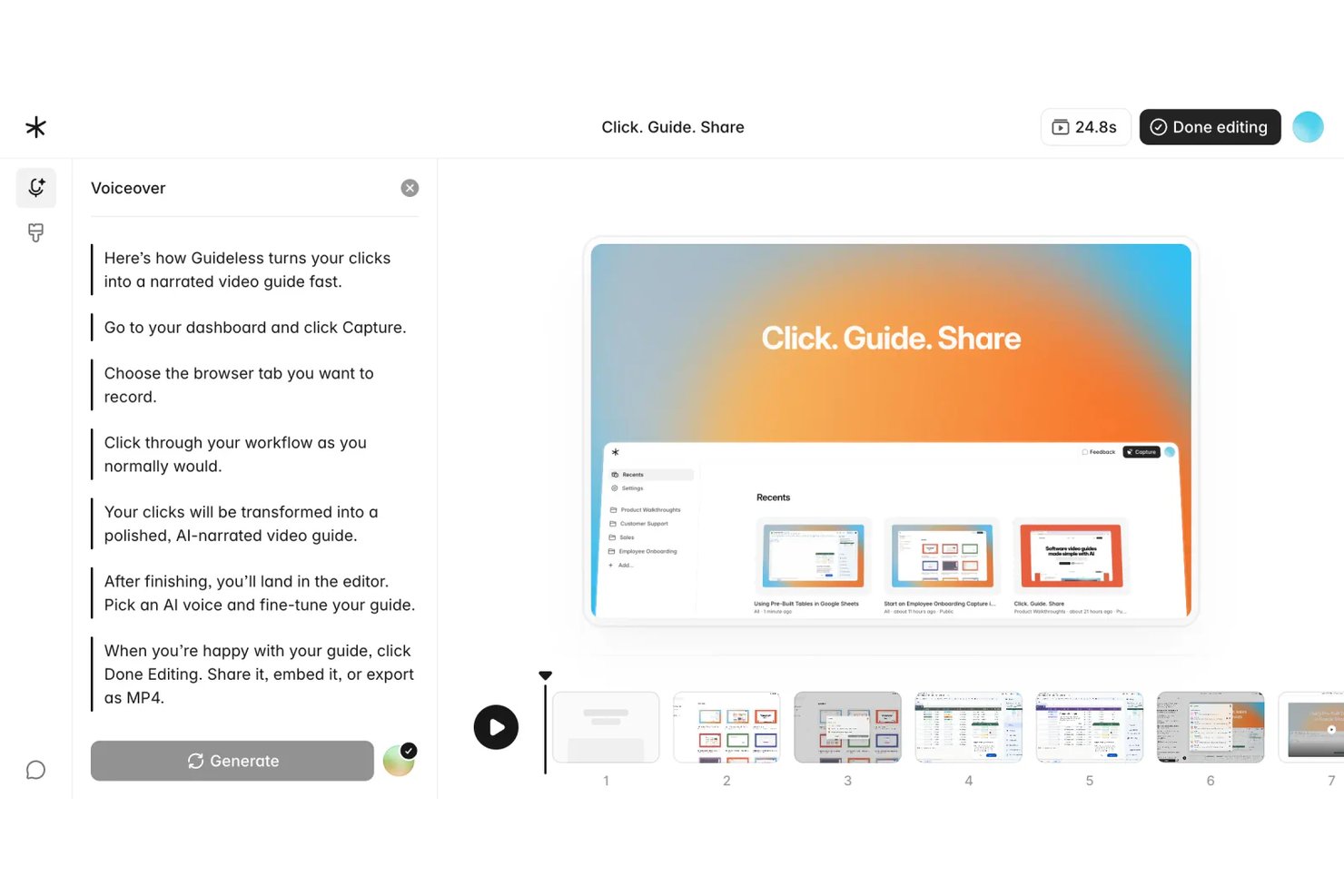
Guideless ist ein browserbasiertes Tool zur Erstellung von Anleitungen, das Live-Workflow-Aufnahmen in KI-gesprochene Videoguides umwandelt. Es eignet sich besonders für Operations- und Projektteams, die ansprechende, leicht zu aktualisierende Prozessdokumentationen ohne manuelle Bildschirmaufnahmen benötigen.
Für wen ist Guideless am besten geeignet?
Guideless ist ideal für kleine bis mittelgroße SaaS- und Tech-Teams, deren gesamter Workflow im Browser stattfindet und die hochwertiges Schulungsmaterial ohne einen aufwändigen Videoproduktionsprozess benötigen.
Warum ist Guideless eine gute Scribe-Alternative?
Ich habe Guideless als eine der besten Optionen ausgewählt, weil es dort überzeugt, wo Scribe an seine Grenzen stößt: durch die direkte Erstellung von KI-gesprochenen Videoguides aus Browser-Workflow-Aufzeichnungen. Während Scribe statische, schrittweise Screenshots liefert, kombiniert Guideless jede aufgezeichnete Aktion mit KI-generierten Anweisungen, einer natürlich klingenden Sprachkommentierung und intelligenten Zoom-Effekten. Besonders gefällt mir der regenerative Editor, mit dem ich nur die geänderten Schritte aktualisieren und die Sprachkommentare neu erstellen kann, ohne die gesamte Anleitung neu aufnehmen zu müssen.
Wichtige Funktionen von Guideless
- Browser-Workflow-Aufzeichnung: Erfassen Sie automatisch jeden Schritt in beliebigen Webanwendungen mit einer Chrome-Erweiterung.
- Unkenntlichmachung sensibler Daten: Vertrauliche oder sensible Informationen werden während der Erstellung der Anleitung in Screenshots automatisch unkenntlich gemacht.
- Export nach MP4, PDF und Markdown: Anleitungen können als Video- oder Dokumentformate heruntergeladen, geteilt und archiviert werden.
- Branding-Anpassungen: Wenden Sie die Farbwelt, Logos und Designs Ihrer Organisation für ein einheitliches Markenbild in allen Anleitungen an.
Guideless-Integrationen
Guideless bietet native Integrationen mit Notion, Confluence und Slack. Für individuelle Integrationen steht eine API zur Verfügung.
Pros and Cons
Pros:
- KI-Sprachkommentar ersetzt manuelle Tonaufnahmen
- Guides können direkt als MP4-Video exportiert werden
- Regenerativer Editor aktualisiert nur geänderte Schritte
Cons:
- Workflow-Erfassung nur im Browser, keine Unterstützung für Desktop-Apps
- Neue Plattform mit kleinerer Vorlagenbibliothek

Trainual
Am besten für zentralisierte Trainingsdokumente

Trainual ist eine Trainingsverwaltungssoftware, die kleinen Unternehmen hilft, ihre Standardarbeitsanweisungen und Richtlinien zu organisieren und zu teilen. Sie richtet sich an Teams, die ihre Einarbeitungs- und Schulungsprozesse optimieren möchten.
Warum es eine gute Scribe-Alternative ist: Trainual zentralisiert Ihre Trainingsdokumente, sodass Sie diese einfach abrufen und bei Bedarf aktualisieren können. Mit anpassbaren Vorlagen und rollenbasierten Zuweisungen können Sie die Inhalte gezielt auf bestimmte Teammitglieder zuschneiden. Die Plattform ermöglicht zudem die Nachverfolgung des Fortschritts, damit alle im Arbeitsbereich stets auf dem neuesten Stand sind.
Herausragende Funktionen und Integrationen:
Funktionen umfassen die Erstellung von Dokumenten per Drag-and-Drop, Quizze zur Wissensüberprüfung und automatische Benachrichtigungen bei Aktualisierungen. Außerdem können Sie die Suchfunktion nutzen, um gezielt bestimmte Dokumente zu finden. So bleibt Ihr Team einfach informiert und hält die Unternehmensrichtlinien ein.
Integrationen beinhalten ADP Run, Paycom, Zapier, Dayforce, Figma und mehr.
Pros and Cons
Pros:
- Zentrales Hub für Playbooks, Richtlinien und Prozesse
- Rollenbasierte Zuweisungen automatisieren die Mitarbeitereinarbeitung
- Integrierte Quizze bestätigen das Verständnis des Schulungsmaterials
Cons:
- Keine Echtzeit-Anleitungen oder In-App-Hilfestellung
- Manuelle Inhaltsorganisation kann die Einrichtung verlangsamen

Supademo
Am besten geeignet für interaktive Produktdemos
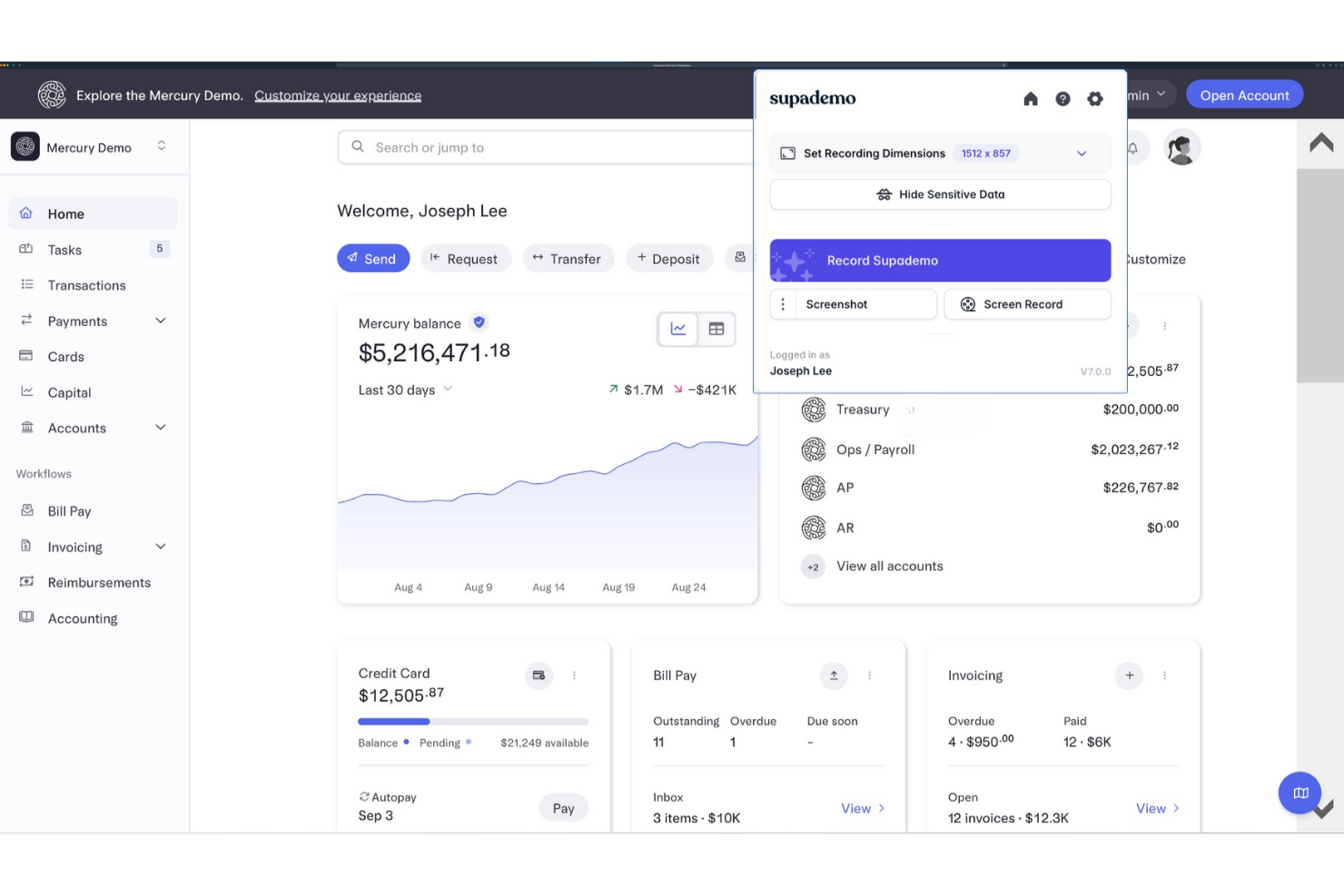
Supademo ist eine Plattform zur Erstellung interaktiver Produktdemos und richtet sich in erster Linie an Vertriebs- und Customer-Success-Teams. Sie unterstützt Unternehmen dabei, ihre Produkte potenziellen Kunden effektiv zu präsentieren.
Warum es eine gute Alternative zu Scribe ist: Supademo bietet interaktive Demos, die Ihr Publikum mit anklickbaren Elementen und geführten Rundgängen einbinden. Demos lassen sich effizient anpassen, um bestimmte Funktionen hervorzuheben und sie somit auf verschiedene Nutzerbedürfnisse zuzuschneiden. Die Plattform verfolgt zudem Nutzerinteraktionen und liefert Einblicke darüber, was Aufmerksamkeit erzeugt. Diese Funktionen machen Supademo ideal für Teams, die ansprechende und informative Produktpräsentationen anbieten möchten.
Herausragende Funktionen und Integrationen:
Funktionen umfassen anpassbare Demo-Vorlagen, Analysen zum Nutzerengagement und die Möglichkeit, Demos in Websites einzubetten. Sie können zudem verzweigte Szenarien erstellen, um das Demo-Erlebnis auf verschiedene Zielgruppen zuzuschneiden. Diese Flexibilität unterstützt Ihr Team bei zielgerichteten und wirkungsvollen Präsentationen.
Integrationen umfassen Calendly, Slack, SurveyMonkey, HubSpot, Salesforce, Google Forms und viele mehr.
Pros and Cons
Pros:
- KI verwandelt Aufzeichnungen in interaktive Demos
- Demos können auf Websites und in Apps eingebettet werden
- Analysen zeigen Klicks und Abbrüche der Betrachter
Cons:
- Fehlende umfassende Videobearbeitungsfunktionen
- Funktionsumfang entwickelt sich für Unternehmen noch weiter

Guidde
Am besten geeignet für KI-gestützte Videoproduktion
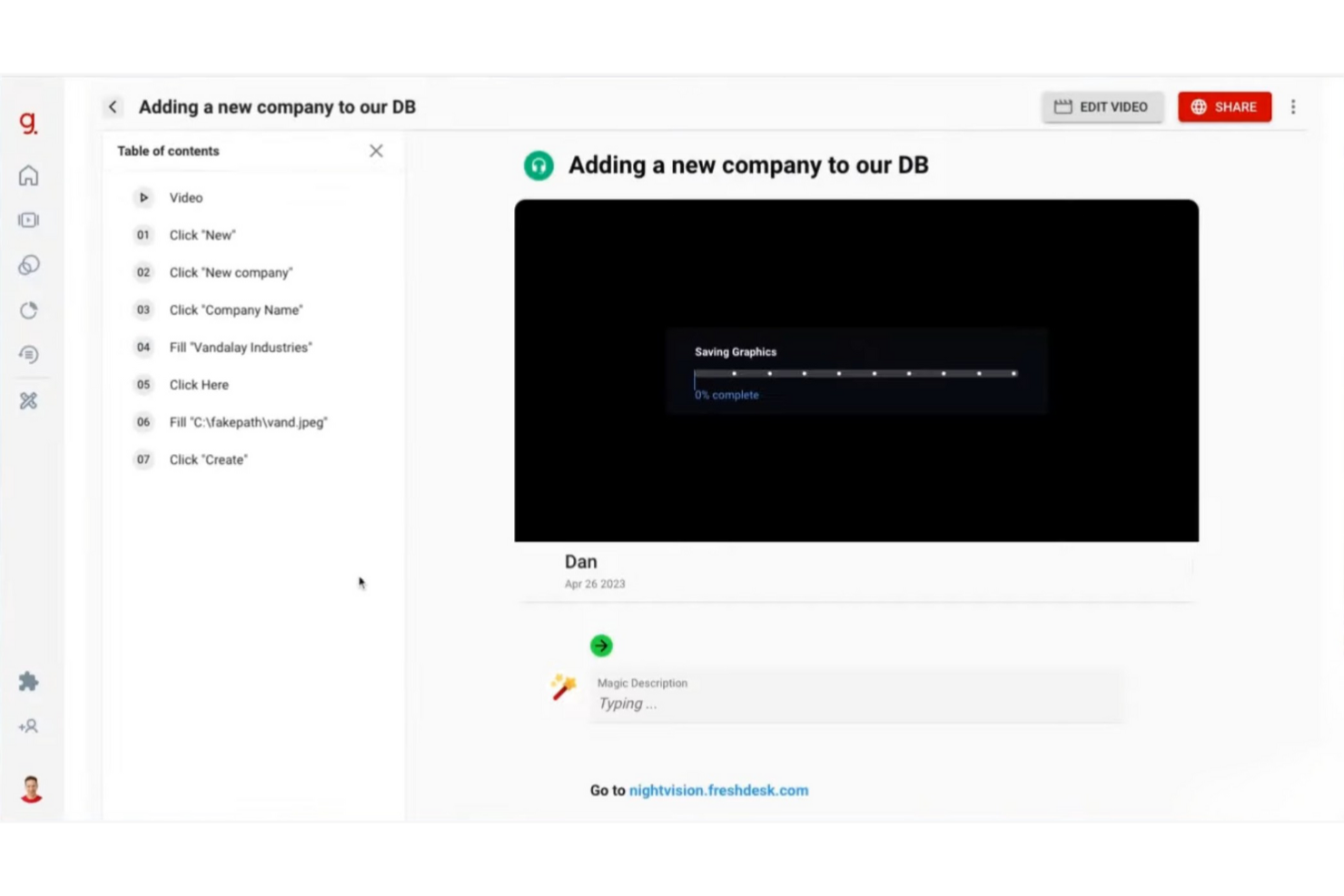
Guidde ist eine KI-gestützte Plattform, die die Erstellung von Videodokumentationen vereinfacht und Unternehmen sowie Teams unterstützt, die effiziente Tutorials und Anleitungen produzieren müssen. Sie hilft vor allem Unternehmen dabei, das Mitarbeiter-Onboarding und die Kundenschulung zu verbessern.
Warum es eine gute Scribe-Alternative ist: Guidde überzeugt mit KI-gestützten Tools, die Workflow-Aufnahmen in bearbeitete Video-Tutorials verwandeln. Die Magic Mic-Funktion fügt Ihren Anleitungen KI-generierte Sprechertexte hinzu und sorgt für ein besseres Lernerlebnis. Sie können Ihre Inhalte sowohl für Mitarbeitende als auch für Kunden veröffentlichen, was die Plattform für viele Anwendungsfälle geeignet macht. Diese Funktionen machen Guidde zu einer starken Wahl, wenn Sie mehr als klassische Dokumentation suchen.
Herausragende Funktionen und Integrationen:
Funktionen umfassen das Magic Capture-Tool zum Aufzeichnen von Workflows, KI-generierte Erzählstränge und individuell anpassbare Sprecher mit über 200 Stimmen. Sie können professionelle Tutorials schnell erstellen – ideal für Teams, die regelmäßig Updates veröffentlichen müssen. Die Plattform bietet außerdem intelligente Freigabeoptionen zur Verteilung von Inhalten.
Integrationen gibt es mit GitLab, ClickUp, Zendesk, Notion, Slack, Zoom und weiteren.
Pros and Cons
Pros:
- KI verwandelt Aufzeichnungen in ausgefeilte Tutorials
- Gebrandete Vorlagen sorgen für konsistente Videodokumentation
- Unterstützt sowohl Video- als auch Schritt-für-Schritt-Anleitungen
Cons:
- Weniger Analysen im Vergleich zu Enterprise-Plattformen
- Begrenzte Anzahl von Schritten pro Anleitung

Loom
Am besten geeignet für Team-Videonachrichten
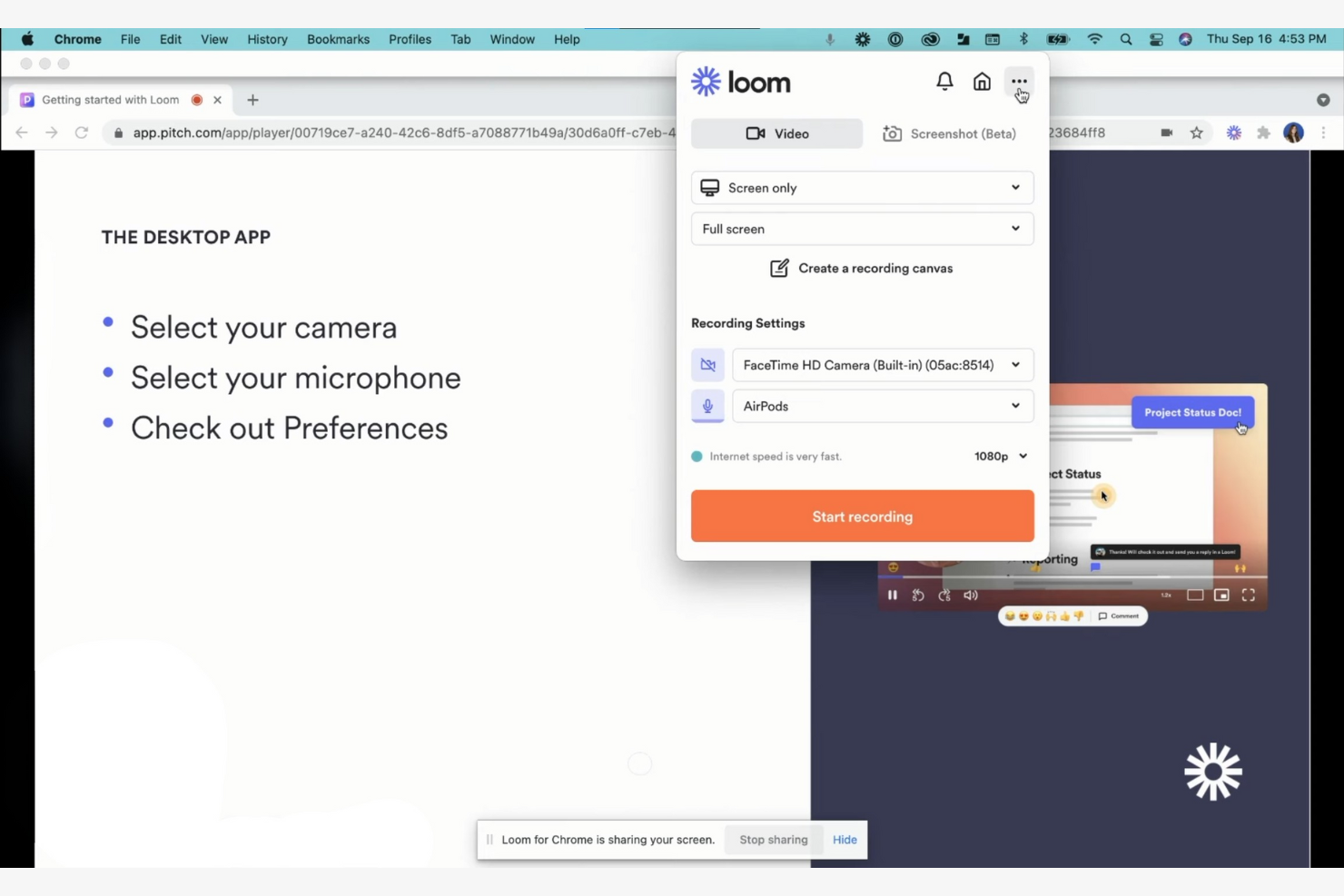
Loom ist ein Videonachrichten-Tool für Teams und Unternehmen, die per Video kommunizieren müssen. Nutzer können Videonachrichten aufnehmen, teilen und ansehen, um eine bessere Zusammenarbeit und Kommunikation aus der Ferne zu unterstützen.
Warum es eine gute Scribe-Alternative ist: Loom bietet mit seinen Videonachrichten-Funktionen einen einzigartigen Ansatz zur Kommunikation. Sie können gleichzeitig Ihren Bildschirm, Ihre Stimme und Ihr Gesicht aufnehmen, sodass komplexe Informationen schnell vermittelt werden können. Die Sofort-Teilen-Funktion ermöglicht es Ihrem Team, Nachrichten ohne Verzögerung anzusehen, wodurch alle auf dem gleichen Stand bleiben. Diese Funktionen machen es ideal für Teams, die Wert auf Echtzeitkommunikation und visuelles Storytelling legen.
Herausragende Funktionen und Integrationen:
Funktionen sind unter anderem das Aufnehmen von HD-Videos, das Hinzufügen von Call-to-Action-Buttons und die Nutzung von Zuschauer-Insights zur Verfolgung des Engagements. Sie können Videos direkt innerhalb der Plattform schneiden und bearbeiten, was das Aufbereiten von Inhalten erleichtert. Die intuitive Benutzeroberfläche ermöglicht es, mit minimaler Einrichtung sofort mit der Videoerstellung zu beginnen.
Integrationen umfassen Slack, Salesforce, Jira, Confluence, Calendly, Zoom und mehr.
Pros and Cons
Pros:
- Sofort teilbare Links ersetzen viele Meetings
- Nimmt Bildschirm, Kamera und Mikrofon gemeinsam auf
- Zuschaueranalysen zeigen Engagement und Abschlussrate
Cons:
- Kostenloses Kontingent beschränkt Aufnahmezeit und Funktionen
- Gelegentlich niedrige Videoqualität

Am besten für regulierte Umgebungen geeignet

FlowShare ist eine Dokumentationssoftware, die für regulierte Umgebungen entwickelt wurde und die Erstellung von Schritt-für-Schritt-Anleitungen automatisiert. Sie richtet sich in erster Linie an Unternehmen, die eine effiziente Dokumentation für Schulungen und Compliance benötigen.
Warum es eine gute Alternative zu Scribe ist: FlowShare erfasst Benutzeraktionen im Hintergrund und erstellt Anleitungen, während Sie arbeiten. Diese Funktion eignet sich besonders für regulierte Umgebungen, in denen Genauigkeit bei der Dokumentation entscheidend ist. Mit Optionen für Corporate Branding und Massenbearbeitung können Sie Anleitungen an die Bedürfnisse Ihrer Organisation anpassen. Das Exportieren in verschiedene Formate bietet Flexibilität für unterschiedliche Dokumentationsanforderungen.
Herausragende Funktionen und Integrationen:
Funktionen umfassen die automatische Erfassung von Aktionen, Corporate-Identity-Einstellungen für das Branding und das Verpixeln sensibler Daten in großen Mengen. Sie können Anleitungen auch in den Formaten PDF, PPTX und HTML exportieren. Diese Vielseitigkeit hilft Ihrem Team, eine konsistente und professionelle Dokumentation zu gewährleisten.
Integrationen umfassen Confluence, SharePoint, WordPress, Guru und weitere.
Pros and Cons
Pros:
- Desktop-App zeichnet jede Bildschirmaktion automatisch auf
- Exportiert Anleitungen in PDF, PPTX und HTML
- Offline-Zugriff eignet sich für streng regulierte Umgebungen
Cons:
- Nur auf Microsoft Windows Desktop verfügbar
- Einschränkungen beim Formatieren

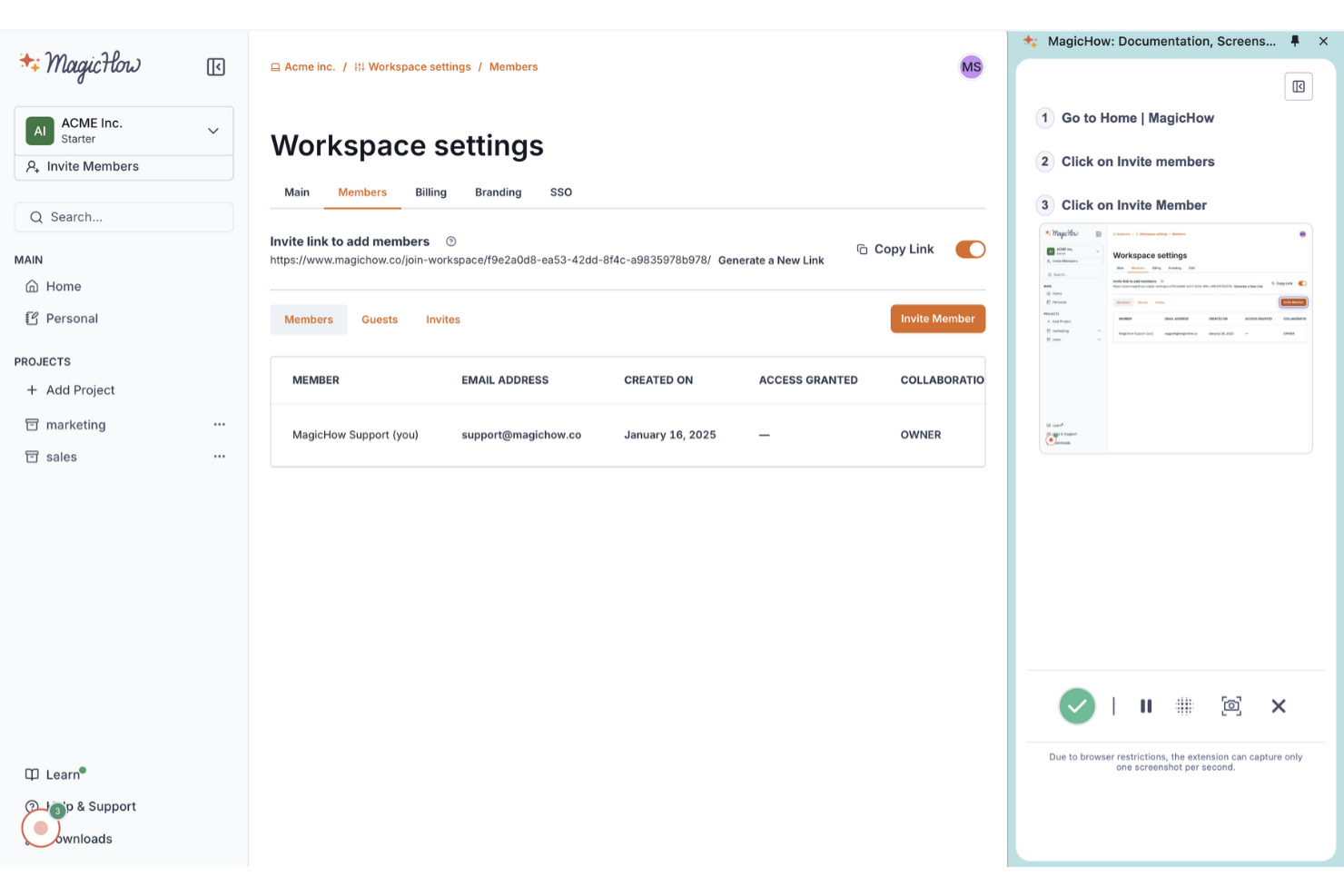
MagicHow ist ein benutzerfreundliches Tool zur Erstellung von Schritt-für-Schritt-Anleitungen, Anweisungen und Handbüchern und richtet sich an Teams, die Prozesse effizient dokumentieren müssen. Es unterstützt Unternehmen, die ihre Dokumentationspraxis vereinfachen möchten, ohne spezielle Vorkenntnisse zu benötigen.
Warum es eine gute Alternative zu Scribe ist: MagicHow ermöglicht die schnelle Erstellung von Anleitungen, wodurch Ihr Team Zeit bei der Dokumentation spart. Die automatische Prozessaufzeichnung und die einfache Bearbeitung von Inhalten erlauben es, unbegrenzt viele Anleitungen rasch zu erstellen und individuell anzupassen, während die Möglichkeiten zum Teilen per Link, PDF und HTML eine unkomplizierte Verteilung ermöglichen.
Hervorstechende Funktionen und Integrationen:
Funktionen beinhalten Desktop- und Browser-Kompatibilität, anpassbare Anleitungen sowie die Möglichkeit, Inhalte in Plattformen einzubetten. Sie können Anleitungen außerdem in verschiedenen Formaten teilen und bleiben so flexibel in der Informationsverteilung. Diese Vielseitigkeit hilft Ihrem Team, eine klare und zugängliche Dokumentation zu pflegen.
Integrationen umfassen Confluence, Notion, WordPress und vieles mehr.
Pros and Cons
Pros:
- Kostenloser Basisplan für kleine Teams
- Chrome-Erweiterung nimmt Browser-Workflows automatisch auf
- Exportiert Anleitungen als teilbare Links und PDFs
Cons:
- Begrenzte Analysen im Vergleich zu ausgereifteren Mitbewerbern
- Kleineres Ökosystem mit weniger tiefgreifenden Integrationen

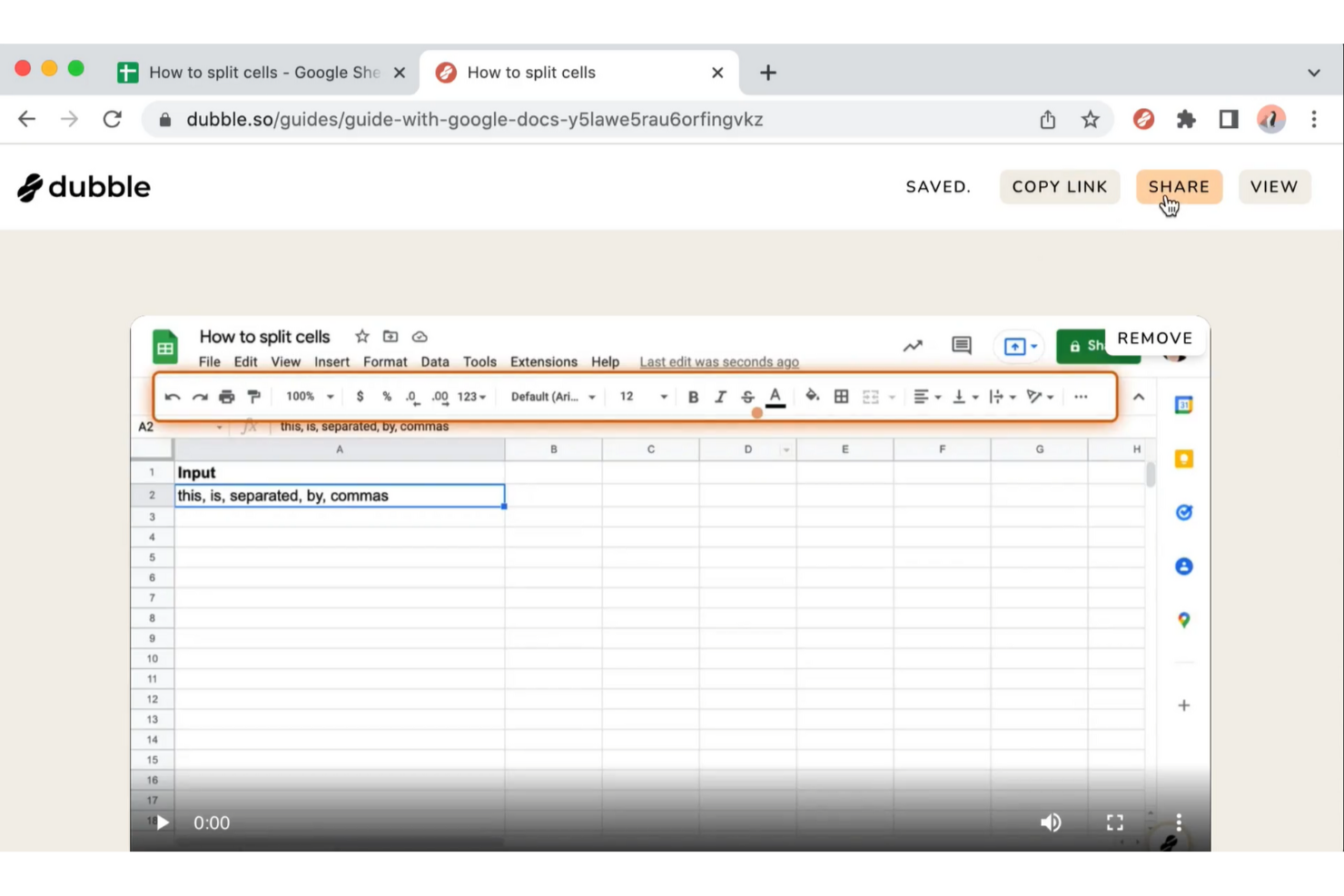
Dubble ist ein Tool zur Erstellung von Schritt-für-Schritt-Anleitungen, Tutorials und Onboarding-Ressourcen durch das Erfassen von Nutzeraktionen. Es eignet sich ideal für Teams, die eine schnelle und effiziente Prozessdokumentation ohne manuelle Eingabe benötigen.
Warum es eine gute Scribe-Alternative ist: Dubble bietet eine sofortige Dokumentation, indem es Ihre Aktionen aufzeichnet und in Anleitungen umwandelt. Funktionen wie die automatische Screenshot-Erfassung und Bearbeitungswerkzeuge ermöglichen Ihnen, ausführliche Dokumentationen mit minimalem manuellem Aufwand zu erstellen. Sie können Anleitungen zudem mit nur einem Klick teilen, was die Zusammenarbeit erleichtert. Diese Funktionen machen Dubble besonders für Teams attraktiv, die bei der Dokumentation Schnelligkeit und Einfachheit priorisieren.
Hervorstechende Funktionen und Integrationen:
Funktionen umfassen schnelle Bearbeitungen mit Optionen, Beschreibungen und Screenshots zu aktualisieren, sowie die Möglichkeit, sensible Informationen zu schwärzen. Sie können Anleitungen einfach teilen, da Dubble verschiedene Formate wie Rich Content und Markdown unterstützt. Diese Flexibilität hilft Ihrem Team, Dokumentationen aktuell und zugänglich zu halten.
Integrationen umfassen Notion, Confluence, Google Docs und mehr.
Pros and Cons
Pros:
- Chrome Watcher wandelt Aktionen in Dokumentation um
- Exportiert Anleitungen als Markdown für Entwickler
- Unterstützt Screenshots, Videos und Schritttexte
Cons:
- Zusammenarbeitsfunktionen sind grundlegend
- Am besten geeignet für Web-Apps; Desktop- oder Nicht-Browser-Workflows sind eingeschränkt

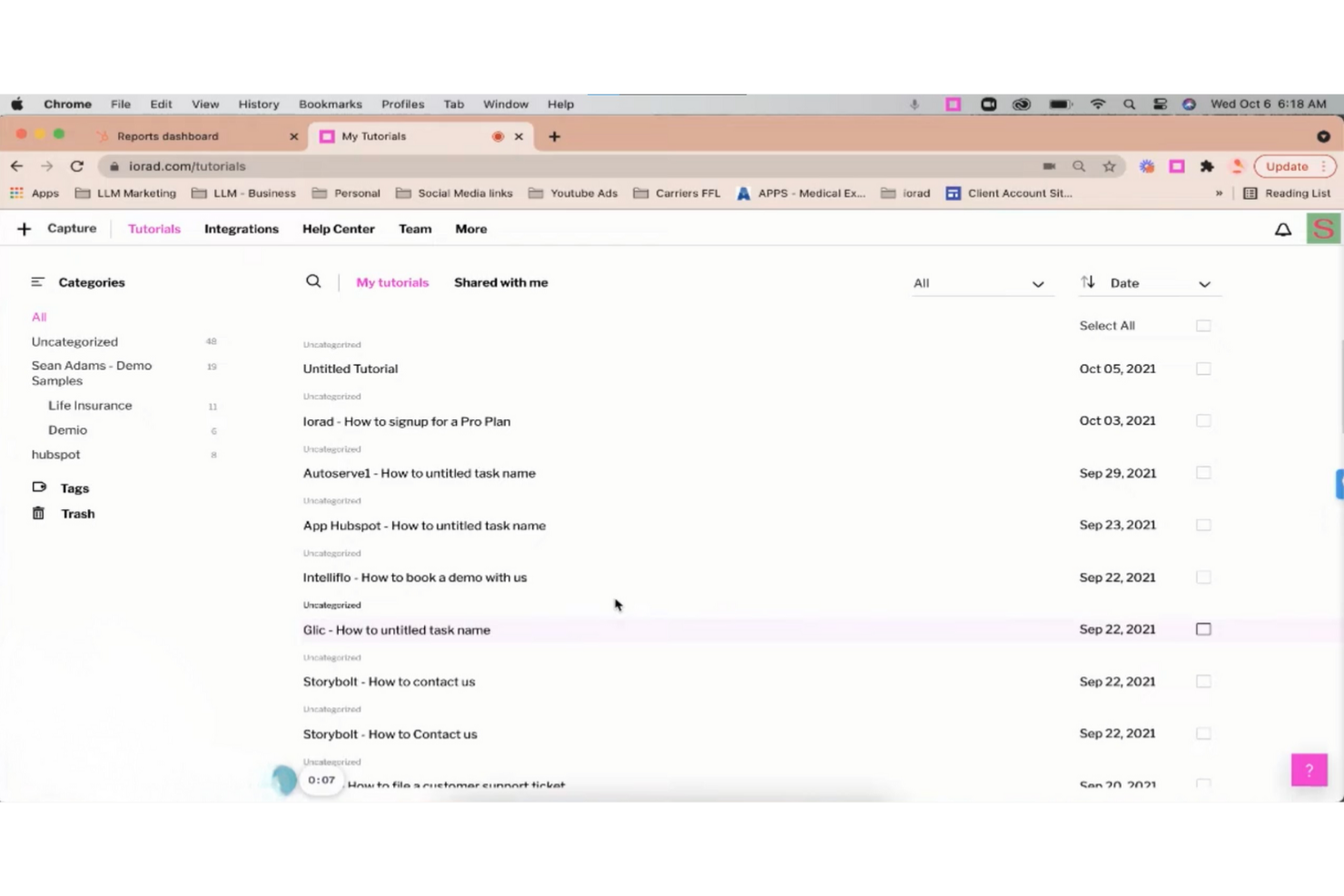
iorad ist ein digitales Tool für Lehrkräfte und Ausbilder, um Arbeitsabläufe durch interaktive Tutorials und Anleitungen zu erfassen und zu erklären, wodurch komplexe Prozesse vereinfacht werden.
Warum es eine gute Scribe-Alternative ist: iorad bietet einen interaktiven Ansatz zur Erstellung von Tutorials, mit Funktionen wie Schritt-für-Schritt-Anleitungen und Klick-zum-Hervorheben. Sie können Tutorials direkt in Websites einbetten oder per Link teilen, sodass sie für Ihr Publikum zugänglich sind. Die Plattform ermöglicht außerdem die Bearbeitung in Echtzeit, sodass Sie Inhalte anpassen können, wenn sich Prozesse ändern. Diese Funktionen machen iorad ideal für Teams, die dynamische und ansprechende Lerninhalte suchen.
Herausragende Funktionen und Integrationen:
Funktionen umfassen die automatische Schrittaufzeichnung, Sprachausgabe und anpassbare Designs. Sie können Tutorials außerdem in verschiedenen Formaten exportieren, wie PDF und HTML, was Flexibilität bei der Informationsverteilung bietet. So kann Ihr Team die Tutorials effektiv nutzen und darauf zugreifen.
Integrationen umfassen Slack, ServiceNow, Confluence, YouTube, HubSpot und mehr.
Pros and Cons
Pros:
- Interaktive Simulationen ermöglichen Nutzern das Üben von Arbeitsabläufen
- Chrome-Erweiterung erfasst Browser-Tutorials automatisch
- Exportiert Tutorials als PDF für Offline-Zugriff
Cons:
- Oberfläche kann für nicht-technische Ersteller komplex wirken
- Erweiterte Anpassungen erfordern Schulung

Tango
Am besten für die Echtzeit-Erfassung von Prozessen
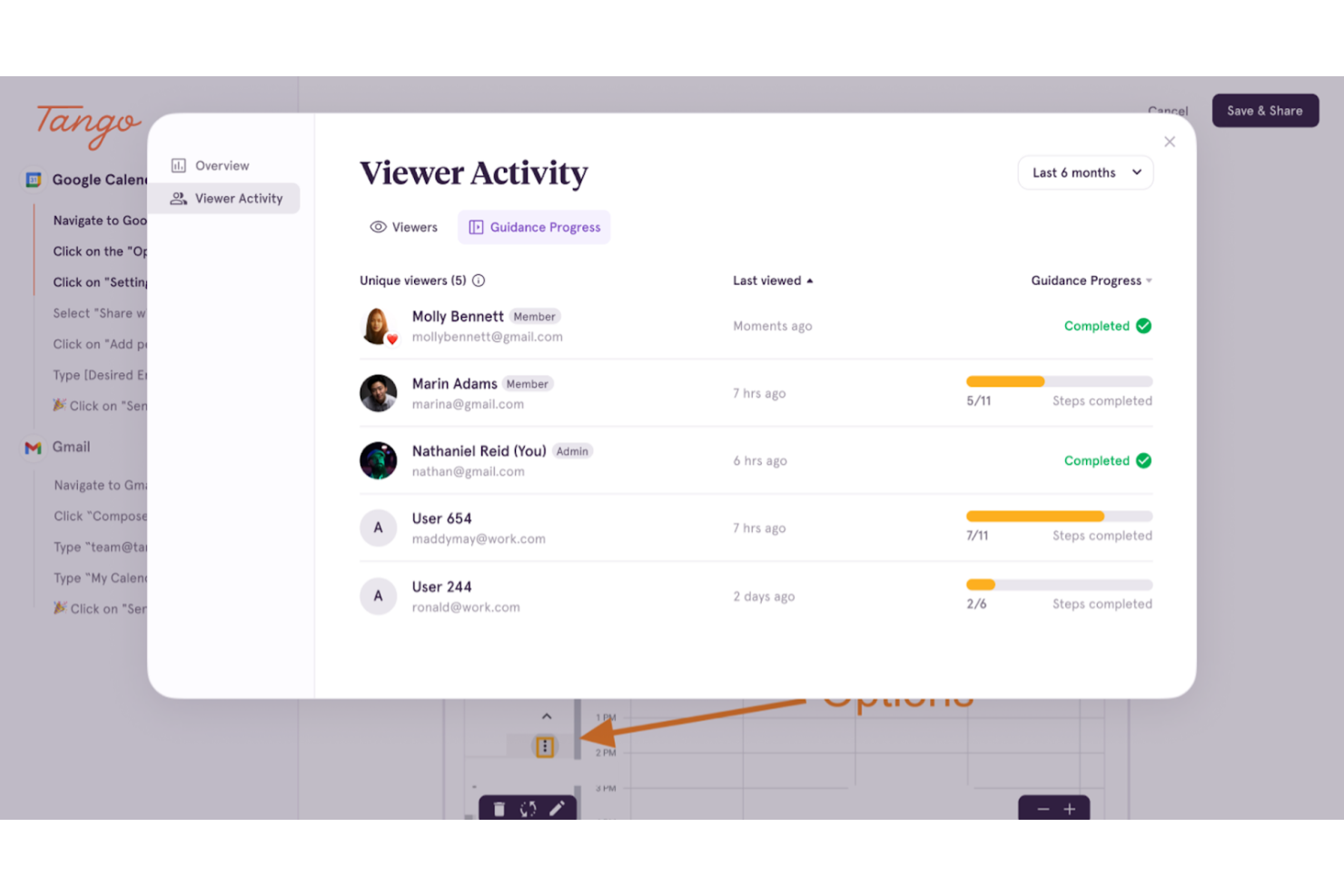
Tango ist ein Prozessdokumentationstool für Projektmanager und Teams, die Arbeitsabläufe effizient erfassen müssen. Es unterstützt die Erstellung von Schritt-für-Schritt-Anleitungen, um die Zusammenarbeit im Team und den Wissensaustausch zu fördern.
Warum es eine gute Alternative zu Scribe ist: Tango bietet eine Echtzeit-Prozesserfassung, mit der Sie Arbeitsabläufe dokumentieren, während Sie sie ausführen. Dieses Feature spart Zeit und reduziert Fehler, indem die einzelnen Schritte automatisch festgehalten werden. Im Gegensatz zu Scribe ermöglicht Tangos Echtzeit-Erfassung die Erstellung detaillierter Anleitungen direkt während der Arbeit. Das macht es besonders nützlich für Teams, die Prozesse während des Arbeitens dokumentieren müssen.
Herausragende Funktionen und Integrationen:
Funktionen sind Echtzeit-Erfassung, automatische Screenshot-Erstellung und anpassbare Schritt-Beschreibungen. Sie können Ihre Dokumentationen bearbeiten und organisieren, so dass Sie Prozesse einfach aktualisieren können, wenn sie sich weiterentwickeln. Das Tool bietet zudem eine benutzerfreundliche Oberfläche, damit Sie ohne große Einarbeitung schnell starten können.
Integrationen umfassen Salesforce, HubSpot, DocuSign, Zoom, Gmail und viele mehr.
Pros and Cons
Pros:
- Browser-Erweiterung zeichnet klickbasierte Workflows auf
- Automatische Screenshots erzeugen klare Schrittanleitungen
- Einbettbare Anleitungen integrieren sich in vorhandene Tools
Cons:
- Kostenlose Version begrenzt die Anzahl der Workflows
- Keine mobile App zur Erfassung auf dem Gerät
Weitere Scribe-Alternativen
Hier sind einige weitere Scribe-Alternativen, die es nicht auf meine Auswahlliste geschafft haben, aber dennoch einen Blick wert sind:
- UserGuiding
Am besten geeignet für Nutzer-Onboarding-Tools
- Trupeer
Am besten für Video- und Dokumentausgaben aus einer einzigen Aufzeichnung geeignet
- Fluency
Am besten für mehrsprachige Dokumentation
- Fleeq
Am besten geeignet für videobasierte Trainingsinhalte
- Glitter AI
Am besten geeignet für KI-Prozessdokumentation


So bewerte ich Scribe-Alternativen
Jedes Tool betrachte ich aus zwei Perspektiven: Grundanforderungen wie automatisches Aufzeichnen von Schritten und Bearbeitung von Anleitungen sowie Unterscheidungsmerkmale wie KI-generierte Texte, Analysen und Integrationen ins PM-Ökosystem.
Kernfunktionen (Grundvoraussetzungen für diese Liste)
Bei der Auswahl bewerte ich jedes Tool auf einer Skala von 0 (Funktion nicht vorhanden) bis 5 (herausragend in diesem Bereich) für jede unten aufgeführte Kernfunktion. Anschließend rechne ich die Gesamtpunktzahl des Tools in einen Prozentwert um. Jedes Tool muss eine Mindestgesamtpunktzahl von 65 % erreichen, um aufgenommen zu werden.
- Automatisches Aufzeichnen von Schritten: Ich bewerte, wie gut jedes Tool Klicks, Scrolls und Tastatureingaben als strukturierte Schritte dokumentiert—zum Beispiel einen Workflow für das Erstellen eines Jira-Tickets, ohne jeden Schritt manuell zu screenshotten.
- Screenshot-Annotationen: Das Werkzeug für Annotationen ist entscheidend, daher achte ich auf Pfeile, Markierungen, Hervorhebungen und Kästen, die Schritte wie das Navigieren im Sprint-Board oder das Einrichten eines Dashboards erklären.
- Anleitung bearbeiten & anpassen: Ich prüfe, wie viel Kontrolle Sie über den generierten Inhalt haben—Schritte umsortieren, Beschreibungen umschreiben, Branding ergänzen—damit Ihre SOPs über die gesamte Projektdokumentation hinweg einheitlich wirken.
- Teilen & Export in mehreren Formaten: Ob Sie ein PDF für die Übergabe an Stakeholder benötigen oder eine eingebettete Anleitung in Confluence – ich bewerte, welche Ausgabeformate und Freigabeoptionen jedes Tool unterstützt.
- Sensible Daten schwärzen: Tools sollten es ermöglichen, Zugangsdaten, Kundennamen oder Finanzdaten in Screenshots zu verwischen oder zu maskieren, bevor Prozessdokumente mit externen Dienstleistern oder funktionsübergreifenden Teams geteilt werden.
- Integration mit Arbeitstools: Ich achte auf native Verbindungen zu Plattformen wie Jira, Slack, Notion und Confluence, damit Anleitungen dort landen, wo das Projektteam ohnehin arbeitet, und nicht isoliert bleiben.
Sobald eine Liste mit Tools entsteht, die diese Anforderungen erfüllen, schaue ich auf die Besonderheiten jedes Anbieters.
Unterscheidungsmerkmale (Wodurch sich Anbieter abheben)
So vergleiche und bewerte ich die unterschiedlichen Anbieter:
Herausragende Funktionen
KI-generierte Schritt-Beschreibungen sparen wirklich Zeit—bei der Dokumentation einer 20-schrittigen Sprint-Retro etwa ist das Überarbeiten von automatisch generierten Texten viel effizienter als alles neu zu schreiben. Ebenso suche ich nach einer zentralen Anleitungsbibliothek, in der Teams SOPs nach Projekten oder Abteilungen organisieren können – das wird wichtig, wenn die Dokumentation größer wird als nur ein paar Anleitungen. Analysen, die Aufrufe und Abschlussraten erfassen, helfen PMO-Leads zu überprüfen, ob Onboarding-Dokumente wirklich genutzt werden oder nur in der Ablage verstauben.
Mehr als nur Funktionen
Sicherheit und Compliance sind entscheidend, wenn Anleitungen Kundendaten oder interne Zugangsdaten enthalten—ich prüfe die Einhaltung von SOC 2 und SSO-Unterstützung, besonders für Enterprise-PMOs, die Dokumentation an andere Anbieter weitergeben. Auch das Preismodell zählt: Eine Gratisversion ermöglicht es einzelnen PMs, das Tool zu testen, bevor sie einen Team-Rollout vorschlagen. Außerdem bewerte ich die Time-to-Value, also wie schnell ein neuer Nutzer die Erweiterung installieren, einen Prozess aufzeichnen und am ersten Tag eine fertige Anleitung teilen kann.
Warum nach einer Scribe-Alternative suchen?
Obwohl Scribe eine gute Wahl für die Prozessdokumentation ist, gibt es mehrere Gründe, aus denen einige Nutzer nach alternativen Lösungen suchen. Vielleicht suchen Sie nach einer Scribe-Alternative, weil …
- Sie mehr Anpassungsmöglichkeiten benötigen
- Ihr Team Offline-Zugriff benötigt
- Sie eine bessere Integration mit vorhandenen Tools wünschen
- Ihre Organisation mehrsprachige Unterstützung benötigt
- Sie erweiterte Funktionen für Analysen benötigen
- Ihr Team durch neue Mitarbeiter schnell wächst und Skalierbarkeit benötigt
Wenn Sie sich in einem dieser Punkte wiedererkennen, sind Sie hier genau richtig. Unsere Liste umfasst mehrere ganzheitliche Optionen für Tools zur Prozessdokumentation, die besser für Teams geeignet sind, die mit diesen Herausforderungen bei Scribe konfrontiert sind und nach alternativen Lösungen suchen.
Die wichtigsten Funktionen von Scribe
Hier sind einige der wichtigsten Funktionen von Scribe, damit Sie die Angebote alternativer Lösungen gegenüberstellen und vergleichen können:
- Automatische Erfassung: Zeichnet Prozesse aus Web-, Desktop- und mobilen Apps automatisch auf und spart Ihrem Team Zeit bei der manuellen Dokumentation.
- Anpassung: Personalisieren Sie Anleitungen mit KI-generierten Inhalten, Unternehmensbranding und Formatierungsoptionen, um sie an die Anforderungen Ihres Teams anzupassen.
- Bearbeitung von Screenshots: Bearbeiten Sie Screenshots, um wichtige Informationen hervorzuheben und die Verständlichkeit für Ihr Publikum zu verbessern.
- Freigabeoptionen: Teilen Sie Anleitungen per E-Mail oder über Links, betten Sie sie in Webseiten ein oder exportieren Sie sie als PDF- und HTML-Dateien, damit die Inhalte zugänglich bleiben.
- Einblicke in die Interaktion: Verfolgen Sie Aufrufe und Abschlüsse von Anleitungen sowie weitere Kennzahlen, damit Ihre Inhalte relevant und aktuell bleiben.
- Seiten: Kombinieren Sie mehrere Anleitungen in einem einzigen Dokument mit Texten, Videos und Screenshots für eine umfassende Prozessdokumentation.
- Scribe Sidekick: Bietet bei Bedarf Zugriff auf Informationen und reduziert wiederholte Fragen und Unterbrechungen.
- Automatische Schwärzung: Schwärzen Sie vertrauliche Informationen automatisch oder manuell sicher, um den Datenschutz zu gewährleisten.