

10 beste E-Mail-Apps im Test 2026

Auswahlliste der besten E-Mail-Apps


Projekte zu verwalten, kann einem Jonglierakt gleichen, und E-Mails tragen oft noch zum Chaos bei. Sie benötigen eine sichere E-Mail-App, die Ihnen hilft, den Überblick zu behalten und Ihr Team auf Kurs zu halten. Meiner Erfahrung nach kann der richtige E-Mail-Client den entscheidenden Unterschied machen.
Ich habe unzählige E-Mail-Apps getestet und bewertet, um die besten Optionen für Sie zu finden. Mein Ziel ist es, unvoreingenommene Einblicke zu vermitteln, die auf Ihre Bedürfnisse eingehen. Ob es um die Integration mit anderen Tools oder um einzigartige Funktionen geht – für jedes Team ist etwas dabei.
In diesem Artikel führe ich Sie durch meine besten Empfehlungen und hebe hervor, was jede einzelne App besonders macht. Finden wir die E-Mail-App, die zu Ihrem Arbeitsablauf passt und Ihnen hilft, Projekte effektiver zu verwalten.
Warum Sie unseren Software-Empfehlungen vertrauen können
Unser Team testet und bewertet Software seit 2012. Als Projektmanager wissen wir selbst, wie schwierig – und wichtig – es ist, die richtige Software auszuwählen.
Für diesen Leitfaden haben wir Tools mithilfe von praktischen Tests und unabhängiger Recherche bewertet und dabei unsere Bewertungskriterien angewendet. Zudem greifen wir auf Erkenntnisse von Branchenvordenkern und praktizierenden Projektmanagement-Experten zurück.
Unsere Bewertungen spiegeln unser menschliches redaktionelles Urteilsvermögen wider, keine Verkaufsstrategie.
Expertenprüfer:
Vergleichstabelle der E-Mail-Apps
\u003cspan style=\u0022font-weight: 400;\u0022\u003eDiese Vergleichstabelle fasst die Preisinformationen meiner besten E-Mail-Apps zusammen:\u003c/span\u003e
| Tool | Best For | Trial Info | Price | ||
|---|---|---|---|---|---|
| 1 | Best for business integration | Free 14-day free trial + free plan available | From $4.03/user/month (billed annually) | Website | |
| 2 | Best for Google Workspace users | Free plan available | From $7/user/month (billed annually) | Website | |
| 3 | Best for Apple device integration | Free plan available | From $0.99/month | Website | |
| 4 | Best for free domain options | Free demo available | Free forever plan | Website | |
| 5 | Best for large email storage | Free 14-day trial + free plan available | From $5/month | Website | |
| 6 | Best for AI-based features | Free plan available | From $14.99/month | Website | |
| 7 | Best for open-source customization | Free to use | Free forever plan | Website | |
| 8 | Best for privacy | Free 7-day trial + free plan available | From $3/month | Website | |
| 9 | Best for Windows users | 30-day free trial | From $9.99/month | Website | |
| 10 | Best for AI-powered assistance | Free plan available | From $25/user/month (billed annually) | Website |
Test der besten E-Mail-App
\u003cspan style=\u0022font-weight: 400\u0022\u003eNachfolgend finden Sie meine ausführlichen Zusammenfassungen der besten E-Mail-Apps, die es in meine Auswahlliste geschafft haben. Meine Bewertungen bieten einen detaillierten Einblick in die wichtigsten Funktionen, Vor- und Nachteile, Integrationen sowie idealen Einsatzmöglichkeiten jedes Tools und helfen Ihnen dabei, die beste Option für sich zu finden.\u003c/span\u003e

Mailbird
Best for business integration
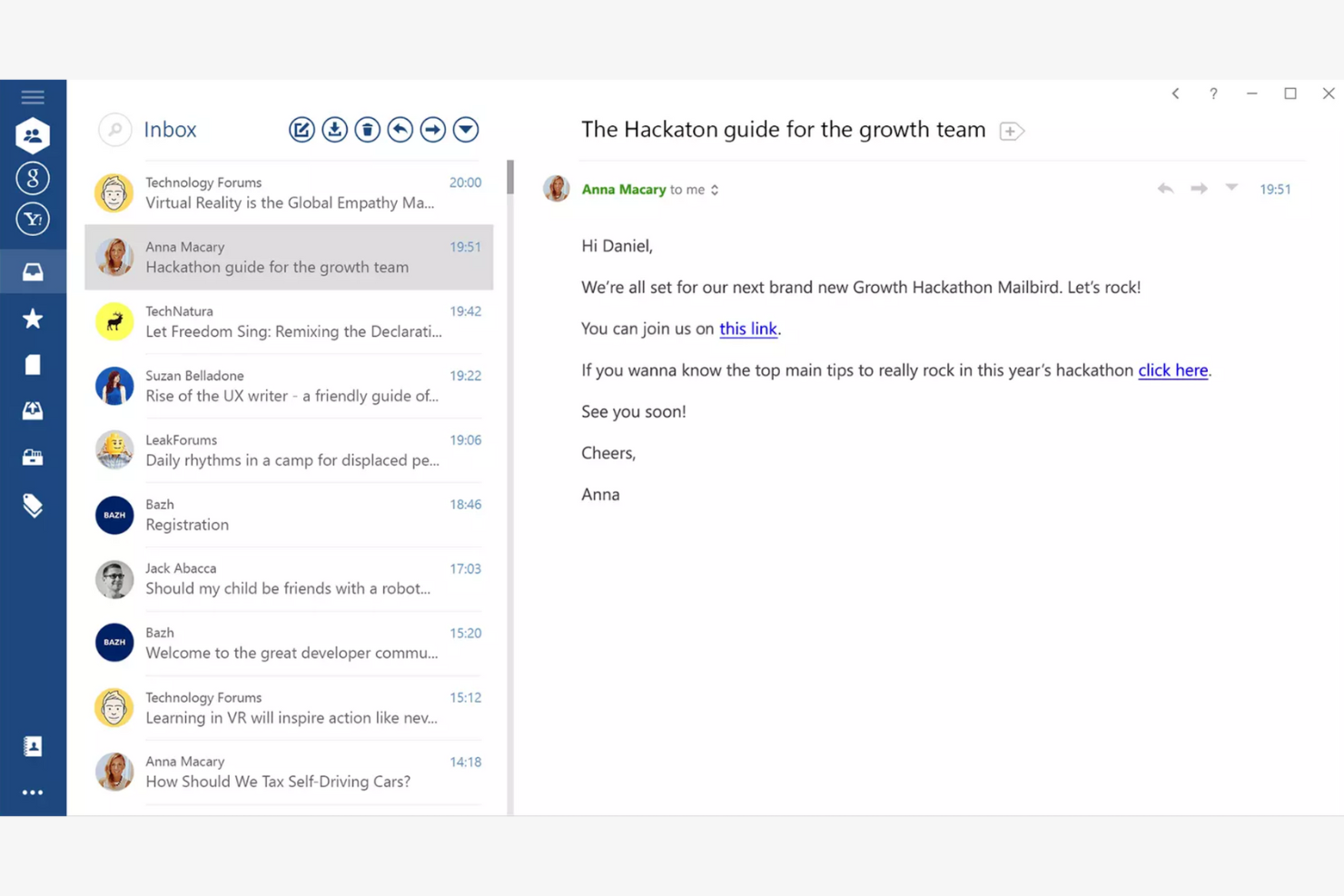
Mailbird is an email client tailored for Windows users, providing an all-in-one platform for managing multiple email accounts. It boosts productivity by offering features that simplify email management and communication.
Why I picked Mailbird: Mailbird is designed specifically for Windows, making it a great choice if your team already uses this operating system. The app's unified inbox lets you manage multiple accounts efficiently, while the speed reader feature helps you process emails quickly. The app's customization options also let you personalize your email experience to fit your needs.
Standout Features and Integrations:
Features include a snooze function to temporarily hide emails and keyboard shortcuts that make navigation quicker and easier. You can also customize the layout to fit your workflow.
Integrations include Slack, Google Calendar, Asana, Dropbox, Evernote, Trello, Facebook, Twitter, WeChat, ZeroBounce, and more.
Pros and Cons
Pros:
- Local-client architecture that keeps data on your device
- Customizable interface
- Unified inbox for multiple accounts
Cons:
- Shallow inbox automation and management tools
- Limited support for non-Windows platforms

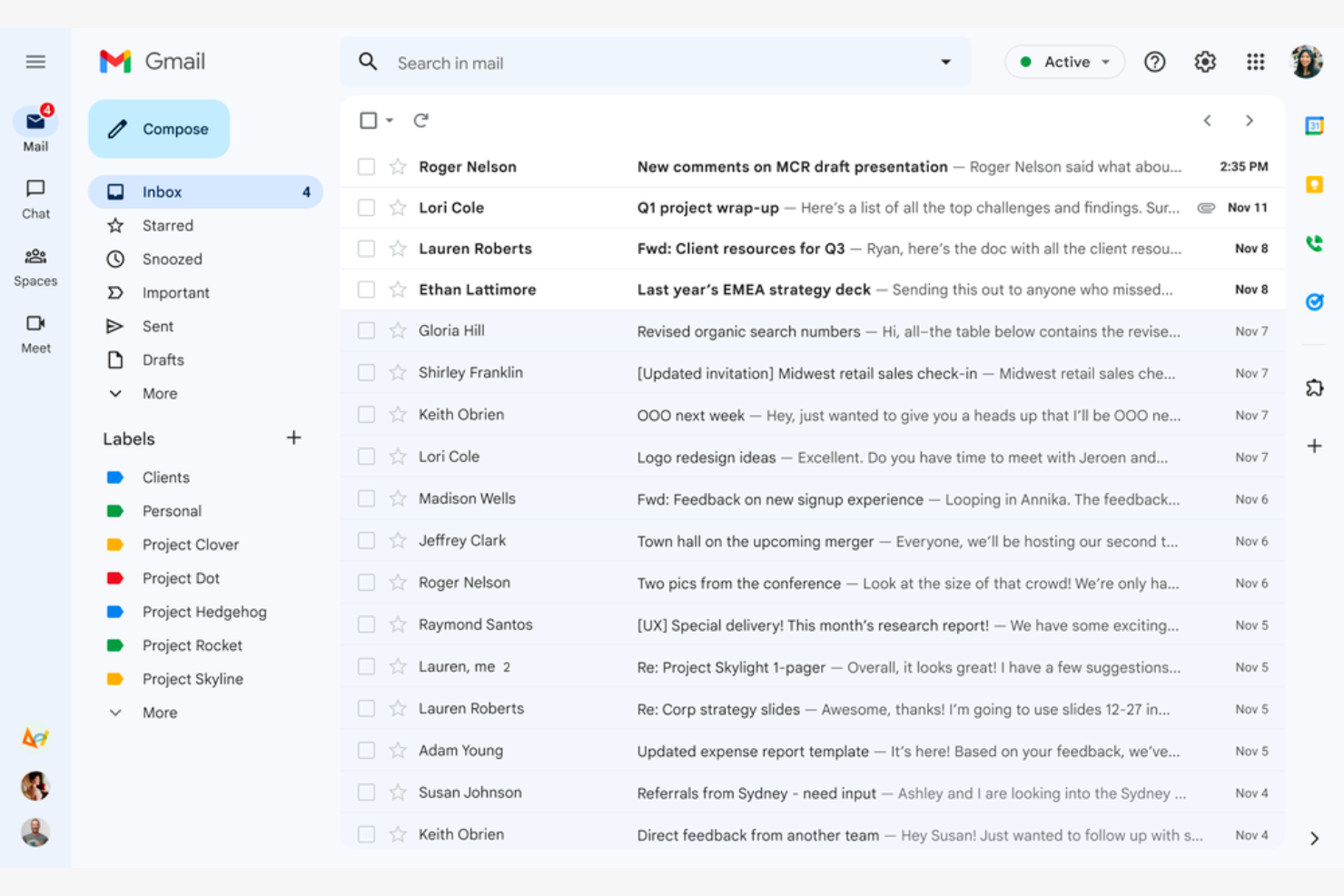
Google Gmail is a widely used email service that caters mainly to Google Workspace users. It offers essential email functions that integrate with Google services, giving both individuals and businesses a connected experience.
Why I picked Google Gmail: Google Gmail is ideal for Google Workspace users because it integrates with Google Drive, Calendar, and Docs. The conversation view groups your emails into threads so you never lose track of the discussion, while labels and filters help you categorize and sort emails efficiently. The Google Gmail app's spam filtering helps keep your inbox clean and protects you from phishing scams.
Standout Features and Integrations:
Features include 15GB of free storage, smart reply suggestions, and advanced search capabilities. You can schedule emails to be sent later, which is handy for coordinating with teams across time zones. The priority inbox also automatically highlights important emails so you never miss critical messages.
Integrations include Google Workspace and more.
Pros and Cons
Pros:
- Search functionality
- Integrates with the Google ecosystem
- Spam and phishing detection
Cons:
- Privacy concerns surrounding Google's data-driven business model
- No folder organization

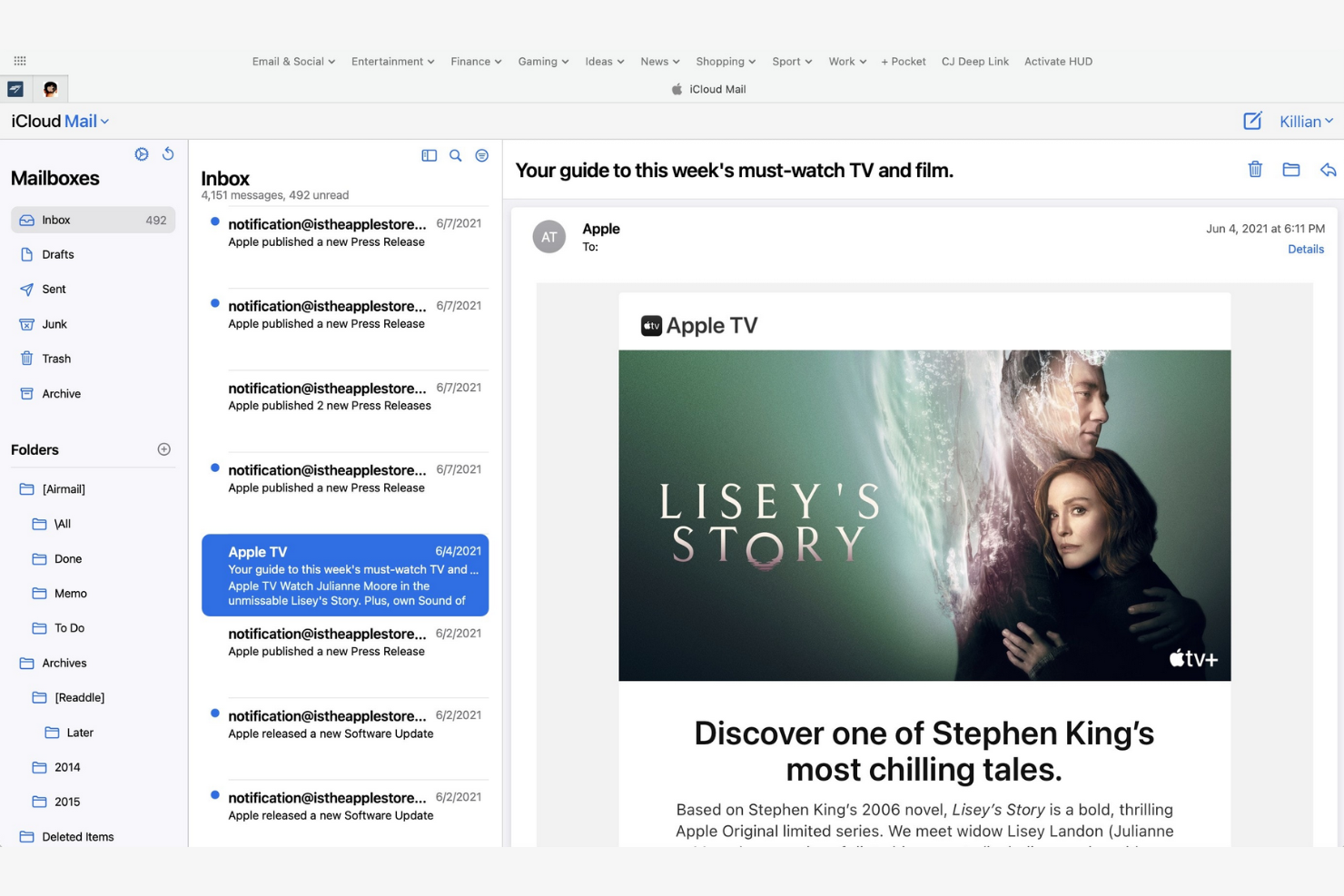
Apple iCloud Mail is an Apple-native email app that offers integration across iPhones, iPads, and Macs. It helps users stay organized and efficient with a suite of essential email management tools.
Why I picked Apple iCloud Mail: Apple iCloud Mail is tailored for Apple users, delivering consistent performance across all your Apple devices. The app's iCloud integration lets you quickly sync emails, contacts, and calendars, while the Handoff feature lets you switch between devices without losing your place. Also, the app's user-friendly interface makes managing emails straightforward.
Standout Features and Integrations:
Features include a priority inbox for important emails, customizable swipe gestures, and support for rich text formatting. You can manage multiple email accounts in one place, and the VIP feature also lets you set notifications for emails from important contacts so you never miss high-priority messages.
Integrations are not publicly listed.
Pros and Cons
Pros:
- Strong privacy protection and minimal data scanning
- Intuitive interface
- Integrates with Apple's ecosystem
Cons:
- Slow search
- Limited free space


mail.com is an email service catering to business owners who need customizable domain options. It lets users create professional-looking email addresses with tailored domain names.
Why I picked mail.com: mail.com's standout feature is free domain options, which let you personalize your email address with a custom domain name. This flexibility is ideal for both individuals and small businesses looking to upgrade their email presence. The tool's simple interface makes managing emails straightforward. The ability to use different domain names sets mail.com apart from other email apps.
Standout Features and Integrations:
Features include unlimited email storage and a customizable spam filter. You can also use the integrated online calendar to manage your schedule efficiently.
Integrations include Opera, Google Chrome, Safari, Mozilla Firefox, Mail Backup X, Mailspring, and more.
Pros and Cons
Pros:
- Intuitive interface
- Generous features included in the free plan
- Wide range of custom domain names
Cons:
- Poor spam protection
- Ads in the free version


Yahoo! Mail is an email service that offers users ample storage for their emails and attachments. Its high-capacity email inbox makes it ideal for both personal and business communication.
Why I picked Yahoo! Mail: Yahoo! Mail's expansive storage capacity is a key feature for users who manage a large volume of emails. You can store thousands of emails without worrying about running out of space. The intuitive interface lets you manage emails efficiently, and thanks to its customizable themes, you can personalize your email experience.
Standout Features and Integrations:
Features include an easy-to-use search function and a built-in calendar that lets you organize your schedule directly from your inbox. You can also customize the interface with unique themes to suit your preferences.
Integrations include Google Drive, Microsoft Office Online, Grammarly, Shift, WiseStamp, CredentialingSpectrum, Reoon Email Verifier, Rambox, Oki-Toki, and more.
Pros and Cons
Pros:
- Built-in calendar and reminder viewer
- Customizable themes available
- Generous email storage space
Cons:
- Track record of major data breaches
- Frequent upselling


Edison Mail is designed for users who value smart features and efficient email management. It increases productivity by automating routine tasks and providing intelligent insights.
Why I picked Edison Mail: Edison Mail's AI-powered features help you manage emails more efficiently. The app includes smart notifications that alert you to important emails, and the one-tap unsubscribe feature is a lifesaver for decluttering your inbox. The built-in assistant also organizes your travel and package information, keeping everything in one place.
Standout Features and Integrations:
Features include a focused inbox that prioritizes emails based on importance and customizable swipe gestures to speed up email management. You can also use dark mode to reduce eye strain during late-night work sessions.
Integrations include Google Workspace, Apple iCloud, Yahoo! Mail, AOL, Hotmail, Amazon, Walmart, Microsoft 365, and more.
Pros and Cons
Pros:
- Focused inbox for priority emails
- One-tap unsubscribing and bulk cleanup features
- Smart notifications
Cons:
- Subscription required
- Syncing errors

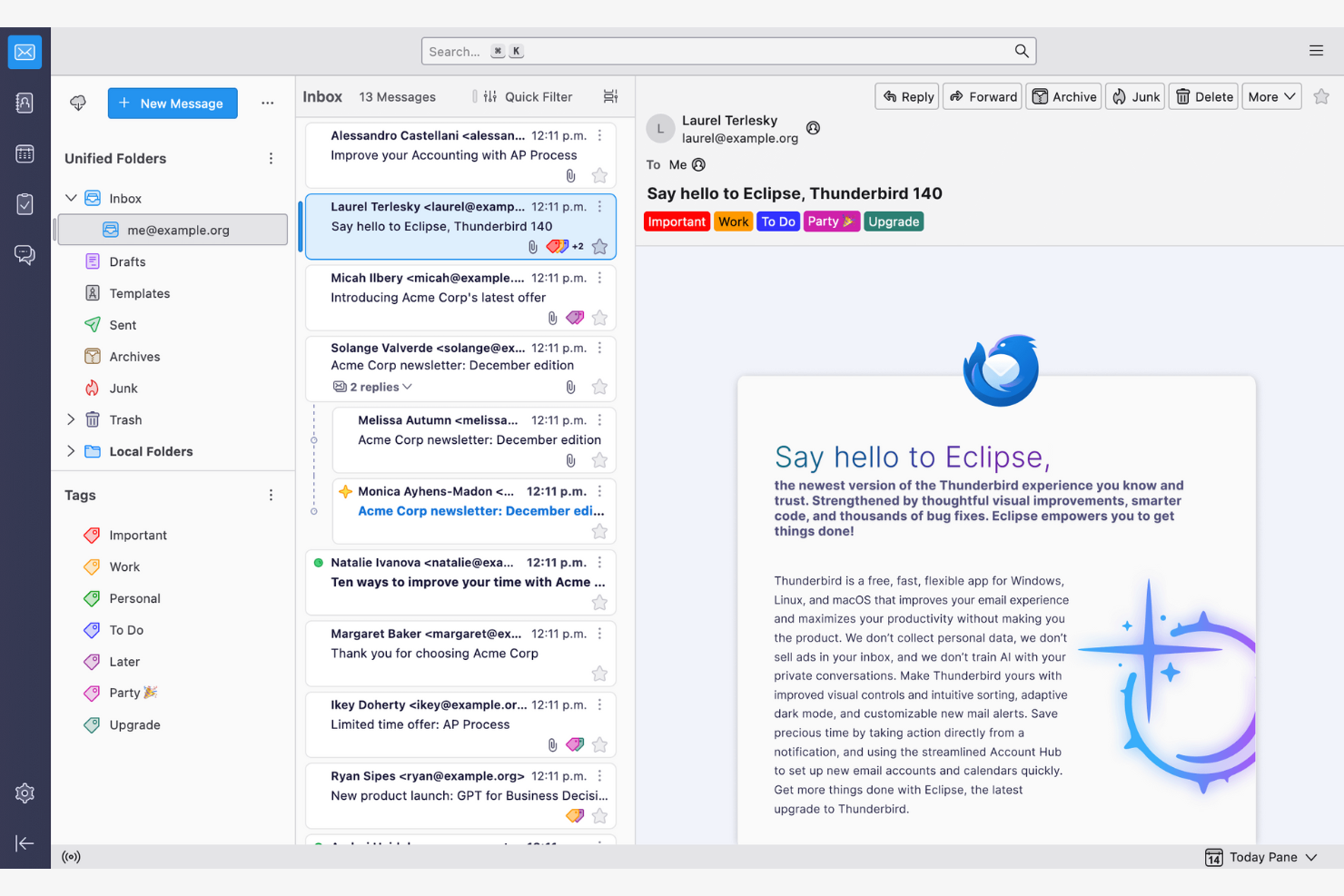
Thunderbird is an open-source email client that lets users customize and control their email environment. Its features make email management and communication more efficient.
Why I picked Thunderbird: Thunderbird is highly customizable, appealing to users who want to tailor it to their specific needs. You can use add-ons to upgrade the app's functionality, while the tabbed email feature lets you manage multiple conversations at once. Because the app is open-source, you can modify it to suit your preferences.
Standout Features and Integrations:
Features include a smart folder system to organize emails across different accounts, powerful spam filtering to block unwanted emails, and a quick filter toolbar to find emails more efficiently.
Integrations include Google Gmail, Yahoo! Mail, McAfee LiveSafe, Kasm Workspaces, Greatmail, PDFCreator, Mailfence, Aid4Mail, 1Tool CRM, and more.
Pros and Cons
Pros:
- Strong spam filtering and privacy options
- Unified inbox with tabs
- Customizable with add-ons
Cons:
- Basic user interface
- No native mobile app

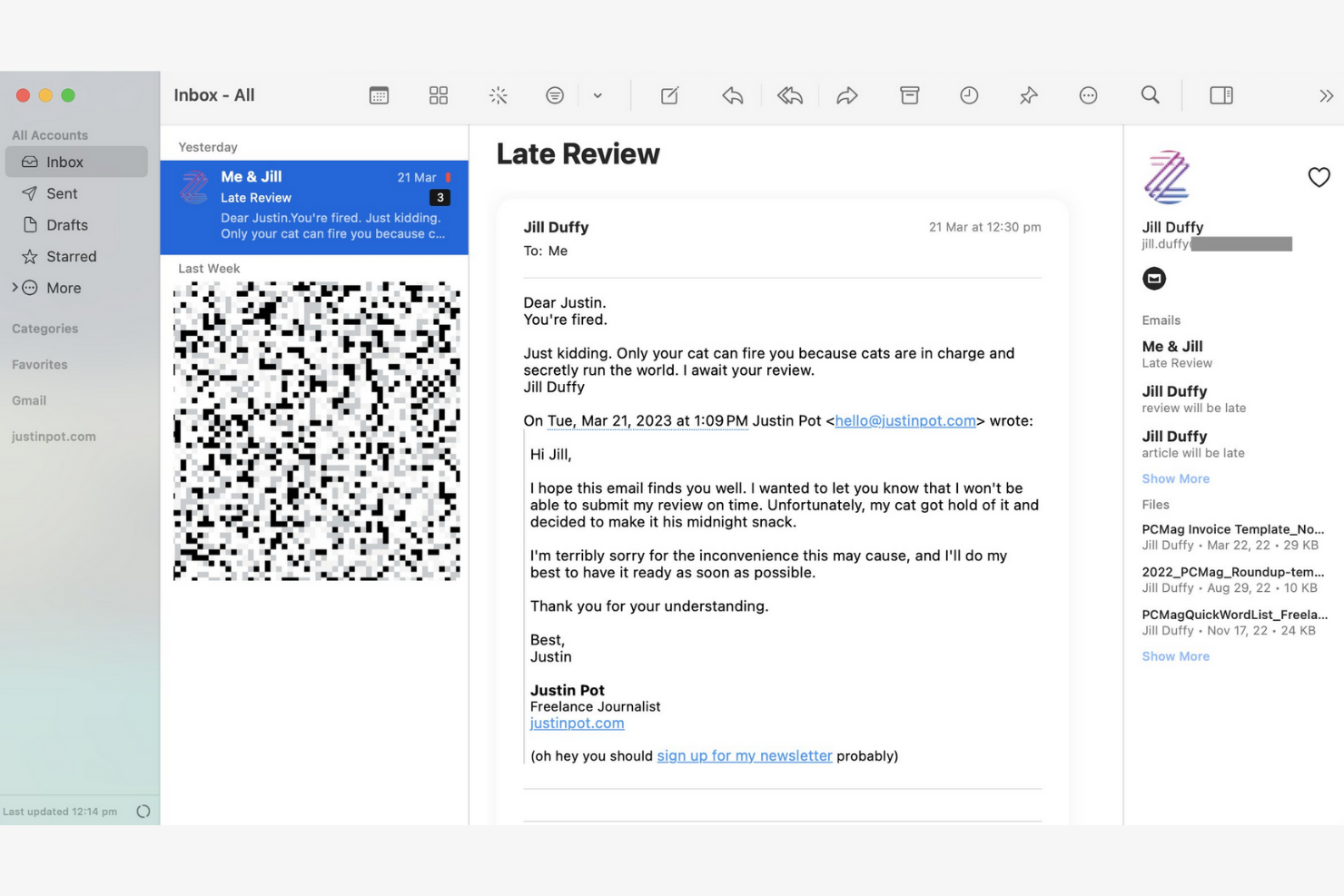
Canary Mail is an email client designed for individuals and teams who prioritize privacy and security in their communications. Its end-to-end encryption keeps your emails confidential and secure.
Why I picked Canary Mail: Canary Mail stands out for its commitment to privacy, offering a suite of data-protection features. You can encrypt emails with a single tap, giving you peace of mind for sensitive communications. The app's focus on security doesn't compromise usability, and the intuitive interface makes it simple to manage your emails while keeping them secure.
Standout Features and Integrations:
Features include search tools that help you find emails quickly, read receipts that show when your emails have been opened, and a snooze feature that temporarily hides emails so you can focus on more important tasks.
Integrations include Google Gmail, Apple iCloud, Proton Mail, Todoist, Asana, and more.
Pros and Cons
Pros:
- Unified inbox across multiple devices
- An AI copilot that functions offline
- Built-in encryption and privacy controls
Cons:
- The best Copilot features require a paid monthly subscription
- Complex encryption


Microsoft Outlook is an email client and personal information manager designed for businesses and professionals. Its integrated calendar features make communicating and scheduling more efficient.
Why I picked Microsoft Outlook: Outlook's strong integration with Microsoft Office makes it ideal for businesses that rely on Microsoft products. You can schedule meetings directly from your inbox to help your team stay organized, and the focused inbox feature shows you your most important emails first. The app's integrated calendar also lets you coordinate schedules.
Standout Features and Integrations:
Features include email categorization to manage messages efficiently, customizable rules to automate email sorting and prioritization, and a built-in task manager to keep track of your to-do lists.
Integrations include Microsoft 365 and more.
Pros and Cons
Pros:
- AI assistance
- Focused inbox for important emails
- Strong integration with the Microsoft 365 ecosystem
Cons:
- Requires regular updates
- Complex interface for new users


Superhuman Mail is an email client tailored for busy professionals who need to manage their emails quickly and efficiently. It focuses on delivering a fast email experience with advanced features that increase productivity.
Why I picked Superhuman Mail: Superhuman Mail prioritizes speed and efficiency, making it a top choice for users who want to process emails quickly. The app's keyboard shortcuts let you navigate and manage emails without a mouse, and the split inbox feature helps you focus by isolating important emails. Also, the app's undo send feature gives you further peace of mind.
Standout Features and Integrations:
Features include a powerful search function to find emails instantly, read-status indicators to see when emails have been opened, and follow-up reminders so you never miss an important response. Superhuman Mail also includes its own built-in AI assistant to help with drafting emails and scheduling meetings.
Integrations include HubSpot, Pipedrive, Salesforce, and more.
Pros and Cons
Pros:
- Minimal, distraction-free interface
- AI integration
- Keyboard shortcuts
Cons:
- Less intuitive for users who prefer traditional mouse-based navigation
- High subscription price relative to other providers
Weitere E-Mail-Apps
\u003cspan style=\u0022font-weight: 400\u0022\u003eHier sind einige weitere E-Mail-App-Optionen, die es nicht in meine Auswahlliste geschafft haben, die sich aber dennoch anzusehen lohnen:\u003c/span\u003e
- Mailspring
For cross-platform use
- Spark
For team collaboration
- SaneBox
For email prioritization
- Gmelius
For turning Gmail into a workspace
- Clean Email
For inbox organization
- eM Client
For customization
- Missive
For dedicated team spaces


How I Evaluate Email Apps
I evaluate email apps on two levels: the baseline a PM needs—like task conversion and inbox collaboration—and the differentiators that make one tool click where another doesn't.
Core Functionality (Table Stakes For This List)
When I'm selecting tools for my list, I rank each one on a scale from 0 (does not offer the functionality) to 5 (excels in this area) for each core functionality listed below. Then, I calculate the tool's total score into a percentage. Each tool needs to achieve a minimum total score of 65% to be considered for inclusion.
- Email Send & Receive: I check whether the app supports multi-account access across Gmail, Outlook, and IMAP/SMTP so PMs can manage client and internal accounts from one place.
- Inbox Organization: Sorting, labeling, filtering, and archiving matter—especially when you're juggling dozens of stakeholder threads across multiple active projects at once.
- Email-to-Task Conversion: I look for the ability to turn an email into a trackable task with due dates and assignees, like converting a client change request into a backlog item.
- Project Management Integrations: Native connections to tools like Asana, Jira, Monday, ClickUp, or Trello help ensure emails don't live in a silo outside your delivery workflow.
- Shared Inbox Collaboration: For agency and cross-functional teams, I evaluate whether the app supports thread assignment, internal comments, and visibility into who's handling what.
- Calendar & Scheduling: Meeting scheduling, deadline reminders, and two-way calendar sync with Google or Outlook keep project timelines connected to everyday communication.
Once I have a list of tools that meet this criteria, I consider what sets each platform apart.
Differentiating Factors (What Sets Vendors Apart)
Here's how I compare and contrast different vendors:
Standout Features
AI-assisted drafting is a big differentiator—tools that can summarize long threads or suggest replies save PMs real time during peak delivery weeks. I also look for follow-up automation, like scheduled nudges when a stakeholder hasn't responded to a blocker. A unified project inbox that groups all emails by initiative or client is another feature I weigh, since it cuts down the time spent hunting for context across scattered threads.
Beyond Features
Integration depth matters beyond just having a connector—I check whether the link to tools like Jira or Asana supports bi-directional sync, so task updates flow back into email threads. Security is another factor I weigh, especially for PMs handling client data under SOC 2 or GDPR requirements. Cross-platform availability also plays a role; field-based coordinators in construction or logistics need reliable mobile apps with offline sync, not just a browser tab.
So wählen Sie eine E-Mail-App aus
Es ist leicht, sich in langen Funktionslisten und komplexen Preisstrukturen zu verlieren. Damit Sie sich auf die Arbeit an Ihrem individuellen Auswahlprozess für Software konzentrieren können, finden Sie hier eine Checkliste mit Faktoren, die Sie berücksichtigen sollten:
| Faktor | Was Sie berücksichtigen sollten |
|---|---|
| Skalierbarkeit | Wächst die App mit Ihrem Team? Berücksichtigen Sie das zukünftige E-Mail-Volumen, zusätzliche Benutzer und den benötigten Speicherplatz. Prüfen Sie, ob die App Ihr Wachstum ohne zusätzliche Kosten unterstützt. |
| Integrationen | Funktioniert die App mit Ihren bestehenden Tools? Achten Sie auf native Integrationen mit Kalendern, Aufgabenmanagern und CRM-Systemen, um Arbeitsabläufe zu vereinfachen. |
| Anpassbarkeit | Können Sie die App an Ihre Anforderungen anpassen? Prüfen Sie die Möglichkeiten für Layout-Anpassungen, benutzerdefinierte Ordner und persönliche Arbeitsabläufe, um sicherzustellen, dass sie zum Stil Ihres Teams passen. |
| Benutzerfreundlichkeit | Ist die App für alle Benutzer intuitiv? Testen Sie die Benutzeroberfläche auf Einfachheit und achten Sie auf eine kurze Einarbeitungszeit, um Verzögerungen durch Schulungen zu vermeiden. |
| Implementierung und Einführung | Wie schnell können Sie loslegen? Bewerten Sie den Einrichtungsprozess, die Verfügbarkeit von Anleitungen und die Unterstützung bei der Migration bestehender E-Mails, um Ausfallzeiten zu minimieren. |
| Kosten | Passt die Preisgestaltung zu Ihrem Budget? Vergleichen Sie Tarife, versteckte Gebühren und langfristige Kosten. Achten Sie auf kostenlose Testversionen, um die App vor einer verbindlichen Entscheidung zu testen. |
| Sicherheitsvorkehrungen | Wie sicher sind Ihre Daten? Überprüfen Sie Verschlüsselungsstandards, Optionen zur Datensicherung und die Einhaltung von Datenschutzbestimmungen, um vertrauliche Informationen zu schützen. |
| Verfügbarkeit des Supports | Welche Hilfe ist verfügbar, wenn Probleme auftreten? Prüfen Sie den Support rund um die Uhr, Reaktionszeiten und Kundendienstkanäle, damit Sie bei Bedarf Unterstützung erhalten. |
Was ist eine E-Mail-App?
Eine E-Mail-App ist ein Softwaretool, mit dem Benutzer E-Mails senden, empfangen und verwalten können. Fachkräfte wie Projektmanager, Marketingmitarbeiter und Führungskräfte nutzen diese Tools, um Kommunikation und Organisation zu verbessern. Funktionen wie die Kategorisierung von E-Mails, Kalenderintegrationen und anpassbare Benachrichtigungen unterstützen die Aufgabenverwaltung, Terminplanung und Organisation. Diese Tools bieten eine strukturierte Möglichkeit, die Kommunikation effizient zu verwalten, Zeit zu sparen und Unübersichtlichkeit zu reduzieren.
Funktionen
Achten Sie bei der Auswahl einer E-Mail-App auf die folgenden wichtigen Funktionen:
- E-Mail-Kategorisierung: Sortiert E-Mails automatisch in Ordner und hilft Ihnen, Nachrichten effizient zu priorisieren und zu verwalten.
- Kalenderintegration: Synchronisiert sich mit Kalendern, um die Terminplanung zu vereinfachen und sicherzustellen, dass Sie keine wichtigen Termine verpassen.
- Anpassbare Benachrichtigungen: Ermöglichen Ihnen, Benachrichtigungen für bestimmte E-Mails festzulegen, Ablenkungen zu reduzieren und sich auf Prioritäten zu konzentrieren.
- Ende-zu-Ende-Verschlüsselung: Sichert Ihre E-Mails und schützt vertrauliche Informationen vor unbefugtem Zugriff.
- Einheitlicher Posteingang: Führt mehrere E-Mail-Konten in einer Benutzeroberfläche zusammen.
- Schlummerfunktion: Blendet E-Mails vorübergehend aus, sodass Sie sich auf dringende Aufgaben konzentrieren können, ohne wichtige Nachrichten aus den Augen zu verlieren.
- Lesebestätigungen: Benachrichtigen Sie, wenn Empfänger Ihre E-Mails öffnen.
- Erweiterte Suche: Findet mithilfe von Schlüsselwörtern oder Filtern schnell bestimmte E-Mails und spart dadurch Zeit und Aufwand.
- Anpassbare Designs: Ermöglichen Ihnen, das Erscheinungsbild der App an Ihre Vorlieben anzupassen und die Benutzerfreundlichkeit zu verbessern.
- Erinnerungen zur Nachverfolgung: Fordern Sie dazu auf, E-Mails erneut aufzurufen, und helfen dabei, wichtige Kommunikation im Blick zu behalten.
Vorteile
Die Einführung einer E-Mail-App bietet Ihrem Team und Ihrem Unternehmen mehrere Vorteile. Hier sind einige, auf die Sie sich freuen können:
- Bessere Organisation: Funktionen zur E-Mail-Kategorisierung und einheitliche Posteingänge helfen Ihnen, Nachrichten geordnet und leicht auffindbar zu halten.
- Verbesserte Sicherheit: Die Ende-zu-Ende-Verschlüsselung schützt vertrauliche Informationen und gibt Ihnen Sicherheit.
- Besseres Zeitmanagement: Anpassbare Benachrichtigungen und Erinnerungen zur Nachverfolgung helfen Ihnen, sich auf das Wesentliche zu konzentrieren.
- Höhere Produktivität: Die Integration mit Kalendern und erweiterte Suchfunktionen vereinfachen Arbeitsabläufe und sparen Zeit.
- Personalisierte Nutzung: Mit anpassbaren Designs können Sie das Erscheinungsbild der App an Ihre Vorlieben anpassen und die Benutzerfreundlichkeit erhöhen.
- Effektive Nachverfolgung der Kommunikation: Lesebestätigungen zeigen Ihnen, wann Empfänger Ihre E-Mails öffnen, und helfen Ihnen, das Engagement einzuschätzen.
- Aufgabenpriorisierung: Die Schlummerfunktion hilft Ihnen bei der Aufgabenverwaltung, indem sie nicht dringende E-Mails vorübergehend ausblendet.
Kosten & Preise
Bei der Auswahl einer E-Mail-App müssen Sie die verschiedenen verfügbaren Preismodelle und Tarife verstehen. Die Kosten variieren je nach Funktionen, Teamgröße, Zusatzoptionen und weiteren Faktoren. Die folgende Tabelle fasst gängige Tarife, ihre Durchschnittspreise und typische enthaltene Funktionen von E-Mail-App-Lösungen zusammen:
Vergleichstabelle der Tarife für E-Mail-Apps
| Tarifart | Durchschnittlicher Preis | Übliche Funktionen |
|---|---|---|
| Kostenloser Tarif | $0 | Grundlegende E-Mail-Funktionen, begrenzter Speicherplatz und Werbung. |
| Persönlicher Tarif | $0-$10/Benutzer/Monat | Anpassbare Designs, grundlegender Support und mehr Speicherplatz. |
| Geschäftstarif | $3-$20/Benutzer/Monat | Erweiterte Sicherheitsfunktionen, Integration mit Kalendern und bevorzugter Support. |
| Unternehmenstarif | $12-$40+/Benutzer/Monat | Umfassende Sicherheit, persönlicher Account Manager und individuelle Integrationen. |
FAQs zu E-Mail-Apps
Hier finden Sie Antworten auf einige häufige Fragen zu E-Mail-Apps:
Wie migriere ich meine E-Mails zu einer neuen E-Mail-App?
Ja, die meisten E-Mail-Apps bieten Tools oder Anleitungen zur Unterstützung bei der Migration von E-Mails. Beim Wechsel sollten Sie Ihre vorhandenen E-Mails und Kontakte sichern. Viele Apps bieten Importoptionen oder eine Integration mit Ihrem aktuellen Anbieter, um diesen Vorgang zu erleichtern. Prüfen Sie, ob Ihre neue App ein Migrationstool oder einen Supportdienst zur Unterstützung anbietet.
Kann eine E-Mail-App mir bei der Verwaltung mehrerer Projekte und Beteiligter helfen?
Ja, viele E-Mail-Apps bieten Labels, Ordner und Automatisierungen, mit denen Sie die Kommunikation über verschiedene Projekte und Beteiligte hinweg verfolgen können. Nutzen Sie diese Tools, um E-Mails nach Projekt oder Kunde zu kategorisieren und Benachrichtigungen für besonders wichtige Nachrichtenverläufe einzurichten.
Kann ich eine E-Mail-App offline verwenden?
Ja, viele E-Mail-Apps bieten Offlinezugriff, aber die Funktionen können eingeschränkt sein. Oft können Sie E-Mails offline lesen und als Entwurf verfassen, während zum Senden und Empfangen von Nachrichten möglicherweise eine Internetverbindung erforderlich ist. Vergewissern Sie sich, dass Ihre ausgewählte App den Offline-Modus unterstützt, wenn dies für Sie wichtig ist, insbesondere wenn Sie häufig reisen.
Wie unterstützen E-Mail-Apps die Zusammenarbeit im Team?
E-Mail-Apps mit integrierten Funktionen für die Zusammenarbeit, beispielsweise gemeinsamen Posteingängen oder Kommentaren, ermöglichen es Ihrem Team, den Fortschritt zu verfolgen, Nachrichten zuzuweisen und doppelte Antworten zu vermeiden. Einige ermöglichen es Ihnen sogar, E-Mails direkt in Aufgaben oder Tickets umzuwandeln.
Auf welche Sicherheitsmaßnahmen sollte ich bei einer E-Mail-App achten?
Achten Sie auf E-Mail-Apps, die Verschlüsselung, Zwei-Faktor-Authentifizierung und Spamfilter anbieten. Diese Funktionen schützen Ihre Daten und verringern das Risiko eines unbefugten Zugriffs. Prüfen Sie, ob die App die für Ihre Branche relevanten Datenschutzbestimmungen einhält, damit Ihre Informationen sicher bleiben.
Wie kann ich wiederkehrende Aufgaben in meiner E-Mail-App automatisieren?
Viele E-Mail-Apps ermöglichen es Ihnen, routinemäßige Aktionen mithilfe von Regeln, Filtern oder Integrationen zu automatisieren. Richten Sie eine automatische Sortierung und vorformulierte Antworten ein oder verbinden Sie die App mit Workflow-Tools wie Slack oder Trello, um Zeit zu sparen.