

10 beste DocuSign-Alternativen im Test 2026

Auswahl der besten Docusign-Alternativen


Verträge und Genehmigungen zu verwalten, gehört dazu, Projekte voranzubringen. Das Einholen von Unterschriften und die Verfolgung des Dokumentenstatus können jedoch alles verlangsamen. Wenn DocuSign aufgrund der Preise, Integrationen oder Einschränkungen bei den Arbeitsabläufen nicht zu deinem Team passt, gibt es zahlreiche leistungsfähige Alternativen, die eine Überlegung wert sind.
Nach meiner Erfahrung beim Testen von Plattformen für elektronische Signaturen leisten die besten Optionen mehr, als nur Unterschriften zu sammeln. Sie ermöglichen eine reibungslosere Zusammenarbeit, klarere Prüfpfade, schnellere Bearbeitungszeiten und weniger Engpässe, wenn Dokumente geprüft, genehmigt und ausgeführt werden müssen. Ich habe sowohl kostenlose DocuSign-Alternativen als auch kostenpflichtige Wettbewerber geprüft, damit du die besten Optionen vergleichen kannst.
In diesem Artikel stelle ich dir die führenden DocuSign-Konkurrenten vor und zeige, worin die einzelnen Tools besonders gut sind und wie ihre Funktionen typische Projektabläufe unterstützen. Finden wir die passende Lösung für dein Team.
Was ist DocuSign?
DocuSign ist eine Software für Dokumentenverwaltung und elektronische Signaturen, mit der du elektronische Vereinbarungen effizient bearbeiten kannst. Sie wird häufig von Fachleuten aus den Bereichen Recht, Immobilien und Finanzen als schnelles und sicheres Tool zum Unterzeichnen von Dokumenten verwendet.
Funktionen wie das Unterzeichnen aus der Ferne, die Nachverfolgung in Echtzeit und die Einhaltung gesetzlicher Standards optimieren Arbeitsabläufe und gewährleisten Sicherheit.
Vergleichstabelle der DocuSign-Alternativen
Diese Vergleichstabelle zeigt die Preisdetails meiner besten DocuSign-Alternativen.
| Tool | Best For | Trial Info | Price | ||
|---|---|---|---|---|---|
| 1 | Am besten für die Integration mit QuickBooks Online geeignet | Kostenloser Tarif verfügbar | Ab $10/Absender/Monat (jährlich abgerechnet) | Website | |
| 2 | Am besten für die Einhaltung gesetzlicher Vorschriften und Vorlagen geeignet | Kostenlose Testversion verfügbar | Ab $20/Monat; API-Pläne ab $49/Monat | Website | |
| 3 | Am besten für KI-gestütztes Vertragsmanagement geeignet | Kostenlose Demo verfügbar | Preise auf Anfrage | Website | |
| 4 | Am besten geeignet für einfache, kostengünstige Workflows für elektronische Signaturen | Kostenlose Testversion verfügbar | Ab $4/Monat | Website | |
| 5 | Am besten für die Dokumentautomatisierung innerhalb von CRM-Arbeitsabläufen | 14-tägige kostenlose Testversion + kostenloser Tarif + kostenlose Demo verfügbar | Ab $19/Nutzer/Monat (jährlich abgerechnet) | Website | |
| 6 | Am besten für die Integration mit Dropbox | Kostenlose Testversion verfügbar | Ab $9.99/Nutzer/Monat (jährlich abgerechnet) | Website | |
| 7 | Am besten für elektronische Signaturen in regulierten Branchen geeignet | Kostenloser Tarif + 14-tägige kostenlose Testversion + Demo verfügbar | Ab 10 $/Benutzer/Monat | Website | |
| 8 | Am besten für Identitätsprüfung auf Unternehmensniveau geeignet | Kostenlose Demo verfügbar | Preis auf Anfrage | Website | |
| 9 | Am besten für die Sicherheit durch Ende-zu-Ende-Verschlüsselung | Kostenloser Tarif + 30-tägige kostenlose Testversion + Demo verfügbar | Ab $10/Nutzer/Monat | Website | |
| 10 | Am besten für selbst gehostete Open-Source-E-Signaturen | Kostenloser Tarif verfügbar | Ab $9.99/Monat (jährlich abgerechnet) | Website |
Warum Sie unseren Software-Empfehlungen vertrauen können
Unser Team testet und bewertet Software seit 2012. Als Projektmanager wissen wir selbst, wie schwierig – und wichtig – es ist, die richtige Software auszuwählen.
Für diesen Leitfaden haben wir Tools mithilfe von praktischen Tests und unabhängiger Recherche bewertet und dabei unsere Bewertungskriterien angewendet. Zudem greifen wir auf Erkenntnisse von Branchenvordenkern und praktizierenden Projektmanagement-Experten zurück.
Unsere Bewertungen spiegeln unser menschliches redaktionelles Urteilsvermögen wider, keine Verkaufsstrategie.
Expertenprüfer:
Rezensionen der besten DocuSign-Alternativen
Nachfolgend findest du meine detaillierten Zusammenfassungen der besten DocuSign-Alternativen, die es in meine Auswahl geschafft haben. Meine Rezensionen geben einen detaillierten Überblick über die wichtigsten Funktionen, Vor- und Nachteile, Integrationen und idealen Anwendungsfälle jedes Tools, damit du die beste Lösung für dich findest.

Signwell
Am besten für die Integration mit QuickBooks Online geeignet

Im Gegensatz zu Adobe Sign, das eine großartige Option für Großunternehmen ist, ist SignWell ein Tool für elektronische Signaturen, das für kleine bis mittelständische Unternehmen entwickelt wurde, die effiziente Möglichkeiten zum Unterzeichnen von Dokumenten benötigen. Es hilft Benutzern, Dokumente online zu erstellen, zu verwalten und zu unterzeichnen, wodurch der Prozess schnell und rechtsverbindlich wird.
Warum es eine gute DocuSign-Alternative ist: SignWell bietet eine Integration mit QuickBooks Online, was für Unternehmen von Vorteil ist, die QuickBooks bereits für ihre Buchhaltung nutzen. Die Plattform stellt anpassbare Vorlagen bereit, die Zeit sparen und eine einheitliche Dokumentformatierung gewährleisten. Echtzeitbenachrichtigungen halten Ihr Team über den Dokumentstatus auf dem Laufenden und helfen, Verzögerungen zu vermeiden. Durch seinen Fokus auf Einfachheit stellt SignWell sicher, dass Sie Dokumente ohne unnötige Komplexität verwalten können.
Hervorzuhebende Funktionen und Integrationen:
Funktionen umfassen Prüfpfade, die detaillierte Aufzeichnungen über die Interaktionen mit Dokumenten bereitstellen. Die Plattform ermöglicht Ihnen, Unterzeichnungsabläufe einzurichten, sodass Dokumente in der richtigen Reihenfolge und mit den richtigen Berechtigungen unterzeichnet werden. Auch das Bearbeitungswerkzeug mit einer Funktion zum Ziehen und Ablegen zur einfachen Anpassung von Dokumenten werden Sie zu schätzen wissen.
Integrationen umfassen QuickBooks Online, Google Drive, Dropbox, Zapier, Microsoft 365 und mehr.
Pros and Cons
Pros:
- Integration mit QuickBooks Online
- Einfaches Bearbeitungswerkzeug mit einer Funktion zum Ziehen und Ablegen
- Bietet Prüfpfade
Cons:
- Grundlegende Berichtsfunktionen
- Nicht ideal für Großunternehmen

Am besten für die Einhaltung gesetzlicher Vorschriften und Vorlagen geeignet
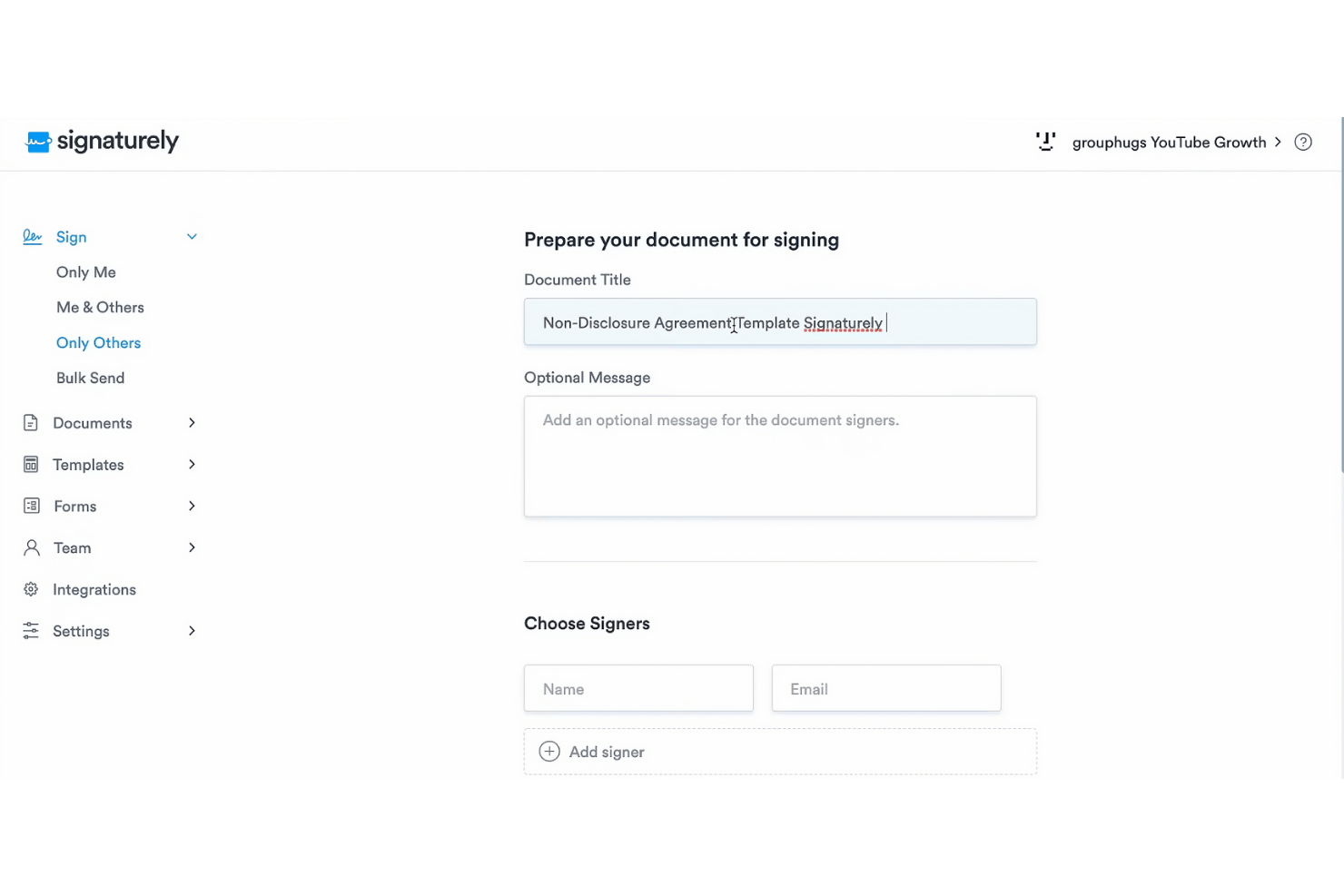
Signaturely ist eine Plattform, die kostenlose, rechtsverbindliche elektronische Signaturen bereitstellt. Sie richtet sich sowohl an Privatpersonen als auch an Unternehmen und hilft Nutzern dabei, Dokumente schnell und sicher zu verwalten und zu unterzeichnen.
Warum es eine gute Docusign-Alternative ist: Signaturely konzentriert sich auf die Einhaltung gesetzlicher Vorschriften und bietet eine Reihe von Vorlagen, die sowohl zeitsparend als auch einfach zu verwenden sind. Automatische Erinnerungen stellen sicher, dass Dokumente nicht unbeachtet bleiben, während die benutzerfreundliche Oberfläche die Verwaltung von Unterlagen vereinfacht. Diese Funktionen richten sich an Teams und Organisationen, die nach einer unkomplizierten und zuverlässigen Lösung für elektronische Signaturen suchen.
Hervorstechende Funktionen und Integrationen:
Zu den Funktionen gehören automatische Erinnerungen für nicht unterzeichnete Dokumente, Funktionen zur Dokumentenverwaltung und zeitsparende Vorlagen. Signaturely unterstützt außerdem papierlose Arbeitsabläufe und trägt damit zu Umweltzielen bei.
Zu den Integrationen gehören Google Drive, Dropbox, OneDrive, Box, Microsoft Teams, Zapier und mehr.
Pros and Cons
Pros:
- Gewährleistung der Einhaltung gesetzlicher Vorschriften
- Automatische Erinnerungen
- Zeitsparende Vorlagen
Cons:
- Eingeschränkte Anpassungsmöglichkeiten
- Nicht ideal für große Unternehmen

Juro
Am besten für KI-gestütztes Vertragsmanagement geeignet
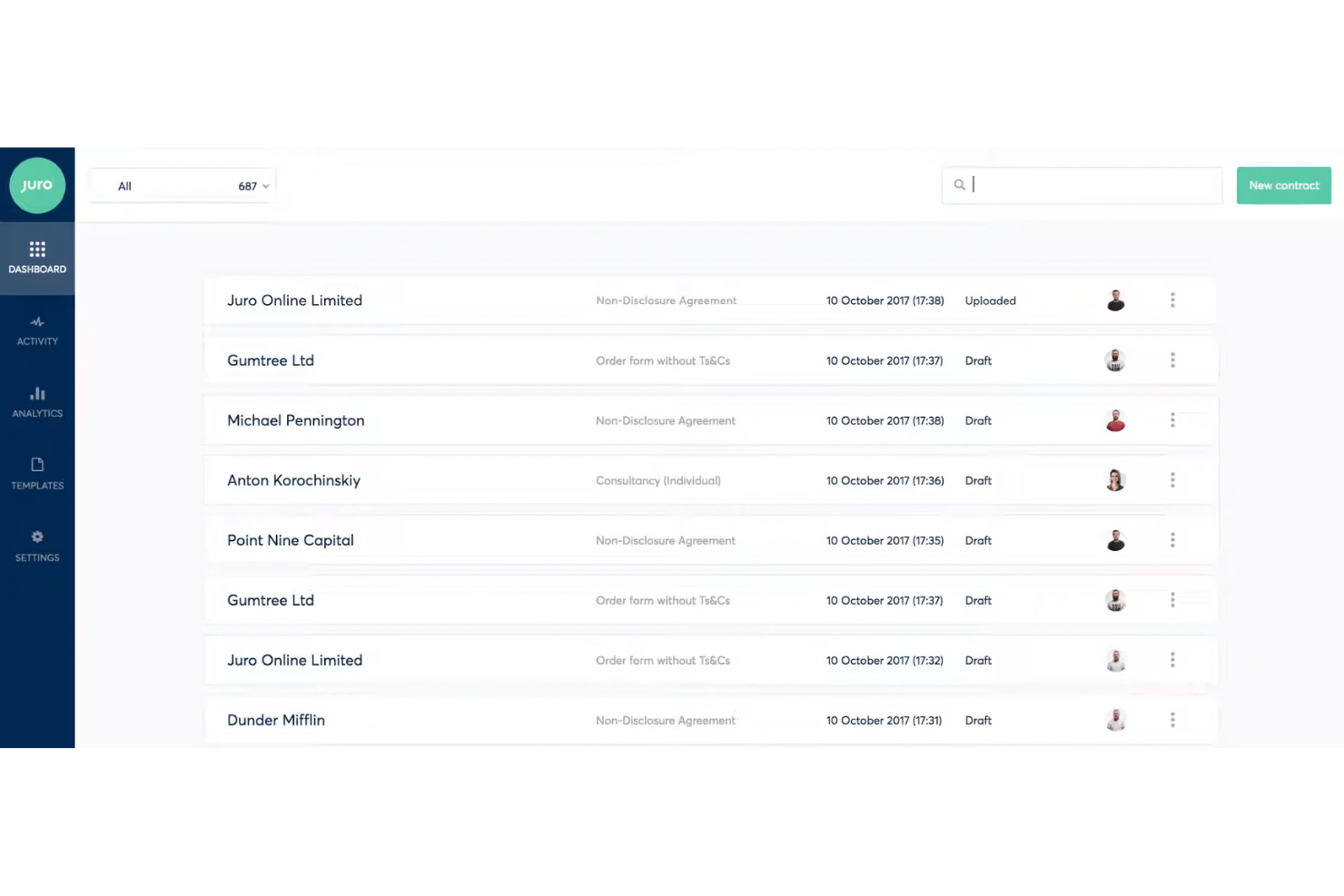
Juro ist eine intelligente Vertragsplattform für Rechts-, Personal-, Beschaffungs-, Vertriebs- und Finanzteams. Sie unterstützt diese Teams dabei, Verträge mithilfe einer KI-gestützten Prüfung und einer selbstständigen Vertragsverwaltung effizient zu verwalten.
Warum es eine gute DocuSign-Alternative ist: Juro bietet eine KI-gestützte Vertragsprüfung und eine intelligente Datenablage für Vertragsdaten und sorgt so für mehr Effizienz im Vertragsmanagement. Im Gegensatz zu DocuSign ist Juro auf Teams zugeschnitten, die fortschrittlichere Funktionen zur Vertragsautomatisierung suchen. Die Möglichkeiten zur Selbstbedienung und die schnelle Einrichtung machen die Plattform für Nutzer attraktiv, die herkömmliche Vertragsmanagementsysteme ersetzen möchten.
Herausragende Funktionen und Integrationen:
Zu den Funktionen gehören die KI-gestützte Vertragsprüfung, die selbstständige Vertragsverwaltung und eine intelligente Datenablage für Vertragsdaten. Juro legt außerdem mit Sicherheitsmaßnahmen auf Unternehmensniveau besonderen Wert auf Sicherheit.
Zu den Integrationen gehören Salesforce, HubSpot, ChatGPT, Slack, Google Drive, Zapier, Greenhouse und weitere.
Pros and Cons
Pros:
- KI-gestützte Vertragsautomatisierung
- Hohe Sicherheitsstandards
- Effiziente Datenablage
Cons:
- Begrenzte Möglichkeiten für umfangreiche Anpassungen
- Nicht ideal für sehr kleine Unternehmen

Am besten geeignet für einfache, kostengünstige Workflows für elektronische Signaturen
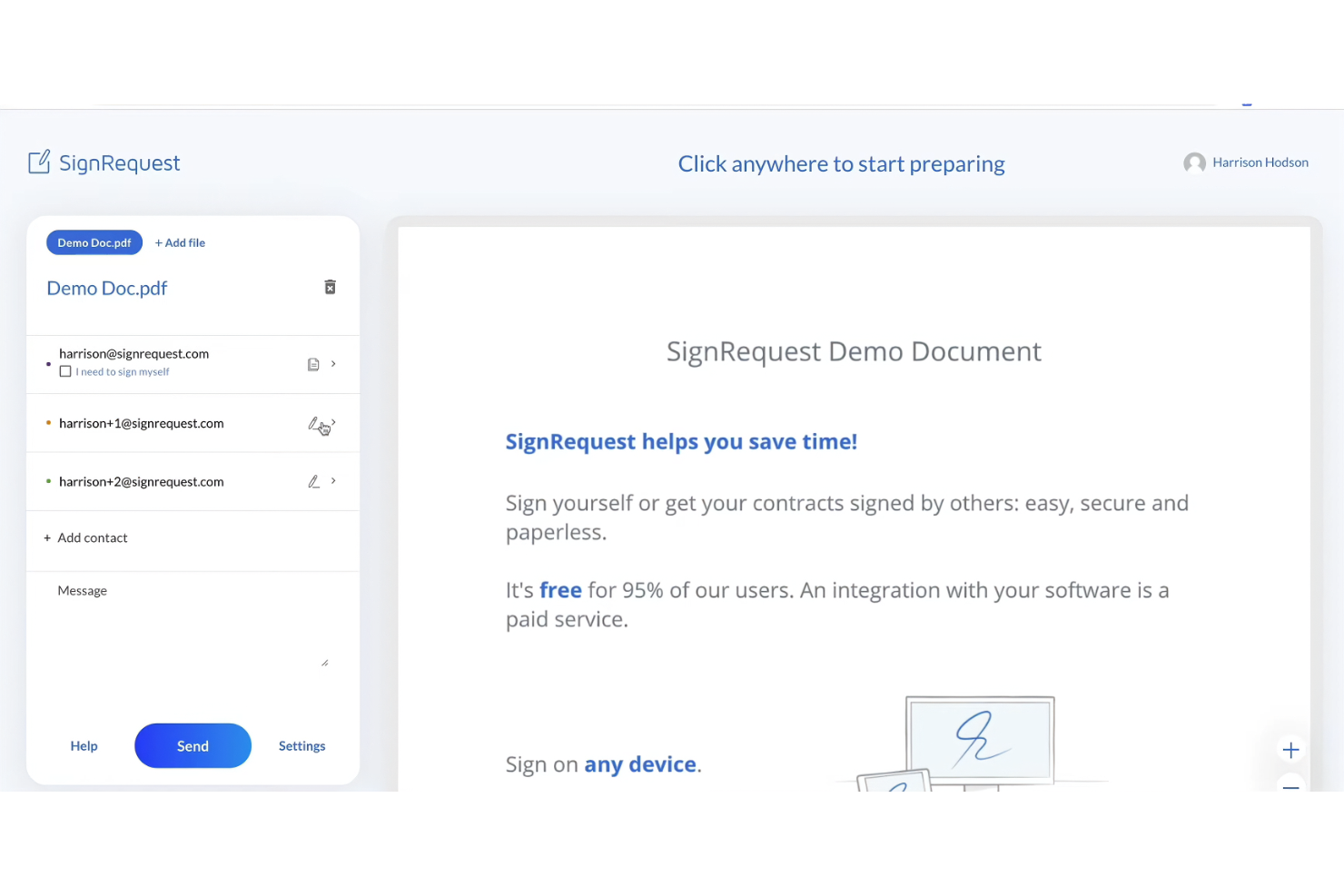
SignRequest ist ein Tool für elektronische Signaturen, das sich ideal für kleine bis mittelgroße Unternehmen eignet, die ihre Prozesse zur Dokumentenunterzeichnung optimieren möchten. Es bietet eine übersichtliche Plattform zum Erstellen und Verwalten rechtsverbindlicher elektronischer Signaturen.
Warum es eine gute Alternative zu Docusign ist: SignRequest bietet eine einfache und kostengünstige Lösung für elektronische Signaturen und ist damit für kleine Teams und Unternehmen zugänglich. Die Plattform legt Wert auf ein benutzerfreundliches Design, sodass sich Ihr Team schnell damit vertraut machen kann. Mit SignRequest können Sie den Dokumentenstatus problemlos verfolgen und Erinnerungen versenden, um fristgerechte Abschlüsse sicherzustellen. Der Fokus auf Einfachheit und Erschwinglichkeit unterscheidet die Plattform von komplexeren Alternativen.
Herausragende Funktionen und Integrationen:
Zu den Funktionen gehören anpassbare Vorlagen, mit denen Sie Dokumente auf spezifische Anforderungen zuschneiden können. Die Plattform unterstützt mehrere Sprachoptionen und ist dadurch vielseitig für internationale Teams einsetzbar. Außerdem stehen Prüfprotokolle zur Verfügung, die sich für die detaillierte Dokumentation von Interaktionen mit Dokumenten eignen.
Zu den Integrationen gehören Google Drive, Slack, Zapier, HubSpot, Gmail, Google Workspace und weitere.
Pros and Cons
Pros:
- Kostengünstig für kleine Unternehmen
- Unterstützt mehrere Sprachen
- Bietet Prüfprotokolle
Cons:
- Grundlegende Berichtsfunktionen
- Begrenzte Möglichkeiten zur individuellen Anpassung
PandaDoc
Am besten für die Dokumentautomatisierung innerhalb von CRM-Arbeitsabläufen

PandaDoc ist eine Software zur Dokumentautomatisierung für Vertriebsteams, Marketingfachleute und Unternehmen, die Dokumente effizient erstellen, versenden und elektronisch signieren müssen. Sie unterstützt Arbeitsabläufe durch die Automatisierung der Dokumentenerstellung und verbessert die Zusammenarbeit.
Warum es eine gute DocuSign-Alternative ist: PandaDoc bietet fortschrittliche Funktionen zur Dokumentautomatisierung, die die Erstellung und Verwaltung von Dokumenten vereinfachen. Die Integrationsmöglichkeiten mit Kundenbeziehungsmanagementsystemen (CRM) ermöglichen es Ihrem Team, Dokumenten-Arbeitsabläufe mit CRM-Systemen zu verbinden. Die Software stellt anpassbare Vorlagen bereit, die Zeit sparen und für Konsistenz in Ihren Dokumenten sorgen. Funktionen für die Zusammenarbeit in Echtzeit verbessern Zusammenarbeit und Kommunikation.
Herausragende Funktionen und Integrationen:
Zu den Funktionen gehört eine Inhaltsbibliothek, mit der Sie Dokumentelemente speichern und wiederverwenden können. Die Software bietet außerdem Analysen, um die Leistung und Interaktion mit Dokumenten zu verfolgen. Der Ziehen-und-Ablegen-Editor zur einfachen Anpassung von Dokumenten wird Ihnen gefallen.
Zu den Integrationen gehören Salesforce, HubSpot, Zoho CRM, Pipedrive, Microsoft Dynamics, Dropbox, Zapier, Slack, QuickBooks und weitere.
Pros and Cons
Pros:
- Leistungsstarke Funktionen zur Dokumentautomatisierung
- Zusammenarbeit in Echtzeit
- Einfacher Ziehen-und-Ablegen-Editor
Cons:
- Lange Ersteinrichtung
- Nicht ideal für sehr kleine Teams

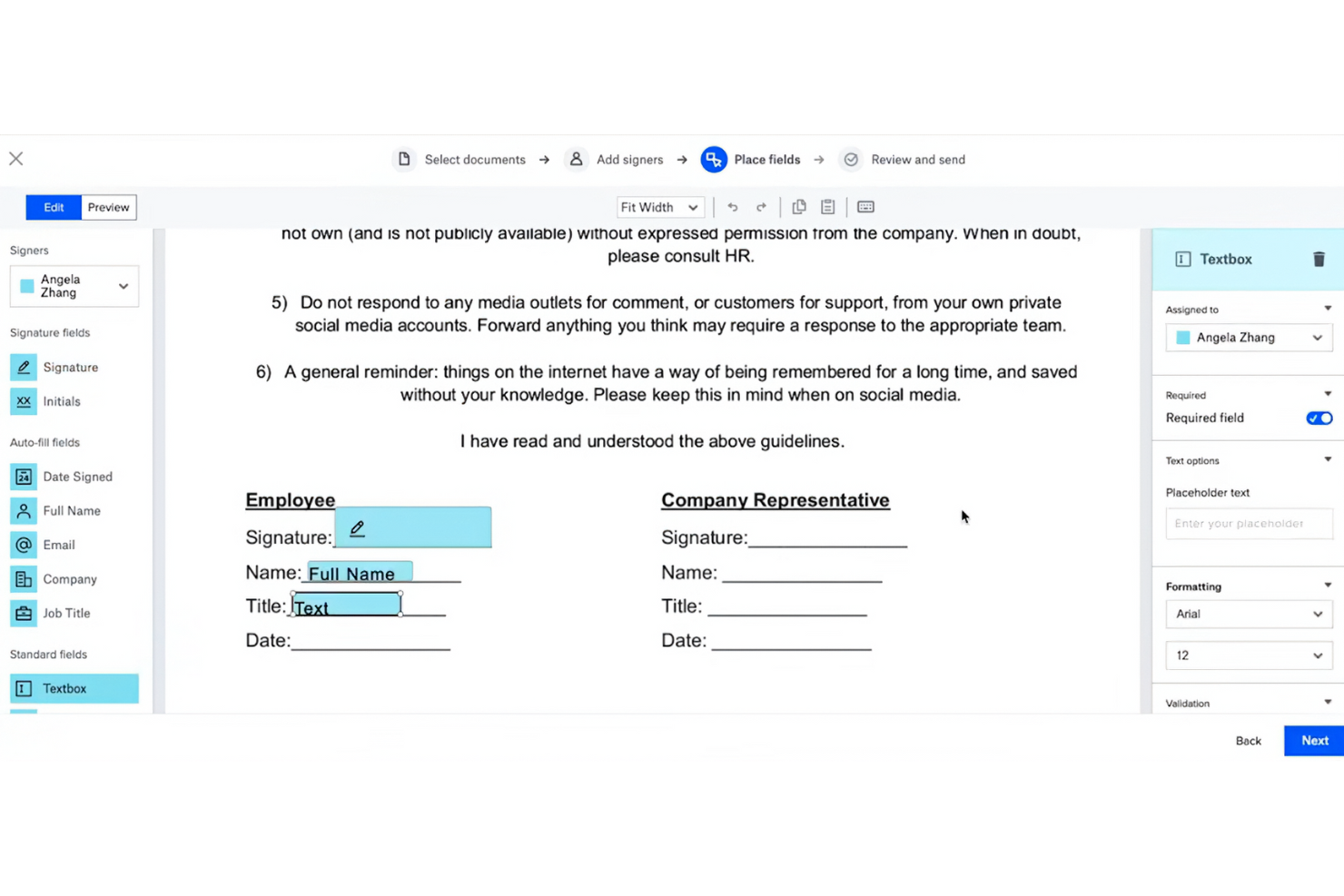
Dropbox Sign (ehemals HelloSign) ist ein Tool für elektronische Signaturen, das für Unternehmen und Teams entwickelt wurde, die Dokumente elektronisch unterzeichnen und Vereinbarungen effizient verwalten möchten, ähnlich wie mit Acrobat Pro. Zu den Hauptnutzern gehören Fachleute aus den Bereichen Recht, Finanzen und Vertrieb, die zuverlässige Funktionen zum Unterzeichnen von Dokumenten benötigen.
Warum es eine gute DocuSign-Alternative ist: Dropbox Sign lässt sich in Dropbox integrieren und ist daher ideal für Nutzer, die Dropbox bereits zur Speicherung verwenden. Die einfache Benutzeroberfläche und die leicht bedienbaren Funktionen unterstützen die Produktivität von Teams, die mit der Dropbox-Umgebung vertraut sind. Durch den Fokus auf Sicherheit und Compliance bietet es Unternehmen, die mit sensiblen Dokumenten arbeiten, Sicherheit.
Herausragende Funktionen und Integrationen:
Zu den Funktionen gehören anpassbare Vorlagen, Prüfprotokolle und Optionen für das persönliche Unterzeichnen. Sie können den Dokumentenstatus ganz einfach mit automatischen Benachrichtigungen und Erinnerungen verfolgen. Die Plattform unterstützt außerdem Funktionen zur Teamverwaltung, mit denen Sie Dokumentenabläufe organisieren und überwachen können.
Zu den Integrationen gehören Adobe Acrobat, Microsoft 365, Zapier und weitere.
Pros and Cons
Pros:
- Lässt sich gut in Dropbox integrieren
- Leistungsstarke Sicherheitsfunktionen
- Unterstützt das persönliche Unterzeichnen
Cons:
- Möglicherweise ist ein Dropbox-Konto erforderlich
- Nicht ideal für große Unternehmen


Zoho Sign ist eine Lösung für elektronische Signaturen, die für Unternehmen und Fachleute entwickelt wurde, die Dokumente digital unterzeichnen möchten. Sie richtet sich an Branchen, die hohe Compliance-Standards und Datenschutz bei der Dokumentenverwaltung erfordern, beispielsweise das Finanz- und Gesundheitswesen.
Warum es eine gute DocuSign-Alternative ist: Zoho Sign bietet leistungsstarke Funktionen zur Einhaltung gesetzlicher Vorschriften und eignet sich daher für Branchen mit strengen Datenschutzanforderungen. Die Plattform stellt Verschlüsselung und Prüfprotokolle bereit, um die Datensicherheit zu gewährleisten. Anpassbare Workflows ermöglichen es Ihrem Team, den Signaturprozess an spezifische Anforderungen anzupassen. Die Integration mit anderen Zoho-Produkten steigert die Produktivität und verbessert die Datenverwaltung.
Hervorstechende Funktionen und Integrationen:
Funktionen umfassen Optionen für den Massenversand, mit denen Sie Dokumente gleichzeitig an mehrere Empfänger senden können. Die Plattform bietet ein Prüfprotokoll für Transparenz und Verantwortlichkeit. Außerdem ist die Vorlagenbibliothek nützlich, um schnell einheitliche und professionelle Dokumente zu erstellen.
Integrationen umfassen Zoho CRM, Zoho Forms, Google Drive, Dropbox, OneDrive, Box, Microsoft 365, Zapier und mehr.
Pros and Cons
Pros:
- Strenge Einhaltung gesetzlicher Vorschriften
- Gewährleistet Datensicherheit
- Optionen für den Massenversand verfügbar
Cons:
- Nicht ideal für sehr kleine Teams
- Grundlegende Berichtsfunktionen


OneSpan Sign (ehemals eSignLive) ist eine Lösung für elektronische Signaturen, die für Unternehmen entwickelt wurde, die sichere, konforme und skalierbare Funktionen für elektronische Signaturen auf ähnliche Weise wie Acrobat Sign benötigen. Sie richtet sich hauptsächlich an Finanzinstitute, Regierungsbehörden und große Unternehmen, die zuverlässige Lösungen für die digitale Unterzeichnung von Dokumenten benötigen.
Warum es eine gute Alternative zu DocuSign ist: OneSpan Sign ist für seine starken Sicherheitsfunktionen bekannt und daher ideal für Branchen mit erhöhten Anforderungen an den Datenschutz. Die Plattform erfüllt strenge Sicherheitsstandards, während fortschrittliche Authentifizierungsmethoden und Prüfprotokolle eine zusätzliche Sicherheitsebene bieten. Diese Funktionen machen OneSpan Sign besonders geeignet für Unternehmen, die Sicherheit und Compliance priorisieren.
Herausragende Funktionen und Integrationen:
Funktionen umfassen fortschrittliche Authentifizierungsmethoden, mit denen Sie die Identität der Unterzeichner effektiv überprüfen können. Die Plattform bietet detaillierte Prüfprotokolle, um die Dokumentaktivitäten nachzuverfolgen und Transparenz zu gewährleisten. Außerdem profitieren Sie von flexiblen Bereitstellungsoptionen, unabhängig davon, ob Sie cloudbasierte oder lokale Lösungen bevorzugen.
Integrationen umfassen Salesforce, Microsoft Dynamics 365, SharePoint, Google Drive, Oracle Fusion und mehr.
Pros and Cons
Pros:
- Hohe Sicherheitsstandards
- Fortschrittliche Authentifizierungsoptionen
- Für große Unternehmen geeignet
Cons:
- Unflexible Anpassungsoptionen
- Die Benutzeroberfläche wirkt komplex und wenig intuitiv
eSignly
Am besten für die Sicherheit durch Ende-zu-Ende-Verschlüsselung
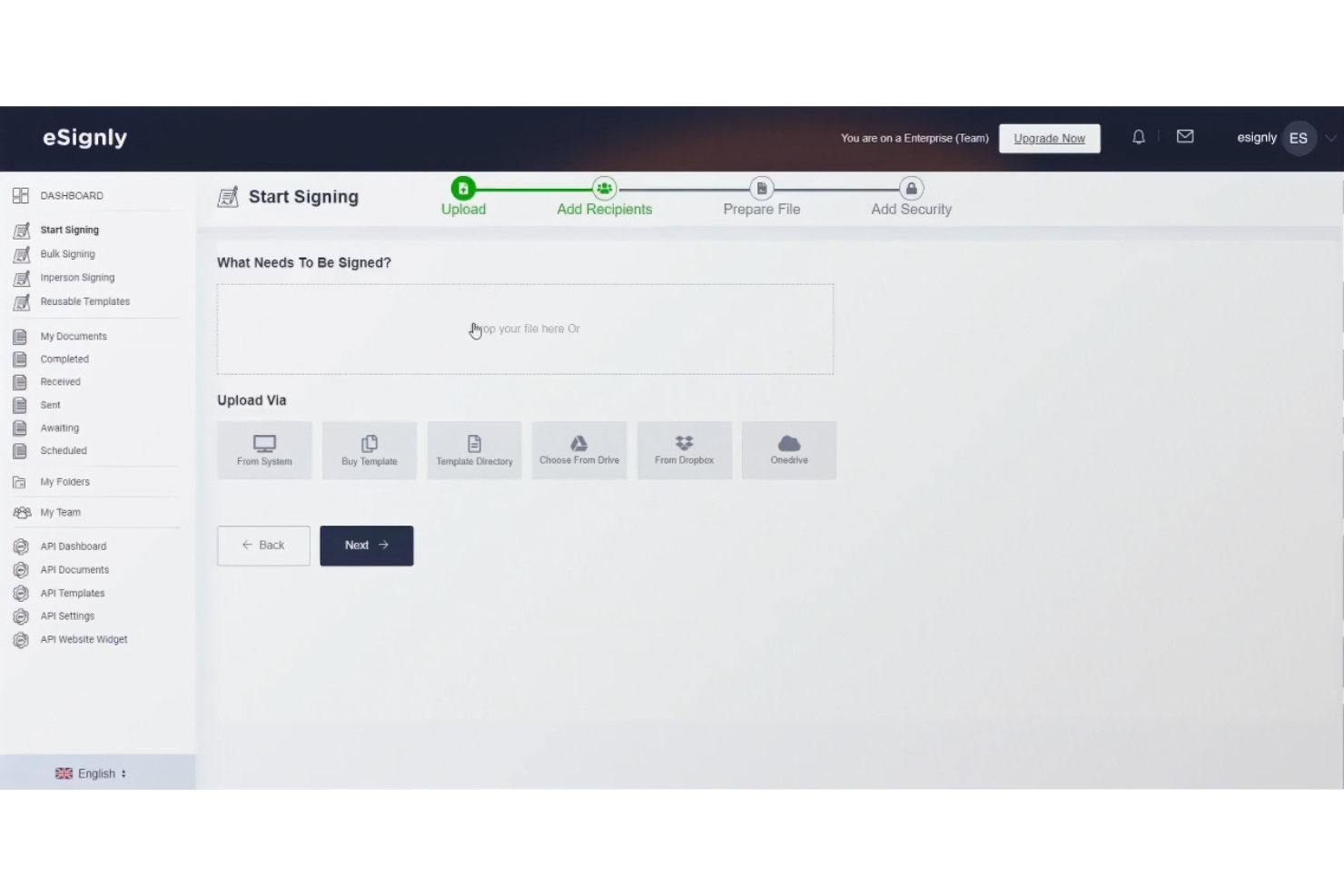
eSignly ist eine Software für elektronische Signaturen, die auf Unternehmen und Einzelpersonen zugeschnitten ist, die eine sichere und effiziente Möglichkeit benötigen, Dokumente online zu signieren. Zu den Hauptfunktionen gehören die Bereitstellung rechtsverbindlicher elektronischer Signaturen, die Gewährleistung der Dokumentensicherheit und die Einhaltung internationaler Standards.
Warum es eine gute DocuSign-Alternative ist: eSignly legt Wert auf eine starke Ende-zu-Ende-Verschlüsselung und bietet dadurch eine überlegene Sicherheit für Ihre Dokumente. Die Plattform erfüllt Vorschriften wie die GDPR und HIPAA und bietet zusätzliche Sicherheit für Unternehmen, die mit sensiblen Informationen umgehen. Anpassbare Vorlagen und Signaturfelder erhöhen die Flexibilität, während der Fokus der Software auf Sicherheit gewährleistet, dass Ihre Dokumente während des gesamten Signaturprozesses vertraulich und geschützt bleiben.
Hervorstechende Funktionen und Integrationen:
Zu den Funktionen gehört die rechtliche Gültigkeit elektronischer Signaturen, wodurch sichergestellt wird, dass sie als rechtsverbindlich anerkannt werden. Die Plattform bietet eine starke Verschlüsselung zum Schutz der Authentizität und Vertraulichkeit von Dokumenten. Außerdem können Sie automatische Erinnerungen nutzen, um den Signaturprozess planmäßig fortzuführen.
Zu den Integrationen gehören Dropbox, Google Drive, OneDrive, Box, Salesforce, Microsoft Teams, Slack, Zoom und weitere.
Pros and Cons
Pros:
- Starke Verschlüsselung für mehr Sicherheit
- Einhaltung von Vorschriften
- Automatische Erinnerungen
Cons:
- Grundlegende Analysefunktionen
- Eingeschränkte erweiterte Anpassungsmöglichkeiten

OpenSign
Am besten für selbst gehostete Open-Source-E-Signaturen
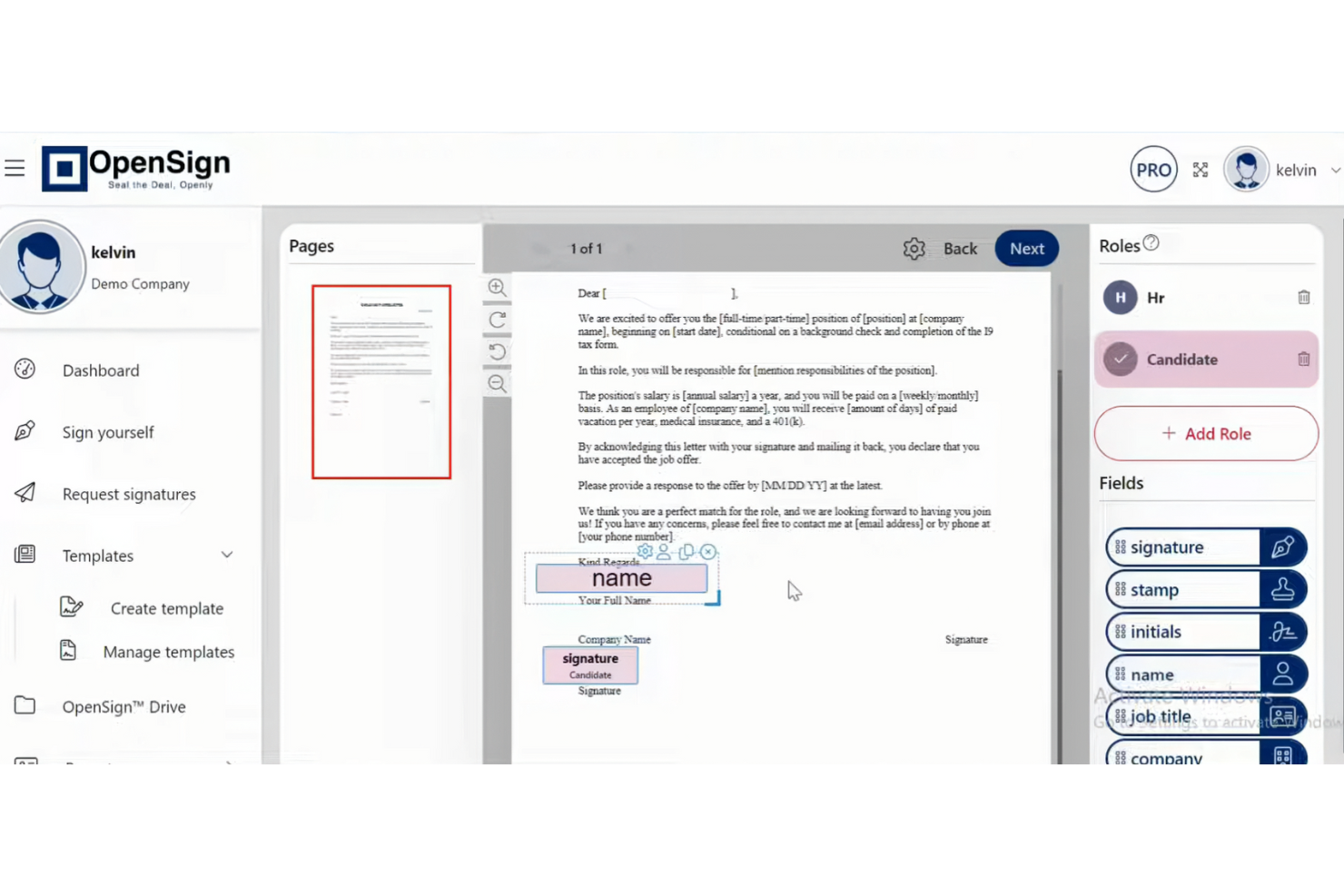
OpenSign ist eine Open-Source-Plattform für elektronische PDF-Signaturen für Einzelpersonen, Teams und Organisationen, die mehr Kontrolle über digitale Signaturen wünschen. Sie hilft Ihnen dabei, Dokumente online zu signieren, zu speichern und zu schützen und dabei nachzuverfolgen, was mit jedem Dokument geschieht.
Warum OpenSign eine gute DocuSign-Alternative ist: Mit OpenSign erhalten Sie im kostenlosen Tarif unbegrenzt digitale Signaturen, statt sich um Begrenzungen pro Umschlag Gedanken zu machen. Da der Code Open Source ist, kann Ihr Team die Plattform selbst hosten und die Kontrolle über Daten und Einrichtung behalten. Die integrierten Abschlusszertifikate und Zugriffsprotokolle liefern einen eindeutigen Nachweis darüber, wer was wann signiert hat, ohne zusätzliche Erweiterungen.
Hervorzuhebende Funktionen und Integrationen:
Funktionen umfassen die Unterstützung für das Signieren verschlüsselter PDFs, DOCX-Dateien und Bilder, sodass Sie viele Dokumenttypen an einem Ort bearbeiten können. Sie können Schriftarten und Farben in Formularfeldern anpassen, Seiten drehen und sich beim Einrichten von Dokumenten auf die automatische Speicherung verlassen, damit Ihre Arbeit nicht verloren geht. Ihr Team kann außerdem öffentliche Profile und Vorlagen verwenden, damit andere Personen gängige Vereinbarungen selbst starten können, ohne jedes Dokument von Grund auf vorbereiten zu müssen.
Integrationen umfassen Gmail, AWS S3, DigitalOcean Spaces und mehr.
Pros and Cons
Pros:
- Open-Source-Code
- Unbegrenzte Signaturen
- Flexible API
Cons:
- Die Einrichtung auf einem eigenen Server erfordert technische Kenntnisse
- Wenige Tools für komplexe Workflows
Weitere DocuSign-Alternativen
Hier sind einige zusätzliche DocuSign-Alternativen, die es nicht in meine Auswahl geschafft haben, aber dennoch einen Blick wert sind:
- eSignatures
Am besten für eine kosteneffiziente Preisgestaltung
- airSlate SignNow
Am besten für das Signieren von Dokumenten auf Mobilgeräten
- Documenso
Am besten für die Kontrolle des Quellcodes von E-Signaturen


Wie ich DocuSign-Alternativen bewerte
Ich teile jede Bewertung in grundlegende Anforderungen – wie rechtsverbindliche Unterschriften und Weiterleitung an mehrere Beteiligte – sowie in Unterscheidungsmerkmale, die ein Tool für Projektmanagement-Teams von anderen abheben.
Kernfunktionen (Mindestanforderungen für diese Liste)
Bei der Auswahl der Tools für meine Liste bewerte ich jedes auf einer Skala von 0 (bietet die Funktion nicht an) bis 5 (hervorragend in diesem Bereich) hinsichtlich jeder unten aufgeführten Kernfunktion. Anschließend berechne ich die Gesamtpunktzahl des Tools als Prozentsatz. Jedes Tool muss insgesamt mindestens 65% erreichen, um berücksichtigt zu werden.
- Rechtsverbindliche E-Signaturen: Ich prüfe die Einhaltung von ESIGN, UETA und eIDAS, damit unterschriebene SOWs und Änderungsaufträge in verschiedenen Rechtsordnungen Bestand haben.
- Dokumentvorlagen & Wiederverwendbarkeit: Wiederverwendbare Vorlagen mit gemeinsamem Teamzugriff sind hier wichtig – denken Sie an NDA- und SOW-Vorlagen, die Ihr PMO bei jedem Projekt nutzt.
- Signatur-Workflows mit mehreren Parteien: Ich bewerte die Möglichkeiten zur sequentiellen und parallelen Weiterleitung, da die meisten Projektverträge mehrere Genehmiger und Kunden betreffen.
- Audit-Trail & Statusverfolgung: Ein manipulationssicheres Protokoll mit Echtzeit-Status der Unterzeichner hilft Projektmanagern, Engpässe aufzuspüren, bevor sie einen Meilenstein verzögern.
- Integrationen mit PM-Tools: Native Anbindungen an Tools wie Asana, Jira oder Smartsheet – sowie API- oder Zapier-Zugriff – halten den Signaturprozess in den bestehenden Workflows.
- Ausfüllbare Felder & Dokumentenvorbereitung: Der Feldeditor sollte Unterschriften, Initialen, Datumsangaben, Texte und Kontrollkästchen unterstützen, sodass ein vollständiges Dokument direkt auf der Plattform vorbereitet werden kann.
Sobald ich eine Liste der Tools habe, die diese Kriterien erfüllen, schaue ich mir an, wodurch sich die einzelnen Plattformen unterscheiden.
Unterscheidungsmerkmale (Was die Anbieter unterscheidet)
So vergleiche und unterscheide ich verschiedene Anbieter:
Herausragende Funktionen
Der Massenversand ist besonders relevant, wenn Sie Dutzende Subunternehmer einbinden oder aktualisierte Projektbedingungen an eine Lieferantenliste verteilen. Außerdem beachte ich mobiles und offline Signieren, da Projektkoordinatoren vor Ort oft Unterschriften ohne zuverlässige Internetverbindung benötigen. Auch KI-gestützte Vertragsanalyse ist interessant – Tools, die wichtige Termine, Liefergegenstände und Beträge aus eingehenden Verträgen extrahieren können, sparen PMs bei der Vertragsprüfung viel Zeit.
Über die Funktionen hinaus
Die Preisstruktur spielt hier eine große Rolle. Preisgestaltung pro Umschlag kann bei einem hohen Auftragsvolumen schnell teuer werden, daher sehe ich mir an, ob eine Plattform eine Preisgestaltung pro Nutzer oder mit unbegrenztem Versand anbietet. Compliance-Zertifizierungen wie SOC 2 und ISO 27001 sind ebenso zu berücksichtigen, besonders wenn Projekte für regulierte Branchen geliefert werden. Außerdem beziehe ich die Zeit bis zum Produktivstart ein – vorgefertigte Dokumentvorlagen und Onboarding zum Selbstbedienen sorgen dafür, dass Ihr Team innerhalb weniger Tage – nicht erst nach Wochen – mit dem Sammeln von Unterschriften beginnen kann.
Warum nach einer DocuSign-Alternative suchen?
DocuSign bietet zwar Dokumentenverwaltung und elektronische Signaturen, aber es gibt mehrere Gründe, warum manche Nutzer nach alternativen Lösungen suchen. Du suchst vielleicht nach einer DocuSign-Alternative, weil …
- Du günstigere Preisoptionen benötigst.
- Dein Team eine bessere Integration mit bestehenden Tools wünscht.
- Du nach verbesserten Sicherheitsfunktionen suchst.
- Du die Einhaltung bestimmter Vorschriften gewährleisten musst.
- Dein Unternehmen mehr Anpassungsmöglichkeiten benötigt.
Wenn du dich in einem dieser Punkte wiedererkennst, bist du hier richtig. Meine Liste enthält mehrere Optionen für Dokumentenverwaltung und elektronische Signaturen, darunter Software für elektronische Signaturen mit KI, die besser für Teams geeignet sind, die mit diesen Herausforderungen bei DocuSign konfrontiert sind und nach alternativen Lösungen suchen.
Funktionen
Hier sind einige der wichtigsten Funktionen von Docusign, die Ihnen dabei helfen, die Angebote alternativer Lösungen gegenüberzustellen und zu vergleichen:
- Elektronische Signatur: Senden, signieren und verfolgen Sie Dokumente effizient, um Ihren Arbeitsablauf zu optimieren.
- Vorlagen: Erstellen Sie wiederverwendbare Vorlagen, um Zeit zu sparen und Ihre Dokumente zu standardisieren.
- Webformulare: Erfassen Sie Daten problemlos mit interaktiven Formularen und beschleunigen Sie den Signaturprozess.
- Massenaktionen: Verwalten Sie mehrere Dokumente gleichzeitig, um Ihre Arbeitsbelastung auszugleichen.
- Mobiles Signieren: Signieren Sie Dokumente von jedem Gerät aus und ermöglichen Sie Ihrem Team so das bequeme Signieren in Echtzeit.
- Authentifizierung: Überprüfen Sie die Identität der Unterzeichner mithilfe mehrerer Authentifizierungsmethoden, um die Sicherheit zu gewährleisten.
- Prüfpfad: Bewahren Sie eine vollständige Historie der Dokumentinteraktionen auf, um Transparenz und Compliance zu gewährleisten.
- Compliance: Halten Sie Branchenvorschriften ein und schaffen Sie so Sicherheit bei rechtlichen Anforderungen.
- Integrationen: Verbinden Sie verschiedene Plattformen und erweitern Sie so Ihren bestehenden Technologie-Stack.
- Individuelles Branding: Passen Sie E-Mails und Webseiten mit Ihrem Logo und Ihren Farben an, um die Einheitlichkeit Ihrer Marke zu wahren.