



Asana vs. Zoho Projects: Expertenvergleich & Bewertungen 2026



Asana bietet einen schlanken Ansatz zur Organisation der Team-Workflows, während Zoho Projects eine integrierte Plattform für die flexible Projektverwaltung bereitstellt. Beide Tools zielen darauf ab, die Produktivität deines Teams zu steigern, unterscheiden sich jedoch in Benutzeroberfläche und Anpassungsmöglichkeiten.
Ich habe diese Tools und ihre wichtigsten Funktionen, Vor- und Nachteile sowie Preismodelle anhand meiner Erfahrung als Projektmanager analysiert und verglichen. Lies meinen Vergleich unten, um herauszufinden, welche Projektmanagement-Software am besten zu deinen Projekten und Prozessen passt.
Asana vs. Zoho Projects: An Overview
Asana

Zoho Projects
Warum Sie unseren Software-Empfehlungen vertrauen können
Unser Team testet und bewertet Software seit 2012. Als Projektmanager wissen wir selbst, wie schwierig – und wichtig – es ist, die richtige Software auszuwählen.
Für diesen Leitfaden haben wir Tools mithilfe von praktischen Tests und unabhängiger Recherche bewertet und dabei unsere Bewertungskriterien angewendet. Zudem greifen wir auf Erkenntnisse von Branchenvordenkern und praktizierenden Projektmanagement-Experten zurück.
Unsere Bewertungen spiegeln unser menschliches redaktionelles Urteilsvermögen wider, keine Verkaufsstrategie.
Expertenprüfer:
Asana vs. Zoho Projects Pricing Comparison
| Asana | Zoho Projects | |
|---|---|---|
| Free Trial | Free plan available | Free plan available |
| Pricing | From $10.99/user/month (billed annually) | From $4/user/month (billed annually) |
Asana vs. Zoho Projects Preise & Versteckte Kosten
Die Preisgestaltung von Asana basiert auf einem gestuften Abo-Modell mit einer kostenlosen Basisversion und Premium-Plänen, die mit zusätzlichen Funktionen und erweitertem Kundenservice skalieren. Zoho Projects' Preismodell folgt ebenfalls einem abgestuften Ansatz mit einem Gratis-Tarif und kostenpflichtigen Optionen, die mehr Funktionen und zusätzliche Sicherheitsmaßnahmen bieten.
Um die beste Projektmanagement-Software für dich zu finden, solltest du die spezifischen Geschäftsanforderungen deines Teams prüfen, die tatsächlich benötigten Projektmanagement-Funktionen berücksichtigen und mögliche versteckte Kosten miteinbeziehen, damit das Tool zu Budget und Arbeitsweise passt.
Asana vs. Zoho Projects Feature Comparison
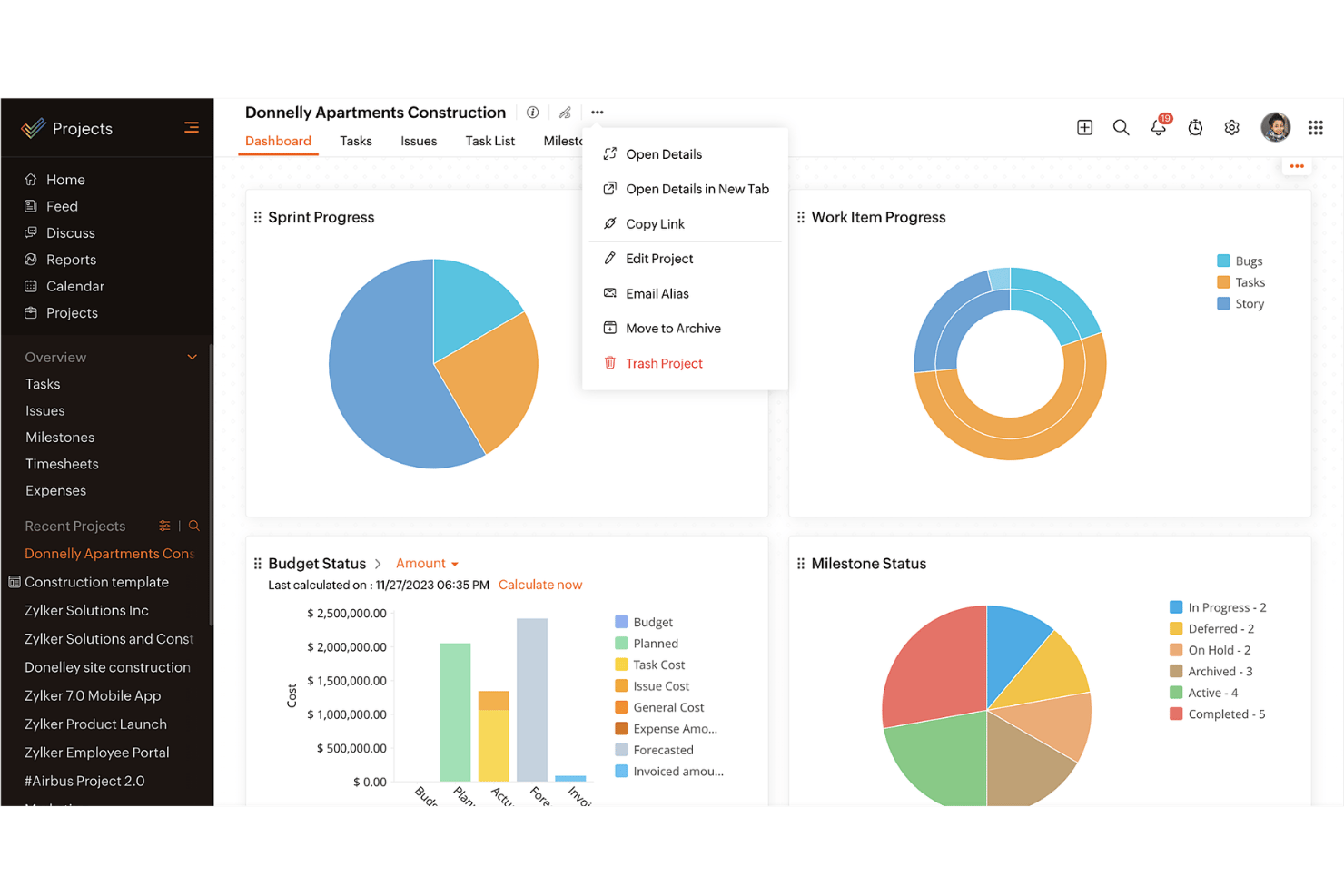
Mit Asanas Aufgabenmanagement kannst du tägliche Aufgaben und Unteraufgaben einfach organisieren und Projektzeitpläne visualisieren. Das ist ideal für Teams, die Wert auf klare Verantwortlichkeiten und Fristen legen. Die Integration von Zoho Projects mit anderen Zoho-Anwendungen eignet sich besonders für Unternehmen, die bereits im Zoho-Ökosystem arbeiten.
| Asana | Zoho Projects | |
|---|---|---|
| API | ||
| Batch Permissions & Access | ||
| Budgeting | ||
| Calendar Management | ||
| Collaboration Support | ||
| Contact Management | ||
| Contact Sharing | ||
| Customer Management | ||
| Dashboard | ||
| Dashboards | ||
| Data Export | ||
| Data Import | ||
| Data Visualization | ||
| Dependency Tracking | ||
| Document Sharing | ||
| Expense Tracking | ||
| External Integrations | ||
| File Sharing | ||
| Gantt Charts | ||
| Kanban Boards | ||
| Multi-User | ||
| Notifications | ||
| Project Management | ||
| Resource Management | ||
| Scheduling | ||
| Task Scheduling/Tracking | ||
| Third-Party Plugins/Add-Ons | ||
| Time Management | ||
| Travel Management | ||
| Workflow Management |
Asana vs. Zoho Projects Integrationen
| Integration | Asana | Zoho Projects |
|---|---|---|
| Slack | ✅ | ✅ |
| Microsoft Teams | ✅ | ✅ |
| Google Drive | ✅ | ✅ |
| Dropbox | ✅ | ✅ |
| Salesforce | ✅ | ❌ |
| Zendesk | ✅ | ✅ |
| Evernote | ✅ | ❌ |
| QuickBooks | ❌ | ❌ |
| API | ✅ | ✅ |
| Zapier | ✅ | ✅ |
Die Integration von Asana mit Slack ermöglicht es, Gespräche direkt in Aufgaben umzuwandeln, was die Workflows beschleunigt und die Kommunikation verbessert. Die Integration von Zoho Projects mit Zendesk hingegen erlaubt es, Support-Tickets in Aufgaben zu verwandeln – ideal für das Management von Folgeaufgaben nach einem Launch.
Asana vs. Zoho Projects Sicherheit, Compliance & Zuverlässigkeit
| Faktor | Asana | Zoho Projects |
|---|---|---|
| Datenschutz | Asana stellt Datenschutz durch DSGVO-Konformität und regelmäßige Audits sicher. | Zoho Projects gewährleistet Datenschutz mittels DSGVO-Konformität und Verschlüsselung. |
| Verschlüsselung | Asana verwendet AES-256-Verschlüsselung für ruhende Daten und TLS für die Übertragung. | Zoho Projects setzt auf AES-256-Verschlüsselung und sichere Rechenzentren. |
| Betriebszeit | Asana garantiert 99,9 % Verfügbarkeit für Unternehmenskunden. | Zoho Projects bietet 99,9 % Verfügbarkeit durch redundante Rechenzentren. |
Asana und Zoho Projects legen beide großen Wert auf Sicherheit und Compliance. Prüfe die spezifischen Anforderungen deines Teams an den Datenschutz, überprüfe die Compliance-Zertifikate des Anbieters und setze Prioritäten bei Funktionen, die zu euren Sicherheitsrichtlinien passen.
Asana vs. Zoho Projects Benutzerfreundlichkeit
| Faktor | Asana | Zoho Projects |
|---|---|---|
| Benutzeroberfläche | Asana bietet eine übersichtliche, benutzerfreundliche Oberfläche mit Drag-and-Drop-Funktionalität. | Zoho Projects verfügt über eine anpassbare Oberfläche mit einer steileren Lernkurve. |
| Onboarding | Asana stellt interaktive Tutorials und schnelle Einrichtungsanleitungen zur Verfügung. | Zoho Projects bietet umfassende Onboarding-Videos und ausführliche Anleitungen. |
| Support | Asana bietet umfangreiche Online-Ressourcen sowie 24/7-Support für Unternehmenskunden. | Zoho Projects stellt zahlreiche Hilfsartikel und eine Wissensdatenbank zur Verfügung. |
Asana überzeugt durch eine einfache Bedienung mit einer klaren Oberfläche und einem schnellen Einstieg. Zoho Projects ist zwar leistungsstark, kann aber aufgrund seiner komplexen Anpassungsoptionen herausfordernder sein, was mehr Zeit zur Einarbeitung erfordern kann.
Asana vs Zoho Projects: Pros & Cons
Asana
- You can easily track tasks and deadlines using Asana's intuitive interface.
- Asana's collaboration tools help your team communicate effectively in real-time.
- There are extensive customization options so you can tailor workflows and views to your specific needs.
- The reporting capabilities are somewhat basic, which may not satisfy teams needing detailed analytics.
- It can feel overwhelming if your team is small or your projects are simple.
- You might find the notification system a bit excessive or distracting.
Zoho Projects
- Task dependencies are highly visual and easy to set up.
- Built-in time tracking integrates smoothly with billing features.
- Customizable project templates support repeatable workflows.
- Reporting customization can be limited for advanced needs.
- Mobile app notifications do not always sync in real time.
- Gantt chart drag-and-drop can feel sluggish with large projects.
Best Use Cases for Asana and Zoho Projects
Asana
- Creative agencies You can manage creative workflows and client projects with Asana’s visual boards and timeline features.
- Tech startups You can coordinate product development and team tasks using Asana’s real-time updates and goal-setting tools.
- Marketing teams You can plan campaigns and track progress with Asana’s clear timelines and task comments.
- Nonprofits Asana lets you manage volunteer tasks, events, and fundraising efforts with clear task assignments and timelines.
- Remote teams You can collaborate effectively with Asana’s real-time updates and communication features.
- Event planners You can organize events easily with Asana’s task management and timeline visualization features.
Zoho Projects
- Small Agencies Kanban boards, time tracking, and client billing streamline project delivery and reporting for agency teams.
- IT Departments Issue tracking, blueprint automations, and strong permission controls provide what IT teams need for complex internal projects.
- Consulting Firms Time sheets, detailed reports, and project-level billing help consultants keep track of client hours and invoicing.
- Remote Teams Robust collaboration tools, document sharing, and project forums help distributed users stay connected.
- Marketing Teams Reusable templates, task dependencies, and timeline tracking make repeated campaigns run smoothly and transparently.
- Construction Projects Gantt charts, milestones, and resource allocation features support the scheduling needs of construction and field project managers.
Wer sollte Asana nutzen, und wer Zoho Projects?
Meiner Meinung nach ist Asana die beste Wahl für Kreativteams und Start-ups, die ein einfaches, intuitives Tool zur schnellen Aufgabenverwaltung und Zusammenarbeit benötigen. Wer in einem größeren Unternehmen arbeitet oder in einer Branche tätig ist, die umfangreiche Anpassungen und Integrationen mit anderen Business-Tools benötigt, ist mit Zoho Projects besser beraten.
Aus meiner Sicht eignet sich Asana für Teams, die eine unkomplizierte Aufgabenverwaltung bevorzugen, während Zoho Projects ideal ist für diejenigen, die detaillierte Kontrolle und umfassendes Projekt-Tracking benötigen. Zudem bietet Zoho Projects umfangreichere Funktionen zu einem wettbewerbsfähigen Preis.
Differences Between Asana and Zoho Projects
| Asana | Zoho Projects | |
|---|---|---|
| Automation | Asana provides basic automation for task management. | Zoho Projects offers more advanced automation features for more complex project workflows. |
| Customization | Asana has limited customization and focuses on simplicity. | Zoho Projects offers extensive customization to fit complex needs. |
| User Interface | Asana has a clean, intuitive interface that makes adoption quicker. | Zoho Projects offers a customizable interface that requires more setup. |
| Read Asana ReviewOpens new window | Read Zoho Projects ReviewOpens new window |
Similarities Between Asana and Zoho Projects
| Cloud-Access | Both are cloud-based, so you can access your projects from anywhere. This is essential for remote work setups. |
|---|---|
| Collaboration | Both project management platforms provide team collaboration tools so your team members can communicate and share updates within the platform efficiently. |
| Mobile Apps | Each tool offers a mobile app that helps you manage tasks, stay updated on the go, and be productive outside the office. |
| Reporting | They both include reporting features that let you generate insights and track project performance. |
| Task Management | Both Asana and Zoho Projects offer task management features that let you assign tasks, set deadlines, and track progress easily. |
| Read Asana ReviewOpens new window Read Zoho Projects ReviewOpens new window | |