



Airtable vs. Notion: Vergleich & Expertenbewertungen für 2026



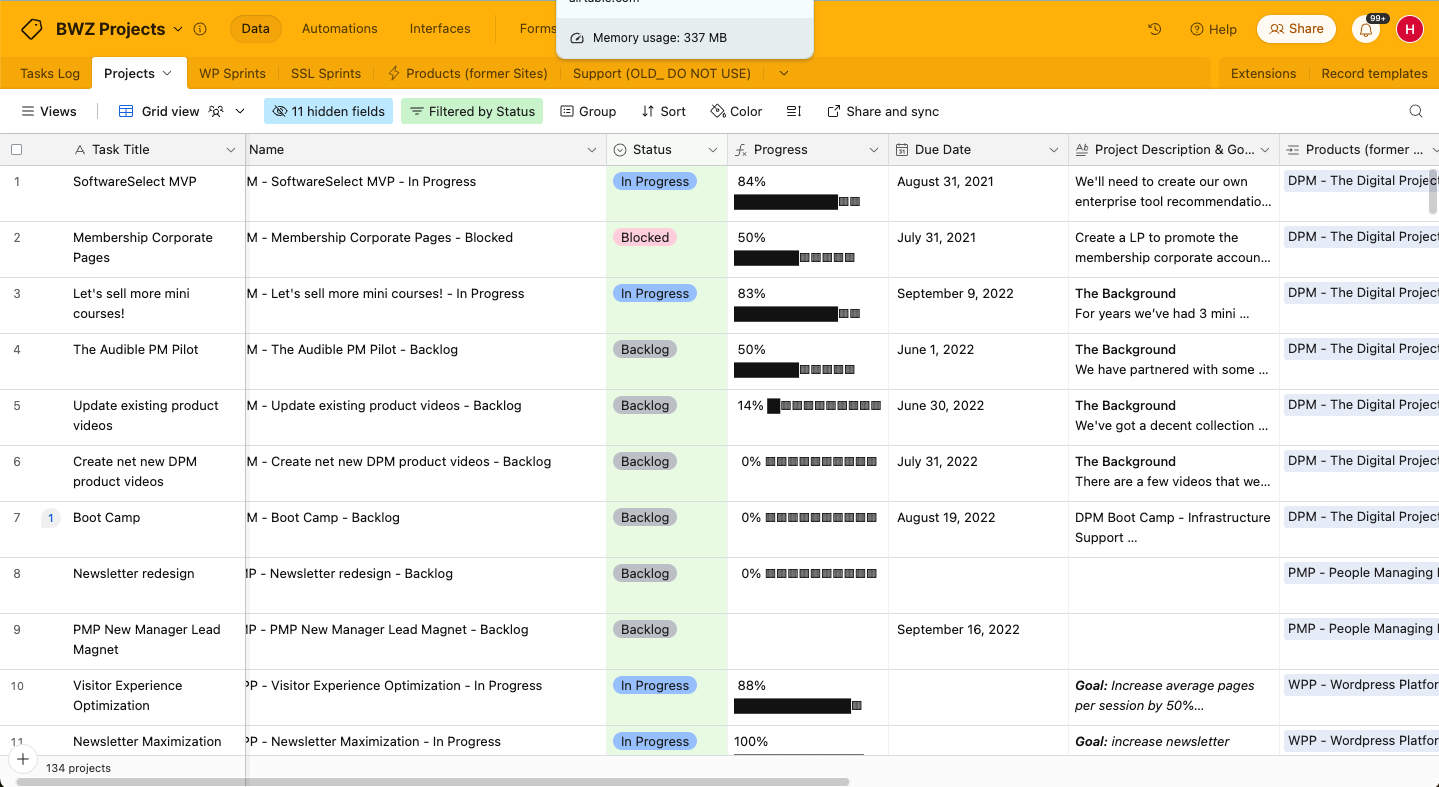
Airtables flexibles System kombiniert Tabellenkalkulations- und Datenbankfunktionen, um Ihnen bei der Organisation Ihrer Projekte zu helfen, während Notion einen Arbeitsbereich bietet, der Notizen, Aufgaben, To-do-Listen und Datenbanken für einen einheitlichen Workflow zusammenführt. Beide Tools können die Teamproduktivität steigern, unterscheiden sich jedoch in ihrer Herangehensweise an Datenorganisation und Zusammenarbeit.
Ich habe jedes Tool getestet und ihre Funktionen, Vor- und Nachteile sowie die Preisgestaltung mithilfe meiner umfangreichen Projektmanagement-Erfahrung bewertet. Finden Sie unten heraus, welche Software für Projektmanagement am besten zu Ihren Anforderungen passt.
Airtable vs. Notion: An Overview
Airtable
Notion

Warum Sie unseren Software-Empfehlungen vertrauen können
Unser Team testet und bewertet Software seit 2012. Als Projektmanager wissen wir selbst, wie schwierig – und wichtig – es ist, die richtige Software auszuwählen.
Für diesen Leitfaden haben wir Tools mithilfe von praktischen Tests und unabhängiger Recherche bewertet und dabei unsere Bewertungskriterien angewendet. Zudem greifen wir auf Erkenntnisse von Branchenvordenkern und praktizierenden Projektmanagement-Experten zurück.
Unsere Bewertungen spiegeln unser menschliches redaktionelles Urteilsvermögen wider, keine Verkaufsstrategie.
Expertenprüfer:
Airtable vs. Notion Pricing Comparison
| Airtable | Notion | |
|---|---|---|
| Free Trial | Free plan + free demo + 14-day trial available | Free plan available |
| Pricing | From $20/user/month | From $10/user/month (billed annually) |
Airtable vs. Notion: Preisgestaltung & versteckte Kosten
Airtables Preisgestaltung folgt einem gestaffelten Abonnementmodell, das mit den Anforderungen Ihres Teams skaliert, aber es können zusätzliche Kosten entstehen, wenn Sie Ihre Limits für Workflow-Automatisierung oder Datensätze überschreiten. Notions Preisgestaltung ist ebenfalls gestaffelt und bietet einen kostenlosen Plan. Die Kosten steigen je nach zusätzlichen Funktionen oder Teammitgliedern.
Um den richtigen Tarif für Ihre Projektmanagement-Bedürfnisse auszuwählen, bewerten Sie die Funktionen und die Skalierbarkeit jedes Tools. Nutzen Sie kostenlose Testphasen, um zu prüfen, wie gut jedes Tool zu Ihrem Workflow passt, bevor Sie sich festlegen.
Airtable vs. Notion Feature Comparison
Airtables anpassbare Ansichten ermöglichen es Ihnen, komplexe Projekte durch Benutzeroberflächen zu verwalten, die Sie für verschiedene Beteiligte individuell gestalten können, was besonders nützlich für Kunden-Updates ist. Notions flexibler Arbeitsbereich ist ideal, um Aufgaben, Notizen und Datenbanken an einem Ort zu kombinieren. Das ist besonders wertvoll, wenn Teamzusammenarbeit und Kontextteilung entscheidend sind.
| Airtable | Notion | |
|---|---|---|
| API | ||
| Calendar Management | ||
| Data Export | ||
| Data Import | ||
| External Integrations | ||
| Multi-User | ||
| Notifications | ||
| Project Management | ||
| Scheduling | ||
| Task Scheduling/Tracking |
Airtable vs. Notion Integrationen
| Integration | Airtable | Notion |
|---|---|---|
| Slack | ✅ | ✅ |
| Google Drive | ✅ | ✅ |
| Salesforce | ✅ | ❌ |
| Trello | ❌ | ✅ |
| GitHub | ✅ | ✅ |
| Microsoft Teams | ❌ | ✅ |
| Dropbox | ✅ | ✅ |
| Figma | ❌ | ✅ |
| API | ✅ | ✅ |
| Zapier | ✅ | ✅ |
Airtable lässt sich mit Slack integrieren, sodass Sie Updates und Benachrichtigungen automatisieren können und Ihr Team auf dem Laufenden bleibt. Notion hingegen bietet eine Integration mit Figma, sodass Designteams an visuellen Projekten zusammenarbeiten können, ohne die Plattform zu verlassen.
Airtable vs. Notion Sicherheit, Compliance & Zuverlässigkeit
| Faktor | Airtable | Notion |
|---|---|---|
| Regulatorische Compliance | Airtable erfüllt die Anforderungen der DSGVO und CCPA, um internationale Standards einzuhalten. | Notion hält ebenfalls die Standards von DSGVO und CCPA ein. |
| Verschlüsselung | Airtable bietet Verschlüsselung beim Datentransfer und -speicherung für Datensicherheit. | Notion verschlüsselt Daten durchgehend (Ende-zu-Ende) und schützt Informationen plattformübergreifend. |
| Betriebszeit/Zuverlässigkeit | Airtable garantiert eine Serviceverfügbarkeit von 99,9%. | Notion bietet hohe Zuverlässigkeit und eine Betriebszeit-Garantie von 99,9%. |
Airtable und Notion bieten beide starke Sicherheitsfunktionen. Beim Vergleich dieser Tools sollten Sie deren Compliance-Zertifizierungen und Verschlüsselungsstandards prüfen und das Tool priorisieren, das die spezifischen regulatorischen Anforderungen Ihrer Branche am besten erfüllt.
Airtable vs. Notion Benutzerfreundlichkeit
| Faktor | Airtable | Notion |
|---|---|---|
| Benutzeroberfläche | Airtable verfügt über eine tabellenähnliche Oberfläche, die intuitiv zur Datenorganisation ist. | Notion bietet eine modulare, benutzerfreundliche Oberfläche, die eine flexible Anpassung des Arbeitsbereichs ermöglicht. |
| Onboarding-Erlebnis | Airtable stellt geführte Vorlagen bereit, die den Einstieg erleichtern. | Notion bietet eine Vielzahl von Tutorials und Vorlagen, um die Lernkurve abzuflachen. |
| Einrichtungsprozess | Die Einrichtung bei Airtable ist unkompliziert, aber die zahlreichen Anpassungsoptionen können anfangs überwältigend sein. | Die Einrichtung von Notion ermöglicht eine detaillierte Anpassung, die jedoch zeitaufwändig sein kann. |
| Kundenservice | Airtable bietet Live-Chat- und E-Mail-Support für schnelle Hilfe. | Notion stellt ausführliche Dokumentationen und Community-Foren als Support bereit. |
Das vertraute Tabellenlayout von Airtable macht die Nutzung einfach, doch die zahlreichen Anpassungsoptionen können anfangs überfordern. Die Möglichkeit von Notion, individuell gestaltete Arbeitsbereiche zu erschaffen, ist sehr leistungsfähig, allerdings kann der Funktionsumfang schnell zu viel sein, wenn eine zügige Einrichtung gefragt ist.
Airtable vs Notion: Pros & Cons
Airtable
- Its automation rules make it easy to notify stakeholders, even if they are outside the platform.
- Airtable's forms feature lets you efficiently gather information from external sources.
- You can connect and perform calculations across multiple bases.
- Customizing the templates requires a big time investment.
- It's not a traditional project management platform.
- The learning curve can be challenging for new users.
Notion
- You can tailor your workspace to fit your needs with flexible layouts and templates.
- The intuitive design makes it easy for users to navigate and organize their projects.
- You can take notes, manage projects, and maintain your databases in one place.
- It can be challenging for new users to master without spending time on tutorials.
- You might experience slow performance if you have large databases or complex setups.
- The mobile app is less intuitive than the desktop version.
Best Use Cases for Airtable and Notion
Airtable
- Creative agencies Airtable lets your team design custom project pipelines to foster creativity and improve task management.
- Marketing teams You can track campaigns with Airtable’s flexible and visual database and make sure every detail is covered.
- Small businesses Airtable adapts to your unique business processes and can scale with you as your team grows.
- Event planners Its visual calendar and task management features help you coordinate every detail efficiently.
- Consulting firms Track client projects and deliverables with Airtable’s customizable views and data organization.
- Product development You can manage product roadmaps and feature backlogs with Airtable’s powerful database tools.
Notion
- Creative Agencies You can use customizable templates within a flexible workspace to manage creative projects and collaborate with the team.
- Freelancers You can manage multiple projects and clients in a single, organized platform.
- Startups You can tailor your workspace to your needs in order to manage rapid growth and changing project requirements.
- Remote Teams Notion supports constant communication and project tracking across different locations.
- Education Departments You can use Notion's database capabilities to organize curricula, schedules, and educational materials.
- Content Writers You can use the note-taking and organization features to manage research, drafts, and editorial calendars efficiently.
Wer sollte Airtable und wer sollte Notion verwenden?
Meiner Meinung nach eignet sich Airtable besonders für Teams, die ein leistungsstarkes Datenbank-Tool mit vertrauter Tabellenoberfläche benötigen – insbesondere im Marketing oder Projektmanagement, wo eine klare Datenorganisation entscheidend ist.
Notion ist ideal für kreative Teams oder Einzelpersonen mit Anwendungsfällen, bei denen ein flexibler Arbeitsbereich für Notizen, Aufgaben- und Projektmanagement benötigt wird. Es ist eine ausgezeichnete Wahl für Start-ups oder Freelancer, die Wert auf individuelle Anpassungen legen.
Differences Between Airtable and Notion
| Airtable | Notion | |
|---|---|---|
| Data Organization | Airtable uses a spreadsheet interface that helps with structured data management. | Notion provides a modular workspace that combines tasks, notes, and databases. |
| User Interface | Airtable has a familiar, spreadsheet-like UI that’s easy to get used to. | Notion’s UI is highly customizable and suitable for creating a flexible workspace. |
| Read Airtable ReviewOpens new window | Read Notion ReviewOpens new window |
Similarities Between Airtable and Notion
| Collaboration | Both Airtable and Notion support team collaboration, with Airtable offering real-time updates and Notion providing shared workspaces. |
|---|---|
| Cross-Platform Access | Both platforms are accessible on various devices, so your team can work from anywhere. |
| Customization | Both tools offer a high degree of customization. Airtable lets you customize views to suit your project needs, while Notion lets you create personalized workspaces. |
| Integrations | Each tool offers integrations with popular services like Slack and Google Workspace to improve productivity |
| User Support | Both Airtable and Notion have active user communities with forums and resources to help you maximize their tools. |
| Read Airtable ReviewOpens new window Read Notion ReviewOpens new window | |